Best Enterprise Video Conferencing Software - Page 3

How Many Video Conferencing Software Products Does G2 Track?

Total Products under this Category: 344

Category Stats (Nov 2026)

  • Average Rating: 4.4/5 (↑0.01 vs Oct 2026) The average rating of products in this category, based on all submitted ratings
  • Top Trending Product: WebMeet (+12.5%) - Among all products in this category, WebMeet recorded the largest rating increase compared to last month

Last updated: November 01, 2026

How Does G2 Rank Video Conferencing Software Products?

Why You Can Trust G2's Software Rankings:

  • 30 Analysts and Data Experts
  • 201,000+ Authentic Reviews
  • 344+ Products
  • Unbiased Rankings

G2's software rankings are built on verified user reviews, rigorous moderation, and a consistent research methodology maintained by a team of analysts and data experts. Each product is measured using the same transparent criteria, with no paid placement or vendor influence. While reviews reflect real user experiences, which can be subjective, they offer valuable insight into how software performs in the hands of professionals. Together, these inputs power the G2 Score, a standardized way to compare tools within every category.

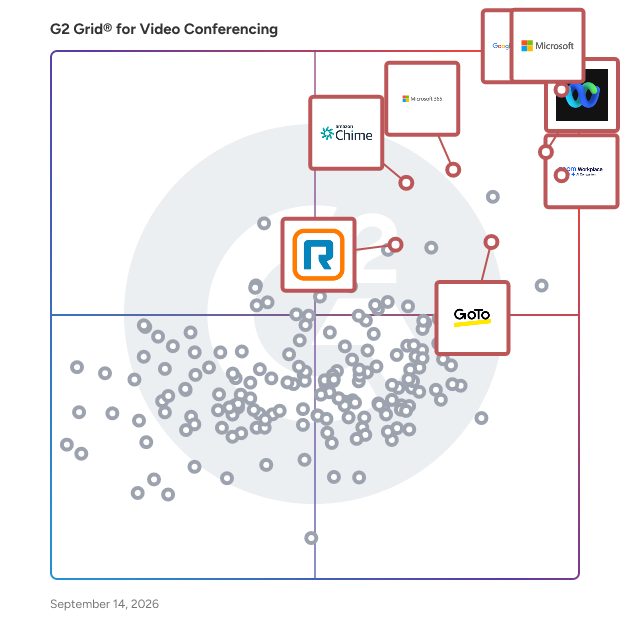
G2 Grid® for Video Conferencing Software

G2 Grid® for Video Conferencing Software plotting products by satisfaction and market presence

Highlighted products: Microsoft Teams, Google Workspace, Zoom Workplace, Webex Suite, Microsoft 365, Amazon Chime, GoTo Meeting, and RingEX.

Underlying data: [Grid® JSON](https://www.g2.com/categories/video-conferencing/grids.json?focus%5B%5D=microsoft-teams&focus%5B%5D=google-workspace&focus%5B%5D=zoom-workplace&focus%5B%5D=cisco-webex-suite&focus%5B%5D=microsoft365&focus%5B%5D=amazon-chime&focus%5B%5D=goto-meeting&focus%5B%5D=ringex&segment=enterprise)

Bigtincan Engagement

We aspire to make every customer interaction successful. Every email, every meeting, and every presentation should provide value and lead buyers to the best decision. Bigtincan Engagement (formerly Clearslide) provides a complete Sales Engagement solution that combines content management, integrated communications, engagement analytics, conversation intelligence, AI-powered meeting automation, and guided selling to power dynamic conversations with buyers. Bigtincan Engagement is designed to enhance sales effectiveness by addressing common challenges faced by sales teams. It aims to increase active selling time, optimize sales interactions, and provide better visibility into buyer needs. Key features include: Centralized Content Management: Sellers can access a variety of content from multiple systems, ensuring they have the most up-to-date materials. Real-Time Buyer Engagement: The platform allows for immediate reactions to engaged buyers through notifications and automates email outreach to focus on active opportunities. Personalized Experiences: Engagement Hub enables the creation of personalized microsites for buyers, allowing sellers to tailor content and interactions based on buyer interests and needs. Analytics and Insights: The platform provides detailed engagement insights, helping sellers understand how buyers interact with shared content, which can uncover hidden needs. Conversation Intelligence: This feature transcribes and analyzes sales calls, providing feedback on tone and articulation, which aids in self-coaching for sales reps. These capabilities are designed to empower sales teams to create engaging, measurable buyer experiences that drive sales success. Bigtincan Engagement customers report: 10%-20% increase in closed deals 25% decrease in time to on-board new reps 50%-80% reduction in selling costs

Average Rating: 4.1/5.0

Total Reviews: 575

How Do G2 Users Rate Bigtincan Engagement?

  • Has the product been a good partner in doing business?: 8.2/10 (Category avg: 8.9/10)
  • Presentations: 9.1/10 (Category avg: 8.9/10)
  • Participant Permissions: 8.2/10 (Category avg: 8.8/10)
  • Whiteboarding: 8.8/10 (Category avg: 8.6/10)

Who Is the Company Behind Bigtincan Engagement?

  • Seller: Bigtincan
  • Year Founded: 2011
  • HQ Location: Waltham, MA
  • Twitter: @bigtincan
    2,236 Twitter followers
  • LinkedIn® Page: www.linkedin.com
    160 employees on LinkedIn®
  • Phone: 781-405-2376

Who Uses This Product?

  • Who Uses This: Account Executive, Account Manager
  • Top Industries: Computer Software, Internet
  • Company Size: 55% Medium, 28% Large

What Are Recent G2 Reviews of Bigtincan Engagement?

What Are G2 Users Discussing About Bigtincan Engagement?

Sneek

Sneek is a remote communication tool designed to enhance team connectivity by replicating the experience of a physical office environment. It enables team members to see each other's live photos at regular intervals and initiate instant video chats with a single click, fostering a sense of presence and immediacy among remote teams. Key Features and Functionality: - Wall of Faces: Displays live photos of team members, updating at user-defined intervals, to maintain a visual connection throughout the day. - Instant Video Chats: Allows users to start one-on-one or group video calls instantly by clicking on a team member's photo, eliminating the need for scheduling or waiting. - Availability Settings: Offers three modes—Available, Busy, and Away—to communicate current status to the team effectively. - Slack Integration: Seamlessly integrates with Slack, enabling users to initiate video chats directly from Slack channels using simple commands. - Screen Sharing: Facilitates real-time collaboration by allowing users to share their screens during video calls. - Admin Controls: Provides administrative features such as interval control and snap pixelation management to customize the user experience. Primary Value and User Solutions: Sneek addresses the challenges of remote work by recreating the spontaneous interactions and visual presence inherent in traditional office settings. By offering continuous visual updates and instant communication tools, it reduces feelings of isolation, enhances team cohesion, and streamlines collaboration. This leads to improved productivity and a more connected remote workforce.

Average Rating: 4.5/5.0

Total Reviews: 102

How Do G2 Users Rate Sneek?

  • Has the product been a good partner in doing business?: 8.7/10 (Category avg: 8.9/10)
  • Presentations: 9.4/10 (Category avg: 8.9/10)
  • Participant Permissions: 8.9/10 (Category avg: 8.8/10)
  • Whiteboarding: 9.2/10 (Category avg: 8.6/10)

Who Is the Company Behind Sneek?

  • Seller: Sneek
  • Year Founded: 2016
  • HQ Location: Calgary, Alberta
  • Twitter: @SneekHQ
    985 Twitter followers
  • LinkedIn® Page: www.linkedin.com
    6 employees on LinkedIn®

Who Uses This Product?

  • Top Industries: Information Technology and Services, Computer Software
  • Company Size: 50% Medium, 43% Small

What Do G2 Reviewers Say About Sneek?

AI-generated summary from verified user reviews

Pros
  • Users find Sneek's ease of use exceptional, enabling quick access to team communication and collaboration without barriers.
  • Users find Sneek's easy setup facilitates seamless communication and enhances teamwork throughout the day.
  • Users cherish the real-time team presence of Sneek, fostering connection and collaboration in remote work settings.
  • Users praise the excellent customer support from Sneek, appreciating quick resolutions through direct live chat assistance.
  • Users love the easy communication in Sneek, fostering a connected and collaborative environment with no barriers.
Cons
  • Users express frustration with slow customer support, often taking a week to resolve even minor issues.
  • Users express frustration over integration issues with Sneek, citing difficulties linking to external tools and slow support response.
  • Users find the missing features in Sneek's smartphone version limits connectivity and lacks essential collaboration tools.
  • Users express frustration over the limited integrations of Sneek, hindering their ability to use essential features effectively.
  • Users are frustrated by the lack of screen sharing options, requiring reliance on external integration for collaboration.

What Are Recent G2 Reviews of Sneek?

What Are G2 Users Discussing About Sneek?

NexGen Virtual Office

NexGen Virtual Office is setting the standard for the best solution for managing hybrid workforces. Our digital business management platform doesn't just offer video conferencing. We offer a revolutionary technology and innovative intuitive design which delivers customers an all-in-one comprehensive solution for bringing remote workforces together no matter team member's locations. NexGen Virtual Office encourages real-time engagement, seamless integrated tools, and customized productivity reporting. Empower your workforce today and establish a stronger community, culture that collaborates in real-time better than ever before.

Average Rating: 4.4/5.0

Total Reviews: 97

How Do G2 Users Rate NexGen Virtual Office?

  • Has the product been a good partner in doing business?: 9.2/10 (Category avg: 8.9/10)
  • Presentations: 8.3/10 (Category avg: 8.9/10)
  • Participant Permissions: 8.6/10 (Category avg: 8.8/10)
  • Whiteboarding: 8.3/10 (Category avg: 8.6/10)

Who Is the Company Behind NexGen Virtual Office?

Who Uses This Product?

  • Top Industries: Marketing and Advertising, Pharmaceuticals
  • Company Size: 64% Small, 17% Medium

What Do G2 Reviewers Say About NexGen Virtual Office?

AI-generated summary from verified user reviews

Pros
  • Users value the ease of use in NexGen Virtual Office, making business management simple and efficient.
  • Users value the freedom to work remotely with NexGen Virtual Office, enhancing productivity and collaboration seamlessly.
  • Users admire the easy setup of NexGen Virtual Office, making it simple to start and manage their business effectively.
  • Users appreciate the efficiency of NexGen Virtual Office, simplifying business operations and enhancing productivity in remote work.
  • Users love the easy setup of NexGen Virtual Office, finding it quick and straightforward to start using.
Cons
  • Users often face performance delays with latency and slow syncing, which hinders workflow and overall experience.
  • Users frequently experience delay issues with NexGen Virtual Office, affecting performance and overall user experience.
  • Users find the steep learning curve of NexGen Virtual Office challenging, especially for those new to virtual environments.
  • Users face a steep learning curve with NexGen Virtual Office, particularly with advanced customization and unfamiliar virtual environments.
  • Users experience performance issues like latency and audio/video quality, especially in low-bandwidth settings.

What Are Recent G2 Reviews of NexGen Virtual Office?

What Are G2 Users Discussing About NexGen Virtual Office?

AI can help you find the answers. G2 helps you trust them.

Connect G2 to Claude or ChatGPT for answers grounded in G2's trusted reviews, comparisons, and pricing from real user insights.

How it works

Veeting Rooms

Veeting is a Swiss video conferencing and collaboration platform for organizations that run meetings under their own brand, on their own domain, and inside their own systems. Four products share one platform. Veeting Rooms is hosted video conferencing for teams that want meetings without setup. Veeting Corporate is the white-label edition, which runs on a customer's own domain and branding and uses REST APIs to connect meetings to booking systems, CRM and internal workflows. Veeting Blocks provides web components and a JavaScript/TypeScript API for embedding video in a customer's own application. Veeting Partners is the reseller program, with unlimited branded instances. Meetings run on WebRTC in any modern browser. Participants join from a link, with nothing to download and no plug-ins or apps to install. A meeting holds up to 30 participants with video, and webinars reach larger audiences. The platform provides screen sharing, a whiteboard, document sharing, chat and shared minutes. Meetings can be recorded, joined by telephone and streamed live, and Off-the-Record meetings run peer-to-peer with end-to-end encryption. A REST API lets another system create accounts, schedule meetings and manage them through their lifecycle, and webhooks report meeting events back to it. Ready-made connectors cover Zapier, Microsoft Outlook and Slack. Customers can use the Swiss cloud or install the platform on-premise in their own data center. Either way it is a closed system with no third-party dependencies, and it makes no outside calls for licensing or media relay, so it can run in closed networks. It complies with the revised Swiss Data Protection Act (revDSG) and the GDPR, and data processing agreements are available. Veeting AG has developed the platform in Zurich since 2014. It is used in healthcare, financial services, education and by software vendors that embed video in their own products.

Average Rating: 4.5/5.0

Total Reviews: 140

How Do G2 Users Rate Veeting Rooms?

  • Has the product been a good partner in doing business?: 8.7/10 (Category avg: 8.9/10)
  • Presentations: 9.2/10 (Category avg: 8.9/10)
  • Participant Permissions: 9.4/10 (Category avg: 8.8/10)
  • Whiteboarding: 9.2/10 (Category avg: 8.6/10)

Who Is the Company Behind Veeting Rooms?

  • Seller: Veeting AG
  • Year Founded: 2014
  • HQ Location: Zurich, CH
  • Twitter: @VeetingRooms
    183 Twitter followers
  • LinkedIn® Page: www.linkedin.com
    3 employees on LinkedIn®

Who Uses This Product?

  • Who Uses This: Software Engineer
  • Top Industries: Information Technology and Services, Computer Software
  • Company Size: 43% Medium, 42% Small

What Do G2 Reviewers Say About Veeting Rooms?

AI-generated summary from verified user reviews

Pros
  • Users love the ease of use of Veeting Rooms, finding setup and joining meetings straightforward and smooth.
  • Users value the reliability of Veeting Rooms, enjoying seamless meetings with consistent audio and video quality.
  • Users value the robust security features of Veeting Rooms, ensuring confidential meetings and data protection.
  • Users appreciate the easy setup of Veeting Rooms, making it simple to join and host meetings effortlessly.
  • Users value the user-friendly interface of Veeting Rooms, making meetings simple and efficient without unnecessary complexity.
Cons
  • Users find the limited features of Veeting Rooms hinder usability and integration within existing workflows.
  • Users notice that the user interface could be more modern and better optimized, impacting overall ease of use.
  • Users experience connectivity issues that detract from audio and video quality, impacting the overall meeting experience.
  • Users find limited customization options in Veeting Rooms, hindering the platform's flexibility for advanced user needs.
  • Users note the limited integrations of Veeting Rooms, hindering seamless use alongside existing tools and workflows.

What Are Recent G2 Reviews of Veeting Rooms?

What Are G2 Users Discussing About Veeting Rooms?

RemoteMeeting

RemoteMeeting is a web-based video conferencing service designed to facilitate seamless corporate and business collaboration. Accessible directly through web browsers without the need for additional software installations, it enables users to connect effortlessly from PCs or mobile devices, supporting up to 100 participants in a single meeting room. This platform offers an intuitive user interface, ensuring that individuals can initiate and join meetings with minimal learning curve, regardless of their technical expertise. By eliminating the complexities associated with traditional video conferencing setups, RemoteMeeting provides a straightforward and efficient solution for virtual meetings. Key Features and Functionality: - No Installation Required: Users can start meetings directly from their web browsers without downloading or installing any programs, reducing setup time and potential technical issues. - Multiple Meeting Modes: Offers various start modes tailored to different meeting needs, including video conferencing, document sharing, and screen sharing, allowing users to select the most appropriate mode for their session. - Collaboration Tools: Equipped with essential tools such as screen sharing, collaborative drawing, remote control, document sharing, recording, and chat functionalities to enhance communication and productivity during meetings. - AI-Powered Features: Incorporates artificial intelligence capabilities like automatic meeting minutes transcription and summarization, enabling efficient documentation and review of discussions. - High-Quality Audio and Video: Utilizes advanced technology to deliver clear audio and video quality, ensuring an immersive meeting experience. Primary Value and User Solutions: RemoteMeeting addresses common challenges in virtual collaboration by providing a user-friendly, installation-free platform that simplifies the process of hosting and joining video conferences. Its comprehensive suite of collaboration tools and AI-driven features enhances meeting efficiency, reduces miscommunication, and saves time on post-meeting documentation. By offering a reliable and accessible solution, RemoteMeeting empowers businesses and organizations to conduct effective virtual meetings, regardless of participants' locations or technical backgrounds.

Average Rating: 4.4/5.0

Total Reviews: 212

How Do G2 Users Rate RemoteMeeting?

  • Has the product been a good partner in doing business?: 9.0/10 (Category avg: 8.9/10)
  • Presentations: 8.9/10 (Category avg: 8.9/10)
  • Participant Permissions: 8.8/10 (Category avg: 8.8/10)
  • Whiteboarding: 8.5/10 (Category avg: 8.6/10)

Who Is the Company Behind RemoteMeeting?

  • Seller: RSupport
  • Year Founded: 2001
  • HQ Location: Seoul, South Korea
  • Twitter: @RsupportUSA
    802 Twitter followers
  • LinkedIn® Page: www.linkedin.com
    237 employees on LinkedIn®
  • Ownership: KOSDAQ:131370

Who Uses This Product?

  • Top Industries: Information Technology and Services, Computer Software
  • Company Size: 49% Small, 33% Medium

What Do G2 Reviewers Say About RemoteMeeting?

AI-generated summary from verified user reviews

Pros
  • Users find RemoteMeeting to be extremely easy to use, benefiting from hassle-free browser access and intuitive controls.
  • Users appreciate the simplicity of RemoteMeeting, enjoying its easy setup and user-friendly interface for seamless communication.
  • Users commend team collaboration in RemoteMeeting, highlighting its seamless integration and powerful tools for effective communication.
  • Users love the easy setup of RemoteMeeting, allowing for a quick start and hassle-free experience.
  • Users appreciate the high-definition video quality of RemoteMeeting, ensuring a seamless and engaging virtual meeting experience.
Cons
  • Users often face connectivity issues with RemoteMeeting, leading to frustrating lags and dropped calls during important discussions.
  • Users find the participant limit of 100 restrictive, impacting collaboration and meeting effectiveness on RemoteMeeting.
  • Users express privacy concerns when sharing sensitive information during remote meetings, impacting overall trust in the platform.
  • Users report slow loading issues with RemoteMeeting on mobile, causing frustration during important conversations and setups.
  • Users find the interface cluttered and unintuitive, leading to navigation difficulties and a need for improvements.

What Are Recent G2 Reviews of RemoteMeeting?

What Are G2 Users Discussing About RemoteMeeting?

StartMeeting

StartMeeting® offers unlimited audio and video conferencing services for the enterprise space. Because we are a carrier and a conferencing network we are able to disrupt the market with truly transformative pricing. We offer an industry-leading $12.95/month/host pricing package for the small to medium-sized business space, and we also have a truly revolutionary $6,000/month package for large enterprise clients. The $6,000/month package allows enterprises of any size to have an unlimited number of hosts all for a flat monthly rate. With both the per host and unlimited hosts pricing, you’ll get an easy-to-use collaboration tool that will provide you and your teams unlimited HD quality audio & video conferencing and screen sharing. Every account also includes: • HD Audio & Video conferencing for up to 1,000 participants • Screen sharing and drawing • Meeting recording and playback • 10 gigs of storage • Custom hold music and greetings • Custom meeting wall • In-country dial-in numbers for 65 countries… and counting With StartMeeting® you are gaining access to one of the largest companies in conferencing. Since 2001 our network has carried more than two billion conference calls around the world, making us the world’s 2nd largest conferencing network. This size and scale are what lets us offer the pricing that we do and also what has helped us build such a streamlined, enterprise-grade application. For more information, visit www.startmeeting.com or call (844) 800-4000.

Average Rating: 4.5/5.0

Total Reviews: 64

How Do G2 Users Rate StartMeeting?

  • Has the product been a good partner in doing business?: 9.3/10 (Category avg: 8.9/10)
  • Presentations: 10.0/10 (Category avg: 8.9/10)
  • Participant Permissions: 8.8/10 (Category avg: 8.8/10)
  • Whiteboarding: 8.9/10 (Category avg: 8.6/10)

Who Is the Company Behind StartMeeting?

  • Seller: CarrierX
  • Year Founded: 2001
  • HQ Location: Long Beach, California
  • Twitter: @FreeConfCall
    9,828 Twitter followers
  • LinkedIn® Page: www.linkedin.com
    43 employees on LinkedIn®

Who Uses This Product?

  • Top Industries: Information Technology and Services, Computer & Network Security
  • Company Size: 41% Small, 24% Medium

What Do G2 Reviewers Say About StartMeeting?

AI-generated summary from verified user reviews

Pros
  • Users appreciate the ease of use of StartMeeting, enabling quick setup and hassle-free meeting management.
  • Users praise the impressive audio quality of StartMeeting, ensuring clear communication during all types of meetings.
  • Users find StartMeeting's easy setup ensures quick scheduling and hassle-free joining, enhancing overall meeting efficiency.
  • Users find StartMeeting to be highly reliable, ensuring smooth video conferences without lag or connectivity issues.
  • Users value the impressive video quality of StartMeeting, ensuring fast and reliable online meetings and webinars.
Cons
  • Users find the outdated and simplistic user interface of StartMeeting lacking in creativity and advanced features.
  • Users note the limited features of StartMeeting, wishing for more advanced capabilities and better customization options.
  • Users note the limited customization in StartMeeting, wishing for more advanced features and collaboration tools.
  • Users note the missing advanced features in StartMeeting, leading to a less versatile experience than competitors.
  • Users note limited integrations with StartMeeting, lacking advanced features and tools for complex workflows compared to competitors.

What Are Recent G2 Reviews of StartMeeting?

What Are G2 Users Discussing About StartMeeting?

EnableX

EnableX Programmable Cloud, a leader in omnichannel communications, enables brands to create meaningful customer engagement at scale—without the complexity of telecom infrastructure. Our carrier-grade platform seamlessly integrates voice, video, and text messaging into web, desktop, and mobile applications through developer-friendly APIs and SDKs, ensuring effortless connectivity across channels and platforms, including SMS, WhatsApp, RCS, Instagram, and Facebook Messenger. Beyond traditional communications, EnableX enhances customer interactions with AI-powered solutions like FaceAI which offers real-time facial and emotion recognition, and Text-to-Speech (TTS) for natural, emotion-aware customer interactions. These advanced capabilities drive intelligent automation, personalised engagement, and richer conversational experiences. Trusted by telecom operators, enterprises, service providers, and system integrators worldwide, EnableX offers transparent pricing, flexible deployment options (public, private, or on-premise), and white-label solutions that provide businesses with full control over their communication infrastructure. With EnableX, businesses can focus on what matters most: delivering seamless, intelligent, and engaging customer interactions with ease and efficiency.

Average Rating: 4.6/5.0

Total Reviews: 170

How Do G2 Users Rate EnableX?

  • Has the product been a good partner in doing business?: 9.2/10 (Category avg: 8.9/10)
  • Presentations: 9.4/10 (Category avg: 8.9/10)
  • Participant Permissions: 9.1/10 (Category avg: 8.8/10)
  • Whiteboarding: 9.0/10 (Category avg: 8.6/10)

Who Is the Company Behind EnableX?

  • Seller: VCLOUDX
  • Year Founded: 2017
  • HQ Location: Singapore
  • Twitter: @EnablexIo
    108 Twitter followers
  • LinkedIn® Page: www.linkedin.com
    43 employees on LinkedIn®

Who Uses This Product?

  • Top Industries: Information Technology and Services, Computer Software
  • Company Size: 52% Small, 31% Medium

What Do G2 Reviewers Say About EnableX?

AI-generated summary from verified user reviews

Pros
  • Users find EnableX to be easy to use, enabling quick development and deployment of applications with low code.
  • Users enjoy the easy integration of EnableX, facilitating seamless video and SMS services effortlessly.
  • Users value the easy integrations of EnableX, appreciating the straightforward API and SDK setup for seamless functionality.
  • Users commend the high video quality of EnableX, enhancing their communication experience with clarity and ease.
  • Users appreciate the easy setup of EnableX, allowing quick integration and seamless operation for video applications.
Cons
  • Users find the documentation lacking, suggesting it needs better structure and clarity for easier implementation.
  • Users find EnableX lacking in integrations and features, making it less versatile for comprehensive needs.
  • Users feel there is limited customization in EnableX, impacting the flexibility of integrating additional features.
  • Users experience audio issues during low network conditions, affecting the overall quality of calls and recordings.
  • Users express a need for missing features, such as background effects, chat options, and better support improvements.

What Are Recent G2 Reviews of EnableX?

What Are G2 Users Discussing About EnableX?

Paradiso Web Conferencing Tool

Paradiso's Web Conferencing Tool is a comprehensive video conferencing solution designed to facilitate seamless virtual interactions for businesses of all sizes. Beyond standard face-to-face video calls, this platform offers a suite of features that enhance collaboration and communication among teams, clients, and partners. Key Features and Functionality: - Interactive Whiteboard: Enables users to write, annotate, brainstorm, and share ideas in real-time, enhancing collaborative sessions. - Multiple Screen Sharing: Allows presenters and participants to share their screens, select specific areas for sharing, and switch between multiple screens effortlessly. - Breakout Rooms: Facilitates the creation of separate virtual rooms for focused group discussions or projects, with the ability to add random users and share various media. - Live Recording: Offers server-side recording capabilities, ensuring high-quality recordings without affecting live streaming performance. - Private and Group Video Calls: Supports both private and group video calls, independent of location or device, with the option to add unlimited participants. - Shared Notes: Provides the ability to share data or notes within a confined group or publicly, with tracking and recording features for training and reference purposes. - Upload Presentations: Enables users to upload and download presentation materials in various formats, enhancing engagement and keeping participants updated on project developments. - Polling Option: Incorporates interactive polls and voting features to engage participants and gather feedback during webinars or meetings. - Multiple Status Options: Allows users to set and display their status for specific tasks, facilitating better communication and problem resolution within teams. - Group Chat: Offers private or public chat options, enabling data sharing, conversation recording, and screenshot capabilities within groups. - Interview through Video Call: Supports conducting individual or group interviews via video calls, streamlining the hiring process. - Employee Onboarding: Facilitates live training sessions for onboarding new hires, providing a platform for interaction and addressing potential issues regarding company norms and processes. - Conduct Product Demos: Equipped with tools necessary for delivering smooth product demonstrations, including analytics, integrations, high-converting registration pages, and automated emails to ensure higher attendance. Primary Value and Solutions Provided: Paradiso's Web Conferencing Tool addresses the growing need for efficient and secure virtual communication in today's business environment. By offering a robust set of features, it enables organizations to conduct effective webinars, virtual meetings, training sessions, and collaborative projects. The platform's emphasis on interactivity, security, and user engagement ensures that businesses can maintain productivity and foster strong relationships with clients and team members, regardless of geographical barriers.

Average Rating: 4.4/5.0

Total Reviews: 58

How Do G2 Users Rate Paradiso Web Conferencing Tool?

  • Has the product been a good partner in doing business?: 8.6/10 (Category avg: 8.9/10)
  • Presentations: 8.9/10 (Category avg: 8.9/10)
  • Participant Permissions: 8.9/10 (Category avg: 8.8/10)
  • Whiteboarding: 8.9/10 (Category avg: 8.6/10)

Who Is the Company Behind Paradiso Web Conferencing Tool?

  • Seller: Paradiso Software
  • Year Founded: 2015
  • HQ Location: Miami, Florida
  • Twitter: @paradisoSW
    13 Twitter followers
  • LinkedIn® Page: www.linkedin.com
    61 employees on LinkedIn®

Who Uses This Product?

  • Top Industries: Information Technology and Services, Education Management
  • Company Size: 51% Small, 31% Medium

What Do G2 Reviewers Say About Paradiso Web Conferencing Tool?

AI-generated summary from verified user reviews

Pros
  • Users value the remote work capabilities of Paradiso Meeting, enhancing interaction and collaboration across distances.
  • Users appreciate the seamless integration with platforms like Zoom and Teams, enhancing communication and collaboration in virtual settings.
  • Users commend the excellent video quality of Paradiso Web Conferencing Tool, enhancing their meeting experiences significantly.
  • Users appreciate the exceptional audio quality of Paradiso, enhancing their overall meeting experience without any glitches.
  • Users find Paradiso Meeting to be a convenient solution for conducting virtual meetings and presentations across distances.
Cons
  • Users find the lack of effective breakout room management in Paradiso Meeting hampers productive group discussions during large meetings.
  • Users often experience audio issues that disrupt communication during meetings using the Paradiso Web Conferencing Tool.
  • Users face significant connectivity issues when joining from handheld devices, hindering their overall experience.
  • Users find the cost to be on the higher side, which may limit accessibility for some potential users.
  • Users struggle with the steep learning curve of the Paradiso Web Conferencing Tool, finding it time-consuming to navigate.

What Are Recent G2 Reviews of Paradiso Web Conferencing Tool?

What Are G2 Users Discussing About Paradiso Web Conferencing Tool?

FreeConference.com

FreeConference.com is the original free conference calling service. A pioneer in offering free and reliable teleconferencing solutions, today FreeConference serves over a billion minutes a year of all-digital conference calls to businesses and individuals requiring top-tier performance at little or no cost. Leading the industry with innovative value, FreeConference.com offers a more complete set of free audio and web conferencing features than any other provider, setting the standard in free conference calling. FreeConference.com is committed to providing reliable and affordable tools for gathering groups of every size, no matter their location, quickly, conveniently, and without restrictions. FreeConference.com is a service of iotum, a global leader in teleconferencing solutions. For more information, visit www.freeconference.com.

Average Rating: 4.5/5.0

Total Reviews: 317

How Do G2 Users Rate FreeConference.com?

  • Has the product been a good partner in doing business?: 9.2/10 (Category avg: 8.9/10)
  • Presentations: 8.8/10 (Category avg: 8.9/10)
  • Participant Permissions: 9.0/10 (Category avg: 8.8/10)
  • Whiteboarding: 8.4/10 (Category avg: 8.6/10)

Who Is the Company Behind FreeConference.com?

  • Seller: iotum
  • Year Founded: 2005
  • HQ Location: Toronto
  • Twitter: @iotuminc
    1,285 Twitter followers
  • LinkedIn® Page: www.linkedin.com
    25 employees on LinkedIn®

Who Uses This Product?

  • Who Uses This: Software Engineer, Owner
  • Top Industries: Information Technology and Services, Computer Software
  • Company Size: 61% Small, 24% Medium

What Do G2 Reviewers Say About FreeConference.com?

AI-generated summary from verified user reviews

Pros
  • Users praise the intuitive ease of use of FreeConference.com, making meetings simple and accessible for everyone.
  • Users love the easy setup of FreeConference.com, enabling quick, hassle-free meeting organization for everyone.
  • Users love the free service of FreeConference.com, enabling easy and intuitive meetings across any device without subscriptions.
  • Users value the reliability of FreeConference.com, enjoying consistent audio quality and seamless functionality across devices.
  • Users rave about the reliable audio quality of FreeConference.com, enhancing their meeting experience significantly.
Cons
  • Users note the limited features of FreeConference.com, particularly in the free plan, impacting usability for larger teams.
  • Users find the user interface outdated and navigation challenging, impacting the overall usability of FreeConference.com.
  • Users note the participant limitations on FreeConference.com hinder larger meetings and access to advanced features, affecting reliability.
  • Users find the poor quality of FreeConference.com affects call reliability and limits its effectiveness for larger teams.
  • Users experience connectivity issues with FreeConference.com, leading to glitches and poor audio/video quality on some devices.

What Are Recent G2 Reviews of FreeConference.com?

What Are G2 Users Discussing About FreeConference.com?

Eyeson One View

eyeson is a technology leader in cloud-based video communication. eyeson provides an API video service to easily integrate live video including live media, data, documents and participants into designed layout. To secure customers performance eyeson offers the service to manage cloud capacity, scalable video coding performance and data management. eyeson provides browser-based video integrations on all desktop and mobile devices.

Average Rating: 4.4/5.0

Total Reviews: 72

How Do G2 Users Rate Eyeson One View?

  • Has the product been a good partner in doing business?: 9.0/10 (Category avg: 8.9/10)
  • Presentations: 9.0/10 (Category avg: 8.9/10)
  • Participant Permissions: 9.2/10 (Category avg: 8.8/10)
  • Whiteboarding: 9.4/10 (Category avg: 8.6/10)

Who Is the Company Behind Eyeson One View?

  • Seller: eyeson
  • Year Founded: 2017
  • HQ Location: Graz, Austria
  • Twitter: @eyeson_team
    8,744 Twitter followers
  • LinkedIn® Page: www.linkedin.com
    13 employees on LinkedIn®

Who Uses This Product?

  • Top Industries: Information Technology and Services, Computer Software
  • Company Size: 55% Small, 31% Medium

What Do G2 Reviewers Say About Eyeson One View?

AI-generated summary from verified user reviews

Pros
  • Users appreciate the ease of use of Eyeson One View, enabling seamless communication with minimal technical barriers.
  • Users appreciate the high video quality of Eyeson One View, enabling clear and effective communication effortlessly.
  • Users value the outstanding video quality of Eyeson One View, even under challenging internet conditions, enhancing collaboration.
  • Users appreciate the high video quality of Eyeson One View, enhancing effective communication and simplifying the meeting process.
  • Users value the clarity and ease of virtual collaboration with eyeson, benefiting from its reliable and structured features.
Cons
  • Users find Eyeson One View has limited features, lacking flexibility for engagement and breakout room functionalities.
  • Users find in-meeting controls limited in Eyeson One View, wishing for more engagement features like whiteboarding.
  • Users find missing features like flexible in-meeting controls and efficient breakout rooms limit engagement during sessions.
  • Users find the limited breakout room functionality in Eyeson One View makes moderation more time-consuming than in other apps.
  • Users face limited functionality on certain browsers or devices, which affects their overall experience with Eyeson One View.

What Are Recent G2 Reviews of Eyeson One View?

What Are G2 Users Discussing About Eyeson One View?

Jitsi

Jitsi Meet is a set of Open Source projects which empower users to use and deploy video conferencing platforms with state-of-the-art video quality and features. For Jitsi Meet installation, configuration, customization, deployment, auto scaling, maintenance, and commercial support. Contact here: https://meetrix.io/contact-us Jitsi Meet is a free, open-source video conferencing platform that allows users to create and join online meetings with ease. Unlike many other video conferencing tools, Jitsi Meet doesn't require users to create an account or install any software to start or join a meeting. It’s browser-based and highly accessible, offering a quick and straightforward way to connect with others via video and audio. Key Features: Ease of Use: Jitsi Meet is incredibly user-friendly. With just a click, you can create a meeting link and share it with others. Participants can join the meeting simply by clicking the link, making it perfect for spontaneous meetings or gatherings. No Account Required: One of the standout features of Jitsi Meet is that it does not require users to create an account. This feature makes it highly convenient for users who want to avoid the hassle of signing up or logging in to yet another service. End-to-End Encryption: Security is a top priority for Jitsi Meet. It offers end-to-end encryption for video and audio calls, ensuring that conversations remain private and secure. This makes it a reliable choice for businesses and individuals concerned about privacy. Unlimited Participants: Jitsi Meet supports meetings with an unlimited number of participants, making it a scalable solution for both small group chats and large conferences. However, the performance may depend on the server capacity and internet bandwidth. Customization and Integration: Jitsi Meet is open-source, which means it can be customized to meet specific needs. Developers can integrate it with other applications, embed it into websites, or even host their own Jitsi Meet servers for complete control over the environment. Screen Sharing and Recording: The platform supports screen sharing, which is crucial for presentations, demonstrations, and collaborative work. Additionally, meetings can be recorded, allowing users to save and review important discussions later. Mobile Accessibility: Jitsi Meet is accessible not just via desktop browsers but also through mobile devices. It has dedicated apps for iOS and Android, enabling users to join meetings on the go. Cost-Effective: Since Jitsi Meet is free and open-source, it’s an attractive option for businesses and individuals looking for a cost-effective video conferencing solution. There are no hidden fees or subscription costs, making it accessible to all. The perfect alternative to solutions such as Zoom, Microsoft Teams and Google meet.

Average Rating: 4.3/5.0

Total Reviews: 205

How Do G2 Users Rate Jitsi?

  • Has the product been a good partner in doing business?: 8.2/10 (Category avg: 8.9/10)
  • Presentations: 8.5/10 (Category avg: 8.9/10)
  • Participant Permissions: 8.5/10 (Category avg: 8.8/10)
  • Whiteboarding: 7.9/10 (Category avg: 8.6/10)

Who Is the Company Behind Jitsi?

  • Seller: 8x8
  • Year Founded: 1987
  • HQ Location: San Jose, CA
  • Twitter: @8x8
    11,056 Twitter followers
  • LinkedIn® Page: www.linkedin.com
    2,846 employees on LinkedIn®
  • Ownership: NYSE:EGHT

Who Uses This Product?

  • Who Uses This: Senior Software Engineer
  • Top Industries: Information Technology and Services, Computer Software
  • Company Size: 62% Small, 31% Medium

What Do G2 Reviewers Say About Jitsi?

AI-generated summary from verified user reviews

Pros
  • Users love the ease of use in Jitsi, highlighting its quick setup and straightforward meeting experience.
  • Users enjoy the easy setup of Jitsi, allowing for quick and straightforward meeting initiation and excellent call quality.
  • Users value the reliability of Jitsi, appreciating its seamless performance and straightforward setup for video communications.
  • Users value Jitsi's top-notch security with end-to-end encryption, ensuring private and secure conversations.
  • Users appreciate the simplicity of Jitsi, enjoying easy setup and seamless meeting experiences without complications.
Cons
  • Users find the learning curve for Jitsi quite complex, often requiring significant time and effort to understand.
  • Users note the limited advanced features of Jitsi, impacting its effectiveness for more professional use cases.
  • Users find the user interface basic and desire improved customization and intuitive controls for a better experience.
  • Users report frequent glitches that cause instability and issues with chat history saving in Jitsi.
  • Users find the missing features in Jitsi challenging, particularly the lack of built-in recording and advanced integrations.

What Are Recent G2 Reviews of Jitsi?

What Are G2 Users Discussing About Jitsi?

Streem

StreemCore® is an enterprise-class, remote visual assistance tool using out-of-the-box augmented reality (AR) capabilities. By adding an interactive, no-download video collaboration tool, companies can quickly see and solve remotely - accelerating diagnosis and support resolution times. With Streem's APIs or SDK, remote AR-enabled video tools can embed and/or integrate into native apps and existing workflows

Average Rating: 4.5/5.0

Total Reviews: 74

How Do G2 Users Rate Streem?

  • Has the product been a good partner in doing business?: 9.6/10 (Category avg: 8.9/10)
  • Presentations: 3.3/10 (Category avg: 8.9/10)
  • Participant Permissions: 8.4/10 (Category avg: 8.8/10)
  • Whiteboarding: 3.3/10 (Category avg: 8.6/10)

Who Is the Company Behind Streem?

  • Seller: Streem
  • Year Founded: 2017
  • HQ Location: Portland, Oregon
  • Twitter: @streem_pro
    470 Twitter followers
  • LinkedIn® Page: www.linkedin.com
    19 employees on LinkedIn®

Who Uses This Product?

  • Top Industries: Consumer Services, Oil & Energy
  • Company Size: 43% Medium, 20% Large

What Do G2 Reviewers Say About Streem?

AI-generated summary from verified user reviews

Pros
  • Users appreciate the ease of use of Streem, with quick setup and intuitive design streamlining their streaming experience.
  • Users appreciate the easy setup of Streem, allowing quick access to streaming and collaboration features without hassle.
  • Users appreciate Streem’s seamless real-time visual collaboration and user-friendly features that enhance remote communication and efficiency.
  • Users appreciate the easy access provided by Streem, allowing quick streaming and smooth onboarding for all users.
  • Users value the time-saving capabilities of Streem, enabling quick resolutions and seamless collaboration without delays.
Cons
  • Users often experience connectivity issues with Streem, especially in areas with poor signal, disrupting their workflows.
  • Users feel that Streem has limited customization options, affecting branding, UI, and advanced features for better usability.
  • Users experience delays with video and screen sharing, affecting connection stability and overall workflow during sessions.
  • Users experience a steep learning curve with Streem, finding the abundance of features overwhelming for beginners.
  • Users report poor quality in app functionality, connectivity issues, and subpar document capture affecting their experience.

What Are Recent G2 Reviews of Streem?

What Are G2 Users Discussing About Streem?

Spike

Spike is an AI-powered email and team communication platform that combines email, chat, meetings, and collaboration tools into a single, organized workspace. It is designed for professionals, small teams, and businesses that use email as their primary communication channel but want a faster, more streamlined way to manage daily interactions and tasks. By transforming traditional email into a chat-like format, Spike simplifies how users read and reply to messages. The platform removes repetitive headers, quoted text, and long chains, allowing conversations to appear as clean, continuous threads. Users can manage all email accounts, calendars, and contacts in one place while taking advantage of built-in AI to summarize conversations, draft replies, and organize the inbox automatically. Spike supports both individual and team use. Freelancers and professionals use it to manage clients and projects more efficiently, while teams rely on Spike to centralize communication, share files, and collaborate in real time without switching between multiple tools. Core Features: Conversational Email: Presents emails as natural chat-like conversations while remaining fully compatible with standard email protocols. AI Productivity Tools: Provides automatic summaries, suggested replies, translations, and content drafting to speed up workflow. Priority Inbox: Uses AI to sort incoming messages into relevant categories—Priority, Other, Notes, and Starred—helping users focus on what matters most. Integrated Meetings: Enables voice and video calls directly from email threads for faster coordination. Collaborative Notes and Docs: Allows users to create, edit, and share documents in real time within the inbox. Unified Inbox and Search: Consolidates multiple email accounts and calendars into a single interface with cross-account search. Shared Inbox: Helps teams manage customer and project communications collaboratively, ensuring faster response times. Compatibility: Works with Gmail, Outlook, iCloud, Office 365, Yahoo Mail, and all IMAP-supported accounts across desktop, mobile, and web platforms. Security and Privacy: Spike is ad-free and never sells or monetizes user data. All message data is encrypted using the AES-256 standard. Spike is suited for users seeking a unified communication platform that enhances productivity while maintaining the familiarity of email. It bridges the gap between traditional email clients and modern collaboration tools, offering a single, AI-enhanced workspace that helps individuals and teams stay focused and efficient.

Average Rating: 4.6/5.0

Total Reviews: 249

How Do G2 Users Rate Spike?

  • Has the product been a good partner in doing business?: 8.6/10 (Category avg: 8.9/10)
  • Presentations: 8.6/10 (Category avg: 8.9/10)
  • Participant Permissions: 9.1/10 (Category avg: 8.8/10)
  • Whiteboarding: 8.7/10 (Category avg: 8.6/10)

Who Is the Company Behind Spike?

  • Seller: Spike
  • Year Founded: 2014
  • HQ Location: Herzliya, IL
  • Twitter: @SpikeNowHQ
    3,036 Twitter followers
  • LinkedIn® Page: www.linkedin.com
    29 employees on LinkedIn®

Who Uses This Product?

  • Who Uses This: CEO, Owner
  • Top Industries: Information Technology and Services, Computer Software
  • Company Size: 72% Small, 15% Medium

What Do G2 Reviewers Say About Spike?

AI-generated summary from verified user reviews

Pros
  • Users find Spike's ease of use remarkable, simplifying communications and enhancing their productivity significantly.
  • Users love the easy email management of Spike, appreciating its simple interface and organized personal messages.
  • Users love Spike's modern chat-like communication, which simplifies email management and enhances productivity through its intuitive design.
  • Users appreciate the intuitive chat-style interface of Spike, enhancing email management and reducing inbox anxiety significantly.
  • Users love Spike's chat-style interface and unified inbox, significantly enhancing productivity and email management.
Cons
  • Users note a lack of essential features in Spike, particularly impacting usability for structured and professional environments.
  • Users highlight limited features in Spike, noting message history caps and lack of search for Japanese text as significant drawbacks.
  • Users note integration issues with Spike, citing limited third-party support and occasional syncing problems with external email providers.
  • Users find Spike expensive, particularly feeling pressured towards paid plans due to limitations on the free tier.
  • Users express frustration with the limited customization options in Spike, impacting notification management and overall experience.

What Are Recent G2 Reviews of Spike?

What Are G2 Users Discussing About Spike?

Zimbra Collaboration Enterprise Collaboration

Zimbra, a Synacor product, is an email and collaboration platform that includes contacts, calendar, tasks, instant messaging, and file sharing, plus add-ons such as videoconferencing, document creation, and file storage. Zimbra powers hundreds of millions of mailboxes in 140+ countries and is offered through more than 500 BSPs and 2000 channel partners. Enterprises, governments, and service providers trust Zimbra. Zimbra can be deployed in the cloud, on-premises (private cloud), or as a hybrid service. The Zimbra Business Solution Provider Network offers it as a Hosted Service. Synacor operates a turnkey, fully hosted/managed, and monetized solution for Service Providers.

Average Rating: 3.6/5.0

Total Reviews: 123

How Do G2 Users Rate Zimbra Collaboration Enterprise Collaboration?

  • Has the product been a good partner in doing business?: 7.9/10 (Category avg: 8.9/10)
  • Presentations: 9.4/10 (Category avg: 8.9/10)
  • Participant Permissions: 8.5/10 (Category avg: 8.8/10)
  • Whiteboarding: 9.2/10 (Category avg: 8.6/10)

Who Is the Company Behind Zimbra Collaboration Enterprise Collaboration?

  • Seller: Synacor
  • Year Founded: 1998
  • HQ Location: Buffalo, NY
  • Twitter: @synacor
    1,597 Twitter followers
  • LinkedIn® Page: www.linkedin.com
    170 employees on LinkedIn®
  • Ownership: NASDAQ:SYNC

Who Uses This Product?

  • Top Industries: Information Technology and Services, Higher Education
  • Company Size: 49% Medium, 31% Large

What Do G2 Reviewers Say About Zimbra Collaboration Enterprise Collaboration?

AI-generated summary from verified user reviews

Pros
  • Users find Zimbra Collaboration essential for daily productivity, as it simplifies communication and collaboration tasks effectively.

What Are Recent G2 Reviews of Zimbra Collaboration Enterprise Collaboration?

What Are G2 Users Discussing About Zimbra Collaboration Enterprise Collaboration?

LiveWebinar

LiveWebinar.com is a cloud-based webinar software that helps both small teams and enterprises manage webinars and online meetings. It lets any sales, HR, or marketing team easily perform online events for their audiences. Its features range from live streaming, presentation and screen sharing possibility, and fully customizable branding option, to user engagement features like polls and surveys, voting, and Call To Action. LiveWebinar also enables organizations to analyze audience engagement delivering valuable insights, and record sessions in HD, using it later for analysis or as an Evergreen Webinar. Try LiveWebinar if you need a webinar platform tailored to your needs!

Average Rating: 4.4/5.0

Total Reviews: 178

How Do G2 Users Rate LiveWebinar?

  • Has the product been a good partner in doing business?: 8.9/10 (Category avg: 8.9/10)
  • Presentations: 8.5/10 (Category avg: 8.9/10)
  • Participant Permissions: 8.6/10 (Category avg: 8.8/10)
  • Whiteboarding: 8.5/10 (Category avg: 8.6/10)

Who Is the Company Behind LiveWebinar?

  • Seller: RTCLab
  • Year Founded: 2016
  • HQ Location: Gdańsk, PL
  • Twitter: @rtclaboratory
    6 Twitter followers
  • LinkedIn® Page: www.linkedin.com
    12 employees on LinkedIn®

Who Uses This Product?

  • Who Uses This: Owner, President
  • Top Industries: Marketing and Advertising, Professional Training & Coaching
  • Company Size: 82% Small, 10% Medium

What Are LiveWebinar's Pros and Cons?

Cons
  • Improvement Needed (1 reviews)
  • User Interface (1 reviews)

What Are Recent G2 Reviews of LiveWebinar?

What Are G2 Users Discussing About LiveWebinar?

Neeraja Prakash
NP
Researched and written by Neeraja Prakash
Updated