Top Free Task Management Software - Page 9

How Many Task Management Software Products Does G2 Track?

Total Products under this Category: 547

Category Stats (Sep 2026)

  • Average Rating: 4.46/5 (↑0.01 vs Aug 2026) The average rating of products in this category, based on all submitted ratings
  • Top Trending Product: Chaser (+1.82%) - Among all products in this category, Chaser recorded the largest rating increase compared to last month

Last updated: September 01, 2026

How Does G2 Rank Task Management Software Products?

Why You Can Trust G2's Software Rankings:

  • 30 Analysts and Data Experts
  • 118,700+ Authentic Reviews
  • 547+ Products
  • Unbiased Rankings

G2's software rankings are built on verified user reviews, rigorous moderation, and a consistent research methodology maintained by a team of analysts and data experts. Each product is measured using the same transparent criteria, with no paid placement or vendor influence. While reviews reflect real user experiences, which can be subjective, they offer valuable insight into how software performs in the hands of professionals. Together, these inputs power the G2 Score, a standardized way to compare tools within every category.

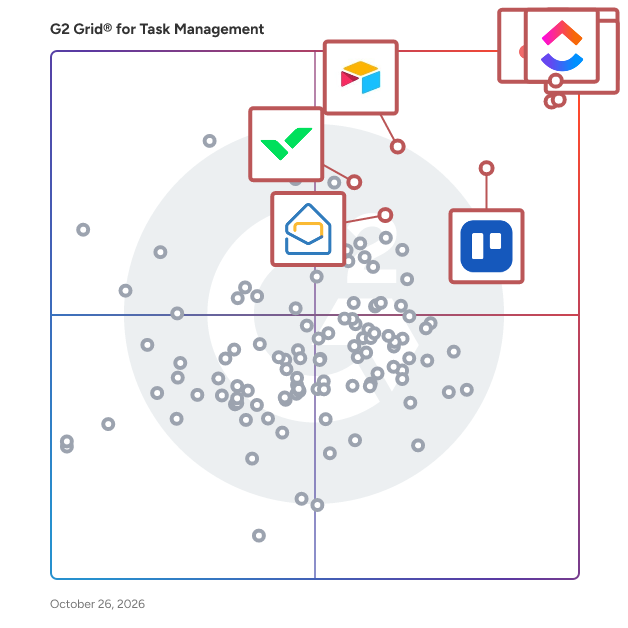
G2 Grid® for Task Management Software

G2 Grid® for Task Management Software plotting products by satisfaction and market presence

Highlighted products: Asana, ClickUp, monday AI Work Platform, Smartsheet, Trello, Airtable, Wrike, and Microsoft Planner.

Underlying data: [Grid® JSON](https://www.g2.com/categories/task-management-software/grids.json?focus%5B%5D=asana&focus%5B%5D=clickup&focus%5B%5D=monday-com&focus%5B%5D=smartsheet&focus%5B%5D=trello&focus%5B%5D=airtable&focus%5B%5D=wrike&focus%5B%5D=microsoft-planner)

Blitzit

Blitzit is a simple to-do list and timer that supercharges your productivity, helping you prioritize what matters, eliminate distractions, and get things done in an unbreakable flow state. Crafted for busy individuals who want a straightforward, powerful tool to stay focused, Blitzit offers a streamlined workflow from morning planning to the final task.By clicking the BLITZ NOW button, you’re in focus mode— a neat panel of tasks with a live timer that floats on your screen, keeping you on track without clutter. Blitzit’s other features include: - Pomodoro timer - Subtasks - Task scheduling - Quick notes (auto-open links in notes) - Anti-distraction alerts to gently bring you back to focus - Organized lists - Productivity reports - Take breaks - Integrations (Notion, Google C. and more to come) With a many more features currently in development including a mobile app.

Average Rating: 4.3/5.0

Total Reviews: 2

How Do G2 Users Rate Blitzit?

  • Task Prioritization: 8.3/10 (Category avg: 8.8/10)
  • Creation & Assignment: 8.3/10 (Category avg: 9.0/10)
  • To-Do Lists: 10.0/10 (Category avg: 8.9/10)

Who Is the Company Behind Blitzit?

  • Seller: Blitzit
  • Year Founded: 2016
  • HQ Location: London, GB
  • Twitter: @BlitzitApp
    466 Twitter followers
  • LinkedIn® Page: www.linkedin.com
    1 employees on LinkedIn®

Who Uses This Product?

  • Company Size: 100% Small

What Do G2 Reviewers Say About Blitzit?

AI-generated summary from verified user reviews

Pros
  • Users love the ease of use of Blitzit, thanks to its clean interface and seamless task management features.
  • Users value the easy management of tasks in Blitzit, enjoying a streamlined and distraction-free productivity experience.
  • Users value the refreshingly simple interface of Blitzit, enhancing productivity without distraction and complexity.
  • Users love the simple and cohesive task management features of Blitzit, enhancing their productivity effortlessly.
  • Users love the time-saving efficiency of Blitzit, streamlining task management and reminders into one cohesive tool.
Cons
  • Users find the limited customization options of Blitzit restrict their ability to personalize their workflows effectively.
  • Users note the limited features of Blitzit, particularly lacking in advanced project planning and customization options.
  • Users find the missing advanced project planning features of Blitzit limits its effectiveness for complex project management.

What Are Recent G2 Reviews of Blitzit?

Dart

Dart is the only truly AI-native project management tool. It is an AI-powered project management software designed to automate and optimize essential workflows for teams of any size. It simplifies project planning, task execution, and team collaboration by leveraging advanced automation and seamless integrations. Dart caters to different industries such as software development, marketing, operations, etc... offering tools that reduce manual effort and streamline project delivery. As a versatile solution, Dart utilizes artificial intelligence to perform repetitive project management tasks. These capabilities include generating detailed reports, breaking large tasks into manageable subtasks, removing duplicate entries, and creating project roadmaps. By automating these processes, Dart allows teams to focus on strategic and high-value activities rather than administrative tasks. Key Features and Benefits: - AI-driven task management: Automates routine functions such as report generation, roadmap development, and task organization to improve efficiency. - Seamless integrations: Connects with platforms like Slack, Jira, GitHub, Notion, Google Workspace, and Trello, enabling a unified workflow. - Customizable workflows: Offers keyboard shortcuts, natural language task creation, and flexible project settings tailored to user needs. - Multiple view options: Provides Gantt charts, Kanban boards, calendars, and roadmaps for effective progress tracking and deadline management. - Collaboration tools: Includes built-in file sharing, document editing, and task-specific comments to enhance communication and reduce silos. Dart serves as a scalable and intelligent project management solution for startups, enterprises, and small teams. It centralizes workflows, provides clear progress visualizations, and reduces complexity in managing projects. Through its automation and adaptable features, Dart supports teams in achieving their project goals with efficiency and clarity.

Average Rating: 4.3/5.0

Total Reviews: 3

How Do G2 Users Rate Dart?

  • Has the product been a good partner in doing business?: 9.2/10 (Category avg: 9.0/10)
  • Task Prioritization: 10.0/10 (Category avg: 8.8/10)
  • Creation & Assignment: 10.0/10 (Category avg: 9.0/10)
  • To-Do Lists: 10.0/10 (Category avg: 8.9/10)

Who Is the Company Behind Dart?

  • Seller: dart
  • Year Founded: 2022
  • HQ Location: San Francisco, US
  • Twitter: @its_dart
    758 Twitter followers
  • LinkedIn® Page: www.linkedin.com
    22 employees on LinkedIn®

Who Uses This Product?

  • Company Size: 86% Small, 14% Medium

What Do G2 Reviewers Say About Dart?

AI-generated summary from verified user reviews

Pros
  • Users value the automation capabilities of Dart, enhancing task management and integration with other software seamlessly.
  • Users commend the efficiency of Dart for its streamlined task management and seamless AI integration, enhancing productivity.
  • Users value the seamless integrations of Dart with other software, enhancing productivity through its AI capabilities.
  • Users value the user-friendly templates of Dart, enhancing efficiency in task creation and management.
  • Users value the versatility of Dart, seamlessly integrating with various software to enhance productivity and task management.
Cons
  • Users experience slow performance with lag in the app, although high-quality support mitigates the issue somewhat.

What Are Recent G2 Reviews of Dart?

FacileThings

A web application that provides you with the best structure and workflow to get things done. It's based on the Getting Things Done methodology (GTD) and allows you to manage your personal and professional life with minimal stress. - The GTD© methodology workflow is fully embedded in the system. You don't need to think about it. - It allows you to align your daily tasks with the purpose, goals, and areas of focus that give meaning to your personal and professional life. - Guided tools to make your life easier: Weekly Review, Mind Sweep, and (AI-assisted) Project Natural Planning will help you win the game of life. - You can integrate all your Google and Outlook calendars, both personal and professional, in a single place. - Delegate tasks to your collaborators and have your agendas always ready for when you meet someone. - Mainly a web app, but there are apps available for iOS and Android. Today, almost all of us feels that there is not enough time to get done all the things we have to do. Tasks at work grow and grow. Besides, there are things to do at home, and commitments we have made to family and friends. And there are also things that we want to do just because we like doing them. Calendars and daily to-do lists with prioritized tasks, no longer help us to get organized efficiently. Our head is full of outstanding and unfinished things that distract us constantly, make us waste time and energy, and cause us anxiety and stress. FacileThings is based on a self-management methodology called GTD® (Getting Things Done). This system, whose effectiveness has been extensively validated by millions of followers, establishes a work flow that allows you to easily and intuitively manage all the elements of your personal productivity. FacileThings will guide you through the process of learning this method and will help you incorporate the needed habits into your daily routine. 1. Capture everything that catches your attention. 2. Clarify what each thing is and what you're doing with it. 3. Organize the results correctly. 4. Review your system regularly. 5. Do the right thing at all times.

Average Rating: 4.5/5.0

Total Reviews: 2

How Do G2 Users Rate FacileThings?

  • Has the product been a good partner in doing business?: 8.3/10 (Category avg: 9.0/10)
  • Task Prioritization: 8.3/10 (Category avg: 8.8/10)
  • Creation & Assignment: 10.0/10 (Category avg: 9.0/10)
  • To-Do Lists: 10.0/10 (Category avg: 8.9/10)

Who Is the Company Behind FacileThings?

  • Seller: FacileThings
  • Year Founded: 2010
  • HQ Location: United Kingdom of Great Britain
  • Twitter: @FacileThings
    6,296 Twitter followers
  • LinkedIn® Page: www.linkedin.com
    3 employees on LinkedIn®

Who Uses This Product?

  • Company Size: 100% Small

What Are Recent G2 Reviews of FacileThings?

What Are G2 Users Discussing About FacileThings?

MyLifeOrganized (MLO)

MyLifeOrganized (MLO) is the most flexible and powerful personal to-do list & task management app. The #1 for those who are truly serious about getting things done, in every aspect of life. Designed to strike a balance between the simple and the complex, MyLifeOrganized (MLO) comes with optional contexts, tags, stars, flags, time-based and location-based reminders, start and due dates, priorities, dependencies, completely customizable filters and views that make MLO really flexible to adapt to your own system for managing your tasks. With the unlimited hierarchy in MLO you can break a big task into small actions while preserving the big picture. Once loaded with your information, MLO goes to work and generates a simple list containing only the next actions that require your immediate attention. This list is updated auto-magically once you complete a task, or simply when it’s dinner time. MLO keeps you focused on what really matters. What else makes MLO so powerful? Behind MLO products there is a long history (since 2004), a team of responsive developers and a strong community of users who care a lot tools they use. It is their honest feedback that makes MLO apps packed with carefully thought out, powerful, yet easy-to-use features.

Average Rating: 5.0/5.0

Total Reviews: 2

How Do G2 Users Rate MyLifeOrganized (MLO)?

  • Task Prioritization: 8.3/10 (Category avg: 8.8/10)
  • Creation & Assignment: 10.0/10 (Category avg: 9.0/10)
  • To-Do Lists: 10.0/10 (Category avg: 8.9/10)

Who Is the Company Behind MyLifeOrganized (MLO)?

Who Uses This Product?

  • Company Size: 50% Medium, 50% Small

What Are Recent G2 Reviews of MyLifeOrganized (MLO)?

myTask2do

Simple task management tool for creating and managing tasks. myTask2do add-in for Outlook brings the power of myTask2do to Outlook. myTask2do add-in lets you create tasks, set time schedules, add a footnote, prioritize, and track progress fast and easily. Create a task by simply entering the name of the task and hitting the add task button. Easily turn your mail into tasks and insert them into projects. Quickly find any task with the advanced search and filtering option. The task list shows the daily tasks in order of projects and information on when to finish by. Update task information from the task details that shows up when a task is selected from the task list. Add time log entries on task from the task list with the option for closing it if it is completed. Comments can be added to the task for providing additional information. myTask2do can help you: Turn Emails into Tasks Review and manage tasks Schedule and organize project tasks Recording of work hours Keeping track of the workload Collaborate real-time with team myTask2do features include: Creating task - Create a task by simply entering the name of the task and hitting the add task button. Managing task - Update task information from the task details that show up when a task is selected from the task list. Time-log entry - Add time log entries on task from the task list with the option for closing it if it is completed. Adding comment - Comments can be added to the task for providing additional information during the course of a task being done. Repeating tasks - create a recurring task for tasks that you need to complete daily, weekly, monthly, or even annually myTask2do is a task management and collaboration tool that simplifies managing combined team tasks and allows you to effectively work with your team to get things done from a single platform in real-time. It is a cloud-based application enabling managers and teams to optimize business processes, increase productivity and implement accountability. NOTE: myTask2do is a subscription-based service and requires either a free trial or paid account. After installing the app, you must sign up for an account if you don’t have a myTask2do account with your Microsoft email. For more information check out our website: http://mytask2do.com or contact us at info@mytask2do.com Add-in capabilities - When this add-in is used, it Can send data over the Internet This add-in can access and modify personal information in the active message, such as the body, subject, sender, recipients, and attachment information. It may send this data to a third-party service. Other items in your mailbox can’t be read or modified.

Average Rating: 4.5/5.0

Total Reviews: 3

How Do G2 Users Rate myTask2do?

  • Has the product been a good partner in doing business?: 10.0/10 (Category avg: 9.0/10)
  • Task Prioritization: 6.7/10 (Category avg: 8.8/10)
  • Creation & Assignment: 8.3/10 (Category avg: 9.0/10)
  • To-Do Lists: 10.0/10 (Category avg: 8.9/10)

Who Is the Company Behind myTask2do?

Who Uses This Product?

  • Company Size: 67% Medium, 33% Small

What Are Recent G2 Reviews of myTask2do?

What Are G2 Users Discussing About myTask2do?

Nimble

Nimble is an enterprise platform built for managing complex projects with confidence, consistency, and complete visibility. Designed for organizations that need more than basic task tracking, NimbleWork brings together teams, workflows, resources, and data into one unified delivery system that helps enterprises plan smarter, execute faster, and deliver more predictably at scale. Nimble supports the full lifecycle of project delivery—from intake and prioritization to execution, governance, and reporting. Its flexible hierarchy modeling allows organizations to structure work the way they operate, whether it’s simple projects or large, multi-team programs with dependencies, risks, and cross-functional workflows. Teams get real-time visibility across initiatives, while leaders gain clarity into progress, bottlenecks, resource utilization, and delivery risks—without relying on spreadsheets or disconnected tools. Key capabilities include: Project Visibility: Unified views of all projects, dependencies, milestones, and risks, enabling proactive decision-making across teams and portfolios. Flexible Work Hierarchy & Custom Work Types: Model projects, tasks, risks, decisions, and change requests with configurable workflows and forms. Hybrid Delivery Support: Manage Agile, Waterfall, or hybrid teams in a consistent framework—ideal for large enterprises with diverse execution models. Advanced Scheduling & Resource Management: Balance workloads, allocate skilled resources, and forecast capacity with built-in intelligence. Real-Time Dashboards & Reporting: Executive-level insights for PMOs, CIOs, and delivery leaders—no custom BI required. Integrated Collaboration: Comments, updates, file sharing, approvals, and discussions happen in context of the work, reducing communication gaps. Automation & Integrations: Rule-based automation, API integrations, and connectivity with 2000+ apps through Zapier and other connectors. AI Capabilities: Nimble includes AI-powered Agents that accelerate planning, automate routine work, and surface actionable insights across projects and teams. From generating project plans and acceptance criteria to summarizing discussions and highlighting risks, these AI companions help teams work smarter, faster, and with greater predictability. For teams adopting modern Project management practices, Nimble also offers intuitive Agile boards, sprint tools, and backlog management—making it easy to support iterative delivery while preserving enterprise governance and traceability. Whether you're managing a multi-year transformation program, cross-team engineering projects, or department-wide initiatives, Nimble helps enterprises eliminate chaos, improve predictability, and deliver with confidence.

Average Rating: 4.0/5.0

Total Reviews: 11

How Do G2 Users Rate Nimble?

  • Has the product been a good partner in doing business?: 8.3/10 (Category avg: 9.0/10)
  • To-Do Lists: 10.0/10 (Category avg: 8.9/10)

Who Is the Company Behind Nimble?

Who Uses This Product?

  • Company Size: 45% Medium, 36% Small

What Do G2 Reviewers Say About Nimble?

AI-generated summary from verified user reviews

Pros
  • Users value the tracking ease of Nimble, facilitating smooth monitoring of issues and progress effortlessly.
  • Users praise Nimble for its responsive customer support and effortless implementation, enhancing their overall experience.
  • Users highlight Nimble's ease of use, appreciating its smooth implementation and functionality in multi-user environments.
  • Users appreciate the effective communication features of Nimble, facilitating easy coordination and tracking of requests.
  • Users find NIMBLE’s implementation ease excellent, appreciating its user-friendly setup and responsive support during integration.
Cons
  • Users face limited customization options with Nimble, making it difficult to tailor the product to their needs.
  • Users report experiencing slow performance with Nimble, leading to extended loading times and frustration.
  • Users find the lack of difficult reporting capabilities frustrating, limiting their ability to track resolved issues effectively.
  • Users express frustration over the inability to extract reports in Excel format, limiting data usability for analysis.
  • Users find Nimble not intuitive, struggling with the interface and limited customization options for their needs.

What Are Recent G2 Reviews of Nimble?

SingularityApp

SingularityApp is a task management and personal productivity software that helps individuals and teams organize tasks, manage projects, and track time across multiple devices. The application is designed for individuals with personal goals, managers coordinating team workflows, and anyone seeking to stay on top of daily responsibilities. SingularityApp is available on Mac, Windows x64, Linux, iOS, Android, and via a web version for PC. Key features include: 1. Tasks and projects — unlimited levels of nested subtasks for managing simple to-do lists and complex multi-level projects, with support for recurring tasks and prioritization. 2. Time tracking and Pomodoro timer — built-in Pomodoro technique with customizable work and rest intervals, productivity statistics, and completed session tracking. 3. Visual project management — Kanban boards for tracking task progress and Gantt charts for timeline planning with dependencies and milestones. 4. Collaboration — shared projects with up to 10 participants, link-based access, and real-time task updates. 5. Notifications and reminders — multiple reminders per task, alarm mode, and GPS-based geo-notifications to avoid missing deadlines. Additional capabilities include a habit tracker, Focus and Review modes, notepads with rich text editing and image support, file attachments with cloud storage, color tags, flexible filters, offline access, and mobile widgets. SingularityApp integrates with Google Calendar (two-way sync), iCal web calendars, local iOS calendar, Telegram bot, and email. An open API is available for connecting external systems and automating workflows. Pricing is available in three tiers: Basic (free), Pro ($3.33/month billed annually), and Elite ($4.17/month billed annually). A 14-day trial with access to most Elite features activates automatically upon registration without requiring a credit card.

Average Rating: 4.3/5.0

Total Reviews: 2

How Do G2 Users Rate SingularityApp?

  • Task Prioritization: 10.0/10 (Category avg: 8.8/10)
  • Creation & Assignment: 9.2/10 (Category avg: 9.0/10)
  • To-Do Lists: 10.0/10 (Category avg: 8.9/10)

Who Is the Company Behind SingularityApp?

Who Uses This Product?

  • Company Size: 100% Small

What Are Recent G2 Reviews of SingularityApp?

Smart Checklist for Jira

Smart Checklist by TitanApps helps you organize your work with clear ToDo’s. Create checklists, save them as templates, and apply them to recurring tasks with automation. Smart Checklist functionality ▪️ Apply Markdown formatting ▪️ Save and automatically apply checklists to Jira issues ▪️ Create custom statuses for checklist items ▪️ Validate checklists before issue transition in your workflow ▪️ Add checklists automatically based on your rules and workflow setup ▪️ Prevent users from modifying checklists with Linked Templates ▪️ Find specific values in checklists with JQL ▪️ View progress on the Agile board. What do you get with Smart Checklist? ✅ Help your teams complete tasks ✅ Check progress at a glance ✅ Automate repetitive tasks ✅ Ensure that the delivered work meets your standards Visit us at: https://titanapps.io/products/jira-checklist TitanApps is a set of productivity tools for project management platforms (such as Jira and monday.com) designed for professional teams to move projects forward.

Average Rating: 4.3/5.0

Total Reviews: 3

How Do G2 Users Rate Smart Checklist for Jira?

  • Task Prioritization: 5.0/10 (Category avg: 8.8/10)
  • Creation & Assignment: 6.7/10 (Category avg: 9.0/10)
  • To-Do Lists: 8.3/10 (Category avg: 8.9/10)

Who Is the Company Behind Smart Checklist for Jira?

  • Seller: Railsware
  • Year Founded: 2007
  • HQ Location: Pasadena, CA, USA
  • Twitter: @railsware
    2,116 Twitter followers
  • LinkedIn® Page: www.linkedin.com
    170 employees on LinkedIn®
  • Ownership: Private

Who Uses This Product?

  • Company Size: 67% Small, 33% Medium

What Are Recent G2 Reviews of Smart Checklist for Jira?

todo.vu

todo.vu combines task and project management with time tracking and billing to provide a versatile, all-in-one productivity tool for freelancers, consultants and teams. Managing any number of client-related or in-house tasks is made simple. Capture tasks quickly, organize your workload visually, delegate, collaborate, and track any time spent on tasks – at any hourly rate. todo.vu’s unique integration of tasks with time tracking and billing means teams can work uninterrupted while time cost totals are calculated automatically in the background. See where every minute of your workday goes, track team and project progress, raise detailed invoices in minutes, and use real data to fine-tune the way you work. All of this leads to improved efficiency, profitability, and service transparency that exceeds client expectations.

Average Rating: 4.4/5.0

Total Reviews: 15

How Do G2 Users Rate todo.vu?

  • Has the product been a good partner in doing business?: 8.3/10 (Category avg: 9.0/10)

Who Is the Company Behind todo.vu?

  • Seller: Kitovu Pty Ltd
  • Year Founded: 2013
  • HQ Location: New Farm, Australia
  • Twitter: @todovu
    279 Twitter followers
  • LinkedIn® Page: www.linkedin.com
    3 employees on LinkedIn®

Who Uses This Product?

  • Company Size: 40% Medium, 33% Small

What Are Recent G2 Reviews of todo.vu?

What Are G2 Users Discussing About todo.vu?

Workdeck

An Artificial Intelligence driven platform for running the complete digitized workplace and proving onsite, remote and hybrid team with one intuitive touchpoint for being productive from anywhere. Integrated tools for: • Management of Projects / Services • Task execution • Resource Planning • Financials • Document Repositories • Communication (chat, instant messaging) • Calendars • Leave Management • Time recording • Purchases and Expense Management • Travel Management • Integrated with Google (G-Suite) and Microsoft Office 365 • Web and smartphone applications

Average Rating: 4.5/5.0

Total Reviews: 2

How Do G2 Users Rate Workdeck?

  • Has the product been a good partner in doing business?: 10.0/10 (Category avg: 9.0/10)
  • To-Do Lists: 10.0/10 (Category avg: 8.9/10)

Who Is the Company Behind Workdeck?

Who Uses This Product?

  • Company Size: 50% Medium, 50% Small

What Are Recent G2 Reviews of Workdeck?

Workiom

Workiom is the AI-native Work Platform that moves AI beyond conversation and into the work that runs the business. It enables business teams to build, operate, and continuously improve the internal applications and workflows they need, bringing operational data, tasks, people, and AI agents together in one secure and governed platform. By connecting every business action to a clear owner, context, and traceable path to completion, Workiom turns business priorities into coordinated execution and measurable outcomes.

Average Rating: 4.5/5.0

Total Reviews: 3

How Do G2 Users Rate Workiom?

  • Has the product been a good partner in doing business?: 10.0/10 (Category avg: 9.0/10)

Who Is the Company Behind Workiom?

  • Seller: Workiom
  • Year Founded: 2018
  • HQ Location: Newark, US
  • Twitter: @workiom
  • LinkedIn® Page: www.linkedin.com
    35 employees on LinkedIn®

Who Uses This Product?

  • Company Size: 33% Large, 33% Medium

What Do G2 Reviewers Say About Workiom?

AI-generated summary from verified user reviews

Pros
  • Users value the flexible customization of Workiom, enabling tailored solutions for specific processes and efficient organization.
  • Users enjoy the customizability of Workiom, allowing quick organization of data to fit their preferences.
  • Users value the flexibility of Workiom to customize apps for specific processes, enhancing their workspace efficiency.
  • Users love how Workiom's customizable organization allows them to easily create job fields that suit their needs.
  • Users appreciate the visibility of Workiom, allowing for quick organization and easy access to customized job fields.
Cons
  • Users find the learning curve steep, as it requires effort to create organized dashboards among numerous widgets.
  • Users find the overwhelming experience with Workiom's dashboards can lead to clutter and reduced usability.
  • Users find Workiom's role delegation cumbersome, lacking essential features like deadlines and visual charts for complex projects.

What Are Recent G2 Reviews of Workiom?

APUtime

Hire a robot. Our friendly, super-powerful and fully autonomous virtual project assistant (APU) will definitely relieve you of the stress of planning and organizing work. You assign solvers, tasks and their deadlines. APU plans the fastest way to complete them. APU hands out work according to the working hours of people and constantly monitors changes deadlines. APU reports in real time.

Average Rating: 5.0/5.0

Total Reviews: 1

How Do G2 Users Rate APUtime?

  • Has the product been a good partner in doing business?: 10.0/10 (Category avg: 9.0/10)

Who Is the Company Behind APUtime?

Who Uses This Product?

  • Company Size: 100% Medium

What Are Recent G2 Reviews of APUtime?

Assignly

Your team is wasting 63 minutes every single day in Slack with conversations that have nothing to do with their job! Here’s how you can organize your workspace and cut those distractions in half. With Assignly, instead of sending a regular Slack message, you send a task so your team knows exactly what to do and when to do it. Then, your Assignly channel acts as your command center for Slack, where you can see everything you need to do, and your team needs to do, so you never lose an important Slack message again. Here, you can assign new tasks… manage deadlines and priorities… and collaborate in organized threads. So join thousands of teams keeping on track in Slack with Assignly and save an average of 32 minutes a day! It takes 2 clicks to add to Slack with no credit card or account required. We’d love to hear what you think!

Average Rating: 5.0/5.0

Total Reviews: 1

How Do G2 Users Rate Assignly?

  • Task Prioritization: 10.0/10 (Category avg: 8.8/10)
  • Creation & Assignment: 10.0/10 (Category avg: 9.0/10)
  • To-Do Lists: 10.0/10 (Category avg: 8.9/10)

Who Is the Company Behind Assignly?

Who Uses This Product?

  • Company Size: 100% Small

What Are Recent G2 Reviews of Assignly?

BackHQ

Back is the first employee service platform for internal service teams to organize and automate all workplace requests and processes on one intuitive platform. It provides employees with a convenient way to get help and information and always know who is taking care of their question. The platform integrates with various communication channels (including Slack and email), so employees can submit requests the way they are used to. Back centralizes all requests in one easy-to-use platform and helps internal service teams respond to them using approvals, forms, reports and integrations. Back automatically answers recurring requests and tasks that do not require the experts’ involvement, saving the experts valuable time. Back provides full transparency to managers by tracking the time their teams spend on resolving requests and helping you proactively identify trends to improve internal workflows.

Average Rating: 5.0/5.0

Total Reviews: 1

Who Is the Company Behind BackHQ?

  • Seller: BackHQ
  • Year Founded: 2015
  • HQ Location: Munich, Bavaria, Germany
  • LinkedIn® Page: de.linkedin.com
    1,996 employees on LinkedIn®

Who Uses This Product?

  • Company Size: 50% Small, 50% Medium

What Are Recent G2 Reviews of BackHQ?

What Are G2 Users Discussing About BackHQ?

Basaas Tasks

With Basaas you can integrate all leading task and project management solutions and your productivity and collaboration tools to one single place for all enterprise tasks. Connect Asana, Jira, Monday and more to a unified and well-organized task solution. You can simplify daily routines for all employees and easily organize your remote working teams. Manage all your projects in one solution and get improved workload insights as well.

Average Rating: 5.0/5.0

Total Reviews: 1

How Do G2 Users Rate Basaas Tasks?

  • Has the product been a good partner in doing business?: 10.0/10 (Category avg: 9.0/10)

Who Is the Company Behind Basaas Tasks?

  • Seller: Basaas GmbH
  • Year Founded: 2014
  • HQ Location: Berlin, Berlin
  • Twitter: @basaas_com
    99 Twitter followers
  • LinkedIn® Page: www.linkedin.com
    3 employees on LinkedIn®

Who Uses This Product?

  • Company Size: 100% Small

What Are Recent G2 Reviews of Basaas Tasks?

What Are G2 Users Discussing About Basaas Tasks?