Best Simulation & CAE Software for Small Business - Page 2

How Many Simulation & CAE Software Products Does G2 Track?

Total Products under this Category: 419

Category Stats (Sep 2026)

  • Average Rating: 4.34/5 (↓0.01 vs Aug 2026) The average rating of products in this category, based on all submitted ratings
  • Top Trending Product: Altair Feko (+1.12%) - Among all products in this category, Altair Feko recorded the largest rating increase compared to last month

Last updated: September 15, 2026

How Does G2 Rank Simulation & CAE Software Products?

Why You Can Trust G2's Software Rankings:

  • 30 Analysts and Data Experts
  • 8,000+ Authentic Reviews
  • 419+ Products
  • Unbiased Rankings

G2's software rankings are built on verified user reviews, rigorous moderation, and a consistent research methodology maintained by a team of analysts and data experts. Each product is measured using the same transparent criteria, with no paid placement or vendor influence. While reviews reflect real user experiences, which can be subjective, they offer valuable insight into how software performs in the hands of professionals. Together, these inputs power the G2 Score, a standardized way to compare tools within every category.

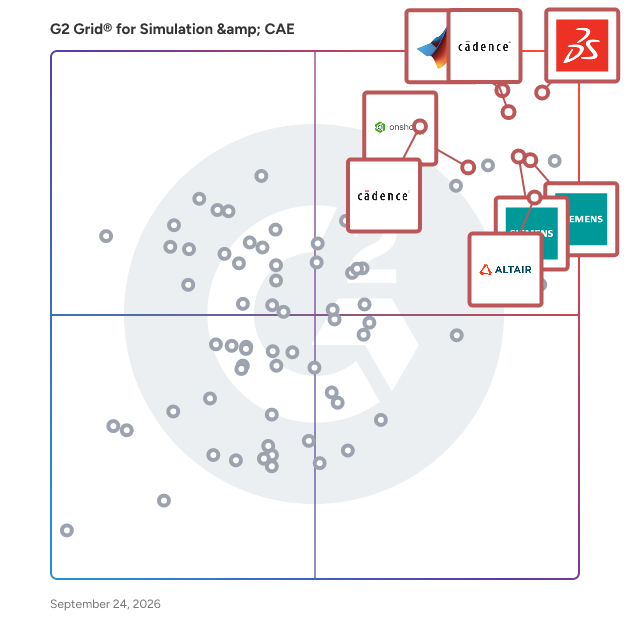
G2 Grid® for Simulation & CAE Software

G2 Grid® for Simulation & CAE Software plotting products by satisfaction and market presence

Highlighted products: SOLIDWORKS, Designcenter Solid Edge, MATLAB, Onshape, Fidelity CFD Platform, Simcenter STAR-CCM+, Sigrity X Platform, and Altair SimSolid.

Underlying data: [Grid® JSON](https://www.g2.com/categories/simulation-cae/grids.json?focus%5B%5D=solidworks&focus%5B%5D=designcenter-solid-edge&focus%5B%5D=matlab&focus%5B%5D=onshape&focus%5B%5D=cadence-design-systems-fidelity-cfd-platform&focus%5B%5D=simcenter-star-ccm&focus%5B%5D=sigrity-x-platform&focus%5B%5D=altair-simsolid&segment=small-business)

Ansys Mechanical

ANSYS Mechanical Pro uses the ANSYS Mechanical interface to deliver powerful finite element modeling capabilities in a way that you can use to make real structural engineering decisions. A finite element analysis solution that provides robust, general-purpose stress, thermal, vibration and fatigue simulations for fast and accurate solutions.

Average Rating: 4.4/5.0

Total Reviews: 90

How Do G2 Users Rate Ansys Mechanical?

  • Has the product been a good partner in doing business?: 9.4/10 (Category avg: 8.6/10)
  • Task: 8.4/10 (Category avg: 8.2/10)
  • Integrate: 8.9/10 (Category avg: 8.0/10)
  • Continuous event modeling: 8.7/10 (Category avg: 8.1/10)

Who Is the Company Behind Ansys Mechanical?

  • Seller: Ansys, Inc.
  • Year Founded: 1970
  • HQ Location: Canonsburg, PA
  • Twitter: @ANSYS
    30,779 Twitter followers
  • LinkedIn® Page: www.linkedin.com
    6,364 employees on LinkedIn®
  • Ownership: NASDAQ:ANSS

Who Uses This Product?

  • Top Industries: Mechanical or Industrial Engineering, Automotive
  • Company Size: 40% Medium, 34% Large

What Do G2 Reviewers Say About Ansys Mechanical?

AI-generated summary from verified user reviews

Pros
  • Users find ANSYS Mechanical's user-friendly interface and integrated tools enhance the ease of performing mechanical simulations.
  • Users appreciate the user-friendly design usability of Ansys Mechanical, enhancing ease of use during simulations.
  • Users find Ansys Mechanical's user-friendly simulation capabilities essential for accurate daily structural analyses and design changes.
  • Users value the easy setup and smooth workflow in 3D Modeling with Ansys Mechanical for structural simulations.
  • Users value the accuracy of Ansys Mechanical, finding it ideal for all types of mechanical simulations.
Cons
  • Users find it challenging to achieve detailed mesh control in ANSYS Mechanical compared to other CAE tools.
  • Users find the missing feature of looping GIF animations frustrating, complicating their presentation needs over the years.
  • Users find the user interface not user-friendly, requiring small automations for better usability and efficiency.

What Are Recent G2 Reviews of Ansys Mechanical?

What Are G2 Users Discussing About Ansys Mechanical?

Simcenter Amesim

Simcenter™ Amesim is a sophisticated mechatronic system simulation platform developed by Siemens Digital Industries Software, designed to assist design engineers in virtually assessing and optimizing the performance of complex systems. This software solution enables users to simulate and analyze the behavior of multi-domain systems, allowing for a more efficient design process from the initial development stages through to final performance validation and control calibration. Targeted primarily at engineers and designers in industries such as automotive, aerospace, and manufacturing, Simcenter Amesim addresses the need for a robust simulation tool that can handle the intricacies of mechatronic systems. By providing a comprehensive environment for modeling, simulation, and analysis, it empowers users to explore various design scenarios and make informed decisions early in the development cycle. This capability is particularly valuable in industries where performance and reliability are critical, as it helps to identify potential issues before physical prototypes are created. Key features of Simcenter Amesim include its extensive library of pre-built components, which cover a wide range of physical domains such as mechanical, electrical, hydraulic, and thermal systems. This allows engineers to create detailed models that accurately represent real-world behaviors. Additionally, the platform supports co-simulation with other software tools, enabling seamless integration into existing workflows. The user-friendly interface facilitates easy navigation and model building, making it accessible even for those who may not have extensive simulation experience. The benefits of using Simcenter Amesim are significant. By leveraging its simulation capabilities, organizations can reduce development time and costs, minimize the need for physical prototypes, and enhance overall product quality. The ability to conduct virtual testing and optimization leads to improved system performance, increased reliability, and greater innovation. As part of the Siemens Xcelerator portfolio, Simcenter Amesim also benefits from integration with other Siemens tools, providing a holistic approach to systems engineering that enhances collaboration and data sharing across teams. Simcenter Amesim stands out in the mechatronic simulation landscape by offering a powerful, integrated platform that meets the diverse needs of engineers. Its focus on multi-domain simulation, ease of use, and compatibility with other engineering tools makes it a valuable asset for organizations looking to improve their design processes and achieve superior product performance.

Average Rating: 4.4/5.0

Total Reviews: 123

How Do G2 Users Rate Simcenter Amesim?

  • Has the product been a good partner in doing business?: 8.5/10 (Category avg: 8.6/10)
  • Task: 7.2/10 (Category avg: 8.2/10)
  • Integrate: 7.9/10 (Category avg: 8.0/10)
  • Continuous event modeling: 8.4/10 (Category avg: 8.1/10)

Who Is the Company Behind Simcenter Amesim?

Who Uses This Product?

  • Top Industries: Automotive, Mechanical or Industrial Engineering
  • Company Size: 37% Large, 36% Small

What Do G2 Reviewers Say About Simcenter Amesim?

AI-generated summary from verified user reviews

Pros
  • Users value the extensive libraries in Simcenter Amesim, enabling quick modeling of complex multi-domain systems and effective simulations.
  • Users find Simcenter Amesim easy to use, appreciating its intuitive design and excellent support for quick results.
  • Users value the co-simulation capability of Simcenter Amesim, combining fast system simulation with accurate CFD modeling.
  • Users value the detailed simulation capabilities of Simcenter Amesim, enabling complex modeling with excellent support and resources.
  • Users highlight the powerful libraries and integration capabilities of Simcenter Amesim, enhancing their product development experience.
Cons
  • Users find Simcenter Amesim expensive, making it challenging to justify its purchase to management.
  • Users find the learning curve steep, making it challenging for beginners to effectively utilize Simcenter Amesim.
  • Users face data management issues in Simcenter Amesim, especially with processing and tracking licenses effectively.
  • Users find the licensing costs expensive, creating challenges due to integration issues and FMU usage restrictions.
  • Users often report integration issues with Simcenter Amesim, complicating workflow and data management significantly.

What Are Recent G2 Reviews of Simcenter Amesim?

What Are G2 Users Discussing About Simcenter Amesim?

Ansys LS-DYNA

ANSYS LS-DYNA is the most commonly used explicit simulation program with multi-physics capabilities to simulate the response of materials to short periods of severe loading. Its many elements, contact formulations, material models and other controls can be used to simulate complex models with control over all the details of the problem.

Average Rating: 4.5/5.0

Total Reviews: 45

How Do G2 Users Rate Ansys LS-DYNA?

  • Has the product been a good partner in doing business?: 7.9/10 (Category avg: 8.6/10)
  • Task: 8.5/10 (Category avg: 8.2/10)
  • Integrate: 8.1/10 (Category avg: 8.0/10)
  • Continuous event modeling: 8.4/10 (Category avg: 8.1/10)

Who Is the Company Behind Ansys LS-DYNA?

  • Seller: Ansys, Inc.
  • Year Founded: 1970
  • HQ Location: Canonsburg, PA
  • Twitter: @ANSYS
    30,779 Twitter followers
  • LinkedIn® Page: www.linkedin.com
    6,364 employees on LinkedIn®
  • Ownership: NASDAQ:ANSS

Who Uses This Product?

  • Who Uses This: CAE Engineer
  • Top Industries: Automotive, Higher Education
  • Company Size: 48% Small, 31% Medium

What Do G2 Reviewers Say About Ansys LS-DYNA?

AI-generated summary from verified user reviews

Pros
  • Users value the accuracy of Ansys LS-DYNA, appreciating its reliability in various simulation applications across industries.
  • Users value the continuous improvement in Ansys LS-DYNA, seamlessly adapting to evolving analysis needs and enhancing efficiency.
  • Users value the responsive customer support from Oasys Team, enhancing the usability and functionality of Ansys LS-DYNA.
  • Users value the ease of use of Ansys LS-DYNA, appreciating its logical interface and streamlined processes.
  • Users value the efficiency improvements in Ansys LS-DYNA, enabling streamlined modeling and design processes.
Cons
  • Users find the difficult learning curve of Ansys LS-DYNA challenging, requiring prior knowledge in FEA for effective use.
  • Users are concerned about the expensive pricing and inflexible license terms of Ansys LS-DYNA.
  • Users note that licensing costs are rising and the terms are becoming less flexible than before.
  • Users find the steep learning curve of Ansys LS-DYNA challenging, requiring prior knowledge in FEA for effective use.
  • Users find Ansys LS-DYNA not user-friendly, requiring prior knowledge for effective use and accurate results.

What Are Recent G2 Reviews of Ansys LS-DYNA?

What Are G2 Users Discussing About Ansys LS-DYNA?

Capital

Siemens Capital is an advanced electrical and electronic (E/E) systems design platform that leverages artificial intelligence to assist industries where precision, speed, and reliability are paramount. This solution is particularly beneficial for sectors such as automotive, aerospace, defense, industrial machinery, and software-defined vehicles, where the complexity of E/E systems continues to grow. Capital empowers engineering teams to design and optimize electrical distribution systems, develop and deploy embedded software for automotive electronic control units (ECUs), and integrate various design data into a single collaborative environment. As industries transition towards electrification and the development of connected vehicles, the need for sophisticated E/E systems becomes increasingly critical. Siemens Capital X, a cloud-based iteration of this platform, enhances the design process by providing organizations with tools that facilitate digital twin and digital thread capabilities. This cloud solution offers numerous advantages, including ease of access, cost-efficient deployment, robust security, and seamless collaboration among global teams. As a software as a service (SaaS) offering, Capital X ensures that sensitive data remains protected while enabling efficient teamwork across various locations. The platform boasts key capabilities that address the challenges of modern E/E systems engineering. These include model-based engineering for complex architectures, automated network implementation, real-time design verification, and embedded software design and testing. Additionally, interactive 3D modeling through mechanical computer-aided design (MCAD) integrations, generative design for harness engineering, and automatic documentation for manufacturing and maintenance streamline the entire design process. Version control and change management features further enhance efficiency by minimizing rework and ensuring that all team members are aligned with the latest updates. Siemens Capital delivers measurable benefits throughout the product lifecycle. By automating repetitive design tasks, it increases efficiency and enhances accuracy by utilizing analytics to catch errors before production. This results in significant cost reductions and faster time-to-market, as design iterations and development cycles are accelerated. Furthermore, real-time insights enable data-driven decisions, guiding engineering teams toward better outcomes. With its comprehensive approach to integrating design, verification, manufacturing, and maintenance processes, Siemens Capital equips organizations to tackle the complexities of contemporary E/E architectures. Whether for next-generation aircraft, high-performance industrial machinery, or innovative connected vehicles, Capital plays a crucial role in reducing risks, controlling costs, and expediting the delivery of cutting-edge products to market. This unified platform not only supports collaboration among mechanical, electrical, and software engineering teams but also ensures that designs comply with industry standards, thereby maintaining a competitive edge in a rapidly evolving technological landscape.

Average Rating: 4.4/5.0

Total Reviews: 115

How Do G2 Users Rate Capital?

  • Has the product been a good partner in doing business?: 8.3/10 (Category avg: 8.6/10)
  • Task: 9.2/10 (Category avg: 8.2/10)
  • Integrate: 9.5/10 (Category avg: 8.0/10)
  • Continuous event modeling: 10.0/10 (Category avg: 8.1/10)

Who Is the Company Behind Capital?

Who Uses This Product?

  • Top Industries: Aviation & Aerospace, Automotive
  • Company Size: 44% Large, 42% Medium

What Do G2 Reviewers Say About Capital?

AI-generated summary from verified user reviews

Pros
  • Users value the easy integrations in Capital, streamlining tasks and enhancing collaboration across tools effectively.
  • Users appreciate the integrations of Capital, streamlining design and production processes within the Siemens portfolio.
  • Users value the ease of use of Capital, praising its simple installation and user-friendly interface.
  • Users value the advanced AI-guided design features of Capital, enhancing system processes and integration flexibility.
  • Users praise the ease of creating components in Capital, likening it to simple painting techniques.
Cons
  • Users find expensive licensing confusing, with unclear management and the need for better pricing strategies for Capital.
  • Users find the lack of features in Capital hampers efficiency and complicates revision management and change identification.
  • Users are frustrated with the performance issues, noting slow response times and delays when opening the application.
  • Users find the difficult learning curve of Capital challenging, especially with limited online resources available.
  • Users face a significant learning curve with Capital, requiring time and technical skills for effective use.
What Are Recent G2 Reviews of Capital?

Keysight ADS

Keysight's Advanced Design System (ADS) is a premier electronic design automation (EDA) software suite tailored for RF, microwave, and high-speed digital applications. It offers a comprehensive environment that integrates schematic capture, layout, design rule checking, and both frequency-domain and time-domain circuit simulations. ADS is widely adopted in industries such as wireless communications, aerospace, and defense, enabling engineers to design and optimize complex electronic products efficiently. Key Features and Functionality: - Integrated Design Workflow: ADS provides a seamless workflow encompassing schematic capture, layout, and simulation, facilitating efficient design processes. - Advanced Simulation Capabilities: The software includes robust electromagnetic (EM) simulation tools, such as Momentum and FEM Element, allowing for accurate analysis of 3D structures and passive components. - Multi-Technology Support: ADS supports the integration of various technologies, including chips, packaging, interconnects, shielding, boards, and I/O connectors, enabling comprehensive multi-technology design. - AI-Powered Assistants: The latest versions of ADS incorporate AI-driven Chat and Copilot assistants, which automate repetitive tasks and streamline complex workflows, enhancing design productivity. - Electro-Thermal Simulation: ADS offers electro-thermal simulation capabilities to validate dynamic device operating temperatures under different conditions, ensuring reliability and performance. Primary Value and User Solutions: ADS addresses the challenges of designing high-frequency and high-speed digital components by providing an integrated platform that combines circuit, system, and EM simulation. This integration reduces the need for multiple tools, minimizes data translation errors, and accelerates the design iteration process. The inclusion of AI-powered assistants further enhances productivity by automating routine tasks and simplifying complex workflows. By offering comprehensive simulation and design capabilities, ADS enables engineers to develop innovative products with confidence, reducing time-to-market and improving overall design efficiency.

Average Rating: 4.6/5.0

Total Reviews: 16

How Do G2 Users Rate Keysight ADS?

  • Task: 9.3/10 (Category avg: 8.2/10)
  • Integrate: 8.8/10 (Category avg: 8.0/10)
  • Continuous event modeling: 9.4/10 (Category avg: 8.1/10)

Who Is the Company Behind Keysight ADS?

  • Seller: Keysight Technologies
  • Year Founded: 2014
  • HQ Location: Santa Rosa, California, United States
  • Twitter: @Keysight
    13,585 Twitter followers
  • LinkedIn® Page: www.linkedin.com
    13,900 employees on LinkedIn®
  • Ownership: NYSE: KEYS

Who Uses This Product?

  • Company Size: 69% Small, 31% Large

What Do G2 Reviewers Say About Keysight ADS?

AI-generated summary from verified user reviews

Pros
  • Users value the wide range of simulation tools offered by ADS, enhancing their design and analysis capabilities.
  • Users value the diverse simulation tools in Keysight ADS, enhancing their ability to perform various analyses efficiently.
Cons
  • Users often feel the learning curve is steep, finding the interface and features overwhelming without proper training.
  • Users often find the interface not user-friendly, requiring considerable time and training to master the extensive features.

What Are Recent G2 Reviews of Keysight ADS?

What Are G2 Users Discussing About Keysight ADS?

TRNSYS

TRNSYS is a software for dynamic simulation of renewable energy systems, HVAC systems, building energy use and both passive and active solar systems.

Average Rating: 4.3/5.0

Total Reviews: 22

How Do G2 Users Rate TRNSYS?

  • Has the product been a good partner in doing business?: 8.9/10 (Category avg: 8.6/10)
  • Task: 8.0/10 (Category avg: 8.2/10)
  • Integrate: 8.1/10 (Category avg: 8.0/10)
  • Continuous event modeling: 8.2/10 (Category avg: 8.1/10)

Who Is the Company Behind TRNSYS?

  • Seller: TRNSYS Project
  • Year Founded: 1848
  • HQ Location: Madison, WI
  • Twitter: @uwmadison
    181,399 Twitter followers
  • LinkedIn® Page: www.linkedin.com
    1 employees on LinkedIn®

Who Uses This Product?

  • Top Industries: Mechanical or Industrial Engineering
  • Company Size: 43% Small, 35% Medium

What Are Recent G2 Reviews of TRNSYS?

Inventor

Autodesk® Inventor® 2021 software provides engineers and designers professional grade design and engineering solution for 3D mechanical design, simulation, visualization, and documentation. With Inventor software, engineers can integrate 2D and 3D data into a single design environment, creating a virtual representation of the final product that enables them to validate the form, fit, and function of the product before it is ever built. Autodesk Inventor includes powerful parametric, direct edit and freeform modeling tools as well as multi-CAD translation capabilities and industry standard DWG™ drawings. Helping you to reduce development costs, get to market faster, and make great products. Speak to Autodesk Sales at 1-844-335-4986.

Average Rating: 4.4/5.0

Total Reviews: 423

How Do G2 Users Rate Inventor?

  • Has the product been a good partner in doing business?: 8.2/10 (Category avg: 8.6/10)
  • Task: 7.7/10 (Category avg: 8.2/10)
  • Integrate: 7.6/10 (Category avg: 8.0/10)
  • Continuous event modeling: 6.8/10 (Category avg: 8.1/10)

Who Is the Company Behind Inventor?

  • Seller: Autodesk
  • Year Founded: 1982
  • HQ Location: San Francisco
  • Twitter: @autodesk
    273,215 Twitter followers
  • LinkedIn® Page: www.linkedin.com
    15,757 employees on LinkedIn®
  • Ownership: NASDAQ:ADSK

Who Uses This Product?

  • Who Uses This: Design Engineer, Mechanical Engineer
  • Top Industries: Mechanical or Industrial Engineering, Machinery
  • Company Size: 43% Medium, 35% Small

What Do G2 Reviewers Say About Inventor?

AI-generated summary from verified user reviews

Pros
  • Users appreciate the ease of use of Inventor, benefiting from its user-friendly interface and customization options.
  • Users love the user-friendly interface of Inventor, making 3D modeling accessible for all skill levels.
  • Users commend the accuracy of Inventor, enhancing their design precision and overall modeling experience.
  • Users value the user-friendly interface of Inventor, which enhances both learning and usability for all skill levels.
  • Users value the user-friendly assembly management in Inventor, enhancing their modeling experience and support interactions.
Cons
  • Users experience lag during heavy assembly operations in Inventor, impacting their workflow and efficiency.
  • Users find the complexity of Inventor overwhelming, as there is much to learn and retain.
  • Users find that Inventor occasionally crashes, leading to frustration and potential loss of unsaved work.
  • Users find the difficult learning curve of Inventor challenging, as there are many details to master.
  • Users find the insufficient training makes it hard for novice students to grasp premade projects effectively.

What Are Recent G2 Reviews of Inventor?

What Are G2 Users Discussing About Inventor?

SolidWorks Simulation

SolidWorks Simulation is a comprehensive suite of analysis tools integrated within the SolidWorks CAD environment, enabling engineers and designers to virtually test and validate their designs under real-world conditions. By simulating physical behaviors such as stress, strain, heat transfer, and fluid dynamics, users can identify potential issues early in the design process, reducing the need for costly physical prototypes and accelerating time to market. Key Features and Functionality: - Structural Analysis: Evaluate the strength and durability of components and assemblies under various loading conditions to ensure product reliability. - Thermal Analysis: Simulate heat transfer and thermal effects to optimize product performance in varying temperature environments. - Fluid Flow Analysis: Analyze fluid dynamics to assess the impact of liquid and gas flows on product design and functionality. - Motion Analysis: Study the movement of assemblies to predict mechanical behavior and identify potential operational issues. - Fatigue Analysis: Predict product lifespan by assessing how repeated loading and unloading cycles affect material integrity over time. - Optimization Tools: Automatically refine designs to meet specified performance criteria, enhancing efficiency and innovation. Primary Value and Problem Solving: SolidWorks Simulation empowers users to make informed design decisions by providing accurate, real-time insights into product performance. This proactive approach minimizes the risk of design flaws, reduces development costs, and shortens the product development cycle. By integrating simulation directly into the design process, SolidWorks Simulation helps ensure that products meet quality standards and perform as intended in real-world applications.

Average Rating: 4.4/5.0

Total Reviews: 58

How Do G2 Users Rate SolidWorks Simulation?

  • Has the product been a good partner in doing business?: 9.2/10 (Category avg: 8.6/10)
  • Task: 8.2/10 (Category avg: 8.2/10)
  • Integrate: 8.5/10 (Category avg: 8.0/10)
  • Continuous event modeling: 7.6/10 (Category avg: 8.1/10)

Who Is the Company Behind SolidWorks Simulation?

  • Seller: Dassault Systèmes
  • Year Founded: 1981
  • HQ Location: Vélizy-Villacoublay, FR
  • Twitter: @SOLIDWORKS
    74,082 Twitter followers
  • LinkedIn® Page: www.linkedin.com
    27,450 employees on LinkedIn®
  • Ownership: EPA: DSY.PA

Who Uses This Product?

  • Top Industries: Mechanical or Industrial Engineering, Design
  • Company Size: 48% Medium, 42% Small

What Do G2 Reviewers Say About SolidWorks Simulation?

AI-generated summary from verified user reviews

Pros
  • Users find SolidWorks Simulation incredibly easy to use, enhancing their design process and supporting beginners effectively.
  • Users praise the accuracy of results provided by SolidWorks Simulation, making it beginner-friendly and effective for simulations.
  • Users value the ease of testing components in SolidWorks Simulation, enhancing design reliability and performance assurance.
  • Users value the helpful customer support of SolidWorks Simulation, assisting with feedback and enhancing their design processes.
  • Users benefit from the intuitive interface of SolidWorks Simulation, enabling fast learning and efficient analysis execution.
Cons
  • Users find some features a bit confusing, which can complicate their overall experience with SolidWorks Simulation.
  • Users face significant export issues with SolidWorks Simulation, making complex analyses frustrating and time-consuming.
  • Users face significant file handling issues with SolidWorks Simulation, leading to frustration and inefficiency in analyses.
  • Users face a lack of features in SolidWorks Simulation, limiting professional control and turbulence modeling options.
  • Users find meshing issues in SolidWorks Simulation limit professional control and lack adequate turbulence models for flow problems.

What Are Recent G2 Reviews of SolidWorks Simulation?

What Are G2 Users Discussing About SolidWorks Simulation?

Abaqus

The Abaqus Unified FEA product suite offers powerful and complete solutions for both routine and sophisticated engineering problems covering a vast spectrum of industrial applications.

Average Rating: 4.3/5.0

Total Reviews: 53

How Do G2 Users Rate Abaqus?

  • Has the product been a good partner in doing business?: 9.0/10 (Category avg: 8.6/10)
  • Task: 8.3/10 (Category avg: 8.2/10)
  • Integrate: 8.2/10 (Category avg: 8.0/10)
  • Continuous event modeling: 8.1/10 (Category avg: 8.1/10)

Who Is the Company Behind Abaqus?

  • Seller: Dassault Systèmes
  • Year Founded: 1981
  • HQ Location: Vélizy-Villacoublay, FR
  • Twitter: @SOLIDWORKS
    74,082 Twitter followers
  • LinkedIn® Page: www.linkedin.com
    27,450 employees on LinkedIn®
  • Ownership: EPA: DSY.PA

Who Uses This Product?

  • Top Industries: Higher Education, Mechanical or Industrial Engineering
  • Company Size: 48% Small, 28% Large

What Do G2 Reviewers Say About Abaqus?

AI-generated summary from verified user reviews

Pros
  • Users find Abaqus to be user-friendly, appreciating its readability and ease of use in simulations and meshing.
  • Users love the unmatched nonlinear solver reliability of Abaqus, especially for complex simulations and analyses.
  • Users praise the unmatched accuracy of Abaqus, achieving reliable results in complex simulations and analyses.
  • Users find 2D tet and hex meshing easy with Abaqus, especially for bolted joint analysis and updating boundary conditions.
Cons
  • Users find the interface of Abaqus not user-friendly, making it challenging to navigate and utilize effectively.
  • Users express frustration with the preprocessing workflow limitations in Abaqus, especially in meshing and geometry editing.
  • Users express that the complex geometry handling in Abaqus creates frustration, with clunky meshing and editing processes.
  • Users find the limited options difficult to work with, requiring a reliable preprocessor for effective model preparation.
  • Users express frustration with meshing issues, citing extensive manual cleanup and clunky geometry editing compared to other tools.

What Are Recent G2 Reviews of Abaqus?

What Are G2 Users Discussing About Abaqus?

CATIA

CATIA is a comprehensive software suite developed by Dassault Systèmes, designed to facilitate the entire product development process from conceptualization to manufacturing. It integrates advanced 3D modeling, simulation, and collaboration tools, enabling users to design, analyze, and manage complex products and systems efficiently. CATIA's intuitive interface and robust capabilities support a wide range of industries, including aerospace, automotive, construction, and consumer goods, fostering innovation and enhancing product quality. Key Features and Functionality: - 3D Modeling and Design: Offers parametric and non-parametric modeling tools for creating precise and complex geometries, accommodating both mechanical and surface design needs. - Simulation and Analysis: Provides integrated simulation capabilities to test and validate product performance under real-world conditions, reducing the need for physical prototypes. - Systems Engineering: Supports model-based systems engineering (MBSE) to manage complex product architectures, ensuring consistency across mechanical, electrical, and software components. - Collaboration Tools: Facilitates real-time collaboration among multidisciplinary teams through a unified platform, enhancing communication and decision-making processes. - Knowledge Management: Enables the capture and reuse of design knowledge and best practices, promoting standardization and efficiency across projects. Primary Value and User Solutions: CATIA addresses the challenges of modern product development by providing a unified environment that integrates design, simulation, and collaboration tools. This integration allows organizations to accelerate innovation, improve product quality, and reduce time-to-market. By supporting a wide range of disciplines and industries, CATIA helps users manage complex product lifecycles, ensure design accuracy, and foster collaboration across global teams, ultimately leading to more sustainable and impactful customer experiences.

Average Rating: 4.2/5.0

Total Reviews: 243

How Do G2 Users Rate CATIA?

  • Has the product been a good partner in doing business?: 7.7/10 (Category avg: 8.6/10)
  • Task: 10.0/10 (Category avg: 8.2/10)
  • Integrate: 10.0/10 (Category avg: 8.0/10)
  • Continuous event modeling: 10.0/10 (Category avg: 8.1/10)

Who Is the Company Behind CATIA?

  • Seller: Dassault Systèmes
  • Year Founded: 1981
  • HQ Location: Vélizy-Villacoublay, FR
  • Twitter: @SOLIDWORKS
    74,082 Twitter followers
  • LinkedIn® Page: www.linkedin.com
    27,450 employees on LinkedIn®
  • Ownership: EPA: DSY.PA

Who Uses This Product?

  • Who Uses This: Design Engineer, Student
  • Top Industries: Automotive, Aviation & Aerospace
  • Company Size: 48% Large, 29% Medium

What Do G2 Reviewers Say About CATIA?

AI-generated summary from verified user reviews

Pros
  • Users appreciate the ease of use and powerful features of CATIA, especially for complex design needs.
  • Users commend the robust 3D modeling capabilities of CATIA, especially for complex shapes and precision work.
  • Users appreciate the flexibility and power of CATIA, especially for complex designs in the automotive industry.
  • Users appreciate the flexibility and power of CATIA for designing complex shapes and ergonomic analysis.
  • Users find CATIA's ease of use and straightforward learning process enhances their modeling experience significantly.
Cons
  • Users struggle with the complex interface of CATIA, finding it challenging and not user-friendly for beginners.
  • Users face a complex UI that complicates navigation and poses challenges, particularly for beginners in CATIA.
  • Users find CATIA to be expensive, making it challenging for casual users to justify its high cost.
  • Users find the expensive licensing of CATIA to be a significant barrier, especially for casual users.
  • Users often face integration issues with CATIA V5, which complicates its compatibility with different system versions.

What Are Recent G2 Reviews of CATIA?

What Are G2 Users Discussing About CATIA?

Autodesk CFD

Autodesk® CFD software provides computational fluid dynamics and thermal simulation tools to help you predict product performance, optimize designs, and validate product behavior before manufacturing.

Average Rating: 4.3/5.0

Total Reviews: 30

How Do G2 Users Rate Autodesk CFD?

  • Has the product been a good partner in doing business?: 8.3/10 (Category avg: 8.6/10)
  • Task: 8.5/10 (Category avg: 8.2/10)
  • Integrate: 9.0/10 (Category avg: 8.0/10)
  • Continuous event modeling: 8.4/10 (Category avg: 8.1/10)

Who Is the Company Behind Autodesk CFD?

  • Seller: Autodesk
  • Year Founded: 1982
  • HQ Location: San Francisco
  • Twitter: @autodesk
    273,215 Twitter followers
  • LinkedIn® Page: www.linkedin.com
    15,757 employees on LinkedIn®
  • Ownership: NASDAQ:ADSK

Who Uses This Product?

  • Top Industries: Mechanical or Industrial Engineering
  • Company Size: 61% Small, 32% Medium

What Are Recent G2 Reviews of Autodesk CFD?

What Are G2 Users Discussing About Autodesk CFD?

Altair Inspire

Altair® Inspire™ is an intuitive, powerful family of integrated software products that accelerates simulation-driven design throughout the product development lifecycle, from concept to reality, while reducing product time-to-market. Used early in the design process, Inspire enables the creation of designs focused on both performance and manufacturability. Inspire empowers its users to explore, develop, and manufacture high-performance products in a single, intuitive environment. Accelerate Design from Concept to Reality • Geometry Creation and Modification: Supports use of parametric surfaces, solids, polyNURBS, facets, and implicit modeling within the same model. • Computational Physics for Rapid Exploration: Makes complex physics simulations accessible and designer friendly, enabling rapid, accurate analysis of structural, fluid flow, and motion dynamics. • Design Optimization for Topology and Beyond: Goes beyond standard topology optimization, incorporating AI for generative design that produces practical, sustainable products. • Manufacturability Analysis: Evaluate processes like casting, metal forming, injection molding, metal and polymer extrusion, polyurethane foaming, and additive manufacturing early to prevent defects and costly retooling.

Average Rating: 4.3/5.0

Total Reviews: 75

How Do G2 Users Rate Altair Inspire?

  • Has the product been a good partner in doing business?: 8.7/10 (Category avg: 8.6/10)
  • Task: 7.4/10 (Category avg: 8.2/10)
  • Integrate: 7.1/10 (Category avg: 8.0/10)
  • Continuous event modeling: 6.9/10 (Category avg: 8.1/10)

Who Is the Company Behind Altair Inspire?

  • Seller: Altair
  • Year Founded: 1985
  • HQ Location: Troy, MI
  • LinkedIn® Page: www.linkedin.com
    2,630 employees on LinkedIn®
  • Ownership: NASDAQ:ALTR
  • Total Revenue (USD mm): $458

Who Uses This Product?

  • Top Industries: Automotive, Mechanical or Industrial Engineering
  • Company Size: 41% Small, 28% Large

What Do G2 Reviewers Say About Altair Inspire?

AI-generated summary from verified user reviews

Pros
  • Users highlight the ease of use of Altair Inspire, appreciating its quick setup and intuitive design capabilities.
  • Users find Altair Inspire's efficiency improvement invaluable, enabling quick setup and streamlined simulations for enhanced design processes.
  • Users commend the powerful integration of design and simulation in Altair Inspire, enhancing creativity and efficiency in engineering.
  • Users appreciate the powerful simulation capabilities of Altair Inspire, enhancing design efficiency and creativity seamlessly.
  • Users highlight the quick and uncomplicated setup of Altair Inspire, allowing easy start for simulation-driven design.
Cons
  • Users find the steep learning curve challenging, especially when transitioning to advanced features and workflows.
  • Users find Altair Inspire not user-friendly, struggling with a confusing interface that mixes features from different solvers.
  • Users experience performance issues with Altair Inspire, particularly when managing complex assemblies, limiting its effectiveness.
  • Users experience slow performance with Altair Inspire, particularly during complex simulations and large model handling.
  • Users report slow simulation performance in Altair Inspire, indicating a need for improved design tools and functionality.

What Are Recent G2 Reviews of Altair Inspire?

What Are G2 Users Discussing About Altair Inspire?

Moldflow

Moldflow software for plastic injection molding simulation helps reduce manufacturing defects. Access tools for injection mold design, plastic part design, and mold processing.

Average Rating: 4.4/5.0

Total Reviews: 24

How Do G2 Users Rate Moldflow?

  • Has the product been a good partner in doing business?: 9.3/10 (Category avg: 8.6/10)
  • Task: 7.6/10 (Category avg: 8.2/10)
  • Integrate: 7.6/10 (Category avg: 8.0/10)
  • Continuous event modeling: 7.2/10 (Category avg: 8.1/10)

Who Is the Company Behind Moldflow?

  • Seller: Autodesk
  • Year Founded: 1982
  • HQ Location: San Francisco
  • Twitter: @autodesk
    273,215 Twitter followers
  • LinkedIn® Page: www.linkedin.com
    15,757 employees on LinkedIn®
  • Ownership: NASDAQ:ADSK

Who Uses This Product?

  • Top Industries: Automotive
  • Company Size: 46% Small, 36% Medium

What Are Recent G2 Reviews of Moldflow?

What Are G2 Users Discussing About Moldflow?

COMSOL Multiphysics®

Engineers and scientists use the COMSOL Multiphysics® software to simulate designs, devices, and processes in all fields of engineering, manufacturing, and scientific research. COMSOL Multiphysics® is a simulation platform that provides fully coupled multiphysics and single-physics modeling capabilities. The Model Builder includes all of the steps in the modeling workflow — from defining geometries, material properties, and the physics that describe specific phenomena to performing computations and evaluating the results. The COMSOL Multiphysics® software brings a user interface and experience that is always the same, regardless of engineering application and physics phenomena. Add-on modules provide specialized functionality for electromagnetics, structural mechanics, acoustics, fluid flow, heat transfer, and chemical engineering. Choose from a list of LiveLink™ products to interface directly with CAD and other third-party software. Deploy simulation applications with COMSOL Compiler™ and COMSOL Server™.

Average Rating: 4.3/5.0

Total Reviews: 36

How Do G2 Users Rate COMSOL Multiphysics®?

  • Has the product been a good partner in doing business?: 8.8/10 (Category avg: 8.6/10)
  • Task: 8.3/10 (Category avg: 8.2/10)
  • Integrate: 8.7/10 (Category avg: 8.0/10)
  • Continuous event modeling: 7.3/10 (Category avg: 8.1/10)

Who Is the Company Behind COMSOL Multiphysics®?

  • Seller: COMSOL
  • Year Founded: 1985
  • HQ Location: Lower Hutt, New Zealand
  • Twitter: @COMSOL_F2
    7 Twitter followers
  • LinkedIn® Page: www.linkedin.com
    8 employees on LinkedIn®

Who Uses This Product?

  • Top Industries: Higher Education, Research
  • Company Size: 36% Large, 33% Medium

What Do G2 Reviewers Say About COMSOL Multiphysics®?

AI-generated summary from verified user reviews

Pros
  • Users praise the ease of learning in COMSOL Multiphysics®, finding the multiphysics interface intuitive and user-friendly.
  • Users value the multiphysics capabilities of COMSOL Multiphysics®, particularly for their seamless interface with various physics.

What Are Recent G2 Reviews of COMSOL Multiphysics®?

What Are G2 Users Discussing About COMSOL Multiphysics®?

SolidWorks Flow Simulation

SOLIDWORKS Flow Simulation is an intuitive Computational Fluid Dynamics (CFD) solution embedded within SOLIDWORKS 3D CAD that enables you to quickly and easily simulate liquid and gas flows through and around your designs to calculate product performance and capabilities.

Average Rating: 4.1/5.0

Total Reviews: 33

How Do G2 Users Rate SolidWorks Flow Simulation?

  • Has the product been a good partner in doing business?: 7.5/10 (Category avg: 8.6/10)
  • Task: 8.3/10 (Category avg: 8.2/10)
  • Integrate: 8.5/10 (Category avg: 8.0/10)
  • Continuous event modeling: 8.5/10 (Category avg: 8.1/10)

Who Is the Company Behind SolidWorks Flow Simulation?

  • Seller: Dassault Systèmes
  • Year Founded: 1981
  • HQ Location: Vélizy-Villacoublay, FR
  • Twitter: @SOLIDWORKS
    74,082 Twitter followers
  • LinkedIn® Page: www.linkedin.com
    27,450 employees on LinkedIn®
  • Ownership: EPA: DSY.PA

Who Uses This Product?

  • Top Industries: Information Technology and Services, Design
  • Company Size: 53% Small, 28% Medium

What Are Recent G2 Reviews of SolidWorks Flow Simulation?

What Are G2 Users Discussing About SolidWorks Flow Simulation?

Daniel Rivera
DR
Researched and written by Daniel Rivera
Updated