Best Remote Monitoring & Management (RMM) Software with Workflow Management Capabilities

How Many Remote Monitoring & Management (RMM) Software Products Does G2 Track?

Total Products under this Category: 76

Category Stats (Sep 2026)

  • Average Rating: 4.55/5 The average rating of products in this category, based on all submitted ratings
  • Top Trending Product: MSP360 RMM (+0.65%) - Among all products in this category, MSP360 RMM recorded the largest rating increase compared to last month

Last updated: September 26, 2026

How Does G2 Rank Remote Monitoring & Management (RMM) Software Products?

Why You Can Trust G2's Software Rankings:

  • 30 Analysts and Data Experts
  • 18,400+ Authentic Reviews
  • 76+ Products
  • Unbiased Rankings

G2's software rankings are built on verified user reviews, rigorous moderation, and a consistent research methodology maintained by a team of analysts and data experts. Each product is measured using the same transparent criteria, with no paid placement or vendor influence. While reviews reflect real user experiences, which can be subjective, they offer valuable insight into how software performs in the hands of professionals. Together, these inputs power the G2 Score, a standardized way to compare tools within every category.

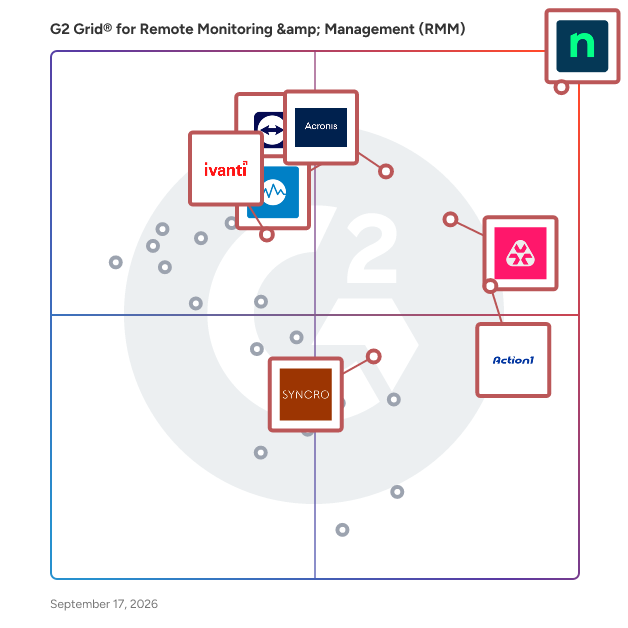
G2 Grid® for Remote Monitoring & Management (RMM) Software

G2 Grid® for Remote Monitoring & Management (RMM) Software plotting products by satisfaction and market presence

Highlighted products: NinjaOne, Remote Monitoring and Management, TeamViewer, Acronis Cyber Protect Cloud, Action1, Datto RMM, Ivanti Autonomous Endpoint Management, and Syncro.

Underlying data: [Grid® JSON](https://www.g2.com/categories/remote-monitoring-management-rmm/grids.json?focus%5B%5D=ninjaone&focus%5B%5D=remote-monitoring-and-management&focus%5B%5D=teamviewer&focus%5B%5D=acronis-cyber-protect-cloud&focus%5B%5D=action1&focus%5B%5D=datto-rmm&focus%5B%5D=ivanti-autonomous-endpoint-management&focus%5B%5D=syncro)

NinjaOne

NinjaOne is the unified IT operations platform that helps IT teams and managed service providers manage, secure, and support every endpoint from a single cloud-native console. Nearly 40,000 customers across 140+ countries use NinjaOne to replace fragmented point tools with one platform built to scale. The platform brings together the core work of modern IT operations: endpoint management, autonomous patch management, vulnerability management, endpoint and SaaS backup, remote access, and IT service desk. Teams monitor and control Windows, macOS, Linux, mobile, and virtual devices in one place, automate routine work with policy-based automation and human-centered AI, and cut the cost and risk that come from running many disconnected tools. NinjaOne serves internal IT teams and MSPs alike, from lean IT departments to mid-market and large enterprise organizations managing distributed, multi-site environments. Common uses include consolidating IT tooling, automating patching for security and compliance, managing distributed and hybrid workforces, improving endpoint visibility, and strengthening backup and ransomware readiness. NinjaOne has maintained a 98 percent customer satisfaction score for more than five years, backed by free unlimited onboarding and 24/7 support in seven languages. Organizations that move to NinjaOne report replacing four or more separate tools with the single platform. NinjaOne is FedRAMP Moderate Authorized and SOC 2 Type II and Type III compliant, and supports audit-ready compliance evidence across frameworks including CMMC, ISO 27001, and HIPAA. The mission behind the platform is simple: unify IT to simplify work, giving IT teams better tools and employees a great technology experience at work.

Average Rating: 4.7/5.0

Total Reviews: 4,990

How Do G2 Users Rate NinjaOne?

  • Ease of Admin: 9.1/10 (Category avg: 8.9/10)
  • Device Management: 9.4/10 (Category avg: 9.3/10)
  • Service Management: 8.6/10 (Category avg: 8.5/10)
  • Remote Monitoring: 9.5/10 (Category avg: 9.3/10)

Who Is the Company Behind NinjaOne?

  • Seller: NinjaOne
  • Company Website:
  • Year Founded: 2013
  • HQ Location: Austin, Texas
  • Twitter: @NinjaOne
    3,607 Twitter followers
  • LinkedIn® Page: www.linkedin.com
    2,376 employees on LinkedIn®

Who Uses This Product?

  • Who Uses This: IT Manager, Owner
  • Top Industries: Information Technology and Services, Computer & Network Security
  • Company Size: 47% Medium, 45% Small

What Do G2 Reviewers Say About NinjaOne?

AI-generated summary from verified user reviews

Pros
  • Users value the ease of use of NinjaOne, highlighting its seamless implementation and effective support for MSPs.
  • Users appreciate the ongoing feature enhancements of NinjaOne, ensuring the platform continuously evolves to meet our needs.
  • Users praise NinjaOne for its easy-to-navigate remote access and full visibility, enhancing IT support efficiency.
  • Users praise the powerful automation features of NinjaOne, enhancing efficiency and simplifying management tasks.
  • Users appreciate the exceptional customer support of NinjaOne, which simplifies learning and enhances overall usability.
Cons
  • Users notice the missing features in NinjaOne, specifically regarding client and customer portal capabilities.
  • Users find the limited features of NinjaOne frustrating, especially regarding user management and third-party software automation.
  • Users find the search function lacking and struggle with visibility and usability issues in NinjaOne.
  • Users feel the search function needs improvement and find the visibility of the NinjaOne icon inconsistent.
  • Users express concerns about feature issues, including confusion over roles, auto-installations, and OS compatibility challenges.

What Are Recent G2 Reviews of NinjaOne?

What Are G2 Users Discussing About NinjaOne?

Remote Monitoring and Management

Atera is defining the category of Autonomous IT, where AI agents resolve technical incidents end to end, without a technician in the loop. Atera's AI-native IT management platform consolidates RMM, helpdesk, ticketing, advanced reporting, and automation, empowering IT teams and MSPs to manage and protect infrastructure, automate tasks, and boost service quality by reducing downtime and improving SLAs. Atera’s autonomous AI agent, Robin, detects, diagnoses, remediates, and verifies incidents by taking action directly on devices, servers, networks, and mainframes, resolving Tier-1 and complex Tier-2 incidents in full. 1) Resolution without the wait. Robin doesn't just suggest or assist, it acts and resolves, on its own, instantly. 2) Always-on coverage, day and night. Robin extends your team's reach around the clock, resolving issues at 2am just as reliably as at 2pm, so your team isn't the only line of defense when it comes to fighting downtime. 3) A personal IT tech for every employee. An intelligent, context-aware AI agent that understands your environment, adapts to each user, and responds instantly. Built on a patented architecture, Robin operates as a system of action within your existing enterprise environment, adhering to the highest enterprise-grade security and compliance standards. It's governed by configurable guardrails, a complete audit trail, and approval workflows, so autonomy never comes at the cost of control. More than 13,000 organizations across 120+ countries rely on Atera to keep their people working, uninterrupted. Discover how Atera can help you achieve unparalleled organizational efficiency at www.atera.com.

Average Rating: 4.6/5.0

Total Reviews: 1,253

How Do G2 Users Rate Remote Monitoring and Management?

  • Ease of Admin: 9.0/10 (Category avg: 8.9/10)
  • Device Management: 9.0/10 (Category avg: 9.3/10)
  • Service Management: 8.7/10 (Category avg: 8.5/10)
  • Remote Monitoring: 9.2/10 (Category avg: 9.3/10)

Who Is the Company Behind Remote Monitoring and Management?

  • Seller: Atera
  • Company Website:
  • Year Founded: 2011
  • HQ Location: New York
  • Twitter: @ateracloud
    1,675 Twitter followers
  • LinkedIn® Page: www.linkedin.com
    416 employees on LinkedIn®

Who Uses This Product?

  • Who Uses This: Owner, IT Manager
  • Top Industries: Information Technology and Services, Computer & Network Security
  • Company Size: 55% Small, 30% Medium

What Do G2 Reviewers Say About Remote Monitoring and Management?

AI-generated summary from verified user reviews

Pros
  • Users find Atera's ease of use exceptional, streamlining management and enhancing efficiency across various tasks.
  • Users appreciate the powerful automation tools of Atera, enabling efficient management and consistent setup for new employees.
  • Users appreciate the all-in-one dashboard of Atera, enhancing efficiency with seamless access to various tools and features.
  • Users praise Atera for its efficiency, streamlining processes and enhancing remote management of devices.
  • Users value the proactive monitoring and all-in-one platform of Atera, significantly enhancing productivity and efficiency.
Cons
  • Users find missing features in Atera, such as insufficient alert context and lack of essential ticketing tools.
  • Users find the limited features of Atera, especially in the mobile app, restrict overall functionality for freelancers.
  • Users find improvement needed in Atera's interface changes and agent installation process, along with remote access reliability.
  • Users note that report loading times and limited customization can hinder efficiency, revealing areas for improvement.
  • Users express concerns about feature issues in Atera, citing limitations and disruptions affecting their workflow.

What Are Recent G2 Reviews of Remote Monitoring and Management?

What Are G2 Users Discussing About Remote Monitoring and Management?

N-able N-central

Join the thousands of MSPs and IT professionals who use N-able™ N-central® to remotely monitor and manage devices and complex networks. Built with security in mind, N-central provides the visibility and efficiency you need to monitor more, provide great customer service, and scale your business. Key features include: • Monitor almost any device, including support for Windows, Linux, and macOS • Gain complete insight across your network and cloud services without the need for extra network monitoring software • Create automated patch management policies to ensure devices are up to date • Streamline your workflow with drag-and-drop scripting in automation manager—no need to write a line of code • Provide remote support across devices and platforms with the integrated Take Control feature • Integrate your existing PSA software or use N-able MSP Manager to manage tickets and billing • Manage security with integrated backup, EDR, AV, and disk encryption • Available as an on-premises or hosted cloud solution to fit your business N-central is designed to help you run your managed services business or internal IT department more efficiently, so you can focus on scaling operations.

Average Rating: 4.4/5.0

Total Reviews: 543

How Do G2 Users Rate N-able N-central?

  • Ease of Admin: 7.9/10 (Category avg: 8.9/10)
  • Device Management: 8.8/10 (Category avg: 9.3/10)
  • Service Management: 8.1/10 (Category avg: 8.5/10)
  • Remote Monitoring: 9.1/10 (Category avg: 9.3/10)

Who Is the Company Behind N-able N-central?

  • Seller: N-able
  • Company Website:
  • HQ Location: Morrisville, North Carolina
  • Twitter: @Nable
    15,859 Twitter followers
  • LinkedIn® Page: www.linkedin.com
    2,307 employees on LinkedIn®
  • Ownership: NYSE: NABL

Who Uses This Product?

  • Who Uses This: Director, Operations Manager
  • Top Industries: Information Technology and Services, Computer & Network Security
  • Company Size: 59% Small, 33% Medium

What Do G2 Reviewers Say About N-able N-central?

AI-generated summary from verified user reviews

Pros
  • Users appreciate the ease of use of N-able N-central, finding it intuitive for managing systems seamlessly.
  • Users value the customizable automation features of N-able N-central, enhancing control and efficiency in IT management.
  • Users value the customizable scripting options in N-able N-central, enhancing control and flexibility for IT management.
  • Users appreciate the solid remote access features of N-able N-central, enhancing system monitoring and management efficiency.
  • Users value the proactive monitoring capabilities of N-able N-central, enhancing efficiency without disrupting clients.
Cons
  • Users find the missing features, like chat and credential management, hinder efficiency and user experience.
  • Users often face feature issues that hinder efficiency, including bugs, connection problems, and inconsistent filtering.
  • Users express frustration over filter editing limitations and the cumbersome patching process in N-able N-central.
  • Users find the steep learning curve due to scattered documentation and lack of comprehensive guides challenging.
  • Users find the interface confusing, struggling with a steep learning curve and unwieldy settings management.

What Are Recent G2 Reviews of N-able N-central?

What Are G2 Users Discussing About N-able N-central?

N-able N-Sight RMM

N-able N-sight™ RMM combines remote monitoring and management, remote access, ticketing, and billing capabilities, into one powerful yet easy to use platform that streamlines day-to-operations, combats threats and drives operational efficiency. Key features include: • Manage all devices across Windows, Linux and Apple platforms • Get up in running rapidly with simple onboarding steps, built-in automation scripts and patching policies • Automated Microsoft patch management to help ensure compliance and security at all times • Integrated Endpoint Detection and Response for layered security • Drag and drop automation for efficient service delivery • Secure and instant remote access to desktop or mobile devices (Windows, macOS, iOS and Android) • Ticketing, including workflows, routing rules and automation to drive efficiency and collaboration across teams • Simple time tracking, including functionality for recurring tickets and appointments • Automated billing and invoicing that integrates with your existing accounting software • Best in class integrations, providing flexibility via APIs and open ecosystem N-sight RMM makes it easy for MSPs and IT Professionals to get started in minutes with a powerful all-in-one platform that delivers the perfect blend of capabilities and ease of use.

Average Rating: 4.3/5.0

Total Reviews: 349

How Do G2 Users Rate N-able N-Sight RMM?

  • Ease of Admin: 8.2/10 (Category avg: 8.9/10)
  • Device Management: 8.5/10 (Category avg: 9.3/10)
  • Service Management: 8.0/10 (Category avg: 8.5/10)
  • Remote Monitoring: 9.0/10 (Category avg: 9.3/10)

Who Is the Company Behind N-able N-Sight RMM?

  • Seller: N-able
  • Company Website:
  • HQ Location: Morrisville, North Carolina
  • Twitter: @Nable
    15,859 Twitter followers
  • LinkedIn® Page: www.linkedin.com
    2,307 employees on LinkedIn®
  • Ownership: NYSE: NABL

Who Uses This Product?

  • Who Uses This: Owner, President
  • Top Industries: Information Technology and Services, Computer & Network Security
  • Company Size: 73% Small, 20% Medium

What Do G2 Reviewers Say About N-able N-Sight RMM?

AI-generated summary from verified user reviews

Pros
  • Users enjoy the ease of use of N-able N-Sight RMM, finding it simple to navigate and set up.
  • Users value the fast remote access of N-able N-Sight RMM, enhancing control and productivity for customer support.
  • Users value the automation capability of N-able N-Sight RMM, as it significantly enhances efficiency and time management.
  • Users value the real-time monitoring capabilities of N-able N-Sight RMM, enhancing proactive management of systems.
  • Users appreciate the intuitive ease of use of N-able N-Sight RMM, enhancing their team's efficiency with straightforward functionality.
Cons
  • Users experience feature issues with N-able N-Sight RMM, leading to frustration and inefficiency in daily operations.
  • Users find the interface not user-friendly, making navigation and understanding features challenging and frustrating.
  • Users struggle with laggy performance on slow devices, making remote access challenging and frustrating at times.
  • Users find the missing features in N-able N-Sight RMM limit integration and functionality for device management.
  • Users experience significant patching issues, with unreliable agents and inconsistent management creating more work, not less.

What Are Recent G2 Reviews of N-able N-Sight RMM?

What Are G2 Users Discussing About N-able N-Sight RMM?

ConnectWise Automate

ConnectWise Automate, formerly LabTech, is an IT management tool that helps deliver IT services at the speed of business. Our remote monitoring and management (RMM) platform provides powerful automation to discover & manage devices, monitor for problems, and automate action. Deliver streamlined reactive and proactive managed services, stop putting out fires, and start focusing on what matters most. See why over 5,500 partners worldwide chose ConnectWise Automate by visiting https://www.connectwise.com/software/automate or calling 877-522-8323.

Average Rating: 4.1/5.0

Total Reviews: 133

How Do G2 Users Rate ConnectWise Automate?

  • Ease of Admin: 7.2/10 (Category avg: 8.9/10)
  • Device Management: 9.4/10 (Category avg: 9.3/10)
  • Service Management: 8.8/10 (Category avg: 8.5/10)
  • Remote Monitoring: 9.4/10 (Category avg: 9.3/10)

Who Is the Company Behind ConnectWise Automate?

  • Seller: ConnectWise
  • Year Founded: 1982
  • HQ Location: Tampa, FL
  • Twitter: @ConnectWise
    14,926 Twitter followers
  • LinkedIn® Page: www.linkedin.com
    3,401 employees on LinkedIn®
  • Phone: 800-671-6898

Who Uses This Product?

  • Top Industries: Information Technology and Services, Computer & Network Security
  • Company Size: 66% Small, 32% Medium

What Do G2 Reviewers Say About ConnectWise Automate?

AI-generated summary from verified user reviews

Pros
  • Users value the customization and comprehensive features of ConnectWise Automate, enhancing their remote management experience.
  • Users love the convenient all-in-one asset management solution, finding it easy to implement and use daily.
  • Users value the customization capabilities of ConnectWise Automate, enhancing efficiency in managing numerous machines.
  • Users value the alert system in ConnectWise Automate, which efficiently manages ticket SLAs and updates.
  • Users appreciate the excellent customer support of ConnectWise Automate, which enhances their experience with the product.
Cons
  • Users find that the initial setup is time-consuming and requires strong admin oversight for optimal use.
  • Users feel the dated UI and lack of ease of use hinder their experience with ConnectWise Automate.
  • Users report that the agent reliability can be inconsistent, causing delays during reinstallation processes.
  • Users experience intermittent connection issues or site downtime, impacting their overall satisfaction with ConnectWise Automate.
  • Users experience significant bugs and breaking updates in ConnectWise Automate, complicating remote access and device management.

What Are Recent G2 Reviews of ConnectWise Automate?

What Are G2 Users Discussing About ConnectWise Automate?

LogMeIn Central

LogMeIn Central is a remote monitoring and management (RMM) platform for IT teams and managed service providers. It enables remote access, endpoint monitoring, patch management, task automation, and reporting from a centralized dashboard. The platform supports Windows and Mac environments and includes antivirus management powered by Bitdefender.

Average Rating: 4.2/5.0

Total Reviews: 203

How Do G2 Users Rate LogMeIn Central?

  • Ease of Admin: 9.1/10 (Category avg: 8.9/10)
  • Device Management: 8.7/10 (Category avg: 9.3/10)
  • Service Management: 8.1/10 (Category avg: 8.5/10)
  • Remote Monitoring: 9.1/10 (Category avg: 9.3/10)

Who Is the Company Behind LogMeIn Central?

  • Seller: GoTo
  • Year Founded: 2003
  • HQ Location: Boston, MA
  • Twitter: @goto
    41,211 Twitter followers
  • LinkedIn® Page: www.linkedin.com
    993 employees on LinkedIn®

Who Uses This Product?

  • Who Uses This: IT Manager, Network Administrator
  • Top Industries: Information Technology and Services, Computer Software
  • Company Size: 51% Small, 38% Medium

What Are Recent G2 Reviews of LogMeIn Central?

Pulseway

Pulseway is RMM software, built to help MSPs and IT teams reduce downtime, take control and become more efficient. Pulseway provides all-in-one IT monitoring and management software, filled with features and modules to boost your productivity straight out of the box and never miss critical alerts. - Pulseway’s comprehensive remote monitoring and management (RMM) software provides a complete view across your network. View operational data for workstations, servers, VMs, network devices and more, while resolving issues straight from the same interface. - Be instantly alerted to issues, resolve them before they become a problem and minimize downtime – across the network. - Let you and your team be fully productive from anywhere to deliver first-class customer service wherever you are. - Automate repetitive IT tasks and automatically fix issues before they become a problem. - Pulseway built-in Mobile Remote Control enables simple, reliable, and fluid remote access to any monitored systems. Access files, applications and control remote systems as if you were sitting right in front of them. Try Pulseway RMM today with a free 14-day no-commitment trial to see for yourself.

Average Rating: 4.5/5.0

Total Reviews: 122

How Do G2 Users Rate Pulseway?

  • Ease of Admin: 9.2/10 (Category avg: 8.9/10)
  • Device Management: 9.3/10 (Category avg: 9.3/10)
  • Service Management: 8.8/10 (Category avg: 8.5/10)
  • Remote Monitoring: 9.4/10 (Category avg: 9.3/10)

Who Is the Company Behind Pulseway?

  • Seller: MMSoft Design
  • Year Founded: 2011
  • HQ Location: Dublin, Ireland
  • Twitter: @pulsewayapp
    6,073 Twitter followers
  • LinkedIn® Page: www.linkedin.com
    47 employees on LinkedIn®

Who Uses This Product?

  • Who Uses This: IT Manager, Owner
  • Top Industries: Information Technology and Services, Computer & Network Security
  • Company Size: 52% Small, 42% Medium

What Do G2 Reviewers Say About Pulseway?

AI-generated summary from verified user reviews

Pros
  • Users praise the intuitive interface of Pulseway, making it easy to implement and enhancing business operations seamlessly.
  • Users commend the easy setup of Pulseway, enabling seamless integration and management for their computer repair services.
  • Users appreciate the implementation ease of Pulseway, enjoying its quick setup and seamless integrations with existing tools.
  • Users appreciate the easy integrations of Pulseway, enhancing efficiency in monitoring and managing infrastructure seamlessly.
  • Users value the s seamless integrations of Pulseway with other software, enhancing efficiency and support capabilities.
Cons
  • Users note the limited features of Pulseway, particularly in network monitoring and mobile app updates.
  • Users find limited compatibility with Pulseway, particularly regarding Microsoft Office and Linux integration issues.
  • Users find the slow performance of Pulseway frustrating, particularly during peak hours, affecting overall usability.
  • Users find the pricing very high compared to other comparable remote monitoring management solutions.
  • Users are frustrated with constant upselling and unfinished features, alongside issues with logging out and reporting quality.

What Are Recent G2 Reviews of Pulseway?

What Are G2 Users Discussing About Pulseway?

Kaseya VSA

Kaseya VSA is an integrated IT systems management platform that can be leveraged seamlessly across IT disciplines to streamline and automate your IT services. Kaseya VSA integrates key management capabilities into a single platform. Kaseya VSA gives your IT Team the ability to automate hundreds of tasks and workflows; manage any device, anywhere, at anytime; and protects every endpoint with enhanced threat detection, automated patch management, and more. VSA capabilities include: Remote Monitoring & Control, Patch Management, Network Monitoring, AV/AM, Process Automation, Backup and more.

Average Rating: 4.0/5.0

Total Reviews: 314

How Do G2 Users Rate Kaseya VSA?

  • Ease of Admin: 7.9/10 (Category avg: 8.9/10)
  • Device Management: 8.3/10 (Category avg: 9.3/10)
  • Service Management: 7.9/10 (Category avg: 8.5/10)
  • Remote Monitoring: 8.6/10 (Category avg: 9.3/10)

Who Is the Company Behind Kaseya VSA?

  • Seller: Kaseya
  • Company Website:
  • Year Founded: 2000
  • HQ Location: Miami, FL
  • Twitter: @KaseyaCorp
    17,411 Twitter followers
  • LinkedIn® Page: www.linkedin.com
    5,483 employees on LinkedIn®

Who Uses This Product?

  • Who Uses This: Owner, CEO
  • Top Industries: Information Technology and Services, Computer & Network Security
  • Company Size: 52% Small, 42% Medium

What Do G2 Reviewers Say About Kaseya VSA?

AI-generated summary from verified user reviews

Pros
  • Users appreciate the ease of use of Kaseya VSA, enjoying its practical interface and efficient management tools.
  • Users love the seamless automation features in Kaseya VSA, enhancing their efficiency and productivity across tasks.
  • Users appreciate the seamless script execution and user-friendly interface of Kaseya VSA for efficient management.
  • Users appreciate the user-friendly interface of Kaseya VSA, which simplifies management and enhances administrative efficiency.
  • Users find Kaseya VSA's intuitive interface enhances their experience, making configuration and management seamless.
Cons
  • Users feel the missing features hinder Kaseya VSA, particularly a direct file transfer method and O365 management.
  • Users experience connection issues, finding the process cumbersome and encountering crashes, impacting their workflow significantly.
  • Users face connectivity issues with Kaseya VSA, slowing down their workflow and complicating remote sessions.
  • Users face remote access issues with Kaseya VSA, finding the connection process cumbersome and unreliable at times.
  • Users experience slow performance with Kaseya VSA, facing delays in loading and remote desk operations.

What Are Recent G2 Reviews of Kaseya VSA?

What Are G2 Users Discussing About Kaseya VSA?