  # Best Password Managers

  *By [Brandon Summers-Miller](https://research.g2.com/insights/author/brandon-summers-miller)*

   Password manager software stores and controls user passwords through an encrypted vault, accessible via desktop, mobile, or browser extensions, allowing users to create strong, unique passwords for every account without needing to memorize them, while enabling businesses to securely share, monitor, and manage credentials at scale. The [best password managers](https://learn.g2.com/best-password-manager) help protect personal data by securing and strengthening passwords across every website and application.

### Core Capabilities of Password Manager Software

To qualify for inclusion in the Password Manager category, a product must:

- Store and save passwords for websites and applications
- Automate the filling of password forms or logins
- Provide tools for securely sharing credentials
- Integrate with browsers or function atop applications
- Allow users to create, change, or randomize passwords

### Common Use Cases for Password Manager Software

Password managers are used by individuals and organizations to strengthen credential security and reduce the risk of breaches. Common use cases include:

- Securing and centralizing employee credentials across business applications
- Enforcing strong password policies and randomized password changes
- Sharing credentials securely across teams without exposing plain-text passwords

### How Password Manager Software Differs from Other Tools

Password managers are a focused subset of [identity management software](https://www.g2.com/categories/identity-management), providing essential credential storage and autofill capabilities. However, they typically offer less advanced functionality than [identity and access management (IAM) software](https://www.g2.com/categories/identity-and-access-management-iam), [single sign-on (SSO) solutions](https://www.g2.com/categories/single-sign-on-sso), and [user provisioning and governance tools](https://www.g2.com/categories/user-provisioning-and-governance-tools), which provide broader access control and lifecycle management.

### Insights from G2 on Password Manager Software

Based on category trends on G2, browser integration and secure credential sharing stand out as the most valued features. Improved security posture and reduced password-related support tickets stand out as primary outcomes of adoption.


## How Many Password Managers Products Does G2 Track?
**Total Products under this Category:** 98

### Category Stats (May 2026)
- **Average Rating**: 4.41/5
- **New Reviews This Quarter**: 456
- **Buyer Segments**: Small-Business 60% │ Mid-Market 28% │ Enterprise 12%
- **Top Trending Product**: PasswordState (+0.333)
*Last updated: May 18, 2026*

  
## How Does G2 Rank Password Managers Products?

**Why You Can Trust G2's Software Rankings:**

- 30 Analysts and Data Experts
- 12,000+ Authentic Reviews
- 98+ Products
- Unbiased Rankings

G2's software rankings are built on verified user reviews, rigorous moderation, and a consistent research methodology maintained by a team of analysts and data experts. Each product is measured using the same transparent criteria, with no paid placement or vendor influence. While reviews reflect real user experiences, which can be subjective, they offer valuable insight into how software performs in the hands of professionals. Together, these inputs power the G2 Score, a standardized way to compare tools within every category.

  
## Top Password Managers at a Glance
| # | Product | Rating | Best For | What Users Say |
|---|---------|--------|----------|----------------|
| 1 | [1Password](https://www.g2.com/products/1password/reviews) | 4.6/5.0 (1,774 reviews) | Enterprise credential organization | "[One-Place Password Management with 1Password](https://www.g2.com/survey_responses/1password-review-11960967)" |
| 2 | [LastPass](https://www.g2.com/products/lastpass/reviews) | 4.5/5.0 (2,027 reviews) | Everyday password access across devices | "[Centralized Password Management for Engineering and Coordination Workflows](https://www.g2.com/survey_responses/lastpass-review-12837175)" |
| 3 | [Bitwarden](https://www.g2.com/products/bitwarden/reviews) | 4.6/5.0 (1,256 reviews) | Value-focused secure credential sharing | "[Bitwarden Self-Hosted: Polished, Fast Sync, and Incredible Value](https://www.g2.com/survey_responses/bitwarden-review-12797910)" |
| 4 | [NordPass Business](https://www.g2.com/products/nordpass-business/reviews) | 4.5/5.0 (641 reviews) | Secure team password sharing | "[Simple, Secure Team Password Management with NordPass Business](https://www.g2.com/survey_responses/nordpass-business-review-12856345)" |
| 5 | [Dashlane Password Manager](https://www.g2.com/products/dashlane-password-manager/reviews) | 4.5/5.0 (622 reviews) | Autofill and password health workflows | "[Dashlane Makes Strong Passwords Effortless with Autofill, Syncing, and Security Insights](https://www.g2.com/survey_responses/dashlane-password-manager-review-12769396)" |
| 6 | [Keeper Password Manager](https://www.g2.com/products/keeper-password-manager/reviews) | 4.6/5.0 (1,187 reviews) | Enterprise vault administration | "[Secure, Smooth Password Management That Keeps My Work Accounts Organized](https://www.g2.com/survey_responses/keeper-password-manager-review-12779964)" |
| 7 | [Rippling IT](https://www.g2.com/products/rippling-it/reviews) | 4.7/5.0 (1,025 reviews) | Employee IT access management | "[Clean UI and Excellent User Experience](https://www.g2.com/survey_responses/rippling-it-review-12866477)" |
| 8 | [IT Glue](https://www.g2.com/products/it-glue/reviews) | 4.6/5.0 (678 reviews) | IT documentation and credential linking | "[Centralized IT Documentation Made Simple](https://www.g2.com/survey_responses/it-glue-review-12725053)" |
| 9 | [Zoho Vault](https://www.g2.com/products/zoho-vault/reviews) | 4.4/5.0 (74 reviews) | Affordable centralized team vaults | "[Keeps My Login Details Organized in One Place and Makes It Easy to Manage](https://www.g2.com/survey_responses/zoho-vault-review-12733975)" |
| 10 | [RoboForm](https://www.g2.com/products/roboform/reviews) | 4.6/5.0 (742 reviews) | Form filling with password storage | "[Best-in-Class Form Filler with an Easy-to-Use Admin Console](https://www.g2.com/survey_responses/roboform-review-12226605)" |

  
## Which Password Managers Is Best for Your Use Case?

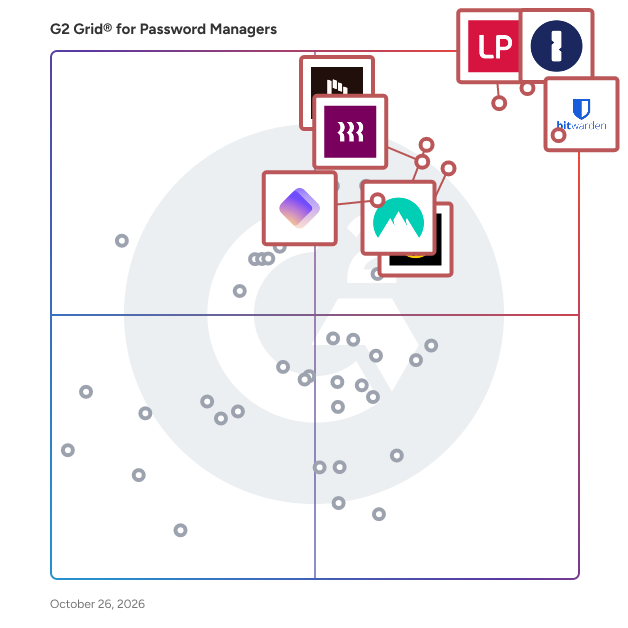
- **Leader:** [1Password](https://www.g2.com/products/1password/reviews)
- **Highest Performer:** [Hudu](https://www.g2.com/products/hudu/reviews)
- **Easiest to Use:** [heylogin](https://www.g2.com/products/heylogin/reviews)
- **Top Trending:** [Rippling IT](https://www.g2.com/products/rippling-it/reviews)
- **Best Free Software:** [LastPass](https://www.g2.com/products/lastpass/reviews)

  
## Which Type of Password Managers Tools Are You Looking For?
  - [Password Managers](https://www.g2.com/categories/password-managers) *(current)*
  - [Single Sign-On (SSO) Solutions](https://www.g2.com/categories/single-sign-on-sso)
  - [Identity and Access Management (IAM) Software](https://www.g2.com/categories/identity-and-access-management-iam)
  - [Multi-Factor Authentication (MFA) Software](https://www.g2.com/categories/multi-factor-authentication-mfa)

  
---

**Sponsored**

### Rippling IT

Transform your organization’s IT operations with Rippling’s unified platform for identity, device, access, and security management. Centralize every IT workflow, from provisioning apps and laptops to enforcing security policies, in a single dashboard. Seamlessly manage the entire employee lifecycle, automatically granting and revoking app access, configuring devices, and maintaining least-privilege controls. Enforce compliance with real-time monitoring, automated patching, and integrated endpoint protection. Streamline offboarding with instant lockouts and secure device recovery. Gain full visibility across hardware, software, and user risk without the complexity of multiple tools. Rippling helps your business cut costs, eliminate manual work, and strengthen security, so your team can move faster. Experience the power of unified IT management with Rippling today.


[Visit website](https://www.g2.com/external_clickthroughs/record?secure%5Bad_program%5D=ppc&amp;secure%5Bad_slot%5D=category_product_list&amp;secure%5Bcategory_id%5D=593&amp;secure%5Bdisplayable_resource_id%5D=593&amp;secure%5Bdisplayable_resource_type%5D=Category&amp;secure%5Bmedium%5D=sponsored&amp;secure%5Bplacement_reason%5D=page_category&amp;secure%5Bplacement_resource_ids%5D%5B%5D=593&amp;secure%5Bprioritized%5D=false&amp;secure%5Bproduct_id%5D=1640029&amp;secure%5Bresource_id%5D=593&amp;secure%5Bresource_type%5D=Category&amp;secure%5Bsource_type%5D=category_page&amp;secure%5Bsource_url%5D=https%3A%2F%2Fwww.g2.com%2Fcategories%2Fpassword-managers%2Ff%2Fplatforms&amp;secure%5Btoken%5D=bcc3955ea8231dffa3a754ccedc72bacd39bf8e1e0e61f6453893439fdb9b837&amp;secure%5Burl%5D=https%3A%2F%2Fwww.rippling.com%2Flp%2Fpaid-identity-access%3Futm_source%3Dg2crowd_cpc%26utm_medium%3Daffiliate%26utm_program%3Devergreen-conversion%26utm_term%3DPassword-Managers%26utm_campaign%3DUS-G2-PPC-IT%26utm_product%3Dit&amp;secure%5Burl_type%5D=custom_url)

---

  
## Buyer Guide: Key Questions for Choosing Password Managers Software
  ### What does Password Manager Software do?
  I describe Password Manager Software as a tool that stores, organizes, shares, and protects credentials used across business systems. G2 reviewers highlight browser extensions, autofill, password generation, encrypted storage, shared vaults, mobile access, and administrative controls as common parts of the workflow. They also associate the category with stronger security habits because teams rely less on reused passwords, scattered records, and informal sharing.


  ### Why do businesses use Password Manager Software?
  From the G2 reviewer patterns I evaluated, businesses use Password Manager Software to reduce password sprawl, protect sensitive information, and control access when employees join, change roles, or leave. Reviewers often mention the strain of remembering many credentials and the risk of sharing passwords through unsafe channels.

Key benefits include:

- Secure storage for individual, team, and client credentials.
- Faster access through autofill, browser extensions, and mobile apps.
- Easier password sharing without exposing the actual password.
- Stronger control over permissions, vaults, and user groups.
- Simplified onboarding and offboarding for administrators.
- Better visibility into weak, reused, or exposed credentials.


  ### Who uses Password Manager Software primarily?
  I found that G2 reviewer sentiment points to both everyday users and administrators. Primary users include:

- **Employees** who need frequent access to many business applications.
- **IT and security teams** that manage access, policies, and shared vaults.
- **Administrators** who control user permissions and employee transitions.
- **Managed service providers and consultants** who handle client credentials.
- **Small business owners** who need a secure place for company logins.
- **Finance, healthcare, software, marketing, and professional services teams** with sensitive records.


  ### What types of Password Manager Software should I consider?
  The G2 feedback pointed to several buyer paths:

- **Business password managers** for team vaults, sharing, access control, and admin oversight.
- **Enterprise password vaults** for privileged access, audits, compliance, and security policy needs.
- **IT documentation platforms** with credential storage for service providers and technical teams.
- **Identity and access platforms** that combine passwords with SSO, MFA, and device controls.
- **Lightweight personal or small-team tools** for simple storage, autofill, and password generation.
- **Open-source or self-hosted options** for teams that want more control over deployment.


  ### What are the core features to look for in Password Manager Software?
  When I assessed G2 reviewer sentiment, the most important features were practical and security-focused:

- Encrypted vaults with organized folders, secure notes, and structured credential management.
- Password generation, health monitoring, breach alerts, and reuse detection.
- Secure sharing with granular permissions, shared folders, and user group controls.
- Browser extensions, autofill, and mobile apps with consistent cross-device sync.
- MFA, SSO, passkeys, biometrics, and zero-knowledge architecture as core security signals.
- Admin tools covering onboarding, offboarding, account recovery, and user dashboards.
- Integrations with browsers, identity providers, and IT workflows.
- Responsive support, reliable performance, and a low-friction setup experience.


  ### What trends are shaping Password Manager Software right now?
  I found that G2 users often highlight these password manager software trends:

- **Passkeys, MFA, SSO, and biometrics** that strengthen identity and access control.
- **Better browser extensions** that improve autofill, login capture, and daily usability.
- **Shared vault governance** that helps teams manage credential access more securely.
- **Audit and compliance features** that give IT teams clearer visibility into password activity.
- **Mobile experience improvements** that support secure access across devices.


  ### How should I choose Password Manager Software?
  For me, the strongest password manager is the kind that matches the team&#39;s security needs, access model, and daily login habits. When secure storage, autofill, browser and mobile reliability, admin permissions, MFA, SSO, auditing, and onboarding controls work together, password management software becomes a dependable system for protecting access without slowing people down.


---

  ## What Are the Top-Rated Password Managers Products in 2026?
### 1. [1Password](https://www.g2.com/products/1password/reviews)
  **Average Rating:** 4.6/5.0
  **Total Reviews:** 1,774
  **Why buyers love it?:** 1Password’s G2 feedback gave me a clear picture of secure credential organization across devices, teams, and business applications. Reviewers highlight vaults, autofill, security alerts, SSO, audit logs, admin controls, and dependable sharing workflows. The product appears strongest for teams that need structured access to business credentials with administrative oversight. Its value comes through most in environments where shared access needs to stay controlled and easy to manage.


### What Do G2 Reviewers Say About 1Password?
*AI-generated summary from verified user reviews*

**Pros:**

- Users find 1Password&#39;s **ease of use** exceptional, simplifying password management across devices with a clean interface.
- Users value the **exceptional security** of 1Password, providing peace of mind and effortless password management across devices.
- Users find 1Password to provide **secure and easy password management** , enhancing peace of mind and efficiency daily.
- Users love the **intuitive interface** of 1Password, which simplifies password management across devices seamlessly.
- Users love the **easy access** offered by 1Password, enabling quick logins and seamless credential management across devices.

**Cons:**

- Users find **password tracking and management cumbersome** , wishing for automatic features and clearer account distinctions.
- Users find the **pricing to be high** for personal use, making it less accessible for some individuals.
- Users experience **login issues** with 1Password, including problems with browser extensions and distinguishing account types.
- Users experience **autofill issues** , finding it annoying and risky when it fills in inappropriate fields automatically.
- Users find the **cost of 1Password high** compared to alternatives, with no free plan available for testing.

#### Key Features
  - Multi-Domain Support
  - Mobile-Push
  - Universal approach
  - Quick Login
  - Password Generator
  #### What Are Recent G2 Reviews of 1Password?

**"[One-Place Password Management with 1Password](https://www.g2.com/survey_responses/1password-review-11960967)"**

**Rating:** 4.0/5.0 stars
*— Joanna J.*

[Read full review](https://www.g2.com/survey_responses/1password-review-11960967)

---

**"[Making Daily Credential Management More Structured](https://www.g2.com/survey_responses/1password-review-12865207)"**

**Rating:** 5.0/5.0 stars
*— VINAY P.*

[Read full review](https://www.g2.com/survey_responses/1password-review-12865207)

---

  #### What Are G2 Users Discussing About 1Password?

- [I&#39;m struggling with 1Password&#39;s secure sharing features. Can anyone explain the best way to use them?](https://www.g2.com/discussions/i-m-struggling-with-1password-s-secure-sharing-features-can-anyone-explain-the-best-way-to-use-them) - 3 comments, 2 upvotes
- [What is 1Password used for?](https://www.g2.com/discussions/1password-what-is-1password-used-for) - 2 comments
- [Is 1password any good?](https://www.g2.com/discussions/is-1password-any-good) - 3 comments, 3 upvotes
### 2. [LastPass](https://www.g2.com/products/lastpass/reviews)
  **Average Rating:** 4.5/5.0
  **Total Reviews:** 2,027
  **Why buyers love it?:** LastPass showed up in reviewer feedback as a familiar tool for everyday credential access across websites and devices. Users highlight autofill, saved passwords, password sharing, mobile access, and reduced reliance on memory for large credential sets. I read the feedback as strongest for users and teams that want broad access convenience in a recognizable password manager. The core theme is simple password storage that supports frequent logins across work and personal tools.


### What Do G2 Reviewers Say About LastPass?
*AI-generated summary from verified user reviews*

**Pros:**

- Users enjoy the **ease of use** of LastPass, making password management seamless across all their devices.
- Users value the **secure and user-friendly password management** of LastPass, simplifying their online login experience.
- Users trust LastPass for its **high security levels** , ensuring passwords remain safe even during potential breaches.
- Users enjoy the **easy-to-use autofill feature** of LastPass, simplifying password management and enhancing operational safety.
- Users appreciate the **high security levels** of LastPass, providing confidence against potential data breaches.

**Cons:**

- Users experience **autofill issues** with LastPass, leading to confusion and difficulties in logging into apps and websites.
- Users find that **password generation can be excessive in length** , and autofill can misidentify fields, causing frustration.
- Users experience **login issues** with LastPass, finding the app challenging and manual password entry frustrating.
- Users find **password issues** in LastPass frustrating, with frequent change prompts and unreliable copy functions impacting usability.
- Users report frequent **browser extension issues** that hinder usability, causing frustration and impacting overall trust in LastPass.

#### Key Features
  - Multiple Operating system support
  - SMS-Based
  - Multiple authentication methods
  - Mobile App Usability
  - Two-Factor Authentication
  #### What Are Recent G2 Reviews of LastPass?

**"[Centralized Password Management for Engineering and Coordination Workflows](https://www.g2.com/survey_responses/lastpass-review-12837175)"**

**Rating:** 5.0/5.0 stars
*— VINAY P.*

[Read full review](https://www.g2.com/survey_responses/lastpass-review-12837175)

---

**"[Stress-Free Password Management with Seamless Autofill and Sync](https://www.g2.com/survey_responses/lastpass-review-12845237)"**

**Rating:** 4.5/5.0 stars
*— Ashwin B.*

[Read full review](https://www.g2.com/survey_responses/lastpass-review-12845237)

---

  #### What Are G2 Users Discussing About LastPass?

- [I&#39;m having trouble organizing and sharing passwords securely with LastPass. How can I do this more efficiently?](https://www.g2.com/discussions/i-m-having-trouble-organizing-and-sharing-passwords-securely-with-lastpass-how-can-i-do-this-more-efficiently)
- [What is LastPass used for?](https://www.g2.com/discussions/lastpass-what-is-lastpass-used-for) - 3 comments
- [What is LastPass used for?](https://www.g2.com/discussions/what-is-lastpass-used-for) - 3 comments, 1 upvote
### 3. [Bitwarden](https://www.g2.com/products/bitwarden/reviews)
  **Average Rating:** 4.6/5.0
  **Total Reviews:** 1,256
  **Why buyers love it?:** Bitwarden’s reviewer feedback pointed to secure credential storage and sharing with strong value for teams. Users highlight vaults, cross-device access, mobile apps, MFA, reliable sync, and team sharing. The product appears well suited for organizations that want affordable password management with meaningful security depth. Interface age, sorting, and setup friction also show up as parts of the experience to account for.


### What Do G2 Reviewers Say About Bitwarden?
*AI-generated summary from verified user reviews*

**Pros:**

- Users appreciate the **ease of use** of Bitwarden, enjoying seamless password management across all platforms.
- Users appreciate the **robust security features** of Bitwarden, enhancing their confidence in protecting sensitive information.
- Users appreciate the **excellent password management** features of Bitwarden, praising its usability and organizational capabilities.
- Users find the **easy setup** of Bitwarden makes transitioning from other password managers seamless and straightforward.
- Users value the **cross-platform compatibility** of Bitwarden, effortlessly accessing accounts on mobile, PC, and Mac.

**Cons:**

- Users often face **autofill issues** on specific websites, limiting Bitwarden&#39;s effectiveness and user experience.
- Users find the **poor UI** of Bitwarden to be clunky and outdated, affecting navigation for new users.
- Users find the **process complexity** in Bitwarden&#39;s admin features cumbersome, causing inefficiencies during onboarding and auditing.
- Users note the **missing features** in Bitwarden, particularly with autofill and TOTP storage functionality.
- Users find the **learning curve steep** , especially in understanding collections and adding passwords effectively.

#### Key Features
  - Quick Login
  - Password Generator
  - Digital Wallet
  #### What Are Recent G2 Reviews of Bitwarden?

**"[Keeps My Work Logins, Cards and Notes Well Organized](https://www.g2.com/survey_responses/bitwarden-review-12807583)"**

**Rating:** 5.0/5.0 stars
*— Ishan S.*

[Read full review](https://www.g2.com/survey_responses/bitwarden-review-12807583)

---

**"[Bitwarden Self-Hosted: Polished, Fast Sync, and Incredible Value](https://www.g2.com/survey_responses/bitwarden-review-12797910)"**

**Rating:** 5.0/5.0 stars
*— Ruben D.*

[Read full review](https://www.g2.com/survey_responses/bitwarden-review-12797910)

---

  #### What Are G2 Users Discussing About Bitwarden?

- [What is Bitwarden used for?](https://www.g2.com/discussions/what-is-bitwarden-used-for) - 2 comments, 1 upvote
- [How does Bitwarden make money?](https://www.g2.com/discussions/how-does-bitwarden-make-money) - 1 comment
- [Does Bitwarden work with apps?](https://www.g2.com/discussions/does-bitwarden-work-with-apps) - 2 comments, 1 upvote
### 4. [NordPass Business](https://www.g2.com/products/nordpass-business/reviews)
  **Average Rating:** 4.5/5.0
  **Total Reviews:** 641
  **Why buyers love it?:** NordPass Business came through in the G2 feedback as a password manager centered on secure team sharing. Reviewers point to shared folders, browser extensions, autofill, password generation, cross-device access, and responsive support as core strengths. I read the strongest value around helping teams build safer password habits while keeping shared credentials organized. Folder structure and browser behavior also appear in the feedback as practical parts of the experience.


### What Do G2 Reviewers Say About NordPass Business?
*AI-generated summary from verified user reviews*

**Pros:**

- Users value the **ease of use** of NordPass Business, enhancing productivity while maintaining strong security for passwords.
- Users appreciate the **security features** of NordPass Business, ensuring organized and easy access to unique passwords.
- Users appreciate the **secure and easy password management** of NordPass Business, simplifying their team&#39;s online security.
- Users find NordPass Business **intuitive** , streamlining password management and enhancing security effortlessly for their teams.
- Users value the **seamless sharing features** of NordPass Business, enhancing team collaboration while maintaining security.

**Cons:**

- Users experience issues with **password management** , including unwanted password creation prompts and autofill conflicts with other managers.
- Users often face **password issues** with NordPass, including unreliable autofill and saved password accessibility challenges.
- Users find **login issues** frustrating due to frequent logouts and unreliable password autofill functionality.
- Users often experience **autofill issues** with NordPass, leading to frustration and interruptions in accessing their accounts.
- Users often experience **browser extension issues** with NordPass Business, limiting integration and complicating usability.

#### Key Features
  - Email-Based
  - Multi-Device Sync
  - Quick Login
  - Password Generator
  - Digital Wallet
  #### What Are Recent G2 Reviews of NordPass Business?

**"[Simple, Secure Team Password Management with NordPass Business](https://www.g2.com/survey_responses/nordpass-business-review-12856345)"**

**Rating:** 4.0/5.0 stars
*— Nagesh B.*

[Read full review](https://www.g2.com/survey_responses/nordpass-business-review-12856345)

---

**"[Enhances Security with Group Sharing](https://www.g2.com/survey_responses/nordpass-business-review-10473026)"**

**Rating:** 5.0/5.0 stars
*— Curtis L.*

[Read full review](https://www.g2.com/survey_responses/nordpass-business-review-10473026)

---

### 5. [Dashlane Password Manager](https://www.g2.com/products/dashlane-password-manager/reviews)
  **Average Rating:** 4.5/5.0
  **Total Reviews:** 622
  **Why buyers love it?:** Dashlane Password Manager came across in G2 feedback as a tool for improving password hygiene through smoother login workflows. Reviewers highlight password capture, password generation, passkeys, two-factor codes, breach visibility, and autofill. I read the strongest value around helping teams reduce manual login friction while strengthening credential habits. Pricing and shared-computer behavior appear as practical factors in the feedback.


### What Do G2 Reviewers Say About Dashlane Password Manager?
*AI-generated summary from verified user reviews*

**Pros:**

- Users appreciate the **ease of use** of Dashlane, finding it beginner-friendly and highly functional across devices.
- Users value the **robust security features** of Dashlane, making password management effortless and safe.
- Users value the **ease of sharing passwords** with others while maintaining security and organization in Dashlane.
- Users find Dashlane **intuitive and easy to use** , providing a responsive and user-friendly experience for password management.
- Users appreciate the **secure password sharing** features of Dashlane, enhancing team collaboration and organizational security.

**Cons:**

- Users face **autofill issues** with Dashlane, finding it overly eager and complicating their form-filling experience.
- Users report frequent **password issues** , including accidental saves and difficulties when managing passwords across different accounts.
- Users experience **login issues** with Dashlane, including inconvenient re-signing and problems with staying logged in.
- Users often face **issues with incorrect password cataloguing** and glitches with biometric logins, complicating their experience.
- Users find the **pricing steep** , especially with a significant increase compared to competitors offering similar features.

#### Key Features
  - Authentication User experience
  - Administration Console
  - Cross Browser support
  - Browser Extension
  - Password Generator
  #### What Are Recent G2 Reviews of Dashlane Password Manager?

**"[A Must-Have for Agency Password Management](https://www.g2.com/survey_responses/dashlane-password-manager-review-6669879)"**

**Rating:** 5.0/5.0 stars
*— Jon R.*

[Read full review](https://www.g2.com/survey_responses/dashlane-password-manager-review-6669879)

---

**"[Dashlane Makes Strong Passwords Effortless with Autofill, Syncing, and Security Insights](https://www.g2.com/survey_responses/dashlane-password-manager-review-12769396)"**

**Rating:** 4.5/5.0 stars
*— Nagesh B.*

[Read full review](https://www.g2.com/survey_responses/dashlane-password-manager-review-12769396)

---

### 6. [Keeper Password Manager](https://www.g2.com/products/keeper-password-manager/reviews)
  **Average Rating:** 4.6/5.0
  **Total Reviews:** 1,187
  **Why buyers love it?:** Keeper Password Manager’s feedback centered on secure vault administration for teams and enterprises. Reviewers mention credential storage, controlled sharing, folders, user management, browser extensions, password creation, administrative visibility, and support. I read it as a fit for organizations that need structured password governance rather than only individual password storage. Setup organization and oversight come through as important parts of the reviewer experience.


### What Do G2 Reviewers Say About Keeper Password Manager?
*AI-generated summary from verified user reviews*

**Pros:**

- Users value the **ease of use** of Keeper Password Manager, praising its intuitive features and convenient password sharing.
- Users value the **strong security features** of Keeper, ensuring their passwords are well-protected from breaches.
- Users appreciate the **secure sharing** feature of Keeper Password Manager, making collaboration effortless for teams.
- Users value Keeper&#39;s **secure and efficient password management** , making it ideal for both personal and organizational use.
- Users appreciate Keeper for its **reliable features** , including passkey storage and efficient password management tools.

**Cons:**

- Users experience frequent **glitches and auto-fill inaccuracies** , leading to frustrations with Keeper Password Manager.
- Users experience **autofill issues** with Keeper Password Manager, requiring manual input for new site credentials frequently.
- Users report **login issues** including cumbersome setup and frequent sign-ins that add frustration to their experience.
- Users face **password issues** with Keeper, including difficulties with shared folder settings and master password resets.
- Users find the **learning curve steep** for Keeper Password Manager, making it challenging for new users to adapt.

#### Key Features
  - Local Access
  - Password Policy Enforcement
  - Multi-Domain Support
  - SMS-Based
  - Cental dashboard
  #### What Are Recent G2 Reviews of Keeper Password Manager?

**"[Secure, Smooth Password Management That Keeps My Work Accounts Organized](https://www.g2.com/survey_responses/keeper-password-manager-review-12779964)"**

**Rating:** 5.0/5.0 stars
*— Ishan S.*

[Read full review](https://www.g2.com/survey_responses/keeper-password-manager-review-12779964)

---

**"[The Professional Choice: Robust Vault Features with Nice Admin Oversight](https://www.g2.com/survey_responses/keeper-password-manager-review-12457273)"**

**Rating:** 4.5/5.0 stars
*— Maris B.*

[Read full review](https://www.g2.com/survey_responses/keeper-password-manager-review-12457273)

---

  #### What Are G2 Users Discussing About Keeper Password Manager?

- [What is Keeper Password Manager used for?](https://www.g2.com/discussions/what-is-keeper-password-manager-used-for) - 2 comments
- [What is a good password keeper app?](https://www.g2.com/discussions/what-is-a-good-password-keeper-app) - 1 comment, 1 upvote
- [How do I get rid of Keeper Password Manager?](https://www.g2.com/discussions/how-do-i-get-rid-of-keeper-password-manager)
### 7. [Rippling IT](https://www.g2.com/products/rippling-it/reviews)
  **Average Rating:** 4.7/5.0
  **Total Reviews:** 1,025
  **Why buyers love it?:** Rippling IT’s G2 feedback framed password access as part of a broader employee IT administration workflow. Reviewers highlight vaults, permissions, onboarding, device visibility, centralized administration, and reduced tool switching. I read the product as strongest when access management needs to connect with employee lifecycle tasks. Contracts, setup, and extension behavior also come through as practical considerations in the reviews.


### What Do G2 Reviewers Say About Rippling IT?
*AI-generated summary from verified user reviews*

**Pros:**

- Users appreciate the **ease of use** of Rippling IT, enjoying seamless integration and streamlined access across platforms.
- Users find Rippling **intuitive and user-friendly** , making document processing and access management effortless and efficient.
- Users value the **powerful integration** of HR management and tech tools in Rippling for streamlined workflows.
- Users love the **easy access** provided by Rippling, streamlining logins and enhancing organizational efficiency.
- Users appreciate the **intuitive and user-friendly interface** of Rippling for efficient HR and payroll management.

**Cons:**

- Users express a need for better **integration and feature availability** in Rippling IT, impacting overall utility.
- Users find the **limited features** of Rippling IT insufficient, lacking functionality for sharing various sensitive information securely.
- Users express a need for **improvement in various features** , highlighting usability issues and desired enhancements for better functionality.
- Users find the **learning curve steep** , which can overwhelm those who are less tech-savvy during setup.
- Users report **poor customer support** , feeling friendly assistance lacks actual power to resolve issues effectively.

#### Key Features
  - Authentication User experience
  - Local Access
  - Ease of installation on server
  - Multi-Domain Support
  - Browser Extension
  #### What Are Recent G2 Reviews of Rippling IT?

**"[Clean UI and Excellent User Experience](https://www.g2.com/survey_responses/rippling-it-review-12866477)"**

**Rating:** 5.0/5.0 stars
*— Pawani P.*

[Read full review](https://www.g2.com/survey_responses/rippling-it-review-12866477)

---

**"[Rippling Makes Account Provisioning and Password Sharing Effortless](https://www.g2.com/survey_responses/rippling-it-review-12639139)"**

**Rating:** 5.0/5.0 stars
*— Stephanie D.*

[Read full review](https://www.g2.com/survey_responses/rippling-it-review-12639139)

---

### 8. [IT Glue](https://www.g2.com/products/it-glue/reviews)
  **Average Rating:** 4.6/5.0
  **Total Reviews:** 678
  **Why buyers love it?:** IT Glue’s G2 feedback positioned it as IT documentation where credential management sits inside broader operational context. Reviewers point to assets, procedures, templates, passwords, related-item linking, centralized client information, troubleshooting support, and technician onboarding. The product appears most useful for IT teams that need documentation and credentials connected. Search, mobile use, performance, and sharing controls also come through as important experience factors.


### What Do G2 Reviewers Say About IT Glue?
*AI-generated summary from verified user reviews*

**Pros:**

- Users find IT Glue to be **very easy to use** , thanks to its intuitive design and efficient search functionality.
- Users highly value the **flexibility and ease of documentation management** in IT Glue, enhancing their operational efficiency.
- Users value the **seamless integration** of IT Glue with RMM tools, enhancing efficiency and reducing screen-switching.
- Users find IT Glue&#39;s **organization capabilities** indispensable for managing assets and passwords efficiently across teams.
- Users love the **easy integrations** of IT Glue, enhancing workflow by seamlessly connecting with RMM and PSA systems.

**Cons:**

- Users report **slow performance** when loading large client data sets, affecting their overall experience with IT Glue.
- Users feel IT Glue lacks **missing features** , such as enhanced mobile access and flexible document organization options.
- Users find the **search functionality lacking** , needing improvements in speed, accuracy, and document accessibility.
- Users find IT Glue&#39;s interface has a **steep learning curve** , causing confusion and difficulty in achieving effective results.
- Users find **search limitations** frustrating, citing slow performance and inconsistencies when looking up information.

#### Key Features
  - Quick Login
  - Two-Factor Authentication
  - Digital Wallet
  - Templates
  - Integrations
  #### What Are Recent G2 Reviews of IT Glue?

**"[Centralized IT Documentation Made Simple](https://www.g2.com/survey_responses/it-glue-review-12725053)"**

**Rating:** 5.0/5.0 stars
*— Justin C.*

[Read full review](https://www.g2.com/survey_responses/it-glue-review-12725053)

---

**"[Centralized Documentation That Streamlines Support and Collaboration](https://www.g2.com/survey_responses/it-glue-review-12813006)"**

**Rating:** 4.5/5.0 stars
*— D S.*

[Read full review](https://www.g2.com/survey_responses/it-glue-review-12813006)

---

  #### What Are G2 Users Discussing About IT Glue?

- [What is IT Glue used for?](https://www.g2.com/discussions/it-glue-what-is-it-glue-used-for) - 2 comments
- [What&#39;s new with IT Glue?](https://www.g2.com/discussions/what-s-new-with-it-glue)
- [What is Glue in information technology?](https://www.g2.com/discussions/what-is-glue-in-information-technology) - 1 comment
### 9. [Zoho Vault](https://www.g2.com/products/zoho-vault/reviews)
  **Average Rating:** 4.4/5.0
  **Total Reviews:** 74
  **Why buyers love it?:** Zoho Vault’s G2 feedback pointed to affordable centralized vaulting for teams. Reviewers highlight secure storage, sharing, centralized management, autofill, team access, easier setup, support, accountability, cross-device access, and onboarding. I read the product as a practical option for teams that need accessible password management. Session logouts, extension speed, interface polish, and advanced-setting discoverability also appear in the feedback.


### What Do G2 Reviewers Say About Zoho Vault?
*AI-generated summary from verified user reviews*

**Pros:**

- Users value the **ease of use** in Zoho Vault, simplifying password management and enhancing security effortlessly.
- Users find Zoho Vault&#39;s **implementation ease** exceptional, facilitating a smooth onboarding process and effortless integration with workflows.
- Users value the **efficient organization and sharing** of passwords in Zoho Vault, enhancing security and teamwork effortlessly.
- Users appreciate the **secure password sharing** capabilities of Zoho Vault, making credential management smooth and efficient.
- Users value the **easy and controlled sharing** of passwords in Zoho Vault, enhancing teamwork and security.

**Cons:**

- Users find the **UI outdated and unpolished** , highlighting the need for a more intuitive design in Zoho Vault.
- Users often face **frequent login issues** with Zoho Vault, causing frustration during busy work sessions.
- Users find the **slow performance** of Zoho Vault&#39;s browser extension a hindrance to efficient password management.
- Users find the **outdated UI** of Zoho Vault unpolished and in need of significant improvements.
- Users experience **autofill issues** with Zoho Vault&#39;s browser extension, affecting reliability and overall user satisfaction.

#### Key Features
  - Quick Login
  - Password Generator
  - Digital Wallet
  #### What Are Recent G2 Reviews of Zoho Vault?

**"[Simple and Secure Password Management for Everyday Use](https://www.g2.com/survey_responses/zoho-vault-review-12005470)"**

**Rating:** 4.5/5.0 stars
*— Verified User in Information Technology and Services*

[Read full review](https://www.g2.com/survey_responses/zoho-vault-review-12005470)

---

**"[Keeps My Login Details Organized in One Place and Makes It Easy to Manage](https://www.g2.com/survey_responses/zoho-vault-review-12733975)"**

**Rating:** 5.0/5.0 stars
*— Ishan S.*

[Read full review](https://www.g2.com/survey_responses/zoho-vault-review-12733975)

---

  #### What Are G2 Users Discussing About Zoho Vault?

- [What does Zoho Vault do?](https://www.g2.com/discussions/what-does-zoho-vault-do) - 2 comments, 1 upvote
- [Is Zoho Vault safe?](https://www.g2.com/discussions/is-zoho-vault-safe) - 2 comments
- [Is Zoho Vault free?](https://www.g2.com/discussions/is-zoho-vault-free) - 1 comment
### 10. [RoboForm](https://www.g2.com/products/roboform/reviews)
  **Average Rating:** 4.6/5.0
  **Total Reviews:** 742
  **Why buyers love it?:** RoboForm’s reviewer feedback emphasized the combination of form filling and password storage.I saw that users highlight credential capture, autofill, form fills, notes, cross-device access, and team sharing. The product reads as useful for people who want stored credentials and important notes in one secure place. Mobile fill behavior, app integrations, and interface modernization also appear in the feedback.


### What Do G2 Reviewers Say About RoboForm?
*AI-generated summary from verified user reviews*

**Pros:**

- Users find RoboForm to be **user-friendly and convenient** , making password management and access seamless across devices.
- Users appreciate the **cross-platform compatibility** of RoboForm, ensuring easy access to their passwords on any device.
- Users love the **easy setup** of RoboForm, enabling quick deployment for personal and team use effortlessly.
- Users appreciate the **secure storage** of RoboForm, providing peace of mind for password and personal data management.
- Users appreciate the **convenience** of RoboForm’s seamless integration and effortless password management across all devices.

**Cons:**

- Users struggle with the **poor UI** of RoboForm, finding it outdated and clunky compared to modern alternatives.
- Users find it challenging to manage **duplicates and password updates** effectively in RoboForm, impacting overall usability.
- Users experience **autofill issues** that cause frustration with password updates and recognition of multiple logins for the same site.
- Users experience **login issues** , facing challenges with resets and inconsistent performance across devices like Samsung Galaxy.
- Users struggle with **duplication issues** , finding it challenging to manage and identify duplicate passwords effectively.

#### Key Features
  - Quick Login
  - Password Generator
  - Digital Wallet
  #### What Are Recent G2 Reviews of RoboForm?

**"[Best-in-Class Form Filler with an Easy-to-Use Admin Console](https://www.g2.com/survey_responses/roboform-review-12226605)"**

**Rating:** 5.0/5.0 stars
*— Kaushik M.*

[Read full review](https://www.g2.com/survey_responses/roboform-review-12226605)

---

**"[It Keeps My Work Logins Organized, Secure, and Fast](https://www.g2.com/survey_responses/roboform-review-12818956)"**

**Rating:** 5.0/5.0 stars
*— Ishan S.*

[Read full review](https://www.g2.com/survey_responses/roboform-review-12818956)

---

  #### What Are G2 Users Discussing About RoboForm?

- [What is RoboForm used for?](https://www.g2.com/discussions/what-is-roboform-used-for) - 1 comment
### 11. [Hudu](https://www.g2.com/products/hudu/reviews)
  **Average Rating:** 4.7/5.0
  **Total Reviews:** 354
  **Why buyers love it?:** Hudu stood out to me for bringing MSP documentation and password storage into the same workspace. Reviewers highlight client records, procedures, assets, integrations, OTP tokens, and credential details as connected pieces of the product. The value appears strongest for service teams that need access context alongside operational documentation. G2 Feedback also points to setup effort, search, and interface refinement as areas that shape day-to-day use.


### What Do G2 Reviewers Say About Hudu?
*AI-generated summary from verified user reviews*

**Pros:**

- Users commend Hudu for its **ease of use** and responsive support, facilitating quick integration and daily organization.
- Users love Hudu for its **user-friendly interface** and the responsive development team that values community feedback.
- Users commend Hudu for its **seamless integrations** and ease of setup, enhancing productivity and knowledge management.
- Users highlight the **extremely easy setup** of Hudu, enabling quick implementation and integration for their companies.
- Users love the **clean and simple design** of Hudu, enhancing usability and customization for their needs.

**Cons:**

- Users find Hudu lacks a **unified search feature** and other functionalities that hinder their overall experience.
- Users find **poor integration** issues with Hudu, needing external tools and facing limited options for efficiency.
- Users suggest that Hudu&#39;s **UX improvement** is needed, especially for navigation and modern interface design.
- Users desire more **innovative features** in Hudu, feeling current offerings are limited and lack essential functions.
- Users experience **integration issues** with Hudu, particularly lacking compatibility with various RMM tools like Atera.

#### Key Features
  - Mobile App Usability
  - Password Generator
  - Comments
  - Integrations
  - Duplicate Detection
  #### What Are Recent G2 Reviews of Hudu?

**"[Self-Hosted Documentation with a Clean API and Flexible MSP Asset Modeling](https://www.g2.com/survey_responses/hudu-review-12577291)"**

**Rating:** 5.0/5.0 stars
*— Mark H.*

[Read full review](https://www.g2.com/survey_responses/hudu-review-12577291)

---

**"[Centralized Documentation, Easy Setup](https://www.g2.com/survey_responses/hudu-review-12733077)"**

**Rating:** 5.0/5.0 stars
*— James S.*

[Read full review](https://www.g2.com/survey_responses/hudu-review-12733077)

---

  #### What Are G2 Users Discussing About Hudu?

- [What is Hudu used for?](https://www.g2.com/discussions/what-is-hudu-used-for) - 1 comment
### 12. [ManageEngine Password Manager Pro](https://www.g2.com/products/manageengine-password-manager-pro/reviews)
  **Average Rating:** 3.9/5.0
  **Total Reviews:** 35
  **Product Description:** Password Manager Pro offers a complete solution to control, manage, monitor, and audit the entire life-cycle of privileged access. In a single package, it offers four solutions - privileged account management, remote access management, privileged session management, and SSL certificate management. Password Manager Pro basically consolidates all your privileged accounts in a centralized vault in fully encrypted form. It enforces password management best practices and secures the privileged accounts, the keys to your kingdom. It helps mitigate security risks related to privileged access and preempt security breaches and compliance issues. Privileged Account Management: Adopt a best practice approach for effective management of privileged accounts that form the security perimeter around mission-critical data servers and other IT assets in your environment—whether they use password or key-based authentication, including those of operating systems, databases, servers, applications, cloud platforms, and networking devices. Remote Access Management: Establish centralized control on access pathways and define how users connect to target systems. Ensure ultimate security in all privileged connections with one-click login capabilities instead of sharing credentials in cleartext. Tunnel connections through an encrypted channel gateway, requiring no direct connectivity between the user device and remote host. Privileged Session Management: Stay aware of what your users are doing with their privileged access and prevent misuse. Facilitate advanced monitoring to check whether users—employees and third parties alike, stay within their provisioned scope. Readily answer questions regarding the ‘who’, ‘what’ and ‘when’ of privileged access. SSL Certificate Management: Gain complete visibility and control over your SSL environment. Stay away from risks of certificate expiration oversights, obsolete hashing algorithms and weak cipher suites that cost you your customers’ trust. Experience seamless, end-to-end management of certificate life cycles.


### What Do G2 Reviewers Say About ManageEngine Password Manager Pro?
*AI-generated summary from verified user reviews*

**Pros:**

- Users find **deployment easy** , enjoying simple implementation and convenient support directly from the platform.
- Users find **easy integrations** invaluable as they streamline privileged management and enhance security effortlessly.
- Users appreciate the **efficiency** of ManageEngine Password Manager Pro, finding it seamless for secure credential management.
- Users find that **implementation is easy** with ManageEngine Password Manager Pro, facilitating seamless deployment and support.
- Users value the **monitoring capabilities** of Password Manager Pro, which enhance security and facilitate zero trust access.

  #### What Are Recent G2 Reviews of ManageEngine Password Manager Pro?

**"[Solid Centralized Identity Management with ManageEngine Password Manager Pro](https://www.g2.com/survey_responses/manageengine-password-manager-pro-review-12685129)"**

**Rating:** 4.0/5.0 stars
*— Jose M.*

[Read full review](https://www.g2.com/survey_responses/manageengine-password-manager-pro-review-12685129)

---

**"[An Enterpise grade PAM tool](https://www.g2.com/survey_responses/manageengine-password-manager-pro-review-10747207)"**

**Rating:** 5.0/5.0 stars
*— Sinodos A.*

[Read full review](https://www.g2.com/survey_responses/manageengine-password-manager-pro-review-10747207)

---

  #### What Are G2 Users Discussing About ManageEngine Password Manager Pro?

- [How much does password manager Pro cost?](https://www.g2.com/discussions/how-much-does-password-manager-pro-cost)
- [Who makes password manager Pro?](https://www.g2.com/discussions/who-makes-password-manager-pro)
- [What is a resource in password manager Pro?](https://www.g2.com/discussions/what-is-a-resource-in-password-manager-pro)
### 13. [Proton Pass For Business](https://www.g2.com/products/proton-pass-for-business/reviews)
  **Average Rating:** 4.8/5.0
  **Total Reviews:** 56
  **Product Description:** Proton Pass for Business is a cloud-based password management solution specifically designed to assist small and medium-sized businesses (SMBs) in securely storing, sharing, and managing login credentials and sensitive data. With a focus on end-to-end encryption and robust administrative controls, this platform addresses the critical need for improved credential hygiene, compliance support, and streamlined access to business systems. It is particularly tailored for organizations that prioritize security and efficiency in their operations. The target audience for Proton Pass for Business includes SMBs that face challenges related to password management, such as credential leaks, reused passwords, and unmanaged credential sharing. By consolidating passwords and other sensitive information into a centralized encrypted vault, businesses can enhance their security posture. The platform also allows for the safe sharing of access among employees and external partners, while implementing organization-wide security policies like two-factor authentication (2FA). Furthermore, it supports modern authentication standards, including passkeys and single sign-on (SSO), making it suitable for a variety of business environments. Key features of Proton Pass for Business include secure credential storage and encryption, which ensures that passwords, secure notes, and credit card details are stored in a zero-knowledge vault accessible only to authorized users. The centralized administrative control allows business administrators to deploy the solution across the organization, onboard or offboard users, enforce security policies, and monitor activity logs for compliance purposes. Additionally, the platform supports cross-device and platform access, enabling seamless credential management across web, desktop, and mobile devices. Proton Pass for Business also enhances collaboration and productivity through features such as secure sharing and vaults, which allow teams to create multiple encrypted vaults for projects or departments. The autofill function speeds up the login process by automatically entering credentials and two-factor codes, reducing the time spent logging into systems and minimizing manual errors. Moreover, the platform includes dark web monitoring to alert users if their credentials appear in data leaks, promoting proactive vulnerability management. The security and compliance benefits of Proton Pass for Business are significant, as the platform operates under Swiss privacy laws, which provide strong protections for business data. Its open-source nature and third-party security audits further enhance trust and transparency. By implementing robust access controls and encrypted storage, Proton Pass supports SMBs in meeting regulatory requirements such as GDPR. Overall, this solution provides a structured approach to reducing security risks, improving productivity, and centralizing password management within a secure environment.


### What Do G2 Reviewers Say About Proton Pass For Business?
*AI-generated summary from verified user reviews*

**Pros:**

- Users value the **ease of use** of Proton Pass, enjoying a smooth migration and efficient browser extensions.
- Users love the **fast performance** of Proton Pass, enjoying its smooth auto-filling and efficient browser extension.
- Users appreciate the **cross-platform compatibility** of Proton Pass, enhanced by its modern interface and functional browser extensions.
- Users appreciate the **easy setup** of Proton Pass, enjoying its smooth navigation and seamless auto-filling capabilities.
- Users find **navigation easy** with Proton Pass, enjoying its smooth interface and efficient auto-filling across platforms.

**Cons:**

- Users find **folder management lacking** , making it difficult to organize large collections of passwords and notes effectively.
- Users find the **learning curve steep** , requiring significant time to fully leverage all available features.
  #### What Are Recent G2 Reviews of Proton Pass For Business?

**"[Privacy Focused](https://www.g2.com/survey_responses/proton-pass-for-business-review-12854370)"**

**Rating:** 5.0/5.0 stars
*— Victor K.*

[Read full review](https://www.g2.com/survey_responses/proton-pass-for-business-review-12854370)

---

**"[I like privacy and Proton is all about privacy.](https://www.g2.com/survey_responses/proton-pass-for-business-review-12801914)"**

**Rating:** 5.0/5.0 stars
*— Steven M.*

[Read full review](https://www.g2.com/survey_responses/proton-pass-for-business-review-12801914)

---

### 14. [heylogin](https://www.g2.com/products/heylogin/reviews)
  **Average Rating:** 4.6/5.0
  **Total Reviews:** 109
  **Product Description:** heylogin is the first password manager with full hardware-based end-to-end encryption. 2-factor secure by default, developed and hosted in Germany.


### What Do G2 Reviewers Say About heylogin?
*AI-generated summary from verified user reviews*

**Pros:**

- Users love the **ease of use** of heylogin, enjoying fast logins without the hassle of passwords.
- Users love the **easy setup** of heylogin, making it accessible for everyone, including those who are not tech-savvy.
- Users find heylogin to be **highly intuitive** , enabling quick navigation and a natural, productive workflow.
- Users value the **enhanced security** of heylogin, enjoying easy access without the hassle of remembering passwords.
- Users rave about the **login efficiency** of Heylogin, enjoying the seamless and secure passwordless experience.

**Cons:**

- Users find **missing features** like limited third-party integration and password import options hinder the usability of heylogin.
- Users experience **autofill issues** with inconsistent form field detection on certain websites, impacting login convenience.
- Users find the **process complexity** of heylogin cumbersome, especially with limited browser support and setup difficulties.
- Users note that heylogin has a **mobile app dependency** which may inconvenience them when their phone is not nearby.
- Users note a **challenging learning curve** when adapting to heylogin&#39;s passwordless system, especially for traditional password users.
  #### What Are Recent G2 Reviews of heylogin?

**"[HeyLogin Makes Passwordless Login Feel Natural, Fast, and Secure](https://www.g2.com/survey_responses/heylogin-review-12271276)"**

**Rating:** 4.0/5.0 stars
*— Joel S.*

[Read full review](https://www.g2.com/survey_responses/heylogin-review-12271276)

---

**"[No Master Password Needed—heylogin’s 2FA Approach Feels Safer](https://www.g2.com/survey_responses/heylogin-review-12257270)"**

**Rating:** 5.0/5.0 stars
*— Kris P.*

[Read full review](https://www.g2.com/survey_responses/heylogin-review-12257270)

---

### 15. [C2 Password](https://www.g2.com/products/c2-password/reviews)
  **Average Rating:** 4.5/5.0
  **Total Reviews:** 12
  **Product Description:** C2 Password is a password manager that goes beyond simple password storing, it does more! ‧ Satisfies your password management needs! C2 Password provides a convenient way for users to create, store, and share passwords and other sensitive information securely. With cross-device syncing and password autofill extension, users can enjoy a seamless online experience without worrying about forgetting passwords ever again. ‧ You got the logins and passwords covered, what about your secrets on your sticky notes? C2 Password helps store credentials other than just passwords, it allows you to add item including addresses, banking information, passport details, identity cards, and even blank notes to type your secrets down. ‧ Make sharing a secure and easy one! Password-sharing is becoming a modern routine as we share many digital platforms with colleagues, friends, and family. To safeguard this process, C2 password makes it simple by allowing users to invite others to a shared vault via email while keeping all of this safe by deploying end-to-end encryption. ‧ Multi-level securoty standards to protect your data C2 Password takes data protection very serious to make sure our customers have full control over their data. To achieve this, all data is protected through our military-grade end-to-end (AES 256) encryption. We also deploy a private key protection, meaning the key used to encrypt amd decrpt your data is stored on your devices and is never shared - not even with Synology C2 servers.


### What Do G2 Reviewers Say About C2 Password?
*AI-generated summary from verified user reviews*

**Pros:**

- Users appreciate the **ease of use** of C2 Password, enjoying its user-friendly interface and multi-device support.
- Users appreciate **secure password sharing** options in C2 Password, enhancing both personal and business password management.
- Users love the **effortless autofill** feature, simplifying MFA across devices without any hassle.
- Users appreciate the **secure password storage** features of C2 Password for both personal and business needs.
- Users praise C2 Password for its **intuitive user-friendly interface** , making navigation and usage effortless across devices.

**Cons:**

- Users feel the **missing features** of C2 Password, such as Linux support and folder organization, hinder overall usability.
- Users often face **app integration issues** with Safari, leading to a frustrating user experience.
- Users experience **autofill issues** with C2 Password, as it sometimes fails to recognize fields in certain apps.
- Users find the **copy-paste issues** frustrating due to the separate password generator in C2 Password.
- Users express concerns about **limited folder management** , which may detract from their overall experience with C2 Password.
  #### What Are Recent G2 Reviews of C2 Password?

**"[Reliable and Secure Password Management for Daily Professional Workflow](https://www.g2.com/survey_responses/c2-password-review-12785564)"**

**Rating:** 5.0/5.0 stars
*— Ishan S.*

[Read full review](https://www.g2.com/survey_responses/c2-password-review-12785564)

---

**"[Simple and Secure Password Manager](https://www.g2.com/survey_responses/c2-password-review-11404959)"**

**Rating:** 5.0/5.0 stars
*— Henry R.*

[Read full review](https://www.g2.com/survey_responses/c2-password-review-11404959)

---

### 16. [Securden Password Vault for Enterprises](https://www.g2.com/products/securden-password-vault-for-enterprises/reviews)
  **Average Rating:** 4.6/5.0
  **Total Reviews:** 51
  **Why buyers love it?:** Securden Password Vault for Enterprises came through as an enterprise password vault focused on governed, audited access. Reviewers highlight role-based access, password sharing, auditing, direct remote login, web or on-premise access, centralized IT credentials, reliability, disaster-recovery considerations, and access monitoring. I read the product as a fit for IT teams managing privileged credential workflows. The reviewer sentiment centers on control, visibility, and operational reliability.


### What Do G2 Reviewers Say About Securden Password Vault for Enterprises?
*AI-generated summary from verified user reviews*

**Pros:**

- Users find Securden Password Vault **exceptionally easy to use** with intuitive features and convenient access methods.
- Users find Securden Password Vault **easy to implement** , enjoying its intuitive UI and seamless integrations for rapid deployment.
- Users love the **intuitive interface** of Securden Password Vault, which makes navigation and usage effortless.
- Users value the **extremely responsive support** from Securden, making issue resolution a quick and smooth process.
- Users value the **smooth integrations** of Securden Password Vault, enhancing efficiency and security in managing credentials.

**Cons:**

- Users find **folder management challenging** , with difficulties in uploads and inconvenient user ordering for organization.
- Users experience **copy-paste issues** with TOTP codes, making the login process more cumbersome than necessary.
- Users express concern over the **potential for complete password loss** , despite the company&#39;s prompt communication and support.
- Users express concerns about **insufficient information** on the product roadmap, desiring clarity on future developments.
- Users find the **initial organization challenging** , which can complicate the setup process for Securden Password Vault.

#### Key Features
  - Quick Login
  - Password Generator
  - Digital Wallet
  #### What Are Recent G2 Reviews of Securden Password Vault for Enterprises?

**"[Affordable and Secure Password Sharing Solution](https://www.g2.com/survey_responses/securden-password-vault-for-enterprises-review-11851846)"**

**Rating:** 4.0/5.0 stars
*— Riccardo P.*

[Read full review](https://www.g2.com/survey_responses/securden-password-vault-for-enterprises-review-11851846)

---

**"[Easy to Use Centralized Security, HA Configuration Needs Improvement](https://www.g2.com/survey_responses/securden-password-vault-for-enterprises-review-11782434)"**

**Rating:** 4.0/5.0 stars
*— Alessandro V.*

[Read full review](https://www.g2.com/survey_responses/securden-password-vault-for-enterprises-review-11782434)

---

  #### What Are G2 Users Discussing About Securden Password Vault for Enterprises?

- [What are the features of a password?](https://www.g2.com/discussions/securden-password-vault-for-enterprises-what-are-the-features-of-a-password)
- [What is password manager Vault?](https://www.g2.com/discussions/what-is-password-manager-vault)
- [What does a password vault do?](https://www.g2.com/discussions/what-does-a-password-vault-do)
### 17. [N-able Passportal](https://www.g2.com/products/n-able-passportal/reviews)
  **Average Rating:** 4.2/5.0
  **Total Reviews:** 40
  **Product Description:** N-able™ Passportal is a cloud-based, encrypted, and efficient privileged access management solution built for MSPs. N-able Passportal offers: • Credential injection across your systems and files • Thorough reporting and auditing • Password hygiene automation • Top-of-class two-way Active Directory sync • Granular IT documentation capabilities with Documentation Manager • Possibility to rebrand and resell the solution as your own with Passportal Site • Mobile app for password reset in under 60 seconds with Blink • Integration with multiple RMM solutions on the market • N-able Take Control integration for seamless credential injection during remote support sessions Secure your business. Save your technicians&#39; time. Demo Passportal today.


### What Do G2 Reviewers Say About N-able Passportal?
*AI-generated summary from verified user reviews*

**Pros:**

- Users value the **easy access** to credentials in the company vault, ensuring quick support when needed.
- Users value the **centralized storage** of N-able Passportal for easy and consistent access to credentials.
- Users value the **convenience** of N-able Passportal for efficiently organizing documentation in daily operations.
- Users appreciate the **versatile data storage** of N-able Passportal, allowing them to save passwords, documents, and certificates efficiently.
- Users appreciate the **ease of use** of N-able Passportal, facilitating efficient organization of infrastructure documentation.

**Cons:**

- Users face **login issues** with N-able Passportal, experiencing difficulties during initial setup and organization key entry.
- Users report frustrating **2FA issues** , including continuous requests and limited search functionalities in the browser plug-in.
- Users face **admin control issues** , citing unfriendliness and slow access affecting their overall experience with N-able Passportal.
- Users find the **difficult setup** of N-able Passportal a challenge, especially during initial login and configuration.
- Users find **folder management cumbersome** , wishing for easier bulk operations and better organization features.
  #### What Are Recent G2 Reviews of N-able Passportal?

**"[Excellent tool to remember to store your credentials](https://www.g2.com/survey_responses/n-able-passportal-review-12180653)"**

**Rating:** 4.0/5.0 stars
*— Rafael L.*

[Read full review](https://www.g2.com/survey_responses/n-able-passportal-review-12180653)

---

**"[Secure Credential and Documentation Manager](https://www.g2.com/survey_responses/n-able-passportal-review-10819845)"**

**Rating:** 5.0/5.0 stars
*— Jose S.*

[Read full review](https://www.g2.com/survey_responses/n-able-passportal-review-10819845)

---

  #### What Are G2 Users Discussing About N-able Passportal?

- [What is N-able Passportal used for?](https://www.g2.com/discussions/what-is-n-able-passportal-used-for)
### 18. [Passwd - team password manager for Google Workspace](https://www.g2.com/products/passwd-team-password-manager-for-google-workspace/reviews)
  **Average Rating:** 4.7/5.0
  **Total Reviews:** 55
  **Why buyers love it?:** Passwd appeared in G2 feedback as a lightweight option for team credential sharing in Google Workspace environments. Reviewers highlight centralized credentials, administrator control, secure sharing, cross-device sync, safer access to shared accounts, urgent-work access, and support. I read the fit as strongest for teams that need simple shared-account access without a heavy password-management workflow. Sync delays and browser-extension needs also appear in the review patterns.


### What Do G2 Reviewers Say About Passwd - team password manager for Google Workspace?
*AI-generated summary from verified user reviews*

**Pros:**

- Users love the **ease of use** of Passwd, appreciating its simplicity and seamless integration with Google Workspace.
- Users praise the **easy setup** of Passwd, allowing quick access and efficient management of passwords within Google Workspace.
- Users value the **secure storage** of Passwd, ensuring safety while easily managing passwords and 2FA tokens.
- Users appreciate the **easy sharing** of passwords securely within their Google Workspace, enhancing collaboration and security.
- Users enjoy the **easy and efficient password sharing** capabilities of Passwd, enhancing team collaboration effortlessly.

**Cons:**

- Users report **autofill issues** when managing multiple accounts, complicating access and usability for team members.
- Users experience **slow performance** with the UI and syncing, which can be frustrating at times.
- Users face **password visibility limitations** and occasional extension issues, impacting their overall experience with the manager.
- Users find the **UX confusing** , particularly during the sign-up process, indicating a need for improvement.
- Users desire more **customization options** for organizing passwords, as current options are limited and can hinder usability.

#### Key Features
  - Quick Login
  - Password Generator
  - Digital Wallet
  #### What Are Recent G2 Reviews of Passwd - team password manager for Google Workspace?

**"[Secure, simple, and reliable.](https://www.g2.com/survey_responses/passwd-team-password-manager-for-google-workspace-review-11623663)"**

**Rating:** 5.0/5.0 stars
*— Valorie S.*

[Read full review](https://www.g2.com/survey_responses/passwd-team-password-manager-for-google-workspace-review-11623663)

---

**"[Reliable Password Management and Intuitive Interface](https://www.g2.com/survey_responses/passwd-team-password-manager-for-google-workspace-review-12011651)"**

**Rating:** 5.0/5.0 stars
*— Fernando A.*

[Read full review](https://www.g2.com/survey_responses/passwd-team-password-manager-for-google-workspace-review-12011651)

---

### 19. [Akeyless Identity Security Platform](https://www.g2.com/products/akeyless-identity-security-platform/reviews)
  **Average Rating:** 4.6/5.0
  **Total Reviews:** 86
  **Why buyers love it?:** Akeyless Identity Security Platform showed up in the feedback as broader secrets management that includes password and certificate workflows. Reviewers highlight secrets storage, certificate lifecycle work, encryption-key management, role-based access, fewer misplaced secrets, consolidated security processes, support, and integrations. The product appears strongest when password management belongs inside a larger identity security and secrets-management program. API and integration details also come through as validation points in the reviews.


### What Do G2 Reviewers Say About Akeyless Identity Security Platform?
*AI-generated summary from verified user reviews*

**Pros:**

- Users find Akeyless easy to use, highlighting the **user-friendly interface** that simplifies secrets management effectively.
- Users commend Akeyless for its **robust security features** , enhancing the protection of their workloads and services.
- Users commend the **excellent customer support** of Akeyless Identity Security Platform, enhancing their overall experience and satisfaction.
- Users appreciate the **easy integrations** of Akeyless Identity Security Platform, simplifying secret management across cloud services.
- Users find the **implementation ease** of Akeyless Identity Security Platform enhances their operational efficiency and onboarding experience.

**Cons:**

- Users find the **poor documentation** to be a hurdle in leveraging the Akeyless platform effectively.
- Users note that the **poor UI** makes navigation difficult, complicating their overall experience with the platform.
- Users find the **complex setup** challenging, often requiring support to navigate log-related issues effectively.
- Users find the **complex usage** of Akeyless can be challenging, requiring significant time and effort for integration.
- Users find the **documentation lacking** , making it difficult to implement features despite excellent support provided.

#### Key Features
  - Quick Login
  - Envelope Encryption
  - Automated Provisioning
  - Service Integration
  - Audit Logging
  #### What Are Recent G2 Reviews of Akeyless Identity Security Platform?

**"[Effortless Setup, Needs Enhanced Features](https://www.g2.com/survey_responses/akeyless-identity-security-platform-review-12547656)"**

**Rating:** 4.0/5.0 stars
*— Avijit K.*

[Read full review](https://www.g2.com/survey_responses/akeyless-identity-security-platform-review-12547656)

---

**"[Effortless Security with Seamless Integration](https://www.g2.com/survey_responses/akeyless-identity-security-platform-review-12543767)"**

**Rating:** 4.5/5.0 stars
*— Sabari S.*

[Read full review](https://www.g2.com/survey_responses/akeyless-identity-security-platform-review-12543767)

---

  #### What Are G2 Users Discussing About Akeyless Identity Security Platform?

- [What is Akeyless Vault Platform used for?](https://www.g2.com/discussions/what-is-akeyless-vault-platform-used-for)
### 20. [Psono Password Manager](https://www.g2.com/products/psono-password-manager/reviews)
  **Average Rating:** 4.7/5.0
  **Total Reviews:** 20
  **Product Description:** Psono is an open souce password manager with enterprise features like SAML or LDAP. It supports client side encryption, second factor and much more. You can host it yourself of use our SaaS offer. All major browsers are supported and also available as app.


### What Do G2 Reviewers Say About Psono Password Manager?
*AI-generated summary from verified user reviews*

**Pros:**

- Users value the **robust security features** of Psono Password Manager, ensuring data protection and user privacy effectively.
- Users praise the **outstanding customer support** from Psono, highlighting the CEO&#39;s accessibility and effective assistance.
- Users value the **seamless integrations** with company systems and appreciate robust security and management features.
- Users find **implementation easy** with Psono Password Manager, appreciating its seamless setup and reliable performance.
- Users value the **open-source approach** of Psono Password Manager, ensuring transparency and security through comprehensive audits.

**Cons:**

- Users feel the **mobile app needs improvement** for field use and its UI is dated compared to the browser extension.
- Users find the **UI outdated** , especially in the mobile app, impacting the overall user experience.
- Users find the **UI issues** in Psono Password Manager&#39;s mobile app somewhat outdated compared to its browser extension.
- Users find the **difficult setup** of Psono Password Manager challenging for their organizational structure.
- Users note the **high per-user cost** of Psono Password Manager, particularly impacting larger organizations.
  #### What Are Recent G2 Reviews of Psono Password Manager?

**"[An excellent, feature complete solution for an unbeatable price!](https://www.g2.com/survey_responses/psono-password-manager-review-10308117)"**

**Rating:** 4.5/5.0 stars
*— Pedro M.*

[Read full review](https://www.g2.com/survey_responses/psono-password-manager-review-10308117)

---

**"[Fast, Secure and easy to deploy](https://www.g2.com/survey_responses/psono-password-manager-review-10307882)"**

**Rating:** 5.0/5.0 stars
*— Dimitri R.*

[Read full review](https://www.g2.com/survey_responses/psono-password-manager-review-10307882)

---

### 21. [KeePass](https://www.g2.com/products/keepass/reviews)
  **Average Rating:** 4.5/5.0
  **Total Reviews:** 219
  **Product Description:** KeePass is a free, open-source password manager designed to securely store and manage your passwords in an encrypted database. It supports multiple operating systems, including Windows, macOS, and Linux, and offers portability without requiring installation. KeePass employs strong encryption algorithms like AES and ChaCha20 to ensure the safety of your sensitive information. Key Features and Functionality: - Strong Security: KeePass encrypts the entire database, including usernames and notes, using robust algorithms such as AES and ChaCha20. It also utilizes SHA-256 for hashing master key components, providing protection against dictionary and guessing attacks. - Multiple User Keys: Users can secure their databases with a master password, a key file, or a combination of both. Additionally, KeePass 2.x allows locking the database to the current Windows user account for enhanced security. - Portability and Accessibility: KeePass is portable and can run directly from a USB stick without installation. It doesn&#39;t store data on the system, leaving no traces after deletion. The software also offers an optimized user interface for screen readers, enhancing accessibility. - Data Import and Export: KeePass supports importing from and exporting to various formats, including TXT, HTML, XML, and CSV, facilitating easy database transfer and integration with other applications. - Password Groups and Management: Users can organize passwords into groups, set expiration dates, and attach files to entries. KeePass also includes a strong random password generator to create secure passwords. - Auto-Type and Drag &amp; Drop: The software features auto-type functionality and global auto-type hotkeys, allowing users to input credentials into other applications seamlessly. Drag &amp; drop support further simplifies the process. - Plugin Architecture: KeePass offers a plugin architecture, enabling users to extend its functionality according to their needs. Primary Value and User Solutions: KeePass addresses the challenge of managing multiple passwords by providing a secure, centralized repository for all credentials. Its strong encryption ensures that sensitive information remains protected, while features like auto-type and password generation enhance user convenience. The portability and cross-platform support make it a versatile solution for users seeking a reliable and accessible password management tool.


### What Do G2 Reviewers Say About KeePass?
*AI-generated summary from verified user reviews*

**Pros:**

- Users find KeePass to be **easy to use** , providing straightforward password management without cloud reliance.
- Users appreciate the **strong password security** of KeePass, ensuring full control without reliance on cloud storage.
- Users appreciate the **easy setup** of KeePass, allowing quick initiation of secure password management.
- Users value the **complete control** KeePass offers over their passwords, appreciating its security and open-source nature.
- Users find **password management easy** with KeePass, ensuring safe access to numerous accounts effortlessly.

**Cons:**

- Users face **data loss risks** due to challenging backup processes and sharing methods, complicating password management.
- Users find the **UI outdated** , making the product less appealing compared to modern alternatives and more difficult for beginners.
- Users find the **difficult setup** of KeePass challenging, especially when managing passwords for multiple individuals securely.
- Users find the **learning curve steep** due to outdated UI and complicated configurations, especially for beginners.
- Users find **password sharing a significant challenge** , complicating security and management in larger teams with KeePass.
  #### What Are Recent G2 Reviews of KeePass?

**"[Secure, Free Password Management Without Cloud Storage!](https://www.g2.com/survey_responses/keepass-review-12723003)"**

**Rating:** 4.5/5.0 stars
*— Brad M.*

[Read full review](https://www.g2.com/survey_responses/keepass-review-12723003)

---

**"[A Simple Yet Powerful Offline Password Vault](https://www.g2.com/survey_responses/keepass-review-12104779)"**

**Rating:** 4.0/5.0 stars
*— Anish T.*

[Read full review](https://www.g2.com/survey_responses/keepass-review-12104779)

---

  #### What Are G2 Users Discussing About KeePass?

- [What is KeePass used for?](https://www.g2.com/discussions/keepass-what-is-keepass-used-for)
- [Can KeePass be hacked?](https://www.g2.com/discussions/can-keepass-be-hacked)
- [Is KeePass safe?](https://www.g2.com/discussions/is-keepass-safe) - 1 comment
### 22. [Kaspersky Password Manager](https://www.g2.com/products/kaspersky-password-manager/reviews)
  **Average Rating:** 4.5/5.0
  **Total Reviews:** 17
  **Product Description:** Kaspersky Password Manager gives an easy access to multiple accounts, plus a secure digital vault for passport, driver&#39;s license, bank cards &amp; other personal data.


  #### What Are Recent G2 Reviews of Kaspersky Password Manager?

**"[Very hand tool for secure password manager](https://www.g2.com/survey_responses/kaspersky-password-manager-review-4497381)"**

**Rating:** 4.0/5.0 stars
*— Eswar Reddy M.*

[Read full review](https://www.g2.com/survey_responses/kaspersky-password-manager-review-4497381)

---

**"[Kaspersky Password Manager Review](https://www.g2.com/survey_responses/kaspersky-password-manager-review-4583925)"**

**Rating:** 5.0/5.0 stars
*— sumon s.*

[Read full review](https://www.g2.com/survey_responses/kaspersky-password-manager-review-4583925)

---

  #### What Are G2 Users Discussing About Kaspersky Password Manager?

- [What is Kaspersky Password Manager used for?](https://www.g2.com/discussions/what-is-kaspersky-password-manager-used-for)
- [What is Kaspersky master password?](https://www.g2.com/discussions/what-is-kaspersky-master-password)
- [How do I disable Kaspersky Password Manager?](https://www.g2.com/discussions/how-do-i-disable-kaspersky-password-manager)
### 23. [Enpass Password Manager](https://www.g2.com/products/enpass-password-manager/reviews)
  **Average Rating:** 4.6/5.0
  **Total Reviews:** 27
  **Product Description:** Enpass ensures data sovereignty without the need for self hosting, allowing you to store password vaults within your existing setup like Microsoft 365 or Google Workspace. By avoiding centralized vendor servers, it removes the single point of failure and reduces the risk of creating a honeypot for cyber threats. Its distributed storage model enhances security, lowering the chance of mass breaches while giving you full control over your sensitive data. With a zero-knowledge architecture, AES-256 encryption, and ISO 27001 and SOC 2 Type 2 certifications, Enpass provides top-tier security and compliance.


### What Do G2 Reviewers Say About Enpass Password Manager?
*AI-generated summary from verified user reviews*

**Pros:**

- Users value the **convenience** of choosing their own cloud storage for syncing passwords across devices.
- Users value the **flexible synchronization options** offered by Enpass, ensuring privacy and convenience across devices.

**Cons:**

- Users often face **app issues** with Enpass, requiring them to relaunch their browser for connectivity.
  #### What Are Recent G2 Reviews of Enpass Password Manager?

**"[Easy to use, Serverless password Manager](https://www.g2.com/survey_responses/enpass-password-manager-review-11709400)"**

**Rating:** 5.0/5.0 stars
*— Mithilesh R.*

[Read full review](https://www.g2.com/survey_responses/enpass-password-manager-review-11709400)

---

**"[Efficient and Secure Password Management](https://www.g2.com/survey_responses/enpass-password-manager-review-12606872)"**

**Rating:** 4.5/5.0 stars
*— Łukasz S.*

[Read full review](https://www.g2.com/survey_responses/enpass-password-manager-review-12606872)

---

  #### What Are G2 Users Discussing About Enpass Password Manager?

- [What is Enpass used for?](https://www.g2.com/discussions/what-is-enpass-used-for)
- [How do I use Enpass?](https://www.g2.com/discussions/how-do-i-use-enpass)
- [How much does Enpass cost?](https://www.g2.com/discussions/how-much-does-enpass-cost)
### 24. [Avatier Identity Anywhere](https://www.g2.com/products/avatier-identity-anywhere/reviews)
  **Average Rating:** 4.6/5.0
  **Total Reviews:** 30
  **Product Description:** Modernize your digital workforce with Avatier Identity Anywhere integrated Identity Access Governance featuring push notification workflow across all your favorite platforms, and a modern cross-platform SSO solution to connect to all your SAML, oAuth, OpenID, and webform apps. Discover unrivaled self-service IT experience enabling collaboration across the entire enterprise without compromising privacy and security. Avatier native mobile experience for iOS and Android includes real-time collaboration support with mobile push notification and improved security with mobile biometric authentication. Introducing Avatier Identity Anywhere which integrates with the leading MFA solutions in the industry to provide a true-passwordless secure Identity Governance and Administration (IGA) experience. Leverage Avatier OTP SMS/Email or phoneless MFA, Duo Security, Google Authenticator, Okta Verify, Ping Identity, Radius, RSA SecureID, Symantec VIP, and many other FIDO2 WebAuthn compliant solutions. Discover all you can do with Avatier for Microsoft Teams &amp; Outlook, ServiceNow (coming soon), Slack, Chrome Extension, iOS, Andriod, chatbot, and of course web and REST API: \* Avatier Self-Service Group Management with integrated Access Governance. Microsoft/Azure group membership is paramount as it controls your role in the company, access to files, and even cloud application access via leading SSO solutions like Avatier. Avatier allows self-service group membership requests with push notification for workflow approval and access certification campaigns. Now you can request creation, deletion, renaming, and even group ownership conveniently from any platform. \* Avatier Access Governance. Verifying workforce fine-grain user access has never been this easy. Avatier ensures access governance is continuously being met by empowering managers to approve, deny, allow an exception, return to campaign owner, or re-assign certifications to a co-worker. \* Avatier User Lifecycle Management. Turn your IT department into an IT Store allowing your workforce to request fine-grain access, roles, and even assets through a familiar shopping cart experience. Optionally, hook Avatier up to your favorite HR system and automate all of your onboarding and offboarding needs. Never panic when its time to disable or delete user access. Avatier allows you can request disabling user access now and schedule deleting the user later. \* Avatier Universal Workflow Approval. Push notification instantly alerts you to urgent matters that require your attention. Using Avatier don&#39;t ever miss an important workforce request for roles, access, assets, or even generic change control. Approve/Deny ServiceNow, Workday, SAP, and other leading apps using Avatier&#39;s Universal Workflow Platform(TM) across all of your favorite platforms like Microsoft Teams, Outlook, ServiceNow, Slack, and Chrome Extension. \* Avatier Self-Service Password Management with Strong Password Policy Enforcement. Your workforce needs self-service password reset and synchronization without requiring an expensive call the help desk. Your service desk needs a secure friendly assisted password reset form anywhere. Avatier gives your workforce the seamless ability to perform these actions wherever they are by securely authenticating with a variety of flexible authentication MFA options. Avatier&#39;s Password Policy Manager will also ensure that your password meets the enterprise password policy and maintain strong passwords across all systems. \* Avatier Single Sign-on (SSO). Modern SSO solutions need to support a diverse workforce with a choice of how and where they would like to securely gain access to their cloud apps. Avatier SSO enables access when your workforce needs it the most with Just-in-Time (JIT) cloud application user provisioning/deprovisioning. It has never been easier to onboard your workforce across all of your cloud applications. Achieve more together with Avatier. To experience Avatier Identity Anywhere in action, we are offering an exclusive FREE 14 day trial to qualified organizations. Schedule yours today: https://calendly.com/avatier-cloudtrial/avatier-kickoff-meeting


  #### What Are Recent G2 Reviews of Avatier Identity Anywhere?

**"[Good support](https://www.g2.com/survey_responses/avatier-identity-anywhere-review-6626216)"**

**Rating:** 4.0/5.0 stars
*— James Z.*

[Read full review](https://www.g2.com/survey_responses/avatier-identity-anywhere-review-6626216)

---

**"[An awesome product!](https://www.g2.com/survey_responses/avatier-identity-anywhere-review-1886608)"**

**Rating:** 5.0/5.0 stars
*— Adam M.*

[Read full review](https://www.g2.com/survey_responses/avatier-identity-anywhere-review-1886608)

---

  #### What Are G2 Users Discussing About Avatier Identity Anywhere?

- [What is Avatier Identity Anywhere used for?](https://www.g2.com/discussions/what-is-avatier-identity-anywhere-used-for)
### 25. [passbolt](https://www.g2.com/products/passbolt/reviews)
  **Average Rating:** 4.3/5.0
  **Total Reviews:** 14
  **Product Description:** Passbolt is an open source password manager designed for collaboration. You can securely generate, store, manage and monitor your team credentials. Get access to all of your passwords from multiple browsers or even your mobile phone. Create strong random passwords, thanks to the fully customizable password generator, and share them instantly with your team. Passbolt is built on top of an open API made for developers and agile teams. Passbolt is extensible and yet usable by everyone. No technical knowledge is required to use it. This is why Passbolt is trusted by small businesses, as well as government offices, regulated industries, and privacy-conscious organizations: Boost collaboration &amp; productivity: - Easily share one password, or a folder with a single user or a group of users; - Use personal or shared tags to identify passwords and secrets; - Give specific access rights to a user or group; - Get detailed reporting on access &amp; change history. Security by design. Audited and certified: - True end-to-end encryption; - Interoperable cryptography based on OpenPGP; - Full control your own encryption key; - Access revocation that actually works; - Regularly audited by independent auditors. Made in Europe.  Privacy by default: - Host it in our cloud, located in Europe; - Or self-host it for full data ownership; - No tracker, no strings attached.


### What Do G2 Reviewers Say About passbolt?
*AI-generated summary from verified user reviews*

**Pros:**

- Users find Passbolt&#39;s **convenience** in managing and sharing access to passwords essential for daily teamwork.
- Users value the **robust data storage** capabilities of Passbolt, enabling secure password sharing and management.
- Users appreciate the **ease of use** of Passbolt, finding password organization clear and features abundant.
- Users value the **easy management** of Passbolt, enabling simple user and password sharing within teams.
- Users value the **seamless integrations** in Passbolt for easily sharing access and passwords among team members.

**Cons:**

- Users face challenges with **login issues** as losing a password requires user re-creation, complicating access.
- Users face difficulties with **password issues** , as losing the login password requires recreating the user account.
- Users express concern about the **necessary browser plugin for SSO** , complicating the login process and user experience.
  #### What Are Recent G2 Reviews of passbolt?

**"[Easy Password Saving and secure.](https://www.g2.com/survey_responses/passbolt-review-12717343)"**

**Rating:** 5.0/5.0 stars
*— Adrian  A.*

[Read full review](https://www.g2.com/survey_responses/passbolt-review-12717343)

---

**"[One of the best password management soution in the market](https://www.g2.com/survey_responses/passbolt-review-11484149)"**

**Rating:** 5.0/5.0 stars
*— Ajinkya J.*

[Read full review](https://www.g2.com/survey_responses/passbolt-review-11484149)

---

  #### What Are G2 Users Discussing About passbolt?

- [How safe is Passbolt?](https://www.g2.com/discussions/how-safe-is-passbolt) - 1 upvote
- [Who uses Passbolt?](https://www.g2.com/discussions/who-uses-passbolt) - 1 upvote
- [Does Passbolt have an app?](https://www.g2.com/discussions/does-passbolt-have-an-app) - 1 upvote

    ## What Is Password Managers?
  [Identity Management Software](https://www.g2.com/categories/identity-management)
  ## What Software Categories Are Similar to Password Managers?
    - [Single Sign-On (SSO) Solutions](https://www.g2.com/categories/single-sign-on-sso)
    - [Identity and Access Management (IAM) Software](https://www.g2.com/categories/identity-and-access-management-iam)
    - [Multi-Factor Authentication (MFA) Software](https://www.g2.com/categories/multi-factor-authentication-mfa)

  
---

## How Do You Choose the Right Password Managers?

### What You Should Know About Password Managers

### Password Managers software buying insights at a glance

[Password Managers](https://www.g2.com/categories/password-managers) software helps organizations securely store, generate, autofill, and manage credentials across applications, devices, and teams. These **password managers** enable businesses to centralize access to sensitive logins, enforce stronger password practices, and reduce reliance on manual credential handling. As companies operate across cloud tools, shared accounts, and distributed environments, **password manager software** is becoming essential infrastructure for organizations that need both security and seamless access control. The most effective **password management tools** and **password management systems** allow teams to move quickly while maintaining strict credential governance and visibility.

Organizations typically adopt **password manager software** to reduce password reuse, simplify onboarding, and securely share credentials across teams without exposing sensitive information. Across password managers reviews, buyers frequently highlight benefits such as reliable autofill, intuitive browser extensions, and easier credential management across desktop and mobile environments. The **best password manager software** stands out when it combines strong security with ease of use, helping employees adopt better password habits without adding friction. In practice, the most effective **password managers** function as a foundational security layer, connecting credential storage, access control, and day-to-day login workflows within a single system.

Pricing varies depending on team size, administrative controls, and the level of security and reporting required. Many **password management tools** offer per-user subscription pricing with tiered plans that include features like secure sharing, audit logs, and advanced admin controls. Some **password management systems** also provide enterprise add-ons for compliance, reporting, and identity integrations. Organizations evaluating **password manager software** often consider ease of use, rollout complexity, admin overhead, and long-term adoption when estimating total cost of ownership.

### Top 5 FAQs from software buyers:

- How do password managers improve security, access control, and credential visibility across teams?
- What features should organizations evaluate when selecting the best password manager software?
- How well do password management tools support secure sharing, admin controls, and audit visibility?
- What level of usability and automation do password managers offer for autofill, password generation, and access management?
- How scalable are password management systems for businesses with distributed teams, shared accounts, and growing security needs?

G2’s top-rated Password Managers software, based on verified reviews, includes [LastPass](https://www.g2.com/products/lastpass/reviews) **,** [1Password](https://www.g2.com/products/1password/reviews) **,** [NordPass Business](https://www.g2.com/products/nordpass-business/reviews) **,** and [Bitwarden](https://www.g2.com/products/bitwarden/reviews).

### What are the top-reviewed Password Managers on G2?

[LastPass](https://www.g2.com/products/lastpass/reviews)

- Number of Reviews: 1,921
- Satisfaction: 93
- Market Score: 97
- G2 score: 95

[1Password](https://www.g2.com/products/1password/reviews)

- Number of Reviews: 1,655
- Satisfaction: 92
- Market Score: 98
- G2 score: 95

[NordPass Business](https://www.g2.com/products/nordpass-business/reviews)

- Number of Reviews: 622
- Satisfaction: 91
- Market Score: 90
- G2 score: 90

[Bitwarden](https://www.g2.com/products/bitwarden/reviews)

- Number of Reviews: 956
- Satisfaction: 95
- Market Score: 86
- G2 score: 90

[Dashlane Password Manager](https://www.g2.com/products/dashlane-password-manager/reviews)

- Number of Reviews: 609
- Satisfaction: 84
- Market Score: 85
- G2 score: 84

Satisfaction reflects user-reported ratings across various factors, including ease of use, feature fit, and quality of support. ([Source 2](https://www.g2.com/reports))

Market Presence scores are calculated based on review volume, third-party signals, and overall market visibility. ([Source 2](https://www.g2.com/reports))

G2 Score is a weighted composite of Satisfaction and Market Presence. ([Source 2](https://www.g2.com/reports))

Learn how G2 scores products. ([Source 1](https://documentation.g2.com/docs/research-scoring-methodologies?_gl=1*5vlk6s*_gcl_au*MTAwMzU5MzUxLjE3NjM0MTg0NzYuNjY0NTIxMTY0LjE3NjQ2MTc0NzcuMTc2NDYxNzQ3Nw..*_ga*NzY1MDU0NjE3LjE3NjM0NzQ3ODM.*_ga_MFZ5NDXZ5F*czE3NjYwODk1MTMkbzY3JGcxJHQxNzY2MDkyMjQyJGo1NyRsMCRoMA..))

### What I Often See in Password Managers

#### Feedback Pros: What Users Consistently Appreciate

- **Seamless autofill and secure password storage simplify daily logins**
- “_I use 1Password to store and manage my passwords securely. It helps me log in to websites easily and keeps my personal information safe. 1Password helps me remember my passwords, so I don&#39;t need to worry about forgetting them and keeps my account secure. My favorite feature is the autofill. It helps me log in quickly without remembering many passwords. The autofill feature saves time because it fills my login details automatically, making logging in faster and easier. We switched to 1Password from another password manager because it is easier to use and more secure. The initial setup of 1Password was very quick and didn&#39;t take much time, allowing our team to start using it quickly. I would recommend 1Password because it is easy to use and helps keep passwords secure._” - [Mohit N.](https://www.g2.com/products/1password/reviews/1password-review-12463037), 1Password review
- **Easy setup with seamless browser integration for frequent daily logins**
- “_What stands out to me about Lastpass is the overall ease of use and how smoothly it fits into daily browsing. The ease of implementation is impressive because setting it up on my browser and mobile device took very little time. It offers a strong number of features such as password generation, secure vault storage, autofill and security alerts. I also appreciate the responsive customer support when help is needed. Because I log into many platforms every day the frequency of use is very high and the ease of integration with different browsers and applications makes managing credentials simple and efficient.”_ - [Piyush P.](https://www.g2.com/products/lastpass/reviews/lastpass-review-12451331), LastPass review
- **Open-source transparency with flexible self-hosting for security control**
- “_It’s free and open source – and that shouldn’t be able to work together this well - but here we are. One of the things I really appreciate is that the self-hosted option is available if you choose it (which is somewhat rare) and the fact that you’re able to check the code for yourself matters if you are the type of individual who cares about that sort of thing.”_ - [Jeremy P.](https://www.g2.com/products/bitwarden/reviews/bitwarden-review-12455715), Bitwarden review

#### Cons: Where Many Platforms Fall Short

- **Frequent extension logouts and limited folder customization options**
- “_Well, sometimes the browser extension disconnects and asks for the master password too frequently, which delays certain processes. If someone loses the master password, the recovery process can be tedious. There are no custom folders and I would like to have a few more options in this regard.”_ - [Angel B.](https://www.g2.com/products/nordpass-business/reviews/nordpass-business-review-12243480), NordPass Business review
- **Inconsistent autofill across complex sites and limited field-level control**
- “_I have very few problems with Dashlane and most of them creep in because of the nature of the web. Different sites have different login flows and on occasion I&#39;ll bump into a site where Dashlane doesn&#39;t know how or what to fill in. They have made improvements on that recently by adding Dashlane to the context menu. I also occasionally have problems with Dashlane wanting to help me fill things that I don&#39;t need its help filling. Like a contact record in my CRM. I can&#39;t turn dashlane off for the site because I want help logging in, but it doesn&#39;t know what I need to put into the CRM. That said, it never really gets in the way.”_ - [Kevin R.](https://www.g2.com/products/dashlane-password-manager/reviews/dashlane-password-manager-review-7750286), Dashlane Password Manager review
- **Overactive autofill prompts on niche tools create occasional friction**
- “_Occasionally, the browser extension can be a little too aggressive with autofill prompts on less common internal tools, which creates minor friction. However, this is easily adjustable with a few clicks, and the trade-off for consistent security is well worth it.”_ - [Michael K.](https://www.g2.com/products/1password/reviews/1password-review-12392978), 1Password review

### My Expert Takeaway on Password Managers

Password manager software delivers the most value when organizations treat it as a security and access control layer rather than just a digital vault. The strongest password managers combine secure credential storage with autofill, sharing, and admin controls, allowing teams to manage access while improving day-to-day login efficiency. The best password management tools and password management systems help employees move quickly without compromising security.

Review sentiment across the category is strong. In this dataset, password manager software holds a 4.59 average star rating, with high usability scores including 6.49 for meets requirements, 6.43 for ease of use, 6.43 for ease of setup, and 6.34 for quality of support. Likelihood to recommend is also high at 9.17, showing that buyers consistently see value after adoption.

Friction tends to appear as organizations scale usage or introduce more advanced admin controls. Teams that struggle often underestimate the effort required to manage shared credentials and enforce policies across users. High-performing teams approach password managers with clear governance and consistent usage across departments.

The best password manager software balances strong security with everyday usability. Leading password managers make it easy for employees to access credentials while giving administrators visibility and control. As businesses adopt more cloud tools and support distributed teams, password management systems are becoming essential security infrastructure.

### Password Managers FAQs

#### **What are the best password managers?**

The best password managers include [LastPass](https://www.g2.com/products/lastpass/reviews) **,** [1Password](https://www.g2.com/products/1password/reviews) **,** [NordPass Business](https://www.g2.com/products/nordpass-business/reviews) **,** [Bitwarden](https://www.g2.com/products/bitwarden/reviews), and [Dashlane](https://www.g2.com/products/dashlane-password-manager/reviews). These tools combine secure vaulting, reliable autofill, and simple sharing, making them strong choices for teams that need consistent access across browsers and devices.

#### **What are the best-rated apps to manage business passwords?**

Top-rated apps to manage business passwords include [1Password](https://www.g2.com/products/1password/reviews), [Bitwarden](https://www.g2.com/products/bitwarden/reviews) **,** [Keeper Password Manager](https://www.g2.com/products/keeper-password-manager/reviews) **,** and [NordPass Business](https://www.g2.com/products/nordpass-business/reviews). Buyers rate these highly for balancing admin controls with usability, offering secure sharing, password generation, and smooth onboarding across teams.

#### **What are the leading password management solutions for office use?**

Leading office-ready password management solutions include [1Password](https://www.g2.com/products/1password/reviews) **,** [LastPass](https://www.g2.com/products/lastpass/reviews) **,** [Dashlane](https://www.g2.com/products/dashlane-password-manager/reviews) **,** and [Bitwarden](https://www.g2.com/products/bitwarden/reviews). These platforms centralize credentials, reduce password reuse, and support secure team sharing, making them well-suited for organizations managing multiple users and shared logins.

#### **Which password tool is best for business security?**

For business security, tools like [Keeper Password Manager](https://www.g2.com/products/keeper-password-manager/reviews) **,** [1Password](https://www.g2.com/products/1password/reviews) **,** and [Bitwarden](https://www.g2.com/products/bitwarden/reviews) stand out. These platforms are favored for strong encryption, admin visibility, and secure credential sharing while still maintaining usability across desktop, browser, and mobile environments.

#### **What are the best user-friendly password manager software for desktops?**

User-friendly desktop password manager softwares include [1Password](https://www.g2.com/products/1password/reviews) **,** [Dashlane](https://www.g2.com/products/dashlane-password-manager/reviews) **,** [Bitwarden](https://www.g2.com/products/bitwarden/reviews) **,** and [NordPass Business](https://www.g2.com/products/nordpass-business/reviews). These tools are known for intuitive setup, reliable browser extensions, and fast autofill, helping users manage credentials efficiently without adding friction to daily workflows.

### Sources

1. [G2 Scoring Methodologies](https://documentation.g2.com/docs/research-scoring-methodologies?_gl=1*5ky9es*_gcl_au*MTY2NDg2MDY3Ny4xNzU1MDQxMDU4*_ga*MTMwMTMzNzE1MS4xNzQ5MjMyMzg1*_ga_MFZ5NDXZ5F*czE3NTUwOTkzMjgkbzQkZzEkdDE3NTUwOTk3NzYkajU3JGwwJGgw)
2. [G2 Winter 2026 Reports](https://company.g2.com/news/g2-winter-2026-reports)

Researched By: [Brandon Summers-Miller](https://research.g2.com/insights/author/brandon-summers-miller)

**Last updated on March 17, 2026**