# Best Online Form Builder Software - Page 7

*By [Neeraja Prakash](https://research.g2.com/insights/author/neeraja-prakash)*


Online form builder software allows users to create fillable forms, including surveys, quizzes, and questionnaires, using a drag-and-drop interface, collect responses, and store submission data within the application itself.

### Core Capabilities of Online Form Builder Software

To qualify for inclusion in the Online Form Builder category, a product must:

- Offer a drag-and-drop or simplified interface for building fillable forms
- Provide native form building features without relying on integrations
- Allow users to share forms or embed them on websites for data collection
- Provide analytics on form submission data
- Offer multiple templates for distinct types of fillable forms

### Common Use Cases for Online Form Builder Software

Online form builders are used by teams across functions to quickly gather structured information from internal or external audiences. Common use cases include:

- Collecting lead information from potential customers or clients
- Running internal surveys and feedback forms
- Embedding registration or intake forms on web pages

### How Online Form Builder Software Differs from Other Tools

Some online form builders operate as standalone solutions, while tools like [CRM software](https://www.g2.com/categories/crm), [lead capture software](https://www.g2.com/categories/lead-capture), and [survey software](https://www.g2.com/categories/survey) may include form building as a secondary feature. Dedicated online form builders distinguish themselves through native form creation, robust templating, and broad integration support for sharing and exporting data.

### Insights from G2 on Online Form Builder Software

Based on category trends on G2, ease of use and the variety of available templates stand out as primary strengths. The ability to embed forms directly on websites and quickly analyze submission data is frequently noted as a major productivity benefit.


## Top Online Form Builder Software at a Glance
| # | Product | Rating | Best For | What Users Say |
|---|---------|--------|----------|----------------|
| 1 | [Jotform](https://www.g2.com/products/jotform/reviews) | 4.7/5.0 (5,061 reviews) | Multi-step forms with payment and e-signature | "[Jotform Makes Professional, No-Code Forms Fast with Powerful Customization](https://www.g2.com/survey_responses/jotform-review-13070368)" |
| 2 | [SurveyMonkey](https://www.g2.com/products/surveymonkey/reviews) | 4.4/5.0 (23,190 reviews) | Survey feedback with built-in analytics and AI | "[Easy-to-use survey platform](https://www.g2.com/survey_responses/surveymonkey-review-7682858)" |
| 3 | [Typeform](https://www.g2.com/products/typeform/reviews) | 4.5/5.0 (979 reviews) | Conversational forms with conditional logic and branding | "[Interactive Forms That Improved Our Response Rates](https://www.g2.com/survey_responses/typeform-review-12757331)" |
| 4 | [ClickUp](https://www.g2.com/products/clickup/reviews) | 4.6/5.0 (12,516 reviews) | Form-triggered task automation across connected workflows | "[Standardized Project Structure with Clear Dashboards and Azure DevOps Integration](https://www.g2.com/survey_responses/clickup-review-13095194)" |
| 5 | [Microsoft Forms](https://www.g2.com/products/microsoft-forms/reviews) | 4.4/5.0 (460 reviews) | Microsoft 365-native surveys with Excel integration | "[Simple and Efficient Tool for Surveys and Academic Forms](https://www.g2.com/survey_responses/microsoft-forms-review-12839124)" |
| 6 | [ActiveCampaign](https://www.g2.com/products/activecampaign/reviews) | 4.4/5.0 (14,172 reviews) | Lead-capture forms wired into CRM automations | "[Efficient Automation with Solid Support](https://www.g2.com/survey_responses/activecampaign-review-11726223)" |
| 7 | [Adobe Acrobat Sign](https://www.g2.com/products/adobe-acrobat-sign/reviews) | 4.4/5.0 (1,016 reviews) | Multi-party contract signing with Adobe integration | "[Clean UI, Smooth Signing, and Seamless PDF Workflow Integration](https://www.g2.com/survey_responses/adobe-acrobat-sign-review-12770100)" |
| 8 | [Laserfiche](https://www.g2.com/products/laserfiche/reviews) | 4.7/5.0 (1,206 reviews) | Government forms with automated retention workflows | "[Robust and Reliable](https://www.g2.com/survey_responses/laserfiche-review-10968098)" |
| 9 | [Tally](https://www.g2.com/products/tally-forms-tally/reviews) | 4.9/5.0 (135 reviews) | Notion-style form building with conditional logic | "[Flexible Form Builder for Registrations, Surveys and Data Collection](https://www.g2.com/survey_responses/tally-review-12957852)" |
| 10 | [PandaDoc](https://www.g2.com/products/pandadoc/reviews) | 4.7/5.0 (3,427 reviews) | Contract workflows with e-signature and payment collection | "[Intuitive, Reliable Document Workflows with Strong Integrations](https://www.g2.com/survey_responses/pandadoc-review-13054495)" |

---
## What Are the Most Common Questions About Online Form Builder Software?
*AI-generated · Last updated: May 26, 2026*
### What tool provides real-time analytics for form submissions?
Based on G2 reviews, several products in the online form builder software category are praised for helping teams monitor responses as they come in, especially when users mention dashboards, auto-generated charts, summaries, and organized reporting views. According to verified users, Microsoft Forms is often used for real-time response tracking and automatic chart generation, while SurveyMonkey reviewers mention grouped reports and easy-to-track results. G2 reviewers also mention Jotform for organizing responses in one place and automatically routing data into sheets or dashboards. Buyers focused on ongoing visibility into submissions tend to value simple reporting, easy exports, and clear response summaries more than advanced customization alone.


### Which vendor offers advanced conditional logic for form fields?
Based on G2 reviews, Jotform and Typeform are repeatedly described as strong choices for conditional logic. According to verified users, Jotform is often used for conditional logic that guides customers to the right section, supports dynamic forms, and helps with workflows like payments, onboarding, and registrations. G2 reviewers mention Typeform for logic jumps and branching that make forms feel more conversational and easier for respondents to complete. SurveyMonkey reviewers also mention skip logic and more structured survey flows. If advanced field logic is a top priority, buyers should focus on products where reviewers consistently call out branching, conditional paths, and tailored user journeys in real workflows.


### What platform supports payment collection through forms?
Based on G2 reviews, several platforms support payment collection directly through forms, but Jotform stands out because reviewers repeatedly mention using it for payments, bookings, registrations, invoices, and product orders. According to verified users, Jotform is used to collect payments before submission, connect with Stripe or Square, and combine ordering with form completion in one workflow. G2 reviewers also mention built-in product carts, payment-enabled booking flows, and workshop registrations with signed documents. Other products in the broader dataset mention payment workflows too, but in recent online form builder reviews, Jotform is the most consistently referenced for payment collection tied directly to form experiences.


### What is the top online form builder for lead generation campaigns?
Based on G2 reviews, the strongest lead generation theme appears around Typeform, Tally, and Jotform. According to verified users, Typeform is often chosen when teams want conversational forms that feel more engaging and help reduce drop-off, especially for lead generation and customer feedback. G2 reviewers mention Tally for lead capture, audit tools, and fast setup with generous free-tier functionality. Jotform reviewers mention website integrations, branded forms, and workflows that capture inquiries and route them into business systems. For lead generation campaigns, buyers seem to value ease of publishing, strong user experience, and integrations that reduce manual follow-up after a submission.

**Here are some of the top-rated products on G2:**

- [Jotform](https://www.g2.com/products/jotform) – used for branded website forms, intake flows, and inquiries that connect to business systems
- [Typeform](https://www.g2.com/products/typeform) – favored for conversational lead generation forms that feel more engaging to complete
- [Tally](https://www.g2.com/products/tally-forms-tally) – popular for fast lead capture forms, quizzes, and onboarding flows with easy customization


### Which form builder offers the best mobile optimization features?
Based on G2 reviews, mobile readiness is most commonly associated with Jotform and Typeform. According to verified users, Jotform is praised for mobile-friendly data collection, offline form support, and forms that work well on phones and tablets for field work or events. G2 reviewers mention Typeform for a clean one-question-at-a-time experience that feels light and easy to complete on mobile devices. Reviewers also note that both products help improve completion by keeping the form experience smooth outside desktop use. For buyers prioritizing mobile optimization, the recurring review themes are responsive layouts, ease of use on phones, and shareable links that work cleanly across devices.


### What is the best form builder for integrating with CRM systems?
Based on G2 reviews, Jotform appears most consistently tied to CRM integrations in the online form builder software category. According to verified users, it is used with CRMs, Zendesk, Salesforce, Google Sheets, and website workflows to reduce manual entry and move form data into downstream systems. G2 reviewers mention smooth CRM integrations, customizable submission forms, and onboarding or intake use cases where data moves directly into existing business tools. Typeform also receives positive mentions for CRM syncing, but Jotform is referenced more frequently across recent reviews for this specific need. Buyers focused on CRM workflows should look for repeated reviewer mentions of connected lead capture and simplified handoffs.


### Which vendor provides the most customizable form templates?
Based on G2 reviews, Jotform, Tally, and Paperform are the strongest matches when customization is a priority. According to verified users, Jotform is praised for templates, branding controls, logic options, and the ability to adapt forms to different workflows. G2 reviewers mention Tally for highly customizable forms that still feel fast and intuitive, including strong branding flexibility. Paperform reviewers repeatedly emphasize design flexibility, polished form experiences, and the ability to tailor forms, payments, and workflows for different business uses. If buyers want the broadest template flexibility, the strongest signals in reviews point toward tools that balance speed, branding, and logic-driven customization.


### Which online form builder offers the highest form conversion rates?
Based on G2 reviews, Typeform is the platform most often associated with stronger completion and response quality. According to verified users, its conversational format makes forms feel lighter, less boring, and more engaging than traditional layouts. G2 reviewers mention higher completion rates, reduced form fatigue, and better response quality because the experience feels more like a conversation than a static form. Other tools like Tally and Jotform also help capture responses efficiently, but Typeform has the clearest recurring review language tied directly to conversion and completion. Buyers prioritizing conversion should look closely at user experience, pacing, and the way questions are presented.


### Which platform supports multi-language form creation?
Based on G2 reviews, Typeform and Microsoft Forms show the clearest support signals for multilingual workflows. According to verified users, Typeform is praised for localization support that allows surveys in different languages to live within the same survey structure. G2 reviewers mention Microsoft Forms for multilingual support in sharing and form distribution. SurveyMonkey also has reviewer mentions related to language and translation, though some users note limits or friction in setup. For buyers with multi-language requirements, the most useful review-backed indicators are localization, easy sharing across audiences, and the ability to manage translated content without duplicating too much work.


### What is the most affordable online form builder for small businesses?
Based on G2 reviews, affordable options are most often associated with Tally, SurveyMonkey, and Jotform, depending on needs. According to verified users, Tally is praised for its generous free tier, simple setup, and lower-cost access for teams that want strong functionality without heavy per-user pricing. G2 reviewers mention SurveyMonkey as affordable and accessible in some small-scale use cases, while Jotform is described by many as easy to start with and useful even on lower plans, though some reviewers also flag upgrade limits. Buyers looking for affordability tend to value a usable free tier, simple publishing, and enough integrations to avoid extra software costs.

**Here are some of the top-rated products on G2:**

- [Tally](https://www.g2.com/products/tally-forms-tally) – favored for a generous free tier, low-cost scaling, and fast setup for forms and surveys
- [SurveyMonkey](https://www.g2.com/products/surveymonkey) – often used for simple surveys and feedback collection with accessible setup
- [Jotform](https://www.g2.com/products/jotform) – commonly used for website forms, registrations, and intake workflows with flexible starter options


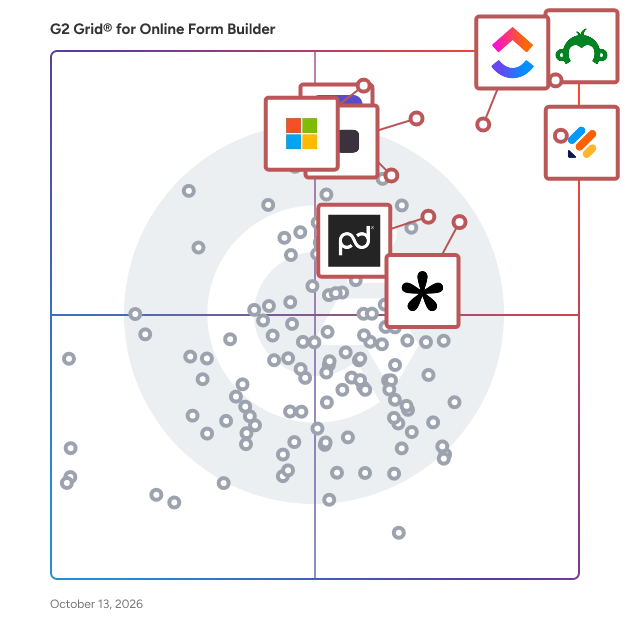
## G2 Grid® for Online Form Builder Software
![G2 Grid® for Online Form Builder Software plotting products by satisfaction and market presence](https://www.g2.com/categories/online-form-builder/grids.png?focus%5B%5D=23672&focus%5B%5D=541&focus%5B%5D=25675&focus%5B%5D=13751&focus%5B%5D=89299&focus%5B%5D=1934&focus%5B%5D=269&focus%5B%5D=3066)
Highlighted products: Jotform, SurveyMonkey, ClickUp, Typeform, Microsoft Forms, ActiveCampaign, Adobe Acrobat Sign, and Laserfiche.
Underlying data: [Grid® JSON](https://www.g2.com/categories/online-form-builder/grids.json?focus%5B%5D=jotform&amp;focus%5B%5D=surveymonkey&amp;focus%5B%5D=clickup&amp;focus%5B%5D=typeform&amp;focus%5B%5D=microsoft-forms&amp;focus%5B%5D=activecampaign&amp;focus%5B%5D=adobe-acrobat-sign&amp;focus%5B%5D=laserfiche)


## How Many Online Form Builder Software Products Does G2 Track?
**Total Products under this Category:** 416

### Category Stats (Jul 2026)
- **Average Rating**: 4.48/5 The average rating of products in this category, based on all submitted ratings
- **Top Trending Product**: Pulse Technology (+0.48%) - Among all products in this category, Pulse Technology recorded the largest rating increase compared to last month
*Last updated: July 13, 2026*


## How Does G2 Rank Online Form Builder Software Products?

**Why You Can Trust G2's Software Rankings:**

- 30 Analysts and Data Experts
- 107,600+ Authentic Reviews
- 416+ Products
- Unbiased Rankings

G2's software rankings are built on verified user reviews, rigorous moderation, and a consistent research methodology maintained by a team of analysts and data experts. Each product is measured using the same transparent criteria, with no paid placement or vendor influence. While reviews reflect real user experiences, which can be subjective, they offer valuable insight into how software performs in the hands of professionals. Together, these inputs power the G2 Score, a standardized way to compare tools within every category.


## Which Online Form Builder Software Is Best for Your Use Case?

- **Leader:** [Jotform](https://www.g2.com/products/jotform/reviews)
- **Highest Performer:** [Paperform](https://www.g2.com/products/paperform/reviews)
- **Easiest to Use:** [pdfFiller](https://www.g2.com/products/pdffiller/reviews)
- **Top Trending:** [Tally](https://www.g2.com/products/tally-forms-tally/reviews)
- **Best Free Software:** [SurveyMonkey](https://www.g2.com/products/surveymonkey/reviews)


---

**Sponsored**

### Hive

Hive is an all-in-one project management software platform that helps teams plan, collaborate, automate workflows, and deliver projects faster. Designed for organizations of every size, Hive combines powerful project planning, task management, team collaboration, and workflow automation tools in one customizable workspace. Whether you&#39;re managing marketing campaigns, product launches, creative projects, client work, or cross-functional initiatives, Hive adapts to your team&#39;s unique processes. Unlike rigid project management tools, Hive offers flexible workflows, customizable dashboards, and multiple project views so every team can work the way they work best. Hive empowers marketing, operations, product, IT, creative, and remote teams with the tools they need to stay organized and aligned. With customizable workflows and powerful collaboration features, teams can centralize work, reduce manual tasks, and improve visibility across every project. Key capabilities include: - Multiple project views, including Kanban boards, Gantt charts, calendars, tables, and lists - Task management with custom fields, dependencies, milestones, and priorities - Workflow automation to eliminate repetitive work - Real-time team collaboration with messaging, comments, and file sharing - Time tracking, reporting, and analytics - Integrations with hundreds of popular business applications Every organization works differently, which is why Hive is built to be one of the most customizable project management platforms available. Teams can create workflows tailored to their business processes using custom fields, project templates, automations, approvals, and integrations. Instead of forcing teams to change how they work, Hive adapts to existing workflows — helping organizations improve efficiency without disrupting productivity. Hive gives teams the flexibility to manage projects from the perspective that works best for them. Switch seamlessly between: - Kanban boards for agile workflows - Gantt charts for timeline planning - Calendar views for scheduling - Table and List views for detailed task management These flexible project views help teams track deadlines, manage resources, identify bottlenecks, and keep projects moving forward. Hive brings projects, communication, and documentation together in one centralized workspace. Team members can collaborate in real time, assign tasks, share files, provide feedback, and monitor project progress without switching between multiple tools. By combining project planning, collaboration, automation, and reporting in a single platform, Hive helps teams reduce busywork and focus on delivering results. Hive is more than just task management software—it&#39;s a scalable work management platform built to evolve alongside your business. As your needs change, Hive continues to expand through new features, integrations, and customer-driven enhancements. With flexible customization, powerful automation, and dedicated customer support, Hive enables organizations to streamline workflows, improve cross-functional collaboration, and execute projects with greater speed and confidence.


[Visit website](https://www.g2.com/external_clickthroughs/record?secure%5Bad_program%5D=ppc&amp;secure%5Bad_slot%5D=category_product_list&amp;secure%5Bcategory_id%5D=1253&amp;secure%5Bchosen_at%5D=2026-07-14T03%3A12%3A33Z&amp;secure%5Bdisplayable_resource_id%5D=1253&amp;secure%5Bdisplayable_resource_type%5D=Category&amp;secure%5Bmedium%5D=sponsored&amp;secure%5Bplacement_reason%5D=page_category&amp;secure%5Bplacement_resource_ids%5D%5B%5D=1253&amp;secure%5Bprioritized%5D=false&amp;secure%5Bproduct_id%5D=27036&amp;secure%5Bresource_id%5D=1253&amp;secure%5Bresource_type%5D=Category&amp;secure%5Bsource_type%5D=category_page&amp;secure%5Bsource_url%5D=https%3A%2F%2Fwww.g2.com%2Fcategories%2Fonline-form-builder%3Fpage%3D7%26selected_view%3Dgrid&amp;secure%5Btoken%5D=f3657122e4985344d34ac68255c836417c517d084a2ae5266b7d7d14f96b65e7&amp;secure%5Burl%5D=https%3A%2F%2Fhive.com%2F&amp;secure%5Burl_type%5D=company_website)

---

## What Are the Top-Rated Online Form Builder Software Products in 2026?
### 1. [pForm](https://www.g2.com/products/pform/reviews)
pForm is a free HTML form builder.


**Average Rating:** 3.8/5.0
**Total Reviews:** 4
**How Do G2 Users Rate pForm?**

- **Has the product been a good partner in doing business?:** 10.0/10 (Category avg: 9.1/10)

**Who Is the Company Behind pForm?**

- **Seller:** [Appnitro Software](https://www.g2.com/sellers/appnitro-software)
- **HQ Location:** N/A
- **LinkedIn® Page:** https://www.linkedin.com/company/No-Linkedin-Presence-Added-Intentionally-By-DataOps (1 employees on LinkedIn®)

**Who Uses This Product?**
- **Company Size:** 50% Small-Business, 25% Mid-Market


#### What Are Recent G2 Reviews of pForm?

**"[Easy to use form app](https://www.g2.com/survey_responses/pform-review-1878167)"**

**Rating:** 4.5/5.0 stars
*— Verified User in Computer Software*

[Read full review](https://www.g2.com/survey_responses/pform-review-1878167)

---

**"[Easy to use](https://www.g2.com/survey_responses/pform-review-1899304)"**

**Rating:** 5.0/5.0 stars
*— Verified User in Gambling &amp; Casinos*

[Read full review](https://www.g2.com/survey_responses/pform-review-1899304)

---


#### What Are G2 Users Discussing About pForm?

- [What is pForm used for?](https://www.g2.com/discussions/what-is-pform-used-for)

### 2. [TeamWave](https://www.g2.com/products/teamwave/reviews)
Integrated Software to Run Your Entire Business - CRM, Projects, HR &amp; More.


**Average Rating:** 4.6/5.0
**Total Reviews:** 24
**How Do G2 Users Rate TeamWave?**

- **Has the product been a good partner in doing business?:** 8.7/10 (Category avg: 9.1/10)
- **CMS Support:** 10.0/10 (Category avg: 8.5/10)
- **Design:** 10.0/10 (Category avg: 8.7/10)
- **Embedded Forms:** 10.0/10 (Category avg: 8.8/10)

**Who Is the Company Behind TeamWave?**

- **Seller:** [TeamWave](https://www.g2.com/sellers/teamwave)
- **Year Founded:** 2016
- **HQ Location:** WILMINGTON, US
- **LinkedIn® Page:** https://www.linkedin.com/company/No-Linkedin-Presence-Added-Intentionally-By-DataOps (1 employees on LinkedIn®)

**Who Uses This Product?**
- **Company Size:** 54% Small-Business, 33% Mid-Market


#### What Are Recent G2 Reviews of TeamWave?

**"[Convenient team management](https://www.g2.com/survey_responses/teamwave-review-7137011)"**

**Rating:** 5.0/5.0 stars
*— Verified User in Information Technology and Services*

[Read full review](https://www.g2.com/survey_responses/teamwave-review-7137011)

---

**"[Remote Team Friendly!](https://www.g2.com/survey_responses/teamwave-review-7136190)"**

**Rating:** 5.0/5.0 stars
*— Janice R.*

[Read full review](https://www.g2.com/survey_responses/teamwave-review-7136190)

---


#### What Are G2 Users Discussing About TeamWave?

- [What is TeamWave used for?](https://www.g2.com/discussions/what-is-teamwave-used-for)

### 3. [VisualVault](https://www.g2.com/products/visualvault/reviews)
VisualVault is a highly-configurable, cloud-based content services platform (CSP) that employs a host of low-code applications and a suite of valuable analytics features. The VisualVault platform is ideally-suited to accommodate the rapid building of valuable line-of-business workflow solutions as well as managing high-volume, high-value data and document-intensive processes. VisualVault functionality is well-suited to a broad range of vertical markets including Healthcare patient data management applications as well as Licensing, Permitting and Case Management for local and state government organizations.


**Average Rating:** 4.3/5.0
**Total Reviews:** 29
**How Do G2 Users Rate VisualVault?**

- **Has the product been a good partner in doing business?:** 8.9/10 (Category avg: 9.1/10)
- **CMS Support:** 7.8/10 (Category avg: 8.5/10)
- **Design:** 6.7/10 (Category avg: 8.7/10)
- **Embedded Forms:** 5.8/10 (Category avg: 8.8/10)

**Who Is the Company Behind VisualVault?**

- **Seller:** [VisualVault](https://www.g2.com/sellers/visualvault)
- **Company Website:** https://www.visualvault.com/
- **Year Founded:** 2003
- **HQ Location:** Tempe, AZ
- **Twitter:** @VisualVaultORC (152 Twitter followers)
- **LinkedIn® Page:** https://www.linkedin.com/company/visualvault/ (67 employees on LinkedIn®)

**Who Uses This Product?**
- **Top Industries:** Hospital &amp; Health Care
- **Company Size:** 52% Mid-Market, 31% Enterprise


#### What Are VisualVault's Pros and Cons?

**Pros:**

- Simple (3 reviews)
- Customization (2 reviews)
- Document Management (2 reviews)
- Ease of Use (2 reviews)
- Form Creation (2 reviews)

**Cons:**

- Inefficient Searching (2 reviews)
- Learning Difficulty (2 reviews)
- Automation Difficulty (1 reviews)
- Bug Issues (1 reviews)
- Complexity (1 reviews)


### What Do G2 Reviewers Say About VisualVault?
*AI-generated summary from verified user reviews*

**Pros:**

- Users praise VisualVault for its **ease of use and excellent customer support** , enhancing their document management experience.
- Users appreciate the **highly customizable workflows** of VisualVault, enhancing their document automation and compliance tracking experience.
- Users value the **highly customizable workflows** in VisualVault, making document management efficient and compliant.
- Users find VisualVault&#39;s **ease of use** remarkable, enjoying its intuitive interface and reliable functionality for managing documents.
- Users value the **highly customizable workflows** in VisualVault, enhancing their document automation and compliance processes.

**Cons:**

- Users feel the **inefficient searching** for employee files hinders productivity and requires constant follow-ups for completion.
- Users find a **slight learning difficulty** for non-technical users, affecting their overall experience with VisualVault.
- Users find the **automation difficult** , often requiring manual reminders for pending competencies to ensure completion.
- Users experience **lag during high-volume uploads** , which can hinder efficiency and frustrate the overall user experience.
- Users express concern over the **complexity** of managing pending competencies, needing frequent reminders and re-launches for completion.

#### What Are Recent G2 Reviews of VisualVault?

**"[Reliable Document Management with Superb Support](https://www.g2.com/survey_responses/visualvault-review-9661617)"**

**Rating:** 5.0/5.0 stars
*— Verified User in Hospital &amp; Health Care*

[Read full review](https://www.g2.com/survey_responses/visualvault-review-9661617)

---

**"[Secure and Efficient Platform for HR File Management](https://www.g2.com/survey_responses/visualvault-review-12697903)"**

**Rating:** 4.5/5.0 stars
*— Harkamalpreet G.*

[Read full review](https://www.g2.com/survey_responses/visualvault-review-12697903)

---


#### What Are G2 Users Discussing About VisualVault?

- [What is VisualVault used for?](https://www.g2.com/discussions/what-is-visualvault-used-for) - 1 comment

### 4. [ActiveCalculator](https://www.g2.com/products/activecalculator/reviews)
Transform your website visitors into valuable leads and customers with ActiveCalculator, the ultimate no-code calculator builder. Whether you want to create a price quote, product configurator, or ROI calculator, our intuitive platform makes it easy to design powerful calculators that captivate and convert.


**Average Rating:** 4.8/5.0
**Total Reviews:** 3
**How Do G2 Users Rate ActiveCalculator?**

- **Has the product been a good partner in doing business?:** 10.0/10 (Category avg: 9.1/10)
- **CMS Support:** 10.0/10 (Category avg: 8.5/10)
- **Design:** 10.0/10 (Category avg: 8.7/10)
- **Embedded Forms:** 10.0/10 (Category avg: 8.8/10)

**Who Is the Company Behind ActiveCalculator?**

- **Seller:** [ActiveCalculator](https://www.g2.com/sellers/activecalculator)
- **HQ Location:** N/A
- **LinkedIn® Page:** https://www.linkedin.com/company/No-Linkedin-Presence-Added-Intentionally-By-DataOps (1 employees on LinkedIn®)

**Who Uses This Product?**
- **Company Size:** 100% Small-Business


#### What Are ActiveCalculator's Pros and Cons?

**Pros:**

- Affordable (1 reviews)
- Customer Support (1 reviews)
- Customizability (1 reviews)
- Features (1 reviews)
- Helpful (1 reviews)


### What Do G2 Reviewers Say About ActiveCalculator?
*AI-generated summary from verified user reviews*

**Pros:**

- Users appreciate the **affordable pricing** of ActiveCalculator, making it accessible for everyone seeking financial solutions.
- Users commend the **prompt and attentive customer support** from Moiz, enhancing their overall experience with ActiveCalculator.
- Users love the **customizability** of ActiveCalculator, as it meets their specific needs perfectly and exceeds expectations.
- Users appreciate Moiz&#39;s **prompt and attentive service** , exceeding expectations in delivering high-quality calculators.
- Users commend ActiveCalculator for its **prompt and attentive service** , resulting in high-quality, tailored calculators.


#### What Are Recent G2 Reviews of ActiveCalculator?

**"[Absolutely the Best Calculator App – A True Game Changer!](https://www.g2.com/survey_responses/activecalculator-review-10765110)"**

**Rating:** 5.0/5.0 stars
*— Harris B.*

[Read full review](https://www.g2.com/survey_responses/activecalculator-review-10765110)

---

**"[A Powerful and User-Friendly Tool for Building Complex Online Calculators](https://www.g2.com/survey_responses/activecalculator-review-10863363)"**

**Rating:** 4.5/5.0 stars
*— Brad P.*

[Read full review](https://www.g2.com/survey_responses/activecalculator-review-10863363)

---


### 5. [Array](https://www.g2.com/products/array/reviews)
Array is enterprise-grade data collection and workflow automation that empowers field teams and organizations to gather, manage, and act on information in real time. Think of Array as a platform that transforms how you capture, process, and use data. Build powerful, custom forms and workflows in minutes, then deploy them to your field teams or customers instantly. Responses feed directly into secure live dashboards, providing instant insights and automation without manual processing. Instead of juggling multiple tools, spreadsheets, and email chains, Array centralises data collection, reporting, and automated actions in one place. You save hours of administrative work while ensuring accuracy, compliance, and visibility across your organisation. With built-in AI capabilities, Array can instantly extract data from uploaded documents and images (such as receipts), generate reports, build charts, and deliver actionable insights—all without requiring extra coding or integrations. Key Features: ✔ Drag-and-drop form builder: Create complex forms with logic, calculations, and functions—no coding required ✔ Live dashboards &amp; reporting: Real-time visualisation of field data, customer feedback, and sales metrics ✔ AI-powered data extraction: Pull key details (e.g., prices, dates, locations) from images and documents automatically ✔ Offline data collection: Field teams can work without internet, syncing data once connected ✔ Automated workflows: Trigger emails, SMS, or CRM updates from form submissions ✔ Multi-channel collaboration: Assign tasks, manage teams, and track location check-ins ✔ Secure sharing &amp; compliance: GDPR-ready, ISO 27001 practices, and role-based access control ✔ Self-serve customisation: Easily adapt dashboards, reports, and forms as needs change—without developer support ✔ AI insights: Generate summaries, trend reports, and recommendations from your collected data Array is built for enterprises and field-driven organisations across industries—whether you manage nationwide sales teams, conduct large-scale customer research, or oversee complex compliance processes. Trusted by global brands like Philip Morris and Walmart, Array enables teams from five to 50,000+ to streamline operations, reduce manual work, and make faster, smarter decisions.


**Average Rating:** 4.3/5.0
**Total Reviews:** 3
**How Do G2 Users Rate Array?**

- **Has the product been a good partner in doing business?:** 8.3/10 (Category avg: 9.1/10)

**Who Is the Company Behind Array?**

- **Seller:** [Array](https://www.g2.com/sellers/array)
- **Year Founded:** 2016
- **HQ Location:** Austin, US
- **Twitter:** @build_array (1,197 Twitter followers)
- **LinkedIn® Page:** https://www.linkedin.com/company/3124515 (15 employees on LinkedIn®)
- **Ownership:** Privately held

**Who Uses This Product?**
- **Company Size:** 67% Small-Business, 33% Mid-Market


#### What Are Recent G2 Reviews of Array?

**"[Outstanding support!](https://www.g2.com/survey_responses/array-review-364496)"**

**Rating:** 5.0/5.0 stars
*— Erik V.*

[Read full review](https://www.g2.com/survey_responses/array-review-364496)

---

**"[Ultimate in Cloud World](https://www.g2.com/survey_responses/array-review-4234902)"**

**Rating:** 4.5/5.0 stars
*— Mohan Hundre S.*

[Read full review](https://www.g2.com/survey_responses/array-review-4234902)

---


### 6. [CabinPanda](https://www.g2.com/products/cabinpanda/reviews)
CabinPanda is an innovative data collection tool. It enables users to create good looking online forms which perform great across different devices. CabinPanda stands out with its solid platform and ease of use.


**Average Rating:** 4.2/5.0
**Total Reviews:** 3
**How Do G2 Users Rate CabinPanda?**

- **CMS Support:** 7.8/10 (Category avg: 8.5/10)
- **Design:** 6.7/10 (Category avg: 8.7/10)
- **Embedded Forms:** 8.3/10 (Category avg: 8.8/10)

**Who Is the Company Behind CabinPanda?**

- **Seller:** [CabinPanda](https://www.g2.com/sellers/cabinpanda)
- **Year Founded:** 2019
- **HQ Location:** London, GB
- **LinkedIn® Page:** https://www.linkedin.com/company/cabinpanda/ (4 employees on LinkedIn®)

**Who Uses This Product?**
- **Company Size:** 100% Small-Business


#### What Are CabinPanda's Pros and Cons?

**Pros:**

- Ease of Use (2 reviews)
- Features (2 reviews)
- Intuitive (2 reviews)
- Easy Integrations (1 reviews)
- Integrations (1 reviews)

**Cons:**

- Limited Customization (1 reviews)
- Limited Features (1 reviews)
- Missing Features (1 reviews)
- Poor Design (1 reviews)


### What Do G2 Reviewers Say About CabinPanda?
*AI-generated summary from verified user reviews*

**Pros:**

- Users appreciate the **ease of use** of CabinPanda, thanks to its intuitive design and user-friendly features.
- Users appreciate the **variety of forms and user-friendly features** in CabinPanda, enhancing their survey building experience.
- Users commend the **intuitive design** of CabinPanda, making form creation and integration a seamless experience.
- Users appreciate the **easy integrations** with popular apps like Trello and Slack, enhancing their workflow effortlessly.
- Users appreciate the **ease of integration** with popular apps, enhancing connectivity and workflow efficiency.

**Cons:**

- Users feel the **limited customization** options and outdated form designs restrict their creativity and preferences.
- Users feel the **limited features** of CabinPanda restrict their ability to fully utilize the product.
- Users find **limited features** in CabinPanda, expressing a need for more innovation and variety in forms.
- Users find the **poor design** of CabinPanda limits customization and feels outdated, reducing functionality and appeal.

#### What Are Recent G2 Reviews of CabinPanda?

**"[Efficient way of creating forms/ surveys](https://www.g2.com/survey_responses/cabinpanda-review-10582431)"**

**Rating:** 4.5/5.0 stars
*— Verified User in Retail*

[Read full review](https://www.g2.com/survey_responses/cabinpanda-review-10582431)

---

**"[Easy to make survey forms with tons of extra features](https://www.g2.com/survey_responses/cabinpanda-review-10572862)"**

**Rating:** 4.5/5.0 stars
*— Hussaina D.*

[Read full review](https://www.g2.com/survey_responses/cabinpanda-review-10572862)

---


### 7. [Delivra](https://www.g2.com/products/delivra/reviews)
Delivra is an email marketing platform helping marketers of any expertise captivate and grow their audience. With more than 20 years of unrivaled customer success, Delivra helps businesses engage in meaningful conversations that produce tangible results. Their focus on approachable solutions has helped empower thousands of organizations across industries to take control of complex marketing automation and data handling. Delivra scales with you and provides the tools you need to succeed every step of the way. Built for busy marketers, Delivra offers a full suite of features to help teams reach their goals. Easily build and send impactful email marketing campaigns with a customizable drag and drop editor. Automate your customer communications by strategically plotting an entire email series, determining which mailings are sent based on a variety of subscriber actions, inactions or time. Get more engagement from your audience and reach customers outside of their inbox with expert segmentation and SMS marketing. Whether you’re working B2B, promoting a Non-Profit, or planning an event, Delivra provides robust analytics and ongoing support to encourage users to hone in and refine their strategy. Integrate with a wide variety of CRM’s, e-commerce platforms, and web analytics tools so everything you need is available in one place. The software either plugs right into the current tech, or Delivra builds out a custom integration to ensure that everything works smoothly.


**Average Rating:** 4.3/5.0
**Total Reviews:** 83
**How Do G2 Users Rate Delivra?**

- **Has the product been a good partner in doing business?:** 9.2/10 (Category avg: 9.1/10)
- **CMS Support:** 10.0/10 (Category avg: 8.5/10)

**Who Is the Company Behind Delivra?**

- **Seller:** [Delivra](https://www.g2.com/sellers/delivra)
- **Year Founded:** 1999
- **HQ Location:** Indianapolis, Indiana
- **Twitter:** @delivra (2,078 Twitter followers)
- **LinkedIn® Page:** https://www.linkedin.com/company/273329/ (29 employees on LinkedIn®)

**Who Uses This Product?**
- **Who Uses This:** Owner
- **Top Industries:** Marketing and Advertising, Non-Profit Organization Management
- **Company Size:** 48% Small-Business, 44% Mid-Market


#### What Are Delivra's Pros and Cons?

**Pros:**

- Automation (4 reviews)
- Ease of Use (4 reviews)
- Automations (3 reviews)
- Easy Setup (3 reviews)
- Email Marketing (3 reviews)

**Cons:**

- Difficult Automation (2 reviews)
- Integration Issues (2 reviews)
- Limited Customization (2 reviews)
- Complex Features (1 reviews)
- Complexity (1 reviews)


### What Do G2 Reviewers Say About Delivra?
*AI-generated summary from verified user reviews*

**Pros:**

- Users love the **seamless automation features** of Delivra, making email marketing efficient and stress-free.
- Users appreciate the **ease of use** of Delivra, enjoying its smooth interface and simple campaign setup.
- Users enjoy the **powerful automation features** of Delivra, enhancing campaign effectiveness and lead capture effortlessly.
- Users appreciate the **easy setup** of Delivra, making it quick and stress-free to launch email campaigns.
- Users love Delivra for its **ease of use** , saving time and simplifying email campaign management significantly.

**Cons:**

- Users find the **automation complexity** of Delivra challenging, impacting their overall experience with the platform.
- Users face **integration issues** with Delivra, finding automation complexity and limited features challenging for their needs.
- Users find the **limited customization** in Delivra restricting, desiring more flexibility in email templates and design.
- Users find the **automation complexity** and integration ecosystem of Delivra somewhat challenging to navigate.
- Users find the **automation complexity** and integration ecosystem of Delivra somewhat challenging and difficult to navigate.

#### What Are Recent G2 Reviews of Delivra?

**"[Streamlined Multi-Channel Communication, Needs Local Compliance Enhancements](https://www.g2.com/survey_responses/delivra-review-13058641)"**

**Rating:** 4.5/5.0 stars
*— Gaston A.*

[Read full review](https://www.g2.com/survey_responses/delivra-review-13058641)

---

**"[Streamlined GDPR Compliance, But Needs Localization Improvements](https://www.g2.com/survey_responses/delivra-review-13042859)"**

**Rating:** 4.0/5.0 stars
*— Mark  J.*

[Read full review](https://www.g2.com/survey_responses/delivra-review-13042859)

---


#### What Are G2 Users Discussing About Delivra?

- [What is Delivra used for?](https://www.g2.com/discussions/what-is-delivra-used-for)

### 8. [FormGet](https://www.g2.com/products/formget/reviews)
FormGet unites everything your sales and marketing team needs such as Email Marketing, Lead Capture, Subscription Billing, all at one place.


**Average Rating:** 4.3/5.0
**Total Reviews:** 3
**How Do G2 Users Rate FormGet?**

- **Has the product been a good partner in doing business?:** 8.3/10 (Category avg: 9.1/10)

**Who Is the Company Behind FormGet?**

- **Seller:** [FormGet.com](https://www.g2.com/sellers/formget-com)
- **Year Founded:** 2009
- **HQ Location:** Bhopal, IN
- **Twitter:** @Mailget02 (61 Twitter followers)
- **LinkedIn® Page:** https://www.linkedin.com/company/13324824 (2 employees on LinkedIn®)

**Who Uses This Product?**
- **Company Size:** 67% Small-Business, 33% Enterprise


#### What Are Recent G2 Reviews of FormGet?

**"[Formget(Pabbly) is great platform to manage marketing (email,forms..)](https://www.g2.com/survey_responses/formget-review-4293444)"**

**Rating:** 4.5/5.0 stars
*— Patrika O.*

[Read full review](https://www.g2.com/survey_responses/formget-review-4293444)

---

**"[great form application not cheap](https://www.g2.com/survey_responses/formget-review-4221444)"**

**Rating:** 4.5/5.0 stars
*— Angela S.*

[Read full review](https://www.g2.com/survey_responses/formget-review-4221444)

---


#### What Are G2 Users Discussing About FormGet?

- [What is FormGet used for?](https://www.g2.com/discussions/what-is-formget-used-for)

### 9. [Formjelly](https://www.g2.com/products/formjelly/reviews)
A simple form builder that allows you to quickly create beautiful forms that don&#39;t sacrifice your privacy.


**Average Rating:** 5.0/5.0
**Total Reviews:** 3
**How Do G2 Users Rate Formjelly?**

- **CMS Support:** 5.0/10 (Category avg: 8.5/10)
- **Design:** 8.3/10 (Category avg: 8.7/10)
- **Embedded Forms:** 8.3/10 (Category avg: 8.8/10)

**Who Is the Company Behind Formjelly?**

- **Seller:** [Formjelly](https://www.g2.com/sellers/formjelly)
- **HQ Location:** N/A
- **LinkedIn® Page:** https://www.linkedin.com/company/No-Linkedin-Presence-Added-Intentionally-By-DataOps (1 employees on LinkedIn®)

**Who Uses This Product?**
- **Company Size:** 100% Small-Business


#### What Are Formjelly's Pros and Cons?

**Pros:**

- Ease of Use (1 reviews)
- Simple (1 reviews)


### What Do G2 Reviewers Say About Formjelly?
*AI-generated summary from verified user reviews*

**Pros:**

- Users find Formjelly&#39;s **ease of use** favorable, especially with its intuitive drag-and-drop functionality for projects.
- Users appreciate the **simple and intuitive interface** of Formjelly, making it easy to use for various projects.


#### What Are Recent G2 Reviews of Formjelly?

**"[great alternative to try](https://www.g2.com/survey_responses/formjelly-review-10368492)"**

**Rating:** 5.0/5.0 stars
*— Verified User in Research*

[Read full review](https://www.g2.com/survey_responses/formjelly-review-10368492)

---

**"[FormJelly - the future of forms!](https://www.g2.com/survey_responses/formjelly-review-4658265)"**

**Rating:** 5.0/5.0 stars
*— Blaine G.*

[Read full review](https://www.g2.com/survey_responses/formjelly-review-4658265)

---


#### What Are G2 Users Discussing About Formjelly?

- [What is Formjelly used for?](https://www.g2.com/discussions/what-is-formjelly-used-for)

### 10. [Formspree](https://www.g2.com/products/formspree/reviews)
Formspree is the form solution for any developer. Use your own frontend code, submit to our API, and we&#39;ll handle the rest. Formspree works with your native form HTML code ensuring that your form seamlessly fits into your website. Whether you&#39;re using HTML, JavaScript, or any other framework, you can use Formspree. It’s the simplest way to embed custom contact us forms, order forms, or email capture forms on your static website. Protect yourself from spammers with industry-leading spam protection that protects millions of websites so you can focus on what actually matters. Once you&#39;ve started capturing submissions, connect your form to the tools you already use with Formspree&#39;s native plugin integrations such as Slack, Zendesk, and Airtable.


**Average Rating:** 3.0/5.0
**Total Reviews:** 3
**How Do G2 Users Rate Formspree?**

- **Has the product been a good partner in doing business?:** 8.3/10 (Category avg: 9.1/10)

**Who Is the Company Behind Formspree?**

- **Seller:** [Formspree](https://www.g2.com/sellers/formspree)
- **HQ Location:** Austin, US
- **Twitter:** @formspree (951 Twitter followers)
- **LinkedIn® Page:** https://www.linkedin.com/company/formspree/ (6 employees on LinkedIn®)

**Who Uses This Product?**
- **Company Size:** 67% Small-Business, 33% Mid-Market


#### What Are Recent G2 Reviews of Formspree?

**"[complaint service](https://www.g2.com/survey_responses/formspree-review-2307170)"**

**Rating:** 4.0/5.0 stars
*— Verified User in Food &amp; Beverages*

[Read full review](https://www.g2.com/survey_responses/formspree-review-2307170)

---

**"[Easy way to get a form for your web project](https://www.g2.com/survey_responses/formspree-review-4218939)"**

**Rating:** 4.5/5.0 stars
*— Verified User in Non-Profit Organization Management*

[Read full review](https://www.g2.com/survey_responses/formspree-review-4218939)

---


### 11. [Growform](https://www.g2.com/products/growform/reviews)
Growform is a multi-step form builder with a focus on conversion rate optimisation (CRO). It lets you build beautiful, responsive multi-step forms that convert up to 2x more visitors into leads than traditional forms. In other words, it helps you get more leads for the same ad spend! The tool itself is a simple to use, &quot;What you see is what you get&quot; (WSYIWG) builder - just add form elements to the screen and customise everything to your liking. Once you&#39;ve designed your form, you can send leads to one of 300+ destinations via Zapier, or receive instant email alerts.


**Average Rating:** 5.0/5.0
**Total Reviews:** 3
**How Do G2 Users Rate Growform?**

- **Has the product been a good partner in doing business?:** 10.0/10 (Category avg: 9.1/10)
- **CMS Support:** 6.7/10 (Category avg: 8.5/10)
- **Design:** 10.0/10 (Category avg: 8.7/10)
- **Embedded Forms:** 10.0/10 (Category avg: 8.8/10)

**Who Is the Company Behind Growform?**

- **Seller:** [Growform Ltd](https://www.g2.com/sellers/growform-ltd)
- **HQ Location:** London, GB
- **LinkedIn® Page:** https://www.linkedin.com/company/growform/ (2 employees on LinkedIn®)

**Who Uses This Product?**
- **Company Size:** 100% Small-Business


#### What Are Recent G2 Reviews of Growform?

**"[Focussed on converting; not complicated](https://www.g2.com/survey_responses/growform-review-9699047)"**

**Rating:** 5.0/5.0 stars
*— Sam C.*

[Read full review](https://www.g2.com/survey_responses/growform-review-9699047)

---

**"[This is the perfect no-code multistep form builder](https://www.g2.com/survey_responses/growform-review-9698535)"**

**Rating:** 5.0/5.0 stars
*— Anthony V.*

[Read full review](https://www.g2.com/survey_responses/growform-review-9698535)

---


### 12. [HappyForms](https://www.g2.com/products/happyforms/reviews)
Grow customer interactions through better forms, sign-ups, surveys, polls and checkouts for WordPress


**Average Rating:** 3.3/5.0
**Total Reviews:** 3
**How Do G2 Users Rate HappyForms?**

- **Has the product been a good partner in doing business?:** 10.0/10 (Category avg: 9.1/10)
- **Design:** 10.0/10 (Category avg: 8.7/10)
- **Embedded Forms:** 10.0/10 (Category avg: 8.8/10)

**Who Is the Company Behind HappyForms?**

- **Seller:** [HappyForms](https://www.g2.com/sellers/happyforms)
- **HQ Location:** N/A
- **LinkedIn® Page:** https://www.linkedin.com/company/No-Linkedin-Presence-Added-Intentionally-By-DataOps (1 employees on LinkedIn®)

**Who Uses This Product?**
- **Company Size:** 133% Small-Business


#### What Are Recent G2 Reviews of HappyForms?

**"[Simple-to-use, highly customizable and spam-free forms](https://www.g2.com/survey_responses/happyforms-review-5379143)"**

**Rating:** 5.0/5.0 stars
*— Dr Andy T.*

[Read full review](https://www.g2.com/survey_responses/happyforms-review-5379143)

---

**"[Excellent Wordpress form builder](https://www.g2.com/survey_responses/happyforms-review-8966900)"**

**Rating:** 5.0/5.0 stars
*— Eduardo P.*

[Read full review](https://www.g2.com/survey_responses/happyforms-review-8966900)

---


#### What Are G2 Users Discussing About HappyForms?

- [What is HappyForms used for?](https://www.g2.com/discussions/what-is-happyforms-used-for)

### 13. [Headlessforms](https://www.g2.com/products/headlessforms/reviews)
Designed to be easy to use, Headlessforms makes it easy to create stunning web forms with just a few clicks. It’s a one stop shop for all your web form needs. Get started with making your first form in under a minute. Headlessforms form builder puts your business on the cutting edge. It is designed to easily integrate with a variety of popular software and apps, allowing you to make the most of your powerful forms.


**Average Rating:** 5.0/5.0
**Total Reviews:** 3
**How Do G2 Users Rate Headlessforms?**

- **Has the product been a good partner in doing business?:** 10.0/10 (Category avg: 9.1/10)
- **CMS Support:** 10.0/10 (Category avg: 8.5/10)
- **Design:** 10.0/10 (Category avg: 8.7/10)
- **Embedded Forms:** 10.0/10 (Category avg: 8.8/10)

**Who Is the Company Behind Headlessforms?**

- **Seller:** [Headlessforms](https://www.g2.com/sellers/headlessforms)
- **Year Founded:** 2015
- **HQ Location:** Wilmington, US
- **LinkedIn® Page:** http://www.linkedin.com/company/startup-buffer (2 employees on LinkedIn®)

**Who Uses This Product?**
- **Company Size:** 100% Small-Business


#### What Are Recent G2 Reviews of Headlessforms?

**"[Save time on your landing pages with a robust form backend.](https://www.g2.com/survey_responses/headlessforms-review-7334389)"**

**Rating:** 5.0/5.0 stars
*— Vikas P.*

[Read full review](https://www.g2.com/survey_responses/headlessforms-review-7334389)

---

**"[Headlessforms is crucial to an efficient small business. I love it!](https://www.g2.com/survey_responses/headlessforms-review-7132351)"**

**Rating:** 5.0/5.0 stars
*— Verified User in Internet*

[Read full review](https://www.g2.com/survey_responses/headlessforms-review-7132351)

---


### 14. [pro-Forms](https://www.g2.com/products/pro-forms/reviews)
Solutions for Field Service &amp; Enterprise Asset Management plus mobile &amp; online form builders pro-Forms is UK hosted cloud-based, Software as a Service (SaaS) solution designed to help businesses of all sizes digitise and streamline their data collection, field operations and asset management processes. With over 20 years’ experience of supporting UK organisations, pro-Forms offers a suite of flexible Plans that replace paper-based forms and fragmented systems with intelligent, reliable and efficient digital alternatives. At its core, pro-Forms provides an easy to use, feature packed job management and planning solution - WORK MANAGER. The Plan lets you raise, schedule and dispatch to field teams whilst monitoring activities real time. The ENTERPRISE ASSET MANAGER Plan adds full asset tracking, lifecycle management and automated workflows to ensure visibility and compliance across all your equipment and resources. Underpinning the field service and asset management solutions are powerful mobile and online form builders that enables businesses to create bespoke digital forms in minutes using a simple drag-and-drop interface. Whether you need inspection sheets, safety checklists, service reports, surveys or proof-of-delivery documents, pro-Forms puts custom form design and deployment in your hands without the need for specialist technical skills. These forms can be completed in the field or online, capture signatures, photos and GPS information, and are delivered instantly back to your office systems. All pro-Forms Plans are backed by UK-based development, hosting and support, with full GDPR compliance and flexible, rolling monthly licences that grow with your needs. Integrations with popular systems such as Xero, QuickBooks, Salesforce, Microsoft 365, Zapier and more mean you can easily connect pro-Forms to your existing business processes and IT landscape. Used across sectors from construction and facilities management to fire and security, health and safety and beyond, pro-Forms helps organisations reduce administrative burden, improve field data accuracy, accelerate invoicing and enhance customer service - all through a single, intuitive platform.


**Average Rating:** 4.3/5.0
**Total Reviews:** 5
**How Do G2 Users Rate pro-Forms?**

- **Has the product been a good partner in doing business?:** 10.0/10 (Category avg: 9.1/10)
- **Design:** 10.0/10 (Category avg: 8.7/10)

**Who Is the Company Behind pro-Forms?**

- **Seller:** [ResourceTrack ](https://www.g2.com/sellers/resourcetrack)
- **Year Founded:** 2006
- **HQ Location:** Birmingham, GB
- **LinkedIn® Page:** https://www.linkedin.com/company/668841/ (3 employees on LinkedIn®)

**Who Uses This Product?**
- **Company Size:** 80% Small-Business, 20% Mid-Market


#### What Are Recent G2 Reviews of pro-Forms?

**"[Flexible, Bespoke Forms with Helpful Guidance from Pro-Forms](https://www.g2.com/survey_responses/pro-forms-review-12569212)"**

**Rating:** 4.5/5.0 stars
*— Andrew M.*

[Read full review](https://www.g2.com/survey_responses/pro-forms-review-12569212)

---

**"[Innovative and Extremely Customisable with a Helpful Team for Smooth Implementation](https://www.g2.com/survey_responses/pro-forms-review-12936503)"**

**Rating:** 5.0/5.0 stars
*— Katrina M.*

[Read full review](https://www.g2.com/survey_responses/pro-forms-review-12936503)

---


#### What Are G2 Users Discussing About pro-Forms?

- [What is pro-Forms used for?](https://www.g2.com/discussions/what-is-pro-forms-used-for)

### 15. [Pulse Technology](https://www.g2.com/products/pulse-technology/reviews)
Pulse Technology provides a platform for business owners and franchise systems to run their business smoothly. You’ll be able to keep things organized with our easy to use CRM (customer relationship management) system. Track all of your communication history for your customers and prospects. Your email and text message communication, notes, tasks and appointments, etc. will be all stored in one place for quick reference. Franchise Systems can take advantage of our full suite of franchise management features and completely integrated system that allows your franchisees to use the exact same platform. All of the data from your franchises will be available in your corporate application for real-time reporting. Save countless hours each week with the robust marketing and workflow automation features that Pulse offers. This will help you streamline many of your marketing and administrative tasks that suck up tremendous amounts of your time. With Pulse, you’ll be able to automate these tasks to free up your schedule and allow you to focus on other important things that matter. Convert more leads to paying customers with our email and text message marketing features and our customizable project boards which allow you to manage your sales pipeline efficiently. Streamline your quoting and invoicing process and deliver professional looking quotes your customers. Have a pulse on every part of your business with real-time reporting that will help you maximize your marketing strategies, sales efforts, and operations of your business. With Pulse, your entire company will run much smoother!


**Average Rating:** 4.8/5.0
**Total Reviews:** 12
**How Do G2 Users Rate Pulse Technology?**

- **Has the product been a good partner in doing business?:** 8.3/10 (Category avg: 9.1/10)

**Who Is the Company Behind Pulse Technology?**

- **Seller:** [Pulse Technology](https://www.g2.com/sellers/pulse-technology)
- **Year Founded:** 2019
- **HQ Location:** Delaware, OH
- **LinkedIn® Page:** https://www.linkedin.com/company/pulse-technology-crm/ (5 employees on LinkedIn®)

**Who Uses This Product?**
- **Company Size:** 54% Small-Business, 23% Mid-Market


#### What Are Pulse Technology's Pros and Cons?

**Pros:**

- Customer Support (2 reviews)
- Efficiency (2 reviews)
- Automation Features (1 reviews)
- Automations (1 reviews)
- Ease of Use (1 reviews)

**Cons:**

- Connectivity Issues (1 reviews)
- Expensive (1 reviews)
- Integration Issues (1 reviews)
- Learning Curve (1 reviews)
- Limited Integrations (1 reviews)


### What Do G2 Reviewers Say About Pulse Technology?
*AI-generated summary from verified user reviews*

**Pros:**

- Users value the **responsive customer support** of Pulse Technology, which enhances efficiency and delivers reliable results.
- Users value the **efficiency** of Pulse Technology, enhancing organization and streamlining client interactions seamlessly.
- Users appreciate the **automation features** of Pulse Technology, enhancing efficiency in client data organization and onboarding processes.
- Users admire the **automation capabilities** of Pulse Technology, enhancing efficiency and streamlining client data management seamlessly.
- Users find Pulse Technology incredibly **efficient and user-friendly** , enhancing processes and streamlining client data organization effortlessly.

**Cons:**

- Users find **integration issues** with Google Calendar in Pulse Technology, seeking improved capabilities for a smoother experience.
- Users feel that the **limited integrations** with other tools, like Google Calendar, hinder the overall effectiveness of Pulse Technology.

#### What Are Recent G2 Reviews of Pulse Technology?

**"[The best CRM out there!](https://www.g2.com/survey_responses/pulse-technology-review-7688739)"**

**Rating:** 5.0/5.0 stars
*— Ana Maria --- C.*

[Read full review](https://www.g2.com/survey_responses/pulse-technology-review-7688739)

---

**"[Streamlined Automation with Stellar Support](https://www.g2.com/survey_responses/pulse-technology-review-11901774)"**

**Rating:** 5.0/5.0 stars
*— Stephanie D.*

[Read full review](https://www.g2.com/survey_responses/pulse-technology-review-11901774)

---


#### What Are G2 Users Discussing About Pulse Technology?

- [What is Pulse Technology used for?](https://www.g2.com/discussions/what-is-pulse-technology-used-for)

### 16. [Serviceform](https://www.g2.com/products/serviceform/reviews)
Serviceform – The only software your business needs for Sales, Support and Marketing Have website visitors but not converting them into customers? Let&#39;s change that! Serviceform helps businesses around the world to convert website visitors into revenue. This is done by combining lead generation tools, analytics to identify the behaviour of the website visitors and a CRM to provide a single solution for website conversion and customer management. Our vision is to be a globally leading company focused on pushing the boundaries of online lead generation and communication. We want to be the only software your business needs for Sales, Support and Marketing. Serviceform is a Finland-based SaaS company. We are committed to growing the best possible lead generation tools and analytics tools. We want to allow business owners to make educated decisions and grow their businesses predictably. About our technology, we provide an all-in-one software platform that helps companies simplify their sales, marketing, and customer support process. • The only 6 website conversion tools you&#39;ll need: Chatbot, Live chat, Dynamic form, Conversational landing page, Engagement chatbot, Popup, and Floating bar. • Management tools: Flex xRM, Ourly Meeting scheduler, Website analytics, and Cookie banner. • Communication tools: Social inbox, Email and SMS campaign builder. Check us out at Serviceform.com!


**Average Rating:** 4.8/5.0
**Total Reviews:** 10
**How Do G2 Users Rate Serviceform?**

- **Has the product been a good partner in doing business?:** 10.0/10 (Category avg: 9.1/10)

**Who Is the Company Behind Serviceform?**

- **Seller:** [Serviceform](https://www.g2.com/sellers/serviceform)
- **Year Founded:** 2017
- **HQ Location:** Turku, FIN
- **LinkedIn® Page:** https://www.linkedin.com/company/linkedin-serviceform (80 employees on LinkedIn®)

**Who Uses This Product?**
- **Company Size:** 90% Small-Business


#### What Are Recent G2 Reviews of Serviceform?

**"[Making our workflow easy and helps us to use our database more effectively](https://www.g2.com/survey_responses/serviceform-review-8022885)"**

**Rating:** 5.0/5.0 stars
*— Dr. Pravarti M.*

[Read full review](https://www.g2.com/survey_responses/serviceform-review-8022885)

---

**"[We use Serviceform&#39;s chatbot, cookies and lead bar on our website. Everything has worked really well](https://www.g2.com/survey_responses/serviceform-review-7883435)"**

**Rating:** 5.0/5.0 stars
*— Alina S.*

[Read full review](https://www.g2.com/survey_responses/serviceform-review-7883435)

---


#### What Are G2 Users Discussing About Serviceform?

- [What is Serviceform used for?](https://www.g2.com/discussions/what-is-serviceform-used-for)

### 17. [Smart Forms](https://www.g2.com/products/smart-forms/reviews)
Smart Forms eliminate the time wasted on filling and filing paper forms.


**Average Rating:** 4.7/5.0
**Total Reviews:** 3
**How Do G2 Users Rate Smart Forms?**

- **Has the product been a good partner in doing business?:** 10.0/10 (Category avg: 9.1/10)
- **CMS Support:** 7.5/10 (Category avg: 8.5/10)
- **Design:** 9.2/10 (Category avg: 8.7/10)
- **Embedded Forms:** 6.7/10 (Category avg: 8.8/10)

**Who Is the Company Behind Smart Forms?**

- **Seller:** [Factory Buket](https://www.g2.com/sellers/factory-buket)
- **Year Founded:** 2016
- **HQ Location:** London, CA
- **LinkedIn® Page:** http://www.linkedin.com/company/factory-bucket-inc (7 employees on LinkedIn®)

**Who Uses This Product?**
- **Company Size:** 67% Enterprise, 33% Small-Business


#### What Are Smart Forms's Pros and Cons?

**Pros:**

- Customizability (1 reviews)
- Customization (1 reviews)
- Customization Options (1 reviews)
- Organization (1 reviews)

**Cons:**

- Learning Curve (1 reviews)


### What Do G2 Reviewers Say About Smart Forms?
*AI-generated summary from verified user reviews*

**Pros:**

- Users value the **customizability** of Smart Forms, enabling tailored layouts and real-time adjustments for specific needs.
- Users value the **customization options** in Smart Forms, allowing for tailored layouts and real-time adaptability.
- Users love the **customization options** in Smart Forms, enabling personalized layouts and real-time adjustments to meet their needs.
- Users value the **data organization capabilities** of Smart Forms, helping them efficiently manage customer information and records.

**Cons:**

- Users often struggle with the **learning curve** of Smart Forms, finding it difficult to use without proper training.

#### What Are Recent G2 Reviews of Smart Forms?

**"[AN EFFICIENT AUXILIARY](https://www.g2.com/survey_responses/smart-forms-review-10624943)"**

**Rating:** 4.0/5.0 stars
*— Verified User in Events Services*

[Read full review](https://www.g2.com/survey_responses/smart-forms-review-10624943)

---

**"[Dynamic and ease of use of Smart forms](https://www.g2.com/survey_responses/smart-forms-review-10536534)"**

**Rating:** 5.0/5.0 stars
*— Seema K.*

[Read full review](https://www.g2.com/survey_responses/smart-forms-review-10536534)

---


#### What Are G2 Users Discussing About Smart Forms?

- [What is Smart Forms used for?](https://www.g2.com/discussions/what-is-smart-forms-used-for)

### 18. [Surefyre](https://www.g2.com/products/surefyre/reviews)
Surefyre™ is a comprehensive, cloud-based platform meticulously engineered to address the critical needs of Managing General Agents. The solution provides a suite of integrated tools specifically designed to streamline agent onboarding processes, expedite submissions, and accelerate quote generation. Surefyre empowers insurance organizations to enhance productivity, improve agent satisfaction, and drive business growth in a competitive market. MGAs across the insurance industry use Surefyre to: Automate workflows to improve efficiency: The underwriters workbench, a key Surefyre feature, revolutionizes P&amp;C underwriting by automating quoting and boosting operational efficiency. The workbench enables faster speed to market, reduces expenses, and improves the experience for agents and customers. Manage the entire policy lifecycle: The agent portal is a central, user-friendly hub for agents to manage the entire policy lifecycle, from submitting new business with intelligent data validation and OCR to generating instant quotes and accessing policy documents. This customizable platform enhances communication and collaboration with underwriters, providing real-time data and insights into their book of business. Enhance operational efficiency with advanced automation processes: Surefyre automates repetitive tasks and workflows throughout the policy lifecycle to significantly improve operational efficiency. This automation empowers MGAs to reduce the time spent on manual data entry, streamline communication between agents and underwriters, and accelerate the overall turnaround time for policy issuance and endorsements. Adapt workflows using no-code configuration: Users can customize and adapt workflows without specialized coding expertise. This adaptability ensures that MGAs can quickly modify processes to incorporate new products, adjust underwriting rules, and respond efficiently to evolving market demands and internal operational changes. The point-and-click interface enables rapid adjustments to forms, rating rules, and workflows. Improve processes and decision-making with AI-powered solutions: Surefyre uses artificial intelligence features to streamline critical tasks, such as submission intake and initial risk assessment. These AI-driven features flag potential issues, pre-fill data fields, and route submissions more effectively based on predefined criteria. Connect to essential carrier data sources: Surefyre’s seamless integrations with Vertafore&#39;s MGA Systems, AIM, and a wide range of third-party solutions allow MGAs to access external data to enhance risk evaluation, automate rating, and streamline policy administration. This connectivity reduces reliance on manual data gathering and improves accuracy. The platform’s modern and fully configurable architecture provides tailored and distinct solutions to meet MGA’s specific and unique requirements. Surefyre is a centralized operational hub, equipping teams with the necessary tools to automate workflows and maximize operational efficiency. Through seamless integration with MGA Systems and AIM, Surefyre supports the complete policy lifecycle, from initial quotation to renewal, ensuring data consistency and reducing administrative overhead.


**Average Rating:** 4.5/5.0
**Total Reviews:** 3

**Who Is the Company Behind Surefyre?**

- **Seller:** [Vertafore](https://www.g2.com/sellers/vertafore)
- **Year Founded:** 1969
- **HQ Location:** Denver, CO
- **LinkedIn® Page:** https://www.linkedin.com/company/7892/ (3,039 employees on LinkedIn®)

**Who Uses This Product?**
- **Company Size:** 67% Mid-Market, 67% Small-Business


#### What Are Recent G2 Reviews of Surefyre?

**"[Surefyre review by a former Hubspot User](https://www.g2.com/survey_responses/surefyre-review-5157220)"**

**Rating:** 4.5/5.0 stars
*— Verified User in E-Learning*

[Read full review](https://www.g2.com/survey_responses/surefyre-review-5157220)

---

**"[A highly responsive CRM ecosystem with great support!](https://www.g2.com/survey_responses/surefyre-review-5157163)"**

**Rating:** 5.0/5.0 stars
*— Verified User in Information Technology and Services*

[Read full review](https://www.g2.com/survey_responses/surefyre-review-5157163)

---


#### What Are G2 Users Discussing About Surefyre?

- [What is Surefyre used for?](https://www.g2.com/discussions/what-is-surefyre-used-for)

### 19. [Vueform Builder](https://www.g2.com/products/vueform-builder/reviews)
Vueform Builder is a powerful, Vue.js-based drag-and-drop form builder with a sleek, user-friendly interface. Fully customizable and frontend-only, it seamlessly integrates into any workflow, giving you complete control over your data. Build feature-rich, reliable forms effortlessly, your way.


**Average Rating:** 4.0/5.0
**Total Reviews:** 3
**How Do G2 Users Rate Vueform Builder?**

- **CMS Support:** 7.2/10 (Category avg: 8.5/10)
- **Design:** 8.9/10 (Category avg: 8.7/10)
- **Embedded Forms:** 7.8/10 (Category avg: 8.8/10)

**Who Is the Company Behind Vueform Builder?**

- **Seller:** [Vueform](https://www.g2.com/sellers/vueform)
- **Year Founded:** 2022
- **HQ Location:** Budapest, HU
- **Twitter:** @vueform (106 Twitter followers)
- **LinkedIn® Page:** https://www.linkedin.com/company/vueform (3 employees on LinkedIn®)

**Who Uses This Product?**
- **Company Size:** 100% Small-Business


#### What Are Recent G2 Reviews of Vueform Builder?

**"[Fast prototyping tool](https://www.g2.com/survey_responses/vueform-builder-review-9161004)"**

**Rating:** 4.0/5.0 stars
*— Jaideep G.*

[Read full review](https://www.g2.com/survey_responses/vueform-builder-review-9161004)

---

**"[Vueform Builder is a great and amazing tool for setting up quick and easy forms.](https://www.g2.com/survey_responses/vueform-builder-review-9225125)"**

**Rating:** 4.5/5.0 stars
*— Yogesh C.*

[Read full review](https://www.g2.com/survey_responses/vueform-builder-review-9225125)

---


### 20. [WS Form](https://www.g2.com/products/ws-form/reviews)
WS Form is a powerful contact form builder plugin for WordPress. Create professional, mobile friendly, accessible contact forms using our unique no-code development environment.


**Average Rating:** 4.7/5.0
**Total Reviews:** 3
**How Do G2 Users Rate WS Form?**

- **Has the product been a good partner in doing business?:** 10.0/10 (Category avg: 9.1/10)
- **CMS Support:** 9.2/10 (Category avg: 8.5/10)
- **Design:** 8.3/10 (Category avg: 8.7/10)
- **Embedded Forms:** 8.3/10 (Category avg: 8.8/10)

**Who Is the Company Behind WS Form?**

- **Seller:** [WS Form](https://www.g2.com/sellers/ws-form)
- **Year Founded:** 2017
- **HQ Location:** New Orleans, US
- **Twitter:** @ws_form (1,575 Twitter followers)
- **LinkedIn® Page:** https://www.linkedin.com/company/wsform/ (2 employees on LinkedIn®)

**Who Uses This Product?**
- **Company Size:** 67% Small-Business, 33% Enterprise


#### What Are Recent G2 Reviews of WS Form?

**"[WSForms](https://www.g2.com/survey_responses/ws-form-review-7711397)"**

**Rating:** 4.0/5.0 stars
*— Brittany C.*

[Read full review](https://www.g2.com/survey_responses/ws-form-review-7711397)

---

**"[The best WordPress form plugin money can buy - saying that after using Gravity Forms &amp; others](https://www.g2.com/survey_responses/ws-form-review-5245751)"**

**Rating:** 5.0/5.0 stars
*— Saumya M.*

[Read full review](https://www.g2.com/survey_responses/ws-form-review-5245751)

---


#### What Are G2 Users Discussing About WS Form?

- [What is WS Form used for?](https://www.g2.com/discussions/what-is-ws-form-used-for)

### 21. [AntForms](https://www.g2.com/products/antforms/reviews)
AntForms is a modern AI-powered form builder built to simplify intelligent data collection for businesses of all sizes. Designed for speed, scalability, and automation, AntForms enables users to create dynamic forms, surveys, and workflow-driven data capture using natural language and advanced conditional logic. With unlimited submissions, built-in analytics, seamless integrations, and developer-friendly automation features, the platform removes traditional limitations found in legacy form builders. AntForms empowers startups, marketers, product teams, and enterprises to collect better data, improve engagement, and streamline workflows effortlessly. The brand stands for simplicity, accessibility, and innovation — delivering powerful form-building capabilities without complexity or paywalls.


**Average Rating:** 5.0/5.0
**Total Reviews:** 2
**How Do G2 Users Rate AntForms?**

- **CMS Support:** 10.0/10 (Category avg: 8.5/10)
- **Design:** 10.0/10 (Category avg: 8.7/10)
- **Embedded Forms:** 10.0/10 (Category avg: 8.8/10)

**Who Is the Company Behind AntForms?**

- **Seller:** [AntForms](https://www.g2.com/sellers/antforms)
- **Year Founded:** 2026
- **HQ Location:** N/A
- **LinkedIn® Page:** https://linkedin.com/company/antforms/ (1 employees on LinkedIn®)

**Who Uses This Product?**
- **Company Size:** 100% Small-Business


#### What Are Recent G2 Reviews of AntForms?

**"[One tool for every form as a PhD student and a teaching assistant. And also available for free.](https://www.g2.com/survey_responses/antforms-review-12710097)"**

**Rating:** 5.0/5.0 stars
*— Abhishek G.*

[Read full review](https://www.g2.com/survey_responses/antforms-review-12710097)

---

**"[User-Friendly and Cost-Effective Form Builder](https://www.g2.com/survey_responses/antforms-review-12654215)"**

**Rating:** 5.0/5.0 stars
*— Shalini S.*

[Read full review](https://www.g2.com/survey_responses/antforms-review-12654215)

---


### 22. [Arengu](https://www.g2.com/products/arengu/reviews)
Arengu allows product makers to build signup flows with any API in minutes. You can build the same signup experience as Airbnb, Stripe or Slack, for your application, and without dedicating a full engineering team.


**Average Rating:** 5.0/5.0
**Total Reviews:** 2
**How Do G2 Users Rate Arengu?**

- **Has the product been a good partner in doing business?:** 10.0/10 (Category avg: 9.1/10)
- **Design:** 10.0/10 (Category avg: 8.7/10)
- **Embedded Forms:** 10.0/10 (Category avg: 8.8/10)

**Who Is the Company Behind Arengu?**

- **Seller:** [Arengu](https://www.g2.com/sellers/arengu)
- **Year Founded:** 2018
- **HQ Location:** A Coruña, ES
- **Twitter:** @arengu (857 Twitter followers)
- **LinkedIn® Page:** https://www.linkedin.com/company/arengu (1 employees on LinkedIn®)

**Who Uses This Product?**
- **Company Size:** 100% Small-Business


#### What Are Recent G2 Reviews of Arengu?

**"[Onboarding flows that doesn&#39;t hurt](https://www.g2.com/survey_responses/arengu-review-6718139)"**

**Rating:** 5.0/5.0 stars
*— Marcos M.*

[Read full review](https://www.g2.com/survey_responses/arengu-review-6718139)

---

**"[Best form software ever](https://www.g2.com/survey_responses/arengu-review-4663274)"**

**Rating:** 5.0/5.0 stars
*— Adrian B.*

[Read full review](https://www.g2.com/survey_responses/arengu-review-4663274)

---


#### What Are G2 Users Discussing About Arengu?

- [What is Arengu used for?](https://www.g2.com/discussions/what-is-arengu-used-for)

### 23. [Bmetric](https://www.g2.com/products/bmetric/reviews)
Hit your sales &amp; service by igniting digital &amp; voice. Gather Leads - Prove value of marketing investments - Personalise Contact Options Hit your sales target Run the website lead-generation your visitors will love and remove friction for your organisation with personalisation, integration &amp; full service Prove value of marketing investments Improve and document the effect of marketing spend on offline sales through call-tracking and personalised forms Reach your service ambitions Run a website contact strategy that doesn’t frustrate your customers through personalised and data driven contact options ------ Gather Sales Leads Maximise lead volume or sales efficiency on your website through targeted lead-generation that is balanced with online sales and service channels. Reach your service ambitions Deliver a website contact strategy that doesn’t frustrate your customers through personalised and data driven contact options. Secure your marketing budget Improve and document the effect of marketing spend on offline sales through call-tracking and personalised forms. Boost online sales Increase conversion rate by driving targeted site campaigns, promotions &amp; abandoned cart interactions. Provide live reaction to feedback Connect visitor feedback with user journeys and create a safety net to avoid angry customers. Engagement Engine &amp; Contact- &amp; Form builder - Widgets, Slide-ins, Overlays &amp; Pop-ups. - Leadforms, contact elements &amp; options, banner promotions Key features: - Personalize contact options and visitor engagements to increase sales and efficient support - Performance dashboard to report on all lead gathering and contact options from inbound calls to website clicks - Direct integration with core systems like analytics &amp; advertising platform, call-centre and CRM - Popular triggers like opening hours, timers &amp; website behaviour - Advanced capabilities to create triggers based on CDP/CRM systems/scoring - Split-testing &amp; personalization - Fully customizable look and template creation Dynamic Call-Tracking Track incoming calls from the website to connect online behavior and marketing sources to phone calls. Allows for integrations to analytics-, advertisement- &amp; crm- platforms Static Call-Tracking One dedicated tracking number to a specific source whether online or offline. Measures how many callers have used a number (exposed one specific place) like outdoor, tv/radio &amp; similar sources Webview (requires dynamic call-tracking) Live visitor behaviour to call-centre agents. When the agent answers a call from the website they can see, live, where the visitor has navigated on the website, source &amp; other data.


**Average Rating:** 4.0/5.0
**Total Reviews:** 2
**How Do G2 Users Rate Bmetric?**

- **CMS Support:** 6.7/10 (Category avg: 8.5/10)
- **Design:** 10.0/10 (Category avg: 8.7/10)
- **Embedded Forms:** 6.7/10 (Category avg: 8.8/10)

**Who Is the Company Behind Bmetric?**

- **Seller:** [Bmetric](https://www.g2.com/sellers/bmetric)
- **Year Founded:** 2012
- **HQ Location:** Copenhagen, DK
- **LinkedIn® Page:** https://www.linkedin.com/company/bmetric/ (17 employees on LinkedIn®)

**Who Uses This Product?**
- **Company Size:** 50% Mid-Market, 50% Small-Business


#### What Are Bmetric's Pros and Cons?

**Pros:**

- Analytics (1 reviews)
- Call Tracking (1 reviews)
- Customization (1 reviews)
- Easy Access (1 reviews)
- Easy Setup (1 reviews)

**Cons:**

- Expensive (1 reviews)
- Learning Curve (1 reviews)
- Limited Customization (1 reviews)
- Poor Customer Support (1 reviews)
- Steep Learning Curve (1 reviews)


### What Do G2 Reviewers Say About Bmetric?
*AI-generated summary from verified user reviews*

**Pros:**

- Users value the **real-time call tracking** and effective leads distribution, enhancing call analytics significantly.
- Users value the **real-time call tracking** of Bmetric, enhancing lead distribution and providing insightful call analytics.
- Users value the **customization options** of Bmetric, enhancing usability and tailoring experiences to their needs.
- Users value the **easy access** of Bmetric, enjoying seamless integration and user-friendly real-time monitoring tools.
- Users value the **easy setup** of Bmetric, which enhances accessibility and streamlines the onboarding process.

**Cons:**

- Users feel that Bmetric is **expensive** , impacting overall satisfaction and accessibility of its features.
- Users struggle with a steep **learning curve** that hinders their ability to effectively utilize Bmetric.
- Users express frustration with **limited customization** options in Bmetric, making it difficult to tailor the product to their needs.
- Users frequently report **pathetic customer support** , leading to frustration and unresolved issues with Bmetric.
- Users find the **steep learning curve** of Bmetric challenging, impacting their ability to effectively utilize the product.

#### What Are Recent G2 Reviews of Bmetric?

**"[best call tracking tool](https://www.g2.com/survey_responses/bmetric-review-7536091)"**

**Rating:** 4.5/5.0 stars
*— Raj K.*

[Read full review](https://www.g2.com/survey_responses/bmetric-review-7536091)

---


### 24. [Borneosoft Online Forms &amp; CRM](https://www.g2.com/products/borneosoft-online-forms-crm/reviews)
Borneosoft Online Forms &amp; CRM is a solution to create and publish forms, make mobile friendly forms without additional steps, accept credit/debit card and PayPal payment and subscription/recurring payment, use spreadsheet and formulas to auto calculate payment total, or discount, accept gift voucher, create multi-tabs/pages form, and include conditional logic into the form.


**Average Rating:** 4.8/5.0
**Total Reviews:** 2
**How Do G2 Users Rate Borneosoft Online Forms &amp; CRM?**

- **CMS Support:** 9.2/10 (Category avg: 8.5/10)
- **Design:** 10.0/10 (Category avg: 8.7/10)
- **Embedded Forms:** 10.0/10 (Category avg: 8.8/10)

**Who Is the Company Behind Borneosoft Online Forms &amp; CRM?**

- **Seller:** [Borneosoft](https://www.g2.com/sellers/borneosoft)
- **HQ Location:** N/A
- **LinkedIn® Page:** http://www.linkedin.com/company/borneosoft (2 employees on LinkedIn®)

**Who Uses This Product?**
- **Company Size:** 67% Small-Business, 33% Mid-Market


#### What Are Borneosoft Online Forms &amp; CRM's Pros and Cons?

**Pros:**

- Ease of Use (2 reviews)
- Ease of Learning (1 reviews)

**Cons:**

- Expensive (1 reviews)


### What Do G2 Reviewers Say About Borneosoft Online Forms &amp; CRM?
*AI-generated summary from verified user reviews*

**Pros:**

- Users find the **ease of use** in Borneosoft Online Forms &amp; CRM enhances efficiency and simplifies data management.
- Users appreciate the **ease of learning** with Borneosoft Online Forms &amp; CRM, enjoying quick form creation and usability.

**Cons:**

- Users find the **product pricing to be expensive** , which may limit access for some potential customers.

#### What Are Recent G2 Reviews of Borneosoft Online Forms &amp; CRM?

**"[Borneosoft Online Forms- Great tool](https://www.g2.com/survey_responses/borneosoft-online-forms-crm-review-10688402)"**

**Rating:** 4.5/5.0 stars
*— Shivani G.*

[Read full review](https://www.g2.com/survey_responses/borneosoft-online-forms-crm-review-10688402)

---

**"[Excellent Online Form Tool](https://www.g2.com/survey_responses/borneosoft-online-forms-crm-review-10680499)"**

**Rating:** 4.5/5.0 stars
*— Kanishka K.*

[Read full review](https://www.g2.com/survey_responses/borneosoft-online-forms-crm-review-10680499)

---


### 25. [Calculated Fields Form](https://www.g2.com/products/calculated-fields-form/reviews)
Calculated Fields Form is a complete WordPress form builder — contact forms, booking forms, quote forms, order forms, payment forms, and more. Its unique strength is real-time dynamic calculations: fields can automatically compute results based on user input, without writing code. One-time purchase, lifetime updates. 40,000+ active installs, rated 4.9/5.


**Average Rating:** 5.0/5.0
**Total Reviews:** 2
**How Do G2 Users Rate Calculated Fields Form?**

- **Design:** 10.0/10 (Category avg: 8.7/10)
- **Embedded Forms:** 10.0/10 (Category avg: 8.8/10)

**Who Is the Company Behind Calculated Fields Form?**

- **Seller:** [CodePeople](https://www.g2.com/sellers/codepeople)
- **HQ Location:** N/A
- **LinkedIn® Page:** https://www.linkedin.com/company/No-Linkedin-Presence-Added-Intentionally-By-DataOps (1 employees on LinkedIn®)

**Who Uses This Product?**
- **Company Size:** 100% Small-Business


#### What Are Recent G2 Reviews of Calculated Fields Form?

**"[Endless Features for Building Complex Forms](https://www.g2.com/survey_responses/calculated-fields-form-review-12673699)"**

**Rating:** 5.0/5.0 stars
*— Alan S.*

[Read full review](https://www.g2.com/survey_responses/calculated-fields-form-review-12673699)

---

**"[Calculated Fields Form: Flexible, Fast, and Easy to Learn and definitely worth the money](https://www.g2.com/survey_responses/calculated-fields-form-review-12659686)"**

**Rating:** 5.0/5.0 stars
*— Zsolt M.*

[Read full review](https://www.g2.com/survey_responses/calculated-fields-form-review-12659686)

---


## What Is Online Form Builder Software?

[Content Management Systems](https://www.g2.com/categories/content-management)

## What Software Categories Are Similar to Online Form Builder Software?

- [Survey Software](https://www.g2.com/categories/survey)
- [CRM Software](https://www.g2.com/categories/crm)
- [Lead Capture Software](https://www.g2.com/categories/lead-capture)


---

## How Do You Choose the Right Online Form Builder Software?

### What You Should Know About Online Form Builder Software

### Online form builder software buying insights at a glance&amp;nbsp;

[Online form builder software](https://www.g2.com/categories/online-form-builder) helps teams capture requests and collect structured information by turning questions into shareable, mobile-friendly forms that feed directly into the systems where work happens. These platforms typically support templates, drag-and-drop form creation, conditional logic, and routing so submissions can trigger workflows across [CRMs](https://www.g2.com/categories/crm), [service desks,](https://www.g2.com/categories/service-desk) [onboarding processes](https://www.g2.com/categories/onboarding-software), approvals, and analytics. In practice, online form builder software bridges intake and execution—helping organizations move from “what do we need to collect?” to “where should this go next?” with less manual follow-up.

As more customer and internal workflows shift to self-serve experiences, expectations have risen around both polish and speed: forms need to look clean on any device and deliver data that’s immediately usable. That’s why the best online form builder software and modern online form builder platforms aren’t limited to simple surveys; they function as lightweight workflow engines that reduce back-and-forth and keep teams moving.

Based on G2 review data, buyers consistently reward form builder software that’s easy to learn and quick to deploy: the average star rating is 4.62/5, and the average “likely to recommend” score is 9.23/10. Ease scores are especially strong (average 6.46/7 for ease of use; 6.42/7 for ease of setup), reinforcing that the category delivers the most value when it removes friction for both form creators and respondents. While most reviewers didn’t switch tools, 21% did, signaling teams outgrowing basic online form builder tools and moving toward deeper logic, controls, and integrations that better align with how they operate.

**Common use cases (and how businesses benefit)**

- **Lead capture and qualification:** Route form submissions into sales pipelines automatically for faster follow-up.
- **Customer intake, onboarding, and documentation:** Standardize required details upfront to reduce rework and delays.
- **Internal request workflows (IT, HR, facilities, procurement):** Centralize requests with approvals and SLAs to keep work moving.
- **Event registration, payments, and waivers:** Collect attendee data cleanly while minimizing manual errors and reconciliation time.
- **Feedback loops and surveys:** Capture structured responses that can be tied back to teams, accounts, and outcomes.

Most online form builder software vendors offer a free plan or free trial, then tier pricing based on submissions, features (logic, branding, permissions), and integrations. On G2 listings, entry-level pricing for prominent tools often starts at roughly $15-$30/user/month, with higher tiers unlocking advanced logic, admin controls, and reporting.

### Top 5 FAQs from software buyers:

- What platform supports payment collection through forms?
- What tool provides real-time analytics for form submissions?
- Which platform supports multi-language form creation?
- Which vendor offers advanced conditional logic for form fields?
- Which vendor provides the most customizable form templates?

G2’s top-rated **Online Form Builder** software, based on verified reviews, includes [Jotform](https://www.g2.com/products/jotform/reviews) **,** [ActiveCampaign](https://www.g2.com/sellers/activecampaign) **,** [Survey Monkey](https://www.g2.com/products/surveymonkey/reviews) **, and** [Microsoft Forms.](https://www.g2.com/products/microsoft-forms/reviews)

### What are the top-reviewed Online Form Builder on G2?

[Jotform](https://www.g2.com/products/jotform/reviews)

- Number of Reviews: 3445
- Satisfaction: 99&amp;nbsp;
- Market Score: 88
- G2 Score: 94

[ActiveCampaign](https://www.g2.com/sellers/activecampaign)

- Number of Reviews: 2830
- Satisfaction: 89
- Market Score: 84
- G2 Score: 87

[Survey Monkey](https://www.g2.com/products/surveymonkey/reviews)

- Number of Reviews: 5326
- Satisfaction: 75
- Market Score: 94
- G2 Score: 84

[Microsoft Forms](https://www.g2.com/products/microsoft-forms/reviews)

- Number of Reviews: 335
- Satisfaction: 67
- Market Score: 99
- G2 Score: 83

[Click Up](https://www.g2.com/products/clickup/reviews)

- Number of Reviews: 1093
- Satisfaction: 75
- Market Score: 89
- G2 Score: 82

**Satisfaction score** reflects how positively users rate and feel about a product based on review-driven signals (beyond just a star average). ([Source 2](https://www.g2.com/reports))&amp;nbsp;

**Market Presence score** reflects a product’s reach and strength in the market using signals like market share, seller size, and broader visibility/impact indicators. ([Source 2](https://www.g2.com/reports))

**G2 Score** is calculated as a proprietary composite that (in simplified terms) averages Satisfaction and Market Presence to rank products within a category. ([Source 2](https://www.g2.com/reports))

Learn how G2 scores products. ([Source 1](https://documentation.g2.com/docs/research-scoring-methodologies?_gl=1*5vlk6s*_gcl_au*MTAwMzU5MzUxLjE3NjM0MTg0NzYuNjY0NTIxMTY0LjE3NjQ2MTc0NzcuMTc2NDYxNzQ3Nw..*_ga*NzY1MDU0NjE3LjE3NjM0NzQ3ODM.*_ga_MFZ5NDXZ5F*czE3NjYwODk1MTMkbzY3JGcxJHQxNzY2MDkyMjQyJGo1NyRsMCRoMA..))

### What I Often See in Online Form Builder Tools

#### Feedback Pros: What Users Consistently Appreciate

- **Drag-and-drop templates accelerate building branded multi-step forms**

_&quot;What I like best about Jotform is how intuitive and flexible it is. The platform makes it incredibly easy to build forms, collect responses, and streamline workflows without needing any technical background. The drag-and-drop builder is clean and user-friendly, and I love how quickly I can customize designs, add conditional logic, and automate follow-up emails. Jotform also integrates seamlessly with the tools I use every day, which saves me time and keeps everything organized in one place. Whether I need to create a simple sign-off form or a more complex registration workflow, Jotform makes the entire process smooth and efficient.”_

_-_ [_Allison C._](https://www.g2.com/products/jotform/reviews/jotform-review-12077608)_, Jotform Review_

- **Native integrations push submissions into spreadsheets, CRMs, and workflows**

_&quot;What is most helpful about ActiveCampaign is how automation-friendly and integration-ready the platform is. It is built in a way that doesn&#39;t fight me; it actually supports my mindset. The automation builder is honestly one of the cleanest I have used. The webhooks are reliable, the API documentation is solid, and syncing between systems doesn&#39;t feel fragile. The reporting dashboards provide the right level of details.”_

_-_ [_Sathya G._](https://www.g2.com/products/activecampaign/reviews/activecampaign-review-12373182)_,_ _ActiveCampaign Review_

- **Conditional logic and routing reduce manual follow-up and errors**

_“What I don’t like about SurveyMonkey is that many advanced features—such as deeper analytics, logic controls, and export options—are locked behind higher-priced plans. Because of this, the free and lower-tier versions can feel quite limiting if you need more detailed insights. Also, while the interface is easy to use, the design and branding customization options are fairly limited, which can be a downside for teams that want surveys to look more tailored or visually distinctive.”_

_-_ [_Tiwari S_](https://www.g2.com/products/surveymonkey/reviews/surveymonkey-review-12293707)_._ **_,_** _Survey Monkey Review_

#### Cons: Where Many Platforms Fall Short

- **Advanced logic, reporting, and design controls gated by tiers**

_“Many essential features are only available on higher-tier plans, which can become pretty spendy fast. It would also be helpful if the customization options were more flexible without requiring coding knowledge. You can apply some branding to your surveys, but achieving complete design control is difficult unless you upgrade or work directly with CSS. Finally, mastering some of the advanced logic features takes a fair amount of trial and error.”_

_-_ [_Julie K_](https://www.g2.com/products/surveymonkey/reviews/surveymonkey-review-11764117)_._ **_,_** _Survey Monkey Review_

- **Complex forms become clunky; learning curve for new admins**

_“While excellent for basic to intermediate surveys, it lacks the deep analytical and branding features of a dedicated platform like Qualtrics. The customisation options for fonts and themes are limited, which can be a minor drawback for customer-facing surveys that require a fully branded experience. It&#39;s a tool for gathering data efficiently, not for complex customer experience (CX) program management.”_

_-_ [_Krisztián T.,_](https://www.g2.com/products/microsoft-forms/reviews/microsoft-forms-review-11996308)_Microsoft Forms Review_

- **Integration setup can be inconsistent, especially for real-time syncing**

_“The API is great and solid, but the rate limits at times feel tight for high-volume operations when syncing large datasets. This requires batching strategies sometimes.”_

_-_ [_Ramesh K._](https://www.g2.com/products/activecampaign/reviews/activecampaign-review-12313091)_, ActiveCampaign Review_

### My Expert Takeaway on Online Form Builder in 2026

Based on G2 reviews, Online form builder tools score strongly on the signals that typically drive adoption: a 4.62/5 average star rating, 9.23/10 likelihood to recommend, 6.46/7 ease of use, and 6.42/7 ease of setup. That profile suggests the category works well for fast rollouts and quick launches, especially when the workflow is straightforward: collect a submission, route it, and notify the right person.

The differences show up after teams move past the first few forms. For basic intake, templates and drag-and-drop builders are usually enough. As usage expands across departments, requirements become more operational. Teams start needing multi-step flows, conditional logic, dependable data syncing, shared assets, and consistent branding. At that point, the question shifts from “How fast can we build?” to “How well can we run this at scale?” In reviews, friction tends to concentrate in two areas: advanced features are often tied to higher tiers, and administration effort increases as more teams share the same environment.

Teams that get the best long-term outcomes treat form builders as workflow infrastructure. They define where submissions land and who owns downstream systems, standardize repeatable patterns like intake, approvals, and handoffs, and enforce guardrails through permissions, templates, and brand controls. They also validate early with the people building the most complex forms, since platforms that feel simple for basic use cases can strain under heavier logic, reporting needs, and sync expectations.

If you’re choosing an Online form builder for a scaling organization, validate four things up front: conditional logic depth, admin controls and permissions, integration reliability, and pricing that stays predictable as volume and governance needs increase. Teams that confirm these early tend to land on a platform that supports both rapid launches and standardized intake across the business.

### Online Form Builder FAQs

#### **What is the best software to create forms?&amp;nbsp;**

[Jotform](https://www.g2.com/products/jotform/reviews) is known for its large template library, drag-and-drop builder, and support for payments and integrations, making it useful for registrations, intake workflows, and business forms. [Survey Monkey](https://www.g2.com/products/surveymonkey/reviews) is often chosen for surveys and feedback programs where analytics and reporting are important. Microsoft Forms is a strong option for teams already using Microsoft 365 that need quick internal surveys or simple forms.

#### **What is the easiest way to make a fillable form?&amp;nbsp;**

The easiest way to create a fillable form is to use a drag-and-drop online form builder that lets you add fields and publish forms without coding. [Microsoft Forms](https://www.g2.com/products/microsoft-forms/reviews) is often considered one of the simplest tools because of its streamlined interface and quick setup for surveys or quizzes. [Jotform](https://www.g2.com/products/jotform/reviews) also makes it easy to build forms with a drag-and-drop editor and prebuilt templates, which helps teams launch forms quickly.

#### **What is the best free online form builder?**

[Jotform](https://www.g2.com/products/jotform/reviews) provides a free plan with templates, integrations, and the ability to create forms for registrations or data collection. [Survey Monkey](https://www.g2.com/products/surveymonkey/reviews) is commonly used for free surveys and feedback collection with built-in reporting. Microsoft Forms is another free option included with Microsoft 365 and widely used for internal [surveys](https://www.g2.com/categories/survey) and quizzes.

#### **What is the best form builder for integrating with CRM systems?**

[ActiveCampaign](https://www.g2.com/products/activecampaign/reviews) includes built-in forms that connect directly to its [CRM](https://www.g2.com/categories/crm) and marketing automation platform, allowing teams to capture leads and trigger campaigns automatically. [Jotform](https://www.g2.com/products/jotform/reviews) integrates with many CRM systems, making it useful for collecting leads that sync into sales pipelines.

#### **What is the most affordable online form builder for small businesses?**

[Jotform](https://www.g2.com/products/jotform/reviews) is commonly used by small businesses because it offers a free plan and flexible paid options while still supporting features like payments and integrations. [Microsoft Forms](https://www.g2.com/products/microsoft-forms/reviews) can also be cost-effective for organizations already using Microsoft 365 since it’s included in the subscription. [Survey Monkey](https://www.g2.com/products/surveymonkey/reviews) provides entry-level plans that work well for teams focused on surveys and feedback collection.

#### Sources

- [G2 Research Hub](https://research.g2.com/insights/demo-automation)
- [G2 Research Scoring Methodologies](https://documentation.g2.com/docs/research-scoring-methodologies)
- [G2 Market Presence Score Overview](https://www.g2.com/reports)

Researched and written by[Gauri Pawsey](https://research.g2.com/insights/author/gauri-pawsey)[&amp;nbsp;](https://research.g2.com/insights/author/gauri-pawsey)

Date published: March 16, 2026


