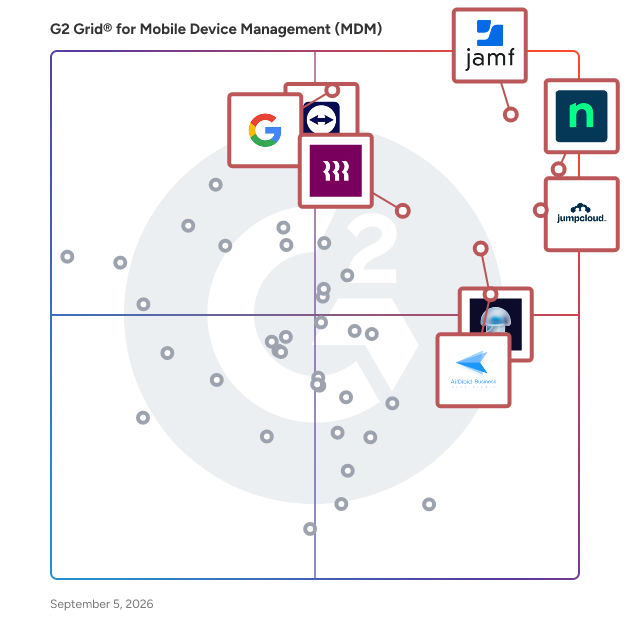
  # Best Mobile Device Management (MDM) Software - Page 2

  *By [Adam Crivello](https://research.g2.com/insights/author/adam-crivello)*

   Mobile device management (MDM) software enables IT departments to monitor, secure, and manage mobile devices, including smartphones and tablets, across various providers and operating systems, applying custom policies to prevent data loss, restrict unauthorized software installs, and maintain control over corporate data access.

### Core Capabilities of MDM Software

To qualify for inclusion in the Mobile Device Management category, a product must:

- Be compatible with all common or company-issued mobile devices and support necessary operating systems and platforms
- Function through and with multiple service providers
- Customize device settings and policies according to company requirements
- Integrate with existing IT, administrative, and application systems
- Enable the remote configuration, locking, wiping, detection, and encryption of devices
- Report on device activity

### Common Use Cases for MDM Software

IT and security teams use MDM software to maintain control and compliance across mobile device fleets in increasingly distributed work environments. Common use cases include:

- Provisioning and configuring company-issued or BYOD devices with corporate policies and security settings
- Remotely wiping or locking lost or compromised devices to prevent unauthorized data access
- Enforcing app management policies to prevent unauthorized software installs and maintain compliance

### How MDM Software Differs from Other Tools

MDM software focuses specifically on the management and security of mobile endpoints, smartphones and tablets, distinguishing it from broader endpoint management platforms that cover desktops, servers, and IoT devices. While MDM addresses device-level provisioning and policy enforcement, it is often used alongside identity and access management tools to provide a complete mobile security posture for the enterprise.

### Insights from G2 on MDM Software

Based on category trends on G2, remote device management capabilities and cross-platform compatibility stand out as the most valued features. Improved security posture and reduced time spent on device provisioning stand out as primary outcomes of adoption.


## How Many Mobile Device Management (MDM) Software Products Does G2 Track?
**Total Products under this Category:** 105

### Category Stats (Jun 2026)
- **Average Rating**: 4.52/5 The average rating of products in this category, based on all submitted ratings
- **New Reviews This Quarter**: 425
- **Buyer Segments**: Mid-Market 47% │ Small-Business 35% │ Enterprise 18% Represents the distribution of reviewers across all products in this category.
- **Top Trending Product**: GroWrk (+0.035) - Among all products in this category, GroWrk recorded the largest rating increase compared to last month
*Last updated: June 01, 2026*

  
## How Does G2 Rank Mobile Device Management (MDM) Software Products?

**Why You Can Trust G2's Software Rankings:**

- 30 Analysts and Data Experts
- 22,100+ Authentic Reviews
- 105+ Products
- Unbiased Rankings

G2's software rankings are built on verified user reviews, rigorous moderation, and a consistent research methodology maintained by a team of analysts and data experts. Each product is measured using the same transparent criteria, with no paid placement or vendor influence. While reviews reflect real user experiences, which can be subjective, they offer valuable insight into how software performs in the hands of professionals. Together, these inputs power the G2 Score, a standardized way to compare tools within every category.

  
## Top Mobile Device Management (MDM) Software at a Glance
| # | Product | Rating | Best For | What Users Say |
|---|---------|--------|----------|----------------|
| 1 | [NinjaOne](https://www.g2.com/products/ninjaone/reviews) | 4.7/5.0 (4,268 reviews) | Unified RMM with patching and remote access for MSPs | "[Super Easy and Effective - Loved my Experience!](https://www.g2.com/survey_responses/ninjaone-review-9229992)" |
| 2 | [Jamf](https://www.g2.com/products/jamf/reviews) | 4.7/5.0 (2,055 reviews) | Enterprise Apple device management with zero-touch enrollment | "[Top Rated  MDM Software](https://www.g2.com/survey_responses/jamf-review-837848)" |
| 3 | [JumpCloud](https://www.g2.com/products/jumpcloud/reviews) | 4.5/5.0 (3,845 reviews) | Cloud directory for identity, devices, and SSO | "[A great solution for SME&#39;s looking for AD-like features without the on-prem requirement](https://www.g2.com/survey_responses/jumpcloud-review-10871254)" |
| 4 | [Admin](https://www.g2.com/products/google-admin/reviews) | 4.4/5.0 (108 reviews) | Centralized Google Workspace user and policy administration | "[Versatile Admin Console with Robust Features](https://www.g2.com/survey_responses/admin-review-12375405)" |
| 5 | [Iru](https://www.g2.com/products/iru/reviews) | 4.7/5.0 (799 reviews) | Apple MDM with blueprint provisioning for growing teams | "[Enterprise-Grade Device Management Without the Complexity](https://www.g2.com/survey_responses/iru-review-12866404)" |
| 6 | [AirDroid Business](https://www.g2.com/products/airdroid-business/reviews) | 4.9/5.0 (407 reviews) | Remote Android device management for distributed fleets | "[AirDroid Business Streamlines Secure Remote Device Management Across Locations](https://www.g2.com/survey_responses/airdroid-business-review-12808806)" |
| 7 | [Rippling IT](https://www.g2.com/products/rippling-it/reviews) | 4.7/5.0 (1,030 reviews) | HR-triggered device and access provisioning | "[Clean UI and Excellent User Experience](https://www.g2.com/survey_responses/rippling-it-review-12866477)" |
| 8 | [TeamViewer](https://www.g2.com/products/teamviewer/reviews) | 4.5/5.0 (3,867 reviews) | Cross-platform remote access and IT support at scale | "[TeamViewer Makes Remote Support Easy and Smooth](https://www.g2.com/survey_responses/teamviewer-review-12835531)" |
| 9 | [Deel IT](https://www.g2.com/products/deel-it/reviews) | 4.7/5.0 (486 reviews) | Global IT asset lifecycle for distributed remote teams | "[Streamlined Global Payments with Exceptional Security](https://www.g2.com/survey_responses/deel-it-review-12644513)" |
| 10 | [Jamf Now](https://www.g2.com/products/jamf-now/reviews) | 4.4/5.0 (51 reviews) | Simple Apple MDM for small teams with blueprint configuration | "[Proactive Protection Against Phishing](https://www.g2.com/survey_responses/jamf-now-review-11788437)" |

  
## Which Mobile Device Management (MDM) Software Is Best for Your Use Case?

- **Leader:** [NinjaOne](https://www.g2.com/products/ninjaone/reviews)
- **Highest Performer:** [SureMDM by 42Gears](https://www.g2.com/products/suremdm-by-42gears/reviews)
- **Easiest to Use:** [AirDroid Business](https://www.g2.com/products/airdroid-business/reviews)
- **Top Trending:** [Rippling IT](https://www.g2.com/products/rippling-it/reviews)
- **Best Free Software:** [TeamViewer](https://www.g2.com/products/teamviewer/reviews)

  
## Which Type of Mobile Device Management (MDM) Software Tools Are You Looking For?
  - [Mobile Device Management (MDM) Software](https://www.g2.com/categories/mobile-device-management-mdm) *(current)*
  - [Mobile Application Management Software](https://www.g2.com/categories/mobile-application-management)
  - [Enterprise Mobility Management Software](https://www.g2.com/categories/enterprise-mobility-management)
  - [Unified Endpoint Management (UEM) Software](https://www.g2.com/categories/unified-endpoint-management-uem)

  
---

**Sponsored**

### Applivery

Applivery is a modern, cloud-based Unified Endpoint Management (UEM) platform designed to help organizations manage and secure their Android, Apple, and Windows devices effectively. This solution provides comprehensive control over a diverse range of endpoints, enabling IT teams to streamline device management processes while enhancing security measures across the organization. Targeted at businesses of all sizes, Applivery caters to IT administrators and security professionals who require a robust solution for managing multiple device types within their infrastructure. The platform is particularly beneficial for organizations that prioritize security and compliance, as it integrates seamlessly with identity providers to facilitate single sign-on (SSO). This feature not only simplifies user access but also enhances overall security by reducing the number of credentials users need to manage. One of the standout features of Applivery is its support for zero-touch deployment, which allows for efficient device provisioning without the need for manual intervention. This capability is particularly advantageous for organizations looking to scale their operations quickly, as it minimizes the time and resources required to set up new devices. Coupled with advanced analytics, Applivery provides valuable insights into device performance and user experience, enabling proactive management and timely troubleshooting. The platform&#39;s user-friendly interface ensures a quick setup process and smooth integration, making it accessible for organizations regardless of their size or technical expertise. Applivery aligns with the latest industry standards, which is crucial for businesses aiming to achieve and maintain compliance with various security certifications such as ISO 27001, SOC2, and CIS. These features not only help organizations safeguard their data but also build trust with clients and stakeholders by demonstrating a commitment to security best practices. Overall, Applivery stands out in the UEM category by offering a comprehensive suite of tools that empower organizations to manage their endpoints efficiently while maintaining high security and compliance standards. Its combination of ease of use, advanced analytics, and robust security features makes it a valuable asset for any organization looking to enhance its endpoint management capabilities.


[Visit website](https://www.g2.com/external_clickthroughs/record?secure%5Bad_program%5D=ppc&amp;secure%5Bad_slot%5D=category_product_list&amp;secure%5Bcategory_id%5D=161&amp;secure%5Bdisplayable_resource_id%5D=161&amp;secure%5Bdisplayable_resource_type%5D=Category&amp;secure%5Bmedium%5D=sponsored&amp;secure%5Bplacement_reason%5D=page_category&amp;secure%5Bplacement_resource_ids%5D%5B%5D=161&amp;secure%5Bprioritized%5D=false&amp;secure%5Bproduct_id%5D=75539&amp;secure%5Bresource_id%5D=161&amp;secure%5Bresource_type%5D=Category&amp;secure%5Bsource_type%5D=category_page&amp;secure%5Bsource_url%5D=https%3A%2F%2Fwww.g2.com%2Fcategories%2Fmobile-device-management-mdm%3Fpage%3D2&amp;secure%5Btoken%5D=fb8713c8149eab842df4aac83f094d348eb88a7cc26264697b03666ea6ce6f26&amp;secure%5Burl%5D=https%3A%2F%2Flp.applivery.com%2Fen%2Fmdm%2Fdevice-management%3Futm_source%3Dg2&amp;secure%5Burl_type%5D=custom_url)

---

  
## Buyer Guide: Key Questions for Choosing Mobile Device Management (MDM) Software Software
  ### What does Mobile Device Management (MDM) software do?
  The best way I can describe MDM software is as a set of platforms that give IT teams centralized control over every device in the organization, from enrollment and configuration through security policy enforcement and remote remediation. Based on reviewer accounts, these platforms go beyond enforcing security policies. They manage patch deployment and application handling across all endpoints simultaneously, regardless of operating system or location.


  ### Why do businesses use Mobile Device Management (MDM) software?
  From my evaluation of G2 sentiment data, a clear pattern emerged. As organizations scaled, manually managing a growing fleet of laptops and mobile devices increased security risks and consumed a disproportionate amount of IT time.

Looking deeper into the feedback, a few consistent motivations stood out:

- Reviewers at distributed organizations describe MDM as essential infrastructure for maintaining device security without physical proximity to employees.
- Many describe choosing platforms that also handle SSO, MFA, and directory services as eliminating a separate identity provider and reducing tool sprawl.
- Users highlight systematic provisioning and deprovisioning as a significant time saver, especially at organizations with high headcount turnover.
- MSP reviewers describe multi-tenant management as a central selection criterion for serving multiple client environments from a single console.


  ### Who uses Mobile Device Management (MDM) software primarily?
  Across G2 reviewer profiles, a clear trend emerged. IT services and computer software companies made up the majority of reviewers, with computer and network security and financial services close behind.

- **IT administrators and systems engineers** manage fleet operations, patch deployment, and remote access across all organization endpoints.
- **IT managers at SMBs** manage device fleets that would otherwise require dedicated endpoint specialists with a small team.
- **MSPs and IT service providers** manage MDM deployments across multiple client environments, prioritizing multi-tenant scalability.
- **Security officers** use device posture documentation and compliance reporting to satisfy audit requirements.


  ### What types of Mobile Device Management (MDM) software should I consider?
  The reviewer accounts I analyzed describe these platforms in a few consistent orientations:

- **Pure MDM tools** focused on device enrollment, policy enforcement, and application management across endpoints.
- **Unified endpoint management platforms** extending MDM to include remote monitoring, patch management, scripting, and helpdesk capabilities.
- **Identity-and-device unified platforms** combining MDM with directory services, SSO, and MFA in a single cloud-hosted system.
- **OS-specific solutions** built primarily around Apple or Windows ecosystems.


  ### What are the core features to look for in Mobile Device Management (MDM) software?
  The reviewer data I analyzed points to a consistent set of capabilities in the strongest platforms:

- Cross-platform support handling Windows, macOS, iOS, and Android from a single console.
- Automated patch management handling OS updates and third-party applications reliably across all device types.
- Remote access and remediation tools allowing IT to diagnose and resolve device issues without interrupting employees.
- Reliable enrollment workflows including zero-touch deployment and Apple Business Manager integration.
- Compliance reporting generating audit-ready records of device posture and policy enforcement history.


  ### What trends are shaping Mobile Device Management (MDM) software right now?
  Across the G2 discussions I reviewed, a few directions are becoming clear:

- **MDM and identity convergence is accelerating** as platforms eliminating the need for a separate identity provider earn strong buyer preference.
- **Third-party patch management reliability** in mixed-OS environments remains the highest-priority capability gap buyers are evaluating.
- **PSA and ticketing integration** is becoming a selection criterion for MSPs as native ticketing in MDM platforms matures slowly.
- **Pricing transparency at scale** is an active concern as per-device costs escalate beyond initial estimates.


  ### How should I choose Mobile Device Management (MDM) software?
  In my view, the best MDM platforms share one quality: they give IT full visibility and control over every device without requiring platform-by-platform management. Use fleet composition as your first filter: platforms that excel in Windows-only or Apple-only environments frequently have meaningful capability gaps for the other OS, and several reviewers discovered this only after deployment.


---

  ## What Are the Top-Rated Mobile Device Management (MDM) Software Products in 2026?
### 1. [LogMeIn Miradore](https://www.g2.com/products/logmein-miradore/reviews)
  **Average Rating:** 4.6/5.0
  **Total Reviews:** 136
  **Product Description:** LogMeIn Miradore is a cloud-based Mobile Device Management (MDM) solution designed to help IT admins and Managed Service Providers manage both company-owned and personal Android, iOS, macOS, and Windows devices from a single platform. With Miradore, you can automate repetitive tasks like enrollments, configurations, and patch updates, saving time and cutting costs. Our platform strengthens security with features like encryption, remote lock/wipe, and passcode enforcement, ensuring sensitive data remains protected. You can boost productivity by equipping users with the right apps, settings and configurations from the start while minimizing technical issues.


### What Do G2 Reviewers Say About LogMeIn Miradore?
*AI-generated summary from verified user reviews*

**Pros:**

- Users find LogMeIn Miradore to have an **easy-to-navigate interface** , enhancing device management across multiple platforms.
- Users value LogMeIn Miradore for its **efficient device management across various operating systems** , streamlining processes significantly.
- Users praise the **seamless integration** of LogMeIn Miradore with Apple Business Manager, enhancing device management efficiency.
- Users appreciate the **intuitive design** of LogMeIn Miradore, simplifying device management across multiple platforms.
- Users appreciate the **setup ease** of LogMeIn Miradore, finding installation and configuration very simple and intuitive.

**Cons:**

- Users express frustration with the **slow performance** of LogMeIn Miradore, impacting application deployment and reporting efficiency.
- Users report **deployment difficulties** with LogMeIn Miradore, citing complex certificate processes and unreliable application deployment.
- Users find the **subscription pricing expensive** and frustrating due to multiple profile requirements for restrictions.
- Users find LogMeIn Miradore **lacking features** , making it challenging for more complicated tasks and configurations.
- Users experience **laggy performance** with LogMeIn Miradore, leading to delays and frustrations during software updates and deployments.
  #### What Are Recent G2 Reviews of LogMeIn Miradore?

**"[Solid MDM Platform, Reliable and Time-Saving](https://www.g2.com/survey_responses/logmein-miradore-review-11930343)"**

**Rating:** 4.5/5.0 stars
*— Armando F.*

[Read full review](https://www.g2.com/survey_responses/logmein-miradore-review-11930343)

---

**"[User-Friendly Design with Security, Room for Setup Improvement](https://www.g2.com/survey_responses/logmein-miradore-review-12196597)"**

**Rating:** 5.0/5.0 stars
*— Ashley  R.*

[Read full review](https://www.g2.com/survey_responses/logmein-miradore-review-12196597)

---

  #### What Are G2 Users Discussing About LogMeIn Miradore?

- [What is Miradore used for?](https://www.g2.com/discussions/what-is-miradore-used-for) - 1 comment
### 2. [Zelt](https://www.g2.com/products/zelt/reviews)
  **Average Rating:** 4.6/5.0
  **Total Reviews:** 250
  **Product Description:** Zelt is the modern, all-in-one HRIS that simplifies people operations by unifying HR, Payroll &amp; IT in a single platform. One source of truth for your employee data. It brings HR, Finance, and IT together into one system of record, giving companies a 360-degree view of the employee across the entire lifecycle - from onboarding to payroll, performance, and scheduling. By bringing together payroll, time off, benefits, reviews, app access, and device management, Zelt helps automate operations, improve compliance, and reduce the overhead of managing multiple disconnected tools. Whether you&#39;re looking to automate administrative tasks, enhance employee engagement, or simplify compliance, Zelt provides robust solutions tailored to your business needs. The platform integrates easily with existing tools and provides valuable insights through customizable reports and analytics, allowing managers to make informed decisions. Designed for growing businesses, Zelt is trusted for its scalability, security, and dedication to enhancing workplace efficiency.


### What Do G2 Reviewers Say About Zelt?
*AI-generated summary from verified user reviews*

**Pros:**

- Users find Zelt&#39;s **ease of use** invaluable, appreciating its simplicity and convenience for quick operations.
- Users love the **simplicity** of Zelt, making HR tasks quick and hassle-free for efficient team operations.
- Users find Zelt&#39;s **intuitive UI** to be quick and simple, making navigation seamless and efficient.
- Users value the **intuitive and speedy UI** of Zelt, making navigation and setup quick and hassle-free.
- Users praise the **responsive customer support** of Zelt, always ready to assist with any inquiries effectively.

**Cons:**

- Users find the **missing features** of Zelt limit its functionality and flexibility for team collaboration.
- Users note that **mobile friendliness and reporting flexibility** need improvement to enhance the Zelt experience.
- Users find Zelt&#39;s **limited features** frustrating, particularly with policies and template functionalities lacking flexibility.
- Users feel that Zelt has **limited customization** , particularly regarding calendar and expense categories, affecting usability.
- Users find **navigation difficult** , as features are often not where expected, leading to confusion initially.
  #### What Are Recent G2 Reviews of Zelt?

**"[Streamlined HR Management with Zelt](https://www.g2.com/survey_responses/zelt-review-12049917)"**

**Rating:** 4.0/5.0 stars
*— Will H.*

[Read full review](https://www.g2.com/survey_responses/zelt-review-12049917)

---

**"[Streamlines Management with an Outstanding UI](https://www.g2.com/survey_responses/zelt-review-12193648)"**

**Rating:** 4.5/5.0 stars
*— Ronald O.*

[Read full review](https://www.g2.com/survey_responses/zelt-review-12193648)

---

  #### What Are G2 Users Discussing About Zelt?

- [What is Zelt used for?](https://www.g2.com/discussions/what-is-zelt-used-for) - 1 comment
### 3. [VantageMDM](https://www.g2.com/products/vantagemdm/reviews)
  **Average Rating:** 5.0/5.0
  **Total Reviews:** 21
  **Product Description:** VantageMDM is a comprehensive mobile device management (MDM) solution designed to help organizations efficiently monitor, manage, and secure a diverse range of devices, including Android, iOS, Windows PCs, macOS, and Chromebooks. By providing a centralized platform, VantageMDM enables businesses and educational institutions to enforce policies, manage applications, and ensure data security across all enrolled devices. Its user-friendly interface simplifies device enrollment, policy enforcement, and real-time monitoring, making it an ideal choice for organizations seeking to enhance operational efficiency and maintain compliance with industry standards. Key Features and Functionality: - Device Management: Centralized control over device settings, configurations, and security policies to ensure compliance and protect sensitive data. - Application Management: Streamlined deployment, updating, and management of applications across all devices, including the ability to blacklist or whitelist specific apps. - Kiosk Mode: Restrict devices to single or multiple approved applications, enhancing security and productivity by preventing unauthorized access. - Remote Screen Sharing: Enable IT administrators to remotely view and troubleshoot device issues, reducing downtime and support costs. - Internet Filtering: Control and monitor web access by blocking or allowing websites based on predefined categories, ensuring secure browsing environments. - Content Management: Efficient distribution and management of files and documents to devices, facilitating seamless access to necessary resources. Primary Value and Solutions Provided: VantageMDM addresses the critical need for organizations to manage and secure a growing array of mobile devices within their networks. By offering a scalable and cost-effective solution, it empowers businesses and educational institutions to: - Enhance Security: Implement robust security measures to protect sensitive information and maintain compliance with industry regulations. - Improve Productivity: Streamline device and application management processes, allowing IT teams to focus on strategic initiatives rather than routine maintenance. - Reduce Operational Costs: Minimize the need for on-site support through remote management capabilities, leading to significant cost savings. - Ensure Compliance: Enforce organizational policies and regulatory requirements consistently across all devices, mitigating risks associated with non-compliance. By integrating VantageMDM into their operations, organizations can achieve a secure, efficient, and compliant mobile device environment tailored to their specific needs.


### What Do G2 Reviewers Say About VantageMDM?
*AI-generated summary from verified user reviews*

**Pros:**

- Users value the **seamless device management** of VantageMDM, enabling efficient control across multiple platforms with ease.
- Users love the **seamless automation** VantageMDM provides, enhancing focus and productivity through effective device management.
- Users appreciate the **centralized management** of VantageMDM, which simplifies control over multiple devices and enhances productivity.
- Users appreciate the **high security** of VantageMDM, effectively ensuring device management focuses on business use and productivity.
- Users love the **intuitive interface** of VantageMDM, making device management and configuration effortless and efficient.

**Cons:**

- Users experience **compatibility issues** with older HR software, complicating onboarding and integration with existing systems.
- Users note that **initial configuration of advanced policies** can be challenging, though the overall experience is very positive.
- Users feel that the **onboarding process needs improvement** , especially regarding the integration with other systems.
- Users find **integration issues** with Active Directory and third-party services complicate the onboarding process significantly.
  #### What Are Recent G2 Reviews of VantageMDM?

**"[A total life saver for mobile device management](https://www.g2.com/survey_responses/vantagemdm-review-10932259)"**

**Rating:** 5.0/5.0 stars
*— hasnain B.*

[Read full review](https://www.g2.com/survey_responses/vantagemdm-review-10932259)

---

**"[Powerful Android MDM with Secure Android Kiosk Mode](https://www.g2.com/survey_responses/vantagemdm-review-11582152)"**

**Rating:** 5.0/5.0 stars
*— Rahul S.*

[Read full review](https://www.g2.com/survey_responses/vantagemdm-review-11582152)

---

### 4. [N-able N-Sight RMM](https://www.g2.com/products/n-able-n-sight-rmm/reviews)
  **Average Rating:** 4.3/5.0
  **Total Reviews:** 338
  **Product Description:** N-able N-sight™ RMM combines remote monitoring and management, remote access, ticketing, and billing capabilities, into one powerful yet easy to use platform that streamlines day-to-operations, combats threats and drives operational efficiency. Key features include: • Manage all devices across Windows, Linux and Apple platforms • Get up in running rapidly with simple onboarding steps, built-in automation scripts and patching policies • Automated Microsoft patch management to help ensure compliance and security at all times • Integrated Endpoint Detection and Response for layered security • Drag and drop automation for efficient service delivery • Secure and instant remote access to desktop or mobile devices (Windows, macOS, iOS and Android) • Ticketing, including workflows, routing rules and automation to drive efficiency and collaboration across teams • Simple time tracking, including functionality for recurring tickets and appointments • Automated billing and invoicing that integrates with your existing accounting software • Best in class integrations, providing flexibility via APIs and open ecosystem N-sight RMM makes it easy for MSPs and IT Professionals to get started in minutes with a powerful all-in-one platform that delivers the perfect blend of capabilities and ease of use.


### What Do G2 Reviewers Say About N-able N-Sight RMM?
*AI-generated summary from verified user reviews*

**Pros:**

- Users appreciate the **ease of use** of N-able N-Sight RMM, enjoying its intuitive interface and seamless setup.
- Users value the **efficient remote access** of N-able N-Sight RMM, enabling quick control and management of devices.
- Users value the **automation capabilities** of N-able N-Sight RMM, which significantly enhance operational efficiency and save time.
- Users value the **real-time monitoring** capabilities of N-able N-Sight RMM, enhancing proactive system management and efficiency.
- Users value the **easy-to-use interface** and extensive options for device management and automation in N-able N-Sight RMM.

**Cons:**

- Users report **feature issues** with N-able N-Sight RMM, including integration problems and unreliable functionality.
- Users find the **interface not user-friendly** , struggling with intuitive navigation and complicated installation processes.
- Users report experiencing **laggy performance** with N-able N-Sight RMM, making remote access frustrating and unreliable.
- Users find the **missing features** in N-able N-Sight RMM limit functionality, particularly for device management and reporting.
- Users report significant **patching issues** , including unreliable agents and inconsistent management, adding unnecessary complexity to their workflow.
  #### What Are Recent G2 Reviews of N-able N-Sight RMM?

**"[Helpdesk Technician](https://www.g2.com/survey_responses/n-able-n-sight-rmm-review-12625299)"**

**Rating:** 5.0/5.0 stars
*— Pedro S.*

[Read full review](https://www.g2.com/survey_responses/n-able-n-sight-rmm-review-12625299)

---

**"[One the best and hassle free RMMs out there](https://www.g2.com/survey_responses/n-able-n-sight-rmm-review-9641345)"**

**Rating:** 4.5/5.0 stars
*— Verified User in Computer Software*

[Read full review](https://www.g2.com/survey_responses/n-able-n-sight-rmm-review-9641345)

---

  #### What Are G2 Users Discussing About N-able N-Sight RMM?

- [What does remote monitoring mean?](https://www.g2.com/discussions/what-does-remote-monitoring-mean)
- [What is SolarWinds RMM?](https://www.g2.com/discussions/what-is-solarwinds-rmm)
- [How does SolarWinds monitoring tool work?](https://www.g2.com/discussions/how-does-solarwinds-monitoring-tool-work)
### 5. [Mosyle](https://www.g2.com/products/mosyle/reviews)
  **Average Rating:** 4.6/5.0
  **Total Reviews:** 54
  **Product Description:** Mosyle is a comprehensive device management solution specifically designed for organizations that utilize Apple devices in workplace and educational settings. This professional-grade platform integrates all necessary tools to seamlessly deploy, manage, and protect Apple devices, making it an essential resource for IT administrators and educators alike. With Mosyle, users can streamline their device management processes, ensuring that Apple devices are work-ready with minimal effort and at a cost-effective price point. Targeted primarily at businesses and educational institutions, Mosyle caters to a diverse audience that includes IT professionals, educators, and administrators who require efficient management of multiple Apple devices. The platform is particularly beneficial for organizations that need to maintain a secure and productive environment while managing a large fleet of devices. Specific use cases include onboarding new devices, enforcing security policies, and providing remote support, all of which are critical for maintaining operational efficiency. One of the key features of Mosyle is its automated deployment capabilities, which allow organizations to set up and configure devices without manual intervention. This feature not only saves time but also reduces the potential for human error during the setup process. Additionally, Mosyle offers robust security features, including device encryption and remote wipe capabilities, ensuring that sensitive data remains protected even if a device is lost or stolen. The platform also supports app management, enabling administrators to easily distribute and manage applications across all devices. Another significant advantage of Mosyle is its user-friendly interface, which simplifies the management process for IT teams. The platform provides detailed analytics and reporting tools, allowing organizations to monitor device usage and compliance with security policies. This data-driven approach helps organizations make informed decisions regarding their device management strategies. Furthermore, Mosyle&#39;s commitment to affordability makes it accessible for organizations of all sizes, ensuring that even smaller institutions can benefit from advanced device management capabilities. Overall, Mosyle stands out in the device management category by offering a holistic solution that combines deployment, management, and security features into a single platform. Its focus on Apple devices, combined with its user-friendly design and cost-effective pricing, makes it a valuable tool for organizations looking to optimize their device management processes while ensuring the safety and productivity of their users.


### What Do G2 Reviewers Say About Mosyle?
*AI-generated summary from verified user reviews*

**Pros:**

- Users praise the **exceptional customer support** of Mosyle, citing quick responses and helpful assistance from real humans.
- Users find Mosyle to be extremely **easy to use and install** , perfect for managing multiple users across locations.
- Users highlight the **affordability** of Mosyle, finding exceptional value compared to pricier industry competitors.
- Users value the **functionality and control** of Mosyle for effective app monitoring and deployment on devices.
- Users praise the **control and functionality** of Mosyle for effectively managing and pushing apps to devices.

**Cons:**

- Users face challenges with the **main administrator configuration** , making changes cumbersome and inconvenient when necessary.
- Users find the **difficult setup** for changing the Main Administrator can be quite frustrating when necessary.
- Users find the **documentation insufficient** , as it is generic and difficult to navigate for specific information.
- Users experience a **learning curve** transitioning from JAMF, but find the platform ultimately straightforward and user-friendly.
- Users find Mosyle has **limited features** compared to competitors, which can affect overall usability and functionality.
  #### What Are Recent G2 Reviews of Mosyle?

**"[Impressive Mosyle Support—Fast Responses and Dedicated Help](https://www.g2.com/survey_responses/mosyle-review-12749842)"**

**Rating:** 5.0/5.0 stars
*— Verified User in Non-Profit Organization Management*

[Read full review](https://www.g2.com/survey_responses/mosyle-review-12749842)

---

**"[Great MDM with Easy Interface, Needs Better Documentation](https://www.g2.com/survey_responses/mosyle-review-12724422)"**

**Rating:** 4.0/5.0 stars
*— Dhruv P.*

[Read full review](https://www.g2.com/survey_responses/mosyle-review-12724422)

---

  #### What Are G2 Users Discussing About Mosyle?

- [What is Mosyle fuse?](https://www.g2.com/discussions/what-is-mosyle-fuse)
- [What is the purpose of Mobile Device Management MDM software?](https://www.g2.com/discussions/what-is-the-purpose-of-mobile-device-management-mdm-software) - 1 comment
- [Is Mosyle an MDM?](https://www.g2.com/discussions/is-mosyle-an-mdm) - 2 comments
### 6. [Swif.ai](https://www.g2.com/products/swif-ai/reviews)
  **Average Rating:** 5.0/5.0
  **Total Reviews:** 74
  **Product Description:** Swif.ai is a next-generation Mobile Device Management (MDM) solution designed to assist organizations in managing and securing their mobile devices while ensuring compliance with various regulatory standards. This software is particularly beneficial for businesses looking to streamline their MDM processes and achieve compliance with frameworks such as SOC2, ISO, NIST, and GDPR in a fraction of the time typically required. With Swif.ai, companies can transition from zero to compliance readiness in just one hour, making it an efficient choice for organizations of all sizes. Targeted primarily at businesses with employee counts ranging from 5 to 50,000, Swif.ai caters to a diverse audience, including small startups, mid-sized companies, and large enterprises. The software addresses the unique challenges that organizations face in managing mobile devices, such as data security, device tracking, and regulatory compliance. By providing a comprehensive MDM solution, Swif.ai enables companies to focus on their core operations while ensuring that their mobile device management is handled effectively and securely. One of the standout features of Swif.ai is its inclusion of free Shadow IT management for all customers. This capability allows organizations to identify and manage unauthorized applications and devices that may pose security risks. By integrating Shadow IT management into the MDM framework, Swif.ai enhances overall security posture and helps organizations maintain compliance with regulatory requirements. This feature is particularly valuable in today’s environment, where the use of personal devices for work purposes is increasingly common. In addition to its robust compliance capabilities, Swif.ai offers a user-friendly interface that simplifies the management of mobile devices. The software provides tools for device enrollment, policy enforcement, and remote management, allowing IT teams to efficiently oversee their mobile fleets. The ability to quickly implement security policies and monitor device compliance ensures that organizations can respond promptly to potential threats and maintain a secure operating environment. Overall, Swif.ai distinguishes itself in the MDM software market by combining rapid compliance capabilities with comprehensive mobile device management features. Its focus on serving a wide range of organizations, from small businesses to large enterprises, along with its unique offerings like free Shadow IT management, positions it as a valuable solution for companies looking to enhance their mobile device security and compliance efforts.


### What Do G2 Reviewers Say About Swif.ai?
*AI-generated summary from verified user reviews*

**Pros:**

- Users value the **efficient device management** capabilities of Swif.ai, streamlining onboarding and enhancing compliance updates.
- Users value the **strong security features** of Swif.ai, enhancing data privacy and compliance effortlessly.
- Users value the **automation features** of Swif.ai, significantly enhancing efficiency in compliance and device management.
- Users appreciate the **ease of use** of Swif.ai, allowing for quick configurations and seamless onboarding processes.
- Users benefit from the **time-saving automation** of Swif.ai, significantly reducing manual tasks and streamlining processes.

**Cons:**

- Users point out **poor reporting** due to lack of customization and the need for manual reformatting of data.
- Users find **insufficient information** in Swif.ai, struggling with technical descriptions and lacking clear guidance in documentation.
- Users find Swif.ai to have a **challenging learning curve** , especially due to its technical and overwhelming interface.
- Users find the **missing features** of Swif.ai hinder their experience, especially regarding Linux management and reporting options.
- Users find the **poor UI** of Swif.ai overcrowded and overly technical, making it hard for non-IT users to navigate.
  #### What Are Recent G2 Reviews of Swif.ai?

**"[Dependable Security for Frontline Patient Care Support](https://www.g2.com/survey_responses/swif-ai-review-12749969)"**

**Rating:** 5.0/5.0 stars
*— Tony  K.*

[Read full review](https://www.g2.com/survey_responses/swif-ai-review-12749969)

---

**"[Bridging Academic Rigor with Enterprise-Grade Device Security](https://www.g2.com/survey_responses/swif-ai-review-12744616)"**

**Rating:** 5.0/5.0 stars
*— Belinda  W.*

[Read full review](https://www.g2.com/survey_responses/swif-ai-review-12744616)

---

### 7. [SOTI MobiControl](https://www.g2.com/products/soti-mobicontrol/reviews)
  **Average Rating:** 4.3/5.0
  **Total Reviews:** 29
  **Product Description:** SOTI MobiControl is the Enterprise Mobility Management (EMM) solution that gives you visibility and control over where your business-critical mobile devices are, what they’re doing, how they’re performing and what security or compliance risks they’re facing.


### What Do G2 Reviewers Say About SOTI MobiControl?
*AI-generated summary from verified user reviews*

**Pros:**

- Users value the **centralized management console** of SOTI MobiControl, enhancing efficiency and control over all devices.
- Users find SOTI MobiControl to be **incredibly easy to use** , making mobile device management a breeze.
- Users commend the **remote access capabilities** of SOTI MobiControl, enabling efficient support and assistance for drivers.
- Users value the **simple and centralized management** of SOTI MobiControl, making device oversight efficient and effective.
- Users appreciate the **comprehensive and centralized management** of SOTI MobiControl, enabling efficient oversight of all devices.

**Cons:**

- Users report frustrating **authentication issues** with SOTI MobiControl, especially when devices are offline or powered off.
- Users find the **high cost** and potential performance lag challenging when managing numerous devices with SOTI MobiControl.
- Users find the **difficult learning** curve challenging initially, requiring time to master SOTI MobiControl&#39;s extensive features.
- Users find the **cost high** , especially when managing large numbers of devices with potential performance issues.
- Users find the **feature dysfunction** in SOTI MobiControl frustrating, especially with limitations in device tracking and locking.
  #### What Are Recent G2 Reviews of SOTI MobiControl?

**"[Comprehensive Tool with Great Potential – A Solid Choice for MDM](https://www.g2.com/survey_responses/soti-mobicontrol-review-12385669)"**

**Rating:** 4.5/5.0 stars
*— Do Thanh T.*

[Read full review](https://www.g2.com/survey_responses/soti-mobicontrol-review-12385669)

---

**"[Effortless Setup and Outstanding Support](https://www.g2.com/survey_responses/soti-mobicontrol-review-12166714)"**

**Rating:** 5.0/5.0 stars
*— Juan R.*

[Read full review](https://www.g2.com/survey_responses/soti-mobicontrol-review-12166714)

---

  #### What Are G2 Users Discussing About SOTI MobiControl?

- [What is SOTI MobiControl used for?](https://www.g2.com/discussions/what-is-soti-mobicontrol-used-for)
- [How do I bypass soti MobiControl?](https://www.g2.com/discussions/how-do-i-bypass-soti-mobicontrol)
- [Is MobiControl a tracker?](https://www.g2.com/discussions/is-mobicontrol-a-tracker)
### 8. [Trio](https://www.g2.com/products/trio-technology-trio/reviews)
  **Average Rating:** 4.8/5.0
  **Total Reviews:** 49
  **Product Description:** Trio is a unified device and access management platform designed for small and mid-sized organizations that need enterprise-grade control without enterprise complexity. It enables IT teams to centrally manage, secure, and monitor devices across Windows, macOS, iOS, iPadOS and Android (RMM/EMM) from a single console. Trio combines MDM, UEM, endpoint security, access control, automation, and compliance enforcement into one platform. IT teams can deploy and configure devices, enforce security policies, manage applications, monitor device health, control user access, and respond to risks in real time—without relying on multiple disconnected tools. Built for scalability and operational clarity, Trio supports zero-touch enrollment, role-based administration, policy-driven management, and detailed activity logging. It is used by IT administrators who want strong security posture, consistent device compliance, and clear visibility across their fleet, while keeping setup and ongoing management straightforward. Claim your Trio free trial today.


  #### What Are Recent G2 Reviews of Trio?

**"[Day-to-day endpoint work without the menu hunting](https://www.g2.com/survey_responses/trio-review-12792330)"**

**Rating:** 4.5/5.0 stars
*— Markus H.*

[Read full review](https://www.g2.com/survey_responses/trio-review-12792330)

---

**"[One tool for the whole fleet, not just Macs](https://www.g2.com/survey_responses/trio-review-12904140)"**

**Rating:** 4.5/5.0 stars
*— Christian M.*

[Read full review](https://www.g2.com/survey_responses/trio-review-12904140)

---

### 9. [Citrix Endpoint Management](https://www.g2.com/products/citrix-endpoint-management/reviews)
  **Average Rating:** 4.0/5.0
  **Total Reviews:** 25
  **Product Description:** Citrix Endpoint Management provides a modern approach unified endpoint management. Manage all your devices including desktops, laptops, smartphones, tablets, and IoT through a single platform.


  #### What Are Recent G2 Reviews of Citrix Endpoint Management?

**"[Citrix helping is space management](https://www.g2.com/survey_responses/citrix-endpoint-management-review-8288852)"**

**Rating:** 4.5/5.0 stars
*— Syed M.*

[Read full review](https://www.g2.com/survey_responses/citrix-endpoint-management-review-8288852)

---

**"[Best available remote access solution for Financial Services](https://www.g2.com/survey_responses/citrix-endpoint-management-review-7461397)"**

**Rating:** 4.5/5.0 stars
*— Fahad K.*

[Read full review](https://www.g2.com/survey_responses/citrix-endpoint-management-review-7461397)

---

  #### What Are G2 Users Discussing About Citrix Endpoint Management?

- [What is Citrix Endpoint Management used for?](https://www.g2.com/discussions/what-is-citrix-endpoint-management-used-for)
### 10. [SolarWinds Observability](https://www.g2.com/products/solarwinds-worldwide-llc-solarwinds-observability/reviews)
  **Average Rating:** 4.3/5.0
  **Total Reviews:** 798
  **Product Description:** SolarWinds® Observability is a comprehensive full-stack observability solution designed to meet the diverse needs of modern organizations, regardless of their size. This solution provides deep visibility into hybrid ecosystems, enabling users to monitor and manage both on-premises and cloud environments effectively. By optimizing performance and ensuring availability across distributed hybrid IT infrastructures, SolarWinds Observability supports organizations in navigating the complexities of their IT environments. Targeted at IT professionals and organizations that require robust monitoring capabilities, SolarWinds Observability caters to a wide range of use cases. It is particularly beneficial for businesses operating in hybrid environments, where the integration of on-premises and cloud resources is essential. The solution allows users to gain a holistic view of their networks, applications, databases, and user experiences, thereby facilitating better decision-making and operational efficiency. This is especially crucial in today’s fast-paced digital landscape, where downtime can significantly impact service reliability and customer satisfaction. One of the standout features of SolarWinds Observability is its built-in intelligence powered by AIOps capabilities. This functionality accelerates issue remediation by enabling users to detect, troubleshoot, and resolve problems more efficiently. The advanced predictive analysis and anomaly-based alerts help organizations proactively address potential issues before they escalate, ultimately reducing downtime and enhancing service reliability. Additionally, the solution&#39;s log pattern analysis further streamlines the troubleshooting process, allowing IT teams to focus on strategic initiatives rather than being bogged down by operational challenges. SolarWinds Observability offers flexibility in deployment, providing users with the option to choose between self-hosted and SaaS models. The self-hosted option integrates seamlessly with other SolarWinds services, such as security and storage monitoring, while the SaaS option is tailored for deeper monitoring of custom and cloud-based applications. This adaptability ensures that organizations can select the deployment method that best aligns with their operational needs and infrastructure. Moreover, SolarWinds Observability stands out by consolidating multiple monitoring tools into a single, integrated solution. This not only simplifies the monitoring process but also helps organizations reduce costs associated with managing disparate systems. By offering comprehensive visibility across hybrid IT environments, SolarWinds Observability empowers organizations to optimize their operations and enhance overall performance.


### What Do G2 Reviewers Say About SolarWinds Observability?
*AI-generated summary from verified user reviews*

**Pros:**

- Users value the **ease of use** in SolarWinds Observability, appreciating its intuitive interface and simple management.
- Users value the **unified monitoring** capabilities of SolarWinds Observability, enhancing troubleshooting and proactive management of infrastructure.
- Users appreciate the **unified visibility** of SolarWinds Observability, simplifying monitoring and accelerating troubleshooting efforts.
- Users appreciate the **monitoring capabilities** of SolarWinds Observability for efficient management of large, critical environments.
- Users highlight the **intuitive user interface** of SolarWinds Observability, enhancing efficiency and proactive network management.

**Cons:**

- Users find the product **expensive** for small companies, despite appreciating its great features and usability.
- Users find the **learning curve steep** , making initial setup and understanding quite challenging without adequate resources.
- Users face **integration issues** with SolarWinds Observability, making compatibility with other tools a challenge.
- Users find the **complex setup** of SolarWinds Observability to be challenging and often confusing, requiring significant expertise.
- Users face **configuration difficulties** which require advanced technical skills and can complicate initial setup and integration.
  #### What Are Recent G2 Reviews of SolarWinds Observability?

**"[Unified, Intuitive Observability with Powerful Alerting](https://www.g2.com/survey_responses/solarwinds-observability-review-12445244)"**

**Rating:** 4.0/5.0 stars
*— Thisal R.*

[Read full review](https://www.g2.com/survey_responses/solarwinds-observability-review-12445244)

---

**"[Clear, Practical Dashboard That Simplifies Database Monitoring Across Systems](https://www.g2.com/survey_responses/solarwinds-observability-review-12283791)"**

**Rating:** 4.5/5.0 stars
*— Jay V.*

[Read full review](https://www.g2.com/survey_responses/solarwinds-observability-review-12283791)

---

  #### What Are G2 Users Discussing About SolarWinds Observability?

- [What is SolarWinds Network Performance Monitor used for?](https://www.g2.com/discussions/what-is-solarwinds-network-performance-monitor-used-for) - 2 comments
- [What is SolarWinds NetFlow Traffic Analyzer used for?](https://www.g2.com/discussions/what-is-solarwinds-netflow-traffic-analyzer-used-for) - 1 comment
- [What is SolarWinds Network Configuration Manager used for?](https://www.g2.com/discussions/what-is-solarwinds-network-configuration-manager-used-for)
### 11. [KACE Unified Endpoint Manager](https://www.g2.com/products/kace-unified-endpoint-manager/reviews)
  **Average Rating:** 4.1/5.0
  **Total Reviews:** 93
  **Product Description:** Replace your manual processes, non-integrated point solutions, or overly complex software suite with the industry’s most comprehensive endpoint systems management solution and give your IT team more time to innovate. KACE fast-to-implement, easy-to-use systems management and deployment solutions provision, manage, secure, and service your growing organization’s network-connected devices, including Windows PCs, Macs, Chromebooks, tablets, Linux, UNIX, and Windows Servers, printers, storage and the internet of things (IoT), while delivering rapid return on investment. And, to add more value to your endpoint systems management solution, explore KACE Essential Services.


  #### What Are Recent G2 Reviews of KACE Unified Endpoint Manager?

**"[Great software for pushing applications, remote install and OS patches/updates](https://www.g2.com/survey_responses/kace-unified-endpoint-manager-review-6825127)"**

**Rating:** 4.0/5.0 stars
*— Verified User in Government Administration*

[Read full review](https://www.g2.com/survey_responses/kace-unified-endpoint-manager-review-6825127)

---

**"[Save mad time with this amazing tool](https://www.g2.com/survey_responses/kace-unified-endpoint-manager-review-7091013)"**

**Rating:** 4.0/5.0 stars
*— Rafael R.*

[Read full review](https://www.g2.com/survey_responses/kace-unified-endpoint-manager-review-7091013)

---

  #### What Are G2 Users Discussing About KACE Unified Endpoint Manager?

- [What are the benefits and drawbacks of using KACE Unified Endpoint Manager for IT asset management?](https://www.g2.com/discussions/what-are-the-benefits-and-drawbacks-of-using-kace-unified-endpoint-manager-for-it-asset-management) - 1 comment
- [What is KACE Unified Endpoint Manager used for?](https://www.g2.com/discussions/what-is-kace-unified-endpoint-manager-used-for)
- [How much does KACE cost?](https://www.g2.com/discussions/how-much-does-kace-cost)
### 12. [Cortado MDM](https://www.g2.com/products/cortado-mobile-solutions-cortado-mdm/reviews)
  **Average Rating:** 4.6/5.0
  **Total Reviews:** 15
  **Product Description:** Cortado MDM is engineered to efficiently optimize your Mobile Device Management processes. With just a few clicks, you can set up devices, oversee applications, and strengthen data security. This platform is highly adaptable, meeting the unique requirements of both iOS and Android operating systems with ease. Cortado&#39;s Mobile Content Manager streamlines the centralized management and distribution of files across mobile devices. This powerful tool allows administrators to effortlessly update and manage content while upholding stringent security measures to protect corporate data. Additionally, the integration of Mobile Asset Management into Cortado MDM enhances the overall management of mobile devices within an organization. Through centralized data collection, businesses can obtain a comprehensive view of all critical data related to their mobile devices, ensuring adherence to compliance standards and maintaining strong data security.


  #### What Are Recent G2 Reviews of Cortado MDM?

**"[Reliable, quickly comprehensible solution](https://www.g2.com/survey_responses/cortado-mdm-review-6746215)"**

**Rating:** 4.5/5.0 stars
*— Verified User in Building Materials*

[Read full review](https://www.g2.com/survey_responses/cortado-mdm-review-6746215)

---

**"[Great support and perfect handling](https://www.g2.com/survey_responses/cortado-mdm-review-6891406)"**

**Rating:** 5.0/5.0 stars
*— Santosh Ralph N.*

[Read full review](https://www.g2.com/survey_responses/cortado-mdm-review-6891406)

---

### 13. [Workspace ONE](https://www.g2.com/products/workspace-one/reviews)
  **Average Rating:** 4.0/5.0
  **Total Reviews:** 38
  **Product Description:** Workspace ONE is a digital workspace platform that simply and securely delivers and manages any app on any device by integrating access control, application management and multi-platform endpoint management. It is available as a cloud service or for on-premises deployment.


  #### What Are Recent G2 Reviews of Workspace ONE?

**"[Unified endpoint management.](https://www.g2.com/survey_responses/workspace-one-review-7897671)"**

**Rating:** 4.5/5.0 stars
*— Mohammed M.*

[Read full review](https://www.g2.com/survey_responses/workspace-one-review-7897671)

---

**"[Vmware Workspace ONE UEM](https://www.g2.com/survey_responses/workspace-one-review-7476020)"**

**Rating:** 4.0/5.0 stars
*— Serdar S.*

[Read full review](https://www.g2.com/survey_responses/workspace-one-review-7476020)

---

  #### What Are G2 Users Discussing About Workspace ONE?

- [What does AirWatch software do?](https://www.g2.com/discussions/what-does-airwatch-software-do)
- [What is Microsoft workspace one?](https://www.g2.com/discussions/what-is-microsoft-workspace-one)
- [What are the main component of the workspace one platform?](https://www.g2.com/discussions/what-are-the-main-component-of-the-workspace-one-platform)
### 14. [SimpleMDM](https://www.g2.com/products/simplemdm/reviews)
  **Average Rating:** 4.7/5.0
  **Total Reviews:** 12
  **Product Description:** SimpleMDM is the ultimate MDM solution for managing and securing Apple devices at work. Whether you’re just starting out or managing devices at scale — it’s time to take control of your Apple devices. Set up and deploy devices quickly with flexible enrollment options so end users can get to work right away. Powerful configuration options and advanced features help you keep devices up to date and secure. Free up time by automating manual, repetitive tasks so you can focus on what really matters. Founded in 2001, PDQ was built by sysadmins, for sysadmins with one mission — to make device management simple, secure, and pretty damn quick. With SimpleMDM, you&#39;ll have everything you need to manage your entire Apple fleet with ease.


  #### What Are Recent G2 Reviews of SimpleMDM?

**"[Switched from Intune to SimpleMDM](https://www.g2.com/survey_responses/simplemdm-review-7492166)"**

**Rating:** 5.0/5.0 stars
*— Verified User in Utilities*

[Read full review](https://www.g2.com/survey_responses/simplemdm-review-7492166)

---

**"[Affordable solution that just works for deploying apps to macs without Apple IDs](https://www.g2.com/survey_responses/simplemdm-review-7524042)"**

**Rating:** 4.5/5.0 stars
*— Ryan M.*

[Read full review](https://www.g2.com/survey_responses/simplemdm-review-7524042)

---

### 15. [Moki](https://www.g2.com/products/moki-moki/reviews)
  **Average Rating:** 4.7/5.0
  **Total Reviews:** 13
  **Product Description:** Moki is a specialized MDM solution for customer-facing iOS, Android and BrightSign devices. Our SaaS platform was specifically designed to simplify the deployment and management of single-purpose, multi-user solutions. Moki makes installing, updating or deleting applications and profiles so simple that anyone can do it. Fully remote control, app lockdown, custom alerting, no-touch deployments, event scheduling, SDK and API integrations and more, make managing all of your devices simple.


  #### What Are Recent G2 Reviews of Moki?

**"[Excellent Automation Package and also Intuitive and Secure Platform.](https://www.g2.com/survey_responses/moki-review-7287873)"**

**Rating:** 4.5/5.0 stars
*— Christine M.*

[Read full review](https://www.g2.com/survey_responses/moki-review-7287873)

---

**"[Great product and the customer support is awesome](https://www.g2.com/survey_responses/moki-review-6702207)"**

**Rating:** 4.5/5.0 stars
*— Amit D.*

[Read full review](https://www.g2.com/survey_responses/moki-review-6702207)

---

  #### What Are G2 Users Discussing About Moki?

- [What is Moki Total Control used for?](https://www.g2.com/discussions/what-is-moki-total-control-used-for)
### 16. [FileWave](https://www.g2.com/products/filewave/reviews)
  **Average Rating:** 4.7/5.0
  **Total Reviews:** 18
  **Product Description:** Since 1992, FileWave has helped IT teams manage complex, multi-platform endpoint environments with consistent policy, unified visibility, and operational control. Organizations across enterprise, education, healthcare, government, and regulated industries rely on FileWave to operate diverse endpoint ecosystems without fragmentation. FileWave provides endpoint management across macOS, Windows, iOS, ChromeOS, and Android from a single operational model. Policies remain consistent across operating systems, visibility stays unified, and enforcement works across platforms rather than per device type. Hybrid, cloud, and on-prem deployments are supported natively, enabling organizations to manage endpoints without architectural compromise. From imaging and deployment to patching, configuration, security enforcement, and ongoing lifecycle management, FileWave enables IT teams to maintain operational confidence across diverse environments. Instead of forcing infrastructure to conform to one platform strategy, FileWave is built to operate across diversity by design.


  #### What Are Recent G2 Reviews of FileWave?

**"[FileWave is a great system for managing computer and devices.](https://www.g2.com/survey_responses/filewave-review-6788251)"**

**Rating:** 4.5/5.0 stars
*— Mikael S.*

[Read full review](https://www.g2.com/survey_responses/filewave-review-6788251)

---

**"[Filewave is a great product](https://www.g2.com/survey_responses/filewave-review-6997378)"**

**Rating:** 5.0/5.0 stars
*— Russell O.*

[Read full review](https://www.g2.com/survey_responses/filewave-review-6997378)

---

### 17. [Applivery](https://www.g2.com/products/applivery/reviews)
  **Average Rating:** 4.9/5.0
  **Total Reviews:** 15
  **Product Description:** Applivery is a modern, cloud-based Unified Endpoint Management (UEM) platform designed to help organizations manage and secure their Android, Apple, and Windows devices effectively. This solution provides comprehensive control over a diverse range of endpoints, enabling IT teams to streamline device management processes while enhancing security measures across the organization. Targeted at businesses of all sizes, Applivery caters to IT administrators and security professionals who require a robust solution for managing multiple device types within their infrastructure. The platform is particularly beneficial for organizations that prioritize security and compliance, as it integrates seamlessly with identity providers to facilitate single sign-on (SSO). This feature not only simplifies user access but also enhances overall security by reducing the number of credentials users need to manage. One of the standout features of Applivery is its support for zero-touch deployment, which allows for efficient device provisioning without the need for manual intervention. This capability is particularly advantageous for organizations looking to scale their operations quickly, as it minimizes the time and resources required to set up new devices. Coupled with advanced analytics, Applivery provides valuable insights into device performance and user experience, enabling proactive management and timely troubleshooting. The platform&#39;s user-friendly interface ensures a quick setup process and smooth integration, making it accessible for organizations regardless of their size or technical expertise. Applivery aligns with the latest industry standards, which is crucial for businesses aiming to achieve and maintain compliance with various security certifications such as ISO 27001, SOC2, and CIS. These features not only help organizations safeguard their data but also build trust with clients and stakeholders by demonstrating a commitment to security best practices. Overall, Applivery stands out in the UEM category by offering a comprehensive suite of tools that empower organizations to manage their endpoints efficiently while maintaining high security and compliance standards. Its combination of ease of use, advanced analytics, and robust security features makes it a valuable asset for any organization looking to enhance its endpoint management capabilities.


### What Do G2 Reviewers Say About Applivery?
*AI-generated summary from verified user reviews*

**Pros:**

- Users commend the **ease of use** in Applivery, highlighting its seamless experience and effortless app distribution.
- Users commend the **automation features** of Applivery, enhancing user experience through seamless and efficient functionality.
- Users value the **responsive customer support** of Applivery, appreciating the proactive and helpful product team.
- Users value the **extensive onboarding resources** and proactive support, making the platform easy to manage and enhance.
- Users value the **easy app distribution and helpful statistics** provided by Applivery for effective device management.

**Cons:**

- Users express disappointment over **compatibility issues** , missing Windows OS support like that of Apple and Google.
- Users find the **complexity of features** challenging, especially those without an IT background, impacting usability.
- Users find Applivery&#39;s **difficult learning curve** challenging, particularly for those without an IT background.
- Users find the **learning curve steep** for non-IT individuals due to the platform&#39;s complexity and numerous advanced features.
- Users find the **limited compatibility** frustrating, particularly missing support for Windows OS compared to other platforms.
  #### What Are Recent G2 Reviews of Applivery?

**"[It was almost an excellent experience](https://www.g2.com/survey_responses/applivery-review-9790842)"**

**Rating:** 5.0/5.0 stars
*— KHUSHI J.*

[Read full review](https://www.g2.com/survey_responses/applivery-review-9790842)

---

**"[Worth Recommending!](https://www.g2.com/survey_responses/applivery-review-9706325)"**

**Rating:** 5.0/5.0 stars
*— Phil O.*

[Read full review](https://www.g2.com/survey_responses/applivery-review-9706325)

---

  #### What Are G2 Users Discussing About Applivery?

- [What is Applivery used for?](https://www.g2.com/discussions/what-is-applivery-used-for) - 1 comment
### 18. [Primo](https://www.g2.com/products/primo/reviews)
  **Average Rating:** 4.5/5.0
  **Total Reviews:** 7
  **Product Description:** Primo is a Unified IT Operations platform founded in 2022, built for companies that need to replace fragmented IT stacks with one structured, auditable system. The platform is currently used by more than 300 companies managing 20,000+ employees across Europe and beyond. Primo centralizes all IT operations in a single system natively connected to your HRIS. Key features include: • Multi-OS Device Management (MDM): Manage Mac, Windows, and mobile devices with Zero-Touch Deployment, policy enforcement, and compliance reporting. • SaaS &amp; Identity Management: Provision and deprovision users via SSO, SCIM, and Role Based Access Control. Track licences and seats, identify shadow IT, and reduce subscription costs. • Lifecycle Management &amp; Procurement : Automate onboarding and offboarding workflows triggered by HRIS data.Order and configure devices globally so they arrive ready to use on day one. • IT Ticketing: Manage IT support requests directly within the platform, linked to devices and employee lifecycle data. Primo helps IT Managers and CTOs eliminate manual coordination between IT and HR, automate the full employee lifecycle, and maintain compliance with GDPR, ISO 27001, and SOC II. All without complexity.


### What Do G2 Reviewers Say About Primo?
*AI-generated summary from verified user reviews*

**Pros:**

- Users commend the **excellent and responsive customer support** from Primo, ensuring effective assistance through various channels.
- Users find Primo to be **user-friendly** , offering straightforward features and excellent support for a seamless experience.
- Users value the **easy integrations** of Primo, enhancing connectivity with their existing SaaS tools.
- Users find the **easy setup** of Primo user-friendly, allowing technicians to configure it independently and efficiently.
- Users find Primo&#39;s **user-friendly features** and excellent support ensures a smooth and independent MDM setup experience.

**Cons:**

- Users find it **difficult to locate services** on Primo, leading to confusion and frustration during usage.
- Users feel that **improvement is needed** in service clarity for ordering devices and requesting repairs with Primo.
- Users note the **missing features** for iPads which limit the overall experience of using Primo.
- Users find that **ordering devices and requesting repairs** through Primo is unclear and requires improvement for better usability.
- Users find the **UX of certain features lacking** , requiring extra effort to locate what they need.
  #### What Are Recent G2 Reviews of Primo?

**"[A modern and reassuring MDM/EDR platform for everyday use](https://www.g2.com/survey_responses/primo-review-12269827)"**

**Rating:** 5.0/5.0 stars
*— Jonathan B.*

[Read full review](https://www.g2.com/survey_responses/primo-review-12269827)

---

**"[User-friendly MDM with a Clear Knowledge Base and Excellent Support](https://www.g2.com/survey_responses/primo-review-12331414)"**

**Rating:** 4.0/5.0 stars
*— Loriks H.*

[Read full review](https://www.g2.com/survey_responses/primo-review-12331414)

---

### 19. [XFA](https://www.g2.com/products/xfa/reviews)
  **Average Rating:** 4.9/5.0
  **Total Reviews:** 7
  **Product Description:** XFA provides seamless device security for your company. Our solution can identify all devices accessing your business tools and reveal those that might otherwise go unnoticed, ensuring you have a clear understanding of your device landscape without compromising user privacy. With XFA, you can give your team the tools to stay vigilant about device security. XFA lets you send automated reminders and verification requests as needed. Access weekly reports for a clear view of your company&#39;s security posture. Ensure only secure devices access your business platforms. XFA checks key security settings like auto-updates and encryption. With these insights, you can then enforce conditional access, integrating seamlessly with Microsoft, Google, Okta, and others. What makes XFA different? Complete coverage — Unlike traditional security tools, XFA ensures you know about every device being used for work — whether it’s company-owned or personal. No more blind spots, no more guesswork. You get full visibility without adding complexity to your IT operations. Effortless Compliance — Achieve 100% compliance with standards like ISO 27001 and SOC2. XFA automates security policy enforcement, simplifying regulatory adherence. Quick &amp; efficient deployment — With XFA, employees can self-onboard their devices, even without admin credentials. That means less reliance on IT, faster rollouts, and seamless onboarding from anywhere in the world. Secure BYOD policy — XFA is not just about security, it&#39;s about flexibility too. Employees can use any secure device they’re comfortable with, boosting both their productivity and happiness. When people can work on the devices they trust, they do their best work.


### What Do G2 Reviewers Say About XFA?
*AI-generated summary from verified user reviews*

**Pros:**

- Users value the **modern, privacy-first security** of XFA, enhancing BYOD support with seamless installation and usability.
- Users value the **cross-platform compatibility** of XFA, enabling seamless operation across all their devices.
- Users love the **ease of use** of XFA, thanks to smooth installations and seamless compatibility with devices.
- Users appreciate the **easy setup** of product XFA, making it ideal for BYOD environments with smooth installation.
- Users appreciate the **easy remote access** with XFA, ensuring secure usage of personal and company devices.

**Cons:**

- Users find the **intrusive reminders** for security compliance can disrupt their overall experience with XFA.
  #### What Are Recent G2 Reviews of XFA?

**"[XFA Makes Elementary Device Security Easy, Clear and Fast](https://www.g2.com/survey_responses/xfa-review-12611665)"**

**Rating:** 5.0/5.0 stars
*— Jim S.*

[Read full review](https://www.g2.com/survey_responses/xfa-review-12611665)

---

**"[Non-Intrusive Security Management Made Easy](https://www.g2.com/survey_responses/xfa-review-12573563)"**

**Rating:** 5.0/5.0 stars
*— Stephane  J.*

[Read full review](https://www.g2.com/survey_responses/xfa-review-12573563)

---

### 20. [Android OS by emteria](https://www.g2.com/products/android-os-by-emteria/reviews)
  **Average Rating:** 4.5/5.0
  **Total Reviews:** 11
  **Product Description:** emteria is the solution for all your Android™ OS customization and maintenance needs. Designed as a foundation for building modern customer facing products, emteria provides product builders with tools for creating and updating their custom Android OS! Combine the advantages of Android with extended industrial settings and additional enterprise features provided by emteria. emteria&#39;s built-in settings and features include Kiosk mode, remote device access (MDM), extended configuration management, and more. To keep your custom Android ROM updated and secure, a reliable cloud infrastructure gives you full control to manage your updates. Build, deliver and install Over-the-Air firmware updates to all your Android products. emteria GmbH, headquartered in Aachen, Germany, supports global players like CGS Inc., Electrolux, and SOCAR and highly sophisticated niche providers like Cribmaster Inc, SIP Car Parks, or Pfeiffer Vacuum. We provide thousands of devices with a modern Android-based operating system to realize professional and industrial use cases. Create your own Android OS 💚 - one solution to build, customize &amp; manage all Android products - OTA updates &amp; extended LTS to keep your products running.


### What Do G2 Reviewers Say About Android OS by emteria?
*AI-generated summary from verified user reviews*

**Pros:**

- Users value the **customizability** of emteria&#39;s Android OS, enhancing its suitability for industrial and embedded applications.
- Users value the **customization and personalization** options of emteria, tailoring Android for industrial and embedded use.
- Users value the **ease of use** of emteria&#39;s Android OS, noting its stability and customization for various applications.
- Users value the **reliability** of emteria&#39;s Android OS, finding it ideal for industrial and embedded applications.
- Users value the **stability** of emteria&#39;s Android OS, making it ideal for industrial and embedded applications.

**Cons:**

- Users find the **lack of detailed customization documentation** challenging, particularly for unique hardware development scenarios.
- Users find the **limited customization** options in emteria&#39;s Android OS restrictive, particularly for advanced setups and unique hardware.
- Users find the documentation **lacks detail** for advanced customization, making it challenging for developers with unique hardware.
  #### What Are Recent G2 Reviews of Android OS by emteria?

**"[Reliable and flexible android OS for Embedded Devices](https://www.g2.com/survey_responses/android-os-by-emteria-review-11753446)"**

**Rating:** 4.0/5.0 stars
*— Verified User in Information Technology and Services*

[Read full review](https://www.g2.com/survey_responses/android-os-by-emteria-review-11753446)

---

**"[Build Android OS versions tailored to specific needs](https://www.g2.com/survey_responses/android-os-by-emteria-review-10020245)"**

**Rating:** 4.0/5.0 stars
*— Kawa O.*

[Read full review](https://www.g2.com/survey_responses/android-os-by-emteria-review-10020245)

---

  #### What Are G2 Users Discussing About Android OS by emteria?

- [What is emteria used for?](https://www.g2.com/discussions/what-is-emteria-used-for)
### 21. [Electric](https://www.g2.com/products/electric-ai-electric/reviews)
  **Average Rating:** 4.8/5.0
  **Total Reviews:** 7
  **Product Description:** The Electric IT Hub simplifies IT and security for small and medium sized businesses (SMBs). Electric’s all-in-one platform empowers SMBs to remotely manage employees’ devices, implement robust security measures, and automate workflows such as application access, employee onboarding and offboarding, device procurement and warehousing, and more. Electric’s IT platform helps you drive productivity, secure your business, and reduce costs while enhancing the employee experience. Let&#39;s discuss your IT and security needs!


### What Do G2 Reviewers Say About Electric?
*AI-generated summary from verified user reviews*

**Pros:**

- Users find Electric&#39;s platform remarkably **easy to use** , streamlining IT operations with intuitive processes and timely support.
- Users praise the **exceptional customer support** from Electric, noting quick responses and proactive problem-solving for seamless IT management.
- Users value the **easy setup** of Electric IT Hub, appreciating its user-friendly dashboard and quick onboarding process.
- Users find Electric&#39;s platform remarkably **intuitive and user-friendly** , making IT management seamless and efficient for their business needs.
- Users value the **reliability** of Electric IT Hub, praising its seamless support and guidance as they scale.

**Cons:**

- Users find the **terminology confusion** regarding terms like &#39;disposed&#39; and &#39;archived&#39; frustrating and unclear.
- Users note the **limited customization** options in Electric, which restrict personal tailoring of the service to their needs.
- Users experienced **software bugs** initially, but Electric quickly resolved these issues with efficient updates.
- Users have experienced some **technical issues** early on, but Electric has resolved them efficiently with ongoing updates.
- Users experience **update issues** occasionally, but the team responds quickly to resolve them and improve functionality.
  #### What Are Recent G2 Reviews of Electric?

**"[Streamlined Device Management with Electric](https://www.g2.com/survey_responses/electric-review-12628333)"**

**Rating:** 5.0/5.0 stars
*— Sonja Z.*

[Read full review](https://www.g2.com/survey_responses/electric-review-12628333)

---

**"[Smooth, Hassle-Free IT Support from Onboarding to Offboarding](https://www.g2.com/survey_responses/electric-review-11510291)"**

**Rating:** 5.0/5.0 stars
*— Kevin  M.*

[Read full review](https://www.g2.com/survey_responses/electric-review-11510291)

---

### 22. [WizyEMM](https://www.g2.com/products/wizyemm/reviews)
  **Average Rating:** 4.1/5.0
  **Total Reviews:** 7
  **Product Description:** WizyEMM is part of www.wizy.io, a Startup Studio created in 2015, dedicated to B2B SaaS solutions built on Google technologies. We work with innovative customers to develop disruptive Cloud SaaS solutions. We leverage the power of the Cloud, AI and Mobile adoption to disrupt and innovate. Our mission is to deliver innovative digital cloud solutions for mobility, by leveraging Android Enterprise, Google Hyperscale Cloud Platform and Artificial Intelligence services. We built WizyEMM around Android Enterprise&#39;s newest technologies, the Android Management API and managed Google Play. WizyEMM is an Android-focused cloud native EMM, built to disrupt the market by offering a super easy-to-use EMM, with a super competitive pricing model, on a monthly pay-as-you-go basis.


  #### What Are Recent G2 Reviews of WizyEMM?

**"[A well-known enterprise mobility management solution](https://www.g2.com/survey_responses/wizyemm-review-9594845)"**

**Rating:** 4.0/5.0 stars
*— Verified User in Financial Services*

[Read full review](https://www.g2.com/survey_responses/wizyemm-review-9594845)

---

**"[A diligent platform with MDM solutions and also supportive team](https://www.g2.com/survey_responses/wizyemm-review-9487265)"**

**Rating:** 4.5/5.0 stars
*— Annitta L.*

[Read full review](https://www.g2.com/survey_responses/wizyemm-review-9487265)

---

  #### What Are G2 Users Discussing About WizyEMM?

- [What is WizyEMM used for?](https://www.g2.com/discussions/what-is-wizyemm-used-for)
### 23. [XTIUM Desktop as a Service](https://www.g2.com/products/xtium-desktop-as-a-service/reviews)
  **Average Rating:** 4.5/5.0
  **Total Reviews:** 29
  **Product Description:** XTIUM&#39;s Desktop as a Service (DaaS) provides secure, cloud-based virtual desktops, enabling employees to access company applications and data from any device, anywhere. This solution enhances security by ensuring data remains in the cloud, reducing risks associated with device loss or theft. DaaS simplifies IT management by centralizing updates and support, offering predictable per-user costs, and allowing rapid scaling to accommodate business growth. By extending the lifespan of existing hardware and minimizing the need for frequent device refreshes, XTIUM&#39;s DaaS optimizes both performance and cost-efficiency.


### What Do G2 Reviewers Say About XTIUM Desktop as a Service?
*AI-generated summary from verified user reviews*

**Pros:**

- Users praise the **ease of use** of XTIUM Desktop as a Service, enhancing productivity with a reliable virtual office model.
- Users value the **easy management** of XTIUM Desktop, streamlining IT operations and enhancing productivity and support efficiency.
- Users value the **ease of management** with XTIUM, streamlining IT tasks and enhancing overall productivity and compliance.
- Users find **management ease** with XTIUM DaaS, simplifying IT processes and enhancing productivity across teams.
- Users appreciate the **reliable performance** of XTIUM Desktop as a Service, enhancing productivity and security from any location.

**Cons:**

- Users report **high resource usage** , making performance inconsistent and challenging to manage disk space effectively.
- Users face **limited resources** causing performance issues, necessitating careful management of memory and disk space.
- Users find **resource management challenging** due to strict limits on memory and disk space, impacting overall performance.
- Users find **inefficient processes** challenging, as resource management becomes difficult due to strict memory and disk space limits.
- Users report **laggy performance** with XTIUM, experiencing high resource usage and unclear causes for the issues.
  #### What Are Recent G2 Reviews of XTIUM Desktop as a Service?

**"[EvolveIP DaaS has been an enabler for our contact center business](https://www.g2.com/survey_responses/xtium-desktop-as-a-service-review-9911460)"**

**Rating:** 5.0/5.0 stars
*— Verified User in Marketing and Advertising*

[Read full review](https://www.g2.com/survey_responses/xtium-desktop-as-a-service-review-9911460)

---

**"[Secure Centralized Data and Effortless Desktop Management](https://www.g2.com/survey_responses/xtium-desktop-as-a-service-review-12382757)"**

**Rating:** 5.0/5.0 stars
*— alex a.*

[Read full review](https://www.g2.com/survey_responses/xtium-desktop-as-a-service-review-12382757)

---

### 24. [Apple Business Essentials](https://www.g2.com/products/apple-business-essentials/reviews)
  **Average Rating:** 4.6/5.0
  **Total Reviews:** 5
  **Product Description:** Apple Business Essentials is an all-in-one subscription service designed to simplify IT management for small businesses. It seamlessly integrates device management, 24/7 support, and cloud storage, enabling businesses to efficiently oversee every iPhone, iPad, Mac, and Apple TV throughout their lifecycle. Key Features and Functionality: - Device Management: Utilize Collections to automatically assign apps and settings to employees, teams, and devices, streamlining setup and configuration. - Onboarding: Employees can sign in with Managed Apple Accounts to access work storage and support, with integrations available for Microsoft Azure Active Directory and Google Workspace. - Security: Enforce security settings like password policies, FileVault, and Firewall, and protect personal data on employee-owned devices through User Enrollment. - Support and Repairs: AppleCare+ for Business Essentials offers 24/7 support and flexible repair options, including same-day repairs at Apple Authorized Service Providers. Primary Value and Solutions: Apple Business Essentials addresses the challenges small businesses face in managing and securing their Apple devices. By consolidating device management, support, and storage into a single subscription, it reduces administrative overhead, enhances security, and ensures employees have the tools and support they need to remain productive. This comprehensive solution allows businesses to focus on their core operations while maintaining a secure and efficient IT environment.


### What Do G2 Reviewers Say About Apple Business Essentials?
*AI-generated summary from verified user reviews*

**Pros:**

- Users value the **ease of use** in linking devices, enhancing organizational efficiency and support experience with Apple Business Essentials.
- Users appreciate the **easy implementation** of Apple Business Essentials, finding setup fast and efficient for their organization.
- Users praise the **easy setup** of Apple Business Essentials, highlighting its fast and user-friendly onboarding process.
- Users praise the **great customer support** of Apple Business Essentials, enhancing their experience and satisfaction.
- Users appreciate the **variety of features** in Apple Business Essentials, enhancing integration and simplicity across devices.

**Cons:**

- Users find the **learning curve tedious** , but customer support makes setup manageable and easier overall.
  #### What Are Recent G2 Reviews of Apple Business Essentials?

**"[Apple Business Essentials for Organisation](https://www.g2.com/survey_responses/apple-business-essentials-review-10774411)"**

**Rating:** 4.0/5.0 stars
*— Verified User in Cosmetics*

[Read full review](https://www.g2.com/survey_responses/apple-business-essentials-review-10774411)

---

**"[Simple and Essentaial](https://www.g2.com/survey_responses/apple-business-essentials-review-11289203)"**

**Rating:** 4.5/5.0 stars
*— Verified User in Non-Profit Organization Management*

[Read full review](https://www.g2.com/survey_responses/apple-business-essentials-review-11289203)

---

### 25. [Bruin](https://www.g2.com/products/bruin/reviews)
  **Average Rating:** 3.8/5.0
  **Total Reviews:** 5
  **Product Description:** Bruin is a mobile device management software that provides detailed insight into phone, data and software expenditures across vendors.


  #### What Are Recent G2 Reviews of Bruin?

**"[One of the best financial tool for billing](https://www.g2.com/survey_responses/bruin-review-5465348)"**

**Rating:** 4.5/5.0 stars
*— ShriRam g.*

[Read full review](https://www.g2.com/survey_responses/bruin-review-5465348)

---

**"[Best Ticket tool with many options](https://www.g2.com/survey_responses/bruin-review-5279514)"**

**Rating:** 4.5/5.0 stars
*— shoeb a.*

[Read full review](https://www.g2.com/survey_responses/bruin-review-5279514)

---

  #### What Are G2 Users Discussing About Bruin?

- [What is Bruin used for?](https://www.g2.com/discussions/what-is-bruin-used-for)

    ## What Is Mobile Device Management (MDM) Software?
  [IT Management Software](https://www.g2.com/categories/it-management)
  ## What Software Categories Are Similar to Mobile Device Management (MDM) Software?
    - [Mobile Application Management Software](https://www.g2.com/categories/mobile-application-management)
    - [Enterprise Mobility Management Software](https://www.g2.com/categories/enterprise-mobility-management)
    - [Unified Endpoint Management (UEM) Software](https://www.g2.com/categories/unified-endpoint-management-uem)

  
---

## How Do You Choose the Right Mobile Device Management (MDM) Software?

### What You Should Know About Mobile Device Management (MDM) Software

### What is mobile device management software?

Mobile devices like smartphones and tablets have become indispensable assets, often rivaling or surpassing the significance of laptops or desktop computers in specific roles. Navigating this landscape is complex, but MDM solutions can help you out.&amp;nbsp;

MDM tools are designed to help businesses overcome the challenges of keeping track of mobile endpoints across organizations. Companies can oversee crucial mobile devices and applications with features like device detection and integration, adherence to policy rules, and application deployment.&amp;nbsp;

MDM solutions also play a pivotal role in securing the corporate data on the devices, allowing businesses to control access to confidential information or take more drastic measures such as locking or wiping the device remotely.&amp;nbsp;

### What are the standard features of mobile device management software?

Mobile device management software offers a range of core features that users find highly beneficial, including:

- **Device identification:** MDM solutions make it possible to create a comprehensive directory of company-owned mobile assets and bring your own devices (BYOD). It includes device ownership, age, and maintenance history.
- **Device configuration:** A significant advantage of MDM solutions lies in their capacity to configure company devices uniformly according to specified requirements. Particularly valuable for ensuring regulatory compliance, MDM tools assist in meeting data security regulations applicable to mobile devices.
- **Device activity tracking:** MDM software allows businesses to monitor the use of corporate mobile devices to gain insights into proper handling. Tracking usage helps justify the need for corporate mobile devices and optimizes their use.
- [Data security](https://www.g2.com/glossary/data-security-definition) **:** Specific MDM solutions incorporate robust data security measures in device configuration. These may include additional anti-malware solutions, heightened identity verification, or data encryption to support overall [data protection](https://learn.g2.com/data-protection).
- **Remote security actions:** In the event of a compromised device, many MDM solutions can take control of the device remotely by locking the device, purging all business data, or initiating a complete wipe.

### What are the benefits of mobile device management software?

The benefits of using a mobile device management software include:

- **Control over corporate mobile devices:** MDM software provides comprehensive visibility into varying devices and operating systems. MDM facilitates control over a device’s entire lifecycle, supporting remote configuration, timely replacements, and prompt updates. It also swiftly restricts access to business information when an employee leaves the company.
- **Cost reduction, increased productivity, and efficiency:** MDM centralizes the management of multiple devices. Automation capabilities streamline device management tasks, saving time, minimizing errors, and expediting device setup.&amp;nbsp;
- **Compliance management:** MDM simplifies adherence to IT guidelines and standards by handling compliance initiatives from a unified console.&amp;nbsp;
- **Device and data security:** MDM focuses on enriching data security in an era when mobile devices are susceptible to cyber threats. It employs various restriction options and configurations to safeguard against cyberattacks to properly address the vulnerability of smartphones and tablets.
- **Remote management:** Organizations can centrally manage devices from any location, which provides flexibility and control. This includes the installation of required software and the assurance that devices are appropriately configured.&amp;nbsp;
- **Policy enforcement:** MDM allows employers to employ app restrictions and passcode enforcement policies. This secures organizational information; it is particularly valuable for shared devices for personal and work purposes.

### Who uses mobile device management software?

The following professionals most commonly use mobile device management software:

- **Internal IT Teams** use MDM for advanced supervision and integrate it into security strategies to prevent unauthorized access.
- **Healthcare professionals** turn to MDM to secure devices for in-home health aides and patient monitoring and to ensure compliance with regulations like HIPAA.
- **Transportation and logistics sector employees** rely on MDM for rapid device enrollment to guarantee adherence to standards like the electronic logging device (ELD) rule.
- **Educational institutions** utilize MDM for remote configuration, app installation, and a secure learning environment with usage restrictions.
- **Retail and service industries** securely deploy mobile devices for various roles, like Single-App Kiosk mode and customization options for brand consistency.
- **Government employees** use MDM to secure devices and data, enhancing operational efficiency while meeting stringent standards.
- **Small businesses** opt for cloud-based MDM tools for device tracking and remote management, enhancing efficiency without needing in-house IT specialists.
- **Managed service provider** institute automated and secure processes using MDM. They proactively manage customer devices through a centralized portal for enhanced service delivery.

### Mobile device management software pricing

Mobile device management software providers offer pricing plans to cater to the diverse needs of businesses. While specific details vary among providers, here are common pricing plans associated with MDM software.

- **Per-device pricing:** Charges are based on the number of devices the MDM software manages. This suits businesses with a predictable number of devices that require management.
- **User-based pricing:** Costs are determined by the number of users or employees who require device management. User-based works for businesses with a fluctuating number of devices per user or multiple devices per user.
- **Cloud-based vs. on-premises:** Cloud-based MDM solutions often follow a subscription model with pricing based on the number of devices or users. On-premises solutions may involve a one-time licensing fee or annual maintenance costs.
- **Trial periods:** Some providers offer free trial periods for businesses that want to test the MDM software before committing to a paid plan.

### Software and services related to mobile device management software

Related solutions and services that can be used alongside mobile device management software include:

- **Mobile application management (MAM) software****:** [Mobile application management (MAM) solutions](https://www.g2.com/categories/mobile-application-management) pair well with MDM tools and focus on the actual device applications instead of the overall device. They let companies deliver and manage necessary applications to mobile devices, helping secure any company data that might flow through them.
- [Enterprise mobility management (EMM) software](https://www.g2.com/categories/enterprise-mobility-management) **:** The summary of MDM and MAM enterprise mobility management (EMM) solutions cover the basic needs of organizing and tracking a company&#39;s mobile devices. These tools function particularly nicely for smaller businesses that might not have many endpoints but heavily utilize mobile devices in their workflow.
- **Endpoint management software**** :** Another valuable partner to MDM tools, [endpoint management solutions](https://www.g2.com/categories/endpoint-management) help companies secure mobile devices and other endpoints. Businesses use them together to view their mobile devices comprehensively.
- [Unified endpoint management (UEM) software](https://www.g2.com/categories/unified-endpoint-management-uem) **:&amp;nbsp;** UEM encompasses all of MAM, MDM, and endpoint management functions under a single platform. These products are typically employed at the enterprise level, where the number of individual endpoints is in the thousands.

### Challenges with mobile device management software

Some common challenges with mobile device management software are:

- **Device compatibility:** Not all MDM solutions cover every mobile [OS](https://www.g2.com/glossary/operating-system-definition) or device hardware. To prevent compatibility issues, ensure that the selected MDM software supports specific mobile OS and devices used by the company.
- **Provider compatibility:** Compatibility challenges extend to data providers like ISPs or telecom companies. Ensuring compatibility with all potential vendors can prove to be cumbersome.
- **Data security and privacy:** Transmitting sensitive corporate data via personal mobile devices raises security and privacy concerns. Some MDM solutions may not fully safeguard against breaches.
- **Vendor lock-in:** MDM solutions from major tech companies may lead to vendor lock-in, limiting flexibility when supporting third-party applications. This restriction hinders the organization&#39;s software choices and may require integration-specific APIs.
- **Complexity:** MDM solutions can be intricate and pose challenges in setup and maintenance. Technical expertise is often necessary, which may be lacking. Investing in training or dedicated IT support becomes essential to overcome these difficulties.
- **Cost:** Implementing and maintaining an MDM solution incurs a notable cost, typically involving monthly or annual fees based on the number of managed devices.&amp;nbsp;

### Which companies should buy mobile device management software?

Industries across various sectors can benefit from implementing mobile device management software. Here are a few sectors where [MDM](https://www.g2.com/glossary/mobile-device-management-definition) is particularly advantageous.

- **Healthcare:** Healthcare providers use mobile devices extensively to access and update patient records, monitor recovery, and deliver treatment. The privacy and security of this sensitive data are paramount, necessitating MDM platforms.&amp;nbsp;
- **Retail sector:** Mobile devices serve diverse purposes, from information kiosks to mPOS systems and inventory tools. MDM solutions offer real-time information for better efficiency and coordination. They simplify tasks, track inventory, and improve decision-making. MDM ensures security by protecting sensitive retail data.
- **Education:** The education sector employs many mobile devices for students and teachers, including tablets and smartphones. MDM software creates a safe learning environment by giving educators control over user activity, limiting access to approved websites and apps, and preventing exposure to inappropriate online content.&amp;nbsp;
- **Warehousing and logistics:** Mobile devices like rugged tablets, handheld scanners, and wearable devices are integral to warehouse operations. MDM platforms efficiently manage these devices to ensure workers get updates, patches, and monitoring capabilities.&amp;nbsp;
- **Transportation:** In transportation, mobile devices are used for navigation, communication, and remote operations. MDM software becomes essential for configuring, updating, and managing these devices remotely. It helps troubleshoot issues, locate devices, and ensure secure communication, mainly when devices go offline or encounter technical problems.

### How to choose mobile device management software

Choosing a mobile device management software depends on the business needs, preferences, and work type. The following explains the step-by-step process buyers can use to find a suitable mobile device management software:

#### Identify business needs and priorities

Consider whether the focus is safeguarding sensitive data, enhancing productivity, or achieving a balance between the two. For instance, an effective MDM solution can increase productivity by limiting employee access to specific distracting applications.&amp;nbsp;

Simultaneously, establishing robust password requirements and encryption features fortifies defense against unauthorized access, further safeguarding sensitive data. The company must frame goals to address specific challenges that have measurable outcomes.

#### Choose the necessary technology and features

Selecting the essential technology, MDM involves careful consideration of four indispensable&amp;nbsp;factors:

- **Remote device management:** AnMDM solution must empower administrators to efficiently oversee and control devices remotely to guarantee uninterrupted functionality and quick issue resolution.
- **User experience and ease of use:** An effective MDM solution should prioritize a user-friendly interface to facilitate straightforward navigation and configuration.
- **Multi-platform support for BYOD Policies:** An MDM solution must be versatile enough to accommodate various operating systems and device types to maintain compatibility with different devices.
- **Application management:** The organization ought to be able to more easily enforce policies, roll out updates, and optimize application usage with a comprehensive MDM solution.
- **Reporting and analytics:** To enable proactive measures and strategic planning, an MDM solution should provide full insight into device usage, security metrics, and performance data.

In addition to these core features, the value of integrations cannot be overstated. Smooth integration with third-party tools and services enhances the MDM solution&#39;s capacity to extend beyond traditional device management and fosters a comprehensive and cohesive IT ecosystem.

#### Review vendor vision, roadmap, viability, and support

Evaluating an MDM vendor involves meticulously examining its vision and roadmap to ensure it matches the organization&#39;s trajectory and can adapt to evolving technological landscapes. Prioritizing these aspects ensures effective deployment and ongoing adaptability to dynamic needs.

A vendor who offers comprehensive support from onboarding to setup assistance contributes to an easy integration process. Furthermore, an extensive knowledge base and community empower users to find context-specific solutions.&amp;nbsp;

#### Evaluate the deployment and purchasing model

It&#39;s imperative to understand the organization&#39;s budget constraints and the IT team&#39;s capabilities in terms of initial setup and ongoing maintenance.

Whether on-premise or cloud-based, the deployment model should align with the organization&#39;s preferences and requirements. An on-premise solution may offer greater control but could demand more resources. On the other hand, a cloud-based solution often provides flexibility and scalability, which reduces the burden on internal IT departments.&amp;nbsp;

The purchasing model should also be transparent and meet the budgetary constraints. Whether it&#39;s a subscription-based model, perpetual licensing, or a combination of both, the finance team must understand the total cost of ownership and the scalability of the pricing structure.&amp;nbsp;

#### Put it all together

Choose an MDM solution prioritizing data security, user-friendly design, and multi-platform support. Evaluate vendors based on alignment, support, and integration options and consider on-premise tools for control or cloud-based for flexibility. For a comprehensive solution, align the purchasing model with budget and scalability needs.

### Implementation of mobile device management software

#### How is mobile device management software implemented?

The team responsible for implementation needs a comprehensive communication plan to set up the MDM platform successfully. They must Initiate the communication plan early and emphasize transparency and overcommunication to clarify what MDM is and how teams will use it.

Address potential hesitation by offering alternatives, such as giving them corporate devices or financial incentives for compliance. Make sure to discuss the requirements for a password, rules for password complexity, device encryption, and the limits of corporate access.

Additionally, differentiate between Android and iOS. For Android, use the Android Enterprise framework during provisioning to convert phones into business-ready devices with a focus on preventing data leakage. For Apple devices, register on the Apple ABM portal to obtain an ABM organization ID to prepare all supervised devices for MDM enrollment.&amp;nbsp;

### Mobile device management software trends

- **Rising mobility:** The pervasiveness of mobile devices continues to grow, especially in the corporate world. Mobile endpoints are on the rise, and with them, the need for effective tracking and management strategies.
- **Privacy and security emphasis:** With increasing scrutiny on data privacy and security, MDM software is a crucial layer of protection for corporate and individual user data. The evolving regulatory landscape underscores the importance of full [mobile data security](https://www.g2.com/glossary/mobile-data-security-definition) measures.
- **BYOD evolution:** The sudden shift to remote work due to the COVID-19 pandemic led to the inevitable rise of bring your own device (BYOD). While IT policies may have become more flexible, well-ordered MDM has become paramount for managing personal devices.
- **Integration with virtual reality (VR) and augmented reality (AR):** The integration of MDM with VR is revolutionizing industries like field service and maintenance. [Augmented reality AR](https://www.g2.com/glossary/augmented-reality-definition) tools, facilitated by MDM, allow technicians to overlay digital information on physical equipment to enhance precision and collaboration. These technologies require high performance, high bandwidth, and high-security management to support immersive experiences in various business applications.
- **AI-driven innovation:** Artificial intelligence (AI) is steering innovation in MDM, enabling automation, optimization, and personalization. AI-powered MDM analyzes device usage patterns, identifies threats, optimizes performance, and provides proactive support.
- **Zero-trust security model:** Adopting a zero-trust security model in MDM assumes that every device, network, or user is inherently suspicious. Along with continuous monitoring and verification, this model uses the principle of least privilege to prevent data breaches and reduce the risk of insider threats.

_Researched and written by_ [_Tian Lin_](https://research.g2.com/insights/author/tian-lin)

_Edited and reviewed by_ [_Aisha West_](https://www.linkedin.com/in/westeawest/)


