Best Mobile Device Management (MDM) Software for Small Business - Page 2

How Many Mobile Device Management (MDM) Software Products Does G2 Track?

Total Products under this Category: 163

Category Stats (Nov 2026)

  • Average Rating: 4.54/5 (↑0.01 vs Oct 2026) The average rating of products in this category, based on all submitted ratings
  • Top Trending Product: FileWave (+0.36%) - Among all products in this category, FileWave recorded the largest rating increase compared to last month

Last updated: November 01, 2026

How Does G2 Rank Mobile Device Management (MDM) Software Products?

Why You Can Trust G2's Software Rankings:

  • 30 Analysts and Data Experts
  • 42,500+ Authentic Reviews
  • 163+ Products
  • Unbiased Rankings

G2's software rankings are built on verified user reviews, rigorous moderation, and a consistent research methodology maintained by a team of analysts and data experts. Each product is measured using the same transparent criteria, with no paid placement or vendor influence. While reviews reflect real user experiences, which can be subjective, they offer valuable insight into how software performs in the hands of professionals. Together, these inputs power the G2 Score, a standardized way to compare tools within every category.

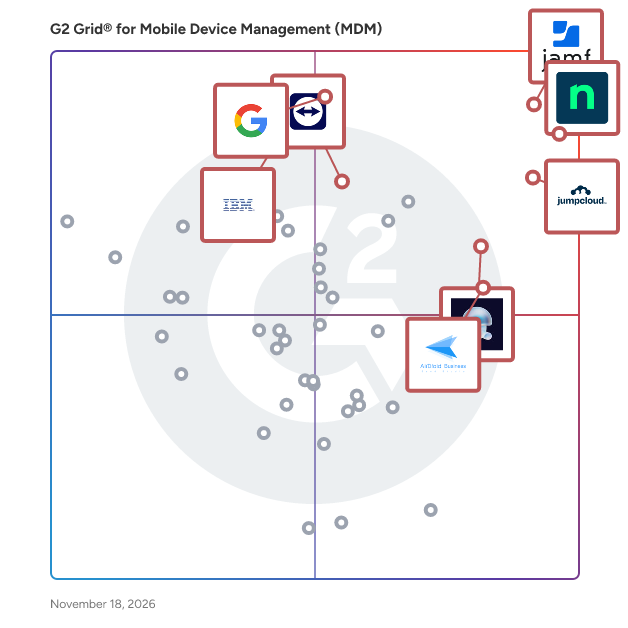
G2 Grid® for Mobile Device Management (MDM) Software

G2 Grid® for Mobile Device Management (MDM) Software plotting products by satisfaction and market presence

Highlighted products: NinjaOne, JumpCloud, Admin, Iru, AirDroid Business, Jamf, IBM MaaS360, and TeamViewer.

Underlying data: [Grid® JSON](https://www.g2.com/categories/mobile-device-management-mdm/grids.json?focus%5B%5D=ninjaone&focus%5B%5D=jumpcloud&focus%5B%5D=google-admin&focus%5B%5D=iru&focus%5B%5D=airdroid-business&focus%5B%5D=jamf&focus%5B%5D=ibm-maas360&focus%5B%5D=teamviewer&segment=small-business)

Hexnode UEM

Hexnode is a comprehensive unified endpoint management tool used by IT professionals to deploy and secure corporate devices. It enables businesses to handle mobility concerns by providing a simple, effective way to view and control devices from a single administrative platform. Hexnode ensures a total separation of corporate and personal data on devices, ensuring the security of the data and the privacy of employees. Supported Operating Systems - Android, Fire OS, iOS, macOS, Linux, ChromeOS, visionOS, tvOS, Windows. Integrations: -Android Enterprise -Apple Business Manager (ABM) -Apple School Manager (ASM) -Azure AD Integration -G Suite (now Google Workspace) -Freshservice -LG, Kyocera and Samsun Knox Enterprise Solution -Microsoft AD -Okta -SCCM -Zendesk Here're the best features of Hexnode UEM: -Android Enterprise program. -Apple Business Manager and Apple School Manager Integrations. -Automated device management. -Web Content Filtering. -BYOD Deployment. -WPCO - Enrollment for Android -Bypass Activation Lock on Apple devices. -Co-managing Windows devices. -Enrollment Profiles for Android, iOS and Windows -Compliance management across the entire device fleet. -Custom Roles for technicians. -Digital Signage -Custom Reports -Different Device Encryption and Security Strategies. -Over-the-air deployment of endpoints using Samsung's Knox Mobile -Enrollment and Google's Zero Touch Enrollment. -Enable Account and Network Configuration. -Enroll using Apple Configurator and other quick enrollment options. -Enterprise application installation using IPA, APK, XAPK, MSI, DMG or PKG files for different platforms. -AI based Scripting with the help of Hexnode Genie. -Automate routine device management tasks with Deployments -Hexnode browser to enable multi-tabbed browsing on mobile devices. -Kiosk mode with a wide range of functionalities. -Unattended Remote Access -Account driven enrollment for Apple devices -Patch management. -Manage any number of devices within a single centralized console. -Monitor and track everything from an intuitive dashboard. -Out-of-the-box devices management. -Out-of-bound product management with REST-based API. -Precisely document security and compliance through a wide array of reports. -Provision, deploy and manage mobile applications. -Remotely set up device configurations on the user devices. -Remote view and control help admins troubleshoot the devices remotely. -ROM Enrollment for Android. -Seamless User Provision. -Selectively restrict device functionalities. -Incidents tab -Compliance policy -LAPS for Windows Security -Self Service device management for macOS and Windows -ChromeOS Managed Guest Sessions -Okta Device Trust -Conditional Access using Entra ID -Android SCEP Solutions we offer: -Unified Endpoint Management -Application Management -Bring Your Own Device -Cross-Platform Support -Enterprise Mobility Management -Identity and Access Management -IoT Device Management -Mobile Device Management -Mobile Application Management -Mobile Content Management -Mobile Expense Management -Mobile Security Management -Mobile Threat Defense -Kiosk Software -Remote Monitoring and Management -Rugged Device Management -Patch Management Trusted by SMBs to Fortune 100 Companies around the world. Check out these case studies: AudiçãoActiva - https://www.hexnode.com/mobile-device-management/mdm-case-study-audicaoactiva/ Andalusia Hospitals - https://www.hexnode.com/mobile-device-management/mdm-case-study-andalusia-hospitals/ Choyce - https://www.hexnode.com/mobile-device-management/mdm-case-study-choyce/ Condé Nast - https://www.hexnode.com/mobile-device-management/mdm-case-study-conde-nast/ DigitalMint - https://www.hexnode.com/mobile-device-management/mdm-case-study-digitalmint/ DKT Philippines - https://www.hexnode.com/mobile-device-management/mdm-case-study-dkt-international/ Hartley ISD - https://www.hexnode.com/mobile-device-management/mdm-case-study-hartley-isd/ Ur & Penn - https://www.hexnode.com/mobile-device-management/mdm-case-study-ur-penn/ Western Airways - https://www.hexnode.com/mobile-device-management/mdm-case-study-western-airways/

Average Rating: 4.5/5.0

Total Reviews: 297

How Do G2 Users Rate Hexnode UEM?

  • Has the product been a good partner in doing business?: 9.1/10 (Category avg: 9.1/10)
  • Whitelist: 9.1/10 (Category avg: 8.9/10)
  • Remote Wipe: 9.4/10 (Category avg: 9.2/10)
  • Blacklist: 9.0/10 (Category avg: 8.9/10)

Who Is the Company Behind Hexnode UEM?

  • Seller: Mitsogo Inc.
  • Company Website:
  • Year Founded: 2013
  • HQ Location: San Francisco, CA
  • LinkedIn® Page: www.linkedin.com
    532 employees on LinkedIn®

Who Uses This Product?

  • Who Uses This: IT Manager, Business Analyst
  • Top Industries: Information Technology and Services, Computer Software
  • Company Size: 53% Medium, 36% Small

What Do G2 Reviewers Say About Hexnode UEM?

AI-generated summary from verified user reviews

Pros
  • Users appreciate the intuitive interface of Hexnode UEM, enabling quick productivity and easy device management.
  • Users value the intuitive and versatile interface of Hexnode UEM, facilitating smooth management across multiple platforms.
  • Users love the intuitive dashboard of Hexnode UEM, simplifying device management with effective policy deployment and support.
  • Users commend the responsive customer support of Hexnode UEM, which assists effectively during implementation and troubleshooting.
  • Users value the flexible policy controls in Hexnode UEM, enabling precise management without complexity during setup.
Cons
  • Users find Hexnode UEM to be lacking features, particularly in reporting, automation, and user management capabilities.
  • Users find the pricing too expensive, especially with rigid plans and high costs for adding technicians.
  • Users find the features limited, lacking depth and advanced options compared to larger UEM platforms.
  • Users find the missing features in Hexnode UEM limit its effectiveness, lacking essential management and automation tools.
  • Users find the inefficient MFA process for bulk device removal in Hexnode UEM to be a major productivity hindrance.

What Are Recent G2 Reviews of Hexnode UEM?

What Are G2 Users Discussing About Hexnode UEM?

Prey

Prey is a comprehensive, cross-platform solution designed to help IT teams maintain full visibility and control over their entire fleet of laptops, tablets, and smartphones. By providing a lightweight and easy-to-deploy agent, Prey empowers organizations to protect their assets, secure sensitive data, and ensure compliance, regardless of the devices' locations. With over 8 million devices trusted globally, Prey stands as a reliable choice for organizations seeking robust device management and security. The primary target audience for Prey includes IT departments across various sectors, including education, healthcare, and corporate environments, where device security and management are critical. Organizations that handle sensitive data or operate in regulated industries will find Prey particularly beneficial due to its compliance features. Specific use cases range from tracking lost or stolen devices to managing a diverse fleet of devices used by remote employees. The platform's capabilities extend beyond mere tracking; it offers a comprehensive approach to device security and management. One of the standout features of Prey is its asset tracking and recovery capabilities. Users can locate any device in real-time through a combination of GPS, Wi-Fi triangulation, and GeoIP technology. This functionality allows IT teams to review location history, create dynamic geofenced zones that trigger security actions, and generate actionable evidence reports. These reports can include camera shots, network data, and screenshots, providing essential support for law enforcement in recovering missing devices. This level of control not only aids in asset recovery but also enhances overall organizational security. Prey also prioritizes the protection of sensitive data and compliance with various regulations. The platform enables immediate actions to prevent data breaches, such as remote file wiping, screen locks, and device alarms. With SOC 2 certification and alignment with GDPR and HIPAA/FERPA standards, Prey offers audit-ready logs and automated compliance alerts. Features like selective data retrieval further ensure that organizations can maintain compliance without the risk of data exposure, making it an invaluable tool for businesses that require stringent data protection measures. Finally, Prey simplifies fleet management through a user-friendly dashboard that allows IT teams to manage their entire device fleet efficiently. Administrators can easily assign devices to employees, group them by usage or location, and monitor hardware changes. This streamlined approach reduces operational overhead, facilitating off-boarding processes and loaner device programs. By consolidating device management into a single platform, Prey enhances productivity and operational efficiency for IT teams, making it a vital component of modern device management strategies.

Average Rating: 4.7/5.0

Total Reviews: 55

How Do G2 Users Rate Prey?

  • Has the product been a good partner in doing business?: 9.5/10 (Category avg: 9.1/10)
  • Whitelist: 6.5/10 (Category avg: 8.9/10)
  • Remote Wipe: 9.8/10 (Category avg: 9.2/10)
  • Blacklist: 6.5/10 (Category avg: 8.9/10)

Who Is the Company Behind Prey?

  • Seller: Prey Project
  • Company Website:
  • Year Founded: 2010
  • HQ Location: Santiago, Santiago
  • LinkedIn® Page: www.linkedin.com
    35 employees on LinkedIn®

Who Uses This Product?

  • Top Industries: Information Technology and Services
  • Company Size: 52% Small, 40% Medium

What Do G2 Reviewers Say About Prey?

AI-generated summary from verified user reviews

Pros
  • Users love the instant tracking and device recovery capabilities of Prey, highlighting its simplicity and effectiveness.
  • Users praise the effective device tracking of Prey, noting its simplicity and improved search capabilities since 2020.
  • Users value Prey's instant location tracking, which enhances device recovery and monitoring efficiency over other solutions.
  • Users commend the ease of use of Prey, appreciating its simple installation and user-friendly interface for tracking devices.
  • Users commend the enhanced asset management features, allowing efficient device tracking and organization with tags.
Cons
  • Users experience connection issues with Prey, affecting device tracking capabilities when offline and complicating recovery efforts.
  • Users note that improvement is needed in Prey's functionality, especially when devices are offline or not updated.
  • Users find the lack of remote access frustrating, as tracking fails when devices are offline, delaying recovery efforts.
  • Users often face remote access issues with Prey, complicating device location when offline or lacking updates.
  • Users report that update issues complicate recovery, as devices need internet to function effectively with Prey.

What Are Recent G2 Reviews of Prey?

What Are G2 Users Discussing About Prey?

ManageEngine Mobile Device Manager Plus MSP

The true MDM solution for MSPs and VARs managing multiple enterprises.

Average Rating: 4.4/5.0

Total Reviews: 20

How Do G2 Users Rate ManageEngine Mobile Device Manager Plus MSP?

  • Has the product been a good partner in doing business?: 8.7/10 (Category avg: 9.1/10)
  • Whitelist: 8.6/10 (Category avg: 8.9/10)
  • Remote Wipe: 9.3/10 (Category avg: 9.2/10)
  • Blacklist: 8.3/10 (Category avg: 8.9/10)

Who Is the Company Behind ManageEngine Mobile Device Manager Plus MSP?

  • Seller: Zoho
  • Year Founded: 1996
  • HQ Location: Austin, TX
  • LinkedIn® Page: www.linkedin.com
    30,913 employees on LinkedIn®
  • Phone: +1 (888) 900-9646

Who Uses This Product?

  • Top Industries: Information Technology and Services
  • Company Size: 62% Small, 38% Medium

What Do G2 Reviewers Say About ManageEngine Mobile Device Manager Plus MSP?

AI-generated summary from verified user reviews

Pros
  • Users appreciate the effective device management capabilities of MDM, seamlessly enforcing kiosk mode for iOS and Android tablets.
  • Users appreciate the ease of use in ManageEngine Mobile Device Manager Plus MSP, enjoying simple administration and control over devices.
  • Users value the quick and easy setup of ManageEngine Mobile Device Manager Plus MSP, significantly enhancing efficiency.
  • Users praise the reliability of ManageEngine Mobile Device Manager Plus MSP, appreciating its quick provisioning and time-saving benefits.
  • Users value the remote control features that provide effective management of company-owned devices with ease.
Cons
  • Users report compatibility issues with non-Samsung devices, affecting the software's performance and functionality.
  • Users experience feature dysfunction as selected applications often fail to appear on the kiosk, hindering usability.
  • Users find the role management somewhat limited, impacting their ability to customize functionalities effectively.
  • Users find that the software's performance is limited by device compatibility, particularly struggling with non-Samsung tablets.
  • Users find the installer outdated, preferring a modern MSI format over the current zip and batch options.

What Are Recent G2 Reviews of ManageEngine Mobile Device Manager Plus MSP?

What Are G2 Users Discussing About ManageEngine Mobile Device Manager Plus MSP?

AI can help you find the answers. G2 helps you trust them.

Connect G2 to Claude or ChatGPT for answers grounded in G2's trusted reviews, comparisons, and pricing from real user insights.

How it works

Scalefusion

Scalefusion is a mobile device management (MDM) and unified endpoint management (UEM) platform that lets IT and security teams enroll, manage, and secure every device, access point, and user from a single dashboard with one agent. It brings together MDM, enterprise mobility management (EMM), endpoint security, and identity and access management (IAM) — capabilities most organizations buy as separate tools — on one platform. Scalefusion manages smartphones, tablets, laptops, desktops, rugged devices, POS systems, and digital signage across Android, iOS/iPadOS, macOS, Windows, ChromeOS, Linux, and Apple/Android TV. Core products: ➠ Scalefusion UEM / MDM — zero-touch enrollment, configuration and policy management, kiosk mode and device lockdown, mobile application management (MAM), patch and OS update management, remote control and troubleshooting, and location tracking with geofencing. ➠ Veltar (Endpoint Security) — vulnerability management, automated compliance, secure web gateway, and endpoint data loss prevention (DLP). ➠ OneIdP (IAM / Zero Trust Access) — identity and access management with single sign-on (SSO) and conditional access based on real-time device posture, so only trusted users on compliant devices reach business apps and email. Best for IT and security teams in Field Services, Retail & Manufacturing, Healthcare, Education, Logistics & Transportation, and frontline operations — managing fleets from 10 to 100,000+ devices across company-owned (COPE) and BYOD programs. Pricing starts at $2 per device/month, with transparent pricing and no setup fees. A 14-day free trial is available. As of 2026, Scalefusion is trusted by 12,000+ businesses across 120+ countries, supported by 200+ global partners.

Average Rating: 4.7/5.0

Total Reviews: 402

How Do G2 Users Rate Scalefusion?

  • Has the product been a good partner in doing business?: 9.3/10 (Category avg: 9.1/10)
  • Whitelist: 9.0/10 (Category avg: 8.9/10)
  • Remote Wipe: 8.9/10 (Category avg: 9.2/10)
  • Blacklist: 8.8/10 (Category avg: 8.9/10)

Who Is the Company Behind Scalefusion?

Who Uses This Product?

  • Who Uses This: IT Manager, CEO
  • Top Industries: Computer Software, Information Technology and Services
  • Company Size: 50% Medium, 45% Small

What Do G2 Reviewers Say About Scalefusion?

AI-generated summary from verified user reviews

Pros
  • Users value the responsive customer support of Scalefusion, enhancing the experience when assistance is needed.
  • Users value the easy device management with Scalefusion, noting its seamless setup and robust support.
  • Users find Scalefusion remarkably easy to use, with a manageable learning curve for seamless device management.
  • Users appreciate the robust feature set of Scalefusion for managing multiple devices effectively across various operating systems.
  • Users praise Scalefusion's exceptional problem resolution, appreciating timely support and effective communication through chat and calls.
Cons
  • Users find the learning curve steep, wishing for more training and in-app guidance for a smoother experience.
  • Users face missing features in Scalefusion, limiting device management and lacking essential tools like GPS tracking.
  • Users find difficult learning curves in Scalefusion, especially regarding complex setups and the need for more training resources.
  • Users feel there is room for improvements in Scalefusion, especially with user-specific settings and compatibility issues.
  • Users face complex setup challenges with Scalefusion, particularly in configuring and managing multiple profiles efficiently.

What Are Recent G2 Reviews of Scalefusion?

What Are G2 Users Discussing About Scalefusion?

Mobile

Keep employees happy and data secure with easy to set-up mobile management for Android, iOS, Windows and other smartphones.

Average Rating: 4.5/5.0

Total Reviews: 19

How Do G2 Users Rate Mobile?

  • Has the product been a good partner in doing business?: 10.0/10 (Category avg: 9.1/10)
  • Whitelist: 7.8/10 (Category avg: 8.9/10)
  • Remote Wipe: 8.8/10 (Category avg: 9.2/10)
  • Blacklist: 7.1/10 (Category avg: 8.9/10)

Who Is the Company Behind Mobile?

  • Seller: Google
  • Year Founded: 1998
  • HQ Location: Mountain View, CA
  • LinkedIn® Page: www.linkedin.com
    301,144 employees on LinkedIn®
  • Ownership: NASDAQ:GOOG
  • Phone: +1 (650) 253-0000

Who Uses This Product?

  • Company Size: 53% Small, 26% Medium

What Are Recent G2 Reviews of Mobile?

Addigy

Addigy is the only Apple Device Management platform that lets IT admins manage Apple devices in real-time, including macOS, iOS, iPadOS and tvOS devices. Our cloud-based multi-tenant platform combines MDM with live agent capabilities to manage and secure your Apple ecosystem — whether you’re managing 100 devices or 10,000. Addigy Guarantees Your Apple Success! How? Let us show you: • Real-time monitoring and management of all your Apple devices. • Secure user onboarding, fully automated. Deploy a new Mac in less than 5 minutes. • Custom compliance support to enforce policies for both groups and individual devices. • Easy software updates. Report, configure, and deploy all OS and third-party software updates. • Instant remote access to macOS devices for fast troubleshooting and issue resolution. Everything your team needs for optimal Apple management—and nothing you don’t. Addigy also integrates with other leading IT solutions, including ConnectWise Manage, Datto/Autotask, BrightGauge, Liongard, ITGlue, Malwarebytes, Zapier, Zendesk, Freshdesk, Augmentt, CloudRadial, and Splashtop.

Average Rating: 4.5/5.0

Total Reviews: 212

How Do G2 Users Rate Addigy?

  • Has the product been a good partner in doing business?: 9.3/10 (Category avg: 9.1/10)
  • Whitelist: 8.6/10 (Category avg: 8.9/10)
  • Remote Wipe: 9.2/10 (Category avg: 9.2/10)
  • Blacklist: 8.4/10 (Category avg: 8.9/10)

Who Is the Company Behind Addigy?

  • Seller: Addigy
  • Company Website:
  • Year Founded: 2013
  • HQ Location: Miami, FL
  • LinkedIn® Page: www.linkedin.com
    81 employees on LinkedIn®
  • Phone: (305) 330-6677

Who Uses This Product?

  • Who Uses This: Owner, President
  • Top Industries: Information Technology and Services, Computer & Network Security
  • Company Size: 61% Small, 33% Medium

What Do G2 Reviewers Say About Addigy?

AI-generated summary from verified user reviews

Pros
  • Users value the ease of use of Addigy for seamless device management and efficient deployment processes.
  • Users value the flexible and powerful features of Addigy, enhancing functionality and simplifying device management.
  • Users value the phenomenal support from Addigy, praising its quick assistance and comprehensive documentation for troubleshooting.
  • Users value the easy deployment process of Addigy, facilitating seamless setup and effective management of macOS devices.
  • Users value the intuitive and feature-rich Apple Device Management of Addigy, appreciating its real-time visibility and excellent support.
Cons
  • Users note the missing features in Addigy, such as inconsistent macOS patching and cluttered app directories.
  • Users find that improvement is needed in the interface, documentation, and app organization for a better experience.
  • Users report feature issues with Addigy, including a clunky UI and limited depth in available installers.
  • Users experience UX improvement issues with Addigy, finding the interface overwhelming and lacking intuitive navigation.
  • Users express frustration over slow and ineffective customer support, leading to unresolved issues and delays.

What Are Recent G2 Reviews of Addigy?

What Are G2 Users Discussing About Addigy?

N-sight RMM

N-able N-sight™ RMM combines remote monitoring and management, remote access, ticketing, and billing capabilities, into one powerful yet easy to use platform that streamlines day-to-operations, combats threats and drives operational efficiency. Key features include: • Manage all devices across Windows, Linux and Apple platforms • Get up in running rapidly with simple onboarding steps, built-in automation scripts and patching policies • Automated Microsoft patch management to help ensure compliance and security at all times • Integrated Endpoint Detection and Response for layered security • Drag and drop automation for efficient service delivery • Secure and instant remote access to desktop or mobile devices (Windows, macOS, iOS and Android) • Ticketing, including workflows, routing rules and automation to drive efficiency and collaboration across teams • Simple time tracking, including functionality for recurring tickets and appointments • Automated billing and invoicing that integrates with your existing accounting software • Best in class integrations, providing flexibility via APIs and open ecosystem N-sight RMM makes it easy for MSPs and IT Professionals to get started in minutes with a powerful all-in-one platform that delivers the perfect blend of capabilities and ease of use.

Average Rating: 4.3/5.0

Total Reviews: 353

How Do G2 Users Rate N-sight RMM?

  • Has the product been a good partner in doing business?: 8.3/10 (Category avg: 9.1/10)
  • Remote Wipe: 7.7/10 (Category avg: 9.2/10)

Who Is the Company Behind N-sight RMM?

  • Seller: N-able
  • Company Website:
  • HQ Location: Morrisville, North Carolina
  • LinkedIn® Page: www.linkedin.com
    2,307 employees on LinkedIn®
  • Ownership: NYSE: NABL

Who Uses This Product?

  • Who Uses This: Owner, President
  • Top Industries: Information Technology and Services, Computer & Network Security
  • Company Size: 73% Small, 20% Medium

What Do G2 Reviewers Say About N-sight RMM?

AI-generated summary from verified user reviews

Pros
  • Users value the ease of use of N-able N-Sight RMM, appreciating its simplicity and efficient support.
  • Users value the improved remote access features of N-able N-Sight RMM, enhancing efficiency and management of devices.
  • Users appreciate the automation capabilities of N-able N-Sight RMM, significantly saving time and enhancing productivity.
  • Users value the real-time monitoring and automation features of N-able N-Sight RMM for effective system management.
  • Users appreciate the intuitive and essential features of N-able N-Sight RMM, enhancing customer service with ease of use.
Cons
  • Users face feature issues with N-able N-Sight RMM, including unreliable performance and poor support, leading to frustration.
  • Users often face laggy performance with N-able N-Sight RMM, struggling with connection issues and unreliable features.
  • Users note several missing features, including limited report customization and ineffective patch management, hindering overall utility.
  • Users find the user interface clunky, which makes it difficult to quickly identify problem devices.
  • Users find the user interface outdated and clunky, making it hard to identify issues quickly and effectively.

What Are Recent G2 Reviews of N-sight RMM?

What Are G2 Users Discussing About N-sight RMM?

VantageMDM

VantageMDM is a comprehensive mobile device management (MDM) solution designed to help organizations efficiently monitor, manage, and secure a diverse range of devices, including Android, iOS, Windows PCs, macOS, and Chromebooks. By providing a centralized platform, VantageMDM enables businesses and educational institutions to enforce policies, manage applications, and ensure data security across all enrolled devices. Its user-friendly interface simplifies device enrollment, policy enforcement, and real-time monitoring, making it an ideal choice for organizations seeking to enhance operational efficiency and maintain compliance with industry standards. Key Features and Functionality: - Device Management: Centralized control over device settings, configurations, and security policies to ensure compliance and protect sensitive data. - Application Management: Streamlined deployment, updating, and management of applications across all devices, including the ability to blacklist or whitelist specific apps. - Kiosk Mode: Restrict devices to single or multiple approved applications, enhancing security and productivity by preventing unauthorized access. - Remote Screen Sharing: Enable IT administrators to remotely view and troubleshoot device issues, reducing downtime and support costs. - Internet Filtering: Control and monitor web access by blocking or allowing websites based on predefined categories, ensuring secure browsing environments. - Content Management: Efficient distribution and management of files and documents to devices, facilitating seamless access to necessary resources. Primary Value and Solutions Provided: VantageMDM addresses the critical need for organizations to manage and secure a growing array of mobile devices within their networks. By offering a scalable and cost-effective solution, it empowers businesses and educational institutions to: - Enhance Security: Implement robust security measures to protect sensitive information and maintain compliance with industry regulations. - Improve Productivity: Streamline device and application management processes, allowing IT teams to focus on strategic initiatives rather than routine maintenance. - Reduce Operational Costs: Minimize the need for on-site support through remote management capabilities, leading to significant cost savings. - Ensure Compliance: Enforce organizational policies and regulatory requirements consistently across all devices, mitigating risks associated with non-compliance. By integrating VantageMDM into their operations, organizations can achieve a secure, efficient, and compliant mobile device environment tailored to their specific needs.

Average Rating: 5.0/5.0

Total Reviews: 21

How Do G2 Users Rate VantageMDM?

  • Has the product been a good partner in doing business?: 9.9/10 (Category avg: 9.1/10)
  • Whitelist: 9.7/10 (Category avg: 8.9/10)
  • Remote Wipe: 9.9/10 (Category avg: 9.2/10)
  • Blacklist: 10.0/10 (Category avg: 8.9/10)

Who Is the Company Behind VantageMDM?

Who Uses This Product?

  • Company Size: 57% Small, 33% Medium

What Do G2 Reviewers Say About VantageMDM?

AI-generated summary from verified user reviews

Pros
  • Users appreciate the seamless integration of Android MDM and Kiosk Mode, enhancing security and focus for business tasks.
  • Users value the seamless integration of Android MDM with Kiosk Mode, enhancing focus and productivity in the workplace.
  • Users appreciate the centralized management of VantageMDM, enabling efficient oversight and control of multiple devices effortlessly.
  • Users value the robust security of VantageMDM, effectively ensuring devices are used strictly for business purposes.
  • Users appreciate the intuitive dashboard of VantageMDM, making device management and monitoring extremely easy and efficient.
Cons
  • Users face compatibility issues with VantageMDM, making onboarding and integration with existing systems challenging.
  • Users find that initial configuration for advanced policies can be challenging, but the system performs well afterward.
  • Users note that the onboarding process requires improvement, especially in connecting with other systems.
  • Users face integration issues during onboarding with Active Directory and third-party services, complicating the process significantly.

What Are Recent G2 Reviews of VantageMDM?

Swif.ai

Swif.ai is a next-generation Mobile Device Management (MDM) solution designed to assist organizations in managing and securing their mobile devices while ensuring compliance with various regulatory standards. This software is particularly beneficial for businesses looking to streamline their MDM processes and achieve compliance with frameworks such as SOC2, ISO, NIST, and GDPR in a fraction of the time typically required. With Swif.ai, companies can transition from zero to compliance readiness in just one hour, making it an efficient choice for organizations of all sizes. Targeted primarily at businesses with employee counts ranging from 5 to 50,000, Swif.ai caters to a diverse audience, including small startups, mid-sized companies, and large enterprises. The software addresses the unique challenges that organizations face in managing mobile devices, such as data security, device tracking, and regulatory compliance. By providing a comprehensive MDM solution, Swif.ai enables companies to focus on their core operations while ensuring that their mobile device management is handled effectively and securely. One of the standout features of Swif.ai is its inclusion of free Shadow IT management for all customers. This capability allows organizations to identify and manage unauthorized applications and devices that may pose security risks. By integrating Shadow IT management into the MDM framework, Swif.ai enhances overall security posture and helps organizations maintain compliance with regulatory requirements. This feature is particularly valuable in today’s environment, where the use of personal devices for work purposes is increasingly common. In addition to its robust compliance capabilities, Swif.ai offers a user-friendly interface that simplifies the management of mobile devices. The software provides tools for device enrollment, policy enforcement, and remote management, allowing IT teams to efficiently oversee their mobile fleets. The ability to quickly implement security policies and monitor device compliance ensures that organizations can respond promptly to potential threats and maintain a secure operating environment. Overall, Swif.ai distinguishes itself in the MDM software market by combining rapid compliance capabilities with comprehensive mobile device management features. Its focus on serving a wide range of organizations, from small businesses to large enterprises, along with its unique offerings like free Shadow IT management, positions it as a valuable solution for companies looking to enhance their mobile device security and compliance efforts.

Average Rating: 4.9/5.0

Total Reviews: 102

How Do G2 Users Rate Swif.ai?

  • Has the product been a good partner in doing business?: 9.4/10 (Category avg: 9.1/10)
  • Whitelist: 8.9/10 (Category avg: 8.9/10)
  • Remote Wipe: 9.2/10 (Category avg: 9.2/10)
  • Blacklist: 9.6/10 (Category avg: 8.9/10)

Who Is the Company Behind Swif.ai?

  • Seller: Swif
  • Company Website:
  • Year Founded: 2022
  • HQ Location: Sunnyvale, US
  • LinkedIn® Page: www.linkedin.com
    43 employees on LinkedIn®

Who Uses This Product?

  • Top Industries: Information Technology and Services, Hospital & Health Care
  • Company Size: 72% Small, 28% Medium

What Do G2 Reviewers Say About Swif.ai?

AI-generated summary from verified user reviews

Pros
  • Users appreciate the multi-OS support of Swif.ai, enhancing device management and streamlining compliance updates effectively.
  • Users appreciate the automated security features of Swif.ai, enhancing efficiency and ensuring compliance with security standards.
  • Users appreciate the automation in Swif.ai, enhancing security efficiency and saving significant time in evidence logging.
  • Users value the ease of use of Swif.ai, enabling quick setup and seamless onboarding processes.
  • Users value the time-saving automation of Swif.ai, enhancing efficiency and reducing repetitive tasks significantly.
Cons
  • Users find poor reporting in Swif.ai, as initial setups are complex and logs are often delayed.
  • Users face challenges with insufficient information in reporting logs and unclear technical descriptions, complicating their experience.
  • Users find the learning curve steep, especially for non-technical staff, making it challenging to navigate initially.
  • Users find the missing features in Swif.ai lead to a less comprehensive experience, especially on mobile devices.
  • Users find the UI overwhelming and cramped, making the experience feel cluttered and difficult to navigate.

What Are Recent G2 Reviews of Swif.ai?

Jamf Now

Jamf Now, a cloud-based Mobile Device Management (MDM) solution, is the easiest way to manage iPads, iPhones, Macs and Apple TVs devices for growing small and medium-sized businesses. With Jamf Now you can set up, manage and secure Apple devices in minutes. Jamf Now helps configure settings on your Apple devices quickly and consistently and allows you to manage your devices by centrally deploying apps anytime from anywhere. Jamf Now helps ensure the sensitive company information your employees access on their Apple devices remains secure. Enforce passcodes and encryption and even remotely lock or wipe a device.

Average Rating: 4.4/5.0

Total Reviews: 51

How Do G2 Users Rate Jamf Now?

  • Has the product been a good partner in doing business?: 9.6/10 (Category avg: 9.1/10)
  • Whitelist: 8.9/10 (Category avg: 8.9/10)
  • Remote Wipe: 9.7/10 (Category avg: 9.2/10)
  • Blacklist: 10.0/10 (Category avg: 8.9/10)

Who Is the Company Behind Jamf Now?

  • Seller: Jamf
  • Year Founded: 2002
  • HQ Location: Minneapolis, MN
  • LinkedIn® Page: www.linkedin.com
    2,546 employees on LinkedIn®
  • Ownership: NASDAQ: JAMF

Who Uses This Product?

  • Top Industries: Information Technology and Services, Computer Software
  • Company Size: 53% Medium, 34% Small

What Do G2 Reviewers Say About Jamf Now?

AI-generated summary from verified user reviews

Pros
  • Users value the ease of use of Jamf Now, finding Apple device management simple and quick for all teams.
  • Users find the device management process effortless with Jamf Now, benefiting from its simplicity and cloud-based functionality.
  • Users value the robust security features of Jamf Now, making Apple device management effortless and effective.
  • Users highlight the cross-platform management of Jamf Now, making Apple device management effortless across various devices.
  • Users find the deployment ease of Jamf Now to be intuitive, allowing quick management of Apple devices.
Cons
  • Users find system limitations in Jamf Now, particularly regarding mixed environments and advanced customization features.
  • Users find missing advanced features in Jamf Now, limiting customization and control for complex organizational needs.
  • Users face compatibility issues with mixed environments and experience difficulties with directory binding in Jamf Now.
  • Users note the limited device management for non-Apple platforms, affecting their overall experience with Jamf Now.
  • Users find Jamf Now to be expensive and occasionally too complex, necessitating additional staff for support.

What Are Recent G2 Reviews of Jamf Now?

What Are G2 Users Discussing About Jamf Now?

LogMeIn Miradore

LogMeIn Miradore is a cloud-based Mobile Device Management (MDM) and Unified Endpoint Management (UEM) platform designed for IT managers, IT administrators, and Managed Service Providers (MSPs) managing multi-platform device fleets. The platform enables organizations to manage, secure, and automate Android, Apple (iOS, iPadOS, macOS), and Windows devices from a single console, with no training required and setup possible in minutes. Miradore helps IT teams automate device enrollment, configuration, OS updates, and application deployment across smartphones, tablets, laptops, and desktops, which maintains real-time visibility into device inventory, security status, and compliance across the full device lifecycle. Miradore strengthens security with encryption, passcode enforcement, remote lock and wipe, application controls, and BYOD data separation — supporting compliance with GDPR, HIPAA, CJIS, and other data protection regulations. For MSPs, Miradore's multi-tenant Partner Portal enables management of multiple customer environments from a single dashboard with tenant-specific permissions and centralized administration. Trusted by more than 10,000 organizations across 180+ countries, Miradore is named a Leader in the 2024 IDC MarketScape for Worldwide UEM Software for Small and Medium-Sized Businesses.

Average Rating: 4.6/5.0

Total Reviews: 142

How Do G2 Users Rate LogMeIn Miradore?

  • Has the product been a good partner in doing business?: 9.3/10 (Category avg: 9.1/10)
  • Whitelist: 8.9/10 (Category avg: 8.9/10)
  • Remote Wipe: 9.1/10 (Category avg: 9.2/10)
  • Blacklist: 9.0/10 (Category avg: 8.9/10)

Who Is the Company Behind LogMeIn Miradore?

  • Seller: GoTo
  • Company Website:
  • Year Founded: 2003
  • HQ Location: Boston, MA
  • LinkedIn® Page: www.linkedin.com
    980 employees on LinkedIn®

Who Uses This Product?

  • Who Uses This: IT Specialist
  • Top Industries: Information Technology and Services, Hospital & Health Care
  • Company Size: 48% Medium, 43% Small

What Do G2 Reviewers Say About LogMeIn Miradore?

AI-generated summary from verified user reviews

Pros
  • Users value the ease of use of LogMeIn Miradore, facilitating efficient management of mobile devices across platforms.
  • Users value the efficient device management capabilities of LogMeIn Miradore, simplifying controls across various operating systems.
  • Users find the setup ease of LogMeIn Miradore exceptional, making configuration and installation quick and intuitive.
  • Users praise the easy setup and seamless integration, making device management efficient and user-friendly.
  • Users appreciate the seamless integration with Apple Business Manager, enhancing their device management processes effortlessly.
Cons
  • Users feel LogMeIn Miradore is lacking features, making complex tasks difficult and causing frustration with profile management.
  • Users feel there are missing features in LogMeIn Miradore, particularly regarding device restrictions and filtering options.
  • Users experience slow performance with LogMeIn Miradore, particularly during application deployment and navigating views.
  • Users experience slow update issues and instability in app updating procedures, affecting overall efficiency.
  • Users face deployment difficulties with LogMeIn Miradore, finding the setup process and application deployment frustratingly complex.

What Are Recent G2 Reviews of LogMeIn Miradore?

What Are G2 Users Discussing About LogMeIn Miradore?

Mosyle

Mosyle is a comprehensive device management solution specifically designed for organizations that utilize Apple devices in workplace and educational settings. This professional-grade platform integrates all necessary tools to seamlessly deploy, manage, and protect Apple devices, making it an essential resource for IT administrators and educators alike. With Mosyle, users can streamline their device management processes, ensuring that Apple devices are work-ready with minimal effort and at a cost-effective price point. Targeted primarily at businesses and educational institutions, Mosyle caters to a diverse audience that includes IT professionals, educators, and administrators who require efficient management of multiple Apple devices. The platform is particularly beneficial for organizations that need to maintain a secure and productive environment while managing a large fleet of devices. Specific use cases include onboarding new devices, enforcing security policies, and providing remote support, all of which are critical for maintaining operational efficiency. One of the key features of Mosyle is its automated deployment capabilities, which allow organizations to set up and configure devices without manual intervention. This feature not only saves time but also reduces the potential for human error during the setup process. Additionally, Mosyle offers robust security features, including device encryption and remote wipe capabilities, ensuring that sensitive data remains protected even if a device is lost or stolen. The platform also supports app management, enabling administrators to easily distribute and manage applications across all devices. Another significant advantage of Mosyle is its user-friendly interface, which simplifies the management process for IT teams. The platform provides detailed analytics and reporting tools, allowing organizations to monitor device usage and compliance with security policies. This data-driven approach helps organizations make informed decisions regarding their device management strategies. Furthermore, Mosyle's commitment to affordability makes it accessible for organizations of all sizes, ensuring that even smaller institutions can benefit from advanced device management capabilities. Overall, Mosyle stands out in the device management category by offering a holistic solution that combines deployment, management, and security features into a single platform. Its focus on Apple devices, combined with its user-friendly design and cost-effective pricing, makes it a valuable tool for organizations looking to optimize their device management processes while ensuring the safety and productivity of their users.

Average Rating: 4.6/5.0

Total Reviews: 57

How Do G2 Users Rate Mosyle?

  • Has the product been a good partner in doing business?: 9.3/10 (Category avg: 9.1/10)
  • Whitelist: 8.6/10 (Category avg: 8.9/10)
  • Remote Wipe: 9.5/10 (Category avg: 9.2/10)
  • Blacklist: 8.0/10 (Category avg: 8.9/10)

Who Is the Company Behind Mosyle?

Who Uses This Product?

  • Top Industries: Primary/Secondary Education, Education Management
  • Company Size: 56% Medium, 26% Small

What Do G2 Reviewers Say About Mosyle?

AI-generated summary from verified user reviews

Pros
  • Users rave about Mosyle's amazing customer support, highlighting quick responses and helpful, patient assistance from real people.
  • Users find Mosyle to be extremely easy to use, appreciating its simplicity and reliability for managing multiple locations.
  • Users find Mosyle's affordability exceptional, offering top-tier performance at a fraction of the cost compared to competitors.
  • Users value the monitoring and app control capabilities of Mosyle, which meet essential MDM needs effectively.
  • Users appreciate the control over monitoring and app deployment, finding Mosyle meets essential MDM needs effectively.
Cons
  • Users find the main administrator configuration difficult to change, creating challenges in managing the product effectively.
  • Users find it challenging to change the Main Administrator, complicating account management and flexibility.
  • Users find documentation insufficient and difficult to navigate, making it hard to locate specific information.
  • Users find a steep learning curve transitioning from JAMF, but usability improves with familiarization.
  • Users note the limited features of Mosyle compared to competitors, which can hinder its overall effectiveness.

What Are Recent G2 Reviews of Mosyle?

What Are G2 Users Discussing About Mosyle?

Zelt

Zelt is the modern, all-in-one HRIS that simplifies people operations by unifying HR, Payroll & IT in a single platform. One source of truth for your employee data. It brings HR, Finance, and IT together into one system of record, giving companies a 360-degree view of the employee across the entire lifecycle - from onboarding to payroll, performance, and scheduling. By bringing together payroll, time off, benefits, reviews, app access, and device management, Zelt helps automate operations, improve compliance, and reduce the overhead of managing multiple disconnected tools. Whether you're looking to automate administrative tasks, enhance employee engagement, or simplify compliance, Zelt provides robust solutions tailored to your business needs. The platform integrates easily with existing tools and provides valuable insights through customizable reports and analytics, allowing managers to make informed decisions. Designed for growing businesses, Zelt is trusted for its scalability, security, and dedication to enhancing workplace efficiency.

Average Rating: 4.6/5.0

Total Reviews: 298

How Do G2 Users Rate Zelt?

  • Has the product been a good partner in doing business?: 9.2/10 (Category avg: 9.1/10)
  • Whitelist: 8.2/10 (Category avg: 8.9/10)
  • Remote Wipe: 9.0/10 (Category avg: 9.2/10)
  • Blacklist: 8.6/10 (Category avg: 8.9/10)

Who Is the Company Behind Zelt?

  • Seller: Zelt
  • Company Website:
  • Year Founded: 2016
  • HQ Location: Belgravia, London, England
  • LinkedIn® Page: www.linkedin.com
    52 employees on LinkedIn®

Who Uses This Product?

  • Who Uses This: CEO
  • Top Industries: Information Technology and Services, Computer Software
  • Company Size: 27% Small, 25% Medium

What Do G2 Reviewers Say About Zelt?

AI-generated summary from verified user reviews

Pros
  • Users find Zelt's interface to offer ease of use, making booking annual leave straightforward and user-friendly.
  • Users appreciate the clean and user-friendly experience of Zelt, making attendance and payroll management seamless.
  • Users find Zelt's intuitive interface user-friendly and easy to navigate, enhancing their overall experience.
  • Users appreciate the clean and intuitive interface of Zelt, making annual leave booking and management effortless.
  • Users commend Zelt for its responsive customer support, enhancing their overall experience and problem-solving efficiency.
Cons
  • Users find missing features in Zelt, such as limited logging options and inflexible expense category management.
  • Users feel that Zelt requires improvement in intuitiveness and customization for a smoother and more efficient experience.
  • Users experience limited features in Zelt, facing inconveniences and restrictions that disrupt administrative workflows significantly.
  • Users feel that Zelt lacks customization options, particularly in calendar views and advanced feature settings.
  • Users struggle with navigation difficulty, particularly in locating the holiday approval and performance review features swiftly.

What Are Recent G2 Reviews of Zelt?

What Are G2 Users Discussing About Zelt?

Applivery

Applivery is a European Unified Endpoint Management (UEM/MDM) platform that helps IT teams manage, secure, and automate fleets of Apple, Android, and Windows devices from a single console, combining artificial intelligence with centralized management. Founded in Spain, Applivery operates in more than 65 markets and is one of the few European platforms with full enterprise-grade UEM capabilities, evolving traditional endpoint management into a smarter, more proactive, and autonomous model. Its Segments architecture applies security policies, compliance (ISO 27001, SOC 2, CIS), and event-based automation without device-by-device management, and includes zero-touch enrollment, private enterprise app distribution through a dedicated App Store, and support for Android devices without Google Mobile Services (GMS).

Average Rating: 4.8/5.0

Total Reviews: 38

How Do G2 Users Rate Applivery?

  • Has the product been a good partner in doing business?: 9.5/10 (Category avg: 9.1/10)
  • Whitelist: 10.0/10 (Category avg: 8.9/10)
  • Remote Wipe: 10.0/10 (Category avg: 9.2/10)
  • Blacklist: 10.0/10 (Category avg: 8.9/10)

Who Is the Company Behind Applivery?

  • Seller: Applivery
  • Company Website:
  • Year Founded: 2016
  • HQ Location: Madrid, ES
  • LinkedIn® Page: www.linkedin.com
    68 employees on LinkedIn®

Who Uses This Product?

  • Top Industries: Computer Software, Information Technology and Services
  • Company Size: 43% Medium, 35% Small

What Do G2 Reviewers Say About Applivery?

AI-generated summary from verified user reviews

Pros
  • Users appreciate the ease of use of Applivery, enjoying seamless app distribution and vital statistics at a glance.
  • Users praise the flawless automation of Applivery, enhancing their experience with seamless and immediate access to information.
  • Users commend the strong customer support of Applivery, appreciating the proactive and responsive product team.
  • Users value the extensive onboarding materials and proactive support from the Applivery product team.
  • Users find it easy to distribute and install apps with Applivery, benefiting from valuable statistics for better usage.
Cons
  • Users miss windows OS support in Applivery, preferring equal compatibility with Apple and Google systems.
  • Users find the complexity of many advanced features challenging, particularly for non-IT users navigating the platform.
  • Users find the difficult learning curve of Applivery challenging, especially for those without IT backgrounds.
  • Users find the learning curve steep for non-IT individuals due to the platform's complexity and multitude of features.
  • Users miss Windows OS support, desiring similar compatibility levels with Apple and Google platforms.

What Are Recent G2 Reviews of Applivery?

What Are G2 Users Discussing About Applivery?

SolarWinds Observability

SolarWinds® Observability is a comprehensive full-stack observability solution designed to meet the diverse needs of modern organizations, regardless of their size. This solution provides deep visibility into hybrid ecosystems, enabling users to monitor and manage both on-premises and cloud environments effectively. By optimizing performance and ensuring availability across distributed hybrid IT infrastructures, SolarWinds Observability supports organizations in navigating the complexities of their IT environments. Targeted at IT professionals and organizations that require robust monitoring capabilities, SolarWinds Observability caters to a wide range of use cases. It is particularly beneficial for businesses operating in hybrid environments, where the integration of on-premises and cloud resources is essential. The solution allows users to gain a holistic view of their networks, applications, databases, and user experiences, thereby facilitating better decision-making and operational efficiency. This is especially crucial in today’s fast-paced digital landscape, where downtime can significantly impact service reliability and customer satisfaction. One of the standout features of SolarWinds Observability is its built-in intelligence powered by AIOps capabilities. This functionality accelerates issue remediation by enabling users to detect, troubleshoot, and resolve problems more efficiently. The advanced predictive analysis and anomaly-based alerts help organizations proactively address potential issues before they escalate, ultimately reducing downtime and enhancing service reliability. Additionally, the solution's log pattern analysis further streamlines the troubleshooting process, allowing IT teams to focus on strategic initiatives rather than being bogged down by operational challenges. SolarWinds Observability offers flexibility in deployment, providing users with the option to choose between self-hosted and SaaS models. The self-hosted option integrates seamlessly with other SolarWinds services, such as security and storage monitoring, while the SaaS option is tailored for deeper monitoring of custom and cloud-based applications. This adaptability ensures that organizations can select the deployment method that best aligns with their operational needs and infrastructure. Moreover, SolarWinds Observability stands out by consolidating multiple monitoring tools into a single, integrated solution. This not only simplifies the monitoring process but also helps organizations reduce costs associated with managing disparate systems. By offering comprehensive visibility across hybrid IT environments, SolarWinds Observability empowers organizations to optimize their operations and enhance overall performance.

Average Rating: 4.3/5.0

Total Reviews: 850

How Do G2 Users Rate SolarWinds Observability?

  • Has the product been a good partner in doing business?: 8.3/10 (Category avg: 9.1/10)
  • Whitelist: 8.3/10 (Category avg: 8.9/10)
  • Remote Wipe: 10.0/10 (Category avg: 9.2/10)
  • Blacklist: 8.3/10 (Category avg: 8.9/10)

Who Is the Company Behind SolarWinds Observability?

Who Uses This Product?

  • Who Uses This: Network Engineer, Network Administrator
  • Top Industries: Information Technology and Services, Hospital & Health Care
  • Company Size: 44% Large, 35% Medium

What Do G2 Reviewers Say About SolarWinds Observability?

AI-generated summary from verified user reviews

Pros
  • Users find the ease of use of SolarWinds Observability beneficial for quick and stress-free monitoring.
  • Users appreciate the clear and practical monitoring that simplifies performance tracking across various databases and environments.
  • Users appreciate the clear monitoring performance of SolarWinds Observability, making troubleshooting less stressful and more efficient.
  • Users appreciate the clear monitoring capabilities of SolarWinds Observability, simplifying performance diagnostics across various databases.
  • Users appreciate the intuitive user interface of SolarWinds Observability, enabling easy navigation and clear data visualization.
Cons
  • Users find the pricing of SolarWinds Observability to be expensive, especially for smaller teams or companies.
  • Users find the learning curve steep, especially for configuring advanced features and tuning alerts effectively.
  • Users struggle with integration issues due to limited out-of-the-box support and challenging customizations with SolarWinds Observability.
  • Users find the complex setup daunting and time-consuming, particularly for larger environments and new users.
  • Users find the configuration difficulty challenging, especially for large environments, making initial setup overwhelming and complex.

What Are Recent G2 Reviews of SolarWinds Observability?

What Are G2 Users Discussing About SolarWinds Observability?

Adam Crivello
AC
Researched and written by Adam Crivello
Updated