Top Free Microsoft 365 Management Tools

How Many Microsoft 365 Management Tools Products Does G2 Track?

Total Products under this Category: 77

Category Stats (Oct 2026)

  • Average Rating: 4.5/5 The average rating of products in this category, based on all submitted ratings
  • Top Trending Product: Datto SaaS Protection (+5.16%) - Among all products in this category, Datto SaaS Protection recorded the largest rating increase compared to last month

Last updated: October 07, 2026

How Does G2 Rank Microsoft 365 Management Tools Products?

Why You Can Trust G2's Software Rankings:

  • 30 Analysts and Data Experts
  • 7,100+ Authentic Reviews
  • 77+ Products
  • Unbiased Rankings

G2's software rankings are built on verified user reviews, rigorous moderation, and a consistent research methodology maintained by a team of analysts and data experts. Each product is measured using the same transparent criteria, with no paid placement or vendor influence. While reviews reflect real user experiences, which can be subjective, they offer valuable insight into how software performs in the hands of professionals. Together, these inputs power the G2 Score, a standardized way to compare tools within every category.

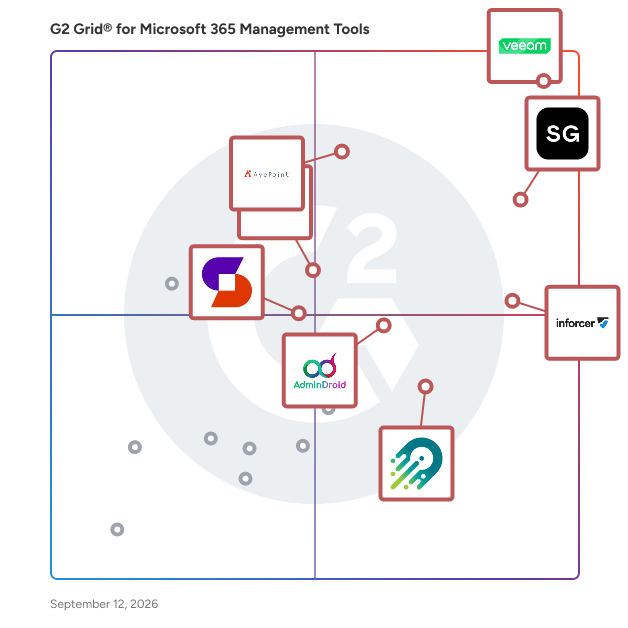
G2 Grid® for Microsoft 365 Management Tools

G2 Grid® for Microsoft 365 Management Tools plotting products by satisfaction and market presence

Highlighted products: Veeam Data Cloud for Microsoft 365, ShareGate, inforcer, AvePoint Confidence Platform, AdminDroid, CoreView, Orchestry, and Syskit Point.

Underlying data: [Grid® JSON](https://www.g2.com/categories/microsoft-365-management-tools/grids.json?focus%5B%5D=veeam-data-cloud-for-microsoft-365&focus%5B%5D=sharegate&focus%5B%5D=inforcer&focus%5B%5D=avepoint-confidence-platform&focus%5B%5D=admindroid&focus%5B%5D=coreview&focus%5B%5D=orchestry&focus%5B%5D=syskit-syskit-point)

ShareGate

ShareGate is a Microsoft 365 migration and governance software platform that helps IT professionals move business data to Microsoft 365 and maintain control of their environments after migration. Trusted by over 100,000 IT pros, ShareGate addresses two distinct operational challenges for IT teams managing Microsoft 365 at scale: executing complex tenant-to-tenant and cross-platform migrations accurately, and maintaining ongoing visibility and governance across collaboration environments. ShareGate Migrate supports organizations moving content between Microsoft 365 tenants and from third-party platforms. Key capabilities include: • Tenant-to-tenant migration for SharePoint, Microsoft Teams, OneDrive, and Exchange Online • Cross-platform migration from Google Workspace, Box, and on-premises file shares • Pre-migration environment analysis covering permissions, ownership, and content structure • Post-migration verification and reporting • Concurrent migration support with workload coverage scaled by plan tier ShareGate Protect supports IT teams managing Microsoft 365 governance on an ongoing basis. Key capabilities include: • Tenant-wide visibility into access, workspace health, guest permissions, and license utilization • Identification of oversharing, inactive workspaces, ownership gaps, and external access drift • Guided remediation tools for fixing access and governance issues without custom scripting • AI and Microsoft Copilot access exposure indicators to support readiness assessments • Cost and license visibility with dollar-value indicators for operational decision-making ShareGate is used by IT professionals and managed service providers across organizations of varying sizes, with particular adoption among teams managing Microsoft 365 environments through mergers, acquisitions, and organizational restructuring. The platform is designed to reduce manual effort and administrative overhead across both migration projects and ongoing governance operations.

Average Rating: 4.6/5.0

Total Reviews: 191

How Do G2 Users Rate ShareGate?

  • Has the product been a good partner in doing business?: 9.3/10 (Category avg: 9.3/10)
  • Management: 8.9/10 (Category avg: 9.0/10)
  • Storage Insights: 8.6/10 (Category avg: 8.5/10)
  • Bulk User Management: 8.7/10 (Category avg: 9.0/10)

Who Is the Company Behind ShareGate?

  • Seller: Workleap
  • Company Website:
  • Year Founded: 2006
  • HQ Location: Montréal, Québec, Canada
  • Twitter: @WorkleapHQ
    1,132 Twitter followers
  • LinkedIn® Page: www.linkedin.com
    376 employees on LinkedIn®

Who Uses This Product?

  • Top Industries: Information Technology and Services, Government Administration
  • Company Size: 60% Large, 27% Medium

What Do G2 Reviewers Say About ShareGate?

AI-generated summary from verified user reviews

Pros
  • Users appreciate the ease of use in ShareGate, enabling effortless SharePoint migrations with an intuitive interface.
  • Users find migration easy with ShareGate, significantly reducing time and simplifying SharePoint and OneDrive management.
  • Users appreciate the intuitive and easy-to-navigate UI of ShareGate, making tasks straightforward and efficient.
  • Users find ShareGate's easy setup straightforward, minimizing complexity and saving time for migrations.
  • Users value the clear and concise reporting in ShareGate, which enhances data migration and auditing efficiency.
Cons
  • Users point out the lack of essential features in ShareGate, expressing a desire for enhancements and improvements.
  • Users find ShareGate expensive, especially for smaller teams needing multiple licenses and advanced features not included in the base product.
  • Users find the poor interface design of ShareGate frustrating, especially with hidden options and complicated navigation.
  • Users report slow migration speeds, leading to long downtimes and potential interruptions in business operations.
  • Users express frustration with the slow loading of ShareGate, finding it disruptive to business operations during migrations.

What Are Recent G2 Reviews of ShareGate?

What Are G2 Users Discussing About ShareGate?

inforcer

inforcer is the only multi-tenant platform built for MSPs combining Microsoft 365 management and threat detection and response. inforcer empowers MSPs to sell, secure, and support Microsoft 365 and Copilot at scale by standardizing security and data governance policies across multiple tenants, automating environment configuration, assessing tenant security posture, detecting threats in real time, and containing incidents automatically. Its reporting and automation features free teams from manual, error-prone scripting and help deliver consistent, secure customer experiences. The platform provides tools to evaluate tenant readiness, govern Copilot rollouts, and manage AI adoption at scale, equipping MSPs to deliver repeatable, recurring AI services to customers.

Average Rating: 4.8/5.0

Total Reviews: 57

How Do G2 Users Rate inforcer?

  • Has the product been a good partner in doing business?: 9.8/10 (Category avg: 9.3/10)
  • Management: 9.7/10 (Category avg: 9.0/10)
  • Bulk User Management: 8.9/10 (Category avg: 9.0/10)

Who Is the Company Behind inforcer?

  • Seller: Inforcer
  • Company Website:
  • Year Founded: 2022
  • HQ Location: London, GB
  • LinkedIn® Page: www.linkedin.com
    212 employees on LinkedIn®

Who Uses This Product?

  • Top Industries: Information Technology and Services, Computer & Network Security
  • Company Size: 67% Small, 31% Medium

What Do G2 Reviewers Say About inforcer?

AI-generated summary from verified user reviews

Pros
  • Users value the efficient configuration management in Inforcer, ensuring consistency and ease in Microsoft 365 policy application.
  • Users find the ease of use in setting up client tenants quick and straightforward with Inforcer's pre-built policies.
  • Users value the ability to manage Microsoft 365 policies consistently across all tenants, streamlining client setup and security.
  • Users value the easy management of Microsoft 365 policies, ensuring consistent security across all tenants effortlessly.
  • Users find the setup ease of Inforcer beneficial, allowing for quick deployment of consistent Microsoft 365 policies.

What Are Recent G2 Reviews of inforcer?

AvePoint Confidence Platform

AvePoint is the unifying Trust Layer for AI. AvePoint enables more than 28,000 organizations and 6,000 channel partners to protect, secure, and govern their entire AI estate across data, infrastructure, AI and agents for Microsoft, Google, Salesforce, and other leading cloud environments — so that enterprises can deploy AI with confidence and scale innovation without scaling risk. To learn more, visit www.avepoint.com.

Average Rating: 4.5/5.0

Total Reviews: 123

How Do G2 Users Rate AvePoint Confidence Platform?

  • Has the product been a good partner in doing business?: 9.1/10 (Category avg: 9.3/10)
  • Management: 10.0/10 (Category avg: 9.0/10)

Who Is the Company Behind AvePoint Confidence Platform?

  • Seller: AvePoint
  • Company Website:
  • Year Founded: 2001
  • HQ Location: Jersey City, NJ
  • Twitter: @AvePoint
    9,747 Twitter followers
  • LinkedIn® Page: www.linkedin.com
    2,850 employees on LinkedIn®

Who Uses This Product?

  • Top Industries: Information Technology and Services, Computer Software
  • Company Size: 40% Medium, 27% Large

What Do G2 Reviewers Say About AvePoint Confidence Platform?

AI-generated summary from verified user reviews

Pros
  • Users find the ease of use of AvePoint Confidence Platform enhances implementation and administration, ensuring a smooth experience.
  • Users value the ease of use and comprehensive cloud backup features of AvePoint Confidence Platform for Microsoft 365.
  • Users value the flexible backup frequency of AvePoint Confidence Platform, making data management effortless and efficient.
  • Users appreciate the integrated data protection and security of AvePoint Confidence Platform, simplifying SaaS management and compliance.
  • Users appreciate the easy setup of AvePoint Confidence Platform, simplifying implementation and administration significantly.
Cons
  • Users find the AvePoint Confidence Platform expensive with high initial costs and limited budget-friendly options for longer use.
  • Users experience backup issues with inconsistent data restoration and infrequent support, leading to frustration and inefficiency.
  • Users experience poor customer support from AvePoint, facing delayed responses and issues with call connectivity.
  • Users face slow performance issues, particularly with data retrieval speed, affecting overall efficiency and user experience.
  • Users report technical issues with backup completions and lack of timely notifications for errors and expiring accounts.

What Are Recent G2 Reviews of AvePoint Confidence Platform?

What Are G2 Users Discussing About AvePoint Confidence Platform?

AI can help you find the answers. G2 helps you trust them.

Connect G2 to Claude or ChatGPT for answers grounded in G2's trusted reviews, comparisons, and pricing from real user insights.

How it works

AdminDroid

AdminDroid 365 brings your entire Microsoft 365 and Active Directory environment into one powerful management platform. With 3600+ Microsoft 365 reports, 450+ Active Directory reports, and 100+ intuitive dashboards, AdminDroid 365 lets you monitor, manage, and secure your organization with unmatched clarity and control. From in-depth analytics to smart automation, AdminDroid 365 delivers everything you need for efficient administration, proactive monitoring, and compliance assurance - all in a single solution. Core Capabilities of AdminDroid: Microsoft 365 Reporting & Auditing - Comprehensive reports across Exchange Online, SharePoint Online, Teams, OneDrive, Power BI (Audit), and more to track usage, audit activities, and analyze trends with clarity. Active Directory Reporting & Auditing - Detailed AD reports on users, groups, computers, OUs, GPOs, logons, and security events providing granular insight into directory activities and security-related changes. 360° Visibility Explorers - Gain a holistic, interconnected view of users, Teams, mailboxes, SharePoint, and OneDrive with centralized activity, access, and permission insights. Management Actions - Execute 475+ management actions across Microsoft 365 and Active Directory, including bulk user, group, mailbox, Teams, SharePoint, OneDrive, and computer operations with full visibility and delegation control. Automation with Flow Agents - Automate onboarding, offboarding, and routine administrative tasks using a centralized, no-code workflow builder that scales from single users to thousands. Reminders & Follow-ups - Automate timely reminders and follow-ups for every critical action within your Microsoft 365 and Active Directory environment. From notifying users about upcoming password expirations to monitoring lockouts and sending Kerberos password reset alerts, AdminDroid handles all follow-ups for you. Alerting - Detect risks and anomalies across Microsoft 365 and Active Directory with coverage for 3000+ activities and 110+ prebuilt alert policies, supported by actionable alert dashboards. Usage & Adoption Analytics - Analyze Microsoft 365 usage and adoption across departments, roles, and locations to identify active users, inactive resources, and license optimization opportunities. Compliance Auditing - Audit and categorize activities against major compliance standards such as ISO, SOX, PCI-DSS, GDPR, HIPAA, and more to strengthen internal controls and data security. Other Major Feature Highlights: Advanced Reporting Capabilities to customize report columns, apply advanced filters, and export data in multiple formats including PDF, Excel, CSV, HTML, and RAW. Saved Report Views to preserve personalized report layouts with selected columns, sorting, and filters for quick reuse. Governance Portal to gain centralized visibility into security, compliance, and usage across Teams, SharePoint, and Exchange from a single interface. Multi-tenant & Multi-domain Support to monitor and generate comprehensive reports across multiple Microsoft 365 tenants and Active Directory domains from a single AdminDroid portal. Multi-Geo Support to manage and report SharePoint data across different geographical locations. Delegated Roles to control admins' access to specific reports, dashboards, management actions, and flow agents. Virtual Tenants to limit admins' access to only the required Microsoft 365 & Active Directory resources, providing granular control based on users, groups, mailboxes, sites, teams, computers, and their properties. Data Retention, Backup & Recovery to retain audit data indefinitely with secure backup and reliable restore options. Partner Support to onboard and manage multiple customer tenants using Microsoft Partner GDAP permissions. Rebranding to personalize the AdminDroid portal with your company name, logo, and custom sign-in experience.

Average Rating: 4.6/5.0

Total Reviews: 38

How Do G2 Users Rate AdminDroid?

  • Has the product been a good partner in doing business?: 9.1/10 (Category avg: 9.3/10)
  • Management: 7.8/10 (Category avg: 9.0/10)
  • Storage Insights: 9.1/10 (Category avg: 8.5/10)
  • Bulk User Management: 7.5/10 (Category avg: 9.0/10)

Who Is the Company Behind AdminDroid?

Who Uses This Product?

  • Top Industries: Information Technology and Services
  • Company Size: 50% Medium, 32% Small

What Are Recent G2 Reviews of AdminDroid?

Orchestry

Orchestry is a Microsoft 365 management and automation platform that accelerates cost savings, storage reduction, sprawl prevention and risk remediation. Our platform is purpose-built with an emphasis on user experience and actionability so you can implement and start making an impact in days, not weeks. Orchestry streamlines workspace provisioning and lifecycle management, automates manual governance tasks, identifies and prioritizes potential risks, and consolidates data into centralized reports and dashboards. It goes beyond native capabilities so you can get control of your tenant, prevent future issues, scale with confidence, and get ready for AI fast.

Average Rating: 4.8/5.0

Total Reviews: 103

How Do G2 Users Rate Orchestry?

  • Has the product been a good partner in doing business?: 9.9/10 (Category avg: 9.3/10)
  • Management: 9.5/10 (Category avg: 9.0/10)
  • Storage Insights: 9.0/10 (Category avg: 8.5/10)
  • Bulk User Management: 9.0/10 (Category avg: 9.0/10)

Who Is the Company Behind Orchestry?

  • Seller: Orchestry Software Inc.
  • Company Website:
  • Year Founded: 2020
  • HQ Location: Vancouver, British Columbia
  • Twitter: @OrchestrySoft
    459 Twitter followers
  • LinkedIn® Page: www.linkedin.com
    44 employees on LinkedIn®

Who Uses This Product?

  • Who Uses This: Senior Consultant
  • Top Industries: Information Technology and Services, Consulting
  • Company Size: 42% Medium, 42% Small

What Do G2 Reviewers Say About Orchestry?

AI-generated summary from verified user reviews

Pros
  • Users commend Orchestry for its ease of use, simplifying workflows and enhancing collaboration across teams and departments.
  • Users find Orchestry to be time-saving, simplifying administration and allowing for quick bulk actions and easy governance.
  • Users appreciate the modern and intuitive user interface of Orchestry, enhancing usability and saving valuable time.
  • Users praise Orchestry for its effective workflow management, enhancing communication and project organization across departments.
  • Users appreciate the capabilities for governance and improved management in Orchestry, transforming their Microsoft 365 environment positively.
Cons
  • Users find the steep learning curve challenging, requiring significant time and effort to master Orchestry's features.
  • Users find the steep learning curve of Orchestry requires significant time and effort for customization and setup.
  • Users find the initial setup challenging, requiring significant time and effort to navigate and customize effectively.
  • Users find the difficult setup of Orchestry to be overwhelming, especially during the initial implementation phase.
  • Users find the poor UI of Orchestry challenging, wishing for a more intuitive and user-friendly interface.

What Are Recent G2 Reviews of Orchestry?

Syskit Point

Syskit Point is an all-in-one platform for Microsoft 365 governance, management, and reporting designed to help organizations streamline IT management. It addresses critical challenges such as oversharing, data leakage, workspace sprawl, and rising storage costs. This comprehensive solution provides a centralized view of all workspaces and users, enabling IT teams and workspace owners to effectively control access, ensure compliance, and enhance data security. The platform covers SharePoint, OneDrive, Microsoft Teams, and Power Platform. Syskit Point caters to diverse industries, from those with minimal regulation to highly regulated, such as finance, healthcare, manufacturing, aviation, and others. Its functionalities are particularly beneficial for teams responsible for managing multiple workspaces, as it offers tools that simplify user access and data management overview. The platform supports various use cases, including preparing a tenant for Microsoft Copilot, optimizing storage, automating lifecycle management, and mitigating different security risks. The key features of Syskit Point include complete visibility into workspace activities and risks, bulk management capabilities, and automation tools. These features allow users to conduct tailored access reviews, delegate tasks efficiently, and generate reports highlighting potential risks and compliance issues. By providing these capabilities, Syskit Point enhances operational efficiency and strengthens security posture, ensuring that organizations can maintain control over their data and user access. Moreover, Syskit Point offers valuable insights into SharePoint storage management, helping organizations reduce unnecessary costs and predict future storage consumption based on analytics. This feature is particularly useful for organizations with significant content generation demands looking to optimize their resources while maintaining compliance with data management policies. Additionally, the platform supports Microsoft Copilot adopters by evaluating their tenants' AI readiness, ensuring that appropriate access levels are maintained, and preventing oversharing. With its scalability and user-friendly interface, Syskit Point is accessible to teams of all sizes and integrates seamlessly into any organization's cybersecurity strategy. By empowering teams to focus on reducing risks, ensuring compliance, and enabling secure collaboration at scale, Syskit Point stands out as a 3rd party platform for organizations navigating the complexities of Microsoft 365 management.

Average Rating: 4.4/5.0

Total Reviews: 36

How Do G2 Users Rate Syskit Point?

  • Has the product been a good partner in doing business?: 9.2/10 (Category avg: 9.3/10)
  • Management: 8.6/10 (Category avg: 9.0/10)
  • Storage Insights: 8.3/10 (Category avg: 8.5/10)
  • Bulk User Management: 8.9/10 (Category avg: 9.0/10)

Who Is the Company Behind Syskit Point?

  • Seller: Syskit
  • Year Founded: 2009
  • HQ Location: Elsworth, Cambridge, GB
  • Twitter: @syskitteam
    624 Twitter followers
  • LinkedIn® Page: www.linkedin.com
    97 employees on LinkedIn®

Who Uses This Product?

  • Company Size: 53% Medium, 17% Large

What Do G2 Reviewers Say About Syskit Point?

AI-generated summary from verified user reviews

Pros
  • Users appreciate the ease of use of Syskit Point, allowing for quick setup and efficient management of SharePoint.
  • Users appreciate the clear access control features of Syskit Point, enabling effective management and auditing of permissions.
  • Users appreciate the easy setup of Syskit Point, enabling quick navigation and efficient management of SharePoint systems.
  • Users value the visibility history feature of Syskit Point for its transparency and ease in tracking changes.
  • Users appreciate the powerful reporting capabilities of Syskit Point, enabling effective management and analysis of SharePoint permissions.
Cons
  • Users find Syskit Point's pricing to be expensive, making it challenging for not-for-profit organizations to access necessary features.
  • Users struggle with poor reporting, as archived data skews space metrics and report filters are inflexible.
  • Users note access limitations in Syskit Point, particularly with licensing and bulk file permission edits complicating functionality.
  • Users note insufficient information on governance and security plans, complicating their ability to make informed decisions.
  • Users find the cost to be prohibitive, especially for not-for-profits, lacking necessary discounts or transparent pricing.

What Are Recent G2 Reviews of Syskit Point?

What Are G2 Users Discussing About Syskit Point?

Automation Anywhere Agentic Process Automation

Automation Anywhere Agentic Process Automation (APA) is an enterprise platform that orchestrates AI agents, RPA bots, APIs, documents, and human expertise as a single governed system of work. APA transforms what is possible with automation — orchestrating every instrument of work across every system, with execution grounded in process expertise, and end-to-end process governance across every agent, every step, and every decision. It turns individual capabilities into compounded business transformation. With the APA platform, you can optimize what already runs your business and expand into what has never been feasible before. What's inside the platform Process Reasoning Engine (PRE) — the decision layer. Goal-driven AI agents plan, act, adapt, and self-correct in real time as conditions change. Mozart Orchestrator — a unified composer that manages decisions, dependencies, context, and exceptions across agents, automations, documents, and APIs. AI Agent Studio — a low-code workspace for building AI agents on foundational models from Amazon Bedrock, Google Vertex AI, Azure OpenAI, OpenAI, and others. Automator AI — generative AI–powered automation development across any application, cloud or on-premises. Document Automation — processes unstructured documents at over 95% accuracy, and 5x faster with Cloud Extraction Service for large-scale extraction. Process Discovery — surfaces bottlenecks and identifies what to automate next. Automation Co-Pilot — triggers multi-step agentic workflows in natural language, inside the applications teams already use. Governance built in, not bolted on Every agent, action, and decision runs inside enterprise controls: fine-grained role-based access control (RBAC), AES-256 encryption at rest, TLS in transit, native audit logs with SIEM integration, and human-in-the-loop oversight. Automation Anywhere maintains SOC 1 Type 2, SOC 2 Type 2, ISO 27001, ISO 22301, and HITRUST certifications, and supports GDPR compliance. Proven in production 1,500+ live APA deployments, 400M+ automations run per year, and 1.8M+ unique AI agent executions across 26 global regions. Bancolombia — 1,300% ROI in the first year and a 50% increase in customer service efficiency JBS — $1M and 125,000 hours saved in IT Granite Telecom — $635,000 in monthly savings and 15,000 hours saved per month Ricoh — 500 days of operational time saved per month SoftBank Corp. — 85% reduction in recruitment hours Who it's for Enterprise operations, IT, finance, HR, customer service, and shared services teams in banking, insurance, healthcare, life sciences, manufacturing, telecommunications, and the public sector — wherever complex, cross-system work has to run reliably and be governed. Learn more at https://www.automationanywhere.com.

Average Rating: 4.5/5.0

Total Reviews: 4,150

How Do G2 Users Rate Automation Anywhere Agentic Process Automation?

  • Has the product been a good partner in doing business?: 8.7/10 (Category avg: 9.3/10)
  • Management: 8.3/10 (Category avg: 9.0/10)
  • Bulk User Management: 10.0/10 (Category avg: 9.0/10)

Who Is the Company Behind Automation Anywhere Agentic Process Automation?

  • Seller: Automation Anywhere
  • Company Website:
  • Year Founded: 2003
  • HQ Location: San Jose, CA
  • Twitter: @AutomationAnywh
    55,050 Twitter followers
  • LinkedIn® Page: www.linkedin.com
    2,327 employees on LinkedIn®

Who Uses This Product?

  • Who Uses This: RPA Developer, Software Engineer
  • Top Industries: Information Technology and Services, Computer Software
  • Company Size: 58% Large, 23% Medium

What Do G2 Reviewers Say About Automation Anywhere Agentic Process Automation?

AI-generated summary from verified user reviews

Pros
  • Users praise the ease of use in Automation Anywhere Agentic Process Automation for simplifying RPA bot creation and management.
  • Users value the ease of automating repetitive tasks with Automation Anywhere, enhancing productivity and efficiency effortlessly.
  • Users appreciate the efficiency of Automation Anywhere, highlighting its ease of use and significant impact on productivity.
  • Users value the automation ease of Automation Anywhere, enabling non-coders to effortlessly build bots and streamline tasks.
  • Users appreciate the intuitive interface of Automation Anywhere, making automation easy and enhancing overall efficiency.
Cons
  • Users find Automation Anywhere's pricing model to be expensive and complex, which can be challenging for small teams.
  • Users find the steep learning curve challenging, especially for beginners navigating advanced features and debugging workflows.
  • Users find the missing features of Automation Anywhere Agentic Process Automation frustrating, limiting their workflow capabilities.
  • Users experience software bugs causing issues like errors in automation and problems with browser extensions.
  • Users often face bot issues including complex debugging and integration challenges, affecting overall usability and performance.

What Are Recent G2 Reviews of Automation Anywhere Agentic Process Automation?

What Are G2 Users Discussing About Automation Anywhere Agentic Process Automation?

Datto SaaS Protection

Reliable, Secure Protection for Cloud Applications Datto SaaS Protection is a cloud-to-cloud backup solution that offers comprehensive backup and recovery for critical cloud data in Microsoft 365 and Google Workspace. It is designed specifically for MSPs to protect their clients’ SaaS data efficiently and manage client data retention, licenses, and cost. SaaS Protection protects against permanent data loss and allows MSPs to easily recover clients’ data following a ransomware attack with 3x daily, point-in-time backups. Backups are stored securely in the Datto Cloud with files, folders, settings, and permissions intact for fast restores whether you need to restore a single item or an entire user account.

Average Rating: 4.5/5.0

Total Reviews: 59

How Do G2 Users Rate Datto SaaS Protection?

  • Has the product been a good partner in doing business?: 9.3/10 (Category avg: 9.3/10)
  • Management: 9.3/10 (Category avg: 9.0/10)
  • Storage Insights: 7.8/10 (Category avg: 8.5/10)
  • Bulk User Management: 8.7/10 (Category avg: 9.0/10)

Who Is the Company Behind Datto SaaS Protection?

  • Seller: Kaseya
  • Company Website:
  • Year Founded: 2000
  • HQ Location: Miami, FL
  • Twitter: @KaseyaCorp
    17,411 Twitter followers
  • LinkedIn® Page: www.linkedin.com
    5,483 employees on LinkedIn®

Who Uses This Product?

  • Top Industries: Information Technology and Services, Computer & Network Security
  • Company Size: 82% Small, 17% Medium

What Do G2 Reviewers Say About Datto SaaS Protection?

AI-generated summary from verified user reviews

Pros
  • Users appreciate the powerful cloud backup capabilities of Datto SaaS Protection for their essential work files.
  • Users appreciate the ease of use of Datto SaaS Protection, finding it simple and intuitive for daily backups.
  • Users find the easy and quick setup of Datto SaaS Protection to be efficient and hassle-free.
  • Users value the simple setup of Datto SaaS Protection, praising its effective out-of-the-box functionality for backups.
  • Users enjoy the convenience of centralized management, simplifying access to multiple tools and enhancing daily productivity.
Cons
  • Users experience frequent backup failures for various reasons, with limitations on archiving and Teams chat backups.
  • Users find the initial complexity of Datto SaaS Protection overwhelming, requiring time to familiarize with its numerous tools.
  • Users find the complexity issues of Datto SaaS Protection overwhelming, needing time to adapt to numerous overlapping tools.
  • Users express concern over the lack of backup for archive mailboxes and 1 to 1 Teams chats in Datto SaaS Protection.
  • Users find the overwhelming choices of Datto SaaS Protection daunting, requiring regular use to navigate effectively.

What Are Recent G2 Reviews of Datto SaaS Protection?

What Are G2 Users Discussing About Datto SaaS Protection?

Backupify

Reliable, automated, secure Microsoft 365 and Google Workspace backup from the cloud-to-cloud experts who started it all. Backupify makes it easy to recover emails, files, sites and Teams from all forms of data loss including accidental or malicious deletion, canceled employee accounts and ransomware - all from an easy to use web dashboard. Now protecting over 4.5 million enterprise users from software tech companies to school staff and students.

Average Rating: 4.2/5.0

Total Reviews: 180

How Do G2 Users Rate Backupify?

  • Has the product been a good partner in doing business?: 8.5/10 (Category avg: 9.3/10)
  • Management: 7.8/10 (Category avg: 9.0/10)
  • Storage Insights: 7.6/10 (Category avg: 8.5/10)
  • Bulk User Management: 7.4/10 (Category avg: 9.0/10)

Who Is the Company Behind Backupify?

  • Seller: Kaseya
  • Company Website:
  • Year Founded: 2000
  • HQ Location: Miami, FL
  • Twitter: @KaseyaCorp
    17,411 Twitter followers
  • LinkedIn® Page: www.linkedin.com
    5,483 employees on LinkedIn®

Who Uses This Product?

  • Top Industries: Information Technology and Services, Computer & Network Security
  • Company Size: 61% Medium, 28% Small

What Do G2 Reviewers Say About Backupify?

AI-generated summary from verified user reviews

Pros
  • Users value the reliability of Backupify, ensuring seamless backups of vital Workspace data for peace of mind.
  • Users appreciate the straightforward and easy-to-use interface of Backupify, ensuring seamless data management and peace of mind.
  • Users appreciate the high backup frequency of Backupify, ensuring vital data is securely and automatically protected.
  • Users value the redundant backup management of Backupify, ensuring peace of mind for invaluable Workspace data.
  • Users value the robust redundancy of Backupify, ensuring their important Workspace data is securely and automatically backed up.
Cons
  • Users face billing issues with Backupify, finding the process tedious and non-intuitive, especially as legacy customers.
  • Users find the difficult setup of Backupify frustrating, especially with accessing settings and billing updates.
  • Users find Backupify lacking features, particularly regarding intuitive access and self-service options for basic tasks.
  • Users face significant login issues and find the process tedious, especially for legacy customers needing settings access.

What Are Recent G2 Reviews of Backupify?

What Are G2 Users Discussing About Backupify?

sapio365

The logical solution for Microsoft 365 tenant administration. sapio365 is a powerful, no-code desktop application that provides IT admins with full visibility and control over their Microsoft 365 environment from a single interface—without the need for PowerShell. From managing users, groups, and licenses to automating tasks and generating reports, sapio365 simplifies complex operations so you can work smarter, not harder. The easiest way to solve Microsoft 365 management challenges that you once thought were impossible. **Key Features:** • sapio365’s unique Flexigrid for complete visibility of your tenants • Seamless management across multiple tenants • Administration of both local and cloud Active Directories (ADs) from one interface. • Custom reporting for Microsoft Office 365 • Precise delegation of admin tasks with granular role-based access control (RBAC) • Safe bulk updates and modifications with just a few clicks • Effortless automation and scheduling of task • Comprehensive library of preconfigured automations and reports • Security audits and actions • Compatibility with GCC High environments

Average Rating: 4.8/5.0

Total Reviews: 10

How Do G2 Users Rate sapio365?

  • Has the product been a good partner in doing business?: 9.8/10 (Category avg: 9.3/10)
  • Management: 9.1/10 (Category avg: 9.0/10)
  • Storage Insights: 9.2/10 (Category avg: 8.5/10)
  • Bulk User Management: 9.4/10 (Category avg: 9.0/10)

Who Is the Company Behind sapio365?

  • Seller: Ytria
  • Year Founded: 1999
  • HQ Location: Montreal, CA
  • Twitter: @Ytria
    403 Twitter followers
  • LinkedIn® Page: www.linkedin.com
    43 employees on LinkedIn®

Who Uses This Product?

  • Company Size: 40% Medium, 30% Small

What Are Recent G2 Reviews of sapio365?

Teams Manager for Microsoft Teams

Teams Manager helps IT administrators keep control of Microsoft 365 and stop uncontrolled growth. Governance features: =================== Provisioning of teams and SharePoint sites with customizable templates Request & approval workflow for new teams, channels, M365 groups, SharePoint sites Lifecycle management Naming conventions Metadata Classifications Governance policies Guest access Access review Ensure structure and organization for your Microsoft Teams & Microsoft 365 environment! Get started right away: Simply install the app from the Teams store and start requesting teams with just one click at https://teams.microsoft.com/l/app/87000000-3db9-bb44-5015-0b4a327a6597 For more information about Teams Manager, please visit www.solutions2share.com/teams-manager/. Curious to see more? Get a free demo at https://www.solutions2share.com/book-a-demo/

Average Rating: 4.5/5.0

Total Reviews: 64

How Do G2 Users Rate Teams Manager for Microsoft Teams?

  • Has the product been a good partner in doing business?: 8.6/10 (Category avg: 9.3/10)
  • Management: 8.7/10 (Category avg: 9.0/10)
  • Storage Insights: 8.7/10 (Category avg: 8.5/10)
  • Bulk User Management: 9.0/10 (Category avg: 9.0/10)

Who Is the Company Behind Teams Manager for Microsoft Teams?

  • Seller: Solutions2Share GmbH
  • Year Founded: 2011
  • HQ Location: Fürth (Bavaria), Germany
  • Twitter: @Solutions2Share
    399 Twitter followers
  • LinkedIn® Page: www.linkedin.com
    53 employees on LinkedIn®

Who Uses This Product?

  • Top Industries: Information Technology and Services, Hospital & Health Care
  • Company Size: 55% Medium, 23% Small

What Do G2 Reviewers Say About Teams Manager for Microsoft Teams?

AI-generated summary from verified user reviews

Pros
  • Users appreciate the ease of use of Teams Manager, highlighting its quick initial setup and intuitive navigation.
  • Users value the centralized management in Teams Manager, simplifying training and tracking for enhanced team efficiency.
  • Users appreciate the integration capabilities of Teams Manager, enhancing communication with tools like Jira and various apps.
  • Users enjoy the seamless integrations with Teams, enhancing collaboration through various apps and webhooks.
  • Users love the navigation ease of Teams Manager, finding it simple and intuitive for efficient collaboration.
Cons
  • Users find the additional cost of Teams Manager burdensome, particularly for small organizations with budget constraints.
  • Users find the difficult setup of Teams Manager for Microsoft Teams off-putting, especially for smaller organizations.
  • Users find the expensive pricing structure burdensome, particularly for smaller organizations with tight budgets.
  • Users are wary of integration issues concerning third-party apps, raising concerns about privacy and data security.
  • Users are frustrated with licensing issues, complicating usage and creating uncertainty around the product's functionality.

What Are Recent G2 Reviews of Teams Manager for Microsoft Teams?

What Are G2 Users Discussing About Teams Manager for Microsoft Teams?

Augmentt

Augmentt is the Microsoft 365 security and compliance platform for MSPs managing multiple client tenants. Most MSPs hit the same wall. The client base grows, Microsoft 365 gets more complicated, and the security work that used to take one technician a few hours a week becomes a job spread across the team. Then an insurer sends a questionnaire, or a client asks whether their data is safe with Copilot, and nobody can answer it across the whole book without a week of manual work. You are here. Here is how you get there. Audit any client tenant against CIS, NIST CSF, HIPAA, CMMC, CISA SCuBA, or Essential 8, see exactly where it stands, and hand the client a costed roadmap on the licences they already own. Hold as many baselines as your book needs, varied by licence, vertical, and standard. Push one to a new client in minutes and have the tenant at your standard inside an hour, with a junior tech doing the work. When a check fails across twenty clients, fix all twenty in one action. Run a full posture audit and Threat Report on a prospect’s tenant before they buy, under your own logo, with no shared credentials. Monitoring is continuous and the evidence is on demand. Every check shows the control it satisfies, drift is caught as it happens, and exports go per tenant with your notes included or withheld.

Average Rating: 4.6/5.0

Total Reviews: 13

How Do G2 Users Rate Augmentt?

  • Has the product been a good partner in doing business?: 9.7/10 (Category avg: 9.3/10)
  • Management: 10.0/10 (Category avg: 9.0/10)
  • Bulk User Management: 8.3/10 (Category avg: 9.0/10)

Who Is the Company Behind Augmentt?

  • Seller: Augmentt Technology
  • Company Website:
  • Year Founded: 2020
  • HQ Location: Kanata, Ontario
  • Twitter: @augmentt_com
    88 Twitter followers
  • LinkedIn® Page: www.linkedin.com
    45 employees on LinkedIn®

Who Uses This Product?

  • Top Industries: Information Technology and Services
  • Company Size: 77% Small, 23% Medium

What Do G2 Reviewers Say About Augmentt?

AI-generated summary from verified user reviews

Pros
  • Users value the ease of use of Augmentt, appreciating its straightforward deployment and user-friendly portal.
  • Users value the robust security features of Augmentt, enhancing client management and peace of mind through effective tools.
  • Users value the simple usability of Augmentt, appreciating its efficiency and user-friendly management tools across platforms.
  • Users value the efficient user management of Augmentt, appreciating its simplicity and centralized portal for client oversight.
  • Users appreciate the straightforward application integration in Augmentt, enhancing efficiency in managing multiple clients effortlessly.
Cons
  • Users find Augmentt has missing features like limited analytics and reporting, impacting software usage insights.
  • Users find Augmentt to be a bit pricey for its limited service monitoring capabilities, affecting overall satisfaction.
  • Users find Augmentt to be expensive relative to its limited support for services, impacting overall value.
  • Users find the limited support for services frustrating, especially considering the product's price point.
  • Users find the limited functionality of Augmentt restricts their ability to optimize and make informed decisions.

What Are Recent G2 Reviews of Augmentt?

What Are G2 Users Discussing About Augmentt?

Office Protect

Office Protect is a Microsoft 365 security add-on that helps MSPs offer managed security more easily and efficiently. It lets you quickly set best practice security settings for all your tenants at the same time, monitors activity 24/7, and alerts you to suspicious events in a timely fashion. By using Office Protect, you're raising clients baseline security, improving your security offer, and showing your value to customers.

Average Rating: 4.1/5.0

Total Reviews: 4

How Do G2 Users Rate Office Protect?

  • Has the product been a good partner in doing business?: 9.2/10 (Category avg: 9.3/10)
  • Management: 8.3/10 (Category avg: 9.0/10)
  • Storage Insights: 8.3/10 (Category avg: 8.5/10)
  • Bulk User Management: 7.5/10 (Category avg: 9.0/10)

Who Is the Company Behind Office Protect?

  • Seller: SherWeb
  • Year Founded: 1998
  • HQ Location: Sherbrooke, Quebec, Canada
  • Twitter: @SherWeb
    2,384 Twitter followers
  • LinkedIn® Page: www.linkedin.com
    935 employees on LinkedIn®

Who Uses This Product?

  • Company Size: 75% Small, 25% Large

What Do G2 Reviewers Say About Office Protect?

AI-generated summary from verified user reviews

Pros
  • Users appreciate the real-time alert management of Office Protect, enhancing security with timely updates on suspicious activities.
  • Users appreciate the ease of deployment of Office Protect, finding setup simple and user-friendly.
  • Users appreciate the ease of use of Office Protect, finding it simple to set up and operate effectively.
  • Users value the real-time monitoring features of Office Protect, enhancing security with timely alerts for suspicious activities.
  • Users find setup incredibly easy, appreciating its simplicity for deployment and user-friendly interface.
Cons
  • Users experience inefficient alert systems, facing issues with repeated alerts and a lack of customization options.
  • Users find the limited customization options frustrating, desiring more advanced features to enhance their experience.

What Are Recent G2 Reviews of Office Protect?

What Are G2 Users Discussing About Office Protect?

Valprovia Governance

Most governance tools tell you what went wrong. Valprovia Governance prevents it from happening in the first place. Valprovia Governance is a self-hosted, preventive governance platform for Microsoft Teams and SharePoint that gives IT departments full control over their Microsoft 365 environment — without slowing down end users. Instead of reporting on problems after the fact, Valprovia enforces security policies, naming conventions, permissions, and structural guidelines automatically at the point of workspace creation. Preventive, not reactive. Governance rules are enforced before problems arise. Templates define how workspaces are created, who approves them, what naming and URL conventions apply, and which sensitivity labels are assigned — all without manual intervention from IT. Fewer high-privileged users. Valprovia removes SharePoint Site Collection Administrators from workspaces by design, reducing the number of high-privileged users across your tenant and minimizing the risk of unauthorized configuration changes or oversharing. AD Group Sync for Teams. Microsoft Teams doesn't natively support Active Directory groups as members. Valprovia bridges this gap: AD groups can be added as members or guests, and changes — such as new or removed users — are automatically synchronized into the corresponding Teams groups. No more manual user-by-user management. Access Profiles: Custom roles beyond Owner and Member. Microsoft Teams only offers two roles: Owner and Member. That's not enough for real-world scenarios where project leads, external partners, controlling staff, and steering committees all need different permission levels. Valprovia introduces Access Profiles — custom roles linked to SharePoint permission groups. When a user is assigned a role, the correct SharePoint permissions are set automatically. IT defines the rules; end users manage assignments within those boundaries. Control without bottlenecks, autonomy without chaos. Bulk Updates with Template Versioning. Every template change is versioned. When your governance concept evolves, bulk updates roll out the changes across all existing workspaces — no scripting, no manual rework. All Teams groups stay in sync with the latest policies. Comprehensive lifecycle management. Automated archiving and deletion based on inactivity, creation date, or metadata values. Permanent archiving removes Teams groups from the client while preserving read-only document access. Workspace change history provides a full audit trail. External user governance. Secure guest invitation workflows, access expiration dates with owner notifications, NDA tracking, and automatic removal of expired users. Internal guests (external users with internal AD accounts) are automatically detected and treated as external — closing a common security gap. Built for enterprises. Self-hosted on your tenant — no data leaves your environment. Built with a least-privileges approach, no global admin rights required. Migration tools for existing Teams environments. Multi-language support (English, German, Russian, with custom languages on request). Learn more: https://www.valprovia.com/en/microsoft-teams-governance -

Average Rating: 4.3/5.0

Total Reviews: 3

How Do G2 Users Rate Valprovia Governance?

  • Has the product been a good partner in doing business?: 10.0/10 (Category avg: 9.3/10)
  • Management: 9.4/10 (Category avg: 9.0/10)
  • Storage Insights: 8.3/10 (Category avg: 8.5/10)
  • Bulk User Management: 8.9/10 (Category avg: 9.0/10)

Who Is the Company Behind Valprovia Governance?

  • Seller: Valprovia
  • Year Founded: 2018
  • HQ Location: Stuttgart, DE
  • LinkedIn® Page: www.linkedin.com
    21 employees on LinkedIn®

Who Uses This Product?

  • Company Size: 67% Small, 33% Medium

What Are Recent G2 Reviews of Valprovia Governance?

Rencore Governance

Rencore Governance is an enterprise software platform that provides policy-based governance, risk monitoring, and automated control across Microsoft 365, Power Platform, and AI-enabled services such as Microsoft Copilot and AI agents. The product is categorized as a cloud governance and compliance management solution focused on Microsoft-centric environments. It is designed for large and mid-sized organizations that require structured oversight of collaboration, low-code development, and AI workloads. Typical users include IT operations, security teams, compliance officers, and digital workplace leaders responsible for managing Microsoft cloud services at scale. Rencore Governance enables organizations to assess readiness for AI deployment, particularly Microsoft Copilot and agents, by analyzing underlying data exposure, permissions structures, and configuration settings. It continuously monitors Microsoft 365 workloads such as Teams, SharePoint, and OneDrive, as well as Power Platform environments, to identify governance gaps and compliance risks. The platform supports policy definition and automated remediation workflows, helping organizations maintain control as usage of AI and low-code tools expands. Key features and capabilities include: Continuous monitoring of Microsoft 365, Power Platform, and AI-related configurations to identify risks such as oversharing, excessive permissions, unmanaged agents, and configuration drift AI and Copilot readiness assessments that evaluate data exposure and structural risks prior to large-scale AI rollout Policy-based governance framework enabling organizations to define, enforce, and automate compliance and security controls Automated remediation workflows to reduce manual intervention and support scalable governance operations Reporting and dashboards that provide visibility into governance posture, risk trends, and audit status Common use cases include preparing Microsoft environments for Copilot deployment, managing low-code application sprawl, enforcing internal governance standards, and supporting regulatory compliance initiatives. The platform is typically deployed in enterprises seeking to balance rapid adoption of AI and automation technologies with structured oversight, cost control, and risk management.

Average Rating: 4.8/5.0

Total Reviews: 4

How Do G2 Users Rate Rencore Governance?

  • Has the product been a good partner in doing business?: 9.6/10 (Category avg: 9.3/10)
  • Management: 9.2/10 (Category avg: 9.0/10)
  • Storage Insights: 8.3/10 (Category avg: 8.5/10)
  • Bulk User Management: 10.0/10 (Category avg: 9.0/10)

Who Is the Company Behind Rencore Governance?

  • Seller: rencore
  • Company Website:
  • Year Founded: 2013
  • HQ Location: Munich, DE
  • Twitter: @RencoreAB
    1 Twitter followers
  • LinkedIn® Page: www.linkedin.com
    52 employees on LinkedIn®

Who Uses This Product?

  • Company Size: 75% Small, 25% Medium

What Are Recent G2 Reviews of Rencore Governance?

Tian Lin
TL
Researched and written by Tian Lin
Updated March 1, 2026