Best Managed File Transfer (MFT) Software with Extensibility Capabilities

How Many Managed File Transfer (MFT) Software Products Does G2 Track?

Total Products under this Category: 147

Category Stats (Oct 2026)

  • Average Rating: 4.62/5 The average rating of products in this category, based on all submitted ratings
  • Top Trending Product: Quatrix (+0.34%) - Among all products in this category, Quatrix recorded the largest rating increase compared to last month

Last updated: October 20, 2026

How Does G2 Rank Managed File Transfer (MFT) Software Products?

Why You Can Trust G2's Software Rankings:

  • 30 Analysts and Data Experts
  • 4,800+ Authentic Reviews
  • 147+ Products
  • Unbiased Rankings

G2's software rankings are built on verified user reviews, rigorous moderation, and a consistent research methodology maintained by a team of analysts and data experts. Each product is measured using the same transparent criteria, with no paid placement or vendor influence. While reviews reflect real user experiences, which can be subjective, they offer valuable insight into how software performs in the hands of professionals. Together, these inputs power the G2 Score, a standardized way to compare tools within every category.

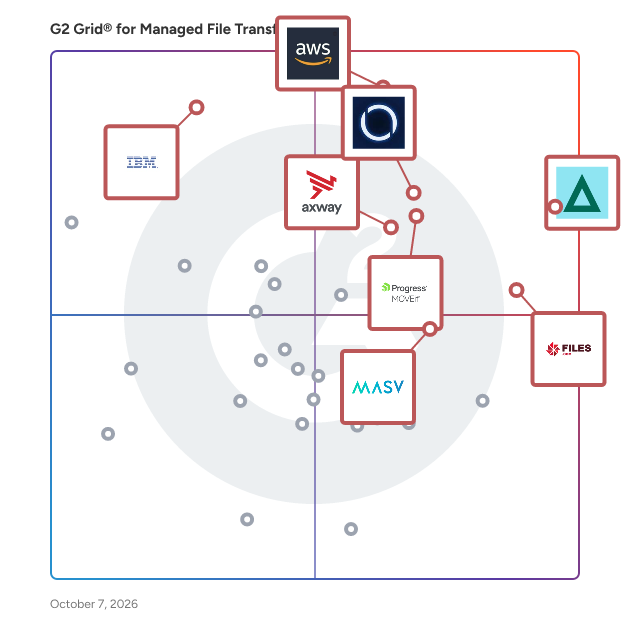
G2 Grid® for Managed File Transfer (MFT) Software

G2 Grid® for Managed File Transfer (MFT) Software plotting products by satisfaction and market presence

Highlighted products: GoAnywhere MFT, AWS Transfer Family, MetaDefender Managed File Transfer™ (MFT), Files.com, Progress MOVEit, Axway Managed File Transfer (MFT), MASV, and IBM Aspera on Cloud.

Underlying data: [Grid® JSON](https://www.g2.com/categories/managed-file-transfer-mft/grids.json?focus%5B%5D=goanywhere-mft&focus%5B%5D=aws-transfer-family&focus%5B%5D=metadefender-managed-file-transfer-mft&focus%5B%5D=files-com&focus%5B%5D=progress-moveit&focus%5B%5D=axway-managed-file-transfer-mft&focus%5B%5D=masv&focus%5B%5D=ibm-aspera-on-cloud)

GoAnywhere MFT

GoAnywhere MFT is a secure managed file transfer solution that automates and secures file transfers between systems, employees, and partners. Keep sensitive data safe—in transit or at rest—with built-in security features and enterprise-level control that meets compliance requirements. GoAnywhere MFT easily allows organizations to connect to internal and external systems, as well as exchange encrypted data using industry standard protocols (e.g., OpenPGP, AES, FTPS, SFTP, HTTPS, AS2/AS3/AS4,and GPG). GoAnywhere MFT goes beyond securing file transfers to seamlessly work with the applications you need daily such as EDI and cloud integration. GoAnywhere is proud to be part of Fortra’s comprehensive portfolio. Fortra simplifies today’s complex automation landscape by bringing products together to solve problems in innovative ways. These solutions address the fast-changing challenges you face in streamlining and securing your organization. With the help of GoAnywhere MFT, Fortra is here for you every step of the way throughout your automation journey.

Average Rating: 4.6/5.0

Total Reviews: 450

How Do G2 Users Rate GoAnywhere MFT?

  • File Transfer Acceleration: 9.0/10 (Category avg: 8.9/10)
  • Compliance: 8.9/10 (Category avg: 9.1/10)
  • Has the product been a good partner in doing business?: 9.1/10 (Category avg: 9.1/10)
  • Access Control: 8.9/10 (Category avg: 8.9/10)

Who Is the Company Behind GoAnywhere MFT?

  • Seller: Fortra
  • Company Website:
  • Year Founded: 1982
  • HQ Location: Eden Prairie, Minnesota
  • Twitter: @fortraofficial
    2,773 Twitter followers
  • LinkedIn® Page: www.linkedin.com
    1,784 employees on LinkedIn®

Who Uses This Product?

  • Who Uses This: System Administrator, DevOps Engineer
  • Top Industries: Information Technology and Services, Hospital & Health Care
  • Company Size: 41% Medium, 35% Large

What Do G2 Reviewers Say About GoAnywhere MFT?

AI-generated summary from verified user reviews

Pros
  • Users appreciate the integration of secure transfers, automation, and monitoring in GoAnywhere MFT, enhancing workflow efficiency.
  • Users value the automation capabilities of GoAnywhere MFT, enhancing efficiency and simplifying workflow management.
  • Users find GoAnywhere MFT's ease of use invaluable, enhancing installation, configuration, and troubleshooting efficiency.
  • Users appreciate the workflow automation of GoAnywhere MFT, enhancing file transfer efficiency and security seamlessly.
  • Users appreciate the secure file transfers of GoAnywhere MFT, benefiting from its automation and reliable monitoring features.
Cons
  • Users find the complexity of GoAnywhere MFT challenging due to a steep learning curve and confusing UI.
  • Users find difficult learning curves for beginners frustrating, with complex workflows and outdated UI hindering usability.
  • Users experience integration issues with GoAnywhere MFT, facing unclear error messages and time-consuming setup challenges.
  • Users criticize the poor interface design of GoAnywhere MFT, noting issues with usability and outdated aesthetics.
  • Users report poor customer support, with slow response times and unhelpful assistance during technical issues.

What Are Recent G2 Reviews of GoAnywhere MFT?

What Are G2 Users Discussing About GoAnywhere MFT?

Progress MOVEit

Progress MOVEit software helps IT operations, enterprise architecture, security and compliance teams automate and secure enterprise file transfers while supporting strict regulatory requirements such as HIPAA, PCI DSS and GDPR. When file transfer volumes grow and oversight requirements tighten, fragmented tools and manual processes can increase operational risk, cause productivity fire drills and add complexity to audit preps. Progress MOVEit Transfer centralizes managed file transfer activity into a single, controlled environment to improve visibility, governance and reliability of mission-critical data flows. Progress MOVEit Cloud extends these capabilities through a fully managed, auditor-certified SaaS deployment that leverages the same documented controls, encryption, detailed audit logging and role-based access without the burden of infrastructure management or software upgrades. Progress MOVEit Automation adds no-code, policy-driven file transfer orchestration that replaces manual scripting, reducing errors that lead to missed SLAs and delays in downstream workflows. MOVEit Automation supports the protocols businesses use today (SFTP, FTPS, HTTPS and more) and seamlessly connects to legacy and cloud endpoints with native connectors. Together, MOVEit Transfer, MOVEit Cloud and MOVEit Automation help regulated organizations or businesses with private data reduce risk, improve operational efficiency and maintain consistent control over data movement. Start your 30-day trial, get a quote, or request more information at www.progress.com/moveit

Average Rating: 4.4/5.0

Total Reviews: 520

How Do G2 Users Rate Progress MOVEit?

  • File Transfer Acceleration: 8.6/10 (Category avg: 8.9/10)
  • Compliance: 8.7/10 (Category avg: 9.1/10)
  • Has the product been a good partner in doing business?: 9.0/10 (Category avg: 9.1/10)
  • Access Control: 8.7/10 (Category avg: 8.9/10)

Who Is the Company Behind Progress MOVEit?

  • Seller: Progress Software
  • Company Website:
  • Year Founded: 1981
  • HQ Location: Burlington, MA.
  • Twitter: @ProgressSW
    48,773 Twitter followers
  • LinkedIn® Page: www.linkedin.com
    4,242 employees on LinkedIn®

Who Uses This Product?

  • Who Uses This: Software Engineer, System Administrator
  • Top Industries: Information Technology and Services, Financial Services
  • Company Size: 40% Medium, 39% Large

What Do G2 Reviewers Say About Progress MOVEit?

AI-generated summary from verified user reviews

Pros
  • Users admire the ease of use of Progress MOVEit, finding it simple to manage and send files effortlessly.
  • Users appreciate the easy file sharing with MOVEit, enjoying seamless transfers and excellent vendor support.
  • Users value the powerful automation capabilities of MOVEit, greatly enhancing efficiency and reducing manual effort.
  • Users commend the responsive and knowledgeable customer support of MOVEit, enhancing their overall user experience.
Cons
  • Users find the installation and maintenance complexity of Progress MOVEit can lead to future issues and headaches.
  • Users face authentication and connectivity problems with MOVEit, particularly when integrating with SharePoint, causing workflow delays.
  • Users find the difficult learning curve for advanced features to be time-consuming, impacting overall user experience.
  • Users report security issues with Progress MOVEit, particularly concerning authentication problems and disaster recovery readiness.
  • Users find the slow performance frustrating, especially with long loading times for the dashboard and document transfers.

What Are Recent G2 Reviews of Progress MOVEit?

What Are G2 Users Discussing About Progress MOVEit?

Globalscape

Fortra’s Globalscape EFT is a sophisticated Managed File Transfer (MFT) solution built to facilitate the secure, efficient, and automated movement of business-critical or sensitive data within Windows-centric enterprises. The platform is tailored for organizations prioritizing reliability and control in their data transfer processes, with flexible deployment options. By replacing legacy scripts with an intuitive, script-less automation framework, Globalscape EFT significantly reduces manual intervention while ensuring military-grade security for every file transfer. The target audience for Globalscape EFT includes IT departments and data management teams in various industries, particularly those that handle sensitive information and must comply with stringent regulatory standards. The solution is also beneficial for organizations looking to modernize their internal file exchanges, secure communications with third parties, and eliminate risky manual processes. With built-in compliance support for standards such as PCI DSS and HIPAA, Globalscape EFT helps organizations streamline governance and mitigate risks associated with data handling. One of the core standout features of Globalscape EFT is its DMZ Gateway, which enforces true zero-data-at-rest protection, ensuring that sensitive data never resides in the demilitarized zone. This capability is crucial for maintaining data integrity and security during transfers. Additionally, the platform supports a wide range of protocols, including SFTP, FTPS, and HTTPS, along with granular role-based access controls and centralized auditing. These features simplify enterprise integration and enhance compliance efforts, making it easier for organizations to demonstrate adherence to regulatory requirements. Globalscape EFT also offers high availability and clustering options, allowing organizations to scale their operations across hybrid environments without sacrificing performance. The platform’s extensive APIs and connectors facilitate integration with IT Service Management (ITSM), Security Information and Event Management (SIEM), and various data platforms. Furthermore, the inclusion of built-in templates accelerates onboarding and standardizes best practices, making it easier for teams to implement effective file transfer processes. In addition, zero downtime capabilities allow updates, maintenance, and configuration changes with minimal disruption to keep critical operations available. In tandem with its robust technical features, Globalscape EFT emphasizes human oversight in automated workflows, providing visibility, alerting, and intervention points to ensure accuracy and trust. For organizations seeking expert assistance, Globalscape’s Professional Services delivers implementation, optimization, and ongoing success planning, to help ensure users can maximize the value of their MFT solution. Overall, Globalscape EFT stands out as a comprehensive file transfer and business process solution that meets the security, scalability, and operational resilience needs of today’s enterprises.

Average Rating: 4.6/5.0

Total Reviews: 73

How Do G2 Users Rate Globalscape?

  • File Transfer Acceleration: 8.8/10 (Category avg: 8.9/10)
  • Compliance: 9.3/10 (Category avg: 9.1/10)
  • Has the product been a good partner in doing business?: 8.9/10 (Category avg: 9.1/10)
  • Access Control: 9.0/10 (Category avg: 8.9/10)

Who Is the Company Behind Globalscape?

  • Seller: Fortra
  • Company Website:
  • Year Founded: 1982
  • HQ Location: Eden Prairie, Minnesota
  • Twitter: @fortraofficial
    2,773 Twitter followers
  • LinkedIn® Page: www.linkedin.com
    1,784 employees on LinkedIn®

Who Uses This Product?

  • Top Industries: Financial Services, Information Technology and Services
  • Company Size: 49% Large, 31% Medium

What Do G2 Reviewers Say About Globalscape?

AI-generated summary from verified user reviews

Pros
  • Users commend the excellent customer support of Globalscape, ensuring quick resolutions and a positive user experience.
  • Users appreciate the ease of use of Globalscape, finding its interface intuitive and support exceptional.
  • Users commend the secure transfer features of Globalscape, ensuring efficient, reliable, and safe file management.
  • Users appreciate the user-friendly interface of Globalscape, noting its ease of navigation and visual appeal.
  • Users commend Globalscape for its impressive security functions, ensuring safe and reliable file transfers and management.
Cons
  • Users experience complexity in upgrades and migrations, facing challenges with bugs and confusing changes over time.
  • Users find the difficult learning curve daunting due to extensive features and confusing changes over time.
  • Users find the cost of Globalscape to be high compared to other MFT solutions, impacting overall value.
  • Users face significant integration issues during upgrades and migrations, complicating their overall experience with Globalscape.
  • Users often face technical issues with Globalscape, including bugs, missing features, and migration challenges that disrupt functionality.

What Are Recent G2 Reviews of Globalscape?

What Are G2 Users Discussing About Globalscape?

AI can help you find the answers. G2 helps you trust them.

Connect G2 to Claude or ChatGPT for answers grounded in G2's trusted reviews, comparisons, and pricing from real user insights.

How it works

Cleo Integration Cloud

Cleo Integration Cloud is a B2B integration and EDI platform built for companies that need to automate trading partner transactions, connect ERP and supply chain systems, and manage exceptions across high-volume order to-cash and procure-to-pay workflows. Cleo helps teams automate common EDI document flows including purchase orders, acknowledgments, ASNs, invoices, shipment status updates, and other X12/EDIFACT transactions across retail, manufacturing, logistics, wholesale distribution, food and beverage, and healthcare ecosystems. The platform supports EDI, API, AS2, SFTP, MFT, and other B2B connectivity patterns so businesses can exchange data securely with customers, suppliers, carriers, marketplaces, 3PLs, and internal applications. Cleo Integration Cloud is designed for teams that need more than basic EDI compliance. It provides trading partner onboarding, EDI mapping and transformation, real-time transaction visibility, exception monitoring, AI assisted issue resolution, and flexible service models for self-service, managed service, or blended integration teams. Companies use Cleo to replace legacy EDI tools, reduce manual partner work, improve document traceability, connect ERP/TMS/WMS/eCommerce systems, and scale B2B automation as transaction volume and partner complexity grow.

Average Rating: 4.4/5.0

Total Reviews: 593

How Do G2 Users Rate Cleo Integration Cloud?

  • File Transfer Acceleration: 9.0/10 (Category avg: 8.9/10)
  • Compliance: 8.7/10 (Category avg: 9.1/10)
  • Has the product been a good partner in doing business?: 8.9/10 (Category avg: 9.1/10)
  • Access Control: 8.5/10 (Category avg: 8.9/10)

Who Is the Company Behind Cleo Integration Cloud?

  • Seller: Cleo
  • Company Website:
  • Year Founded: 1976
  • HQ Location: Rockford, IL
  • Twitter: @CleoNeverStops
    958 Twitter followers
  • LinkedIn® Page: www.linkedin.com
    581 employees on LinkedIn®

Who Uses This Product?

  • Who Uses This: EDI Analyst, IT Manager
  • Top Industries: Transportation/Trucking/Railroad, Logistics and Supply Chain
  • Company Size: 50% Medium, 29% Large

What Do G2 Reviewers Say About Cleo Integration Cloud?

AI-generated summary from verified user reviews

Pros
  • Users value the responsive customer support of Cleo Integration Cloud, enhancing their overall experience and learning process.
  • Users appreciate the seamless connectivity of Cleo Integration Cloud, enabling diverse and efficient integrations across platforms.
  • Users value the integration capabilities of Cleo Integration Cloud, enabling seamless connections to diverse software with ease.
  • Users value the easy integrations of Cleo Integration Cloud, simplifying complex setups and enhancing overall efficiency.
  • Users value the easy setup of Cleo Integration Cloud, enabling seamless EDI connections for efficient operations.
Cons
  • Users find the difficult learning curve of Cleo Integration Cloud frustrating due to complex tools and minimal support.
  • Users find the pricing to be high, raising concerns about the overall feasibility of Cleo Integration Cloud.
  • Users experience slow processing with Cleo Integration Cloud, citing delayed support and ineffective integration updates.
  • Users find the complexity of integration and training within Cleo Integration Cloud to be challenging and time-consuming.
  • Users often face a steep learning curve with Cleo Integration Cloud, complicating advanced configurations and customizations.

What Are Recent G2 Reviews of Cleo Integration Cloud?

What Are G2 Users Discussing About Cleo Integration Cloud?

JSCAPE MFT Server

JSCAPE by Redwood is a secure managed file transfer (MFT) software designed for enterprise IT and security teams that need to consolidate file transfer infrastructure, meet strict compliance requirements and maintain full visibility over every file movement. It replaces fragmented tools and manual processes with one automated, scalable solution across internal systems, trading partners and cloud environments. The solution is primarily used at large enterprises in financial services, healthcare, manufacturing, government and other regulated industries. JSCAPE supports the broadest range of file transfer protocols available in a single MFT solution — SFTP, FTP/S, HTTP/S, AS2, OFTP2, WebDAV and more — and deploys on any platform in any environment: on-premises, cloud, hybrid, containerized or SaaS. Key features and capabilities include: – Security posture backed by active third-party certifications other MFT providers don't typically hold, including SOC 2 Type 1 and Type 2, ISO 27001, Drummond Certified™, and FIPS 140-2 and 140-3 validated encryption. – Quarterly penetration testing, annual third-party audits, full audit trails, MFA, SSO/SAML and DMZ proxy capabilities. – 100+ no-code and low-code workflow templates for trigger-based, event-driven and time-based automations. – Native integrations for AWS, Microsoft Azure, Google Cloud, IBM Cloud, CyberArk, Dropbox, RunMyJobs and more. REST API and Open API support extend connectivity to any enterprise system. – Automated failover, load balancing and active-active server redundancy, with proactive load testing and network scanning. – 24/7/365 technical support via phone, email and web, with a 95.9% customer satisfaction rating and 8-minute median response time across all priority levels, included in every plan at no additional cost. JSCAPE is also part of Redwood Software, the leading orchestration platform for the enterprise, driving business transformation at the lowest total cost of ownership. Backed by 30 years of experience, the trust of more than 50% of the Fortune 50 and a culture of customer obsession, Redwood unleashes the human potential in your enterprise to focus on innovation, growth and what’s next.

Average Rating: 4.5/5.0

Total Reviews: 96

How Do G2 Users Rate JSCAPE MFT Server?

  • File Transfer Acceleration: 9.2/10 (Category avg: 8.9/10)
  • Compliance: 9.0/10 (Category avg: 9.1/10)
  • Has the product been a good partner in doing business?: 9.1/10 (Category avg: 9.1/10)
  • Access Control: 8.8/10 (Category avg: 8.9/10)

Who Is the Company Behind JSCAPE MFT Server?

  • Seller: Redwood Software
  • Company Website:
  • Year Founded: 1993
  • HQ Location: Frisco, US
  • Twitter: @RedwoodSoftware
    826 Twitter followers
  • LinkedIn® Page: www.linkedin.com
    815 employees on LinkedIn®

Who Uses This Product?

  • Top Industries: Information Technology and Services, Banking
  • Company Size: 50% Medium, 46% Large

What Do G2 Reviewers Say About JSCAPE MFT Server?

AI-generated summary from verified user reviews

Pros
  • Users love the fast file transfer speed of JSCAPE MFT Server, enhancing efficiency for important data transfers.
  • Users love the stress-free file transfers with JSCAPE MFT Server, ensuring seamless, secure, and automatic file management.
  • Users value the robust security of JSCAPE MFT Server, ensuring safe and timely file transfers effortlessly.
  • Users appreciate the user-friendly interface of JSCAPE MFT Server, making it easy for both admins and users.
  • Users value the secure and automated file transfer features of JSCAPE MFT Server, enhancing efficiency and safety.
Cons
  • Users highlight the complexity of options and settings in JSCAPE, which can lead to a challenging learning curve.
  • Users find that JSCAPE MFT Server has a difficult learning curve, requiring time to master its options and settings.
  • Users face integration issues with JSCAPE MFT Server, struggling with PGP key compatibility and slow support for troubleshooting.
  • Users find the poor customer support of JSCAPE MFT Server frustrating, often delaying issue resolution and assistance.
  • Users find the interface design poor, making it challenging to navigate and understand the numerous settings efficiently.

What Are Recent G2 Reviews of JSCAPE MFT Server?

What Are G2 Users Discussing About JSCAPE MFT Server?

CData Arc

CData Arc is a leading B2B application and data connectivity solution for secure managed file transfer (MFT), EDI processing, and back-office integration. Arc seamlessly connects enterprise applications like CRMs, ERPs, marketing and accounting software, and even relational database systems to automate complex processes and synchronization across the enterprise, both on-premises and in the cloud. The application supports file transfer through a wide array of B2B messaging protocols including AS2, AS4, OFTP, SFTP, and more. It streamlines, secures, and automates data movement and gives users the ability to define workflows around incoming and outgoing files. In addition, Arc features interactive EDI mapping and translation with support for all major EDI standards and protocols such as X12 and EDIFACT. This allows users not only to exchange files with their trading partners but also to translate those messages into a readable XML format that is ready for further processing. A codeless visual interface features a modern drag-and-drop approach to workflow management where users can configure connectors in a workspace to build complex workflows. This drag-and-drop approach also extends to data transformation, allowing users to easily map data between formats like JSON, XML, and CSV. These features can be used to integrate backend applications with EDI messaging workflows, or simply to synchronize data between two or more disparate applications. Arc is a modern integration framework that enables organizations to manage all their file transfers, EDI communication, and backend workflows through a central solution that is reliable, secure, scalable, and can be deployed anywhere. Start a free 30-day trial, get custom quotes, or request more information at arc.cdata.com.

Average Rating: 4.5/5.0

Total Reviews: 54

How Do G2 Users Rate CData Arc?

  • File Transfer Acceleration: 8.3/10 (Category avg: 8.9/10)
  • Compliance: 9.0/10 (Category avg: 9.1/10)
  • Has the product been a good partner in doing business?: 8.9/10 (Category avg: 9.1/10)
  • Access Control: 8.7/10 (Category avg: 8.9/10)

Who Is the Company Behind CData Arc?

  • Seller: CData
  • Year Founded: 2014
  • HQ Location: Chapel Hill, NC
  • Twitter: @cdatasoftware
    2,000 Twitter followers
  • LinkedIn® Page: www.linkedin.com
    493 employees on LinkedIn®

Who Uses This Product?

  • Top Industries: Computer Software, Logistics and Supply Chain
  • Company Size: 46% Small, 36% Medium

What Do G2 Reviewers Say About CData Arc?

AI-generated summary from verified user reviews

Pros
  • Users love the ease of use of CData Arc, which helps minimize workload and streamline processes.
  • Users commend CData Arc for its efficiency in minimizing workload, making data integration straightforward and high-quality.
  • Users praise the high-quality connectivity of CData Arc, making data integrations efficient and straightforward.
  • Users praise the efficient data integrations of CData Arc, highlighting its high quality and reliability.
  • Users appreciate the efficiency improvement of CData Arc, significantly reducing their workload and simplifying tasks.

What Are Recent G2 Reviews of CData Arc?

What Are G2 Users Discussing About CData Arc?

ActiveBatch

ActiveBatch is part of Redwood Software offering the easiest to use job scheduler and an extensible, highly reliable workload automation software. Redwood Software, a 2025 Gartner® Magic Quadrant™ for SOAP Leader, is the leading orchestration platform for the autonomous enterprise. We empower customers to drive business transformation at the lowest TCO, intelligently automating critical business and IT processes across complex ERP, hybrid cloud, data management and agentic AI systems. ActiveBatch provides a central IT automation hub for assembling and monitoring end-to-end workflows in data warehouses and across the enterprise. ActiveBatch includes hundreds of direct integrations with major IT and business platforms and a Super REST API Adapter so you can connect to any server, any application or any service. Orchestrate your entire tech stack so that business-critical systems such as data warehousing, CRM, ERP, supply chain management, work order management, project management and consulting systems work together seamlessly with minimal human intervention. The job scheduler is the brain of workload automation architecture, allowing you to build and orchestrate cross-functional workflows. It handles load balancing, scheduling, dependency checking, SLA monitoring, reporting and notifications. Eliminate manual workflows with ActiveBatch automated tasks and accelerate development of high-value services that drive your company forward. ActiveBatch includes a low-code drag-and-drop GUI with dozens of DevOps features to easily build end-to-end business processes in half the time without the need for custom scripting. Users can securely access ActiveBatch from any device with flexible interfaces such as a self-service portal for business and help desk users. ActiveBatch’s proactive support model includes 24/7 global support and predictive diagnostics using AI to keep your environment optimized for reliability and productivity.

Average Rating: 4.5/5.0

Total Reviews: 241

How Do G2 Users Rate ActiveBatch?

  • File Transfer Acceleration: 9.4/10 (Category avg: 8.9/10)
  • Compliance: 8.9/10 (Category avg: 9.1/10)
  • Has the product been a good partner in doing business?: 9.0/10 (Category avg: 9.1/10)
  • Access Control: 8.9/10 (Category avg: 8.9/10)

Who Is the Company Behind ActiveBatch?

  • Seller: Redwood Software
  • Company Website:
  • Year Founded: 1993
  • HQ Location: Frisco, US
  • Twitter: @RedwoodSoftware
    826 Twitter followers
  • LinkedIn® Page: www.linkedin.com
    815 employees on LinkedIn®

Who Uses This Product?

  • Who Uses This: Consultant
  • Top Industries: Information Technology and Services, Financial Services
  • Company Size: 38% Large, 37% Medium

What Do G2 Reviewers Say About ActiveBatch?

AI-generated summary from verified user reviews

Pros
  • Users value the workflow automation capabilities of ActiveBatch, allowing effortless task management and seamless application integration.
  • Users praise the workflow automation of ActiveBatch, allowing independent task management and seamless integration across systems.
  • Users find the ease of use of ActiveBatch remarkable, making workflow management and automation straightforward and intuitive.
  • Users favor the efficient scheduling capabilities of ActiveBatch, simplifying complex workflows and automating tasks effortlessly.
  • Users value the time-saving automation of ActiveBatch, simplifying workflow management and reducing manual effort significantly.
Cons
  • Users find the complexity of implementation in ActiveBatch challenging, impacting usability and ease of configuration.
  • Users find the difficult learning curve challenging, especially for new members adapting to the system's complexity.
  • Users face a cluttered UI design that hinders navigation and complicates the learning curve for new team members.
  • Users find beginner unfriendliness in ActiveBatch due to a steep learning curve and less intuitive interface.
  • Users face limited educational resources, making setup and navigation challenging, especially for smaller teams without IT support.

What Are Recent G2 Reviews of ActiveBatch?

What Are G2 Users Discussing About ActiveBatch?

IBM Sterling B2B Integrator

IBM Sterling B2B Integrator supports up to 10 million transactions per day by automating and consolidating B2B processes on a single, always-on B2B platform. IBM Sterling B2B Integrator helps companies integrate all their complex B2B/EDI processes across their partner communities in a single gateway. It provides a highly flexible platform, available on premise or via hybrid cloud, that supports data transformation and most communication protocols; secures your B2B network and data; provides Docker container support; and achieves high-availability for operations with Global Mailbox. B2B Integrator enables companies to reduce costs by consolidating on a single platform and automates B2B processes across enterprises while providing governance, adherence to standards and visibility for those processes.

Average Rating: 4.2/5.0

Total Reviews: 34

How Do G2 Users Rate IBM Sterling B2B Integrator?

  • File Transfer Acceleration: 8.7/10 (Category avg: 8.9/10)
  • Compliance: 8.6/10 (Category avg: 9.1/10)
  • Has the product been a good partner in doing business?: 8.7/10 (Category avg: 9.1/10)
  • Access Control: 8.5/10 (Category avg: 8.9/10)

Who Is the Company Behind IBM Sterling B2B Integrator?

  • Seller: IBM
  • Year Founded: 1911
  • HQ Location: Armonk, New York, United States
  • Twitter: @IBMSecurity
    74,660 Twitter followers
  • LinkedIn® Page: www.linkedin.com
    344,328 employees on LinkedIn®
  • Ownership: SWX:IBM

Who Uses This Product?

  • Top Industries: Information Technology and Services, Banking
  • Company Size: 69% Large, 19% Medium

What Do G2 Reviewers Say About IBM Sterling B2B Integrator?

AI-generated summary from verified user reviews

Pros
  • Users appreciate the comprehensive EDI features of IBM Sterling B2B Integrator, effectively meeting diverse business requirements.
  • Users value the multi-protocol support in IBM Sterling B2B Integrator for seamless EDI transactions and data transformation.
  • Users value the ease of use in IBM Sterling B2B Integrator, streamlining their process implementation effortlessly.
  • Users value the easy integrations of IBM Sterling B2B Integrator, facilitating seamless process implementation.
  • Users appreciate the File Transfer functionality in IBM Sterling B2B Integrator, enabling efficient data management and transmission.
Cons
  • Users find the complexity of the product challenging, especially for newcomers and in developing EDI maps.
  • Users face significant integration issues with IBM Sterling B2B Integrator, complicating workflow and limiting flexibility.
  • Users find the cost management of IBM Sterling B2B Integrator challenging due to the lack of pre-built business processes.
  • Users find the difficult implementation of IBM Sterling B2B Integrator challenging due to required complex coding and dependencies.
  • Users find the difficult learning curve challenging, especially for newcomers, making the product complex to use.

What Are Recent G2 Reviews of IBM Sterling B2B Integrator?

What Are G2 Users Discussing About IBM Sterling B2B Integrator?

Titan MFT Server

Titan MFT Server is a secure, enterprise-grade Managed File Transfer (MFT) platform designed to facilitate the encrypted and automated movement of files across various environments, including on-premises, hybrid, and multi-cloud setups. This solution is particularly valuable for organizations that need to exchange sensitive data while adhering to strict regulatory standards such as HIPAA, PCI DSS, FIPS 140-2, and GDPR. By prioritizing compliance, scalability, and performance, Titan MFT Server addresses the complex needs of modern data transfer. The platform is tailored for organizations of all sizes that require a reliable method for transferring files securely. Its advanced file transfer automation capabilities are powered by a robust event management system, allowing administrators to configure over 100 event-based triggers. These triggers can automate essential tasks such as virus scanning, file routing, auditing, renaming, and real-time alerts. This level of automation not only reduces manual effort but also enhances productivity while proactively defending against unauthorized access attempts or suspicious activities. Titan MFT Server also incorporates collaboration features that enhance productivity. The DropZones functionality allows for secure external file intake, while password-protected links with configurable permissions enable safe outbound file sharing. The modern web-based interface simplifies the process for both internal and external users, allowing them to securely upload and download files without the need for client installations. This ease of use is crucial for organizations looking to streamline their file transfer processes while maintaining high security standards. To ensure business continuity, Titan MFT Server includes high-availability clustering with load balancing and failover support. Organizations can set up active-active or active-passive clusters across multiple geographic locations, making it adaptable for deployment in the cloud (AWS, Azure, Google Cloud), on-premises, or in a hybrid model. The platform's flexible licensing options, available via subscription or perpetual license, cater to varying budgetary and infrastructure needs. Titan MFT Server is particularly beneficial for automating secure file transfers at an enterprise scale, meeting compliance standards with comprehensive audit trails and encryption, and enabling secure external collaboration through its innovative features. By centralizing, securing, and streamlining file exchange infrastructure, Titan MFT empowers IT, security, and DevOps teams to manage data transfers more efficiently and securely across distributed environments.

Average Rating: 4.5/5.0

Total Reviews: 21

How Do G2 Users Rate Titan MFT Server?

  • File Transfer Acceleration: 8.3/10 (Category avg: 8.9/10)
  • Compliance: 9.7/10 (Category avg: 9.1/10)
  • Has the product been a good partner in doing business?: 9.1/10 (Category avg: 9.1/10)
  • Access Control: 9.4/10 (Category avg: 8.9/10)

Who Is the Company Behind Titan MFT Server?

Who Uses This Product?

  • Top Industries: Financial Services
  • Company Size: 67% Medium, 24% Large

What Are Recent G2 Reviews of Titan MFT Server?

What Are G2 Users Discussing About Titan MFT Server?

ExaVault

ExaVault is the modern alternative to legacy file servers for organizations that aren't moving to SaaS today. Many businesses still rely on aging SFTP/FTP infrastructure, stitched-together servers, or brittle custom solutions. The result is wasted IT resources, compliance risks, and slower business operations. ExaVault is a self-managed file transfer appliance designed for on-premises, private cloud, or virtualized environments. Built on SaaS-grade technology, it delivers modern security, automation, and usability while running entirely under your control. Unlike traditional servers that demand endless patching, licensing, and certificate management, ExaVault is built to take care of itself. Automatic security updates keep your system protected against vulnerabilities without weekend patch cycles. Hands-free licensing renews in the background with no downtime or manual key uploads. SSL certificates are fully managed to prevent costly outages. The result is a reliable platform that runs with minimal administrative overhead. For IT and DevOps teams, ExaVault is purpose-built for system-to-system workflows: secure SFTP automation, ingestion pipelines, internal dropboxes, and compliance-driven transfers. For regulated industries and organizations with strict residency requirements, it keeps sensitive data inside infrastructure you control, without sacrificing modern features or reliability. When the time comes to embrace SaaS, ExaVault provides an automated migration path to Files.com. ExaVault gives you a modern file transfer solution you own today, with a clear path to the cloud when you're ready.

Average Rating: 4.5/5.0

Total Reviews: 191

How Do G2 Users Rate ExaVault?

  • File Transfer Acceleration: 8.7/10 (Category avg: 8.9/10)
  • Compliance: 8.7/10 (Category avg: 9.1/10)
  • Has the product been a good partner in doing business?: 9.2/10 (Category avg: 9.1/10)
  • Access Control: 8.7/10 (Category avg: 8.9/10)

Who Is the Company Behind ExaVault?

  • Seller: Files.com
  • Company Website:
  • Year Founded: 2008
  • HQ Location: Scottsdale, Arizona
  • LinkedIn® Page: www.linkedin.com
    82 employees on LinkedIn®

Who Uses This Product?

  • Who Uses This: CEO, CTO
  • Top Industries: Computer Software, Information Technology and Services
  • Company Size: 54% Small, 39% Medium

What Do G2 Reviewers Say About ExaVault?

AI-generated summary from verified user reviews

Pros
  • Users appreciate the data security of ExaVault, ensuring protection against theft by third parties.
  • Users value the high reliability of ExaVault, noting its stability and minimal outages.
  • Users value the secure sharing feature of ExaVault, ensuring their data remains protected from unauthorized access.
  • Users value the secure transfer feature of ExaVault, ensuring their data stays safe from third-party theft.
  • Users value the strong security measures of ExaVault, ensuring data remains safe from third-party theft.
Cons
  • Users find ExaVault's pricing predatory and expensive, with additional concerns about user management and usability.
  • Users find poor usability in ExaVault, with slow processes and a frustrating interface affecting their experience.
  • Users feel that ExaVault has security issues and ineffective user management, negatively impacting their experience.

What Are Recent G2 Reviews of ExaVault?

What Are G2 Users Discussing About ExaVault?