  # Best Learning Management Systems - Page 6

  *By [Emma Stein](https://research.g2.com/insights/author/emma-stein)*

   **NOTE: Solutions in this category are designed to be used by educational institutions, such as K-12 schools, colleges, universities, and professional schools. If you are looking for an LMS to use in a business or corporate setting, please visit our [Corporate LMS software](https://www.g2.com/categories/corporate-learning-management-systems) category.**

Learning management systems (LMSs) are platforms designed to help instructors manage educational coursework online. They provide educators with a single platform for making course material accessible online, including lesson content, assignments, and assessments. LMSs are used to help streamline the delivery of online learning for educational institutions, allowing for a more connected and accessible educational experience for students.

An LMS enables instructors to build digital courses that include various types of content, such as syllabi, lectures, multimedia files, and readings, as well as distribute assignments to students. LMSs also offer online assessment functionality, such as quizzes and tests. Communication features enable instructors to communicate with students and parents via direct messages, mobile notifications, and discussion forums.

Although there are similarities between education-focused LMSs and [corporate LMS software](https://www.g2.com/categories/corporate-learning-management-systems) products, platforms designed for K-12 or higher education typically include features specific to educational environments, such as grading functionality and individualized feedback on student assignments. LMSs work in concert with other education software, such as [student information systems (SIS)](https://www.g2.com/categories/student-information-systems-sis), to streamline student data management.

To qualify for inclusion in the Learning Management System (LMS) category, a product must:

- Provide a platform for educators to deliver online course content to students
- Distribute assignments to students and allow instructors to grade student work
- Administer digital assessments to students
- Facilitate individualized feedback on student work, such as through written comments or grading rubrics
- Generate performance dashboards for tracking student progress
- Contain gradebook functionality or integrate with third-party gradebooks


## How Many Learning Management Systems Products Does G2 Track?
**Total Products under this Category:** 284

### Category Stats (May 2026)
- **Average Rating**: 4.43/5
- **New Reviews This Quarter**: 162
- **Buyer Segments**: Mid-Market 46% │ Small-Business 34% │ Enterprise 20%
- **Top Trending Product**: Classe365 (+0.065)
*Last updated: May 18, 2026*

  
## How Does G2 Rank Learning Management Systems Products?

**Why You Can Trust G2's Software Rankings:**

- 30 Analysts and Data Experts
- 13,700+ Authentic Reviews
- 284+ Products
- Unbiased Rankings

G2's software rankings are built on verified user reviews, rigorous moderation, and a consistent research methodology maintained by a team of analysts and data experts. Each product is measured using the same transparent criteria, with no paid placement or vendor influence. While reviews reflect real user experiences, which can be subjective, they offer valuable insight into how software performs in the hands of professionals. Together, these inputs power the G2 Score, a standardized way to compare tools within every category.

  
## Which Learning Management Systems Is Best for Your Use Case?

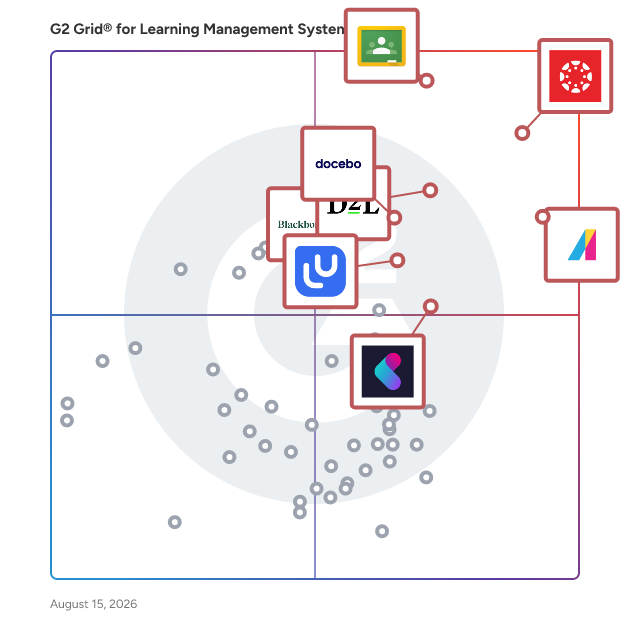
- **Leader:** [Canvas LMS](https://www.g2.com/products/canvas-lms/reviews)
- **Highest Performer:** [WorkRamp](https://www.g2.com/products/workramp/reviews)
- **Easiest to Use:** [Google Classroom](https://www.g2.com/products/google-classroom/reviews)
- **Top Trending:** [Moodle](https://www.g2.com/products/moodle/reviews)
- **Best Free Software:** [Canvas LMS](https://www.g2.com/products/canvas-lms/reviews)

  
---

**Sponsored**

### GoSkills

GoSkills is a modern, AI-first Learning Management System (LMS) and Learning Experience Platform (LXP) that helps organizations create, deliver, track, and scale employee training quickly, easily, and affordably. The #1-rated LMS for growing startups, SMBs, and mid-market organizations that want to launch training fast, without the complexity of a traditional LMS. Easy to implement, easy to manage, and comes with a free plan and flexible pricing. Key capabilities • Built-in course library: 500+ expert-led courses in business, technology, software, soft skills, leadership, and professional development, continuously updated. • Gamified microlearning: 3–7 minute lessons with quizzes, exercises, and reference materials that drive engagement and retention. • Course builder: Build custom courses with an intuitive block-based editor; import SCORM, xAPI, AICC, and CMI5 content; export courses to other LMS platforms. • AI course creation (Genie AI): Generate full courses with a conversational AI assistant, or turn PDFs and PowerPoints into structured training in minutes, in multiple languages. • Learning paths: Curated sequences that take learners from novice to expert, or guide them through skills needed for career advancement and role transitions. • AI tutor and recommender: On-demand 24/7 learner support and personalized course suggestions based on goals. • Reporting and analytics: Granular tracking from learner progress to individual lesson level; identify and close skills gaps; collect feedback with customizable review forms. • Automated workflows: Manage learners by role or team, assign courses, set due dates, and schedule reminders. • Certification and compliance: Issue certificates on completion; log offline and live training; maintain audit-ready records. • Custom branding: Personalize your platform with custom logos, login pages, and certificates. • SSO and integrations: Google, Microsoft, and Okta SSO; SCIM 2.0; REST API and Zapier; SOC 2 compliant. Use cases Employee onboarding, upskilling and reskilling, leadership development, compliance training, and partner or customer training. Who GoSkills is for L&amp;D professionals, HR teams, operations managers, team managers, and company owners. Its intuitive design makes it easy for roles outside of L&amp;D to deploy and manage a successful training program. Used across technology, professional services, retail, construction, manufacturing, healthcare, nonprofits, government, and more. Problems GoSkills solves GoSkills replaces the fragmented combination of a learning library, authoring tool, and LMS with one intuitive platform launchable in minutes. Its microlearning format drives completion rates above 40% — more than 3x the industry average — tackling the engagement challenges most organizations face. Built-in AI tools and simple admin workflows significantly reduce course creation and management time. Why teams choose GoSkills GoSkills uniquely combines two essentials in one platform: a built-in library of 500+ expert-led courses, with a modern LMS for creating and managing custom training. Teams can get started fast with ready-made content, then build their own onboarding, compliance, SOP, customer education, and role-specific training in the same system. Unlike traditional LMS platforms, GoSkills is fast to set up, genuinely enjoyable to use, and priced for teams of any size, including small teams that other platforms won’t serve. Trusted by 10,000+ teams worldwide, GoSkills is consistently rated #1 on G2 for Ease of Use, Setup, and Support.


[Visit website](https://www.g2.com/external_clickthroughs/record?secure%5Bad_program%5D=ppc&amp;secure%5Bad_slot%5D=category_product_list&amp;secure%5Bcategory_id%5D=322&amp;secure%5Bdisplayable_resource_id%5D=565&amp;secure%5Bdisplayable_resource_type%5D=Category&amp;secure%5Bmedium%5D=sponsored&amp;secure%5Bplacement_reason%5D=neighbor_category&amp;secure%5Bplacement_resource_ids%5D%5B%5D=565&amp;secure%5Bprioritized%5D=false&amp;secure%5Bproduct_id%5D=23786&amp;secure%5Bresource_id%5D=322&amp;secure%5Bresource_type%5D=Category&amp;secure%5Bsource_type%5D=category_page&amp;secure%5Bsource_url%5D=https%3A%2F%2Fwww.g2.com%2Fcategories%2Flearning-management-system-lms%3Fpage%3D8&amp;secure%5Btoken%5D=8b08b157561939de19f75388cf07b435bf7ab47d5597904d0d34c0c46d752c5b&amp;secure%5Burl%5D=https%3A%2F%2Fwww.goskills.com%2Flms%3Futm_source%3Dg2.com%26utm_medium%3Dppc%26utm_campaign%3Dg2_clicks&amp;secure%5Burl_type%5D=custom_url)

---

  ## What Are the Top-Rated Learning Management Systems Products in 2026?
### 1. [Skolera](https://www.g2.com/products/skolera/reviews)
  Skolera ULP delivers a unified learning platform designed to allow teachers to deliver streamlined and integrated learning to their students.


  **Average Rating:** 4.0/5.0
  **Total Reviews:** 1

**Who Is the Company Behind Skolera?**

- **Seller:** [Skolera| AMG Technology](https://www.g2.com/sellers/skolera-amg-technology)
- **Year Founded:** 2017
- **HQ Location:** N/A
- **LinkedIn® Page:** https://www.linkedin.com/company/17977554 (15 employees on LinkedIn®)

**Who Uses This Product?**
  - **Company Size:** 100% Small-Business


### 2. [Smart Owls](https://www.g2.com/products/smart-owls/reviews)
  Smart Owls Empowering educators to go digital.


  **Average Rating:** 5.0/5.0
  **Total Reviews:** 1

**Who Is the Company Behind Smart Owls?**

- **Seller:** [Shree Ram Ventures](https://www.g2.com/sellers/shree-ram-ventures)
- **Year Founded:** 2019
- **HQ Location:** Jalandhar, IN
- **LinkedIn® Page:** http://www.linkedin.com/company/smart-owls (9 employees on LinkedIn®)

**Who Uses This Product?**
  - **Company Size:** 100% Small-Business


### 3. [Training-Online.eu](https://www.g2.com/products/training-online-eu/reviews)
  Training-Online.eu is a web cloud Learning Management System designed to cover all the stages of the employee lifecycle. It is easy to understand, accessible on any device, available in multiple languages and furthermore constitutes an interesting alternative to other LMSs.


  **Average Rating:** 4.5/5.0
  **Total Reviews:** 1
**How Do G2 Users Rate Training-Online.eu?**

- **Ease of Use:** 10.0/10 (Category avg: 8.7/10)
- **Has the product been a good partner in doing business?:** 10.0/10 (Category avg: 9.1/10)
- **Quality of Support:** 8.3/10 (Category avg: 8.8/10)
- **Ease of Admin:** 10.0/10 (Category avg: 8.7/10)

**Who Is the Company Behind Training-Online.eu?**

- **Seller:** [Training-Online.eu](https://www.g2.com/sellers/training-online-eu)
- **HQ Location:** Prague, Czech Republic
- **Twitter:** @TrainingOnlineE (29 Twitter followers)
- **LinkedIn® Page:** https://www.linkedin.com/company/No-Linkedin-Presence-Added-Intentionally-By-DataOps (1 employees on LinkedIn®)

**Who Uses This Product?**
  - **Company Size:** 100% Small-Business


### 4. [Tutoolio LMS](https://www.g2.com/products/tutoolio-lms/reviews)
  Tutoolio LMS is a cloud-based, multi-tenant Learning Management System designed to help organizations deliver, manage, and measure corporate training and compliance at scale. The platform unifies course management, an integrated authoring tool, reporting and analytics, certification, surveys, and live events in one secure system. Administrators benefit from granular roles and permissions, organizational and category structures, CSV bulk user import, and automation rules that reduce routine work and standardize processes across departments and sites. Content creation is built in. Authors design interactive e‑learning modules, quizzes, and final tests with versioning, question banks, pass/fail thresholds, and multilingual support; existing content such as SCORM/xAPI, PDFs, and video can be imported and published directly into courses and learning paths. Learners access a clear portal with progress tracking, due dates, and downloadable, audit‑ready certificates. Powerful dashboards and customizable reports provide real‑time visibility into enrollments, completions, scores, and compliance status for audits and management reviews. Tutoolio LMS also supports blended learning and synchronous formats: schedule webinars or classroom sessions, track attendance, and combine them with self‑paced content in structured learning paths. The built‑in survey designer enables employee and course feedback, competency checks, and awareness assessments with logic, preview, JSON view, and translation features—ensuring data‑driven program improvement without switching tools. For security awareness, the optional PhishSim module adds realistic phishing simulations fully integrated into the LMS workflow. Teams can launch campaigns, analyze open/click/credential‑submit rates, identify repeat offenders, and trigger targeted micro‑trainings to reduce human risk. Consolidated reporting connects simulations, training, and certification for measurable behavior change and compliance evidence. The platform is EU‑hosted and GDPR‑aligned, with SSO options and an open API for integrations with HRIS/IdP/collaboration systems. Multi‑language delivery and multi‑tenant capabilities support complex enterprises and partner networks while keeping governance and data separation intact. In short, Tutoolio LMS provides an all‑in‑one enterprise learning solution that simplifies administration, accelerates content delivery, and proves impact—covering corporate LMS, course authoring, online training, compliance management, surveys, and security awareness in a single, scalable SaaS platform.


  **Average Rating:** 5.0/5.0
  **Total Reviews:** 1
**How Do G2 Users Rate Tutoolio LMS?**

- **Ease of Use:** 10.0/10 (Category avg: 8.7/10)
- **Has the product been a good partner in doing business?:** 10.0/10 (Category avg: 9.1/10)
- **Quality of Support:** 10.0/10 (Category avg: 8.8/10)
- **Ease of Admin:** 10.0/10 (Category avg: 8.7/10)

**Who Is the Company Behind Tutoolio LMS?**

- **Seller:** [Tutoolio](https://www.g2.com/sellers/tutoolio)
- **Year Founded:** 2019
- **HQ Location:** Bonn, DE
- **LinkedIn® Page:** https://www.linkedin.com/company/tutoolio/ (11 employees on LinkedIn®)

**Who Uses This Product?**
  - **Company Size:** 100% Mid-Market


### 5. [Vacademy](https://www.g2.com/products/vacademy/reviews)
  Vacademy LMS – AI-Powered Learning That Transforms Education- Reimagine Learning with AI Vacademy LMS is not just another e-learning tool — it’s your complete digital campus, powered by artificial intelligence. Designed for schools, coaching centers, universities, NGOs, and enterprises, Vacademy helps you teach smarter, engage deeper, and grow faster — all under your own brand. With Vacademy, you can launch your own branded LMS within days, automate teaching workflows, and deliver personalized learning experiences at scale. Key Features ✅ AI Course Builder: Upload content and let AI generate structured lessons, quizzes, and notes instantly. ✅ Interactive Learning: Enable two-way engagement with real-time Q&amp;A, polls, and voice-based responses. ✅ Multi-User Portals: Dedicated dashboards for students, teachers, admins, and parents. ✅ AI-Powered Assessment: Automated grading, MCQs, and performance analytics. ✅ Live Classes &amp; Video Hub: Secure HD live sessions and content libraries. ✅ Smart Tracking: Monitor progress, attendance, and learning engagement automatically. ✅ Certificates, Rewards &amp; Badges: Motivate learners through gamified recognition. ✅ Payment Integration: Accept fees securely via Razorpay, Stripe, or PayPal. ✅ 12+ Smart Tools: Assignments, announcements, attendance, feedback forms &amp; more. ✅ White-Label Ready: Your logo, your colors — powered by Vacademy. ✅ Integrations: Google Meet, Zoom, Drive, ERPs, CRMs, and third-party systems. ✅ Cloud-Secure &amp; Scalable: Built for 10 to 10,000 learners — with enterprise-grade security. Why Choose Vacademy? -AI at the Core: Automate course creation, grading, and personalized recommendations. -Faster Go-Live: Launch in days, not months. -Affordable &amp; Customizable: Tailored for institutions of all sizes. -White-Label Advantage: Build your own brand without any technical setup. -Engagement that Works: Boost learning with quizzes, gamification, and progress rewards. Promotional Offers – Limited Time - Get up to 25% OFF on your first-year subscription this festive season! - Free Demo + Consultation: Learn how AI can revolutionize your teaching process. - Early Adopter Bonus: First 50 institutions receive free onboarding and setup worth ₹25,000. Let’s Build Your Digital Campus Today! Visit-www.vacademy.io/lms Email:hello@vacademy.io


  **Average Rating:** 5.0/5.0
  **Total Reviews:** 1
**How Do G2 Users Rate Vacademy?**

- **Ease of Use:** 10.0/10 (Category avg: 8.7/10)
- **Quality of Support:** 10.0/10 (Category avg: 8.8/10)

**Who Is the Company Behind Vacademy?**

- **Seller:** [Vacademy](https://www.g2.com/sellers/vacademy)
- **Year Founded:** 2020
- **HQ Location:** Austin, US
- **LinkedIn® Page:** https://www.linkedin.com/company/vacademyio (2 employees on LinkedIn®)

**Who Uses This Product?**
  - **Company Size:** 100% Small-Business


### 6. [Vowel LMS](https://www.g2.com/products/vowel-lms/reviews)
  Vowel LMS is an AI-powered learning experience platform designed to help organizations create, deliver, and measure learning that leads to real skill development and performance improvement. Unlike traditional LMS platforms that focus mainly on course delivery and completion tracking, Vowel is built to support continuous, contextual learning aligned with business goals and job roles. Vowel enables organizations to design flexible learning ecosystems that adapt to their workflows, culture, and capability needs. It is commonly used for onboarding, sales enablement, compliance training, partner and reseller training, and ongoing employee development. The platform supports learning that happens both inside and outside formal training programs, helping teams learn in real work situations. The platform includes AI-assisted content creation tools that allow teams to build courses quickly using drag-and-drop authoring. Users can curate external content such as YouTube videos, generate quizzes automatically, and update learning materials with minimal effort. Vowel supports standard learning formats including SCORM, xAPI, videos, documents, and presentations, making it easy to reuse existing content. Vowel supports blended learning models, including self-paced digital learning, instructor-led training, virtual classrooms, and mobile-first learning. Integrations with video conferencing tools enable live sessions with automated attendance tracking and session recordings. Learners can access content across devices, making learning available anytime and anywhere. Assessment and evaluation are core to the platform. Vowel includes a centralized question bank, automated quiz generation, multimedia assessments, and both objective and subjective evaluations. Skill and competency mapping features help organizations align learning programs to job roles, track proficiency levels, identify skill gaps, and recommend targeted learning paths. Advanced analytics and reporting provide visibility into learner progress, engagement, and skill development. Managers and administrators can access built-in reports, custom dashboards, and data exports to make data-driven learning decisions. APIs allow learning data to integrate with enterprise systems and BI tools. Vowel also includes engagement features such as social learning, leaderboards, rewards, notifications, and group learning challenges to encourage participation. With enterprise-grade security, role-based access, white labeling, multilingual support, and integrations with HRMS and content platforms, Vowel is built to scale while remaining easy to use. Vowel LMS is designed for organizations that want learning to translate into real capability, performance, and business impact.


  **Average Rating:** 4.5/5.0
  **Total Reviews:** 1
**How Do G2 Users Rate Vowel LMS?**

- **Ease of Use:** 10.0/10 (Category avg: 8.7/10)
- **Quality of Support:** 8.3/10 (Category avg: 8.8/10)

**Who Is the Company Behind Vowel LMS?**

- **Seller:** [Vowel Learning Solutions](https://www.g2.com/sellers/vowel-learning-solutions)
- **HQ Location:** Pune, IN
- **LinkedIn® Page:** http://www.linkedin.com/company/vowellxp (20 employees on LinkedIn®)

**Who Uses This Product?**
  - **Company Size:** 100% Mid-Market


### 7. [WPLMS](https://www.g2.com/products/wplms/reviews)
  WPLMS is a Social Learning Management system. Power packed with features, built on latest technologies it is an all in one affordable solution for small scale entrepreneurs to huge enterprises. It is incredibly popular as a MOOC software and hosts several successful startups around the world. Fully spec complaint it supports both SCORM and TinCan / xAPI formats and also comes with mobile app. Checkout our sales video : https://vimeo.com/232964928 To know more visit our website : https://wplms.io


  **Average Rating:** 4.5/5.0
  **Total Reviews:** 1
**How Do G2 Users Rate WPLMS?**

- **Ease of Use:** 5.0/10 (Category avg: 8.7/10)
- **Has the product been a good partner in doing business?:** 10.0/10 (Category avg: 9.1/10)
- **Quality of Support:** 8.3/10 (Category avg: 8.8/10)
- **Ease of Admin:** 8.3/10 (Category avg: 8.7/10)

**Who Is the Company Behind WPLMS?**

- **Seller:** [VibeThemes](https://www.g2.com/sellers/vibethemes)
- **HQ Location:** N/A
- **Twitter:** @wplmssupport (60 Twitter followers)
- **LinkedIn® Page:** https://www.linkedin.com/company/No-Linkedin-Presence-Added-Intentionally-By-DataOps (1 employees on LinkedIn®)

**Who Uses This Product?**
  - **Company Size:** 100% Small-Business


### 8. [Academe Suite](https://www.g2.com/products/academe-suite/reviews)
  Ampletrails provides education providers with e-learning systems designed to be able to teach students online.


**Who Is the Company Behind Academe Suite?**

- **Seller:** [Ampletrails](https://www.g2.com/sellers/ampletrails)
- **Year Founded:** 2011
- **HQ Location:** Morganville, US
- **Twitter:** @ampletrails (296 Twitter followers)
- **LinkedIn® Page:** https://www.linkedin.com/company/ampletrails (21 employees on LinkedIn®)


### 9. [ALICE Training Institute](https://www.g2.com/products/alice-training-institute/reviews)
  ALICE eLearning provides schools with age- and ability-appropriate certification curriculum that lays a consistent foundation for active shooter response training. The on-demand courses empower staff to participate in their own survival during an active threat while providing robust resources to prepare students with confidence and guidance. With role-specific courses, ALICE eLearning ensures all staff, regardless of job responsibilities, are prepared to respond in the face of violence, making the school safer. These life lessons encapsulated in the ALICE strategies will provide lifelong skills beyond the four walls of the school.


**Who Is the Company Behind ALICE Training Institute?**

- **Seller:** [Navigate360](https://www.g2.com/sellers/navigate360)
- **Year Founded:** 2020
- **HQ Location:** Richfield, Ohio
- **Twitter:** @Navigate360_ (937 Twitter followers)
- **LinkedIn® Page:** https://www.linkedin.com/company/navigate-360/ (220 employees on LinkedIn®)


### 10. [Alludo](https://www.g2.com/products/alludo/reviews)
  Alludo’s online professional learning platform helps K-12 district leadership offer educators personalized learning that impacts students and school districts. Give learners a choice in their learning and they will be engaged, and more importantly, they will make a difference. Alludo school districts engage at a rate of 70-90%! Alludo saves professional learning leaders’ time, helps you skyrocket your connection with and motivation of learners, and positively impacts students’ education and school district initiatives.


**Who Is the Company Behind Alludo?**

- **Seller:** [Alpenspruce Education Solutions](https://www.g2.com/sellers/alpenspruce-education-solutions)
- **Year Founded:** 2015
- **HQ Location:** Kirkland, US
- **Twitter:** @alpenspruce (64 Twitter followers)
- **LinkedIn® Page:** https://www.linkedin.com/company/alludo/ (9 employees on LinkedIn®)


### 11. [AMVONET Suite](https://www.g2.com/products/amvonet-suite/reviews)
  AMVONET is an interactive educational network and platform.


**Who Is the Company Behind AMVONET Suite?**

- **Seller:** [AMVONET](https://www.g2.com/sellers/amvonet)
- **HQ Location:** United States
- **Twitter:** @amvonet (88 Twitter followers)
- **LinkedIn® Page:** https://www.linkedin.com/company/amvonet (4 employees on LinkedIn®)


### 12. [ANU](https://www.g2.com/products/anu/reviews)
  ANU is a deceptively simple learning management system (LMS) for individual teachers, educational organisations and businesses built on Drupal. It’s been developed to provide engaging and impactful learning for real people, with a UX based on extensive research.


**Who Is the Company Behind ANU?**

- **Seller:** [Systemseed](https://www.g2.com/sellers/systemseed)
- **HQ Location:** N/A
- **LinkedIn® Page:** https://www.linkedin.com/company/No-Linkedin-Presence-Added-Intentionally-By-DataOps (1 employees on LinkedIn®)


### 13. [Apolearn](https://www.g2.com/products/apolearn/reviews)
  Apolearn distinguishes itself in the marketplace by offering a highly customizable and user-friendly Learning Management System (LMS) that adapts to the unique needs of various educational institutions. Unlike other LMS solutions, Apolearn combines powerful features with an intuitive interface, ensuring both educators and learners have a seamless and enriching experience. Apolearn&#39;s commitment to innovation and user satisfaction sets it apart, providing customers with the tools to create impactful learning journeys that drive success and engagement. Choose Apolearn for a smarter, more efficient approach to education. Since its inception in 2015, Apolearn has rapidly expanded to support over 2 million learners and clients in more than 50 countries worldwide. The dedicated team at Apolearn is committed to delivering a cutting-edge platform that fosters seamless learning experiences for both educators and learners. The LMS from Apolearn offers a comprehensive suite of features aimed at enhancing the teaching and learning process. Key functionalities include customizable course creation, interactive content, robust analytics, and seamless integration with over 300 third-party tools. Apolearn also supports collaborative learning through forums, chat, and video conferencing, ensuring that learners remain engaged and connected. The platform&#39;s intuitive and user-friendly design makes it easy for educators to create and manage courses while providing learners with an immersive educational experience. One of Apolearn&#39;s standout features is its integration of advanced artificial intelligence (AI) tools to assist educators. These AI functionalities include content creation, course ideation, automatic subtitling of videos, and accessibility enhancements for learners with disabilities. By leveraging AI, Apolearn helps educators save time and improve the quality of their instructional materials, making it easier to deliver personalized learning experiences. Additionally, Apolearn&#39;s platform is designed to be accessible and inclusive, ensuring that all learners, regardless of their abilities, can fully participate and benefit from the educational content.


**Who Is the Company Behind Apolearn?**

- **Seller:** [Apolearn](https://www.g2.com/sellers/apolearn)
- **Year Founded:** 2015
- **HQ Location:** Paris, FR
- **LinkedIn® Page:** https://www.linkedin.com/company/apolearn (10 employees on LinkedIn®)


### 14. [Bokamoso LMS](https://www.g2.com/products/bokamoso-lms/reviews)
  As a scalable, user-driven, and budget-friendly learning management system, Bokamoso LMS is an excellent application running over the cloud. The tool is designed to tailor to the exhaustive needs of training and imparting knowledge.


**Who Is the Company Behind Bokamoso LMS?**

- **Seller:** [eTraverse](https://www.g2.com/sellers/etraverse)
- **Year Founded:** 2020
- **HQ Location:** Sandton, ZA
- **LinkedIn® Page:** https://www.linkedin.com/company/etraverse/ (4 employees on LinkedIn®)


### 15. [Calibr Learn](https://www.g2.com/products/calibr-learn/reviews)
  Calibr Learn is an AI-powered learning platform that unifies LMS and LXP capabilities to help organizations create, deliver, and optimize workforce learning at scale. Designed for modern HR and L&amp;D teams, it combines the structure and control of a corporate LMS with the personalization and engagement of an LXP, making it easier to drive meaningful learning outcomes across the employee lifecycle. With built-in generative AI, teams can create high-quality, interactive courses in minutes—reducing content development time and effort. Personalized learning paths and AI-driven recommendations ensure employees receive the most relevant training based on their roles, skills, and growth goals, improving engagement and knowledge retention. Calibr Learn supports end-to-end training needs, including onboarding, compliance, SOP training, and continuous upskilling, while real-time analytics provide deep visibility into learner progress, skill gaps, and training effectiveness. By unifying AI-powered content creation, personalized learning, and robust training management, Calibr Learn empowers organizations to build a future-ready workforce and stay competitive in a rapidly evolving business environment. Key Features of Calibr Learn: AI-Powered Personalization – Deliver tailored learning paths and recommendations for every employee Generative AI Course Authoring – Create engaging courses quickly with minimal effort 360° Analytics Dashboard – Track learner progress, identify skill gaps, and measure training impact Knowledge Sharing &amp; Collaboration – Enable peer learning and knowledge exchange across teams Performance Monitoring – Align learning with employee performance and business outcomes Mobile &amp; On-the-Go Learning – Ensure seamless access across devices, anytime, anywhere Compliance &amp; Certification Management – Automate mandatory training and track certifications SOP-Focused Training – Standardize and scale process-driven learning across the organization Gamified Learning Experience – Boost engagement with interactive and rewarding experiences Enterprise Integrations &amp; SSO – Securely connect with existing systems for a unified workflow Multilingual Support – Deliver training to global teams with localized learning experiences


  **Average Rating:** 5.0/5.0
  **Total Reviews:** 1
**How Do G2 Users Rate Calibr Learn?**

- **Ease of Use:** 10.0/10 (Category avg: 8.7/10)
- **Has the product been a good partner in doing business?:** 10.0/10 (Category avg: 9.1/10)
- **Quality of Support:** 10.0/10 (Category avg: 8.8/10)
- **Ease of Admin:** 10.0/10 (Category avg: 8.7/10)

**Who Is the Company Behind Calibr Learn?**

- **Seller:** [Calibr](https://www.g2.com/sellers/calibr)
- **Year Founded:** 2022
- **HQ Location:** Bengaluru, Karnataka
- **Twitter:** @calibr_ai (32 Twitter followers)
- **LinkedIn® Page:** https://www.linkedin.com/company/calibr-ai/ (20 employees on LinkedIn®)
- **Ownership:** Privately Held

**Who Uses This Product?**
  - **Company Size:** 100% Mid-Market


### 16. [CareerMap LMS](https://www.g2.com/products/careermap-lms/reviews)
  CareerMap is a LMS designed to offer an user-friendly interface, infographic dashboard and xAPI support with extended bookmarking.


**Who Is the Company Behind CareerMap LMS?**

- **Seller:** [Nexlearn](https://www.g2.com/sellers/nexlearn)
- **Year Founded:** 2002
- **HQ Location:** Wichita, US
- **Twitter:** @NexLearn (671 Twitter followers)
- **LinkedIn® Page:** https://www.linkedin.com/company/drivesafeonline/ (1 employees on LinkedIn®)


### 17. [chocolateLMS](https://www.g2.com/products/chocolatelms/reviews)
  chocolateLMS, your comprehensive, flexible and user friendly training platform


**Who Is the Company Behind chocolateLMS?**

- **Seller:** [emeneo](https://www.g2.com/sellers/emeneo)
- **Year Founded:** 2005
- **HQ Location:** Shanghai, CN
- **LinkedIn® Page:** http://www.linkedin.com/company/emeneo (6 employees on LinkedIn®)


### 18. [Cinch](https://www.g2.com/products/cinch/reviews)
  Cinch is a Content management platform for organizations that require fast and efficient content authoring and delivery


**Who Is the Company Behind Cinch?**

- **Seller:** [Cinchhub](https://www.g2.com/sellers/cinchhub)
- **HQ Location:** N/A
- **LinkedIn® Page:** https://www.linkedin.com/company/No-Linkedin-Presence-Added-Intentionally-By-DataOps (1 employees on LinkedIn®)


### 19. [Claroline Connect](https://www.g2.com/products/claroline-com-claroline-connect/reviews)
  Claroline Connect is an open-source learning management system designed to enhance online education and collaborative work. Developed using PHP and JavaScript, it offers a user-friendly interface accessible to both educators and learners without technical expertise. The platform supports personalized learning paths, decentralized content management, and seamless integration with various tools, making it suitable for educational institutions and corporate training environments. Its open-source nature allows for extensive customization to meet specific organizational needs. Key Features and Functionality: - User-Friendly Interface: Intuitive design ensures easy navigation for users of all technical levels. - Customizable Platform: Extensive options to tailor courses, learning paths, and user roles to specific requirements. - Scalability: Capable of supporting organizations of any size, from small teams to large enterprises. - Mobile Accessibility: Learners can access courses and materials on any device, facilitating learning on the go. - Learner Engagement Tools: Features like gamification, badges, and social learning enhance user engagement and course completion rates. - Comprehensive Resource Library: Offers a variety of resources, including videos, forums, and quizzes, to create interactive and engaging content. Primary Value and Solutions Provided: Claroline Connect addresses the need for a flexible and customizable e-learning platform that empowers organizations to manage and deliver effective training programs. By offering decentralized content management, personalized learning paths, and robust analytics, it enables educators and trainers to create tailored educational experiences. The platform&#39;s scalability and mobile accessibility ensure that learning can occur anytime, anywhere, accommodating the diverse needs of modern learners. Additionally, its open-source framework allows for continuous improvement and adaptation, ensuring that it remains aligned with evolving educational and corporate training requirements.


**Who Is the Company Behind Claroline Connect?**

- **Seller:** [Claroline.com](https://www.g2.com/sellers/claroline-com)
- **Year Founded:** 2015
- **HQ Location:** Saint-Ghislain, BE
- **LinkedIn® Page:** https://www.linkedin.com/company/9360278 (3 employees on LinkedIn®)


### 20. [Classentra](https://www.g2.com/products/classentra/reviews)
  Classentra is built by Les Entreprises Urbaino, a software company based in Quebec, Canada. The product was created to solve a real problem independent teachers face every day: managing the patchwork of tools needed to run a live online course. Classentra unifies announcements, materials, assignments with grading, live session scheduling, native video classes, attendance, grades, private notes, and per-course messaging into one workspace. Built-in AI tools help teachers draft announcements, generate quizzes from uploaded materials, summarize student submissions, and give students grounded study help based on their actual course content. The primary value is operational simplicity. Independent teachers, tutors, and coaches stop juggling Zoom, Google Classroom, WhatsApp, and spreadsheets. Everything happens in one workspace, students get a clean experience, and teachers reclaim hours each week previously spent on admin work — so they can focus on teaching.


**Who Is the Company Behind Classentra?**

- **Seller:** [Les Entreprises Urbaino](https://www.g2.com/sellers/les-entreprises-urbaino)
- **HQ Location:** N/A
- **LinkedIn® Page:** https://www.linkedin.com/company/No-Linkedin-Presence-Added-Intentionally-By-DataOps (2 employees on LinkedIn®)


### 21. [Classera LMS](https://www.g2.com/products/classera-classera-lms/reviews)
  Classera LMS is a Learning Management System (LMS) designed primarily for K-12 and higher education, offering a comprehensive e-learning platform with gamification, social learning, and AI-powered features. It is widely used in the Middle East and other regions, particularly in Saudi Arabia, where it supports digital transformation in education. Key Features of Classera LMS: Gamified Learning Badges, points, leaderboards, and rewards to increase student engagement. Social Learning Tools Discussion forums, chat, and collaborative spaces. AI &amp; Adaptive Learning Personalized learning paths based on student performance. Mobile &amp; Offline Access Works on smartphones and tablets, even without internet. Virtual Classrooms Live lessons with video conferencing (Zoom &amp; Google Meet integration). Assessment &amp; Analytics Quizzes, automated grading, and performance tracking. Parent &amp; Teacher Portals Allows parents to monitor progress and teachers to manage classes.


**Who Is the Company Behind Classera LMS?**

- **Seller:** [Classera](https://www.g2.com/sellers/classera-bfb96de3-5aa0-4d24-b287-582ee4cbe9e3)
- **Year Founded:** 2012
- **HQ Location:** San Francisco, US
- **LinkedIn® Page:** https://www.linkedin.com/company/classera-inc- (384 employees on LinkedIn®)


### 22. [Classroom Manager](https://www.g2.com/products/classroom-manager/reviews)
  Classroom Manager is a comprehensive Learning Management System (LMS designed to streamline in-company training processes. It offers a suite of features that automate scheduling, facilitate assessments, and provide a digital learning platform, enhancing both administrative efficiency and trainee engagement. By digitizing traditional training management tasks, Classroom Manager reduces paperwork and simplifies the coordination of training activities, allowing organizations to focus more on delivering quality education and less on administrative overhead. Key Features and Functionality: - Automatic Scheduling: Generates deployment plans automatically with clear, interactive displays for comprehensive oversight. - Assessments: Manages appraisals effectively, catering to training managers, trainers, and department heads. - Learning Platform: Provides online knowledge resources and tracks trainees&#39; learning progress. - Student Page: Offers a snapshot of key performance indicators, personal data, and current assignments. - Online Report Booklet: Enables trainees to maintain digital report booklets and submit them for review with a single click. - Project Tasks: Utilizes templates for project assignments and promotes interactive collaboration with trainees. - Dashboard: Delivers an overview of employees, curricula, department assignments, deadlines, and more, with customizable views for trainers and trainees. - AI•bee: Empowers users to create their own e-learning courses using an integrated quiz and course creation tool. - Surveys: Ensures training quality by collecting feedback on training programs and organizational aspects. Primary Value and Solutions Provided: Classroom Manager addresses the challenges of managing in-company training by digitizing and automating key processes. It eliminates the inefficiencies associated with paper-based systems, offering a centralized platform for scheduling, assessments, and learning content management. This leads to improved organization, better tracking of trainee progress, and enhanced overall training quality. By simplifying administrative tasks, it allows training managers and trainers to dedicate more time to delivering effective training experiences, ultimately contributing to the development of a skilled and knowledgeable workforce.


**Who Is the Company Behind Classroom Manager?**

- **Seller:** [Intelligent Media Systems AG](https://www.g2.com/sellers/intelligent-media-systems-ag)
- **Year Founded:** 2001
- **HQ Location:** Zürich, CH
- **LinkedIn® Page:** https://www.linkedin.com/company/intelligent-media-systems-ag (43 employees on LinkedIn®)


### 23. [classroom.software](https://www.g2.com/products/classroom-software/reviews)
  It is a classroom software that includes classroom management, online education, live course, attendance, online course material system and automatic homework copy tracking systems.


**Who Is the Company Behind classroom.software?**

- **Seller:** [Mobinavel](https://www.g2.com/sellers/mobinavel)
- **HQ Location:** N/A
- **LinkedIn® Page:** https://www.linkedin.com/company/No-Linkedin-Presence-Added-Intentionally-By-DataOps (1 employees on LinkedIn®)


### 24. [Cleo](https://www.g2.com/products/checkit-learning-cleo/reviews)
  CheckIT Learning provides neuroscience-based tools for K-12 and higher education to bridge curriculum, achievement, and equity gaps. Its AI-powered LMS Cleo is designed to provide individualized learning experiences for every student, while at the same time reducing teacher workload and improving instruction quality. Designed to meet the needs of today’s diverse classrooms, Cleo features a neuroscience-trained AI mentor, which helps students learn how to learn and acts as a 24/7 co-pilot for teachers. By integrating brain-based principles into the study process, Cleo helps students build learning and life skills, while supporting teachers’ growth and well-being. ​ CheckIT Learning has a Responsibly Designed AI certification issued by Digital Promise. It is a formal member of the UNESCO Global Alliance on the Science of Learning for Education and part of iRAISE (International Research-driven Alliance for AI Serving Every Child).​


**Who Is the Company Behind Cleo?**

- **Seller:** [CheckIT Learning](https://www.g2.com/sellers/checkit-learning)
- **Year Founded:** 2022
- **HQ Location:** White Bear Lake, US
- **LinkedIn® Page:** https://www.linkedin.com/company/checkit-learning (6 employees on LinkedIn®)


### 25. [CleverGround LMS Software](https://www.g2.com/products/cleverground-lms-software/reviews)
  CleverGround LMS - Best LMS Software in Pune is designed and curated to suit the digital needs of modern Tuitions and Colleges. Bringing the exact classroom experience to your mobile phones with the ease of automation. CleverGround is a platform that connects the three major parts of a learning system: the students, teachers and the administration team. Inspired by some of the best learning institutions in the world, we have eliminated the administrative tasks that both students and teachers have to complete each day. Everything from delivery and submission to the evaluation of examinations is automated. The app grades exams and quizzes automatically based on the information the teachers provide. Furthermore, the grading curve is available for students to view, so they can monitor their progress and work on problem areas.


**Who Is the Company Behind CleverGround LMS Software?**

- **Seller:** [CleverGround Technologies Pvt. Ltd](https://www.g2.com/sellers/cleverground-technologies-pvt-ltd)
- **Year Founded:** 2018
- **HQ Location:** Pune, IN
- **LinkedIn® Page:** https://www.linkedin.com/company/cleverground/ (47 employees on LinkedIn®)


    ## What Is Learning Management Systems?
  [Education Software](https://www.g2.com/categories/education)
  ## What Software Categories Are Similar to Learning Management Systems?
    - [Corporate Learning Management Systems](https://www.g2.com/categories/corporate-learning-management-systems)
    - [Online Learning Platforms](https://www.g2.com/categories/online-learning-platform)
    - [Healthcare Learning Management Systems (LMS)](https://www.g2.com/categories/healthcare-learning-management-systems-lms)

  
---

## How Do You Choose the Right Learning Management Systems?

### What You Should Know About Learning Management Systems (LMS)

### What is a Learning Management System (LMS)?

A learning management system (LMS) helps instructors deliver and manage online learning by creating a streamlined communication channel between instructors and students. These software applications manage all types of content, including video, courses, and documents, and allow students to access all course content from any device. Instructors can use an LMS to manage rubrics, student discussion boards, and course syllabi, and they provide key features for reporting, progress tracking, and assignments and assessments.

LMS is the software backbone for many educational institutions, particularly for those that primarily offer online courses. These solutions are designed for academic use and give schools a valuable tool that allows students to access course material from anywhere. As eLearning has grown in prominence at all levels of education, an LMS has become an even more central part of an institution’s digital instruction efforts. Instructors rely on these tools for content management, diversifying their learning activities, and giving students more control over the learning process.

#### What Types of Learning Management System (LMS) Exist?

**Proprietary LMS**

A [proprietary LMS](https://www.g2.com/categories/learning-management-system-lms/f/proprietary) is a closed-source platform sold and maintained by a vendor. These LMS products are often more expensive than closed source due to the licensing fee that must be paid per user, in addition to annual and ongoing fees related to the subscription. Proprietary LMS is hosted by vendors on their own server, and they are responsible for managing and maintaining the platform. They also offer the benefit of strong external support in terms of tech support if anything goes wrong with the product, though this comes at an additional cost. The downside to a proprietary LMS is the limited integrations and customization, and that security and stability rests in the vendor’s hands.

**Open-source LMS**

An [open-source LMS](https://www.g2.com/categories/learning-management-system-lms/f/open-source) is freely distributed, does not require a licensing fee, and can be maintained and customized by the user. Compared to proprietary products, these open-source solutions allow for a greater level of accessibility and control. Users can personalize the platform to suits their specific needs, with plugins and new functionalities able to be added immediately and for free. The caveat is that organizations must have the infrastructure in place to run and support their open-source solution, as well as an IT team that is familiar with the platform. Managed service providers do exist for open-source LMS, though. While there are no hard costs with an open-source LMS, organizations may still find themselves spending just as much, if not more, as a proprietary LMS to implement and manage an open-source platform.

### What are the Common Features of Learning Management System (LMS)?

**Course creation and management:** Instructors can create and manage structured learning content and set user permissions to control how students access content. With an LMS, instructors can add a variety of media to enhance their syllabus, including text, images, videos, links, interactive tests, slideshows, and more. Teachers can upload entire courses and modules, enroll students or enable self-enrollment, and see individual reports on each student. These learning materials can be uploaded all at once, allowing students to follow along with content for the course&#39;s length synchronously or asynchronously.

**Course calendars:** Instructors can set all upcoming course activities on a calendar for student access. This allows students to stay on top of all assignments and upcoming tests, and to see real-time updates when due dates change.

**Online assessment:** Instructors can create and customize tests for students to access and submit online. Most platforms will support a variety of question types, such as multiple choice, drag and drop, essay, true or false, and agreement scale. From there, instructors can grade assignments and post scores online for students to access. Additionally, in-person assessments can also be uploaded and graded on the LMS.&amp;nbsp;

**Attendance management:** Some LMS products allow instructors to track student attendance for classes and events, whether the student was late or absent. These attendance reports can then be viewed online by students to see where they stand in the class.

**Discussion boards:** Instructors and students can create discussion topics for the purpose of completing specific assignments, continuing in-class discussions, or soliciting end-of-semester feedback. Students can respond to individual threads and edit their comments. Instructors can also set time limits on discussion access, which motivates students to respond within the given timeframe. Typically, all discussions will also be timestamped. Discussion boards give teachers one more tool to assess overall student competency in a particular subject.

**Gamification:** Certain LMSs contain gaming elements, which may include badges and leaderboards. The gamified environment is designed to create a more engaging learning experience for students and promote social learning. In addition to tracking their grades, students are encouraged to work toward acquiring various pieces of digital approval directly in the system.

**Teacher communications:** Instructors can send messages to students directly within the LMS or via email, which usually integrates with the LMS. This allows teachers and students to have 1:1 discussions related to student performance or further discussion of class topics. Teachers can also set reminders and notifications to alert students of upcoming deadlines whenever they access the LMS.

**Dashboards:** Dashboards allow instructors to organize all relevant information and keep it clean for viewing and tracking specific data. These interfaces can be customized to suit user needs and could include data such as average class grade, student attendance, assignment submission statistics, and student access time.

**Reporting:** All LMS products contain some type of reporting feature. These reports are either prebuilt (in which case the user has only a limited number of offerings that are already in existence) or customizable. These may include reports on participation, learner progress, access time, quizzes, course activity, and more.

**Student profiles:** Students can create and manage their own user profile within the LMS, which helps build social relationships with classmates during discussions and helps instructors to recognize their students more easily. These profiles can also contain contact information if teachers or classmates need to reach out to them.

Other Features of Learning Management Systems: [Cloud](https://www.g2.com/categories/learning-management-system-lms/f/cloud), [Higher education](https://www.g2.com/categories/learning-management-system-lms/f/higher-education), [On-premises](https://www.g2.com/categories/learning-management-system-lms/f/on-premises),

### What are the Benefits of Learning Management System (LMS)?

An LMS provides a centralized repository for digital content, allowing students and instructors to access and manage all required course materials in one place, from any device. These tools allow for automation of the assessment process and tracking of student progress while facilitating collaboration and communication among students, teachers, and parents.

**Consolidate digital content:** The primary reason to use an LMS is that it is a living repository for all digital learning content that the organization offers. It enables teachers to upload documents, create presentations, and share all course material directly through the application.

**Assess student progress:** Instructors can track student progress by uploading grades and assignment scores. The LMS gives them a single place where they may create, distribute, and grade assessments and assignments for their courses. Most platforms include automatic grading functions that allow instructors to mark student work and input the scores directly into a gradebook.

**Distribute content:** Instructors can create new content or upload existing content as needed within the application. This lets students immediately see exactly what they need to study, without having to wait until the next class session.

**Facilitate communication:** Typically, LMS platforms come with standard communication features that allow instructors to send messages to students or parents and vice versa. Instructors communicate information about upcoming assignments to an entire class, or they message an individual student about their progress or any concerns. Mass notification features allow instructors to get in touch with many members of the school community with one click.

**Encourage collaboration:** An LMS helps create a digital community that fosters meaningful collaboration among peers, both for teachers and students. Instructors use an LMS to share lesson plans and materials, tell colleagues about an instructional strategy they are trying out, or ask a question to the community. Students use discussion forums built into LMS platforms to participate in online discussions, work together on group projects, or seek help with an assignment. Learning is a social process, so encouraging collaboration can lead to a richer learning experience for students and improve retention rates.

### Who Uses Learning Management System (LMS)?

**Teachers:** Teachers use LMS software to upload and house digital course content. Those who teach online courses often use only an LMS for all of their teaching-related needs. In an LMS, teachers can upload and collect assignments and assessments, update student grades, track student progress, and more.

**Students:** Students use LMS tools to access course material, take online assessments, submit assignments, and track their progress throughout the duration of a course. The LMS, particularly for an online student, acts as the hub for all school-related activities.

**Administrators:** School administrators use the data gathered by LMS software to track student progress and report on key metrics. Often, administrators may integrate existing student information systems (SIS) with the LMS to facilitate a seamless transition of data from one system to another. In this way, they use an LMS to maintain a holistic view of student performance throughout their tenure at the educational institution.

### What are the Alternatives to Learning Management System (LMS)?

[Online learning platform](https://www.g2.com/categories/online-learning-platform): Online learning platforms provide an architecture to create online courses and other educational products, and are often sold as an integration within LMS products. These products allow instructors to create customizable study materials and streamline tasks, freeing up educators to focus on providing engaging, high-quality lessons. For smaller institutions, an online learning platform might be a cheaper option to provide engaging online learning experiences for students.

#### Software Related to Learning Management System (LMS)

[Student information systems (SIS)](https://www.g2.com/categories/student-information-systems-sis) **:** SIS stores and tracks all student information, including grades, attendance records, and more. The software functions as a digital dropbox for school-related information. An LMS offers some of the same features as SIS, but while SIS is focused on tracking and storing information, an LMS is entirely focused on the creation and consumption of online content. Most LMS products allow for SIS data migration.

[Virtual classroom](https://www.g2.com/categories/virtual-classroom) **:** Virtual classroom software is used by educational institutions to host classes remotely while maintaining the functionality available in a traditional classroom environment. Through the virtual classroom environment, teachers can interact with students, and students can engage with lesson materials, view presentations and videos, and take tests, all in real time. Virtual classrooms may come as an integrated part of an LMS or integrate with one.

[Online proctoring](https://www.g2.com/categories/online-proctoring) **:** Online proctoring software allows instructors to monitor test takers remotely during online exams. Many proctoring products integrate with LMSs to streamline the delivery of exams to test takers.

### Challenges with Learning Management System (LMS)

Compared to an open-source LMS, a proprietary LMS comes with several challenges:

**Integrations:** LMS products often have integrations with a variety of other education software, which allow for improved communication and sharing of data. Particularly when using a proprietary LMS, users may find a frustrating lack of supported integrations with their other tools. Taking stock of all products in the existing tech stack prior to purchase can help identify LMS products that would allow for integration with all other tools. Vendors may also charge for additional integrations.

**Data migration:** It is significantly harder to move from a proprietary LMS to another LMS product, due to the exclusivity of the vendor’s hosted platform. Users may face difficulty in migrating their data successfully to and from a proprietary LMS.

**Security and stability:** Proprietary LMS vendors take full ownership of the security and stable hosting of their product. Users are therefore at the mercy of vendors to keep the servers operational, and to ensure data breaches do not occur. If a proprietary LMS platform suddenly shutters, users would have little recourse to retrieve all their data safely and efficiently.&amp;nbsp;

**Scalability:** Proprietary LMS products charge per user, and having to add users as time goes on will incur additional registration and maintenance fees. Open-source LMS products, on the other hand, are often free and allow for smooth scaling up to tens of thousands of users.&amp;nbsp;

### Which Companies Should Buy Learning Management System (LMS)?

Any educational institution that needs to manage coursework content online and improve online learning delivery should consider using an LMS. These platforms automate the administrative tasks that can detract educators from focusing more time on improving their syllabi and class engagement.&amp;nbsp;

Corporate organizations seeking a similar platform to manage their training content can find relevant products in the [Corporate Learning Management Systems](https://www.g2.com/categories/corporate-learning-management-systems) category. As opposed to an academic LMS, corporate LMS products are designed to support a business&#39;s onboarding, employee training, and compliance training programs.&amp;nbsp;

### How to Buy Learning Management System (LMS)

#### Requirements Gathering (RFI/RFP) for Learning Management System (LMS)

Open-source LMS products are developed through developer collaboration and the source code is made publicly available for download. If schools are seeking an open-source LMS, they can either download and host the platform on their own on-premise servers or have a third-party vendor manage that process for them. That process will look different than a traditional buying process for proprietary LMS products, which is detailed below.

Since an LMS is often the most expensive software in a school’s tech ecosystem, the buying process can feel stressful and complicated. Schools in the process of purchasing a new proprietary LMS should consider factors such as hard costs and recurring costs, required versus nice-to-have features, and ease of use. Interoperability is also an important consideration; will the school’s existing tools and course content be able to integrate and transfer over to the new LMS? Furthermore, the platform should support an institution’s model for tracking and assessing student performance.

An intuitive platform is also critical, as both teachers and students must be able to navigate the platform with relatively minimal training, or else LMS adoption is likely to fail. Some LMS products are more optimized to suit the needs of smaller schools or vice versa. It’s important for teachers to be included in the conversation about what features an LMS should have to be useful for them, as their user experience will be the deciding factor of success or failure.

Schools should also consider both current and future goals with using an LMS. If a school is looking to massively grow its student base over a given span of time, certain LMS products may only be useful to them in the interim. A school may also desire to grow its virtual classroom capabilities and shift more substantially towards fully-online course models, in which case it would be even more important to have a platform that supports online collaboration and communication.

Once a school has considered these factors and developed their list of requirements, the next step is to develop long lists and short lists for potential vendors.

#### Compare Learning Management System (LMS) Products

**Create a long list**

Long lists are created by eliminating the options that do not provide critical functionality. For example, a [K-12 school](https://www.g2.com/categories/learning-management-system-lms/f/k-12%09https://www.g2.com/categories/learning-management-system-lms%09What%20are%20Learning%20Management%20Systems?%09Hayata%09Best%20Learning%20Management%20Systems%20with%20K-12%20Capabilities%20%7C%20G2%09Top%20Learning%20Management%20Systems.%20Choose%20the%20right%20Learning%20Management%20Systems%20using%20real-time,%20up-to-date%20product%20reviews%20from%207153%20verified%20user%20reviews.) looking for an LMS shouldn’t bother with platforms intended for higher education, as they likely will offer far more features than needed and come with higher costs. They may need an LMS with built-in course authoring tools, which is not a present feature in every LMS. A typical long list should not include more than 10 products unless there are many options that are very similar. In this case, additional details like the geographical presence of the company or its reputation can be used to eliminate vendors.

**What to ask vendors of learning management system (LMS)?**

When narrowing down the list of vendors, buyers should consider questions such as:

- How does the pricing model for this product work? Are there capital and recurring costs? What are the annual licensing and maintenance costs? Can the vendor offer a SaaS model?
- How well known is the vendor? Do they have a sizable amount of clientele in the given education market?
- If the LMS is open source, is there a reliable community of active developers that still maintain it and can respond to questions? How active is the user community for this LMS?
- Is the LMS customizable? How much do additional modules or plug-ins cost? Can certain features be turned off or modified?
- Can specific user restrictions be assigned depending on user type (student, teacher, administrator)?
- What type of eLearning content does the LMS support? What languages does it support for content? Are there course templates available?
- How well does the LMS work on mobile devices?
- How easily can the LMS be grown to support a larger number of users and content?
- How does the LMS handle assessment?
- Is the LMS compliant with the school&#39;s and nation&#39;s security and privacy protocols around eLearning courses, such as SCORM, AICC, and xAPI? Is there a disaster recovery plan? Where are the servers hosted?

**Create a short list**

Short lists are created by reviewing the RFI information received from vendors. It is possible that some vendors decline to participate and don’t respond to RFIs. These vendors are usually eliminated from the selection process. From there, this short list steers the buying decision closer to completion, leaving only a couple of vendors to choose between based on small, key factors that fulfill all the requirements and considerations a school has for implementing an LMS.

**Conduct demos**

Demos are a great opportunity for buyers to see how the LMS works. Only the shortlisted vendors are invited to demonstrate their solutions. Demos should be performed live, using the system, and not through slide decks and screenshots. All vendors should follow a predetermined scenario that simulates the business processes of the buyer. For schools, they should specifically request a walkthrough of a student versus teacher experience of using the platform.

#### Selection of Learning Management System (LMS)

**Choose a selection team**

To choose a selection team, decision makers need to involve subject matter experts from all teams that will use the system. This will likely involve the principal or dean, as well as a select number of teachers who represent the larger faculty&#39;s needs. The IT department may also be present, especially if going with an open-source LMS.

**Negotiation**

Negotiation happens between the buyer and the short list of vendors. In some cases, there are only two vendors that make it to this stage, which means that they offer similar products. At this point, the dealbreaker is the price of the product, which can vary based on the discounts offered by each vendor. Buyers should consider upfront costs, price per user costs, and any associated content hosting costs with the LMS.

The final decision should be based on all the information gathered previously.

### Learning Management System (LMS) Trends

**Mobile compatibility** : One of the primary trends in the LMS software market today is the inclusion of mobile apps and the increase in multimedia content types supported by these applications. Mobile learning is on the rise and LMS vendors are recognizing this trend by creating mobile versions of their software for users. This will enable students and teachers to access the platforms on the go from their mobile devices.

**Blended learning** : The increased ability of teachers to distribute digital content through an LMS has helped develop their adoption of blended learning, which is an education model where some of the student’s learning is done online and away from a traditional classroom setting. An LMS helps promote this new learning environment by allowing for increased flexibility in the kinds of content teachers can put in front of their students and for how students interact with the material, creating a more personalized experience for each student that can improve learning outcomes.

Depending on their learners’ needs, teachers use modern LMS platforms to deliver video lectures, audio recordings, photos, documents, spreadsheets, and more. One emerging content type is interactive video, in which learners engage with the content by answering questions. A teacher may assign students with interactive video lessons, exposing them to a new topic before class hours. This flipped classroom model ensures that both parties can spend their time in class on a more in-depth discussion of the issue rather than an overview lecture. LMS discussion forums or social media integrations allow the learning to continue outside of class. Blended learning will likely continue to grow in popularity, fueled by LMS software features that help streamline that content delivery.

**Learning data analytics** : With many educators aiming to deliver more personalized learning experiences for students, teachers are looking for new ways to gather and analyze data on their students’ activities and performance. Built-in assessment tools allow teachers to deliver formative assessments to gauge how effectively their students have mastered the material and identify which students need additional support. A growing number of LMS platforms are including more advanced analytics tools, allowing the instructor to analyze how students are interacting with the content and their mastery of it. Instructors can see how often students are logging in, how they are interacting with the content and participating in discussions, who have submitted assignments on time, and how students performed on assessments. That data is then analyzed by dashboards built into the LMS. Besides analyzing learning data, the institution’s leaders may analyze how faculty are using the LMS in their courses and determine whether instructors are taking full advantage of the software or if administrators should organize further training.


---
## What Are the Most Common Questions About Learning Management Systems?

### How can I assess the user experience of different LMS options?

To assess the user experience of different LMS options, consider analyzing user reviews focusing on ease of use, customer support, and feature satisfaction. For instance, platforms like Moodle and Canvas are often praised for their user-friendly interfaces, while Blackboard is noted for its robust support. Look at ratings for mobile accessibility and integration capabilities, as these factors significantly impact user experience. Additionally, comparing user feedback on specific features such as reporting tools and customization options can provide deeper insights into overall satisfaction.


### How do I evaluate the reporting and analytics capabilities of an LMS?

To evaluate the reporting and analytics capabilities of an LMS, consider user feedback on features like customizable reports, real-time data tracking, and user engagement metrics. Products such as Moodle, TalentLMS, and Docebo are noted for their robust analytics, with users highlighting the importance of visual dashboards and detailed performance insights. Look for systems that allow integration with other tools for enhanced data analysis, as this is frequently mentioned in reviews. Additionally, assess user satisfaction ratings specifically related to reporting features to gauge effectiveness.


### How do LMS platforms handle compliance and certification tracking?

LMS platforms typically offer robust compliance and certification tracking features, allowing organizations to monitor employee progress and ensure adherence to regulatory requirements. For instance, platforms like TalentLMS and Docebo provide automated reminders for certification renewals and detailed reporting capabilities to track compliance status. Additionally, systems such as Cornerstone OnDemand and SAP Litmos enable users to create custom compliance courses and maintain records of completed certifications, ensuring that organizations can easily manage their compliance obligations.


### How do LMS pricing models typically work?

LMS pricing models typically include subscription-based, per-user, and tiered pricing structures. Subscription-based models are prevalent, with monthly or annual fees that can range from $5 to $20 per user, depending on features. Per-user pricing is common among platforms like Moodle and TalentLMS, where costs increase with the number of users. Tiered pricing is also seen, offering different feature sets at varying price points, which allows organizations to choose plans that best fit their needs. Overall, flexibility in pricing is a key trend, accommodating various organizational sizes and budgets.


### How do LMS vendors ensure data security and privacy compliance?

LMS vendors prioritize data security and privacy compliance by implementing robust encryption protocols, regular security audits, and adherence to regulations such as GDPR and FERPA. For instance, platforms like Moodle and Canvas emphasize user data protection through customizable privacy settings and secure access controls. Additionally, many vendors offer features like single sign-on (SSO) and two-factor authentication to enhance security. User reviews highlight the importance of these features, with many users noting their satisfaction with the security measures in place, which fosters trust in the platform.


### How scalable are most LMS solutions for growing organizations?

Most LMS solutions are designed to be highly scalable, accommodating the needs of growing organizations. For instance, platforms like Moodle and TalentLMS are frequently praised for their ability to handle increasing user loads without performance degradation. Users report that systems such as Docebo and Cornerstone OnDemand offer robust features that support scalability, including customizable user roles and extensive integrations. Additionally, platforms like SAP Litmos and Absorb LMS are noted for their flexibility in managing large volumes of learners and content, making them suitable for organizations anticipating growth.


### What are common use cases for implementing an LMS?

Common use cases for implementing a Learning Management System (LMS) include employee onboarding, where organizations streamline training processes; compliance training, ensuring staff meet regulatory requirements; and ongoing professional development, allowing users to access courses and resources for skill enhancement. Additionally, LMS platforms are utilized for tracking learner progress and performance analytics, which help organizations assess training effectiveness. Popular LMS solutions like Moodle, TalentLMS, and Docebo are frequently highlighted for their robust features supporting these use cases.


### What are the differences between cloud-based and on-premise LMS?

Cloud-based LMS solutions, such as TalentLMS and Docebo, offer flexibility, automatic updates, and lower upfront costs, making them ideal for remote access and scalability. In contrast, on-premise LMS like Moodle and SAP Litmos provide greater control over data security and customization but require significant initial investment and ongoing maintenance. Users often cite ease of use and integration capabilities as advantages of cloud-based systems, while on-premise solutions are preferred for organizations with strict compliance requirements.


### What are the key features to look for in an LMS?

Key features to look for in a Learning Management System include user-friendly interface, mobile accessibility, robust reporting and analytics, integration capabilities with other tools, customizable learning paths, and strong customer support. High user ratings highlight the importance of mobile access and reporting features, with many users emphasizing the need for seamless integration with existing systems. Additionally, customizable options are frequently mentioned as essential for tailoring the learning experience to specific organizational needs.


### What factors influence the total cost of ownership for an LMS?

The total cost of ownership for an LMS is influenced by several factors, including subscription fees, implementation costs, training expenses, and ongoing support. User reviews indicate that platforms like Moodle and TalentLMS are often praised for their affordability, while others like Blackboard and Canvas may incur higher costs due to extensive features and support services. Additionally, customization and scalability can significantly impact overall expenses, as noted by users who emphasize the importance of aligning LMS capabilities with organizational needs.


### What integrations should I consider for my LMS?

When selecting an LMS, consider integrations with tools like Zoom for virtual classrooms, Salesforce for CRM capabilities, Google Workspace for collaboration, and Microsoft Teams for communication. Additionally, look for compatibility with content creation tools such as Articulate and Adobe Captivate, as well as assessment platforms like ProProfs and SurveyMonkey. These integrations enhance functionality and user experience, as highlighted by user reviews that emphasize the importance of seamless connectivity with existing tools.


### What support options are commonly available with LMS providers?

Common support options available with LMS providers include 24/7 customer support, live chat, email support, and extensive knowledge bases. Many platforms also offer onboarding assistance and training resources. For instance, platforms like Moodle and TalentLMS are noted for their comprehensive support documentation, while platforms such as Docebo and Cornerstone OnDemand provide dedicated account managers and personalized training sessions. User reviews highlight the importance of responsive support teams, with many users emphasizing the value of timely assistance in resolving technical issues.


