# Best Financial Analysis Software for Small Business - Page 2

*By [Nathan Calabrese](https://research.g2.com/insights/author/nathan-calabrese)*


Products classified in the overall Financial Analysis category are similar in many regards and help companies of all sizes solve their business problems. However, small business features, pricing, setup, and installation differ from businesses of other sizes, which is why we match buyers to the right Small Business Financial Analysis to fit their needs. Compare product ratings based on reviews from enterprise users or connect with one of G2&#39;s buying advisors to find the right solutions within the Small Business Financial Analysis category.

In addition to qualifying for inclusion in the Financial Analysis Software category, to qualify for inclusion in the Small Business Financial Analysis Software category, a product must have at least 10 reviews left by a reviewer from a small business.


## Top Financial Analysis Software at a Glance
| # | Product | Rating | Best For | What Users Say |
|---|---------|--------|----------|----------------|
| 1 | [Datarails](https://www.g2.com/products/datarails/reviews) | 4.6/5.0 (365 reviews) | Excel-native consolidation with live ERP drill-down | "[Seamless, Faultless Reporting That Makes Work Easier](https://www.g2.com/survey_responses/datarails-review-13067556)" |
| 2 | [D&amp;B Finance Analytics Credit Intelligence](https://www.g2.com/products/d-b-finance-analytics-credit-intelligence/reviews) | 4.5/5.0 (98 reviews) | Credit decisioning with cross-company payment intelligence | "[Clear, Actionable Data for Smarter Credit Management](https://www.g2.com/survey_responses/d-b-finance-analytics-credit-intelligence-review-12343199)" |
| 3 | [Vena](https://www.g2.com/products/vena/reviews) | 4.5/5.0 (471 reviews) | Excel-native budgeting with multi-entity consolidation | "[Revolutionized Budgeting and Reporting with Vena](https://www.g2.com/survey_responses/vena-review-12854573)" |
| 4 | [DualEntry](https://www.g2.com/products/dualentry/reviews) | 4.9/5.0 (122 reviews) | — | "[Accurate + Convenience](https://www.g2.com/survey_responses/dualentry-review-11367056)" |
| 5 | [Velixo](https://www.g2.com/products/velixo/reviews) | 4.7/5.0 (255 reviews) | Excel-native ERP reporting with live refresh | "[Transforms Acumatica into a Dynamic Solution](https://www.g2.com/survey_responses/velixo-review-10438038)" |
| 6 | [LiveFlow](https://www.g2.com/products/liveflow/reviews) | 4.9/5.0 (332 reviews) | QuickBooks-native multi-entity consolidation and live reporting | "[Reliable, Fast, and Supportive – Liveflow Is a Game-Changer for Financial Reporting](https://www.g2.com/survey_responses/liveflow-review-11110255)" |
| 7 | [Aleph](https://www.g2.com/products/getaleph/reviews) | 4.9/5.0 (100 reviews) | Excel-native actuals refresh across multi-source financials | "[One Trusted Layer for Finance Data—Powerful Sheets Integration and Reliable AI Answers](https://www.g2.com/survey_responses/aleph-review-13147347)" |
| 8 | [Fathom](https://www.g2.com/products/fathom/reviews) | 4.7/5.0 (111 reviews) | — | "[Effortless Reporting with Stunning Clarity](https://www.g2.com/survey_responses/fathom-review-13092549)" |
| 9 | [Reach Reporting](https://www.g2.com/products/reach-reporting/reviews) | 4.8/5.0 (60 reviews) | — | "[Financial Reporting Simplified](https://www.g2.com/survey_responses/reach-reporting-review-11683520)" |
| 10 | [Prophix Software](https://www.g2.com/products/prophix-software/reviews) | 4.4/5.0 (218 reviews) | Multi-ERP consolidation with Excel-like budgeting | "[Effortless Financial Management with Prophix](https://www.g2.com/survey_responses/prophix-software-review-12781305)" |

---
## What Are the Most Common Questions About Financial Analysis Software?
*AI-generated · Last updated: May 26, 2026*
### What best tools for real-time financial performance tracking?
Based on G2 reviews, buyers looking for financial analysis software for real-time performance tracking consistently mention fast data refreshes, centralized reporting, and easier access to current numbers. According to verified users, tools in this category help teams reduce manual updates, monitor budget versus actuals, and surface trends faster for leadership. G2 reviewers mention that strong options are especially useful when organizations want one place to review dashboards, KPIs, and reporting across multiple systems or entities. Recent feedback also shows that users value products that shorten reporting cycles, improve visibility into financial performance, and make it easier to answer ad hoc questions without relying on static spreadsheets.

**Here are some of the top-rated products on G2:**

- [Datarails](https://www.g2.com/products/datarails/reviews) – frequently used for automated reporting, dashboard visibility, and faster budget-versus-actual analysis inside Excel-based workflows
- [Vena](https://www.g2.com/products/vena/reviews) – commonly praised for centralized planning, real-time collaboration, and reporting that helps finance teams track performance across departments
- [Fathom](https://www.g2.com/products/fathom/reviews) – often highlighted for clear KPI dashboards, visual reporting, and faster monthly reporting for management and board discussions


### Which platform is best for financial ratio analysis?
Based on G2 reviews, [Datarails](https://www.g2.com/products/datarails/reviews) stands out most often for financial ratio analysis because reviewers repeatedly highlight its ability to centralize financial data, automate reporting, and support deeper analysis without forcing teams out of familiar spreadsheet workflows. According to verified users, the combination of Excel integration, dashboards, and drill-down reporting helps finance teams evaluate trends, compare actuals to budgets, and investigate drivers behind performance. G2 reviewers mention that a strong platform for ratio analysis should make financial data easier to structure, refresh, and interpret while reducing manual consolidation work. Recent reviews also emphasize the value of quick reporting cycles and consistent data visibility when analyzing company performance.


### Which financial analysis software offers the best visualization tools?
Based on G2 reviews, visualization quality in financial analysis software is most closely tied to how easily teams can turn financial data into dashboards, charts, and presentation-ready reports. According to verified users, the best options help finance teams explain performance clearly to executives, board members, and non-financial stakeholders. G2 reviewers mention that buyers often look for tools that pair financial reporting with customizable visuals, KPI dashboards, and cleaner ways to present trends across departments or entities. Recent reviews also show that users value software that reduces the time spent building reports manually while still making key performance insights easy to understand. Visual clarity is especially important when teams need to communicate budget, forecast, and variance results quickly.

**Here are some of the top-rated products on G2:**

- [Fathom](https://www.g2.com/products/fathom/reviews) – widely used for visual reporting, KPI dashboards, and client-friendly financial presentations that are easy for non-finance audiences to follow
- [Datarails](https://www.g2.com/products/datarails/reviews) – frequently noted for dashboards, storyboards, and reporting outputs that improve visibility for management and stakeholders
- [Aleph](https://www.g2.com/products/aleph/reviews) – praised for flexible dashboards, Excel-connected reporting, and fast refreshes that support leadership-ready variance and performance visuals


### Which financial analysis tool offers AI-powered forecasting?
Based on G2 reviews, AI-powered forecasting in this category is described as a way to accelerate analysis, surface trends, and support scenario planning rather than replace finance judgment. According to verified users, products with AI features help teams ask natural-language questions, generate commentary, or speed up forecasting workflows alongside budgeting and reporting. G2 reviewers mention that these capabilities are most valuable when paired with strong underlying reporting, centralized data, and familiar finance workflows. Recent reviews show that buyers should look for tools that combine forecasting support with solid visibility into actuals, plans, and variances. Users also note that some AI features are still evolving, so implementation quality and workflow fit matter as much as the AI label itself.


### Which is the best financial analysis software for corporate finance teams?
Based on G2 reviews, [Datarails](https://www.g2.com/products/datarails/reviews) is the strongest fit for corporate finance teams because reviewers consistently describe it as a centralized environment for reporting, consolidation, budgeting, and analysis while preserving familiar Excel-based workflows. According to verified users, it helps finance teams reduce manual consolidation, improve version control, and create faster reporting cycles for leadership and management. G2 reviewers mention that corporate finance teams especially value software that supports multiple data sources, recurring reporting, and clearer financial visibility without adding unnecessary friction. Recent feedback also highlights its usefulness for month-end work, board reporting, and helping teams spend less time on data prep and more time on analysis.


### What best software for scenario planning in financial analysis?
Based on G2 reviews, scenario planning is one of the most important use cases for financial analysis software because it helps teams test assumptions, compare outcomes, and respond faster to changing conditions. According to verified users, buyers value tools that make it easier to model budget changes, hiring plans, revenue shifts, and operational decisions without rebuilding spreadsheets from scratch. G2 reviewers mention that effective scenario planning software also improves collaboration by giving finance and leadership a shared view of forecasts and tradeoffs. Recent reviews highlight strong demand for products that combine scenario modeling with centralized reporting, version control, and quicker refresh cycles. For many finance teams, the best solutions are the ones that turn planning into an ongoing process instead of a static spreadsheet exercise.

**Here are some of the top-rated products on G2:**

- [Vena](https://www.g2.com/products/vena/reviews) – often used for scenario modeling, budgeting, and variance analysis while keeping teams in an Excel-familiar planning environment
- [Parallel](https://www.g2.com/products/parallel-parallel/reviews) – frequently praised for helping founders and operators build fast scenarios around spend, runway, hiring, and growth decisions
- [Drivetrain](https://www.g2.com/products/drivetrain-drivetrain/reviews) – commonly highlighted for scenario modeling, forecasting, and comparing assumptions in one centralized FP&amp;A workflow


### What top tools for analyzing company financial performance?
Based on G2 reviews, top tools for analyzing company financial performance are usually the ones that centralize data, speed up reporting, and make it easier to drill into variances and trends. According to verified users, finance teams want software that reduces manual spreadsheet work while improving access to budget, forecast, and actual performance in one place. G2 reviewers mention that these tools are especially valuable when organizations need to compare departments, entities, or time periods without rebuilding reports every cycle. Recent feedback also points to demand for dashboards, visual reporting, and easier collaboration with non-finance stakeholders. The strongest products help teams move from collecting numbers to actually interpreting what is driving performance and where action is needed.

**Here are some of the top-rated products on G2:**

- [Datarails](https://www.g2.com/products/datarails/reviews) – widely used to centralize financial data, automate recurring reports, and support faster performance analysis across multiple sources
- [Fathom](https://www.g2.com/products/fathom/reviews) – known for KPI reporting, visual summaries, and management reporting that helps teams interpret business performance more clearly
- [Aleph](https://www.g2.com/products/aleph/reviews) – valued for consolidating finance data, supporting ad hoc analysis, and helping teams answer leadership questions quickly with refreshed reporting


### What top platforms for multi-currency financial analysis?
Based on G2 reviews, multi-currency financial analysis is a critical need for teams managing international entities, group reporting, or cross-border operations. According to verified users, the best platforms simplify consolidation, support reporting across different currencies, and reduce the manual effort previously required in spreadsheets. G2 reviewers mention that buyers in this use case often look for tools that can combine multiple entities into a single reporting view while preserving drill-down access and clearer performance comparisons. Recent reviews also show that users value platforms that improve month-end reporting and help finance teams monitor group-level results more efficiently. For organizations with complex structures, strong multi-currency support can make reporting faster, cleaner, and easier to trust.

**Here are some of the top-rated products on G2:**

- [Joiin](https://www.g2.com/products/joiin/reviews) – repeatedly praised for multi-entity consolidation, multi-currency reporting, and faster management reporting across Xero-connected businesses
- [Vena](https://www.g2.com/products/vena/reviews) – noted for supporting complex planning and analysis across multi-entity and evolving organizational structures
- [Fathom](https://www.g2.com/products/fathom/reviews) – highlighted for consolidations across many entities and easier analytics for organizations operating in different countries and currencies


### What top-rated financial analysis platforms for large enterprises?
Based on G2 reviews, large enterprises typically need financial analysis software that can centralize data, automate reporting, and support more complex planning and governance requirements. According to verified users, the top-rated platforms in this category help finance teams work across multiple systems, business units, and reporting needs without relying on disconnected spreadsheets. G2 reviewers mention that large organizations also value stronger controls, repeatable reporting, and tools that make scenario modeling and executive reporting faster. Recent feedback shows that scalability matters not just in data volume, but also in how well a platform supports collaboration across finance, operations, and leadership. The best enterprise-fit tools tend to pair flexible analysis with stronger process consistency and visibility.

**Here are some of the top-rated products on G2:**

- [Prophix Software](https://www.g2.com/products/prophix-software/reviews) – often used to centralize planning, budgeting, and reporting while reducing manual work in larger finance environments
- [Pigment](https://www.g2.com/products/pigment-2024-01-19/reviews) – recognized for scalable planning, scenario analysis, and consolidating reporting needs across organizations into one platform
- [Drivetrain](https://www.g2.com/products/drivetrain-drivetrain/reviews) – praised for unifying data from multiple systems and supporting centralized forecasting, reporting, and scenario planning


### What best platforms for integrating financial analysis with ERP systems?
Based on G2 reviews, ERP integration is one of the most important requirements when evaluating financial analysis software because it affects both reporting speed and data trust. According to verified users, the best platforms connect financial data from ERP and adjacent systems into one environment so teams can avoid manual exports, reduce reconciliation work, and analyze results faster. G2 reviewers mention that buyers often prioritize software that works well with systems like QuickBooks, NetSuite, Sage, Acumatica, SAP, or Microsoft environments while still keeping workflows accessible to finance users. Recent reviews also emphasize the value of easy setup, recurring refreshes, and cleaner reporting outputs when integrating ERP data into planning and performance analysis processes.

**Here are some of the top-rated products on G2:**

- [Datarails](https://www.g2.com/products/datarails/reviews) – frequently used to integrate accounting and ERP-adjacent data sources for faster reporting, consolidation, and analysis in Excel-centered workflows
- [Velixo](https://www.g2.com/products/velixo/reviews) – commonly praised for direct ERP-to-Excel connectivity, real-time refreshes, and customizable reporting with systems such as Acumatica and Sage Intacct
- [LiveFlow](https://www.g2.com/products/liveflow/reviews) – often highlighted for pulling live accounting data into spreadsheets to automate reporting and reduce manual export work


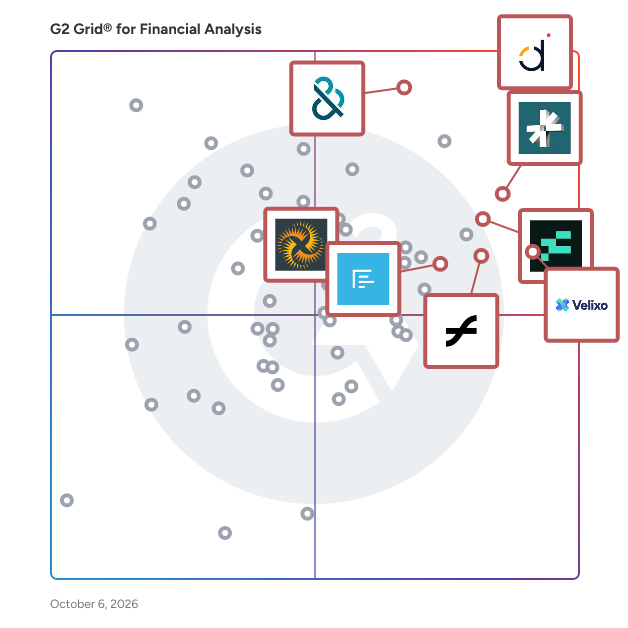
## G2 Grid® for Financial Analysis Software
![G2 Grid® for Financial Analysis Software plotting products by satisfaction and market presence](https://www.g2.com/categories/financial-analysis/grids.png?focus%5B%5D=160444&focus%5B%5D=99063&focus%5B%5D=95296&focus%5B%5D=96765&focus%5B%5D=10475&focus%5B%5D=1402310&focus%5B%5D=103747&focus%5B%5D=127184)
Highlighted products: LiveFlow, Datarails, D&amp;B Finance Analytics Credit Intelligence, Reach Reporting, Fathom, DualEntry, Joiin, and Velixo.
Underlying data: [Grid® JSON](https://www.g2.com/categories/financial-analysis/grids.json?focus%5B%5D=liveflow&amp;focus%5B%5D=datarails&amp;focus%5B%5D=d-b-finance-analytics-credit-intelligence&amp;focus%5B%5D=reach-reporting&amp;focus%5B%5D=fathom&amp;focus%5B%5D=dualentry&amp;focus%5B%5D=joiin&amp;focus%5B%5D=velixo&amp;segment=small-business)


## How Many Financial Analysis Software Products Does G2 Track?
**Total Products under this Category:** 205

### Category Stats (Jul 2026)
- **Average Rating**: 4.53/5 (↓0.01 vs Jun 2026) The average rating of products in this category, based on all submitted ratings
- **Top Trending Product**: Unit4 FP&amp;A (+2.61%) - Among all products in this category, Unit4 FP&amp;A recorded the largest rating increase compared to last month
*Last updated: July 22, 2026*


## How Does G2 Rank Financial Analysis Software Products?

**Why You Can Trust G2's Software Rankings:**

- 30 Analysts and Data Experts
- 8,900+ Authentic Reviews
- 205+ Products
- Unbiased Rankings

G2's software rankings are built on verified user reviews, rigorous moderation, and a consistent research methodology maintained by a team of analysts and data experts. Each product is measured using the same transparent criteria, with no paid placement or vendor influence. While reviews reflect real user experiences, which can be subjective, they offer valuable insight into how software performs in the hands of professionals. Together, these inputs power the G2 Score, a standardized way to compare tools within every category.


---

**Sponsored**

### Abacum

Abacum is an AI-native Financial Planning and Analysis (FP&amp;A) platform designed to enhance business performance through clarity, speed, and impactful decision-making. This innovative solution provides users with instant access to essential operational and financial key performance indicators (KPIs) all in one centralized location. With just a single click, users can automate management reporting, forecast revenue, plan headcount, budget operational expenditures (OPEX), and run multiple scenarios, all seamlessly integrated within the Abacum environment. Targeted primarily at mid-market companies, Abacum caters to finance teams seeking a robust yet user-friendly solution for their planning and analysis needs. The platform stands out by combining intuitive workflows with enterprise-grade flexibility, allowing users to create collaborative plans, analyze performance in real time, and share valuable insights that drive business progress. Its ability to integrate with over 700 systems, including ERP, CRM, HRIS, and data warehouses, ensures that all data is automatically synced, cleaned, structured, and consistently up to date, thus eliminating the need for manual data handling. One of the key features of Abacum is its multi-dimensional modeling engine, which empowers finance teams to conduct complex analyses and scenario planning with ease. This capability, coupled with collaborative workflows, facilitates seamless business partnering across various functions within an organization. As a result, finance teams can plan and report up to 75% faster, significantly improving efficiency and allowing them to focus on strategic initiatives rather than time-consuming manual processes. Abacum is designed to support fast-growing companies and industry leaders, including names such as Strava, Dish Networks, JG Wentworth, BetterUp, Factorial, Kajabi, Abridge, and Aiven. By providing a scalable FP&amp;A solution that balances power with simplicity, Abacum enables organizations to navigate the complexities of financial planning and analysis confidently.


[Visit website](https://www.g2.com/external_clickthroughs/record?secure%5Bad_program%5D=ppc&amp;secure%5Bad_slot%5D=category_product_list&amp;secure%5Bcategory_id%5D=1550&amp;secure%5Bchosen_at%5D=2026-07-23T12%3A39%3A17Z&amp;secure%5Bdisplayable_resource_id%5D=1550&amp;secure%5Bdisplayable_resource_type%5D=Category&amp;secure%5Bmedium%5D=sponsored&amp;secure%5Bplacement_reason%5D=page_category&amp;secure%5Bplacement_resource_ids%5D%5B%5D=1550&amp;secure%5Bprioritized%5D=false&amp;secure%5Bproduct_id%5D=154807&amp;secure%5Bresource_id%5D=1550&amp;secure%5Bresource_type%5D=Category&amp;secure%5Bsource_type%5D=llm_category_page&amp;secure%5Bsource_url%5D=https%3A%2F%2Fwww.g2.com%2Fcategories%2Ffinancial-analysis%2Fsmall-business%3Fpage%3D2&amp;secure%5Btoken%5D=8e32dbae5985751591805b1087e67d9b49bf4b42ed8b37acc9a8303d34d7aaf7&amp;secure%5Burl%5D=https%3A%2F%2Fwww.abacum.ai%2F%3Futm_source%3Dg2%26utm_medium%3Dcpc%26utm_campaign%3Dg2_paid&amp;secure%5Burl_type%5D=custom_url)

---

## What Are the Top-Rated Financial Analysis Software Products in 2026?
### 1. [Budgyt](https://www.g2.com/products/budgyt/reviews)
Budgyt is database-driven budgeting software that replaces Excel budgets entirely - eliminating formula errors, version control chaos, and the career-ending risk of broken budgets in board meetings. Unlike platforms built on top of Excel that perpetuate formula risks, Budgyt uses a pure database foundation where two plus two always equals four. No #REF errors. No broken rollups. No more frantically hunting through hidden worksheets while your board watches. Purpose-built for finance teams with board accountability. Whether you&#39;re a nonprofit managing grant allocation across multiple programs, a professional services firm tracking practice profitability, or a growing business with complex department structures, Budgyt solves the collaboration and control problems Excel can&#39;t. Why 800+ organizations and 6,000 users have trusted Budgyt: Unbreakable formulas. Database-driven calculations mean your budget never breaks. Your team contributes safely without touching your master budget. No more &quot;did I break something?&quot; panic or weekend formula archaeology. Complete audit trail. Click any number to see exactly how it was calculated. From summary to transaction detail in two clicks. No more &quot;let me get back to you&quot; moments that kill credibility in board meetings. True collaboration. Unlimited users included (no per-seat fees). Department heads and program managers contribute directly while you maintain complete control. Granular permissions protect sensitive data like payroll while enabling transparency. Implementation in days. Deep API integrations with several accounting platforms (QuickBooks, Xero, NetSuite, Sage Intacct, Microsoft Business Central) automatically map your chart of accounts, departments, and dimensions. Start budgeting immediately. Recognized by G2 as Users Most Likely to Recommend, Easiest to Do Business With, and Easiest Admin. Starting at $399/month with unlimited users included. Budget with confidence. Present without fear.


**Average Rating:** 4.8/5.0
**Total Reviews:** 107
**How Do G2 Users Rate Budgyt?**

- **Custom Reports:** 8.5/10 (Category avg: 8.7/10)
- **Report Types:** 8.9/10 (Category avg: 8.8/10)
- **Has the product been a good partner in doing business?:** 9.7/10 (Category avg: 9.2/10)
- **Custom KPIs:** 8.1/10 (Category avg: 8.6/10)

**Who Is the Company Behind Budgyt?**

- **Seller:** [Budgyt](https://www.g2.com/sellers/budgyt)
- **Company Website:** https://www.budgyt.com
- **Year Founded:** 2013
- **HQ Location:** New York, NY
- **Twitter:** @budgyt (115 Twitter followers)
- **LinkedIn® Page:** https://www.linkedin.com/company/11036487/ (13 employees on LinkedIn®)

**Who Uses This Product?**
- **Who Uses This:** Controller, CFO
- **Top Industries:** Non-Profit Organization Management, Computer Software
- **Company Size:** 61% Mid-Market, 36% Small-Business


#### What Are Budgyt's Pros and Cons?

**Pros:**

- Ease of Use (17 reviews)
- Budgeting Management (12 reviews)
- Customer Support (12 reviews)
- Budgeting (10 reviews)
- Budgeting Efficiency (10 reviews)

**Cons:**

- Integration Issues (5 reviews)
- Expensive (2 reviews)
- Inefficient Reporting (2 reviews)
- Learning Difficulty (2 reviews)
- Limitations (2 reviews)


### What Do G2 Reviewers Say About Budgyt?
*AI-generated summary from verified user reviews*

**Pros:**

- Users commend Budgyt for its **ease of use** , enabling seamless data uploads and straightforward presentations for efficient management.
- Users praise Budgyt for its **affordable pricing and user-friendly interface** , enhancing budget management for non-profits.
- Users praise Budgyt for its **responsive customer support** , which is attentive and available around the clock.
- Users love the **easy budgeting process** with Budgyt, appreciating its multiple layers and excellent support.
- Users appreciate the **budgeting efficiency** of Budgyt, which simplifies processes and improves visibility across multiple locations.

**Cons:**

- Users face **integration issues** with Budgyt, particularly in managing multiple companies and lacking full automation capabilities.
- Users find Budgyt **expensive** , particularly with high initial setup costs that may not align with its value.
- Users find the **inefficient reporting** in Budgyt lacking in presentation and customization for non-financial audiences.
- Users find a **learning difficulty** with Budgyt, especially those unfamiliar with accounting practices, complicating usage.
- Users face **limitations in integration capabilities** with Budgyt, particularly when managing multiple entities effectively.

#### What Are Recent G2 Reviews of Budgyt?

**"[Flexible Cloud-Based Financial Reporting with Powerful Variance Analysis](https://www.g2.com/survey_responses/budgyt-review-13044414)"**

**Rating:** 5.0/5.0 stars
*— Verified User in Manufacturing*

[Read full review](https://www.g2.com/survey_responses/budgyt-review-13044414)

---

**"[Seamless QuickBooks Online Integration with Strong Support and Great Value](https://www.g2.com/survey_responses/budgyt-review-13038570)"**

**Rating:** 5.0/5.0 stars
*— Steve P.*

[Read full review](https://www.g2.com/survey_responses/budgyt-review-13038570)

---


#### What Are G2 Users Discussing About Budgyt?

- [What is Budgyt used for?](https://www.g2.com/discussions/what-is-budgyt-used-for) - 1 comment

### 2. [Global Database Risk Intelligence](https://www.g2.com/products/global-database-risk-intelligence/reviews)
When it comes to making informed business decisions, the integrity and comprehensiveness of your data sources matter. Global Database presents its Business Credit Reports - an unparalleled tool designed to offer businesses a comprehensive insight into the financial stability and creditworthiness of companies worldwide. Key Features: Comprehensive Financial Data: Gain access to detailed financial histories, including income statements, balance sheets, cash flow statements, and key financial ratios. Credit Risk Insights: Evaluate potential risks with our credit scores and ratings, allowing you to make well-informed decisions, minimize bad debts, and optimize credit terms. Global Coverage: Our database covers businesses from numerous sectors and countries, ensuring you have a global perspective regardless of where you operate. Real-time Updates: Stay ahead of the curve. Our reports are updated in real-time, ensuring that you have the most recent data at your fingertips. User-friendly Interface: Access information seamlessly with our intuitive interface, making it easier for businesses of all sizes to gather insights and analytics. Advanced Analytics: Beyond raw data, benefit from in-depth analytics that help in identifying trends, growth rates, and predicting future financial health.


**Average Rating:** 4.7/5.0
**Total Reviews:** 39
**How Do G2 Users Rate Global Database Risk Intelligence?**

- **Custom Reports:** 10.0/10 (Category avg: 8.7/10)
- **Report Types:** 10.0/10 (Category avg: 8.8/10)
- **Has the product been a good partner in doing business?:** 10.0/10 (Category avg: 9.2/10)
- **Custom KPIs:** 10.0/10 (Category avg: 8.6/10)

**Who Is the Company Behind Global Database Risk Intelligence?**

- **Seller:** [Global Data Intelligence Limited](https://www.g2.com/sellers/global-data-intelligence-limited)
- **Year Founded:** 2015
- **HQ Location:** Northampton, UK
- **Twitter:** @Global_Database (1,594 Twitter followers)
- **LinkedIn® Page:** https://www.linkedin.com/company/global-database/ (40 employees on LinkedIn®)

**Who Uses This Product?**
- **Top Industries:** Information Technology and Services, Transportation/Trucking/Railroad
- **Company Size:** 108% Small-Business, 49% Mid-Market


#### What Are Global Database Risk Intelligence's Pros and Cons?

**Pros:**

- Ease of Use (20 reviews)
- Integrations (19 reviews)
- Dashboards (12 reviews)
- Insights (10 reviews)
- Dashboard Customization (9 reviews)

**Cons:**

- Limited Customization (8 reviews)
- Slow Performance (8 reviews)
- Customization Difficulties (6 reviews)
- Slow Loading (5 reviews)
- Complex Setup (4 reviews)


### What Do G2 Reviewers Say About Global Database Risk Intelligence?
*AI-generated summary from verified user reviews*

**Pros:**

- Users appreciate the **ease of use** of Global Database Risk Intelligence, benefiting from intuitive dashboards and quick data access.
- Users value the **seamless integrations** of Global Database, enhancing data reliability and streamlining reporting processes.
- Users value the **intuitive and seamless dashboards** of Global Database Risk Intelligence for easy risk assessment and integration.
- Users value the **comprehensive insights** of Global Database Risk Intelligence, benefiting from detailed historical data and intuitive dashboards.
- Users appreciate the **easy-to-navigate dashboards** of Global Database Risk Intelligence, enhancing clarity in metrics and reports.

**Cons:**

- Users note a **lack of customization** options in reports, limiting their ability to tailor data for different departments.
- Users experience **slow performance** during peak times, with reports loading slowly and filters being tricky initially.
- Users notice a **lack of customization options** for reports, leading to some challenges in tailoring financial presentations.
- Users experience **slow loading times** , especially with detailed reports and advanced filters, affecting efficiency.
- Users experience **complex setup** times, particularly during initial customization and integration, but enjoy smooth operation afterward.

#### What Are Recent G2 Reviews of Global Database Risk Intelligence?

**"[Comprehensive Risk Intelligence That Elevates SME Lending portfolio](https://www.g2.com/survey_responses/global-database-risk-intelligence-review-11919415)"**

**Rating:** 5.0/5.0 stars
*— Jim  Y.*

[Read full review](https://www.g2.com/survey_responses/global-database-risk-intelligence-review-11919415)

---

**"[Enabling rapid partner onboarding with confidence](https://www.g2.com/survey_responses/global-database-risk-intelligence-review-11919314)"**

**Rating:** 5.0/5.0 stars
*— Debarshi  M.*

[Read full review](https://www.g2.com/survey_responses/global-database-risk-intelligence-review-11919314)

---


### 3. [Jedox](https://www.g2.com/products/jedox/reviews)
Jedox is the world’s most adaptable planning and performance management platform that empowers organizations to deliver plans that outperform expectations. Over 2,900 organizations in 140 countries trust Jedox to model any scenario, integrate data from any source and simplify cross-organizational plans across all business systems. Jedox enables a culture of decisiveness and confidence so teams can plan for opportunities, react quickly to changes, and uncover what they didn’t know was possible. ​ ​


**Average Rating:** 4.3/5.0
**Total Reviews:** 158
**How Do G2 Users Rate Jedox?**

- **Custom Reports:** 8.7/10 (Category avg: 8.7/10)
- **Report Types:** 8.7/10 (Category avg: 8.8/10)
- **Has the product been a good partner in doing business?:** 8.5/10 (Category avg: 9.2/10)
- **Custom KPIs:** 8.5/10 (Category avg: 8.6/10)

**Who Is the Company Behind Jedox?**

- **Seller:** [Jedox](https://www.g2.com/sellers/jedox)
- **Company Website:** https://www.jedox.com
- **Year Founded:** 2002
- **HQ Location:** Freiburg, Germany
- **Twitter:** @Jedox (1,673 Twitter followers)
- **LinkedIn® Page:** https://www.linkedin.com/company/231653/ (400 employees on LinkedIn®)

**Who Uses This Product?**
- **Who Uses This:** Controller
- **Top Industries:** Information Technology and Services, Accounting
- **Company Size:** 51% Mid-Market, 28% Small-Business


#### What Are Jedox's Pros and Cons?

**Pros:**

- Ease of Use (8 reviews)
- Budgeting Management (7 reviews)
- Flexibility (7 reviews)
- Forecasting (7 reviews)
- Integrations (7 reviews)

**Cons:**

- Complex Modeling (5 reviews)
- Learning Curve (5 reviews)
- Complexity (4 reviews)
- Learning Difficulty (4 reviews)
- Slow Loading (4 reviews)


### What Do G2 Reviewers Say About Jedox?
*AI-generated summary from verified user reviews*

**Pros:**

- Users admire the **ease of use** of Jedox, noting its intuitive interface and smooth onboarding process.
- Users value the **seamless budgeting management** in Jedox, integrating various operations and enhancing data relationships.
- Users value Jedox for its **flexibility** , enabling fast implementation and smooth integration with existing systems.
- Users value Jedox for its **effective forecasting capabilities** , enhancing planning and streamlining reporting processes significantly.
- Users value the **robust integrations** of Jedox, seamlessly connecting data from multiple systems for enhanced planning.

**Cons:**

- Users find the **complex modeling** process challenging, especially with large datasets and a less intuitive interface.
- Users struggle with the **learning curve** of Jedox, finding it challenging and time-consuming to master the platform.
- Users find the **complexity of model building** in Jedox challenging, requiring extensive training and technical expertise.
- Users find that **learning Jedox can be difficult** , requiring extensive training and technical expertise for effective use.
- Users find **slow loading times** with Jedox, especially for complex reports and opening forms, affecting productivity.

#### What Are Recent G2 Reviews of Jedox?

**"[Set-up of jedox for HR Modeling](https://www.g2.com/survey_responses/jedox-review-8900158)"**

**Rating:** 4.0/5.0 stars
*— Dmytro K.*

[Read full review](https://www.g2.com/survey_responses/jedox-review-8900158)

---

**"[Powerful Data Relationships and Budgeting Flexibility](https://www.g2.com/survey_responses/jedox-review-12107792)"**

**Rating:** 4.0/5.0 stars
*— Pille P.*

[Read full review](https://www.g2.com/survey_responses/jedox-review-12107792)

---


#### What Are G2 Users Discussing About Jedox?

- [What is Jedox used for?](https://www.g2.com/discussions/what-is-jedox-used-for)

### 4. [Spotlight Reporting](https://www.g2.com/products/spotlight-reporting/reviews)
Spotlight Reporting is the comprehensive cloud platform for financial reporting and cash flow forecasting. Our suite of tools are designed by experienced accountants to enable strategic planning, forecasting and multi-currency consolidation for businesses, accounting firms, and Virtual CFOs. Connect your preferred accounting solution and turn your financial data into insights for confident decision making. Quickly generate visual dashboards, management reports, and forecasts, perfect for presenting to clients, the bank, or the board.


**Average Rating:** 4.7/5.0
**Total Reviews:** 24
**How Do G2 Users Rate Spotlight Reporting?**

- **Custom Reports:** 9.2/10 (Category avg: 8.7/10)
- **Report Types:** 8.6/10 (Category avg: 8.8/10)
- **Has the product been a good partner in doing business?:** 10.0/10 (Category avg: 9.2/10)
- **Custom KPIs:** 9.0/10 (Category avg: 8.6/10)

**Who Is the Company Behind Spotlight Reporting?**

- **Seller:** [Spotlight Reporting](https://www.g2.com/sellers/spotlight-reporting)
- **Year Founded:** 2010
- **HQ Location:** Wellington, New Zealand
- **Twitter:** @spotlightrep (7,727 Twitter followers)
- **LinkedIn® Page:** https://linkedin.com/company/spotlight-reporting-limited (43 employees on LinkedIn®)

**Who Uses This Product?**
- **Top Industries:** Accounting
- **Company Size:** 63% Small-Business, 21% Mid-Market


#### What Are Recent G2 Reviews of Spotlight Reporting?

**"[Great Onboarding, Customer Support, and Engagement](https://www.g2.com/survey_responses/spotlight-reporting-review-8691167)"**

**Rating:** 5.0/5.0 stars
*— Ryan V.*

[Read full review](https://www.g2.com/survey_responses/spotlight-reporting-review-8691167)

---

**"[Efficient and easy to use !](https://www.g2.com/survey_responses/spotlight-reporting-review-8356636)"**

**Rating:** 5.0/5.0 stars
*— Sara V.*

[Read full review](https://www.g2.com/survey_responses/spotlight-reporting-review-8356636)

---


#### What Are G2 Users Discussing About Spotlight Reporting?

- [What is Spotlight Reporting used for?](https://www.g2.com/discussions/what-is-spotlight-reporting-used-for) - 2 upvotes

### 5. [Cube](https://www.g2.com/products/cube-2025-12-17/reviews)
Cube is the financial intelligence platform built for the AI-era. We supercharge planning, accelerate analysis, and unify data to unlock the insights that drive better decisions—while giving FP&amp;A teams the freedom to work seamlessly in Excel, Google Sheets, the web, or chat. Cube is the smartest way to work in the tools you love. With native Excel and Google Sheets integrations, Slack and Teams apps, and an AI-powered collaboration suite, Cube helps finance work faster, align better, and guide plans without changing how they work. Founded in New York City by a 3x CFO, Cube now supports thousands of finance professionals across industries including manufacturing, retail, healthcare, education, and more. The platform combines flexibility and scalability in a modern planning environment that’s easy to adopt and powerful to grow with. Cube connects your spreadsheets and source systems to powerful planning, modeling, and analytics without the need for code or consultants. Teams use Cube to operate faster, run what-if scenarios instantly, and deliver real-time insights that help business partners make quick, confident decisions. With Cube, finance teams can: \*Get AI-generated business insights \* Automate manual tasks \* Eliminate version control issues \* Collaborate across teams and tools all while working in the spreadsheet and communication apps they already love.


**Average Rating:** 4.5/5.0
**Total Reviews:** 143
**How Do G2 Users Rate Cube?**

- **Custom Reports:** 8.6/10 (Category avg: 8.7/10)
- **Report Types:** 8.3/10 (Category avg: 8.8/10)
- **Has the product been a good partner in doing business?:** 9.3/10 (Category avg: 9.2/10)
- **Custom KPIs:** 7.5/10 (Category avg: 8.6/10)

**Who Is the Company Behind Cube?**

- **Seller:** [Cube](https://www.g2.com/sellers/cube-962a346c-36a4-4f22-8fc2-83ec443ddb2f)
- **Company Website:** https://cubesoftware.com
- **Year Founded:** 2018
- **HQ Location:** New York
- **LinkedIn® Page:** https://www.linkedin.com/company/35625340/ (153 employees on LinkedIn®)

**Who Uses This Product?**
- **Who Uses This:** Finance Manager
- **Top Industries:** Information Technology and Services, Computer Software
- **Company Size:** 81% Mid-Market, 16% Small-Business


#### What Are Cube's Pros and Cons?

**Pros:**

- Ease of Use (4 reviews)
- Customer Support (3 reviews)
- Flexibility (3 reviews)
- Integrations (3 reviews)
- Dashboard Customization (2 reviews)

**Cons:**

- Complexity (1 reviews)
- Customization Difficulties (1 reviews)
- Dashboard Limitations (1 reviews)
- Data Management (1 reviews)
- Data Management Issues (1 reviews)


### What Do G2 Reviewers Say About Cube?
*AI-generated summary from verified user reviews*

**Pros:**

- Users find Cube to be **intuitive and easy to use** , allowing for fast implementation and efficient functionality.
- Users praise the **excellent customer support** of Cube, highlighting their responsiveness and dedication to user success.
- Users appreciate the **flexibility** of Cube, enabling seamless integration and intuitive customization for improved FP&amp;A processes.
- Users love Cube for its **seamless integrations** , enhancing efficiency and streamlining financial processes effectively.
- Users value the **customizable dashboards** in Cube, allowing quick access to KPIs and in-depth analysis.

**Cons:**

- Users find the **complexity of data transfer** with Cube challenging due to its predefined custom dimensions.
- Users feel the **customization options are limited** , impacting their ability to fully utilize Cube&#39;s capabilities.
- Users find the **dashboard limitations** restrictive, desiring enhanced customization and visualization options for better functionality.
- Users find **data transfer complexities** with Cube&#39;s predefined dimensions challenging, hindering seamless implementation and efficiency.
- Users face **data management issues** with Cube, particularly difficulties in data transfer and limited custom dimensions.

#### What Are Recent G2 Reviews of Cube?

**"[Strong Integrations and Excel-Native FP&amp;A, with Rapidly Evolving Features](https://www.g2.com/survey_responses/cube-review-13057613)"**

**Rating:** 4.5/5.0 stars
*— Kyle C.*

[Read full review](https://www.g2.com/survey_responses/cube-review-13057613)

---

**"[Excel-Native Powerhouse with Seamless Integrations and Responsive Support](https://www.g2.com/survey_responses/cube-review-13033122)"**

**Rating:** 4.0/5.0 stars
*— Chris K.*

[Read full review](https://www.g2.com/survey_responses/cube-review-13033122)

---


#### What Are G2 Users Discussing About Cube?

- [What is your experience with Cube Software for financial planning, and what improvements could be made?](https://www.g2.com/discussions/what-is-your-experience-with-cube-software-for-financial-planning-and-what-improvements-could-be-made)
- [What is Cube Software used for?](https://www.g2.com/discussions/what-is-cube-software-used-for)

### 6. [Apliqo](https://www.g2.com/products/apliqo/reviews)
Apliqo’s performance management applications harness your organisation’s unique complexity, so you can model the future and guide your business forward with confidence. As finance professionals ourselves, we’ve been through the pain of inaccurate, time-consuming and unwieldy processes. And we’re here to put a stop to it. Permanently. We’ve put all our knowledge and experience into our applications, building in all the planning IQ, analytics and reporting capabilities you need. So you don’t have to suffer any longer.


**Average Rating:** 4.9/5.0
**Total Reviews:** 43
**How Do G2 Users Rate Apliqo?**

- **Custom Reports:** 8.9/10 (Category avg: 8.7/10)
- **Report Types:** 9.6/10 (Category avg: 8.8/10)
- **Has the product been a good partner in doing business?:** 9.9/10 (Category avg: 9.2/10)
- **Custom KPIs:** 9.5/10 (Category avg: 8.6/10)

**Who Is the Company Behind Apliqo?**

- **Seller:** [Apliqo](https://www.g2.com/sellers/apliqo)
- **Company Website:** https://apliqo.com/
- **Year Founded:** 2013
- **HQ Location:** Zurich, CH
- **Twitter:** @apliqo (47 Twitter followers)
- **LinkedIn® Page:** https://www.linkedin.com/company/apliqo (19 employees on LinkedIn®)

**Who Uses This Product?**
- **Who Uses This:** Consultant, Senior Consultant
- **Top Industries:** Consulting, Information Technology and Services
- **Company Size:** 62% Mid-Market, 31% Small-Business


#### What Are Apliqo's Pros and Cons?

**Pros:**

- Dashboards (7 reviews)
- Features (7 reviews)
- Customizability (5 reviews)
- Customization (5 reviews)
- Dashboard Customization (5 reviews)

**Cons:**

- Learning Difficulty (7 reviews)
- Learning Curve (6 reviews)
- Expertise Required (5 reviews)
- Customization Difficulties (2 reviews)
- Customization Difficulty (2 reviews)


### What Do G2 Reviewers Say About Apliqo?
*AI-generated summary from verified user reviews*

**Pros:**

- Users commend the **user-friendly dashboards** of Apliqo, enhancing data visualization and decision-making efficiency.
- Users value the **ease of development** in Apliqo, appreciating its built-in features and seamless TM1 integration.
- Users value the **customizability** of Apliqo, enabling tailored dashboards that enhance data visualization and interactivity.
- Users value the **highly customizable dashboards** of Apliqo, enhancing their ability to visualize and interact with data effectively.
- Users benefit from **highly customizable dashboards** in Apliqo, enhancing data visualization and interaction for better decision-making.

**Cons:**

- Users may face **learning difficulties** due to the technical knowledge required for effective use of Apliqo.
- Users note a **steep learning curve** for non-technical developers, especially regarding TM1, MDX, CSS, and JSON.
- Users note that **expertise is required** in TM1 and MDX, making it challenging for non-technical developers.
- Users face **customization difficulties** with Apliqo, requiring extensive knowledge of TM1, MDX, CSS, and JSON.
- Users find **customization difficult** in Apliqo, requiring technical knowledge that may challenge less experienced developers.

#### What Are Recent G2 Reviews of Apliqo?

**"[Intuitive Frontend for Planning Analytics](https://www.g2.com/survey_responses/apliqo-review-10223927)"**

**Rating:** 4.5/5.0 stars
*— Van Zyl B.*

[Read full review](https://www.g2.com/survey_responses/apliqo-review-10223927)

---

**"[Delivering business value through an intuitive interface](https://www.g2.com/survey_responses/apliqo-review-10319445)"**

**Rating:** 5.0/5.0 stars
*— Dave H.*

[Read full review](https://www.g2.com/survey_responses/apliqo-review-10319445)

---


### 7. [Phocas Software](https://www.g2.com/products/phocas-software/reviews)
Phocas Software delivers cloud-based business intelligence (BI) and financial planning and analysis (FP&amp;A) solutions for mid-market businesses in wholesale distribution, manufacturing, and retail. Phocas delivers an intuitive, accessible platform that simplifies data analysis and financial planning, empowering organizations to make confident, data-driven decisions. Seamlessly integrating with ERP systems and any other source, Phocas consolidates data into a centralized platform. Unlocking the potential of ERP data and delivering improvements at every business level. Its BI core enables users to explore data, spot trends, and find opportunities. FP&amp;A tools support dynamic financial reporting, flexible budgeting, performance tracking and accurate forecasts. Plus, Phocas offers automated rebate management. Phocas Analytics A BI tool that connects businesses around one central data source. It’s fast, secure and designed to be self-serve for everyone. Up-to-date data is easy to access and explore empowering people to understand and improve the business at any level – by branch, division, sales, product, customer. • Data consolidation: ERP + other data sources automatically consolidated into a centralized platform • AI natural language: query data using Phocas AI and get instant answers • Drill down: Explore data from high-level overviews to transactional detail • Enhanced analysis: Flexible pivot tables enable custom data analysis • Ad hoc reporting: Build custom reports and dashboards in minutes and with ease • Visualizations &amp; dashboards: Transform live data into custom dashboards, charts, graphs and sparklines Phocas Financial Statements Designed to help businesses easily and accurately report on their financial health and performance. ERP numbers are transformed into dynamic profit and loss (income statement), balance sheet and cashflow statements. Empowering users to quickly explore data in detail and to proactively solve problems. • Customize: Easily adjust statements to suit cross-functional teams • Fast: speed up month-end with automated financial data consolidation and reporting • Live actuals: work with reliable, up-to-date actuals with formulas and ratios baked into the tool • Drill down: slice, dice and drill down to transaction-level detail • Side-by-side analysis: compare statements across different periods, branches, divisions • User-based access: secure visibility and direction for end business users Phocas Budgets &amp; Forecasts Consolidates planning across the business in one place – financial budgets, sales forecasts, headcount, demand planning. As easy to use as a spreadsheet, just faster and custom-built. • Automated: budgets and forecasts are populated with live ERP data so actuals are always reliable • Flexible: adapts to growing business needs; handles increased complexity, detailed planning • Easy tracking: use live actuals to regularly track performance, compare to budgets, quickly reforecast • Collaborative: assignment, submission and approval processes make cross-functional input quick and stress-free • Versatile: facilitates driver-based, multi-level, 3-statement budgeting, unlimited scenario planning Phocas Rebates Automated payable and receivable rebate management that improves accuracy and delivers more profitable outcomes. A self-serve tool that makes it easy to identify trends, spot near misses, and assess overall performance. With real-time updates, users can quickly optimize product offers, pricing, and purchasing decisions to align with emerging opportunities. Enabling businesses to maximize profitability and strengthen partnerships.


**Average Rating:** 4.6/5.0
**Total Reviews:** 188
**How Do G2 Users Rate Phocas Software?**

- **Custom Reports:** 8.9/10 (Category avg: 8.7/10)
- **Report Types:** 8.9/10 (Category avg: 8.8/10)
- **Has the product been a good partner in doing business?:** 9.0/10 (Category avg: 9.2/10)
- **Custom KPIs:** 9.0/10 (Category avg: 8.6/10)

**Who Is the Company Behind Phocas Software?**

- **Seller:** [Phocas Software](https://www.g2.com/sellers/phocas-software)
- **Company Website:** https://www.phocassoftware.com
- **Year Founded:** 1999
- **HQ Location:** Sydney, AU
- **LinkedIn® Page:** https://www.linkedin.com/company/1114241/ (332 employees on LinkedIn®)

**Who Uses This Product?**
- **Top Industries:** Wholesale, Electrical/Electronic Manufacturing
- **Company Size:** 66% Mid-Market, 23% Small-Business


#### What Are Phocas Software's Pros and Cons?

**Pros:**

- Ease of Use (8 reviews)
- Capabilities (5 reviews)
- Data Analysis (5 reviews)
- Report Creation (5 reviews)
- Reporting Efficiency (5 reviews)

**Cons:**

- Feature Improvements (3 reviews)
- Improvements Needed (3 reviews)
- Missing Features (3 reviews)
- Missing Functionality (3 reviews)
- Bugs (2 reviews)


### What Do G2 Reviewers Say About Phocas Software?
*AI-generated summary from verified user reviews*

**Pros:**

- Users appreciate the **ease of use** of Phocas Software, enabling straightforward data interpretation and effective decision-making.
- Users praise Phocas Software for its **intuitive capabilities** that simplify data analysis and enhance decision-making.
- Users value **fast and clear data analysis** in Phocas Software, facilitating informed decision-making with ease.
- Users value the **easy report creation** in Phocas Software, enabling quick, defensible insights for decision-making.
- Users appreciate the **reporting efficiency** of Phocas Software, enabling quick, credible insights for informed decision-making.

**Cons:**

- Users find **feature improvements necessary** for Phocas Software, particularly in budgeting and user experience at scale.
- Users note that **improvements are needed** in data handling, budgeting, and user experience for better efficiency.
- Users report **missing features** in Phocas Software, impacting operational efficiency and user experience in complex environments.
- Users express frustration over **missing functionality** like real-time data access and limited contract-level intelligence in Phocas Software.
- Users report encountering **bugs and date format issues** that complicate setup and lead to time-consuming troubleshooting.

#### What Are Recent G2 Reviews of Phocas Software?

**"[Phocas Software: Delivering Decision-Ready Insight, Commercial Control, and Governance at Scale](https://www.g2.com/survey_responses/phocas-software-review-12082649)"**

**Rating:** 5.0/5.0 stars
*— Lyndon R.*

[Read full review](https://www.g2.com/survey_responses/phocas-software-review-12082649)

---

**"[Effortless Data Integration and Visualization with Phocas](https://www.g2.com/survey_responses/phocas-software-review-12057725)"**

**Rating:** 5.0/5.0 stars
*— Matthew W.*

[Read full review](https://www.g2.com/survey_responses/phocas-software-review-12057725)

---


#### What Are G2 Users Discussing About Phocas Software?

- [What is Phocas Software used for?](https://www.g2.com/discussions/what-is-phocas-software-used-for) - 1 comment

### 8. [Oracle Essbase](https://www.g2.com/products/oracle-essbase/reviews)
Oracle Essbase is the industry-leading multi-dimensional online analytical processing (OLAP) server, providing a rich environment for effectively developing custom analytic and enterprise performance management applications.


**Average Rating:** 4.3/5.0
**Total Reviews:** 237
**How Do G2 Users Rate Oracle Essbase?**

- **Custom Reports:** 8.9/10 (Category avg: 8.7/10)
- **Report Types:** 8.8/10 (Category avg: 8.8/10)
- **Has the product been a good partner in doing business?:** 6.7/10 (Category avg: 9.2/10)
- **Custom KPIs:** 8.3/10 (Category avg: 8.6/10)

**Who Is the Company Behind Oracle Essbase?**

- **Seller:** [Oracle](https://www.g2.com/sellers/oracle)
- **Year Founded:** 1977
- **HQ Location:** Austin, TX
- **Twitter:** @Oracle (827,997 Twitter followers)
- **LinkedIn® Page:** https://www.linkedin.com/company/1028/ (208,078 employees on LinkedIn®)
- **Ownership:** NYSE:ORCL

**Who Uses This Product?**
- **Top Industries:** Information Technology and Services, Insurance
- **Company Size:** 74% Enterprise, 19% Mid-Market


#### What Are Oracle Essbase's Pros and Cons?

**Pros:**

- Excel Integration (1 reviews)
- Visualization (1 reviews)

**Cons:**

- Data Management (1 reviews)
- Not User-Friendly (1 reviews)


### What Do G2 Reviewers Say About Oracle Essbase?
*AI-generated summary from verified user reviews*

**Pros:**

- Users value the **Excel integration through Smart View** , enhancing their multidimensional analysis capabilities in Oracle Essbase.
- Users value the **multidimensional analysis** capabilities and seamless **Excel integration** via SmartView in Oracle Essbase.

**Cons:**

- Users find the **difficulties in data management** frustrating, as the interface feels outdated and errors are common.
- Users find the Oracle Essbase interface **not user-friendly** , often struggling with its outdated design and error sensitivity.

#### What Are Recent G2 Reviews of Oracle Essbase?

**"[My personal experience about essbase](https://www.g2.com/survey_responses/oracle-essbase-review-8010153)"**

**Rating:** 4.5/5.0 stars
*— Rohith P.*

[Read full review](https://www.g2.com/survey_responses/oracle-essbase-review-8010153)

---

**"[Powerful Multidimensional Analysis with Smooth Excel SmartView Integration](https://www.g2.com/survey_responses/oracle-essbase-review-12405557)"**

**Rating:** 4.5/5.0 stars
*— Verified User in Telecommunications*

[Read full review](https://www.g2.com/survey_responses/oracle-essbase-review-12405557)

---


#### What Are G2 Users Discussing About Oracle Essbase?

- [What is Oracle Essbase used for?](https://www.g2.com/discussions/what-is-oracle-essbase-used-for)
- [What is the difference between Hyperion and Essbase?](https://www.g2.com/discussions/what-is-the-difference-between-hyperion-and-essbase)
- [Is Oracle Essbase a relational database?](https://www.g2.com/discussions/is-oracle-essbase-a-relational-database)
- [What is Essbase database?](https://www.g2.com/discussions/what-is-essbase-database)
- [What is Essbase used for?](https://www.g2.com/discussions/what-is-essbase-used-for)

### 9. [Keboola](https://www.g2.com/products/keboola/reviews)
Keboola is a finance data and AI platform for companies that need trusted financial reporting, planning, analysis, and close processes across complex systems. Built for CFOs, FP&amp;A teams, Controllers, finance operations, and data teams, Keboola helps organizations turn fragmented data from ERPs, accounting systems, spreadsheets, CRM, warehouses, and operational tools into one governed foundation for financial intelligence. Many finance teams rely on disconnected systems, inconsistent charts of accounts, manual reconciliations, and spreadsheet-based reporting. This makes it difficult to close quickly, produce reliable forecasts, answer board questions, support acquisitions, or use AI safely with financial data. Keboola solves this upstream data problem by connecting, standardizing, transforming, and governing financial data before it reaches FP&amp;A, CPM, BI, reporting, or AI tools. Keboola is especially valuable for multi-entity companies, private-equity-backed businesses, holding groups, financial services firms, franchises, and organizations growing through M&amp;A. These companies often operate across multiple ERPs, entities, countries, currencies, and reporting definitions. Keboola helps standardize chart-of-accounts logic, automate financial data pipelines, reconcile data across systems, and create trusted business definitions that teams can use consistently. Unlike traditional FP&amp;A, CPM, EPM, budgeting, forecasting, or financial reporting tools that assume clean data already exists, Keboola focuses on the governed data foundation underneath. The platform gives teams transparent, auditable logic for financial transformations, source-to-output lineage, reusable business rules, and a semantic layer that helps ensure reports, dashboards, forecasts, and AI outputs are based on trusted company data. Keboola works alongside existing tools such as Snowflake, BigQuery, Databricks, Microsoft Fabric, Power BI, Tableau, Looker, Anaplan, Pigment, DataRails, Workiva, and other finance and analytics platforms. Rather than forcing a rip-and-replace project, Keboola strengthens the data layer beneath these systems so finance teams can plan, report, reconcile, and analyze with greater confidence. For AI adoption, Keboola provides the governed data environment that makes AI practical for business-critical financial workflows. Teams can connect AI agents and assistants to approved metrics, trusted pipelines, financial definitions, and auditable data products, reducing the risk of confident but untraceable answers. With Keboola, organizations can improve financial analysis, accelerate reporting, support financial close, automate reconciliation workflows, enable more reliable FP&amp;A, and create a trusted foundation for AI-powered finance.


**Average Rating:** 4.6/5.0
**Total Reviews:** 135
**How Do G2 Users Rate Keboola?**

- **Has the product been a good partner in doing business?:** 9.0/10 (Category avg: 9.2/10)

**Who Is the Company Behind Keboola?**

- **Seller:** [Keboola](https://www.g2.com/sellers/keboola)
- **Company Website:** https://www.keboola.com
- **Year Founded:** 2008
- **HQ Location:** Prague
- **Twitter:** @keboola (2,004 Twitter followers)
- **LinkedIn® Page:** https://www.linkedin.com/company/keboola/ (97 employees on LinkedIn®)

**Who Uses This Product?**
- **Who Uses This:** Data Analyst, Data Engineer
- **Top Industries:** Information Technology and Services, Marketing and Advertising
- **Company Size:** 64% Mid-Market, 21% Small-Business


#### What Are Keboola's Pros and Cons?

**Pros:**

- Ease of Use (35 reviews)
- Features (27 reviews)
- Data Management (26 reviews)
- Integrations (26 reviews)
- Customer Support (25 reviews)

**Cons:**

- Learning Curve (14 reviews)
- Complexity (13 reviews)
- Steep Learning Curve (11 reviews)
- Data Management (9 reviews)
- UX Improvement (9 reviews)


### What Do G2 Reviewers Say About Keboola?
*AI-generated summary from verified user reviews*

**Pros:**

- Users find Keboola&#39;s platform to be **simple and easy to use** , making data management accessible for everyone.
- Users value the **user-friendly data management** capabilities of Keboola, enhancing accessibility for non-technical individuals.
- Users praise the **intuitive setup for data flows** in Keboola, enhancing productivity with seamless data handling.
- Users value the **extensive integrations** of Keboola, enabling seamless data management across various platforms and tools.
- Users praise Keboola for its **incredible customer support** , providing fast and helpful assistance to enhance their experience.

**Cons:**

- Users find the **learning curve steep** , often requiring developer assistance and causing confusion with component navigation.
- Users struggle with the **complexity** of Keboola, facing steep learning curves and inconsistent documentation that hinders usability.
- Users face a **steep learning curve** with Keboola, often needing external help to navigate its complexities effectively.
- Users find the **interface difficult to navigate** , making data management more complex and error-prone than expected.
- Users find the **user interface overwhelming** and not intuitive, resulting in a challenging learning experience for newcomers.

#### What Are Recent G2 Reviews of Keboola?

**"[Usefull tool with good people behind it](https://www.g2.com/survey_responses/keboola-review-13121874)"**

**Rating:** 4.5/5.0 stars
*— Verified User in Wholesale*

[Read full review](https://www.g2.com/survey_responses/keboola-review-13121874)

---

**"[Streamlines Data Prep with Some Learning Curves](https://www.g2.com/survey_responses/keboola-review-9741142)"**

**Rating:** 5.0/5.0 stars
*— Vojta F.*

[Read full review](https://www.g2.com/survey_responses/keboola-review-9741142)

---


#### What Are G2 Users Discussing About Keboola?

- [What are the benefits and challenges of using Keboola for data integration, and what do you recommend for new users?](https://www.g2.com/discussions/what-are-the-benefits-and-challenges-of-using-keboola-for-data-integration-and-what-do-you-recommend-for-new-users)

### 10. [PlanGuru](https://www.g2.com/products/planguru/reviews)
PlanGuru is a tool for budgeting, forecasting, and performance review for small and mid-sized companies, it has a simple, intuitive interface and solid integration with Quickbooks and Excel make implementation and utilization simple for businesses of all sizes and shapes.


**Average Rating:** 4.5/5.0
**Total Reviews:** 37
**How Do G2 Users Rate PlanGuru?**

- **Custom Reports:** 8.8/10 (Category avg: 8.7/10)
- **Report Types:** 8.9/10 (Category avg: 8.8/10)
- **Has the product been a good partner in doing business?:** 9.7/10 (Category avg: 9.2/10)
- **Custom KPIs:** 9.4/10 (Category avg: 8.6/10)

**Who Is the Company Behind PlanGuru?**

- **Seller:** [PlanGuru](https://www.g2.com/sellers/planguru)
- **Year Founded:** 2013
- **HQ Location:** Wilkes Barre, PA
- **Twitter:** @planguru (196 Twitter followers)
- **LinkedIn® Page:** https://www.linkedin.com/company/planguru/ (11 employees on LinkedIn®)

**Who Uses This Product?**
- **Top Industries:** Accounting
- **Company Size:** 65% Small-Business, 38% Mid-Market


#### What Are PlanGuru's Pros and Cons?

**Pros:**

- Capabilities (1 reviews)
- Customer Experience (1 reviews)
- Customer Support (1 reviews)
- Customization (1 reviews)
- Easy Implementation (1 reviews)

**Cons:**

- Complexity (1 reviews)
- Confusion (1 reviews)


### What Do G2 Reviewers Say About PlanGuru?
*AI-generated summary from verified user reviews*

**Pros:**

- Users value the **robust support and extensive features** of PlanGuru, greatly enhancing their financial data management.
- Users value the **outstanding customer support** from Plan Guru, enhancing the overall experience with personalized assistance.
- Users praise the **knowledgeable customer support** of PlanGuru, making financial data integration seamless and effective.
- Users value the **customization options** in PlanGuru, enhancing their reporting experience with tailored KPI and data sets.
- Users appreciate the **easy implementation** of PlanGuru, benefiting from knowledgeable support during data integration.

**Cons:**

- Users find the **complexity of features** in PlanGuru can be confusing, though support is readily available.
- Users experience **confusion** due to numerous features, though the PlanGuru team provides helpful support when needed.

#### What Are Recent G2 Reviews of PlanGuru?

**"[Plan Guru is great!](https://www.g2.com/survey_responses/planguru-review-9572323)"**

**Rating:** 4.0/5.0 stars
*— Verified User in Environmental Services*

[Read full review](https://www.g2.com/survey_responses/planguru-review-9572323)

---

**"[RTA Group Review of Plan Guru](https://www.g2.com/survey_responses/planguru-review-9421484)"**

**Rating:** 5.0/5.0 stars
*— Jill S.*

[Read full review](https://www.g2.com/survey_responses/planguru-review-9421484)

---


#### What Are G2 Users Discussing About PlanGuru?

- [What does Planguru do?](https://www.g2.com/discussions/what-does-planguru-do) - 1 comment
- [How much does PlanGuru cost?](https://www.g2.com/discussions/how-much-does-planguru-cost)
- [What is budget maestro?](https://www.g2.com/discussions/what-is-budget-maestro)

### 11. [Grid](https://www.g2.com/products/withgrid/reviews)
From lead to invoice, track every dollar in SaaSGrid. SaaSGrid is the financial analytics platform built for B2B SaaS. We help companies like Scratchpad, Tecton, and Pearl track every dollar across their CRM, billing system, and ERP, providing real time and fully reconciled insights. SaaSGrid creates a single source of truth for pipeline, ARR, retention, revenue, and cash, and helps you present this data in beautiful, easy to share dashboards.


**Average Rating:** 4.6/5.0
**Total Reviews:** 14
**How Do G2 Users Rate Grid?**

- **Custom Reports:** 7.5/10 (Category avg: 8.7/10)
- **Report Types:** 9.6/10 (Category avg: 8.8/10)
- **Has the product been a good partner in doing business?:** 9.7/10 (Category avg: 9.2/10)
- **Custom KPIs:** 8.0/10 (Category avg: 8.6/10)

**Who Is the Company Behind Grid?**

- **Seller:** [Grid (formerly SaaSGrid)](https://www.g2.com/sellers/grid-formerly-saasgrid)
- **Year Founded:** 2023
- **HQ Location:** San Francisco, California
- **LinkedIn® Page:** https://www.linkedin.com/company/withgrid/ (8 employees on LinkedIn®)

**Who Uses This Product?**
- **Top Industries:** Computer Software
- **Company Size:** 71% Small-Business, 21% Mid-Market


#### What Are Grid's Pros and Cons?

**Pros:**

- Easy Integrations (2 reviews)
- Reporting Efficiency (2 reviews)
- Automation (1 reviews)
- Collaboration (1 reviews)
- Customer Success (1 reviews)

**Cons:**

- Expensive (1 reviews)
- Slow Performance (1 reviews)


### What Do G2 Reviewers Say About Grid?
*AI-generated summary from verified user reviews*

**Pros:**

- Users value the **easy integrations** with Hubspot and other tools, enhancing their data reporting and visualization experience.
- Users praise the **reporting efficiency** of Grid, highlighting its easy integration and valuable prebuilt reports and charts.
- Users value the **automation capabilities** of SaaSGrid, significantly enhancing their metrics tracking and analysis efficiency.
- Users value the **collaborative insights** from SaaSGrid, enabling multiple teams to access vital metrics effortlessly.
- Users value the **outstanding customer support** of SaaSGrid, ensuring responsive help for any unique challenges faced.

**Cons:**

- Users feel that the **cost is high** now that it&#39;s only available for those with significant ARR.
- Users find it helpful for current metrics, but experience **slow performance** that hinders forecasted metrics functionality.

#### What Are Recent G2 Reviews of Grid?

**"[Finally, metrics our whole team trusts](https://www.g2.com/survey_responses/grid-review-12989721)"**

**Rating:** 4.5/5.0 stars
*— Verified User in Information Technology and Services*

[Read full review](https://www.g2.com/survey_responses/grid-review-12989721)

---

**"[Less time wrangling data, more time acting on it](https://www.g2.com/survey_responses/grid-review-12971727)"**

**Rating:** 5.0/5.0 stars
*— Yulija K.*

[Read full review](https://www.g2.com/survey_responses/grid-review-12971727)

---


### 12. [Octopus AI](https://www.g2.com/products/octopus-ai/reviews)
Easy and instant financial planning for your early-stage startup. No CFO yet? No problem! Octopus&#39;s intuitive platform allows founders without a finance background to effortlessly monitor their startup&#39;s financial performance and forecast future scenarios.


**Average Rating:** 4.5/5.0
**Total Reviews:** 12
**How Do G2 Users Rate Octopus AI?**

- **Custom Reports:** 8.3/10 (Category avg: 8.7/10)
- **Report Types:** 7.0/10 (Category avg: 8.8/10)
- **Custom KPIs:** 8.1/10 (Category avg: 8.6/10)

**Who Is the Company Behind Octopus AI?**

- **Seller:** [OCTOPUS.AI](https://www.g2.com/sellers/octopus-ai)
- **Year Founded:** 2023
- **HQ Location:** Wilmington
- **LinkedIn® Page:** https://www.linkedin.com/company/my-octopus-ai/about/ (10 employees on LinkedIn®)

**Who Uses This Product?**
- **Company Size:** 83% Small-Business, 8% Enterprise


#### What Are Octopus AI's Pros and Cons?

**Pros:**

- Ease of Use (4 reviews)
- Insights (3 reviews)
- Easy Integrations (2 reviews)
- Real-time Data (2 reviews)
- User Interface (2 reviews)

**Cons:**

- Expensive (1 reviews)
- Integration Issues (1 reviews)
- Missing Features (1 reviews)
- Navigation Difficulty (1 reviews)
- Software Bugs (1 reviews)


### What Do G2 Reviewers Say About Octopus AI?
*AI-generated summary from verified user reviews*

**Pros:**

- Users find Octopus AI **easy to use** , facilitating analysis and providing accessible financial insights for better decision making.
- Users find Octopus AI&#39;s **ease of use and insightful analytics** invaluable for quick, informed decision-making.
- Users value the **easy integrations** of Octopus AI, enabling convenient daily data management for improved marketing campaigns.
- Users appreciate the **real-time data** capabilities of Octopus AI, providing immediate financial insights without delay.
- Users value the **immediate and concrete answers** from Octopus AI, simplifying financial analysis without burdening their teams.

**Cons:**

- Users find Octopus AI **expensive** , suggesting improvements in pricing and marketing for better value.
- Users face **integration issues** with Octopus AI, as it does not connect with all necessary data sources.
- Users note the **limited functionality** of Octopus AI, indicating it&#39;s still in early development with some glitches.
- Users often face **navigation difficulty** , struggling to locate certain features initially within Octopus AI.
- Users report **software bugs** in Octopus AI, indicating early development and narrow functionality impacting their experience.

#### What Are Recent G2 Reviews of Octopus AI?

**"[Dynamic website and app design with real-time cost estimation](https://www.g2.com/survey_responses/octopus-ai-review-9498196)"**

**Rating:** 4.5/5.0 stars
*— Isil A.*

[Read full review](https://www.g2.com/survey_responses/octopus-ai-review-9498196)

---

**"[Strategically built AI Tools for planning and execution](https://www.g2.com/survey_responses/octopus-ai-review-9738635)"**

**Rating:** 5.0/5.0 stars
*— Prabhjeet K.*

[Read full review](https://www.g2.com/survey_responses/octopus-ai-review-9738635)

---


### 13. [ExtendInsights](https://www.g2.com/products/extendinsights/reviews)
Start working from one place without jumping between systems. ExtendInsights connects your business data across NetSuite, Salesforce, HubSpot, Google Analytics, Stripe, Chargebee, and more directly into Excel. There, you can analyze, update, and report on live data without time-consuming exports, CSV processes, or manual rework. Instead of exporting from each system and stitching data together manually, ExtendInsights lets you access everything in one place—live, connected, and ready to go. Writeback is also available for NetSuite, Salesforce, and HubSpot. Whether you’re building live financial reports, updating records in bulk, analyzing saved searches or queries, combining multiple data sources, or creating executive dashboards, ExtendInsights eliminates manual steps and accelerates every part of your workflow. ExtendInsights brings analytics, data management, and financial reporting together in a single Excel-based experience. Create, edit, and update records in NetSuite, Salesforce, and HubSpot while simultaneously analyzing live data, all without switching tools or relying on CSVs. The result is faster workflows, fewer errors, and more time spent on insights instead of data preparation. Your team already works in Excel. Now they can do everything there. Key features: Visualize data using dynamic pivot tables and charts Build fast, accurate, and auditable financial reports Leverage data source security to keep data secure CloudExtend empowers users to make faster, more insightful decisions by creating innovative, user-friendly applications that integrate workplace productivity tools with platforms they use every day to automatically add emails, events, and files to NetSuite from Gmail and Outlook, or use Excel and Power BI to improve reporting and analysis capabilities for popular data sources. Our integration apps eliminate hundreds of hours of manual work, significantly reduce data import times, and provide a 360-degree view of customer activity.


**Average Rating:** 4.5/5.0
**Total Reviews:** 47
**How Do G2 Users Rate ExtendInsights?**

- **Has the product been a good partner in doing business?:** 9.1/10 (Category avg: 9.2/10)

**Who Is the Company Behind ExtendInsights?**

- **Seller:** [CloudExtend by Celigo](https://www.g2.com/sellers/cloudextend-by-celigo)
- **Company Website:** https://www.cloudextend.io/
- **Year Founded:** 2007
- **HQ Location:** Redwood City, US
- **Twitter:** @cloudextendIO (253 Twitter followers)
- **LinkedIn® Page:** https://www.linkedin.com/company/cloudextend/ (17 employees on LinkedIn®)

**Who Uses This Product?**
- **Top Industries:** Accounting, Retail
- **Company Size:** 54% Mid-Market, 42% Small-Business


#### What Are ExtendInsights's Pros and Cons?

**Pros:**

- Ease of Use (5 reviews)
- Integrations (4 reviews)
- Data Management (3 reviews)
- Accuracy of Information (2 reviews)
- Data Analysis (2 reviews)

**Cons:**

- Data Management (2 reviews)
- Slow Data Loading (2 reviews)
- Slow Loading (2 reviews)
- Slow Processing (2 reviews)
- Access Control (1 reviews)


### What Do G2 Reviewers Say About ExtendInsights?
*AI-generated summary from verified user reviews*

**Pros:**

- Users find ExtendInsights to have **exceptional ease of use** , making data management and updates significantly simpler.
- Users appreciate the **easy integrations** of ExtendInsights, enabling quick connections to Excel, NetSuite, and more.
- Users value the **effortless data management** of ExtendInsights, simplifying tasks and enhancing overall productivity.
- Users praise the **accuracy of information** in ExtendInsights, enhancing data-driven decisions and streamlining management processes.
- Users value the **efficient data analysis** capabilities of ExtendInsights, significantly speeding up reporting processes.

**Cons:**

- Users experience **slow data loading** and limitations in accessing certain data types within ExtendInsights&#39; Data Management.
- Users experience **slow data loading** as it processes only 25 lines at a time, disrupting efficiency in data retrieval.
- Users experience **slow loading** times when accessing data in ExtendInsights, affecting efficiency and usability.
- Users find the **slow processing** of ExtendInsights frustrating, especially with data not loading efficiently.
- Users find it challenging to determine the **best fields for creating templates** , impacting their overall experience with ExtendInsights.

#### What Are Recent G2 Reviews of ExtendInsights?

**"[A Huge Time-Saver for Bulk NetSuite Record Updates](https://www.g2.com/survey_responses/extendinsights-review-13061561)"**

**Rating:** 4.5/5.0 stars
*— Sarah M.*

[Read full review](https://www.g2.com/survey_responses/extendinsights-review-13061561)

---

**"[The Only Tool That Makes Connecting Excel to NetSuite Easy](https://www.g2.com/survey_responses/extendinsights-review-13119964)"**

**Rating:** 5.0/5.0 stars
*— Verified User in Apparel &amp; Fashion*

[Read full review](https://www.g2.com/survey_responses/extendinsights-review-13119964)

---


#### What Are G2 Users Discussing About ExtendInsights?

- [What is CloudExtend Excel For NetSuite used for?](https://www.g2.com/discussions/what-is-cloudextend-excel-for-netsuite-used-for)
- [What is CloudExtend Excel for Salesforce used for?](https://www.g2.com/discussions/what-is-cloudextend-excel-for-salesforce-used-for)

### 14. [Basis](https://www.g2.com/products/basis-basis/reviews)
Basis is a strategic finance platform that finance teams use to bring together financial and operational data, create and maintain data-integrated planning models, and build self-serve reports and dashboards.


**Average Rating:** 4.9/5.0
**Total Reviews:** 12
**How Do G2 Users Rate Basis?**

- **Custom Reports:** 9.8/10 (Category avg: 8.7/10)
- **Report Types:** 9.7/10 (Category avg: 8.8/10)
- **Has the product been a good partner in doing business?:** 10.0/10 (Category avg: 9.2/10)
- **Custom KPIs:** 9.8/10 (Category avg: 8.6/10)

**Who Is the Company Behind Basis?**

- **Seller:** [Basis Finance](https://www.g2.com/sellers/basis-finance)
- **HQ Location:** New York, US
- **LinkedIn® Page:** https://www.linkedin.com/company/basis-inc/ (1 employees on LinkedIn®)

**Who Uses This Product?**
- **Company Size:** 83% Small-Business, 17% Mid-Market


#### What Are Recent G2 Reviews of Basis?

**"[Next level FP&amp;A! Basis is a must have if you&#39;re ready to level up your company finances.](https://www.g2.com/survey_responses/basis-review-7889241)"**

**Rating:** 5.0/5.0 stars
*— Matt G.*

[Read full review](https://www.g2.com/survey_responses/basis-review-7889241)

---

**"[A must-have for finance!](https://www.g2.com/survey_responses/basis-review-8003863)"**

**Rating:** 5.0/5.0 stars
*— Allison  L.*

[Read full review](https://www.g2.com/survey_responses/basis-review-8003863)

---


## What Is Financial Analysis Software?

[Accounting &amp; Finance Software](https://www.g2.com/categories/accounting-finance)

## What Software Categories Are Similar to Financial Analysis Software?

- [Data Visualization Tools](https://www.g2.com/categories/data-visualization-tools)
- [FP&amp;A Software](https://www.g2.com/categories/fp-a-financial-planning-analysis)
- [Financial Close Software](https://www.g2.com/categories/financial-close)
- [Budgeting and Forecasting Software](https://www.g2.com/categories/budgeting-and-forecasting)
- [Cash Flow Management Software](https://www.g2.com/categories/cash-flow-management)
- [Sales Planning Software](https://www.g2.com/categories/sales-planning)
- [Financial Reconciliation Software](https://www.g2.com/categories/financial-reconciliation)


---

## How Do You Choose the Right Financial Analysis Software?

### What You Should Know About Financial Analysis Software

### What is Financial Analysis Software?

Financial analysis software helps businesses of all sizes track and monitor their company&#39;s financial performance. Using reports and metrics from current and historical data, companies can see how they are currently operating, better plan their financial direction, and identify growth or improvement areas.&amp;nbsp;

This software can convert large, complex data sets into more straightforward reports that allow management to make data-driven decisions.

Financial analysis software is often integrated with accounting software or other similar financial platforms that help gather, analyze, and report financial data. It is often used by financial analysts, accountants, finance managers, auditors, and consultants.

### What are the Common Features of Financial Analysis Software?

The following are some core features within financial analysis software that can help users make smart decisions and draw conclusions from data analysis.

**Financial reports:** This software can take complicated financial data and convert it into organized financial statements and reports, such as income statements, balance sheets, and cash flow statements, which give analysts a more digestible view of an organization&#39;s financial health and performance.

**Budgeting and forecasting:** The software may include budgeting and forecasting modules, allowing users to create financial projections based on historical data and performance.

**Compliance reporting:** Financial analysis software may assist with compliance reporting, ensuring financial data meets regulatory requirements.

**Integrations:** This software often integrates with several data sources to compile an accurate view of an organization’s financial status. These sources include accounting or ERP software, spreadsheets, and financial databases.

**Metrics:** Financial analysis software can calculate and display various financial ratios and metrics, such as profitability ratios, liquidity ratios, and efficiency ratios, aiding in financial performance evaluation.

### What are the Benefits of Financial Analysis Software?

Financial analysis software has many benefits that can help all users with reporting, planning, and company-wide decision making.

**Forecasting:** Forecasting modules allow companies to use past financial data to predict better future revenues, expenses, and other costs of doing business. This software helps companies to make educated guesses on several metrics, as forecasting is not an exact science.

**Data visualization:** Financial analysis tools often include visualization features that can intake complex number sets and convert them into graphs and charts that are easier to understand and interpret.

**Customization:** Financial analysis software often allows customization, such as reports, dashboards, and analysis parameters, to meet specific needs and scales according to the size and complexity of an organization&#39;s financial operations.

**Data accuracy:** Financial analysis software automates data collection and processing, reducing the risk of manual errors often occurring in manual financial analysis. This ensures greater accuracy and reliability in financial reporting and decision-making.

### Who Uses Financial Analysis Software?

A wide range of users throughout a company can use financial analysis software to benefit from its insights and analysis.

**Finance professionals:** Financial analysts, accountants, and CFOs are examples of users who use financial analysis tools to analyze financial data by generating financial reports for decision-making, budgeting, and forecasting.

**Managers:** Managers from any department within an organization can benefit from utilizing dashboards and reports that provide details on the financial performance of their teams. Financial analysis software can also give more insight into their department that they usually wouldn’t have access to, such as profitability and loss data, market trends, or financially wasteful activities.

**Treasurers:** Corporate treasurers utilize this software to manage cash flow, liquidity, and risk exposure, ensuring financial stability and optimizing cash management.

**Compliance professionals:** Professionals in regulatory compliance use financial analysis solutions to ensure adherence to financial regulations and prepare financial statements and reports required by regulatory organizations.

**Auditors:** Auditors can use financial analysis tools to analyze financial records, transactions, and activities to ensure accuracy and compliance during the auditing process.

### Challenges with Financial Analysis Software

While financial analysis software offers numerous benefits, it also has challenges. Some common challenges with this software include:

**Data volume and processing:** Handling large volumes of financial data for analysis can be resource-intensive. Slower processing times or system performance issues may occur when dealing with big data sets.

**Compliance:** Ensuring that the software&#39;s analysis and reporting adhere to financial regulations and standards is crucial, especially in regulated industries.

### How to Buy Financial Analysis Software

#### Requirements Gathering (RFI/RFP) for Financial Analysis Software

When selecting financial analysis software, it’s essential to first look at how the business operates and then become familiar with the different types of software available.&amp;nbsp;

There are many options for financial analysis products, including those designed for the business needs of small and medium-sized companies.&amp;nbsp;

Some things to consider include its ability to integrate with accounting systems and provide cash flow analysis, trend analysis, and risk analysis, to name a few.

#### Compare Financial Analysis Software Products

**Create a long list**

Depending on the industry, the buyer will want to create a long list of software products designed to help businesses in their particular industry.&amp;nbsp;

For example, there are platforms built explicitly for enterprises, while others have flexibility with the number of users and allow additional seats as a company grows.

**Create a short list**

After reviewing and researching the software on the long list, the buyer can whittle it down based on their budget. Financial analysis software is available for all budgets, and some general applications may be downloaded for free or bought at a lower price.

However, buyers must remember that the more specialized and customized a software is, the more expensive it gets. This is because the user base for specialized software is relatively small. The company should be prepared to pay a premium if it wants something specific to its industry or customized for its business.

**Conduct demos**

As a rule of thumb, companies should demo all products on their short list. During demos, buyers should ask specific questions about the functionalities they care about most.&amp;nbsp;

For example, one might ask to be walked through any features for managing cash flow analysis, reporting, or comparative analysis.

#### Selection of Financial Analysis Software

**Choose a selection team**

The managers from departments such as accounting, finance, sales, IT, and procurement should be involved in the selection process. Every business is different, and frequent users are in the best position to offer an educated opinion on the business&#39;s particular needs. Some users may even be able to help the company install and set up the software of their choice.

After choosing the software, buyers must remember that they don’t have to be stuck with this selection forever; most platforms allow for add-ons or modifications. However, the company shouldn’t make this decision lightly because no matter what software is chosen, it will involve a considerable commitment of time and money.&amp;nbsp;

Therefore, it is also essential to check the scalability of the software solution and vendor capability (from reviews, vendor background, and historical performance in the market). To see a return on investment (ROI), buyers cannot change their minds in a few months and switch software.

**Negotiation**

Negotiating a software contract is vital to minimize risk, whether in terms of performance protection, security protection, or simply ensuring that both parties agree on what to expect from the other.&amp;nbsp;

If a business has the cash flow, it could ask for a discount in return for an annual upfront payment, and many software providers are happy to make that deal. A software provider may offer unlimited usage if the buyer pays upfront instead of a monthly or quarterly package price.&amp;nbsp;

Buyers should also determine if they need help implementing or integrating the software with other systems. Usually, a software provider&#39;s first offer will include some implementation services in a given timeframe. Buyers can ask for these services to be removed if they can manage it themselves or if a third party can do it for cheaper.&amp;nbsp;

Buyers also need to decide for how long they will need this software. If the company uses the software for years, the buyer can negotiate for a long-term offering, sometimes resulting in more favorable pricing.

**Final decision**

The final decision should be based on all the information gathered previously. Businesses should prioritize needs and select the solution that meets most, if not all, of their requirements. Companies must remember that there isn&#39;t a perfect software, but there is one that is best for their business.&amp;nbsp;

If possible, buyers should try to conduct a pilot program with a smaller sample size of users to gauge how well the software is received, integrated, and implemented. If the platform receives high marks, then they can buy with confidence. If the tool is inefficient or not performing as expected, it might be time to test another tool.


