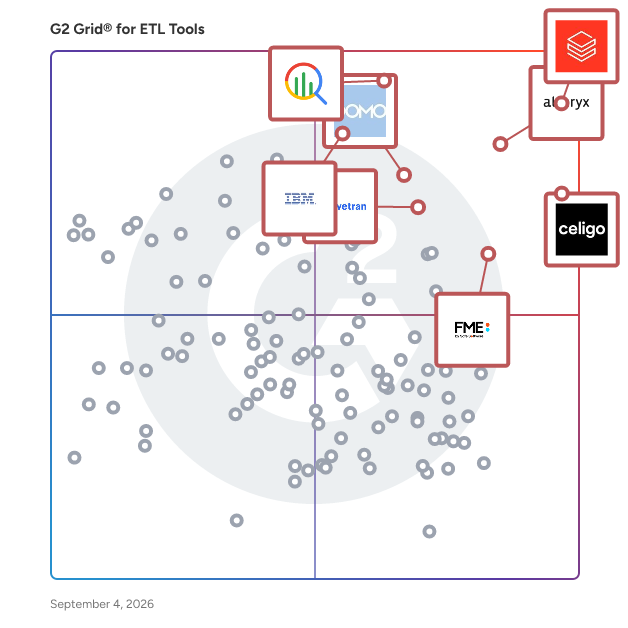
# Best ETL Tools

  *By [Shalaka Joshi](https://research.g2.com/insights/author/shalaka-joshi)*

   ETL (extract, transform, and load) tools transfer data between databases and external systems, supporting data replication, warehousing, analytics, data cleansing, and structuring, and increasingly support ELT workflows where transformation occurs within the target system rather than before loading.

### Core Capabilities of ETL Tools

To qualify for inclusion in the ETL category, a product must:

- Facilitate extract, transform, and load processes
- Transform data for quality or visualization
- Audit or record integration data
- Archive data for backup, future reference, or analysis

### Common Use Cases for ETL Tools

Data engineering and analytics teams use ETL tools to move and prepare data for reporting, analysis, and business intelligence. Common use cases include:

- Replicating data from source systems into [data warehouses](https://www.g2.com/categories/data-warehouse) for centralized analytics
- Cleansing and transforming raw data into structured, queryable formats
- Building visual data workflows to automate recurring data transfer and integration processes

### How ETL Tools Differ from Other Tools

ETL tools pre-process and transform data before loading it into the target system, distinguishing them from ELT approaches where the target system handles transformation after loading. While [data integration tools](https://www.g2.com/categories/data-integration-tools) cover a broader range of connectivity scenarios, ETL tools focus specifically on structured data movement pipelines with built-in transformation, auditing, and archiving capabilities.

### Insights from G2 on ETL Tools

Based on category trends on G2, visual workflow builders and pre-built connectors stand out as standout features. These platforms deliver reductions in manual data preparation time and improved data quality as core benefits of ETL adoption.


## How Many ETL Tools Products Does G2 Track?
**Total Products under this Category:** 247

### Category Stats (May 2026)
- **Average Rating**: 4.55/5 (↑0.02 vs Apr 2026)
- **New Reviews This Quarter**: 230
- **Buyer Segments**: Mid-Market 53% │ Small-Business 31% │ Enterprise 16%
- **Top Trending Product**: Cloudera Data Platform (+0.155)
*Last updated: May 18, 2026*

  
## How Does G2 Rank ETL Tools Products?

**Why You Can Trust G2's Software Rankings:**

- 30 Analysts and Data Experts
- 18,100+ Authentic Reviews
- 247+ Products
- Unbiased Rankings

G2's software rankings are built on verified user reviews, rigorous moderation, and a consistent research methodology maintained by a team of analysts and data experts. Each product is measured using the same transparent criteria, with no paid placement or vendor influence. While reviews reflect real user experiences, which can be subjective, they offer valuable insight into how software performs in the hands of professionals. Together, these inputs power the G2 Score, a standardized way to compare tools within every category.

  
## Top ETL Tools at a Glance
| # | Product | Rating | Best For | What Users Say |
|---|---------|--------|----------|----------------|
| 1 | [Databricks](https://www.g2.com/products/databricks/reviews) | 4.6/5.0 (747 reviews) | Unified lakehouse pipelines with governance and ML workflows | "[Databricks in my case: Multiple Integrations, Intuitive UI, and Reliable Performance](https://www.g2.com/survey_responses/databricks-review-12834055)" |
| 2 | [Google Cloud BigQuery](https://www.g2.com/products/google-cloud-bigquery/reviews) | 4.5/5.0 (1,155 reviews) | Serverless analytics on large cloud datasets | "[Fast, Scalable Serverless Analytics and data mining with Google bigquery](https://www.g2.com/survey_responses/google-cloud-bigquery-review-12835204)" |
| 3 | [Celigo](https://www.g2.com/products/celigo/reviews) | 4.6/5.0 (1,018 reviews) | NetSuite-centered app integration and sync | "[Celigo, a greta integrator with a University Lab inside it.](https://www.g2.com/survey_responses/celigo-review-10532295)" |
| 4 | [Alteryx](https://www.g2.com/products/alteryx/reviews) | 4.6/5.0 (773 reviews) | Drag-and-drop data prep and reporting automation | "[Easy, Time-Saving Data Automation with Alteryx’s Drag-and-Drop Workflows](https://www.g2.com/survey_responses/alteryx-review-12594796)" |
| 5 | [IBM watsonx.data](https://www.g2.com/products/ibm-watsonx-data/reviews) | 4.4/5.0 (159 reviews) | Lakehouse querying across object storage | "[Unified Data Management with Learning Curve](https://www.g2.com/survey_responses/ibm-watsonx-data-review-12817742)" |
| 6 | [FME Platform](https://www.g2.com/products/fme-platform/reviews) | 4.6/5.0 (134 reviews) | Geospatial and multi-format data transformation | "[Great visual tool for ETL of databases, but the UI may become clunky](https://www.g2.com/survey_responses/fme-platform-review-12826438)" |
| 7 | [Fivetran](https://www.g2.com/products/fivetran/reviews) | 4.3/5.0 (777 reviews) | Managed connector-based data ingestion | "[Effortless Data Integration with Wide Connectivity](https://www.g2.com/survey_responses/fivetran-review-12701875)" |
| 8 | [Workato](https://www.g2.com/products/workato/reviews) | 4.7/5.0 (727 reviews) | Low-code workflow automation across SaaS apps | "[Effortless Integration with workato Support](https://www.g2.com/survey_responses/workato-review-12805302)" |
| 9 | [Domo](https://www.g2.com/products/domo/reviews) | 4.3/5.0 (987 reviews) | Self-service ETL feeding business dashboards | "[All-in-One Platform for Real-Time Analytics and Dashboards](https://www.g2.com/survey_responses/domo-review-12676104)" |
| 10 | [Skyvia](https://www.g2.com/products/skyvia/reviews) | 4.8/5.0 (319 reviews) | No-code CRM sync, backup, and scheduled ETL | "[Easy, No-Code Data Sync Setup with Straightforward Pricing](https://www.g2.com/survey_responses/skyvia-review-12828558)" |

  
## Which ETL Tools Is Best for Your Use Case?

- **Leader:** [Databricks](https://www.g2.com/products/databricks/reviews)
- **Highest Performer:** [Skyvia](https://www.g2.com/products/skyvia/reviews)
- **Easiest to Use:** [Skyvia](https://www.g2.com/products/skyvia/reviews)
- **Top Trending:** [Peliqan](https://www.g2.com/products/peliqan/reviews)
- **Best Free Software:** [Fivetran](https://www.g2.com/products/fivetran/reviews)

  
## Which Type of ETL Tools Tools Are You Looking For?
  - [ETL Tools](https://www.g2.com/categories/etl-tools) *(current)*
  - [iPaaS Software](https://www.g2.com/categories/ipaas)
  - [Big Data Integration Platforms](https://www.g2.com/categories/big-data-integration-platforms)
  - [Data Extraction Tools](https://www.g2.com/categories/data-extraction-tools)

  
---

**Sponsored**

### CData Sync

Unlike volume-based tools with unpredictable pricing, CData Sync offers a single platform for ETL and reverse ETL, with full deployment flexibility and fixed, scalable pricing—so your costs don’t balloon as your data grows. Connect to 250+ enterprise data sources, including: • Salesforce, Microsoft Dynamics, and SAP • SharePoint, NetSuite, Workday, and QuickBooks • ServiceNow, Xero, Sage Intacct, HubSpot, Marketo, Oracle • …and many more Replicate that data into your preferred destinations, such as: • Snowflake, Databricks, SQL Server, Redshift, OneLake, and others Deploy it your way—on-premises, in your own cloud, or in a private-cloud SaaS model. Getting started is simple: 1. Log in 2. Select your source tables 3.Set your sync interval CData Sync handles the rest, using efficient incremental updates that minimize load on your operational systems. The platform includes: • Point-and-click ETL/ELT/reverse ETL • Change Data Capture (CDC) with no elevated database permissions • Complete data control and custom SQL transformations • dbt integration CData Sync centralizes your automated data flows, giving you full control, faster delivery, and the freedom to scale without hidden fees. Download a 30-day free trial of CData Sync or learn more at: www.cdata.com/sync


[Visit website](https://www.g2.com/external_clickthroughs/record?secure%5Bad_program%5D=paid_promo&amp;secure%5Bad_slot%5D=category_product_list&amp;secure%5Bcategory_id%5D=1181&amp;secure%5Bmedium%5D=sponsored&amp;secure%5Bprioritized%5D=false&amp;secure%5Bproduct_id%5D=124922&amp;secure%5Bresource_id%5D=1181&amp;secure%5Bresource_type%5D=Category&amp;secure%5Bsource_type%5D=category_page&amp;secure%5Bsource_url%5D=https%3A%2F%2Fwww.g2.com%2Fcategories%2Fetl-tools%3Fpage%3D7&amp;secure%5Btoken%5D=44c16b945ba151e2e4acf845daa666c4ce8eb7ba63015394571bc5874f56fdd7&amp;secure%5Burl%5D=https%3A%2F%2Fwww.cdata.com%2Fsync%2F&amp;secure%5Burl_type%5D=paid_promos)

---

  
## Buyer Guide: Key Questions for Choosing ETL Tools Software
  ### What do ETL tools do?
  When I explain ETL tools, I frame them as systems that help businesses move and prepare data across applications, databases, files, APIs, and cloud platforms. These platforms bring extraction, transformation, mapping, syncing, and loading into one workflow, so teams can support reporting, automation, analytics, and operations with cleaner data. Instead of moving data manually or building every connection from scratch, teams can create more reliable data flows with less integration effort.


  ### Why do businesses use ETL tools?
  From the G2 reviewer patterns I evaluated, businesses use ETL tools because disconnected systems create repetitive work, data gaps, and slow reporting. Users often mention the need to connect ERP, CRM, e-commerce, warehouse, finance, and analytics environments without manual exports.

Common benefits include:

- Less manual data entry and fewer spreadsheet workarounds.
- Faster data movement between applications and reporting tools.
- More reliable syncs across operations, finance, sales, and customer systems.
- Clearer automation for repeatable workflows.
- Better support for analytics, dashboards, and decisions.


  ### Who uses ETL tools primarily?
  After I evaluated G2 reviewer roles and job context, I found that ETL tools serve technical and business-facing teams:

- **Administrators** manage integrations, monitor flows, and keep systems aligned.
- **Data and analytics teams** prepare datasets, pipelines, warehouses, and reports.
- **IT teams** connect applications, APIs, and cloud platforms.
- **Operations teams** reduce manual order, inventory, finance, and customer work.
- **Consultants** build integrations for client environments.


  ### What types of ETL tools should I consider?
  From the review themes I evaluated, buyers should compare several tool types:

- **Application integration platforms** for business app connections and workflow automation.
- **Data pipeline and warehouse tools** for scale, transformation logic, and analytics readiness.
- **Low-code integration tools** for faster setup and visual flow design.
- **Developer-oriented platforms** for APIs, custom logic, and complex environments.
- **Cloud data platforms** for processing, governance, and analytics use cases.
- **Specialized connector tools** when common systems must sync quickly.


  ### What are the core features to look for in ETL tools?
  When I break down G2 reviews for this category, I look closely at the themes users repeatedly mention:

- Prebuilt connectors for common business systems that help reduce integration build time.
- API support for custom integrations that help teams connect systems beyond native connector coverage.
- Mapping and transformation controls that help teams clean, shape, and prepare data without relying on custom code for every change.
- Workflow automation and scheduling that help pipelines run reliably on a repeatable cadence.
- Monitoring, alerts, and error handling that help teams catch pipeline issues before they affect reporting, analytics, or downstream systems.
- Clear setup and admin controls that help reduce dependency on specialized engineering resources.
- Documentation and support resources that help teams onboard faster and troubleshoot integration issues.
- Scalability for larger data volumes and complex pipeline architectures that help the platform support growing data needs over time.


  ### What trends are shaping ETL tools right now?
  Based on the reviewer sentiment I evaluated, several patterns stood out:

- **Setup simplicity is advancing** without sacrificing depth or configurability.
- **Low-code development** is shortening pipeline build times for non-engineering teams.
- **Cloud-first architecture** is becoming the default as on-premise needs narrow to regulated use cases.
- **AI-assisted workflow logic** is raising the bar for what teams expect from automation.
- **Data quality and observability** are maturing into core pipeline requirements rather than afterthoughts.
- **Cross-system integration coverage** is expanding as analytics, ERP, e-commerce, and finance ecosystems converge.


  ### How should I choose ETL tools?
  For me, the strongest ETL tools match your data sources, team depth, and maintenance needs. The G2 feedback I evaluated points to a clear decision path: prioritize connector fit, setup effort, transformation control, monitoring quality, support, and scale. If reviewers praise usability yet also cite learning curve, documentation, or pricing concerns, test onboarding and long-term administration before you commit.


---

  ## What Are the Top-Rated ETL Tools Products in 2026?
### 1. [Databricks](https://www.g2.com/products/databricks/reviews)
  **Average Rating:** 4.6/5.0
  **Total Reviews:** 747
  **Why buyers love it?:** When I reviewed Databricks feedback, the strongest pattern was a need to consolidate data engineering, analytics, and machine learning work in one governed environment. Reviewers highlight scalable pipeline execution, collaborative notebooks, Unity Catalog governance, and integrations that connect reporting and AI work. They also point to cost management, cluster behavior, and setup complexity as areas that require discipline from experienced teams. The product reads as a fit for organizations that need a broad lakehouse platform rather than a narrow connector or transformation tool.


### What Do G2 Reviewers Say About Databricks?
*AI-generated summary from verified user reviews*

**Pros:**

- Users value the **AI features and robust data security** of Databricks, enhancing usability and integration in big data processes.
- Users find Databricks to have exceptional **ease of use** , facilitating efficient model hosting and data management.
- Users value the **seamless integrations** of Databricks with AWS and Azure, enhancing real-time collaboration and analytics.
- Users value the **collaborative environment** in Databricks, enabling real-time teamwork among data engineers and analysts.
- Users value the **effective data management tools** of Databricks, enabling seamless integration and real-time insights.

**Cons:**

- Users find the **steep learning curve** challenging, complicating organizational adoption and initial usage of Databricks.
- Users find the **costs for Databricks to be high** , especially when working with large datasets and complex operations.
- Users note a **steep learning curve** for Databricks, posing challenges for new users and organizational adoption.
- Users find the **missing features** in Databricks limiting, hindering productivity and complicating the overall experience.
- Users find the **complexity** of Databricks challenging, especially with steep learning curves and vague error identification.

#### Key Features
  - Cloud
  - Data Lake
  - Spark Integration
  - Spark Integration
  - Workload Processing
  #### What Are Recent G2 Reviews of Databricks?

**"[Databricks in my case: Multiple Integrations, Intuitive UI, and Reliable Performance](https://www.g2.com/survey_responses/databricks-review-12834055)"**

**Rating:** 4.0/5.0 stars
*— Yelnur K.*

[Read full review](https://www.g2.com/survey_responses/databricks-review-12834055)

---

**"[Databricks centralizes data, analytics, and AI](https://www.g2.com/survey_responses/databricks-review-12824341)"**

**Rating:** 5.0/5.0 stars
*— Leonardo .*

[Read full review](https://www.g2.com/survey_responses/databricks-review-12824341)

---

  #### What Are G2 Users Discussing About Databricks?

- [What does Databricks software do?](https://www.g2.com/discussions/what-does-databricks-software-do) - 3 comments
- [What is Databricks unified analytics platform?](https://www.g2.com/discussions/what-is-databricks-unified-analytics-platform) - 3 comments
- [What is Lakehouse in Databricks?](https://www.g2.com/discussions/what-is-lakehouse-in-databricks) - 4 comments, 2 upvotes
### 2. [Google Cloud BigQuery](https://www.g2.com/products/google-cloud-bigquery/reviews)
  **Average Rating:** 4.5/5.0
  **Total Reviews:** 1,155
  **Why buyers love it?:** BigQuery feedback pointed me toward teams that want fast SQL analytics without direct infrastructure management. Reviewers highlight speed on large datasets, cloud-native scale, and integration with Google Cloud services. They also mention query cost awareness, permission setup, and advanced troubleshooting as areas that require care. The sentiment positions the product around analytics-ready warehousing and ETL workloads where teams value managed scale.


### What Do G2 Reviewers Say About Google Cloud BigQuery?
*AI-generated summary from verified user reviews*

**Pros:**

- Users appreciate the **ease of use** of Google Cloud BigQuery, making complex data management effortless and efficient.
- Users value the **incredible speed** of Google Cloud BigQuery, enabling efficient handling of large datasets effortlessly.
- Users appreciate the **fast querying capabilities** of Google Cloud BigQuery, enabling efficient analysis of large datasets effortlessly.
- Users appreciate the **seamless integrations** with Google Cloud tools, enhancing efficiency and analytics capabilities.
- Users value the **query efficiency** of Google Cloud BigQuery, allowing effortless processing of complex datasets seamlessly.

**Cons:**

- Users find that **cost management can be challenging** with Google Cloud BigQuery, leading to potentially high expenses.
- Users struggle with **query issues** , particularly regarding cost management and the need for better alert systems for heavy queries.
- Users face **cost issues** with Google Cloud BigQuery, particularly due to expensive pricing and poorly optimized queries.
- Users find **cost management challenging** due to pricing per TB scanned and poorly optimized queries.
- Users find the **learning curve steep** for Google Cloud BigQuery, especially around partitioning and clustering, causing confusion.

#### Key Features
  - Data Mining
  - Report Generation
  - Campaign Stickiness
  - Data Lake
  - Machine Scaling
  #### What Are Recent G2 Reviews of Google Cloud BigQuery?

**"[Fast, Scalable Serverless Analytics and data mining with Google bigquery](https://www.g2.com/survey_responses/google-cloud-bigquery-review-12835204)"**

**Rating:** 4.0/5.0 stars
*— Tanishka J.*

[Read full review](https://www.g2.com/survey_responses/google-cloud-bigquery-review-12835204)

---

**"[Scalable, Secure BigQuery That Connects Seamlessly Across Services](https://www.g2.com/survey_responses/google-cloud-bigquery-review-12638747)"**

**Rating:** 5.0/5.0 stars
*— Aayush M.*

[Read full review](https://www.g2.com/survey_responses/google-cloud-bigquery-review-12638747)

---

  #### What Are G2 Users Discussing About Google Cloud BigQuery?

- [Is Big Query free?](https://www.g2.com/discussions/is-big-query-free) - 3 comments, 1 upvote
- [Is BigQuery part of Google Cloud Platform?](https://www.g2.com/discussions/is-bigquery-part-of-google-cloud-platform) - 2 comments, 2 upvotes
- [What is Google BigQuery based on?](https://www.g2.com/discussions/what-is-google-bigquery-based-on) - 1 comment
### 3. [Celigo](https://www.g2.com/products/celigo/reviews)
  **Average Rating:** 4.6/5.0
  **Total Reviews:** 1,018
  **Why buyers love it?:** When I reviewed Celigo feedback, I saw the clearest pattern around operational integration for teams connecting NetSuite with ecommerce, CRM, fulfillment, and other business systems. Reviewers highlight prebuilt flows, a usable interface, real-time sync, support quality, and low-code flexibility. I read the product as strongest when it supports ongoing business-process sync across several applications rather than a single lightweight connection. Feedback also points to generic error messages, developer help during setup, and cost sensitivity when usage stays narrow.


### What Do G2 Reviewers Say About Celigo?
*AI-generated summary from verified user reviews*

**Pros:**

- Users appreciate the **ease of use** of Celigo, highlighting its user-friendly interface and efficient connection options.
- Users value the **robust integration capabilities** of Celigo, enhancing connectivity and simplifying complex processes.
- Users find Celigo&#39;s **integration capabilities** comprehensive and user-friendly, enabling efficient connections with diverse partners.
- Users praise the **easy integrations** offered by Celigo, especially with prebuilt connectors and excellent support for NetSuite.
- Users value the **responsive and helpful customer support** of Celigo, enhancing their overall experience with the product.

**Cons:**

- Users struggle with **unclear error handling** , making it challenging to resolve issues and navigate the system effectively.
- Users highlight the **high cost** of Celigo, as even basic tiers may be unaffordable for small businesses.
- Users experience a challenging **learning curve** with Celigo, hindering their ability to resolve issues independently.
- Users express concerns over **premium pricing** for Celigo, especially with additional managed connectors and modules costs.
- Users express frustration with the **complexity of the system** , highlighting challenges in debugging and filtering data effectively.

#### Key Features
  - Logs/Documentation
  - App Integration
  - Security Standards
  - API Designer
  - Monitoring &amp; Notification
  #### What Are Recent G2 Reviews of Celigo?

**"[Go for it if you’re looking for a solid integration platform](https://www.g2.com/survey_responses/celigo-review-11876505)"**

**Rating:** 4.5/5.0 stars
*— Goutham P.*

[Read full review](https://www.g2.com/survey_responses/celigo-review-11876505)

---

**"[Celigo, a greta integrator with a University Lab inside it.](https://www.g2.com/survey_responses/celigo-review-10532295)"**

**Rating:** 5.0/5.0 stars
*— Ignacio R.*

[Read full review](https://www.g2.com/survey_responses/celigo-review-10532295)

---

  #### What Are G2 Users Discussing About Celigo?

- [What is Celigo used for?](https://www.g2.com/discussions/what-is-celigo-used-for)
### 4. [Alteryx](https://www.g2.com/products/alteryx/reviews)
  **Average Rating:** 4.6/5.0
  **Total Reviews:** 773
  **Why buyers love it?:** Alteryx’s feedback was strongest to me around making data preparation, blending, and analysis accessible through visual workflows. Reviewers highlight drag-and-drop design, automation of repetitive reporting tasks, large dataset handling, and reduced dependence on manual spreadsheet work. I found its clearest fit in teams that need repeatable data prep and analytics workflows without writing code line by line. Performance slowdowns, memory pressure, pricing, version control, and clearer error guidance also come through as areas that matter in larger workflows.


### What Do G2 Reviewers Say About Alteryx?
*AI-generated summary from verified user reviews*

**Pros:**

- Users appreciate the **ease of use** of Alteryx, making technology accessible and efficient for everyone.
- Users commend Alteryx for its **automation capabilities** , enhancing speed and efficiency in data preparation and analysis.
- Users appreciate the **intuitive interface** of Alteryx, which simplifies data management and enhances workflow efficiency.
- Users find Alteryx to be **easy to learn and use** , with intuitive tools and supportive community for assistance.
- Users value the **efficiency** of Alteryx, enabling quick data processing and streamlined workflows for enhanced productivity.

**Cons:**

- Users find the **high cost** of Alteryx challenging, particularly for small teams and startups.
- Users experience a **steep learning curve** with Alteryx, requiring time to master its advanced features and operations.
- Users find the **missing features** of Alteryx limiting, particularly the lack of connectors and data drill-down capabilities.
- Users find the **learning difficulty** in Alteryx can be overwhelming initially, especially with troubleshooting and tool names.
- Users report **slow performance** with Alteryx when handling large datasets, which impacts efficiency and productivity.

#### Key Features
  - Data Column Filtering
  - Data Visualization
  - WYSIWYG Report Design
  - Data Unification
  - Data Visualization
  #### What Are Recent G2 Reviews of Alteryx?

**"[Easy, Time-Saving Data Automation with Alteryx’s Drag-and-Drop Workflows](https://www.g2.com/survey_responses/alteryx-review-12594796)"**

**Rating:** 4.0/5.0 stars
*— Kapil S.*

[Read full review](https://www.g2.com/survey_responses/alteryx-review-12594796)

---

**"[powerful data prep made simple with drag-and-drop](https://www.g2.com/survey_responses/alteryx-review-12714902)"**

**Rating:** 4.0/5.0 stars
*— Sravya A.*

[Read full review](https://www.g2.com/survey_responses/alteryx-review-12714902)

---

### 5. [IBM watsonx.data](https://www.g2.com/products/ibm-watsonx-data/reviews)
  **Average Rating:** 4.4/5.0
  **Total Reviews:** 159
  **Why buyers love it?:** IBM watsonx.data stood out to me in the feedback as a lakehouse-oriented platform for analytics teams working across large datasets and object storage. Reviewers highlight fast querying, open data access, and support for analytics workloads without forcing all data into one conventional warehouse pattern. I found its clearest fit in organizations that want governed lakehouse analytics across mixed storage environments. Documentation gaps and setup complexity also appear as adoption factors in the reviews.


### What Do G2 Reviewers Say About IBM watsonx.data?
*AI-generated summary from verified user reviews*

**Pros:**

- Users value the **ease of use** of IBM watsonx.data, appreciating its unified platform for simplifying data analytics.
- Users appreciate the **fast and easy data management** with IBM watsonx.data, enhancing productivity across various data sources.
- Users appreciate the **flexibility and AI readiness** of IBM watsonx.data, enhancing data management across hybrid environments.
- Users value the **seamless integration** of IBM watsonx.data with other IBM tools, enhancing their workflow efficiency.
- Users value the **unified lakehouse feature** of IBM watsonx.data for simplifying analytics and optimizing data management.

**Cons:**

- Users face a **steep learning curve** with watsonx.data, as setup and feature navigation can be quite complex.
- Users find the **complexity** of IBM watsonx.data challenging, especially for those new to the software.
- Users find the **pricing is a bit high** for small teams, making it hard to justify investment.
- Users experience **difficult setup** with IBM watsonx.data, finding the onboarding process complex and documentation confusing.
- Users often experience **difficulty** with documentation and navigation, making the platform less beginner-friendly and accessible.

#### Key Features
  - Real-Time Data Collection
  - Hadoop Integration
  - Machine Scaling
  - Cloud Processing
  - Data Querying
  #### What Are Recent G2 Reviews of IBM watsonx.data?

**"[Unified Data Management with Learning Curve](https://www.g2.com/survey_responses/ibm-watsonx-data-review-12817742)"**

**Rating:** 4.0/5.0 stars
*— Anchal P.*

[Read full review](https://www.g2.com/survey_responses/ibm-watsonx-data-review-12817742)

---

**"[Powerful Query Performance and Governance, But a Steep Onboarding Learning Curve](https://www.g2.com/survey_responses/ibm-watsonx-data-review-12836202)"**

**Rating:** 4.0/5.0 stars
*— Arkajit D.*

[Read full review](https://www.g2.com/survey_responses/ibm-watsonx-data-review-12836202)

---

### 6. [FME Platform](https://www.g2.com/products/fme-platform/reviews)
  **Average Rating:** 4.6/5.0
  **Total Reviews:** 134
  **Why buyers love it?:** FME Platform’s feedback felt distinct because reviewers repeatedly connect it to spatial, file, and system-to-system transformation work. Reviewers highlight format coverage, transformers, automation, and the ability to convert data between specialized systems. I read the product as strongest for data operations where geospatial or highly varied formats make standard ETL tools feel too generic. Advanced workflows and product terminology also come through as areas that can take time to master.


### What Do G2 Reviewers Say About FME Platform?
*AI-generated summary from verified user reviews*

**Pros:**

- Users find the **ease of use** of FME Platform exceptional, enabling efficient workflows for both beginners and experts.
- Users find the **ease of data management** in FME Platform impressive, benefiting from its speed and versatility.
- Users appreciate the **automation capabilities** of FME Platform, significantly enhancing workflow efficiency and reducing manual efforts.
- Users value the **intuitive ease of use** and extensive data support of FME Platform, enhancing their workflow efficiency.
- Users value the **flexibility and ease of use** of FME Platform for seamless data transformation and integration.

**Cons:**

- Users find the **complexity of operational overhead** in FME Platform frustrating, particularly with authentication and logging challenges.
- Users find the software to be **expensive** , which may deter those with limited budgets from utilizing it.
- Users struggle with a **steep learning curve** in the FME Platform, finding the interface and tools overwhelming at first.
- Users note a **difficult learning curve** with FME Platform, especially when fine-tuning tools and settings.
- Users are concerned about the **high pricing model** , which limits access for smaller teams and individual users.

#### Key Features
  - Reporting
  - Extraction
  - Real-Time Integration
  #### What Are Recent G2 Reviews of FME Platform?

**"[Great visual tool for ETL of databases, but the UI may become clunky](https://www.g2.com/survey_responses/fme-platform-review-12826438)"**

**Rating:** 5.0/5.0 stars
*— Raj P.*

[Read full review](https://www.g2.com/survey_responses/fme-platform-review-12826438)

---

**"[Reliable Enablement Platform for Learning, APIs, and Secure Workflows](https://www.g2.com/survey_responses/fme-platform-review-12832718)"**

**Rating:** 4.5/5.0 stars
*— Drew M.*

[Read full review](https://www.g2.com/survey_responses/fme-platform-review-12832718)

---

  #### What Are G2 Users Discussing About FME Platform?

- [What does FME stand for in FME Server?](https://www.g2.com/discussions/what-does-fme-stand-for-in-fme-server)
- [Is FME an ETL?](https://www.g2.com/discussions/is-fme-an-etl)
- [What is FME process?](https://www.g2.com/discussions/what-is-fme-process)
### 7. [Fivetran](https://www.g2.com/products/fivetran/reviews)
  **Average Rating:** 4.3/5.0
  **Total Reviews:** 777
  **Why buyers love it?:** Fivetran came through in the feedback as a managed ingestion tool for analytics environments. Reviewers highlight reliable connectors, schema handling, and reduced maintenance for source-to-warehouse pipelines. I saw its value most clearly for teams that want managed ELT ingestion and prefer to spend less time on pipeline upkeep. Pricing, connector coverage, and specific configuration limits also come up as areas to examine carefully.


### What Do G2 Reviewers Say About Fivetran?
*AI-generated summary from verified user reviews*

**Pros:**

- Users appreciate the **ease of use** of Fivetran, finding it simple to send and synchronize data seamlessly.
- Users praise the **easy setup** of Fivetran, enjoying quick integration and seamless use with existing applications.
- Users praise the **easy integration** of Fivetran, allowing seamless data transfers to various applications effortlessly.
- Users commend the **efficient customer support** of Fivetran, noting their fast responses and helpful insights.
- Users appreciate the **simple and intuitive UI** of Fivetran, which enhances data management efficiency without extensive coding.

**Cons:**

- Users report **sync issues** with Fivetran, including delays and failures that undermine confidence in the tool&#39;s reliability.
- Users find Fivetran&#39;s pricing to be **expensive** , especially as data usage and needs grow over time.
- Users experience **integration issues** with Fivetran, including difficulties connecting to various platforms and limited connector options.
- Users express concerns over **pricing issues** , especially regarding transparency and unexpected charges impacting their budgets.
- Users find the **learning curve steep** due to constant changes and confusing onboarding processes impacting usability.

#### Key Features
  - Diverse Extraction Points
  - Reporting
  - Pay by Usage
  - Diverse Extraction Points
  #### What Are Recent G2 Reviews of Fivetran?

**"[Effortless Data Integration with Wide Connectivity](https://www.g2.com/survey_responses/fivetran-review-12701875)"**

**Rating:** 4.5/5.0 stars
*— Satya Prateek B.*

[Read full review](https://www.g2.com/survey_responses/fivetran-review-12701875)

---

**"[Surprisingly Easy Setup, Smooth Warehouse Sync, and Great Performance](https://www.g2.com/survey_responses/fivetran-review-12796484)"**

**Rating:** 4.5/5.0 stars
*— Verified User in Consulting*

[Read full review](https://www.g2.com/survey_responses/fivetran-review-12796484)

---

  #### What Are G2 Users Discussing About Fivetran?

- [What is Fivetran used for?](https://www.g2.com/discussions/fivetran-what-is-fivetran-used-for) - 1 comment
- [What is Census used for?](https://www.g2.com/discussions/what-is-census-used-for)
- [Who owns Fivetran?](https://www.g2.com/discussions/who-owns-fivetran)
### 8. [Workato](https://www.g2.com/products/workato/reviews)
  **Average Rating:** 4.7/5.0
  **Total Reviews:** 727
  **Why buyers love it?:** Workato’s feedback led me to view it as an automation platform with more depth than simple point-to-point integration. Reviewers highlight a low-code recipe model, a broad connector library, fast workflow setup, and support for business processes that span multiple applications. I read the strongest fit as teams that need to automate cross-app processes with technical flexibility and less custom code. Reviewers also describe a steeper path for complex logic, pricing concerns, and workflow management challenges as usage expands.


### What Do G2 Reviewers Say About Workato?
*AI-generated summary from verified user reviews*

**Pros:**

- Users find Workato’s interface to be **user-friendly and intuitive** , making both simple and complex tasks easy to manage.
- Users value the **seamless integrations** of Workato, making automation across systems effortless and efficient.
- Users value the **easy integrations** of Workato, enabling quick automation and significant time savings across various tools.
- Users value the **seamless automation capabilities** of Workato, simplifying complex workflows across multiple systems effortlessly.
- Users value the **low code, user-friendly interface** of Workato, making automation and integrations straightforward and efficient.

**Cons:**

- Users often find the **complexity** of Workato&#39;s terminology and documentation overwhelming, hindering their onboarding experience.
- Users experience a **steep learning curve** with Workato, requiring time and practice to master recipe creation.
- Users note the **missing features** in Workato, particularly for ETL tasks and documentation updates, impacting usability.
- Users encounter **data limitations** with Workato, particularly with unclear recipe errors and outdated documentation.
- Users express concerns about Workato&#39;s **expensive pricing** , which can hinder expansion and complicate budget management.

#### Key Features
  - API Testing
  - Traffic Control
  - App Integration
  - White Labelled
  - Low-Code
  #### What Are Recent G2 Reviews of Workato?

**"[Robust Integration with Room for Improvement](https://www.g2.com/survey_responses/workato-review-12106962)"**

**Rating:** 4.0/5.0 stars
*— Ayan S.*

[Read full review](https://www.g2.com/survey_responses/workato-review-12106962)

---

**"[Effortless Integration with workato Support](https://www.g2.com/survey_responses/workato-review-12805302)"**

**Rating:** 4.5/5.0 stars
*— Lokesh  k.*

[Read full review](https://www.g2.com/survey_responses/workato-review-12805302)

---

  #### What Are G2 Users Discussing About Workato?

- [What does Workato do?](https://www.g2.com/discussions/what-does-workato-do)
- [How much does Workato cost?](https://www.g2.com/discussions/how-much-does-workato-cost) - 1 comment
- [What is a Workato recipe?](https://www.g2.com/discussions/what-is-a-workato-recipe) - 3 comments
### 9. [Domo](https://www.g2.com/products/domo/reviews)
  **Average Rating:** 4.3/5.0
  **Total Reviews:** 987
  **Why buyers love it?:** Domo’s feedback pointed me toward business-facing analytics teams that want data prep and visualization in the same environment. Reviewers highlight Magic ETL, easy setup, dashboard delivery, alerts, and a user interface that helps non-engineering users work with data. I saw its clearest fit where teams want self-service data flows that move quickly into operational dashboards. Pricing complexity, credit monitoring, SQL limitations, and occasional bugs also appear in the review patterns.


### What Do G2 Reviewers Say About Domo?
*AI-generated summary from verified user reviews*

**Pros:**

- Users value the **ease of use** of Domo, making data management accessible for everyone, even non-tech-savvy individuals.
- Users value the **flexible dashboards** in Domo, enabling seamless data visualization and integration from multiple sources.
- Users praise Domo for its **intuitive design** , allowing easy access and effective data visualization for all skill levels.
- Users value the **easy integrations** in Domo, enabling seamless connections with various data sources for streamlined management.
- Users value the **seamless integration** of Domo, enabling efficient data management and real-time collaboration across platforms.

**Cons:**

- Users find the **learning curve steep** , often needing extra time to adapt to Domo&#39;s updates and functionalities.
- Users note **missing features** in Domo, such as limited visualization capabilities and outdated MySQL implementation affecting usability.
- Users are frustrated with **data management issues** , including complicated uploads and poor organization of datasets in Domo.
- Users find Domo **expensive** due to ongoing costs and complexity of using multiple features and external support.
- Users find Domo&#39;s **complexity** overwhelming, often requiring technical expertise and extended setup time to be effective.

#### Key Features
  - Steps to Answer
  - Data Column Filtering
  - Data Visualization
  - Data Modeling
  - Connectors
  #### What Are Recent G2 Reviews of Domo?

**"[All-in-One Platform for Real-Time Analytics and Dashboards](https://www.g2.com/survey_responses/domo-review-12676104)"**

**Rating:** 5.0/5.0 stars
*— Anuj T.*

[Read full review](https://www.g2.com/survey_responses/domo-review-12676104)

---

**"[Comprehensive Analytics Tool with a Learning Curve](https://www.g2.com/survey_responses/domo-review-9326769)"**

**Rating:** 5.0/5.0 stars
*— John L.*

[Read full review](https://www.g2.com/survey_responses/domo-review-9326769)

---

  #### What Are G2 Users Discussing About Domo?

- [What is Domo used for?](https://www.g2.com/discussions/what-is-domo-used-for) - 1 comment
- [How much does Domo cost?](https://www.g2.com/discussions/how-much-does-domo-cost)
- [What is Domo data?](https://www.g2.com/discussions/what-is-domo-data)
### 10. [Skyvia](https://www.g2.com/products/skyvia/reviews)
  **Average Rating:** 4.8/5.0
  **Total Reviews:** 319
  **Why buyers love it?:** Skyvia’s reviews gave me a clear view of a no-code data movement tool for CRM, databases, spreadsheets, and reporting systems. Reviewers highlight automated sync, scheduling, Salesforce backup and restore, connector breadth, and reduced manual transfers. I found its best fit in operational data workflows where consistency across business systems matters more than heavy engineering customization. Advanced mapping, job debugging, and setup guidance also come up as areas that can require extra attention.


### What Do G2 Reviewers Say About Skyvia?
*AI-generated summary from verified user reviews*

**Pros:**

- Users find Skyvia to have **exceptional ease of use** , allowing seamless integration and efficient workflow automation.
- Users value the **easy integrations** of Skyvia, simplifying data operations and enhancing efficiency across systems.
- Users commend Skyvia for its **easy setup** , enabling quick integration and empowering teams to focus on insights.
- Users find the **initial setup extremely easy** , enabling teams to swiftly start integrating data without hassle.
- Users value Skyvia&#39;s **real-time data management and automation** , enhancing visibility and saving time on manual tasks.

**Cons:**

- Users desire more **step-by-step examples** in Skyvia&#39;s documentation for smoother onboarding and better understanding.
- Users find the **difficult setup** process with Skyvia to be time-consuming and less intuitive, especially for large datasets.
- Users note **feature limitations** in reporting and query functionality, impacting operations during large tasks.
- Users find the **learning curve steep** , particularly for complex setups and lacking guided examples and documentation.
- Users find the **poor documentation** of Skyvia lacking practical examples, hindering advanced reporting and setup effectiveness.

#### Key Features
  - Diverse Extraction Points
  - Auditing
  - Service Provision
  - Real-Time Integration
  - Data Mapping
  #### What Are Recent G2 Reviews of Skyvia?

**"[Easy, No-Code Data Sync Setup with Straightforward Pricing](https://www.g2.com/survey_responses/skyvia-review-12828558)"**

**Rating:** 5.0/5.0 stars
*— Emily  C.*

[Read full review](https://www.g2.com/survey_responses/skyvia-review-12828558)

---

**"[Straightforward, Reliable Data Sync Between Cloud Apps and Databases](https://www.g2.com/survey_responses/skyvia-review-12843850)"**

**Rating:** 5.0/5.0 stars
*— Marcus  W.*

[Read full review](https://www.g2.com/survey_responses/skyvia-review-12843850)

---

  #### What Are G2 Users Discussing About Skyvia?

- [What is Skyvia used for?](https://www.g2.com/discussions/what-is-skyvia-used-for) - 1 comment
### 11. [SnapLogic Intelligent Integration Platform (IIP)](https://www.g2.com/products/snaplogic-intelligent-integration-platform-iip/reviews)
  **Average Rating:** 4.4/5.0
  **Total Reviews:** 370
  **Why buyers love it?:** SnapLogic IIP read to me as a broad enterprise integration platform rather than a tool for isolated ETL tasks. Reviewers highlight visual pipeline design, reusable Snaps, large connector coverage, and the ability to connect multiple systems with less manual development. I found its strongest fit in organizations that need visual integration across varied enterprise applications and data flows. Debugging, complex pipeline management, and configuration depth also appear in the feedback as areas that require skill.


### What Do G2 Reviewers Say About SnapLogic Intelligent Integration Platform (IIP)?
*AI-generated summary from verified user reviews*

**Pros:**

- Users appreciate the **ease of use** of SnapLogic IIP, enabling quick connections and straightforward setup for integrations.
- Users value the **easy integrations** of SnapLogic, enhancing efficiency and simplifying API and database connections.
- Users value the **seamless integration** capabilities of SnapLogic IIP, enhancing efficiency across multiple systems.
- Users value the **user-friendly interface** of SnapLogic, which simplifies workflows and enhances overall productivity.
- Users value the **automation capabilities** of SnapLogic IIP, enhancing efficiency and enabling focus on business value.

**Cons:**

- Users experience **performance issues** with SnapLogic, especially under heavy workloads and while debugging errors.
- Users experience **poor performance** during heavy workloads, leading to inefficiencies and workflow complications in SnapLogic.
- Users struggle with **technical difficulties** , particularly in debugging errors and managing performance under heavy workloads.
- Users find the **complexity** of choosing appropriate Snaps and troubleshooting errors frustrating and often unclear.
- Users face **unclear error reporting** that complicates debugging and leads to performance drops in large-scale operations.

#### Key Features
  - Orchestration
  - API Monitoring
  - App Integration
  - Auditing
  - Extraction
  #### What Are Recent G2 Reviews of SnapLogic Intelligent Integration Platform (IIP)?

**"[Improved Data Connectivity with Room for Stability Enhancements](https://www.g2.com/survey_responses/snaplogic-intelligent-integration-platform-iip-review-12375834)"**

**Rating:** 4.0/5.0 stars
*— Savio M.*

[Read full review](https://www.g2.com/survey_responses/snaplogic-intelligent-integration-platform-iip-review-12375834)

---

**"[Streamlined Integrations with AI-Powered Efficiency](https://www.g2.com/survey_responses/snaplogic-intelligent-integration-platform-iip-review-12380685)"**

**Rating:** 5.0/5.0 stars
*— Sanket N.*

[Read full review](https://www.g2.com/survey_responses/snaplogic-intelligent-integration-platform-iip-review-12380685)

---

  #### What Are G2 Users Discussing About SnapLogic Intelligent Integration Platform (IIP)?

- [What is SnapLogic Intelligent Integration Platform (IIP) used for?](https://www.g2.com/discussions/what-is-snaplogic-intelligent-integration-platform-iip-used-for) - 1 comment
### 12. [Azure Data Factory](https://www.g2.com/products/azure-data-factory/reviews)
  **Average Rating:** 4.6/5.0
  **Total Reviews:** 95
  **Why buyers love it?:** Azure Data Factory came through in the feedback as a cloud data orchestration tool for Azure and connected sources. Reviewers highlight the visual pipeline designer, scheduling, monitoring, source connectors, and reliable movement between storage, databases, APIs, and SaaS systems. I read the strongest fit as Azure-based teams that need scheduled data ingestion and dependency-managed pipelines. Feedback also mentions limited debugging detail, pipeline sprawl, latency for real-time needs, and less advanced transformation depth than dedicated processing engines.


### What Do G2 Reviewers Say About Azure Data Factory?
*AI-generated summary from verified user reviews*

**Pros:**

- Users value the **effective data integration capabilities** of Azure Data Factory, streamlining complex workflows effortlessly.
- Users appreciate the **ease of use** of Azure Data Factory, simplifying complex data integration and pipeline creation.
- Users appreciate the **seamless connectivity** of Azure Data Factory, enabling easy integration of multiple data sources effortlessly.
- Users value the **seamless integration** capabilities of Azure Data Factory, simplifying large-scale data orchestration and management.
- Users value the **scalability** of Azure Data Factory, enabling effortless management of complex data workflows across various sources.

**Cons:**

- Users find the **debugging difficulty** in Azure Data Factory frustrating, especially with complex workflows and limited troubleshooting tools.
- Users find **difficult debugging** in Azure Data Factory frustrating, especially with complex pipelines and limited troubleshooting tools.
- Users find Azure Data Factory **expensive** to manage, especially when pipeline usage and data volumes increase costs significantly.
- Users find **feature limitations** in Azure Data Factory, citing insufficient logging and complex transformation capabilities.
- Users find the **complexity of Azure Data Factory** overwhelming, particularly when debugging pipelines and managing intricate workflows.

#### Key Features
  - Reporting
  - Extraction
  #### What Are Recent G2 Reviews of Azure Data Factory?

**"[Low-Code Drag-and-Drop That Makes Development Easy for Developers and Business Users](https://www.g2.com/survey_responses/azure-data-factory-review-12746463)"**

**Rating:** 4.5/5.0 stars
*— Shyam s.*

[Read full review](https://www.g2.com/survey_responses/azure-data-factory-review-12746463)

---

**"[Intuitive, Scalable Data Integration with Azure Data Factory](https://www.g2.com/survey_responses/azure-data-factory-review-12454264)"**

**Rating:** 4.5/5.0 stars
*— Alan R.*

[Read full review](https://www.g2.com/survey_responses/azure-data-factory-review-12454264)

---

  #### What Are G2 Users Discussing About Azure Data Factory?

- [Is Azure data Factory an ETL tool?](https://www.g2.com/discussions/is-azure-data-factory-an-etl-tool) - 2 comments
- [What are the additional capabilities of data Factory?](https://www.g2.com/discussions/what-are-the-additional-capabilities-of-data-factory)
- [Which 3 types of activities can you run in Microsoft Azure data Factory?](https://www.g2.com/discussions/which-3-types-of-activities-can-you-run-in-microsoft-azure-data-factory)
### 13. [Boomi Data Integration](https://www.g2.com/products/boomi-data-integration/reviews)
  **Average Rating:** 4.7/5.0
  **Total Reviews:** 120
  **Why buyers love it?:** Boomi Data Integration’s feedback led me to operational integration across sales and finance workflows. Reviewers highlight faster integration buildout, process visibility, transaction handling, and less need for heavy custom development. I saw its strongest fit in organizations that need a shared integration layer across business-critical systems such as CRM, ERP, billing, and service tools. Debugging can take more effort when processes become complex or data volumes rise, which also appears in the review feedback.


### What Do G2 Reviewers Say About Boomi Data Integration?
*AI-generated summary from verified user reviews*

**Pros:**

- Users appreciate the **user-friendly interface** of Boomi Data Integration, making it easy to learn and implement.
- Users praise the **excellent customer support** of Boomi Data Integration, offering timely assistance during implementation and beyond.
- Users appreciate the **wide range of connectors** in Boomi Data Integration, simplifying data management across multiple platforms.
- Users value the **automation capabilities** of Boomi Data Integration, enhancing efficiency in ETL processes and scheduling tasks.
- Users find **implementation easy** with Boomi Data Integration, benefiting from excellent support and user-friendly features.

**Cons:**

- Users face **data limitations** when connecting to sources, often struggling with missing documentation and unavailable fields.
- Users face **information deficiency** with Boomi Data Integration, often struggling due to missing documentation and unavailable report fields.
- Users often face **insufficient information** when connecting to data sources, complicating the integration process and requiring alternative solutions.
- Users find Boomi Data Integration **lacking necessary features** , as documentation is often missing or fields are insufficient.
- Users face **limited features** with Boomi Data Integration, as not all needed fields or documentation are consistently available.

#### Key Features
  - Diverse Extraction Points
  - Reporting
  - Data Protection
  - Diverse Extraction Points
  #### What Are Recent G2 Reviews of Boomi Data Integration?

**"[Boomi Data Integration: Fast, Reliable Integrations at Scale](https://www.g2.com/survey_responses/boomi-data-integration-review-12546768)"**

**Rating:** 5.0/5.0 stars
*— Takkellapati S.*

[Read full review](https://www.g2.com/survey_responses/boomi-data-integration-review-12546768)

---

**"[Actual review of ELT Tool Rivery](https://www.g2.com/survey_responses/boomi-data-integration-review-10179408)"**

**Rating:** 5.0/5.0 stars
*— Amit K.*

[Read full review](https://www.g2.com/survey_responses/boomi-data-integration-review-10179408)

---

  #### What Are G2 Users Discussing About Boomi Data Integration?

- [What advice do you have for others considering Rivery for data integration and pipeline management?](https://www.g2.com/discussions/what-advice-do-you-have-for-others-considering-rivery-for-data-integration-and-pipeline-management)
- [What is the use of Rivery?](https://www.g2.com/discussions/what-is-the-use-of-rivery) - 2 comments
- [How much does Rivery cost?](https://www.g2.com/discussions/how-much-does-rivery-cost) - 1 comment
### 14. [5X](https://www.g2.com/products/5x/reviews)
  **Average Rating:** 4.9/5.0
  **Total Reviews:** 81
  **Why buyers love it?:** What stood out to me in 5X’s G2 feedback was how often reviewers describe it as a unified place to build, manage, and operate modern data workflows. Reviewers highlight integrated ingestion, dbt development, orchestration, BI workflows, governance, and version control as parts of a connected platform rather than separate tools. I read the product as especially useful when teams want to reduce friction across data engineering and analytics work while keeping source integration and dashboard delivery in one environment. Users also point to responsive support and hands-on implementation guidance, while some mention an initial learning curve, complex setup, and maturing feature areas.


### What Do G2 Reviewers Say About 5X?
*AI-generated summary from verified user reviews*

**Pros:**

- Users value the **ease of use** of 5X, appreciating its seamless integration and streamlined interface for data management.
- Users commend the **prompt and attentive customer support** from 5X, facilitating effective collaboration and quick issue resolution.
- Users highlight the **seamless data integration** and interactive UI of 5X, enhancing overall business efficiency and support.
- Users commend the **seamless integration capabilities** of 5X, enhancing collaboration and efficiency across teams and workflows.
- Users value the **seamless data integration** of 5X, enhancing collaboration between data engineering and analytics teams.

**Cons:**

- Users face a **steep learning curve** initially, requiring time and support for effective setup and use of features.
- Users find the **complex setup** of 5X adds delays and challenges during initial deployment and implementation.
- Users note **feature limitations** in 5X, as many functions remain in beta and need further development.
- Users find the **learning curve steep** initially, with challenges in setup and utilizing advanced features effectively.
- Users find the **difficult setup** of 5X time-consuming and require additional support for effective deployment.

#### Key Features
  - Reporting
  - Extraction
  - Data Integration
  - Analytics capabilities
  - Data Observability
  #### What Are Recent G2 Reviews of 5X?

**"[Exceptional Support and User-Friendly Platform Driving Our Data Transformation](https://www.g2.com/survey_responses/5x-review-11903408)"**

**Rating:** 4.0/5.0 stars
*— Shuming F.*

[Read full review](https://www.g2.com/survey_responses/5x-review-11903408)

---

**"[A reliable and scalable data partner](https://www.g2.com/survey_responses/5x-review-11889175)"**

**Rating:** 5.0/5.0 stars
*— Varinderjit  K.*

[Read full review](https://www.g2.com/survey_responses/5x-review-11889175)

---

### 15. [IBM StreamSets](https://www.g2.com/products/ibm-streamsets/reviews)
  **Average Rating:** 4.0/5.0
  **Total Reviews:** 115
  **Why buyers love it?:** IBM StreamSets stood out in the feedback for pipeline resilience when data structures change. Reviewers highlight visual pipeline design, real-time and batch support, connector coverage, operational visibility, and schema drift handling. I read the product as a fit for teams that need streaming or hybrid data pipelines that can adapt to changing source data. Cost, UI performance, debugging complexity, and limits around custom transformations also appear as review-backed considerations.


### What Do G2 Reviewers Say About IBM StreamSets?
*AI-generated summary from verified user reviews*

**Pros:**

- Users commend the **ease of use** of IBM StreamSets, appreciating its intuitive interface and quick data pipeline creation.
- Users appreciate the **user-friendly drag-and-drop interface** of IBM StreamSets, enhancing visualization and debugging efficiency.
- Users appreciate the **effective data pipeline creation and monitoring** capabilities of IBM StreamSets across hybrid and multi-cloud environments.
- Users appreciate the **simplicity and intuitiveness** of IBM StreamSets, making data integration workflows accessible to everyone.
- Users appreciate the **seamless integrations** of IBM StreamSets, enhancing real-time data handling and efficiency across platforms.

**Cons:**

- Users struggle with a **steep learning curve** , requiring deep technical knowledge and often finding the interface cluttered.
- Users find IBM StreamSets **expensive** for smaller teams, with performance issues and slow support complicating usability.
- Users find that **learning difficulty** can hinder onboarding new engineers, especially with advanced features and unclear documentation.
- Users report **slow performance** when processing large data volumes, impacting efficiency and usability for complex tasks.
- Users struggle with the **steep learning curve** of IBM StreamSets, especially for advanced features and complex configurations.

#### Key Features
  - Data Processing
  - Dasboard visualizations
  - Data Structuring
  - Reporting
  - Data Integration
  #### What Are Recent G2 Reviews of IBM StreamSets?

**"[Powerful Data Integration With IBM Stream sets.](https://www.g2.com/survey_responses/ibm-streamsets-review-11654909)"**

**Rating:** 5.0/5.0 stars
*— Abhishek D.*

[Read full review](https://www.g2.com/survey_responses/ibm-streamsets-review-11654909)

---

**"[Simplifies Real-Time Data Pipelines with Mixed Customization](https://www.g2.com/survey_responses/ibm-streamsets-review-12240946)"**

**Rating:** 4.0/5.0 stars
*— Sravya A.*

[Read full review](https://www.g2.com/survey_responses/ibm-streamsets-review-12240946)

---

  #### What Are G2 Users Discussing About IBM StreamSets?

- [What is StreamSets used for?](https://www.g2.com/discussions/what-is-streamsets-used-for)
- [What is StreamSets data collector?](https://www.g2.com/discussions/what-is-streamsets-data-collector)
- [What is StreamSets control hub?](https://www.g2.com/discussions/what-is-streamsets-control-hub)
### 16. [dbt](https://www.g2.com/products/dbt/reviews)
  **Average Rating:** 4.7/5.0
  **Total Reviews:** 205
  **Product Description:** dbt is a transformation workflow that lets data teams quickly and collaboratively deploy analytics code following software engineering best practices like modularity, portability, CI/CD, and documentation. Now anyone who knows SQL can build production-grade data pipelines.


### What Do G2 Reviewers Say About dbt?
*AI-generated summary from verified user reviews*

**Pros:**

- Users appreciate the **ease of use** of dbt, enjoying its user-friendly interface and seamless integration for data transformation.
- Users value the **clean, structured approach** of dbt, enhancing collaboration and efficiency in data analytics workflows.
- Users value dbt&#39;s **automation capabilities** , which enhance data reliability and streamline analytics workflows effectively.
- Users value the **clean and organized transformation process** dbt offers, enhancing collaboration and ensuring reliable data accuracy.
- Users appreciate the **seamless integrations** of dbt, enhancing their workflow and simplifying data transformations across platforms.

**Cons:**

- Users experience a **lack of flexibility** in dbt, causing frustrations with model errors and disrupting work efficiency.
- Users experience **dependency issues** with dbt, causing confusion and delays when managing project complexities and errors.
- Users note a **steep learning curve** with dbt, making initial setup and complex projects challenging to navigate.
- Users find **error messages vague** , making it difficult to identify issues and hindering the debugging process.
- Users find the **error messages vague** , making it difficult to diagnose issues and troubleshoot effectively.
  #### What Are Recent G2 Reviews of dbt?

**"[dbt Streamlines Data Pipelines with Powerful Incremental and SCD2 Features](https://www.g2.com/survey_responses/dbt-review-12712114)"**

**Rating:** 5.0/5.0 stars
*— Hithesh P.*

[Read full review](https://www.g2.com/survey_responses/dbt-review-12712114)

---

**"[Effortless Data Transformations with dbt](https://www.g2.com/survey_responses/dbt-review-12737111)"**

**Rating:** 5.0/5.0 stars
*— Akash M.*

[Read full review](https://www.g2.com/survey_responses/dbt-review-12737111)

---

  #### What Are G2 Users Discussing About dbt?

- [What is DBT data Modelling?](https://www.g2.com/discussions/what-is-dbt-data-modelling) - 2 comments
- [What is DBT technology?](https://www.g2.com/discussions/what-is-dbt-technology) - 2 comments
- [What is DBT database tool?](https://www.g2.com/discussions/what-is-dbt-database-tool) - 1 comment
### 17. [Coupler.io](https://www.g2.com/products/coupler-io/reviews)
  **Average Rating:** 4.8/5.0
  **Total Reviews:** 102
  **Product Description:** Coupler.io is a no-code data integration platform that provides instant access to 400+ sources and a world of insights — all in one place.&amp;nbsp;It allows you to collect data from various cloud sources, transform it, and load it into spreadsheets, BI tools, data warehouses, and AI agents. No complex setup or deep technical expertise required. Trusted by 1M+ users, including companies like Uber, Netflix, and Airbus, Coupler.io streamlines data processes for marketers, data analysts, business owners, sales teams, e-commerce businesses, and financial professionals. With 1800+ ready-made integrations, Coupler.io allows you to automatically collect data from Google Analytics, Facebook Ads, GoHighLevel, Shopify, QuickBooks, and many other apps. You can blend data from multiple sources into Google Sheets, Looker Studio, Power BI, BigQuery, Claude, ChatGPT, and other destinations. Coupler.io makes data transformation easy with data joining and appending functions, filtering, formulas, and data set templates. To quick-start with reporting, explore Coupler.io&#39;s in-app dashboards and free dashboard templates gallery for third-party tools. You can also build custom dashboards from scratch. AI Insights interprets dashboards in seconds, highlighting trends and anomalies and providing actionable recommendations. Coupler.io&#39;s AI integrations enable real-time analysis of large, blended data through natural language conversations in AI chats. These allow businesses to make data-driven decisions, scale operations, and improve reporting efficiency. Coupler.io is a SOC 2-certified, reliable platform that follows the highest data security and privacy standards to keep your data protected. Take full control of your data, identify what works, and scale it with Coupler.io for holistic data management and analysis!


### What Do G2 Reviewers Say About Coupler.io?
*AI-generated summary from verified user reviews*

**Pros:**

- Users highlight the **ease of use** of Coupler.io, enabling quick setup and automated data syncing effortlessly.
- Users value Coupler.io for its **time-saving capabilities** , enabling seamless data synchronization and efficient event management.
- Users love the **automation capabilities** of Coupler.io, significantly reducing manual tasks and streamlining data management.
- Users value the **seamless integrations** of Coupler.io, effortlessly syncing multiple platforms to keep reports accurate and timely.
- Users appreciate the **seamless data integration** of Coupler.io, enabling easy synchronization across platforms and reliable scheduling.

**Cons:**

- Users find the **difficult setup** of Coupler.io cumbersome, especially when managing multiple data sources and configurations.
- Users find the **complex setup** of Coupler.io challenging, requiring trial and error for advanced configurations.
- Users experience a **small learning curve** when setting up initial connections, but helpful documentation aids the process.
- Users find Coupler.io to be **expensive** , especially with additional charges for multiple integrations and licenses.
- Users feel there is a **lack of information** regarding advanced features and detailed documentation in Coupler.io.
  #### What Are Recent G2 Reviews of Coupler.io?

**"[Helpful tool for syncing data with Airtable](https://www.g2.com/survey_responses/coupler-io-review-9448658)"**

**Rating:** 4.5/5.0 stars
*— Hannah P.*

[Read full review](https://www.g2.com/survey_responses/coupler-io-review-9448658)

---

**"[Easy way to connect Power BI to Quickbooks](https://www.g2.com/survey_responses/coupler-io-review-12796693)"**

**Rating:** 5.0/5.0 stars
*— Yassine L.*

[Read full review](https://www.g2.com/survey_responses/coupler-io-review-12796693)

---

  #### What Are G2 Users Discussing About Coupler.io?

- [What is Coupler.io used for?](https://www.g2.com/discussions/what-is-coupler-io-used-for)
### 18. [Matia](https://www.g2.com/products/matia/reviews)
  **Average Rating:** 4.9/5.0
  **Total Reviews:** 32
  **Product Description:** Matia is a data operations platform that enables modern data teams to build, manage, and monitor end-to-end data pipelines in one place. Matia allows data teams to spend time managing their data, instead of their tools. Matia combines ingestion, reverse ETL, data cataloging, and observability into a single, unified interface. Rather than stitching together multiple tools for data movement, observability, and metadata tracking, teams use Matia to streamline their workflow, reduce vendor bloat, and improve data trust across the organization. Common use cases include syncing operational data into warehouse destinations, monitoring pipeline health with built-in alerts, documenting data assets automatically, and aligning data delivery with business-critical SLAs. Teams adopt Matia to simplify their stack, reduce engineering overhead, and create more transparent, reliable data infrastructure.


### What Do G2 Reviewers Say About Matia?
*AI-generated summary from verified user reviews*

**Pros:**

- Users commend Matia for its **exceptional customer support** , highlighting promptness, reliability, and proactive assistance.
- Users find Matia&#39;s **ease of use** exceptional, with an intuitive UI and seamless implementation aided by excellent support.
- Users value the **dedicated support** and **intuitive UI** of Matia, enhancing their integration experience and efficiency.
- Users commend the **easy integration management** in Matia, enhancing efficiency and seamless functionality in their workflows.
- Users value the **exceptional reliability** of Matia, ensuring efficient and stress-free data connection and support.

**Cons:**

- Users note the **limited connectors** available on Matia, though the team is actively working on expanding integrations.
- Users find Matia is **missing features** compared to competitors, yet the team proactively adds necessary connectors.
- Users note the **limited features** of Matia, especially compared to more established competitors in the market.
- Users note the **limited integrations** with Matia, which restricts compatibility with various platforms and endpoints.
- Users find Matia&#39;s interface to be **not user-friendly** , citing its unintuitive design and slow loading times.
  #### What Are Recent G2 Reviews of Matia?

**"[Seamless Transition, Outstanding Value](https://www.g2.com/survey_responses/matia-review-12570399)"**

**Rating:** 5.0/5.0 stars
*— Jonah J.*

[Read full review](https://www.g2.com/survey_responses/matia-review-12570399)

---

**"[Excellent tooling backed by a highly supportive team](https://www.g2.com/survey_responses/matia-review-12338799)"**

**Rating:** 5.0/5.0 stars
*— Verified User in Security and Investigations*

[Read full review](https://www.g2.com/survey_responses/matia-review-12338799)

---

### 19. [Coefficient](https://www.g2.com/products/coefficient/reviews)
  **Average Rating:** 4.7/5.0
  **Total Reviews:** 184
  **Product Description:** Coefficient is a new way to work with your company data better, faster, and more accurately without ever leaving your spreadsheet, integrating with the tools you already use. Install the Coefficient Excel or Google Sheets extension and use it in a new or existing sheet in seconds. Once installed, Coefficient lives as a sidebar companion so your company data is only a couple of clicks away at any time. Any data source that you work with is available directly in your Coefficient sidebar – such as Salesforce, HubSpot, Snowflake, NetSuite, QuickBooks, MySQL, and Looker – with the ability to consolidate your data from multiple systems into one spreadsheet. Use Coefficient filters to easily customize your imports to only work with the data you need, keeping your spreadsheets performant. Quickly go back anytime to add more data in the same report. Never rebuild the same analysis twice by keeping your data up to date with scheduled updates. And, use Coefficient alerts to trigger Slack or email messages anytime your spreadsheet updates. Now, you can turn your spreadsheet into the most flexible, powerful monitoring system across all of your company data. Say “goodbye” to manual data workflows and “hello” to connected spreadsheets.


### What Do G2 Reviewers Say About Coefficient?
*AI-generated summary from verified user reviews*

**Pros:**

- Users enjoy the **seamless ease of use** of Coefficient, highlighting its user-friendly setup and reliable functionality.
- Users appreciate the **seamless automation** of Coefficient, praising its simplicity and efficient data integration from multiple platforms.
- Users appreciate the **seamless integrations** in Coefficient, which enhance efficiency and ease of use.
- Users value the **time-saving features** of Coefficient, allowing quick data import and easy refresh with one click.
- Users love the **easy integrations** of Coefficient, enabling quick connections with databases and automating data imports effortlessly.

**Cons:**

- Users find the **limited features** in Coefficient restrictive, especially regarding filtering options and plan differences.
- Users note **feature limitations** like lack of bulk updates and multiple filters from one column, impacting usability.
- Users note a **limitation on data processing** in Coefficient, especially with large datasets and Google Sheets constraints.
- Users find the **missing features** in Coefficient somewhat limiting, especially regarding bulk updates and connectors.
- Users find **integration issues** with Coefficient, particularly noting limited customization and occasional delays with Google Sheets.
  #### What Are Recent G2 Reviews of Coefficient?

**"[Effortless Salesforce to Sheets Integration](https://www.g2.com/survey_responses/coefficient-review-12701723)"**

**Rating:** 5.0/5.0 stars
*— Ellen Dericks C.*

[Read full review](https://www.g2.com/survey_responses/coefficient-review-12701723)

---

**"[Effortless Scheduled Refreshes. Eliminates Manual Exports and Makes Revenue Data Actionable](https://www.g2.com/survey_responses/coefficient-review-12318636)"**

**Rating:** 5.0/5.0 stars
*— Jacob R.*

[Read full review](https://www.g2.com/survey_responses/coefficient-review-12318636)

---

### 20. [AWS Glue](https://www.g2.com/products/aws-glue/reviews)
  **Average Rating:** 4.3/5.0
  **Total Reviews:** 193
  **Product Description:** AWS Glue is a serverless data integration service that makes it easier for analytics users to discover, prepare, move, and integrate data from multiple sources for analytics, machine learning, and application develop-ment. You can discover and connect to 70+ diverse data sources, manage your data in a centralized data catalog, and visually create, run, and monitor ETL pipelines to load data into your data lakes. You can im-mediately search and query catalogued data using Amazon Athena, Amazon EMR, and Amazon Redshift Spectrum.


### What Do G2 Reviewers Say About AWS Glue?
*AI-generated summary from verified user reviews*

**Pros:**

- Users commend the **ease of use** of AWS Glue, making data transformation and analytics straightforward and efficient.
- Users value the **seamless data integration** of AWS Glue, enhancing their analytics, machine learning, and application development processes.
- Users value the **fully managed ETL service** of AWS Glue for its seamless integration and cost optimization.
- Users appreciate the **versatile functionality** of AWS Glue, praising its ease in data preparation and job execution.
- Users find AWS Glue **easy to implement and effective for ETL operations** , enhancing data integration and accessibility.

**Cons:**

- Users experience **slow performance** with AWS Glue due to lengthy startup times and complex debugging processes.
- Users face **debugging difficulties** with AWS Glue due to unclear error messages, complicating the troubleshooting process.
- Users find **difficult debugging** with AWS Glue due to unclear error messages and complex processes that hinder efficient troubleshooting.
- Users experience **performance issues** with AWS Glue, including slow start-up times and complex debugging processes.
- Users find the **time-consuming startup and debugging** processes of AWS Glue to be a significant drawback.
  #### What Are Recent G2 Reviews of AWS Glue?

**"[AWS Glue Makes ETL Simple with Serverless Scalability and Deep AWS Integration](https://www.g2.com/survey_responses/aws-glue-review-12380790)"**

**Rating:** 4.5/5.0 stars
*— Pradip G.*

[Read full review](https://www.g2.com/survey_responses/aws-glue-review-12380790)

---

**"[Cloud native, Serverless, Scalable, and Easy Setup for Python ETL](https://www.g2.com/survey_responses/aws-glue-review-10405188)"**

**Rating:** 4.0/5.0 stars
*— Sujith C.*

[Read full review](https://www.g2.com/survey_responses/aws-glue-review-10405188)

---

  #### What Are G2 Users Discussing About AWS Glue?

- [What is AWS Glue and how it works?](https://www.g2.com/discussions/what-is-aws-glue-and-how-it-works) - 1 comment
- [What does AWS Glue do?](https://www.g2.com/discussions/what-does-aws-glue-do) - 2 comments
- [What are the main components of AWS Glue?](https://www.g2.com/discussions/what-are-the-main-components-of-aws-glue) - 2 comments
### 21. [Parabola](https://www.g2.com/products/parabola/reviews)
  **Average Rating:** 4.9/5.0
  **Total Reviews:** 51
  **Product Description:** Parabola is a workflow builder that makes it easy to organize and transform messy data from anywhere—even PDFs, emails, and spreadsheets—so you can automate the work you thought would always be manual. Teams at fast-moving companies like Brooklinen, On Running, and Flexport use Parabola to save hundreds of hours and finally take on the projects that used to feel out of reach. Whether it’s reconciling inventory across multiple 3PLs, auditing invoices, or manually exporting the same report every Monday, Parabola gives teams the power to automate it—all without needing engineering support.


### What Do G2 Reviewers Say About Parabola?
*AI-generated summary from verified user reviews*

**Pros:**

- Users value the **effortless automation** capabilities of Parabola, significantly enhancing productivity and saving time.
- Users value the **ease of use** in Parabola, enabling effortless automation and quick setup for non-coders.
- Users find Parabola&#39;s **intuitive design** empowering, making automation accessible and simplifying complex workflows effortlessly.
- Users value the **time-saving automation** Parabola provides, significantly enhancing efficiency and productivity across teams.
- Users highlight the **tremendous time savings** Parabola provides through simple automation of complex workflows and tasks.

**Cons:**

- Users find the **rigid step requirement** of Parabola cumbersome, affecting workflow efficiency and limiting advanced functionality.
- Users report a challenging **learning curve** with Parabola, especially for those unfamiliar with logic flows or data transformations.
- Users find that **time consumption** is an issue with Parabola due to the complexity of unique steps required.
- Users experience **data inaccuracy** with Parabola, requiring them to double-check work and manage date settings carefully.
- Users face challenges with **limited export options** , especially regarding large data sets and inefficient sheet updates.
  #### What Are Recent G2 Reviews of Parabola?

**"[Easy to use especially for someone who is not a coder!](https://www.g2.com/survey_responses/parabola-review-11891755)"**

**Rating:** 5.0/5.0 stars
*— Mia P.*

[Read full review](https://www.g2.com/survey_responses/parabola-review-11891755)

---

**"[Parabola Drives Efficiency in our Operations](https://www.g2.com/survey_responses/parabola-review-11653790)"**

**Rating:** 4.0/5.0 stars
*— Colby T.*

[Read full review](https://www.g2.com/survey_responses/parabola-review-11653790)

---

  #### What Are G2 Users Discussing About Parabola?

- [What is Parabola used for?](https://www.g2.com/discussions/what-is-parabola-used-for)
### 22. [Singular](https://www.g2.com/products/singular/reviews)
  **Average Rating:** 4.5/5.0
  **Total Reviews:** 500
  **Product Description:** Singular is the only end-to-end marketing attribution and analytics platform that uncovers true ROI across all marketing channels. We transform complex marketing data into actionable insights by unifying campaign data from thousands of channels with cross-device attribution data. Leading brands like LinkedIn, Nike, WB Games, and Rovio rely on Singular to maximize every marketing dollar, eliminate wasted spend, and drive higher user retention. With superior ROI reporting, advanced fraud prevention, user engagement capabilities, and unmatched data accessibility, marketers can finally drive faster growth with smarter insights.


### What Do G2 Reviewers Say About Singular?
*AI-generated summary from verified user reviews*

**Pros:**

- Users praise Singular for its **exceptional customer support** , noting fast responses and effective problem resolution.
- Users appreciate the **ease of use** of Singular, highlighting its clear dashboards and straightforward onboarding process.
- Users find Singular&#39;s support **exceptionally helpful** , providing timely assistance and tailored solutions for various challenges.
- Users appreciate the **flexibility and transparency** of Singular for efficient data analysis and decision-making.
- Users appreciate the **clear and user-friendly reporting** in Singular, enhancing their campaign management experience.

**Cons:**

- Users experience **poor interface design** , finding some workflows and UI elements unintuitive and in need of improvement.
- Users note the **poor UI** in Singular, requiring extra support and impacting overall user experience.
- Users find it challenging to achieve **accurate reporting** with Singular due to attribution issues and dashboard limitations.
- Users express concern over **data limitations** with Singular, impacting attribution accuracy and complicating performance analysis.
- Users express concerns over **limited attribution capabilities** affecting conversion tracking accuracy and performance analysis for campaigns.
  #### What Are Recent G2 Reviews of Singular?

**"[There are some ups and downs, but the support is mostly timely and professional](https://www.g2.com/survey_responses/singular-review-5211366)"**

**Rating:** 4.5/5.0 stars
*— Giedrius P.*

[Read full review](https://www.g2.com/survey_responses/singular-review-5211366)

---

**"[Singular Makes Cross-Channel Reporting and ROAS Tracking Fast and Easy](https://www.g2.com/survey_responses/singular-review-12624145)"**

**Rating:** 4.5/5.0 stars
*— Marko D.*

[Read full review](https://www.g2.com/survey_responses/singular-review-12624145)

---

  #### What Are G2 Users Discussing About Singular?

- [What is Singular used for?](https://www.g2.com/discussions/what-is-singular-used-for)
### 23. [ILUM](https://www.g2.com/products/ilum-ilum/reviews)
  **Average Rating:** 4.9/5.0
  **Total Reviews:** 23
  **Product Description:** Ilum: A Data Platform Built by Data Engineers, for Data Engineers Ilum is a Data Lakehouse platform that unifies data management, distributed processing, analytics, and AI workflows for AI engineers, data engineers, data scientists, and analysts. It belongs to the Data Platform, Data Lakehouse, and Data Engineering software categories and supports flexible deployment across cloud, on-premise, and hybrid environments. Ilum enables technical teams to build, operate, and scale modern data infrastructure using open standards. It integrates tools for batch processing, stream processing, notebook-based exploration, workflow orchestration, and business intelligence, All In a Single Platform. Ilum supports modern open table formats like Delta Lake, Apache Iceberg, Apache Hudi, and Apache Paimon. It also offers native integration with Apache Spark and Trino for compute, with Apache Flink support currently in development. Key features include: - SQL Editor: Query Delta, Iceberg, Hudi, or Spark SQL with autocomplete, result previews, and metadata inspection. - Data Lineage &amp; Catalog: Visualize data flow using OpenLineage and explore datasets through a searchable Data Catalog. - Notebook Integration: Use built-in Jupyter notebooks pre-wired to Spark, metadata, and your data environment for exploration or modeling. - Spark Job Management: Submit, monitor, and debug Spark jobs with integrated logs, metrics, scheduling, and a built-in Spark History Server. - Trino Support: Run federated queries across multiple data sources using Trino directly from within Ilum. - Declarative Pipelines: Define repeatable ETL and analytics pipelines, with dependency tracking and recovery logic. - Automatic ERD Diagrams: Instantly generate ER diagrams from schemas to aid in data understanding and onboarding. - ML Experimentation &amp; Tracking: Includes MLflow for managing experiments, tracking parameters, metrics, and artifacts, fully integrated with notebooks and data pipelines to streamline model development workflows. - AI Integration &amp; Deployment: Supports both classical ML and modern AI use cases, including GenAI workflows, vector search, and embedding-based applications. Models can be registered, versioned, and deployed for inference within declarative pipelines. - Built-in AI Agent Interface: Ilum integrates, providing a GPT-style interface to interact with your data, trigger pipelines, generate SQL, or explore metadata using natural language, bringing GenAI capabilities directly into your data platform. - BI Dashboards: Native support for Apache Superset, with JDBC integration for Tableau, Power BI, and other BI tools. Additional highlights: - Multi-Cluster Management: Connect multiple Spark or Kubernetes clusters to scale and isolate workloads. - Fine-Grained Access Control: LDAP, OAuth2, and Hydra integration for secure, role-based access. - Hybrid Ready: Designed to replace Databricks or Cloudera in environments where cloud adoption is partial, regulated, or not possible.


### What Do G2 Reviewers Say About ILUM?
*AI-generated summary from verified user reviews*

**Pros:**

- Users appreciate ILUM&#39;s **ease of use** , finding it intuitive and efficient for managing data and Spark workloads.
- Users value ILUM&#39;s **seamless integration and user-friendly interface** , enhancing productivity and simplifying data management significantly.
- Users appreciate the **outstanding integrations** of ILUM, simplifying connectivity and enhancing workflow efficiency across platforms.
- Users highlight the **easy setup** of ILUM, taking just one day to deploy and integrate smoothly.
- Users love the **easy integrations** of ILUM, simplifying data management and enhancing the overall workflow efficiency.

**Cons:**

- Users note a **complex setup** process for ILUM, requiring documentation and experimentation for optimal configuration.
- Users find the **difficult setup** of ILUM requires experimentation and deeper understanding to optimize performance effectively.
- Users find the **learning curve steep** with ILUM, especially for advanced configurations and automated workflows.
- Users find some aspects of ILUM’s interface **not intuitive and difficult to navigate** , especially for advanced configurations.
- Users find ILUM&#39;s **complexity in advanced configurations** and initial setup can be challenging and may require additional support.
  #### What Are Recent G2 Reviews of ILUM?

**"[Seamless Integration and Unified Features for Advanced Users](https://www.g2.com/survey_responses/ilum-review-11904273)"**

**Rating:** 5.0/5.0 stars
*— Jan L.*

[Read full review](https://www.g2.com/survey_responses/ilum-review-11904273)

---

**"[From Hadoop to K8s with lower TCO](https://www.g2.com/survey_responses/ilum-review-11862422)"**

**Rating:** 5.0/5.0 stars
*— Mark D.*

[Read full review](https://www.g2.com/survey_responses/ilum-review-11862422)

---

### 24. [Weld](https://www.g2.com/products/weld-weld/reviews)
  **Average Rating:** 4.8/5.0
  **Total Reviews:** 103
  **Product Description:** Weld delivers an ultra-fast, secure, and reliable way to move data from all your tools, applications, and databases into cloud data warehouses, such as Snowflake, BigQuery, and Databricks. Deploy data pipelines in minutes with connectors that adapt to schema changes, detect duplicates, self-heal on failure, and run without maintenance, so your data team can focus on insights, not infrastructure.


### What Do G2 Reviewers Say About Weld?
*AI-generated summary from verified user reviews*

**Pros:**

- Users value the **ease of use** of Weld, appreciating its straightforward data connections and automation features.
- Users rave about Weld&#39;s **lightning-fast customer support** , resolving issues quickly and effectively, enhancing overall experience.
- Users love Weld&#39;s **easy integration** with various platforms and its intuitive AI tools for effective data management.
- Users value the **automation capabilities** of Weld, significantly saving time and improving data management efficiency.
- Users commend Weld for its **seamless data integration** , enabling effortless connection of multiple sources for in-depth analysis.

**Cons:**

- Users find the **limited connectors** in Weld somewhat restrictive, especially for syncing data to MongoDB.
- Users find the **limit of 4 connectors** in the basic plan rather restrictive, needing higher options for flexibility.
- Users highlight the **lack of native connectors** as a limitation, despite Weld&#39;s other strengths and expanding catalog.
- Users find Weld&#39;s **limited integrations** restrictive, highlighting the need for more connectors and support for MongoDB.
- Users experience **connectivity issues** due to fewer connectors and reliance on third-party tools for some integrations.
  #### What Are Recent G2 Reviews of Weld?

**"[Easy Connector Setup and Great Value](https://www.g2.com/survey_responses/weld-review-12601466)"**

**Rating:** 4.5/5.0 stars
*— Lucas T.*

[Read full review](https://www.g2.com/survey_responses/weld-review-12601466)

---

**"[Seamless ETL with Stellar Support](https://www.g2.com/survey_responses/weld-review-12858335)"**

**Rating:** 5.0/5.0 stars
*— Edward S.*

[Read full review](https://www.g2.com/survey_responses/weld-review-12858335)

---

### 25. [Coalesce](https://www.g2.com/products/coalesce-coalesce/reviews)
  **Average Rating:** 4.7/5.0
  **Total Reviews:** 21
  **Product Description:** What is Coalesce? Coalesce is the only data transformation platform built for scale, governance, and the AI-driven future. The platform provides data teams with an intuitive yet powerful interface to build, document, and manage data transformations 10x faster, all while maintaining standards and governance. With the addition of Coalesce Catalog, customers can now unify data transformation and metadata in a single solution—enabling better discovery, trust, and collaboration across the business. Coalesce simplifies data transformations with a visual, code-driven developer experience that helps data experts build manageable data pipelines at scale. By boosting data team productivity by 10x+, Coalesce helps SQL users of all experience levels deliver data projects as efficiently as possible, turn raw data into meaningful insights and avoid creating tech debt. How does Coalesce work? Coalesce automates in-database transformations, giving developers the flexibility to code as they like using an easy-to-learn graphical user interface (GUI) and codify repetitive work as needed. Coalesce enables data teams to extend and scale their projects using customizable templates for frequently-used transformations and by automatically generating standardized, best-practice SQL. Why Coalesce? Transform your data into discoverable, well-documented assets that everyone can use and understand. Coalesce speeds up development in a standardized way, making it simpler and faster to build complex pipelines of any size. Deliver ready-to-use data from day one: Coalesce brings speed, structure, and control to the transformation layer. With built-in structure and repeatable logic, Coalesce lets teams spend less time on low-level tasks and more time making data accessible and trustworthy. Build pipelines with precision: Coalesce delivers a powerful low-code experience that generates clean, performant SQL behind the scenes. With visual workflows, reusable logic, and version tracking, teams can transform data consistently and at scale without getting bogged down in manual work. AI-ready from the start: Coalesce Copilot uses AI to streamline documentation and boost data quality. With auto-generated lineage and smart metadata built in, your data is always prepared for analytics, machine learning, and beyond. Govern as you go: Don’t let governance be an afterthought. Coalesce tightly integrates data cataloging and transformation, giving every pipeline the context, documentation, and oversight it needs. That means consistent, compliant data across any data platform you’re using. What Data Platforms does Coalesce support? Coalesce supports Snowflake, Databricks, Microsoft Fabric, and Google BigQuery. How much does Coalesce cost? Coalesce customizes licensing to fit your data team&#39;s development needs, ensuring you only pay for what you need. For more information, request a custom quote or contact our sales team. How do I know if Coalesce is the right data transformation solution for my company? Coalesce is designed to be easy to learn and empower a wide spectrum of skill sets, ranging from data engineers and architects to data scientists and analysts. By pairing an intuitive GUI with code-driven capabilities, Coalesce helps data teams get ramped up quickly and enables seasoned data professionals to get up to speed on projects in half the time, and maximize their impact by working more productively How secure is Coalesce? Coalesce never stores your data at rest, and data in motion is always encrypted. After pipelines are deployed to production, all data refreshes are performed entirely within your data platform, meaning data never leaves the data warehouse. What data warehousing methodologies does Coalesce support? Coalesce supports all data warehousing methodologies, including Data Vault 2.0. How do I get Started with Coalesce? You can start using Coalesce today by creating a free 14-day trial, or by launching Coalesce from within your Snowflake account with Snowflake Partner Connect.


### What Do G2 Reviewers Say About Coalesce?
*AI-generated summary from verified user reviews*

**Pros:**

- Users love the **ease of use** of Coalesce, enabling rapid onboarding and efficient data integration processes.
- Users praise Coalesce for its **automation capabilities** , drastically reducing time and effort in data transformation projects.
- Users praise the **responsive and knowledgeable customer support** of Coalesce, enhancing their overall experience and satisfaction.
- Users praise Coalesce for its **intuitive interface** , making data transformation and management seamless and efficient.
- Users commend Coalesce for its **efficient no-code/low-code interface** , enabling fast project delivery and easy onboarding of new team members.

**Cons:**

- Users face **UI design issues** like navigation difficulties and missing features that hinder usability and efficiency.
- Users face **integration issues** with Coalesce, making it challenging to connect with other tools and manage git integration.
- Users find a **steep learning curve** due to limited online courses and the need for deeper insights on features.
- Users experience **limitations in managing environment credentials** and find the transformation of SQL code to be cumbersome.
- Users note the need for **better documentation** , particularly regarding role management and custom node creation guidance.
  #### What Are Recent G2 Reviews of Coalesce?

**"[Coalesce Supercharges Data Warehousing with No‑Code Speed and Best Practices](https://www.g2.com/survey_responses/coalesce-review-12256572)"**

**Rating:** 5.0/5.0 stars
*— Nicholas M.*

[Read full review](https://www.g2.com/survey_responses/coalesce-review-12256572)

---

**"[Streamlined Data Warehousing](https://www.g2.com/survey_responses/coalesce-review-12264947)"**

**Rating:** 5.0/5.0 stars
*— Anthony P.*

[Read full review](https://www.g2.com/survey_responses/coalesce-review-12264947)

---


    ## What Is ETL Tools?
  [Cloud Data Integration Software](https://www.g2.com/categories/cloud-data-integration)
  ## What Software Categories Are Similar to ETL Tools?
    - [iPaaS Software](https://www.g2.com/categories/ipaas)
    - [Big Data Integration Platforms](https://www.g2.com/categories/big-data-integration-platforms)
    - [Data Extraction Tools](https://www.g2.com/categories/data-extraction-tools)

  
---

## How Do You Choose the Right ETL Tools?

### What You Should Know About ETL Tools

### ETL software buying insights at a glance

Organizations today manage data across multiple applications, databases, and cloud environments. [ETL tools](https://www.g2.com/categories/etl-tools) help teams extract, transform, and load that data into centralized systems where it can be analyzed and used for reporting or operational decision-making. As companies adopt [cloud data warehouses](https://www.g2.com/categories/data-warehouse) and modern analytics stacks, these solutions play an important role in keeping data pipelines reliable and consistent.&amp;nbsp;

The best ETL tools help organizations reduce manual scripting, maintain consistent data pipelines, and support large volumes of data across multiple integrations. As data environments grow more complex, ETL providers increasingly focus on simplifying integrations and enabling faster access to analytics-ready data.

Common use cases focus on simplifying how data moves and gets prepared across systems. Teams use these tools to automate pipelines between SaaS apps, databases, and warehouses, consolidate data for unified reporting, and transform raw inputs into analytics-ready datasets for [BI tools](https://www.g2.com/categories/business-intelligence). They also help maintain consistent, reliable data flows across distributed environments, supporting cloud data warehouses and modern analytics platforms.

Pricing varies across the category depending on the number of integrations, pipeline volume, and transformation complexity. Many vendors use usage-based pricing models tied to data volume or connectors. Entry-level plans often support smaller teams or limited pipelines, while enterprise deployments add advanced monitoring, governance, and scalability capabilities.

### Top 5 FAQs from software buyers

- How do ETL tools support modern data stacks and cloud-based data architectures?
- How well do ETL platforms integrate with cloud data warehouses like BigQuery, Snowflake, or Redshift?
- Which ETL tools simplify pipeline management and reduce maintenance overhead for data teams?
- What level of scalability and performance do ETL solutions provide for large-scale data pipelines?
- Which ETL providers offer the broadest integration support across SaaS applications, databases, and APIs?

G2’s top-rated ETL tools, based on verified reviews, include [Google Cloud BigQuery](https://www.g2.com/products/google-cloud-bigquery/reviews), [Databricks](https://www.g2.com/products/databricks/reviews), [Domo](https://www.g2.com/products/domo/reviews), [Workato](https://www.g2.com/products/workato/reviews), and [SnapLogic Intelligent Integration Platform (IIP)](https://www.g2.com/products/snaplogic-intelligent-integration-platform-iip/reviews).

### What are the top-reviewed ETL Tools on G2?

[**Google Cloud BigQuery**](https://www.g2.com/products/google-cloud-bigquery/reviews)

- Number of Reviews: 324
- Satisfaction: 98
- Market Score: 99
- G2 Score: 98

[**Databricks**](https://www.g2.com/products/databricks/reviews)

- Number of Reviews: 279
- Satisfaction: 100
- Market Score: 81
- G2 Score: 90

[**Domo**](https://www.g2.com/products/domo/reviews)

- Number of Reviews: 380
- Satisfaction: 88
- Market Score: 73
- G2 Score: 80

[**Workato**](https://www.g2.com/products/workato/reviews)

- Number of Reviews: 224
- Satisfaction: 94
- Market Score: 62
- G2 Score: 78

[**SnapLogic Intelligent Integration Platform (IIP)**](https://www.g2.com/products/snaplogic-intelligent-integration-platform-iip/reviews)

- Number of Reviews: 172
- Satisfaction: 94
- Market Score: 60
- G2 Score: 77

**Satisfaction** reflects user-reported ratings, including ease of use, support, and feature fit. ([Source 2](https://www.g2.com/reports))

**Market Presence** scores combine review and external signals that indicate market momentum and footprint. ([Source 2](https://www.g2.com/reports))

**G2 Score** is a weighted composite of Satisfaction and Market Presence. ([Source 2](https://www.g2.com/reports))

Learn how G2 scores products. ([Source 1](https://documentation.g2.com/docs/research-scoring-methodologies?_gl=1*5vlk6s*_gcl_au*MTAwMzU5MzUxLjE3NjM0MTg0NzYuNjY0NTIxMTY0LjE3NjQ2MTc0NzcuMTc2NDYxNzQ3Nw..*_ga*NzY1MDU0NjE3LjE3NjM0NzQ3ODM.*_ga_MFZ5NDXZ5F*czE3NjYwODk1MTMkbzY3JGcxJHQxNzY2MDkyMjQyJGo1NyRsMCRoMA..))

### What I Often See in ETL Tools

#### Feedback Pros: What Users Consistently Appreciate

• **Visual pipeline builders simplify complex multi-source data integrations**

_“I love how the SnapLogic Intelligent Integration Platform (IIP) makes building integrations so easy with its AI-powered and low-code interface, which significantly streamlines design and maintenance for both technical and non-technical users. This platform guides the pipeline design and reduces the manual effort, aligning with its AI-driven workflow approach, and it has been instrumental in helping me automate workflows, improve data flow efficiency, and reduce the integration effort significantly. The initial setup was very easy because it&#39;s a cloud-based, self-service platform that minimizes installation effort and helps teams get started quickly. I highly recommend SnapLogic IIP for organizations looking to modernize and accelerate their integration strategy, and I would rate it a 9 for its ease of use.”_

- [Sanket N.](https://www.g2.com/products/snaplogic-intelligent-integration-platform-iip/reviews/snaplogic-intelligent-integration-platform-iip-review-12380685), SnapLogic Intelligent Integration Platform (IIP) review

• **Extensive connectors enable fast integration across SaaS and databases**

_“We use this every day as a vital part of an integration between our website and database. Easy to use with a number of different integrations available at your fingertips. Assistance was always an email away.”_

- [Nick E.](https://www.g2.com/products/skyvia/reviews/skyvia-review-12443772), Skyvia review

• **Automation capabilities reduce manual pipeline maintenance and data preparation**

_“Workato is an excellent tool for automating tasks and improving processes. What I find truly impressive is that we no longer have to rely on our ERP vendor for new features or automations; instead, we can handle everything ourselves using Workato. Personally, I have implemented numerous enhancements that have greatly benefited the Finance team, resulting in an estimated annual savings of around 1,000 hours. Also tool is so easy to use that you do not need to have any technical knowledge.”_

- [Manvitha K.](https://www.g2.com/products/workato/reviews/workato-review-12106615), Workato review

#### Cons: Where Many Platforms Fall Short

• **Advanced transformations require deeper technical knowledge and configuration**

_“Some advanced use cases require a deeper technical understanding, especially when building custom flows, handling edge cases, or working with complex APIs. The UI can feel overwhelming for new users, and debugging large integrations could be improved with more developer-style tooling. Pricing can also be a consideration for smaller organizations compared to lightweight automation tools.”_

- [Nuri Vladimir E.](https://www.g2.com/products/celigo/reviews/celigo-review-12356472), Celigo review

• **Limited debugging visibility when pipelines fail during complex workloads**

_“Debugging and troubleshooting pipelines can sometimes be difficult. Error messages are not always very detailed, which can slow down the process of identifying issues. The UI is helpful, but complex pipelines can become harder to manage and visualize as they grow. Additionally, monitoring and cost tracking for large workloads requires careful attention, as pipeline executions and data movement activities can accumulate costs quickly.”_

- [Alan R.](https://www.g2.com/products/azure-data-factory/reviews/azure-data-factory-review-12454264), Azure Data Factory

• **Scaling integrations or data volume increases operational management complexity**

_“The pricing model can become expensive for large-scale queries without proper optimization and cost monitoring. The learning curve for advanced features and query optimization techniques requires time investment. Limited support for certain data types and occasional complexity in debugging nested queries could be improved for a better developer experience.”_

- [Alok K.](https://www.g2.com/products/google-cloud-bigquery/reviews/google-cloud-bigquery-review-12237841), Google Cloud BigQuery review

### My Expert Takeaway on ETL Tools in 2026

Looking across the review data, ETL solutions receive consistently strong sentiment, with an average rating of **4.61/5 stars and a 9.22/10 likelihood to recommend**. That tells me most teams see clear value once their pipelines are operational. ETL tools have quietly become core infrastructure for modern data environments, especially as organizations connect more SaaS applications, warehouses, and analytics systems.

What I notice most in the reviews is that teams rarely evaluate ETL platforms only on integrations. Instead, reliability and automation come up repeatedly. Users want pipelines that run consistently without constant monitoring or manual fixes. When pipelines break or debugging becomes difficult, it quickly impacts reporting workflows and downstream analytics.

Another pattern I see is that successful teams treat ETL software as shared infrastructure rather than an isolated engineering tool. Data engineers may design pipelines, but analysts and operations teams often rely on them daily. Platforms that simplify pipeline visibility, monitoring, and maintenance tend to make collaboration easier across teams.

Industry usage patterns also suggest that organizations with growing data environments benefit the most from mature ETL workflows. For buyers evaluating the best ETL tools, the biggest differentiator often comes down to how well a platform keeps pipelines stable and manageable as data complexity grows.

### ETL Tools FAQs

#### What are the best free ETL tools for developers?

Many platforms offer open-source components, limited free tiers, or trial versions that developers use to build and test pipelines.

Common options include:

- [dbt](https://www.g2.com/products/dbt/reviews) **:** An open-source framework used by data teams to transform and model data directly inside data warehouses.
- [Google Cloud BigQuery](https://www.g2.com/products/google-cloud-bigquery/reviews): Offers a limited free usage tier that allows developers to run queries and build data pipelines at small scale.
- [AWS Glue](https://www.g2.com/products/aws-glue/reviews): A serverless data integration service commonly used for large-scale pipelines, typically accessed through free trial credits or limited testing environments.

Developers often use these tools to prototype data pipelines before scaling to production workloads.

#### What are the best no-code or low-code ETL tools?

No-code and low-code ETL tools simplify pipeline creation through visual workflows and prebuilt integrations.

Examples include:

- [Workato](https://www.g2.com/products/workato/reviews): Known for its automation platform and extensive connector ecosystem that simplifies integration workflows.
- [SnapLogic](https://www.g2.com/products/snaplogic-intelligent-integration-platform-iip/reviews): Uses a visual interface and prebuilt connectors to help teams design data pipelines without heavy coding.
- [Alteryx](https://www.g2.com/products/alteryx/reviews): Offers a drag-and-drop workflow builder designed for analysts working with data preparation and transformation.

These platforms allow data teams to manage pipelines without relying heavily on engineering resources.

#### Which ETL services offer strong security features?

Organizations handling sensitive data often prioritize ETL tools that offer strong governance, access controls, and compliance capabilities.

Platforms commonly used in secure environments include:

- [Azure Data Factory](https://www.g2.com/products/azure-data-factory/reviews): Integrates with Microsoft’s identity and security framework for controlled data pipelines.
- [Google Cloud BigQuery](https://www.g2.com/products/google-cloud-bigquery/reviews): Supports secure data processing with built-in encryption and governance capabilities.
- [AWS Glue](https://www.g2.com/products/aws-glue/reviews): Provides role-based access controls and integration with AWS security services.

These platforms help organizations maintain secure data movement across complex environments.

#### What’s the leading ETL app for big data analysis?

For large-scale analytics workloads, organizations often use ETL tools that integrate directly with modern data platforms.

Common choices include:

- [Databricks](https://www.g2.com/products/databricks/reviews): Designed for large-scale data engineering, analytics, and machine learning pipelines.
- [Google Cloud BigQuery](https://www.g2.com/products/google-cloud-bigquery/reviews): Enables large-scale data processing and analytics within a cloud data warehouse environment.
- [Fivetran](https://www.g2.com/products/fivetran/reviews): Automates high-volume data ingestion into cloud warehouses for analytics and reporting.

These platforms support large datasets and complex transformation workflows.

#### What are the different types of ETL tools?

ETL tools generally fall into four categories:

- **Open-source ETL tools** : Flexible frameworks for custom pipeline development.
- **Cloud-based ETL platforms** : Managed services that automate data pipelines.
- **No-code or low-code ETL tools** : Visual workflow tools for non-engineering teams.
- **Enterprise ETL solutions** : Platforms built for governance, monitoring, and large-scale data environments.

Each category supports different technical needs and levels of pipeline complexity.

#### Sources

- [G2 Scoring Methodologies](https://documentation.g2.com/docs/research-scoring-methodologies?_gl=1*5ky9es*_gcl_au*MTY2NDg2MDY3Ny4xNzU1MDQxMDU4*_ga*MTMwMTMzNzE1MS4xNzQ5MjMyMzg1*_ga_MFZ5NDXZ5F*czE3NTUwOTkzMjgkbzQkZzEkdDE3NTUwOTk3NzYkajU3JGwwJGgw)
- [G2 Winter 2026 Reports](https://company.g2.com/news/g2-winter-2026-reports)

Researched By: [Shalaka Joshi](https://research.g2.com/insights/author/shalaka-joshi)

Last updated on March 16, 2026