Best Employee Intranet Software - Page 4

How Many Employee Intranet Software Products Does G2 Track?

Total Products under this Category: 275

Category Stats (Nov 2026)

  • Average Rating: 4.47/5 The average rating of products in this category, based on all submitted ratings
  • Top Trending Product: Corporate Portal (+1.7%) - Among all products in this category, Corporate Portal recorded the largest rating increase compared to last month

Last updated: November 01, 2026

How Does G2 Rank Employee Intranet Software Products?

Why You Can Trust G2's Software Rankings:

  • 30 Analysts and Data Experts
  • 61,800+ Authentic Reviews
  • 275+ Products
  • Unbiased Rankings

G2's software rankings are built on verified user reviews, rigorous moderation, and a consistent research methodology maintained by a team of analysts and data experts. Each product is measured using the same transparent criteria, with no paid placement or vendor influence. While reviews reflect real user experiences, which can be subjective, they offer valuable insight into how software performs in the hands of professionals. Together, these inputs power the G2 Score, a standardized way to compare tools within every category.

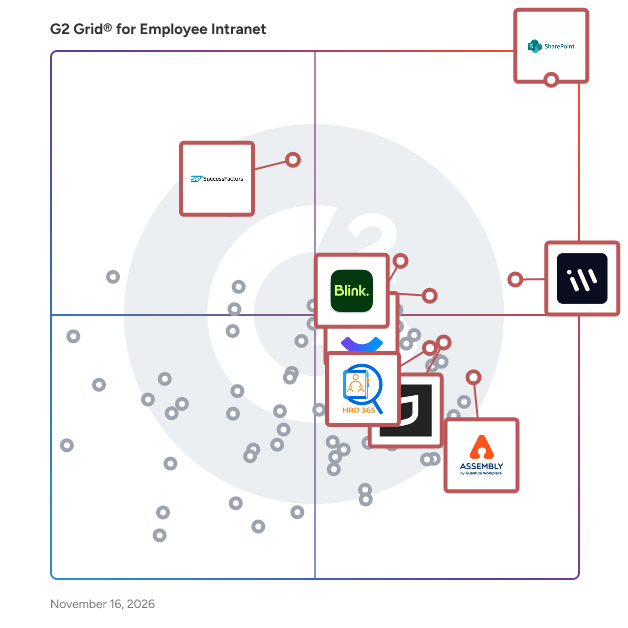
G2 Grid® for Employee Intranet Software

G2 Grid® for Employee Intranet Software plotting products by satisfaction and market presence

Highlighted products: Microsoft SharePoint, Workvivo, SAP SuccessFactors HCM, ClickUp, Blink, Jostle, Assembly by Quantum Workplace, and HR Directory 365.

Underlying data: [Grid® JSON](https://www.g2.com/categories/employee-intranet/grids.json?focus%5B%5D=microsoft-sharepoint&focus%5B%5D=workvivo&focus%5B%5D=sap-sap-successfactors-hcm&focus%5B%5D=clickup&focus%5B%5D=blink-blink&focus%5B%5D=jostle&focus%5B%5D=assembly-by-quantum-workplace&focus%5B%5D=hr-directory-365)

LumApps

LumApps: The AI-Powered Intranet for Every Employee, Everywhere LumApps is a flexible, scalable employee experience platform designed to improve communication, reduce friction, and support productivity for employees on any device, wherever they work. LumApps reduces digital friction by bringing office and frontline employees together in one AI-powered, mobile- and desktop-ready hub. Internal Communications: Reaching every employee with critical information is a huge challenge, especially when 80% of the global workforce is deskless. The result? Frontline employees often feel disconnected as important messages get lost in the noise or never reach them at all. LumApps ensures company strategy and updates reach everyone, from corporate offices to the factory floor. Our multi-channel communications help deliver targeted messaging to all employees via mobile app, desktop, text message, and digital signage, no matter where they work. Our integrated analytics allow you to measure the results of your communications efforts and identify areas of improvement. IT Leaders: Application sprawl and shadow IT create security, compliance, and governance risks for organizations. LumApps consolidates your digital workplace into a secure, enterprise-grade hub, helping IT teams standardize, govern, and reduce risk. With seamless integrations, workspace-agnostic design, and AI-powered search, LumApps makes information easy to find while maintaining strong data governance. HR Professionals: High turnover and poor employee experiences often result from outdated training methods, a lack of recognition, and silos that reduce connections. LumApps supports a consistent, equitable employee experience with personalized journeys, modern learning, and automated onboarding that helps new hires feel supported from day one. Additionally, LumApps enhances the employee experience with powerful collaboration tools like team workspaces, social feeds, and personalized dashboards that connect teams, encourage engagement, and drive productivity. Operations: Inefficient manual paper processes and scattered tools slow down frontline and operational teams. Digitize routine work with automated workflows, real-time checklists, and mobile-ready access that supports fast adoption across frontline teams. Streamline everything from shift handovers to safety reporting, transforming delivery time. Why LumApps? As a multi-time leader in the Gartner® Magic Quadrant™ and Forrester Wave, LumApps supports over 7 million users across 2,200+ customers. In addition, LumApps received the highest scores across all six use cases evaluated in the 2025 Gartner® Critical Capabilities for Intranet Packaged Solutions report. In 2025, LumApps joined forces with Beekeeper to create a category-defining platform hub for every employee, across HQ and the frontline. Whether in manufacturing, retail, or healthcare, LumApps provides the "AI Employee Hub" that works for you, ensuring every employee is connected, engaged, and productive.

Average Rating: 4.4/5.0

Total Reviews: 159

How Do G2 Users Rate LumApps?

  • Quality of Support: 8.6/10 (Category avg: 9.0/10)
  • Ease of Use: 8.8/10 (Category avg: 8.9/10)
  • Has the product been a good partner in doing business?: 9.1/10 (Category avg: 9.1/10)
  • Ease of Admin: 8.7/10 (Category avg: 8.8/10)

Who Is the Company Behind LumApps?

  • Seller: LumApps
  • Company Website:
  • Year Founded: 2015
  • HQ Location: Tassin, France
  • LinkedIn® Page: www.linkedin.com
    897 employees on LinkedIn®

Who Uses This Product?

  • Top Industries: Hospitality, Retail
  • Company Size: 50% Large, 33% Medium

What Do G2 Reviewers Say About LumApps?

AI-generated summary from verified user reviews

Pros
  • Users highlight the ease of use of LumApps, allowing effortless navigation and streamlined internal communication.
  • Users find LumApps incredibly useful for internal communications, enhancing collaboration and providing seamless updates across the organization.
  • Users enjoy the ease of use of LumApps, appreciating its intuitive design and organized access to information.
  • Users value the effective internal communication and engagement capabilities of LumApps, enhancing organizational understanding seamlessly.
  • Users value the seamless platform integration of LumApps, enhancing internal communication and keeping everyone informed effortlessly.
Cons
  • Users find the insufficient information regarding metrics and integration options limits their usability and effectiveness.
  • Users find a lack of features in LumApps, especially in content flexibility and customization options.
  • Users face integration issues with LumApps, hindering seamless use alongside other applications and complicating task management.
  • Users find the high barrier to entry challenging, making it difficult for newcomers to engage with LumApps effectively.
  • Users find confusion in LumApps due to unclear messages and overwhelming changes, especially for beginners.

What Are Recent G2 Reviews of LumApps?

What Are G2 Users Discussing About LumApps?

Lightspeed365 Sharepoint intranet

Lightspeed365 is a SharePoint intranet layer, not a standalone platform. It installs into the Microsoft 365 tenant you already own and turns native SharePoint into a branded employee intranet, built on the SharePoint Framework so every component runs as native SharePoint content. WHAT LIGHTSPEED365 CORE INCLUDES Branding and design. A branding customiser gives full control over typography, colours, navigation and layouts. Sub-branding lets multi-brand businesses give each division or region its own visual identity from a single intranet, which most SharePoint intranet products do not offer. Pre-built site templates cover homepages, onboarding, benefits hubs, department landing pages, policy libraries and location pages. Findability. Structured handbooks aggregate pages, documents and list items from across your entire SharePoint environment into one searchable, filterable interface, permission-trimmed through your existing SharePoint and Entra permissions. A Microsoft Graph-powered files explorer sits alongside it. The people directory is searchable by skill, project, custom field, department and location, with profile cards showing reporting lines, contact details and expertise, built from Entra ID so it updates automatically as people join, leave or move teams. Communications. Targeted news feeds, alerts and audience-specific content, with audience targeting driven by your existing Entra ID groups rather than a separate targeting system. Content scheduling publishes and expires content automatically. Page feedback lets employees flag out-of-date content. Engagement and personalisation. A welcome bar delivers a personalised greeting with local weather and quick access to relevant content. An app launcher surfaces the tools each employee uses most, targeted by role and audience, with apps administrators can mandate and users can personalise. Polls, accordions and multilingual support via SharePoint's native page variants are included. Analytics and access. Microsoft Clarity integration provides heatmaps, scroll depth, session recordings and content performance trends, so comms teams can show leadership engagement data rather than page views. A Teams app delivers the full branded intranet inside Microsoft Teams on desktop and mobile, pinnable to the Teams rail. PREMIUM APPS Premium apps are enterprise-grade extensions, licensed on subscription. They can be added alongside Core or bought standalone for an existing SharePoint intranet, at any point. AI search lets employees ask questions in natural language and get permission-trimmed answers from across your SharePoint environment, covering policies, how-to guides, news and people profiles. Push notifications target urgent updates through Teams and device lock screens, reaching employees who do not open the intranet daily. Subscriptions let employees opt into the news channels and topics they care about. Noticeboard is an employee-driven space for community posting and bottom-up communication. Site index is a searchable directory of every SharePoint site, Teams space and Viva Engage community across the tenant. Site provisioning lets employees request new sites, Teams spaces or Viva Engage communities from the intranet, with approval workflows that prevent sprawl. AI search and push notifications require additional Azure resources, scoped with your IT team during setup. Core has no Azure dependency. INTEGRATIONS AND ARCHITECTURE SharePoint Online, Microsoft Teams, Viva Connections, Viva Engage, Entra ID for identity and audience targeting, Outlook, and Microsoft Clarity. Because Lightspeed365 content is native SharePoint content, Microsoft Copilot can reference and summarise it within its standard Microsoft 365 scope. Everything executes inside your own tenant, with no external platform and no third-party data processing. Access follows native SharePoint and Entra permissions rather than a parallel permission model, so there is no separate user administration. Administration happens through a dashboard embedded in the intranet itself, so there is no external admin console and no separate configuration layer to maintain. Compliance posture is inherited from Microsoft 365 rather than certified separately. PRICING Core is licensed per tenant and banded by employee count, available as a one-time perpetual licence or an annual subscription. Premium apps are subscription only. No per-user monthly fee and no reseller margin. Available direct, through Microsoft Marketplace, or via the UK Government G-Cloud framework. WHO IT IS FOR Internal communications, HR and IT teams at mid-sized and enterprise businesses running Microsoft 365, typically 150 to 2,500 employees, replacing or refreshing a SharePoint intranet. Used across financial services, healthcare, education, professional services, energy, real estate and the public sector, in the UK, US, Canada and Australia. Lightspeed365 is built by Content Formula, a Microsoft 365 consultancy founded in 2005 that has delivered more than 500 digital workplace projects. Implementation is delivered by the same team that builds the product, with no outsourced partners or resellers. Lightspeed365 has been featured in the ClearBox Intranet Report and is rated 4.8 on G2, 5.0 on Google and 5.0 on Microsoft Marketplace. A 14-day free trial of Core features runs in your own Microsoft 365 tenant, with no credit card required. COMMON QUESTIONS How is Lightspeed365 different from native SharePoint? SharePoint provides strong foundations for document libraries, search, audience targeting, news publishing and site analytics. Lightspeed365 adds the capabilities that turn those foundations into an intranet: branded design with sub-branding, a searchable handbook, deeper people search, full branding control, personalisation, engagement tools and governance features such as site provisioning. Do we need SharePoint Online already, and can we keep our existing environment? Yes to both. Lightspeed365 runs inside your existing SharePoint Online tenant, which you already have on Microsoft 365 Business or Enterprise, and it works with your current site structure, permissions and content. You do not need to start from scratch. How long does it take to launch? Around a week for licence-only deployment, three to four weeks for smaller builds with implementation support, and eight to twelve weeks for enterprise deployments involving significant content migration. Is Lightspeed365 easy for non-technical people to manage? Yes. Editors use the standard SharePoint page editor, and every web part has its own configuration video guide. Comms and HR teams publish and target content without depending on IT. How is Lightspeed365 licensed? Per tenant, banded by employee count. Core is available as a perpetual licence or an annual subscription. Premium apps are subscription only. What is the difference between Core and Premium? Core is a complete intranet covering branding, templates, people search, handbooks, targeted news, personalisation and analytics. Premium apps are enterprise-grade extensions, including AI search, push notifications, subscriptions, noticeboard, site index and site provisioning. Premium is not an upgrade to Core, and Premium apps can be bought standalone for an existing SharePoint intranet. What is a perpetual licence? A one-time purchase of Core. You licence the version current at your purchase date and keep it indefinitely, with support and maintenance included for the first twelve months. Later feature releases are not included, and Premium apps are not available on a perpetual basis. Where is my data stored? In your own Microsoft 365 tenant. Lightspeed365 does not introduce external storage, external APIs or third-party data processing. Your existing data residency settings apply. Is there any vendor lock-in? No. Your content sits in native SharePoint. If you stop licensing Lightspeed365, your pages, libraries and structure remain in place. Only the additional components stop functioning. Does Lightspeed365 require Azure infrastructure? Core does not. Two Premium apps, AI search and push notifications, require additional Azure resources, which are scoped with your IT team during setup. Does Lightspeed365 work with Microsoft Copilot? Yes. Because Lightspeed365 content is native SharePoint content, Copilot can reference and summarise it within its standard Microsoft 365 scope. We continue to evaluate deeper integration as Microsoft expands the platform. Can employees access the intranet from Microsoft Teams? Yes. The Teams app delivers the full branded intranet inside Teams on desktop and mobile, and can be pinned to the Teams rail for one-tap access. Is Lightspeed365 suitable for regulated industries? Yes. It inherits your Microsoft 365 compliance posture and adds no external data processing. Businesses in financial services, healthcare and the public sector use it. For formal policy attestation and audit-ready compliance evidence, Content Formula offers a dedicated product alongside it. How does Lightspeed365 compare to a custom SharePoint build? A custom intranet build typically costs GBP 50,000 to 150,000 and takes six to twelve months. It also creates an ongoing dependency on developers for updates and maintenance. Lightspeed365 delivers comparable outcomes in weeks using maintained, supported web parts rather than custom code. Is Lightspeed365 an alternative to Viva Connections? They solve different problems. Viva Connections surfaces SharePoint content inside Microsoft Teams. Lightspeed365 enhances the SharePoint content itself, with richer news, deeper branding, people search and governance tools. They work well together rather than as alternatives. Try before you buy Book a live demo at https://lightspeedintranet.com/book-a-demo or sign-up for a free tail at https://lightspeedintranet.com/lightspeed365-free-trial/

Average Rating: 4.8/5.0

Total Reviews: 11

How Do G2 Users Rate Lightspeed365 Sharepoint intranet?

  • Quality of Support: 9.7/10 (Category avg: 9.0/10)
  • Ease of Use: 9.0/10 (Category avg: 8.9/10)
  • Has the product been a good partner in doing business?: 9.6/10 (Category avg: 9.1/10)
  • Ease of Admin: 9.2/10 (Category avg: 8.8/10)

Who Is the Company Behind Lightspeed365 Sharepoint intranet?

  • Seller: Content Formula
  • Year Founded: 2005
  • HQ Location: London, GB
  • LinkedIn® Page: www.linkedin.com
    29 employees on LinkedIn®
  • Phone: +44 (0)20 4534 3460

Who Uses This Product?

  • Company Size: 55% Medium, 45% Large

What Do G2 Reviewers Say About Lightspeed365 Sharepoint intranet?

AI-generated summary from verified user reviews

Pros
  • Users appreciate the intuitive and user-friendly interface of Lightspeed365 Sharepoint, facilitating easy adoption and integration.
  • Users value the easy integrations of Lightspeed365 Sharepoint, simplifying portal management and enhancing user experience seamlessly.
  • Users value the intuitive and user-friendly interface of Lightspeed365, facilitating smooth adoption of new features.
  • Users find Lightspeed365 Sharepoint intranet extremely intuitive, facilitating easy integration and enhancing the overall user experience.
  • Users appreciate the intuitive and user-friendly platform of Lightspeed365, making enhancements easy to adopt and flexible to needs.

What Are Recent G2 Reviews of Lightspeed365 Sharepoint intranet?

Axero

Axero is a modern intranet and digital workplace platform that brings your people, content, and communication into one searchable, branded hub. Built for mid-size and enterprise companies, Axero is where HR leaders, internal communications teams, and IT administrators bring everything together — so employees can find information, collaborate on projects, and stay connected to what's happening across the company, no matter where they work. Key features and capabilities include: - Intranet & communication hub: Company news, announcements, and updates in one place, where every employee can actually see them - Knowledge management: Organized document libraries and wikis so nothing gets buried and information stays current - Team collaboration: Workspaces, task management, and project tools that keep teams moving without the back-and-forth - Tool consolidation: A native form builder, newsletter manager, and LMS mean fewer tools to juggle. And with Axero App Manager, you can build and deploy custom tools right inside the platform - People directory & profiles: Find the right person fast with employee search and org charts that actually reflect how the company is structured - Integrations: Connects with SharePoint, Microsoft 365, Google Workspace, Slack, and more so teams aren't starting from scratch Axero works for everyone, from employees who want drag-and-drop tools, to developers who want REST APIs, CSS overrides, webhooks, and full control through Axero App Manager. The result is an intranet that looks like your brand and works the way your people do. Available in the cloud or on-premise, with role-based permissions and SSO support. And when you work with Axero, you get more than software — you get a dedicated client success team that's with you through implementation, adoption, and everything after.

Average Rating: 4.3/5.0

Total Reviews: 105

How Do G2 Users Rate Axero?

  • Quality of Support: 8.8/10 (Category avg: 9.0/10)
  • Ease of Use: 8.4/10 (Category avg: 8.9/10)
  • Has the product been a good partner in doing business?: 9.0/10 (Category avg: 9.1/10)
  • Ease of Admin: 8.1/10 (Category avg: 8.8/10)

Who Is the Company Behind Axero?

Who Uses This Product?

  • Top Industries: Financial Services, Information Technology and Services
  • Company Size: 57% Medium, 25% Small

What Do G2 Reviewers Say About Axero?

AI-generated summary from verified user reviews

Pros
  • Users value the intuitive design and ease of use of Axero, making it a great resource for content management.
  • Users praise Axero for its exceptional customer support, highlighting quick responses and a commitment to user experience.
  • Users appreciate the easy setup of Axero, finding it straightforward and user-friendly for efficient content management.
  • Users value the ease of document retrieval and seamless communication features of Axero for effective collaboration.
  • Users value the exceptional support provided by Axero, enhancing their overall experience with proactive resources.
Cons
  • Users find the learning curve steep, as mastering coding and features requires time and effort.
  • Users express frustration over missing functionalities and desired audit reporting capabilities in Axero.
  • Users find Axero not intuitive, requiring significant time to learn and navigate through its complex layers.
  • Users find the confusing interface of Axero challenging, often requiring time to learn and adapt effectively.
  • Users find the search functionality limited and inefficient, often requiring extensive navigation to locate desired options.

What Are Recent G2 Reviews of Axero?

What Are G2 Users Discussing About Axero?

AI can help you find the answers. G2 helps you trust them.

Connect G2 to Claude or ChatGPT for answers grounded in G2's trusted reviews, comparisons, and pricing from real user insights.

How it works

OneWindow

OneWindow takes standard Office 365 deployment and makes it specific to any industry or organization while removing the cost and complexity of custom on premise solutions.

Average Rating: 4.5/5.0

Total Reviews: 28

How Do G2 Users Rate OneWindow?

  • Quality of Support: 8.5/10 (Category avg: 9.0/10)
  • Ease of Use: 8.6/10 (Category avg: 8.9/10)
  • Has the product been a good partner in doing business?: 8.8/10 (Category avg: 9.1/10)
  • Ease of Admin: 8.6/10 (Category avg: 8.8/10)

Who Is the Company Behind OneWindow?

  • Seller: Microsoft
  • Year Founded: 1975
  • HQ Location: Redmond, Washington
  • LinkedIn® Page: www.linkedin.com
    232,750 employees on LinkedIn®
  • Ownership: MSFT
  • Phone: +1 (877) 276-2464

Who Uses This Product?

  • Top Industries: Education Management
  • Company Size: 39% Medium, 32% Large

What Are Recent G2 Reviews of OneWindow?

What Are G2 Users Discussing About OneWindow?

ONLYOFFICE Workspace

ONLYOFFICE Workspace is a web-based open-source business platform for efficient team management and online collaboration, developed by Ascensio System SIA, a Latvian software development company. The solution features online document editors, a platform for document management, corporate communication, mail and project management tools. The ONLYOFFICE online editors allow you to create, edit and collaborate on text documents, spreadsheets, presentations, fillable forms and PDF files. Complete compatibility with Word, Excel and PowerPoint files.

Average Rating: 4.4/5.0

Total Reviews: 63

How Do G2 Users Rate ONLYOFFICE Workspace?

  • Quality of Support: 8.6/10 (Category avg: 9.0/10)
  • Ease of Use: 8.9/10 (Category avg: 8.9/10)
  • Has the product been a good partner in doing business?: 9.2/10 (Category avg: 9.1/10)
  • Ease of Admin: 9.3/10 (Category avg: 8.8/10)

Who Is the Company Behind ONLYOFFICE Workspace?

Who Uses This Product?

  • Top Industries: Computer Software, Higher Education
  • Company Size: 76% Small, 17% Medium

What Do G2 Reviewers Say About ONLYOFFICE Workspace?

AI-generated summary from verified user reviews

Pros
  • Users appreciate the affordable free tier of ONLYOFFICE Workspace, making it easy to access and use without costs.
  • Users appreciate the centralization of ONLYOFFICE Workspace, as it helps them stay organized with all documents in one place.
  • Users appreciate the intuitive design and centralized document integration of ONLYOFFICE Workspace, enhancing organization and productivity.
  • Users find ONLYOFFICE Workspace intuitive and user-friendly, making organization and document management effortless and efficient.
  • Users appreciate the easy collaboration features of ONLYOFFICE Workspace, enhancing organization and streamlining document management.
Cons
  • Users are frustrated by the lack of customer service, finding self-help options inadequate for resolving billing issues.
  • Users feel frustrated by incomplete information regarding customer support, impacting their overall experience with ONLYOFFICE Workspace.
  • Users find the lack of insufficient training and support disappointing, hindering their experience with ONLYOFFICE Workspace.
  • Users express disappointment in limited storage for large documents and the lack of adequate customer support.
  • Users express dissatisfaction with the poor customer support of ONLYOFFICE Workspace, feeling it lacks adequate assistance for users.

What Are Recent G2 Reviews of ONLYOFFICE Workspace?

What Are G2 Users Discussing About ONLYOFFICE Workspace?

Haiilo

Haiilo is an employee experience platform designed to simplify the digital workplace and bring communication, knowledge, tools, and AI into one connected experience. Haiilo helps organisations bring systems and channels together in one place, giving employees a clear starting point for work and making it easier to find information, stay aligned, and complete tasks without switching between tools. Built for distributed, hybrid, and global teams, Haiilo supports internal communications, HR, and IT teams in delivering consistent information and improving how employees access and use workplace systems. What Haiilo helps you do Reach every employee, everywhere Deliver communication to office-based and frontline employees across mobile, desktop, email, and other channels from a single platform. Create a central access point for work Provide one place where employees can find company information, access tools, and navigate systems without needing to know where content lives. Enable two-way communication Support structured communication as well as discussion, feedback, and knowledge sharing through pages, communities, and content formats. Reduce system and channel fragmentation Connect tools such as Microsoft Teams, SharePoint, and other enterprise systems into one experience, reducing the need to switch between applications. Improve access to information with AI Use AI to remove busy work, provide summaries, and help employees find answers more quickly within their existing workflows. Measure communication and engagement Track reach, engagement, and content performance through built-in analytics to understand what is being used and where gaps exist. Who it’s for Internal communications teams HR and people teams IT teams responsible for the digital workplace Why Haiilo Haiilo combines communication, knowledge access, and system integration into a single platform, helping organisations reduce complexity and make everyday work easier to navigate. Product information Haiilo is an employee experience platform that simplifies the digital workplace by bringing communication, knowledge, tools, and AI into one connected experience. Many organisations operate across multiple systems that don’t work well together. This creates fragmentation, makes information harder to find, and increases the effort required to complete everyday tasks. Haiilo addresses this by providing a single access point where employees can find information, access tools, and stay aligned. The platform integrates with existing systems rather than replacing them, acting as an experience layer that reduces context switching and improves how employees interact with their digital workplace. AI capabilities support this by helping employees find information easily, summarise content, and complete tasks more efficiently within the flow of work. For internal communications and HR teams, Haiilo provides a structured way to deliver information and measure engagement. For IT teams, it offers a way to simplify the user experience across systems without large-scale transformation projects. The result is a more consistent, accessible, and usable digital workplace where employees can work with greater clarity and less friction.

Average Rating: 4.6/5.0

Total Reviews: 303

How Do G2 Users Rate Haiilo?

  • Quality of Support: 9.1/10 (Category avg: 9.0/10)
  • Ease of Use: 9.4/10 (Category avg: 8.9/10)
  • Has the product been a good partner in doing business?: 9.0/10 (Category avg: 9.1/10)
  • Ease of Admin: 9.1/10 (Category avg: 8.8/10)

Who Is the Company Behind Haiilo?

  • Seller: Haiilo
  • Company Website:
  • Year Founded: 2010
  • HQ Location: Hamburg, Hamburg
  • LinkedIn® Page: www.linkedin.com
    268 employees on LinkedIn®

Who Uses This Product?

  • Top Industries: Information Technology and Services, Accounting
  • Company Size: 48% Large, 43% Medium

What Do G2 Reviewers Say About Haiilo?

AI-generated summary from verified user reviews

Pros
  • Users value the effective communication tools of Haiilo, enhancing team collaboration and social media presence.
  • Users praise the ease of use of Haiilo, appreciating its intuitive handling and smooth user experience.
  • Users love how Haiilo enhances team collaboration by simplifying content sharing and boosting social influence and brand reach.
  • Users appreciate the user-friendly interface and support of Haiilo, enjoying seamless updates and new features.
  • Users find that Haiilo enhances content sharing, boosting brand visibility and facilitating effective communication among teams.
Cons
  • Users highlight the lack of customization in Haiilo, making it difficult to adapt the platform to unique needs.
  • Users express frustration over the limited customization options in Haiilo, impacting their content and workflow flexibility.
  • Users find Haiilo's navigation difficult, leading to frustration and inefficiencies in accessing essential features.
  • Users feel Haiilo is too expensive for small companies, often causing frustration with additional feature costs and usability issues.
  • Users often face technical issues with Haiilo, including flexibility problems and insufficient customer support for troubleshooting.

What Are Recent G2 Reviews of Haiilo?

Bonzai Intranet

Bonzai is a complete intranet-in-a-box for SharePoint and Office 365. It combines the best features of collaboration, productivity and engagement into a single digital workplace platform. The award-winning Bonzai platform is designed to drive business value without the complexity, cost and risk associated with outdated, custom-built intranet solutions. Bonzai is feature-rich, easy-to-use, flexible and 100% customizable for a stress-free intranet experience. Empower your teams and break down silos with powerful features like best-in-class intranet search, intuitive navigation, document management, employee directory. Connect, engage and share with everyone in your team and outside with features for content authoring and targeting, social networking and marketplace. Bonzai's tested and proven delivery methodology provides 100% successful intranet deployments in a matter of weeks

Average Rating: 4.7/5.0

Total Reviews: 11

How Do G2 Users Rate Bonzai Intranet?

  • Quality of Support: 10.0/10 (Category avg: 9.0/10)
  • Ease of Use: 8.3/10 (Category avg: 8.9/10)
  • Has the product been a good partner in doing business?: 10.0/10 (Category avg: 9.1/10)
  • Ease of Admin: 8.7/10 (Category avg: 8.8/10)

Who Is the Company Behind Bonzai Intranet?

Who Uses This Product?

  • Company Size: 64% Large, 36% Medium

What Are Recent G2 Reviews of Bonzai Intranet?

Intranet Connections

Intranet Connections is an out-of- the-box intranet portal designed to remove siloed communications, build community, automate business workflows and eliminate misinformation through a single ultimate reference. If you’re tired of managing clunky internal sites with outdated materials, we can help modernize your toolset with a simple to use, low-maintenance intranet platform – giving time back to staff. Intranet Connections integrates with MS Teams, Slack, Azure AD, and MS Office 365. We work with any organization between 40 - 500 employees, but specialize in credit unions, banks, and hospitals.

Average Rating: 4.4/5.0

Total Reviews: 22

How Do G2 Users Rate Intranet Connections?

  • Quality of Support: 9.2/10 (Category avg: 9.0/10)
  • Ease of Use: 8.8/10 (Category avg: 8.9/10)
  • Has the product been a good partner in doing business?: 9.6/10 (Category avg: 9.1/10)
  • Ease of Admin: 9.0/10 (Category avg: 8.8/10)

Who Is the Company Behind Intranet Connections?

Who Uses This Product?

  • Company Size: 64% Medium, 23% Large

What Are Recent G2 Reviews of Intranet Connections?

What Are G2 Users Discussing About Intranet Connections?

Oneteam

An intro to Oneteam: It might not surprise you that connecting with your deskless workforce is a major challenge. They are spread out over multiple locations, don’t sit behind a computer, don’t have a business email address, and often only work part-time, to name a few reasons. Old-school methods like intranets, email blasts, paper guides, and bulletin boards just don't cut it anymore. They create what we dub the "Deskless Gap." And guess what? This gap can drain your team's engagement, loyalty, and success, pushing your best talents out the door and negatively influencing your business growth. At Oneteam, we've crafted the ultimate app to bridge this gap. Think of it as your all-in-one toolkit: seamless communication, smooth onboarding, interactive eLearning, insightful surveys, and handy checklists: everything you need, all in Oneteam. Today, Oneteam seeks to unleash the full potential of deskless workers worldwide and has already achieved success in bridging the deskless gap for organizations including H&M, Toolstation, Ibis, WestCord Hotels, and DPD. Learn more about Oneteam ► https://www.oneteam.io

Average Rating: 4.4/5.0

Total Reviews: 79

How Do G2 Users Rate Oneteam?

  • Quality of Support: 9.2/10 (Category avg: 9.0/10)
  • Ease of Use: 9.2/10 (Category avg: 8.9/10)
  • Has the product been a good partner in doing business?: 9.3/10 (Category avg: 9.1/10)
  • Ease of Admin: 9.0/10 (Category avg: 8.8/10)

Who Is the Company Behind Oneteam?

  • Seller: Oneteam
  • Year Founded: 2014
  • HQ Location: Rotterdam, Zuid-Holland
  • LinkedIn® Page: www.linkedin.com
    33 employees on LinkedIn®

Who Uses This Product?

  • Top Industries: Retail, Hospitality
  • Company Size: 74% Medium, 14% Large

What Do G2 Reviewers Say About Oneteam?

AI-generated summary from verified user reviews

Pros
  • Users find Oneteam's ease of use invaluable, integrating essential functions into a unified app for seamless collaboration.
  • Users value the streamlined communication of Oneteam, enhancing collaboration and efficiency for frontline employees.
  • Users value the unified communication features of Oneteam, enhancing collaboration and streamlining workflow within teams.
  • Users enjoy the easy communication features of Oneteam, facilitating faster and more effective team interactions.
  • Users love the enhanced team collaboration in Oneteam, promoting streamlined communication and organization for improved productivity.
Cons
  • Users find the missing features in Oneteam, such as customizable workflows and advanced analytics, disappointing compared to competitors.
  • Users feel disappointed by the lack of features in Oneteam, missing essential tools like automation and analytics.
  • Users find the limited features of Oneteam disappointing, lacking essential functionalities for a comprehensive collaboration experience.
  • Users experience feature issues in Oneteam, including problems with image viewing and limited comment editing options.
  • Users experience organizational challenges with Oneteam, struggling with technical reliability and complicated system integrations.

What Are Recent G2 Reviews of Oneteam?

What Are G2 Users Discussing About Oneteam?

CentricMinds

CentricMinds is a modern intranet and employee experience platform designed to enhance organizational communication, knowledge management, and productivity from a single, integrated solution. This platform empowers employees to create content with the assistance of artificial intelligence, facilitates instant access to information through AI-driven enterprise search, and promotes collaboration via a dedicated employee app that includes team chat features. With CentricMinds, employees can efficiently access essential documents, forms, workflows, and business information, regardless of their work location. Targeting organizations of various sizes, CentricMinds serves as a comprehensive digital workplace that replaces the need for multiple disconnected tools. It caters to a diverse audience, including office-based staff, remote workers, and frontline employees, ensuring that all team members remain connected and informed. The platform's modern intranet serves as a central hub for company news, announcements, and knowledge sharing, fostering a culture of transparency and engagement among employees. Key features of CentricMinds include a dedicated employee app that consolidates company news, team chat, and essential documents, allowing for seamless communication and collaboration. The task management functionality enables managers to assign and track work through the desktop intranet, while frontline employees can receive, update, and complete tasks directly from their mobile devices. This streamlined approach to task management enhances accountability and ensures that work is completed efficiently. The platform also leverages AI technology to assist with content creation and enterprise search, enabling employees to publish updates more quickly and find critical organizational knowledge with ease. Document management capabilities, including version control, metadata management, and permissions, ensure that sensitive information is securely handled. Moreover, CentricMinds integrates with popular business systems such as Microsoft 365, SharePoint, Google Drive, and Dropbox, allowing organizations to maintain their existing workflows while enhancing overall efficiency. In addition to these features, CentricMinds offers digital forms, approval workflows, and employee directories that automate business processes and improve collaboration across teams. By bringing together people, information, and business processes in one cohesive platform, organizations can cultivate a more connected, informed, and engaged workforce. This ultimately strengthens communication, enhances collaboration, and fosters a culture of accountability and continuous improvement within the organization.

Average Rating: 4.6/5.0

Total Reviews: 22

How Do G2 Users Rate CentricMinds?

  • Quality of Support: 9.4/10 (Category avg: 9.0/10)
  • Ease of Use: 9.4/10 (Category avg: 8.9/10)
  • Has the product been a good partner in doing business?: 9.5/10 (Category avg: 9.1/10)
  • Ease of Admin: 8.9/10 (Category avg: 8.8/10)

Who Is the Company Behind CentricMinds?

  • Seller: CentricMinds
  • Company Website:
  • Year Founded: 2002
  • HQ Location: Melbourne, VIC
  • LinkedIn® Page: www.linkedin.com
    17 employees on LinkedIn®

Who Uses This Product?

  • Company Size: 64% Medium, 27% Large

What Are Recent G2 Reviews of CentricMinds?

What Are G2 Users Discussing About CentricMinds?

MangoApps

MangoApps is a leading intranet platform and employee hub that brings together your people, knowledge, tools, and AI in one secure, unified digital workplace. Whether you’re managing desk-based teams, frontline employees, or a mix of both, MangoApps replaces disconnected apps and outdated systems with a single source of truth—accessible anytime, anywhere, on any device. The platform combines a modern intranet, a frontline employee app, and an AI-powered knowledge experience to make work simpler, faster, and more connected. Employees can find information instantly, collaborate in real time, complete training, manage tasks, and engage with company culture—all in one place. Trusted by global brands across retail, healthcare, finance, manufacturing, and more, MangoApps helps organizations boost employee communication, strengthen employee engagement, and create a better overall employee experience. By reducing app overload and bridging the digital divide, MangoApps empowers every worker to focus on what matters most—getting work done. Key Highlights: - AI-powered search and chat for accurate, role-based answers - Mobile-first experience for frontline employee engagement - Streamlined communication and collaboration tools - Enterprise-grade security (HITRUST, ISO 27001, SOC 2 Type II) - Proven adoption rates of 90%+ in companies from 300 to 300,000+ employees Why Choose MangoApps? Organizations choose MangoApps because it delivers a digital workplace that works for everyone—desk, remote, and frontline employees alike. Instead of juggling multiple tools for intranet, chat, file sharing, training, and workflows, MangoApps gives you one integrated platform that’s easy to use, highly secure, and built for enterprise scale. With MangoApps, you can: - Centralize communications so every announcement, update, and resource is seen - Drive measurable gains in employee engagement with personalized, targeted content - Give frontline employees mobile access to schedules, tasks, and training in real time -Connect AI to your company’s knowledge for instant, reliable answers - Scale effortlessly from hundreds to hundreds of thousands of employees without losing performance or usability From replacing outdated intranets to creating a mobile-first employee communication platform, MangoApps is the employee experience solution that grows with your organization. It’s not just software—it’s a smarter way to connect people, knowledge, and work.

Average Rating: 4.2/5.0

Total Reviews: 118

How Do G2 Users Rate MangoApps?

  • Quality of Support: 8.8/10 (Category avg: 9.0/10)
  • Ease of Use: 8.4/10 (Category avg: 8.9/10)
  • Has the product been a good partner in doing business?: 9.0/10 (Category avg: 9.1/10)
  • Ease of Admin: 8.5/10 (Category avg: 8.8/10)

Who Is the Company Behind MangoApps?

  • Seller: MangoApps
  • Year Founded: 2008
  • HQ Location: Issaquah, WA
  • LinkedIn® Page: www.linkedin.com
    169 employees on LinkedIn®

Who Uses This Product?

  • Who Uses This: Project Manager
  • Top Industries: Hospital & Health Care, Information Technology and Services
  • Company Size: 57% Medium, 22% Large

What Do G2 Reviewers Say About MangoApps?

AI-generated summary from verified user reviews

Pros
  • Users find MangoApps easy to use and intuitive, enhancing collaboration for geographically diverse teams.
  • Users find MangoApps to be intuitive and user-friendly, enhancing collaboration within their diverse workforce.
  • Users appreciate the comprehensive features of MangoApps, enhancing employee experience and streamlining communication and engagement.
  • Users value the centralized notification system in MangoApps, enhancing team collaboration across diverse work environments.
  • Users value the collaborative work environment of MangoApps, enhancing teamwork across diverse geographical locations.
Cons
  • Users find the complex features overwhelming to learn, despite some being intuitive and supported by helpful resources.
  • Users find the complexity of MangoApps overwhelming due to the extensive features that require time to learn.
  • Users find the complex usability of MangoApps overwhelming, despite helpful customer support and community resources.
  • Users find the confusion from overwhelming features can hinder their experience, despite effective support options available.
  • Users find the difficult learning curve of MangoApps overwhelming despite the helpful customer support and community resources.

What Are Recent G2 Reviews of MangoApps?

What Are G2 Users Discussing About MangoApps?

Twine

Helping fast growing companies bring their workplaces together. Twine is comms tool for the modern workplace. Bringing your people, content and ideas together in one place with apps such as a Knowledge, News & Broadcast, Wellbeing, People Directory, Team boards, Connected Search and more. These play nicely with your existing systems too: sign-on using Okta and Active Directory, pull in files from Dropbox, Google and Box, and much more. It's all built on a modular basis, so you can pick and choose the features you need and start building your ideal digital workplace. Check out the promo video here: https://www.twineapp.com/feature-video

Average Rating: 4.6/5.0

Total Reviews: 18

How Do G2 Users Rate Twine?

  • Quality of Support: 9.7/10 (Category avg: 9.0/10)
  • Ease of Use: 9.5/10 (Category avg: 8.9/10)
  • Has the product been a good partner in doing business?: 9.2/10 (Category avg: 9.1/10)
  • Ease of Admin: 9.1/10 (Category avg: 8.8/10)

Who Is the Company Behind Twine?

  • Seller: Twine
  • Year Founded: 2015
  • HQ Location: London, United Kingdom
  • LinkedIn® Page: www.linkedin.com
    2 employees on LinkedIn®

Who Uses This Product?

  • Company Size: 84% Medium, 26% Small

What Are Recent G2 Reviews of Twine?

What Are G2 Users Discussing About Twine?

Noodle

Noodle Intranet is an enterprise software platform that enables companies to communicate and collaborate more efficiently than ever before. Companies often use very complicated, confusing, inefficient systems to collaborate. By consolidating many IT services within one secure site your company will be able to get more work done while saving time and money.

Average Rating: 4.3/5.0

Total Reviews: 54

How Do G2 Users Rate Noodle?

  • Quality of Support: 9.1/10 (Category avg: 9.0/10)
  • Ease of Use: 8.8/10 (Category avg: 8.9/10)
  • Has the product been a good partner in doing business?: 9.3/10 (Category avg: 9.1/10)
  • Ease of Admin: 8.8/10 (Category avg: 8.8/10)

Who Is the Company Behind Noodle?

  • Seller: Vialect
  • Year Founded: 2003
  • HQ Location: Tecumseh, Ontario
  • LinkedIn® Page: www.linkedin.com
    4 employees on LinkedIn®

Who Uses This Product?

  • Top Industries: Telecommunications
  • Company Size: 46% Medium, 39% Small

What Are Recent G2 Reviews of Noodle?

What Are G2 Users Discussing About Noodle?

eXo Platform

eXo Platform is an open-source, AI-augmented digital workplace and intranet software that brings internal communication, team collaboration, knowledge management and employee engagement together in one platform. Developed by eXo, a French software vendor in business for more than 20 years, it is used by over 1,000,000 people worldwide and can run as SaaS, in a private cloud or on-premises. Organizations choose eXo as an open-source alternative to SharePoint, Microsoft 365 and Google Workspace when they want one place where employees get informed, work together and find what they need, while keeping full control of their data, their AI and their hosting. 👥 WHO eXo PLATFORM IS FOR eXo Platform serves mid-size and large companies, public administrations, local and regional authorities, hospitals, universities, research organizations and associations, from a first team to several thousand users. • IT departments that must decide where data is hosted, integrate with an existing directory and avoid vendor lock-in. • Internal communication teams that need to reach every employee, including frontline, field and mobile staff. • HR and engagement teams that want onboarding, recognition and a stronger company culture. • Managers and project teams that want to stop switching between email, shared folders, chat and task tools. ✅ KEY FEATURES 📰 Intranet and internal communication • No-code page and site builder with drag and drop, templates, branding and mobile preview. • Targeted, scheduled and multilingual news, with automatic translation, alert banners and event pages. • Communication spaces that decentralize news by department, region or topic, with writer and publisher roles. • People directory, rich profiles and org chart. 💬 Team collaboration • Collaborative spaces for teams, departments, projects and communities, with subspaces and guest access. • Activity streams with posts, mentions, reactions, polls and stories. • Built-in chat and video conferencing with screen sharing. • Shared agendas with Google, Office 365 / Exchange and CalDAV calendar connectors. 📁 Document management and file sharing • Personal and shared drives with automatic versions, categories and full-text search. • Online co-editing of Office and OpenDocument files (OnlyOffice included). • Network drive access (WebDAV) and protected external links with password and expiry date. 📚 Knowledge management • Notes organized in trees for procedures, guides, wikis and FAQs. • Tags, categories and links between contents. • Unified search across notes, documents, posts, people and spaces, always within each user's permissions. ✔️ Tasks and projects • Projects with custom workflows and kanban, list or timeline views. • Owners, due dates, priorities, labels and comments, with one view of all of a user's tasks. 🏆 Employee engagement and recognition • Kudos between colleagues, quests, points, badges and leaderboards. • Engagement campaigns for onboarding, ideation, advocacy or safety. 📊 Analytics • Ready-made adoption reports on users, spaces and contents, plus custom charts and tables. 🤖 AI YOU CONTROL With the eXo AI module: • AI assistants that answer from your own spaces, documents and notes, and show their sources. • Writing help in the editor: write, rephrase, summarize and illustrate. • Multi-LLM: choose the AI models your organization trusts. • A secure MCP server (Model Context Protocol) with more than 100 tools lets external assistants such as Claude, ChatGPT and Le Chat work with eXo content. Administrators approve each connected service, assistants only see what the user is already allowed to see, and access can be revoked at any time. 🔒 DEPLOYMENT, SECURITY AND DATA SOVEREIGNTY • Three deployment options: SaaS (eXo Hubs), private cloud operated by eXo, or on-premises on your own infrastructure. • Sovereign hosting in France is available through Orange Business "Live Collaboration", hosted in an Orange Business SecNumCloud data center. • Single sign-on with OpenID Connect, OAuth or SAML v2, LDAP / Active Directory synchronization and optional two-factor authentication. • Information segmented by space, with open, on-request, invitation-only or hidden spaces. • Open source code: no black box and no vendor lock-in. 🔗 INTEGRATIONS AND OPEN STANDARDS • Documented REST APIs to connect business applications and data. • App center with single entry point to your web and desktop applications. • Connectors for calendars, IMAP email, BlueMind, DeepL and Google Translate, OnlyOffice and Jitsi. • Open standards: WebDAV, iCal / CalDAV, IMAP / SMTP, OpenID Connect, SAML v2 and LDAP. 📱 MOBILE ACCESS • iOS and Android apps with news, chat, documents, tasks and push notifications. • Installable web app on desktop and mobile, with favorite documents available offline. 🌍 MULTILINGUAL • Interface available in several languages, including right-to-left languages. • Multilingual pages, menus, articles and notes. ⭐ WHY ORGANIZATIONS CHOOSE eXo • One platform instead of a patchwork of tools, with one search and one login. • Data, AI and hosting under your control. • Open source and standards-based, so you can extend it and leave without lock-in. • An interface employees actually adopt, on desktop and mobile. 🏛️ CUSTOMERS AND RECOGNITION eXo Platform is used by organizations such as Région Occitanie, Groupe Gilbert and Schiever. Région Occitanie, for example, moved from Office 365 to eXo for its agents and external partners. eXo Platform won the OW2 Best Project Market Award 2026, and eXo partners with Orange Business and Axians. 💶 PRICING eXo Hubs, the SaaS edition for teams, starts at €4 (about $4.47) per user per month, billed annually. Intranet & Portal, Team Collaboration and Digital Workplace offers for larger organizations are priced on quote. A free online trial is available. 🤝 SUPPORT, IMPLEMENTATION AND TRAINING Every subscription includes support and maintenance, and access to new versions. eXo's team or a partner integrator configures the platform, connects it to your directory and single sign-on, and trains administrators, contributors and community leaders. Change management support helps launch the platform and drive adoption. ❓ FREQUENTLY ASKED QUESTIONS Is eXo Platform open source? Yes. eXo Platform is open source, and organizations can host it themselves or use eXo's cloud. Is eXo Platform an alternative to SharePoint and Microsoft 365? Yes. eXo covers the intranet, document management, collaboration, chat and video needs usually met by SharePoint and Microsoft 365, and can replace them or work alongside existing tools. Can eXo Platform be hosted on-premises? Yes. eXo runs on-premises, in a private cloud operated by eXo, or as SaaS. Does eXo Platform include AI? Yes. With the AI module, assistants answer from your own content and cite sources, using the AI models you choose. The MCP server also connects external assistants such as Claude, ChatGPT and Le Chat. Does eXo Platform work on mobile? Yes. iOS and Android apps and an installable web app give access to news, chat, documents and tasks. How much does eXo Platform cost? eXo Hubs starts at €4 per user per month, billed annually. Larger offers are priced on quote.

Average Rating: 4.3/5.0

Total Reviews: 83

How Do G2 Users Rate eXo Platform?

  • Quality of Support: 8.6/10 (Category avg: 9.0/10)
  • Ease of Use: 8.7/10 (Category avg: 8.9/10)
  • Has the product been a good partner in doing business?: 8.3/10 (Category avg: 9.1/10)
  • Ease of Admin: 8.2/10 (Category avg: 8.8/10)

Who Is the Company Behind eXo Platform?

Who Uses This Product?

  • Top Industries: Information Technology and Services, Computer Software
  • Company Size: 38% Small, 33% Medium

What Do G2 Reviewers Say About eXo Platform?

AI-generated summary from verified user reviews

Pros
  • Users find eXo Platform enhances employee engagement through effective task assignment, progress tracking, and team collaboration.
  • Users find eXo Platform extremely helpful for enhancing employee engagement and streamlining collaboration with integrated tools.
  • Users appreciate the marketing opportunities with eXo Platform, enhancing engagement and collaboration through versatile features.
  • Users value the effective task management features of eXo Platform, enhancing team collaboration and operational efficiency.
  • Users value the effective team collaboration features of eXo Platform, enhancing engagement and operational efficiency across teams.

What Are Recent G2 Reviews of eXo Platform?

What Are G2 Users Discussing About eXo Platform?

Reward Gateway Employee Experience Platform

Reward Gateway helps companies engage, motivate and retain people – every day, all over the world. Partnering with over 4000 companies in 23 countries, we empower more than 6.5 million employees to connect, appreciate and support one another to make the world a better place to work. Our unified employee engagement hub provides the best of recognition, reward, surveys, benefits and discounts that support the overall wellbeing of our client’s employees, enriching their talent acquisition, retention and values-driven growth. Our clients include American Express, Unilever, Samsung, IBM, McDonald’s and more.

Average Rating: 4.6/5.0

Total Reviews: 2,760

How Do G2 Users Rate Reward Gateway Employee Experience Platform?

  • Quality of Support: 9.3/10 (Category avg: 9.0/10)
  • Ease of Use: 9.3/10 (Category avg: 8.9/10)
  • Has the product been a good partner in doing business?: 9.4/10 (Category avg: 9.1/10)
  • Ease of Admin: 9.0/10 (Category avg: 8.8/10)

Who Is the Company Behind Reward Gateway Employee Experience Platform?

Who Uses This Product?

  • Who Uses This: Software Engineer, Teacher
  • Top Industries: Hospital & Health Care, Computer Software
  • Company Size: 47% Medium, 43% Large

What Do G2 Reviewers Say About Reward Gateway Employee Experience Platform?

AI-generated summary from verified user reviews

Pros
  • Users value the effective employee recognition and engagement features of Reward Gateway, enhancing appreciation within the organization.
  • Users value the easy recognition and reward system, facilitating public acknowledgments and engagement among team members.
  • Users praise the ease of use of Reward Gateway, enhancing engagement with a user-friendly, supportive platform.
  • Users love the easy recognition of team members through point assignments and employee shoutouts within Reward Gateway.
  • Users commend the effective employee engagement fostered by Reward Gateway, enhancing recognition and cultural values in the workplace.
Cons
  • Users feel there are limited gift card options and discounts on popular shops, affecting their overall experience.
  • Users find the insufficient information on recognition visibility impacts its effectiveness, especially for non-email users.
  • Users express confusion about status and deadlines, making it challenging to navigate the platform effectively.
  • Users find the pricing to be excessively high, making some gift options less appealing and motivating.
  • Users often face login issues that hinder access and complicate navigation, leading to frustration and confusion.

What Are Recent G2 Reviews of Reward Gateway Employee Experience Platform?

What Are G2 Users Discussing About Reward Gateway Employee Experience Platform?

Neeraja Prakash
NP
Researched and written by Neeraja Prakash
Updated July 21, 2025