Best Employee Intranet Software - Page 3

How Many Employee Intranet Software Products Does G2 Track?

Total Products under this Category: 221

Category Stats (Sep 2026)

  • Average Rating: 4.47/5 The average rating of products in this category, based on all submitted ratings
  • Top Trending Product: Origami Connect (+7.99%) - Among all products in this category, Origami Connect recorded the largest rating increase compared to last month

Last updated: September 01, 2026

How Does G2 Rank Employee Intranet Software Products?

Why You Can Trust G2's Software Rankings:

  • 30 Analysts and Data Experts
  • 58,700+ Authentic Reviews
  • 221+ Products
  • Unbiased Rankings

G2's software rankings are built on verified user reviews, rigorous moderation, and a consistent research methodology maintained by a team of analysts and data experts. Each product is measured using the same transparent criteria, with no paid placement or vendor influence. While reviews reflect real user experiences, which can be subjective, they offer valuable insight into how software performs in the hands of professionals. Together, these inputs power the G2 Score, a standardized way to compare tools within every category.

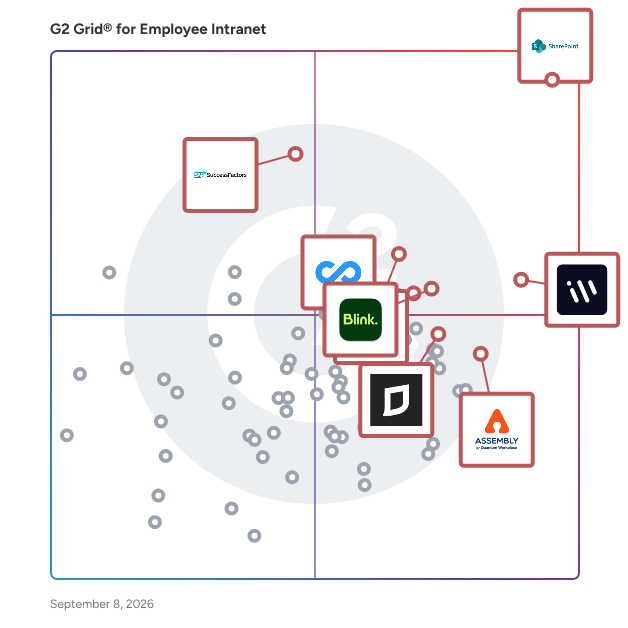
G2 Grid® for Employee Intranet Software

G2 Grid® for Employee Intranet Software plotting products by satisfaction and market presence

Highlighted products: Microsoft SharePoint, Workvivo, ClickUp, Blink, SAP SuccessFactors HCM, Connecteam, Assembly by Quantum Workplace, and Jostle.

Underlying data: [Grid® JSON](https://www.g2.com/categories/employee-intranet/grids.json?focus%5B%5D=microsoft-sharepoint&focus%5B%5D=workvivo&focus%5B%5D=clickup&focus%5B%5D=blink-blink&focus%5B%5D=sap-sap-successfactors-hcm&focus%5B%5D=connecteam&focus%5B%5D=assembly-by-quantum-workplace&focus%5B%5D=jostle&segment=all)

Oak Engage

Oak is the all-in-one intranet that powers your frontline and desk-based employees, wherever they are. From comms to operations, find everything your organisation needs in one platform. Cut through the noise, reach every employee and deliver measurable impact. Engaging employees is hard. Too many tools, too much noise, not every employee has access. People are left feeling overwhelmed and inundated with information. Oak makes it easy. We offer a solution that takes away the stress. We believe intranets should be working a whole lot harder for businesses. We empower you to be more strategic in your approach and allow you to focus your already limited resources on the things that truly matter. We allow you to send targeted and relevant content to cut through the noise, giving your employees a personalised experience. Get the right message, to the right people, at the right time. Oak Engage is the essential go-to place for your employees. Connect and engage with your people, wherever they are, whilst giving them the tools to make their jobs easier.

Average Rating: 4.5/5.0

Total Reviews: 60

How Do G2 Users Rate Oak Engage?

  • Quality of Support: 9.5/10 (Category avg: 9.0/10)
  • Ease of Use: 8.6/10 (Category avg: 8.9/10)
  • Has the product been a good partner in doing business?: 9.3/10 (Category avg: 9.1/10)
  • Ease of Admin: 8.6/10 (Category avg: 8.9/10)

Who Is the Company Behind Oak Engage?

  • Seller: Oak Engage
  • Company Website:
  • Year Founded: 1994
  • HQ Location: Newcastle Upon Tyne, Tyne and Wear
  • LinkedIn® Page: www.linkedin.com
    81 employees on LinkedIn®

Who Uses This Product?

  • Who Uses This: Internal Communications Manager
  • Company Size: 52% Large, 38% Medium

What Do G2 Reviewers Say About Oak Engage?

AI-generated summary from verified user reviews

Pros
  • Users appreciate the ease of use of Oak Engage, valuing its intuitive design and accessibility for all employees.
  • Users appreciate the two-way communication feature of Oak Engage, enhancing storytelling and engagement among team members.
  • Users appreciate the helpful customer support from Oak Engage, enhancing their experience with quick and effective solutions.
  • Users appreciate the flexibility and ease of use of Oak Engage, enhancing communication and efficiency across teams.
  • Users value the effective communication features of Oak Engage, enabling quick and consistent messaging across teams.
Cons
  • Users find Oak Engage lacking essential features, leading to cumbersome processes and limited customization options.
  • Users find limited customization in Oak Engage, hindering flexibility and complicating user team management and content assignment.
  • Users find missing features in Oak Engage, including limited process flows and difficulties in user management.
  • Users find Oak Engage not intuitive, especially with limited design tools and cumbersome mobile app functionality.
  • Users find filtering issues in Oak Engage frustrating, especially in handling submissions and customizing content efficiently.

What Are Recent G2 Reviews of Oak Engage?

What Are G2 Users Discussing About Oak Engage?

LOLYO

Interne Kommunikation braucht vor allem ALLE! LOLYO ist die einzige Mitarbeiter-App, die mit integriertem MITMACH-Booster Mitarbeitende begeistert und motiviert, die App auf ihr Smartphone zu laden und aktiv teilzunehmen. • Sie erreichen ALLE in Echtzeit und standortunabhängig, in über 25 Sprachen und mit bis zu 100% Beteiligung. • Schon in der Basisversion sind über 30 Features inkludiert, natürlich DSGVO-konform & NIS2 ready. • Mit eigenem Branding, bedürfnisorientierten Zusatzfunktionen und der Bündelung der gesamten internen Kommunikation auf einer Plattform wird LOLYO zu Ihrer individuellen Lösung. Eine transparente Preisliste finden Sie auf der Website. Sie können LOLYO 60 Tage kostenlos und unverbindlich in der Vollversion testen.

Average Rating: 4.7/5.0

Total Reviews: 27

How Do G2 Users Rate LOLYO?

  • Quality of Support: 9.1/10 (Category avg: 9.0/10)
  • Ease of Use: 9.8/10 (Category avg: 8.9/10)
  • Has the product been a good partner in doing business?: 9.5/10 (Category avg: 9.1/10)
  • Ease of Admin: 9.4/10 (Category avg: 8.9/10)

Who Is the Company Behind LOLYO?

Who Uses This Product?

  • Company Size: 39% Medium, 25% Small

What Do G2 Reviewers Say About LOLYO?

AI-generated summary from verified user reviews

Pros
  • Users appreciate the ease of use of LOLYO, highlighting its user-friendly interface and convenient access to important updates.
  • Users appreciate the fast and user-friendly communication offered by LOLYO, enhancing collaboration and connectivity.
  • Users love the easy sharing capabilities of LOLYO, enabling quick communication and collaboration across the team.
  • Users value the easy-to-use interface of LOLYO, which keeps them updated with important news and developments.
  • Users find LOLYO highly convenient with its easy interface and constant updates from workplace groups.
Cons
  • Users find a lack of clarity regarding usage statistics and functionality, leading to confusion about app features.
  • Users desire more selection options in LOLYO’s library to enhance their overall experience.
  • Users find missing features like usage statistics and automatic "mark as read" functionality limit the app's effectiveness.

What Are Recent G2 Reviews of LOLYO?

Flip

Flip is the AI-native employee experience platform built for the 80% of the global workforce that doesn't sit at a desk. Retail, manufacturing, logistics, construction, and services companies use Flip to connect their frontline workforce to everything they need — in one touch. Unlike traditional internal communication tools, Flip is a system of action. Frontline workers don't just read messages in Flip — they complete real work: submitting absence requests, confirming shifts, onboarding, running safety checks, looking up payslips, and accessing core HR and operational systems directly in the app. Flip replaces a fragmented stack of intranet, comms tool, HR self-service portal, task manager, and identity provider with a single platform that's business-critical to daily operations. The Flip platform includes: Flip Comms — News, channels, chats, and knowledge base designed for low-digital-literacy users. Replaces WhatsApp, paper notice boards, and unread email. Flip Flows — No-code workflow automation for HR and operations. Absence requests, shift confirmations, onboarding, safety checks — executed inside Flip. Flip Identity — Digital identity and one-touch access for frontline workers. Secure access without corporate email addresses, removing the gap that traditional IdPs and SSO never solved for deskless teams. Flip Agents / Ask AI — The AI orchestration layer. Goes beyond Q&A to execute workflows, retrieve system data, and automate repetitive tasks through chat and voice. Mini Apps — Pre-built, native deep integrations with Workday, UKG, SAP SuccessFactors, and other systems of record. No middleware. Flip is German-engineered, EU-hosted, GDPR- and works-council-ready, and trusted by some of Europe's largest frontline employers — including Bosch, REWE, and Porsche — to run daily operations across multi-site organizations with 1,000 to 100,000+ employees. Three capabilities set Flip apart: AI that executes tasks rather than just answering questions; Flip Identity, which solves the frontline-access problem that SSO vendors never built for; and deep native HR/Ops integrations where competitors rely on middleware. One touch. One app. Every system.

Average Rating: 4.8/5.0

Total Reviews: 35

How Do G2 Users Rate Flip?

  • Quality of Support: 9.7/10 (Category avg: 9.0/10)
  • Ease of Use: 9.6/10 (Category avg: 8.9/10)
  • Has the product been a good partner in doing business?: 9.3/10 (Category avg: 9.1/10)
  • Ease of Admin: 8.5/10 (Category avg: 8.9/10)

Who Is the Company Behind Flip?

  • Seller: Flip
  • Year Founded: 2018
  • HQ Location: Stuttgart, Germany
  • LinkedIn® Page: www.linkedin.com
    173 employees on LinkedIn®

Who Uses This Product?

  • Company Size: 43% Large, 43% Medium

What Do G2 Reviewers Say About Flip?

AI-generated summary from verified user reviews

Pros
  • Users love the access ease of Flip, ensuring all staff stay informed and connected effortlessly.
  • Users value the effective communication features of Flip, enhancing accessibility and information flow among employees.
  • Users benefit from the enhanced communication efficiency of Flip, facilitating seamless interaction with employees on the go.
  • Users love the effective coworker recognition features of Flip, enhancing communication and employee engagement seamlessly.
  • Users value the outstanding customer support of Flip, highlighting quick and courteous issue resolution.
Cons
  • Users find the costs to be significant for small companies, especially with limited staff using the app.
  • Users find the subscription costs noteworthy, especially with many staff members not yet using the app.

What Are Recent G2 Reviews of Flip?

What Are G2 Users Discussing About Flip?

Ekko app

Ekko app is a mobile-first employee app designed for the workers who are hardest to reach - frontline, hourly, and deskless employees. With an intuitive interface built for high engagement and ease of use, Ekko app is trusted by 250+ companies and 50,000+ employees in Denmark and abroad. Modules include internal communications, work environment, reporting, and onboarding & training.

Average Rating: 4.9/5.0

Total Reviews: 24

How Do G2 Users Rate Ekko app?

  • Quality of Support: 9.7/10 (Category avg: 9.0/10)
  • Ease of Use: 9.3/10 (Category avg: 8.9/10)
  • Has the product been a good partner in doing business?: 9.8/10 (Category avg: 9.1/10)
  • Ease of Admin: 9.0/10 (Category avg: 8.9/10)

Who Is the Company Behind Ekko app?

  • Seller: To Echo
  • Year Founded: 2016
  • HQ Location: Ballerup, DK
  • LinkedIn® Page: www.linkedin.com
    22 employees on LinkedIn®

Who Uses This Product?

  • Top Industries: Construction
  • Company Size: 62% Medium, 31% Small

What Are Recent G2 Reviews of Ekko app?

Bloom Intranet

About Ichicraft and Bloom Intranet Ichicraft Ichicraft is a boutique software company on a mission to make the Microsoft 365 workplace feel more human. We craft digital experiences with precision, personality, and purpose, sweating the small stuff so our customers don't have to. Founded and based in Rotterdam, we work with organizations across Europe to turn Microsoft 365 from a collection of tools into a workspace people actually enjoy using. We listen, we adapt, and we keep the craft front and center. Every pixel and byte gets the same level of care, because we believe that good software should feel good to use, not just look good in a slide. Our product family is called Bloom Intranet. Bloom Intranet Bloom Intranet is the modern way to make Microsoft 365 feel like home. Built on Microsoft SharePoint, it brings everything your people need into one personalized, secure, and engaging experience. The family comes in two flavors that work beautifully on their own or together: Bloom Hub, the central digital workplace, and Bloom Elements, the modular widgets you can place anywhere in your SharePoint environment. Hub centralizes the experience. Elements distributes it. Between the two, you can shape an intranet that fits your organization exactly, without rebuilding what already works. Both products live inside your existing Microsoft 365 tenant, respect your existing permissions, and inherit the security and compliance you already trust. Bloom Hub Bloom Hub is your digital happy place. A fully customizable, role-based dashboard built on Microsoft SharePoint that turns Microsoft 365 into a workspace that actually works for you. More than a collection of smart widgets, Bloom Hub is a powerful platform that gives every user a personalized, secure, and engaging starting point for their day. From IT to HR to Internal Communications, teams can build hubs that bring together everything that matters: Microsoft Outlook, Microsoft Teams, Microsoft Power BI, Microsoft Planner, news, documents, tasks, and more, all in one place. With audience targeting, hub templates, personalization, shared hubs, and built-in analytics, you stay in full control of your digital experience. The result is a workplace that feels tailored, not generic: precise where it needs to be precise, playful where it can afford to be playful. A note for longtime customers: Bloom Hub was previously known as Ichicraft Boards. Same product DNA, same team, fresh name that better reflects where the product is going. Bloom Elements Bloom Elements is your intranet, your way. A set of modular widgets delivered as Microsoft SharePoint web parts, ready to drop onto any page and configure per role. The right information, on the right page, for the right person. Use Elements on its own to add personality and personalization to your existing SharePoint sites, or pair them with Bloom Hub to extend your hub widgets across your wider intranet. Either way, you build targeted experiences without rebuilding your intranet from scratch. From news and tasks to people search, links, weather, and dashboards, every widget is crafted with the same precision that runs through the entire Bloom Intranet family. Audience targeting, theming, and reuse are built in, so admins can compose pages that feel hand-tailored for every team. Built with care, certified for the workplace Bloom Intranet is fully responsive, ISO 27001:2022 certified, and designed with privacy at its core. Your data stays where it belongs, inside your Microsoft 365 tenant, governed by your own policies. Crafted in Rotterdam by Ichicraft. Loved everywhere.

Average Rating: 5.0/5.0

Total Reviews: 10

How Do G2 Users Rate Bloom Intranet?

  • Quality of Support: 9.8/10 (Category avg: 9.0/10)
  • Ease of Use: 9.7/10 (Category avg: 8.9/10)
  • Has the product been a good partner in doing business?: 9.8/10 (Category avg: 9.1/10)
  • Ease of Admin: 9.3/10 (Category avg: 8.9/10)

Who Is the Company Behind Bloom Intranet?

  • Seller: Ichicraft BV
  • Year Founded: 2019
  • HQ Location: Rotterdam, NL
  • LinkedIn® Page: www.linkedin.com
    4 employees on LinkedIn®
  • Ownership: Privately owned

Who Uses This Product?

  • Company Size: 45% Large, 36% Medium

What Do G2 Reviewers Say About Bloom Intranet?

AI-generated summary from verified user reviews

Pros
  • Users appreciate the ease of use of Bloom Intranet, finding it intuitive and quick to implement.
  • Users highlight the setup ease of Bloom Intranet, enjoying a seamless and intuitive installation process.
  • Users appreciate the customization options of Bloom Intranet, creating personalized experiences that meet unique user needs.
  • Users value the ease of use of Ichicraft Boards, enhancing productivity through intuitive navigation and seamless implementation.
  • Users praise the intuitive design of Ichicraft Boards, enhancing daily productivity and simplifying their workflow seamlessly.
Cons
  • Users report slow performance with Bloom Intranet, impacting their overall experience and productivity.

What Are Recent G2 Reviews of Bloom Intranet?

AgilityPortal

AgilityPortal is an award-winning Employee Intranet Software, Employee Portal Software, Partner Portal Software, and Digital Workplace Platform designed to help organizations improve communication, engagement, collaboration, and knowledge sharing across hybrid, remote, frontline, and distributed workforces. Unlike traditional intranet solutions that require multiple disconnected tools, AgilityPortal combines employee communications, employee engagement, knowledge management, document management, onboarding, learning management, workflow automation, collaboration, and secure partner portals into a single integrated platform. Whether you're managing 100 employees or 100,000+, AgilityPortal provides one central hub where employees, partners, suppliers, contractors, and customers can access information, communicate, collaborate, and stay connected from any device. As a modern alternative to Microsoft SharePoint, Microsoft Viva, Workplace from Meta, Workvivo, Staffbase, Slack, and other fragmented workplace solutions, AgilityPortal helps organizations simplify their technology stack while delivering a better employee and partner experience. Why Organizations Choose AgilityPortal: ✓ One Platform Instead of Multiple Tools - Reduce software sprawl by combining intranet, employee communications, employee engagement, knowledge management, learning management, forms, workflows, document management, collaboration, and partner enablement capabilities within a single platform. ✓ Employee Intranet Software - Create a centralized digital workplace where employees can access company news, policies, documents, resources, directories, events, and business-critical information from one secure location. ✓ Internal Communications Software - Keep employees informed and aligned with company announcements, news feeds, targeted communications, alerts, notifications, social communities, and real-time messaging tools. ✓ Employee Engagement Platform - Build a stronger workplace culture through employee recognition, surveys, polls, feedback tools, social engagement features, communities, and employee advocacy programs. ✓ Knowledge Management Software - Eliminate information silos by centralizing policies, procedures, training materials, knowledge bases, FAQs, and business documentation in a searchable knowledge hub. ✓ Document Management and Collaboration - Store, organize, manage, and share files securely with permissions, version control, online collaboration, and seamless integration with Microsoft 365 and Google Workspace. ✓ Employee Onboarding and Learning Management - Accelerate employee onboarding and continuous learning through structured learning pathways, courses, certifications, assessments, compliance training, and knowledge-sharing initiatives. ✓ Workflow Automation and Digital Forms - Streamline approvals, requests, operational processes, HR workflows, compliance activities, and internal business processes through configurable forms and automated workflows. ✓ Partner Portal and Extranet Software - Extend collaboration beyond employees by providing secure access to partners, suppliers, distributors, franchisees, contractors, vendors, and customers through dedicated Partner Portals and Extranets. AgilityPortal enables organizations to centralize partner onboarding, document sharing, training materials, knowledge bases, announcements, deal registration, forms, workflows, and communication channels within a secure branded environment. Role-based permissions ensure external users only access relevant information while administrators maintain complete visibility, governance, and control. Frontline and Hybrid Workforce Communication Keep deskless, frontline, field-based, remote, and hybrid employees connected through a mobile-first experience available across desktop, tablet, iOS, and Android devices. ✓ Powerful Integrations - Connect seamlessly with Microsoft 365, Google Workspace, SharePoint, OneDrive, Teams, Outlook, Zoom, Slack, Dropbox, HR systems, CRM platforms, and hundreds of business applications. ✓ Advanced Analytics and Insights - Measure employee engagement, communication effectiveness, adoption rates, content performance, and workforce trends with powerful dashboards and reporting tools. ✓ Built for Modern Organizations - Organizations across healthcare, financial services, manufacturing, education, government, technology, hospitality, retail, logistics, and nonprofit sectors use AgilityPortal to create more connected, productive, and engaged workforces. By bringing people, communication, knowledge, documents, training, workflows, and partner collaboration into a single platform, AgilityPortal helps organizations reduce complexity, eliminate information silos, improve engagement, accelerate onboarding, and increase operational efficiency. Recognized by users as one of the easiest employee intranet and digital workplace platforms to deploy and manage, AgilityPortal empowers organizations to modernize internal communications, strengthen employee engagement, and create exceptional workplace experiences. If you're looking for a SharePoint alternative, Employee Intranet Software, Employee Engagement Platform, Internal Communications Software, Partner Portal Software, Extranet Platform, Knowledge Management Solution, or Digital Workplace Platform, AgilityPortal delivers everything your organization needs in one secure, scalable, and easy-to-use solution. Empower your employees. Enable your partners. Simplify your technology stack. Build a connected digital workplace with AgilityPortal.

Average Rating: 4.8/5.0

Total Reviews: 30

How Do G2 Users Rate AgilityPortal?

  • Quality of Support: 9.8/10 (Category avg: 9.0/10)
  • Ease of Use: 9.7/10 (Category avg: 8.9/10)
  • Has the product been a good partner in doing business?: 10.0/10 (Category avg: 9.1/10)
  • Ease of Admin: 9.0/10 (Category avg: 8.9/10)

Who Is the Company Behind AgilityPortal?

  • Seller: AgilityPortal
  • Year Founded: 2020
  • HQ Location: London, GB
  • Twitter: @AgilityPortal
    307 Twitter followers
  • LinkedIn® Page: www.linkedin.com
    4 employees on LinkedIn®

Who Uses This Product?

  • Top Industries: Non-Profit Organization Management
  • Company Size: 48% Medium, 45% Small

What Do G2 Reviewers Say About AgilityPortal?

AI-generated summary from verified user reviews

Pros
  • Users praise the ease of use of AgilityPortal, highlighting its intuitive design and responsive customer support.
  • Users commend AgilityPortal for its intuitive design and ease of use, enhancing user adoption and experience.
  • Users commend the responsive customer support of AgilityPortal for its quick assistance and valuable guidance.
  • Users value the intuitive UI of AgilityPortal, appreciating its ease of use and seamless navigation.
  • Users value the effective communication features of AgilityPortal, enhancing collaboration and productivity across teams.
Cons
  • Users feel that the insufficient information on AgilityPortal slows down their ability to effectively use the platform.
  • Users feel the lack of customization limits their ability to adapt AgilityPortal to specific needs and preferences.
  • Users find the learning curve challenging, suggesting more tutorials would enhance their understanding of AgilityPortal's functionality.
  • Users express concerns about poor customer support during the trial phase, despite improved service at the end.

What Are Recent G2 Reviews of AgilityPortal?

What Are G2 Users Discussing About AgilityPortal?
HCL Connections

Connections delivers a collaborative platform that keeps your employees connected and engaged. Connections helps create a personalized, well-designed, digital office with role-based content and tools to keep your teams focused on achieving business goals and objectives. Connections offers a cohesive framework based on transparency, engagement, application interoperability and knowledge transfer. Connections focuses on how your employees actually work, not on tools and applications, and integrates seamlessly with existing applications to breakdown these silos. It puts people, not content, at the center of how your teams collaborate. Facilitate rich interactions and learning opportunities between leadership, management and employees. The built-in features of Connections allow for two-way communication, giving employees a voice and managers real insight. Count on enterprise-grade security and control, whether in the cloud or on-premises. You can customize levels of access to content and files for both internal and external users, and the robust security and privacy features ensure effective compliance and lower risk.

Average Rating: 3.9/5.0

Total Reviews: 474

How Do G2 Users Rate HCL Connections?

  • Quality of Support: 8.0/10 (Category avg: 9.0/10)
  • Ease of Use: 8.2/10 (Category avg: 8.9/10)
  • Has the product been a good partner in doing business?: 8.1/10 (Category avg: 9.1/10)
  • Ease of Admin: 7.4/10 (Category avg: 8.9/10)

Who Is the Company Behind HCL Connections?

  • Seller: HCL Technologies
  • Year Founded: 1999
  • HQ Location: Noida, Uttar Pradesh
  • Twitter: @hcltech
    425,043 Twitter followers
  • LinkedIn® Page: www.linkedin.com
    258,955 employees on LinkedIn®
  • Ownership: NSE - National Stock Exchange of India

Who Uses This Product?

  • Who Uses This: Customer Service Representative, Consultant
  • Top Industries: Information Technology and Services, Hospital & Health Care
  • Company Size: 49% Large, 27% Medium

What Are Recent G2 Reviews of HCL Connections?

What Are G2 Users Discussing About HCL Connections?

Interact

Interact is the AI-native employee experience platform trusted by more than 1,500 enterprise organizations and over 4 million users worldwide. Built on 15+ years of intranet expertise, Interact unifies your intranet, internal communications and HR tools in one employee experience platform, giving every employee the right information for their role, whether they work at a desk, in the field or on the frontline. Interact is AI-native, not a bolted-on AI extension, with AI embedded throughout the employee experience. Integrated AI accelerates content creation, personalizes delivery by role and location, answers employee questions with cited sources, detects and surfaces recognition, tracks sentiment and translates in real time. Cue and Conductor extend this AI layer even further: Cue creates a proactive, personalized experience for every employee with a built-in chat function, while Conductor turns plain-language goals into governed actions across the Interact platform. For internal communications teams, Interact ​delivers messaging that really works. Plan campaigns in an editorial calendar, then publish once and deliver everywhere: intranet, email, mobile app, Microsoft Teams, Slack, SMS and digital signage. Auto-translation into 100+ languages reaches global, multilingual and deskless workforces, and analytics go beyond page views to prove reach, engagement and business impact. For HR and People teams, Interact unlock the self-service that empowers high performance. Automate onboarding with pre-start homepages and checklists, drive policy compliance with mandatory reads and acknowledgment dashboards, and surface benefits, handbooks and answers through AI-powered search: customers have taken open-enrollment completion from 79% to 100% and cut HR enquiries by 35% in ten weeks. For finance and executive leadership, Interact consolidates fragmented, overlapping tools into a single platform and provides a measurable return. Model productivity gains, faster onboarding and improved retention across both desk-based and frontline workers, and connect employee engagement directly to business outcomes, so budget owners can see the value. Interact is enterprise-ready by design: ISO 27001 and SOC 2 Type II certified, GDPR compliant, with AES-256 encryption, SAML single sign-on, granular permissions, approval workflows and data residency across the US, EU, Canada and Australia. Interact integrates with 100+ enterprise tools, including Microsoft 365, SharePoint, Teams, Google Workspace, Workday, UKG, ServiceNow, Zendesk and Slack, with an open API for custom workflows. Trusted by global enterprises including Levi Strauss & Co., Domino's, New York Life, Piedmont Healthcare and Teva, Interact turns everyday moments, from onboarding to recognition, into connected experiences that drive retention and performance. Stop tolerating irrelevant content, broken search and disconnected apps. Give every employee one place that works.

Average Rating: 4.5/5.0

Total Reviews: 72

How Do G2 Users Rate Interact?

  • Quality of Support: 8.9/10 (Category avg: 9.0/10)
  • Ease of Use: 8.7/10 (Category avg: 8.9/10)
  • Has the product been a good partner in doing business?: 9.3/10 (Category avg: 9.1/10)
  • Ease of Admin: 8.0/10 (Category avg: 8.9/10)

Who Is the Company Behind Interact?

  • Seller: Interact
  • Company Website:
  • HQ Location: Manchester, United Kingdom
  • Twitter: @IntranetExperts
    5,048 Twitter followers
  • LinkedIn® Page: www.linkedin.com
    237 employees on LinkedIn®

Who Uses This Product?

  • Top Industries: Hospital & Health Care, Financial Services
  • Company Size: 44% Medium, 43% Large

What Do G2 Reviewers Say About Interact?

AI-generated summary from verified user reviews

Pros
  • Users commend Interact for its ease of use, enabling efficient task completion and smooth onboarding experiences.
  • Users commend the great customer support from Interact, ensuring smooth setup and seamless integration with tools.
  • Users praise Interact for its user-friendly interface and robust tools, enhancing productivity and simplifying workflows seamlessly.
  • Users praise the setup ease of Interact, noting fantastic support that simplifies creating beautiful pages and newsletters.
  • Users appreciate the effective communication hub of Interact, simplifying access to information and promoting teamwork.
Cons
  • Users express frustration with the lack of features in Interact, citing outdated designs and unaddressed requests.
  • Users are disappointed by the missing features in Interact, particularly outdated designs and unaddressed feature requests.
  • Users find navigation difficulties with Interact due to convoluted categorization and hidden configuration options, complicating the user experience.
  • Users find layout issues in Interact, with confusing media library navigation and design limitations impacting creativity.
  • Users struggle with organizational challenges in Interact, particularly in navigating the ticketing system and hidden features.

What Are Recent G2 Reviews of Interact?

Happeo

Happeo is a modern intranet solution that helps organizations centralize company information into one official place — so employees always know where to find what they need to get their work done. When knowledge is scattered across drives, email, and chat, people spend more time searching and asking around than actually getting work done. The same questions get asked repeatedly, new hires take too long to get up to speed, and no one can point to a single source of truth. At a certain point, the informal workarounds stop working — and the cost of scattered information becomes a real drag on execution. Happeo is built for desk-based teams that need a structured, searchable home for company knowledge — without a lengthy implementation or a dedicated intranet owner. It is particularly well-suited for organizations moving away from a patchwork of drives, email threads, and chat tools. New hires get a clear and consistent source of truth from day one, and teams stay aligned without relying on inboxes or chat to carry critical communication. Key features include pages that give teams a structured home for policies, processes, and resources; search that surfaces answers across company knowledge and connected tools; and channels that keep important company updates organized and visible so nothing gets buried in an overflowing inbox. AI-powered insights into missing, outdated, and incorrect content help teams keep their knowledge base accurate over time — not just at launch. The result is a trusted place for company knowledge that employees actually use — so less time is spent searching, and more time spent getting work done.

Average Rating: 4.5/5.0

Total Reviews: 151

How Do G2 Users Rate Happeo?

  • Quality of Support: 9.3/10 (Category avg: 9.0/10)
  • Ease of Use: 9.1/10 (Category avg: 8.9/10)
  • Has the product been a good partner in doing business?: 9.4/10 (Category avg: 9.1/10)
  • Ease of Admin: 8.8/10 (Category avg: 8.9/10)

Who Is the Company Behind Happeo?

  • Seller: Happeo
  • Year Founded: 2017
  • HQ Location: Helsinki, Helsinki
  • Twitter: @happeoHQ
    1,844 Twitter followers
  • LinkedIn® Page: www.linkedin.com
    67 employees on LinkedIn®

Who Uses This Product?

  • Top Industries: Information Technology and Services, Computer Software
  • Company Size: 69% Medium, 17% Large

What Do G2 Reviewers Say About Happeo?

AI-generated summary from verified user reviews

Pros
  • Users love the intuitive organization in Happeo, enhancing knowledge sharing and improving communication across teams.
  • Users appreciate the effective collaboration features of Happeo, enhancing team communication and knowledge sharing seamlessly.
  • Users love Happeo for its effective communication channels, enhancing team collaboration and information sharing significantly.
  • Users love how Happeo enhances communication through its effective channels and social media-like interactions.
  • Users love the effective content management of Happeo, enhancing collaboration and centralizing knowledge across the organization.
Cons
  • Users find the support information insufficient, hindering effective problem-solving and engagement with the platform.
  • Users find a lack of information in the support section, which hinders their ability to find helpful resources.
  • Users find the search functionality lacking, making it difficult to find supportive self-help information.
  • Users desire more content management options, including date tracking and responsibility allocation for page elements.
  • Users find the difficult navigation of Happeo's support section limits their ability to find helpful information.

What Are Recent G2 Reviews of Happeo?

What Are G2 Users Discussing About Happeo?

Speakap

Started with internal comms. Now we’re redefining employee experience. Speakap started as a simple solution for frontline communication. But work changed - so we did, too. Work isn’t just a checklist anymore. It’s where people connect, contribute, and (hopefully) don’t spend half their shift chasing down lost memos. That’s why Speakap exists. We bring communication, onboarding, engagement, task management, compliance, and insights together in one ridiculously easy-to-use platform. No more juggling apps. No more info black holes. Just one place to keep your teams informed, engaged, and ready to deliver. Now, we help 600+ companies, including IKEA, Domino’s, and Bosch, create stronger, more connected workplaces where employees feel valued, not just managed. Because when work clicks, people stick around. Curious? Take a look: 👉 https://www.speakap.com/why-speakap

Average Rating: 4.5/5.0

Total Reviews: 67

How Do G2 Users Rate Speakap?

  • Quality of Support: 9.3/10 (Category avg: 9.0/10)
  • Ease of Use: 9.5/10 (Category avg: 8.9/10)
  • Has the product been a good partner in doing business?: 9.3/10 (Category avg: 9.1/10)
  • Ease of Admin: 9.0/10 (Category avg: 8.9/10)

Who Is the Company Behind Speakap?

  • Seller: Speakap
  • Year Founded: 2011
  • HQ Location: New York NY
  • Twitter: @Speakap
    621 Twitter followers
  • LinkedIn® Page: www.linkedin.com
    80 employees on LinkedIn®

Who Uses This Product?

  • Top Industries: Retail, Hospitality
  • Company Size: 53% Medium, 43% Large

What Do G2 Reviewers Say About Speakap?

AI-generated summary from verified user reviews

Pros
  • Users find Speakap's ease of use excellent, allowing seamless communication with all employees, even those remote.
  • Users commend the effective communication features of Speakap, enhancing connectivity and collaboration for all employees.
  • Users value the smooth communication offered by Speakap, enhancing connectivity and efficiency among employees.
  • Users commend the engaging communication of Speakap, fostering connections among all colleagues in a seamless manner.
  • Users value the seamless connectivity of Speakap, enhancing communication with all employees, including deskless teams.
Cons
  • Users face messaging issues with message timing and delivery, impacting communication effectiveness despite future improvements.
  • Users note a lack of essential features in Speakap, such as SSO and a basic journey module hinder usability.
  • Users face video chat integration issues, relying on external platforms like GTM and Zoom for functionality.
  • Users find the confusion from overlapping messages challenging, making it hard to keep track of updates.
  • Users face connectivity issues that hinder seamless instant messaging experiences on Speakap.

What Are Recent G2 Reviews of Speakap?

What Are G2 Users Discussing About Speakap?

Worksmile

Worksmile is an intelligent HR platform that turns everyday HR processes, internal communication, and employee benefits into one connected experience for the whole organization. Worksmile is a comprehensive platform designed for organizations looking to optimize their HR workflows – from growing companies to large enterprises. It is trusted by more than 360 companies and 200,000 employees. HR gets less manual work, managers get a clearer picture of their teams, and employees get one place where work actually feels organized – instead of chasing information across emails, spreadsheets, and disconnected tools. Key Features and Benefits: – Automated HR Processes – Worksmile brings HR processes together in one system: employee requests and cases, absence and leave management, document workflows with templates and electronic signatures, employee data administration, payroll data preparation, policy and compliance management, work equipment tracking, competency and performance management, and pay transparency – including job valuation, pay gap analysis, and Total Rewards Statements. Clear HR dashboards turn all of this into real-time visibility instead of scattered reports, so HR and managers always know where things stand and can make decisions based on current data, not guesswork. – Centralized Communication and Community – Worksmile combines a company intranet with employee community features: groups, recognition (kudos), and wellbeing initiatives. A dedicated communication center puts every post under control – schedule it, pin it, mark it as important, target it to the right group, and route it through approval before it goes live, so the whole organization always speaks with one, consistent voice. – Benefits and Cafeteria Management – HR teams can manage benefit budgets and a flexible cafeteria offering with products from around 500 partners. Employees choose the benefits that matter to them within their assigned budget, while HR keeps full visibility and control over costs and usage – turning benefits from a fixed perk into something employees genuinely feel is theirs. – User-Friendly Interface, Backed by AI – With an intuitive, easy-to-navigate interface, Worksmile helps both HR teams and employees adopt the platform quickly, minimizing the learning curve regardless of technical expertise. An AI Assistant is built into everyday moments across the platform – from drafting a post to getting a quick answer – so help is always a click away, not a separate tool to learn. Worksmile brings HR processes, internal communication, and benefits management together in one integrated platform – helping organizations cut manual work, build transparency, and give every employee, manager, and HR professional a workplace experience they actually want to use every day.

Average Rating: 4.5/5.0

Total Reviews: 138

How Do G2 Users Rate Worksmile?

  • Quality of Support: 8.8/10 (Category avg: 9.0/10)
  • Ease of Use: 9.0/10 (Category avg: 8.9/10)
  • Has the product been a good partner in doing business?: 8.8/10 (Category avg: 9.1/10)
  • Ease of Admin: 8.8/10 (Category avg: 8.9/10)

Who Is the Company Behind Worksmile?

  • Seller: worksmile
  • Company Website:
  • Year Founded: 2016
  • HQ Location: Warsaw
  • LinkedIn® Page: www.linkedin.com
    63 employees on LinkedIn®

Who Uses This Product?

  • Who Uses This: HR Specialist, HR Business Partner
  • Top Industries: Information Technology and Services, Computer Software
  • Company Size: 58% Medium, 34% Large

What Do G2 Reviewers Say About Worksmile?

AI-generated summary from verified user reviews

Pros
  • Users find Worksmile to be extremely easy to use, with intuitive features and seamless integration enhancing their experience.
  • Users love the intuitive interface of Worksmile, making it easy to navigate and customize according to their needs.
  • Users commend Worksmile for enhancing employee engagement through tailored options and a motivating sports section.
  • Users value the user-friendly interface and excellent support of Worksmile, enhancing their overall experience and satisfaction.
  • Users commend the responsive and helpful customer support of Worksmile, enhancing their overall experience with the product.
Cons
  • Users find complex usability in Worksmile, struggling with detailed reports and a less intuitive admin panel.
  • Users face slow loading times during report generation and experience delays with verification emails and app performance.
  • Users find difficulty in navigation and activity tracking within Worksmile, leading to a less effective experience.
  • Users are disappointed by the limited features in Worksmile, wishing for more comprehensive tools and smoother usability.
  • Users face long wait times for help and report generation, impacting efficiency and timely access to information.

What Are Recent G2 Reviews of Worksmile?

Talkspirit

Talkspirit is a collaborative platform for teamwork. Providing a full range of features to connect, communicate and collaborate in one simple overview. All the features are located right were you’d expect them to be, and cover three essential areas: 1) Collaboration Provide a collaborative workspace through groups: organise projects, gather feedback, create events and share ideas, knowledge & documents. 2) Communication Provide instant communication through work chat: ask questions, brainstorm ideas, form decisions, launch video chats, quickly send files and occasionally send GIFS to lighten the mood. 3) Connectivity Provide a personalized information hub through the newsfeed: every co-worker is always on top of new relevant information as soon as it happens, ready to take action. talkspirit works together seamlessly with all the apps, tools and services that your business already uses. It provides a bunch of native integrations that are easy to set up and easy to use – over 500 integrations are available. All content is searchable too, secure and available while on the move through the mobile app for Android and iOS. Available in 8 languages (FR, EN, DE, IT, PT, ES, NL & PL).

Average Rating: 4.6/5.0

Total Reviews: 116

How Do G2 Users Rate Talkspirit?

  • Quality of Support: 9.2/10 (Category avg: 9.0/10)
  • Ease of Use: 9.1/10 (Category avg: 8.9/10)
  • Has the product been a good partner in doing business?: 8.9/10 (Category avg: 9.1/10)
  • Ease of Admin: 9.2/10 (Category avg: 8.9/10)

Who Is the Company Behind Talkspirit?

  • Seller: Talkspirit
  • Year Founded: 2004
  • HQ Location: Paris, Ile de France
  • Twitter: @talkSpirit
    9,346 Twitter followers
  • LinkedIn® Page: www.linkedin.com
    28 employees on LinkedIn®

Who Uses This Product?

  • Top Industries: Computer Software, Information Technology and Services
  • Company Size: 40% Medium, 40% Small

What Do G2 Reviewers Say About Talkspirit?

AI-generated summary from verified user reviews

Pros
  • Users value the efficient communication features of Talkspirit, enhancing seamless connectivity and collaboration within teams.
  • Users appreciate the ease of use of Talkspirit, finding the setup simple and the platform user-friendly.
  • Users value the fast networking of Talkspirit, facilitating efficient communication and connection within their organization.
  • Users value the user-friendly integration of Talkspirit, facilitating quick onboarding and real-time collaboration for teams.
  • Users appreciate the easy setup of Talkspirit, enabling quick onboarding and efficient communication from the start.
Cons
  • Users experience file sharing issues with Talkspirit, noting slow speeds and occasional unreliability in functionality.
  • Users note the limited features of Talkspirit, with concerns around third-party integrations and occasional performance lags.
  • Users find the limited third-party integrations and occasional lag frustrating, impacting the overall user experience.
  • Users find Talkspirit's features lacking in maturity, such as the underdeveloped slide editor and unreliable file sharing.
  • Users find the lack of communication features in Talkspirit hinders their ability to collaborate effectively.

What Are Recent G2 Reviews of Talkspirit?

What Are G2 Users Discussing About Talkspirit?

LumApps

LumApps: The AI-Powered Intranet for Every Employee, Everywhere LumApps is a flexible, scalable employee experience platform designed to improve communication, reduce friction, and support productivity for employees on any device, wherever they work. LumApps reduces digital friction by bringing office and frontline employees together in one AI-powered, mobile- and desktop-ready hub. Internal Communications: Reaching every employee with critical information is a huge challenge, especially when 80% of the global workforce is deskless. The result? Frontline employees often feel disconnected as important messages get lost in the noise or never reach them at all. LumApps ensures company strategy and updates reach everyone, from corporate offices to the factory floor. Our multi-channel communications help deliver targeted messaging to all employees via mobile app, desktop, text message, and digital signage, no matter where they work. Our integrated analytics allow you to measure the results of your communications efforts and identify areas of improvement. IT Leaders: Application sprawl and shadow IT create security, compliance, and governance risks for organizations. LumApps consolidates your digital workplace into a secure, enterprise-grade hub, helping IT teams standardize, govern, and reduce risk. With seamless integrations, workspace-agnostic design, and AI-powered search, LumApps makes information easy to find while maintaining strong data governance. HR Professionals: High turnover and poor employee experiences often result from outdated training methods, a lack of recognition, and silos that reduce connections. LumApps supports a consistent, equitable employee experience with personalized journeys, modern learning, and automated onboarding that helps new hires feel supported from day one. Additionally, LumApps enhances the employee experience with powerful collaboration tools like team workspaces, social feeds, and personalized dashboards that connect teams, encourage engagement, and drive productivity. Operations: Inefficient manual paper processes and scattered tools slow down frontline and operational teams. Digitize routine work with automated workflows, real-time checklists, and mobile-ready access that supports fast adoption across frontline teams. Streamline everything from shift handovers to safety reporting, transforming delivery time. Why LumApps? As a multi-time leader in the Gartner® Magic Quadrant™ and Forrester Wave, LumApps supports over 7 million users across 2,200+ customers. In addition, LumApps received the highest scores across all six use cases evaluated in the 2025 Gartner® Critical Capabilities for Intranet Packaged Solutions report. In 2025, LumApps joined forces with Beekeeper to create a category-defining platform hub for every employee, across HQ and the frontline. Whether in manufacturing, retail, or healthcare, LumApps provides the "AI Employee Hub" that works for you, ensuring every employee is connected, engaged, and productive.

Average Rating: 4.4/5.0

Total Reviews: 159

How Do G2 Users Rate LumApps?

  • Quality of Support: 8.6/10 (Category avg: 9.0/10)
  • Ease of Use: 8.8/10 (Category avg: 8.9/10)
  • Has the product been a good partner in doing business?: 9.1/10 (Category avg: 9.1/10)
  • Ease of Admin: 8.7/10 (Category avg: 8.9/10)

Who Is the Company Behind LumApps?

  • Seller: LumApps
  • Company Website:
  • Year Founded: 2015
  • HQ Location: Tassin, France
  • LinkedIn® Page: www.linkedin.com
    897 employees on LinkedIn®

Who Uses This Product?

  • Top Industries: Hospitality, Retail
  • Company Size: 50% Large, 33% Medium

What Do G2 Reviewers Say About LumApps?

AI-generated summary from verified user reviews

Pros
  • Users appreciate the effortless ease of use of LumApps, facilitating quick and efficient microsite creation.
  • Users appreciate the effective notifications and support from the CSM team, enhancing their work experience and goals.
  • Users love the simple UI of LumApps, making internal webpage management fast and intuitive for everyone.
  • Users value the effective engagement facilitated by LumApps, enhancing communication and creating a cohesive user experience.
  • Users find LumApps' seamless platform integration enhances user experience and engagement with various tools and brand identity.
Cons
  • Users find the insufficient information on analytics and features limits effective user journey insights within LumApps.
  • Users experience a lack of features in LumApps, hindering usability and efficiency, especially with analytics and integration.
  • Users experience integration issues with LumApps, making it challenging to effectively use alongside other applications.
  • Users find the organizational challenges in LumApps overwhelming, making user adoption and engagement difficult.
  • Users find the confusion in LumApps challenging, with unclear messages and overwhelming changes for beginners.

What Are Recent G2 Reviews of LumApps?

What Are G2 Users Discussing About LumApps?

Axero

Axero is a modern intranet and digital workplace platform that brings your people, content, and communication into one searchable, branded hub. Built for mid-size and enterprise companies, Axero is where HR leaders, internal communications teams, and IT administrators bring everything together — so employees can find information, collaborate on projects, and stay connected to what's happening across the company, no matter where they work. Key features and capabilities include: - Intranet & communication hub — Company news, announcements, and updates in one place, where every employee can actually see them - Knowledge management — Organized document libraries and wikis so nothing gets buried and information stays current - Team collaboration — Workspaces, task management, and project tools that keep teams moving without the back-and-forth - Tool consolidation — A native form builder, newsletter manager, and LMS mean fewer tools to juggle. And with Axero App Manager, teams can build and deploy custom tools right inside the platform - People directory & profiles — Find the right person fast with employee search and org charts that actually reflect how the company is structured - Integrations — Connects with SharePoint, Microsoft 365, Google Workspace, Slack, and more so teams aren't starting from scratch Axero works for everyone — from employees who want drag-and-drop tools, to developers who want REST APIs, CSS overrides, webhooks, and full control through Axero App Manager. The result is an intranet that looks like your brand and works the way your people do. Available in the cloud or on-premise, with role-based permissions and SSO support. And when you work with Axero, you get more than software — you get a dedicated client success team that's with you through implementation, adoption, and everything after.

Average Rating: 4.3/5.0

Total Reviews: 99

How Do G2 Users Rate Axero?

  • Quality of Support: 8.9/10 (Category avg: 9.0/10)
  • Ease of Use: 8.4/10 (Category avg: 8.9/10)
  • Has the product been a good partner in doing business?: 9.1/10 (Category avg: 9.1/10)
  • Ease of Admin: 8.3/10 (Category avg: 8.9/10)

Who Is the Company Behind Axero?

  • Seller: Axero Solutions, LLC
  • Company Website:
  • Year Founded: 2008
  • HQ Location: New York, NY
  • Twitter: @AxeroSolutions
    417 Twitter followers
  • LinkedIn® Page: www.linkedin.com
    46 employees on LinkedIn®

Who Uses This Product?

  • Top Industries: Financial Services, Information Technology and Services
  • Company Size: 55% Medium, 24% Small

What Do G2 Reviewers Say About Axero?

AI-generated summary from verified user reviews

Pros
  • Users find Axero's platform to be intuitive and easy to use, facilitating quick adoption and implementation.
  • Users highlight Axero's timely and responsive customer support, ensuring their needs are met efficiently and effectively.
  • Users value the customization flexibility of Axero, allowing precise tailoring of their intranet for large organizations.
  • Users find Axero's setup to be easy and intuitive, making configuration and maintenance a seamless experience.
  • Users value the flexibility and all-in-one solution of Axero, enhancing knowledge sharing and content management in organizations.
Cons
  • Users find the learning curve challenging, especially when editing page layouts and managing features without support.
  • Users note the missing features in Axero, lacking certain promised functionalities and experiencing undesired changes post-updates.
  • Users find Axero not intuitive, with complex navigation and limited search functions hindering the user experience.
  • Users find the menu options overwhelming, which can complicate the initial setup and usage of Axero.
  • Users experience inefficient searching as it requires deep navigation and lacks comprehensive content coverage in results.

What Are Recent G2 Reviews of Axero?

What Are G2 Users Discussing About Axero?

Lightspeed365 Sharepoint intranet

Lightspeed365 is a SharePoint intranet layer, not a standalone platform. It installs into the Microsoft 365 tenant you already own and turns native SharePoint into a branded employee intranet, built on the SharePoint Framework so every component runs as native SharePoint content. WHAT LIGHTSPEED365 CORE INCLUDES Branding and design. A branding customiser gives full control over typography, colours, navigation and layouts. Sub-branding lets multi-brand businesses give each division or region its own visual identity from a single intranet, which most SharePoint intranet products do not offer. Pre-built site templates cover homepages, onboarding, benefits hubs, department landing pages, policy libraries and location pages. Findability. Structured handbooks aggregate pages, documents and list items from across your entire SharePoint environment into one searchable, filterable interface, permission-trimmed through your existing SharePoint and Entra permissions. A Microsoft Graph-powered files explorer sits alongside it. The people directory is searchable by skill, project, custom field, department and location, with profile cards showing reporting lines, contact details and expertise, built from Entra ID so it updates automatically as people join, leave or move teams. Communications. Targeted news feeds, alerts and audience-specific content, with audience targeting driven by your existing Entra ID groups rather than a separate targeting system. Content scheduling publishes and expires content automatically. Page feedback lets employees flag out-of-date content. Engagement and personalisation. A welcome bar delivers a personalised greeting with local weather and quick access to relevant content. An app launcher surfaces the tools each employee uses most, targeted by role and audience, with apps administrators can mandate and users can personalise. Polls, accordions and multilingual support via SharePoint's native page variants are included. Analytics and access. Microsoft Clarity integration provides heatmaps, scroll depth, session recordings and content performance trends, so comms teams can show leadership engagement data rather than page views. A Teams app delivers the full branded intranet inside Microsoft Teams on desktop and mobile, pinnable to the Teams rail. PREMIUM APPS Premium apps are enterprise-grade extensions, licensed on subscription. They can be added alongside Core or bought standalone for an existing SharePoint intranet, at any point. AI search lets employees ask questions in natural language and get permission-trimmed answers from across your SharePoint environment, covering policies, how-to guides, news and people profiles. Push notifications target urgent updates through Teams and device lock screens, reaching employees who do not open the intranet daily. Subscriptions let employees opt into the news channels and topics they care about. Noticeboard is an employee-driven space for community posting and bottom-up communication. Site index is a searchable directory of every SharePoint site, Teams space and Viva Engage community across the tenant. Site provisioning lets employees request new sites, Teams spaces or Viva Engage communities from the intranet, with approval workflows that prevent sprawl. AI search and push notifications require additional Azure resources, scoped with your IT team during setup. Core has no Azure dependency. INTEGRATIONS AND ARCHITECTURE SharePoint Online, Microsoft Teams, Viva Connections, Viva Engage, Entra ID for identity and audience targeting, Outlook, and Microsoft Clarity. Because Lightspeed365 content is native SharePoint content, Microsoft Copilot can reference and summarise it within its standard Microsoft 365 scope. Everything executes inside your own tenant, with no external platform and no third-party data processing. Access follows native SharePoint and Entra permissions rather than a parallel permission model, so there is no separate user administration. Administration happens through a dashboard embedded in the intranet itself, so there is no external admin console and no separate configuration layer to maintain. Compliance posture is inherited from Microsoft 365 rather than certified separately. PRICING Core is licensed per tenant and banded by employee count, available as a one-time perpetual licence or an annual subscription. Premium apps are subscription only. No per-user monthly fee and no reseller margin. Available direct, through Microsoft Marketplace, or via the UK Government G-Cloud framework. WHO IT IS FOR Internal communications, HR and IT teams at mid-sized and enterprise businesses running Microsoft 365, typically 150 to 2,500 employees, replacing or refreshing a SharePoint intranet. Used across financial services, healthcare, education, professional services, energy, real estate and the public sector, in the UK, US, Canada and Australia. Lightspeed365 is built by Content Formula, a Microsoft 365 consultancy founded in 2005 that has delivered more than 500 digital workplace projects. Implementation is delivered by the same team that builds the product, with no outsourced partners or resellers. Lightspeed365 has been featured in the ClearBox Intranet Report and is rated 4.8 on G2, 5.0 on Google and 5.0 on Microsoft Marketplace. A 14-day free trial of Core features runs in your own Microsoft 365 tenant, with no credit card required. COMMON QUESTIONS How is Lightspeed365 different from native SharePoint? SharePoint provides strong foundations for document libraries, search, audience targeting, news publishing and site analytics. Lightspeed365 adds the capabilities that turn those foundations into an intranet: branded design with sub-branding, a searchable handbook, deeper people search, full branding control, personalisation, engagement tools and governance features such as site provisioning. Do we need SharePoint Online already, and can we keep our existing environment? Yes to both. Lightspeed365 runs inside your existing SharePoint Online tenant, which you already have on Microsoft 365 Business or Enterprise, and it works with your current site structure, permissions and content. You do not need to start from scratch. How long does it take to launch? Around a week for licence-only deployment, three to four weeks for smaller builds with implementation support, and eight to twelve weeks for enterprise deployments involving significant content migration. Is Lightspeed365 easy for non-technical people to manage? Yes. Editors use the standard SharePoint page editor, and every web part has its own configuration video guide. Comms and HR teams publish and target content without depending on IT. How is Lightspeed365 licensed? Per tenant, banded by employee count. Core is available as a perpetual licence or an annual subscription. Premium apps are subscription only. What is the difference between Core and Premium? Core is a complete intranet covering branding, templates, people search, handbooks, targeted news, personalisation and analytics. Premium apps are enterprise-grade extensions, including AI search, push notifications, subscriptions, noticeboard, site index and site provisioning. Premium is not an upgrade to Core, and Premium apps can be bought standalone for an existing SharePoint intranet. What is a perpetual licence? A one-time purchase of Core. You licence the version current at your purchase date and keep it indefinitely, with support and maintenance included for the first twelve months. Later feature releases are not included, and Premium apps are not available on a perpetual basis. Where is my data stored? In your own Microsoft 365 tenant. Lightspeed365 does not introduce external storage, external APIs or third-party data processing. Your existing data residency settings apply. Is there any vendor lock-in? No. Your content sits in native SharePoint. If you stop licensing Lightspeed365, your pages, libraries and structure remain in place. Only the additional components stop functioning. Does Lightspeed365 require Azure infrastructure? Core does not. Two Premium apps, AI search and push notifications, require additional Azure resources, which are scoped with your IT team during setup. Does Lightspeed365 work with Microsoft Copilot? Yes. Because Lightspeed365 content is native SharePoint content, Copilot can reference and summarise it within its standard Microsoft 365 scope. We continue to evaluate deeper integration as Microsoft expands the platform. Can employees access the intranet from Microsoft Teams? Yes. The Teams app delivers the full branded intranet inside Teams on desktop and mobile, and can be pinned to the Teams rail for one-tap access. Is Lightspeed365 suitable for regulated industries? Yes. It inherits your Microsoft 365 compliance posture and adds no external data processing. Businesses in financial services, healthcare and the public sector use it. For formal policy attestation and audit-ready compliance evidence, Content Formula offers a dedicated product alongside it. How does Lightspeed365 compare to a custom SharePoint build? A custom intranet build typically costs GBP 50,000 to 150,000 and takes six to twelve months. It also creates an ongoing dependency on developers for updates and maintenance. Lightspeed365 delivers comparable outcomes in weeks using maintained, supported web parts rather than custom code. Is Lightspeed365 an alternative to Viva Connections? They solve different problems. Viva Connections surfaces SharePoint content inside Microsoft Teams. Lightspeed365 enhances the SharePoint content itself, with richer news, deeper branding, people search and governance tools. They work well together rather than as alternatives. Try before you buy Book a live demo at https://lightspeedintranet.com/book-a-demo or sign-up for a free tail at https://lightspeedintranet.com/lightspeed365-free-trial/

Average Rating: 4.8/5.0

Total Reviews: 10

How Do G2 Users Rate Lightspeed365 Sharepoint intranet?

  • Quality of Support: 9.6/10 (Category avg: 9.0/10)
  • Ease of Use: 9.1/10 (Category avg: 8.9/10)
  • Has the product been a good partner in doing business?: 9.5/10 (Category avg: 9.1/10)
  • Ease of Admin: 9.3/10 (Category avg: 8.9/10)

Who Is the Company Behind Lightspeed365 Sharepoint intranet?

Who Uses This Product?

  • Company Size: 60% Medium, 40% Large

What Do G2 Reviewers Say About Lightspeed365 Sharepoint intranet?

AI-generated summary from verified user reviews

Pros
  • Users praise the ease of use of Lightspeed365 Sharepoint, appreciating its intuitive integration and helpful guides.
  • Users find easy integrations with Lightspeed365 Sharepoint valuable for enhancing their company portal and user experience.
  • Users find Lightspeed365 Sharepoint intranet very easy to use, aided by helpful guides that showcase new features.
  • Users find the integration process intuitive, enabling seamless app management and enhancing their overall company portal experience.
  • Users find Lightspeed365's platform quality exceptional, noting its ease of use and adaptability for their needs.

What Are Recent G2 Reviews of Lightspeed365 Sharepoint intranet?

Neeraja Prakash
NP
Researched and written by Neeraja Prakash
Updated July 21, 2025