Best Email Anti-spam Software for Small Business

How Many Email Anti-spam Software Products Does G2 Track?

Total Products under this Category: 121

Category Stats (Oct 2026)

  • Average Rating: 4.46/5 The average rating of products in this category, based on all submitted ratings
  • Top Trending Product: Darktrace / EMAIL (+0.63%) - Among all products in this category, Darktrace / EMAIL recorded the largest rating increase compared to last month

Last updated: October 22, 2026

How Does G2 Rank Email Anti-spam Software Products?

Why You Can Trust G2's Software Rankings:

  • 30 Analysts and Data Experts
  • 6,300+ Authentic Reviews
  • 121+ Products
  • Unbiased Rankings

G2's software rankings are built on verified user reviews, rigorous moderation, and a consistent research methodology maintained by a team of analysts and data experts. Each product is measured using the same transparent criteria, with no paid placement or vendor influence. While reviews reflect real user experiences, which can be subjective, they offer valuable insight into how software performs in the hands of professionals. Together, these inputs power the G2 Score, a standardized way to compare tools within every category.

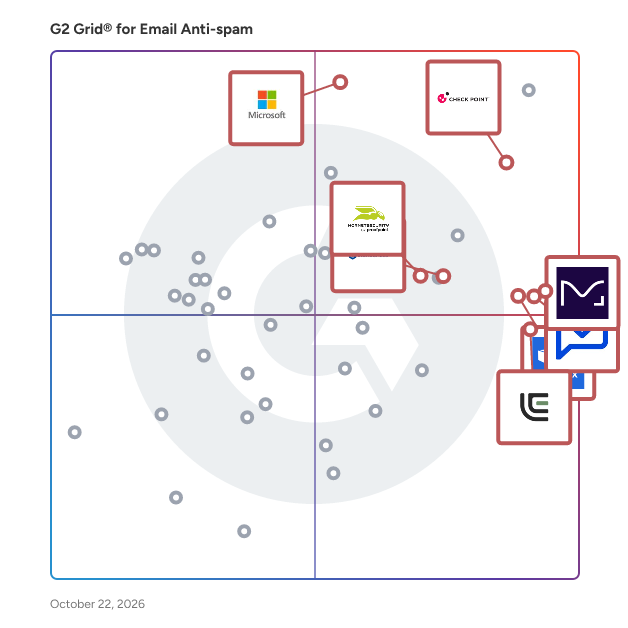
G2 Grid® for Email Anti-spam Software

G2 Grid® for Email Anti-spam Software plotting products by satisfaction and market presence

Highlighted products: Paubox, SaneBox, Valimail, Check Point Email Security, Microsoft Defender for Office 365, LibraCyber Email Security, Hornetsecurity 365 Total Protection, and IRONSCALES.

Underlying data: [Grid® JSON](https://www.g2.com/categories/email-anti-spam/grids.json?focus%5B%5D=paubox&focus%5B%5D=sanebox&focus%5B%5D=valimail&focus%5B%5D=check-point-email-security&focus%5B%5D=microsoft-microsoft-defender-for-office-365&focus%5B%5D=libracyber-email-security&focus%5B%5D=hornetsecurity-365-total-protection&focus%5B%5D=ironscales&segment=small-business)

Paubox

Paubox is a HIPAA compliant email security platform designed for healthcare organizations. It provides outbound email encryption and AI-powered inbound email protection, helping organizations safeguard protected health information (PHI) without changing how staff or patients use email. Email remains a critical communication tool in healthcare, but standard platforms like Google Workspace and Microsoft 365 are not HIPAA compliant on their own. Paubox makes compliance automatic and enhances security to defend against evolving phishing and malware attacks, all while maintaining a seamless user experience. Paubox serves small to mid-sized healthcare organizations, clinics, and IT teams seeking reliable compliance, reduced risk, and simple management. Key capabilities: - Automatic outbound encryption: Every message is encrypted by default; recipients read emails directly in their inbox, without portals or passwords - AI-powered inbound email security: Detects and blocks phishing, spoofing, and malware using generative AI analysis - Seamless integration: Works with Google Workspace, Microsoft 365, and Microsoft Exchange without new workflows or domain changes - Compliance and control: Supports HIPAA compliance and minimizes human error in handling PHI - Additional tools: Archiving, Data Loss Prevention, Paubox Email API, and Paubox Marketing Benefits: - Simplifies compliance management and reduces IT workload - Improves patient and staff experience with frictionless secure email - Strengthens protection against modern email threats Paubox enables healthcare organizations to confidently use email as a secure, compliant, and user-friendly communication channel, eliminating guesswork for staff and helping IT teams protect against data breaches and compliance risk.

Average Rating: 4.9/5.0

Total Reviews: 659

How Do G2 Users Rate Paubox?

  • Has the product been a good partner in doing business?: 9.8/10 (Category avg: 9.1/10)
  • Quality of Support: 9.7/10 (Category avg: 9.0/10)
  • Ease of Admin: 9.5/10 (Category avg: 8.9/10)
  • Ease of Use: 9.7/10 (Category avg: 9.0/10)

Who Is the Company Behind Paubox?

  • Seller: Paubox
  • Year Founded: 2015
  • HQ Location: San Francisco, CA
  • Twitter: @PauboxHQ
    16,577 Twitter followers
  • LinkedIn® Page: www.linkedin.com
    49 employees on LinkedIn®

Who Uses This Product?

  • Who Uses This: Owner, CEO
  • Top Industries: Mental Health Care, Hospital & Health Care
  • Company Size: 85% Small, 13% Medium

What Do G2 Reviewers Say About Paubox?

AI-generated summary from verified user reviews

Pros
  • Users appreciate the ease of use of Paubox, finding it simple to set up and integrate seamlessly.
  • Users value the seamless security of Paubox, enhancing peace of mind while handling sensitive information effectively.
  • Users commend the fantastic customer support from Paubox, highlighting their responsiveness and dedication to user satisfaction.
  • Users value the peace of mind from Paubox's email security, ensuring HIPAA compliance and protecting sensitive information.
  • Users find the setup ease of Paubox refreshing, enjoying quick integration and excellent customer support.
Cons
  • Users find Paubox to be expensive, noting pricing concerns despite the perceived value and available incentives.
  • Users experience occasional email delivery issues with Paubox, causing frustrations with missed messages and bounces.
  • Users find Paubox setup to be difficult, though the support team provides helpful guidance during the process.
  • Users find the email encryption visibility inadequate, as clients hesitate due to how different the emails appear.
  • Users feel there are encryption visibility issues that could lead to confusion for recipients about email security.

What Are Recent G2 Reviews of Paubox?

What Are G2 Users Discussing About Paubox?

SaneBox

SaneBox is an email management tool that helps the average worker save at least 2.5 hours per week so they can spend more time outside their inbox. Founded in 2011, SaneBox offers individuals and enterprise clients alike a full suite of email organizational tools to take back control of their inbox.

Average Rating: 4.8/5.0

Total Reviews: 242

How Do G2 Users Rate SaneBox?

  • Has the product been a good partner in doing business?: 9.7/10 (Category avg: 9.1/10)
  • Quality of Support: 9.7/10 (Category avg: 9.0/10)
  • Ease of Admin: 9.7/10 (Category avg: 8.9/10)
  • Ease of Use: 9.5/10 (Category avg: 9.0/10)

Who Is the Company Behind SaneBox?

  • Seller: SaneBox
  • Year Founded: 2010
  • HQ Location: Boston, MA
  • Twitter: @sanebox
    9,146 Twitter followers
  • LinkedIn® Page: www.linkedin.com
    14 employees on LinkedIn®

Who Uses This Product?

  • Who Uses This: Owner, CEO
  • Top Industries: Information Technology and Services, Marketing and Advertising
  • Company Size: 80% Small, 9% Medium

What Do G2 Reviewers Say About SaneBox?

AI-generated summary from verified user reviews

Pros
  • Users appreciate the ease of use of SaneBox, enjoying its effective auto sorting and simple initial setup.
  • Users appreciate the effective inbox management of SaneBox, simplifying email organization and promoting a clear workflow.
  • Users appreciate the auto sorting and mass delete features of SaneBox, effectively keeping their inbox organized.
  • Users praise SaneBox for its efficiency in organizing emails and achieving inbox zero effortlessly.
  • Users highlight the easy setup of SaneBox, finding it straightforward and efficient for managing their inbox.
Cons
  • Users find SaneBox expensive, especially when adding multiple accounts, impacting its overall value perception.
  • Users desire more features and customization in SaneBox, feeling the current set is limited for the price.
  • Users feel SaneBox lacks adequate AI features, requiring manual checking and limiting customization options.
  • Users find the lack of training requires time and oversight, as the AI still misses some spam.
  • Users report a steep learning curve, requiring time to train the AI for effective spam filtering.

What Are Recent G2 Reviews of SaneBox?

What Are G2 Users Discussing About SaneBox?

Valimail

Valimail: The Leader in Email Authentication & Brand Protection Valimail is the trusted leader in automated email authentication, helping organizations achieve and maintain DMARC enforcement up to 4x faster with a unique blend of speed, simplicity, and automation. By eliminating manual processes, Valimail ensures that your brand stays protected against phishing, spoofing, and email fraud while improving email deliverability and brand trust. Valimail offers three solutions: 1) Valimail Monitor provides organizations with global visibility into all senders using their domains, removing the complexity of interpreting raw DMARC reports. Key Features & Benefits: -See Who’s Sending on Your Behalf – Instantly identify all senders using your domain and authorize the right ones. -Check Google & Yahoo Readiness – Get a real-time check to ensure your domain meets Google & Yahoo’s latest DMARC, DKIM, and SPF requirements. -Preview BIMI for Your Brand – Upload your logo and see how it would appear in inboxes on mobile and desktop. >> First step towards DMARC enforcement – Identify and authorize all senders before making changes that impact email flow. 2) Valimail Enforce is the only FedRAMP-certified platform and the vetted DMARC partner for Microsoft 365, offering fully automated DMARC, SPF, and DKIM configuration to eliminate errors and simplify implementation. Key Features & Benefits: -Automated DMARC, DKIM, and SPF Configuration – Reduce the risk of misconfiguration and achieve enforcement faster. -Expert DMARC Support & Advisory Services – Get direct access to technical support for tailored guidance and rapid issue resolution. -Powerful Analytics & Reporting – Gain actionable insights into email performance, phishing attempts, and domain spoofing. >> Stop phishing attacks, prevent brand impersonation, and ensure only legitimate emails reach inboxes. 3) Valimail Amplify helps brands stand out in crowded inboxes by enabling BIMI (Brand Indicators for Message Identification) and displaying your verified brand logo directly in emails. Key Features & Benefits: -Enhanced Brand Visibility & Competitive Edge – Your logo appears directly in inboxes, making your emails instantly recognizable. -Boost Engagement & Trust – Recipients trust and engage more with branded emails, improving open rates and conversions. -Seamless BIMI Implementation – The only fully automated BIMI solution, offering single-click logo configuration and automated VMC/CMC management. -Effortless Brand Asset Management – Easily assign, update, or swap logos across domains. >> For companies at DMARC enforcement, Amplify accelerates BIMI adoption—ensuring your logo appears in inboxes faster. For more information visit www.valimail.com.

Average Rating: 4.5/5.0

Total Reviews: 673

How Do G2 Users Rate Valimail?

  • Has the product been a good partner in doing business?: 9.2/10 (Category avg: 9.1/10)
  • Quality of Support: 9.0/10 (Category avg: 9.0/10)
  • Ease of Admin: 9.1/10 (Category avg: 8.9/10)
  • Ease of Use: 8.9/10 (Category avg: 9.0/10)

Who Is the Company Behind Valimail?

  • Seller: Valimail
  • Company Website:
  • Year Founded: 2015
  • HQ Location: Denver, CO
  • Twitter: @ValiMail
    1,110 Twitter followers
  • LinkedIn® Page: linkedin.com
    101 employees on LinkedIn®

Who Uses This Product?

  • Who Uses This: IT Manager, Owner
  • Top Industries: Information Technology and Services, Computer Software
  • Company Size: 46% Small, 33% Medium

What Do G2 Reviewers Say About Valimail?

AI-generated summary from verified user reviews

Pros
  • Users appreciate the ease of use of Valimail, benefiting from its intuitive dashboard and automated tools.
  • Users value Valimail's automated DMARC enforcement, enhancing email security and simplifying the management process significantly.
  • Users praise the easy setup of Valimail, appreciating the straightforward process and helpful customer support during implementation.
  • Users appreciate the easy setup of Valimail, enabling quick configuration and effective DMARC management.
  • Users praise the brilliant reporting features of Valimail, enhancing security and simplifying domain management.
Cons
  • Users find Valimail expensive, especially small businesses struggling with additional costs for necessary features and subscriptions.
  • Users find Valimail's reporting limited and lacking in detail, reducing its effectiveness for audits and reviews.
  • Users find the complexity of Valimail's setup and learning curve challenging, especially for non-technical users.
  • Users find a lack of detail in Valimail's reporting and tier access, complicating their overall experience.
  • Users experience configuration difficulties with Valimail, especially in managing IPs and navigating the setup process.

What Are Recent G2 Reviews of Valimail?

What Are G2 Users Discussing About Valimail?

AI can help you find the answers. G2 helps you trust them.

Connect G2 to Claude or ChatGPT for answers grounded in G2's trusted reviews, comparisons, and pricing from real user insights.

How it works

Check Point Email Security

Check Point Harmony Email & Collaboration, protects enterprise data by preventing targeted attacks on SaaS applications and cloud-based email.

Average Rating: 4.6/5.0

Total Reviews: 487

How Do G2 Users Rate Check Point Email Security?

  • Has the product been a good partner in doing business?: 9.3/10 (Category avg: 9.1/10)
  • Quality of Support: 9.1/10 (Category avg: 9.0/10)
  • Ease of Admin: 9.3/10 (Category avg: 8.9/10)
  • Ease of Use: 9.2/10 (Category avg: 9.0/10)

Who Is the Company Behind Check Point Email Security?

Who Uses This Product?

  • Who Uses This: IT Manager, Systems Administrator
  • Top Industries: Information Technology and Services, Computer & Network Security
  • Company Size: 57% Medium, 23% Large

What Do G2 Reviewers Say About Check Point Email Security?

AI-generated summary from verified user reviews

Pros
  • Users value the effective email protection from Check Point Email Security, gaining peace of mind against threats.
  • Users value the robust security features of Check Point Email Security, effectively blocking phishing attacks and suspicious emails.
  • Users value the protection against phishing attacks provided by Check Point Email Security, ensuring peace of mind.
  • Users appreciate the ease of use of Check Point Email Security, enjoying a streamlined and efficient email management experience.
  • Users value the effective phishing protection of Check Point Email Security, enjoying peace of mind with automated threat handling.
Cons
  • Users report that Check Point Email Security has false positives, mistakenly marking important emails as spam frequently.
  • Users find the initial setup complexity and prolonged onboarding process frustrating, leading to inefficiencies and confusion.
  • Users express frustration with the complex setup process, finding it time-consuming and challenging to integrate with existing systems.
  • Users highlight the limited features of Check Point Email Security, wishing for broader support and configuration options.
  • Users experience configuration difficulties with Check Point Email Security, leading to prolonged onboarding and integration challenges.

What Are Recent G2 Reviews of Check Point Email Security?

What Are G2 Users Discussing About Check Point Email Security?

Microsoft Defender for Office 365

Microsoft Defender for Office 365 is a comprehensive security solution designed to protect organizations from advanced threats targeting email and collaboration tools within the Microsoft 365 environment. It offers robust protection against phishing, malware, and business email compromise, ensuring secure communication and collaboration across platforms like Exchange Online, Microsoft Teams, SharePoint, and OneDrive. Key Features and Functionality: - Safe Attachments: Scans email attachments in a secure environment to detect and block malicious content before it reaches users. - Safe Links: Provides real-time protection by analyzing URLs at the time of click, safeguarding users from malicious links. - Anti-Phishing Policies: Utilizes advanced algorithms and machine learning to identify and mitigate phishing attempts, including those involving domain impersonation. - Protection for Collaboration Tools: Extends security measures to Microsoft Teams, SharePoint, and OneDrive, ensuring safe file sharing and collaboration. - Automated Investigation and Response (AIR): Automates threat investigation processes, enabling swift identification and remediation of security incidents. - Attack Simulation Training: Offers tools to simulate phishing attacks, helping organizations educate employees and strengthen their security posture. Primary Value and Problem Solved: Microsoft Defender for Office 365 addresses the critical need for advanced threat protection in today's digital workplace. By integrating seamlessly with Microsoft 365 applications, it provides a unified defense against sophisticated cyber threats, reducing the risk of data breaches and ensuring business continuity. Its comprehensive approach not only safeguards email communications but also secures collaborative platforms, enabling organizations to operate confidently in a secure environment.

Average Rating: 4.5/5.0

Total Reviews: 282

How Do G2 Users Rate Microsoft Defender for Office 365?

  • Has the product been a good partner in doing business?: 8.8/10 (Category avg: 9.1/10)
  • Quality of Support: 8.7/10 (Category avg: 9.0/10)
  • Ease of Admin: 8.9/10 (Category avg: 8.9/10)
  • Ease of Use: 8.9/10 (Category avg: 9.0/10)

Who Is the Company Behind Microsoft Defender for Office 365?

  • Seller: Microsoft
  • Year Founded: 1975
  • HQ Location: Redmond, Washington
  • Twitter: @microsoft
    13,091,739 Twitter followers
  • LinkedIn® Page: www.linkedin.com
    232,750 employees on LinkedIn®
  • Ownership: MSFT

Who Uses This Product?

  • Who Uses This: Software Engineer, Associate Software Engineer
  • Top Industries: Information Technology and Services, Computer Software
  • Company Size: 39% Large, 37% Medium

What Do G2 Reviewers Say About Microsoft Defender for Office 365?

AI-generated summary from verified user reviews

Pros
  • Users value the seamless integration of Microsoft Defender for Office 365 across platforms, simplifying threat protection effortlessly.
  • Users value the advanced threat protection of Microsoft Defender for Office 365, ensuring robust security across collaboration platforms.
  • Users appreciate the advanced threat protection of Microsoft Defender for Office 365, ensuring robust security against various cyber threats.
  • Users value the seamless Office 365 integration of Microsoft Defender, ensuring comprehensive protection across all collaboration platforms.
  • Users highly value the seamless integration of Microsoft Defender for Office 365 with collaboration tools, enhancing security effortlessly.
Cons
  • Users find the complexity of setup and configuration to be overwhelming, especially for newcomers needing guidance.
  • Users report occasional false positives in spam filtering, disrupting workflows and affecting user experience.
  • Users face significant configuration difficulties due to multiple portals and complex licensing, impacting overall usability and effectiveness.
  • Users find limited reporting capabilities frustrating, as navigating dashboards can be cumbersome and time-consuming during investigations.
  • Users report poor detection, as the system occasionally flags low-risk items, complicating threat prioritization and workflow efficiency.

What Are Recent G2 Reviews of Microsoft Defender for Office 365?

What Are G2 Users Discussing About Microsoft Defender for Office 365?

LibraCyber Email Security

Protect your business from disruption, financial loss and reputational damage. LibraCyber Email Security stops known and emerging email threats from reaching their target, so you only receive legitimate messages. It provides exceptional email security by integrating cloud email and a secure email gateway with LibraCyber’s unique Adaptive Trust Engine that uses AI to learn the usual patterns of behavior for organizations and individuals, continuously assessing the strength of business-to-business trust and proactively holding anomalous traffic. LibraCyber Email Security scans and filters all inbound and outbound emails for advanced malware, phishing, business email compromise, spam and more. Proprietary sandboxing technology removes dangerous payloads and active content from attachments, and you can protect users from visiting unsafe sites with active URL analysis that checks every link. Use LibraCyber Email Security to understand the threat landscape and attacks launched against your organization, deal with security incidents faster, and see how you compare against others around the world. Easy to follow workflows make it painless to change configuration settings, and full reporting and dashboards give you full visibility of email traffic and trends so you can understand the risks and use insights to plan intelligent mitigation strategies.

Average Rating: 4.8/5.0

Total Reviews: 111

How Do G2 Users Rate LibraCyber Email Security?

  • Has the product been a good partner in doing business?: 9.6/10 (Category avg: 9.1/10)
  • Quality of Support: 9.8/10 (Category avg: 9.0/10)
  • Ease of Admin: 9.4/10 (Category avg: 8.9/10)
  • Ease of Use: 9.3/10 (Category avg: 9.0/10)

Who Is the Company Behind LibraCyber Email Security?

  • Seller: LibraCyber
  • Company Website:
  • Year Founded: 2013
  • HQ Location: Lecco, IT
  • LinkedIn® Page: www.linkedin.com
    221 employees on LinkedIn®

Who Uses This Product?

  • Who Uses This: IT Manager
  • Top Industries: Information Technology and Services, Computer & Network Security
  • Company Size: 46% Medium, 35% Small

What Do G2 Reviewers Say About LibraCyber Email Security?

AI-generated summary from verified user reviews

Pros
  • Users value the ease of use of LibraCyber Email Security, praising its simple configuration and efficient dashboard.
  • Users appreciate the fast, reliable support of LibraCyber Email Security, enhancing their overall experience and management capabilities.
  • Users find the effective spam filter and advanced security features of LibraCyber Email Security invaluable for safeguarding their emails.
  • Users commend the remarkable effectiveness of LibraCyber Email Security, enhancing email protection with advanced features and support.
  • Users rave about the setup ease of LibraCyber Email Security, benefiting from quick configuration and minimal spam.
Cons
  • Users find the complexity of setup and configuration in LibraCyber Email Security to be a significant hurdle.
  • Users find the user interface sluggish and unintuitive, impacting their overall experience with LibraCyber Email Security.
  • Users express frustration over access issues limiting advanced troubleshooting and preventing necessary OS-level interventions.
  • Users find the difficult setup of LibraCyber Email Security challenging, especially for those lacking experience with email systems.
  • Users experience email delivery issues due to SPF/DKIM problems and occasional filter bypasses, requiring manual adjustments.

What Are Recent G2 Reviews of LibraCyber Email Security?

Hornetsecurity 365 Total Protection

365 Total Protection is the only solution on the market to cover all aspects of security, compliance and backup for Microsoft 365. Choose from various bundles to suit your business needs, and enjoy state-of-the-art email security that protects against spam, viruses, phishing and ransomware; plus email signatures and disclaimers. You can also benefit from Advanced Threat Protection (ATP) to defend your users against the most sophisticated email attacks, automated email continuity to prevent unexpected downtime and legally compliant email archiving to keep all emails safe and searchable. You can even opt for backup and recovery for endpoints and Microsoft 365 data in mailboxes, Teams, OneDrive and SharePoint. 365 Total Protection‘s tailored integration with Microsoft 365 simplifies your entire experience: from signup, to setup, to feature and user management. Its central console is a perfect blend of data privacy and ease of use, enabling you to do more and worry less.

Average Rating: 4.6/5.0

Total Reviews: 65

How Do G2 Users Rate Hornetsecurity 365 Total Protection?

  • Has the product been a good partner in doing business?: 9.0/10 (Category avg: 9.1/10)
  • Quality of Support: 8.9/10 (Category avg: 9.0/10)
  • Ease of Admin: 8.8/10 (Category avg: 8.9/10)
  • Ease of Use: 9.1/10 (Category avg: 9.0/10)

Who Is the Company Behind Hornetsecurity 365 Total Protection?

  • Seller: Hornetsecurity
  • Company Website:
  • Year Founded: 2007
  • HQ Location: Hannover, DE
  • Twitter: @Hornetsecurity
    1,115 Twitter followers
  • LinkedIn® Page: www.linkedin.com
    562 employees on LinkedIn®

Who Uses This Product?

  • Top Industries: Computer & Network Security, Information Technology and Services
  • Company Size: 49% Small, 46% Medium

What Do G2 Reviewers Say About Hornetsecurity 365 Total Protection?

AI-generated summary from verified user reviews

Pros
  • Users value the robust email protection of Hornetsecurity 365, appreciating its seamless integration and spam management features.
  • Users value the robust email protection provided by Hornetsecurity 365, effectively safeguarding against spam and malware.
  • Users highlight the ease of use of Hornetsecurity 365 Total Protection, appreciating its simple setup and effective management.
  • Users value the multi-layered malware protection of Hornetsecurity 365 Total Protection, enhancing email security significantly.
  • Users value the seamless integration with Office 365, enhancing email protection and user experience effortlessly.
Cons
  • Users find the user interface too complex, making it hard to navigate and locate essential documentation.
  • Users find the confusing interface and unclear settings hinder overall user experience and usability.
  • Users find the complexity of settings and admin roles challenging, leading to a complicated overall experience.
  • Users face configuration difficulties with Hornetsecurity 365 Total Protection, requiring significant effort to customize settings effectively.
  • Users find the difficult setup challenging, requiring extensive reading and navigation to achieve optimal performance.

What Are Recent G2 Reviews of Hornetsecurity 365 Total Protection?

What Are G2 Users Discussing About Hornetsecurity 365 Total Protection?

IRONSCALES

IRONSCALES is a cloud-native email security platform that helps enterprises and MSPs close gaps with mailbox-level detection, autonomous remediation, and built-in user training. It combines AI and human insights that continuously learn from user behavior, message context, and analyst feedback to identify advanced threats like BEC, account takeovers, impersonation, and other advanced phishing attacks. IRONSCALES is headquartered in Atlanta, Georgia and is proud to serve more than 18,000 customers globally. IRONSCALES leverages adaptive AI and its Agentic AI engine, Themis, to drive autonomous, mailbox-level remediation with customizable automation. Smart clustering, context-driven decisioning, and user-reported inputs enable Themis to remediate threats in real time while preserving analyst oversight and control. Designed for rapid deployment via API, IRONSCALES integrates with existing security stacks without requiring MX record changes. To reduce risk, improve SOC efficiency, and support a proactive security culture, its comprehensive capabilities also include: - Phishing Simulations - Security Awareness Training - DMARC management - Deepfake Live Protection - Generative AI tools

Average Rating: 4.7/5.0

Total Reviews: 67

How Do G2 Users Rate IRONSCALES?

  • Has the product been a good partner in doing business?: 9.7/10 (Category avg: 9.1/10)
  • Quality of Support: 9.3/10 (Category avg: 9.0/10)
  • Ease of Admin: 9.4/10 (Category avg: 8.9/10)
  • Ease of Use: 9.5/10 (Category avg: 9.0/10)

Who Is the Company Behind IRONSCALES?

  • Seller: IRONSCALES
  • Company Website:
  • Year Founded: 2014
  • HQ Location: Atlanta, Georgia
  • Twitter: @IRONSCALES
    3,518 Twitter followers
  • LinkedIn® Page: www.linkedin.com
    181 employees on LinkedIn®

Who Uses This Product?

  • Top Industries: Information Technology and Services, Non-Profit Organization Management
  • Company Size: 46% Medium, 35% Small

What Do G2 Reviewers Say About IRONSCALES?

AI-generated summary from verified user reviews

Pros
  • Users appreciate the ease of use of IRONSCALES, benefiting from its quick integration and effective phishing protection.
  • Users benefit from strong phishing protection with IRONSCALES, effectively reducing scam and spam emails.
  • Users value the easy implementation of IRONSCALES, which enhances email security and reduces administrative overhead.
  • Users love the easy setup of IRONSCALES, allowing quick implementation and immediate phishing detection.
  • Users highly value the outstanding customer support from IRONSCALES, ensuring prompts assistance and a secure email experience.
Cons
  • Users occasionally experience false positives, which can be a minor inconvenience in email security management.
  • Users experience poor detection issues with IRONSCALES, as urgent alerts sometimes fail and incidents may be misclassified.
  • Users note the limited features of IRONSCALES, particularly in customization and user access roles, impacting usability.
  • Users find the difficult training modules lack comprehensive overview, causing minor inconvenience during the learning process.
  • Users express concern over email filtering issues, fearing potential risks before automatic remediation takes place.

What Are Recent G2 Reviews of IRONSCALES?

Cloudflare One (SASE)

Cloudflare One is a single-vendor secure access service edge (SASE) platform that converges security and networking services into a unified, global connectivity cloud. It replaces legacy, fragmented hardware and first-generation SASE solutions with a composable, programmable architecture. Cloudflare One connects and protects an organization's workforce, AI agents, and infrastructure. Learn more at https://www.cloudflare.com/sase/ Designed for agility, it enables teams to: - Accelerate safe AI adoption with granular visibility, control, and AI agent governance. - Modernize remote access by replacing clunky VPNs with zero trust access. - Block email phishing attacks with flexible, SASE-native email security. - Protect web traffic for remote users and branch offices with lightweight DNS filtering. - Deploy “coffee shop networking” with a light branch, heavy cloud approach.

Average Rating: 4.6/5.0

Total Reviews: 103

How Do G2 Users Rate Cloudflare One (SASE)?

  • Has the product been a good partner in doing business?: 9.5/10 (Category avg: 9.1/10)
  • Quality of Support: 9.2/10 (Category avg: 9.0/10)
  • Ease of Admin: 9.0/10 (Category avg: 8.9/10)
  • Ease of Use: 9.1/10 (Category avg: 9.0/10)

Who Is the Company Behind Cloudflare One (SASE)?

  • Seller: Cloudflare, Inc.
  • Year Founded: 2009
  • HQ Location: San Francisco, California
  • Twitter: @Cloudflare
    286,254 Twitter followers
  • LinkedIn® Page: www.linkedin.com
    8,094 employees on LinkedIn®
  • Ownership: NYSE: NET

Who Uses This Product?

  • Top Industries: Information Technology and Services, Computer & Network Security
  • Company Size: 38% Small, 33% Medium

What Do G2 Reviewers Say About Cloudflare One (SASE)?

AI-generated summary from verified user reviews

Pros
  • Users value the ease of use of Cloudflare One, appreciating its intuitive design and seamless integration with existing systems.
  • Users praise the excellent threat protection of Cloudflare One, ensuring security without compromising performance.
  • Users value the reliability of Cloudflare One, ensuring consistent performance and security for seamless operations.
  • Users value the superior security features of Cloudflare One, enhancing protection and performance seamlessly across networks.
  • Users appreciate the intuitive and unified user interface of Cloudflare One, simplifying management for IT teams.
Cons
  • Users find a steep learning curve with Cloudflare One, as onboarding and feature familiarity can be challenging.
  • Users find the complexity of Cloudflare One's setup and documentation to hinder their onboarding experience.
  • Users find the difficult learning curve of Cloudflare One challenging, especially for new and advanced features.
  • Users note a difficult learning curve for Cloudflare One, particularly with its dashboard and policy setup complexities.
  • Users face a difficult setup process in Cloudflare One, often struggling with complexity and incomplete documentation.

What Are Recent G2 Reviews of Cloudflare One (SASE)?

What Are G2 Users Discussing About Cloudflare One (SASE)?

Proofpoint Core Email Protection

Proofpoint Collaboration Security tackles multichannel, multistage attacks with 99.999% detection accuracy. It identifies and remediates advanced email threats including BEC, ransomware, phishing, ATO, and exec impersonations. The solution blocks threats across email and other digital communication and collaboration platforms, i.e. MS Teams, WhatsApp, Slack, LinkedIn, OneDrive, protecting users anywhere they work, on any device. Customers get protection against both internal and supplier account compromise, and strengthens human resilience against emerging threats. With Proofpoint’s Collaboration Security, customers ensure that interactions with business partners, suppliers, and even AI agents remain trusted and secure.

Average Rating: 4.6/5.0

Total Reviews: 615

How Do G2 Users Rate Proofpoint Core Email Protection?

  • Has the product been a good partner in doing business?: 9.2/10 (Category avg: 9.1/10)
  • Quality of Support: 8.8/10 (Category avg: 9.0/10)
  • Ease of Admin: 8.5/10 (Category avg: 8.9/10)
  • Ease of Use: 8.5/10 (Category avg: 9.0/10)

Who Is the Company Behind Proofpoint Core Email Protection?

  • Seller: Proofpoint
  • Company Website:
  • Year Founded: 2002
  • HQ Location: Sunnyvale, CA
  • Twitter: @proofpoint
    31,157 Twitter followers
  • LinkedIn® Page: www.linkedin.com
    5,261 employees on LinkedIn®

Who Uses This Product?

  • Who Uses This: Information Security Analyst, IT Security Engineer
  • Top Industries: Financial Services, Hospital & Health Care
  • Company Size: 66% Large, 29% Medium

What Do G2 Reviewers Say About Proofpoint Core Email Protection?

AI-generated summary from verified user reviews

Pros
  • Users highlight the exceptional malware protection provided by Proofpoint Core Email Protection, ensuring robust security and support.
  • Users value the reliable email security of Proofpoint Core Email Protection, ensuring peace of mind at work.
  • Users value the effective anti-phishing and anti-malware capabilities of Proofpoint, ensuring robust email security from day one.
  • Users value the effective security of Proofpoint Core Email Protection, ensuring reliable email safety for their environment.
  • Users value the ease of use in Proofpoint Core Email Protection, appreciating its simple interface and effective security.
Cons
  • Users find the UI confusing, with multiple portals making navigation challenging despite the tool’s robust capabilities.
  • Users find the configuration process complex, which can lead to difficulties in setting up email protection policies.
  • Users experience intermittent email access issues and slow updates, along with challenges from false positives and misdirected emails.
  • Users report a high rate of false positives, causing legitimate emails to be flagged as spam frequently.
  • Users find the lack of certain features in Proofpoint Core Email Protection frustrating, especially missing audit logs and API capabilities.

What Are Recent G2 Reviews of Proofpoint Core Email Protection?

What Are G2 Users Discussing About Proofpoint Core Email Protection?

Vade

Vade is a global cybersecurity company specializing in developing threat detection and response technology with artificial intelligence. Founded in 2009 in Hem, France, Vade has eight global locations, including offices in the US, France, Japan, Canada, and Israel. Vade for M365 is a threat detection and response solution for Microsoft 365 that is purpose-built for MSPs. Vade combines powerful, AI-based protection with integrated, no-cost features that help MSPs save time, reduce admin workload, and generate more ROI from cybersecurity: • Phishing, spear phishing, and malware/ransomware protection • Auto- and assisted remediation • Multi-tenant incident response • Automated user awareness training • SIEM integration • Error-free configuration • Deploy in minutes • No MX record change • Layers with EOP/ATP

Average Rating: 4.6/5.0

Total Reviews: 169

How Do G2 Users Rate Vade?

  • Has the product been a good partner in doing business?: 9.2/10 (Category avg: 9.1/10)
  • Quality of Support: 9.2/10 (Category avg: 9.0/10)
  • Ease of Admin: 9.3/10 (Category avg: 8.9/10)
  • Ease of Use: 9.5/10 (Category avg: 9.0/10)

Who Is the Company Behind Vade?

  • Seller: Vade
  • Year Founded: 2009
  • HQ Location: Hem, Hauts-de-France
  • Twitter: @VadeSecure
    1,841 Twitter followers
  • LinkedIn® Page: www.linkedin.com
    214 employees on LinkedIn®

Who Uses This Product?

  • Top Industries: Information Technology and Services, Computer & Network Security
  • Company Size: 56% Small, 38% Medium

What Do G2 Reviewers Say About Vade?

AI-generated summary from verified user reviews

Pros
  • Users value Vade's AI-driven threat detection, effectively preventing phishing, malware, and cyber threats in real time.
  • Users praise Vade for its AI-driven threat detection that effectively prevents phishing and malware in real time.
  • Users value the AI-driven threat detection of Vade, which effectively prevents phishing and malware in real time.
  • Users value the AI-driven threat detection of Vade, effectively preventing phishing and malware in real time.
  • Users value the AI-driven threat detection of Vade, which effectively prevents phishing and other cyber threats in real time.
Cons
  • Users experience false positives with Vade, as legitimate emails are occasionally blocked by the AI-driven detection system.
  • Users report experiencing website blocking issues due to false positives in Vade's AI-driven detection system.

What Are Recent G2 Reviews of Vade?

What Are G2 Users Discussing About Vade?

Intermedia Exchange Email

Intermedia Hosted Exchange provides a comprehensive cloud-based Microsoft Exchange Online experience to small to midsize businesses (SMBs). Highlights include versatile security options and white glove email migration support. Exchange Email is one of 30+ essential business applications from Intermedia. With a single control panel, your cloud is easier to use and more efficient to manage. Plus there's just one bill, one password and one support team. Join the 1.4M business users that trust Intermedia with their communication needs and experience: Unbelievable uptime: Our 99.999% uptime SLA means no more than 26 seconds of unplanned downtime per month. J.D. Power-certified 24/7 support: Our expert support is certified by J.D. Power as "exceptional". We're here for you by phone or chat. Expert migration and onboarding: — FREE! Our Cloud Concierge™experts will create a custom migration plan with no downtime or data loss.

Average Rating: 3.9/5.0

Total Reviews: 23

How Do G2 Users Rate Intermedia Exchange Email?

  • Has the product been a good partner in doing business?: 8.3/10 (Category avg: 9.1/10)
  • Quality of Support: 8.6/10 (Category avg: 9.0/10)
  • Ease of Admin: 9.6/10 (Category avg: 8.9/10)
  • Ease of Use: 9.2/10 (Category avg: 9.0/10)

Who Is the Company Behind Intermedia Exchange Email?

  • Seller: Intermedia
  • Year Founded: 1993
  • HQ Location: Sunnyvale, California
  • Twitter: @intermedia_net
    4,556 Twitter followers
  • LinkedIn® Page: www.linkedin.com
    1,410 employees on LinkedIn®

Who Uses This Product?

  • Top Industries: Information Technology and Services
  • Company Size: 65% Small, 30% Medium

What Are Recent G2 Reviews of Intermedia Exchange Email?

What Are G2 Users Discussing About Intermedia Exchange Email?

CyberSentriq

CyberSentriq is an integrated cybersecurity and data protection platform, leveraging solutions from two best-of breed vendors in the MSP space. Partnering with over 3,000 MSPs and protecting over 150,000 SMBs globally, CyberSentriq provides an unmatched combination of proactive AI-driven email and web security, advanced data protection, and operational resilience. The CyberSentriq platform offers: - Data backup & recovery for Microsoft M365 & Entra ID, Azure, Google workspace and more - AI-driven threat intelligence and detection - Advanced email security at both the Mail Exchange (MX) and Integrated Cloud Email Security (ICES) layers. - Security awareness services - Phishing simulation - Email archiving and encryption

Average Rating: 4.6/5.0

Total Reviews: 385

How Do G2 Users Rate CyberSentriq?

  • Has the product been a good partner in doing business?: 9.4/10 (Category avg: 9.1/10)
  • Quality of Support: 9.1/10 (Category avg: 9.0/10)
  • Ease of Admin: 9.2/10 (Category avg: 8.9/10)
  • Ease of Use: 9.3/10 (Category avg: 9.0/10)

Who Is the Company Behind CyberSentriq?

  • Seller: CyberSentriq
  • Company Website:
  • Year Founded: 2025
  • HQ Location: Galway ,Galway
  • Twitter: @Redstor
    1,949 Twitter followers
  • LinkedIn® Page: www.linkedin.com
    206 employees on LinkedIn®

Who Uses This Product?

  • Who Uses This: IT Manager, Director
  • Top Industries: Information Technology and Services, Computer & Network Security
  • Company Size: 47% Medium, 41% Small

What Do G2 Reviewers Say About CyberSentriq?

AI-generated summary from verified user reviews

Pros
  • Users appreciate the ease of use of CyberSentriq, benefiting from its user-friendly interface and efficient cloud solutions.
  • Users commend the exceptional restore capability of CyberSentriq, allowing versatile recovery across multiple platforms effortlessly.
  • Users love the ease of tracking and reviewing backups with Redstore, enhancing data management efficiency and reliability.
  • Users value the exceptional backup and restore features of CyberSentriq, ensuring efficient data recovery across platforms.
  • Users appreciate the reliable daily backups of CyberSentriq, ensuring quick access and minimal downtime during recovery.
Cons
  • Users face backup issues due to vague reporting and no scheduled backups on user endpoints, complicating restoration efforts.
  • Users express the need for improved reporting features in CyberSentriq for better troubleshooting and transparency.
  • Users find the reporting inadequate for troubleshooting, lacking detail needed for effective error resolution and analysis.
  • Users struggle with backup failures, finding error resolution tedious and reporting on Office 365 insufficient for troubleshooting.
  • Users find the reporting issues in CyberSentriq unsatisfactory, lacking detail and options for effective auditing.

What Are Recent G2 Reviews of CyberSentriq?

What Are G2 Users Discussing About CyberSentriq?

INKY Email Security Platform

INKY is the behavioral email security platform that blocks threats, prevents data leaks, and coaches users to make smart decisions. Like a security coach, it signals suspicious behaviors with interactive banners that guide users to take safe action on any device or email client. IT teams don’t face the burden of filtering every email themselves or maintaining multiple systems. Through powerful technology and intuitive user engagement, INKY keeps bad actors out for good. Smarter AI-powered email security, beyond Graphus.

Average Rating: 4.2/5.0

Total Reviews: 119

How Do G2 Users Rate INKY Email Security Platform?

  • Has the product been a good partner in doing business?: 8.7/10 (Category avg: 9.1/10)
  • Quality of Support: 8.6/10 (Category avg: 9.0/10)
  • Ease of Admin: 8.8/10 (Category avg: 8.9/10)
  • Ease of Use: 8.6/10 (Category avg: 9.0/10)

Who Is the Company Behind INKY Email Security Platform?

  • Seller: Kaseya
  • Company Website:
  • Year Founded: 2000
  • HQ Location: Miami, FL
  • Twitter: @KaseyaCorp
    17,411 Twitter followers
  • LinkedIn® Page: www.linkedin.com
    5,483 employees on LinkedIn®

Who Uses This Product?

  • Top Industries: Information Technology and Services, Computer & Network Security
  • Company Size: 55% Small, 33% Medium

What Do G2 Reviewers Say About INKY Email Security Platform?

AI-generated summary from verified user reviews

Pros
  • Users value the cross-platform compatibility of INKY Email Security, seamlessly integrating with Microsoft for enhanced functionality.
  • Users praise the seamless integration of INKY Email Security Platform with Microsoft, enhancing their overall experience.
  • Users appreciate the easy integrations of INKY Email Security Platform, especially its seamless compatibility with Microsoft.
  • Users praise the seamless integration with Microsoft, enhancing their experience with INKY Email Security Platform.
  • Users value the seamless integration with Microsoft, enhancing their experience with the INKY Email Security Platform.
Cons
  • Users find setup for Google tricky, but they acknowledge the platform's overall excellence and effectiveness.
  • Users find the difficult setup for INKY Email Security Platform challenging, despite its otherwise flawless performance.

What Are Recent G2 Reviews of INKY Email Security Platform?

What Are G2 Users Discussing About INKY Email Security Platform?

N-able Mail Assure

N-able™ Mail Assure is cloud-based email security helps you and your customers stay in control and protect inbound and outbound email using collective threat intelligence, 24/7 email continuity, and long-term email archiving. Proprietary filtering technology, combined with real-time pattern threat recognition and machine learning technology, helps protect users against advanced phishing attacks, ransomware, malware, spam, and other email-borne threats. N-able™ Mail Assure offers: • Advanced threat protection for inbound and outbound email • Built-in 24/7 email continuity to maintain business productivity • Encrypted, long-term email archiving • A Private Portal for specifically business-critical emails • 99.99% malware catch rate, as certified by Virus Bulletin: https://www.virusbulletin.com/virusbulletin/2022/06/vbspam-comparative-review/ • A multitenant web interface designed for your technicians and end-users • Seamless integration with Microsoft 365™ • Quarantine reports to give users visibility over email flow

Average Rating: 4.0/5.0

Total Reviews: 67

How Do G2 Users Rate N-able Mail Assure?

  • Has the product been a good partner in doing business?: 8.0/10 (Category avg: 9.1/10)
  • Quality of Support: 8.0/10 (Category avg: 9.0/10)
  • Ease of Admin: 8.2/10 (Category avg: 8.9/10)
  • Ease of Use: 7.8/10 (Category avg: 9.0/10)

Who Is the Company Behind N-able Mail Assure?

  • Seller: N-able
  • HQ Location: Morrisville, North Carolina
  • Twitter: @Nable
    15,859 Twitter followers
  • LinkedIn® Page: www.linkedin.com
    2,307 employees on LinkedIn®
  • Ownership: NYSE: NABL

Who Uses This Product?

  • Top Industries: Information Technology and Services, Computer & Network Security
  • Company Size: 69% Small, 24% Medium

What Do G2 Reviewers Say About N-able Mail Assure?

AI-generated summary from verified user reviews

Pros
  • Users value the user-friendly and strong email security provided by N-able Mail Assure, enhancing their experience.
  • Users value the strong email security and advanced filtering features of N-able Mail Assure for reliability.
  • Users value the easy customization of N-able Mail Assure, enabling quick integration with Microsoft 365 and Google Workspace.
  • Users find the dashboard easy to understand, enabling quick data analysis with intuitive bar and pie charts.
  • Users appreciate the intuitive dashboard updates of N-able Mail Assure, enabling quick data analysis through clear visuals.
Cons
  • Users experience slow customer support, which can hinder timely resolutions and overall satisfaction with the service.
  • Users note the slow performance of N-able Mail Assure, which affects their overall productivity and experience.
  • Users express concern over email security vulnerabilities in N-able Mail Assure, especially regarding MX records and potential attack strategies.
  • Users express frustration with the limited customization options available and the slow support response times.
  • Users express dissatisfaction with the limited customization options and slow support of N-able Mail Assure.

What Are Recent G2 Reviews of N-able Mail Assure?

What Are G2 Users Discussing About N-able Mail Assure?

Lauren Worth
LW
Researched and written by Lauren Worth
Updated
Reviews & FAQs

Reviews Summary: The Best Email Anti-spam Software for Small-Business Businesses

Thanks to 6102 Email Anti-spam software reviews and associated data from users working for small-sized companies, at G2 we have some of the most definitive data on the best Email Anti-spam software for the smaller space. We have identified 24 individual Email Anti-spam products offering the features, pricing and support that Small-Business companies look for when comparing Email Anti-spam software and solutions. These reviews are generated using the qualitative and quantitative feedback from G2 members working in small-sized companies and who have used these Email Anti-spam software products.

When G2 reviewers submit their Email Anti-spam software reviews, they often provide information on the type of company they work for and what market segment they belong to. We break these different market segments into three distinct groups:

  • Small Business Email Anti-spam Software Reviews (< 50 employees)
  • smaller Email Anti-spam Software Reviews (51-1,000 employees)
  • Enterprise Email Anti-spam Software Reviews (1,001+ employees)

smaller businesses have their own unique requirements when it comes to Email Anti-spam software compared to small or enterprise companies. That is why these individual small-sized company Email Anti-spam software reviews are especially helpful when comparing product set up, ease of use and overall cost.

Below you will find FAQs and review snippets for Email Anti-spam software products that work well in smaller environments. These reviews are written by real G2 users working for these Small-Business companies who have real-world experience with these Email Anti-spam software products.

FAQs About Email Anti-spam Software for Small-Business Businesses

Q. What are the best Email Anti-spam software products for small-sized businesses, according to G2 reviewers?
  • SaneBox - 4.9-stars, 148 reviews (81% from smaller reviewers)
  • Paubox - 4.9-stars, 52 reviews (65% from smaller reviewers)
  • Valimail - 4.4-stars, 74 reviews (52% from smaller reviewers)
  • Check Point Email Security - 4.5-stars, 66 reviews (17% from smaller reviewers)
  • Microsoft Defender for Office 365 - 4.5-stars, 64 reviews (28% from smaller reviewers)
Q. What are the least-liked Email Anti-spam software products for professionals at small-sized companies, based on the overall G2 rating?
  • IronVest InboxGuard - 4.7-stars, 15 reviews (65% from smaller reviewers)
  • Trellix Email Security - 3.9-stars, 11 reviews (37% from smaller reviewers)
  • Phish Protection by DuoCircle - 4.8-stars, 23 reviews (61% from smaller reviewers)
  • Security Gateway - 4.7-stars, 16 reviews (57% from smaller reviewers)
  • Validity Engage - 4.3-stars, 94 reviews (35% from smaller reviewers)
Q. What are the highest-rated Email Anti-spam software tool features according to employees at Small-Business companies?
  • Phishing Protection - 5.0-stars
  • Autonomous Task Execution - 4.1-stars
  • Proactive Assistance - 3.7-stars
Q. What are the features that are rated lowest by employees at Small-Business companies?
  • Not enough data to answer this question.
Q. How many Email Anti-spam software reviews are from users working in smaller companies?

1041 out of all Email Anti-spam software reviews on G2 are from users working in Small-Business companies (17%).

Here's What Reviewers Working at smaller Businesses Have to Say About Email Anti-spam Software

What Small-Business Professionals Liked What Small-Business Professionals Disliked

SaneBox: “Sane Reminders make sure items that need follow-up come back into my inbox, saving me the time of keeping a separate to-do list. It's an incredible time-saver. The Sand Digest that brings me all my emails that aren't urgent at times I've selected helps me maintain my focus. It's an incredible business tool that I'm not sure how I ever managed without!”

Read Review

Validity Engage: “They dropped their self-service package with only 1 month's warning and no migration path except for to upgrade to their (unaffordable) enterprise package. I also didn't even realize they did this because they sent the email from their marketing domain, which I have under my email filters (rich, for an email company!) Do not trust these guys. Support is just an AI robot that tells you to buy the enterprise package. Absolute joke.”

Read Review

MailWasher: “I like that it's very easy to set up and offers great flexibility in how emails are filtered for different users.”

Read Review

INKY Email Security Platform: “The support team is inexperienced and no help. After following their support procedures, I have found that their team does not have an effective process to have issues addressed within a reasonable amount of time. Example: There was a PDF stripped from a client email. When I attempted to recover the email from Graphus the platform failed and only provided "Attachment recovery error". After raising the issue with the vendor, it took them over a day to assign the issue, the support rep(Angel) could only manage one message per day and did not understand the request to recover the pdf from their system. After 2 weeks this became a time sensitive issue, and I connected with my AM about it 3 times along with escalating the issue on my side once and the issue is still unresolved. It has been a total of 3 weeks, and no progress has been made.”

Read Review

Microsoft Defender for Office 365: “MS defender protects you from all possible threats like malware, trojan, rootkit, and all possible virus threats.”

Read Review

SpamTitan Email Security: “Customer service. Employees knowledge of product. Ability for product to work as expected. Missing basic functionality like ability to block spam mail or allow mail that isn't spam.”

Read Review

Recommendations To Others Problems Solved & Benefits

Paubox: “Go for PauBox, and pair it with Google Workspace (formerly GSuite), they interface seamlessly well together!”

Read Review

Abnormal AI: “It reduces the manual effort of scanning suspicious emails. It scans incoming email attachments first and only allows them through if they look safe, which helps provide complete security. It also sends phishing alerts.”

Read Review

Paubox: “Look at reviews of competition.”

Read Review

Proofpoint Core Email Protection: “Pretty much everything related to the email gateway.”

Read Review

SaneBox: “Takes some time for training but once established, it's a breeze to use.”

Read Review

Proofpoint Core Email Protection: “Quarantine suspicious emails before they become a threat to our environment.”

Read Review