Best E-Signature Software for Small Business - Page 2

How Many E-Signature Software Products Does G2 Track?

Total Products under this Category: 583

Category Stats (Oct 2026)

  • Average Rating: 4.59/5 The average rating of products in this category, based on all submitted ratings
  • Top Trending Product: Docusign (+0.2%) - Among all products in this category, Docusign recorded the largest rating increase compared to last month

Last updated: October 13, 2026

How Does G2 Rank E-Signature Software Products?

Why You Can Trust G2's Software Rankings:

  • 30 Analysts and Data Experts
  • 58,500+ Authentic Reviews
  • 583+ Products
  • Unbiased Rankings

G2's software rankings are built on verified user reviews, rigorous moderation, and a consistent research methodology maintained by a team of analysts and data experts. Each product is measured using the same transparent criteria, with no paid placement or vendor influence. While reviews reflect real user experiences, which can be subjective, they offer valuable insight into how software performs in the hands of professionals. Together, these inputs power the G2 Score, a standardized way to compare tools within every category.

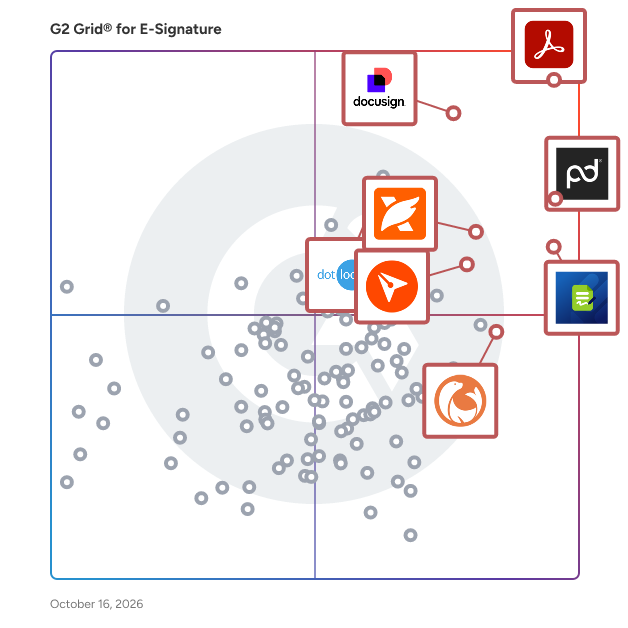
G2 Grid® for E-Signature Software

G2 Grid® for E-Signature Software plotting products by satisfaction and market presence

Highlighted products: Adobe Acrobat, PandaDoc, Jotform Sign, Docusign, BoldSign, Foxit PDF Editor, DocuSeal, and dotloop.

Underlying data: [Grid® JSON](https://www.g2.com/categories/e-signature/grids.json?focus%5B%5D=adobe-acrobat&focus%5B%5D=pandadoc&focus%5B%5D=jotform-sign&focus%5B%5D=docusign&focus%5B%5D=boldsign&focus%5B%5D=foxit-pdf-editor&focus%5B%5D=docuseal&focus%5B%5D=dotloop&segment=small-business)

Zoho Sign

Zoho Sign is a digital signing service that lets you execute contracts quickly without the hassles of handling paper documents while ensuring security and legality. It works completely on cloud and integrates readily with your everyday apps for a completely seamless signing experience. Zoho Sign is built on PKI technology with AES-256 encryption, it ensures every signature is tamper-proof. Configure sequential or parallel signing workflows, authenticate signers using OTP or government-issued IDs, without a line of code. Track document status in real time, automate reminders, and maintain complete audit trails. Zoho Sign supports qualified electronic signatures through certified trust service providers, making it ideal for regulated industries along with APIs, webhooks, and SDKs that make it flexible. Documents that can be signed: - NDAs - Invoices - Sales contracts - Business proposals - Purchase orders - Lease agreements - Partnership agreements - Employment offers and more. Key features: - Sign workflows via email, SMS, and WhatsApp - Reusable and shareable document templates - Bulk send, bulk sign, and in-person signing - Conditional and formula-based signer fields - Public form-based signing via SignForms - Signer authentication via OTP and trust services - Automatic cloud backup - Qualified and advanced electronic signatures - Custom branding and white labeling - Trusted document timestamping - REST APIs, webhooks, mobile and web SDKs - Control module for Life Sciences and Healthcare - Custom user groups, controls, and permissions - AI-powered workflows - Blockchain-based timestamping Support URL: https://www.zoho.com/sign/contact.html?src=G2

Average Rating: 4.4/5.0

Total Reviews: 62

How Do G2 Users Rate Zoho Sign?

  • Has the product been a good partner in doing business?: 9.5/10 (Category avg: 9.2/10)
  • Performance and Reliability: 9.1/10 (Category avg: 9.0/10)
  • Enterprise Scalability: 8.2/10 (Category avg: 8.9/10)
  • Signature Document Creation: 8.3/10 (Category avg: 9.1/10)

Who Is the Company Behind Zoho Sign?

  • Seller: Zoho
  • Year Founded: 1996
  • HQ Location: Austin, TX
  • Twitter: @Zoho
    137,880 Twitter followers
  • LinkedIn® Page: www.linkedin.com
    30,913 employees on LinkedIn®
  • Phone: +1 (888) 900-9646

Who Uses This Product?

  • Top Industries: Information Technology and Services, Computer Software
  • Company Size: 59% Small, 30% Medium

What Do G2 Reviewers Say About Zoho Sign?

AI-generated summary from verified user reviews

Pros
  • Users appreciate the ease of use of Zoho Sign, making document signing a seamless and stress-free experience.
  • Users value Zoho Sign for its affordability and appreciate its simple, dependable, and easy-to-use interface.
  • Users appreciate the simplicity and affordability of Zoho Sign, finding it easy to use and reliable.
  • Users appreciate the impressive customization options in Zoho Sign, enhancing the signing process with tailored forms.
  • Users appreciate the impressive customization options in Zoho Sign, enhancing the signing experience with personalized elements.
Cons
  • Users find the difficult editing process of Zoho Sign templates not intuitive, limiting their efficiency and experience.
  • Users find the editing process for templates unintuitive and wish for more options to enhance efficiency.
  • Users often experience email issues with Zoho Sign, finding the functionality lacking and unresponsive.
  • Users find the limited features of Zoho Sign hinder their ability to customize and fully utilize the platform.

What Are Recent G2 Reviews of Zoho Sign?

What Are G2 Users Discussing About Zoho Sign?

SignNow

signNow is an electronic signature that enables business to be conducted anywhere, anytime and on any device. signNow offers the best ROI for SBM and mid-market thanks to its intuitive UI, transparent pricing, flexible configuration and the ease of API integrations. All paid plans of airSlate SignNow include unlimited number of users.

Average Rating: 4.6/5.0

Total Reviews: 1,738

How Do G2 Users Rate SignNow?

  • Has the product been a good partner in doing business?: 9.1/10 (Category avg: 9.2/10)
  • Performance and Reliability: 9.1/10 (Category avg: 9.0/10)
  • Enterprise Scalability: 9.0/10 (Category avg: 8.9/10)
  • Signature Document Creation: 8.9/10 (Category avg: 9.1/10)

Who Is the Company Behind SignNow?

  • Seller: airSlate
  • Company Website:
  • Year Founded: 2006
  • HQ Location: Brookline, Massachusetts
  • Twitter: @airSlate
    1,234 Twitter followers
  • LinkedIn® Page: www.linkedin.com
    816 employees on LinkedIn®

Who Uses This Product?

  • Who Uses This: Owner, CEO
  • Top Industries: Real Estate, Insurance
  • Company Size: 72% Small, 23% Medium

What Do G2 Reviewers Say About SignNow?

AI-generated summary from verified user reviews

Pros
  • Users value the ease of use of SignNow, enhancing efficiency in managing digital agreements effortlessly.
  • Users appreciate the intuitive design of SignNow, making it easy for clients to navigate and manage agreements.
  • Users appreciate how SignNow makes document signing quick and easy, enhancing workflow and client experience.
  • Users value how SignNow simplifies signature collection, enhancing workflow efficiency and improving document management.
  • Users appreciate the user-friendly interface of SignNow, making digital agreement management streamlined and efficient.
Cons
  • Users find the document editing limitations frustrating, impacting customization and overall user experience on SignNow.
  • Users find SignNow overpriced, but still consider it a useful tool worth renewing annually.
  • Users find the learning curve for Advanced Field Settings challenging for new team members navigating the menus.
  • Users find navigating the deep menus for Advanced Field Settings challenging, causing a steep learning curve for new team members.
  • Users find that advanced customization options in SignNow are limited, hindering their ability to tailor documents effectively.

What Are Recent G2 Reviews of SignNow?

What Are G2 Users Discussing About SignNow?

DocHub

DocHub is a browser-based solution for editing, signing, filling out, and sharing documents, built to replace the scattered mix of scanners, printers, and disconnected apps that everyday paperwork often requires. With DocHub, any lease can be finalized, a school form completed, or a client agreement reviewed in a single sitting, from first edit to final signature, without installing any software on your computer, tablet, or phone. DocHub is designed to fit directly into the tools that people are already using. Through native integrations with well-known services like Google Drive and Gmail, DocHub lets documents move from inbox to completed form without leaving a familiar workspace. There is no need to download a file, open a separate program, and re-upload it elsewhere. DocHub meets people where their documents already are, which is why it has become a natural part of how millions of users handle everyday paperwork. DocHub is trusted by more than one hundred million users, spanning from individuals completing simple personal forms to mid-sized and larger organizations running well- structured & high-volume document processes. To serve both audiences, DocHub maintains compliance with GDPR, HIPAA, and SOC 2 Type II. DocHub naturally applies artificial intelligence in a focused and practical way rather than as a separate, general-purpose chat experience layered on top. DocHub's offers built-in intelligence support for the most specific tasks: locating a clause within a large text, clarifying dense language, reorganizing a file as such, moving a delayed document forward. Such level of AI support lets DocHub function less like an added, separate tool and more like a capable, truly “smart” assistant, already familiar with all your daily tasks. DocHub serves a broad base of individuals and independent professionals. Freelancers use DocHub to send polished, signable invoices along with contracts, application forms and tax documentation. Contractors and business owners across multiple sectors use DocHub to prepare and finalize agreements on site, in the office or even while commuting between both. Solo practitioners, consultants, and service providers rely on DocHub for client-facing paperwork that needs to look professional without having a dedicated back office. DocHub is also capable of supporting other routine paperwork that has nothing to do with running business. Students use DocHub to complete enrollment forms, permission slips, and financial aid documents without hunting for a printer. Job seekers use DocHub to fill out applications and survey forms and then sign offer letters quickly. People handling routine personal administration tasks, from medical intake forms to rental applications and leases, confirm that DocHub turns a multi-step exhausting chore into an easy, doable task which does not require much time or effort.

Average Rating: 4.6/5.0

Total Reviews: 273

How Do G2 Users Rate DocHub?

  • Has the product been a good partner in doing business?: 9.2/10 (Category avg: 9.2/10)
  • Performance and Reliability: 9.0/10 (Category avg: 9.0/10)
  • Enterprise Scalability: 8.3/10 (Category avg: 8.9/10)
  • Signature Document Creation: 8.7/10 (Category avg: 9.1/10)

Who Is the Company Behind DocHub?

  • Seller: airSlate
  • Company Website:
  • Year Founded: 2006
  • HQ Location: Brookline, Massachusetts
  • Twitter: @airSlate
    1,234 Twitter followers
  • LinkedIn® Page: www.linkedin.com
    816 employees on LinkedIn®

Who Uses This Product?

  • Who Uses This: Owner, President
  • Top Industries: Real Estate, Construction
  • Company Size: 81% Small, 16% Medium

What Do G2 Reviewers Say About DocHub?

AI-generated summary from verified user reviews

Pros
  • Users find DocHub to be incredibly easy to use, making document management and signing a straightforward process.
  • Users value the signature functionality of DocHub, appreciating its ease of use for signing and managing PDFs.
  • Users appreciate the simplicity and straightforwardness of DocHub, making document editing and signing effortless.
  • Users value the signature features of DocHub, appreciating its ease of use and reliability for PDF management.
  • Users appreciate the intuitive design of DocHub, making PDF editing and signing refreshingly simple and efficient.
Cons
  • Users find that the missing features hinder advanced editing and document management, impacting their overall experience.
  • Users often find signature issues in DocHub, particularly with editing documents after sending them for signatures.
  • Users find DocHub not user-friendly, particularly on mobile, often facing confusion and clunkiness in navigation.
  • Users find DocHub not user-friendly, especially on mobile, making tasks like editing and sending documents cumbersome.
  • Users find difficult editing in DocHub, struggling with limitations on advanced features and document management.

What Are Recent G2 Reviews of DocHub?

What Are G2 Users Discussing About DocHub?

AI can help you find the answers. G2 helps you trust them.

Connect G2 to Claude or ChatGPT for answers grounded in G2's trusted reviews, comparisons, and pricing from real user insights.

How it works

GetAccept

GetAccept is the #1 AI Digital Sales Room, built to help revenue teams run every deal like their best sales rep. It replaces scattered emails and static attachments with an AI-native workspace, bringing content, proposals, e-signing, and buyer communication together so sellers, buyers, and every stakeholder stay aligned on the latest documents, timelines, and next steps across the full sales cycle. GetAccept's AI analyses your meetings, calls, emails, CRM data, internal content, and publicly available data, and is trained to take action, building and updating personalized Digital Sales Rooms in minutes and keeping every rep on track with your sales process and methodology. Real-time tracking shows exactly how buyers engage with each deal, and native CRM integrations keep everything synced in the tools reps already use. GetAccept solves the problem of deals stalling between meetings in scattered email threads, static attachments, and manual admin. By giving sellers and buyers a single, trackable space to collaborate from first touch to signature, it helps revenue teams of every size to work smarter, close faster, and win more. Why revenue teams choose GetAccept  ↳ AI-powered enablement: auto-generate and surface the right content for each deal, stage, and stakeholder, grounded in your meetings, CRM, and internal knowledge.  ↳ AI-built sales rooms: spin up a personalized, interactive Digital Sales Room in minutes that keeps conversations, materials, and actions aligned.  ↳ Deal intelligence: turn buyer engagement signals into clear visibility and AI-guided next steps.  ↳ Proposals and e-signing built in: create, send, track, and close documents without leaving the room.  ↳ Connected to your stack: #1-rated native integrations with Salesforce, HubSpot, and Slack, plus 100+ more, keep activity synced everywhere automatically. Trusted by 5,000+ revenue teams, including Dealfront, ScaleWise, Samsung, and Chargebee. "This is a way for you to control the narrative, to make sure your reps are sticking to the process and helping your customers experience value instead of just product pitching." Remi Aaagaard Mørken, SVP of Sales, SalesScreen (100% increase in win rate) "Since I started using GetAccept, my sales process and communication with my prospects are way more project- and solution-oriented. They know where to find the content they need, and I can focus on providing solutions." Carolina Bräuninger, Senior Strategic Account Executive, Dealfront (67% decrease in sales cycle time) "If you haven't got something like GetAccept from a contracts perspective, but equally from a Deal Room perspective, then you're behind." Gavin Summer, Co-Founder, ScaleWise (51% increase in proposal-to-close rate) (edited)

Average Rating: 4.6/5.0

Total Reviews: 1,254

How Do G2 Users Rate GetAccept?

  • Has the product been a good partner in doing business?: 9.3/10 (Category avg: 9.2/10)
  • Performance and Reliability: 8.8/10 (Category avg: 9.0/10)
  • Enterprise Scalability: 8.7/10 (Category avg: 8.9/10)
  • Signature Document Creation: 8.7/10 (Category avg: 9.1/10)

Who Is the Company Behind GetAccept?

  • Seller: GetAccept Inc.
  • Company Website:
  • Year Founded: 2015
  • HQ Location: Palo Alto, CA
  • Twitter: @getaccept
    1,433 Twitter followers
  • LinkedIn® Page: www.linkedin.com
    154 employees on LinkedIn®

Who Uses This Product?

  • Who Uses This: Sales Manager, Account Manager
  • Top Industries: Computer Software, Information Technology and Services
  • Company Size: 50% Small, 43% Medium

What Do G2 Reviewers Say About GetAccept?

AI-generated summary from verified user reviews

Pros
  • Users commend the ease of use in GetAccept, ensuring a smooth experience and minimal complaints from users.
  • Users appreciate the responsive customer support of GetAccept, enhancing their overall experience with the platform.
  • Users find GetAccept intuitive and easy to use, enhancing document workflows and client engagement effectively.
  • Users value the exceptional customer service of GetAccept, enhancing their overall experience and satisfaction with the platform.
  • Users find GetAccept a huge time-saver, thanks to its all-in-one accessibility and efficient automation features.
Cons
  • Users note the missing dark mode, which affects comfort and visual experience while using GetAccept.
  • Users face limited customization, leading to frustration and complexity when managing minor variations in contracts.
  • Users find difficult editing due to clunky blocks and limitations on signing order and quote modifications.
  • Users find the limited features of GetAccept to create unnecessary complexity and hinder customization options.
  • Users often face poor integration issues with GetAccept, leading to time-consuming troubleshooting and error message frustrations.

What Are Recent G2 Reviews of GetAccept?

DottedSign

DottedSign is a trusted, seamless, and flexible eSignature solution designed to enhance operational effectiveness for organizations. Offering accessible SaaS, API, and self-hosted deployment , DottedSign enables secure online signing, ensuring regulatory compliance. Try out DottedSign Business Plan FREE for 14-days: https://www.dottedsign.com/ Review DottedSign to get US$20 now: https://reurl.cc/1bnD0G KEY FEATURES GET SIGNATURE FROM MULTIPLE SIGNERS ● Invite signers by adding them straight from your contact list or entering their emails (Google Contact supported) ● Remote signing - Assign signature, initial, date and text fields to signers in a designated order. Advanced field settings are available including checkbox, radio button, image and hyperlink fields. ● Bulk send - Send a single document to multiple groups of signers ● Public form - Create an on-demand, self-service document signing link on your website ● Front desk signing - For face-to-face signing scenarios ● Color-coded fields to navigate your signers where to fill in ● Save tasks as reusable templates, or create standardized document templates ● Modify documents - Merge, replace, add, or remove documents in tasks or templates ● Field conditional rule - Dynamic field filling setup for signers' smooth signing completion ● Assign editors to handle the signing process, simplifying it for the sender ● Set document viewing permissions for each recipient SIGN DOCUMENTS YOURSELF & PERSONALIZE YOUR SIGNATURES ● Add your eSignature by hand, by the mobile panel, or by typing ● Click signature - Add your last-used signature by clicking the field, and it will apply automatically ● Make stamps by using your camera or photos ● Pre-fill your personal information and drag and drop it to the document ● Add signatures, initials, texts, and dates to documents ● Adjust the font size and text alignment to your liking ● Remove backgrounds for signature stamps MANAGE SIGNATURE TASKS ● Visual progress bar - Monitor signature tasks by intuitively checking all signers’ status ● Timeline of Personal Activities - Display and record activities of all your personal tasks ● Void signature requests - Cancel signature tasks with one tap ● Search - Find your documents easily by searching with signer names, documents, or field search key ● Custom message - Leave messages to all recipients before and after completion ● Auto reminder & expiry date setting - Automatically send reminders to notify anyone who has not signed documents yet ● Change signer – Replace a recipient of a sent document with another one; recipient can send change requests to the sender ● Decline to sign or edit recipient permissions– Sender can manage the recipient’s permission to decline the request in case the document requires further amendment EXPAND YOUR TEAM CAPACITY WITH ADVANCED SECURITY AND CONTROLS ● Create your Admin Console and invite team members ● Template sharing across the team ● Team management reporting - Show insights based on the team performance ● Set up your logo, profile and name when sending the signature request email ● Member permission control across files and relevant data access under the Admin Console IMPORT, EXPORT AND SHARE DOCUMENTS WITH EASE ● Get documents from camera, photos, the iOS file app, email attachments and the web ● Import documents from cloud services, including Google Drive, OneDrive, Dropbox and KDAN Cloud ● Export completed documents to cloud services, including Google Drive and OneDrive ● Share the document via a file link to open the file directly on the web browser SECURITY AND LEGALITY ● Digital audit trails - Record every change made to the document for evidence ● Protected signing process - Ensure confidentiality of paperless signing, encrypted by TLS/SSL, AES-256 and RSA-2048 ● Email & SMS secure password to identify signer identity before accessing the task OR before completing the task ● Digital certificates issued by Adobe Approved Trust List (AATL) certified CA INTEGRATIONS ● Top-tier integrations - Google Drive, Gmail, Salesforce, Microsoft Teams, Zapier, and more ● DottedSign API - Automate the signing flow in your system ● Embedded signing - Quickly integrate eSignature into your web applications

Average Rating: 4.7/5.0

Total Reviews: 232

G2 Deal: 20% Off with DottedSign Business

Explore DottedSign Business at 20% off: -Unlimited team users -Advanced signature settings -Unlimited reusable templates/user -Bulk send for efficiency -Front desk signing -Check and return tasks -Team management & reporting -Custom branding

Price: ~~$200/year (100 signature tasks)~~ → $160/ year (100 signature tasks)

View this exclusive G2 deal

How Do G2 Users Rate DottedSign?

  • Has the product been a good partner in doing business?: 9.6/10 (Category avg: 9.2/10)
  • Performance and Reliability: 9.0/10 (Category avg: 9.0/10)
  • Enterprise Scalability: 9.0/10 (Category avg: 8.9/10)
  • Signature Document Creation: 9.3/10 (Category avg: 9.1/10)

Who Is the Company Behind DottedSign?

  • Seller: KDAN
  • Year Founded: 2009
  • HQ Location: Irvine, California
  • LinkedIn® Page: www.linkedin.com
    228 employees on LinkedIn®

Who Uses This Product?

  • Who Uses This: CEO, SDET
  • Top Industries: Information Technology and Services, Marketing and Advertising
  • Company Size: 75% Small, 24% Medium

What Do G2 Reviewers Say About DottedSign?

AI-generated summary from verified user reviews

Pros
  • Users appreciate the ease of use of DottedSign, finding it simple and intuitive for signing documents quickly.
  • Users commend DottedSign's time-saving capabilities, effectively streamlining the document-signing process and enhancing productivity.
  • Users find DottedSign intuitive and user-friendly, making electronic signatures and document management simple and efficient.
  • Users appreciate the intuitive and streamlined signing process of DottedSign, enhancing efficiency and flexibility for all involved.
  • Users value the effective tracking features in DottedSign, enhancing efficiency and convenience for document verification.
Cons
  • Users note the limited customization options in DottedSign, which restricts their ability to tailor the platform to their needs.
  • Users are frustrated with DottedSign's expensive pricing, finding it prohibitive for startups and small businesses.
  • Users find the limited free version of DottedSign restrictive, making it hard to manage signature requests effectively.
  • Users face slow performance with DottedSign during large document handling, impacting their overall workflow efficiency.
  • Users find the integration limitations and restricted free tier of DottedSign frustrating for their e-signature needs.

What Are Recent G2 Reviews of DottedSign?

DocSend

Dropbox DocSend helps business professionals like you to securely share and control the content that drives your business forward. Dropbox DocSend's powerful link-based system makes it easy to set security preferences for each stakeholder, receive notifications each time someone views your file, analyze content performance on a page-by-page basis, and create modern virtual deal rooms. With DocSend, business can offload administrative burdens and securely share the most impactful proprietary information faster. DocSend’s Virtual Data Rooms manage sensitive documents securely and gets team real-time deal insights, simplying the entire deal process from initial pitch to final signature. Join over 34,000 companies that rely on Dropbox DocSend to share and manage sensitive information.

Average Rating: 4.6/5.0

Total Reviews: 561

How Do G2 Users Rate DocSend?

  • Has the product been a good partner in doing business?: 8.7/10 (Category avg: 9.2/10)
  • Performance and Reliability: 9.1/10 (Category avg: 9.0/10)
  • Enterprise Scalability: 9.0/10 (Category avg: 8.9/10)
  • Signature Document Creation: 8.4/10 (Category avg: 9.1/10)

Who Is the Company Behind DocSend?

  • Seller: Dropbox
  • Company Website:
  • Year Founded: 2007
  • HQ Location: San Francisco, California
  • Twitter: @Dropbox
    3,279,477 Twitter followers
  • LinkedIn® Page: www.linkedin.com
    4,183 employees on LinkedIn®

Who Uses This Product?

  • Who Uses This: CEO, Founder
  • Top Industries: Computer Software, Information Technology and Services
  • Company Size: 76% Small, 21% Medium

What Do G2 Reviewers Say About DocSend?

AI-generated summary from verified user reviews

Pros
  • Users praise DocSend for its ease of use, making document sharing and tracking simple and efficient.
  • Users value the visibility and tracking features of DocSend, enhancing document sharing and strategic decision-making.
  • Users appreciate the visibility and analytics DocSend provides, enhancing collaboration and document sharing for better insights.
  • Users value the robust security features of DocSend, ensuring safe document sharing with detailed engagement insights.
  • Users value the easy sharing of DocSend, which provides visibility and control over document engagement and professionalism.
Cons
  • Users find DocSend to be expensive, especially when managing multiple clients and requiring multiple user seats.
  • Users find the app functionality lacking, facing issues like slow loading, mobile optimization, and limited file type support.
  • Users find DocSend lacking features, such as advanced analytics and mobile optimization, limiting its overall effectiveness.
  • Users feel that DocSend's limited customization options restrict flexibility and adaptability for diverse marketing needs.
  • Users express concerns about high and fluctuating pricing for DocSend, affecting accessibility and overall affordability.

What Are Recent G2 Reviews of DocSend?

What Are G2 Users Discussing About DocSend?

Yoti Sign

We are a tech company disrupting the e-signing market with competitive pricing, biometric verification and a user-friendly product. Many businesses are making the switch to Yoti, saving them money and making the process of sending, signing and managing documents so much easier. Thanks to the advanced encryption used, it is the safest way to get any contract or agreement signed from anywhere in the world and on any device. Our team has analysed the market and products available and developed an e-signing platform that is seamless for users. Features like templates, check boxes, editable text fields and signing order allow you to adjust documents to your needs. Embedded in the platform, biometric verification is the powerful option to carry out client onboarding, KYC or authenticate a signee. Our e-signing platform is a tool for both small and large businesses that are looking to speed up their sales processes and improve customer service. We have onboarded a significant number of customers across many sectors such as tech, property, legal, financial and recruitment. Our clients have reviewed us with an average score of 9.6/10, with a particular emphasis towards the customer service and integration support the team are offering.

Average Rating: 4.9/5.0

Total Reviews: 26

How Do G2 Users Rate Yoti Sign?

  • Has the product been a good partner in doing business?: 9.4/10 (Category avg: 9.2/10)
  • Performance and Reliability: 10.0/10 (Category avg: 9.0/10)
  • Enterprise Scalability: 9.8/10 (Category avg: 8.9/10)
  • Signature Document Creation: 9.8/10 (Category avg: 9.1/10)

Who Is the Company Behind Yoti Sign?

  • Seller: Yoti
  • Year Founded: 2014
  • HQ Location: London, England
  • Twitter: @getyoti
    6,944 Twitter followers
  • LinkedIn® Page: www.linkedin.com
    474 employees on LinkedIn®

Who Uses This Product?

  • Company Size: 77% Small, 19% Medium

What Are Recent G2 Reviews of Yoti Sign?

What Are G2 Users Discussing About Yoti Sign?

Ignition

From lead to cash, Ignition transforms your sales, billing and payments process with seamless automation. Over 8,500 service-based businesses, including accounting, agencies, consulting and financial services, trust Ignition to sell, bill and get paid. ✓ Capture leads and manage your sales pipeline ✓ Fast track revenue with branded online proposals ✓ Get paid on time with automated invoicing and payments ✓ Reduce business risk with templated contracts ✓ Automate data collection with online forms ✓ Centralize and manage client billing in one place ✓ Keep track of projected revenue and cash flow ✓ Seamlessly increase pricing and renew proposals in bulk ✓ Connect apps to automate workflows

Average Rating: 4.7/5.0

Total Reviews: 122

How Do G2 Users Rate Ignition?

  • Has the product been a good partner in doing business?: 9.6/10 (Category avg: 9.2/10)
  • Performance and Reliability: 9.6/10 (Category avg: 9.0/10)
  • Enterprise Scalability: 9.3/10 (Category avg: 8.9/10)
  • Signature Document Creation: 8.8/10 (Category avg: 9.1/10)

Who Is the Company Behind Ignition?

  • Seller: Ignition
  • Company Website:
  • Year Founded: 2013
  • HQ Location: Chippendale, Australia
  • Twitter: @ignitionapp
    11,259 Twitter followers
  • LinkedIn® Page: www.linkedin.com
    345 employees on LinkedIn®

Who Uses This Product?

  • Who Uses This: Owner, Director
  • Top Industries: Accounting, Marketing and Advertising
  • Company Size: 89% Small, 3% Medium

What Do G2 Reviewers Say About Ignition?

AI-generated summary from verified user reviews

Pros
  • Users value the ease of use in Ignition, finding it intuitive and efficient for client interactions and payments.
  • Users commend Ignition for its exceptional customer support, highlighting helpful assistance and quick response times.
  • Users praise the easy setup of Ignition, allowing quick implementation and seamless integration with existing systems.
  • Users commend Ignition for its time-saving capabilities, streamlining proposals and payments effortlessly and enhancing efficiency.
  • Users commend Ignition for its effortless efficiency, significantly streamlining processes and enhancing their onboarding experience.
Cons
  • Users highlight the high cost of Ignition as a significant drawback, despite its positive impact on their business.
  • Users note a significant learning curve when using Ignition, leading to occasional mistakes and a time-intensive setup.
  • Users feel the need for more customization options in Ignition, particularly for forms and pricing packages.
  • Users desire more customization features in Ignition, particularly for forms and proposal versioning.
  • Users face payment issues with high subscription costs and limited refund options, complicating financial management.

What Are Recent G2 Reviews of Ignition?

What Are G2 Users Discussing About Ignition?

eZsign

eZsign is a secure, legally binding e-signature platform for businesses of any size, anywhere — with data hosted exclusively in Canada. That gives every customer strong privacy protection, and gives organizations subject to Canadian or Quebec privacy laws (PIPEDA, Law 25) built-in compliance with no configuration. Fully bilingual in English and French, eZsign delivers SOC 2 Type II certified security, Level 4 assurance, Long-Term Validation (LTV), and Time Stamping Authority (TSA) timestamps. Every signed document includes a court-admissible audit trail. Pricing is simple: one flat monthly rate in CAD covers teams of 2 to 10 users, with unlimited documents, unlimited signatures, and no envelope limits or overage fees. Onboarding training and live human support are included on all business plans — you reach a real person, not a chatbot. Used across HR, sales, legal, real estate, accounting, procurement, and government. A strong alternative to DocuSign, Adobe Acrobat Sign, and PandaDoc for teams that want predictable pricing, fast human support and training for their team. Try it free for 30 days — no credit card required.

Average Rating: 4.7/5.0

Total Reviews: 144

How Do G2 Users Rate eZsign?

  • Has the product been a good partner in doing business?: 9.4/10 (Category avg: 9.2/10)
  • Performance and Reliability: 10.0/10 (Category avg: 9.0/10)
  • Enterprise Scalability: 10.0/10 (Category avg: 8.9/10)
  • Signature Document Creation: 9.5/10 (Category avg: 9.1/10)

Who Is the Company Behind eZsign?

Who Uses This Product?

  • Top Industries: Financial Services, Real Estate
  • Company Size: 82% Small, 14% Medium

What Are Recent G2 Reviews of eZsign?

Signaturely

Signaturely is a free electronic signature software to get documents signed online. Work smarter & faster by moving into the digital age with esignatures. Signing documents by hand, scanning them, and emailing them is a headache, wouldn’t you agree? Signaturely eliminates the headache and moves you into the digital age.

Average Rating: 4.8/5.0

Total Reviews: 567

How Do G2 Users Rate Signaturely?

  • Has the product been a good partner in doing business?: 9.5/10 (Category avg: 9.2/10)
  • Performance and Reliability: 9.5/10 (Category avg: 9.0/10)
  • Enterprise Scalability: 8.9/10 (Category avg: 8.9/10)
  • Signature Document Creation: 9.3/10 (Category avg: 9.1/10)

Who Is the Company Behind Signaturely?

  • Seller: Signaturely
  • Year Founded: 2020
  • HQ Location: Walnut, California
  • Twitter: @Signaturely
    9 Twitter followers
  • LinkedIn® Page: www.linkedin.com
    3 employees on LinkedIn®

Who Uses This Product?

  • Who Uses This: Founder, CEO
  • Top Industries: Marketing and Advertising, Information Technology and Services
  • Company Size: 92% Small, 6% Medium

What Do G2 Reviewers Say About Signaturely?

AI-generated summary from verified user reviews

Pros
  • Users appreciate the ease of use of Signaturely, making the signature gathering process quick and efficient.
  • Users value the ease of use of Signaturely, appreciating its intuitive interface and straightforward document handling.
  • Users value the time-saving capabilities of Signaturely, enabling quick and efficient document signing and completion.
  • Users love the user-friendly interface of Signaturely for its ease and seamless document signing experience.
  • Users appreciate the ease of signing with Signaturely, enjoying a hassle-free and efficient document workflow.
Cons
  • Users find difficult editing processes hinder their experience, with occasional website freezes and an unsatisfactory template setup.
  • Users report download issues that hinder their ability to retrieve signed documents efficiently and causes website delays.
  • Users wish for more customization options in Signaturely to enhance their document experience and flexibility.
  • Users miss the limited signature options under the free tier of Signaturely, which has become less favorable.
  • Users find the process of identifying "Me" fields confusing, leading to a complicated and non-intuitive experience.

What Are Recent G2 Reviews of Signaturely?

What Are G2 Users Discussing About Signaturely?

Evrotrust

Evrotrust is an electronic identity and trust service provider with a mission to help businesses transform their services and develop sustainable digital channels. Established with a vision to redefine how identity is verified online, we strive to provide secure, efficient, and user-friendly solutions for digital authentication, e-signatures, and identity proofing. For the past 7 years, hundreds of enterprises from 11 countries have made Evrotrust the foundation of their digital services. 15 major EU banks prefer our regulated remote customer identification and e-signing to solve the security and compliance dilemma in the long term. Through the Evrotrust mobile application, we provide free, reusable electronic identity to more than 1.3 million users from 57 nationalities. Evrotrust offers robust legal and security protection for organizations during digital interactions with their clients while providing the end user with an easy-to-use agile tool that makes their experience as seamless as possible. Our expertise and the quality of our services are recognized internationally at the highest level. Evrotrust is also a qualified trust service provider, featured in the EU’s QTSPs list, and our solution has been elected as a notified eID scheme under the eIDAS. For more information, please visit: www.evrotrust.com

Average Rating: 4.9/5.0

Total Reviews: 30

How Do G2 Users Rate Evrotrust?

  • Has the product been a good partner in doing business?: 9.7/10 (Category avg: 9.2/10)
  • Performance and Reliability: 9.2/10 (Category avg: 9.0/10)
  • Enterprise Scalability: 9.1/10 (Category avg: 8.9/10)
  • Signature Document Creation: 8.8/10 (Category avg: 9.1/10)

Who Is the Company Behind Evrotrust?

  • Seller: Evrotrust
  • Year Founded: 2015
  • HQ Location: Sofia, Bulgaria
  • LinkedIn® Page: www.linkedin.com
    95 employees on LinkedIn®

Who Uses This Product?

  • Top Industries: Financial Services, Computer Software
  • Company Size: 42% Small, 32% Medium

What Are Recent G2 Reviews of Evrotrust?

Qwilr

Make your competitors’ proposals look primitive with Qwilr. Send proposals, generate quotes, collect sign-off, and get paid – all in one place. Trusted by 5,000+ organizations including OpenTable, Thomson Reuters, Drata, Yale University and more, Qwilr helps sales teams close deals faster by turning static proposals and quotes into interactive, trackable web pages. With Qwilr, you can… Create impressive, interactive proposals: Engage buyers with dynamic proposals featuring videos, interactive pricing, calendar links and more Get deals closed faster: Get deals signed with legally-compliant e-signatures and collect payments instantly with our integrated payments solution, QwilrPay Track buyer engagement: See what your buyers view and click on, and use this to tailor your follow-ups. Get real-time alerts via Slack or email when buyers take action Keep every page consistently branded: Standardize your proposals, automatically applying your fonts and colors to every page Scale your process with automation: Connect Qwilr to Salesforce, HubSpot, Pipedrive or Zoho and automate proposal creation. Improve team efficiency: Create reusable templates and content blocks, so that reps never start from scratch Thousands of sales teams use Qwilr to modernize their proposal process, impress buyers, and close deals faster. Try Qwilr free for 14 days: https://qwilr.com/

Average Rating: 4.6/5.0

Total Reviews: 920

G2 Deal: Get 20% off Qwilr for 3 months.

Start increasing deal velocity, getting buyer insights from sales assets, and giving reps more time to sell with Qwilr. Sign-up now and use coupon code 'G2DEAL' to get 20% off for your first 3 months.

Price: ~~$39/user per month~~ → $31/user per month

View this exclusive G2 deal

How Do G2 Users Rate Qwilr?

  • Has the product been a good partner in doing business?: 9.3/10 (Category avg: 9.2/10)
  • Performance and Reliability: 9.1/10 (Category avg: 9.0/10)
  • Enterprise Scalability: 8.6/10 (Category avg: 8.9/10)
  • Signature Document Creation: 8.9/10 (Category avg: 9.1/10)

Who Is the Company Behind Qwilr?

  • Seller: Qwilr
  • Company Website:
  • Year Founded: 2014
  • HQ Location: Redfern, New South Wales
  • Twitter: @Qwilr
    2,506 Twitter followers
  • LinkedIn® Page: www.linkedin.com
    106 employees on LinkedIn®

Who Uses This Product?

  • Who Uses This: CEO, Account Executive
  • Top Industries: Marketing and Advertising, Computer Software
  • Company Size: 80% Small, 16% Medium

What Do G2 Reviewers Say About Qwilr?

AI-generated summary from verified user reviews

Pros
  • Users admire the ease of use of Qwilr, enabling quick proposal building and straightforward customization.
  • Users love the customizable templates in Qwilr, enhancing proposals and improving overall user experience and brand presentation.
  • Users find the easy setup of Qwilr to be intuitive, enabling quick creation of proposals without needing support.
  • Users admire the simplicity and efficiency of Qwilr, which enhances workflow and promotes effective collaboration.
  • Users value the excellent customer support from Qwilr, enhancing their experience with clear guidance and assistance.
Cons
  • Users find limited customization options in Qwilr, making advanced editing and templates less efficient and user-friendly.
  • Users express frustration with integration issues in Qwilr, particularly with QuickBooks and payment processing options.
  • Users desire more missing features like advanced design modules, better HubSpot integration, and mobile support for Qwilr.
  • Users experience difficult editing with limited formatting control, leading to frustration during customization and layout adjustments.
  • Users note the limited features of Qwilr, particularly in content arrangement and integration options for better usability.

What Are Recent G2 Reviews of Qwilr?

What Are G2 Users Discussing About Qwilr?

Signeasy

Signeasy is an eSignature and Intelligent Contract Management platform for every team that works with contracts. Finance, HR, Sales, Operations, IT, Legal Ops, and Supply Chain teams across 48,000+ businesses in 100+ countries use Signeasy to manage contracts from the first request to renewal. Signeasy has everything your team needs to manage contracts end to end: - eSignatures - Secure contract repository - Approval workflows - AI-powered contract insights and summary - Key term extraction - Renewal reminders - Downloadable reports - Team workspaces with Role-based access control - Search that lets you go deep into your contracts - AI answer engine that helps you get information from your contracts Signeasy is built for every team that touches contracts. Its AI tells you what's inside every contract, team workspaces show what's pending, and renewal tracking surfaces insights you can act on — all inside one platform. Signeasy easily integrates with the tools your team already uses: Google Workspace, Microsoft 365, HubSpot, SharePoint, Salesforce, and more. With over 100 million contracts processed, every feature is built to ensure your contracts are secure and compliant with SOC 2, GDPR, HIPAA, 21 CFR Part 11 and eIDAS — with audit trails, 2FA, SSO, and tamper-proof trust seals built in. Signeasy focuses on user experience and is a Google recommended App and is designed for a mobile workforce in the SMB and mid-market segment. Signeasy is reputed for its high-touch human support team. Customers report saving dozens of hours a month, eliminating manual follow-ups, and processing contracts significantly faster on Signeasy. Hear it directly from our customers: https://signeasy.com/case-study

Average Rating: 4.7/5.0

Total Reviews: 743

G2 Deal: 50% off Signeasy Annual Business Plan

Get 50% off on the Annual Business Plan. Add more users at $15/mo (billed annually).

Price: ~~$75/month~~ → $37.50/month

View this exclusive G2 deal

How Do G2 Users Rate Signeasy?

  • Has the product been a good partner in doing business?: 9.2/10 (Category avg: 9.2/10)
  • Performance and Reliability: 9.0/10 (Category avg: 9.0/10)
  • Enterprise Scalability: 8.6/10 (Category avg: 8.9/10)
  • Signature Document Creation: 8.8/10 (Category avg: 9.1/10)

Who Is the Company Behind Signeasy?

  • Seller: Signeasy
  • Company Website:
  • Year Founded: 2010
  • HQ Location: Dallas, Texas
  • Twitter: @getsigneasy
    1,685 Twitter followers
  • LinkedIn® Page: www.linkedin.com
    64 employees on LinkedIn®

Who Uses This Product?

  • Who Uses This: Owner, CEO
  • Top Industries: Real Estate, Financial Services
  • Company Size: 68% Small, 20% Medium

What Do G2 Reviewers Say About Signeasy?

AI-generated summary from verified user reviews

Pros
  • Users value the ease of use of Signeasy, finding navigation and document management straightforward and efficient.
  • Users love the ease of signing on mobile devices, appreciating the quick and hassle-free document management process.
  • Users appreciate the easy transfer of documents to team members, simplifying collaboration and enhancing workflow efficiency.
  • Users love Signeasy for its user-friendly interface, making document signing and management quick and effortless.
  • Users appreciate the intuitive design of Signeasy, making document navigation and signing effortless and straightforward.
Cons
  • Users feel that Signeasy's pricing is too high, especially compared to competitors and for small businesses.
  • Users find limited customization options frustrating, longing for more accessible advanced features across all pricing tiers.
  • Users find the document filling process confusing, especially with navigation and template-saving options being difficult to locate.
  • Users find the pricing unaffordable for small businesses, suggesting it needs to be adjusted to be more competitive.
  • Users find the access limitations frustrating, especially for advanced features and document storage across pricing tiers.

What Are Recent G2 Reviews of Signeasy?

What Are G2 Users Discussing About Signeasy?

Assembly

Create remarkable client experiences. CRM, portal, payments, tasks, contracts & more, with an AI Assistant that works for you. Assembly is the AI-powered platform for professional service firms. It replaces a patchwork of point tools with one place to run client work, so clients get a clean, branded portal for tasks, payments, messages, files, contracts, and forms, and your team runs on a simple CRM with an AI Assistant that knows full client context. The result: faster onboarding, improved retention, and happier clients. Assembly also fits the stack you already use. Embed Calendly, Airtable, and 1,000s of other products, connect Zapier/Make and webhooks, or build Custom Apps with our API so your workflow drives the software, not the other way around. Trusted by 1,000+ businesses serving 1M+ clients. SOC 2 Type II and HIPAA. Start for free today at assembly.com.

Average Rating: 4.7/5.0

Total Reviews: 342

How Do G2 Users Rate Assembly?

  • Has the product been a good partner in doing business?: 9.4/10 (Category avg: 9.2/10)
  • Performance and Reliability: 9.3/10 (Category avg: 9.0/10)
  • Enterprise Scalability: 8.9/10 (Category avg: 8.9/10)
  • Signature Document Creation: 8.8/10 (Category avg: 9.1/10)

Who Is the Company Behind Assembly?

  • Seller: Assembly
  • Company Website:
  • Year Founded: 2020
  • HQ Location: New York, US
  • Twitter: @assemblycom
    60,010 Twitter followers
  • LinkedIn® Page: www.linkedin.com
    44 employees on LinkedIn®

Who Uses This Product?

  • Who Uses This: CEO, Owner
  • Top Industries: Marketing and Advertising, Accounting
  • Company Size: 90% Small, 5% Medium

What Do G2 Reviewers Say About Assembly?

AI-generated summary from verified user reviews

Pros
  • Users value the ease of use of Assembly, enhancing their ability to share and manage information effectively.
  • Users highlight the easy setup of Assembly, enabling quick user onboarding and efficient workflow integration.
  • Users commend the responsive customer support of Assembly, which enhances their overall experience with the platform.
  • Users love the intuitive setup of Assembly, enjoying seamless integrations and a straightforward client management process.
  • Users appreciate the seamless integrations that streamline processes and enhance client management within Assembly.
Cons
  • Users desire more missing features in Assembly, hoping for enhancements like Rich text and better integration opportunities.
  • Users express desire for more features as current options lead to limited integration and customization capabilities.
  • Users desire more customization options for the client portal, feeling limited by the current capabilities.
  • Users note the lack of features in Assembly, feeling it resembles a 'beta version' at times.
  • Users find the integration issues with other software limit the overall functionality and flexibility of Assembly.

What Are Recent G2 Reviews of Assembly?

What Are G2 Users Discussing About Assembly?

OneSpan Sign

OneSpan Sign is the eSignature platform built for customer agreements. OneSpan Sign makes it easy to prepare, sign, verify, and manage agreements, reducing delays, abandonment, and manual work across the agreement process. Financial services, insurance, and other organizations use OneSpan Sign to solve common workflow problems, such as delays and abandonment caused by identity verification bottlenecks, complex agreement language, missing customer information, document errors, and rework. More than an eSignature solution, OneSpan Sign extends digital agreement capabilities across the broader workflow. By combining identity verification, signer attachment validation, secure signing, and connected workflows in one integrated workflow, organizations can keep agreements moving efficiently from start to finish. Why choose OneSpan Sign: More completions Fully white-labeled workflows, Smart Forms, and features like AI Summary and Q&A (coming soon) help customers complete agreements with greater confidence. Organizations using OneSpan Sign's white labeling capability have improved completion rates by up to 23%. Faster completions OneSpan Sign keeps agreements moving with SMS notifications, automated reminders, flexible routing, integrated identity verification, and mobile-friendly signing experiences. Businesses have reduced process times by up to 99% with OneSpan Sign. Fewer exceptions Built-in business rules, conditional logic, and NIGO Good Order Checks capabilities (coming soon) help identify missing, incorrect, expired, or potentially altered information before it creates issues later in the process. Financial institutions using OneSpan Sign have cut errors and irregularities by up to 80%. Higher adoption OneSpan Sign delivers intuitive experiences for signers and senders. Mobile-first signing, flexible authentication options, reusable templates, and low-code tools help drive adoption across customers and internal teams. Organizations using OneSpan Sign have achieved up to 98% user adoption.​ Identity assurance OneSpan Sign includes AI-powered identity verification and a wide range of authentication options to help organization confirm that a signer is who they say they are. From SMS authentication and FIDO passkeys to ID verification with biometric face matching and video liveness detection, select the right authentication method for each signer based on the assurance requirements of the transaction. Regulatory defensibility OneSpan Sign captures a tamper-evident audit trail of each agreement process. It includes signer actions, identity evidence, authentication events, and NIGO records. A single audit trail makes it easier to demonstrate who signed, what was signed, and how the agreement was completed. Robust security Backed by OneSpan's decades of experience as a cybersecurity company, OneSpan Sign provides a broad set of security controls. These include flexible authentication options, signer attachment validation capabilities, tamper-evident audit trails, white labeling as a layer of defense against phishing, and advanced identity verification to help defend against deepfakes, replay attacks, synthetic identities, and other types of identity fraud. Easy connectivity OneSpan Sign connects agreement workflows with other core systems through integrations, low-code tools, and APIs. Teams can initiate signing from existing applications and automatically connect completed agreements to the next business process.

Average Rating: 4.7/5.0

Total Reviews: 744

How Do G2 Users Rate OneSpan Sign?

  • Has the product been a good partner in doing business?: 9.4/10 (Category avg: 9.2/10)
  • Performance and Reliability: 9.2/10 (Category avg: 9.0/10)
  • Enterprise Scalability: 9.3/10 (Category avg: 8.9/10)
  • Signature Document Creation: 9.1/10 (Category avg: 9.1/10)

Who Is the Company Behind OneSpan Sign?

  • Seller: OneSpan
  • Company Website:
  • Year Founded: 1991
  • HQ Location: Boston, MA
  • Twitter: @OneSpan
    3,374 Twitter followers
  • LinkedIn® Page: www.linkedin.com
    669 employees on LinkedIn®

Who Uses This Product?

  • Who Uses This: CEO, President
  • Top Industries: Information Technology and Services, Financial Services
  • Company Size: 34% Small, 26% Medium

What Do G2 Reviewers Say About OneSpan Sign?

AI-generated summary from verified user reviews

Pros
  • Users find OneSpan Sign offers a friendly and intuitive platform, making digital transformation simple and efficient.
  • Users find OneSpan Sign intuitive and easy to use, simplifying workflows and enhancing user experience significantly.
  • Users appreciate the simplicity and reliability of OneSpan Sign, streamlining the e-signature process across devices.
  • Users value the seamless organizational integration of OneSpan Sign, enhancing e-signature workflows across various platforms effortlessly.
  • Users love the simplicity of OneSpan Sign, making e-signatures easy and reliable for everyone.
Cons
  • Users find OneSpan Sign confusing, citing complex usability and difficulties with simple tasks and documentation clarity.
  • Users find the interface usability complex, making simple tasks difficult and causing frustration with error clarity.
  • Users find missing features in OneSpan Sign, citing limited customization and inflexible reporting options as drawbacks.
  • Users find OneSpan Sign not user-friendly, noting that simple tasks are complex and documentation is difficult to navigate.
  • Users find usability complex, making simple tasks challenging and error details unclear, complicating the experience.

What Are Recent G2 Reviews of OneSpan Sign?

What Are G2 Users Discussing About OneSpan Sign?

Julie Jung
JJ
Researched and written by Julie Jung
Updated