Best E-Signature Software with Mobile Signatures Capabilities - Page 2

How Many E-Signature Software Products Does G2 Track?

Total Products under this Category: 432

Category Stats (Aug 2026)

  • Average Rating: 4.59/5 (↑0.01 vs Jul 2026) The average rating of products in this category, based on all submitted ratings
  • Top Trending Product: Kinective SignPlus (+8.33%) - Among all products in this category, Kinective SignPlus recorded the largest rating increase compared to last month

Last updated: August 04, 2026

How Does G2 Rank E-Signature Software Products?

Why You Can Trust G2's Software Rankings:

  • 30 Analysts and Data Experts
  • 56,300+ Authentic Reviews
  • 432+ Products
  • Unbiased Rankings

G2's software rankings are built on verified user reviews, rigorous moderation, and a consistent research methodology maintained by a team of analysts and data experts. Each product is measured using the same transparent criteria, with no paid placement or vendor influence. While reviews reflect real user experiences, which can be subjective, they offer valuable insight into how software performs in the hands of professionals. Together, these inputs power the G2 Score, a standardized way to compare tools within every category.

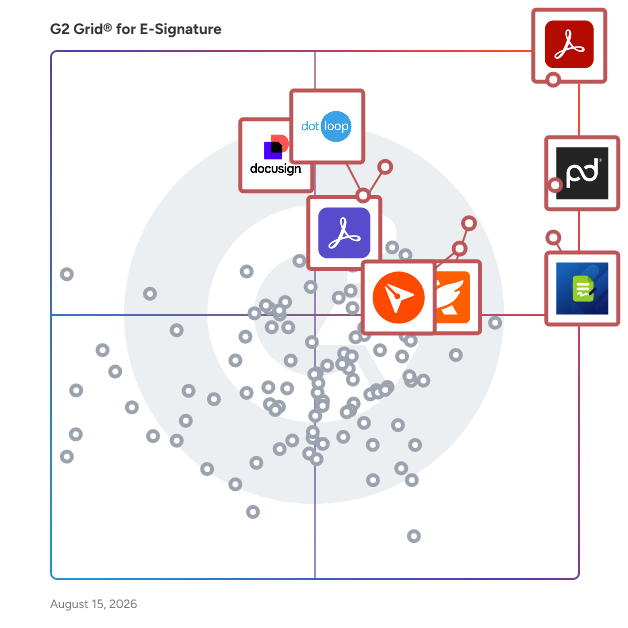
G2 Grid® for E-Signature Software

G2 Grid® for E-Signature Software plotting products by satisfaction and market presence

Highlighted products: Adobe Acrobat, PandaDoc, Jotform Sign, Foxit PDF Editor, Docusign, Adobe Acrobat Sign, BoldSign, and dotloop.

Underlying data: [Grid® JSON](https://www.g2.com/categories/e-signature/grids.json?focus%5B%5D=adobe-acrobat&focus%5B%5D=pandadoc&focus%5B%5D=jotform-sign&focus%5B%5D=foxit-pdf-editor&focus%5B%5D=docusign&focus%5B%5D=adobe-acrobat-sign&focus%5B%5D=boldsign&focus%5B%5D=dotloop)

Sponsored

GTM Workspace - Powered by ZoomInfo

Note: GTM Workspace is the upgraded version of ZoomInfo Sales and ZoomInfo Copilot. GTM Workspace is a unified sales execution platform that empowers account executives and account managers to run their entire book of business from a single workspace. By bringing together CRM data, ZoomInfo intelligence, engagement history, and buying signals into one consolidated view, GTM Workspace eliminates the constant context-switching that prevents sellers from doing their best work. At the core of GTM Workspace is an AI assistant that understands the full context of a rep's territory - their accounts, open opportunities, past conversations, and real-time signals - enabling natural language commands that drive real action. Sellers can instantly prepare for meetings, monitor account health, prioritize pipeline, and identify the best prospects to pursue, all without leaving a single interface. GTM Workspace integrates directly with Salesforce, maintaining bidirectional, real-time sync so CRM data stays current automatically. Flexible, spreadsheet-style Views allow reps to slice and analyze their accounts, contacts, leads, and opportunities exactly the way they work - with ZoomInfo firmographic, technographic, and intent data enriched directly alongside CRM fields. Purpose-built for the way modern sales teams operate, GTM Workspace requires no training, no agent building, and no engineering projects. It works immediately out of the box, delivering day-one value on top of the data foundation teams already rely on. The result: sellers spend less time stitching together information across disconnected tools and more time doing what they do best - building relationships and closing deals.

Visit website

Scrive

Founded in 2010 in Sweden, Scrive offers an omnichannel solution, automating agreement-based business processes with electronic signature and identity verification. Ease of use and robust security measures are key reasons why organisations of all sizes, including enterprises in highly regulated industries, rely on Scrive solutions to drive internal efficiency, compliance and customer satisfaction. As a Qualified Trust Service Provider (QTSP) for Qualified Electronic Signatures (QES), Scrive ensures the highest level of trust and legal validity for digital transactions in accordance with EU eIDAS regulations. eSign, Scrive’s agreement signing platform, is available out of the box with pricing plans and feature packages to suit any business, or as an API integration. Key benefits include: - Sign on any device - Authenticate and onboard users with eIDs - Track and monitor the status of your agreements - Solutions built for EU compliance - Detailed audit log/legal evidence - Secure, tamper-proof documents

Average Rating: 4.5/5.0

Total Reviews: 196

How Do G2 Users Rate Scrive?

  • Has the product been a good partner in doing business?: 9.4/10 (Category avg: 9.2/10)
  • Performance and Reliability: 9.4/10 (Category avg: 9.0/10)
  • Enterprise Scalability: 9.0/10 (Category avg: 8.9/10)
  • Signature Document Creation: 8.8/10 (Category avg: 9.1/10)

Who Is the Company Behind Scrive?

  • Seller: Scrive
  • Company Website:
  • Year Founded: 2010
  • HQ Location: Stockholm
  • Twitter: @scrive
    476 Twitter followers
  • LinkedIn® Page: www.linkedin.com
    265 employees on LinkedIn®

Who Uses This Product?

  • Top Industries: Information Technology and Services, Financial Services
  • Company Size: 38% Medium, 33% Small

What Do G2 Reviewers Say About Scrive?

AI-generated summary from verified user reviews

Pros
  • Users appreciate the ease of use of Scrive, finding it intuitive and efficient for creating professional documents.
  • Users value the easy setup of Scrive, allowing for a hassle-free start to contract management.
  • Users appreciate the fast and helpful customer support of Scrive, enhancing their overall experience and efficiency.
  • Users love Scrive's intuitive interface, making form creation seamless and accessible for all employees.
  • Users value the high level of security in Scrive, ensuring safe document transactions in their workflow.
Cons
  • Users report poor customer support, citing issues with ticket management and unhelpful assistance from the support team.
  • Users face signature issues with Scrive, experiencing inflexibility, tedious setups, and difficulties with plugins and document handling.
  • Users experience connectivity issues with integrations and SMS delivery, impacting usability in some regions.
  • Users find Scrive expensive, especially for startups, and suggest shorter license periods for better affordability.
  • Users report insufficient tutorials that hinder effective use of Scrive, leading to confusion and frustrating experiences.

What Are Recent G2 Reviews of Scrive?

What Are G2 Users Discussing About Scrive?

Qwilr

Make your competitors’ proposals look primitive with Qwilr. Send proposals, generate quotes, collect sign-off, and get paid – all in one place. Trusted by 5,000+ organizations including OpenTable, Thomson Reuters, Drata, Yale University and more, Qwilr helps sales teams close deals faster by turning static proposals and quotes into interactive, trackable web pages. With Qwilr, you can… Create impressive, interactive proposals: Engage buyers with dynamic proposals featuring videos, interactive pricing, calendar links and more Get deals closed faster: Get deals signed with legally-compliant e-signatures and collect payments instantly with our integrated payments solution, QwilrPay Track buyer engagement: See what your buyers view and click on, and use this to tailor your follow-ups. Get real-time alerts via Slack or email when buyers take action Keep every page consistently branded: Standardize your proposals, automatically applying your fonts and colors to every page Scale your process with automation: Connect Qwilr to Salesforce, HubSpot, Pipedrive or Zoho and automate proposal creation. Improve team efficiency: Create reusable templates and content blocks, so that reps never start from scratch Thousands of sales teams use Qwilr to modernize their proposal process, impress buyers, and close deals faster. Try Qwilr free for 14 days: https://qwilr.com/

Average Rating: 4.6/5.0

Total Reviews: 901

How Do G2 Users Rate Qwilr?

  • Has the product been a good partner in doing business?: 9.3/10 (Category avg: 9.2/10)
  • Performance and Reliability: 9.1/10 (Category avg: 9.0/10)
  • Enterprise Scalability: 8.6/10 (Category avg: 8.9/10)
  • Signature Document Creation: 8.9/10 (Category avg: 9.1/10)

Who Is the Company Behind Qwilr?

  • Seller: Qwilr
  • Company Website:
  • Year Founded: 2014
  • HQ Location: Redfern, New South Wales
  • Twitter: @Qwilr
    2,506 Twitter followers
  • LinkedIn® Page: www.linkedin.com
    104 employees on LinkedIn®

Who Uses This Product?

  • Who Uses This: Account Executive, CEO
  • Top Industries: Marketing and Advertising, Computer Software
  • Company Size: 80% Small, 16% Medium

What Do G2 Reviewers Say About Qwilr?

AI-generated summary from verified user reviews

Pros
  • Users appreciate the ease of use of Qwilr, finding the interface simple and customization quick and effective.
  • Users love Qwilr's customizable templates, enhancing their proposals with a professional touch and intuitive interface.
  • Users find the easy setup of Qwilr intuitive, allowing effortless creation of proposals without needing support.
  • Users praise Qwilr for its simplicity and efficiency, enhancing workflow and collaboration across teams effortlessly.
  • Users value the excellent customer support from Qwilr, enhancing their experience with responsive assistance and guidance.
Cons
  • Users feel that Qwilr has limited customization options, making it difficult to achieve desired edits and layouts.
  • Users are frustrated with integration issues, particularly with QuickBooks and payment options, impacting overall satisfaction.
  • Users note missing features, such as CMS-like design tools and better integrations, affecting their overall experience.
  • Users struggle with difficult editing, often feeling limited in formatting control and facing cumbersome customization challenges.
  • Users find the limited features of Qwilr restrict usability, especially with content arrangement and integrated scheduling tools.

What Are Recent G2 Reviews of Qwilr?

What Are G2 Users Discussing About Qwilr?

Lightico

Lightico is an AI-powered platform for end-to-end customer journey orchestration, built to help regulated enterprises in financial services, energy, and telecoms run compliant digital journeys across every channel. Manual paperwork, fragmented systems, and compliance checks slow down decisions and frustrate customers at the moments that matter most. Lightico closes that gap: customers complete documents, verify identity, sign, and pay from a single link sent by text or email, without downloading an app or paying a per-envelope fee. Teams reduce manual processing and reallocate staff time to higher-value work as a result. Key capabilities: 1. AI-Powered Intelligent Document Processing (IDP): classifies, reads and validates documents automatically, cutting manual review at every step. 2. Journey Orchestration & No-Code Design: business teams design and launch compliant customer journeys without long IT cycles. 3. eSignature & Digital Consent: customers sign contracts and approve terms and conditions instantly, with clickwrap consent captured and audit-ready. 4. ID Verification (IDV): verifies identity in real time to fight fraud without adding friction. 5. Document Collection & eForms: collects and organizes customer data and documents in one flow. 6. Case Management: streamlines documents, tasks, updates, and approvals into one connected case, in any channel. Compliance, operations, and CX teams use Lightico to run high-stakes, regulated interactions across contact centers, retail, and digital channels, layering on top of existing software and core systems. Lightico's customers, including HSBC, VodafoneThree, GM Financial, and EE, have seen results such as same-day loan processing, a 30% compliance lift, a 13-point NPS increase, and a £120 million revenue uplift with transactions completed 7 minutes faster. Lightico delivers a documented 5:1 ROI, typically recovered within 3 to 6 months. Lightico works through an API, native MCP (Model Context Protocol) connectivity for AI agents, or standalone, and integrates with systems like Salesforce. It runs on SOC 2, ISO 27001, PCI-DSS, HIPAA, eIDAS, and ESIGN Act controls. Visit lightico.com to request a demo and see how Lightico cuts compliance risk and speeds up customer journeys.

Average Rating: 4.8/5.0

Total Reviews: 322

How Do G2 Users Rate Lightico?

  • Has the product been a good partner in doing business?: 9.5/10 (Category avg: 9.2/10)
  • Performance and Reliability: 9.4/10 (Category avg: 9.0/10)
  • Enterprise Scalability: 9.6/10 (Category avg: 8.9/10)
  • Signature Document Creation: 9.5/10 (Category avg: 9.1/10)

Who Is the Company Behind Lightico?

  • Seller: Lightico
  • Year Founded: 2014
  • HQ Location: New York, NY
  • Twitter: @lightico
    2,735 Twitter followers
  • LinkedIn® Page: www.linkedin.com
    129 employees on LinkedIn®

Who Uses This Product?

  • Who Uses This: sales advisor, sales
  • Top Industries: Telecommunications, Financial Services
  • Company Size: 61% Large, 26% Medium

What Are Recent G2 Reviews of Lightico?

What Are G2 Users Discussing About Lightico?

Sertifi

Sertifi provides a complete contracting, payment, and authorization platform for the hospitality and travel industry. Brands like Marriott, Topgolf, and AEG Worldwide trust Sertifi to efficiently and securely finalize event and travel bookings with their guests. Sertifi’s easy-to-use platform helps tens of thousands of businesses in more than 135 countries, with more than $5 billion in payment requests being sent through the system annually. With decades of experience in hospitality and travel, Sertifi is building a network that gives guests and travelers across the globe a great experience from the start. Sertifi for e-Signatures Send and sign fully branded agreements – anytime, anywhere, from any device. Give your guests a convenient, digital experience and see completed contracts flow in 90% faster. Sertifi for Payments Avoid delays and get paid 2.5x faster by sending payment and signature requests together. Behind the scenes, Sertifi captures and processes your payments as one PCI-compliant solution. SertifiPay Get paid even faster with our proprietary payment processor, available worldwide and powered by Stripe. In less than 10 minutes, you can sign up to accept payments directly in Sertifi – one account, one complete workflow. Sertifi for Digital Authorizations Digitize payment authorizations to keep your guest’s information secure with PCI compliance and receive completed forms 5x faster. Eliminate chargebacks with advanced fraud tools that instantly verify cards and detect fraud early. Enjoy seamless B2B payment delivery between travel companies - such as travel management companies and virtual card providers - and travel suppliers, particularly hotels. It's a convenient, secure alternative to faxes. Contact us directly at corp.sertifi.com.

Average Rating: 4.8/5.0

Total Reviews: 133

How Do G2 Users Rate Sertifi?

  • Has the product been a good partner in doing business?: 9.6/10 (Category avg: 9.2/10)
  • Performance and Reliability: 9.5/10 (Category avg: 9.0/10)
  • Enterprise Scalability: 9.7/10 (Category avg: 8.9/10)
  • Signature Document Creation: 9.4/10 (Category avg: 9.1/10)

Who Is the Company Behind Sertifi?

  • Seller: Flywire
  • HQ Location: Boston, MA
  • Twitter: @Flywire
    4,578 Twitter followers
  • LinkedIn® Page: www.linkedin.com
    1,309 employees on LinkedIn®
  • Ownership: NASDAQ: FLYW

Who Uses This Product?

  • Who Uses This: President, Carrier Development Specialist
  • Top Industries: Computer Software, Hospitality
  • Company Size: 36% Medium, 26% Large

What Are Recent G2 Reviews of Sertifi?

Nitro PDF

1. What is Nitro PDF? Nitro PDF is a full-featured PDF editor that enables you to create, edit, convert, sign, and secure PDF documents. It is designed for individuals, small businesses, and enterprises as a cost-effective alternative to Adobe Acrobat, combining powerful functionality with an intuitive interface that works across devices. 2. What are the main features of Nitro PDF? Nitro PDF is a comprehensive solution for creating, editing, and securing documents across Windows, Mac, iOS, and web browsers. It includes powerful AI productivity tools and is built with an intuitive interface mirroring the Microsoft Office and Apple toolbars. Key features of Nitro PDF include: • Core Editing: Tools to create, edit, convert, combine, and annotate PDFs, including advanced OCR and secure signing capabilities. • AI Smart Tools: Enhances productivity via smart data extraction, automated form creation, and intelligent document redaction. • Nitro Analytics: Real-time visibility into PDF usage, allowing organizations to measure productivity, prove ROI, and track sustainability. • Nitro Workspace: A centralized cloud hub for accessing PDF and eSign tools, AI assistants, and administration from any device. • Advanced Editing: Create PDFs from any file type and convert PDFs into editable Microsoft Word, Excel, and PowerPoint files while maintaining original layouts. • Powerful OCR (Optical Character Recognition): Turn scanned paper documents and images into fully searchable and editable PDFs with high-accuracy text recognition. Nitro PDF is available in multiple plans to suit different business needs. 3. What support options does Nitro offer? Whether you're a five-person team or a global enterprise, our dedicated support is available 24/7. • Human Support: Nitro offers dedicated customer support, including onboarding, training, and troubleshooting resources, to ensure a smooth experience for your team. • Knowledge Base and Guides: Access hundreds of detailed articles covering product features, integrations, workflows, and best practices. • Video Tutorials: Step-by-step walkthroughs and demonstrations to help you learn and master Nitro tools quickly. • Community Forum: Connect with other Nitro users, share feedback, ask questions, and discover tips and solutions. • Knowledge Assistant: A 24/7 in-app AI assistant providing instant, context-aware guidance on features, workflows, and troubleshooting. 4. Does Nitro PDF support integrations with other business tools? Yes. Nitro PDF integrates with software such as Microsoft Office suite, OneDrive, Dropbox, and other platforms. These integrations simplify document workflows and make it easy to create, edit, and share PDFs directly within your existing environment. 5. How does Nitro ensure document security and compliance? Nitro protects sensitive information with advanced encryption, password protection, granular access controls, and tamper-evident audit trails. Nitro's solutions are designed to meet enterprise and mid-market compliance requirements, including ISO 27001, SOC 2, HIPAA, GDPR, eIDAS, UETA, and the ESIGN Act.

Average Rating: 4.4/5.0

Total Reviews: 379

How Do G2 Users Rate Nitro PDF?

  • Has the product been a good partner in doing business?: 8.9/10 (Category avg: 9.2/10)
  • Performance and Reliability: 8.6/10 (Category avg: 9.0/10)
  • Enterprise Scalability: 8.8/10 (Category avg: 8.9/10)
  • Signature Document Creation: 8.9/10 (Category avg: 9.1/10)

Who Is the Company Behind Nitro PDF?

  • Seller: Nitro, Inc
  • Company Website:
  • Year Founded: 2005
  • HQ Location: San Francisco, CA
  • LinkedIn® Page: www.linkedin.com
    371 employees on LinkedIn®

Who Uses This Product?

  • Who Uses This: IT Manager
  • Top Industries: Information Technology and Services, Construction
  • Company Size: 47% Small, 35% Medium

What Do G2 Reviewers Say About Nitro PDF?

AI-generated summary from verified user reviews

Pros
  • Users appreciate the ease of use of Nitro PDF, benefiting from its user-friendly interface and comprehensive features.
  • Users appreciate the easy editing capabilities of Nitro PDF, streamlining their workflow for PDF tasks effectively.
  • Users highlight Nitro PDF's full PDF editing capabilities and user-friendly interface as key benefits for enhancing productivity.
  • Users value the easy conversion feature of Nitro PDF, appreciating seamless transitions without formatting loss.
  • Users value the intuitive PDF editing capabilities of Nitro PDF, enhancing their document management experiences effortlessly.
Cons
  • Users face PDF issues with Nitro PDF, including compatibility limitations and inconsistent text recognition, especially with languages like Hindi.
  • Users find the pricing high, especially for individuals and small teams needing just basic features.
  • Users experience slow performance with Nitro PDF, especially when handling large files, hindering productivity and usability.
  • Users find the limited features of Nitro PDF inadequate for complex documents, requiring extra effort for formatting checks.
  • Users experience significant performance issues with Nitro PDF, often facing slow response times and freezing on large documents.

What Are Recent G2 Reviews of Nitro PDF?

What Are G2 Users Discussing About Nitro PDF?

BlueSnap Accounts Receivable Automation

The Armatic platform enhances the power of your existing accounting/ ERP software and your existing CRM system with workflow automation, powerful business intelligence and fully integrated cross-department communications functionality to automate tasks in finance, sales, support, HR and operations. 1. Finance & Billing Automation (AR, AP, Invoices, Subscriptions, Payments): Fully automated AR Collections drastically reduces time to payment (DSO). Our advanced rules engine delivers the right message at the right time automatically, ensuring the highest likelihood of payment, while enabling prompt, efficient customer communication. Never have another vendor payment not accounted for, assign vendor bills for review and approvals. Leverage our workflow automation and approval engine to route all your bills for optimized payments. Enable subscription/recurring billing, progress billing, invoice creation, automatic payments, payment plans, late fees, coupons, online billing and interactive customer portals, all integrated and synced with your current accounting and CRM systems. Payment tokenization and automated failed payment recovery ensures no payment is missed and all data is secure. 2. Sales & Success Automation (QTC, CPQ, NPS, eSign): Automate quotes for prospects, control your pricing and close deals faster with our QTC and CPQ features. Everything from creating a quote to collecting cash from customers. Empower your sales and success team to handle the QTC process and remove departmental bottlenecks. No more second-guessing, let your sales team handle all aspects of new contract creation within a clearly defined framework - from quote to eSignature and payment. Share all historical communication data, files, documents, invoices and contracts across your whole team from the customer manager. Use Armatic's build in contact center to communicate with your customers. Leverage the Armatic Net Promoter Score engine to join companies that have grown 2x faster vs the competition. Empower your teams to make better decisions backed by customer feedback. 3. Human Capital Automation (eNPS, Employee Advocacy, Contracts, eRecords): Measure and improve your employee satisfaction with the Armatic employee NPS. Create communication feedback loops with your employees to drive loyalty and employee engagement. Amplify your companies social reach with Employee Advocacy. Leverage the social networks of your employees, by providing them an easy way to share approved company information. Your companies social posts reach a magnitude of prospects and potential new hires. Provide your HR team and managers across your organization a solution to eSign, store and manage securely all employee contracts. Share all historical communication data, files, documents, employee contracts and NDAs across your whole team. The Armatic employee contact manager provides your team instant and easy access to all employee relevant information, including communication data, contracts, and HR related notes.

Average Rating: 4.6/5.0

Total Reviews: 37

How Do G2 Users Rate BlueSnap Accounts Receivable Automation?

  • Has the product been a good partner in doing business?: 9.6/10 (Category avg: 9.2/10)
  • Performance and Reliability: 10.0/10 (Category avg: 9.0/10)
  • Enterprise Scalability: 8.9/10 (Category avg: 8.9/10)
  • Signature Document Creation: 9.2/10 (Category avg: 9.1/10)

Who Is the Company Behind BlueSnap Accounts Receivable Automation?

  • Seller: BlueSnap
  • Year Founded: 2001
  • HQ Location: Boston, MA
  • Twitter: @BlueSnapInc
    2,163 Twitter followers
  • LinkedIn® Page: www.linkedin.com
    153 employees on LinkedIn®
  • Phone: 1 (781) 790-5013

Who Uses This Product?

  • Company Size: 59% Small, 19% Medium

What Do G2 Reviewers Say About BlueSnap Accounts Receivable Automation?

AI-generated summary from verified user reviews

Pros
  • Users appreciate the automation of invoicing and payments with BlueSnap, enabling a focus on more important tasks.
  • Users appreciate the efficiency of BlueSnap Accounts Receivable Automation, enabling smooth invoicing and timely payment collection.
  • Users value the efficient payment processing of BlueSnap Accounts Receivable Automation, enhancing cash flow and reducing manual efforts.
  • Users value the time-saving automation of BlueSnap Accounts Receivable, allowing them to focus on more important tasks.
  • Users appreciate the ease of use of BlueSnap Accounts Receivable Automation, streamlining invoicing and payment processes effectively.
Cons
  • Users find the complexity of setup and reporting in BlueSnap challenging, especially under pressure while integrating with tools.
  • Users find the reporting features complex and less user-friendly, complicating their ability to quickly gauge progress.
  • Users find the limited customization frustrating, especially for unique billing scenarios and complex workflows.
  • Users find the reporting features cumbersome, feeling it complicates progress tracking and adds unnecessary effort under pressure.
  • Users find the complex features of BlueSnap Accounts Receivable Automation slow to grasp and can hinder efficiency.

What Are Recent G2 Reviews of BlueSnap Accounts Receivable Automation?

Box Sign

Boost efficiency with reliable e-signing. With millions of documents sent all around the world, SignRequest is the secure, legally binding and affordable e-signature solution.

Average Rating: 4.6/5.0

Total Reviews: 1,523

How Do G2 Users Rate Box Sign?

  • Has the product been a good partner in doing business?: 9.3/10 (Category avg: 9.2/10)
  • Performance and Reliability: 9.2/10 (Category avg: 9.0/10)
  • Enterprise Scalability: 8.8/10 (Category avg: 8.9/10)
  • Signature Document Creation: 8.8/10 (Category avg: 9.1/10)

Who Is the Company Behind Box Sign?

  • Seller: Box
  • Year Founded: 1998
  • HQ Location: Redwood City, CA
  • Twitter: @Box
    78,537 Twitter followers
  • LinkedIn® Page: www.linkedin.com
    4,311 employees on LinkedIn®
  • Ownership: NYSE:BOX

Who Uses This Product?

  • Who Uses This: Owner, CEO
  • Top Industries: Real Estate, Marketing and Advertising
  • Company Size: 81% Small, 14% Medium

What Do G2 Reviewers Say About Box Sign?

AI-generated summary from verified user reviews

Pros
  • Users value the convenience of Box Sign for efficiently managing and securing documents in one centralized location.
  • Users value the ease of use of Box Sign, seamlessly managing document workflows in a secure environment.
  • Users value the security and reliability of Box Sign, efficiently managing and tracking documents in a safe environment.
  • Users value the time-saving features of Box Sign for efficiently managing and tracking document signatures in one place.
  • Users value the tracking features of Box Sign, enhancing document management and ensuring secure, streamlined workflows.
Cons
  • Users note layout issues on mobile, suggesting improvements for a more responsive and seamless signing experience.
  • Users find mobile issues with Box Sign, noting non-responsive UI and suggesting improvements for a better experience.

What Are Recent G2 Reviews of Box Sign?

What Are G2 Users Discussing About Box Sign?

Legalesign

Legalesign is UK-based eSignature software to send, sign and manage contracts online. Companies use Legalesign to gain significant productivity and financial benefits, increase their customers' satisfaction by removing the need for a printer and enabling them to sign from anywhere and, last but not least, relieve the burden of tiresome paperwork upon long suffering staff everywhere. Legalesign customers include legal firms, insurance companies, property firms, recruiters, accountants and many others. Legalesign is built from the ground up to deliver maximum value for our customers. The tariff price of business software is often far exceeded by its costs of use – the cost of adoption, training, the time in day-to-day usage, and the cost of change. Legalesign is designed throughout to minimise these costs so our customers see the most value through to the bottom line: from eliminating un-needed clicks in day-to-day actions so you don’t waste time getting contracts sent out, up to the entire architecture of the system that allows you to scale horizontally and vertically seamlessly and easily. We invest heavily in behind-the-scenes systems to ensure uptime and reliability, providing service where it matters.

Average Rating: 4.8/5.0

Total Reviews: 295

How Do G2 Users Rate Legalesign?

  • Has the product been a good partner in doing business?: 9.6/10 (Category avg: 9.2/10)
  • Performance and Reliability: 9.4/10 (Category avg: 9.0/10)
  • Enterprise Scalability: 9.2/10 (Category avg: 8.9/10)
  • Signature Document Creation: 9.0/10 (Category avg: 9.1/10)

Who Is the Company Behind Legalesign?

  • Seller: Legalesign
  • Year Founded: 2012
  • HQ Location: Cambridge, England
  • Twitter: @Legalesign
    512 Twitter followers
  • LinkedIn® Page: www.linkedin.com
    13 employees on LinkedIn®

Who Uses This Product?

  • Who Uses This: Director, Managing Director
  • Top Industries: Staffing and Recruiting, Accounting
  • Company Size: 66% Small, 29% Medium

What Do G2 Reviewers Say About Legalesign?

AI-generated summary from verified user reviews

Pros
  • Users rave about the exceptional customer support from Legalesign, noting prompt and helpful responses during their onboarding process.
  • Users appreciate the ease of use of Legalesign, valuing its functionality and responsive customer support.
  • Users find Legalesign super intuitive, enabling seamless document signing without the need for any training.
  • Users commend the reliability and speed of Legalesign, seamlessly transforming their document signing process with confidence.
  • Users find Legalesign to be an affordable option with exceptional support, enhancing functionality and satisfaction.
Cons
  • Users find the interface usability issues of Legalesign, such as quirky designs and persistent onboarding cards, frustrating.
  • Users find some features confusing, particularly with checkboxes and the process of bulk sending.
  • Users note signature issues that complicate workflow, although recent updates have improved user experience significantly.
  • Users find difficult editing frustrating, as mistakes require deleting documents and starting the process over.
  • Users express concern over limited customization with Legalesign, particularly regarding integration with JobAdder for efficiency.

What Are Recent G2 Reviews of Legalesign?

What Are G2 Users Discussing About Legalesign?

DocVerify

DocVerify advances signatures and notarization into the digital age with a robust eSign and remote online notarization (RON) solution. Now you can securely sign, manage and store legally binding documents in a trusted, online environment. DocVerify's approved and certified e-notary tool does not require software downloads or hardware purchases. Access to this electronic notarization is available through the internet and a standard browser. Accelerate turnaround times, reduce costs and keep transactions moving forward with the trusted DocVerify platform. For contracts and other business documents, DocVerify’s electronic signature tools provide a wealth of options. The digital signing software can simplify obtaining signatures or integrate into your company’s existing systems. DocVerify is offered by Black Knight, an industry-leading technology, data and analytics company, powering the mortgage industry for 60 years.

Average Rating: 4.1/5.0

Total Reviews: 276

How Do G2 Users Rate DocVerify?

  • Has the product been a good partner in doing business?: 8.5/10 (Category avg: 9.2/10)
  • Performance and Reliability: 8.8/10 (Category avg: 9.0/10)
  • Enterprise Scalability: 8.7/10 (Category avg: 8.9/10)
  • Signature Document Creation: 8.4/10 (Category avg: 9.1/10)

Who Is the Company Behind DocVerify?

  • Seller: Black Knight
  • Year Founded: 2014
  • HQ Location: Jacksonville, FL
  • Twitter: @Black_KnightInc
    4,486 Twitter followers
  • LinkedIn® Page: www.linkedin.com
    2,589 employees on LinkedIn®
  • Ownership: NYSE: BKI

Who Uses This Product?

  • Who Uses This: Notary Public, Paralegal
  • Top Industries: Legal Services, Real Estate
  • Company Size: 76% Small, 18% Medium

What Are Recent G2 Reviews of DocVerify?

What Are G2 Users Discussing About DocVerify?

Conga Sign

Secure. Seamless. Scalable. Conga Sign delivers enterprise-grade eSignature experiences that are fully embedded, fully branded, and fully compliant- wherever business happens Most eSignature tools are rigid, unbranded, and hard to integrate. Conga Sign changes that. It enables secure, compliant, and fully customizable signing experiences embedded directly into your systems. With flexible deployment, global compliance, and full audibility, Conga Sign helps teams move faster, reduce risk, and deliver better customer experiences. Fast, Frictionless Signing Experiences To eliminate delays and manual handoffs, signatures can be captured instantly, via embedded portals, mobile devices, or automated workflows. Agreements are generated, signed, and stored without switching systems or emailing attachments, reducing turnaround time and improving accuracy. Branded, Trustworthy Transactions Full white-labeling allows organizations to remove third-party branding from the signing experience. This ensures every agreement reflects your brand, builds trust with customers, and reduces the risk of phishing or spam-related drop-off. Works Where You and Your Customers Work The solution integrates seamlessly into your existing ecosystem, including Salesforce, MS Dynamics, Workday, and custom applications or websites. With flexible deployment via web app, API, or pre-built connectors, teams can embed signing directly into workflows and customer-facing experiences. Secure, Compliant, and Audit-Ready Meets global compliance standards including ESIGN, UETA, eIDAS, HIPAA, and GDPR. Provides robust audit trails, tamper-proof controls, and advanced authentication methods such as SMS codes, ID verification, and knowledge-based authentication, ensuring every signature is legally defensible. Flexible Deployment Across Teams and Systems Whether used by Sales, Legal, Finance, or Operations, the solution adapts to your business needs. It supports multiple deployment models from standalone use to embedded flows, making it easy to scale across departments without complex implementation. Scales from One to Millions From one-off agreements to high-volume onboarding or billing cycles, the platform handles large volumes of signatures with ease. Supports batch sending, time- or action-triggered workflows, and automated delivery, enabling teams to execute agreements at scale without sacrificing speed or control. Automated and Embedded Workflows A good eSignature solution doesn’t just capture signatures, it powers end-to-end agreement workflows. Agreements can be generated, signed, routed, and stored automatically, with data flowing back into your CRM or ERP. This creates a seamless experience for employees and customers, reducing operational overhead and accelerating revenue. Authentication Options: Email Authentication SMS PIN Secret Question Challenge Knowledge-Based Authentication (KBA) Login Credentials (including SSO) Government ID Check Biometric Comparison Certifications & Security Compliance Standards - Conga Sign meets leading industry standards for data protection and compliance: SOC 2 ISO 27001 FedRAMP GDPR HIPAA Connectors & Integrations - Conga Sign works out-of-the-box with major enterprise systems, including: Salesforce & Salesforce CPQ SharePoint Workday SMART Communications Guidewire PEGA Laserfiche Microsoft Dynamics CRM Box Why Conga Sign Stands out in the eSignature market: Brand-first experience: No third-party logos or domains — your brand stays front and center. Flexible integration: Works with any CRM, ERP, or portal via API or pre-built connectors. Compliance confidence: Meets global standards with full audit trails and secure authentication. Better value: 30–40% lower cost than leading competitors, with no feature gating. Part of a broader solution: Seamlessly connects with Conga Composer, CPQ, and CLM for end-to-end agreement workflows.

Average Rating: 4.3/5.0

Total Reviews: 39

How Do G2 Users Rate Conga Sign?

  • Has the product been a good partner in doing business?: 9.1/10 (Category avg: 9.2/10)
  • Performance and Reliability: 8.3/10 (Category avg: 9.0/10)
  • Enterprise Scalability: 7.9/10 (Category avg: 8.9/10)
  • Signature Document Creation: 7.6/10 (Category avg: 9.1/10)

Who Is the Company Behind Conga Sign?

  • Seller: Conga
  • Year Founded: 2006
  • HQ Location: 3200 Kirby Dr., Suite 500, Houston, TX 77098
  • LinkedIn® Page: www.linkedin.com
    2,116 employees on LinkedIn®
  • Phone: (303) 465-1616

Who Uses This Product?

  • Top Industries: Computer Software
  • Company Size: 45% Medium, 31% Large

What Do G2 Reviewers Say About Conga Sign?

AI-generated summary from verified user reviews

Pros
  • Users find high convenience in using Conga Sign for seamlessly executing contracts.
  • Users find Conga Sign to be an easy and convenient solution for executing contracts efficiently.
  • Users find the easy setup of Conga Sign enhances convenience and efficiency in executing contracts.
  • Users find Conga Sign to be an easy and convenient solution for executing contracts efficiently.
  • Users value the seamless integration with Salesforce and Conga Legal, enhancing workflow efficiency and collaboration.
Cons
  • Users face e-signature issues with Conga Sign, including lost envelopes and poor user experience affecting efficiency.
  • Users face challenges with limited signing options, impacting recognition and causing delays in the signing process.
  • Users experience delays in signing due to lost envelopes and a less intuitive user experience.
  • Users often find the poor interface usability of Conga Sign frustrating, leading to lost envelopes and delayed signing.
  • Users find the interface not intuitive, leading to confusion and delays in signing documents.

What Are Recent G2 Reviews of Conga Sign?

What Are G2 Users Discussing About Conga Sign?
E-Sign

E-Sign is a leading electronic signature service. Securely sign your documents digitally and save your business money and a great deal of time. Over 85% of agreements are completed in less than a day, and 48% in less than 15 minutes. E-Sign are the leading, trusted suppliers of electronic signature solutions. Operating from our own UK based data centres, we provide cost-effective digital signatures to streamline administrative tasks and significantly reduce document turnaround times. Redefine the way you conduct business with seamless, secure, and legally binding eSignature solutions. Embrace unparalleled efficiency and compliance and embrace the future of streamlined transactions.

Average Rating: 4.7/5.0

Total Reviews: 85

How Do G2 Users Rate E-Sign?

  • Has the product been a good partner in doing business?: 9.7/10 (Category avg: 9.2/10)
  • Performance and Reliability: 9.7/10 (Category avg: 9.0/10)
  • Enterprise Scalability: 9.6/10 (Category avg: 8.9/10)
  • Signature Document Creation: 9.3/10 (Category avg: 9.1/10)

Who Is the Company Behind E-Sign?

  • Seller: E-Sign
  • Year Founded: 2012
  • HQ Location: Liverpool, England
  • Twitter: @eSignHQ
    718 Twitter followers
  • LinkedIn® Page: www.linkedin.com
    16 employees on LinkedIn®

Who Uses This Product?

  • Who Uses This: Director
  • Top Industries: Financial Services, Information Technology and Services
  • Company Size: 84% Small, 10% Medium

What Are Recent G2 Reviews of E-Sign?

What Are G2 Users Discussing About E-Sign?

Signaturit

Building trust in every digital transaction. Signaturit Group, a Namirial Company, European leader in Trusted Digital Transactions. We drive the digital transformation of businesses and administrations with a cloud-native platform that covers the entire digital transaction lifecycle: digital identity, onboarding, electronic signature, fraud prevention, document management and archiving, certified communication, digital identity wallet, and e-invoicing. As a Qualified Trust Service Provider (QTSP) under eIDAS, we guarantee legal certainty, regulatory compliance and maximum trust in every digital transaction. Namirial Company +250,000 customers | +90 countries | +1,400 employees

Average Rating: 4.5/5.0

Total Reviews: 36

How Do G2 Users Rate Signaturit?

  • Has the product been a good partner in doing business?: 9.4/10 (Category avg: 9.2/10)
  • Performance and Reliability: 9.3/10 (Category avg: 9.0/10)
  • Enterprise Scalability: 8.9/10 (Category avg: 8.9/10)
  • Signature Document Creation: 8.5/10 (Category avg: 9.1/10)

Who Is the Company Behind Signaturit?

Who Uses This Product?

  • Company Size: 47% Small, 44% Medium

What Do G2 Reviewers Say About Signaturit?

AI-generated summary from verified user reviews

Pros
  • Users find Signaturit's affordable pricing significantly more appealing than that of its competitors.
  • Users appreciate the intuitive interface of Signaturit, making the signing process fast and reliable.
  • Users love the intuitive interface of Signaturit, enhancing the speed and reliability of the signing process.
  • Users find the pricing of Signaturit significantly more appealing compared to other options in the market.
  • Users value the reliable signing process of Signaturit, appreciating its intuitive interface and legal security.
Cons
  • Users find the pricing structure expensive, particularly for small volumes and limited customization options.
  • Users find the limited customization options for emails restrict their ability to tailor communications effectively.
  • Users feel the limited customization options and high pricing for small volumes make Signaturit less appealing.

What Are Recent G2 Reviews of Signaturit?

What Are G2 Users Discussing About Signaturit?

Oneflow

Oneflow is an AI-powered contract management platform that turns contracts into an operating system that drives revenue, compliance and operational efficiency. Contracts hold revenue, risk, and obligations, yet they rarely connect to daily workflows. Instead of static PDFs that lock away critical information, Oneflow turns every contract into an actionable asset that reveals opportunities, flags risks, and drives execution across teams so your business moves faster with full visibility. With Oneflow, teams can create, review, sign, and control contracts in one unified platform. Contracts are fully digital, collaborative, and always up to date.Contract data becomes an operational layer that automates workflows across teams, and gives full visibility into obligations, performance, and risk. AI is embedded across the platform to review contracts, extract key data, identify risks, and surface insights at scale. The platform enables you to: - Centralize all contracts, clauses, and obligations in a structured, searchable repository - Automate workflows, compliance checks, and data flows across your existing systems - Execute with full visibility into engagement, deadlines, and contract activity - Optimize using AI-driven portfolio analysis to improve decisions & performance over time With deep integrations into CRM, HR, and automation platforms, Oneflow ensures contracts are no longer disconnected from business processes. Instead, they become an operating system that drives revenue, reduces risk, and enables smarter decision-making. Whether you're in sales, HR, procurement, finance, or legal, Oneflow helps you move faster and stay in control.

Average Rating: 4.4/5.0

Total Reviews: 361

How Do G2 Users Rate Oneflow?

  • Has the product been a good partner in doing business?: 8.9/10 (Category avg: 9.2/10)
  • Performance and Reliability: 8.8/10 (Category avg: 9.0/10)
  • Enterprise Scalability: 8.4/10 (Category avg: 8.9/10)
  • Signature Document Creation: 8.5/10 (Category avg: 9.1/10)

Who Is the Company Behind Oneflow?

  • Seller: Oneflow
  • Year Founded: 2012
  • HQ Location: Stockholm, Stockholm County
  • Twitter: @oneflowcom
    261 Twitter followers
  • LinkedIn® Page: www.linkedin.com
    155 employees on LinkedIn®

Who Uses This Product?

  • Who Uses This: CEO, Konsultchef
  • Top Industries: Staffing and Recruiting, Computer Software
  • Company Size: 44% Small, 43% Medium

What Do G2 Reviewers Say About Oneflow?

AI-generated summary from verified user reviews

Pros
  • Users find Oneflow's ease of use exceptional, streamlining contract management and enhancing workflow efficiency effortlessly.
  • Users find Oneflow to be intuitive and easy to use, enhancing the contract management experience significantly.
  • Users find Oneflow to be an efficient tool that streamlines contract management and enhances workflow significantly.
  • Users appreciate the streamlined contract management of Oneflow, which simplifies processes and enhances overall efficiency.
  • Users commend the fast and accurate customer support from OneFlow, enhancing their overall experience with the product.
Cons
  • Users note a lack of missing features in Oneflow, particularly in customization and integrations that limit flexibility.
  • Users find the limited capabilities for document collaboration frustrating and desire better integration and automation features.
  • Users note the limited customization options in Oneflow, seeking more flexibility and integration features for better usability.
  • Users feel that Oneflow is quite expensive and lacks value due to the additional costs for promised functionalities.
  • Users find feature usability lacking in Oneflow compared to competitors, citing cumbersomeness and design issues.

What Are Recent G2 Reviews of Oneflow?

What Are G2 Users Discussing About Oneflow?

Secured Signing

Secured Signing's eSignature solution is designed to enhance the signing process by incorporating advanced security features such as AI-powered deepfake detection, ID Verification and live video verification. The platform allows users to not only sign documents but also to ensure the integrity, identity, and intent behind each signature, addressing the growing concerns of digital fraud in today’s online environment. Targeted towards businesses and organizations across various sectors, including recruitment, legal, finance, and government, Secured Signing provides a comprehensive signing experience that is both secure and compliant with global standards. The platform is particularly beneficial for industries that require stringent identity verification and regulatory adherence, making it an ideal choice for enterprises that prioritize data protection and compliance. Global Compliance & Security Standards: Our ISO 27001, SOC 2 (Type 1 & 2), HIPAA, GDPR, MISMO, FDA, and FAA-compliant designations ensure the highest level of data protection, privacy, and industry-specific regulatory adherence. Core Features • Live Verification & AI Deepfake Defense: Real-time identity verification during signing featuring Realify - our AI-driven deepfake detection, and a structured audit report. • Video Confirmation & Video Signing: Execute remote signings via live video meetings; includes identity verification, comprehension checks, and secure execution in a single session. • Multi-Layered Authentication: Robust signer validation through biometric ID verification with liveness checks, SMS 2FA, and SSO. • Advanced Audit Trail: Comprehensive, legally defensible records including timestamps, email logs, and IP addresses. • Data Integrity & Sovereignty: Documents are locked against alteration after the first signature. Choose your data residency with regional datacenters in the US, NZ, AUS, and UK. • Flexible eSignature Workflows: Customizable, scalable signing processes tailored to Recruitment, Legal, Notary, Government, Finance, and Enterprise sectors. • API-First Architecture: Built for seamless connectivity. Integrate directly with your tech stack or use our pre-built connectors. The platform is designed with flexibility in mind, offering customizable eSignature workflows that can be tailored to meet the specific needs of various industries. Its API-first architecture facilitates seamless integration with existing technology stacks, allowing organizations to connect directly or utilize pre-built connectors with popular applications such as Bullhorn, Jobadder, Actionstep, Tracker RMS, Salesforce, Microsoft SharePoint, Microsoft Word, and Clio. This adaptability, combined with its commitment to security and compliance, positions Secured Signing as a leading solution in the eSignature market, catering to the evolving demands of modern businesses.

Average Rating: 4.6/5.0

Total Reviews: 45

How Do G2 Users Rate Secured Signing?

  • Has the product been a good partner in doing business?: 9.6/10 (Category avg: 9.2/10)
  • Performance and Reliability: 9.1/10 (Category avg: 9.0/10)
  • Enterprise Scalability: 9.1/10 (Category avg: 8.9/10)
  • Signature Document Creation: 9.3/10 (Category avg: 9.1/10)

Who Is the Company Behind Secured Signing?

  • Seller: Secured Signing
  • Year Founded: 2009
  • HQ Location: Auckland, New Zealand
  • Twitter: @SecuredSigning
    341 Twitter followers
  • LinkedIn® Page: www.linkedin.com
    19 employees on LinkedIn®

Who Uses This Product?

  • Top Industries: Information Technology and Services, Staffing and Recruiting
  • Company Size: 67% Small, 24% Medium

What Do G2 Reviewers Say About Secured Signing?

AI-generated summary from verified user reviews

Pros
  • Users find Secured Signing to be very easy to use, streamlining the document signing process efficiently.
  • Users value the quick and helpful customer support from Secured Signing, enhancing their overall experience.
  • Users highlight the easy integration of Secured Signing with their CRM, enhancing efficiency and reducing manual tasks.
  • Users find the easy setup of Secured Signing great, enhancing efficiency and streamlining document management processes.
  • Users value the time-saving features of Secured Signing, enhancing efficiency and streamlining document management processes.
Cons
  • Users find difficult editing in Secured Signing due to limited flexibility and accuracy in form adjustments.
  • Users find form flexibility issues with Secured Signing, particularly in editing and customizing templates effectively.
  • Users experience copy-paste issues with Secured Signing, complicating form editing and template management tasks.
  • Users face challenges with cc'ing individuals in documents, which can hinder collaboration efforts.
  • Users experience layout issues with Secured Signing, as template editing and field flexibility are limited and cumbersome.

What Are Recent G2 Reviews of Secured Signing?

What Are G2 Users Discussing About Secured Signing?

Formstack Sign

Fast and secure digital signatures anywhere. Formstack Sign is a cloud-based electronic signature solution that helps small to large businesses collect e-signatures for document authorization, ensure privacy, and access the system across multiple devices. Offering a host of features, such as customizable templates, a drag-and-drop interface, electronic file conversion, signer redirection/referral, reusable forms, and more, the platform syncs with Google and Outlook to help users import contact information. Additionally, it allows users to personalize documents with custom fonts, branding, and colors. Formstack Sign enables users to create password-protected documents that can be signed via SMS/text messages. To ensure legal compliance, the solution includes an audit trail for all documentation. The product is available on a per-user per-month subscription, and support is extended via email and online helpdesk. Formstack Sign is an ideal digital signature solution for any industry, including: - Healthcare - Higher Education - Insurance - Financial Services - Government - Energy and Utilities Formstack Sign saves teams an average of 13 hours per week, giving them more time to focus on impactful work.

Average Rating: 4.8/5.0

Total Reviews: 404

How Do G2 Users Rate Formstack Sign?

  • Has the product been a good partner in doing business?: 9.5/10 (Category avg: 9.2/10)
  • Performance and Reliability: 9.4/10 (Category avg: 9.0/10)
  • Enterprise Scalability: 9.3/10 (Category avg: 8.9/10)
  • Signature Document Creation: 9.3/10 (Category avg: 9.1/10)

Who Is the Company Behind Formstack Sign?

  • Seller: Formstack, LLC
  • Company Website:
  • Year Founded: 2006
  • HQ Location: Fishers, IN
  • Twitter: @Formstack
    6,392 Twitter followers
  • LinkedIn® Page: www.linkedin.com
    219 employees on LinkedIn®

Who Uses This Product?

  • Who Uses This: Insurance Agent, Account Manager
  • Top Industries: Insurance, Higher Education
  • Company Size: 85% Small, 13% Medium

What Do G2 Reviewers Say About Formstack Sign?

AI-generated summary from verified user reviews

Pros
  • Users appreciate the intuitive and user-friendly interface of Formstack Sign, enhancing their document management experience.
  • Users value the time-saving automation of Formstack Sign, enabling quick form distribution and streamlined processes.
  • Users find Formstack Sign incredibly convenient for its intuitive use and seamless integration with other software.
  • Users appreciate the easy signing process with Formstack Sign, enhancing workflow and integration with other applications.
  • Users appreciate the ease of managing signatures with Formstack Sign, streamlining document distribution and saving time.
Cons
  • Users face form issues related to setup complexity, email recognition, and unmet functionality promises from sales support.
  • Users express frustration over email issues, particularly with sender names and delays due to shared email addresses.
  • Users desire better email management to streamline organization recognition and avoid delays with clients sharing email addresses.
  • Users face e-signature issues due to limits on merges, complicating an otherwise simple platform experience.
  • Users find the limited customization options in Formstack Sign restrict their ability to tailor the tool effectively.

What Are Recent G2 Reviews of Formstack Sign?

What Are G2 Users Discussing About Formstack Sign?