2026 Best Software Awards are here!See the list

Best Enterprise Data Center Infrastructure Management (DCIM) Software

Shalaka Joshi
SJ
Researched and written by Shalaka Joshi

Products classified in the overall Data Center Infrastructure Management (DCIM) category are similar in many regards and help companies of all sizes solve their business problems. However, enterprise business features, pricing, setup, and installation differ from businesses of other sizes, which is why we match buyers to the right Enterprise Business Data Center Infrastructure Management (DCIM) to fit their needs. Compare product ratings based on reviews from enterprise users or connect with one of G2's buying advisors to find the right solutions within the Enterprise Business Data Center Infrastructure Management (DCIM) category.

In addition to qualifying for inclusion in the Data Center Infrastructure Management (DCIM) Software category, to qualify for inclusion in the Enterprise Business Data Center Infrastructure Management (DCIM) Software category, a product must have at least 10 reviews left by a reviewer from an enterprise business.

Show More
Show Less

G2 takes pride in showing unbiased reviews on user satisfaction in our ratings and reports. We do not allow paid placements in any of our ratings, rankings, or reports. Learn about our scoring methodologies.

1 filter applied
Clear All

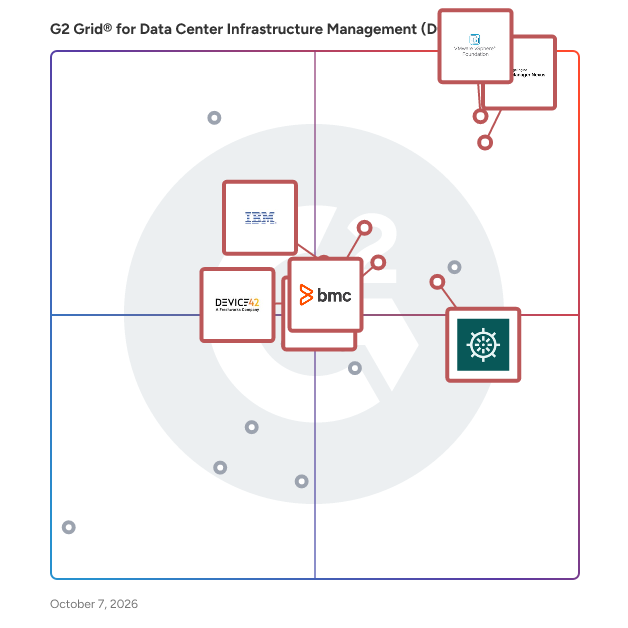
8 Listings in Enterprise Data Center Infrastructure Management (DCIM) Software Available

  • Overview
    Expand/Collapse Overview
  • Product Description
    How are these determined?Information
    This description is provided by the seller.

    VMware vSphere Foundation is the enterprise workload engine built to optimize the IT infrastructure for organizations of all sizes by boosting operational efficiency, supercharging workload performanc

    Users
    No information available
    Industries
    No information available
    Market Segment
    • 52% Enterprise
    • 30% Mid-Market
  • Pros and Cons
    Expand/Collapse Pros and Cons
  • VMware vSphere Foundation Pros and Cons
    How are these determined?Information
    Pros and Cons are compiled from review feedback and grouped into themes to provide an easy-to-understand summary of user reviews.
    Pros
    Ease of Use
    8
    Features
    4
    Customization
    3
    Deployment Ease
    3
    Easy Setup
    3
    Cons
    Expensive
    6
    Learning Difficulty
    2
    Limited Functionality
    2
    Networking Issues
    2
    Scaling Issues
    2
  • User Satisfaction
    Expand/Collapse User Satisfaction
  • VMware vSphere Foundation features and usability ratings that predict user satisfaction
    8.3
    Server Performance
    Average: 8.2
    0.0
    Space Planning
    Average: 8.4
    8.3
    Quality of Support
    Average: 8.4
    6.7
    Energy Consumption
    Average: 7.9
  • Seller Details
    Expand/Collapse Seller Details
  • Seller Details
    Seller
    Broadcom
    Company Website
    Year Founded
    1991
    HQ Location
    San Jose, CA
    Twitter
    @broadcom
    62,375 Twitter followers
    LinkedIn® Page
    www.linkedin.com
    55,707 employees on LinkedIn®
Product Description
How are these determined?Information
This description is provided by the seller.

VMware vSphere Foundation is the enterprise workload engine built to optimize the IT infrastructure for organizations of all sizes by boosting operational efficiency, supercharging workload performanc

Users
No information available
Industries
No information available
Market Segment
  • 52% Enterprise
  • 30% Mid-Market
VMware vSphere Foundation Pros and Cons
How are these determined?Information
Pros and Cons are compiled from review feedback and grouped into themes to provide an easy-to-understand summary of user reviews.
Pros
Ease of Use
8
Features
4
Customization
3
Deployment Ease
3
Easy Setup
3
Cons
Expensive
6
Learning Difficulty
2
Limited Functionality
2
Networking Issues
2
Scaling Issues
2
VMware vSphere Foundation features and usability ratings that predict user satisfaction
8.3
Server Performance
Average: 8.2
0.0
Space Planning
Average: 8.4
8.3
Quality of Support
Average: 8.4
6.7
Energy Consumption
Average: 7.9
Seller Details
Seller
Broadcom
Company Website
Year Founded
1991
HQ Location
San Jose, CA
Twitter
@broadcom
62,375 Twitter followers
LinkedIn® Page
www.linkedin.com
55,707 employees on LinkedIn®
(585)4.1 out of 5
7th Easiest To Use in Data Center Infrastructure Management (DCIM) software
Save to My Lists
  • Overview
    Expand/Collapse Overview
  • Product Description
    How are these determined?Information
    This description is provided by the seller.

    Microsoft System Center helps customers realize the benefits of the Microsoft Cloud Platform by delivering unified management. Experience fast time-to-value with out-of-the-box monitoring, provisionin

    Users
    • IT Manager
    • Network Engineer
    Industries
    • Information Technology and Services
    • Education Management
    Market Segment
    • 46% Enterprise
    • 33% Mid-Market
  • Pros and Cons
    Expand/Collapse Pros and Cons
  • Microsoft System Center Pros and Cons
    How are these determined?Information
    Pros and Cons are compiled from review feedback and grouped into themes to provide an easy-to-understand summary of user reviews.
    Pros
    Ease of Use
    4
    All-in-One Solution
    1
    Automation
    1
    Centralized Management
    1
    Customization
    1
    Cons
    Expensive
    3
    Pricing Issues
    3
    Inaccurate Information
    2
    Missing Features
    2
    Performance Issues
    2
  • User Satisfaction
    Expand/Collapse User Satisfaction
  • Microsoft System Center features and usability ratings that predict user satisfaction
    8.8
    Server Performance
    Average: 8.2
    8.1
    Space Planning
    Average: 8.4
    8.0
    Quality of Support
    Average: 8.4
    8.3
    Energy Consumption
    Average: 7.9
  • Seller Details
    Expand/Collapse Seller Details
  • Seller Details
    Seller
    Microsoft
    Year Founded
    1975
    HQ Location
    Redmond, Washington
    Twitter
    @microsoft
    13,090,375 Twitter followers
    LinkedIn® Page
    www.linkedin.com
    226,132 employees on LinkedIn®
    Ownership
    MSFT
Product Description
How are these determined?Information
This description is provided by the seller.

Microsoft System Center helps customers realize the benefits of the Microsoft Cloud Platform by delivering unified management. Experience fast time-to-value with out-of-the-box monitoring, provisionin

Users
  • IT Manager
  • Network Engineer
Industries
  • Information Technology and Services
  • Education Management
Market Segment
  • 46% Enterprise
  • 33% Mid-Market
Microsoft System Center Pros and Cons
How are these determined?Information
Pros and Cons are compiled from review feedback and grouped into themes to provide an easy-to-understand summary of user reviews.
Pros
Ease of Use
4
All-in-One Solution
1
Automation
1
Centralized Management
1
Customization
1
Cons
Expensive
3
Pricing Issues
3
Inaccurate Information
2
Missing Features
2
Performance Issues
2
Microsoft System Center features and usability ratings that predict user satisfaction
8.8
Server Performance
Average: 8.2
8.1
Space Planning
Average: 8.4
8.0
Quality of Support
Average: 8.4
8.3
Energy Consumption
Average: 7.9
Seller Details
Seller
Microsoft
Year Founded
1975
HQ Location
Redmond, Washington
Twitter
@microsoft
13,090,375 Twitter followers
LinkedIn® Page
www.linkedin.com
226,132 employees on LinkedIn®
Ownership
MSFT
G2 Advertising
Sponsored
G2 Advertising
Get 2x conversion than Google Ads with G2 Advertising!
G2 Advertising places your product in premium positions on high-traffic pages and on targeted competitor pages to reach buyers at key comparison moments.
(176)4.6 out of 5
1st Easiest To Use in Data Center Infrastructure Management (DCIM) software
Save to My Lists
Entry Level Price:$345 For 10 devices
  • Overview
    Expand/Collapse Overview
  • Product Description
    How are these determined?Information
    This description is provided by the seller.

    ManageEngine OpManager offers unified network performance monitoring and fault management for your entire IT infrastructure. It provides real-time insights into the health and availability of all devi

    Users
    • IT Manager
    • Network Administrator
    Industries
    • Information Technology and Services
    • Financial Services
    Market Segment
    • 57% Mid-Market
    • 32% Enterprise
  • Pros and Cons
    Expand/Collapse Pros and Cons
  • ManageEngine OpManager Pros and Cons
    How are these determined?Information
    Pros and Cons are compiled from review feedback and grouped into themes to provide an easy-to-understand summary of user reviews.
    Pros
    Monitoring
    47
    Ease of Use
    36
    Real-time Monitoring
    33
    Comprehensive Monitoring
    25
    User Interface
    24
    Cons
    Missing Features
    12
    Complexity
    9
    Poor Customer Support
    9
    Expensive
    8
    Licensing Issues
    8
  • User Satisfaction
    Expand/Collapse User Satisfaction
  • ManageEngine OpManager features and usability ratings that predict user satisfaction
    9.3
    Server Performance
    Average: 8.2
    8.3
    Space Planning
    Average: 8.4
    8.7
    Quality of Support
    Average: 8.4
    8.2
    Energy Consumption
    Average: 7.9
  • Seller Details
    Expand/Collapse Seller Details
  • Seller Details
    Seller
    Zoho
    Year Founded
    1996
    HQ Location
    Austin, TX
    Twitter
    @Zoho
    136,993 Twitter followers
    LinkedIn® Page
    www.linkedin.com
    29,794 employees on LinkedIn®
    Phone
    +1 (888) 900-9646
Product Description
How are these determined?Information
This description is provided by the seller.

ManageEngine OpManager offers unified network performance monitoring and fault management for your entire IT infrastructure. It provides real-time insights into the health and availability of all devi

Users
  • IT Manager
  • Network Administrator
Industries
  • Information Technology and Services
  • Financial Services
Market Segment
  • 57% Mid-Market
  • 32% Enterprise
ManageEngine OpManager Pros and Cons
How are these determined?Information
Pros and Cons are compiled from review feedback and grouped into themes to provide an easy-to-understand summary of user reviews.
Pros
Monitoring
47
Ease of Use
36
Real-time Monitoring
33
Comprehensive Monitoring
25
User Interface
24
Cons
Missing Features
12
Complexity
9
Poor Customer Support
9
Expensive
8
Licensing Issues
8
ManageEngine OpManager features and usability ratings that predict user satisfaction
9.3
Server Performance
Average: 8.2
8.3
Space Planning
Average: 8.4
8.7
Quality of Support
Average: 8.4
8.2
Energy Consumption
Average: 7.9
Seller Details
Seller
Zoho
Year Founded
1996
HQ Location
Austin, TX
Twitter
@Zoho
136,993 Twitter followers
LinkedIn® Page
www.linkedin.com
29,794 employees on LinkedIn®
Phone
+1 (888) 900-9646
(51)4.5 out of 5
2nd Easiest To Use in Data Center Infrastructure Management (DCIM) software
Save to My Lists
  • Overview
    Expand/Collapse Overview
  • Product Description
    How are these determined?Information
    This description is provided by the seller.

    The data center is not a simple environment to manage, and a DICM solution should not be simplistic. Nlyte is recognized globally by analysts and IT professionals as the leading DCIM software on the

    Users
    No information available
    Industries
    • Information Technology and Services
    • Financial Services
    Market Segment
    • 63% Enterprise
    • 25% Mid-Market
  • Pros and Cons
    Expand/Collapse Pros and Cons
  • Nlyte Pros and Cons
    How are these determined?Information
    Pros and Cons are compiled from review feedback and grouped into themes to provide an easy-to-understand summary of user reviews.
    Pros
    Automation
    5
    Ease of Use
    4
    Asset Management
    3
    Efficiency Optimization
    3
    Easy Integrations
    2
    Cons
    Complexity
    4
    Setup Difficulty
    4
    Learning Curve
    3
    Poor Customer Support
    3
    Expensive
    2
  • User Satisfaction
    Expand/Collapse User Satisfaction
  • Nlyte features and usability ratings that predict user satisfaction
    8.6
    Server Performance
    Average: 8.2
    9.5
    Space Planning
    Average: 8.4
    8.7
    Quality of Support
    Average: 8.4
    8.6
    Energy Consumption
    Average: 7.9
  • Seller Details
    Expand/Collapse Seller Details
  • Seller Details
    Seller
    Nlyte
    Company Website
    Year Founded
    2003
    HQ Location
    Kennesaw, Georgia
    Twitter
    @nlyte
    1,958 Twitter followers
    LinkedIn® Page
    www.linkedin.com
    110 employees on LinkedIn®
Product Description
How are these determined?Information
This description is provided by the seller.

The data center is not a simple environment to manage, and a DICM solution should not be simplistic. Nlyte is recognized globally by analysts and IT professionals as the leading DCIM software on the

Users
No information available
Industries
  • Information Technology and Services
  • Financial Services
Market Segment
  • 63% Enterprise
  • 25% Mid-Market
Nlyte Pros and Cons
How are these determined?Information
Pros and Cons are compiled from review feedback and grouped into themes to provide an easy-to-understand summary of user reviews.
Pros
Automation
5
Ease of Use
4
Asset Management
3
Efficiency Optimization
3
Easy Integrations
2
Cons
Complexity
4
Setup Difficulty
4
Learning Curve
3
Poor Customer Support
3
Expensive
2
Nlyte features and usability ratings that predict user satisfaction
8.6
Server Performance
Average: 8.2
9.5
Space Planning
Average: 8.4
8.7
Quality of Support
Average: 8.4
8.6
Energy Consumption
Average: 7.9
Seller Details
Seller
Nlyte
Company Website
Year Founded
2003
HQ Location
Kennesaw, Georgia
Twitter
@nlyte
1,958 Twitter followers
LinkedIn® Page
www.linkedin.com
110 employees on LinkedIn®
(106)4.5 out of 5
6th Easiest To Use in Data Center Infrastructure Management (DCIM) software
Save to My Lists
Entry Level Price:Free
  • Overview
    Expand/Collapse Overview
  • Product Description
    How are these determined?Information
    This description is provided by the seller.

    Faddom simplifies Application Dependency Mapping (ADM) by providing IT teams with complete, real-time visibility into their hybrid infrastructure without agents or disruptions. With automated disco

    Users
    No information available
    Industries
    • Information Technology and Services
    • Hospital & Health Care
    Market Segment
    • 45% Enterprise
    • 41% Mid-Market
  • Pros and Cons
    Expand/Collapse Pros and Cons
  • Faddom Pros and Cons
    How are these determined?Information
    Pros and Cons are compiled from review feedback and grouped into themes to provide an easy-to-understand summary of user reviews.
    Pros
    Ease of Use
    16
    Customer Support
    15
    Features
    15
    Tracking
    14
    Integrations
    11
    Cons
    Configuration Issues
    4
    Learning Difficulty
    4
    Limitations
    4
    Limited Features
    4
    Cost
    3
  • User Satisfaction
    Expand/Collapse User Satisfaction
  • Faddom features and usability ratings that predict user satisfaction
    7.9
    Server Performance
    Average: 8.2
    5.8
    Space Planning
    Average: 8.4
    9.2
    Quality of Support
    Average: 8.4
    5.6
    Energy Consumption
    Average: 7.9
  • Seller Details
    Expand/Collapse Seller Details
  • Seller Details
    Seller
    Faddom
    Company Website
    Year Founded
    2022
    HQ Location
    Tel Aviv
    Twitter
    @faddommapping
    52 Twitter followers
    LinkedIn® Page
    www.linkedin.com
    74 employees on LinkedIn®
Product Description
How are these determined?Information
This description is provided by the seller.

Faddom simplifies Application Dependency Mapping (ADM) by providing IT teams with complete, real-time visibility into their hybrid infrastructure without agents or disruptions. With automated disco

Users
No information available
Industries
  • Information Technology and Services
  • Hospital & Health Care
Market Segment
  • 45% Enterprise
  • 41% Mid-Market
Faddom Pros and Cons
How are these determined?Information
Pros and Cons are compiled from review feedback and grouped into themes to provide an easy-to-understand summary of user reviews.
Pros
Ease of Use
16
Customer Support
15
Features
15
Tracking
14
Integrations
11
Cons
Configuration Issues
4
Learning Difficulty
4
Limitations
4
Limited Features
4
Cost
3
Faddom features and usability ratings that predict user satisfaction
7.9
Server Performance
Average: 8.2
5.8
Space Planning
Average: 8.4
9.2
Quality of Support
Average: 8.4
5.6
Energy Consumption
Average: 7.9
Seller Details
Seller
Faddom
Company Website
Year Founded
2022
HQ Location
Tel Aviv
Twitter
@faddommapping
52 Twitter followers
LinkedIn® Page
www.linkedin.com
74 employees on LinkedIn®
(309)4.4 out of 5
Optimized for quick response
5th Easiest To Use in Data Center Infrastructure Management (DCIM) software
Save to My Lists
  • Overview
    Expand/Collapse Overview
  • Product Description
    How are these determined?Information
    This description is provided by the seller.

    IBM Turbonomic is a real-time application resource management platform designed to help users optimize and manage resources across hybrid and multi-cloud environments. This innovative solution continu

    Users
    • Software Engineer
    • System Engineer
    Industries
    • Information Technology and Services
    • Computer Software
    Market Segment
    • 42% Enterprise
    • 32% Mid-Market
    User Sentiment
    How are these determined?Information
    These insights, currently in beta, are compiled from user reviews and grouped to display a high-level overview of the software.
    • IBM Turbonomic is a tool designed to automate resource allocations across complex hybrid and multi-cloud environments, ensuring application performance.
    • Users frequently mention the tool's ability to provide clear visibility into resource usage, identify over-provisioned workloads, and automatically execute optimization actions based on real-time data analysis, which helps in cost optimization and maintaining system efficiency.
    • Reviewers mentioned the high running costs, complex setup process, and the need for manual validation of some recommendations as drawbacks, along with the tool's user interface being complex for new users and the initial setup requiring extra configuration effort.
  • Pros and Cons
    Expand/Collapse Pros and Cons
  • IBM Turbonomic Pros and Cons
    How are these determined?Information
    Pros and Cons are compiled from review feedback and grouped into themes to provide an easy-to-understand summary of user reviews.
    Pros
    Cost Optimization
    23
    Automation
    21
    Ease of Use
    21
    Performance
    19
    Artificial Intelligence
    17
    Cons
    Complexity
    16
    Learning Curve
    15
    Expensive
    14
    Complex Configuration
    11
    Setup Complexity
    11
  • User Satisfaction
    Expand/Collapse User Satisfaction
  • IBM Turbonomic features and usability ratings that predict user satisfaction
    9.0
    Server Performance
    Average: 8.2
    8.9
    Space Planning
    Average: 8.4
    8.9
    Quality of Support
    Average: 8.4
    8.8
    Energy Consumption
    Average: 7.9
  • Seller Details
    Expand/Collapse Seller Details
  • Seller Details
    Seller
    IBM
    Company Website
    Year Founded
    1911
    HQ Location
    Armonk, NY
    Twitter
    @IBM
    708,873 Twitter followers
    LinkedIn® Page
    www.linkedin.com
    339,241 employees on LinkedIn®
Product Description
How are these determined?Information
This description is provided by the seller.

IBM Turbonomic is a real-time application resource management platform designed to help users optimize and manage resources across hybrid and multi-cloud environments. This innovative solution continu

Users
  • Software Engineer
  • System Engineer
Industries
  • Information Technology and Services
  • Computer Software
Market Segment
  • 42% Enterprise
  • 32% Mid-Market
User Sentiment
How are these determined?Information
These insights, currently in beta, are compiled from user reviews and grouped to display a high-level overview of the software.
  • IBM Turbonomic is a tool designed to automate resource allocations across complex hybrid and multi-cloud environments, ensuring application performance.
  • Users frequently mention the tool's ability to provide clear visibility into resource usage, identify over-provisioned workloads, and automatically execute optimization actions based on real-time data analysis, which helps in cost optimization and maintaining system efficiency.
  • Reviewers mentioned the high running costs, complex setup process, and the need for manual validation of some recommendations as drawbacks, along with the tool's user interface being complex for new users and the initial setup requiring extra configuration effort.
IBM Turbonomic Pros and Cons
How are these determined?Information
Pros and Cons are compiled from review feedback and grouped into themes to provide an easy-to-understand summary of user reviews.
Pros
Cost Optimization
23
Automation
21
Ease of Use
21
Performance
19
Artificial Intelligence
17
Cons
Complexity
16
Learning Curve
15
Expensive
14
Complex Configuration
11
Setup Complexity
11
IBM Turbonomic features and usability ratings that predict user satisfaction
9.0
Server Performance
Average: 8.2
8.9
Space Planning
Average: 8.4
8.9
Quality of Support
Average: 8.4
8.8
Energy Consumption
Average: 7.9
Seller Details
Seller
IBM
Company Website
Year Founded
1911
HQ Location
Armonk, NY
Twitter
@IBM
708,873 Twitter followers
LinkedIn® Page
www.linkedin.com
339,241 employees on LinkedIn®
(51)4.7 out of 5
4th Easiest To Use in Data Center Infrastructure Management (DCIM) software
View top Consulting Services for Device42, A Freshworks Company
Save to My Lists
  • Overview
    Expand/Collapse Overview
  • Product Description
    How are these determined?Information
    This description is provided by the seller.

    With customers across 70+ countries, organizations of all sizes rely on Device42 as the most trusted, advanced, and complete full-stack agentless discovery and dependency mapping platform for Hybrid I

    Users
    No information available
    Industries
    • Information Technology and Services
    • Computer Software
    Market Segment
    • 45% Enterprise
    • 35% Mid-Market
  • Pros and Cons
    Expand/Collapse Pros and Cons
  • Device42, A Freshworks Company Pros and Cons
    How are these determined?Information
    Pros and Cons are compiled from review feedback and grouped into themes to provide an easy-to-understand summary of user reviews.
    Pros
    Asset Management
    3
    Ease of Use
    1
    Productivity Improvement
    1
    Solutions
    1
    Tracking
    1
    Cons
    Complexity
    1
    Latency Issues
    1
    Learning Curve
    1
    Navigation Issues
    1
    Performance Issues
    1
  • User Satisfaction
    Expand/Collapse User Satisfaction
  • Device42, A Freshworks Company features and usability ratings that predict user satisfaction
    7.8
    Server Performance
    Average: 8.2
    8.9
    Space Planning
    Average: 8.4
    9.5
    Quality of Support
    Average: 8.4
    9.4
    Energy Consumption
    Average: 7.9
  • Seller Details
    Expand/Collapse Seller Details
  • Seller Details
    Seller
    Device42
    Year Founded
    2010
    HQ Location
    West Haven, CO
    Twitter
    @device42
    1,692 Twitter followers
    LinkedIn® Page
    www.linkedin.com
    114 employees on LinkedIn®
Product Description
How are these determined?Information
This description is provided by the seller.

With customers across 70+ countries, organizations of all sizes rely on Device42 as the most trusted, advanced, and complete full-stack agentless discovery and dependency mapping platform for Hybrid I

Users
No information available
Industries
  • Information Technology and Services
  • Computer Software
Market Segment
  • 45% Enterprise
  • 35% Mid-Market
Device42, A Freshworks Company Pros and Cons
How are these determined?Information
Pros and Cons are compiled from review feedback and grouped into themes to provide an easy-to-understand summary of user reviews.
Pros
Asset Management
3
Ease of Use
1
Productivity Improvement
1
Solutions
1
Tracking
1
Cons
Complexity
1
Latency Issues
1
Learning Curve
1
Navigation Issues
1
Performance Issues
1
Device42, A Freshworks Company features and usability ratings that predict user satisfaction
7.8
Server Performance
Average: 8.2
8.9
Space Planning
Average: 8.4
9.5
Quality of Support
Average: 8.4
9.4
Energy Consumption
Average: 7.9
Seller Details
Seller
Device42
Year Founded
2010
HQ Location
West Haven, CO
Twitter
@device42
1,692 Twitter followers
LinkedIn® Page
www.linkedin.com
114 employees on LinkedIn®
  • Overview
    Expand/Collapse Overview
  • Product Description
    How are these determined?Information
    This description is provided by the seller.

    BMC AMI Ops is an AI-driven mainframe operations management solution for IBM Z environments. It helps enterprises monitor, automate, and optimize the performance and availability of mission-critical s

    Users
    No information available
    Industries
    No information available
    Market Segment
    • 62% Enterprise
    • 27% Small-Business
  • User Satisfaction
    Expand/Collapse User Satisfaction
  • BMC AMI Ops features and usability ratings that predict user satisfaction
    0.0
    No information available
    0.0
    No information available
    8.3
    Quality of Support
    Average: 8.4
    0.0
    No information available
  • Seller Details
    Expand/Collapse Seller Details
  • Seller Details
    Year Founded
    1980
    HQ Location
    Houston, TX
    Twitter
    @BMCSoftware
    48,137 Twitter followers
    LinkedIn® Page
    www.linkedin.com
    9,037 employees on LinkedIn®
    Phone
    713 918 8800
Product Description
How are these determined?Information
This description is provided by the seller.

BMC AMI Ops is an AI-driven mainframe operations management solution for IBM Z environments. It helps enterprises monitor, automate, and optimize the performance and availability of mission-critical s

Users
No information available
Industries
No information available
Market Segment
  • 62% Enterprise
  • 27% Small-Business
BMC AMI Ops features and usability ratings that predict user satisfaction
0.0
No information available
0.0
No information available
8.3
Quality of Support
Average: 8.4
0.0
No information available
Seller Details
Year Founded
1980
HQ Location
Houston, TX
Twitter
@BMCSoftware
48,137 Twitter followers
LinkedIn® Page
www.linkedin.com
9,037 employees on LinkedIn®
Phone
713 918 8800