Best Construction Risk Assessment Software for Small Business

How Many Construction Risk Assessment Software Products Does G2 Track?

Total Products under this Category: 99

Category Stats (Oct 2026)

  • Average Rating: 4.48/5 (↓0.01 vs Sep 2026) The average rating of products in this category, based on all submitted ratings
  • Top Trending Product: Corfix (+0.55%) - Among all products in this category, Corfix recorded the largest rating increase compared to last month

Last updated: October 15, 2026

How Does G2 Rank Construction Risk Assessment Software Products?

Why You Can Trust G2's Software Rankings:

  • 30 Analysts and Data Experts
  • 12,700+ Authentic Reviews
  • 99+ Products
  • Unbiased Rankings

G2's software rankings are built on verified user reviews, rigorous moderation, and a consistent research methodology maintained by a team of analysts and data experts. Each product is measured using the same transparent criteria, with no paid placement or vendor influence. While reviews reflect real user experiences, which can be subjective, they offer valuable insight into how software performs in the hands of professionals. Together, these inputs power the G2 Score, a standardized way to compare tools within every category.

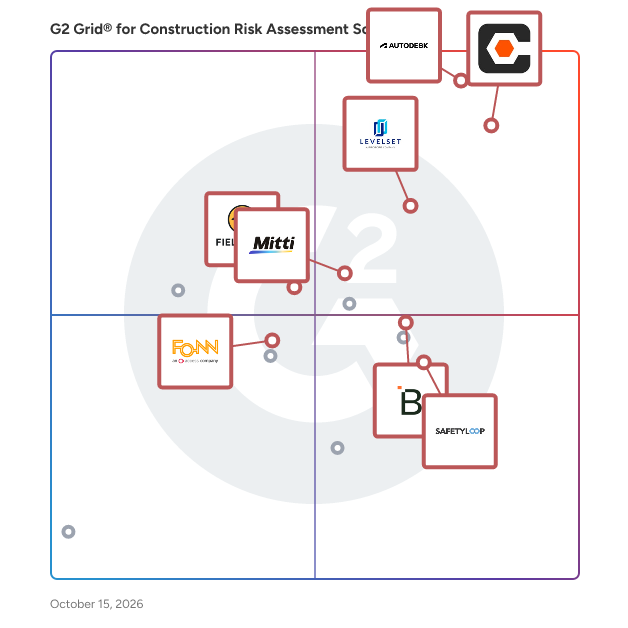
G2 Grid® for Construction Risk Assessment Software

G2 Grid® for Construction Risk Assessment Software plotting products by satisfaction and market presence

Highlighted products: Procore, LEVELSET, Autodesk Forma (formerly Autodesk Construction Cloud), Breadcrumb, Mitti (by SafetyCulture), Fieldwire by Hilti, SafetyLoop, and Fonn.

Underlying data: [Grid® JSON](https://www.g2.com/categories/construction-risk-assessment-software/grids.json?focus%5B%5D=procore&focus%5B%5D=levelset&focus%5B%5D=autodesk-forma-formerly-autodesk-construction-cloud&focus%5B%5D=breadcrumb-2025-12-01&focus%5B%5D=safetyculturehq&focus%5B%5D=fieldwire-by-hilti&focus%5B%5D=safetyloop&focus%5B%5D=fonn&segment=small-business)

Procore

Procore construction software manages your construction projects, resources and financials from planning to closeout. The platform connects every project contributor to solutions built specifically for the industry for the owner, the general contractor and the specialty contractor. The ability to communicate across teams makes it easier to work together by establishing a single source of truth. This is how Procore gives your team easy access to everything they need to know to get the job done.

Average Rating: 4.6/5.0

Total Reviews: 4,307

How Do G2 Users Rate Procore?

  • Has the product been a good partner in doing business?: 8.9/10 (Category avg: 9.2/10)
  • Risk Management: 8.4/10 (Category avg: 8.6/10)
  • Photo Documentation: 9.4/10 (Category avg: 8.6/10)
  • Regulation Compliance: 8.4/10 (Category avg: 8.4/10)

Who Is the Company Behind Procore?

  • Seller: Procore Technologies
  • Company Website:
  • Year Founded: 2003
  • HQ Location: Carpinteria, CA
  • Twitter: @procoretech
    16,491 Twitter followers
  • LinkedIn® Page: www.linkedin.com
    4,950 employees on LinkedIn®

Who Uses This Product?

  • Who Uses This: Project Manager, Project Engineer
  • Top Industries: Construction, Architecture & Planning
  • Company Size: 48% Medium, 40% Small

What Do G2 Reviewers Say About Procore?

AI-generated summary from verified user reviews

Pros
  • Users highlight Procore's intuitive interface, making training and onboarding for new users effortless.
  • Users value the efficient document management in Procore, streamlining processes and reducing the need for physical storage.
  • Users value the logical organization of Procore, enhancing task management and collaboration on job sites.
  • Users value the centralization of information in Procore, streamlining processes and enhancing efficiency in construction projects.
Cons
  • Users find the learning curve steep, particularly with importing budgets from Excel, impacting overall user-friendliness.
  • Users note the missing features in Procore, particularly concerning material procurement and meeting management improvements.
  • Users express concerns about the lack of features in Procore, impacting versatility and user-friendliness.
  • Users find limitations in integration and reporting features that hinder Procore's overall effectiveness for their needs.
  • Users find Procore's difficult learning curve challenging, often feeling overwhelmed by its complex features and notifications.

What Are Recent G2 Reviews of Procore?

What Are G2 Users Discussing About Procore?

LEVELSET

Levelset, a Procore Company, empowers construction industry credit and finance leaders to streamline lien rights management and automate payment processes. Trusted for over a decade, Levelset has protected 8 million projects with over 500,000 users and supported the largest construction suppliers. Solutions save time, resolve payment issues, and mitigate risk. Critical features like Job Radar provide early risk insights, and the research team delivers unparalleled project data accuracy and depth.

Average Rating: 4.5/5.0

Total Reviews: 51

How Do G2 Users Rate LEVELSET?

  • Has the product been a good partner in doing business?: 9.8/10 (Category avg: 9.2/10)
  • Risk Management: 8.1/10 (Category avg: 8.6/10)
  • Photo Documentation: 5.4/10 (Category avg: 8.6/10)
  • Regulation Compliance: 6.8/10 (Category avg: 8.4/10)

Who Is the Company Behind LEVELSET?

  • Seller: Procore Technologies
  • Year Founded: 2003
  • HQ Location: Carpinteria, CA
  • Twitter: @procoretech
    16,491 Twitter followers
  • LinkedIn® Page: www.linkedin.com
    4,950 employees on LinkedIn®
  • Ownership: NYSE: PCOR

Who Uses This Product?

  • Top Industries: Construction
  • Company Size: 45% Small, 41% Medium

What Do G2 Reviewers Say About LEVELSET?

AI-generated summary from verified user reviews

Pros
  • Users appreciate the ease of use of Levelset, benefiting from streamlined processes and friendly customer support.
  • Users commend the exceptional customer support offered by Levelset, ensuring a seamless experience during setup and beyond.
  • Users find LEVELSET's team to be exceptionally helpful, providing valuable assistance and support in managing deadlines and information.
  • Users highlight the easy access and user-friendliness of Levelset, making it ideal for diverse teams.
  • Users appreciate the ease of implementation with Levelset, finding it user-friendly and efficient for daily tasks.
Cons
  • Users experience difficulty navigating the interface and finding crucial editing options, complicating their workflow.
  • Users face inefficient processes with LEVELSET, struggling with inaccurate information and costly communication methods.
  • Users find the difficult navigation of LEVELSET challenging, requiring time to adjust to the interface.
  • Users report poor email notifications, leading to a lack of updates and unprofessional service from Levelset.
  • Users report inaccurate information from LEVELSET, leading to unresolved liens and increased costs due to inefficiencies.

What Are Recent G2 Reviews of LEVELSET?

Autodesk Forma (formerly Autodesk Construction Cloud)

Autodesk Forma (formerly Autodesk Construction Cloud) connects workflows, teams and data at every stage of construction to reduce risk, maximize efficiency, and increase profits. Autodesk Build is part of Autodesk Forma (formerly Autodesk Construction Cloud)'s newest set of products that further connect data, workflows, and teams throughout the entire building lifecycle. Build delivers a broad, deep, and connected set of field execution and project management tools for builders in a single software platform that is easy to deploy, adopt and use. Autodesk Build delivers the unification of best-in-class technology from PlanGrid and BIM 360, along with new functionality, to connect construction data and workflows across the headquarters, office, and jobsite. It offers tools for project management, quality, safety, cost, document management and project closeout workflows in a single application that is purpose-built for what you do and where you are working. -Supports integrated & digitized processes for the build phase of a project in a platform that is easy to deploy, adopt and use, while ensuring information sharing and workflows are tightly controlled and highly-configurable. -Standardized and centralized data collection from design through operations enables data-driven decision making, and predictive analytics provide visibility into high-risk issues that can impact project cost, schedule, quality, and safety. -Cloud-based document management provides a single source of truth for all project documentation for the owner, GCs and subs. Autodesk Takeoff empowers estimators to create fast, accurate takeoffs in a cloud-based solution that combines 2D and 3D workflows. Autodesk Takeoff is part of Autodesk Forma (formerly Autodesk Construction Cloud)'s newest set of products that further connect data, workflows, and teams throughout the entire building lifecycle. Autodesk Takeoff allows estimators to perform more accurate 2D takeoffs and generate automated quantities from 3D models in a single online solution. Preconstruction teams are empowered to win more work with integrated takeoffs and quantities that help produce quality estimates for faster, more accurate bidding. -Manage sheets and models in one data environment with Autodesk Docs -Easily capture project scope with linear, count and area takeoff -Generate multiple quantities and use custom formulas -Get instant access to quantities from models for automated 3D takeoffs -Access aggregated quantities from drawings and models Autodesk BIM Collaborate is part of Autodesk Forma (formerly Autodesk Construction Cloud)'s newest set of products that further connect data, workflows, and teams throughout the entire building lifecycle. BIM Collaborate empowers project teams to align and execute on design intent and constructability by managing the entire design collaboration and coordination workflow. Autodesk BIM Collaborate empowers design and construction teams to align and execute on design intent and constructability in a single online solution. By allowing teams to manage the entire design collaboration and coordination process in a single common data environment, BIM Collaborate reduces rework and improves overall design quality. -No limits on projects or file storage -Subscribe once and use on any project you are working on -Flexible subscription offerings for users, projects and businesses -Easily add subscribers and models as your business grows -Keep the same central administration and user login when adding new products

Average Rating: 4.4/5.0

Total Reviews: 5,463

How Do G2 Users Rate Autodesk Forma (formerly Autodesk Construction Cloud)?

  • Has the product been a good partner in doing business?: 8.3/10 (Category avg: 9.2/10)
  • Risk Management: 7.5/10 (Category avg: 8.6/10)
  • Photo Documentation: 8.2/10 (Category avg: 8.6/10)
  • Regulation Compliance: 7.3/10 (Category avg: 8.4/10)

Who Is the Company Behind Autodesk Forma (formerly Autodesk Construction Cloud)?

  • Seller: Autodesk
  • Company Website:
  • Year Founded: 1982
  • HQ Location: San Francisco
  • Twitter: @autodesk
    273,215 Twitter followers
  • LinkedIn® Page: www.linkedin.com
    15,757 employees on LinkedIn®

Who Uses This Product?

  • Who Uses This: BIM Manager, Project Manager
  • Top Industries: Construction, Architecture & Planning
  • Company Size: 45% Medium, 31% Large

What Do G2 Reviewers Say About Autodesk Forma (formerly Autodesk Construction Cloud)?

AI-generated summary from verified user reviews

Pros
  • Users appreciate the simple user interface of Autodesk Forma, making it easy to navigate and utilize effectively.
  • Users value the real-time collaboration features of Autodesk Forma, enhancing project insight and coordination efficiency.
  • Users value the real-time collaboration features of Autodesk Forma, enhancing insights and teamwork throughout the design process.
  • Users value the seamless collaboration in Autodesk Forma, enhancing trust and efficiency across project phases.
  • Users value the easy access for team members to models and data, enhancing collaboration and understanding.
Cons
  • Users express frustration over missing features and complex access hurdles that limit functionality for architects in Autodesk Forma.
  • Users face limitations in tracking and functionality, making project management challenging and costing concerns prevalent.
  • Users face access limitations with Autodesk Forma, struggling with login prompts and multi-level assemblies access.
  • Users are frustrated by the lack of features in Autodesk Forma, making project management and collaboration challenging.
  • Users highlight the need for better configuration and accessibility in Autodesk Forma for improved usability.

What Are Recent G2 Reviews of Autodesk Forma (formerly Autodesk Construction Cloud)?

What Are G2 Users Discussing About Autodesk Forma (formerly Autodesk Construction Cloud)?

AI can help you find the answers. G2 helps you trust them.

Connect G2 to Claude or ChatGPT for answers grounded in G2's trusted reviews, comparisons, and pricing from real user insights.

How it works

Breadcrumb

Breadcrumb is a modern worksite safety and compliance tool built for the construction industry in the United States and operating globally across the United Kingdom, Ireland, Australia, and New Zealand. Available on mobile and desktop, Breadcrumb houses vital jobsite safety documentation such as orientations, training and certifications, JHAs, and manpower counts, as well as a complete worker directory linked to every site with the ability to send messages directly to each worker on site. This centralized hub is accessible to everyone who needs it and integrates with Procore in real-time. By streamlining a typically disjointed experience and creating a direct path of communication to the worker, Breadcrumb helps jobsite teams manage projects more efficiently, without losing site of safety. Breadcrumb is connecting the field by providing general contractors the with the database, providing the foremen with the tools to manage their crews, and making it easy for workers to complete their orientations and profiles. We offer core tools like project and company orientations, project sign in and attendance, the collection of training, licenses and certifications, as well as evacuations and subcontractor communications and alerts. We also offer solutions for work permits, JHAs, PTPs and the like. The result is a complete worker directory with the contact information of every worker on every site, as well as a full compliance library and audit trail where everything is time-stamped and saved to the cloud. Furthermore, Breadcrumb offers a deep integration with project management platforms Procore and Autodesk Forma. **Procore integration:** The most downloaded safety app on the Procore marketplace. The integration includes bidirectional directories that sync projects, companies, users and permissions. The integration also means that all man hours recorded in Breadcrumb are pushed across to the Procore Daily Log, and all safety documents such as orientations, certifications and permits are replicated in Procore Documents. **Autodesk Forma integration:** Breadcrumb's integration with Autodesk Forma Build means site-specific safety plans, JHAs, orientations, PTPs and permits flow straight into Autodesk Forma, and real-time manpower counts push directly into Forma Build forms. No manual entry or duplicate work.

Average Rating: 4.7/5.0

Total Reviews: 54

How Do G2 Users Rate Breadcrumb?

  • Has the product been a good partner in doing business?: 9.6/10 (Category avg: 9.2/10)
  • Regulation Compliance: 10.0/10 (Category avg: 8.4/10)

Who Is the Company Behind Breadcrumb?

  • Seller: Breadcrumb
  • Company Website:
  • Year Founded: 2020
  • HQ Location: Cremorne, AU
  • LinkedIn® Page: www.linkedin.com
    80 employees on LinkedIn®

Who Uses This Product?

  • Top Industries: Construction
  • Company Size: 57% Small, 43% Medium

What Do G2 Reviewers Say About Breadcrumb?

AI-generated summary from verified user reviews

Pros
  • Users value enhanced communication through Breadcrumb, benefiting from efficient orientations and effective mass notifications.
  • Users find Breadcrumb's ease of use invaluable for efficient orientations and seamless communication across projects.
  • Users commend Breadcrumb for its effective time management, streamlining subcontractor orientation and enhancing communication efficiency.
  • Users find Breadcrumb's training capabilities effective, streamlining orientations and enhancing communication for subcontractors.
Cons
  • Users face challenges with poor connectivity in remote areas, hindering the loading of the Breadcrumb browser version.

What Are Recent G2 Reviews of Breadcrumb?

Mitti (by SafetyCulture)

Mitti (by SafetyCulture) is the operations system for every site, shift and standard. Trusted by over 80,000 organisations, Mitti brings your people, training records and workflows into one operating picture. From the frontline to the boardroom, it gives everyone a clear understanding of who's trained and ready for the shift ahead, highlights what needs attention and recommends what to do next. Every course completed, skill verified and action taken becomes intelligence your teams can use to improve every day.

Average Rating: 4.6/5.0

Total Reviews: 472

How Do G2 Users Rate Mitti (by SafetyCulture)?

  • Has the product been a good partner in doing business?: 9.2/10 (Category avg: 9.2/10)
  • Risk Management: 8.6/10 (Category avg: 8.6/10)
  • Photo Documentation: 8.7/10 (Category avg: 8.6/10)
  • Regulation Compliance: 8.3/10 (Category avg: 8.4/10)

Who Is the Company Behind Mitti (by SafetyCulture)?

  • Seller: Mitti
  • Company Website:
  • Year Founded: 2004
  • HQ Location: Surry Hills, New South Wales
  • Twitter: @MittiHQ
    4,867 Twitter followers
  • LinkedIn® Page: www.linkedin.com
    428 employees on LinkedIn®

Who Uses This Product?

  • Who Uses This: Founder, Director
  • Top Industries: Construction, Manufacturing
  • Company Size: 44% Small, 41% Medium

What Do G2 Reviewers Say About Mitti (by SafetyCulture)?

AI-generated summary from verified user reviews

Pros
  • Users value the ease of use of Mitti, enabling quick surveys and reports from any mobile device.
  • Users commend Mitti for its efficiency improvement, significantly streamlining information flow and ensuring timely access to updates.
  • Users value the efficiency of Mitti for streamlining information flow and ensuring timely updates.
  • Users value the customization options of Mitti, enabling easy checklist creation and efficient project management.
  • Users find SafetyCulture's intuitive mobile app enhances usability, streamlining inspections and improving safety management effectively.
Cons
  • Users find missing features in Mitti, such as limited reports and clunky AI, hinder their overall experience.
  • Users find the limited customization in Mitti challenging, particularly with reports and dashboard flexibility.
  • Users struggle with a significant learning curve, finding the interface and AI functionality less intuitive and sometimes clunky.
  • Users express concerns about limited features such as clunky AI functionality and inadequate integration with other tools.
  • Users find the complexity of the interface challenging, leading to a steep learning curve and confusion over features.

What Are Recent G2 Reviews of Mitti (by SafetyCulture)?

What Are G2 Users Discussing About Mitti (by SafetyCulture)?

Fieldwire by Hilti

The field-first construction platform for less busywork and more building. Trusted on 4M+ projects worldwide, Fieldwire by Hilti connects the field and office in one simple, powerful platform so teams can move faster, stay aligned, and navigate projects with confidence from start to finish. Construction demands clear information, reliable coordination, and tools that perform where the work happens. Fieldwire brings plans, tasks, and updates into one transparent source of truth, giving everyone – from CEO to installer – access to the information they need, whether in the office or on the jobsite. Built for contractors across every trade, Fieldwire keeps teams aligned with up-to-date information and no surprises. Designed for easy adoption in the field, teams gain real-time visibility into progress, clear ownership of work, and the context to make confident decisions. Automated workflows and streamlined reporting reduce manual work, improve accountability, and help projects stay on schedule and on budget. As part of the Hilti Group, Fieldwire combines deep construction expertise with modern digital innovation to deliver better outcomes on every job. Learn more at Fieldwire.com.

Average Rating: 4.5/5.0

Total Reviews: 579

How Do G2 Users Rate Fieldwire by Hilti?

  • Has the product been a good partner in doing business?: 8.9/10 (Category avg: 9.2/10)
  • Risk Management: 8.6/10 (Category avg: 8.6/10)
  • Photo Documentation: 9.3/10 (Category avg: 8.6/10)
  • Regulation Compliance: 8.5/10 (Category avg: 8.4/10)

Who Is the Company Behind Fieldwire by Hilti?

  • Seller: Fieldwire
  • Company Website:
  • Year Founded: 2013
  • HQ Location: San Francisco, CA
  • LinkedIn® Page: www.linkedin.com
    361 employees on LinkedIn®

Who Uses This Product?

  • Who Uses This: Project Manager, Project Engineer
  • Top Industries: Construction, Architecture & Planning
  • Company Size: 56% Small, 32% Medium

What Do G2 Reviewers Say About Fieldwire by Hilti?

AI-generated summary from verified user reviews

Pros
  • Users appreciate the ease of use of Fieldwire, simplifying communication and project management across teams.
  • Users appreciate the short learning curve of Fieldwire by Hilti, enhancing efficiency and project management quickly.
  • Users value the efficient team collaboration offered by Fieldwire, enhancing communication and project tracking seamlessly.
  • Users find easy access to files and prints invaluable, enhancing organization and collaboration on job sites.
  • Users find Fieldwire to be intuitive and easy to use, streamlining project management and enhancing communication.
Cons
  • Users find the limited customization of Fieldwire restrictive, affecting its adaptability for unique business needs.
  • Users express frustration with limited functionality, including difficulties in viewing multiple projects and editing markups.
  • Users experience slow performance with Fieldwire, particularly when switching between projects on mobile and desktop devices.
  • Users find it frustrating that missing features limit checklist imports and report customization options in Fieldwire.
  • Users report update issues with Fieldwire, including excessive emails and syncing delays between devices.

What Are Recent G2 Reviews of Fieldwire by Hilti?

What Are G2 Users Discussing About Fieldwire by Hilti?

SafetyLoop

SafetyLoop is a modern, cloud-based safety and compliance platform built to help organizations reduce risk, improve accountability, and simplify safety operations across every jobsite, team, and device. Designed for growing and enterprise organizations, SafetyLoop brings incident management, inspections, audits, corrective actions, risk assessments, emergency preparedness, training, inventory management, and field reporting into one highly configurable platform. SafetyLoop helps organizations standardize and scale their Health & Safety Management System (HSMS) while supporting COR™, OH&S, and broader regulatory compliance initiatives. Real-time visibility, automated workflows, and digital safety processes allow teams to move beyond paperwork and reactive safety management toward a connected, proactive, and data-driven approach. Built for real-world field environments, SafetyLoop provides seamless web and mobile experiences across iOS and Android, including powerful offline functionality. Crews can complete inspections, report incidents, conduct audits, access emergency procedures, and capture critical safety data even in remote areas without connectivity. Once a connection is restored, information automatically syncs to the cloud. SafetyLoop is highly customizable and adapts to the way your organization already operates. Configurable forms, workflows, permissions, dashboards, training matrices, inventory systems, and reporting tools allow companies to align the platform with their internal processes, terminology, and safety culture across divisions, regions, and worksites. Real-time analytics, executive dashboards, automated notifications, and organization-wide visibility give leadership immediate insight into compliance gaps, safety trends, outstanding corrective actions, training status, and operational risk. This enables faster decision-making, stronger accountability, greater worker engagement, and measurable continuous improvement. Whether deployed across construction, manufacturing, energy, transportation, utilities, environmental services, or industrial operations, SafetyLoop delivers a scalable, intuitive, and cost-effective solution that helps organizations build safer workplaces, improve compliance, reduce administrative overhead, and strengthen operational resilience.

Average Rating: 4.6/5.0

Total Reviews: 39

How Do G2 Users Rate SafetyLoop?

  • Has the product been a good partner in doing business?: 9.8/10 (Category avg: 9.2/10)

Who Is the Company Behind SafetyLoop?

  • Seller: SafetyLoop
  • Company Website:
  • Year Founded: 2017
  • HQ Location: Toronto, CA
  • LinkedIn® Page: www.linkedin.com
    9 employees on LinkedIn®

Who Uses This Product?

  • Top Industries: Construction
  • Company Size: 54% Medium, 39% Small

What Are Recent G2 Reviews of SafetyLoop?

Fonn

Fonn is the user-friendly construction management tool that increases productivity through streamlined collaboration, both in the office, and on site with our easy-to-use mobile app. Plan, track and deliver jobs on time and on budget. Communicate in real time with clients, subcontractors and suppliers to avoid costly re-work errors. Reduce compliance headaches with a clear project audit trail.

Average Rating: 4.6/5.0

Total Reviews: 30

How Do G2 Users Rate Fonn?

  • Has the product been a good partner in doing business?: 8.7/10 (Category avg: 9.2/10)
  • Risk Management: 7.8/10 (Category avg: 8.6/10)
  • Photo Documentation: 9.0/10 (Category avg: 8.6/10)
  • Regulation Compliance: 8.9/10 (Category avg: 8.4/10)

Who Is the Company Behind Fonn?

  • Seller: The Access Group
  • Year Founded: 1991
  • HQ Location: Loughborough, Leicestershire
  • Twitter: @theaccessgroup
    4,212 Twitter followers
  • LinkedIn® Page: www.linkedin.com
    7,358 employees on LinkedIn®

Who Uses This Product?

  • Top Industries: Construction
  • Company Size: 88% Small, 12% Medium

What Do G2 Reviewers Say About Fonn?

AI-generated summary from verified user reviews

Pros
  • Users appreciate the ease of use of Fonn, benefiting from automated information generation without needing manual input.
  • Users value the efficiency improvement of Fonn, as it automates information generation with minimal input required.
  • Users appreciate the automated information generation in Fonn, enhancing efficiency and reducing manual input.
  • Users value the automated information generation feature of Fonn, enhancing efficiency and reducing manual input.
  • Users value the up-to-date information feature of Fonn, appreciating its automation that reduces manual input.

What Are Recent G2 Reviews of Fonn?

What Are G2 Users Discussing About Fonn?

SiteDocs

Most intuitive and affordable Safety Software with world class Analytics, an integration and automation engine, and In-App Chat. The easiest way to manage your entire safety program from mobile apps and the web. SiteDocs features a custom form builder, PDF document library, worker certification management, offline-mode, reports, and more. SiteDocs will help you easily manage your safety program while saving you time and helping you maintain the highest standard of safety possible.

Average Rating: 4.5/5.0

Total Reviews: 32

How Do G2 Users Rate SiteDocs?

  • Has the product been a good partner in doing business?: 8.8/10 (Category avg: 9.2/10)
  • Risk Management: 7.5/10 (Category avg: 8.6/10)
  • Photo Documentation: 9.1/10 (Category avg: 8.6/10)
  • Regulation Compliance: 7.8/10 (Category avg: 8.4/10)

Who Is the Company Behind SiteDocs?

  • Seller: SiteDocs
  • Year Founded: 2010
  • HQ Location: Abbotsford, BC
  • Twitter: @SiteDocs
    240 Twitter followers
  • LinkedIn® Page: www.linkedin.com
    148 employees on LinkedIn®

Who Uses This Product?

  • Top Industries: Construction
  • Company Size: 48% Medium, 45% Small

What Do G2 Reviewers Say About SiteDocs?

AI-generated summary from verified user reviews

Pros
  • Users find SiteDocs easy to use, as basic computer skills are sufficient for accessing resources and signing forms.
  • Users value the easy access to important work information and resources through SiteDocs, enhancing their workflow.
  • Users appreciate the seamless file storage of SiteDocs, favoring digital documentation and automatic syncing with Dropbox.
  • Users value the intuitive interface of SiteDocs, making it easy to access and manage workplace information.
  • Users appreciate the seamless sharing capabilities of SiteDocs, enabling effortless digital documentation and organization with Dropbox integration.
Cons
  • Users find access limitations frustrating, noting time-consuming navigation and restricted editing capabilities for resources.
  • Users find the document management process time-consuming, facing limitations on editing and uploading resources.
  • Users find navigation cumbersome and face limitations in editing resources, affecting overall user experience.

What Are Recent G2 Reviews of SiteDocs?

What Are G2 Users Discussing About SiteDocs?

GoCanvas

GoCanvas is a mobile-first field operations platform that helps businesses eliminate errors, reduce admin time, and complete jobs faster. Built for teams in the field, GoCanvas replaces paperwork and manual handoffs with easy-to-use mobile forms and flexible digital workflows that connect the field and office in real time. Turn your existing PDFs into smart, mobile-friendly forms using an AI-powered form converter or an intuitive drag-and-drop builder. Streamline inspections, work orders, safety checks, and daily reports by capturing photos and videos, scanning barcodes, logging GPS, and collecting e-signatures - even while offline, with automatic sync when connectivity returns. With thousands of integrations, GoCanvas fits seamlessly into your existing systems so teams always have access to accurate, real-time data. And powerful analytics let you track performance, uncover trends, and make data-informed decisions that drive efficiency. GoCanvas is trusted by thousands of businesses across industries like construction, energy and utilities, transportation, and field services to streamline operations, ensure compliance, and deliver better results—faster.

Average Rating: 4.3/5.0

Total Reviews: 76

How Do G2 Users Rate GoCanvas?

  • Has the product been a good partner in doing business?: 8.8/10 (Category avg: 9.2/10)

Who Is the Company Behind GoCanvas?

  • Seller: Canvas Solutions
  • Year Founded: 2008
  • HQ Location: Reston, VA
  • Twitter: @GoCanvas
    2,657 Twitter followers
  • LinkedIn® Page: www.linkedin.com
    226 employees on LinkedIn®

Who Uses This Product?

  • Top Industries: Construction, Computer Software
  • Company Size: 44% Medium, 39% Small

What Do G2 Reviewers Say About GoCanvas?

AI-generated summary from verified user reviews

Pros
  • Users appreciate the ease of use of GoCanvas, highlighting its organization and user-friendly design.
  • Users find GoCanvas to be user-friendly, appreciating its organization and ease of use for effective tasks.
  • Users love the customizability of forms in GoCanvas, enhancing their experience and meeting specific needs.
  • Users love the customization of forms in GoCanvas, allowing for tailored solutions that meet their needs.
  • Users enjoy the customization options for forms in GoCanvas, enhancing their data collection flexibility.
Cons
  • Users find the interface outdated, making the scheduling process seem unnecessarily complicated and in need of refinement.
  • Users experience clarity issues with GoCanvas, noting slow responses and images lacking realism.
  • Users find the complexity of scheduling in GoCanvas outdated and not fitting for their needs.
  • Users find the complex setup of GoCanvas to be outdated and unnecessarily complicated for their needs.
  • Users find the complex usability of GoCanvas frustrating, with outdated scheduling complicating their experience unnecessarily.

What Are Recent G2 Reviews of GoCanvas?

SALUS

SALUS is the operational safety and crew intelligence platform built for trade contractors. SALUS connects forms, docs, equipment, crews, and jobsites to distribute the right worker-specific controls at the right time, at scale, and shares one operational record across the entire organization. No more rebuilding the story from paper, texts, spreadsheets, and disconnected systems. Rosie, SALUS’ AI Admin & Risk Assistant, works across that record to handle the busy work: draft crew-ready controls, procedures, and site plans in seconds; capture events in the field instantly; monitor readiness and risk; and assemble source-linked reports in seconds. SALUS connects orientations, certifications, training, subcontractor readiness, JHAs and digital forms, permits, SDS, equipment, incidents, inspections, corrective actions, and reporting. With QR access, offline capture, voice, photos, signatures, Procore integration, API access, automations, and scheduled reporting, crews complete the work once—and Safety, Operations, and Executive leaders work from the same crew-level truth.

Average Rating: 4.7/5.0

Total Reviews: 66

How Do G2 Users Rate SALUS?

  • Has the product been a good partner in doing business?: 9.6/10 (Category avg: 9.2/10)
  • Risk Management: 9.0/10 (Category avg: 8.6/10)
  • Photo Documentation: 8.3/10 (Category avg: 8.6/10)
  • Regulation Compliance: 7.2/10 (Category avg: 8.4/10)

Who Is the Company Behind SALUS?

  • Seller: SALUS
  • Company Website:
  • Year Founded: 2018
  • HQ Location: Vancouver, CA
  • LinkedIn® Page: www.linkedin.com
    72 employees on LinkedIn®

Who Uses This Product?

  • Top Industries: Construction
  • Company Size: 50% Medium, 44% Small

What Do G2 Reviewers Say About SALUS?

AI-generated summary from verified user reviews

Pros
  • Users value the real-time access to completed safety processes and signatures, enhancing accountability and efficiency.
  • Users value the ease of use of SALUS, which streamlines safety documentation and training management effortlessly.
  • Users value the real-time access to safety process completion and documentation, enhancing accountability and efficiency.
  • Users value the real-time file storage of SALUS, enhancing safety training documentation and access for employees.
  • Users value the real-time reporting of safety processes and training, enhancing accountability and performance tracking.
Cons
  • Users find the lack of document tracking and reporting opportunities in SALUS to be limiting for their needs.
  • Users wish for more tracking and reporting features in SALUS, indicating a gap in document management capabilities.

What Are Recent G2 Reviews of SALUS?

What Are G2 Users Discussing About SALUS?

1Life

Clients benefit from 1 SOLUTION designed specifically for small-mid-sized businesses. Capabilities include web/mobile document, form, and scheduling management, learning management, online training courses and custom course builder, sub-contractor evaluation and management, WHMIS management, and more. Purchase just the features you want or the whole enchilada! The 1Life Workplace Safety Management System has been continuously improved over 10 years in consultation with our clients and an in-house team of experienced Safety Professionals and Software Developers.

Average Rating: 4.7/5.0

Total Reviews: 96

How Do G2 Users Rate 1Life?

  • Has the product been a good partner in doing business?: 9.5/10 (Category avg: 9.2/10)
  • Risk Management: 8.3/10 (Category avg: 8.6/10)
  • Photo Documentation: 9.2/10 (Category avg: 8.6/10)
  • Regulation Compliance: 8.5/10 (Category avg: 8.4/10)

Who Is the Company Behind 1Life?

  • Seller: 1Life
  • Year Founded: 2009
  • HQ Location: Winnipeg, Manitoba
  • Twitter: @1LifeWSS
    1,003 Twitter followers
  • LinkedIn® Page: www.linkedin.com
    20 employees on LinkedIn®

Who Uses This Product?

  • Who Uses This: Owner
  • Top Industries: Construction, Retail
  • Company Size: 57% Small, 43% Medium

What Are Recent G2 Reviews of 1Life?

What Are G2 Users Discussing About 1Life?

Neya Kumaresan
NK
Researched and written by Neya Kumaresan
Updated