Best Cloud Content Collaboration Software - Page 2

How Many Cloud Content Collaboration Software Products Does G2 Track?

Total Products under this Category: 263

Category Stats (Sep 2026)

  • Average Rating: 4.36/5 (↑0.01 vs Aug 2026) The average rating of products in this category, based on all submitted ratings
  • Top Trending Product: Assai Document Management (+26.07%) - Among all products in this category, Assai Document Management recorded the largest rating increase compared to last month

Last updated: September 01, 2026

How Does G2 Rank Cloud Content Collaboration Software Products?

Why You Can Trust G2's Software Rankings:

  • 30 Analysts and Data Experts
  • 118,600+ Authentic Reviews
  • 263+ Products
  • Unbiased Rankings

G2's software rankings are built on verified user reviews, rigorous moderation, and a consistent research methodology maintained by a team of analysts and data experts. Each product is measured using the same transparent criteria, with no paid placement or vendor influence. While reviews reflect real user experiences, which can be subjective, they offer valuable insight into how software performs in the hands of professionals. Together, these inputs power the G2 Score, a standardized way to compare tools within every category.

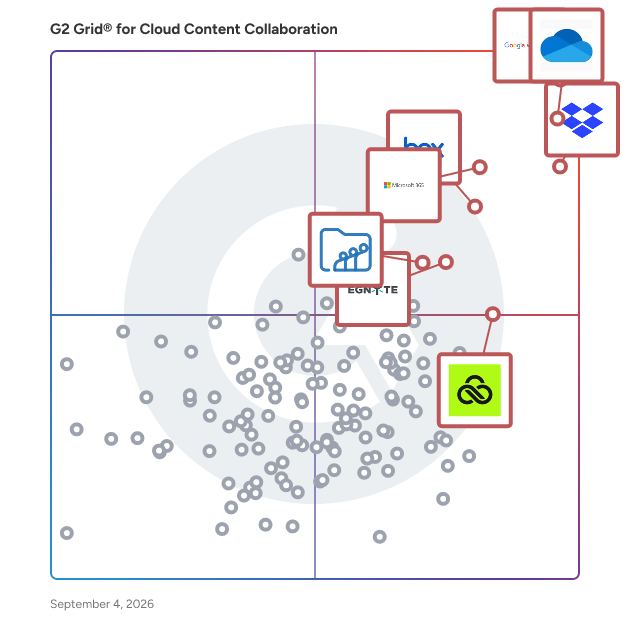
G2 Grid® for Cloud Content Collaboration Software

G2 Grid® for Cloud Content Collaboration Software plotting products by satisfaction and market presence

Highlighted products: Google Workspace, Microsoft OneDrive for Business, Dropbox, Microsoft 365, Box, Egnyte, LucidLink, and Zoho WorkDrive.

Underlying data: [Grid® JSON](https://www.g2.com/categories/cloud-content-collaboration/grids.json?focus%5B%5D=google-workspace&focus%5B%5D=microsoft-onedrive-for-business&focus%5B%5D=dropbox&focus%5B%5D=microsoft365&focus%5B%5D=box&focus%5B%5D=egnyte&focus%5B%5D=lucidlink&focus%5B%5D=zoho-workdrive)

Nextcloud

Nextcloud provides universal access to data while keeping IT in control, with a complete content collaboration platform. Store, share and edit documents alone or with others, take notes during an audio/video chat or manage your tasks and calendars from one platform. Through our user friendly mobile and web interfaces, teams can collaborate on documents, calendars and projects on the go, while data remains secure on the existing company servers. Nextcloud is: * supremely easy to use and accessible * quick to deploy and integrate in existing infrastructure * extremely secure with multiple layers of encryption and authentication * used by over 35 million users on more than 300.000 servers all over the world * 100% open source software, with a strong ecosystem backed by a German, employee-owned company

Average Rating: 4.3/5.0

Total Reviews: 195

How Do G2 Users Rate Nextcloud?

  • Has the product been a good partner in doing business?: 8.5/10 (Category avg: 8.8/10)
  • Performance and Reliability: 8.3/10 (Category avg: 8.7/10)
  • File following: 8.5/10 (Category avg: 8.8/10)
  • Device Syncing: 8.4/10 (Category avg: 8.8/10)

Who Is the Company Behind Nextcloud?

  • Seller: Nextcloud
  • Year Founded: 2016
  • HQ Location: Stuttgart, Baden-Württemberg
  • Twitter: @Nextclouders
    36,053 Twitter followers
  • LinkedIn® Page: www.linkedin.com
    148 employees on LinkedIn®

Who Uses This Product?

  • Top Industries: Information Technology and Services, Computer Software
  • Company Size: 57% Small, 30% Medium

What Do G2 Reviewers Say About Nextcloud?

AI-generated summary from verified user reviews

Pros
  • Users appreciate the effective team collaboration tools in Nextcloud, enhancing productivity and maintaining data privacy seamlessly.
  • Users find Nextcloud to be easy to use, making storage, sharing, and backup both efficient and manageable.
  • Users value the strong file sharing and sync capabilities of Nextcloud, enhancing their data management experience effectively.
  • Users appreciate the complete data ownership and privacy provided by Nextcloud, enhancing their data security and transparency.
  • Users emphasize the easy collaboration features of Nextcloud, enhancing teamwork and simplifying file sharing across teams.
Cons
  • Users find the training required for initial setup challenging, particularly for those lacking technical expertise.
  • Users experience slow performance on weaker servers, impacting features like file preview and live document editing.
  • Users note that the file size handling in Nextcloud could use performance improvements for larger libraries.
  • Users find integration difficult due to complex setup and maintenance requirements, particularly for non-technical individuals.
  • Users find permission issues challenging in Nextcloud, making initial setup and configuration time-consuming and confusing.

What Are Recent G2 Reviews of Nextcloud?

What Are G2 Users Discussing About Nextcloud?

AlphaSense

Meet AlphaSense: the world's leading market intelligence and search platform. AlphaSense is a market intelligence platform used by the world’s top companies and financial institutions to help professionals make better business decisions with confidence and speed. Since 2011, our AI-based technology has delivered insights from an extensive universe of public and private content—including realtime and aftermarket broker research, expert calls, private company data, SEC filings, earnings transcripts, regulatory content, news and trade journals. Our platform is trusted by over 4,000 enterprise customers, including a majority of the S&P 500. For more information, please visit www.alpha-sense.com.

Average Rating: 4.6/5.0

Total Reviews: 343

How Do G2 Users Rate AlphaSense?

  • Has the product been a good partner in doing business?: 9.4/10 (Category avg: 8.8/10)
  • Performance and Reliability: 9.3/10 (Category avg: 8.7/10)
  • File following: 8.7/10 (Category avg: 8.8/10)
  • Device Syncing: 8.8/10 (Category avg: 8.8/10)

Who Is the Company Behind AlphaSense?

  • Seller: AlphaSense
  • Company Website:
  • Year Founded: 2011
  • HQ Location: New York
  • Twitter: @AlphaSenseInc
    34,479 Twitter followers
  • LinkedIn® Page: www.linkedin.com
    3,341 employees on LinkedIn®

Who Uses This Product?

  • Who Uses This: Analyst, Associate
  • Top Industries: Financial Services, Pharmaceuticals
  • Company Size: 46% Large, 33% Small

What Do G2 Reviewers Say About AlphaSense?

AI-generated summary from verified user reviews

Pros
  • Users appreciate the ease of use of AlphaSense, enjoying efficient access to valuable insights and time-saving summaries.
  • Users value the search functionality of AlphaSense, enabling access to unique presentations and timely data easily.
  • Users appreciate the intuitive generative AI search of AlphaSense, which enhances efficiency in market intelligence and data analysis.
  • Users find AlphaSense's intuitive AI search invaluable for quickly generating insights and summaries, enhancing market intelligence efficiency.
  • Users value the advanced AI capabilities of AlphaSense for efficient competitive monitoring and insightful data summaries.
Cons
  • Users find the learning difficulty of AlphaSense frustrating, often needing to rely on others for assistance.
  • Users find the difficult learning curve of AlphaSense challenging, often requiring more time and familiarity to use effectively.
  • Users find the platform overwhelming for new users, as the extensive features and data can be intimidating.
  • Users find the search functionality lacking, struggling to filter for high-quality articles and avoid irrelevant results.
  • Users express frustration over insufficient information, particularly the need for more structured industry reports and documentation.

What Are Recent G2 Reviews of AlphaSense?

What Are G2 Users Discussing About AlphaSense?

Tresorit

Tresorit is a secure content collaboration platform designed to help individuals and organizations store, sync, and share sensitive information while prioritizing privacy. This comprehensive solution integrates encrypted storage, file sharing, collaboration tools, data rooms, and e-signatures into a single product family. Trusted by thousands of organizations worldwide, Tresorit is part of Swiss Post and serves as a privacy-first alternative to mainstream cloud tools, particularly for teams managing confidential files, regulated data, or client-facing work. At the heart of Tresorit is its commitment to zero-knowledge, end-to-end encryption. This means that files are encrypted on the user's device before being uploaded, and the encryption keys remain inaccessible to Tresorit itself. As a result, the platform cannot read customer content, ensuring that sensitive information remains protected even in the event of infrastructure compromise. Tresorit's cryptographic design choices are specifically intended to prevent data leakage through content matching or server-side visibility, providing users with peace of mind regarding their data security. Tresorit SecureCloud serves as an encrypted workspace that facilitates both internal collaboration and external exchanges. It supports secure file storage, syncing, and team collaboration while maintaining user-friendly workflows. The platform offers personal and business plans, with personal use functioning as an encrypted vault for sensitive documents and business use providing a secure workspace that emphasizes IT control, governance, and collaboration. This dual approach caters to a wide range of users, from individuals to large organizations. The Tresorit Drive experience allows users to access encrypted content through familiar interfaces such as Windows File Explorer and macOS Finder. This feature includes “cloud-only” access, which prevents the need to store all files locally, thus enhancing efficiency while maintaining centralized control. Administrators have the capability to take action if a device is lost or compromised, such as revoking access and unlinking the device to mitigate risks. For secure external sharing, Tresorit FileSharing offers robust access control features. Users can protect sharing links with expiration rules, passwords, watermarks, and restrictions on downloading or printing, all while benefiting from detailed activity tracking and auditing. Additionally, Tresorit integrates seamlessly into email workflows like Outlook and Gmail, helping to minimize the risks associated with sending sensitive attachments. For structured client collaboration, Tresorit Engage provides customizable, encrypted data rooms that support ongoing projects, role-based access control, and granular permissions, making it particularly useful for industries such as legal, finance, and consulting. Tresorit also enhances its offerings with Tresorit eSign, which combines document signing with encrypted file handling, supporting EU-qualified electronic signatures for high-trust workflows. Tresorit Email Encryption allows users to send encrypted emails directly from Outlook, ensuring secure communication without imposing complex setups on recipients. On the compliance front, Tresorit boasts strong security validation and certifications, including ISO 27001:2022 and Common Criteria EAL4+, while also supporting compliance with frameworks like GDPR and HIPAA. With data residency options across multiple regions, organizations can align their storage locations with legal and governance requirements, further solidifying Tresorit's position as a trusted solution for secure content collaboration.

Average Rating: 4.5/5.0

Total Reviews: 263

How Do G2 Users Rate Tresorit?

  • Has the product been a good partner in doing business?: 8.9/10 (Category avg: 8.8/10)
  • Performance and Reliability: 9.0/10 (Category avg: 8.7/10)
  • File following: 8.8/10 (Category avg: 8.8/10)
  • Device Syncing: 8.9/10 (Category avg: 8.8/10)

Who Is the Company Behind Tresorit?

  • Seller: Tresorit
  • Company Website:
  • Year Founded: 2011
  • HQ Location: Zurich, Zurich
  • Twitter: @Tresorit
    7,446 Twitter followers
  • LinkedIn® Page: www.linkedin.com
    144 employees on LinkedIn®

Who Uses This Product?

  • Who Uses This: CEO, Manager
  • Top Industries: Information Technology and Services, Non-Profit Organization Management
  • Company Size: 83% Small, 15% Medium

What Do G2 Reviewers Say About Tresorit?

AI-generated summary from verified user reviews

Pros
  • Users appreciate the user-friendly interface of Tresorit, finding it easy to manage and secure sensitive files.
  • Users appreciate Tresorit for its strong security features, enabling safe handling and sharing of sensitive files effortlessly.
  • Users appreciate the easy file sharing capabilities of Tresorit, enhancing collaboration without cumbersome email exchanges.
  • Users appreciate the secure sharing capabilities of Tresorit, allowing private information to be shared without hassle.
  • Users appreciate the ironclad security of Tresorit, enjoying peace of mind with end-to-end encryption and zero-knowledge design.
Cons
  • Users find the access limitations of Tresorit frustrating, hindering file management and collaborative editing experiences.
  • Users acknowledge that Tresorit is expensive, particularly impacting smaller teams and solo practitioners with limited budgets.
  • Users find file management cumbersome, with difficulties in organizing, renaming, and navigating through directories.
  • Users experience syncing issues with Tresorit, leading to inconsistent file visibility and slower performance across platforms.
  • Users face file sharing issues with Tresorit, including visibility problems and slower performance compared to alternatives.

What Are Recent G2 Reviews of Tresorit?

What Are G2 Users Discussing About Tresorit?

Kiteworks

Kiteworks’ mission is to empower organizations to effectively manage risk in every send, share, receive, and save of sensitive content. To this end, we created a platform that delivers content governance, compliance, and protection to customers. The platform unifies, tracks, controls, and secures sensitive content moving within, into, and out of their organization, significantly improving risk management and ensuring regulatory compliance on all sensitive content communications. Any professional or organization who sends, shares, receives or saves sensitive content should govern and protect it with Kiteworks. It’s as simple as that. With Kiteworks, CIOs and CISOs gain complete visibility, compliance and control over IP, PII, PHI, and other sensitive content across all 3rd party communication channels, including email, file sharing, mobile, enterprise apps, web portals, SFTP, and MFT. When users click the Kiteworks button, they know it’s the safe, secure way to share sensitive information with the outside world. With on-premise, private cloud, hybrid and FedRAMP deployment options, the Kiteworks platform provides the security and governance CISOs need to protect their organizations, mitigate risk, and adhere to rigorous compliance regulations such as NIST 800-171, HIPAA, SOX, GDPR, GLBA, FISMA, and others.

Average Rating: 4.4/5.0

Total Reviews: 119

How Do G2 Users Rate Kiteworks?

  • Has the product been a good partner in doing business?: 8.1/10 (Category avg: 8.8/10)
  • Performance and Reliability: 8.1/10 (Category avg: 8.7/10)
  • File following: 8.5/10 (Category avg: 8.8/10)
  • Device Syncing: 8.3/10 (Category avg: 8.8/10)

Who Is the Company Behind Kiteworks?

  • Seller: Kiteworks
  • Year Founded: 1999
  • HQ Location: Palo Alto, CA
  • Twitter: @Kiteworks
    3,460 Twitter followers
  • LinkedIn® Page: www.linkedin.com
    380 employees on LinkedIn®
  • Phone: 650-485-4300

Who Uses This Product?

  • Top Industries: Information Technology and Services, Marketing and Advertising
  • Company Size: 26% Small, 22% Large

What Do G2 Reviewers Say About Kiteworks?

AI-generated summary from verified user reviews

Pros
  • Users appreciate the strong security and encryption of Kiteworks, confidently sharing sensitive files without worry.
  • Users value the secure sharing features of Kiteworks, enabling confident file transfer without fears of data breaches.
  • Users appreciate the strong security and encryption of Kiteworks, enabling safe sharing of sensitive files with confidence.
  • Users value the strong security features of Kiteworks, enabling safe sharing of sensitive files with peace of mind.
  • Users appreciate the strong security features of Kiteworks, ensuring safe and compliant file sharing for sensitive information.
Cons
  • Users find the complex usability of Kiteworks challenging, especially for new users struggling with navigation and workflows.
  • Users find the interface overly complex, making it challenging for new users to navigate and utilize effectively.
  • Users find the poor interface design of Kiteworks makes it difficult to navigate and utilize effectively.
  • Users find the user interface complex, expressing a desire for a more intuitive and streamlined experience.
  • Users find the poor UI design of Kiteworks overwhelming and clunky, complicating navigation and usability.

What Are Recent G2 Reviews of Kiteworks?

What Are G2 Users Discussing About Kiteworks?

Webdocs

A Key Part of Fortra (the new face of HelpSystems) Webdocs is proud to be part of Fortra’s comprehensive cybersecurity portfolio. Fortra simplifies today’s complex cybersecurity landscape by bringing complementary products together to solve problems in innovative ways. These integrated, scalable solutions address the fast-changing challenges you face in safeguarding your organization. With the help of the powerful protection from Webdocs and others, Fortra is your relentless ally, here for you every step of the way throughout your cybersecurity journey.

Average Rating: 4.4/5.0

Total Reviews: 87

How Do G2 Users Rate Webdocs?

  • Has the product been a good partner in doing business?: 8.9/10 (Category avg: 8.8/10)
  • Performance and Reliability: 8.3/10 (Category avg: 8.7/10)
  • File following: 8.6/10 (Category avg: 8.8/10)
  • Device Syncing: 8.6/10 (Category avg: 8.8/10)

Who Is the Company Behind Webdocs?

  • Seller: Fortra
  • Year Founded: 1982
  • HQ Location: Eden Prairie, Minnesota
  • Twitter: @fortraofficial
    2,773 Twitter followers
  • LinkedIn® Page: www.linkedin.com
    1,755 employees on LinkedIn®

Who Uses This Product?

  • Top Industries: Information Technology and Services, Computer Software
  • Company Size: 47% Medium, 27% Small

What Do G2 Reviewers Say About Webdocs?

AI-generated summary from verified user reviews

Pros
  • Users value the ease of use of Webdocs, finding document management efficient and stress-free in a centralized platform.
  • Users appreciate the seamless organization of Webdocs, enhancing collaboration and streamlining their document management experience.
  • Users appreciate the efficiency and centralization of Webdocs, enhancing document management and collaboration across teams.
  • Users appreciate the easy collaboration features of Webdocs, enhancing team efficiency and streamlining workflow significantly.
  • Users appreciate the secure and user-friendly document management of Webdocs, facilitating efficient collaboration and streamlined workflows.
Cons
  • Users find limited customization in Webdocs, hindering the creation of complex documents and advanced formatting options.
  • Users experience slow performance with Webdocs, particularly when handling large documents or high volumes of files.
  • Users note significant integration issues and limited customization in Webdocs, impacting complex document handling and formatting.
  • Users experience performance issues with Webdocs, particularly when handling large documents, impacting overall efficiency.
  • Users experience integration difficulties with Webdocs, especially when uploading documents and connecting to third-party applications.

What Are Recent G2 Reviews of Webdocs?

DocuWare

DocuWare is a comprehensive document management and workflow automation solution designed to streamline business processes by enabling organizations to securely store, manage, and share documents across various formats and sources. Whether operating from the office, home, or on the go, DocuWare facilitates efficient document handling and approval processes through automated workflows, available in both on-premise and cloud configurations. Key Features and Functionality: - Document Management: Centralized storage of documents, ensuring they are accessible, secure, and compliant. - Automated Workflows: Simplification of approvals and document processing, reducing manual tasks and accelerating business operations. - AI-Powered Data Processing: Utilization of Intelligent Document Processing (IDP) to extract and process complex, unstructured data efficiently, even from handwritten or degraded documents. - Remote Accessibility: Secure access to documents and workflows from any device with internet connectivity, supporting distributed and remote teams. - Integration Capabilities: Seamless integration with various applications, enhancing existing business systems and workflows. Primary Value and Solutions Provided: DocuWare addresses the challenges of manual document handling and inefficient workflows by automating and digitizing these processes. This leads to increased productivity, as teams can quickly find and retrieve documents, focus on strategic initiatives, and respond promptly to customer and business needs. By reducing manual tasks, organizations can enhance efficiency, ensure data security, and maintain compliance with regulatory standards. Ultimately, DocuWare empowers businesses to be more agile and competitive in their respective industries.

Average Rating: 4.3/5.0

Total Reviews: 26

How Do G2 Users Rate DocuWare?

  • Has the product been a good partner in doing business?: 4.2/10 (Category avg: 8.8/10)
  • Performance and Reliability: 8.6/10 (Category avg: 8.7/10)
  • File following: 8.2/10 (Category avg: 8.8/10)
  • Device Syncing: 8.3/10 (Category avg: 8.8/10)

Who Is the Company Behind DocuWare?

  • Seller: Ricoh USA, Inc
  • Year Founded: 1962
  • HQ Location: New Delhi, India
  • Twitter: @RicohIDC
    111 Twitter followers
  • LinkedIn® Page: www.linkedin.com
    18,363 employees on LinkedIn®
  • Ownership: BSE: 517496

Who Uses This Product?

  • Company Size: 50% Small, 43% Medium

What Do G2 Reviewers Say About DocuWare?

AI-generated summary from verified user reviews

Pros
  • Users appreciate the ease of use of DocuWare, allowing quick access to documents and efficient data management.
  • Users praise the intelligent data management of DocuWare, enhancing productivity with its advanced recognition and automation features.
  • Users find the collaboration features of RicohDocs greatly enhance teamwork and productivity within their organizations.
  • Users appreciate the easy access of DocuWare, enhancing efficiency with a user-friendly interface and seamless integration.
  • Users find the easy implementation of DocuWare seamless, significantly improving access and efficiency in document management.
Cons
  • Users find the cost issues of DocuWare to be a bit high, impacting their overall satisfaction.
  • Users find the learning curve challenging, making onboarding difficult for those unfamiliar with the system.
  • Users find the training required for DocuWare to be a significant challenge, hindering smooth onboarding and usage.
  • Users find that mastering difficult learning aspects like indexing, workflows, and configuration requires significant time investment.
  • Users find the cost of DocuWare a bit high, which may be a barrier for some potential customers.

What Are Recent G2 Reviews of DocuWare?

What Are G2 Users Discussing About DocuWare?

Assembly

Create remarkable client experiences. CRM, portal, payments, tasks, contracts & more, with an AI Assistant that works for you. Assembly is the AI-powered platform for professional service firms. It replaces a patchwork of point tools with one place to run client work, so clients get a clean, branded portal for tasks, payments, messages, files, contracts, and forms, and your team runs on a simple CRM with an AI Assistant that knows full client context. The result: faster onboarding, improved retention, and happier clients. Assembly also fits the stack you already use. Embed Calendly, Airtable, and 1,000s of other products, connect Zapier/Make and webhooks, or build Custom Apps with our API so your workflow drives the software, not the other way around. Trusted by 1,000+ businesses serving 1M+ clients. SOC 2 Type II and HIPAA. Start for free today at assembly.com.

Average Rating: 4.7/5.0

Total Reviews: 330

How Do G2 Users Rate Assembly?

  • Has the product been a good partner in doing business?: 9.4/10 (Category avg: 8.8/10)
  • Performance and Reliability: 9.1/10 (Category avg: 8.7/10)
  • File following: 9.4/10 (Category avg: 8.8/10)
  • Device Syncing: 9.4/10 (Category avg: 8.8/10)

Who Is the Company Behind Assembly?

  • Seller: Assembly
  • Company Website:
  • Year Founded: 2020
  • HQ Location: New York, US
  • Twitter: @assemblycom
    60,010 Twitter followers
  • LinkedIn® Page: www.linkedin.com
    42 employees on LinkedIn®

Who Uses This Product?

  • Who Uses This: CEO, Owner
  • Top Industries: Marketing and Advertising, Accounting
  • Company Size: 91% Small, 4% Medium

What Do G2 Reviewers Say About Assembly?

AI-generated summary from verified user reviews

Pros
  • Users value the ease of use of Assembly, enhancing their ability to share and manage information effectively.
  • Users highlight the easy setup of Assembly, enabling quick user onboarding and efficient workflow integration.
  • Users commend the responsive customer support of Assembly, which enhances their overall experience with the platform.
  • Users love the intuitive setup of Assembly, enjoying seamless integrations and a straightforward client management process.
  • Users appreciate the seamless integrations that streamline processes and enhance client management within Assembly.
Cons
  • Users desire more missing features in Assembly, hoping for enhancements like Rich text and better integration opportunities.
  • Users express desire for more features as current options lead to limited integration and customization capabilities.
  • Users desire more customization options for the client portal, feeling limited by the current capabilities.
  • Users note the lack of features in Assembly, feeling it resembles a 'beta version' at times.
  • Users find the integration issues with other software limit the overall functionality and flexibility of Assembly.

What Are Recent G2 Reviews of Assembly?

What Are G2 Users Discussing About Assembly?

Clinked

Clinked is a secure, cloud-based client portal and virtual data room that gives teams, clients, and external stakeholders one place to work together without relying on endless email chains, scattered file-sharing links, or disconnected tools. Instead of hunting through inboxes for the latest document, approval, or update, everyone works from the same branded workspace with access to the information relevant to them. Used by organisations across professional services, legal, finance, healthcare, government organisations and other high-trust industries, Clinked helps businesses manage sensitive documents, client communication, projects, and approvals in a secure environment. Whether you're onboarding clients, managing ongoing projects, coordinating due diligence, or sharing confidential information, Clinked brings files, conversations, tasks, and updates together in a single location. Organisations can choose from a range of solutions, including a branded client portal, a fully customised portal experience, or a virtual data room designed for confidential transactions and document-heavy projects. This flexibility allows teams to create an experience that matches both their workflow and their clients' expectations. One of Clinked's defining features is its extensive white-label capability. Businesses can customise portals with their own logos, colours, domains, email templates, and branding elements, creating an experience that feels like a natural extension of their company. Clients interact with your brand, not a third-party platform. Branded mobile apps for iOS and Android further extend that experience beyond the desktop. Clinked is built around reducing the friction that often comes with client work. Instead of sharing files through email, discussing them in separate chat tools, and tracking progress elsewhere, teams can manage documents, conversations, tasks, approvals, events, and project activity in one place. Activity feeds and dashboards provide visibility into what has changed, while task management tools help teams assign responsibilities, track progress, and keep projects moving forward. Document management is a core strength of the platform. Teams can organize files with granular permission controls, version tracking, audit trails, approvals, and secure sharing. Users can quickly find information through intelligent search tools and structured workspaces, while document previews, annotations, and comments make collaboration easier without requiring downloads or lengthy email exchanges. Security remains central to everything Clinked offers. The platform is ISO 27001 certified and protects data through bank-grade encryption, detailed permission controls, two-factor authentication, audit logs, and secure infrastructure. These safeguards make it well suited for organizations handling confidential information, regulated data, or client records where visibility and accountability matter. Clinked also connects with widely used business tools including Zapier, Google Workspace, Microsoft 365, DocuSign, Jotform, and many other third-party applications. Through integrations, APIs, and automation capabilities, organizations can connect Clinked to existing workflows while keeping client-facing collaboration in a secure, branded environment. For organizations looking to reduce email dependency, improve visibility across projects, and provide a more professional experience for clients, Clinked offers a practical alternative to juggling multiple systems. It combines secure document management, communication, project coordination, and branding flexibility in a single platform designed around how modern client work actually happens.

Average Rating: 4.8/5.0

Total Reviews: 143

G2 Deal: Exclusive G2 Offer: Unlock everlasting savings on Clinked's monthly subscription with code "g2offer10"!

Plus, get 20% off annually and 35% off 2-yearly, automatically applied at checkout. Additionally, take advantage of our highly competitive rates on custom packages tailored to your exact needs. Schedule a demo today to discover more!

Price: ~~$119.00 = 100 Users+Free Guests~~ → $107.10 = 100 Users+Free Guests

View this exclusive G2 deal

How Do G2 Users Rate Clinked?

  • Has the product been a good partner in doing business?: 9.7/10 (Category avg: 8.8/10)
  • Performance and Reliability: 9.6/10 (Category avg: 8.7/10)
  • File following: 9.6/10 (Category avg: 8.8/10)
  • Device Syncing: 9.6/10 (Category avg: 8.8/10)

Who Is the Company Behind Clinked?

  • Seller: Clinked
  • Company Website:
  • Year Founded: 2008
  • HQ Location: Cambridge, UK
  • Twitter: @clinked
    1,295 Twitter followers
  • LinkedIn® Page: www.linkedin.com
    17 employees on LinkedIn®

Who Uses This Product?

  • Top Industries: Computer Software, Marketing and Advertising
  • Company Size: 66% Small, 25% Medium

What Do G2 Reviewers Say About Clinked?

AI-generated summary from verified user reviews

Pros
  • Users appreciate the ease of use of Clinked, finding it quick and simple for document sharing with clients.
  • Users value the easy collaboration features of Clinked, enhancing organization and streamlining communication across projects.
  • Users value the seamless team collaboration in Clinked, enhancing communication and project management efficiency.
  • Users value the ease of document sharing in Clinked, finding it quick and efficient for client interactions.
  • Users value the all-in-one functionality of Clinked, streamlining project management and enhancing client communication effectively.
Cons
  • Users find the limited customization options in Clinked restrict their ability to personalize their workspaces effectively.
  • Users find the learning curve steep, requiring extra time and support to become comfortable with Clinked's functionalities.
  • Users find the missing features in Clinked, such as enhanced chat and email syncing, limit its all-in-one potential.
  • Users face integration issues with Clinked, though prompt customer support helps mitigate some challenges.
  • Users identify limited features in Clinked's mobile app compared to the desktop version, impacting task management on the go.

What Are Recent G2 Reviews of Clinked?

What Are G2 Users Discussing About Clinked?

SugarSync

SugarSync is a comprehensive cloud storage service that enables users to back up, access, synchronize, and share files across multiple devices, including computers and mobile platforms. It supports various operating systems such as Windows, macOS, iOS, and Android, ensuring seamless integration into diverse digital environments. By continuously monitoring and updating changes to files, SugarSync ensures that users have the most current versions available across all their devices. Key Features and Functionality: - Automatic File Synchronization: SugarSync continuously monitors files for changes, automatically updating and synchronizing them across all linked devices. - Cross-Platform Compatibility: The service supports multiple operating systems, including Windows, macOS, iOS, and Android, facilitating seamless integration across various devices. - Secure File Sharing: Users can share files and folders privately or publicly, with options to control permissions and track access. - Data Backup and Recovery: SugarSync provides robust backup solutions, ensuring data is securely stored and recoverable in case of device loss or failure. - Remote Data Management: In the event of device theft or loss, users can remotely wipe their data to prevent unauthorized access. Primary Value and User Solutions: SugarSync addresses the need for efficient and secure file management in an increasingly digital and mobile world. By offering automatic synchronization and backup, it ensures that users have access to their latest files anytime, anywhere, without the risk of data loss. The service's cross-platform compatibility and secure sharing capabilities enhance collaboration and productivity, making it an ideal solution for both individuals and businesses seeking reliable and accessible cloud storage.

Average Rating: 4.0/5.0

Total Reviews: 80

How Do G2 Users Rate SugarSync?

  • Has the product been a good partner in doing business?: 7.1/10 (Category avg: 8.8/10)
  • Performance and Reliability: 7.7/10 (Category avg: 8.7/10)
  • File following: 7.7/10 (Category avg: 8.8/10)
  • Device Syncing: 8.8/10 (Category avg: 8.8/10)

Who Is the Company Behind SugarSync?

  • Seller: Ziff Davis
  • Year Founded: 1995
  • HQ Location: New York
  • Twitter: @ziffdavis
    1,426 Twitter followers
  • LinkedIn® Page: www.linkedin.com
    6,678 employees on LinkedIn®
  • Ownership: NASDAQ: ZD

Who Uses This Product?

  • Top Industries: Information Technology and Services, Computer Software
  • Company Size: 55% Small, 26% Medium

What Do G2 Reviewers Say About SugarSync?

AI-generated summary from verified user reviews

Pros
  • Users enjoy the ease of use of SugarSync, appreciating its flexible syncing and straightforward initial setup.
  • Users appreciate the easy setup of SugarSync, enabling a smooth start to secure file syncing and backup.
  • Users appreciate the access ease of SugarSync, enjoying quick file availability and effortless sharing capabilities.
  • Users appreciate the easy collaboration features of SugarSync, making teamwork and file sharing seamless across devices.
  • Users value the reliability of SugarSync for secure file backup and seamless syncing across all devices.
Cons
  • Users experience storage limitations with SugarSync, affecting overall usability and mobile app performance.
  • Users find syncing issues with SugarSync, especially with slow performance and limited real-time collaboration options.
  • Users feel the pricing is high for SugarSync, making it less appealing compared to cheaper alternatives.
  • Users find SugarSync to be expensive compared to other cloud storage options, affecting their overall satisfaction.
  • Users find limited storage capacity and infrequent updates a drawback, hindering their overall experience with SugarSync.

What Are Recent G2 Reviews of SugarSync?

What Are G2 Users Discussing About SugarSync?

pCloud

pCloud is Swiss cloud storage that provides access to all your digital content including images, video, audio, documents, and more- anytime, anywhere, on any device. Our security approach focuses on making sure your data is safe and you're as much in control as possible. When you sign up for pCloud, you choose the data region, where your files and personal data are stored - either in the United States (Dallas, Texas) or the European Union (Luxembourg). Test pCloud with a free account with up to 10GB storage space! Keep all of your important files safe and centralized in one place. You can share with team members, clients, etc. across the globe and give them controlled access and permissions to your digital library. It has a user-friendly interface that clearly shows where everything is located and what it does. The software is available for multiple platforms – iOS and Android devices, Mac, Windows, and Linux. By installing pCloud on your computer (through its desktop application pCloud Drive), the app creates a secure virtual drive that expands your local storage space. Every change you make in your pCloud can be seen immediately on your computer, phone, or tablet. All your devices are instantly synchronized and you have direct file access to any update you make. pCloud's latest feature Branded links allows you to customize download links with your brand's style and logo. pCloud Crypto is the highest level of security for your files. You could save your sensitive information, and your private documents in the cloud, and have them on any device. Nobody has access to these files, including the administrators of pCloud. With client-side encryption, your files are encrypted locally on your computer, and only the encrypted information is uploaded to the cloud. The files never leave your device without the encryption Since 2013, more than 16,000,000+ users worldwide trusted us. We believe in creating reliable and safe cloud storage for both individuals and businesses.

Average Rating: 4.3/5.0

Total Reviews: 164

How Do G2 Users Rate pCloud?

  • Has the product been a good partner in doing business?: 7.5/10 (Category avg: 8.8/10)
  • Performance and Reliability: 8.3/10 (Category avg: 8.7/10)
  • File following: 8.2/10 (Category avg: 8.8/10)
  • Device Syncing: 8.9/10 (Category avg: 8.8/10)

Who Is the Company Behind pCloud?

  • Seller: pCloud
  • Year Founded: 2013
  • HQ Location: Baar, Switzerland
  • Twitter: @pCloudapp
    13,979 Twitter followers
  • LinkedIn® Page: www.linkedin.com
    51 employees on LinkedIn®

Who Uses This Product?

  • Who Uses This: Software Engineer
  • Top Industries: Information Technology and Services, Marketing and Advertising
  • Company Size: 53% Small, 25% Medium

What Do G2 Reviewers Say About pCloud?

AI-generated summary from verified user reviews

Pros
  • Users appreciate the generous free storage and ease of use with pCloud, enabling regular and fast file backups.
  • Users highlight the ease of use of pCloud, making it simple to set up and store large files securely.
  • Users enjoy the fast upload speeds for large files, enhancing convenience and overall satisfaction with pCloud.
  • Users commend pCloud for its reliable performance, ensuring fast, secure file management across devices without hassle.
  • Users appreciate the strong file security of pCloud, ensuring their data remains safe and private across devices.
Cons
  • Users note a lack of built-in collaboration features in pCloud, leading to reliance on external tools for teamwork.
  • Users experience occasional performance issues with pCloud, particularly during initial syncs and on the mobile app.
  • Users find the customer support slow and frustrating, especially when addressing technical inquiries.
  • Users experience slow loading issues, particularly with the mobile app and initial sync for large folders.
  • Users find the collaboration features limited, often needing to use external tools for real-time document sharing.

What Are Recent G2 Reviews of pCloud?

What Are G2 Users Discussing About pCloud?

Synology Office Suite

Synology Office Suite is a comprehensive on-prem productivity solution designed to help organizations embrace AI transformation, enhancing communication, streamlining workflows, and accelerating content creation. With a one-time purchase, it provides a cost-effective solution for organizations of all sizes. The suite brings user-friendly and intuitive tools including Synology Drive, Office, MailPlus, Chat, Calendar, Contacts, Note Station, and AI Console, making it easy for teams to get started. For more information please visit: https://www.synology.com/en-global/dsm/overview/productivity

Average Rating: 4.4/5.0

Total Reviews: 22

How Do G2 Users Rate Synology Office Suite?

  • Has the product been a good partner in doing business?: 8.9/10 (Category avg: 8.8/10)
  • Performance and Reliability: 8.7/10 (Category avg: 8.7/10)
  • File following: 8.8/10 (Category avg: 8.8/10)
  • Device Syncing: 9.3/10 (Category avg: 8.8/10)

Who Is the Company Behind Synology Office Suite?

  • Seller: Synology
  • Year Founded: 2000
  • HQ Location: Taiwan
  • Twitter: @Synology
    67,298 Twitter followers
  • LinkedIn® Page: www.linkedin.com
    974 employees on LinkedIn®

Who Uses This Product?

  • Company Size: 68% Small, 32% Medium

What Do G2 Reviewers Say About Synology Office Suite?

AI-generated summary from verified user reviews

Pros
  • Users find Synology Office Suite easy to use, enhancing daily collaboration and efficiency in small office environments.
  • Users appreciate the seamless integrations of Synology Office Suite, enhancing collaboration and data protection across various platforms.
  • Users enjoy the seamless team collaboration with Synology Office Suite, enhancing productivity through real-time document sharing and management.
  • Users appreciate the real-time collaboration features of Synology Office Suite, enhancing teamwork and document management effortlessly.
  • Users enjoy the easy-to-use collaboration tools of Synology Office Suite, enhancing productivity and workflow efficiency.
Cons
  • Users find the limited features of Synology Office Suite restrict its functionality compared to Office 365.
  • Users note the missing features in Synology Office Suite, impacting functionality and limiting complex task performance.
  • Users find Synology Office Suite lacking in features compared to competitors, impacting usability for complex tasks.
  • Users find the lack of advanced features in Synology Office Suite makes it a less viable solution compared to Office 365.
  • Users find the learning curve steep with Synology Office Suite, especially when transitioning from other office solutions.

What Are Recent G2 Reviews of Synology Office Suite?

Datto Workplace

Datto Workplace is a security-focused enterprise file sync and share (EFSS) solution designed to facilitate secure and efficient collaboration for businesses. It enables employees to access, edit, and share files seamlessly from any location and device, enhancing productivity without compromising security. With deep integrations into Microsoft Office, Teams, and Outlook, Datto Workplace fits naturally into existing workflows, minimizing the need for process changes. Key Features and Functionality: - Seamless Integration: Integrates with Microsoft Office, Teams, and Outlook, allowing users to collaborate within familiar applications. - Proactive Threat Detection: Employs patented active malware and ransomware detection to identify and mitigate threats, ensuring data integrity. - Advanced Security Measures: Utilizes in-transit and at-rest data encryption, role-based access control (RBAC), and audit trails to maintain high security standards. - Compliance Assurance: Meets compliance requirements for HIPAA, GDPR, and SOC 2, providing peace of mind for businesses handling sensitive information. - Flexible Accessibility: Offers access via desktop, mobile devices, and web interfaces, supporting both online and offline work environments. - Administrative Control: Provides a multi-tenant cloud portal for full administrative control, including license management, automated alerts, and reporting configurations. Primary Value and Solutions Provided: Datto Workplace addresses the critical need for secure, remote file access and collaboration in today's business environment. By integrating seamlessly with existing tools and providing robust security features, it enables organizations to enhance productivity without sacrificing data protection. The platform's compliance with major regulatory standards ensures that businesses can confidently manage sensitive information. Additionally, its proactive threat detection capabilities safeguard against potential cyber threats, minimizing downtime and data loss. Overall, Datto Workplace empowers businesses to collaborate effectively and securely, regardless of location or device.

Average Rating: 4.4/5.0

Total Reviews: 39

How Do G2 Users Rate Datto Workplace?

  • Has the product been a good partner in doing business?: 9.3/10 (Category avg: 8.8/10)
  • Performance and Reliability: 9.0/10 (Category avg: 8.7/10)
  • File following: 9.1/10 (Category avg: 8.8/10)
  • Device Syncing: 8.9/10 (Category avg: 8.8/10)

Who Is the Company Behind Datto Workplace?

  • Seller: Kaseya
  • Year Founded: 2000
  • HQ Location: Miami, FL
  • Twitter: @KaseyaCorp
    17,411 Twitter followers
  • LinkedIn® Page: www.linkedin.com
    5,471 employees on LinkedIn®

Who Uses This Product?

  • Top Industries: Information Technology and Services
  • Company Size: 78% Small, 15% Medium

What Do G2 Reviewers Say About Datto Workplace?

AI-generated summary from verified user reviews

Pros
  • Users value the effortless file sharing and collaboration capabilities of Datto Workplace, enhancing productivity and ensuring data security.
  • Users highlight the ease of use of Datto Workplace, facilitating seamless access and collaboration across devices effortlessly.
  • Users value the easy collaboration features of Datto Workplace, enabling smooth and secure teamwork across devices.
  • Users value the reliability of Datto Workplace, ensuring secure access to files anytime, enhancing productivity and collaboration.
  • Users appreciate the robust security measures of Datto Workplace, ensuring data protection and peace of mind during collaboration.
Cons
  • Users notice the lack of features in Datto Workplace, hindering efficiency and making it feel less user-friendly.
  • Users experience slow uploads with Datto Workplace, which can significantly disrupt their workflow and efficiency.
  • Users often face syncing issues with larger folders, causing delays and frustrations during usage of Datto Workplace.
  • Users struggle with the inability to view documents directly in Datto Workplace, requiring multiple tabs for access.
  • Users find Datto Workplace to be expensive, especially given its limited features compared to other platforms.

What Are Recent G2 Reviews of Datto Workplace?

What Are G2 Users Discussing About Datto Workplace?

Trimble Connect

Trimble Connect is an open, cloud-based common data environment (CDE) and collaboration solution for global commercial building, civil construction, and geospatial firms. It provides value across the entire construction project lifecycle, from design teams finding fewer clashes and faster reviews to fabricators having constructible models and smoother coordination. Trimble Connect allows teams to: -Store, organize, and manage version-controlled files across teams. -View, inspect, and overlay over 60 industry file formats—including 2D drawings, 3D models, and point clouds. -Automate clash detection before construction begins in the field. -Assign tasks that tie specific action items directly to 3D model elements. -Link office software with field hardware for real-time data sync and accurate layout verification. Trimble Connect is built for the way you work, with web, desktop, and mobile availability. You can use the tools you know with our hundreds of integrations and open APIs. Permissions, audit logs, and compliance-ready governance allow you to stay in control and keep your data secure. Trimble Connect is a platform your business can rely on today--and grow with tomorrow. -Work from one source of truth → Less confusion, more confidence across your teams. -Reduce costly risk → Fewer errors, rework, and delays eating into your margins. -Decide faster, with confidence → Real-time access to the right models and data. -Stay future-ready → A platform that connects today’s projects with tomorrow’s digital twins and constructible workflows. Join the thousands of companies that trust Trimble Connect to power their projects. With over 24 million projects already created, we're the proven solution for planning, building, and delivering excellence.

Average Rating: 4.4/5.0

Total Reviews: 54

How Do G2 Users Rate Trimble Connect?

  • Has the product been a good partner in doing business?: 8.3/10 (Category avg: 8.8/10)
  • Performance and Reliability: 8.7/10 (Category avg: 8.7/10)
  • File following: 8.6/10 (Category avg: 8.8/10)
  • Device Syncing: 9.2/10 (Category avg: 8.8/10)

Who Is the Company Behind Trimble Connect?

  • Seller: Trimble
  • Year Founded: 1978
  • HQ Location: Sunnyvale, CA
  • Twitter: @TrimbleCorpNews
    12,061 Twitter followers
  • LinkedIn® Page: www.linkedin.com
    10,997 employees on LinkedIn®
  • Ownership: NASDAQ

Who Uses This Product?

  • Who Uses This: Architect
  • Top Industries: Construction, Civil Engineering
  • Company Size: 50% Small, 39% Medium

What Do G2 Reviewers Say About Trimble Connect?

AI-generated summary from verified user reviews

Pros
  • Users find Trimble Connect's ease of use exceptional, facilitating seamless navigation and efficient collaboration among project teams.
  • Users value the seamless integration of Trimble Connect for efficient collaboration and enhanced project organization across teams.
  • Users appreciate the seamless integration of 3D models and documents, enhancing collaboration and coordination across project teams.
  • Users value the cross-platform connectivity of Trimble Connect, enhancing project visibility and data integration significantly.
  • Users value the easy collaboration in Trimble Connect, enhancing project coordination and streamlining access to key information.
Cons
  • Users find Trimble Connect lacking advanced features, with navigation issues that complicate user experience and onboarding.
  • Users note a significant training required for navigating Trimble Connect, especially for those unfamiliar with the platform.
  • Users find the limited design capabilities of Trimble Connect restrictive, impacting their overall user experience and functionality.
  • Users experience slow performance with large models and high user activity, impacting usability and efficiency.
  • Users find the expensive pricing a significant hurdle, especially for small contractors and new users.

What Are Recent G2 Reviews of Trimble Connect?

What Are G2 Users Discussing About Trimble Connect?

Sync.com

Since 2011, Sync.com has been on a mission to provide a safe space for the world to collaborate. Today, over one million businesses of all sizes use Sync’s award-winning cloud apps and ground-breaking privacy protection features to share big ideas, store important information and collaborate on game-changing projects.

Average Rating: 4.3/5.0

Total Reviews: 54

How Do G2 Users Rate Sync.com?

  • Has the product been a good partner in doing business?: 8.8/10 (Category avg: 8.8/10)
  • File following: 9.2/10 (Category avg: 8.8/10)
  • Device Syncing: 9.2/10 (Category avg: 8.8/10)

Who Is the Company Behind Sync.com?

  • Seller: Sync.com
  • Year Founded: 2011
  • HQ Location: Ontario, Canada
  • Twitter: @Sync
    12,963 Twitter followers
  • LinkedIn® Page: www.linkedin.com
    46 employees on LinkedIn®

Who Uses This Product?

  • Top Industries: Information Technology and Services
  • Company Size: 77% Small, 14% Large

What Do G2 Reviewers Say About Sync.com?

AI-generated summary from verified user reviews

Pros
  • Users love the seamless integration of Sync.com, quickly adapting from Sharefile to a smooth experience.
  • Users value the secure storage provided by Sync.com, ensuring their files remain private and accessible only to them.
  • Users value the zero-knowledge encryption of Sync.com, ensuring their files remain private and secure from unauthorized access.
  • Users value the zero-knowledge encryption of Sync.com for its unparalleled privacy and security of personal files.
Cons
  • Users are disappointed with the poor customer support, facing challenges with refunds and slow response times.
  • Users express frustration with billing issues, facing unclear charges and a lack of refund support after trials.
  • Users note that Sync.com can be expensive for storage beyond 5GB compared to other cloud services.
  • Users are frustrated by limited integrations with Sync.com and challenges during the trial and billing process.
  • Users are disappointed by Sync.com's limited functionality due to insufficient integrations and unsatisfactory customer service experiences.

What Are Recent G2 Reviews of Sync.com?

What Are G2 Users Discussing About Sync.com?

DocuWare

DocuWare is a type of digital document management and automated workflow solution designed to help organizations streamline their document processes and enhance operational efficiency. This versatile platform caters to businesses of all sizes and spans various industries, including but not limited to manufacturing, finance, education, and government. By offering a comprehensive suite of tools for managing documents and automating workflows, DocuWare enables users to reduce manual tasks, improve collaboration, and ensure compliance with regulatory requirements. The target audience for DocuWare includes organizations seeking to optimize their document management practices and automate repetitive processes. This solution is particularly beneficial for businesses that handle large volumes of paperwork or require secure access to sensitive information. With its capabilities, DocuWare serves a diverse clientele, from small businesses to large enterprises, making it a flexible choice for any organization looking to enhance its document handling capabilities. DocuWare's key features include robust document storage, intelligent document processing, advanced search functionalities, and customizable workflow automation. Users can easily store and retrieve documents in a secure digital environment, ensuring that critical information is always accessible. The platform's advanced search capabilities allow users to locate documents quickly, saving time and improving productivity. Additionally, the customizable workflow automation tools enable organizations to design processes tailored to their specific needs, facilitating smoother operations and reducing the likelihood of errors. One of the standout aspects of DocuWare is its adaptability to various deployment options. Organizations can choose between cloud-based or on-premises solutions, allowing them to select the deployment method that best fits their infrastructure and security requirements. With support for 24 languages, DocuWare is accessible to a global audience, making it a suitable choice for multinational organizations. The platform currently serves over 20,000 customers and 930,000 users across more than 100 countries, backed by a network of over 800 partners, which highlights its widespread acceptance and reliability in the market. Overall, DocuWare provides a comprehensive solution for organizations looking to modernize their document management and workflow processes. By leveraging its advanced features and flexible deployment options, businesses can enhance efficiency, improve collaboration, and ensure that they remain compliant with industry regulations.

Average Rating: 4.4/5.0

Total Reviews: 238

How Do G2 Users Rate DocuWare?

  • Has the product been a good partner in doing business?: 9.0/10 (Category avg: 8.8/10)
  • Performance and Reliability: 8.8/10 (Category avg: 8.7/10)
  • File following: 9.5/10 (Category avg: 8.8/10)
  • Device Syncing: 8.3/10 (Category avg: 8.8/10)

Who Is the Company Behind DocuWare?

  • Seller: DocuWare
  • Company Website:
  • Year Founded: 1988
  • HQ Location: Beacon, NY
  • Twitter: @DocuWare
    2,283 Twitter followers
  • LinkedIn® Page: www.linkedin.com
    647 employees on LinkedIn®

Who Uses This Product?

  • Who Uses This: Software Analyst
  • Top Industries: Information Technology and Services, Pharmaceuticals
  • Company Size: 47% Medium, 30% Large

What Do G2 Reviewers Say About DocuWare?

AI-generated summary from verified user reviews

Pros
  • Users value the ease of use of DocuWare, finding its intuitive interface and efficient workflows highly beneficial.
  • Users appreciate the seamless integration capabilities of DocuWare, enhancing productivity and simplifying document management effortlessly.
  • Users value the streamlined document management of DocuWare, enabling efficient workflows and quick access to files.
  • Users value the robust automation in DocuWare, which simplifies repetitive tasks and enhances workflow efficiency.
  • Users value the easy integrations of DocuWare, enhancing efficiency through seamless connections with various applications.
Cons
  • Users notice missing features, including inadequate OCR and limited system integration, affecting overall efficiency.
  • Users face a challenging learning curve with DocuWare, especially those new to document management systems.
  • Users find limited features in DocuWare, especially regarding built-in actions, rules, and compatibility concerns.
  • Users find the complex setup and steep learning curve frustrating, hindering efficient initial use of DocuWare.
  • Users face a challenging learning curve with DocuWare due to complex setup and insufficient tutorials available.

What Are Recent G2 Reviews of DocuWare?

What Are G2 Users Discussing About DocuWare?

Neeraja Prakash
NP
Researched and written by Neeraja Prakash
Updated July 20, 2025