# Best Enterprise Business Process Management Software - Page 2

*By [Bijou Barry](https://research.g2.com/insights/author/bijou-barry)*


Products classified in the overall Business Process Management category are similar in many regards and help companies of all sizes solve their business problems. However, enterprise business features, pricing, setup, and installation differ from businesses of other sizes, which is why we match buyers to the right Enterprise Business Business Process Management to fit their needs. Compare product ratings based on reviews from enterprise users or connect with one of G2&#39;s buying advisors to find the right solutions within the Enterprise Business Business Process Management category.

In addition to qualifying for inclusion in the Business Process Management Software category, to qualify for inclusion in the Enterprise Business Business Process Management Software category, a product must have at least 10 reviews left by a reviewer from an enterprise business.


## Top Business Process Management Software at a Glance
| # | Product | Rating | Best For | What Users Say |
|---|---------|--------|----------|----------------|
| 1 | [Microsoft Power Automate](https://www.g2.com/products/microsoft-power-automate/reviews) | 4.4/5.0 (1,042 reviews) | Microsoft 365 process automation | "[Efficient and easy-to-implement automation](https://www.g2.com/survey_responses/microsoft-power-automate-review-11356351)" |
| 2 | [Zapier](https://www.g2.com/products/zapier/reviews) | 4.5/5.0 (2,062 reviews) | — | "[Zapier has changed a lot recently!](https://www.g2.com/survey_responses/zapier-review-12997643)" |
| 3 | [Laserfiche](https://www.g2.com/products/laserfiche/reviews) | 4.7/5.0 (1,206 reviews) | Document-driven workflow automation | "[Robust and Reliable](https://www.g2.com/survey_responses/laserfiche-review-10968098)" |
| 4 | [Jotform Workflows](https://www.g2.com/products/jotform-workflows/reviews) | 4.5/5.0 (562 reviews) | Form-led approvals and task routing | "[Intuitive Tool for Faster Candidate Email Updates](https://www.g2.com/survey_responses/jotform-workflows-review-12956925)" |
| 5 | [Bizagi](https://www.g2.com/products/bizagi/reviews) | 4.6/5.0 (305 reviews) | Visual process modeling and workflow improvement | "[Bizagi Suite: Accelerating Process Automation with Low-Code Development](https://www.g2.com/survey_responses/bizagi-review-13050818)" |
| 6 | [AuraQuantic](https://www.g2.com/products/auraquantic/reviews) | 4.9/5.0 (66 reviews) | No-code process automation and visibility | "[Now we are more productive with AuraQuantic](https://www.g2.com/survey_responses/auraquantic-review-10247811)" |
| 7 | [Appian](https://www.g2.com/products/appian/reviews) | 4.5/5.0 (434 reviews) | Enterprise low-code process automation | "[Implementation and Costs: Major Challenges for Appian](https://www.g2.com/survey_responses/appian-review-12935187)" |
| 8 | [Quixy](https://www.g2.com/products/quixy/reviews) | 5.0/5.0 (129 reviews) | No-code workflow and app building | "[Quixy - The only destination for automating workflows](https://www.g2.com/survey_responses/quixy-review-10408888)" |
| 9 | [Camunda](https://www.g2.com/products/camunda/reviews) | 4.5/5.0 (317 reviews) | Developer-led process orchestration | "[Camunda: Scalable Flexibility with Some Adoption Challenges](https://www.g2.com/survey_responses/camunda-review-12624528)" |
| 10 | [Nintex](https://www.g2.com/products/nintex-nintex/reviews) | 4.3/5.0 (1,272 reviews) | Low-code workflow and document automation | "[Nintex - Best in Industry that provides Seamless SharePoint Integration That Speeds Up Workflow](https://www.g2.com/survey_responses/nintex-review-12729348)" |

---
## What Are the Most Common Questions About Business Process Management Software?
*AI-generated · Last updated: May 26, 2026*
### What&#39;s the leading BPM software for medium-sized companies?
Based on G2 reviews, [Microsoft Power Automate](https://www.g2.com/products/microsoft-power-automate/reviews) stands out most often for medium-sized teams that want to automate approvals, notifications, reporting, and data movement without deep coding. According to verified users, it is especially valued for its low-code builder, templates, and strong integrations with Outlook, Teams, SharePoint, Excel, and other Microsoft tools already used in day-to-day operations. G2 reviewers mention that it helps reduce repetitive work, improve consistency, and give business users more control over process changes. They also note tradeoffs: advanced workflows can become harder to troubleshoot, premium connectors can add complexity, and some teams report occasional delays or debugging challenges as automations scale.


### Best-rated BPM apps for improving workflow?
Based on G2 reviews, buyers looking to improve workflow commonly highlight products that reduce manual handoffs, standardize approvals, and make process steps easier to track. According to verified users, Microsoft Power Automate is frequently used for repetitive task automation inside Microsoft environments, while Laserfiche is often praised for forms, records management, and structured workflows. G2 reviewers also describe Bizagi as helpful for visualizing and standardizing workflows so teams can better understand ownership and bottlenecks. Across reviews, the main value comes from replacing email-driven or paper-based processes with clearer routing, better visibility, and more consistent execution. Common cautions include learning curves, debugging effort, and slower performance when workflows become larger or more complex.

**Here are some of the top-rated products on G2:**

- [Microsoft Power Automate](https://www.g2.com/products/microsoft-power-automate/reviews) – frequently used to automate approvals, notifications, file handling, and data updates across Microsoft tools
- [Laserfiche](https://www.g2.com/products/laserfiche/reviews) – often used for forms, document workflows, records management, and reducing paper-based processes
- [Bizagi](https://www.g2.com/products/bizagi/reviews) – commonly used to model workflows visually, standardize approvals, and improve process visibility across teams


### Best BPM system for integrating with existing business apps?
Based on G2 reviews, buyers evaluating integration capabilities often focus on how well a BPM platform connects existing systems without forcing major process redesign. According to verified users, Microsoft Power Automate is frequently praised for connecting Microsoft 365 apps, email, SharePoint, Power Apps, APIs, and many external services, which helps automate data movement and notifications across tools. G2 reviewers also mention Bizagi for API and external system connections, especially when teams need structured workflow orchestration, and Laserfiche for linking document processes and databases. Reviewers consistently say the strongest integration value comes from reducing manual re-entry and keeping information synchronized, though setup effort, premium connectors, and more advanced configurations can introduce complexity.

**Here are some of the top-rated products on G2:**

- [Microsoft Power Automate](https://www.g2.com/products/microsoft-power-automate/reviews) – often used to connect Microsoft 365, email, SharePoint, APIs, and third-party services for automated data flow
- [Bizagi](https://www.g2.com/products/bizagi/reviews) – used for workflow automation with API integrations and external system orchestration across departments
- [Laserfiche](https://www.g2.com/products/laserfiche/reviews) – supports document workflows, database connectivity, and process integration for records-heavy environments


### Top business process tools for efficient office work?
Based on G2 reviews, efficient office work usually means reducing repetitive admin, speeding approvals, and keeping documents and tasks from getting lost across inboxes and shared folders. According to verified users, Microsoft Power Automate is often used for approvals, notifications, file routing, and recurring reporting, especially in Microsoft-centered workplaces. G2 reviewers mention Laserfiche for replacing paper processes with forms, records management, and structured routing, while Jotform Workflows is often described as an easy option for form-based approvals and request tracking. Across these products, reviewers consistently point to better visibility, faster handoffs, and fewer manual follow-ups as the main benefits. They also note that more complex logic or workflow customization can require extra setup effort.

**Here are some of the top-rated products on G2:**

- [Microsoft Power Automate](https://www.g2.com/products/microsoft-power-automate/reviews) – helps automate approvals, recurring emails, file updates, and routine office tasks inside Microsoft 365
- [Laserfiche](https://www.g2.com/products/laserfiche/reviews) – supports office teams with digital forms, records management, and paperless process routing
- [Jotform Workflows](https://www.g2.com/products/jotform-workflows/reviews) – commonly used for form-driven approvals, request tracking, and reducing email-based coordination


### Premium business process management software with free trial?
Based on G2 reviews, users in this category frequently describe premium BPM products in terms of breadth, flexibility, and support rather than trial availability. According to verified users, products such as Appian, Camunda, SAP Signavio, and Nintex are often associated with enterprise-grade workflow automation, orchestration, or process visibility. G2 reviewers mention strengths like low-code development, business process modeling, approvals, integrations, and cross-team standardization. They also describe common tradeoffs, including steeper learning curves, more involved setup, and higher perceived cost for some environments. Because the recent G2 review data provided here does not consistently verify free-trial availability, buyers should treat trial status as needing direct confirmation from the vendor rather than as a review-grounded category conclusion.


### Best business management tool for large enterprises?
Based on G2 reviews, large enterprises tend to value platforms that support complex workflows, cross-department coordination, governance, and integration at scale. According to verified users, Microsoft Power Automate is widely used to automate approvals, notifications, and data movement across enterprise Microsoft environments, while SAP Signavio is often highlighted for process mapping, process mining, and identifying inefficiencies across large organizations. G2 reviewers also describe Bizagi as useful for standardized workflow modeling and enterprise collaboration. The common theme is visibility: teams want clearer ownership, fewer manual handoffs, and a more structured way to improve operations. Reviewers also note that complexity grows with scale, so onboarding, reporting setup, and advanced customization often require dedicated effort.

**Here are some of the top-rated products on G2:**

- [Microsoft Power Automate](https://www.g2.com/products/microsoft-power-automate/reviews) – well suited for large Microsoft-centric organizations automating approvals, reporting, and system-to-system tasks
- [SAP Signavio](https://www.g2.com/products/sap-signavio/reviews) – often used by enterprises for process mapping, mining, and standardizing operations across teams
- [Bizagi](https://www.g2.com/products/bizagi/reviews) – supports enterprise workflow standardization, process visibility, and structured collaboration between business and IT


### Most recommended business process management service for a tech firm?
Based on G2 reviews, tech-focused teams often favor BPM platforms that support APIs, automation logic, integrations, and visibility into multi-step processes. According to verified users, Bizagi is frequently described as useful for connecting workflows with APIs, external systems, and data-driven processes while keeping business and technical teams aligned through visual modeling. G2 reviewers also mention Microsoft Power Automate for connecting apps, APIs, and Microsoft services, and Camunda for process orchestration and developer-oriented workflow automation. Across the reviews, the strongest signals are around reducing manual handoffs, improving accountability, and making complex processes easier to monitor. Reviewers also caution that technical onboarding, documentation depth, and debugging can become bigger factors in advanced implementations.

**Here are some of the top-rated products on G2:**

- [Bizagi](https://www.g2.com/products/bizagi/reviews) – often used by technical teams for API-connected workflows, BPMN modeling, and cross-team process clarity
- [Microsoft Power Automate](https://www.g2.com/products/microsoft-power-automate/reviews) – helps tech teams automate integrations, API-driven tasks, and data movement across apps
- [Camunda](https://www.g2.com/products/camunda/reviews) – commonly used for orchestration, BPMN-based automation, and managing complex workflows across systems


### Best business process management software for a small startup?
Based on G2 reviews, small startups usually benefit most from BPM software that is easy to learn, quick to set up, and able to remove manual work without requiring a large technical team. According to verified users, Microsoft Power Automate is often praised for templates, drag-and-drop flow building, and automating routine tasks like emails, approvals, and file updates. G2 reviewers also describe Jotform Workflows as approachable for form-based approvals and request routing, and Laserfiche users highlight no-code forms and workflow structure for organizations digitizing paper-heavy processes. Across reviews, buyers should weigh usability and setup speed against the extra complexity that can appear once workflows become more advanced or highly customized.

**Here are some of the top-rated products on G2:**

- [Microsoft Power Automate](https://www.g2.com/products/microsoft-power-automate/reviews) – helps smaller teams automate recurring tasks, approvals, and updates without heavy coding
- [Jotform Workflows](https://www.g2.com/products/jotform-workflows/reviews) – useful for startups that need simple form routing, approvals, and centralized request handling
- [Laserfiche](https://www.g2.com/products/laserfiche/reviews) – supports startups digitizing forms and document-driven processes with strong workflow structure


### Which BPM software is best for reducing operational costs?
Based on G2 reviews, [Microsoft Power Automate](https://www.g2.com/products/microsoft-power-automate/reviews) is the most evident choice for reducing operational costs because reviewers repeatedly describe it replacing repetitive manual tasks, reducing data entry, minimizing errors, and freeing staff for higher-value work. According to verified users, it is used for approvals, automated emails, reporting, file handling, registration workflows, and syncing information across systems, which cuts down on routine administrative effort. G2 reviewers mention that its templates, low-code interface, and Microsoft integrations make it practical for many common business processes. They also note that costs can become less predictable when advanced workflows rely on premium connectors or more complex automation scenarios.


### Top-rated BPM solutions for automating tasks?
Based on G2 reviews, task automation buyers usually prioritize tools that can remove repetitive work, standardize approvals, and keep process status visible without constant follow-up. According to verified users, Microsoft Power Automate is widely used for automating emails, notifications, file updates, approvals, and data synchronization. G2 reviewers also highlight Bizagi for structured workflow automation and clear process visibility, while Jotform Workflows is often mentioned for automating form-based tasks, approvals, and routing. Across the category, reviewers consistently value easier handoffs, less manual coordination, and faster completion of recurring tasks. At the same time, they note that more advanced automation often brings tradeoffs like steeper learning curves, integration setup effort, or troubleshooting complexity.

**Here are some of the top-rated products on G2:**

- [Microsoft Power Automate](https://www.g2.com/products/microsoft-power-automate/reviews) – automates recurring business tasks such as approvals, file handling, notifications, and data syncing
- [Bizagi](https://www.g2.com/products/bizagi/reviews) – supports workflow automation with visual process design, task tracking, and approval routing
- [Jotform Workflows](https://www.g2.com/products/jotform-workflows/reviews) – helps automate submissions, approvals, and task routing for teams managing form-driven processes


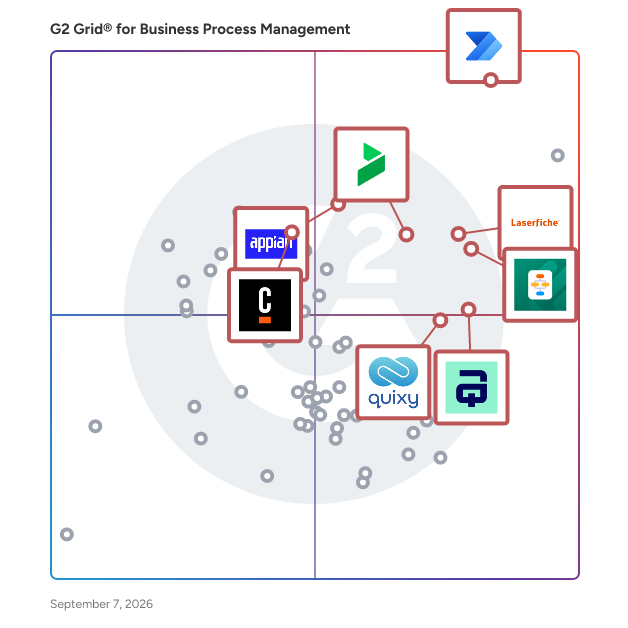
## G2 Grid® for Business Process Management Software
![G2 Grid® for Business Process Management Software plotting products by satisfaction and market presence](https://www.g2.com/categories/business-process-management/grids.png?focus%5B%5D=122375&focus%5B%5D=3066&focus%5B%5D=1507&focus%5B%5D=18747&focus%5B%5D=74308&focus%5B%5D=20785&focus%5B%5D=1402291&focus%5B%5D=114120)
Highlighted products: Microsoft Power Automate, Laserfiche, Appian, AuraQuantic, Camunda, Bizagi, Jotform Workflows, and Quixy.
Underlying data: [Grid® JSON](https://www.g2.com/categories/business-process-management/grids.json?focus%5B%5D=microsoft-power-automate&amp;focus%5B%5D=laserfiche&amp;focus%5B%5D=appian&amp;focus%5B%5D=auraquantic&amp;focus%5B%5D=camunda&amp;focus%5B%5D=bizagi&amp;focus%5B%5D=jotform-workflows&amp;focus%5B%5D=quixy&amp;segment=enterprise)


## How Many Business Process Management Software Products Does G2 Track?
**Total Products under this Category:** 192

### Category Stats (Jul 2026)
- **Average Rating**: 4.53/5 (↓0.01 vs Jun 2026) The average rating of products in this category, based on all submitted ratings
- **Top Trending Product**: HighGear (+1.06%) - Among all products in this category, HighGear recorded the largest rating increase compared to last month
*Last updated: July 20, 2026*


## How Does G2 Rank Business Process Management Software Products?

**Why You Can Trust G2's Software Rankings:**

- 30 Analysts and Data Experts
- 13,600+ Authentic Reviews
- 192+ Products
- Unbiased Rankings

G2's software rankings are built on verified user reviews, rigorous moderation, and a consistent research methodology maintained by a team of analysts and data experts. Each product is measured using the same transparent criteria, with no paid placement or vendor influence. While reviews reflect real user experiences, which can be subjective, they offer valuable insight into how software performs in the hands of professionals. Together, these inputs power the G2 Score, a standardized way to compare tools within every category.


---

**Sponsored**

### Smartsheet

Smartsheet is an Intelligent Work Management Platform that revolutionizes how you manage projects, portfolios, and processes. The Smartsheet AI-powered platform delivers adaptability, sophisticated experiences, and enterprise-grade rigor to support work across industries — from service delivery to construction, clinical trials, and marketing campaigns. Designed to meet demanding requirements, it helps organizations drive efficiency, accelerate innovation, and stay competitive. Over 85% of Fortune 500 companies trust Smartsheet to align their resources to improve efficiency, agility, and collaboration in today’s ever-changing world of work.


[Visit website](https://www.g2.com/external_clickthroughs/record?secure%5Bad_program%5D=ppc&amp;secure%5Bad_slot%5D=category_product_list&amp;secure%5Bcategory_id%5D=163&amp;secure%5Bchosen_at%5D=2026-07-20T19%3A31%3A39Z&amp;secure%5Bdisplayable_resource_id%5D=1698&amp;secure%5Bdisplayable_resource_type%5D=Category&amp;secure%5Bmedium%5D=sponsored&amp;secure%5Bplacement_reason%5D=neighbor_category&amp;secure%5Bplacement_resource_ids%5D%5B%5D=1698&amp;secure%5Bprioritized%5D=false&amp;secure%5Bproduct_id%5D=530&amp;secure%5Bresource_id%5D=163&amp;secure%5Bresource_type%5D=Category&amp;secure%5Bsource_type%5D=category_page&amp;secure%5Bsource_url%5D=https%3A%2F%2Fwww.g2.com%2Fcategories%2Fbusiness-process-management%2Fenterprise%3Fpage%3D2&amp;secure%5Btoken%5D=7d145958be478c52ec86dcaa2317f2fcc4c6f010cfd4894cec6a9655b30f99bc&amp;secure%5Burl%5D=https%3A%2F%2Fwww.smartsheet.com%2Fs%2Fproject-portfolio-software%3Futm_source%3DG2%26utm_medium%3Daffiliate%26utm_campaign%3Daff-ppm-us-ca-g2&amp;secure%5Burl_type%5D=custom_url)

---


## Business Process Management Software Features & Capabilities

### What are the Best Business Process Management Software with No-Code App Development?
Provides drag and drop tools usable by admins with little to no coding experience in order to build applications which automate workflows and business processes.

**Top-rated Business Process Management Software for No-Code App Development:**
- [Microsoft Power Automate](https://www.g2.com/products/microsoft-power-automate/reviews)
- [Laserfiche](https://www.g2.com/products/laserfiche/reviews)
- [Jotform Workflows](https://www.g2.com/products/jotform-workflows/reviews)
[Explore Business Process Management Software with No-Code App Development](https://www.g2.com/categories/business-process-management/f/no-code-app-development)

### What are the Best Business Process Management Software with Low-Code App Development?
Provides development environments to allow users to develop applications which automate workflows and business processes with minimal coding.

**Top-rated Business Process Management Software for Low-Code App Development:**
- [Microsoft Power Automate](https://www.g2.com/products/microsoft-power-automate/reviews)
- [Laserfiche](https://www.g2.com/products/laserfiche/reviews)
- [Jotform Workflows](https://www.g2.com/products/jotform-workflows/reviews)
[Explore Business Process Management Software with Low-Code App Development](https://www.g2.com/categories/business-process-management/f/low-code-app-development)

### What are the Best Business Process Management Software with Process Analysis?
Delivers data points such as time and cost of a process on a dashboard to evaluate process efficacy.

**Top-rated Business Process Management Software for Process Analysis:**
- [Microsoft Power Automate](https://www.g2.com/products/microsoft-power-automate/reviews)
- [Laserfiche](https://www.g2.com/products/laserfiche/reviews)
- [Jotform Workflows](https://www.g2.com/products/jotform-workflows/reviews)
[Explore Business Process Management Software with Process Analysis](https://www.g2.com/categories/business-process-management/f/process-analysis)

### What are the Best Business Process Management Software with Document Generation?
Enables users to create documents for business processes and provides a wide array of templates which are customizable.

**Top-rated Business Process Management Software for Document Generation:**
- [Microsoft Power Automate](https://www.g2.com/products/microsoft-power-automate/reviews)
- [Laserfiche](https://www.g2.com/products/laserfiche/reviews)
- [Jotform Workflows](https://www.g2.com/products/jotform-workflows/reviews)
[Explore Business Process Management Software with Document Generation](https://www.g2.com/categories/business-process-management/f/document-generation)


## What Are the Top-Rated Business Process Management Software Products in 2026?
### 1. [Navvia](https://www.g2.com/products/navvia/reviews)
The Navvia Process Designer is the easiest and most cost effective way to design and document processes. With features such as prebuilt templates, easy to draw flowcharts, automated document creation, requirements gathering, and on-line collaboration &amp; sharing, the Navvia Process Designer will save you time and money. It’s the perfect solution for ITSM practitioners, process analysts, consulting companies or tool implementers.


**Average Rating:** 4.5/5.0
**Total Reviews:** 109
**How Do G2 Users Rate Navvia?**

- **Intelligence:** 7.6/10 (Category avg: 8.3/10)
- **Has the product been a good partner in doing business?:** 9.7/10 (Category avg: 9.1/10)
- **Process Overview:** 9.0/10 (Category avg: 8.9/10)
- **Process Analysis:** 8.8/10 (Category avg: 8.7/10)

**Who Is the Company Behind Navvia?**

- **Seller:** [Navvia](https://www.g2.com/sellers/navvia)
- **Year Founded:** 1999
- **HQ Location:** Toronto, Canada
- **Twitter:** @GoNavvia (6,112 Twitter followers)
- **LinkedIn® Page:** https://www.linkedin.com/company/141227/ (16 employees on LinkedIn®)

**Who Uses This Product?**
- **Top Industries:** Information Technology and Services, Higher Education
- **Company Size:** 72% Enterprise, 18% Mid-Market


#### What Are Navvia's Pros and Cons?

**Pros:**

- Customer Support (2 reviews)
- Ease of Use (2 reviews)
- Process Management (2 reviews)
- Automation Efficiency (1 reviews)
- Ease of Work (1 reviews)

**Cons:**

- Access Restrictions (1 reviews)
- Limited Customization (1 reviews)
- Process Management (1 reviews)


### What Do G2 Reviewers Say About Navvia?
*AI-generated summary from verified user reviews*

**Pros:**

- Users praise the **exceptional customer support** of Navvia, noting their friendliness and quick response times.
- Users appreciate the **ease of use** of Navvia, benefiting from its intuitive guides and helpful process templates.
- Users appreciate Navvia for its **step-by-step process management guidance** , enhancing operational efficiency and user experience.
- Users appreciate the **automation efficiency** of Navvia, which saves time by updating changes automatically throughout the process.
- Users appreciate the **step-by-step guidance** of Navvia, simplifying their process management and operational tasks.

**Cons:**

- Users face difficulties with **access restrictions** , making it hard to download and share process documents effectively.
- Users find the **limited customization** options in Navvia restrict their ability to tailor the product to their needs.
- Users struggle with **difficulties in downloading and sharing process documents** , hindering collaboration and efficiency.

#### What Are Recent G2 Reviews of Navvia?

**"[Navvia - Great tool for building ITSM processes](https://www.g2.com/survey_responses/navvia-review-10525947)"**

**Rating:** 4.0/5.0 stars
*— Verified User in Media Production*

[Read full review](https://www.g2.com/survey_responses/navvia-review-10525947)

---

**"[Great process design accelerator](https://www.g2.com/survey_responses/navvia-review-10424805)"**

**Rating:** 4.5/5.0 stars
*— SHILPA R.*

[Read full review](https://www.g2.com/survey_responses/navvia-review-10424805)

---


#### What Are G2 Users Discussing About Navvia?

- [What are the benefits and drawbacks of using Navvia for process design and management?](https://www.g2.com/discussions/what-are-the-benefits-and-drawbacks-of-using-navvia-for-process-design-and-management)
- [What is Navvia used for?](https://www.g2.com/discussions/what-is-navvia-used-for)

### 2. [iGrafx](https://www.g2.com/products/igrafx/reviews)
iGrafx empowers enterprises to understand, improve, and transform the way their business truly runs. As a leader in Process Intelligence, iGrafx Process360 Live unifies process mining, process mapping, and digital twin simulation in one end‑to‑end platform—giving organizations a complete, connected view of their operations. Process360 Live captures real process data, maps it visually, and simulates potential improvements so teams can identify inefficiencies, test changes safely, and drive measurable optimization. From aligning business and IT, to strengthening compliance, to accelerating initiatives like automation, RPA, Lean, and Six Sigma, iGrafx helps organizations turn their processes into a competitive advantage with clarity and confidence. With iGrafx, business leaders can discover how work actually happens, model how it should happen, and continuously optimize for ROI and operational excellence. Learn more at www.igrafx.com.


**Average Rating:** 4.6/5.0
**Total Reviews:** 83
**How Do G2 Users Rate iGrafx?**

- **Intelligence:** 8.8/10 (Category avg: 8.3/10)
- **Has the product been a good partner in doing business?:** 9.1/10 (Category avg: 9.1/10)
- **Process Overview:** 9.2/10 (Category avg: 8.9/10)
- **Process Analysis:** 9.0/10 (Category avg: 8.7/10)

**Who Is the Company Behind iGrafx?**

- **Seller:** [iGrafx](https://www.g2.com/sellers/igrafx)
- **Year Founded:** 1991
- **HQ Location:** Tualatin, OR
- **Twitter:** @iGrafx (654 Twitter followers)
- **LinkedIn® Page:** https://www.linkedin.com/company/35543/ (80 employees on LinkedIn®)

**Who Uses This Product?**
- **Top Industries:** Information Technology and Services, Financial Services
- **Company Size:** 49% Enterprise, 43% Mid-Market


#### What Are Recent G2 Reviews of iGrafx?

**"[Great for requirement elicitation sessions](https://www.g2.com/survey_responses/igrafx-review-9004233)"**

**Rating:** 4.0/5.0 stars
*— Sue G.*

[Read full review](https://www.g2.com/survey_responses/igrafx-review-9004233)

---

**"[A complete set of tools with unique functionalities, for effective and efficient BPM.](https://www.g2.com/survey_responses/igrafx-review-8128562)"**

**Rating:** 4.5/5.0 stars
*— Verified User in Financial Services*

[Read full review](https://www.g2.com/survey_responses/igrafx-review-8128562)

---


#### What Are G2 Users Discussing About iGrafx?

- [What are the benefits and challenges of using iGrafx for process mapping and management?](https://www.g2.com/discussions/what-are-the-benefits-and-challenges-of-using-igrafx-for-process-mapping-and-management)
- [What is iGrafx used for?](https://www.g2.com/discussions/what-is-igrafx-used-for)

### 3. [BP Logix](https://www.g2.com/products/bp-logix/reviews)
BP Logix helps leaders in regulated industries transform the way they get work done. Our powerful low-code automation platform, Process Director, empowers citizen developers and IT teams alike to: ◾ Create custom, scalable business applications that automate their most complex processes. ◾ Conquer compliance gaps with 24/7 audit tracking, electronic signatures, user access permissions, and more. ◾ Reduce costs and knock out backlogs with an agile low-code platform that is 20x faster than custom coding.


**Average Rating:** 4.7/5.0
**Total Reviews:** 29
**How Do G2 Users Rate BP Logix?**

- **Intelligence:** 6.7/10 (Category avg: 8.3/10)
- **Has the product been a good partner in doing business?:** 9.3/10 (Category avg: 9.1/10)
- **Process Overview:** 8.0/10 (Category avg: 8.9/10)
- **Process Analysis:** 8.2/10 (Category avg: 8.7/10)

**Who Is the Company Behind BP Logix?**

- **Seller:** [BP Logix](https://www.g2.com/sellers/bp-logix)
- **Year Founded:** 1995
- **HQ Location:** Encinitas, CA
- **Twitter:** @bplogix (2,492 Twitter followers)
- **LinkedIn® Page:** https://www.linkedin.com/company/236159/ (30 employees on LinkedIn®)

**Who Uses This Product?**
- **Top Industries:** Higher Education
- **Company Size:** 52% Enterprise, 38% Mid-Market


#### What Are Recent G2 Reviews of BP Logix?

**"[Director, Enterprise Security](https://www.g2.com/survey_responses/bp-logix-review-8050473)"**

**Rating:** 4.0/5.0 stars
*— Verified User in Hospital &amp; Health Care*

[Read full review](https://www.g2.com/survey_responses/bp-logix-review-8050473)

---

**"[Boost your business with BP Logix](https://www.g2.com/survey_responses/bp-logix-review-8255368)"**

**Rating:** 5.0/5.0 stars
*— Jan M.*

[Read full review](https://www.g2.com/survey_responses/bp-logix-review-8255368)

---


#### What Are G2 Users Discussing About BP Logix?

- [What is BP Logix used for?](https://www.g2.com/discussions/what-is-bp-logix-used-for)

### 4. [ProcessMaker](https://www.g2.com/products/processmaker/reviews)
ProcessMaker is a Process Orchestration and Automation platform built to take you beyond basic workflow tools. It connects people, systems, and AI, so you can orchestrate end-to-end work reliably—and run it at scale. ProcessMaker combines agentic AI, deep process intelligence, and intuitive process modelers in one platform. Founded in 2000, ProcessMaker is trusted globally to manage real operational complexity with the governance and flexibility enterprises require. With intuitive drag-and-drop modelers, teams can design, run, and optimize workflows fast. Business users can contribute without heavy training, while IT can extend, integrate, and standardize across the organization. ProcessMaker supports everything from simple approvals to mission-critical operations, works for SMEs and enterprises, and integrates with virtually any tech stack—so you can modernize without ripping and replacing what you already have.


**Average Rating:** 4.3/5.0
**Total Reviews:** 275
**How Do G2 Users Rate ProcessMaker?**

- **Intelligence:** 7.7/10 (Category avg: 8.3/10)
- **Has the product been a good partner in doing business?:** 8.3/10 (Category avg: 9.1/10)
- **Process Overview:** 8.6/10 (Category avg: 8.9/10)
- **Process Analysis:** 8.4/10 (Category avg: 8.7/10)

**Who Is the Company Behind ProcessMaker?**

- **Seller:** [Decisions](https://www.g2.com/sellers/decisions)
- **Year Founded:** 2010
- **HQ Location:** Virginia Beach, Virginia
- **Twitter:** @decisions (466 Twitter followers)
- **LinkedIn® Page:** https://www.linkedin.com/company/2373238/ (322 employees on LinkedIn®)

**Who Uses This Product?**
- **Who Uses This:** Consultant
- **Top Industries:** Information Technology and Services, Financial Services
- **Company Size:** 40% Mid-Market, 35% Enterprise


#### What Are ProcessMaker's Pros and Cons?

**Pros:**

- Automation (3 reviews)
- Efficiency (3 reviews)
- Customer Support (2 reviews)
- Ease of Learning (2 reviews)
- Ease of Work (2 reviews)

**Cons:**

- Functionality Limitations (3 reviews)
- Missing Features (3 reviews)
- Bugs (2 reviews)
- Limited Features (2 reviews)
- Performance Issues (2 reviews)


### What Do G2 Reviewers Say About ProcessMaker?
*AI-generated summary from verified user reviews*

**Pros:**

- Users value the **seamless automation** features of ProcessMaker, enabling easy business process creation without deep coding knowledge.
- Users value the **efficiency** of ProcessMaker, facilitating quick workflow creation and management for all users.
- Users find the **customer support** of ProcessMaker invaluable, aiding them through development and integration with ease.
- Users rave about the **ease of learning** ProcessMaker, making workflow management accessible for everyone quickly.
- Users value the **ease of work** with ProcessMaker, enjoying its simple interface and quick learning curve for workflows.

**Cons:**

- Users face **functionality limitations** in ProcessMaker, struggling with basic tasks like inputting signatures and changing assignment rules.
- Users experience **missing features** like signature input and seamless assignment rule changes, hindering basic functionality.
- Users dislike the **hidden bugs** in ProcessMaker that disrupt workflows and indicate underlying app issues.
- Users find the **limited features** of ProcessMaker frustrating, as essential tasks are often unsupported.
- Users report **performance issues** due to hidden bugs that disrupt workflows and indicate app instability.

#### What Are Recent G2 Reviews of ProcessMaker?

**"[Efficient workflow automation tool](https://www.g2.com/survey_responses/processmaker-review-10536107)"**

**Rating:** 4.0/5.0 stars
*— Izuchukwu M.*

[Read full review](https://www.g2.com/survey_responses/processmaker-review-10536107)

---

**"[ProcessMaker is an excellent business process automation software.](https://www.g2.com/survey_responses/processmaker-review-10551224)"**

**Rating:** 5.0/5.0 stars
*— Verified User in Oil &amp; Energy*

[Read full review](https://www.g2.com/survey_responses/processmaker-review-10551224)

---


#### What Are G2 Users Discussing About ProcessMaker?

- [What is ProcessMaker used for?](https://www.g2.com/discussions/what-is-processmaker-used-for)
- [How do you use process maker?](https://www.g2.com/discussions/how-do-you-use-process-maker)
- [What is Process maker?](https://www.g2.com/discussions/what-is-process-maker)
- [What are the three key components of a BPM system?](https://www.g2.com/discussions/processmaker-what-are-the-three-key-components-of-a-bpm-system) - 1 comment
- [What are the features of BPM?](https://www.g2.com/discussions/what-are-the-features-of-bpm)

### 5. [DocuWare](https://www.g2.com/products/docuware/reviews)
DocuWare is a type of digital document management and automated workflow solution designed to help organizations streamline their document processes and enhance operational efficiency. This versatile platform caters to businesses of all sizes and spans various industries, including but not limited to manufacturing, finance, education, and government. By offering a comprehensive suite of tools for managing documents and automating workflows, DocuWare enables users to reduce manual tasks, improve collaboration, and ensure compliance with regulatory requirements. The target audience for DocuWare includes organizations seeking to optimize their document management practices and automate repetitive processes. This solution is particularly beneficial for businesses that handle large volumes of paperwork or require secure access to sensitive information. With its capabilities, DocuWare serves a diverse clientele, from small businesses to large enterprises, making it a flexible choice for any organization looking to enhance its document handling capabilities. DocuWare&#39;s key features include robust document storage, intelligent document processing, advanced search functionalities, and customizable workflow automation. Users can easily store and retrieve documents in a secure digital environment, ensuring that critical information is always accessible. The platform&#39;s advanced search capabilities allow users to locate documents quickly, saving time and improving productivity. Additionally, the customizable workflow automation tools enable organizations to design processes tailored to their specific needs, facilitating smoother operations and reducing the likelihood of errors. One of the standout aspects of DocuWare is its adaptability to various deployment options. Organizations can choose between cloud-based or on-premises solutions, allowing them to select the deployment method that best fits their infrastructure and security requirements. With support for 24 languages, DocuWare is accessible to a global audience, making it a suitable choice for multinational organizations. The platform currently serves over 20,000 customers and 930,000 users across more than 100 countries, backed by a network of over 800 partners, which highlights its widespread acceptance and reliability in the market. Overall, DocuWare provides a comprehensive solution for organizations looking to modernize their document management and workflow processes. By leveraging its advanced features and flexible deployment options, businesses can enhance efficiency, improve collaboration, and ensure that they remain compliant with industry regulations.


**Average Rating:** 4.4/5.0
**Total Reviews:** 238
**How Do G2 Users Rate DocuWare?**

- **Has the product been a good partner in doing business?:** 9.0/10 (Category avg: 9.1/10)

**Who Is the Company Behind DocuWare?**

- **Seller:** [DocuWare](https://www.g2.com/sellers/docuware)
- **Company Website:** https://docuware.com
- **Year Founded:** 1988
- **HQ Location:** Beacon, NY
- **Twitter:** @DocuWare (2,283 Twitter followers)
- **LinkedIn® Page:** https://www.linkedin.com/company/101401/ (649 employees on LinkedIn®)

**Who Uses This Product?**
- **Who Uses This:** Software Analyst
- **Top Industries:** Information Technology and Services, Pharmaceuticals
- **Company Size:** 47% Mid-Market, 30% Enterprise


#### What Are DocuWare's Pros and Cons?

**Pros:**

- Ease of Use (23 reviews)
- Integrations (16 reviews)
- Document Management (15 reviews)
- Automation (14 reviews)
- Easy Integrations (14 reviews)

**Cons:**

- Missing Features (9 reviews)
- Learning Curve (7 reviews)
- Limited Features (7 reviews)
- Complexity (5 reviews)
- Training Required (5 reviews)


### What Do G2 Reviewers Say About DocuWare?
*AI-generated summary from verified user reviews*

**Pros:**

- Users appreciate the **ease of use** of DocuWare, which streamlines document management and improves accessibility.
- Users value the **seamless integration capabilities** of DocuWare, enhancing productivity and streamlining workflows effectively.
- Users value the **streamlined document management** in DocuWare, enhancing efficiency and organization through intuitive workflows and integrations.
- Users appreciate the **robust automation** of DocuWare, significantly enhancing efficiency and streamlining workflows across various businesses.
- Users value the **easy integrations** of DocuWare, enhancing workflow efficiency and connectivity with various applications.

**Cons:**

- Users note **missing features** in DocuWare, such as inadequate OCR and API documentation, affecting overall efficiency.
- Users may face a **difficult learning curve** with DocuWare, especially those new to document management systems.
- Users find DocuWare has **limited features** , requiring extensive scripting and lacking necessary built-in actions for workflows.
- Users find the **complexity** of DocuWare&#39;s setup and features overwhelming, making initial use time-consuming and challenging.
- Users find the **training required** challenging, especially due to limited tutorials and complex components to learn.

#### What Are Recent G2 Reviews of DocuWare?

**"[Secure Document Management with Fair Pricing](https://www.g2.com/survey_responses/docuware-review-12929690)"**

**Rating:** 5.0/5.0 stars
*— Natalie S.*

[Read full review](https://www.g2.com/survey_responses/docuware-review-12929690)

---

**"[DocuWare Makes Secure Document Storage and Access Seamless Anywhere](https://www.g2.com/survey_responses/docuware-review-12837116)"**

**Rating:** 5.0/5.0 stars
*— Timothy S.*

[Read full review](https://www.g2.com/survey_responses/docuware-review-12837116)

---


#### What Are G2 Users Discussing About DocuWare?

- [What is DocuWare used for?](https://www.g2.com/discussions/what-is-docuware-used-for)
- [What benefits does DocuWare offer in purchasing?](https://www.g2.com/discussions/what-benefits-does-docuware-offer-in-purchasing) - 1 comment
- [How much does DocuWare cost?](https://www.g2.com/discussions/how-much-does-docuware-cost) - 1 comment
- [How do I use DocuWare?](https://www.g2.com/discussions/how-do-i-use-docuware) - 1 comment
- [What is DocuWare software?](https://www.g2.com/discussions/what-is-docuware-software) - 1 comment

### 6. [CMW Platform](https://www.g2.com/products/cmw-platform/reviews)
CMW Platform is a type of business process management (BPM) software that helps organizations design, automate, and manage workflows to improve operational efficiency, transparency, and compliance. Designed for mid-sized and large organizations across industries—including finance, healthcare, manufacturing, and professional services—CMW Platform enables business users to model processes using BPMN 2.0 and build applications with minimal IT involvement. Up to 95% of applications can be created entirely without coding using a visual interface, while developers still have the option to extend and customize functionality with high-code capabilities. The platform supports both cloud and on-premise deployment, allowing flexibility in infrastructure and compliance needs. It integrates with third-party systems, offers real-time collaboration, and enforces role-based access control to meet enterprise security requirements. Key features and capabilities include: # Visual BPMN 2.0 Process Modeling: Standardized and intuitive workflow design. # Low-Code Development: Enables business users to create up to 95% of applications without IT. # High-Code Extension: Offers full programming flexibility for advanced use cases. # Integration &amp; APIs: Connects seamlessly with external systems and data sources. # Security &amp; Collaboration: Role-based access, audit trails, and team communication tools. CMW Platform has been widely recognized by industry analysts and users: - Named #1 in BPM Platforms by Gartner Peer Insights based on user reviews - Received Best Ease of Use (Capterra 2023) and Software Advice Frontrunners 2024 awards in workflow software - Recognized as a High Performer with Fastest Implementation in G2 reports (2023–2024) cmwlab.com - Awarded the Champion Medal in the SoftwareReviews 2023 BPM Emotional Footprint report Users and experts highlight the platform&#39;s adaptability, usability, and power: + “Flexibility is outstanding…automate and manage our work more efficiently” — Acronis Service cmwlab.com + “Deceptively simple…power data management layer” — BPM.com cmwlab.com + “Comprehensive solutions…drag‑and‑drop feature simplifying the process for non-technical users” — TechDogs Use-case scenarios include automating approval workflows, case and document management, cross-department coordination, and operational monitoring. CMW Lab delivers regular updates to enhance performance, scalability, and user experience without disrupting live operations.


**Average Rating:** 4.6/5.0
**Total Reviews:** 137
**How Do G2 Users Rate CMW Platform?**

- **Intelligence:** 9.0/10 (Category avg: 8.3/10)
- **Has the product been a good partner in doing business?:** 8.8/10 (Category avg: 9.1/10)
- **Process Overview:** 9.0/10 (Category avg: 8.9/10)
- **Process Analysis:** 8.7/10 (Category avg: 8.7/10)

**Who Is the Company Behind CMW Platform?**

- **Seller:** [CMW Lab](https://www.g2.com/sellers/cmw-lab)
- **Year Founded:** 2010
- **HQ Location:** Foxboro, MA
- **Twitter:** @CMW_Lab (272 Twitter followers)
- **LinkedIn® Page:** https://www.linkedin.com/company/1167436/ (19 employees on LinkedIn®)

**Who Uses This Product?**
- **Top Industries:** Information Technology and Services, Computer Software
- **Company Size:** 43% Mid-Market, 34% Small-Business


#### What Are CMW Platform's Pros and Cons?

**Pros:**

- Ease of Use (8 reviews)
- Customization (4 reviews)
- Automation (3 reviews)
- Customer Support (3 reviews)
- Easy Integrations (3 reviews)

**Cons:**

- Expensive (4 reviews)
- Steep Learning Curve (4 reviews)
- Complexity (3 reviews)
- Poor UI (3 reviews)
- Difficult Setup (1 reviews)


### What Do G2 Reviewers Say About CMW Platform?
*AI-generated summary from verified user reviews*

**Pros:**

- Users appreciate the **ease of use** of CMW Platform, enabling non-technical users to create workflows effortlessly.
- Users highlight the **ease of customization** in CMW Platform, allowing tailored workflows that enhance organization and efficiency.
- Users value the **ease of automation** on the CMW Platform, appreciating its user-friendly features and integration capabilities.
- Users appreciate the **fantastic customer support** of CMW Platform, enhancing their experience and facilitating smooth operations.
- Users value the **easy integrations** with third-party applications, enhancing workflow and project management efficiency.

**Cons:**

- Users find the platform **expensive** , especially for small businesses, with high costs and additional feature fees.
- Users find the **steep learning curve** for advanced features to be challenging and time-consuming during initial setup.
- Users find the **complexity of the platform** challenging, especially during initial setup and advanced feature usage.
- Users find the **UI lacking** , noting it could be more modern and intuitive for better usability.
- Users find the **initial setup complex** , making it hard and time-consuming to fully utilize the CMW Platform.

#### What Are Recent G2 Reviews of CMW Platform?

**"[Automation of workflows that facilitates the sending of emails](https://www.g2.com/survey_responses/cmw-platform-review-12740171)"**

**Rating:** 4.0/5.0 stars
*— Francisco Jose S.*

[Read full review](https://www.g2.com/survey_responses/cmw-platform-review-12740171)

---

**"[User-Friendly Workflow Automation with Great Features, but Pricey and Some Glitches](https://www.g2.com/survey_responses/cmw-platform-review-11810807)"**

**Rating:** 4.5/5.0 stars
*— Dharmik V.*

[Read full review](https://www.g2.com/survey_responses/cmw-platform-review-11810807)

---


### 7. [Cflow](https://www.g2.com/products/cflow/reviews)
Cflow is a leading AI-powered approval automation platform that empowers key decision makers with actionable data for making informed business decisions. Trusted by a 100,000+ user base spanning SMBs, mid-market, and Enterprise companies, Cflow is the highest-rated choice for unstoppable, no-code workflow automation. Complex workflows with multiple approval levels can be effectively automated within minutes using the visual workflow builder. Cflow takes paperless offices to the next level by providing intelligent document processing and document management features that include AI-powered OCR, Auto-classification, Fuzzy Search Mapping, Document Designer, Integrated electronic signatures, and role-based access control. SEYARC AI in Cflow turns data into decisions instantly by automating data entry, form filling, document reading, and insights. Cflow’s core value proposition lies in its ability to automate processes and deliver results in days, not months. Backed by SOC 2 Type 2, ISO 27001, GDPR, and HIPAA compliance, Cflow delivers enterprise-grade security that Global businesses require.


**Average Rating:** 4.7/5.0
**Total Reviews:** 185
**How Do G2 Users Rate Cflow?**

- **Intelligence:** 9.5/10 (Category avg: 8.3/10)
- **Has the product been a good partner in doing business?:** 9.6/10 (Category avg: 9.1/10)
- **Process Overview:** 9.5/10 (Category avg: 8.9/10)
- **Process Analysis:** 9.6/10 (Category avg: 8.7/10)

**Who Is the Company Behind Cflow?**

- **Seller:** [Cavintek Inc](https://www.g2.com/sellers/cavintek-inc)
- **Company Website:** https://www.cavintek.com
- **Year Founded:** 2011
- **HQ Location:** 4140 Via Candidiz UNIT 158, San Diego, CA 92130, United States
- **Twitter:** @cflowapps (828 Twitter followers)
- **LinkedIn® Page:** https://www.linkedin.com/company/cflowapps/ (26 employees on LinkedIn®)

**Who Uses This Product?**
- **Top Industries:** Marketing and Advertising, Information Technology and Services
- **Company Size:** 46% Mid-Market, 40% Small-Business


#### What Are Cflow's Pros and Cons?

**Pros:**

- Ease of Use (79 reviews)
- Automation (54 reviews)
- Workflow Management (51 reviews)
- Automation Efficiency (48 reviews)
- Process Automation (46 reviews)

**Cons:**

- Performance Issues (32 reviews)
- Slow Performance (28 reviews)
- Learning Curve (24 reviews)
- Limited Features (12 reviews)
- Slow Loading (12 reviews)


### What Do G2 Reviewers Say About Cflow?
*AI-generated summary from verified user reviews*

**Pros:**

- Users appreciate the **ease of use** of Cflow, enabling simple setup and management of workflows without coding.
- Users value Cflow&#39;s **automation capabilities** that streamline daily tasks, enhancing efficiency and organization in workflows.
- Users appreciate the **user-friendly workflow management** of Cflow, enhancing efficiency and supporting smooth operational processes.
- Users find Cflow&#39;s **automation efficiency** invaluable, streamlining tasks like onboarding and procurement with ease.
- Users appreciate how Cflow&#39;s **process automation** streamlines tasks like onboarding and approvals, greatly enhancing workflow efficiency.

**Cons:**

- Users experience **performance issues** with Cflow, including slow loading and delayed notifications on mobile.
- Users notice **slow performance** in Cflow, especially during data transfers and while editing workflows, impacting overall efficiency.
- Users find the **steep learning curve** of Cflow daunting, especially with its many features for new automation users.
- Users find the **limited features** of Cflow restrict their customization and efficiency, especially for new users.
- Users experience **slow loading** times, particularly when multiple workflows are active, affecting overall app performance.

#### What Are Recent G2 Reviews of Cflow?

**"[Cflow has been a great software solution for our team.](https://www.g2.com/survey_responses/cflow-review-13029422)"**

**Rating:** 5.0/5.0 stars

[Read full review](https://www.g2.com/survey_responses/cflow-review-13029422)

---

**"[Cflow Streamlines Workflows with Clear Visibility and Easy Collaboration](https://www.g2.com/survey_responses/cflow-review-12913981)"**

**Rating:** 5.0/5.0 stars
*— Krishna Rahul B.*

[Read full review](https://www.g2.com/survey_responses/cflow-review-12913981)

---


## What Is Business Process Management Software?

[Process Automation Software](https://www.g2.com/categories/process-automation)

## What Software Categories Are Similar to Business Process Management Software?

- [Low-Code Development Platforms](https://www.g2.com/categories/low-code-development-platforms)
- [No-Code Development Platforms](https://www.g2.com/categories/no-code-development-platforms)
- [Robotic Process Automation (RPA) Software](https://www.g2.com/categories/robotic-process-automation-rpa)
- [Process Mining Tools](https://www.g2.com/categories/process-mining-tools)
- [Digital Process Automation (DPA) Software](https://www.g2.com/categories/digital-process-automation-dpa)
- [Workflow Management Software](https://www.g2.com/categories/workflow-management)
- [Process Orchestration Software](https://www.g2.com/categories/process-orchestration)


---

## How Do You Choose the Right Business Process Management Software?

### What You Should Know About Business Process Management Software

### What is Business Process Management (BPM) Software?

Business process management (BPM) is the practice of streamlining and improving business activities to more efficiently perform specific business actions. Often these business actions require cross-team collaboration and consist of many moving parts, whether they are software systems or human intervention. There are many BPM software products that can help companies achieve the ultimate goal of seamless workflow automation. BPM tools often provide process modeling, execution, and analysis functionality to help business managers ensure that the processes they need done are working efficiently and effectively. The possibilities are vast and varied: this software can be used for a host of different use cases, such as invoicing, marketing, and accounting.

With business process automation solutions, businesses are able to improve and increase collaboration and be on the road toward automation. Through detailed mappings of processes and tools for managing workflows, professionals can get a birds-eye view of their business operations and thereby have a clear understanding of how they can optimize them.&amp;nbsp;

#### What Types of Business Process Management (BPM) Software Exist?

There are a few different types and use cases of BPM software, but each helps an organization streamline workflows. Although all of these tools capture business processes and give users the ability to automate them, they differ in terms of their ability for users to create standalone applications on top of these processes.

**Standard BPM software**

With standard BPM software, users get full control over their business processes, providing them with tools for monitoring execution performance and analyzing their current goals, workflows, and more. It should be noted that BPM solutions do not exist in isolation from a company’s broader software stack. On the contrary, it is key for them to integrate into various other tools, such as [CRM software](https://www.g2.com/categories/crm) and [ERP software](https://www.g2.com/categories/erp). With proper integration, users are able to better understand the company’s manifold processes in order to optimize or automate them.&amp;nbsp;

**Digital process automation (DPA)**

DPA&amp;nbsp;is a subset of BPM and refers to those products which include all of the core functionality of BPM software, but also allow users to create standalone applications on top of business processes. For example, a retail company can use [digital process automation](https://www.g2.com/categories/business-process-management/f/digital-process-automation) to analyze how sales representatives are selling their products across various regions, such as how they input pipeline data into spreadsheets, send emails to prospects, and more. Then, an administrator can create an application which the salespeople can use to streamline and automate this process, helping them become more efficient.

### What are the Common Features of Business Process Management (BPM) Software?

The following are some core features within BPM software that can help companies in defining, automating, and reporting on processes that are intended to help optimize businesses to deliver on company goals.

**Real-time process monitoring:** Keeping track of the manifold processes a business has can be difficult, especially when doing so in real time across various systems. With properly deployed BPM software in place, users can monitor these processes in real time. This provides the benefit of being able to rigorously test variations and changes to these processes. For example, a business can test the effect of routing all of their support cases to a particular individual or system. If it is found that this is not working well, they can iterate and test different options, all while keeping a close eye on their BPM monitoring feature for insight.

**Document automation:** Forms and documents are ubiquitous across businesses, such as onboarding documents for new employees, contracts for customers or vendors, and surveys. Manually inputting and analyzing data from these sources can be time consuming and tedious. BPM software can assist in automating this process, whether that be in part or in total. For example, one can use BPM to automate inputting data from new employees’ personal documents onto the company’s [core HR software](https://www.g2.com/categories/core-hr).&amp;nbsp;

BPM tools will differ in regards to how much intelligence, or natural language understanding, they have built in. Thus, although most solutions will have optical character recognition (OCR) built-in, some will also provide the ability to understand documents. This would allow it to “read” documents and, for example, summarize the text therein or recognize key terms in order to input them into other documents or systems.

**Process automation:** Automating processes and workflows does not happen overnight. BPM software provides features for facilitating this automation through process design and execution. In other words, users can use this software to not just document processes, but to also create them ex nihilo and to automate them, often via a drag-and-drop interface.

In regards to how this is facilitated, many BPM products have a library in which to keep previously used or designed workflows for future use. In addition, some tools provide templates for common use cases, such as accounts payable, employee onboarding, and procurement. Users can adopt and adapt these templates for their particular needs and use case.

Other Features of Business Process Management Software: [Document generation](https://www.g2.com/categories/business-process-management/f/document-generation), [Finance](https://www.g2.com/categories/business-process-management/f/finance), [Low-code app development](https://www.g2.com/categories/business-process-management/f/low-code-app-development), [No-code app development](https://www.g2.com/categories/business-process-management/f/no-code-app-development), [Process analysis](https://www.g2.com/categories/business-process-management/f/process-analysis)

Specific Subject Matters: [Human resources](https://www.g2.com/categories/business-process-management/f/human-resources)

### What are the Benefits of Business Process Management (BPM) Software?

Companies purchase BPM software because they need to solve some type of operational objective in a streamlined and efficient way. BPM software allows users to easily build unique workflows, assess the necessary steps required to carry out the objective, and integrate all the different solutions involved in the process. The actions that need to be carried out are usually time consuming and complex, so finding a way to automate these business processes can be very beneficial to any company. Additionally, BPM solutions can provide insights into the efficiency of processes. BPM tools can help identify bottlenecks and unnecessary process steps, and they even help hold employees accountable for their actions.

**Increased efficiency:** Using BPM solutions ensures that tasks are carried out in the most efficient manner possible. The processes are set up in an optimal way so that businesses are not wasting resources and employees are not wasting time, steps are not being skipped, and all actions are being performed as they should be; therefore, all tasks are being performed to their fullest.

**Enhanced productivity:** If companies are properly taking advantage of BPM tools, that means that they are saving their employees’ time through automation. By streamlining and automating the tedious tasks, workers have more time to focus on business-critical tasks instead of working on the time-consuming ones.

**Improved collaboration:** Businesses can easily get siloed, with business units working on their own, focused on their own goals and metrics. Although they all strive to improve the broader business, collaboration between departments can be difficult. A key benefit for BPM software is providing a bird’s eye view of all of a company’s processes, across its departments. With one source of truth in place, interdepartmental conversations become easier and more fruitful.

### Who Uses Business Process Management (BPM) Software?

Traditionally, BPM tools are used by mid-market and enterprise-sized companies. Larger companies tend to have more siloed departments, and when business actions need to become integrated to be efficient, BPM software is an easy solution. It is much rarer for small businesses to need a dedicated tool for workflow management.

Within companies, BPM tools are frequently leveraged by operations and [IT administrators](https://www.g2.com/categories/business-process-management/f/it) but can expand to really any department that needs to automate business processes. Some companies may have dedicated business analysts or process directors who ensure that internal processes are as streamlined as possible. Here are some department-specific examples:

**Sales:** BPM software can help automate actions performed by a [sales team](https://www.g2.com/categories/business-process-management/f/sales), specifically when it comes to contract creation and approval. Many BPM tools offer document management features specifically built for contract creation. Once a sales representative convinces a prospect to buy, the next step in the workflow is to send a contract. Based on the particular specifications of the deal, a contract can be created using BPM tools.

**Supply chain:** Once a deal is finalized, the next step in a workflow may be to ship the goods purchased. If a document is signed, BPM software can help place the exact order bought by the customer. This is where the tool goes from working with a business’ CRM to working with their [supply chain software](https://www.g2.com/categories/business-process-management/f/supply-chain). The order is automatically entered into a company’s ERP system and the goods are manufactured and shipped.

**Accounting:** Now that the goods are shipped and received, the accounting department needs to note the exact exchange of goods (i.e., how much was shipped, how much did they pay for it, etc.). This information can be inputted into an [accounting system](https://www.g2.com/categories/accounting) using BPM software.

### What are the Alternatives to Business Process Management (BPM) Software?

Alternatives to BPM software can replace this type of software, either partially or completely:

[Workflow management software](https://www.g2.com/categories/workflow-management) **:** Businesses should have a clear idea regarding what they are trying to achieve to determine the type of software they are looking for. Thus, if a business is looking for a more lightweight solution for facilitating workflow, workflow management software might be the best fit. This software helps to define and manage sequences of business activities and tasks and is more beneficial for small and medium-sized businesses with a low to medium complexity level of their operations.

[Robotic process automation (RPA) software](https://www.g2.com/categories/robotic-process-automation-rpa) **:** If a business is looking to automate routine tasks, RPA might be a good option. RPA provides robots that mimic clicks and other activity on the computer screen and facilitates the automation of a host of tasks, such as invoicing and employee onboarding. These virtual agents perform actions following these workflows both with and without human supervision or intervention.

[Rapid application development (RAD) software](https://www.g2.com/categories/rapid-application-development-rad) **:** Businesses should understand that they can pursue different avenues to achieve automation. Instead of BPM or in addition to it, users should investigate RAD software, such as the form of [low-code](https://www.g2.com/categories/low-code-development-platforms)and [no-code](https://www.g2.com/categories/no-code-development-platforms) development platforms. With this software, businesses are able to develop software quickly with minimal coding, reducing the need for extensive coding experience. Some of these tools are purpose-built for process automation.&amp;nbsp;

#### Software Related to Business Process Management (BPM) Software

The following solutions can be used in conjunction with BPM tools to create end-to-end business process automation and further advance digital transformation:

[Robotic process automation (RPA) software](https://www.g2.com/categories/robotic-process-automation-rpa) **:** RPA software is somewhat of an automation advancement born from BPM. RPA software allows businesses to build and train bots to carry out tedious tasks. By providing both supervised and unsupervised automation, RPA software helps to take BPM one step further, in terms of seamless workflow automation and process execution. RPA tools may be used side by side or in lieu of BPM solutions.

[Process mining software](https://www.g2.com/categories/process-mining) **:** While BPM tools help to set up workflows and automation, process mining software helps to monitor the automation and ensure the processes are being carried out correctly. Process mining software helps find where processes are falling short, which steps are being skipped, and how effective the processes are to the overall business objective. These tools can monitor event logs to make sure that employees are following all of the necessary steps or if they are skipping certain tasks. With the help of machine learning, process mining software can often inform business analysts of unnecessary steps that can streamline business processes.

### Challenges with Business Process Management (BPM) Software

Software solutions can come with their own set of challenges.&amp;nbsp;Especially when it comes to BPM solutions, which integrates and connects to systems across the organization, it is important to pay attention to the following core issues:

**Return on investment (ROI):** The biggest issue with BPM software is understanding the ROI. It is hard to measure the exact level of productivity and efficiency gained from BPM tools, which can make gaining traction and internal adoption a struggle.

**Integration:** Integration is another concern, especially with the rapid frequency that companies add new software solutions. However, with SaaS products becoming the norm, the ease of integrating disparate software products across departments is becoming easier. If a business is using legacy, on-premises solutions, it can be challenging and expensive to make the theoretical processes work seamlessly in practice.

### Which Companies Should Buy Business Process Management (BPM) Software?

The implementation of artificial intelligence (AI) can have a positive impact on businesses across a host of different industries. Here are some examples:

**Financial services:** Within financial institutions, such as banks, brokerage firms, and credit unions, it is common for a host of different systems to be used. They can benefit from a BPM tool that can help them get a better understanding of their business processes and the use of these various systems across the business. As an industry that is heavily regulated, BPM can be particularly beneficial, since it can assist in auditing company processes.

**Healthcare:** For many healthcare-related organizations, software can help with processes such as inputting data related to new patients and processing insurance claims. This assists in analyzing the efficiency of current processes and improving them. Through the automation and streamlining of processes, healthcare companies can lower risk and costs, and make their billing and collections smarter.

**Government:** It is commonly said that governmental organizations are inefficient. This stereotype is attributed to the fact that these organizations might be using legacy technology, as well as disparate tools across departments. The effects of this inefficiency are not trivial. With BPM software, governmental organizations can streamline and automate their workflows.

### How to Buy Business Process Management (BPM) Software

#### Requirements Gathering (RFI/RFP) for Business Process Management (BPM) Software

When looking to deploy a BPM solution, it is important to start from the beginning. In other words, a business should begin by conducting an overview of business processes. If a company is just starting out and looking to purchase their first BPM software, or wherever a business is in its buying process, g2.com can help select the best option.

Taking a holistic overview of the business systems and processes will help businesses to identify pain points. This will help them to figure out which software to buy (e.g., if it can effectively handle the business’ processes) and to develop buying criteria. A carefully created checklist can help in determining the necessary and nice-to-have features, such as features, budget, integrations, number of users, security requirements, cloud or on-premises solutions, and more.

A request for information (RFI) can be useful, especially if the deployment is large in scale and scope. By producing this, a business can be well placed to gather information from sellers. Depending on the scope of the deployment, it might be helpful to produce an RFI, a one-page list with a few bullet points describing what is needed from a BPM software.

#### Compare Business Process Management (BPM) Software Products

**Create a long list**

Evaluating vendors should start with a long list, which will help to determine whether or not a given solution is a good fit. Buyers should create a broad list of tools that align with their business goals. So that there is a level playing field, it is important to ask the same set of questions to each seller.

**Create a short list**

Next, a whittling down should take place. Through pointed questions, demos, and trials, one can go from a long list to a short one. Although this will differ for each business and use case, three to five products are typically a good number. With this list in hand, businesses can produce a matrix to compare the features and pricing of the various solutions.

**Conduct demos**

To ensure the comparison is thoroughgoing, the user should demo each solution on the short list with the same use case and datasets. This will allow the business to evaluate like for like and see how each vendor stacks up against the competition.

#### Selection of Business Process Management (BPM) Software

**Choose a selection team**

Before getting started, it&#39;s crucial to create a winning team that will work together throughout the entire process, from identifying pain points to implementation. The software selection team should consist of members of the organization who have the right interest, skills, and time to participate in this process. A good starting point is to aim for three to five people who fill roles such as the main decision maker, project manager, process owner, system owner, or staffing subject matter expert, as well as a technical lead, IT administrator, or security administrator. In smaller companies, the vendor selection team may be smaller, with fewer participants multitasking and taking on more responsibilities.

**Negotiation**

Just because something is written on a company’s pricing page, does not mean it is fixed (although some companies will not budge). It is imperative to open up a conversation regarding pricing and licensing. For example, the vendor may be willing to give a discount for multi-year contracts or for recommending the product to others.

**Final decision**

After this stage, and before going all in, it is recommended to roll out a test run or pilot program to test adoption with a small sample size of users. If the tool is well used and well received, the buyer can be confident that the selection was correct. If not, it might be time to go back to the drawing board.

### Business Process Management (BPM) Software Trends

Digital transformation is working its way into every type of software, and BPM is no exception. AI and predictive analytics are two of the more powerful trends in the BPM space today.

**Machine learning**

By implementing machine learning functionality into BPM tools, these solutions can become more adaptive and predictive. If a BPM solution can learn what is working and what is not, and make changes autonomously that benefit the business, then it saves the company time, effort, and money. However, while truly intelligent BPM products are still years away, the logic is there and could impact the industry in massive ways.

**Analytics**

Analytics is a much more immediate trend for BPM tools. Being able to monitor and view the data that goes into each process is critical for businesses. It gives business users an understanding of exactly how effective and efficient each business process is and allows teams to adjust accordingly.


