AI-Generated Results
Finding matches…
FileMage Gateway is a cloud-based file transfer server that enables secure and efficient file exchanges by integrating directly with Amazon S3. It supports multiple protocols, including SFTP, FTP, and FTPS, allowing users to upload and download files seamlessly. The platform also offers a web-based portal with customizable branding, providing an intuitive interface for file management. By streaming transfers in memory without staging on disk, FileMage ensures rapid data availability and minimizes latency.
Key Features and Functionality:
- Multi-Protocol Support: Facilitates file transfers via SFTP, FTP, and FTPS, accommodating various client preferences.
- Web-Based User Portal: Offers a browser-accessible interface for file uploads and downloads, customizable with organizational branding.
- Direct S3 Integration: Streams files directly to Amazon S3, eliminating the need for intermediate storage and ensuring immediate data availability.
- Security Measures: Implements per-user IP restrictions, audit logging, configurable password policies, brute-force login prevention, and supports multi-factor authentication.
- User and Permission Management: Allows administrators to set user home directories, assign folder-level permissions, and manage user groups for streamlined access control.
- Automated SSL/TLS Certificates: Automatically provisions and renews free SSL/TLS certificates through Let's Encrypt, ensuring secure connections.
Primary Value and User Solutions:
FileMage Gateway addresses the need for secure, scalable, and efficient file transfer solutions in cloud environments. By integrating directly with Amazon S3, it leverages the reliability and scalability of cloud storage, enabling organizations to manage file exchanges without the complexities of traditional on-premises servers. The inclusion of a web-based portal enhances user accessibility, while robust security features ensure data protection. This combination of functionality and security makes FileMage Gateway an ideal solution for businesses seeking to modernize their file transfer processes.
Not seeing what you're looking for?
Dive deeper into "UFile" on G2 AI

FileTrail is records management & information governance software for AmLaw 200 firms.

Automate is an intuitive platform that lets you automate almost any business process without writing code. Streamline your file transfers, user provisioning, report generation, and more.
Wondershare Recoverit is a comprehensive data recovery solution designed to retrieve lost, deleted, or inaccessible files from various storage devices. With support for over 1,000 file formats, including documents, photos, videos, and emails, Recoverit ensures that users can recover their valuable data efficiently and effectively. Its user-friendly interface and advanced recovery algorithms make it suitable for both personal and professional use.
Key Features and Functionality:
- All-Inclusive Data Recovery: Recoverit can retrieve a wide range of data types, including videos, photos, files, audio, emails, and more, from various storage devices.
- Versatile Storage Device Support: It supports data recovery from diverse storage media like hard drives, crashed computers, NAS, Linux systems, memory cards, and cameras.
- Advanced Scanning Modes: With quick and deep scan options, it efficiently uncovers recently deleted files or thoroughly searches for all lost data.
- Patented Recovery Techniques: Leveraging 35 top-notch patented technologies, Recoverit excels in recovering files even from seemingly unrecoverable situations.
- Corrupted File Repair: Not only does Recoverit retrieve lost data, but it also repairs corrupted videos, photos, and other files effectively.
- High Recovery Success Rate: With an industry-leading recovery success rate of 95%, Recoverit maximizes the chances of retrieving your valuable data.
- User-Friendly Interface: Its redesigned user interface simplifies the recovery process, providing a stress-free experience for users.
- Support for Various File Formats: Recoverit can restore files in multiple formats and file systems, such as NTFS, FAT, HFS+, and APFS.
- Multiple Device Compatibility: It works seamlessly with various devices, including PC/Mac, hard drives, USB flash drives, SSDs, action cameras, and more.
Primary Value and User Solutions:
Recoverit addresses the critical need for reliable data recovery by offering a robust and intuitive platform that caters to various data loss scenarios. Whether due to accidental deletion, formatting, device damage, or system crashes, Recoverit provides users with a dependable solution to restore their important files. Its high recovery success rate and support for a wide range of devices and file formats make it an essential tool for individuals and businesses aiming to safeguard their digital assets.

Beyond Compare 3 is a tool for comparing files and folders on your Windows or Linux system. Visualize changes in your code and carefully reconcile them.
PDFgear The most productive PDF tool that streamline your PDF workflow. PDFgear online tools can convert, edit, fill and sign PDF files in a browser everywhere at any time while PDFgear desktop software provides more advanced PDF features to solve your digital document issues without internet connection.

Duplicate File Finder can easily locate duplicate files on your hard drives, so that you can delete them, in order to free up valueable disk space.
The EasyFile Content Management Suite is a full-featured group of applications designed to provide small and medium-sized businesses increased efficiency while reducing their dependency on paper.
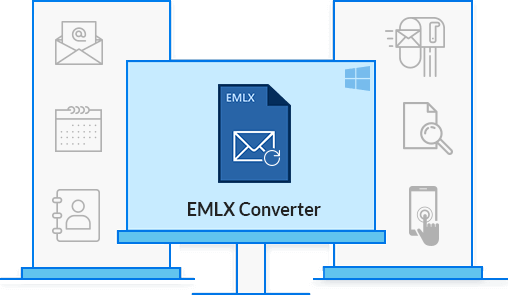
EMLX Converter Tool exports emlx data files to multiple other file formats. You can convert EMLX to PDF, MBOX, EML, HTML, MSG, PST, etc. With its advance features, you can directly export EMLX to Gmail, Yahoo, Thunderbird, Zimbra, etc. It comes with a user-friendly GUI that allows both technical or non-technical users to access the software without ant prior tech knowledge. You can convert EMLX file to different file formats in bulk without any data moderation. The tool has best emlx conversion rate in its category. With its high-class algorithms, it offers high data security features that maintain data integrity and consistency. It is compatible with all versions of Windows and Mac OS. You can download the free version of the tool to evaluate this utility and convert the first 25 emlx emails for free. So easily convert Apple Mail EMLX files to other file formats with ease.

FX File Explorer features a Material Design UI and new ways to transfer your files between devices and computers
Automatically transcribe audio, turn your audio or video to text. Upload your file and convert your audio to text with Transkriptor. Transkriptor’s powerful artifical intelligence generates online transcriptions within few minutes. Transkriptor is used by many professionals or students. Transkriptor is the best assisstant for interview transcription, lecture transcription and video transcription. Transkriptor creates editable TXT, word or SRT files. You can download your transcriptions within seconds or you can use Transkriptor’s online editor for easy and quick editing. Sign up today and be more productive in school, work, and life.

Seafile is a secure, scalable, and flexible file management solution designed to enhance collaboration and productivity for teams of all sizes. Available as both a cloud-based SaaS and self-hosted option, Seafile enables businesses to store, manage, and collaborate on project documents, files, and knowledge in one centralized platform. SeafilePlus Cloud offers a comprehensive suite of tools that goes beyond simple file syncing and sharing. It centralizes your team’s documents, files, and knowledge, making collaboration seamless and efficient. With customizable file properties, AI-powered file management, and various organizational views like list, gallery, and kanban, SeafilePlus ensures that teams stay organized while boosting productivity. SeafilePlus also includes SeaDoc for document collaboration, Wikis for knowledge management, and Excalidraw for online whiteboard sessions and brainstorming. These integrated tools transform how teams collaborate on documents, manage knowledge, and brainstorm ideas—all within the same platform. AI-powered file organization and content editing further enhance the user experience, allowing teams to manage their files more intelligently and efficiently. For teams and businesses requiring full control over their data, Seafile On-Premise offers a self-hosted solution that allows you to store and manage files on your own infrastructure. This option provides enhanced security, compliance, and complete data ownership, making it ideal for organizations with strict privacy or regulatory requirements. Whether you choose SeafilePlus Cloud for its convenience and cloud-based features, or Seafile On-Premise for greater control, Seafile offers a flexible, intelligent file management solution. The combination of advanced AI-powered features, integrated collaboration tools, and customizable views makes Seafile a standout in the file management space, ensuring that your team can work efficiently, securely, and productively
Multi-user Digital Asset Management software aimed at all industries that need to organize and quickly search for photos, documents and other file formats stored on a local network. Designed for Windows, but can be launched on Macs via special applications.
A single account to backup and sync data from multiple computers and mobiles

ShareX is a free and open-source application for Windows that enables users to capture or record any area of their screen with a single keystroke. It supports uploading images, text, and various file types to a wide range of destinations. With over 17 years of active development, ShareX is designed for power users seeking a comprehensive screen capture and file-sharing solution.
Key Features and Functionality:
- Screen Capture Methods: Offers various capture options, including fullscreen, active window, active monitor, region, and scrolling capture.
- Screen Recording: Supports screen recording with audio, as well as recording in GIF format.
- Image Editing: Includes a built-in image editor for annotating and modifying screenshots with borders, effects, and watermarks.
- File Sharing: Allows uploading images, text, and other file types to over 80 supported destinations, such as Imgur, Flickr, Google Drive, and Dropbox.
- Customizable Workflows: Enables users to define actions to be performed after capturing or recording, such as adding image effects, copying to clipboard, or uploading to a specific destination.
- Productivity Tools: Offers additional tools like a color picker, QR code generator, hash checker, and screen ruler.
Primary Value and User Solutions:
ShareX provides a versatile and efficient solution for users who need to capture, edit, and share screen content seamlessly. Its extensive customization options and support for numerous destinations streamline workflows, making it an invaluable tool for professionals and enthusiasts alike. By integrating screen capture, recording, editing, and sharing functionalities into a single application, ShareX enhances productivity and simplifies the process of managing and distributing visual content.
Fast.io is a cloud-based file sharing and collaboration platform designed to streamline team workflows by centralizing file storage, sharing, and management. It integrates seamlessly with popular cloud storage services like Google Drive, Dropbox, and OneDrive, providing automatic synchronization and global content delivery via a built-in Content Delivery Network (CDN) powered by Cloudflare and Akamai. Fast.io enhances productivity with AI-assisted file analysis and search, real-time collaboration tools, and detailed analytics integration with Google Analytics and Mixpanel. It is tailored for businesses and remote teams requiring secure, efficient, and scalable file handling with compliance support for regulations such as GDPR and CCPA.
Key Features:
- Integrated CDN and Cloud Sync: Automatically sync files from major cloud storage providers and deliver content globally with fast, reliable CDN support.
- AI-Enhanced File Management: Leverage AI to analyze large datasets of files, improve search accuracy, and streamline file organization and retrieval.
- Real-Time Team Collaboration: Facilitates seamless file sharing and commenting within teams, supporting remote and distributed work environments.
- Robust Security and Compliance: Ensures secure file transfers and storage with compliance to GDPR, CCPA, and enterprise-grade data protection standards.
- Detailed Analytics and Reporting: Provides foolproof analytics collected directly from the CDN, integrated with Google Analytics and Mixpanel for actionable insights.
- Easy Integration and Scalability: Supports API integration and scales effortlessly to accommodate growing teams and increasing data volumes.
Primary Value and Solutions:
Fast.io addresses the challenges of modern team collaboration by offering a centralized platform that simplifies file management and sharing. By integrating with existing cloud storage services and providing a global CDN, it ensures fast and reliable access to files. The AI-enhanced features improve searchability and organization, reducing time spent managing files. Real-time collaboration tools and robust security measures support efficient and secure teamwork, making Fast.io an ideal solution for businesses and remote teams seeking to enhance productivity and maintain compliance with data protection regulations.

Matrix42 FastViewer is a remote support and maintenance solution designed to facilitate seamless remote control of computers and devices, regardless of location. It enables IT teams to troubleshoot issues, perform maintenance tasks, and transfer files efficiently, all while ensuring secure and reliable connections.
Key Features and Functionality:
- Remote Control: Access and control unattended computers and servers as if on-site, allowing for efficient troubleshooting and maintenance.
- Multiple Access Points: Utilize FastViewer through a standalone web-based browser application, a desktop application for Windows and Mac, or an integrated web-based application within Matrix42’s Enterprise Service Management.
- File Transfer: Easily transfer individual files and folders or synchronize entire folder structures between devices.
- Multi-Monitor Support: Collaborate effectively with support for multiple monitors, enhancing the remote working experience.
- Unattended Access: Manage and control devices without the need for an on-site presence, providing flexibility and scalability for IT operations.
- Security: Ensure data protection with 256-bit AES encryption, safeguarding all remote sessions and file transfers.
Primary Value and User Solutions:
FastViewer addresses the growing need for robust remote support tools in an increasingly remote and hybrid work environment. By enabling IT departments to resolve issues remotely, it reduces the need for on-site visits, leading to significant cost and time savings. The solution enhances productivity by accelerating ticket resolution and minimizing downtime, allowing employees to focus on their core tasks without interruptions. Its flexibility and ease of use make it an ideal choice for organizations seeking to centralize IT operations and provide consistent support across various locations.

WordPerfect Office Standard is a comprehensive office suite designed to meet the diverse needs of professionals and businesses. It offers a robust set of applications, including a word processor, spreadsheet tool, presentation software, and more, all aimed at enhancing productivity and streamlining document management tasks. With its user-friendly interface and extensive compatibility with various file formats, WordPerfect Office Standard provides a reliable solution for creating, editing, and sharing documents efficiently.
Key Features and Functionality:
- WordPerfect Word Processor: Craft documents, letters, brochures, and resumes with ease. The powerful Reveal Codes feature allows precise control over document formatting.
- Quattro Pro Spreadsheet Application: Develop comprehensive spreadsheets for budgets, invoices, expenses, and receipts. It supports opening, editing, and creating files compatible with Microsoft Excel.
- Presentations Slideshow Creator: Design and deliver captivating presentations, proposals, and interactive reports. It ensures compatibility with Microsoft PowerPoint files and supports wireless remotes for seamless delivery.
- WordPerfect Lightning Digital Notebook: Collect text and images from multiple sources, then reuse the content by exporting documents, sending emails, or posting to blogs.
- Paradox Database Management System: Easily track, manage, and retrieve data with reliability and flexibility.
- AfterShot 3 Photo-Editing and Management: Quickly learn professional-grade photo editing with tools for easy corrections, enhancements, and batch processing.
- Corel MultiCam Capture Lite: Capture video from multiple cameras, including built-in webcams and your computer screen, synchronizing all videos for seamless compilation.
Primary Value and Solutions Provided:
WordPerfect Office Standard addresses the essential needs of professionals and businesses by offering a versatile and integrated suite of applications. It simplifies the creation and management of various document types, from text documents and spreadsheets to presentations and databases. The suite's compatibility with over 60 file formats, including Microsoft Office files, ensures smooth collaboration and file exchange. Features like Reveal Codes provide users with precise control over document formatting, enhancing the quality and professionalism of their work. Additionally, the inclusion of tools like AfterShot 3 and Corel MultiCam Capture Lite extends the suite's functionality to photo editing and video capture, catering to a wide range of multimedia needs. Overall, WordPerfect Office Standard delivers a comprehensive solution that enhances productivity, fosters collaboration, and meets the diverse demands of modern workplaces.
Ensora Mental Health (formerly TheraNest) software allows you to manage and grow your practice with comprehensive therapy notes, storage for your files and documents, a client portal for intake forms and appointments, secure access, and billing.
DropSend is a file transfer and storage service designed to facilitate the secure and efficient sharing of large files. Catering to both individual and business users, DropSend enables the transmission of files up to 8GB in size without the need for recipients to have an account or download additional software. This user-friendly platform ensures that large videos, photos, documents, and other file types can be sent quickly and securely, streamlining workflows and enhancing productivity.
Key Features and Functionality:
- Large File Transfers: Send files up to 8GB in size, eliminating the constraints of email attachments.
- Secure Online Storage: Store files in a secure cloud environment, accessible from any device.
- Cross-Platform Accessibility: Access and manage files via web browsers, desktop applications for Windows and Mac, and mobile apps for iOS devices.
- No Recipient Account Required: Recipients can download files without needing a DropSend account, simplifying the sharing process.
- Password Protection and Download Limits: Enhance security by setting passwords and controlling the number of downloads per file.
- Custom Branding: Business users can customize the interface with their company name, logo, and colors for a branded experience.
Primary Value and User Solutions:
DropSend addresses the common challenge of sharing large files that exceed email size limitations. By providing a secure, efficient, and user-friendly platform, it enables users to send substantial files without compromising on speed or security. The service's flexibility across various devices and operating systems ensures that users can manage and share their files seamlessly, whether for personal projects or professional collaborations. For businesses, DropSend offers advanced features like custom branding and multi-user accounts, facilitating enhanced collaboration and maintaining brand consistency.