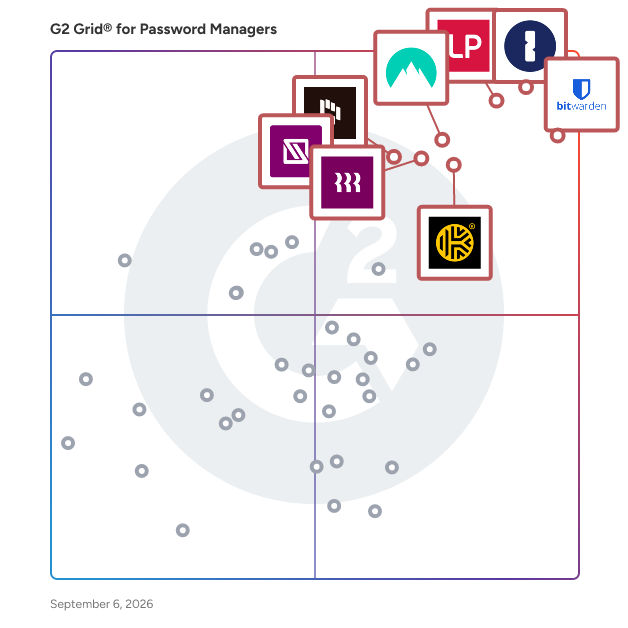
# Best Password Managers - Page 2

*By [Brandon Summers-Miller](https://research.g2.com/insights/author/brandon-summers-miller)*


Password manager software stores and controls user passwords through an encrypted vault, accessible via desktop, mobile, or browser extensions, allowing users to create strong, unique passwords for every account without needing to memorize them, while enabling businesses to securely share, monitor, and manage credentials at scale. The [best password managers](https://learn.g2.com/best-password-manager) help protect personal data by securing and strengthening passwords across every website and application.

### Core Capabilities of Password Manager Software

To qualify for inclusion in the Password Manager category, a product must:

- Store and save passwords for websites and applications
- Automate the filling of password forms or logins
- Provide tools for securely sharing credentials
- Integrate with browsers or function atop applications
- Allow users to create, change, or randomize passwords

### Common Use Cases for Password Manager Software

Password managers are used by individuals and organizations to strengthen credential security and reduce the risk of breaches. Common use cases include:

- Securing and centralizing employee credentials across business applications
- Enforcing strong password policies and randomized password changes
- Sharing credentials securely across teams without exposing plain-text passwords

### How Password Manager Software Differs from Other Tools

Password managers are a focused subset of [identity management software](https://www.g2.com/categories/identity-management), providing essential credential storage and autofill capabilities. However, they typically offer less advanced functionality than [identity and access management (IAM) software](https://www.g2.com/categories/identity-and-access-management-iam), [single sign-on (SSO) solutions](https://www.g2.com/categories/single-sign-on-sso), and [user provisioning and governance tools](https://www.g2.com/categories/user-provisioning-and-governance-tools), which provide broader access control and lifecycle management.

### Insights from G2 on Password Manager Software

Based on category trends on G2, browser integration and secure credential sharing stand out as the most valued features. Improved security posture and reduced password-related support tickets stand out as primary outcomes of adoption.


## Top Password Managers at a Glance
| # | Product | Rating | Best For | What Users Say |
|---|---------|--------|----------|----------------|
| 1 | [1Password](https://www.g2.com/products/1password/reviews) | 4.6/5.0 (1,786 reviews) | Enterprise credential organization | "[Seamless, Simple Password Management Across Desktop and Mobile](https://www.g2.com/survey_responses/1password-review-12976873)" |
| 2 | [Bitwarden](https://www.g2.com/products/bitwarden/reviews) | 4.6/5.0 (1,313 reviews) | Value-focused secure credential sharing | "[Practical Auto-fill, But Confusing in Some URLs](https://www.g2.com/survey_responses/bitwarden-review-12707628)" |
| 3 | [LastPass](https://www.g2.com/products/lastpass/reviews) | 4.5/5.0 (2,035 reviews) | Everyday password access across devices | "[Stress-Free Password Management with Seamless Autofill and Sync](https://www.g2.com/survey_responses/lastpass-review-12845237)" |
| 4 | [NordPass Business](https://www.g2.com/products/nordpass-business/reviews) | 4.5/5.0 (641 reviews) | Secure team password sharing | "[Simple, Secure Team Password Management with NordPass Business](https://www.g2.com/survey_responses/nordpass-business-review-12856345)" |
| 5 | [Keeper Password Manager](https://www.g2.com/products/keeper-password-manager/reviews) | 4.6/5.0 (1,225 reviews) | Enterprise vault administration | "[Feature rich password manager meeting all our business needs for password security and hygiene](https://www.g2.com/survey_responses/keeper-password-manager-review-10821974)" |
| 6 | [Dashlane Password Manager](https://www.g2.com/products/dashlane-password-manager/reviews) | 4.5/5.0 (623 reviews) | Autofill and password health workflows | "[A Must-Have for Agency Password Management](https://www.g2.com/survey_responses/dashlane-password-manager-review-6669879)" |
| 7 | [Rippling IT](https://www.g2.com/products/rippling-it/reviews) | 4.7/5.0 (1,038 reviews) | Employee IT access management | "[IT provisioning and app access made completely painless for everyday employees.](https://www.g2.com/survey_responses/rippling-it-review-13035351)" |
| 8 | [IT Glue](https://www.g2.com/products/it-glue/reviews) | 4.6/5.0 (704 reviews) | IT documentation and credential linking | "[Centralized Documentation That Streamlines Support and Collaboration](https://www.g2.com/survey_responses/it-glue-review-12813006)" |
| 9 | [Proton Pass For Business](https://www.g2.com/products/proton-pass-for-business/reviews) | 4.7/5.0 (103 reviews) | — | "[Privacy Focused](https://www.g2.com/survey_responses/proton-pass-for-business-review-12854370)" |
| 10 | [Zoho Vault](https://www.g2.com/products/zoho-vault/reviews) | 4.4/5.0 (73 reviews) | Affordable centralized team vaults | "[Keeps My Login Details Organized in One Place and Makes It Easy to Manage](https://www.g2.com/survey_responses/zoho-vault-review-12733975)" |

---
## What Are the Most Common Questions About Password Managers?
*AI-generated · Last updated: May 26, 2026*
### What best user-friendly password manager software for desktops?
Based on G2 reviews, [1Password](https://www.g2.com/products/1password) stands out for desktop usability because reviewers repeatedly describe it as easy to use for both end users and admins, with a clean interface, reliable browser support, and smooth cross-device access. According to verified users, it helps reduce login friction through autofill, password generation, and organized vaults. G2 reviewers mention that setup is generally straightforward, though some first-time users still note a learning curve around vault structure and onboarding. Overall, recent feedback points to a desktop experience that balances convenience, organization, and secure access for both individual and team workflows.

**Here are some of the top-rated products on G2:**

- [1Password](https://www.g2.com/products/1password) – often praised for intuitive desktop use, autofill, and organized vaults for personal and team credentials
- [LastPass](https://www.g2.com/products/lastpass) – commonly used for centralized password storage, browser autofill, and multi-device access
- [Bitwarden](https://www.g2.com/products/bitwarden) – valued for straightforward cross-device access, simple UI, and secure password generation


### Which password tool is best for business security?
Based on G2 reviews, [1Password](https://www.g2.com/products/1password) is the strongest recent fit for business security in this dataset. According to verified users, teams rely on it for secure vaults, controlled sharing, password generation, and security visibility features that help reduce reused or weak credentials. G2 reviewers mention benefits such as sharing access without sending passwords through chat or email, organizing credentials by vault, and supporting onboarding and offboarding with more control. Recent reviews also highlight Watchtower alerts, passkey support, and broad browser and device access. Some users mention setup complexity and occasional autofill or reauthentication issues, but security-focused feedback is consistently strong.


### What best password manager for small business?
Based on G2 reviews, small businesses tend to value password managers that combine secure storage, easy sharing, and simple day-to-day administration. According to verified users, recent feedback most often highlights tools that help teams replace spreadsheets, notes, and informal sharing with centralized vaults and browser-based autofill. G2 reviewers mention that these products are especially helpful for onboarding, offboarding, and keeping shared credentials accessible without exposing them unnecessarily. Small business users also call out ease of setup, cross-device access, and organized folders or vaults as practical advantages. Across the latest reviews, the strongest signals point to solutions built for secure sharing, quick access, and straightforward team management rather than overly complex administration.

**Here are some of the top-rated products on G2:**

- [LastPass](https://www.g2.com/products/lastpass) – frequently used by smaller teams for centralized password storage, sharing, and easy browser access
- [1Password](https://www.g2.com/products/1password) – helpful for small teams that want secure vaults, shared access, and strong password hygiene
- [Bitwarden](https://www.g2.com/products/bitwarden) – often chosen for simple setup, organized sharing, and easy access across devices


### Which password manager has the best reviews?
Based on G2 reviews, [1Password](https://www.g2.com/products/1password) has the strongest concentration of recent positive feedback among the password managers in this dataset. According to verified users, reviewers consistently praise its ease of use, secure vault sharing, browser integrations, password generation, and cross-device sync. G2 reviewers mention that it helps reduce password reuse, speeds up logins, and gives teams a more structured way to manage shared credentials. Many also highlight security-focused features such as alerts and support for newer authentication workflows. While some users note pricing concerns, onboarding friction, or occasional autofill issues, the overall review language is especially favorable and consistently buyer-relevant.


### What&#39;s the best software for managing team passwords?
Based on G2 reviews, the best software for managing team passwords is the one that makes secure sharing, permissions, and organization easy to maintain every day. According to verified users, recent reviews repeatedly emphasize the value of shared vaults, role-based access, and the ability to avoid passing credentials through email, chat, or spreadsheets. G2 reviewers mention that effective team password tools reduce onboarding friction, simplify offboarding, and give staff access to the right accounts without exposing sensitive information more broadly than needed. They also point to browser autofill, password generation, and centralized management as major productivity gains. Overall, team buyers should prioritize platforms with strong sharing workflows and dependable day-to-day access.

**Here are some of the top-rated products on G2:**

- [LastPass](https://www.g2.com/products/lastpass) – widely used for team password sharing, centralized vaults, and controlled access across organizations
- [Keeper Password Manager](https://www.g2.com/products/keeper-password-manager) – strong fit for teams that need secure sharing, permissions, and organized credential storage
- [Bitwarden](https://www.g2.com/products/bitwarden) – often cited for secure team sharing, collections, and efficient browser-based access


### What top rated enterprise password manager app?
Based on G2 reviews, enterprise buyers focus on password managers that support centralized administration, secure sharing, auditability, and reliable browser or device access. According to verified users, recent feedback points to products that help larger organizations replace weak sharing habits with vault-based controls, organized access, and clearer visibility into credentials. G2 reviewers mention enterprise use cases such as onboarding and offboarding, role-based sharing, password hygiene monitoring, and access control across teams. They also value integrations with identity systems, admin oversight, and dependable access for distributed teams. In the latest review set, the strongest enterprise signals come from tools that combine broad usability with controlled sharing and operational consistency across many users.

**Here are some of the top-rated products on G2:**

- [1Password](https://www.g2.com/products/1password) – praised by larger teams for shared vaults, admin controls, and secure credential management across devices
- [Bitwarden](https://www.g2.com/products/bitwarden) – recognized for centralized vault access, secure sharing, and admin-friendly setup for broader teams
- [LastPass](https://www.g2.com/products/lastpass) – commonly used for enterprise password sharing, access controls, and centralized credential organization


### What most secure password app for companies?
Based on G2 reviews, companies define secure password apps by how well they reduce password reuse, control access, and support safe sharing across teams. According to verified users, recent reviews emphasize secure vaults, role-based access, password generation, and alerts that help identify weak or exposed credentials. G2 reviewers mention that secure platforms also help remove passwords from spreadsheets, browser memory, notes, and chat messages, which lowers day-to-day risk. They also value features like controlled sharing, multi-device access, and audit-friendly administration. Across the latest reviews, the most trusted products are the ones that combine strong credential organization with practical workflows that employees will actually use consistently.


### What best-rated app to manage business passwords?
Based on G2 reviews, business buyers consistently favor password managers that combine secure storage with simple access for employees and admins. According to verified users, recent reviews highlight the importance of browser autofill, organized vaults or folders, and secure sharing that avoids exposing passwords in plain text. G2 reviewers mention that the best-rated tools help teams centralize credentials, speed up logins, and support smoother onboarding and offboarding. Business users also value products that work across devices and keep password hygiene manageable without adding too much overhead. In this review set, the strongest buyer signals come from tools that balance usability, secure sharing, and dependable daily workflow support.

**Here are some of the top-rated products on G2:**

- [1Password](https://www.g2.com/products/1password) – well reviewed for business vaults, secure sharing, and consistent browser and device usability
- [Keeper Password Manager](https://www.g2.com/products/keeper-password-manager) – valued for team sharing, organized credential storage, and strong security controls
- [LastPass](https://www.g2.com/products/lastpass) – often used to centralize business credentials and simplify secure access across teams


### What leading password management solution for office use?
Based on G2 reviews, office-oriented password management solutions are most useful when they reduce daily login delays and make shared access easier to manage. According to verified users, recent feedback favors products that let staff quickly autofill credentials, organize shared logins, and avoid storing sensitive information in spreadsheets or handwritten notes. G2 reviewers mention that office teams especially benefit from browser extensions, shared vaults, and quick search or retrieval when multiple tools are used throughout the day. They also value straightforward setup and cross-device consistency for employees working across browsers, laptops, and mobile devices. Overall, the leading options in this dataset are the ones that improve routine productivity while strengthening access control.

**Here are some of the top-rated products on G2:**

- [LastPass](https://www.g2.com/products/lastpass) – often used in office settings for centralized credentials, autofill, and team password sharing
- [Bitwarden](https://www.g2.com/products/bitwarden) – useful for offices that need organized password storage and easy access across devices
- [1Password](https://www.g2.com/products/1password) – supports office teams with secure vaults, browser access, and controlled credential sharing


### What recommend best corporate password management tool?
Based on G2 reviews, corporate teams usually need a password management tool that supports secure sharing, centralized visibility, and dependable access at scale. According to verified users, recent feedback points to products that reduce password sprawl, help enforce stronger credential habits, and make onboarding or offboarding more controlled. G2 reviewers mention that corporate buyers value vault structures, browser integrations, password generation, and ways to share access without revealing credentials broadly. They also look for solutions that support compliance-minded workflows, admin oversight, and smoother coordination across departments. In the latest review data, the most recommended corporate tools are the ones that combine strong everyday usability with clear access management and secure collaboration.

**Here are some of the top-rated products on G2:**

- [Bitwarden](https://www.g2.com/products/bitwarden) – recommended for centralized credential storage, secure sharing, and practical administration across teams
- [1Password](https://www.g2.com/products/1password) – frequently praised for corporate password sharing, organized vaults, and secure day-to-day access
- [LastPass](https://www.g2.com/products/lastpass) – commonly used for corporate password organization, access control, and easy browser-based workflows


## How Many Password Managers Products Does G2 Track?
**Total Products under this Category:** 100

### Category Stats (Jul 2026)
- **Average Rating**: 4.41/5 The average rating of products in this category, based on all submitted ratings
- **Top Trending Product**: passbolt (+0.4%) - Among all products in this category, passbolt recorded the largest rating increase compared to last month
*Last updated: July 05, 2026*


## How Does G2 Rank Password Managers Products?

**Why You Can Trust G2's Software Rankings:**

- 30 Analysts and Data Experts
- 12,200+ Authentic Reviews
- 100+ Products
- Unbiased Rankings

G2's software rankings are built on verified user reviews, rigorous moderation, and a consistent research methodology maintained by a team of analysts and data experts. Each product is measured using the same transparent criteria, with no paid placement or vendor influence. While reviews reflect real user experiences, which can be subjective, they offer valuable insight into how software performs in the hands of professionals. Together, these inputs power the G2 Score, a standardized way to compare tools within every category.


## Which Password Managers Is Best for Your Use Case?

- **Leader:** [1Password](https://www.g2.com/products/1password/reviews)
- **Highest Performer:** [Hudu](https://www.g2.com/products/hudu/reviews)
- **Easiest to Use:** [heylogin](https://www.g2.com/products/heylogin/reviews)
- **Top Trending:** [Rippling IT](https://www.g2.com/products/rippling-it/reviews)
- **Best Free Software:** [LastPass](https://www.g2.com/products/lastpass/reviews)


---

**Sponsored**

### Ory

Ory offers a suite of cloud-native, open-source identity and access management solutions, including: Ory Kratos for configurable user management with features like MFA and social login; Ory Hydra for OAuth 2.0 and OpenID Connect authorization; Ory Polis for organization management and enterprise SSO; Ory Keto for a granular authorization system based on Google Zanzibar; Ory Oathkeeper, an identity and access proxy that enforces a Zero Trust security model; and Ory Talos to Transform API keys into dynamic controls for the agentic era . Deploy Your Way \* Ory Network - SaaS, instant on global identity system \* Ory Enterprise License - On-prem self-hosted option (same code as our SaaS offering) with enterprise support \* Open Source - Try Ory for your specific use cases (community supported)


[Visit website](https://www.g2.com/external_clickthroughs/record?secure%5Bad_program%5D=ppc&amp;secure%5Bad_slot%5D=category_product_list&amp;secure%5Bcategory_id%5D=593&amp;secure%5Bchosen_at%5D=2026-07-05T21%3A56%3A33Z&amp;secure%5Bdisplayable_resource_id%5D=257&amp;secure%5Bdisplayable_resource_type%5D=Category&amp;secure%5Bmedium%5D=sponsored&amp;secure%5Bplacement_reason%5D=neighbor_category&amp;secure%5Bplacement_resource_ids%5D%5B%5D=257&amp;secure%5Bplacement_resource_ids%5D%5B%5D=254&amp;secure%5Bplacement_resource_ids%5D%5B%5D=1083&amp;secure%5Bprioritized%5D=false&amp;secure%5Bproduct_id%5D=1197072&amp;secure%5Bresource_id%5D=593&amp;secure%5Bresource_type%5D=Category&amp;secure%5Bsource_type%5D=category_page&amp;secure%5Bsource_url%5D=https%3A%2F%2Fwww.g2.com%2Fcategories%2Fpassword-managers&amp;secure%5Btoken%5D=fdb3157af2ff8c0680e75a0c768a6a4f3f200c048e9a09c46f659679fa7720be&amp;secure%5Burl%5D=https%3A%2F%2Fwww.ory.com%2Fpricing%2F&amp;secure%5Burl_type%5D=custom_url)

---

## What Are the Top-Rated Password Managers Products in 2026?
### 1. [Passwork](https://www.g2.com/products/passwork/reviews)
Passwork — self-hosted enterprise password manager with zero-knowledge encryption. Passwork is an on-premise corporate password manager built for security-conscious organizations. Developed and headquartered in Europe (Barcelona, Spain), Passwork meets GDPR, NIS2, ENS and other European regulatory requirements by design. All passwords and credentials are stored exclusively on your own server. Double-layer AES-256 encryption (server-side and client-side) with zero-knowledge architecture means your data stays within your infrastructure, fully under the control of your system administrators. Passwork is ISO/IEC 27001 certified. Your data never leaves your infrastructure. Trusted by enterprises across Europe for secure password sharing, privileged access management, and centralized credential governance.


**Average Rating:** 4.7/5.0
**Total Reviews:** 21
**How Do G2 Users Rate Passwork?**

- **Has the product been a good partner in doing business?:** 10.0/10 (Category avg: 9.1/10)
- **Admin Management:** 9.9/10 (Category avg: 9.0/10)
- **Quick Login:** 9.7/10 (Category avg: 9.1/10)
- **Two-Factor Authentication:** 10.0/10 (Category avg: 9.1/10)

**Who Is the Company Behind Passwork?**

- **Seller:** [Passwork](https://www.g2.com/sellers/passwork)
- **Year Founded:** 2017
- **HQ Location:** Barcelona, Spain
- **LinkedIn® Page:** https://www.linkedin.com/company/No-Linkedin-Presence-Added-Intentionally-By-DataOps (1 employees on LinkedIn®)

**Who Uses This Product?**
- **Company Size:** 48% Mid-Market, 43% Small-Business


#### What Are Recent G2 Reviews of Passwork?

**"[Exactly what we were looking for, does everything it promises](https://www.g2.com/survey_responses/passwork-review-12688014)"**

**Rating:** 5.0/5.0 stars
*— Lukas B.*

[Read full review](https://www.g2.com/survey_responses/passwork-review-12688014)

---

**"[Intuitive Role-Based Vaults with Reliable Self-Hosting and Solid SSO](https://www.g2.com/survey_responses/passwork-review-12935806)"**

**Rating:** 4.5/5.0 stars
*— Anders W.*

[Read full review](https://www.g2.com/survey_responses/passwork-review-12935806)

---


#### What Are G2 Users Discussing About Passwork?

- [What is Passwork used for?](https://www.g2.com/discussions/what-is-passwork-used-for)

### 2. [passbolt](https://www.g2.com/products/passbolt/reviews)
Passbolt is an open source password manager designed for collaboration. You can securely generate, store, manage and monitor your team credentials. Get access to all of your passwords from multiple browsers or even your mobile phone. Create strong random passwords, thanks to the fully customizable password generator, and share them instantly with your team. Passbolt is built on top of an open API made for developers and agile teams. Passbolt is extensible and yet usable by everyone. No technical knowledge is required to use it. This is why Passbolt is trusted by small businesses, as well as government offices, regulated industries, and privacy-conscious organizations: Boost collaboration &amp; productivity: - Easily share one password, or a folder with a single user or a group of users; - Use personal or shared tags to identify passwords and secrets; - Give specific access rights to a user or group; - Get detailed reporting on access &amp; change history. Security by design. Audited and certified: - True end-to-end encryption; - Interoperable cryptography based on OpenPGP; - Full control your own encryption key; - Access revocation that actually works; - Regularly audited by independent auditors. Made in Europe.  Privacy by default: - Host it in our cloud, located in Europe; - Or self-host it for full data ownership; - No tracker, no strings attached.


**Average Rating:** 4.3/5.0
**Total Reviews:** 15
**How Do G2 Users Rate passbolt?**

- **Has the product been a good partner in doing business?:** 9.2/10 (Category avg: 9.1/10)
- **Admin Management:** 10.0/10 (Category avg: 9.0/10)
- **Quick Login:** 8.3/10 (Category avg: 9.1/10)
- **Two-Factor Authentication:** 9.4/10 (Category avg: 9.1/10)

**Who Is the Company Behind passbolt?**

- **Seller:** [passbolt](https://www.g2.com/sellers/passbolt)
- **HQ Location:** Luxembourg, LU
- **Twitter:** @passbolt (1,439 Twitter followers)
- **LinkedIn® Page:** https://www.linkedin.com/company/passbolt/ (40 employees on LinkedIn®)

**Who Uses This Product?**
- **Company Size:** 60% Small-Business, 33% Mid-Market


#### What Are passbolt's Pros and Cons?

**Pros:**

- Convenience (1 reviews)
- Data Storage (1 reviews)
- Ease of Use (1 reviews)
- Easy Management (1 reviews)
- Integrations (1 reviews)

**Cons:**

- Login Issues (1 reviews)
- Password Issues (1 reviews)
- SSO Issues (1 reviews)


### What Do G2 Reviewers Say About passbolt?
*AI-generated summary from verified user reviews*

**Pros:**

- Users find **password sharing extremely convenient** in Passbolt, enhancing team collaboration and security seamlessly.
- Users value the **efficient password storage** offered by Passbolt, ensuring secure access and collaboration among team members.
- Users appreciate the **ease of use** in Passbolt, benefiting from well-organized features and clear password management.
- Users appreciate the **easy management** of Passbolt for creating users, groups, and sharing passwords effortlessly.
- Users value the **easy integration and user management** in Passbolt, simplifying password sharing and access control.

**Cons:**

- Users face challenges with **login issues** , as lost passwords require account recreation instead of a simple reset.
- Users face **password issues** as losing the login password requires them to recreate their account entirely.
- Users often struggle with **SSO issues** since logging in requires a browser plugin, complicating accessibility.

#### What Are Recent G2 Reviews of passbolt?

**"[Easy Password Saving and secure.](https://www.g2.com/survey_responses/passbolt-review-12717343)"**

**Rating:** 5.0/5.0 stars
*— Adrian  A.*

[Read full review](https://www.g2.com/survey_responses/passbolt-review-12717343)

---

**"[Passbolt Makes Secure Team Password Sharing Simple and Centralized](https://www.g2.com/survey_responses/passbolt-review-12969694)"**

**Rating:** 4.5/5.0 stars
*— Ravindra N.*

[Read full review](https://www.g2.com/survey_responses/passbolt-review-12969694)

---


#### What Are G2 Users Discussing About passbolt?

- [How safe is Passbolt?](https://www.g2.com/discussions/how-safe-is-passbolt) - 1 upvote
- [Who uses Passbolt?](https://www.g2.com/discussions/who-uses-passbolt) - 1 upvote
- [Does Passbolt have an app?](https://www.g2.com/discussions/does-passbolt-have-an-app) - 1 upvote
- [What does passbolt do?](https://www.g2.com/discussions/what-does-passbolt-do)

### 3. [PracticeProtect](https://www.g2.com/products/practiceprotect/reviews)
Practice Protect is The #1 cyber security and password management platform for accountants worldwide. Take control over client logins &amp; sensitive data in the cloud with password protection, login security, email protection, &amp; more.


**Average Rating:** 4.9/5.0
**Total Reviews:** 14
**How Do G2 Users Rate PracticeProtect?**

- **Has the product been a good partner in doing business?:** 9.7/10 (Category avg: 9.1/10)
- **Admin Management:** 7.5/10 (Category avg: 9.0/10)
- **Quick Login:** 9.2/10 (Category avg: 9.1/10)
- **Two-Factor Authentication:** 10.0/10 (Category avg: 9.1/10)

**Who Is the Company Behind PracticeProtect?**

- **Seller:** [PracticeProtect](https://www.g2.com/sellers/practiceprotect)
- **HQ Location:** Denver, US
- **Twitter:** @PracProtect (627 Twitter followers)
- **LinkedIn® Page:** https://www.linkedin.com/company/18065960 (53 employees on LinkedIn®)

**Who Uses This Product?**
- **Top Industries:** Accounting
- **Company Size:** 86% Small-Business


#### What Are PracticeProtect's Pros and Cons?

**Pros:**

- Customizability (1 reviews)
- Customization (1 reviews)
- Customization Options (1 reviews)
- Data Security (1 reviews)
- Ease of Use (1 reviews)


### What Do G2 Reviewers Say About PracticeProtect?
*AI-generated summary from verified user reviews*

**Pros:**

- Users value the **customizability** of PracticeProtect, enhancing security and adaptability to their specific needs.
- Users value the **customizable options** of PracticeProtect, enabling enhanced security tailored to their firm&#39;s needs.
- Users value the **customization options** of PracticeProtect, enhancing their security measures and improving overall usability.
- Users value the **robust data security** of PracticeProtect, ensuring the protection of sensitive information with ease.
- Users value the **user-friendly interface** of PracticeProtect, appreciating its ease in managing security measures effortlessly.


#### What Are Recent G2 Reviews of PracticeProtect?

**"[Secure and Seamless](https://www.g2.com/survey_responses/practiceprotect-review-9399230)"**

**Rating:** 5.0/5.0 stars
*— Andrea K.*

[Read full review](https://www.g2.com/survey_responses/practiceprotect-review-9399230)

---

**"[Secure Log in](https://www.g2.com/survey_responses/practiceprotect-review-9399921)"**

**Rating:** 5.0/5.0 stars
*— Verified User in Financial Services*

[Read full review](https://www.g2.com/survey_responses/practiceprotect-review-9399921)

---


#### What Are G2 Users Discussing About PracticeProtect?

- [What is PracticeProtect used for?](https://www.g2.com/discussions/what-is-practiceprotect-used-for)

### 4. [Uniqkey](https://www.g2.com/products/uniqkey/reviews)
Uniqkey is Europe’s #1 trusted password and access management platform - purpose-built for companies that demand security, simplicity, and control. Engineered by European cybersecurity experts, our platform combines military-grade encryption with an effortless user experience. We remove complexity from everyday workflows, helping employees stay secure without slowing them down. From auto-filling 2FA codes to streamlining access across your cloud environment, Uniqkey keeps security frictionless and productivity high. With real-time visibility across your entire infrastructure, IT teams gain complete control over access rights, employee activity, and security scores - empowering them to defend against threats and drive compliance with confidence proactively. Seamlessly integrated with Microsoft and other core systems, Uniqkey makes provisioning and offboarding fast, automated, and secure. Built for Europe. Hosted in Europe. Committed to European sovereignty. At Uniqkey, Europe isn’t just where we’re from - it’s who we’re built for. With all data hosted locally on European soil and infrastructure based in Denmark, we guarantee data sovereignty, GDPR compliance, and full alignment with European regulatory frameworks. In a time when EU organisations increasingly prioritise European-made security solutions, Uniqkey delivers peace of mind by keeping your sensitive data secure, private, and fully under European jurisdiction. We proudly help organisations across the continent meet rising demands for trusted, locally developed cybersecurity solutions.


**Average Rating:** 4.4/5.0
**Total Reviews:** 138
**How Do G2 Users Rate Uniqkey?**

- **Has the product been a good partner in doing business?:** 9.5/10 (Category avg: 9.1/10)
- **Admin Management:** 8.8/10 (Category avg: 9.0/10)
- **Quick Login:** 9.0/10 (Category avg: 9.1/10)
- **Two-Factor Authentication:** 8.8/10 (Category avg: 9.1/10)

**Who Is the Company Behind Uniqkey?**

- **Seller:** [Uniqkey](https://www.g2.com/sellers/uniqkey)
- **Company Website:** https://uniqkey.eu
- **Year Founded:** 2017
- **HQ Location:** Herlev, Hovedstaden
- **Twitter:** @uniqkeyofficial (266 Twitter followers)
- **LinkedIn® Page:** https://www.linkedin.com/company/uniqkey (33 employees on LinkedIn®)

**Who Uses This Product?**
- **Top Industries:** Marketing and Advertising, Accounting
- **Company Size:** 61% Small-Business, 38% Mid-Market


#### What Are Uniqkey's Pros and Cons?

**Pros:**

- Customer Support (3 reviews)
- Ease of Implementation (3 reviews)
- Implementation Ease (3 reviews)
- Easy Setup (2 reviews)
- Security (2 reviews)

**Cons:**

- Password Issues (2 reviews)
- Password Management (2 reviews)
- Complexity (1 reviews)
- Folder Management (1 reviews)
- Learning Curve (1 reviews)


### What Do G2 Reviewers Say About Uniqkey?
*AI-generated summary from verified user reviews*

**Pros:**

- Users commend the **responsive customer support** from Uniqkey, ensuring quick resolutions and thorough guidance.
- Users highlight the **ease of implementation** with Uniqkey, making it simple for both employees and admins.
- Users love the **easy implementation** of Uniqkey, noting a smooth onboarding experience for both employees and admins.
- Users find the **easy setup** of Uniqkey invaluable, making onboarding and implementation a seamless experience.
- Users value the **robust security features** of Uniqkey, including separate vaults and security scores for management.

**Cons:**

- Users find the **password issues** frustrating, as features like security scores and import options are lacking.
- Users find the lack of a **personal security score** and password management options frustrating while using Uniqkey.
- Users find the **initial complexity** of Uniqkey confusing, though it becomes easier to implement over time.
- Users feel that the lack of **folder management** for passwords hampers organization and accessibility significantly.
- Users find the **initial learning curve confusing** , though they can gradually adapt and utilize the functionality effectively.

#### What Are Recent G2 Reviews of Uniqkey?

**"[Effortless Implementation and High Functionality](https://www.g2.com/survey_responses/uniqkey-review-12034612)"**

**Rating:** 5.0/5.0 stars
*— Martin S.*

[Read full review](https://www.g2.com/survey_responses/uniqkey-review-12034612)

---

**"[Uniqkey solves several key challenges](https://www.g2.com/survey_responses/uniqkey-review-12021627)"**

**Rating:** 4.5/5.0 stars
*— Verified User in Accounting*

[Read full review](https://www.g2.com/survey_responses/uniqkey-review-12021627)

---


#### What Are G2 Users Discussing About Uniqkey?

- [How has Uniqkey improved your password management, and what advice would you give to new users?](https://www.g2.com/discussions/how-has-uniqkey-improved-your-password-management-and-what-advice-would-you-give-to-new-users)
- [What is Uniqkey used for?](https://www.g2.com/discussions/what-is-uniqkey-used-for)

### 5. [Corbado](https://www.g2.com/products/corbado/reviews)
Corbado is the passkey intelligence platform for enterprise CIAM teams running consumer authentication at scale. The platform answers the three questions every passkey rollout faces: why is adoption flat, what&#39;s breaking logins, and how do we scale passkeys across millions of users without replacing the IDP. Two products sit on the platform. Corbado Connect ships managed passkeys with analytics built in: SDKs, UI components, backend infrastructure, gradual rollout controls and funnel analytics in one product, for teams that want faster time-to-passkeys with analytics from day one. Corbado Observe is the passkey observability layer for teams that already shipped passkeys and need visibility: funnel analytics, error patterns by device and browser, per-user drill-down, and device readiness signals. Both products work alongside Okta, Auth0, Ping, ForgeRock, Cognito or in-house stacks. Customers like VicRoads (5 million users) use Corbado to reach 50 to 80 percent passkey adoption, cut SMS OTP costs and reduce authentication helpdesk tickets. The roadmap extends the same intelligence engine from passkeys to every auth method.


**Average Rating:** 4.8/5.0
**Total Reviews:** 11
**How Do G2 Users Rate Corbado?**

- **Has the product been a good partner in doing business?:** 10.0/10 (Category avg: 9.1/10)
- **Admin Management:** 9.8/10 (Category avg: 9.0/10)
- **Quick Login:** 9.8/10 (Category avg: 9.1/10)
- **Two-Factor Authentication:** 10.0/10 (Category avg: 9.1/10)

**Who Is the Company Behind Corbado?**

- **Seller:** [Corbado](https://www.g2.com/sellers/corbado)
- **Year Founded:** 2021
- **HQ Location:** Munich, Germany
- **Twitter:** @corbadotech (216 Twitter followers)
- **LinkedIn® Page:** https://www.linkedin.com/company/corbado (9 employees on LinkedIn®)

**Who Uses This Product?**
- **Top Industries:** Computer Software
- **Company Size:** 82% Small-Business, 9% Mid-Market


#### What Are Corbado's Pros and Cons?

**Pros:**

- Ease of Use (6 reviews)
- Implementation Ease (5 reviews)
- Authentication (3 reviews)
- Password Management (3 reviews)
- Biometric Authentication (2 reviews)

**Cons:**

- Limited Compatibility (3 reviews)
- Login Issues (2 reviews)
- Missing Features (2 reviews)
- Authentication Issues (1 reviews)
- SSO Issues (1 reviews)


### What Do G2 Reviewers Say About Corbado?
*AI-generated summary from verified user reviews*

**Pros:**

- Users value the **ease of use** of Corbado, allowing simple passkey implementation without requiring technical expertise.
- Users value the **implementation ease** of Corbado, enabling smooth integration without requiring extensive technical expertise.
- Users appreciate the **easy implementation of passkey logins** in Corbado, enhancing security while providing login flexibility.
- Users value the **easy passkey logins** from Corbado, enhancing security while ensuring a seamless user experience.
- Users praise **Biometric Authentication** in Corbado for its ease of use and strong protection against phishing attacks.

**Cons:**

- Users find **limited compatibility** with Corbado as it lacks support for OIDC, Microsoft, and Apple logins.
- Users express frustration over the lack of **Microsoft and Apple login support** , complicating the access process.
- Users note a lack of **Apple login support** and other authentication methods, though improvements are anticipated.
- Users experience **authentication issues** due to the lack of Microsoft login support, complicating access and usability.
- Users are frustrated by the lack of **Apple login support** in Corbado, hindering convenience and accessibility.

#### What Are Recent G2 Reviews of Corbado?

**"[Perfect for large-scale enterprise rollouts of passkeys](https://www.g2.com/survey_responses/corbado-review-10925392)"**

**Rating:** 5.0/5.0 stars
*— Igor G.*

[Read full review](https://www.g2.com/survey_responses/corbado-review-10925392)

---

**"[Highly secure for Financial applications](https://www.g2.com/survey_responses/corbado-review-10422312)"**

**Rating:** 5.0/5.0 stars
*— Talal S.*

[Read full review](https://www.g2.com/survey_responses/corbado-review-10422312)

---


### 6. [GateKeeper Proximity Authentication](https://www.g2.com/products/gatekeeper-proximity-authentication/reviews)
Proximity MFA for shared workstations. MFA for Shared Computers is a cutting-edge security solution designed to enhance user authentication and access control in environments where multiple users share computing resources. This innovative approach allows individuals to log in using their physical presence rather than traditional passwords, creating a seamless and secure experience across computers, VPNs, websites, and desktop applications. Patented and designed for rugged environments including law enforcement, healthcare, manufacturing (ICS/OT cybersecurity), and compliance. Targeted primarily at organizations that require stringent security measures, such as healthcare providers, financial institutions, and government agencies, this solution addresses common challenges associated with password management. By eliminating the need for users to remember or type passwords, it significantly reduces the risk of forgotten credentials, password resets, and the chaos that often accompanies password management. The continuous authentication feature ensures that users remain securely logged in as long as they are present, while automatically locking the system when they step away, thus preventing unauthorized access. Key features of MFA for Shared Computers include passwordless proximity login, which utilizes a wireless key to authenticate users effortlessly. This technology allows passwords to auto-fill across various platforms, including electronic health records (EHRs) like Allscripts PM and eClinicalWorks, as well as web applications such as Office365 and banking sites. The solution integrates seamlessly with existing systems such as Active Directory, Okta, and RADIUS, ensuring that organizations can maintain their current infrastructure while enhancing security protocols. The benefits of adopting this solution extend beyond mere convenience. Organizations can automate access control and ensure compliance with various regulatory standards, including CMMC, CJIS, HIPAA, and NIS2. By streamlining user authentication processes, businesses can improve productivity while maintaining a high level of security. The ability to manage passwords efficiently across shared computers not only enhances user experience but also fortifies overall organizational security, making it an essential tool for any entity looking to safeguard sensitive information in a shared computing environment.


**Average Rating:** 4.9/5.0
**Total Reviews:** 41
**How Do G2 Users Rate GateKeeper Proximity Authentication?**

- **Has the product been a good partner in doing business?:** 9.9/10 (Category avg: 9.1/10)
- **Admin Management:** 10.0/10 (Category avg: 9.0/10)
- **Quick Login:** 10.0/10 (Category avg: 9.1/10)
- **Two-Factor Authentication:** 9.4/10 (Category avg: 9.1/10)

**Who Is the Company Behind GateKeeper Proximity Authentication?**

- **Seller:** [Untethered Labs](https://www.g2.com/sellers/untethered-labs)
- **Company Website:** https://www.gkaccess.com
- **Year Founded:** 2015
- **HQ Location:** Greenbelt, MD
- **Twitter:** @gkaccess (1,989 Twitter followers)
- **LinkedIn® Page:** https://www.linkedin.com/company/5370448/ (19 employees on LinkedIn®)

**Who Uses This Product?**
- **Top Industries:** Hospital &amp; Health Care, Electrical/Electronic Manufacturing
- **Company Size:** 40% Small-Business, 37% Mid-Market


#### What Are GateKeeper Proximity Authentication's Pros and Cons?

**Pros:**

- Ease of Use (13 reviews)
- Security (12 reviews)
- Implementation Ease (8 reviews)
- Customer Support (7 reviews)
- Secure Sharing (7 reviews)

**Cons:**

- Authentication Issues (2 reviews)
- Difficult Learning (2 reviews)
- Limited Compatibility (2 reviews)
- App Issues (1 reviews)
- Data Security (1 reviews)


### What Do G2 Reviewers Say About GateKeeper Proximity Authentication?
*AI-generated summary from verified user reviews*

**Pros:**

- Users praise the **ease of use** of GateKeeper Proximity Authentication, highlighting its intuitive interface and management simplicity.
- Users value the **enhanced security** of GateKeeper Proximity Authentication, feeling confident with secure logins and audit features.
- Users find the **implementation process easy** , allowing for quick configuration and deployment across workstations.
- Users commend the **exceptional customer support** of GateKeeper, highlighting responsiveness and professionalism in tech assistance.
- Users value the **secure sharing** features of GateKeeper, enhancing security and simplifying access to shared resources.

**Cons:**

- Users are concerned about **authentication issues** related to biometric data privacy and proprietary token access challenges.
- Users find a **difficult learning curve** necessary for effective use, requiring multiple training sessions to fully benefit.
- Users face **limited compatibility** issues, particularly with the absence of an Android app in the Play Store.
- Users express concerns over **app issues** related to biometric data privacy and potential security fatigue during authentication.
- Users are concerned about **biometric data privacy** and possible insider threats with GateKeeper Proximity Authentication.

#### What Are Recent G2 Reviews of GateKeeper Proximity Authentication?

**"[Gatekeeper is a lifesaver for Manufacturing](https://www.g2.com/survey_responses/gatekeeper-proximity-authentication-review-11166996)"**

**Rating:** 5.0/5.0 stars
*— tom r.*

[Read full review](https://www.g2.com/survey_responses/gatekeeper-proximity-authentication-review-11166996)

---

**"[Easy Tracking and Maintenance That Works Great for Our Organization](https://www.g2.com/survey_responses/gatekeeper-proximity-authentication-review-12703434)"**

**Rating:** 5.0/5.0 stars
*— Kelsie D.*

[Read full review](https://www.g2.com/survey_responses/gatekeeper-proximity-authentication-review-12703434)

---


#### What Are G2 Users Discussing About GateKeeper Proximity Authentication?

- [What is GateKeeper Proximity Authentication used for?](https://www.g2.com/discussions/what-is-gatekeeper-proximity-authentication-used-for) - 1 upvote

### 7. [IBM Vault (formerly HashiCorp Vault)](https://www.g2.com/products/ibm-vault-formerly-hashicorp-vault/reviews)
IBM Vault (formerly HashiCorp Vault) tightly controls access to secrets and encryption keys by authenticating against trusted sources of identity such as Active Directory, LDAP, Kubernetes, CloudFoundry, and cloud platforms. Vault enables fine grained authorization of which users and applications are permitted access to secrets and keys. Some of Vault&#39;s main use cases include: - Secrets Management - Identity Brokering - Data Encryption


**Average Rating:** 4.3/5.0
**Total Reviews:** 52
**How Do G2 Users Rate IBM Vault (formerly HashiCorp Vault)?**

- **Has the product been a good partner in doing business?:** 8.1/10 (Category avg: 9.1/10)
- **Admin Management:** 8.8/10 (Category avg: 9.0/10)
- **Quick Login:** 8.4/10 (Category avg: 9.1/10)
- **Two-Factor Authentication:** 9.3/10 (Category avg: 9.1/10)

**Who Is the Company Behind IBM Vault (formerly HashiCorp Vault)?**

- **Seller:** [HashiCorp](https://www.g2.com/sellers/hashicorp)
- **Company Website:** https://www.hashicorp.com/
- **Year Founded:** 2012
- **HQ Location:** San Francisco, CA
- **Twitter:** @hashicorp (103,221 Twitter followers)
- **LinkedIn® Page:** https://www.linkedin.com/company/2830763/ (2,181 employees on LinkedIn®)

**Who Uses This Product?**
- **Top Industries:** Computer Software, Information Technology and Services
- **Company Size:** 38% Enterprise, 36% Mid-Market


#### What Are IBM Vault (formerly HashiCorp Vault)'s Pros and Cons?

**Pros:**

- Security (3 reviews)
- Ease of Use (2 reviews)
- Easy Integrations (2 reviews)
- Integrations (2 reviews)
- Useful (2 reviews)

**Cons:**

- Complexity Issues (1 reviews)
- Complex Usage (1 reviews)
- Expensive (1 reviews)
- Learning Curve (1 reviews)
- Learning Difficulty (1 reviews)


### What Do G2 Reviewers Say About IBM Vault (formerly HashiCorp Vault)?
*AI-generated summary from verified user reviews*

**Pros:**

- Users appreciate the **improved security posture** provided by IBM Vault, enhancing integrations and management simplicity.
- Users find IBM Vault to be **super easy to use** , with intuitive management and excellent integration capabilities.
- Users appreciate the **easy integrations** of IBM Vault, enhancing security and simplifying management for developers.
- Users value the **native integrations** of IBM Vault, enhancing security and allowing easy customization with internal applications.
- Users find the **easy setup process and useful backend engines** of IBM Vault enhance integration and security significantly.

**Cons:**

- Users find the **complexity** of IBM Vault challenging, especially for those who are new to the system.
- Users find the **complex usage** of IBM Vault can be challenging for beginners to grasp effectively.
- Users note the **high cost** of IBM Vault for enterprise features limits accessibility and full capability utilization.
- Users find the **learning curve steep** , making it challenging for beginners to understand IBM Vault effectively.
- Users find the **learning difficulty** of IBM Vault challenging, especially for those new to the platform.

#### What Are Recent G2 Reviews of IBM Vault (formerly HashiCorp Vault)?

**"[Secure and Streamlined Secret Management with IBM Vault](https://www.g2.com/survey_responses/ibm-vault-formerly-hashicorp-vault-review-12982792)"**

**Rating:** 5.0/5.0 stars
*— Mohan K.*

[Read full review](https://www.g2.com/survey_responses/ibm-vault-formerly-hashicorp-vault-review-12982792)

---

**"[Reliable Security Management, Steep Learning Curve](https://www.g2.com/survey_responses/ibm-vault-formerly-hashicorp-vault-review-12974371)"**

**Rating:** 4.5/5.0 stars
*— UDAY SAI G.*

[Read full review](https://www.g2.com/survey_responses/ibm-vault-formerly-hashicorp-vault-review-12974371)

---


#### What Are G2 Users Discussing About IBM Vault (formerly HashiCorp Vault)?

- [How do you implement HashiCorp vault?](https://www.g2.com/discussions/how-do-you-implement-hashicorp-vault)
- [How much does HashiCorp vault cost?](https://www.g2.com/discussions/how-much-does-hashicorp-vault-cost)
- [How does HashiCorp vault work?](https://www.g2.com/discussions/how-does-hashicorp-vault-work)
- [What is the use of HashiCorp vault?](https://www.g2.com/discussions/what-is-the-use-of-hashicorp-vault)

### 8. [PassCamp](https://www.g2.com/products/passcamp/reviews)
PassCamp is a game changing cloud based secret manager for teams and enterprises. It’s the first and only password &amp; secret management tool that was built for teams from day one. PassCamp is a user-friendly and secure solution that solves all of your password problems. - Only need to remember one password - Securely store &amp; Organize passwords, payments, addresses, notes, codes - One-click generate unique and secure passwords - Autosave, Autofill &amp; Autoupdate passwords as you go - Access Passwords wherever you are with mobile and web apps Also, with PassCamp you can: - Securely Share passwords with your team, your clients and your family - Control Access &amp; Permissions to your passwords - Track history of every single password you have PassCamp uses the most advanced security technologies like AES-256 and RSA-4096 encryption, zero-knowledge proof, transport layer encryption centralized blockchain to ensure your sensitive data is secure. It is created to be as easy to use as possible, using the best design practises and user testing. Both collaborating teams and individual users find PassCamp to be the most user friendly password manager out there. Join thousands of teams using PassCamp and try it out for free today.


**Average Rating:** 4.3/5.0
**Total Reviews:** 16
**How Do G2 Users Rate PassCamp?**

- **Admin Management:** 9.2/10 (Category avg: 9.0/10)
- **Quick Login:** 9.3/10 (Category avg: 9.1/10)
- **Two-Factor Authentication:** 9.2/10 (Category avg: 9.1/10)

**Who Is the Company Behind PassCamp?**

- **Seller:** [PassCamp](https://www.g2.com/sellers/passcamp)
- **Year Founded:** 2017
- **HQ Location:** Kaunas, Kaunas
- **Twitter:** @PassCamp (65 Twitter followers)
- **LinkedIn® Page:** https://www.linkedin.com/company/passcamp/

**Who Uses This Product?**
- **Company Size:** 56% Small-Business, 31% Mid-Market


#### What Are Recent G2 Reviews of PassCamp?

**"[PassCamp simple and time saver password management tool](https://www.g2.com/survey_responses/passcamp-review-9090553)"**

**Rating:** 4.5/5.0 stars
*— Prashant S.*

[Read full review](https://www.g2.com/survey_responses/passcamp-review-9090553)

---

**"[Reliable password manager for managing multiple accounts](https://www.g2.com/survey_responses/passcamp-review-9113477)"**

**Rating:** 4.5/5.0 stars
*— Bhavya J.*

[Read full review](https://www.g2.com/survey_responses/passcamp-review-9113477)

---


#### What Are G2 Users Discussing About PassCamp?

- [What is PassCamp used for?](https://www.g2.com/discussions/what-is-passcamp-used-for)

### 9. [CyberFOX Password Manager](https://www.g2.com/products/cyberfox-password-manager/reviews)
CyberFOX Password Manager is secure and easy to use password management software designed for MSPs and IT professionals. It lets you securely store, access, and share passwords and digital credentials all in one place while giving your team strong security controls and visibility. This solution is built to help organizations enforce strong password hygiene, reduce support tickets for password resets, and protect sensitive login information with industry grade encryption and flexible access policies. CyberFOX Password Manager helps teams centralize sensitive credential management and improve overall security posture while making password handling simple and reliable. \_\_\_ Start Your CyberFOX Password Manager Free Trial Try CyberFOX Password Manager and securely store, manage, and share credentials with your team. No credit card required. https://www.cyberfox.com/password-manager-trial


**Average Rating:** 4.2/5.0
**Total Reviews:** 14
**How Do G2 Users Rate CyberFOX Password Manager?**

- **Has the product been a good partner in doing business?:** 8.6/10 (Category avg: 9.1/10)
- **Admin Management:** 9.5/10 (Category avg: 9.0/10)
- **Quick Login:** 8.5/10 (Category avg: 9.1/10)
- **Two-Factor Authentication:** 9.8/10 (Category avg: 9.1/10)

**Who Is the Company Behind CyberFOX Password Manager?**

- **Seller:** [CyberFOX](https://www.g2.com/sellers/cyberfox)
- **Year Founded:** 2022
- **HQ Location:** Tampa, FL
- **Twitter:** @CyberFoxLLC (162 Twitter followers)
- **LinkedIn® Page:** https://www.linkedin.com/company/cyberfoxsolutionsllc/ (112 employees on LinkedIn®)

**Who Uses This Product?**
- **Company Size:** 67% Small-Business, 20% Mid-Market


#### What Are Recent G2 Reviews of CyberFOX Password Manager?

**"[Password Boss works well.](https://www.g2.com/survey_responses/cyberfox-password-manager-review-7083388)"**

**Rating:** 5.0/5.0 stars
*— Lloyd W.*

[Read full review](https://www.g2.com/survey_responses/cyberfox-password-manager-review-7083388)

---

**"[By far the best password keeper out there!](https://www.g2.com/survey_responses/cyberfox-password-manager-review-8195043)"**

**Rating:** 5.0/5.0 stars
*— Jacquelyn L.*

[Read full review](https://www.g2.com/survey_responses/cyberfox-password-manager-review-8195043)

---


### 10. [TransferChain](https://www.g2.com/products/transferchain/reviews)
TransferChain provides the safest cloud storage, file transfer, and file request capabilities for businesses - through zero-knowledge encryption, file splitting, distributed cloud architectures, and blockchain authorization. Neither TransferChain nor any unauthorized third parties, be it potential bad actors or data centers, can access the user’s private and confidential information. TransferChain is the most secure and private way to store your sensitive documents and share them externally.


**Average Rating:** 4.7/5.0
**Total Reviews:** 29
**How Do G2 Users Rate TransferChain?**

- **Has the product been a good partner in doing business?:** 10.0/10 (Category avg: 9.1/10)
- **Admin Management:** 10.0/10 (Category avg: 9.0/10)
- **Quick Login:** 10.0/10 (Category avg: 9.1/10)
- **Two-Factor Authentication:** 10.0/10 (Category avg: 9.1/10)

**Who Is the Company Behind TransferChain?**

- **Seller:** [TransferChain AG](https://www.g2.com/sellers/transferchain-ag)
- **Year Founded:** 2020
- **HQ Location:** Baar, Switzerland
- **Twitter:** @TransferChain_ (860 Twitter followers)
- **LinkedIn® Page:** https://www.linkedin.com/company/transferchain/ (19 employees on LinkedIn®)

**Who Uses This Product?**
- **Company Size:** 86% Small-Business, 3% Enterprise


#### What Are TransferChain's Pros and Cons?

**Pros:**

- Security (20 reviews)
- Ease of Use (10 reviews)
- Security Focus (8 reviews)
- Secure Storage (7 reviews)
- Reliability (4 reviews)

**Cons:**

- File Size (4 reviews)
- Mobile App Issues (3 reviews)
- Security (3 reviews)
- Insufficient Information (2 reviews)
- Learning Curve (2 reviews)


### What Do G2 Reviewers Say About TransferChain?
*AI-generated summary from verified user reviews*

**Pros:**

- Users value the **high security** of TransferChain, enjoying peace of mind with end-to-end encryption and sharing controls.
- Users appreciate the **ease of use** of TransferChain, enjoying its intuitive interface for seamless file management.
- Users value the **trustless design for password storage** in TransferChain, enhancing security through decentralized storage solutions.
- Users value the **secure storage** of TransferChain, ensuring peace of mind with trustless design and end-to-end encryption.
- Users value the **reliability** of TransferChain, noting its fast loading, security, and effective data management capabilities.

**Cons:**

- Users find the **upload speeds sluggish** , particularly for larger documents, which hinders overall efficiency and usability.
- Users find **mobile app issues** challenging, especially with integration on phones and older browsers, but hope for improvements.
- Users find the **security features overwhelming** , complicating the login process and causing confusion during use.
- Users express frustration over **insufficient information regarding file size limits** , impacting their ability to send large files effectively.
- Users experience a **small learning curve** initially with TransferChain, but find it becomes more user-friendly over time.

#### What Are Recent G2 Reviews of TransferChain?

**"[Good for secure storage and transferring sensitive files](https://www.g2.com/survey_responses/transferchain-review-11626967)"**

**Rating:** 4.0/5.0 stars
*— Peter K.*

[Read full review](https://www.g2.com/survey_responses/transferchain-review-11626967)

---

**"[Unmatched Confidence in Data Security with TransferChain](https://www.g2.com/survey_responses/transferchain-review-12264720)"**

**Rating:** 5.0/5.0 stars
*— Jean-Francois L.*

[Read full review](https://www.g2.com/survey_responses/transferchain-review-12264720)

---


### 11. [Passpack](https://www.g2.com/products/passpack/reviews)
Passpack is the Team Password &amp; Credentials Manager for every business: A mission-critical solution built for secure Team &amp; Role access management and productive collaboration, yet easy and versatile for everyone to use. Passpack delivers a compelling value proposition for businesses as a platform-agnostic solution offering highly secure, organization-wide online password &amp; credentials management. Enhance company defenses against cyberattacks with end-to-end encryption and organize your library of digital credentials, PINs, registration codes, account numbers, and certificates in a central repository that can be updated in real time and shared among trusted individuals.


**Average Rating:** 4.0/5.0
**Total Reviews:** 35
**How Do G2 Users Rate Passpack?**

- **Has the product been a good partner in doing business?:** 7.8/10 (Category avg: 9.1/10)
- **Admin Management:** 8.7/10 (Category avg: 9.0/10)
- **Quick Login:** 8.6/10 (Category avg: 9.1/10)
- **Two-Factor Authentication:** 8.1/10 (Category avg: 9.1/10)

**Who Is the Company Behind Passpack?**

- **Seller:** [Passpack](https://www.g2.com/sellers/passpack)
- **Company Website:** https://www.passpack.com
- **Year Founded:** 2013
- **HQ Location:** Sandy, UT, USA
- **Twitter:** @passpack (901 Twitter followers)
- **LinkedIn® Page:** https://www.linkedin.com/company/745968/ (8 employees on LinkedIn®)

**Who Uses This Product?**
- **Top Industries:** Computer Software, Marketing and Advertising
- **Company Size:** 54% Small-Business, 43% Mid-Market


#### What Are Passpack's Pros and Cons?

**Pros:**

- Ease of Use (2 reviews)
- Password Security (2 reviews)
- Centralized Management (1 reviews)
- Customer Support (1 reviews)
- Cybersecurity (1 reviews)

**Cons:**

- Manual Intervention Required (1 reviews)
- Poor Interface Design (1 reviews)
- Poor UI (1 reviews)
- Process Complexity (1 reviews)
- UI Issues (1 reviews)


### What Do G2 Reviewers Say About Passpack?
*AI-generated summary from verified user reviews*

**Pros:**

- Users appreciate the **ease of use** of Passpack, praising its quick setup and intuitive management of credentials.
- Users value the **robust password security** of Passpack, enhancing trust with its zero architecture and encryption features.
- Users appreciate the **centralized management** of Passpack, ensuring secure and trusted password management for organizations.
- Users commend the **responsive customer support** of Passpack, enhancing their overall experience with the product.
- Users trust Passpack for its **robust cybersecurity** features, ensuring secure management of critical password information.

**Cons:**

- Users find **manual intervention required** for adding labels cumbersome and less intuitive during login saving.
- Users feel the **poor interface design** of Passpack limits usability, suggesting that improvements are needed for better experience.
- Users feel the **UI could be improved** , indicating it detracts from the overall experience of Passpack.
- Users find **process complexity** in Passpack frustrating, particularly when adding labels during login entry.
- Users feel the **UI could be improved** , as it currently detracts from the overall user experience.

#### What Are Recent G2 Reviews of Passpack?

**"[Easy Password Management with a Handy Generator and Security Ratings](https://www.g2.com/survey_responses/passpack-review-12400935)"**

**Rating:** 4.5/5.0 stars
*— Rudi D.*

[Read full review](https://www.g2.com/survey_responses/passpack-review-12400935)

---

**"[Highly Secure Password Management, Needs UI Improvement](https://www.g2.com/survey_responses/passpack-review-12408258)"**

**Rating:** 4.5/5.0 stars
*— Jay T.*

[Read full review](https://www.g2.com/survey_responses/passpack-review-12408258)

---


#### What Are G2 Users Discussing About Passpack?

- [What is Passpack used for?](https://www.g2.com/discussions/what-is-passpack-used-for)

### 12. [mSecure](https://www.g2.com/products/msecure/reviews)
mSecure is a secure password management solution designed to help individuals, families, and businesses store and safeguard sensitive information, such as passwords, credit cards, and private notes, in an organized and highly secure environment. mSecure focuses on simplifying the management of credentials while providing robust protection against unauthorized access and data breaches. mSecure is ideal for users who value data security and require an intuitive platform for storing, generating, and organizing sensitive information. mSecure Password Manager is compatible across multiple platforms, ensuring that users can access their data on desktop and mobile devices seamlessly. Key features and benefits of mSecure include: Comprehensive Security Measures: mSecure uses industry-standard encryption (AES-256) to protect user data both at rest and during transmission. Password Generator: Users can create strong, unique passwords for every account to enhance security and prevent unauthorized access. Cross-Platform Synchronization: Securely sync data across devices using mSecure Cloud or other sync methods, such as Wi-Fi and Dropbox. Customizable Organization: Users can create and manage custom templates and categories for efficient organization of sensitive data. Secure Sharing: Share login credentials and other sensitive information with family members or colleagues securely through encrypted channels. Whether you need to manage personal passwords, collaborate with team members, or enhance organizational security, mSecure offers the tools and functionality to meet diverse use cases. The software prioritizes simplicity and user control without compromising security, making it an excellent choice for users looking to protect their most valuable digital assets.


**Average Rating:** 4.4/5.0
**Total Reviews:** 13
**How Do G2 Users Rate mSecure?**

- **Has the product been a good partner in doing business?:** 8.3/10 (Category avg: 9.1/10)
- **Admin Management:** 8.6/10 (Category avg: 9.0/10)
- **Quick Login:** 9.0/10 (Category avg: 9.1/10)
- **Two-Factor Authentication:** 8.1/10 (Category avg: 9.1/10)

**Who Is the Company Behind mSecure?**

- **Seller:** [mSeven Software](https://www.g2.com/sellers/mseven-software)
- **Year Founded:** 2008
- **HQ Location:** N/A
- **Twitter:** @msecure (1,136 Twitter followers)
- **LinkedIn® Page:** https://www.linkedin.com/company/2112506/ (7 employees on LinkedIn®)

**Who Uses This Product?**
- **Company Size:** 62% Small-Business, 31% Mid-Market


#### What Are mSecure's Pros and Cons?

**Pros:**

- Open Source (1 reviews)
- Reliability (1 reviews)
- Secure Storage (1 reviews)
- Security (1 reviews)

**Cons:**

- Billing Issues (1 reviews)
- Data Loss (1 reviews)
- Expensive (1 reviews)


### What Do G2 Reviewers Say About mSecure?
*AI-generated summary from verified user reviews*

**Pros:**

- Users value the **reliable protection of sensitive information** provided by mSecure across multiple devices with strong encryption.
- Users value the **reliability** of mSecure for safeguarding sensitive information across multiple devices effortlessly.
- Users appreciate the **secure storage** of mSecure, confidently safeguarding sensitive information across multiple devices.
- Users appreciate the **robust security features** of mSecure, ensuring safe access to sensitive information across multiple devices.

**Cons:**

- Users are frustrated by the **monthly subscription fee** , preferring a one-time purchase option like previous versions.
- Users express concern over **data loss** when transitioning to subscription models, preferring one-time purchase for stability.
- Users find the **monthly subscription fees** of mSecure unsuitable, preferring one-time payment options for occasional use.

#### What Are Recent G2 Reviews of mSecure?

**"[One stop shop for storing all login and other information](https://www.g2.com/survey_responses/msecure-review-6985632)"**

**Rating:** 4.5/5.0 stars
*— Brian M.*

[Read full review](https://www.g2.com/survey_responses/msecure-review-6985632)

---

**"[A Good Guardian of Sensitive Information](https://www.g2.com/survey_responses/msecure-review-10839633)"**

**Rating:** 4.5/5.0 stars
*— Darius R.*

[Read full review](https://www.g2.com/survey_responses/msecure-review-10839633)

---


#### What Are G2 Users Discussing About mSecure?

- [What is mSecure used for?](https://www.g2.com/discussions/what-is-msecure-used-for)

### 13. [TeamsID](https://www.g2.com/products/teamsid/reviews)
TeamsID was a cloud-based password management solution designed to help teams securely store, share, and manage passwords and sensitive information. It provided a centralized platform where organizations could control access to credentials, ensuring that team members had the necessary information to perform their tasks efficiently. Key Features and Functionality: - Secure Password Sharing: Allowed teams to share passwords safely within the organization, ensuring that only authorized personnel had access to specific credentials. - Centralized Password Vault: Offered a unified repository for storing all team logins and sensitive records, simplifying access management. - Multi-Platform Support: Provided native applications for iOS, Android, Windows, Mac, and browser extensions, enabling access across various devices. - Two-Factor Authentication (2FA): Enhanced security by requiring an additional verification step during login processes. - Integration with Google SSO: Facilitated seamless login experiences by integrating with Google Single Sign-On, reducing the need for multiple passwords. - Activity Logging: Tracked user actions within the platform, offering administrators insights into access patterns and potential security concerns. Primary Value and User Solutions: TeamsID addressed the common challenge of managing and sharing passwords within organizations. By providing a secure and centralized platform, it eliminated the risks associated with sharing credentials through unsecured channels like email or messaging apps. This not only enhanced security but also improved operational efficiency by ensuring that team members had timely access to the necessary information. The platform&#39;s user-friendly interface and integration capabilities made it suitable for businesses of all sizes seeking to strengthen their password management practices. As of February 2024, TeamsID transitioned to TeamPassword, offering users an upgraded and more efficient password management experience.


**Average Rating:** 4.4/5.0
**Total Reviews:** 12
**How Do G2 Users Rate TeamsID?**

- **Has the product been a good partner in doing business?:** 10.0/10 (Category avg: 9.1/10)
- **Admin Management:** 9.2/10 (Category avg: 9.0/10)
- **Quick Login:** 10.0/10 (Category avg: 9.1/10)
- **Two-Factor Authentication:** 10.0/10 (Category avg: 9.1/10)

**Who Is the Company Behind TeamsID?**

- **Seller:** [SplashData](https://www.g2.com/sellers/splashdata)
- **Year Founded:** 2000
- **HQ Location:** Los Gatos, CA
- **Twitter:** @splashdata (2,038 Twitter followers)
- **LinkedIn® Page:** https://www.linkedin.com/company/71295 (10 employees on LinkedIn®)

**Who Uses This Product?**
- **Company Size:** 54% Small-Business, 31% Mid-Market


#### What Are TeamsID's Pros and Cons?

**Pros:**

- Ease of Use (1 reviews)
- Easy Access (1 reviews)
- Simple (1 reviews)


### What Do G2 Reviewers Say About TeamsID?
*AI-generated summary from verified user reviews*

**Pros:**

- Users appreciate the **ease of use** of TeamsID, highlighting its simplicity and accessibility for video calls.
- Users appreciate the **easy access** of TeamsID, finding it simple and convenient for video calls.
- Users value the **ease of use** of TeamsID, enjoying its simple features and accessibility for video calls.


#### What Are Recent G2 Reviews of TeamsID?

**"[Review on Team ID](https://www.g2.com/survey_responses/teamsid-review-7389156)"**

**Rating:** 5.0/5.0 stars
*— Pooja R.*

[Read full review](https://www.g2.com/survey_responses/teamsid-review-7389156)

---

**"[Convenient tools, Easy, Accessible Video Calls with Simple Features](https://www.g2.com/survey_responses/teamsid-review-11758585)"**

**Rating:** 4.5/5.0 stars
*— Valeria V.*

[Read full review](https://www.g2.com/survey_responses/teamsid-review-11758585)

---


#### What Are G2 Users Discussing About TeamsID?

- [What is TeamsID used for?](https://www.g2.com/discussions/what-is-teamsid-used-for)

### 14. [Sticky Password](https://www.g2.com/products/sticky-password/reviews)
Sticky Password is a trusted password management company headquartered in Brno, Czech Republic. Founded in 2001 by security professionals with extensive experience in cybersecurity and encryption. Sticky Password is a cross-platform solution, providing native applications for Windows, macOS, Linux, ChromeOS, Android, and iOS. It supports secure access to passwords without requiring installation on the target computer, which is ideal for restricted or shared environments. Core features include secure password storage, autofill, password generation, two-factor authentication, encrypted cloud sync or optional local-only sync, Dark Web monitoring, and emergency access. Sticky Password helps users simplify and secure their online experience by managing all their passwords and sensitive information in one encrypted vault. With a privacy-first design, all data is processed locally on the user’s device, giving them full control and minimizing exposure.


**Average Rating:** 4.0/5.0
**Total Reviews:** 16
**How Do G2 Users Rate Sticky Password?**

- **Has the product been a good partner in doing business?:** 10.0/10 (Category avg: 9.1/10)
- **Admin Management:** 6.7/10 (Category avg: 9.0/10)
- **Quick Login:** 7.9/10 (Category avg: 9.1/10)
- **Two-Factor Authentication:** 7.8/10 (Category avg: 9.1/10)

**Who Is the Company Behind Sticky Password?**

- **Seller:** [Lamantine Software](https://www.g2.com/sellers/lamantine-software)
- **Year Founded:** 2001
- **HQ Location:** Brno
- **Twitter:** @stickypassword (3,431 Twitter followers)
- **LinkedIn® Page:** https://www.linkedin.com/company/480253/ (9 employees on LinkedIn®)

**Who Uses This Product?**
- **Company Size:** 56% Small-Business, 44% Enterprise


#### What Are Sticky Password's Pros and Cons?


**Cons:**

- Duplication Issues (1 reviews)


### What Do G2 Reviewers Say About Sticky Password?
*AI-generated summary from verified user reviews*


**Cons:**

- Users struggle with **duplication issues** as Sticky Password often creates multiple password files, complicating management.

#### What Are Recent G2 Reviews of Sticky Password?

**"[Sticky](https://www.g2.com/survey_responses/sticky-password-review-1509854)"**

**Rating:** 4.0/5.0 stars
*— Verified User in Financial Services*

[Read full review](https://www.g2.com/survey_responses/sticky-password-review-1509854)

---

**"[Manager all your passwords in the one place, no more need to remember hundreds of login details](https://www.g2.com/survey_responses/sticky-password-review-4773512)"**

**Rating:** 5.0/5.0 stars
*— Josh v.*

[Read full review](https://www.g2.com/survey_responses/sticky-password-review-4773512)

---


#### What Are G2 Users Discussing About Sticky Password?

- [Who makes Sticky Password?](https://www.g2.com/discussions/who-makes-sticky-password)
- [Is Sticky Password open source?](https://www.g2.com/discussions/is-sticky-password-open-source)
- [What are the features of a password?](https://www.g2.com/discussions/sticky-password-what-are-the-features-of-a-password)
- [How good is Sticky Password?](https://www.g2.com/discussions/how-good-is-sticky-password)

### 15. [SplashID](https://www.g2.com/products/splashid/reviews)
SplashID is the most trusted name in password managers with over 10 years of delivering security to over 1 million users.


**Average Rating:** 3.8/5.0
**Total Reviews:** 19
**How Do G2 Users Rate SplashID?**

- **Has the product been a good partner in doing business?:** 5.8/10 (Category avg: 9.1/10)
- **Admin Management:** 6.7/10 (Category avg: 9.0/10)
- **Quick Login:** 7.6/10 (Category avg: 9.1/10)
- **Two-Factor Authentication:** 8.0/10 (Category avg: 9.1/10)

**Who Is the Company Behind SplashID?**

- **Seller:** [SplashData](https://www.g2.com/sellers/splashdata)
- **Year Founded:** 2000
- **HQ Location:** Los Gatos, CA
- **Twitter:** @splashdata (2,038 Twitter followers)
- **LinkedIn® Page:** https://www.linkedin.com/company/71295 (10 employees on LinkedIn®)

**Who Uses This Product?**
- **Top Industries:** Information Technology and Services
- **Company Size:** 63% Enterprise, 21% Small-Business


#### What Are Recent G2 Reviews of SplashID?

**"[SplashID since Palm Pilot days](https://www.g2.com/survey_responses/splashid-review-522792)"**

**Rating:** 4.0/5.0 stars
*— Verified User in Banking*

[Read full review](https://www.g2.com/survey_responses/splashid-review-522792)

---

**"[Easy Password Keeper](https://www.g2.com/survey_responses/splashid-review-543656)"**

**Rating:** 4.0/5.0 stars
*— Liz B.*

[Read full review](https://www.g2.com/survey_responses/splashid-review-543656)

---


### 16. [Intuitive Password](https://www.g2.com/products/intuitive-password/reviews)
Intuitive Password is a military-grade password manager that simplifies your online experience by remembering your passwords and confidential data for you. With Intuitive Password to manage your logins and passwords, it&#39;s easy to have an unique and strong password for every online account and improve your online security.


**Average Rating:** 4.5/5.0
**Total Reviews:** 11
**How Do G2 Users Rate Intuitive Password?**

- **Admin Management:** 10.0/10 (Category avg: 9.0/10)
- **Quick Login:** 9.0/10 (Category avg: 9.1/10)
- **Two-Factor Authentication:** 9.0/10 (Category avg: 9.1/10)

**Who Is the Company Behind Intuitive Password?**

- **Seller:** [Intuitive Security Systems Pty Ltd](https://www.g2.com/sellers/intuitive-security-systems-pty-ltd)
- **HQ Location:** Sydney, AU
- **Twitter:** @intuitivepwd (1,151 Twitter followers)
- **LinkedIn® Page:** https://www.linkedin.com/company/intuitive-security-systems-pty.-ltd./about

**Who Uses This Product?**
- **Company Size:** 45% Small-Business, 36% Enterprise


#### What Are Recent G2 Reviews of Intuitive Password?

**"[My review on Intuitive Password](https://www.g2.com/survey_responses/intuitive-password-review-4495585)"**

**Rating:** 4.0/5.0 stars
*— Akshay k.*

[Read full review](https://www.g2.com/survey_responses/intuitive-password-review-4495585)

---

**"[One place for saving all passwords](https://www.g2.com/survey_responses/intuitive-password-review-4957018)"**

**Rating:** 4.5/5.0 stars
*— Verified User in Information Technology and Services*

[Read full review](https://www.g2.com/survey_responses/intuitive-password-review-4957018)

---


#### What Are G2 Users Discussing About Intuitive Password?

- [What is Intuitive Password used for?](https://www.g2.com/discussions/what-is-intuitive-password-used-for)

### 17. [LogMeOnce](https://www.g2.com/products/logmeonce/reviews)
LogMeOnce Team Password Manager is a comprehensive solution designed to help teams efficiently manage and secure their passwords. It offers a user-friendly interface that simplifies password administration, facilitates secure sharing among team members, and ensures access from any device or location. Ideal for teams of up to 50 members, LogMeOnce enhances security protocols while promoting productivity by reducing the complexities associated with password management. Key Features and Functionality: - Simple Administration: Streamlines the management of multiple passwords, allowing IT administrators to set up best practices and enforce security policies effectively. - Auto Login &amp; Autofill: Provides seamless access to applications with single-click authentication, enhancing user convenience and efficiency. - Secure Sharing: Enables secure credential sharing among team members without exposing actual passwords, ensuring sensitive information remains protected. - Dedicated Employee Vaults: Offers individual password vaults for each employee, maintaining a clear separation between personal and professional credentials. - Multiple Two-Factor Authentication Options: Supports various 2FA methods, including SMS, voice call, email, Google Authenticator, and more, to enhance account security. - Passwordless Login: Introduces innovative authentication methods like PhotoLogin and QR code login, eliminating the need for traditional passwords. Primary Value and User Solutions: LogMeOnce Team Password Manager addresses the critical need for secure and efficient password management within teams. By centralizing password storage and enforcing robust security measures, it mitigates the risks associated with weak or reused passwords. The platform&#39;s secure sharing capabilities foster collaboration without compromising sensitive information. Additionally, its user-friendly design and advanced features like passwordless login and multiple 2FA options enhance both security and productivity, allowing teams to focus on their core tasks without the burden of managing multiple credentials.


**Average Rating:** 3.9/5.0
**Total Reviews:** 15
**How Do G2 Users Rate LogMeOnce?**

- **Has the product been a good partner in doing business?:** 5.8/10 (Category avg: 9.1/10)
- **Admin Management:** 8.3/10 (Category avg: 9.0/10)
- **Quick Login:** 9.0/10 (Category avg: 9.1/10)
- **Two-Factor Authentication:** 7.5/10 (Category avg: 9.1/10)

**Who Is the Company Behind LogMeOnce?**

- **Seller:** [LogmeOnce](https://www.g2.com/sellers/logmeonce)
- **Year Founded:** 2011
- **HQ Location:** McLean, VA
- **Twitter:** @LogmeOnce (9,435 Twitter followers)
- **LinkedIn® Page:** https://www.linkedin.com/company/2849334/ (11 employees on LinkedIn®)

**Who Uses This Product?**
- **Top Industries:** Information Technology and Services
- **Company Size:** 39% Mid-Market, 33% Small-Business


#### What Are LogMeOnce's Pros and Cons?

**Pros:**

- Ease of Use (2 reviews)
- Reliability (2 reviews)
- 2FA Security (1 reviews)
- Access Ease (1 reviews)
- Authentication (1 reviews)

**Cons:**

- Autofill Issues (1 reviews)
- Complexity (1 reviews)
- Complex Setup (1 reviews)
- Complex Usability (1 reviews)
- Cost (1 reviews)


### What Do G2 Reviewers Say About LogMeOnce?
*AI-generated summary from verified user reviews*

**Pros:**

- Users find LogMeOnce to be **easy to use** , with a manageable learning curve for seamless access to features.
- Users find LogMeOnce&#39;s **reliability** commendable, as it works flawlessly most of the time with strong security features.
- Users value the **two-factor authentication options** in LogMeOnce, enhancing account security and peace of mind.
- Users appreciate the **access ease** of LogMeOnce, enjoying streamlined login with features like passwordless authentication and biometric options.
- Users commend the **advanced security features** of LogMeOnce, enhancing account protection through robust authentication methods.

**Cons:**

- Users face **autofill issues** , including unwanted password prompts and confusion between different user logins on the same site.
- Users find the **learning curve steep** , needing time to grasp LogMeOnce&#39;s complex features and configuration options.
- Users find the **complex setup** of LogMeOnce challenging, requiring time to learn and navigate its features.
- Users find the **complex usability** of LogMeOnce challenging, requiring time to learn and effectively use its features.
- Users express concern over **high costs** associated with LogMeOnce&#39;s premium features, limiting access for some users.

#### What Are Recent G2 Reviews of LogMeOnce?

**"[Best password manager of all time!!](https://www.g2.com/survey_responses/logmeonce-review-7975226)"**

**Rating:** 4.0/5.0 stars
*— Shardul R.*

[Read full review](https://www.g2.com/survey_responses/logmeonce-review-7975226)

---

**"[Best - Advanced - Secure Password Management and Identity Protection solution in Market](https://www.g2.com/survey_responses/logmeonce-review-8211092)"**

**Rating:** 4.0/5.0 stars
*— Shubham K.*

[Read full review](https://www.g2.com/survey_responses/logmeonce-review-8211092)

---


### 18. [Locker Password Manager](https://www.g2.com/products/locker-password-manager/reviews)
Locker is a cross-platform password manager that goes beyond the mere concept of password management. It helps users secure sensitive data such as passwords, secret notes, payment cards, crypto assets and online identities. It stores passwords and autofill information for popular websites, logs you into your favorite sites, and scans for data breaches to ensure that your privacy is protected. Locker offers other additional security-related features, such as private emails (allows you to hide your original email), built-in authenticator,... A plus point is that those features are available on our most supported platforms and in a single Locker app. Every feature in Locker is built on the foundation of privacy and transparency to ensure the highest security for users. We believe everyone deserves a secure and seamless internet experience, and Locker strives to provide just that. No matter if you are tech-savvy or not, you can always keep yourself safe online with Locker. Locker for Business is an advanced business password manager. Mitigate risks. Improve productivity. Locker is a product of CyStack Security - a leading cybersecurity company based in Vietnam. CyStack has been a reputable partner providing security applications and security-managed services for many large and small businesses in Vietnam and around the world.


**Average Rating:** 3.5/5.0
**Total Reviews:** 8
**How Do G2 Users Rate Locker Password Manager?**

- **Has the product been a good partner in doing business?:** 6.1/10 (Category avg: 9.1/10)
- **Admin Management:** 7.3/10 (Category avg: 9.0/10)
- **Quick Login:** 7.1/10 (Category avg: 9.1/10)
- **Two-Factor Authentication:** 7.7/10 (Category avg: 9.1/10)

**Who Is the Company Behind Locker Password Manager?**

- **Seller:** [CyStack](https://www.g2.com/sellers/cystack)
- **Year Founded:** 2017
- **HQ Location:** Hanoi, VN
- **LinkedIn® Page:** https://www.linkedin.com/company/cystackcorp/ (44 employees on LinkedIn®)

**Who Uses This Product?**
- **Company Size:** 63% Small-Business, 38% Mid-Market


#### What Are Locker Password Manager's Pros and Cons?


**Cons:**

- Poor Customer Support (1 reviews)
- Unfriendly Interface (1 reviews)
- UX Improvement (1 reviews)


### What Do G2 Reviewers Say About Locker Password Manager?
*AI-generated summary from verified user reviews*


**Cons:**

- Users find that the **poor customer support** of Locker Password Manager makes troubleshooting difficult and frustrating.
- Users find the **unfriendly interface** of Locker Password Manager frustrating, often feeling lost without adequate support.
- Users find Locker Password Manager **not intuitive** and lacking support for addressing their questions and concerns.

#### What Are Recent G2 Reviews of Locker Password Manager?

**"[Robust zero-knowledge password manager](https://www.g2.com/survey_responses/locker-password-manager-review-11355850)"**

**Rating:** 5.0/5.0 stars
*— Luca P.*

[Read full review](https://www.g2.com/survey_responses/locker-password-manager-review-11355850)

---

**"[It has potential, it&#39;s just a matter of patience.](https://www.g2.com/survey_responses/locker-password-manager-review-10708436)"**

**Rating:** 5.0/5.0 stars
*— Jorge Armando H.*

[Read full review](https://www.g2.com/survey_responses/locker-password-manager-review-10708436)

---


### 19. [DoubleClue: Identity Security Platform](https://www.g2.com/products/doubleclue-identity-security-platform/reviews)
Unified digital security for the &quot;human factor&quot;: DoubleClue combines Identity- and Access Management with a hardwareless multi factor authentication and comes with an integrated password- and confidential data safe. Your digital identity is efficiently secured while productivity and user experience is increased by single sign on (SSO) and an adaptive policy concept. DoubleClue protects everything around your account including passwords and the data you´d like to exchange safely with others. Don´t be limited by smartphones or tokens and even manage your IAM locally / on premises in case you don´t want any data to be stored on external clouds.


**Average Rating:** 4.5/5.0
**Total Reviews:** 10
**How Do G2 Users Rate DoubleClue: Identity Security Platform?**

- **Has the product been a good partner in doing business?:** 9.4/10 (Category avg: 9.1/10)
- **Admin Management:** 9.2/10 (Category avg: 9.0/10)
- **Quick Login:** 9.0/10 (Category avg: 9.1/10)
- **Two-Factor Authentication:** 9.3/10 (Category avg: 9.1/10)

**Who Is the Company Behind DoubleClue: Identity Security Platform?**

- **Seller:** [HWS Information Systems](https://www.g2.com/sellers/hws-information-systems)
- **Year Founded:** 2000
- **HQ Location:** Neustadt, Bavaria
- **Twitter:** @HWS_Gruppe (4 Twitter followers)
- **LinkedIn® Page:** https://www.linkedin.com/company/hws-gruppe (132 employees on LinkedIn®)

**Who Uses This Product?**
- **Company Size:** 64% Mid-Market, 36% Small-Business


#### What Are DoubleClue: Identity Security Platform's Pros and Cons?

**Pros:**

- Ease of Use (1 reviews)
- Intuitive (1 reviews)
- Security (1 reviews)
- Simple (1 reviews)

**Cons:**

- Complexity (1 reviews)
- Error Handling (1 reviews)
- Inadequate Security (1 reviews)
- Process Complexity (1 reviews)
- Security (1 reviews)


### What Do G2 Reviewers Say About DoubleClue: Identity Security Platform?
*AI-generated summary from verified user reviews*

**Pros:**

- Users find DoubleClue to be a **user-friendly platform** , making identity security easy and efficient to manage.
- Users find DoubleClue to be an **intuitive and user-friendly** identity security platform that enhances their experience.
- Users find DoubleClue to be a **user-friendly security platform** that effectively meets their security needs.
- Users find DoubleClue to be a **very user-friendly** and effective identity security platform for their needs.

**Cons:**

- Users find that **complex security features** can be challenging to navigate, complicating the overall experience.
- Users find the **error handling challenging** , occasionally impacting their ability to manage security effectively.
- Users find **inadequate security** management challenging, affecting their overall experience with the DoubleClue platform.
- Users find the **process complexity** challenging, making it difficult to handle the security features effectively.
- Users find the **hard security management** challenging at times, which can hinder their experience with DoubleClue.

#### What Are Recent G2 Reviews of DoubleClue: Identity Security Platform?

**"[DoubleClue](https://www.g2.com/survey_responses/doubleclue-identity-security-platform-review-8511809)"**

**Rating:** 5.0/5.0 stars
*— Murugan R.*

[Read full review](https://www.g2.com/survey_responses/doubleclue-identity-security-platform-review-8511809)

---

**"[Excellent Product](https://www.g2.com/survey_responses/doubleclue-identity-security-platform-review-8713658)"**

**Rating:** 4.5/5.0 stars
*— Haldar R.*

[Read full review](https://www.g2.com/survey_responses/doubleclue-identity-security-platform-review-8713658)

---


### 20. [RoboForm Password Manager](https://www.g2.com/products/roboform-password-manager/reviews)
Leading the way in password management technology, security, and innovation


**Average Rating:** 3.7/5.0
**Total Reviews:** 5
**How Do G2 Users Rate RoboForm Password Manager?**

- **Has the product been a good partner in doing business?:** 9.2/10 (Category avg: 9.1/10)
- **Admin Management:** 9.0/10 (Category avg: 9.0/10)
- **Quick Login:** 7.3/10 (Category avg: 9.1/10)
- **Two-Factor Authentication:** 10.0/10 (Category avg: 9.1/10)

**Who Is the Company Behind RoboForm Password Manager?**

- **Seller:** [Siber Systems](https://www.g2.com/sellers/siber-systems)
- **Year Founded:** 1995
- **HQ Location:** Fairfax, VA
- **Twitter:** @roboform (19,840 Twitter followers)
- **LinkedIn® Page:** https://www.linkedin.com/company/1036826/ (68 employees on LinkedIn®)
- **Phone:** 1-703-218-1851

**Who Uses This Product?**
- **Company Size:** 100% Small-Business


#### What Are RoboForm Password Manager's Pros and Cons?

**Pros:**

- Ease of Use (2 reviews)
- Easy Access (2 reviews)
- Synchronization (2 reviews)
- Autofill (1 reviews)
- Centralized Storage (1 reviews)

**Cons:**

- 2FA Issues (1 reviews)
- Authentication Issues (1 reviews)
- Autofill Issues (1 reviews)
- Copy-Paste Issues (1 reviews)
- Not User-Friendly (1 reviews)


### What Do G2 Reviewers Say About RoboForm Password Manager?
*AI-generated summary from verified user reviews*

**Pros:**

- Users appreciate the **ease of use** of RoboForm, highlighting seamless syncing and hassle-free login across devices.
- Users appreciate the **seamless access** to their passwords across all devices, ensuring convenience and security.
- Users value the **seamless synchronization** of RoboForm across all devices, ensuring effortless access to passwords and information.
- Users appreciate the **seamless autofill feature** of RoboForm, making password entry and form filling effortless and efficient.
- Users value the **centralized storage** of RoboForm, ensuring passwords and information are easily accessible across all devices.

**Cons:**

- Users face significant **2FA issues** with RoboForm, requiring multiple clicks for facial recognition authentication, complicating the login process.
- Users face significant **authentication issues** due to complicated passkey processes, leading to a frustrating experience.
- Users face **autofill issues** with RoboForm, as it inconsistently saves passwords and complicates password generation.
- Users find **copy-paste issues** with RoboForm, making password management cumbersome and inefficient during resets.
- Users find the **user interface cumbersome** after updates, complicating the login process significantly compared to before.

#### What Are Recent G2 Reviews of RoboForm Password Manager?

**"[Great Affordable Password Manager, beats all the rest](https://www.g2.com/survey_responses/roboform-password-manager-review-10398946)"**

**Rating:** 5.0/5.0 stars
*— Verified User in Professional Training &amp; Coaching*

[Read full review](https://www.g2.com/survey_responses/roboform-password-manager-review-10398946)

---

**"[RoboForm Password Manager keeps my life organized and secure everywhere](https://www.g2.com/survey_responses/roboform-password-manager-review-11755052)"**

**Rating:** 5.0/5.0 stars
*— Paul B.*

[Read full review](https://www.g2.com/survey_responses/roboform-password-manager-review-11755052)

---


### 21. [Devolutions Cloud](https://www.g2.com/products/devolutions-cloud/reviews)
Devolutions Cloud is a cloud-hosted password and credential management solution that helps teams securely store, share, and govern their passwords and sensitive data without maintaining their own server infrastructure. It belongs to the password manager and credential management software category and is designed for IT teams, small and midsize businesses, and organizations that want centralized credential governance delivered as a managed service. As a fully managed workspace, Devolutions Cloud removes the need to provision, update, or back up servers — the infrastructure is operated by Devolutions. It serves as a centralized data source for Devolutions applications such as Devolutions Password Manager and Remote Desktop Manager, providing the vault, permissions, and audit layer that those tools connect to. Users store and retrieve credentials, share them securely with colleagues, and apply access policies, while administrators manage roles, single sign-on, and multi-factor authentication from a central location. Common use cases include centralizing employee credentials across business applications, sharing access securely across a team without exposing raw passwords, enforcing password and access policies, and auditing credential usage for accountability and compliance. Key features and benefits include: - A fully managed, cloud-hosted workspace with no servers, updates, or backups for the customer to maintain - Centralized credential storage with role-based permissions and secure sharing across teams - Single sign-on (SSO) and multi-factor authentication (MFA) support with providers such as Microsoft Entra ID and Okta - SOC 2 Type II and ISO 27001 certified infrastructure - Integration with Devolutions Password Manager, Remote Desktop Manager, and the broader Devolutions suite as a connected data source Organizations adopt Devolutions Cloud when they want centralized credential management and governance but prefer a managed service over self-hosting. It offers the same core access-management capabilities as the self-hosted Devolutions Server while shifting infrastructure responsibility to the vendor, making it suited to teams that want to focus on security and access rather than maintaining systems. It scales from small teams to larger organizations with formal access and compliance needs.


**Average Rating:** 4.9/5.0
**Total Reviews:** 4
**How Do G2 Users Rate Devolutions Cloud?**

- **Has the product been a good partner in doing business?:** 10.0/10 (Category avg: 9.1/10)
- **Admin Management:** 10.0/10 (Category avg: 9.0/10)
- **Quick Login:** 10.0/10 (Category avg: 9.1/10)
- **Two-Factor Authentication:** 8.3/10 (Category avg: 9.1/10)

**Who Is the Company Behind Devolutions Cloud?**

- **Seller:** [Devolutions](https://www.g2.com/sellers/devolutions)
- **Year Founded:** 2010
- **HQ Location:** Lavaltrie, Quebec
- **Twitter:** @DevolutionsInc (1,249 Twitter followers)
- **LinkedIn® Page:** https://www.linkedin.com/company/1533251/ (236 employees on LinkedIn®)

**Who Uses This Product?**
- **Company Size:** 75% Small-Business


#### What Are Devolutions Cloud's Pros and Cons?

**Pros:**

- Centralized Storage (1 reviews)
- Intuitive (1 reviews)
- Organization (1 reviews)

**Cons:**

- Learning Curve (1 reviews)


### What Do G2 Reviewers Say About Devolutions Cloud?
*AI-generated summary from verified user reviews*

**Pros:**

- Users value the **centralized storage** of Devolutions Cloud for secure, efficient access to important data and credentials.
- Users commend the **intuitive and centralized management** of Devolutions Cloud, simplifying access to IT infrastructure and data.
- Users appreciate the **intuitive organization** of Devolutions Cloud, enhancing efficiency and security in managing IT resources.

**Cons:**

- Users find the **learning curve steep** for Devolutions Cloud, making it challenging for new users to start effectively.

#### What Are Recent G2 Reviews of Devolutions Cloud?

**"[Devolutions Hub Solves Password Chaos for IT Teams](https://www.g2.com/survey_responses/devolutions-cloud-review-11136070)"**

**Rating:** 5.0/5.0 stars
*— Verified User in Computer &amp; Network Security*

[Read full review](https://www.g2.com/survey_responses/devolutions-cloud-review-11136070)

---

**"[Security and Efficiency with Some VPN Limitations](https://www.g2.com/survey_responses/devolutions-cloud-review-12261543)"**

**Rating:** 4.5/5.0 stars
*— Francesco I.*

[Read full review](https://www.g2.com/survey_responses/devolutions-cloud-review-12261543)

---


#### What Are G2 Users Discussing About Devolutions Cloud?

- [What is Devolutions Password Hub used for?](https://www.g2.com/discussions/what-is-devolutions-password-hub-used-for) - 1 comment

### 22. [PasswordState](https://www.g2.com/products/passwordstate/reviews)
Click Studios (SA) Pty Ltd | 304 followers on LinkedIn. Password management should be affordable for everyone. Because it&#39;s important! | Click Studios Passwordstate is the web-based solution for Enterprise Password Management. Allow teams of people to access and share sensitive password credentials without the need of additional complex security and auditing tools.


**Average Rating:** 4.0/5.0
**Total Reviews:** 4
**How Do G2 Users Rate PasswordState?**

- **Admin Management:** 7.8/10 (Category avg: 9.0/10)
- **Quick Login:** 8.3/10 (Category avg: 9.1/10)
- **Two-Factor Authentication:** 6.7/10 (Category avg: 9.1/10)

**Who Is the Company Behind PasswordState?**

- **Seller:** [Click Studios](https://www.g2.com/sellers/click-studios)
- **Year Founded:** 2000
- **HQ Location:** Adelaide, AU
- **LinkedIn® Page:** https://au.linkedin.com/company/click-studios-sa-pty-ltd (3 employees on LinkedIn®)

**Who Uses This Product?**
- **Company Size:** 50% Enterprise, 25% Mid-Market


#### What Are PasswordState's Pros and Cons?

**Pros:**

- Ease of Use (1 reviews)
- Simple (1 reviews)

**Cons:**

- SSO Issues (1 reviews)


### What Do G2 Reviewers Say About PasswordState?
*AI-generated summary from verified user reviews*

**Pros:**

- Users find PasswordState to be **simple and easy to use** , suitable for managing various types of secrets.
- Users find PasswordState to be **simple and easy to use** , perfect for managing various types of secrets.

**Cons:**

- Users occasionally experience **SSO issues** with PasswordState, leading to frustrations during access management.

#### What Are Recent G2 Reviews of PasswordState?

**"[No More Remembering Passwords—Makes Work Easier](https://www.g2.com/survey_responses/passwordstate-review-12626427)"**

**Rating:** 4.5/5.0 stars
*— Kacper L.*

[Read full review](https://www.g2.com/survey_responses/passwordstate-review-12626427)

---

**"[Stronger Control and Clear Visibility for Admin Accounts with PasswordState](https://www.g2.com/survey_responses/passwordstate-review-12677873)"**

**Rating:** 5.0/5.0 stars
*— Jose M.*

[Read full review](https://www.g2.com/survey_responses/passwordstate-review-12677873)

---


### 23. [Anonyome Platform](https://www.g2.com/products/anonyome-platform/reviews)
Anonyome Labs is an AI-native privacy and identity protection company delivering enterprise and consumer solutions since 2014. For businesses, the company offers turnkey SDKs, APIs, and white-label applications spanning VPN, Password Manager, Verifiable Credentials, and more trusted by Fortune 100 companies and backed by 25 issued patents. For consumers, its flagship app MySudo gives users private digital identities with working phone numbers, email inboxes, virtual cards, and private browsing, supported by a suite of privacy tools including VPN, AI Privacy Inbox Scanner, and Password Manager (coming soon). Headquartered in Salt Lake City, Utah, Anonyome Labs is committed to making privacy and identity protection the norm.


**Average Rating:** 4.6/5.0
**Total Reviews:** 10
**How Do G2 Users Rate Anonyome Platform?**

- **Has the product been a good partner in doing business?:** 8.8/10 (Category avg: 9.1/10)

**Who Is the Company Behind Anonyome Platform?**

- **Seller:** [Anonyome Labs](https://www.g2.com/sellers/anonyome-labs)
- **Year Founded:** 2014
- **HQ Location:** Salt Lake City, US
- **Twitter:** @AnonyomeLabs (3,696 Twitter followers)
- **LinkedIn® Page:** https://www.linkedin.com/company/anonyome-labs-inc-/ (124 employees on LinkedIn®)

**Who Uses This Product?**
- **Top Industries:** Computer Games
- **Company Size:** 50% Mid-Market, 30% Enterprise


#### What Are Recent G2 Reviews of Anonyome Platform?

**"[Secure And Impressive App](https://www.g2.com/survey_responses/anonyome-platform-review-5400588)"**

**Rating:** 4.5/5.0 stars
*— Nikhil V.*

[Read full review](https://www.g2.com/survey_responses/anonyome-platform-review-5400588)

---

**"[Amazing tool](https://www.g2.com/survey_responses/anonyome-platform-review-5382257)"**

**Rating:** 5.0/5.0 stars
*— Rajat R.*

[Read full review](https://www.g2.com/survey_responses/anonyome-platform-review-5382257)

---


#### What Are G2 Users Discussing About Anonyome Platform?

- [What is Sudo Platform used for?](https://www.g2.com/discussions/what-is-sudo-platform-used-for)

### 24. [ManageEngine Password Manager Pro MSP](https://www.g2.com/products/manageengine-password-manager-pro-msp/reviews)
Password Manager Pro is a secure vault for storing and managing shared sensitive information such as passwords, documents and digital identities. Password Manager Pro&#39;s MSP Edition allows service providers to centrally manage the privileged passwords of their customers through a fully automated, policy-driven approach. This ensures MSPs are able to offer critical data protection above and beyond their customer&#39;s best practice security guidelines for sensitive information and also helps them demonstrate to their customers that the critical data are being securely handled.


**Average Rating:** 3.8/5.0
**Total Reviews:** 3
**How Do G2 Users Rate ManageEngine Password Manager Pro MSP?**

- **Has the product been a good partner in doing business?:** 8.3/10 (Category avg: 9.1/10)
- **Admin Management:** 10.0/10 (Category avg: 9.0/10)
- **Quick Login:** 10.0/10 (Category avg: 9.1/10)
- **Two-Factor Authentication:** 10.0/10 (Category avg: 9.1/10)

**Who Is the Company Behind ManageEngine Password Manager Pro MSP?**

- **Seller:** [Zoho](https://www.g2.com/sellers/zoho-b00ca9d5-bca8-41b5-a8ad-275480841704)
- **Year Founded:** 1996
- **HQ Location:** Austin, TX
- **Twitter:** @Zoho (137,880 Twitter followers)
- **LinkedIn® Page:** https://www.linkedin.com/company/38373/ (30,766 employees on LinkedIn®)
- **Phone:** +1 (888) 900-9646 

**Who Uses This Product?**
- **Company Size:** 67% Small-Business, 33% Enterprise


#### What Are ManageEngine Password Manager Pro MSP's Pros and Cons?

**Pros:**

- Convenience (1 reviews)
- Secure Sharing (1 reviews)
- Secure Storage (1 reviews)
- Security (1 reviews)


### What Do G2 Reviewers Say About ManageEngine Password Manager Pro MSP?
*AI-generated summary from verified user reviews*

**Pros:**

- Users value the **centralized secure document storage** of ManageEngine Password Manager Pro MSP for easy access and security.
- Users value the **secure sharing** feature for easy access to centralized documents while maintaining strict security protocols.
- Users value the **secure central storage** feature, enabling access to documents while maintaining high security levels.
- Users value the **robust security** features of ManageEngine Password Manager Pro MSP for central document storage and access control.


#### What Are Recent G2 Reviews of ManageEngine Password Manager Pro MSP?

**"[recommended secure vault for password , secure documents](https://www.g2.com/survey_responses/manageengine-password-manager-pro-msp-review-10750353)"**

**Rating:** 4.0/5.0 stars
*— Gauri S.*

[Read full review](https://www.g2.com/survey_responses/manageengine-password-manager-pro-msp-review-10750353)

---

**"[Solid password management system](https://www.g2.com/survey_responses/manageengine-password-manager-pro-msp-review-4470296)"**

**Rating:** 4.0/5.0 stars
*— Verified User in Accounting*

[Read full review](https://www.g2.com/survey_responses/manageengine-password-manager-pro-msp-review-4470296)

---


### 25. [Vaultwarden](https://www.g2.com/products/vaultwarden/reviews)
This product has charges associated with it for seller support. This is a Bitwarden server API implementation written in Rust compatible with upstream Bitwarden clients, perfect for self-hosted deployment where running the official resource-heavy service might not be ideal.


**Average Rating:** 4.8/5.0
**Total Reviews:** 3
**How Do G2 Users Rate Vaultwarden?**

- **Has the product been a good partner in doing business?:** 10.0/10 (Category avg: 9.1/10)
- **Admin Management:** 9.2/10 (Category avg: 9.0/10)
- **Quick Login:** 10.0/10 (Category avg: 9.1/10)
- **Two-Factor Authentication:** 10.0/10 (Category avg: 9.1/10)

**Who Is the Company Behind Vaultwarden?**

- **Seller:** [Hossted](https://www.g2.com/sellers/hossted)
- **Year Founded:** 2006
- **HQ Location:** Bnei Brak, Israel
- **LinkedIn® Page:** https://www.linkedin.com/company/linnovate-ltd (58 employees on LinkedIn®)

**Who Uses This Product?**
- **Company Size:** 100% Small-Business


#### What Are Vaultwarden's Pros and Cons?

**Pros:**

- Connectivity (1 reviews)
- Data Security (1 reviews)
- Detection (1 reviews)
- Ease of Use (1 reviews)
- Fast Performance (1 reviews)

**Cons:**

- Autofill Issues (1 reviews)
- Difficult Setup (1 reviews)
- Lack of Features (1 reviews)
- Limited Community Support (1 reviews)
- Mobile App Issues (1 reviews)


### What Do G2 Reviewers Say About Vaultwarden?
*AI-generated summary from verified user reviews*

**Pros:**

- Users enjoy the **seamless connectivity** of Vaultwarden, enabling secure syncing across all their devices effortlessly.
- Users value the **data security** of Vaultwarden, appreciating the encryption and self-hosted control over their information.
- Users commend the **reliable detection** capabilities of Vaultwarden, enhancing their confidence in digital security across devices.
- Users find Vaultwarden to be **user-friendly and reliable** , appreciating its smooth setup and seamless syncing across devices.
- Users love the **fast performance** of Vaultwarden, enjoying seamless syncing and reliability across all devices.

**Cons:**

- Users struggle with **autofill issues** in Vaultwarden, often needing to switch between the app and mobile browser.
- Users find the **difficult setup** of Vaultwarden challenging due to advanced features needing manual configuration.
- Users find the **lack of features** in Vaultwarden frustrating, often relying on the mobile browser for necessary functions.
- Users note that **community support can take time** , which may impact the overall user experience with Vaultwarden.
- Users find the **limited mobile app features** confusing, often needing to switch between the app and browser.

#### What Are Recent G2 Reviews of Vaultwarden?

**"[Vaultwarden has made password management fast, reliable, and affordable](https://www.g2.com/survey_responses/vaultwarden-review-11756302)"**

**Rating:** 5.0/5.0 stars
*— Paul B.*

[Read full review](https://www.g2.com/survey_responses/vaultwarden-review-11756302)

---

**"[Made it easy to access my passwords](https://www.g2.com/survey_responses/vaultwarden-review-10346548)"**

**Rating:** 5.0/5.0 stars
*— Shauna Y.*

[Read full review](https://www.g2.com/survey_responses/vaultwarden-review-10346548)

---


## What Is Password Managers?

[Identity Management Software](https://www.g2.com/categories/identity-management)

## What Software Categories Are Similar to Password Managers?

- [Single Sign-On (SSO) Solutions](https://www.g2.com/categories/single-sign-on-sso)
- [Identity and Access Management (IAM) Software](https://www.g2.com/categories/identity-and-access-management-iam)
- [Multi-Factor Authentication (MFA) Software](https://www.g2.com/categories/multi-factor-authentication-mfa)


---

## How Do You Choose the Right Password Managers?

### What You Should Know About Password Managers

### Password Managers software buying insights at a glance

[Password Managers](https://www.g2.com/categories/password-managers) software helps organizations securely store, generate, autofill, and manage credentials across applications, devices, and teams. These **password managers** enable businesses to centralize access to sensitive logins, enforce stronger password practices, and reduce reliance on manual credential handling. As companies operate across cloud tools, shared accounts, and distributed environments, **password manager software** is becoming essential infrastructure for organizations that need both security and seamless access control. The most effective **password management tools** and **password management systems** allow teams to move quickly while maintaining strict credential governance and visibility.

Organizations typically adopt **password manager software** to reduce password reuse, simplify onboarding, and securely share credentials across teams without exposing sensitive information. Across password managers reviews, buyers frequently highlight benefits such as reliable autofill, intuitive browser extensions, and easier credential management across desktop and mobile environments. The **best password manager software** stands out when it combines strong security with ease of use, helping employees adopt better password habits without adding friction. In practice, the most effective **password managers** function as a foundational security layer, connecting credential storage, access control, and day-to-day login workflows within a single system.

Pricing varies depending on team size, administrative controls, and the level of security and reporting required. Many **password management tools** offer per-user subscription pricing with tiered plans that include features like secure sharing, audit logs, and advanced admin controls. Some **password management systems** also provide enterprise add-ons for compliance, reporting, and identity integrations. Organizations evaluating **password manager software** often consider ease of use, rollout complexity, admin overhead, and long-term adoption when estimating total cost of ownership.

### Top 5 FAQs from software buyers:

- How do password managers improve security, access control, and credential visibility across teams?
- What features should organizations evaluate when selecting the best password manager software?
- How well do password management tools support secure sharing, admin controls, and audit visibility?
- What level of usability and automation do password managers offer for autofill, password generation, and access management?
- How scalable are password management systems for businesses with distributed teams, shared accounts, and growing security needs?

G2’s top-rated Password Managers software, based on verified reviews, includes [LastPass](https://www.g2.com/products/lastpass/reviews) **,** [1Password](https://www.g2.com/products/1password/reviews) **,** [NordPass Business](https://www.g2.com/products/nordpass-business/reviews) **,** and [Bitwarden](https://www.g2.com/products/bitwarden/reviews).

### What are the top-reviewed Password Managers on G2?

[LastPass](https://www.g2.com/products/lastpass/reviews)

- Number of Reviews: 1,921
- Satisfaction: 93
- Market Score: 97
- G2 score: 95

[1Password](https://www.g2.com/products/1password/reviews)

- Number of Reviews: 1,655
- Satisfaction: 92
- Market Score: 98
- G2 score: 95

[NordPass Business](https://www.g2.com/products/nordpass-business/reviews)

- Number of Reviews: 622
- Satisfaction: 91
- Market Score: 90
- G2 score: 90

[Bitwarden](https://www.g2.com/products/bitwarden/reviews)

- Number of Reviews: 956
- Satisfaction: 95
- Market Score: 86
- G2 score: 90

[Dashlane Password Manager](https://www.g2.com/products/dashlane-password-manager/reviews)

- Number of Reviews: 609
- Satisfaction: 84
- Market Score: 85
- G2 score: 84

Satisfaction reflects user-reported ratings across various factors, including ease of use, feature fit, and quality of support. ([Source 2](https://www.g2.com/reports))

Market Presence scores are calculated based on review volume, third-party signals, and overall market visibility. ([Source 2](https://www.g2.com/reports))

G2 Score is a weighted composite of Satisfaction and Market Presence. ([Source 2](https://www.g2.com/reports))

Learn how G2 scores products. ([Source 1](https://documentation.g2.com/docs/research-scoring-methodologies?_gl=1*5vlk6s*_gcl_au*MTAwMzU5MzUxLjE3NjM0MTg0NzYuNjY0NTIxMTY0LjE3NjQ2MTc0NzcuMTc2NDYxNzQ3Nw..*_ga*NzY1MDU0NjE3LjE3NjM0NzQ3ODM.*_ga_MFZ5NDXZ5F*czE3NjYwODk1MTMkbzY3JGcxJHQxNzY2MDkyMjQyJGo1NyRsMCRoMA..))

### What I Often See in Password Managers

#### Feedback Pros: What Users Consistently Appreciate

- **Seamless autofill and secure password storage simplify daily logins**
- “_I use 1Password to store and manage my passwords securely. It helps me log in to websites easily and keeps my personal information safe. 1Password helps me remember my passwords, so I don&#39;t need to worry about forgetting them and keeps my account secure. My favorite feature is the autofill. It helps me log in quickly without remembering many passwords. The autofill feature saves time because it fills my login details automatically, making logging in faster and easier. We switched to 1Password from another password manager because it is easier to use and more secure. The initial setup of 1Password was very quick and didn&#39;t take much time, allowing our team to start using it quickly. I would recommend 1Password because it is easy to use and helps keep passwords secure._” - [Mohit N.](https://www.g2.com/products/1password/reviews/1password-review-12463037), 1Password review
- **Easy setup with seamless browser integration for frequent daily logins**
- “_What stands out to me about Lastpass is the overall ease of use and how smoothly it fits into daily browsing. The ease of implementation is impressive because setting it up on my browser and mobile device took very little time. It offers a strong number of features such as password generation, secure vault storage, autofill and security alerts. I also appreciate the responsive customer support when help is needed. Because I log into many platforms every day the frequency of use is very high and the ease of integration with different browsers and applications makes managing credentials simple and efficient.”_ - [Piyush P.](https://www.g2.com/products/lastpass/reviews/lastpass-review-12451331), LastPass review
- **Open-source transparency with flexible self-hosting for security control**
- “_It’s free and open source – and that shouldn’t be able to work together this well - but here we are. One of the things I really appreciate is that the self-hosted option is available if you choose it (which is somewhat rare) and the fact that you’re able to check the code for yourself matters if you are the type of individual who cares about that sort of thing.”_ - [Jeremy P.](https://www.g2.com/products/bitwarden/reviews/bitwarden-review-12455715), Bitwarden review

#### Cons: Where Many Platforms Fall Short

- **Frequent extension logouts and limited folder customization options**
- “_Well, sometimes the browser extension disconnects and asks for the master password too frequently, which delays certain processes. If someone loses the master password, the recovery process can be tedious. There are no custom folders and I would like to have a few more options in this regard.”_ - [Angel B.](https://www.g2.com/products/nordpass-business/reviews/nordpass-business-review-12243480), NordPass Business review
- **Inconsistent autofill across complex sites and limited field-level control**
- “_I have very few problems with Dashlane and most of them creep in because of the nature of the web. Different sites have different login flows and on occasion I&#39;ll bump into a site where Dashlane doesn&#39;t know how or what to fill in. They have made improvements on that recently by adding Dashlane to the context menu. I also occasionally have problems with Dashlane wanting to help me fill things that I don&#39;t need its help filling. Like a contact record in my CRM. I can&#39;t turn dashlane off for the site because I want help logging in, but it doesn&#39;t know what I need to put into the CRM. That said, it never really gets in the way.”_ - [Kevin R.](https://www.g2.com/products/dashlane-password-manager/reviews/dashlane-password-manager-review-7750286), Dashlane Password Manager review
- **Overactive autofill prompts on niche tools create occasional friction**
- “_Occasionally, the browser extension can be a little too aggressive with autofill prompts on less common internal tools, which creates minor friction. However, this is easily adjustable with a few clicks, and the trade-off for consistent security is well worth it.”_ - [Michael K.](https://www.g2.com/products/1password/reviews/1password-review-12392978), 1Password review

### My Expert Takeaway on Password Managers

Password manager software delivers the most value when organizations treat it as a security and access control layer rather than just a digital vault. The strongest password managers combine secure credential storage with autofill, sharing, and admin controls, allowing teams to manage access while improving day-to-day login efficiency. The best password management tools and password management systems help employees move quickly without compromising security.

Review sentiment across the category is strong. In this dataset, password manager software holds a 4.59 average star rating, with high usability scores including 6.49 for meets requirements, 6.43 for ease of use, 6.43 for ease of setup, and 6.34 for quality of support. Likelihood to recommend is also high at 9.17, showing that buyers consistently see value after adoption.

Friction tends to appear as organizations scale usage or introduce more advanced admin controls. Teams that struggle often underestimate the effort required to manage shared credentials and enforce policies across users. High-performing teams approach password managers with clear governance and consistent usage across departments.

The best password manager software balances strong security with everyday usability. Leading password managers make it easy for employees to access credentials while giving administrators visibility and control. As businesses adopt more cloud tools and support distributed teams, password management systems are becoming essential security infrastructure.

### Password Managers FAQs

#### **What are the best password managers?**

The best password managers include [LastPass](https://www.g2.com/products/lastpass/reviews) **,** [1Password](https://www.g2.com/products/1password/reviews) **,** [NordPass Business](https://www.g2.com/products/nordpass-business/reviews) **,** [Bitwarden](https://www.g2.com/products/bitwarden/reviews), and [Dashlane](https://www.g2.com/products/dashlane-password-manager/reviews). These tools combine secure vaulting, reliable autofill, and simple sharing, making them strong choices for teams that need consistent access across browsers and devices.

#### **What are the best-rated apps to manage business passwords?**

Top-rated apps to manage business passwords include [1Password](https://www.g2.com/products/1password/reviews), [Bitwarden](https://www.g2.com/products/bitwarden/reviews) **,** [Keeper Password Manager](https://www.g2.com/products/keeper-password-manager/reviews) **,** and [NordPass Business](https://www.g2.com/products/nordpass-business/reviews). Buyers rate these highly for balancing admin controls with usability, offering secure sharing, password generation, and smooth onboarding across teams.

#### **What are the leading password management solutions for office use?**

Leading office-ready password management solutions include [1Password](https://www.g2.com/products/1password/reviews) **,** [LastPass](https://www.g2.com/products/lastpass/reviews) **,** [Dashlane](https://www.g2.com/products/dashlane-password-manager/reviews) **,** and [Bitwarden](https://www.g2.com/products/bitwarden/reviews). These platforms centralize credentials, reduce password reuse, and support secure team sharing, making them well-suited for organizations managing multiple users and shared logins.

#### **Which password tool is best for business security?**

For business security, tools like [Keeper Password Manager](https://www.g2.com/products/keeper-password-manager/reviews) **,** [1Password](https://www.g2.com/products/1password/reviews) **,** and [Bitwarden](https://www.g2.com/products/bitwarden/reviews) stand out. These platforms are favored for strong encryption, admin visibility, and secure credential sharing while still maintaining usability across desktop, browser, and mobile environments.

#### **What are the best user-friendly password manager software for desktops?**

User-friendly desktop password manager softwares include [1Password](https://www.g2.com/products/1password/reviews) **,** [Dashlane](https://www.g2.com/products/dashlane-password-manager/reviews) **,** [Bitwarden](https://www.g2.com/products/bitwarden/reviews) **,** and [NordPass Business](https://www.g2.com/products/nordpass-business/reviews). These tools are known for intuitive setup, reliable browser extensions, and fast autofill, helping users manage credentials efficiently without adding friction to daily workflows.

### Sources

1. [G2 Scoring Methodologies](https://documentation.g2.com/docs/research-scoring-methodologies?_gl=1*5ky9es*_gcl_au*MTY2NDg2MDY3Ny4xNzU1MDQxMDU4*_ga*MTMwMTMzNzE1MS4xNzQ5MjMyMzg1*_ga_MFZ5NDXZ5F*czE3NTUwOTkzMjgkbzQkZzEkdDE3NTUwOTk3NzYkajU3JGwwJGgw)
2. [G2 Winter 2026 Reports](https://company.g2.com/news/g2-winter-2026-reports)

Researched By: [Brandon Summers-Miller](https://research.g2.com/insights/author/brandon-summers-miller)

**Last updated on March 17, 2026**