


Introducing G2.ai, the future of software buying.Try now

Designcenter Solid Edge Reviews & Product Details

Pricing

Pricing provided by Designcenter Solid Edge.

Solid Edge Design and Drafting XaaS

Starting at $90.47
Per Month

Designcenter Solid Edge Media

Designcenter Solid Edge Demo - Large Assembly
Faster performance and memory load time when developing large assemblies. New support for embedded components inside the assembly with no file reference, for simplified supplier data workflow.
Designcenter Solid Edge Demo - Next-generation Cloud-Based Collaboration
Synchronize files with cloud storage, while you work; view, measure and markup any computer-aided design (CAD) on any device; securely share projects with anyone; and, review designs in augmented reality (AR) on phones and tablets.
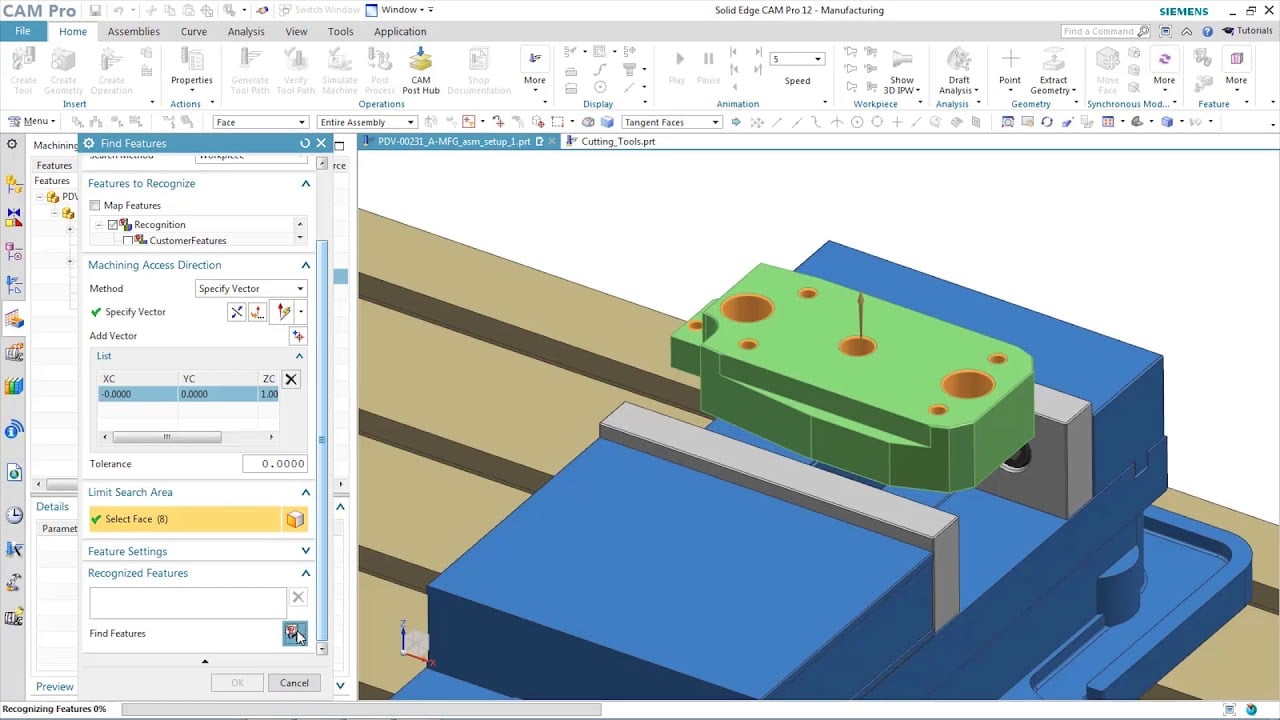
Designcenter Solid Edge Demo - CAM & Machining
Solid Edge manufacturing solutions provide fast and easy feature-based machining, allowing you to automatically determine the machining process for a wide range of features.
Designcenter Solid Edge Demo - Faster reverse engineering
Reduce time spent on reverse engineering with lightning-fast performance enhancements including deviation analysis.
Designcenter Solid Edge Demo - Technical Publications
Open, save and revise data from Teamcenter, Siemens’ powerful PLM solution, with tight integration to ensure your working with the right data, every time. Go from engineering to documentation quickly and seamlessly working directly with Solid Edge 3D models; leveraging the digital twin ensures al...
Designcenter Solid Edge Demo - FLOEFD
Better integration between flow simulation and structural simulation help create a more accurate digital twin. Add fluid pressure and temperatures results from Simcenter FLOEFD for Solid Edge for analysis in Solid Edge Simulation. Digitally validating and optimizing parts, assemblies and complete...
Play Designcenter Solid Edge Video
Product Avatar Image

Have you used Designcenter Solid Edge before?

Answer a few questions to help the Designcenter Solid Edge community

Designcenter Solid Edge Reviews (555)

View 1 Video Reviews
Reviews

Designcenter Solid Edge Reviews (555)

View 1 Video Reviews
4.3
555 reviews

Pros & Cons

Generated from real user reviews
View All Pros and Cons
Search reviews
Filter Reviews
Clear Results
G2 reviews are authentic and verified.
BC
Semi Skilled trainee Engineer
Small-Business (50 or fewer emp.)
"Intuitive 3D Modeling and Efficient Workflow for Engineers"
What do you like best about Designcenter Solid Edge?

As a graduate mechanical engineer, what I appreciate most about Designcenter Solid Edge is its intuitive 3D modeling environment and the efficiency it brings to the design workflow. The software enables me to create and modify parts and assemblies quickly, which is crucial during the iterative process of engineering design.

I especially value the parametric and synchronous modeling capabilities, as they allow for rapid design changes while preserving dimensional accuracy. This adaptability proves invaluable when I need to accommodate design updates or optimize specific components.

Furthermore, the integrated drafting and assembly tools simplify the process of generating clear, manufacturing-ready drawings directly from 3D models. In summary, Solid Edge enhances practical engineering design by shortening development time and letting me concentrate more on functionality, performance, and manufacturability. Review collected by and hosted on G2.com.

What do you dislike about Designcenter Solid Edge?

I dislike the learning curve associated with some of its advanced features. While the core modeling tools are intuitive, certain functions such as complex assemblies and advanced simulation tools can take time to fully understand and use efficiently.

Additionally, the software can feel resource-intensive when working with larger assemblies, which may affect performance on lower-specification computers. Some workflows also require multiple steps to accomplish tasks that feel more streamlined in other CAD platforms. Review collected by and hosted on G2.com.

PB
Mechatronics Engineer
Enterprise (> 1000 emp.)
"Efficient, Feature-Rich CAD Software That Grows With Your Needs"
What do you like best about Designcenter Solid Edge?

What I like most is how well Solid Edge balances power and usability. The interface is clean and easy to navigate, even with its wide range of features. The synchronous modeling is especially impressive—it lets me make real-time changes without worrying about breaking the design structure. It’s a huge time-saver and makes the whole process feel more fluid. Review collected by and hosted on G2.com.

What do you dislike about Designcenter Solid Edge?

While Solid Edge is powerful, it can be overwhelming for new users. Some features are buried under layers of menus, and the learning curve is steep if you're not familiar with CAD tools. The tutorials and documentation could be more beginner-friendly to help ease the transition. Review collected by and hosted on G2.com.

Parth Lavjibhai B.
PB
Automation Engineer
Mid-Market (51-1000 emp.)
Business partner of the seller or seller's competitor, not included in G2 scores.
"Reliable and Efficient CAD Solution"
What do you like best about Designcenter Solid Edge?

The most impressive aspect of Solid Edge is its intuitive interface combined with robust design capabilities. The synchronous technology makes it easy to modify models quickly without going back to sketches, which saves time during the design process. I also appreciate the wide range of simulation tools that allow me to test functionality before moving to production. Its integration with other Siemens products and compatibility with different file formats further improve efficiency in collaborative projects. Overall, Solid Edge balances advanced functionality with ease of use, making it suitable for both beginners and experienced professionals. Review collected by and hosted on G2.com.

What do you dislike about Designcenter Solid Edge?

While Solid Edge offers many strong features, it can feel resource-intensive on lower-end systems, sometimes slowing down performance with larger assemblies. The learning curve for mastering advanced tools, especially simulation and electrical design, can be steep for new users without prior CAD experience. In addition, customer support response times could be more consistent, particularly when dealing with complex licensing or integration issues. Occasional updates also require adjustment, as some features change in ways that temporarily disrupt established workflows. These challenges don’t outweigh the benefits but highlight areas for improvement. Review collected by and hosted on G2.com.

"Effortless Design Reuse, Boosts Consistency"
What do you like best about Designcenter Solid Edge?

I like how Designcenter Solid Edge turns reuse into a normal part of the workflow, making it easy to grab the right part quickly without breaking my flow. It offers fast 'find and drop' reuse, allowing for preview before committing, which enhances consistency across projects and maintains momentum under time pressure. Additionally, it makes 'company standards' easier to follow, is excellent for repeat subassemblies—not just single parts—and it results in less file opening and context switching. I also find that it supports clean handoffs and quietly reduces errors. Review collected by and hosted on G2.com.

What do you dislike about Designcenter Solid Edge?

A few things that commonly don't feel as smooth with Designcenter Solid Edge, especially once your libraries get big: Search and filtering can feel limited, it's only as good as the library behind it, version control and revisions can still be tricky, performance can dip with network libraries, UI can feel a bit utilitarian. Review collected by and hosted on G2.com.

Mason M.
MM
Director of Operations &Technology
Small-Business (50 or fewer emp.)
"The Solid Edge startup program is like nothing else"
What do you like best about Designcenter Solid Edge?

The best thing about the Solid Edge is hands down the tools offered within the CAD software itself. I've used and am familiar with the other CAD software such as Solidworks and Onshape, while there are surface modeling tools that allow you to achieve similar effects to Synchronous they are hardly in the same realm or usability and ease of use. Some tasks take mer seconds withing Solid Edge that would easily take 30 minutes in Solidworks. Solid Edge is miles ahead of them. Review collected by and hosted on G2.com.

What do you dislike about Designcenter Solid Edge?

The hardest thing about using Solid Edge is finding free high-quality information on education and training. I've found that many of the other software out there has tons of free or cheap high quality educational videos that are easy to access and intuitive. This has not been the case for Solid Edge. Which is a shame if you'd like to take advantage of their advanced tools. Review collected by and hosted on G2.com.

Mithil B.
MB
Manufacturing engineer
Small-Business (50 or fewer emp.)
"Streamlines Design Workflow and Boosts Efficiency"
What do you like best about Designcenter Solid Edge?

What I like most about Designcenter in Solid Edge is how useful it is once you get used to it. Being able to reuse standard parts instead of creating everything from scratch saves a lot of time, especially on repeat projects. It also helps keep designs consistent, which is important when working with the same parts over and over. When everything is set up properly, it makes the design process smoother and more reliable. Review collected by and hosted on G2.com.

What do you dislike about Designcenter Solid Edge?

What I don’t like about Designcenter is that it’s not very user-friendly at the beginning. It takes time to understand where everything is, and searching for parts isn’t always straightforward. Sometimes it feels slow when the library gets bigger, which can be frustrating during tight deadlines. The interface also feels a bit old compared to other tools, and it could really benefit from better organization and faster performance. Review collected by and hosted on G2.com.

Nikita Smriti L.
NL
Master Thesis
Small-Business (50 or fewer emp.)
"Efficient CAD Management, Needs Speed Improvement"
What do you like best about Designcenter Solid Edge?

I use Designcenter Solid Edge to manage different CAD files. It helps me quickly browse parts, assemblies, and drawings without needing to open each file individually, solving the challenge of keeping complex projects organized. I like how I can preview and drag-and-drop parts into my project swiftly, making navigation of complex assemblies faster. It links smoothly with the rest of the Solid Edge environment, and the search and review features work reliably, making the files easier to track. The setup was straightforward for me because Designcenter is already integrated with Solid Edge. Review collected by and hosted on G2.com.

What do you dislike about Designcenter Solid Edge?

The overall speed and responsiveness when working with larger project files could be improved. It would help if Designcenter used more efficient caching so that previously accessed folders load instantly instead of refreshing every time. It can also have better memory management. Review collected by and hosted on G2.com.

Verified User in Airlines/Aviation
UA
Small-Business (50 or fewer emp.)
"Reliable CAD software that streamlines design and boosts productivity"
What do you like best about Designcenter Solid Edge?

Designcenter Solid Edge provides a very intuitive and efficient environment for creating both simple and highly complex 3D models. The interface feels well-organized, and tools are easy to locate, which helps speed up the design process. I especially appreciate how smoothly it handles assemblies and how stable the software is, even with larger projects. The simulation and analysis tools are also valuable because they allow you to validate designs early, reducing errors and design iterations. Overall, it offers a strong balance of power, reliability, and usability. Review collected by and hosted on G2.com.

What do you dislike about Designcenter Solid Edge?

The main downside of Designcenter Solid Edge is that certain advanced features can feel slightly hidden or require a steeper learning curve, especially for new users transitioning from other CAD platforms. Some workflows could be more streamlined, and occasional compatibility issues with files from other CAD programs can disrupt collaboration. Additionally, system performance may slow down with extremely large assemblies unless the hardware is very strong. While these aren’t deal-breakers, they are areas that could benefit from refinement. Review collected by and hosted on G2.com.

Parth  B.
PB
Automation Engineer
Mid-Market (51-1000 emp.)
"Powerful and Reliable CAD Tool with Excellent Design Capabilities"
What do you like best about Designcenter Solid Edge?

Solid Edge offers an impressive set of design and engineering tools that make complex 3D modeling and drafting much easier. I particularly value its synchronous technology, which allows me to edit models quickly without being tied to a strict history-based workflow. The software is also highly versatile, supporting assemblies, sheet metal, and simulation, which makes it a strong all-in-one solution for mechanical design. Its user interface is clean, modern, and well-structured, so even beginners can gradually become comfortable. Integration with other Siemens solutions and compatibility with multiple file formats further adds to its convenience in collaborative projects. Overall, it helps accelerate the design process while ensuring accuracy and efficiency. Review collected by and hosted on G2.com.

What do you dislike about Designcenter Solid Edge?

While Solid Edge is feature-rich, it can feel overwhelming at first due to the sheer number of tools and options. The learning curve is steeper compared to some lighter CAD applications, which may require additional training for new users. At times, performance can slow down when working with extremely large assemblies or highly detailed models, which affects productivity. Licensing costs may also be a concern for smaller organizations or individual users, as it may not be as budget-friendly as other alternatives. Customer support is generally good, but response times could be improved in certain regions. These drawbacks do not overshadow its strengths, but they are worth considering. Review collected by and hosted on G2.com.

Sidra M.
SM
Senior Consultant - Audit & Assurance
Enterprise (> 1000 emp.)
"Efficient and versatile 3D design tool for product development"
What do you like best about Designcenter Solid Edge?

Solid Edge stands out for its intuitive interface and powerful synchronous technology, which makes editing and updating models straightforward, even in complex assemblies. The software offers a strong set of features for 3D modeling, simulation, and drafting, which help speed up design cycles. I particularly value the integration with engineering analysis tools, as it allows me to validate designs early in the process and avoid costly errors. It is also reliable when working with large assemblies and provides excellent compatibility with different file formats, which is very helpful for collaboration across teams. Review collected by and hosted on G2.com.

What do you dislike about Designcenter Solid Edge?

Although Solid Edge is feature-rich, it can feel resource-heavy, requiring a powerful system for smooth performance, especially with very large models. The learning curve for advanced tools is a bit steep, and new users may need time and training to use the full range of functions effectively. At times, updates or patches can introduce small usability issues that take time to resolve. Additionally, while technical support is generally good, response times can be slow during peak demand periods. More built-in tutorials and simplified onboarding would make it even more user-friendly. Review collected by and hosted on G2.com.

Pricing Options

Pricing provided by Designcenter Solid Edge.

Solid Edge Design and Drafting XaaS

Starting at $90.47
Per Month

Solid Edge X Standard

Starting at $261.00
Per Month

Solid Edge X Advanced

Starting at $312.00
Per Month

Solid Edge X Premium

Starting at $413.00
Per Month

G2 Deals

Exclusive savings on Designcenter Solid Edge through G2 Deals

Get 25% off any monthly or annual subscription of Solid Edge and accelerate your product development process using best-in-class 3D design tools.

How to claim this offer

Claim the offer via G2 and use code G2START25 during checkout.

Designcenter Solid Edge Comparisons
Product Avatar Image
SOLIDWORKS
Compare Now
Product Avatar Image
Inventor
Compare Now
Product Avatar Image
Designcenter NX
Compare Now
Designcenter Solid Edge Features
CAD-CAM Import
Drawing
Modeling
Visualize
File Import
Push/Pull
Views
Annotate
Documentation
Data Extract
Product Avatar Image
Designcenter Solid Edge