Best Web Content Management Software for Medium-Sized Businesses - Page 2

How Many Web Content Management Software Products Does G2 Track?

Total Products under this Category: 422

Category Stats (Oct 2026)

  • Average Rating: 4.28/5 The average rating of products in this category, based on all submitted ratings
  • Top Trending Product: CMS Pro (+3.53%) - Among all products in this category, CMS Pro recorded the largest rating increase compared to last month

Last updated: October 01, 2026

How Does G2 Rank Web Content Management Software Products?

Why You Can Trust G2's Software Rankings:

  • 30 Analysts and Data Experts
  • 31,200+ Authentic Reviews
  • 422+ Products
  • Unbiased Rankings

G2's software rankings are built on verified user reviews, rigorous moderation, and a consistent research methodology maintained by a team of analysts and data experts. Each product is measured using the same transparent criteria, with no paid placement or vendor influence. While reviews reflect real user experiences, which can be subjective, they offer valuable insight into how software performs in the hands of professionals. Together, these inputs power the G2 Score, a standardized way to compare tools within every category.

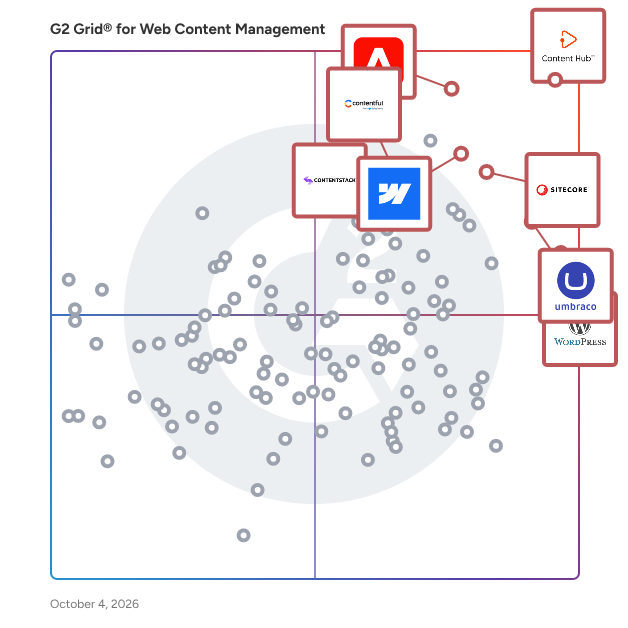
G2 Grid® for Web Content Management Software

G2 Grid® for Web Content Management Software plotting products by satisfaction and market presence

Highlighted products: HubSpot Content Hub, Sitecore Digital Experience Platform, Adobe Experience Manager, Umbraco, WordPress.org, Webflow, Contentstack, and Contentful.

Underlying data: [Grid® JSON](https://www.g2.com/categories/web-content-management/grids.json?focus%5B%5D=hubspot-content-hub&focus%5B%5D=sitecore-digital-experience-platform&focus%5B%5D=adobe-experience-manager&focus%5B%5D=umbraco&focus%5B%5D=wordpress-org&focus%5B%5D=webflow&focus%5B%5D=contentstack&focus%5B%5D=contentful&segment=mid-market)

Padlet

Dostoevsky said that beauty will save the world. Padlet offers beautiful boards and canvases for visual thinkers and learners. Use boards to collect, organize, and present anything. Use sandboxes for whiteboarding, lessons, and activities. Over 40 million people every month actively use Padlet around the world. Here are some of the ways they use it: -Collaborate on files with clients -Store instructional videos -Share marketing assets -Manage real-estate listings on a map -Create interactive lessons -Design collaborative worksheets -Make slideshows -Build meeting agendas -Solicit feedback -Brainstorm ideas -And more Dostoevsky would have loved Padlet.

Average Rating: 4.9/5.0

Total Reviews: 347

How Do G2 Users Rate Padlet?

  • Has the product been a good partner in doing business?: 9.5/10 (Category avg: 8.7/10)
  • Content Authoring: 9.1/10 (Category avg: 8.6/10)
  • Flexible Navigation Structures: 9.0/10 (Category avg: 8.3/10)
  • API: 8.1/10 (Category avg: 8.3/10)

Who Is the Company Behind Padlet?

  • Seller: Padlet
  • Year Founded: 2012
  • HQ Location: San Francisco, US
  • Twitter: @padlet
    73,244 Twitter followers
  • LinkedIn® Page: www.linkedin.com
    79 employees on LinkedIn®

Who Uses This Product?

  • Who Uses This: Teacher
  • Top Industries: Education Management, Primary/Secondary Education
  • Company Size: 49% Small, 43% Medium

What Do G2 Reviewers Say About Padlet?

AI-generated summary from verified user reviews

Pros
  • Users find Padlet incredibly easy to use, appreciating its intuitive design and supportive interface for all skill levels.
  • Users value Padlet for its excellent organization features, making it easy to save and access important resources.
  • Users love how easy Padlet is to use, enhancing collaboration and organization for classroom discussions and lesson planning.
  • Users find Padlet extremely intuitive, making it easy to organize resources and enhance their teaching experience.
  • Users find Padlet helpful for collaboration, resource sharing, and learning, making it an invaluable tool for all ages.
Cons
  • Users express frustration over access limitations, as the free account only permits 3 Padlets, hindering effective usage.
  • Users find the limited Padlet count in the free version challenging, especially for educators managing multiple classes.
  • Users express frustration with the lack of features in the free version of Padlet, limiting their usability in teaching.
  • Users find the limited features of Padlet's free account restrictive, impacting their ability to manage multiple classes effectively.
  • Users find Padlet expensive, with limited free options that restrict full feature access, especially for students.

What Are Recent G2 Reviews of Padlet?

What Are G2 Users Discussing About Padlet?

Experro

Experro is a one-of-a-kind agentic product discovery and personalization platform built to optimize eCommerce experiences. Powered by Generative AI, it’s redefining how brands deliver search, discovery, and content — hyper-personalized for every shopper and automatically optimized to drive key business KPIs. Trusted by leading B2C, B2B, and DTC brands, Experro creates intelligent, intent-driven journeys by analyzing real-time shopper behavior and surfacing high-performing products through advanced text and image search. Built to maximize AOV, profitability, and customer satisfaction, Experro empowers eCommerce teams with AI-driven tools and automation, eliminating busywork and accelerating growth.

Average Rating: 4.8/5.0

Total Reviews: 48

How Do G2 Users Rate Experro?

  • Has the product been a good partner in doing business?: 10.0/10 (Category avg: 8.7/10)
  • Content Authoring: 10.0/10 (Category avg: 8.6/10)
  • Flexible Navigation Structures: 10.0/10 (Category avg: 8.3/10)
  • API: 10.0/10 (Category avg: 8.3/10)

Who Is the Company Behind Experro?

  • Seller: RapidOps, Inc.
  • Year Founded: 2008
  • HQ Location: Charlotte, North Carolina
  • Twitter: @rapid_ops
    992 Twitter followers
  • LinkedIn® Page: www.linkedin.com
    272 employees on LinkedIn®

Who Uses This Product?

  • Top Industries: Information Technology and Services, Apparel & Fashion
  • Company Size: 60% Medium, 23% Small

What Do G2 Reviewers Say About Experro?

AI-generated summary from verified user reviews

Pros
  • Users praise the ease of use of Experro, appreciating its intuitive interface and streamlined workflow for compliance tasks.
  • Users praise Experro for its integrated compliance workspace, which enhances efficiency and streamlines team collaboration.
  • Users value the AI-powered search functionality of Experro, enhancing product discovery with speed and accuracy.
  • Users value the comprehensive analytics of Experro, enabling efficient compliance tracking and enhancing overall performance insights.
  • Users value the efficiency in data analysis and accurate product discovery that Experro delivers, enhancing the overall experience.
Cons
  • Users find the learning curve challenging due to the platform's complexity, requiring time to adapt effectively.
  • Users find a steep learning curve in Experro, requiring time to grasp advanced features and technical aspects.
  • Users find poor documentation frustrating, often wishing for more detailed guides and tutorials to enhance their experience.
  • Users find the high learning curve of Experro challenging, especially for new team members adjusting to its depth.
  • Users find the learning curve steep, especially when navigating complex features and advanced configurations in Experro.

What Are Recent G2 Reviews of Experro?

Brightspot

Brightspot is the flexible content management platform that transforms fragmented ecosystems into a scalable operation, accelerating your ability to publish easier, govern better and grow faster — without compromise. Founded in 2008 and headquartered in Reston, Virginia, Brightspot has spent more than 15 years helping organizations transform how they manage and deliver content. Today, the platform powers mission-critical digital experiences for some of the world’s most recognized brands, including AP News, CoStar, NBC Sports, Special Olympics, and Whole Foods. Built to support the needs of both non-technical users and developers alike, Brightspot removes the friction that slows content teams down. With support for headless, templated and hybrid architectures, the platform gives you the flexibility to scale your digital operations without the limitations of rigid infrastructure. From multisite and multilingual publishing to role-based workflows, modular content models and seamless integrations, Brightspot enables you to manage and govern even the most complex content ecosystems — all from one centralized hub. Brightspot’s AI-powered capabilities and workflow automation tools accelerate your publishing process, freeing teams to focus on what matters most: creating high-impact content. Intuitive authoring tools, pre-built templates, customizable workflows and built-in SEO and translation tools make it easier than ever to create. Beyond the product, Brightspot is known for its unmatched customer partnership. From onboarding to innovation, Brightspot works closely with your team to ensure your CMS evolves with your business. Whether you're growing your audience, adding new brands, expanding to global markets or integrating with the latest technologies, Brightspot is with you every step of the way. That’s why 97% of customers return year after year. With Brightspot, content becomes a competitive advantage — not a roadblock. Launch faster. Scale smarter. And lead fearlessly with a CMS that adapts to your business, not the other way around.

Average Rating: 4.4/5.0

Total Reviews: 92

How Do G2 Users Rate Brightspot?

  • Has the product been a good partner in doing business?: 9.0/10 (Category avg: 8.7/10)
  • Content Authoring: 8.5/10 (Category avg: 8.6/10)
  • Flexible Navigation Structures: 8.1/10 (Category avg: 8.3/10)
  • API: 7.8/10 (Category avg: 8.3/10)

Who Is the Company Behind Brightspot?

  • Seller: Brightspot
  • Company Website:
  • Year Founded: 2008
  • HQ Location: Reston, US
  • Twitter: @TeamBrightspot
    500 Twitter followers
  • LinkedIn® Page: www.linkedin.com
    188 employees on LinkedIn®

Who Uses This Product?

  • Top Industries: Online Media, Higher Education
  • Company Size: 56% Medium, 29% Small

What Do G2 Reviewers Say About Brightspot?

AI-generated summary from verified user reviews

Pros
  • Users applaud Brightspot's ease of use, enabling quick content management and seamless integration across multiple websites.
  • Users value the user-friendly and flexible content management of Brightspot, making content reuse and publishing efficient.
  • Users value the strong customization options of Brightspot, enabling tailored workflows and enhanced content management.
  • Users value the strong customizability of Brightspot, enabling tailored solutions for various workflows and processes.
  • Users commend the flexibility of Brightspot, enabling quick adaptations to evolving needs and streamlined workflows.
Cons
  • Users are frustrated by the missing features in Brightspot, which hinder integration and slow down innovation.
  • Users express frustration over feature limitations in Brightspot, impacting customization and overall efficiency in workflows.
  • Users report a significant learning curve with Brightspot due to complex customization and inadequate documentation.
  • Users find the limited customization options of Brightspot frustrating, impacting their design and workflow flexibility.
  • Users find Brightspot's limited functionality frustrating, facing challenges with customization, content sharing, and reporting tools.

What Are Recent G2 Reviews of Brightspot?

What Are G2 Users Discussing About Brightspot?

AI can help you find the answers. G2 helps you trust them.

Connect G2 to Claude or ChatGPT for answers grounded in G2's trusted reviews, comparisons, and pricing from real user insights.

How it works

Sanity

The Content Operating System—a fully customizable all-code backend for content-driven websites and apps. Power all your content operations from a single platform with a feature-rich content workspace, interactive visual editing, serverless functions, AI agent, and the database optimized for content. Learn more: https://www.sanity.io/ Try it out: https://www.sanity.io/get-started Join the community: https://snty.link/community Get work-ready: https://www.sanity.io/learn Questions? hello@sanity.io

Average Rating: 4.7/5.0

Total Reviews: 912

How Do G2 Users Rate Sanity?

  • Has the product been a good partner in doing business?: 9.2/10 (Category avg: 8.7/10)
  • Content Authoring: 9.1/10 (Category avg: 8.6/10)
  • Flexible Navigation Structures: 8.8/10 (Category avg: 8.3/10)
  • API: 8.9/10 (Category avg: 8.3/10)

Who Is the Company Behind Sanity?

  • Seller: Sanity.io
  • Company Website:
  • Year Founded: 2018
  • HQ Location: San Francisco, California
  • Twitter: @sanity_io
    15,030 Twitter followers
  • LinkedIn® Page: www.linkedin.com
    331 employees on LinkedIn®

Who Uses This Product?

  • Who Uses This: Software Engineer, Senior Software Engineer
  • Top Industries: Computer Software, Information Technology and Services
  • Company Size: 72% Small, 18% Medium

What Do G2 Reviewers Say About Sanity?

AI-generated summary from verified user reviews

Pros
  • Users love the flexibility of Sanity, enabling easy customization and smooth implementation for various structured data needs.
  • Users value the extensive customizability of Sanity, allowing for tailored and efficient content management experiences.
  • Users value the flexibility and power of Sanity's features, enhancing content creation and streamlining workflows effectively.
  • Users love the customization options in Sanity, enabling tailored solutions for diverse project requirements.
  • Users find Sanity to be incredibly easy to use and flexible, making setup and management a seamless experience.
Cons
  • Users find the steep learning curve of Sanity challenging, especially due to lacking beginner-friendly tutorials and documentation.
  • Users face a steep learning curve with Sanity, making the setup process lengthy and sometimes frustrating.

What Are Recent G2 Reviews of Sanity?

What Are G2 Users Discussing About Sanity?

Hygraph

Whatever you imagine – whether it’s a global news platform, an ecommerce experience, a learning app, a content hub, or something entirely unique – you can build it with Hygraph. Hygraph is the leading headless CMS for enterprises building content-rich websites, apps, and digital products. It gives teams the tools to create, manage, and deliver structured content anywhere – across web, mobile, or any other platform. With a powerful GraphQL API, flexible content modeling, and fine-grained permissions, both developers and content teams can move faster and work better together. Hygraph is built to handle complex content needs while staying easy to use, so your team can focus on delivering great digital experiences.

Average Rating: 4.4/5.0

Total Reviews: 729

How Do G2 Users Rate Hygraph?

  • Has the product been a good partner in doing business?: 9.0/10 (Category avg: 8.7/10)
  • Content Authoring: 8.7/10 (Category avg: 8.6/10)
  • Flexible Navigation Structures: 8.2/10 (Category avg: 8.3/10)
  • API: 8.6/10 (Category avg: 8.3/10)

Who Is the Company Behind Hygraph?

  • Seller: Hygraph
  • Company Website:
  • Year Founded: 2017
  • HQ Location: Berlin
  • Twitter: @hygraph
    5,094 Twitter followers
  • LinkedIn® Page: www.linkedin.com
    66 employees on LinkedIn®

Who Uses This Product?

  • Who Uses This: Software Engineer, Web Developer
  • Top Industries: Computer Software, Information Technology and Services
  • Company Size: 64% Small, 29% Medium

What Do G2 Reviewers Say About Hygraph?

AI-generated summary from verified user reviews

Pros
  • Users find the ease of use in Hygraph's intuitive UI and flexible content organization highly beneficial.
  • Users value the flexible and intuitive content management system of Hygraph, enhancing their overall experience.
  • Users praise the fast and flexible API integration of Hygraph, enhancing workflow and simplifying onboarding for teams.
  • Users value the flexible content management system of Hygraph, enhancing development and performance for web applications.
  • Users value the seamless integrations of Hygraph with GraphQL, enhancing flexibility and improving development workflows.
Cons
  • Users note a steep learning curve in Hygraph, especially for those unfamiliar with CMS platforms or technical details.
  • Users find Hygraph's learning difficulty challenging, especially for non-technical users navigating its complex features.
  • Users find difficult usability in Hygraph, especially non-technical teams needing extensive guidance and developer support.
  • Users find Hygraph to be expensive, particularly at higher tiers, which may burden smaller teams financially.
  • Users find pricing issues burdensome due to costly higher tiers and limitations in the free plan's asset file size.

What Are Recent G2 Reviews of Hygraph?

Kontent.ai

Kontent.ai is the world’s first Agentic CMS and the only platform that helps organizations intelligently operate content at scale. By embedding AI agents into content workflows, Kontent.ai empowers organizations to automate operations, enforce governance, and accelerate time to market, without adding headcount. Kontent.ai features two core AI capabilities. The AI Agent is activated through natural language prompts and can execute complex tasks such as launching large-scale campaigns, restructuring content in bulk, or supporting content migrations, reducing the need for developer involvement.  Expert Agents operate as always-on, fully customizable digital teammates. Once created by using a natural language prompt, they trigger automatically, eliminating manual steps and ensuring consistency across processes. They can support business specific use cases, from enforcing brand and compliance standards to content audits and localization. You can integrate them with your existing tech stack to extend automation beyond the CMS and coordinate actions across systems. Multiple agents can also be combined to work together, eliminating workflow steps in complex tasks and reducing operational complexity.  Kontent.ai Agentic CMS helps you: - Expand to new markets faster - Improve team productivity - Reduce compliance risk - Improve content performance With a demonstrated ROI of 320%, Kontent.ai customers, including WebMD Ignite, Elanco, Zurich Insurance, PPG, and Oxford University, see measurable improvements in content velocity, operational efficiency, and risk reduction. Kontent.ai is a Microsoft partner recognized by Gartner and Forrester. Learn more at kontent.ai. 

Average Rating: 4.3/5.0

Total Reviews: 191

How Do G2 Users Rate Kontent.ai?

  • Has the product been a good partner in doing business?: 9.0/10 (Category avg: 8.7/10)
  • Content Authoring: 9.0/10 (Category avg: 8.6/10)
  • Flexible Navigation Structures: 8.4/10 (Category avg: 8.3/10)
  • API: 9.0/10 (Category avg: 8.3/10)

Who Is the Company Behind Kontent.ai?

  • Seller: Kontent.ai
  • Company Website:
  • Year Founded: 2015
  • HQ Location: Brno
  • Twitter: @Kontent_ai
    3,887 Twitter followers
  • LinkedIn® Page: www.linkedin.com
    134 employees on LinkedIn®

Who Uses This Product?

  • Who Uses This: Developer
  • Top Industries: Computer Software, Information Technology and Services
  • Company Size: 42% Medium, 36% Small

What Do G2 Reviewers Say About Kontent.ai?

AI-generated summary from verified user reviews

Pros
  • Users find Kontent.ai to be user-friendly, making it simple to manage content and integrate with websites.
  • Users appreciate the user-friendly content management of Kontent.ai, enhancing organization and accessibility across platforms.
  • Users praise the helpful and responsive customer support of Kontent.ai, greatly enhancing their user experience.
  • Users appreciate the easy integrations of Kontent.ai, enhancing organization and accessibility across their platforms.
  • Users find Kontent.ai's intuitive interface enhances content creation and management, streamlining workflows effectively.
Cons
  • Users find the learning curve challenging, especially with layout updates and onboarding new stakeholders to the platform.
  • Users find the limited features of Kontent.ai restrict their customization options and lack essential tools for integration.
  • Users note the lack of essential features like e-commerce and comprehensive role profiles, hindering their overall experience.
  • Users find CMS limitations in Kontent.ai challenging, especially with missing out-of-the-box tools and complex navigation.
  • Users highlight a steep learning curve for new employees in navigating Kontent.ai, especially with its headless CMS approach.

What Are Recent G2 Reviews of Kontent.ai?

What Are G2 Users Discussing About Kontent.ai?

Elementor

THE #1 NO CODE DRAG & DROP WORDPRESS WEBSITE BUILDER POWERING 22M+ WEBSITES WORLDWIDE, NOW WITH AI. Elementor, the leading WordPress website creation platform, empowers you to build professional, pixel-perfect websites seamlessly with its no-code, drag-and-drop Atomic Editor. Supporting the full website lifecycle, Elementor enables you to confidently build, optimize, and manage your website with extended capabilities such as AI-powered creation, image optimization, transactional email delivery, accessibility tools, performance boosters, and more. Now in version 4 – the Atomic Editor! Introducing a new generation of performance-first atomic building blocks that allow you to control every atomic part with no limits or locked layouts. Define your global design systems and reusable components once, and they apply everywhere instantly – turning hours or even days of work into single clicks. Unlock all features with Elementor One. Need fast and secure cloud hosting for your Elementor site? Try out Elementor Host Powered by Google Cloud & Cloudflare. 4.9/5 TrustPilot score. 🌟 Create Professional Stunning Websites Intuitive Drag & Drop Builder: Build any website with our no-code, drag-and-drop Editor. Achieve design precision with full control over layout and style. Pixel-Perfect Design Tools: Upload SVGs, apply masks, gradients, box shadows, headline effects, shape dividers, and use built-in CSS controls for advanced customization. Template Library: Apply complete website kits for instant setups, or choose from a vast library of single pages, blocks, and pop-up templates. Advanced Widgets: Access over 40 FREE widgets, including heading, image, text editor, video, button, gallery, carousels, and more. AI Capabilities: Revolutionize your design and content creation process with native AI integration. Instantly create sections, text, code, and images. 🗝️ Key features: Design System: Use Variables and Classes for consistent colors, typography, and design elements, ensuring a cohesive, professional look that updates everywhere globally. Responsive Design: Optimize your design for every device with custom breakpoints, ensuring a seamless desktop, tablet, and mobile experience. Mask Shapes: Turning any element, like an image or video, into whatever shape you desire to create standout designs. CSS Transform: Use CSS Transform to rotate, scale, and skew elements, adding dynamic styling to your site. Entrance Animations: Add entrance animations to elements to create engaging and interactive user experiences. Revision History: Elementor’s Revision History feature enables users to track and revert to previous versions of their designs, providing peace of mind and flexibility during the creative process. Developer-Friendly: Equipped with extensive documentation, API, developer tools, and custom code areas, Elementor offers a conducive environment for developers to extend its capabilities and create custom solutions. Floating Buttons: Enhance user interaction with customizable, floating action buttons that stay in view as users scroll. Components [Pro]: Reuse the same building blocks across pages and sites, and update them everywhere they appear. Including controlled content editing, allowing collaborators and clients to update only exposed content properties without breaking layout or styling. Theme Builder [Pro]: Design every part of your site—headers, footers, posts, and archives—for complete control over appearance. Popup Builder [Pro]: Create eye-catching popups with Elementor’s Popup Builder, equipped with advanced targeting and triggering options to optimize user engagement and conversions. Forms [Pro]: Design and integrate custom forms, utilizing advanced features and integrations to capture and manage submissions effectively. WooCommerce Builder [Pro]: Integrate Elementor with WooCommerce to design custom product pages, shop layouts, archives, carts, checkout pages, my account, and more, enhancing your store’s visual appeal and functionality. Dynamic Content [Pro]: Leverage dynamic content capabilities to create personalized and interactive web experiences by connecting your designs to various data sources. Notes [Pro]: Enhance team collaboration by using Elementor’s Notes feature to leave feedback and comments directly on the design interface. Custom Code [Pro]: Insert custom code to extend the functionality of your site, offering flexibility for advanced customizations. Custom CSS [Pro]: Apply Custom CSS to fine-tune the styling of elements, ensuring precise control over the design aspects. Motion Effects [Pro]: Add advanced motion effects to elements for a more dynamic and engaging user experience. Custom Fonts & Icons [Pro]: Upload and use custom fonts and icons to match your brand’s identity. 😍 Elementor FREE widgets Unlock the potential of Elementor with our comprehensive suite of free widgets and tools, designed to empower your website creation process and elevate your design capabilities: Heading. Add eye-catching headlines. Image. Control the size, opacity and more. Text Editor. Just like the WordPress text editor. Video. Add YouTube, Vimeo, VideoPress, Dailymotion or self-hosted videos. Button. Create interactive buttons. Link in Bio. Build link in bio components to promote your business / services. Image Box. A box with image, headline and text. Testimonials. Customer testimonials. Icon. Place one or more of 600+ icons available. Icon Box. An icon, headline, and text with one widget. Social Icons. Link to your social pages with the Facebook/X (formerly Twitter) icons. Image Gallery. Display your images in a grid. Image Carousel. Create rotating carousels or sliders for chosen images. Icon List. Use any icon to create a bullet list. Counter. Show numbers in an escalating manner. Progress Bar. Include an escalating progress bar. Nested Tabs. Display content in vertical or horizontal tabs. Nested Accordion. Display any type of content in collapsible sections. Rating. Display how many stars (or another icon) other visitors gave. Alert. Include a colored alert box to draw visitor’s attention. HTML. Insert code into the page. Shortcode. Insert shortcodes from any plugin into the page. Menu Anchor. Link any menu to this anchor. Read More. Set the Read More cut-off for the excerpt in archive pages. Sidebar. Add sidebars onto the page. Google Maps. Embed maps into the page. SoundCloud. Add SoundCloud audio bits. Divider. Separate content with a designed divider. Spacer. Add space between elements. Text Path. Attach your text to a path. And counting… 🚀 Enhance Your Website Website performance impacts your visitor’s experience and search result ranking. Elementor, in partnership with Google Chrome, continuously enhances performance without compromising design. Key features include: - Reduced DOM Output: Streamlined HTML structure for faster rendering. Improved Media File Loading: Optimized loading of images, videos, and other media assets. - Reduced CSS and JS Files: Minimized stylesheets and scripts individually loaded only on demand for quicker loading times. - Lazy Loading: Deferred loading of non-critical resources to improve initial page load speed. - Faster Font Loading: Efficient delivery of web fonts to enhance text rendering speed. - Optimized Front-End Asset Loading: Efficient loading of assets like JavaScript and CSS to minimize render-blocking. - Element Caching: Cache frequently accessed design elements to reduce server response time and enhance overall performance. 🔥 Elementor Editor Pro Features Create unparalleled websites while saving time, money and resources with Elementor Editor Pro’s full website builder. Get access to 100+ professional widgets, features, and tools. Editor Pro Design Widgets: - Posts: Display your blog posts with customizable layouts and styles. - Share Buttons: Allow visitors to easily share your content on various social media platforms. - Portfolio: Showcase your work or projects with stunning portfolio layouts. - Slides: Create dynamic slideshows with custom animations and transitions. - Form: Design and customize advanced forms for user interaction and data collection. - Login: Add a login form or user registration module to your website. - Nav Menu: Customize and style your website’s navigation menu for better user experience. - Animated Headline: Create attention-grabbing headlines with animated effects. - Price Table: Display pricing plans or packages in a structured and visually appealing format. - Price List: Showcase a list of prices or services with customizable styling options. - Gallery: Create beautiful image galleries with various layout options and lightbox support. - Flip Box: Add interactive flip animations to highlight content or features. - Call to Action: Encourage user interaction and conversions with compelling call-to-action sections. - Media Carousel: Showcase a carousel of media files such as images or videos. - Testimonial Carousel: Display client testimonials in a carousel format for social proof. - Nested Carousel: Create nested carousels for more complex content organization. - Loop Carousel: Display content in a looped carousel for continuous viewing. - Table Of Content: Generate a table of contents for longer articles or guides to improve navigation. - Countdown: Add countdown timers to create urgency for promotions or events. - Facebook Page: Embed your Facebook page feed or content onto your website. - Blockquote: Highlight quotes or testimonials with stylish formatting options. - Template: Save and reuse design templates for consistent branding and layout. - Reviews: Showcase customer reviews and ratings to build trust and credibility. - Facebook Button: Add buttons to promote interactions with your Facebook page or content. - Facebook Embed: Embed Facebook posts or content onto your website. - Facebook Comments: Enable Facebook comments on your website’s pages or posts. - PayPal Button: Integrate PayPal buttons for easy online payments. - Stripe Button: Integrate Stripe payment buttons to facilitate secure online transactions. - Lottie Widget: Add Lottie animations to enhance visual appeal and engagement. - Code Highlight: Display code snippets with syntax highlighting for better readability. - Video Playlist: Create and customize playlists for video content on your website. - Mega Menu: Customize advanced menus for better navigation and displaying complex content. - Off Canvas: Create off-canvas areas that slide in to show extra info or menus without cluttering the main layout. Editor Pro Theme Widgets: Build and customize all the key parts of your website including headers, footers, 404 page, global archives, and more… - Post Title: Customize the title of individual blog posts or pages. - Post Excerpt: Display a brief summary or teaser of your blog posts. - Post Content: Customize the main content area of your blog posts or pages. - Featured Image: Set and customize featured images for blog posts or pages. - Author Box: Display author information and bios on blog posts. - Post Comments: Customize the appearance and functionality of comments sections on your website. - Post Navigation: Add navigation links to adjacent posts for easy browsing. - Post Info: Display additional information about blog posts, such as author and date. - Site Logo: Upload and customize your website’s logo for branding purposes. - Site Title: Customize the title of your website. - Page Title: Customize the title of individual pages. - Search Bar: Add a search bar to allow users to search your website’s content. - Breadcrumbs: Display hierarchical navigation paths for better user navigation. - Sitemap: Generate a sitemap for better search engine indexing and user navigation. - Loop Grid: Design and customize grid layouts for blog post archives or product listings. Editor Pro WooCommerce Widgets: Design and customize a complete online shopping experience across your entire website. - Product: Display individual products with customizable layouts and styles. - Breadcrumbs: Display hierarchical navigation paths for better user navigation within your store. - Product Title: Customize the title of individual products. - Product Images: Set and customize images for product listings. - Product Price: Display the price of individual products. - Add To Cart: Add customizable add to cart buttons for easy purchasing. - Product Rating: Display ratings and reviews for products. - Product Stock: Display stock availability for products. - Product Meta: Display additional information about products, such as SKU and categories. - Product Content: Customize the main content area of product descriptions. - Short Description: Display brief summaries or teasers of products. - Product Data Tabs: Organize product information into tabbed sections for better organization. - Additional Information: Display additional details about products, such as dimensions and weight. - Product Related: Showcase related products to encourage additional purchases. - Upsells: Promote upsell products to increase average order value. - Products: Display a grid or list of products with customizable settings. - Custom Add To Cart: Customize the add to cart button for specific products. - WooCommerce Pages: Design and customize WooCommerce-specific pages, such as the cart and checkout pages. - Product Categories: Display product categories for easy navigation within your store. - Menu Cart: Display a cart icon in your navigation menu for easy access to the shopping cart. - Cart: Customize the appearance and functionality of the shopping cart page. - Checkout: Customize the appearance and functionality of the checkout page. - My Account: Customize the appearance and functionality of the customer account area. - Purchase Summary: Display a summary of purchases during the checkout process. - WooCommerce Notices: Customize the appearance and functionality of WooCommerce notices, such as order confirmation messages. Build professional websites with Elementor Editor Pro! 🔒 SECURITY AND COMPLIANCE Elementor places a paramount focus on security, evident through our acquisition of industry certifications such as ISO/IEC 27001, ISO/IEC 27017, ISO/IEC 27018, ISO/IEC 27701, and SOC 2 Type II. These certifications underscore our commitment to implementing robust security measures, and highlight our dedication to adhering to recognized industry standards. We encourage ethical security research through our Bug Bounty program. We collaborate with leading bug bounty services to provide opportunities for researchers to report vulnerabilities in our services. Our bounty programs include a triage team available 24/7/365. For more information: Trust Center. ♿ Accessibility Best Practices Elementor offers accessibility tools and enhancements to help you provide a better experience for all users. Including HTML 5 semantic, full keyboard navigation menu, ongoing improvement of features, widget, and more. 🌐 Translated to 63+ languages, includes RTL support Elementor supports multiple languages, typographies, and RTL, with editor translations in over 63 languages. It’s also compatible with WPML, Polylang, TranslatePress, Weglot, and more. To contribute, add a new language via translate.wordpress.org. See our guide on how to translate and localize the plugin.

Average Rating: 4.4/5.0

Total Reviews: 414

How Do G2 Users Rate Elementor?

  • Has the product been a good partner in doing business?: 8.3/10 (Category avg: 8.7/10)
  • Content Authoring: 9.3/10 (Category avg: 8.6/10)
  • Flexible Navigation Structures: 9.4/10 (Category avg: 8.3/10)
  • API: 9.3/10 (Category avg: 8.3/10)

Who Is the Company Behind Elementor?

  • Seller: Elementor
  • Company Website:
  • Year Founded: 2016
  • HQ Location: Ramat Gan, Tel Aviv District, Israel
  • Twitter: @elemntor
    29,101 Twitter followers
  • LinkedIn® Page: www.linkedin.com
    467 employees on LinkedIn®

Who Uses This Product?

  • Who Uses This: Owner, Web Developer
  • Top Industries: Marketing and Advertising, Information Technology and Services
  • Company Size: 86% Small, 13% Medium

What Do G2 Reviewers Say About Elementor?

AI-generated summary from verified user reviews

Pros
  • Users love the ease of use of Elementor, appreciating its intuitive drag-and-drop interface and straightforward setup.
  • Users love Elementor's intuitive drag-and-drop interface, making website design fast and effortless for all skill levels.
  • Users love the intuitive drag-and-drop functionality of Elementor, enabling fast and easy website creation without coding.
  • Users love the extensive customizability of Elementor, allowing for easy and professional website creation without hassle.
  • Users love the powerful customization options of Elementor, enabling easy, professional design without needing expert skills.
Cons
  • Users often face plugin issues that lead to compatibility troubles, affecting overall performance and user experience.
  • Users notice that Elementor has a slow loading speed, impacting their overall usage experience negatively.
  • Users find Elementor's pricing expensive, especially after recent tier updates, limiting functionality and customization options.
  • Users find Elementor has limited features, requiring additional purchases for customization and creating frustration with its basic functions.
  • Users express frustration with Elementor's poor customer support, finding the team unhelpful and slow to resolve issues.

What Are Recent G2 Reviews of Elementor?

What Are G2 Users Discussing About Elementor?
Progress Sitefinity

Progress Sitefinity is a cloud-first content management system (CMS) and digital experience platform (DXP) used to build, manage and personalize websites, portals and other digital properties. It is adopted by mid-market and enterprise organisations that operate multi-site, multilingual or regulated digital estates and need to balance marketing autonomy with IT governance and developer flexibility. Primary use cases include corporate websites, member and customer portals, authenticated experiences, integration-heavy workflows and consolidation of fragmented CMS deployments. Sitefinity supports marketing, development and IT teams through a shared platform model with role-appropriate tools and permissions. Key capabilities include: - Multisite, multilingual and multi-brand management with governance controls and workflows - Native customer data platform (Sitefinity Insight) for segmentation, analytics and personalization - 1,000+ prebuilt connectors and open APIs, Sitefinity Cloud platform integrates with your MarTech stack, CRM and enterprise systems in hours—not weeks - Extensibility using .NET and ASP.NET Core for custom development and composable architectures Sitefinity also incorporates generative and retrieval-augmented capabilities through Progress® Agentic RAG, enabling dynamic assembly of experiences from approved content to reduce manual production work while maintaining accuracy, compliance and brand standards. Additional operational benefits and deployment considerations: - Standardization and consolidation of CMS estates across business units or regions - Support for marketing, development and IT workflows without requiring a headless-only approach - Structured content for regulated or high-volume publishing environments - Deployment on-premises or as a managed cloud service on Microsoft Azure, reducing maintenance and providing security, scaling and compliance

Average Rating: 4.0/5.0

Total Reviews: 494

How Do G2 Users Rate Progress Sitefinity?

  • Has the product been a good partner in doing business?: 8.0/10 (Category avg: 8.7/10)
  • Content Authoring: 8.5/10 (Category avg: 8.6/10)
  • Flexible Navigation Structures: 7.5/10 (Category avg: 8.3/10)
  • API: 7.5/10 (Category avg: 8.3/10)

Who Is the Company Behind Progress Sitefinity?

  • Seller: Progress Software
  • Company Website:
  • Year Founded: 1981
  • HQ Location: Burlington, MA.
  • Twitter: @ProgressSW
    48,773 Twitter followers
  • LinkedIn® Page: www.linkedin.com
    4,242 employees on LinkedIn®

Who Uses This Product?

  • Who Uses This: Web Developer, Marketing Manager
  • Top Industries: Information Technology and Services, Non-Profit Organization Management
  • Company Size: 47% Medium, 29% Small

What Do G2 Reviewers Say About Progress Sitefinity?

AI-generated summary from verified user reviews

Pros
  • Users value the ease of creating custom content with Sitefinity, benefiting from its user-friendly interface and powerful tools.
  • Users appreciate the ease of use of Progress Sitefinity, which streamlines transitions and simplifies content management.
  • Users appreciate the customizability of Progress Sitefinity, enabling effortless creation of tailored content and modules.
  • Users appreciate the user-friendly interface of Sitefinity, enabling seamless collaboration for both developers and content editors.
  • Users value the excellent customer service and technical support from Sitefinity, enhancing their overall experience and satisfaction.
Cons
  • Users highlight the expensive licensing and setup costs of Sitefinity, which may deter smaller organizations.
  • Users highlight the high pricing issues of Sitefinity, making it less accessible for teams with limited budgets.
  • Users find the limited features of Progress Sitefinity frustrating, hindering customization and effective content management.
  • Users find content management cumbersome, struggling with limited features and reliance on third-party tools for functionality.
  • Users struggle with data migration issues in Progress Sitefinity, complicating tasks that were easier in previous systems.

What Are Recent G2 Reviews of Progress Sitefinity?

What Are G2 Users Discussing About Progress Sitefinity?

Optimizely Content Management System

Optimizely's Content Management System (CMS) is purpose-built for marketers, and fully composable for developers. It’s the only CMS that supports the end-to-end content lifecycle, making it easy to deliver on-brand, high-impact digital experiences that 'wow' audiences. User-friendly tools let marketers build channel-specific experiences in a few clicks (no coding needed), creating, previewing and publishing directly from the Visual Builder while Optimizely's modern GraphQL service enables content delivery from anywhere, to anywhere, so you can meet customers where they are. Store and organize brand-approved content for easy reuse with Optimizely's fully-integrated DAM, and apply data-driven personalization with AI-guided insights to deliver consistent, on-brand content that's optimized for individuals, in real-time.

Average Rating: 4.0/5.0

Total Reviews: 187

How Do G2 Users Rate Optimizely Content Management System?

  • Has the product been a good partner in doing business?: 8.1/10 (Category avg: 8.7/10)
  • Content Authoring: 8.3/10 (Category avg: 8.6/10)
  • Flexible Navigation Structures: 7.8/10 (Category avg: 8.3/10)
  • API: 7.7/10 (Category avg: 8.3/10)

Who Is the Company Behind Optimizely Content Management System?

  • Seller: Optimizely
  • Company Website:
  • Year Founded: 1994
  • HQ Location: New York
  • Twitter: @Optimizely
    28,791 Twitter followers
  • LinkedIn® Page: www.linkedin.com
    1,689 employees on LinkedIn®

Who Uses This Product?

  • Top Industries: Information Technology and Services, Computer Software
  • Company Size: 49% Medium, 33% Large

What Do G2 Reviewers Say About Optimizely Content Management System?

AI-generated summary from verified user reviews

Pros
  • Users appreciate the ease of use and powerful features of Optimizely, making efficient content management a breeze.
  • Users value the flexibility of Optimizely CMS, allowing endless customization and seamless integration with third-party apps.
  • Users value the stability and ease of use in Optimizely, making content management accessible for all skill levels.
  • Users find the ease of use in Optimizely Content Management System makes it intuitive and user-friendly for all.
  • Users value the extensive customizability of Optimizely CMS, enabling tailored solutions and seamless integration for diverse needs.
Cons
  • Users find the steep learning curve challenging, especially those without development experience or smaller teams.
  • Users face a steep learning curve, making it challenging for new users and smaller teams to adapt effectively.
  • Users find the CMS expensive, making it challenging for smaller organizations to afford implementation and customization.
  • Users find the complexity of Optimizely CMS challenging due to steep learning curves and overwhelming admin interfaces.
  • Users note a steep learning curve and challenging developer support that can hinder efficient content management.

What Are Recent G2 Reviews of Optimizely Content Management System?

What Are G2 Users Discussing About Optimizely Content Management System?

Agility CMS

Agility CMS is a headless, API-first content management system designed to empower enterprise teams in managing websites, applications, and digital channels at scale. This innovative solution allows editorial teams to take control of publishing directly, eliminating the dependency on developers for content updates. Meanwhile, engineering teams benefit from a clean API that seamlessly connects to any frontend, tool, or channel within their technology stack. With over 20 years of migration experience and a robust architecture, Agility CMS is built to last, ensuring organizations can rely on it well beyond their next contract renewal. Targeted primarily at marketing professionals and developers, Agility CMS streamlines the content creation and updating process. Marketing teams can leverage a user-friendly visual interface to build pages and preview changes in real time, enabling them to maintain control over their content without requiring coding skills. This hands-on approach allows for quick responses to evolving market demands. For development teams, Agility CMS offers the flexibility to work with any preferred framework, accessing content through RESTful or GraphQL APIs. This adaptability facilitates the creation of customized solutions tailored to specific project needs, free from the constraints of traditional content management systems. Agility CMS is equipped with several key features that enhance its overall functionality and usability. An integrated Content Delivery Network (CDN) ensures that content is published rapidly and consistently across all channels, while enterprise-grade security measures protect sensitive information. The composable architecture allows organizations to adapt and scale their content management strategies as necessary, making it suitable for businesses of all sizes. These features collectively contribute to a streamlined content delivery process, allowing users to focus on creating impactful content rather than navigating technical hurdles. What distinguishes Agility CMS from other content management systems is its unwavering commitment to security, extensive industry experience, and dedicated customer support. With over two decades of expertise in the CMS landscape, the Agility team possesses a profound understanding of the challenges organizations face and designs solutions that effectively address these needs. Additionally, the human support provided by Agility CMS is a significant differentiator; customers can expect prompt assistance from knowledgeable representatives who are genuinely invested in their success. This combination of robust security, industry experience, and personalized support positions Agility CMS as a reliable choice for enterprises, such as Collabria Financial and Mitsubishi, that require secure and scalable content delivery across multiple channels.

Average Rating: 4.4/5.0

Total Reviews: 196

How Do G2 Users Rate Agility CMS?

  • Has the product been a good partner in doing business?: 9.0/10 (Category avg: 8.7/10)
  • Content Authoring: 9.0/10 (Category avg: 8.6/10)
  • Flexible Navigation Structures: 8.4/10 (Category avg: 8.3/10)
  • API: 8.7/10 (Category avg: 8.3/10)

Who Is the Company Behind Agility CMS?

  • Seller: Agility Inc
  • Company Website:
  • Year Founded: 2002
  • HQ Location: Toronto
  • Twitter: @AgilityCMS
    2,601 Twitter followers
  • LinkedIn® Page: www.linkedin.com
    23 employees on LinkedIn®

Who Uses This Product?

  • Who Uses This: Web Developer
  • Top Industries: Information Technology and Services, Computer Software
  • Company Size: 49% Small, 45% Medium

What Do G2 Reviewers Say About Agility CMS?

AI-generated summary from verified user reviews

Pros
  • Users highlight the user-friendly interface of Agility CMS, making it accessible and adaptable even for non-technical users.
  • Users value the powerful content management features of Agility CMS, enabling seamless updates without disrupting site design.
  • Users value the flexibility of Agility CMS, enabling seamless integrations and adaptable website development without limitations.
  • Users appreciate Agility CMS for its impressive array of features, making website editing and creation seamless and efficient.
  • Users value the seamless integrations of Agility CMS, enhancing their workflow and website management effortlessly.
Cons
  • Users find the learning curve steep with Agility CMS, especially when adjusting to its extensive features and setup requirements.
  • Users find the initial setup complex, requiring substantial time and effort to understand the system effectively.
  • Users note that technical expertise required limits their ability to fully utilize Agility CMS's features effectively.
  • Users face challenges due to limited flexibility with legacy technology and a need for more detailed documentation.
  • Users find customization difficult with Agility CMS, especially novices who struggle with the platform's complexity.

What Are Recent G2 Reviews of Agility CMS?

What Are G2 Users Discussing About Agility CMS?

Bold

Bold is the CMS that understands your content. Unlike a traditional CMS, Bold separates the presentation of the content from the content itself. This makes it effortless to create, curate and distribute content for modern consumption across different screens and screen-less voice devices. With a content workflow that is modelled after an effective newsroom, Bold makes it easy for authors to tell stories better with built-in support for reusable content cards, story elements and story types. All content added on Bold is optimized for distribution across channels such as SEO, Social and Mobile. Third-party integrations include Apple News, Google News, Facebook Instant Articles, AMP, PWA, Push notifications, email marketing, RSS feeds and others. As a hosted SaaS CMS, Bold manages server management, performance, security and upgrades for its clients so that digital publishers can focus on creating great content for their audience. Bold offers developers well-documented APIs, starter kits and design consulting services to jumpstart their own front-end development. Bold offers free onboarding, migration services, 24/7 chat/email support, auto-scaling infrastructure, 95.95% uptime guarantee and regular backups. Pricing for bold begins at $99/mo.

Average Rating: 4.4/5.0

Total Reviews: 36

How Do G2 Users Rate Bold?

  • Has the product been a good partner in doing business?: 9.7/10 (Category avg: 8.7/10)
  • Content Authoring: 9.2/10 (Category avg: 8.6/10)
  • Flexible Navigation Structures: 9.6/10 (Category avg: 8.3/10)
  • API: 10.0/10 (Category avg: 8.3/10)

Who Is the Company Behind Bold?

  • Seller: Quintype
  • Year Founded: 2014
  • HQ Location: Bengaluru, India
  • Twitter: @quintype_inc
    1,005 Twitter followers
  • LinkedIn® Page: www.linkedin.com
    111 employees on LinkedIn®

Who Uses This Product?

  • Top Industries: Media Production, Online Media
  • Company Size: 62% Medium, 33% Small

What Are Recent G2 Reviews of Bold?

What Are G2 Users Discussing About Bold?

Terminalfour

Terminalfour is a comprehensive digital engagement and web content management platform specifically designed for higher education institutions. It empowers universities and colleges to enhance their online presence, streamline content management, and implement effective digital marketing strategies to recruit, retain, and engage students and staff. Key Features and Functionality: - Content Management: Allows institutions to manage multiple websites efficiently, ensuring brand consistency and accessibility. - Design Flexibility: Offers customizable templates and design options to create responsive and engaging websites. - Quality Control: Provides tools to maintain content accuracy and adherence to web governance standards. - Dashboards and Analytics: Delivers powerful dashboards and reports to monitor website performance and user engagement. - Governance and Workflow: Enables the enforcement of web governance rules and workflows, allowing editors to manage their content within set guidelines. - Forms and Transactions: Facilitates the creation of forms and transactional processes to enhance user interaction. - Content Optimization: Supports content targeting and personalization to improve user experience and engagement. - Marketing and Social Integration: Integrates with various marketing tools and social media platforms to extend reach and impact. - System Integration: Seamlessly integrates with existing university systems such as CRM, student portals, and learning management systems (LMS). - Security and Scalability: Hosted on AWS, ensuring high availability, performance, and robust security measures. Primary Value and Solutions Provided: Terminalfour addresses the unique challenges faced by higher education institutions in managing their digital presence. By offering a user-friendly platform, it simplifies content management across multiple channels, ensuring consistency and accessibility. The platform's advanced analytics and personalization capabilities enable institutions to craft targeted digital marketing campaigns, enhancing student recruitment and retention efforts. Furthermore, its integration with existing university systems streamlines operations, while robust security and scalability features ensure reliable performance during peak periods. Overall, Terminalfour empowers educational institutions to create engaging digital experiences that drive student engagement and institutional success.

Average Rating: 3.9/5.0

Total Reviews: 20

How Do G2 Users Rate Terminalfour?

  • Has the product been a good partner in doing business?: 7.9/10 (Category avg: 8.7/10)
  • Content Authoring: 8.2/10 (Category avg: 8.6/10)
  • Flexible Navigation Structures: 6.8/10 (Category avg: 8.3/10)
  • API: 6.7/10 (Category avg: 8.3/10)

Who Is the Company Behind Terminalfour?

  • Seller: Terminalfour
  • Year Founded: 1996
  • HQ Location: Dublin,Dublin
  • Twitter: @TERMINALFOUR
    1,998 Twitter followers
  • LinkedIn® Page: www.linkedin.com
    94 employees on LinkedIn®

Who Uses This Product?

  • Top Industries: Higher Education
  • Company Size: 60% Medium, 45% Large

What Do G2 Reviewers Say About Terminalfour?

AI-generated summary from verified user reviews

Pros
  • Users appreciate the responsive customer support from TerminalFour, which genuinely values and acts on user feedback.
  • Users appreciate the exceptional customer support from TerminalFour, valuing their commitment to user feedback and experience.

What Are Recent G2 Reviews of Terminalfour?

What Are G2 Users Discussing About Terminalfour?

Magnolia

Magnolia combines the power of composable DXP with emerging AI to help enterprises move faster, adapt with ease, and drive long-term success. With its open, flexible, and intuitive CMS, global organizations can bring all their digital experiences—websites, portals, intranets, and applications—together on one centralized platform. Magnolia gives developers the freedom to build, marketers the tools to create, and businesses the confidence to grow. With over 450 enterprise customers and more than 200 certified Magnolia Partners globally, Magnolia is the CMS of choice for leading companies worldwide, including American Express, JetBlue, T-Mobile, Sanofi, and Generali.

Average Rating: 4.3/5.0

Total Reviews: 59

How Do G2 Users Rate Magnolia?

  • Has the product been a good partner in doing business?: 8.4/10 (Category avg: 8.7/10)
  • Content Authoring: 8.8/10 (Category avg: 8.6/10)
  • Flexible Navigation Structures: 8.0/10 (Category avg: 8.3/10)
  • API: 8.7/10 (Category avg: 8.3/10)

Who Is the Company Behind Magnolia?

  • Seller: Magnolia
  • Year Founded: 1997
  • HQ Location: Münchenstein (Basel), CH
  • Twitter: @magnolia_cms
    4,478 Twitter followers
  • LinkedIn® Page: www.linkedin.com
    258 employees on LinkedIn®

Who Uses This Product?

  • Who Uses This: Software Engineer
  • Top Industries: Information Technology and Services, Computer Software
  • Company Size: 39% Large, 33% Medium

What Are Recent G2 Reviews of Magnolia?

What Are G2 Users Discussing About Magnolia?

Pantheon

Pantheon is the website operations (WebOps) platform top developers, marketers, and IT use to build, launch and run their Drupal, WordPress and NextJS websites. Pantheon includes all of the tools professional developers need to build mission-critical sites—like staging environments, version control, backups and workflow. Powering 700,000+ sites with over 17 billion page views, Pantheon’s container-based infrastructure allows you to launch websites faster, without worrying about traffic spikes, security, or performance. It’s free in development. You can scale in software on the same infrastructure from day one, and never touch a server again. Create your free account now!

Average Rating: 4.4/5.0

Total Reviews: 588

How Do G2 Users Rate Pantheon?

  • Has the product been a good partner in doing business?: 8.8/10 (Category avg: 8.7/10)
  • Content Authoring: 9.1/10 (Category avg: 8.6/10)
  • Flexible Navigation Structures: 8.9/10 (Category avg: 8.3/10)
  • API: 8.9/10 (Category avg: 8.3/10)

Who Is the Company Behind Pantheon?

  • Seller: Pantheon
  • Company Website:
  • Year Founded: 2010
  • HQ Location: San Francisco, CA
  • Twitter: @getpantheon
    22,508 Twitter followers
  • LinkedIn® Page: www.linkedin.com
    443 employees on LinkedIn®

Who Uses This Product?

  • Who Uses This: Web Developer, Senior Web Developer
  • Top Industries: Marketing and Advertising, Information Technology and Services
  • Company Size: 65% Small, 26% Medium

What Do G2 Reviewers Say About Pantheon?

AI-generated summary from verified user reviews

Pros
  • Users appreciate the 24/7 customer support from Pantheon, finding the team knowledgeable and responsive to their needs.
  • Users find Pantheon to be user-friendly, facilitating quick updates and seamless website management even for beginners.
  • Users find Pantheon incredibly helpful, appreciating knowledgeable support and easy website management with consistent performance.
  • Users commend Pantheon for its reliable uptime and speed, ensuring consistent website performance and effective management.
  • Users value the easy setup of Pantheon, facilitating seamless updates and fast website management across multiple environments.
Cons
  • Users note that Pantheon is expensive, but believe the quality justifies the high cost for reliable service.
  • Users find the high pricing of Pantheon a drawback, particularly for smaller projects despite its quality services.
  • Users experience bug issues with Pantheon, particularly during deployments and while using command line tools.
  • Users find the steep learning curve of Pantheon challenging, especially for teams lacking technical expertise.
  • Users find Pantheon's pricing issues challenging, especially for smaller projects and organizations with distinct needs.

What Are Recent G2 Reviews of Pantheon?

Pimcore

Pimcore is an enterprise data and experience management technology solution designed to help organizations effectively scale their Product Experience Management (PXM) across intricate ecosystems. Established in 2013 and based in Salzburg, Austria, Pimcore has gained the trust of over 118,000 companies globally, making it a significant player in the field of digital experience management. This platform serves a diverse target audience, including businesses of all sizes that require a unified approach to managing product information, digital assets, and customer data. Pimcore's comprehensive suite integrates various functionalities such as Product Information Management (PIM), Master Data Management (MDM), Digital Asset Management (DAM), Customer Data Platform (CDP), and Digital Experience/CMS, as well as Digital Commerce capabilities. This integration allows organizations to streamline their operations and create consistent, personalized experiences for their customers across multiple channels. Key features of the Pimcore platform include its ability to aggregate and govern product content and data, which is essential for maintaining accuracy and consistency in product information. The platform's flexibility enables businesses to customize their data management processes according to their unique requirements. Additionally, Pimcore supports the enrichment of product content, allowing companies to enhance their offerings with detailed descriptions, images, and other relevant information that can improve customer engagement and conversion rates. One of the standout aspects of Pimcore is its composable architecture, which allows organizations to select and implement only the components they need, thereby optimizing their investment in technology. This modular approach not only enhances scalability but also ensures that businesses can adapt to changing market demands and customer preferences. Furthermore, Pimcore's recognition in Gartner's 2025 Magic Quadrant for Digital Experience Platforms underscores its credibility and effectiveness in delivering robust solutions for managing digital experiences. Overall, Pimcore provides a comprehensive and integrated solution for businesses looking to enhance their product experience management capabilities. By unifying various data management functions, it empowers organizations to create personalized and consistent customer experiences while maintaining control over their product content and data across complex ecosystems.

Average Rating: 4.5/5.0

Total Reviews: 42

How Do G2 Users Rate Pimcore?

  • Has the product been a good partner in doing business?: 8.8/10 (Category avg: 8.7/10)
  • Content Authoring: 8.8/10 (Category avg: 8.6/10)
  • Flexible Navigation Structures: 9.1/10 (Category avg: 8.3/10)
  • API: 9.0/10 (Category avg: 8.3/10)

Who Is the Company Behind Pimcore?

  • Seller: pimcore
  • Company Website:
  • Year Founded: 2009
  • HQ Location: Salzburg, Austria
  • Twitter: @pimcore
    1,630 Twitter followers
  • LinkedIn® Page: www.linkedin.com
    85 employees on LinkedIn®

Who Uses This Product?

  • Top Industries: Information Technology and Services
  • Company Size: 50% Medium, 32% Small

What Do G2 Reviewers Say About Pimcore?

AI-generated summary from verified user reviews

Pros
  • Users value the ease of use of Pimcore, streamlining data management with a single, adaptable interface.
  • Users value Pimcore's all-in-one solutions, streamlining data management and automating processes seamlessly across multiple languages.
  • Users commend Pimcore for its simplicity and adaptability in managing complex data and experiences seamlessly.
  • Users appreciate the customizability of Pimcore, tailoring solutions to meet specific industry needs and workflows.
  • Users value the data centralization of Pimcore, streamlining management and enabling tailored solutions for their industry needs.
Cons
  • Users find the learning curve steep, requiring significant time and effort to configure Pimcore independently.
  • Users found Pimcore to have a complex interface, though recent updates have improved the experience significantly.
  • Users wish for improved developer independence in making changes without relying on integrators for assistance.
  • Users find the difficulty learning Pimcore frustrating, requiring significant time and potentially partnering to configure effectively.
  • Users find Pimcore to be expensive and challenging to learn without assistance, making it less accessible.

What Are Recent G2 Reviews of Pimcore?

What Are G2 Users Discussing About Pimcore?

Neeraja Prakash
NP
Researched and written by Neeraja Prakash
Updated