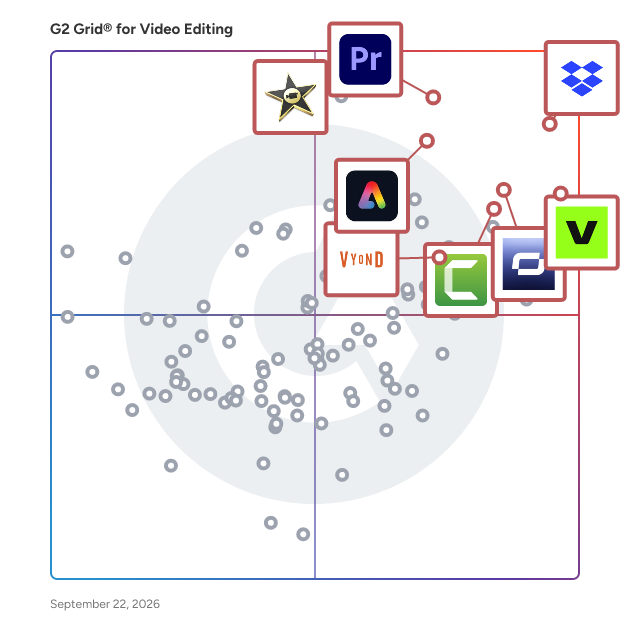
# Best Enterprise Video Editing Software

*By [Neeraja Prakash](https://research.g2.com/insights/author/neeraja-prakash)*


Products classified in the overall Video Editing category are similar in many regards and help companies of all sizes solve their business problems. However, enterprise business features, pricing, setup, and installation differ from businesses of other sizes, which is why we match buyers to the right Enterprise Business Video Editing to fit their needs. Compare product ratings based on reviews from enterprise users or connect with one of G2&#39;s buying advisors to find the right solutions within the Enterprise Business Video Editing category.

In addition to qualifying for inclusion in the Video Editing Software category, to qualify for inclusion in the Enterprise Business Video Editing Software category, a product must have at least 10 reviews left by a reviewer from an enterprise business.


## Top Video Editing Software at a Glance
| # | Product | Rating | Best For | What Users Say |
|---|---------|--------|----------|----------------|
| 1 | [Dropbox](https://www.g2.com/products/dropbox/reviews) | 4.4/5.0 (30,826 reviews) | Large video file sharing | "[Dropbox: Simple, Reliable Cloud Storage with Smooth Sync and Team Collaboration](https://www.g2.com/survey_responses/dropbox-review-13049539)" |
| 2 | [VEED](https://www.g2.com/products/veed/reviews) | 4.6/5.0 (2,132 reviews) | Browser-based subtitle editing | "[Easy Video Editing with Quick Turnaround](https://www.g2.com/survey_responses/veed-review-11784336)" |
| 3 | [Adobe Premiere Pro](https://www.g2.com/products/adobe-premiere-pro/reviews) | 4.5/5.0 (1,633 reviews) | Advanced video production workflows | "[Powerful, Professional Video Editing with Adobe Premiere Pro](https://www.g2.com/survey_responses/adobe-premiere-pro-review-12963512)" |
| 4 | [Riverside](https://www.g2.com/products/riverside/reviews) | 4.8/5.0 (1,729 reviews) | Remote podcast and interview production | "[Effortless Recording and Amazing Text-Based Editing](https://www.g2.com/survey_responses/riverside-review-13034561)" |
| 5 | [iMovie](https://www.g2.com/products/imovie/reviews) | 4.3/5.0 (565 reviews) | Basic Apple video editing | "[iMovie Makes Video Editing Simple Without Sacrificing Quality](https://www.g2.com/survey_responses/imovie-review-12698198)" |
| 6 | [Synthesia](https://www.g2.com/products/synthesia/reviews) | 4.6/5.0 (2,748 reviews) | AI training video creation | "[Empowered Our Marketing and Training Efforts with Ease](https://www.g2.com/survey_responses/synthesia-review-10836418)" |
| 7 | [Adobe Express](https://www.g2.com/products/adobe-express/reviews) | 4.5/5.0 (824 reviews) | Quick social video design | "[Adobe Express: Effortless Templates for Fast, Professional Designs](https://www.g2.com/survey_responses/adobe-express-review-13064583)" |
| 8 | [Movavi Video Editor](https://www.g2.com/products/movavi-movavi-video-editor/reviews) | 4.6/5.0 (415 reviews) | Beginner-friendly video editing | "[easy Video Editing for Teaching and Patient Guidance](https://www.g2.com/survey_responses/movavi-video-editor-review-12691061)" |
| 9 | [Camtasia](https://www.g2.com/products/camtasia/reviews) | 4.6/5.0 (1,702 reviews) | Screen-recorded training videos | "[Intuitive, Medium-Weight Editor That Delivers Professional Results](https://www.g2.com/survey_responses/camtasia-review-12891940)" |
| 10 | [HeyGen](https://www.g2.com/products/heygen/reviews) | 4.8/5.0 (1,867 reviews) | Multilingual AI avatar videos | "[Unique Speech-to-Video with Reliable Audio Upload and Transcription](https://www.g2.com/survey_responses/heygen-review-13039371)" |

---
## What Are the Most Common Questions About Video Editing Software?
*AI-generated · Last updated: May 26, 2026*
### What is the best video editing program out there?
Based on G2 reviews, Adobe Premiere Pro stands out as the strongest fit for buyers looking for a full-featured video editing program in this category. According to verified users, it is praised for professional editing controls, subtitle generation, color grading, and strong integration with other Adobe tools. G2 reviewers mention that it helps teams create polished marketing videos, event recaps, reels, and client-ready content while keeping workflows flexible. Reviewers also note a learning curve and heavier system demands, so it tends to fit users who want deeper editing control rather than the simplest beginner experience. VEED is often mentioned for speed and ease, but Premiere Pro appears most broadly capable in recent reviews.


### What is the best video editing tool for commercial projects?
Based on G2 reviews, buyers working on commercial projects often look for software that balances creative control, output quality, and workflow efficiency. Adobe Premiere Pro is frequently described by reviewers as a strong choice for branded videos, advertising work, client deliverables, and multi-clip editing. According to verified users, it supports polished results through tools for captions, effects, color work, and integration with other Adobe products. G2 reviewers mention that it helps them produce brand videos, event summaries, social campaigns, and client-facing edits with professional consistency. At the same time, some users say it takes time to learn and can be demanding on hardware, so teams should weigh ease of use against advanced control.

**Here are some of the top-rated products on G2:**

- [Adobe Premiere Pro](https://www.g2.com/products/adobe-premiere-pro/reviews) – used for brand videos, advertising videos, event summaries, reels, and polished client-facing edits
- [VEED](https://www.g2.com/products/veed/reviews) – favored for fast browser-based editing, subtitles, resizing, and social-ready short-form content
- [Riverside](https://www.g2.com/products/riverside/reviews) – suited for recording, editing, clipping, and publishing webinar, podcast, and interview video content


### What is the best video editing software for small business?
Based on G2 reviews, small businesses often prioritize ease of use, speed, and the ability to create polished content without a large production team. According to verified users, VEED is commonly valued for being easy to learn, browser-based, and useful for captions, short-form editing, resizing, and quick publishing workflows. G2 reviewers mention that it helps smaller teams create marketing videos, social clips, training content, and repurposed short videos without needing deep editing expertise. Some users do note limitations in advanced editing and occasional lag on larger projects, but the overall feedback highlights fast turnaround and accessibility. For small businesses that want straightforward production over heavy post-production complexity, it appears to be a strong fit.

**Here are some of the top-rated products on G2:**

- [VEED](https://www.g2.com/products/veed/reviews) – ideal for small teams creating subtitles, shorts, training videos, and social content quickly
- [Riverside](https://www.g2.com/products/riverside/reviews) – works well for businesses producing podcasts, webinars, interviews, and short clips in one workflow
- [Adobe Premiere Pro](https://www.g2.com/products/adobe-premiere-pro/reviews) – useful for small businesses that need more control for polished branded and client-ready videos


### What is the best software for editing business videos?
Based on G2 reviews, software for editing business videos is judged heavily on how well it supports presentations, explainers, product demos, internal communications, and customer-facing content. According to verified users, Adobe Premiere Pro is often selected when teams need a professional environment for assembling polished edits, adding captions, refining visuals, and handling branded content. G2 reviewers mention using it for marketing videos, event videos, advertising content, and polished social outputs. Buyers should note that it is not usually described as the simplest entry-level option, but it is repeatedly credited with helping teams improve quality and efficiency once they are comfortable with the workflow. That makes it a strong option for serious business video production.

**Here are some of the top-rated products on G2:**

- [Adobe Premiere Pro](https://www.g2.com/products/adobe-premiere-pro/reviews) – supports marketing, social, advertising, and client-facing business video editing
- [VEED](https://www.g2.com/products/veed/reviews) – useful for browser-based business videos with subtitles, voiceovers, resizing, and quick edits
- [Dropbox](https://www.g2.com/products/dropbox/reviews) – often used to share and manage large video files, project assets, and versioned business content across teams


### Which video editing app is best for our company?
Based on G2 reviews, VEED is the best fit when companies want an editing app that is easy to adopt across teams. According to verified users, it is valued for simple setup, browser-based access, subtitle generation, resizing, script-based editing, and fast creation of social, training, and promotional videos. G2 reviewers mention that it helps nontraditional editors and smaller teams publish content faster without a heavy technical learning curve. Reviewers also describe it as useful for repurposing long videos into shorts and adding captions efficiently. While some users want deeper editing controls, the overall review pattern suggests VEED is especially well suited for companies that want quick production and broad usability rather than the most advanced desktop workflow.


### What is the best-rated video editing software for office?
Based on G2 reviews, office teams often need software that is practical for presentations, internal training, recorded explainers, and communication videos rather than cinematic editing. According to verified users, Riverside is frequently praised for making recording, editing, clipping, and publishing easier in one place. G2 reviewers mention transcripts, AI clips, separate speaker tracks, and straightforward workflows that help teams create podcasts, webinars, walkthroughs, and internal video updates with less friction. Users also note that it reduces the need for multiple tools, which is valuable in office environments where speed and simplicity matter. Some reviewers mention occasional browser or editing issues, but overall it is described as highly efficient for business-facing video workflows.

**Here are some of the top-rated products on G2:**

- [Riverside](https://www.g2.com/products/riverside/reviews) – strong for office webinars, podcasts, walkthroughs, transcripts, clips, and all-in-one publishing
- [VEED](https://www.g2.com/products/veed/reviews) – fits office teams creating captions, quick edits, repurposed clips, and internal communication videos
- [Adobe Premiere Pro](https://www.g2.com/products/adobe-premiere-pro/reviews) – works for offices that need more polished editing for presentations, reels, and branded content


### What is the best video editing software reviews?
Based on G2 reviews, the strongest review themes in this category center on Adobe Premiere Pro, VEED, and Riverside. According to verified users, Adobe Premiere Pro is recognized for professional editing depth, VEED for speed and simplicity, and Riverside for streamlined recording-plus-editing workflows. G2 reviewers mention Premiere Pro for polished branded and client work, VEED for subtitles, short clips, and browser-based editing, and Riverside for podcasts, webinars, and shareable highlights. The common buyer pattern is clear: teams choose based on the type of workflow they need rather than a single universal winner. If advanced control matters most, reviewers lean toward Premiere Pro. If speed and accessibility matter more, VEED and Riverside receive especially strong recent praise.

**Here are some of the top-rated products on G2:**

- [Adobe Premiere Pro](https://www.g2.com/products/adobe-premiere-pro/reviews) – highly reviewed for advanced editing, captions, effects, and polished professional output
- [VEED](https://www.g2.com/products/veed/reviews) – highly reviewed for subtitle workflows, browser editing, and fast short-form production
- [Riverside](https://www.g2.com/products/riverside/reviews) – highly reviewed for podcast, webinar, and interview recording with fast clip creation


### What are the top video editing apps for professional use?
Based on G2 reviews, professional users tend to favor tools that deliver strong editing control, dependable output, and production efficiency. According to verified users, Adobe Premiere Pro is consistently highlighted for professional editing, color work, captions, and integration with the broader Adobe ecosystem. G2 reviewers mention VEED as a faster alternative for creators and marketers who need captions, subtitles, and short-form content without a heavy setup. Riverside also appears often in professional workflows where recording quality, transcripts, and clip generation matter for podcasts, webinars, and remote interviews. Together, these tools reflect three different professional needs: full editing power, rapid browser-based production, and all-in-one recording plus editing support.

**Here are some of the top-rated products on G2:**

- [Adobe Premiere Pro](https://www.g2.com/products/adobe-premiere-pro/reviews) – built for professional editing workflows with captions, effects, color work, and integrations
- [VEED](https://www.g2.com/products/veed/reviews) – supports professional social, training, and multilingual video workflows with browser-based speed
- [Riverside](https://www.g2.com/products/riverside/reviews) – helps professionals record and repurpose podcasts, interviews, and webinars efficiently


### Which is the top video editing software for corporate use?
Based on G2 reviews, Adobe Premiere Pro is the top video editing software for corporate use among products in this recent review set. According to verified users, it is repeatedly used for branded content, marketing campaigns, event summaries, reels, training-related edits, and client-ready business videos. G2 reviewers mention that it offers the mix of editing control, polish, subtitle support, and Adobe ecosystem integration that larger corporate teams often need. Reviewers also note that it can require stronger hardware and more learning time, but they consistently describe the output as professional and flexible. For corporate teams prioritizing quality and broad production capability, Premiere Pro appears to lead this category in current review sentiment.


### What is the most popular video editing software for desktop use?
Based on G2 reviews, Adobe Premiere Pro appears to be the most popular choice for desktop-focused video editing in this category set. According to verified users, it is used for everything from reels and social content to professional client work, brand videos, event summaries, and advanced editing tasks. G2 reviewers mention its desktop workflow advantages through timeline control, effects, captioning, and integrations with other Adobe tools like After Effects and Photoshop. They also highlight that it works best for users willing to invest time in learning the software. While simpler products earn praise for speed, Premiere Pro is the one most consistently associated with broad desktop editing use and professional production depth.


## How Many Video Editing Software Products Does G2 Track?
**Total Products under this Category:** 288

### Category Stats (Jul 2026)
- **Average Rating**: 4.47/5 The average rating of products in this category, based on all submitted ratings
- **Top Trending Product**: Eddie (+9.38%) - Among all products in this category, Eddie recorded the largest rating increase compared to last month
*Last updated: July 06, 2026*


## How Does G2 Rank Video Editing Software Products?

**Why You Can Trust G2's Software Rankings:**

- 30 Analysts and Data Experts
- 65,800+ Authentic Reviews
- 288+ Products
- Unbiased Rankings

G2's software rankings are built on verified user reviews, rigorous moderation, and a consistent research methodology maintained by a team of analysts and data experts. Each product is measured using the same transparent criteria, with no paid placement or vendor influence. While reviews reflect real user experiences, which can be subjective, they offer valuable insight into how software performs in the hands of professionals. Together, these inputs power the G2 Score, a standardized way to compare tools within every category.


---

**Sponsored**

### iSpring LMS

iSpring LMS is a feature-rich platform that helps companies accelerate their business momentum through ROI-efficient training. The LMS enables the entire training cycle with clarity and consistency, from structured onboarding to continuous employee development. It helps reduce employee turnover, improve performance, and ensure that teams stay aligned, skilled, and ready to support the company’s long-term growth. iSpring LMS gives managers and trainers a simple way to organize training, guide employees through skill-building, and see exactly how their learners are progressing. Employees get a clear path to follow, and leaders get the visibility they need to support growth, maintain standards, and keep performance on track. Here are the core capabilities that make this possible: - The mirrored organizational structure reflects how your company works, so training stays aligned with roles and teams. - Specified learning tracks guide learners step by step through required courses and programs. - Detailed reporting highlights progress, deadlines, and knowledge gaps with actionable insights. - The Supervisor Dashboard gives managers instant visibility into team performance without extra admin work. - Automated workflows handle enrollments, reminders, and assignments, saving time and reducing manual tasks. - The corporate portal and newsfeed centralize updates and announcements to keep everyone aligned. - 360-Degree Reviews gather well-rounded performance feedback from peers and supervisors. - On-The-Job Training validates real-world skills with structured checklists. - Knowledge Base gives employees quick access to SOPs, product info, and internal documentation. - Development Plans build personalized growth paths that connect training to long-term skill development.


[Visit website](https://www.g2.com/external_clickthroughs/record?secure%5Bad_program%5D=ppc&amp;secure%5Bad_slot%5D=category_product_list&amp;secure%5Bcategory_id%5D=500&amp;secure%5Bchosen_at%5D=2026-07-06T12%3A00%3A08Z&amp;secure%5Bdisplayable_resource_id%5D=565&amp;secure%5Bdisplayable_resource_type%5D=Category&amp;secure%5Bmedium%5D=sponsored&amp;secure%5Bplacement_reason%5D=retargeted_product&amp;secure%5Bplacement_resource_ids%5D%5B%5D=20042&amp;secure%5Bprioritized%5D=false&amp;secure%5Bproduct_id%5D=20042&amp;secure%5Bresource_id%5D=500&amp;secure%5Bresource_type%5D=Category&amp;secure%5Bsource_type%5D=category_page&amp;secure%5Bsource_url%5D=https%3A%2F%2Fwww.g2.com%2Fcategories%2Fvideo-editing%2Fenterprise%3Fpage%3D2&amp;secure%5Btoken%5D=d9d9a88c5fbfb793e8abf0d2f82a5213f265b2f22408858faf3eac4de4c900a1&amp;secure%5Burl%5D=https%3A%2F%2Fwww.ispring.com%2F%3Futm_source%3Dg2%26utm_medium%3Dpartner%26utm_campaign%3Dcorporate_lms_paid_clicks&amp;secure%5Burl_type%5D=custom_url)

---

## What Are the Top-Rated Video Editing Software Products in 2026?
### 1. [Camtasia](https://www.g2.com/products/camtasia/reviews)
The Camtasia Product Suite is a powerful, AI-powered ecosystem for video creation and screen recording. Built to deliver professional results fast, Camtasia makes it easy to produce high-quality content—even if you’ve never edited a video before. Our advanced AI features—including Camtasia Rev, script generation, text-to-speech, and automatic translations—streamline your entire workflow. Plus, with our new Zoom integration, you can instantly turn meeting recordings into reusable training content. Pull Zoom cloud recordings directly into your timeline, edit screen and camera feeds as independent layers, and apply dynamic layouts so your camera never blocks critical onscreen content. Whether you choose our Free, Essentials, Plus, or Pro plan, the Camtasia Editor is easy enough for beginners yet versatile enough to be your video solution for life. Explore our plans today and accelerate your production journey.


**Average Rating:** 4.6/5.0
**Total Reviews:** 1,702
**How Do G2 Users Rate Camtasia?**

- **Has the product been a good partner in doing business?:** 9.0/10 (Category avg: 9.0/10)
- **Quality of Support:** 8.8/10 (Category avg: 8.7/10)
- **Ease of Admin:** 9.0/10 (Category avg: 9.0/10)
- **Titles and Captions:** 8.8/10 (Category avg: 8.4/10)

**Who Is the Company Behind Camtasia?**

- **Seller:** [TechSmith](https://www.g2.com/sellers/techsmith)
- **Company Website:** https://www.techsmith.com
- **Year Founded:** 1987
- **HQ Location:** Okemos, MI
- **Twitter:** @TechSmith (29,513 Twitter followers)
- **LinkedIn® Page:** https://www.linkedin.com/company/16448/ (356 employees on LinkedIn®)

**Who Uses This Product?**
- **Who Uses This:** Owner, Founder
- **Top Industries:** Computer Software, Information Technology and Services
- **Company Size:** 53% Small-Business, 27% Mid-Market


#### What Are Camtasia's Pros and Cons?

**Pros:**

- Ease of Use (194 reviews)
- Easy Editing (120 reviews)
- Video Editing (117 reviews)
- Features (104 reviews)
- Easy Creation (93 reviews)

**Cons:**

- Learning Curve (37 reviews)
- Slow Rendering (36 reviews)
- Expensive (31 reviews)
- Limited Features (30 reviews)
- Feature Limitations (28 reviews)


### What Do G2 Reviewers Say About Camtasia?
*AI-generated summary from verified user reviews*

**Pros:**

- Users praise the **ease of use** in Camtasia, appreciating its efficient video editing and user-friendly features.
- Users value the **easy editing** capabilities of Camtasia, finding it efficient for creating and enhancing videos effortlessly.
- Users love Camtasia for its **user-friendly video editing** capabilities, making it accessible for everyone to create quality content.
- Users appreciate the **intuitive features** of Camtasia, enhancing efficiency in creating high-quality educational content.
- Users love the **easy creation** process with Camtasia, finding it intuitive and efficient for video editing.

**Cons:**

- Users encounter a **steep learning curve** with Camtasia, making initial setup and feature usage challenging and non-intuitive.
- Users experience **slow rendering** times, especially with longer videos, impacting their editing efficiency and workflow.
- Users find Camtasia&#39;s **subscription fees too expensive** and prefer a more affordable pricing option for groups.
- Users find the **limited features** of Camtasia frustrating, especially its resource consumption and lack of auto captioning.
- Users find **feature limitations** in Camtasia, such as missing transitions and high resource consumption, frustrating for editing.

#### What Are Recent G2 Reviews of Camtasia?

**"[Intuitive, Medium-Weight Editor That Delivers Professional Results](https://www.g2.com/survey_responses/camtasia-review-12891940)"**

**Rating:** 4.5/5.0 stars
*— Brian M.*

[Read full review](https://www.g2.com/survey_responses/camtasia-review-12891940)

---

**"[Easy and Reliable Tool for Creating Professional Training Videos](https://www.g2.com/survey_responses/camtasia-review-12251107)"**

**Rating:** 5.0/5.0 stars
*— Vivek G.*

[Read full review](https://www.g2.com/survey_responses/camtasia-review-12251107)

---


#### What Are G2 Users Discussing About Camtasia?

- [What is Camtasia used for?](https://www.g2.com/discussions/what-is-camtasia-used-for) - 4 comments
- [What is Audiate used for?](https://www.g2.com/discussions/what-is-audiate-used-for) - 1 comment
- [What does Camtasia cost?](https://www.g2.com/discussions/what-does-camtasia-cost) - 3 comments
- [Is Camtasia easy to use?](https://www.g2.com/discussions/is-camtasia-easy-to-use) - 6 comments, 1 upvote
- [Can you get Camtasia for free?](https://www.g2.com/discussions/can-you-get-camtasia-for-free) - 5 comments

### 2. [Dropbox](https://www.g2.com/products/dropbox/reviews)
Keep creative projects moving from first draft to final sign-off. Dropbox brings your team’s files, feedback, and approvals together in one secure cloud storage platform. Back up your work, send large files in seconds, and keep everyone in sync—so nothing slows you down. Find it fast, from anywhere Dropbox makes it easy to find and share files across desktop, mobile, and web—whether your team is in the office, remote, or on the go. Organize your work, align your team Every version stays current and simple to manage. Synced team folders keep content up to date, and previews for 175+ file types keep your team in the loop. Share anything, instantly Send large assets—up to 2 TB uploads and 1 TB video previews—with just a link. Security you can trust Protect your files with industry-leading encryption, granular permissions, compliance-ready controls, and built-in recovery features. Dropbox integrates with Google Workspace, Microsoft 365, Adobe Creative Cloud, Slack, Salesforce, Canva, Autodesk, Zoom, and more. Trusted by more than 700 million users and 575,000 teams worldwide.


**Average Rating:** 4.4/5.0
**Total Reviews:** 30,826
**How Do G2 Users Rate Dropbox?**

- **Has the product been a good partner in doing business?:** 8.9/10 (Category avg: 9.0/10)
- **Quality of Support:** 8.6/10 (Category avg: 8.7/10)
- **Ease of Admin:** 8.9/10 (Category avg: 9.0/10)
- **Titles and Captions:** 7.5/10 (Category avg: 8.4/10)

**Who Is the Company Behind Dropbox?**

- **Seller:** [Dropbox](https://www.g2.com/sellers/dropbox)
- **Company Website:** https://www.dropbox.com/
- **Year Founded:** 2007
- **HQ Location:** San Francisco, California
- **Twitter:** @Dropbox (3,279,477 Twitter followers)
- **LinkedIn® Page:** https://www.linkedin.com/company/167251/ (4,149 employees on LinkedIn®)

**Who Uses This Product?**
- **Who Uses This:** Owner, Project Manager
- **Top Industries:** Information Technology and Services, Marketing and Advertising
- **Company Size:** 63% Small-Business, 23% Mid-Market


#### What Are Dropbox's Pros and Cons?

**Pros:**

- Ease of Use (1693 reviews)
- Easy Access (856 reviews)
- File Sharing (818 reviews)
- Easy Sharing (685 reviews)
- Cloud Storage (645 reviews)

**Cons:**

- Expensive Cost (525 reviews)
- Expensive (513 reviews)
- Plan Limitations (501 reviews)
- Limited Storage (491 reviews)
- Not Free (297 reviews)


### What Do G2 Reviewers Say About Dropbox?
*AI-generated summary from verified user reviews*

**Pros:**

- Users love the **intuitive interface** of Dropbox, enabling quick adoption and seamless collaboration across teams.
- Users value the **easy access across multiple devices** that Dropbox offers for efficient file management and sharing.
- Users appreciate the **convenient file sharing** capabilities of Dropbox, enhancing collaboration and organization across devices.
- Users love the **easy sharing** capabilities of Dropbox, particularly for big and confidential files with clients.
- Users enjoy the **reliable cloud storage** of Dropbox, appreciating its ease of use and seamless collaboration features.

**Cons:**

- Users find the **cost of storage upgrades** excessive, especially for small teams and individual users with limited needs.
- Users find Dropbox **too expensive** for the limited storage offered, particularly when requiring more capacity.
- Users are frustrated by **tight storage limits** and feel upgrades are costly for minimal increases in space.
- Users criticize the **limited storage** of Dropbox, making it hard to use without upgrading to a paid plan.
- Users feel that Dropbox&#39;s **storage plans are pricey** with limited free options, often falling short for larger needs.

#### What Are Recent G2 Reviews of Dropbox?

**"[Dropbox: Simple, Reliable Cloud Storage with Smooth Sync and Team Collaboration](https://www.g2.com/survey_responses/dropbox-review-13049539)"**

**Rating:** 5.0/5.0 stars
*— jamsheed I.*

[Read full review](https://www.g2.com/survey_responses/dropbox-review-13049539)

---

**"[Deeper Search Functionality, Needs Better Integrations](https://www.g2.com/survey_responses/dropbox-review-12952362)"**

**Rating:** 4.5/5.0 stars
*— Prahlad K.*

[Read full review](https://www.g2.com/survey_responses/dropbox-review-12952362)

---


#### What Are G2 Users Discussing About Dropbox?

- [What strategies do you use to ensure secure and efficient file sharing with Dropbox in your organization?](https://www.g2.com/discussions/what-strategies-do-you-use-to-ensure-secure-and-efficient-file-sharing-with-dropbox-in-your-organization) - 6 comments, 5 upvotes
- [What is Dropbox used for?](https://www.g2.com/discussions/what-is-dropbox-used-for) - 8 comments, 7 upvotes
- [What is Dropbox and how it works?](https://www.g2.com/discussions/what-is-dropbox-and-how-it-works) - 6 comments, 5 upvotes
- [Can I scan directly to Dropbox?](https://www.g2.com/discussions/can-i-scan-directly-to-dropbox) - 4 comments, 3 upvotes
- [How does Dropbox for business work?](https://www.g2.com/discussions/how-does-dropbox-for-business-work) - 2 comments

### 3. [Synthesia](https://www.g2.com/products/synthesia/reviews)
Synthesia is the best AI video generation platform for business. By turning text into professional AI-generated videos in minutes, Synthesia replaces static documents and slide decks with dynamic, human-like communication that drives engagement, understanding, and results. 🚀 Create at the speed of change Traditional video production is slow, costly, and hard to scale. With Synthesia, anyone can create studio-quality videos fast, right in their browser. When your products, policies, or messages change, your videos can too — no cameras, actors, or editing software required. 🧍‍♂️ Bring your message to life with AI Avatars Add a human touch to every message with 240+ diverse, realistic AI avatars, representing different ages, ethnicities, and styles. Choose a brand-aligned avatar or create your own custom digital twin for a consistent on-screen identity. 🌍 Communicate globally with ease Reach every audience with a click. Synthesia supports 160+ languages and accents with built-in AI translation and dubbing, making global rollouts effortless. Deliver consistent, localized content to every team and market — without losing your brand’s voice. 💡 Engage and educate through interactivity Keep your audience involved with interactive videos that go beyond passive viewing. Add clickable elements, branching paths, or quizzes to improve learning outcomes and drive action across training, onboarding, and customer education. 📊 Measure impact, not just output Synthesia’s built-in analytics let you see how your videos perform — who’s watching, where they drop off, and how they engage. Use data-driven insights to refine content and maximize ROI on every communication. 🔒 Built for enterprise trust and security Synthesia is trusted by the world’s leading organizations for its enterprise-grade security and compliance standards, including SOC 2 Type II, GDPR, and ISO 27001. Your data, avatars, and videos are always protected with role-based access, watermarking, and private deployment options. 🤝 Empower everyone to be a communicator From HR and L&amp;D to Marketing and Sales, Synthesia enables every team to create on-brand, on-message videos at scale — turning communication into a competitive advantage.


**Average Rating:** 4.6/5.0
**Total Reviews:** 2,748
**How Do G2 Users Rate Synthesia?**

- **Has the product been a good partner in doing business?:** 8.9/10 (Category avg: 9.0/10)
- **Quality of Support:** 8.9/10 (Category avg: 8.7/10)
- **Ease of Admin:** 9.1/10 (Category avg: 9.0/10)
- **Titles and Captions:** 8.6/10 (Category avg: 8.4/10)

**Who Is the Company Behind Synthesia?**

- **Seller:** [Synthesia](https://www.g2.com/sellers/synthesia)
- **Company Website:** https://www.synthesia.io/
- **Year Founded:** 2017
- **HQ Location:** London
- **Twitter:** @synthesiaIO (28,606 Twitter followers)
- **LinkedIn® Page:** https://www.linkedin.com/company/synthesia-technologies/ (772 employees on LinkedIn®)

**Who Uses This Product?**
- **Who Uses This:** CEO, Owner
- **Top Industries:** Computer Software, E-Learning
- **Company Size:** 66% Small-Business, 18% Mid-Market


#### What Are Synthesia's Pros and Cons?

**Pros:**

- Ease of Use (990 reviews)
- Quality (644 reviews)
- Easy Creation (612 reviews)
- Realistic Avatars (608 reviews)
- Features (491 reviews)

**Cons:**

- Avatar Limitations (350 reviews)
- Limited Avatars (314 reviews)
- Avatar Quality (298 reviews)
- AI Limitations (288 reviews)
- Limited Customization (253 reviews)


### What Do G2 Reviewers Say About Synthesia?
*AI-generated summary from verified user reviews*

**Pros:**

- Users love the **ease of use** of Synthesia, enabling quick and professional video creation without technical skills.
- Users highlight the **high quality of videos and professional avatars** , enhancing training effectiveness with consistent results.
- Users love the **convenience and ease of use** in creating engaging videos with Synthesia&#39;s expressive avatars.
- Users love the **high-quality realistic avatars** and voices, making video creation professional and engaging without extra effort.
- Users appreciate the **ease of use and comprehensive features** of Synthesia, facilitating high-quality video creation effectively.

**Cons:**

- Users note that the **avatars appear unnatural** , despite improvements, and suggest quality equipment for better results.
- Users note the **limited avatars** with inconsistent quality and unnatural features, affecting the overall video experience.
- Users find the **avatar quality lacking** , describing them as unnatural and often unreliable in presentation and gestures.
- Users note **AI limitations** in avatar realism and customization, affecting content quality and user experience.
- Users find **limited customization** of AI avatars&#39; expressions frustrating, hindering their creative possibilities and experience.

#### What Are Recent G2 Reviews of Synthesia?

**"[Empowered Our Marketing and Training Efforts with Ease](https://www.g2.com/survey_responses/synthesia-review-10836418)"**

**Rating:** 5.0/5.0 stars
*— Farhad N.*

[Read full review](https://www.g2.com/survey_responses/synthesia-review-10836418)

---

**"[The Best AI Tool for Creating Business Videos](https://www.g2.com/survey_responses/synthesia-review-9342731)"**

**Rating:** 5.0/5.0 stars
*— Darlan E.*

[Read full review](https://www.g2.com/survey_responses/synthesia-review-9342731)

---


#### What Are G2 Users Discussing About Synthesia?

- [What is Synthesia used for?](https://www.g2.com/discussions/what-is-synthesia-used-for) - 5 comments

### 4. [Adobe Premiere Pro](https://www.g2.com/products/adobe-premiere-pro/reviews)
Adobe Premiere Pro is a professional video editing software developed by Adobe Systems, designed for creating high-quality videos across various industries. It offers a comprehensive suite of tools for editing, color correction, audio enhancement, and visual effects, making it a preferred choice for filmmakers, broadcasters, and content creators. Key Features and Functionality: - Advanced Editing Tools: Provides industry-standard video editing capabilities, including three-point editing, timeline-based editing, and support for multiple video and audio tracks. - AI-Powered Enhancements: Utilizes artificial intelligence to streamline workflows, such as Object Mask for quick masking and tracking, Text-Based Editing for efficient transcript-based editing, and Media Intelligence for rapid clip searching. - Color Correction and Grading: Offers powerful color correction tools, including color wheels, curve controls, and built-in video scopes, enabling precise color adjustments and grading. - Audio Editing and Mixing: Features professional audio tools to reduce noise, enhance dialogue, and add advanced effects, along with AI capabilities like Enhance Speech for improving audio quality. - Effects and Transitions: Includes a vast library of cinematic effects, transitions, and customizable templates to create unique visual styles. - Title and Caption Creation: Allows for the design of polished titles, captions, and graphics with customizable templates, and supports automatic translation of captions in multiple languages. - Cross-Platform Compatibility: Available on both Windows and macOS platforms, ensuring flexibility and accessibility for users. Primary Value and User Solutions: Adobe Premiere Pro addresses the needs of professional video editors by providing a robust and versatile platform that integrates seamlessly with other Adobe Creative Cloud applications. Its AI-driven features significantly reduce editing time, allowing users to focus on creative aspects rather than technical complexities. The software&#39;s comprehensive toolset enables the production of high-quality videos suitable for various platforms, from social media to cinematic releases. By offering advanced editing capabilities, color correction, audio enhancement, and visual effects in a single package, Premiere Pro empowers users to bring their creative visions to life efficiently and effectively.


**Average Rating:** 4.5/5.0
**Total Reviews:** 1,633
**How Do G2 Users Rate Adobe Premiere Pro?**

- **Has the product been a good partner in doing business?:** 8.7/10 (Category avg: 9.0/10)
- **Quality of Support:** 8.1/10 (Category avg: 8.7/10)
- **Ease of Admin:** 8.5/10 (Category avg: 9.0/10)
- **Titles and Captions:** 9.0/10 (Category avg: 8.4/10)

**Who Is the Company Behind Adobe Premiere Pro?**

- **Seller:** [Adobe](https://www.g2.com/sellers/adobe)
- **Year Founded:** 1982
- **HQ Location:** San Jose, CA
- **Twitter:** @Adobe (956,842 Twitter followers)
- **LinkedIn® Page:** https://www.linkedin.com/company/1480/ (42,087 employees on LinkedIn®)
- **Ownership:** NASDAQ:ADBE

**Who Uses This Product?**
- **Who Uses This:** Graphic Designer, Owner
- **Top Industries:** Media Production, Marketing and Advertising
- **Company Size:** 64% Small-Business, 22% Mid-Market


#### What Are Adobe Premiere Pro's Pros and Cons?

**Pros:**

- Video Editing (69 reviews)
- High Quality (58 reviews)
- Ease of Use (55 reviews)
- Video Creation (40 reviews)
- Highly Recommendable (16 reviews)

**Cons:**

- Learning Curve (32 reviews)
- Slow Rendering (27 reviews)
- Expensive Cost (16 reviews)
- Time-Consumption (16 reviews)
- Update Issues (14 reviews)


### What Do G2 Reviewers Say About Adobe Premiere Pro?
*AI-generated summary from verified user reviews*

**Pros:**

- Users love the **ease of use** in Adobe Premiere Pro, making video editing accessible and efficient for everyone.
- Users appreciate the **high quality** of Adobe Premiere Pro, enabling exceptional video editing and sound design capabilities.
- Users value the **user-friendly interface** of Adobe Premiere Pro, making video editing accessible and efficient for beginners.
- Users value the **excellent control and features** in Adobe Premiere Pro for creating structured educational videos effortlessly.
- Users highly appreciate Adobe Premiere Pro for its **powerful flexibility** and seamless integration with other Adobe apps.

**Cons:**

- Users face a **steep learning curve** with Premiere Pro, finding it complex and resource-intensive, especially on mid-range systems.
- Users experience **slow rendering** in Adobe Premiere Pro, often necessitating the use of additional software for efficiency.
- Users criticize the **expensive cost** of Adobe Premiere Pro, especially compared to its free alternatives like Da Vinci.
- Users find Adobe Premiere Pro to be a **time-consuming tool** due to its steep learning curve and heavy resource demands.
- Users often face **update issues** with Premiere Pro, leading to crashes and slow performance on larger projects.

#### What Are Recent G2 Reviews of Adobe Premiere Pro?

**"[Seamless Creative Cloud Integration That Speeds Up Editing](https://www.g2.com/survey_responses/adobe-premiere-pro-review-12977489)"**

**Rating:** 4.5/5.0 stars
*— Shreyas N.*

[Read full review](https://www.g2.com/survey_responses/adobe-premiere-pro-review-12977489)

---

**"[Powerful, Professional Video Editing with Adobe Premiere Pro](https://www.g2.com/survey_responses/adobe-premiere-pro-review-12963512)"**

**Rating:** 5.0/5.0 stars
*— Gaurav R.*

[Read full review](https://www.g2.com/survey_responses/adobe-premiere-pro-review-12963512)

---


#### What Are G2 Users Discussing About Adobe Premiere Pro?

- [I&#39;m new to Adobe Premiere Pro and struggling with color grading. How can I get started with basic color correction?](https://www.g2.com/discussions/i-m-new-to-adobe-premiere-pro-and-struggling-with-color-grading-how-can-i-get-started-with-basic-color-correction) - 4 comments
- [What is Adobe Premiere Pro used for?](https://www.g2.com/discussions/what-is-adobe-premiere-pro-used-for) - 6 comments, 2 upvotes
- [Is there a way to get Adobe Premiere Pro for free?](https://www.g2.com/discussions/is-there-a-way-to-get-adobe-premiere-pro-for-free) - 3 comments, 1 upvote
- [Does Adobe Premiere Pro include Photoshop?](https://www.g2.com/discussions/does-adobe-premiere-pro-include-photoshop) - 2 comments
- [What is the function of Adobe Premiere?](https://www.g2.com/discussions/what-is-the-function-of-adobe-premiere) - 2 comments

### 5. [Adobe Express](https://www.g2.com/products/adobe-express/reviews)
Quickly and easily make standout content from thousands of beautiful templates with the all-new Adobe Express. Simply choose a template, add images and text, and quickly resize your creations to fit your favorite social media site. Available on web and mobile. Make stunning content. Start from thousands of templates for social media graphics, stories, and thumbnails, as well as posters, flyers, business cards, logos, and more. Get free Adobe Stock images. Access the Adobe Stock royalty-free photo collection\* with millions of on-trend and seasonal images. Give your photos pro effects. Get the look you want with easy-to-apply effects, filters, textures, and overlays. Remove backgrounds instantly. Effortlessly cut out backgrounds without having to outline your subject — and start with a fresh canvas. Add design elements. Discover just what you need from tons of images, icons, backgrounds, and design assets. Resize content in a snap. Instantly resize and reflow content to fit any size for Instagram, Facebook, YouTube, banners, flyers, and more. Your content will adjust instantly using intuitive Adobe tools. Make it move. Create attention-grabbing content with features to animate text and photos. Apply your brand. Upload your brand logo, fonts, and colors and apply them to any design with one tap. Make videos made for social. Easily trim, crop, resize, and convert videos. Play with text. Choose from over 18,000 licensed fonts from the Adobe Fonts library. Start from text templates that feature curved type, grids, and beautiful font pairs. Remix it. Customize predesigned graphics and text to make them your own. Work better together. Share templates, assets, and brand identity across your team so content consistently reflects your look. Save favorite templates to your library for a faster start. \*Adobe Express membership required. The Adobe Stock photo collection does not include Premium or editorial content. Limited Adobe Stock functionality available in web page and video features within the desktop app.​


**Average Rating:** 4.5/5.0
**Total Reviews:** 824
**How Do G2 Users Rate Adobe Express?**

- **Has the product been a good partner in doing business?:** 9.1/10 (Category avg: 9.0/10)
- **Quality of Support:** 8.7/10 (Category avg: 8.7/10)
- **Ease of Admin:** 9.4/10 (Category avg: 9.0/10)
- **Titles and Captions:** 9.0/10 (Category avg: 8.4/10)

**Who Is the Company Behind Adobe Express?**

- **Seller:** [Adobe](https://www.g2.com/sellers/adobe)
- **Company Website:** https://adobe.com
- **Year Founded:** 1982
- **HQ Location:** San Jose, CA
- **Twitter:** @Adobe (956,842 Twitter followers)
- **LinkedIn® Page:** https://www.linkedin.com/company/1480/ (42,087 employees on LinkedIn®)

**Who Uses This Product?**
- **Who Uses This:** Graphic Designer, Marketing Manager
- **Top Industries:** Marketing and Advertising, Design
- **Company Size:** 57% Small-Business, 28% Mid-Market


#### What Are Adobe Express's Pros and Cons?

**Pros:**

- Ease of Use (297 reviews)
- Templates (109 reviews)
- Speed (106 reviews)
- Easy Creation (95 reviews)
- Intuitive (93 reviews)

**Cons:**

- Limited Features (106 reviews)
- Feature Limitations (103 reviews)
- Limited Customization (68 reviews)
- Limited Options (64 reviews)
- Slow Performance (54 reviews)


### What Do G2 Reviewers Say About Adobe Express?
*AI-generated summary from verified user reviews*

**Pros:**

- Users praise the **ease of use** of Adobe Express, making it accessible for non-designers with helpful templates.
- Users love the **ready-made templates** in Adobe Express, enjoying quick and easy professional content creation.
- Users appreciate the **speed and ease** of creating customized content effortlessly with Adobe Express, enhancing productivity significantly.
- Users appreciate the **easy creation** process in Adobe Express, making professional content design quick and accessible for all.
- Users love the **intuitive design** of Adobe Express, making graphic creation fast and easy for all skill levels.

**Cons:**

- Users find Adobe Express has **limited features** , feeling it lacks the functions offered by competitors like Canva.
- Users find that Adobe Express has **feature limitations** , making it less versatile compared to other graphic design platforms.
- Users find **limited customization options** can hinder advanced design projects and feel too simplified at times.
- Users find **limited options** in Adobe Express, lacking advanced features and tools for a more robust design experience.
- Users experience **slow performance** with Adobe Express, especially when working on heavier designs or switching projects.

#### What Are Recent G2 Reviews of Adobe Express?

**"[Effortless Design and Video Creation with Time-Saving AI Features](https://www.g2.com/survey_responses/adobe-express-review-11931770)"**

**Rating:** 4.5/5.0 stars
*— Sree K.*

[Read full review](https://www.g2.com/survey_responses/adobe-express-review-11931770)

---

**"[Adobe Express: Effortless Templates for Fast, Professional Designs](https://www.g2.com/survey_responses/adobe-express-review-13064583)"**

**Rating:** 4.5/5.0 stars
*— Ravindra N.*

[Read full review](https://www.g2.com/survey_responses/adobe-express-review-13064583)

---


#### What Are G2 Users Discussing About Adobe Express?

- [What is Adobe Creative Cloud Express used for?](https://www.g2.com/discussions/what-is-adobe-creative-cloud-express-used-for) - 2 comments
- [How good is Adobe spark?](https://www.g2.com/discussions/adobe-creative-cloud-express-how-good-is-adobe-spark) - 3 comments
- [Is Adobe spark really free?](https://www.g2.com/discussions/adobe-creative-cloud-express-is-adobe-spark-really-free) - 2 comments, 1 upvote

### 6. [Vyond](https://www.g2.com/products/vyond/reviews)
Vyond is an all-in-one AI video platform designed to empower organizations in creating secure, compliant, and engaging business content at scale. With a history spanning over 15 years, Vyond has established itself as a trusted solution for more than 20,000 companies, including 65% of the Fortune 500. Vyond is particularly suited for enterprises looking to enhance their internal communications, training programs, sales enablement, and marketing efforts through high-quality video content. Vyond serves a diverse range of use cases. It is particularly beneficial for companies aiming to streamline onboarding processes, improve training completion rates, and enhance compliance training. By integrating seamlessly with existing tools such as Slack, Learning Management Systems (LMS), and Customer Relationship Management (CRM) systems, Vyond allows employees to create brand-safe content without the need to switch between multiple applications. This integration not only fosters a more efficient workflow but also ensures that video content aligns with organizational branding and compliance standards. Key features of Vyond include AI avatars, AI-assisted scripting, instant translation, and text-to-speech capabilities, which collectively enhance the video creation process. Users can develop custom characters and utilize various animation styles, including animated, photorealistic, mixed-media, and live-action formats, all within a single platform. This versatility allows organizations to cater to different audience preferences and learning styles, making their content more engaging and effective. Additionally, Vyond’s SCORM-compliant LMS integration ensures that training materials can be easily tracked and measured, providing valuable insights into employee engagement and learning outcomes. Vyond stands out in the market by simplifying the technology stack for enterprises while expanding their creative capabilities. The platform’s focus on measurable outcomes—such as faster onboarding, higher training completion, and improved sales enablement—enables organizations to track return on investment (ROI) within their existing systems of record. This emphasis on data-driven results allows businesses to make informed decisions about their video content strategies and optimize their communication efforts. With a commitment to ongoing innovation and customer trust, Vyond is dedicated to evolving its platform to meet the needs of modern enterprises. By bringing next-generation AI capabilities into a compliant and governed environment, Vyond enables organizations to create content more efficiently, communicate more effectively, and reduce their reliance on fragmented solutions. This positions Vyond as a comprehensive tool for any organization looking to leverage video as a key component of their business strategy.


**Average Rating:** 4.8/5.0
**Total Reviews:** 499
**How Do G2 Users Rate Vyond?**

- **Has the product been a good partner in doing business?:** 9.2/10 (Category avg: 9.0/10)
- **Quality of Support:** 9.4/10 (Category avg: 8.7/10)
- **Ease of Admin:** 9.4/10 (Category avg: 9.0/10)
- **Titles and Captions:** 8.9/10 (Category avg: 8.4/10)

**Who Is the Company Behind Vyond?**

- **Seller:** [Vyond](https://www.g2.com/sellers/vyond)
- **Company Website:** https://www.vyond.com/
- **Year Founded:** 2007
- **HQ Location:** San Mateo, California
- **Twitter:** @VyondVideo (136 Twitter followers)
- **LinkedIn® Page:** https://www.linkedin.com/company/vyond/ (274 employees on LinkedIn®)

**Who Uses This Product?**
- **Who Uses This:** Instructional Designer, Senior Instructional Designer
- **Top Industries:** E-Learning, Hospital &amp; Health Care
- **Company Size:** 51% Enterprise, 26% Small-Business


#### What Are Vyond's Pros and Cons?

**Pros:**

- Ease of Use (185 reviews)
- Video Creation (124 reviews)
- Features (111 reviews)
- Easy Creation (107 reviews)
- Versatility (92 reviews)

**Cons:**

- Limited Customization (45 reviews)
- Limited Features (33 reviews)
- Limited Options (32 reviews)
- Limited Selection (27 reviews)
- Learning Curve (26 reviews)


### What Do G2 Reviewers Say About Vyond?
*AI-generated summary from verified user reviews*

**Pros:**

- Users find Vyond **easy to use** , with helpful tutorials and a variety of templates for seamless video creation.
- Users love Vyond for its **seamless video creation** , enabling quick production and engaging content for eLearning materials.
- Users love the **wide range of customizable features** in Vyond, enhancing creativity and ease of video creation.
- Users appreciate the **easy creation** process in Vyond, enabling engaging video production with minimal learning curve.
- Users value the **versatility** of Vyond, making video creation engaging and efficient across various applications.

**Cons:**

- Users express a desire for **more customization options** in Vyond, particularly for characters and props.
- Users find Vyond has **limited features** , wishing for more customization options and diverse character selections.
- Users find the **limited options** frustrating, especially when trying to achieve more advanced animations with characters.
- Users desire a **limited selection** of healthcare-related assets in Vyond to enhance their creative projects.
- Users find a significant **learning curve** , particularly beginners, due to navigation quirks and limited tutorial content.

#### What Are Recent G2 Reviews of Vyond?

**"[Engaging Course Videos Within Tight Timelines](https://www.g2.com/survey_responses/vyond-review-13053276)"**

**Rating:** 5.0/5.0 stars
*— Liz F.*

[Read full review](https://www.g2.com/survey_responses/vyond-review-13053276)

---

**"[Saves Hours with Reusable Characters, Scenes, and Flexible Styles](https://www.g2.com/survey_responses/vyond-review-12781412)"**

**Rating:** 5.0/5.0 stars
*— Emma C.*

[Read full review](https://www.g2.com/survey_responses/vyond-review-12781412)

---


#### What Are G2 Users Discussing About Vyond?

- [What is Vyond used for?](https://www.g2.com/discussions/what-is-vyond-used-for) - 1 comment

### 7. [Wistia](https://www.g2.com/products/wistia/reviews)
Wistia is a complete video marketing platform that helps teams create, host, market, and measure their videos and webinars—all in one place. With Wistia, you can easily create professional videos, host webinars, collect and send leads to your marketing automation platform, and more. As you level up your video marketing strategy, Wistia has your back with educational resources and world-class support.


**Average Rating:** 4.6/5.0
**Total Reviews:** 1,130
**How Do G2 Users Rate Wistia?**

- **Has the product been a good partner in doing business?:** 9.2/10 (Category avg: 9.0/10)
- **Quality of Support:** 9.1/10 (Category avg: 8.7/10)
- **Ease of Admin:** 9.3/10 (Category avg: 9.0/10)
- **Titles and Captions:** 8.8/10 (Category avg: 8.4/10)

**Who Is the Company Behind Wistia?**

- **Seller:** [Wistia](https://www.g2.com/sellers/wistia)
- **Company Website:** https://www.wistia.com
- **Year Founded:** 2006
- **HQ Location:** Cambridge, MA
- **Twitter:** @wistia (28,640 Twitter followers)
- **LinkedIn® Page:** https://www.linkedin.com/company/1316084/ (208 employees on LinkedIn®)

**Who Uses This Product?**
- **Who Uses This:** Marketing Manager, Digital Marketing Manager
- **Top Industries:** Computer Software, Marketing and Advertising
- **Company Size:** 48% Mid-Market, 35% Small-Business


#### What Are Wistia's Pros and Cons?

**Pros:**

- Ease of Use (302 reviews)
- Features (189 reviews)
- Video Quality (125 reviews)
- Video Management (115 reviews)
- Integrations (100 reviews)

**Cons:**

- Limited Customization (67 reviews)
- Expensive (57 reviews)
- Missing Features (56 reviews)
- Expensive Cost (50 reviews)
- Feature Limitations (48 reviews)


### What Do G2 Reviewers Say About Wistia?
*AI-generated summary from verified user reviews*

**Pros:**

- Users find Wistia&#39;s platform **easy to use** , appreciating its seamless video uploads and strong customization options.
- Users love the **powerful video editing features** of Wistia, enhancing brand customization and integration with their workflow.
- Users love the **high-quality video** from Wistia, enhancing their branding and seamless integration into campaigns.
- Users love Wistia&#39;s **centralized video management** , simplifying sharing, editing, and tracking analytics effortlessly across platforms.
- Users appreciate the **seamless integrations** of Wistia, enhancing productivity and allowing easy sharing across platforms.

**Cons:**

- Users desire more **customization options** in Wistia, particularly for the live webinar experience and detailed analytics.
- Users find Wistia to be **expensive** , creating barriers to entry and leading to the removal of archived videos.
- Users often face **missing features** like easy playlist creation and limited customization options for videos in Wistia.
- Users find Wistia&#39;s pricing structure to be a **high barrier to entry** , especially for those with large video collections.
- Users express concerns regarding **feature limitations** in Wistia, particularly in landing page creation and event setup.

#### What Are Recent G2 Reviews of Wistia?

**"[Wistia Makes Video Management Simple, Customizable, and Efficient](https://www.g2.com/survey_responses/wistia-review-12960803)"**

**Rating:** 5.0/5.0 stars
*— Mikalla C.*

[Read full review](https://www.g2.com/survey_responses/wistia-review-12960803)

---

**"[Seamless Video Hosting with User-Friendly Interface](https://www.g2.com/survey_responses/wistia-review-4364873)"**

**Rating:** 5.0/5.0 stars
*— Josh W.*

[Read full review](https://www.g2.com/survey_responses/wistia-review-4364873)

---


#### What Are G2 Users Discussing About Wistia?

- [What is Wistia used for?](https://www.g2.com/discussions/wistia-what-is-wistia-used-for)
- [How do I download wistia?](https://www.g2.com/discussions/how-do-i-download-wistia) - 1 comment
- [How much does wistia cost?](https://www.g2.com/discussions/how-much-does-wistia-cost)
- [What is wistia?](https://www.g2.com/discussions/what-is-wistia)
- [What is wistia used for?](https://www.g2.com/discussions/what-is-wistia-used-for) - 1 comment

### 8. [iMovie](https://www.g2.com/products/imovie/reviews)
iMovie is a user-friendly video editing application developed by Apple, designed to help users create professional-quality movies and trailers with ease. Available on Mac, iPhone, and iPad, iMovie offers a streamlined interface and intuitive tools that make video editing accessible to everyone, from beginners to seasoned editors. Key Features and Functionality: - Magic Movie: Automatically creates polished videos from selected clips and photos, complete with titles, transitions, and music, allowing users to produce custom videos with minimal effort. - Storyboards: Provides 20 pre-made templates for popular video types, such as cooking tutorials and product reviews, guiding users through the storytelling process with shot lists and step-by-step instructions. - Cinematic Mode: Enables editing of videos captured in Cinematic mode on iPhone, allowing users to adjust depth-of-field effects and focus points for a more professional look. - High-Fidelity Filters and Effects: Offers 13 creative video filters and various effects like slow motion, fast forward, picture-in-picture, and split-screen to enhance visual storytelling. - Soundtracks and Audio Editing: Includes over 100 smart soundtracks that adjust to the length of the movie, along with options to add sound effects, voiceovers, and music from the user&#39;s library. - Green-Screen Effects: Allows users to place subjects over different backgrounds using green-screen effects, with masking controls and strength adjustments for a natural appearance. - Seamless Integration Across Devices: Projects can be started on an iPhone or iPad and finished on a Mac, with support for 4K video editing and the ability to export in various resolutions. Primary Value and User Solutions: iMovie empowers users to transform their video clips into compelling narratives without requiring advanced editing skills. By offering a suite of powerful yet accessible tools, iMovie simplifies the video creation process, enabling users to produce high-quality content for personal projects, social media, educational purposes, and more. Its integration across Apple devices ensures a flexible and cohesive editing experience, allowing users to work on their projects anytime, anywhere.


**Average Rating:** 4.3/5.0
**Total Reviews:** 565
**How Do G2 Users Rate iMovie?**

- **Has the product been a good partner in doing business?:** 9.0/10 (Category avg: 9.0/10)
- **Quality of Support:** 8.3/10 (Category avg: 8.7/10)
- **Ease of Admin:** 9.1/10 (Category avg: 9.0/10)
- **Titles and Captions:** 8.2/10 (Category avg: 8.4/10)

**Who Is the Company Behind iMovie?**

- **Seller:** [Apple](https://www.g2.com/sellers/apple)
- **Year Founded:** 1976
- **HQ Location:** Cupertino, CA
- **Twitter:** @Apple (9,935,357 Twitter followers)
- **LinkedIn® Page:** https://www.linkedin.com/company/162479/ (187,339 employees on LinkedIn®)
- **Ownership:** NASDAQ:AAPL

**Who Uses This Product?**
- **Who Uses This:** Teacher, Owner
- **Top Industries:** Marketing and Advertising, Higher Education
- **Company Size:** 73% Small-Business, 20% Mid-Market


#### What Are iMovie's Pros and Cons?

**Pros:**

- Ease of Use (9 reviews)
- Video Editing (8 reviews)
- Video Creation (6 reviews)
- Ease of Learning (3 reviews)
- Easy Creation (3 reviews)

**Cons:**

- Feature Deficiency (4 reviews)
- Feature Limitations (4 reviews)
- Editing Limitations (2 reviews)
- Slow Rendering (2 reviews)
- Audio Issues (1 reviews)


### What Do G2 Reviewers Say About iMovie?
*AI-generated summary from verified user reviews*

**Pros:**

- Users find iMovie&#39;s **ease of use** exceptional, making video editing accessible for beginners and novices alike.
- Users love the **user-friendly interface** of iMovie, making video editing accessible for beginners and non-professionals.
- Users find iMovie&#39;s **user-friendly video creation** features ideal for quick and polished projects, especially for social media.
- Users value the **ease of learning** with iMovie, enabling beginners to quickly produce quality video projects.
- Users love iMovie for its **intuitive and user-friendly design** , making video creation easy even for beginners.

**Cons:**

- Users find iMovie&#39;s **limited advanced features** restrictive, especially when needing more detailed customization for creative projects.
- Users cite **limited advanced features** in iMovie, which may hinder more complex editing needs and workflows.
- Users find iMovie’s **limited editing capabilities** insufficient for advanced projects, leading to frustration as needs grow.
- Users experience **slow rendering** with larger projects in iMovie, which can hinder their editing workflow.
- Users find **audio issues** in iMovie frustrating as they seek more detailed sound controls for advanced editing needs.

#### What Are Recent G2 Reviews of iMovie?

**"[iMovie Makes Video Editing Simple Without Sacrificing Quality](https://www.g2.com/survey_responses/imovie-review-12698198)"**

**Rating:** 5.0/5.0 stars
*— Brennan K.*

[Read full review](https://www.g2.com/survey_responses/imovie-review-12698198)

---

**"[Clean, Intuitive Video Editing for Fast Turnaround Projects](https://www.g2.com/survey_responses/imovie-review-12634580)"**

**Rating:** 4.5/5.0 stars
*— Mathew E.*

[Read full review](https://www.g2.com/survey_responses/imovie-review-12634580)

---


#### What Are G2 Users Discussing About iMovie?

- [What is iMovie used for?](https://www.g2.com/discussions/what-is-imovie-used-for) - 1 comment, 1 upvote
- [Is iMovie a paid app?](https://www.g2.com/discussions/is-imovie-a-paid-app) - 3 comments
- [What does the iMovie app do?](https://www.g2.com/discussions/what-does-the-imovie-app-do) - 2 comments
- [Is iMovie completely free?](https://www.g2.com/discussions/is-imovie-completely-free) - 3 comments
- [Does Windows have something like iMovie?](https://www.g2.com/discussions/does-windows-have-something-like-imovie) - 1 comment

### 9. [PlayPlay](https://www.g2.com/products/playplay/reviews)
PlayPlay is the video platform built for business. Everything at PlayPlay is designed, developed and supported to give teams the power to create impactful, branded videos in no time, without requiring any editing skills. What you will get with PlayPlay: - Effortless Video Creation: An intuitive platform designed to help anyone find ideas and turn them into videos that drive results in no time. - AI That Gets You: Purposeful AI designed to support every step of your creation workflow — never a gimmick. - Autonomy for Teams, Alignment for the Brand: give teams creative freedom while keeping every video on-brand. - Premium Guidance, Human Support – Strategic expertise and real people to help you make the most of every video. Trusted by over 3,000 companies for product launches, executive announcements, employee updates, and more.


**Average Rating:** 4.7/5.0
**Total Reviews:** 311
**How Do G2 Users Rate PlayPlay?**

- **Has the product been a good partner in doing business?:** 9.2/10 (Category avg: 9.0/10)
- **Quality of Support:** 9.5/10 (Category avg: 8.7/10)
- **Ease of Admin:** 9.3/10 (Category avg: 9.0/10)
- **Titles and Captions:** 8.9/10 (Category avg: 8.4/10)

**Who Is the Company Behind PlayPlay?**

- **Seller:** [PlayPlay](https://www.g2.com/sellers/playplay)
- **Company Website:** https://www.playplay.video
- **Year Founded:** 2017
- **HQ Location:** Paris, FR
- **Twitter:** @PlayPlayVideo (1,042 Twitter followers)
- **LinkedIn® Page:** https://www.linkedin.com/company/playplay (203 employees on LinkedIn®)

**Who Uses This Product?**
- **Who Uses This:** Chargée de communication, Community Manager
- **Top Industries:** Information Technology and Services, Marketing and Advertising
- **Company Size:** 48% Enterprise, 33% Mid-Market


#### What Are PlayPlay's Pros and Cons?

**Pros:**

- Ease of Use (24 reviews)
- Video Creation (15 reviews)
- High Quality (11 reviews)
- Features (10 reviews)
- Easy Creation (9 reviews)

**Cons:**

- Limited Customization (9 reviews)
- Limited Features (6 reviews)
- Editing Difficulties (5 reviews)
- Feature Limitations (5 reviews)
- Subtitle Issues (5 reviews)


### What Do G2 Reviewers Say About PlayPlay?
*AI-generated summary from verified user reviews*

**Pros:**

- Users find PlayPlay&#39;s **ease of use** exceptional, enabling quick, intuitive video creation without prior experience.
- Users find PlayPlay&#39;s **ease of use** remarkable, enabling quick video creation even for non-experts.
- Users highlight the **high quality** of videos produced by PlayPlay, enhancing professionalism in communication projects effortlessly.
- Users appreciate the **user-friendly interface and evolving features** of PlayPlay, enhancing their video creation experience.
- Users love the **easy creation** process of PlayPlay, enabling anyone to make videos effortlessly with great features.

**Cons:**

- Users note the **limited customization options** in PlayPlay, which restricts creative flexibility in video production.
- Users note that PlayPlay has **limited features** , lacking customization options and flexibility in its video editing capabilities.
- Users note **editing difficulties** with limited advanced features, impacting flexibility and audio editing options for complex projects.
- Users feel that PlayPlay has **feature limitations** , especially regarding screen flexibility and customization options.
- Users find the **subtitle issues** in PlayPlay limiting, often preferring external platforms for better customization.

#### What Are Recent G2 Reviews of PlayPlay?

**"[Super Easy to Use with Innovative, Adaptable Screens](https://www.g2.com/survey_responses/playplay-review-12174624)"**

**Rating:** 5.0/5.0 stars
*— ivolve m.*

[Read full review](https://www.g2.com/survey_responses/playplay-review-12174624)

---

**"[Incredible Impact on Video Creation](https://www.g2.com/survey_responses/playplay-review-12242444)"**

**Rating:** 5.0/5.0 stars
*— Tania A.*

[Read full review](https://www.g2.com/survey_responses/playplay-review-12242444)

---


### 10. [VEED](https://www.g2.com/products/veed/reviews)
VEED is an AI-powered video creation and editing platform that helps creators, marketers, teams and enterprises generate and edit video content at scale. The platform combines advanced AI video generation with simple but powerful editing tools, allowing users to produce professional videos without technical expertise or expensive equipment. From Idea to Video in One Unified Workflow VEED brings video generation and editing together in a single platform so users can create original content through AI video generation, then refine it with professional editing features—all in one workspace. Users no longer need to juggle tools, struggle with editing skills, or deal with production bottlenecks. This integrated approach helps teams scale content production, localize videos across markets, and maintain brand consistency across campaigns. The platform is designed for content creators producing social media and educational videos, marketing teams developing campaign assets, small business owners creating promotional content, and enterprises managing video content at scale. VEED&#39;s browser-based interface requires no downloads or installations, making professional video creation accessible from any device with an internet connection. Teams can collaborate on projects in real-time, share feedback, and manage multiple video projects simultaneously. AI Video Generation VEED&#39;s video generation capabilities are powered by industry-leading AI from OpenAI, Google, and ElevenLabs and integrated with the latest releases, including Sora and Veo. The platform also features Fabric 1.0, VEED&#39;s proprietary AI video model that delivers natural lip-sync synchronization between generated avatars and audio, creating more realistic and engaging video content. Users can: • Transform text scripts into complete videos with AI avatars and dynamic scenes • Generate professional voiceovers in multiple languages and voices using neural text-to-speech technology • Create talking videos with precise lip-sync accuracy using Fabric 1.0 • Create custom visuals, animations, and motion graphics from text prompts • Produce multiple video variations optimized for different platforms and target audiences The video generation workflow allows users to start from scratch with just a text prompt, eliminating the need for filming equipment, studios, or professional on-camera skills. Videos can be customized with brand colors, logos, and style preferences to maintain visual consistency across content. AI-Powered Editing Tools The platform lets creators automate complex editing tasks traditionally requiring professional skills and software expertise. Key editing capabilities include: • Generate and translate automatic subtitles in over 125 languages, with fully customizable styling • Translate spoken audio into multiple languages using AI dubbing. • Intuitive background removal for videos and images—no green screen needed • Detect and remove filler words for cleaner, more professional dialogue • Automatically trim scenes, improve pacing, and remove dead space with Magic Cut • Clean audio and reduce background noise in one click These editing features work alongside traditional video editing tools like timeline editing, transitions, text overlays, and color correction, giving users both AI-powered automation and manual creative control.


**Average Rating:** 4.6/5.0
**Total Reviews:** 2,132
**How Do G2 Users Rate VEED?**

- **Has the product been a good partner in doing business?:** 9.0/10 (Category avg: 9.0/10)
- **Quality of Support:** 8.4/10 (Category avg: 8.7/10)
- **Ease of Admin:** 9.2/10 (Category avg: 9.0/10)
- **Titles and Captions:** 9.0/10 (Category avg: 8.4/10)

**Who Is the Company Behind VEED?**

- **Seller:** [VEED](https://www.g2.com/sellers/veed-bdac6289-d6d6-4f09-b842-7bac70643e49)
- **Company Website:** https://www.veed.io/
- **Year Founded:** 2018
- **HQ Location:** London, GB
- **Twitter:** @veedstudio (22,690 Twitter followers)
- **LinkedIn® Page:** https://www.linkedin.com/company/veedhq/ (176 employees on LinkedIn®)

**Who Uses This Product?**
- **Who Uses This:** Founder, Owner
- **Top Industries:** Marketing and Advertising, Computer Software
- **Company Size:** 81% Small-Business, 9% Mid-Market


#### What Are VEED's Pros and Cons?

**Pros:**

- Ease of Use (1240 reviews)
- Features (833 reviews)
- Easy Editing (763 reviews)
- Video Editing (713 reviews)
- Easy Creation (670 reviews)

**Cons:**

- Slow Performance (280 reviews)
- Limited Features (263 reviews)
- Expensive (232 reviews)
- AI Limitations (212 reviews)
- Limited Options (202 reviews)


### What Do G2 Reviewers Say About VEED?
*AI-generated summary from verified user reviews*

**Pros:**

- Users appreciate the **ease of use** of VEED, enhancing productivity and simplifying video editing tasks seamlessly.
- Users love the **user-friendly customization** of VEED, enabling quick content repurposing and video creation effortlessly.
- Users praise VEED for its **simple and user-friendly editing** , making video creation quick and effortless.
- Users praise VEED for its **user-friendly interface** and quick editing capabilities, making video creation seamless and efficient.
- Users love the **easy creation** of videos with VEED, enjoying the intuitive interface and impressive transcription capabilities.

**Cons:**

- Users experience **slow performance** with VEED, leading to frustrating jerky playback and sluggish editing experiences.
- Users find the **limited transitions and features** restrictive, hindering the creation of smoother, more customized videos.
- Users find the **pricing expensive** for basic features, making it less accessible for simple projects.
- Users find that the **AI features have limitations** and require further refinement for better accuracy and usability.
- Users find the **limited options** for customization and graphics in VEED to be a drawback for creative projects.

#### What Are Recent G2 Reviews of VEED?

**"[VEED.IO Makes Video Editing Easy for Beginners - Love the Simple Captions Feature](https://www.g2.com/survey_responses/veed-review-13066980)"**

**Rating:** 5.0/5.0 stars
*— Cindy L.*

[Read full review](https://www.g2.com/survey_responses/veed-review-13066980)

---

**"[Easy Video Editing with Quick Turnaround](https://www.g2.com/survey_responses/veed-review-11784336)"**

**Rating:** 4.0/5.0 stars
*— Josh K.*

[Read full review](https://www.g2.com/survey_responses/veed-review-11784336)

---


#### What Are G2 Users Discussing About VEED?

- [Is VEED good for editing?](https://www.g2.com/discussions/is-veed-good-for-editing) - 7 comments, 3 upvotes
- [What are the features of video editing software?](https://www.g2.com/discussions/veed-what-are-the-features-of-video-editing-software) - 1 comment, 1 upvote
- [What can VEED do?](https://www.g2.com/discussions/what-can-veed-do) - 1 comment

### 11. [Final Cut Pro X](https://www.g2.com/products/final-cut-pro-x/reviews)
Final Cut Pro X is a professional video editing software developed by Apple, designed to provide filmmakers, video editors, and content creators with a comprehensive suite of tools for crafting high-quality videos. Built on a modern 64-bit architecture, it leverages the full power of Mac hardware to deliver exceptional performance, even when working with demanding formats like 4K video. Key Features and Functionality: - Magnetic Timeline: A flexible, trackless canvas that allows users to add and arrange clips effortlessly, with other clips automatically adjusting to maintain synchronization. - Clip Connections and Compound Clips: Link primary story clips to other elements such as titles and sound effects to keep them in perfect sync, and combine related elements into a single, editable Compound Clip. - Content Auto-Analysis and Smart Collections: Automatically scans and tags media upon import, organizing clips based on shot type, media type, and the number of people in the shot, facilitating efficient media management. - Advanced Chroma Keying: Provides sophisticated controls for color sampling, edge adjustment, and light wrap, enabling precise keying without the need for external applications. - Multicam Editing: Synchronizes up to 64 angles of video and photos using audio waveforms, time and date, or timecode, allowing seamless editing of multicamera projects. - 3D Titles and Motion Graphics: Offers customizable 3D titles with various styles, materials, and lighting options, along with integration with Motion for creating professional motion graphics. - Audio Editing and Color Correction: Includes powerful tools for refining audio and performing color grading to achieve the desired aesthetic. - Integration with Touch Bar: On compatible MacBook Pro models, the Touch Bar provides context-sensitive controls for editing tools, audio levels, and timeline navigation. Primary Value and User Solutions: Final Cut Pro X streamlines the video editing process by combining a user-friendly interface with advanced features, enabling users to focus on storytelling without being hindered by technical complexities. Its efficient media organization, real-time performance, and comprehensive toolset address the needs of both novice and professional editors, facilitating the creation of polished, professional-quality videos.


**Average Rating:** 4.4/5.0
**Total Reviews:** 370
**How Do G2 Users Rate Final Cut Pro X?**

- **Has the product been a good partner in doing business?:** 8.8/10 (Category avg: 9.0/10)
- **Quality of Support:** 8.2/10 (Category avg: 8.7/10)
- **Ease of Admin:** 8.6/10 (Category avg: 9.0/10)
- **Titles and Captions:** 8.7/10 (Category avg: 8.4/10)

**Who Is the Company Behind Final Cut Pro X?**

- **Seller:** [Apple](https://www.g2.com/sellers/apple)
- **Year Founded:** 1976
- **HQ Location:** Cupertino, CA
- **Twitter:** @Apple (9,935,357 Twitter followers)
- **LinkedIn® Page:** https://www.linkedin.com/company/162479/ (187,339 employees on LinkedIn®)
- **Ownership:** NASDAQ:AAPL

**Who Uses This Product?**
- **Who Uses This:** Owner, Director
- **Top Industries:** Media Production, Entertainment
- **Company Size:** 74% Small-Business, 16% Mid-Market


#### What Are Final Cut Pro X's Pros and Cons?

**Pros:**

- Video Editing (7 reviews)
- High Quality (4 reviews)
- Speed (4 reviews)
- Ease of Use (3 reviews)
- Highly Recommendable (3 reviews)

**Cons:**

- Feature Limitations (4 reviews)
- Learning Curve (3 reviews)
- Audio Issues (2 reviews)
- Time-Consumption (2 reviews)
- Editing Issues (1 reviews)


### What Do G2 Reviewers Say About Final Cut Pro X?
*AI-generated summary from verified user reviews*

**Pros:**

- Users love the **one-time purchase model** of Final Cut Pro X, making it an affordable video editing solution.
- Users love the **high quality** render outputs of Final Cut Pro X, enhancing their video production with stunning results.
- Users enjoy the **speed and stability** of Final Cut Pro X, enhancing their video editing experience significantly.
- Users appreciate the **ease of use** of Final Cut Pro X, enabling quick adaptation and smooth video editing workflows.
- Users highly appreciate the **ease of use and speed** of Final Cut Pro X, especially for 4K video projects.

**Cons:**

- Users highlight **feature limitations** in Final Cut Pro X, particularly in color grading and cross-platform support issues.
- Users note a **steep learning curve** for beginners, making mastery of Final Cut Pro X challenging but achievable.
- Users experience **audio issues** with Final Cut Pro X, hindering effective use of built-in audio tools.
- Users note that the product can be **time-consuming** due to the need for plugins and organization in larger projects.
- Users experience challenges with **editing issues** in color correction and keyframing, leading to time-consuming adjustments.

#### What Are Recent G2 Reviews of Final Cut Pro X?

**"[Simple Interface, Strong Apple Integration](https://www.g2.com/survey_responses/final-cut-pro-x-review-12858226)"**

**Rating:** 4.5/5.0 stars
*— Verified User*

[Read full review](https://www.g2.com/survey_responses/final-cut-pro-x-review-12858226)

---

**"[An Editor That Offers Infinite Potential And A Time-Saving Editing Workflow Without A Subscription](https://www.g2.com/survey_responses/final-cut-pro-x-review-12309859)"**

**Rating:** 4.0/5.0 stars
*— Brent H.*

[Read full review](https://www.g2.com/survey_responses/final-cut-pro-x-review-12309859)

---


#### What Are G2 Users Discussing About Final Cut Pro X?

- [What is Final Cut Pro X used for?](https://www.g2.com/discussions/final-cut-pro-x-what-is-final-cut-pro-x-used-for) - 1 comment
- [Is Final Cut Pro a one time purchase?](https://www.g2.com/discussions/is-final-cut-pro-a-one-time-purchase) - 1 comment
- [What is Final Cut Pro X used for?](https://www.g2.com/discussions/what-is-final-cut-pro-x-used-for) - 2 comments
- [Does Final Cut Pro X trial have all features?](https://www.g2.com/discussions/does-final-cut-pro-x-trial-have-all-features) - 1 comment
- [What features does Final Cut Pro have?](https://www.g2.com/discussions/what-features-does-final-cut-pro-have)

### 12. [Riverside](https://www.g2.com/products/riverside/reviews)
Riverside (formerly Riverside.fm) is the all-in-one platform for recording, live streaming, editing, repurposing, and publishing studio-quality videos and podcasts. Creators and businesses use it to produce broadcast-quality content without the production maze of multiple tools, expensive studios, or technical expertise. Record up to 4K video and uncompressed audio locally on every participant’s device, so quality holds up even on bad internet. Edit by editing the transcript. Turn long recordings into clips, captions, show notes, and translations with AI. Webinars scale to 10,000 attendees. Trusted by independent podcasters like Tim Ferriss, Mel Robbins, and Guy Raz, and by brands including Spotify, Marvel, HubSpot, Microsoft, and Intuit. What are Riverside&#39;s core benefits? - All-in-one: Record, live stream, edit, repurpose, host, and publish from one platform. Studio-quality results, no studio needed: Up to 4K video and uncompressed audio, recorded locally so quality doesn’t depend on the internet connection. - AI that does the heavy lifting: Edit by chatting or by editing text, clip automatically, enhance audio, translate, and generate show notes in seconds. - Speed without compromising quality: Cut hours of post-production into minutes. - Maximum reach from every recording: Built-in repurposing into clips, captions, transcripts, translations, and social formats. - No learning curve: Easy enough for first-timers, deep enough for pros. Guests join from a browser link. What are Riverside&#39;s main features? - Record crystal-clear audio and video regardless of internet connection - Edit content with intuitive, time-saving tools leveraging AI - Repurpose content automatically for multiple channels - Live stream to any social platforms (YouTube, Facebook, Instagram, Twitch, and more) - Transcribe audio and video files in 100+ languages with 99% accuracy - Host and distribute your podcast to major directories like Spotify, Apple, and YouTube. What is Riverside best used for? For creators: - Podcast recording, editing, hosting, and publishing - Remote video interviews with guests anywhere in the world - YouTube videos and long-form content - Live shows and live podcasts - Solo recordings, screen capture, and tutorials For businesses and teams: - Marketing video: testimonials, case studies, social content, brand podcasts - Webinars and virtual events up to 10,000 attendees - Internal communications: town halls, executive updates, all-hands - Learning and development: training, onboarding, internal knowledge - Sales: demos, prospect calls, customer stories - Product: demos, recorded user calls, walkthroughs - Producers and agencies: multi-guest remote production with full producer control What does Riverside offer for businesses? Full production control: - Producer Mode: Run the session without appearing in the recording. Control guests’ mics, cameras, layouts, and teleprompters. - Studio branding: Lock fonts, colors, logos, and overlays so content stays on-brand at scale. Team collaboration: - Workspaces, roles, and permissions: Organize teams, assign access, share files inside/outside the company. - In-editor comments: Feedback without Slack threads or screen recordings. - Riverside API Scale and speed: - Unlimited recording, storage, and exports. - Simultaneous team editing. Enterprise-grade security and support: - End-to-end encryption. SSO available. - 24/7 live support - Dedicated Customer Success Manager. - Producer on demand


**Average Rating:** 4.8/5.0
**Total Reviews:** 1,729
**How Do G2 Users Rate Riverside?**

- **Has the product been a good partner in doing business?:** 9.5/10 (Category avg: 9.0/10)
- **Quality of Support:** 9.4/10 (Category avg: 8.7/10)
- **Ease of Admin:** 9.5/10 (Category avg: 9.0/10)
- **Titles and Captions:** 9.1/10 (Category avg: 8.4/10)

**Who Is the Company Behind Riverside?**

- **Seller:** [Riverside](https://www.g2.com/sellers/riverside)
- **Company Website:** https://riverside.com/
- **Year Founded:** 2020
- **HQ Location:** Palo Alto, California
- **Twitter:** @RiversidedotFM (10,509 Twitter followers)
- **LinkedIn® Page:** https://www.linkedin.com/company/riverside-fm/ (450 employees on LinkedIn®)

**Who Uses This Product?**
- **Who Uses This:** Founder, Owner
- **Top Industries:** Entertainment, Media Production
- **Company Size:** 89% Small-Business, 10% Mid-Market


#### What Are Riverside's Pros and Cons?

**Pros:**

- Ease of Use (1084 reviews)
- Quality (781 reviews)
- High Quality (729 reviews)
- Recording (671 reviews)
- Video Quality (657 reviews)

**Cons:**

- Recording Issues (248 reviews)
- Missing Features (216 reviews)
- Feature Deficiency (212 reviews)
- Audio Issues (155 reviews)
- Editing Issues (142 reviews)


### What Do G2 Reviewers Say About Riverside?
*AI-generated summary from verified user reviews*

**Pros:**

- Users find Riverside&#39;s **ease of use** invaluable, simplifying podcast production and enhancing overall experience.
- Users highlight Riverside&#39;s **exceptional audio quality** , enjoying seamless recordings without digital interference during remote sessions.
- Users appreciate the **high quality** of Riverside&#39;s recordings, enabling professional productions with exceptional features and support.
- Users love the **streamlined and intuitive recording process** of Riverside, enhanced by excellent support and quality features.
- Users value the **exceptional video quality** of Riverside, enabling production of professional-looking programs with ease.

**Cons:**

- Users report **recording issues** such as poor audio quality, incorrect transcriptions, and cumbersome upload processes.
- Users express a desire for **missing features** like green screen capability and collaborative annotation tools in Riverside.
- Users find Riverside lacking in **green screen capability** and desire Zapier integration for improved functionality.
- Users experience **audio issues** with Riverside, including unclear sound and background noise that disrupt recordings.
- Users report **editing issues** with Riverside, often requiring a shift to professional tools for better results.

#### What Are Recent G2 Reviews of Riverside?

**"[Easy to Use and Makes Podcast Production and Editing a Breeze](https://www.g2.com/survey_responses/riverside-review-12976238)"**

**Rating:** 4.5/5.0 stars
*— David G.*

[Read full review](https://www.g2.com/survey_responses/riverside-review-12976238)

---

**"[Effortless Recording and Amazing Text-Based Editing](https://www.g2.com/survey_responses/riverside-review-13034561)"**

**Rating:** 5.0/5.0 stars
*— Gabriel G.*

[Read full review](https://www.g2.com/survey_responses/riverside-review-13034561)

---


#### What Are G2 Users Discussing About Riverside?

- [How do I record on Riverside FM?](https://www.g2.com/discussions/how-do-i-record-on-riverside-fm)
- [Can you screen share on Riverside FM?](https://www.g2.com/discussions/can-you-screen-share-on-riverside-fm) - 2 comments
- [What is Riverside FM?](https://www.g2.com/discussions/what-is-riverside-fm) - 2 comments
- [How does Riverside FM work?](https://www.g2.com/discussions/how-does-riverside-fm-work) - 1 comment

### 13. [Panopto](https://www.g2.com/products/panopto/reviews)
Panopto is the leading provider of video knowledge management, enabling universities and enterprises to create, manage, and scale knowledge with confidence. Panopto is trusted by 1,600+ organizations to turn expertise into searchable, accessible video at scale. With AI-powered creation, centralized governance, and secure delivery, Panopto improves engagement and comprehension, accelerates onboarding, and extends institutional knowledge. The Panopto platform serves a wide range of use cases—from lecture capture and flipped classrooms in academic institutions to employee training, onboarding, and knowledge management in corporate environments. Deep integrations with learning management systems (LMS) and enterprise tools ensure a seamless experience across every workflow. Powerful features, including automated video indexing, full-text search, and detailed analytics, help organizations unlock the full value of their video libraries. Panopto&#39;s AI video studio, Elai, extends the platform&#39;s capabilities with an all-in-one solution for AI-generated video content. Trusted by over 2,000 clients, Elai enables organizations to produce professional, interactive videos narrated by digital human presenters—in minutes, and without a camera, studio, or green screen. Its intuitive editor supports instant video creation from text, PowerPoint, and PDF files; translation into 75+ languages; and interactive elements including buttons, quizzing, and branching scenarios—making scalable content creation accessible to everyone. Panopto&#39;s customer base spans higher education, global enterprises, and government agencies, reflecting a shared commitment to accessibility, engagement, and the lasting impact of well-managed knowledge.


**Average Rating:** 4.3/5.0
**Total Reviews:** 148
**How Do G2 Users Rate Panopto?**

- **Has the product been a good partner in doing business?:** 9.1/10 (Category avg: 9.0/10)
- **Quality of Support:** 8.8/10 (Category avg: 8.7/10)
- **Ease of Admin:** 8.5/10 (Category avg: 9.0/10)
- **Titles and Captions:** 9.0/10 (Category avg: 8.4/10)

**Who Is the Company Behind Panopto?**

- **Seller:** [Panopto](https://www.g2.com/sellers/panopto)
- **Company Website:** https://www.panopto.com
- **Year Founded:** 2007
- **HQ Location:** 600 River Avenue Suite 100 Pittsburgh, PA 15212
- **Twitter:** @Panopto (2,831 Twitter followers)
- **LinkedIn® Page:** https://www.linkedin.com/company/956754/ (194 employees on LinkedIn®)

**Who Uses This Product?**
- **Top Industries:** Higher Education, Education Management
- **Company Size:** 53% Enterprise, 33% Mid-Market


#### What Are Panopto's Pros and Cons?

**Pros:**

- Ease of Use (19 reviews)
- Features (15 reviews)
- Helpfulness (12 reviews)
- Customer Support (9 reviews)
- Recording Feature (9 reviews)

**Cons:**

- Feature Deficiency (5 reviews)
- Difficulty (4 reviews)
- Interface Issues (4 reviews)
- Slow Performance (4 reviews)
- Slow Rendering (4 reviews)


### What Do G2 Reviewers Say About Panopto?
*AI-generated summary from verified user reviews*

**Pros:**

- Users value the **ease of use** of Panopto, making video creation and access simple for everyone involved.
- Users appreciate Panopto&#39;s **versatile content creation options** , making it easy to use for everyone from novices to experts.
- Users find Panopto **extremely helpful** for integrating, creating content, and reviewing lectures flexibly from anywhere.
- Users appreciate the **friendly and responsive customer support** from Panopto, enhancing their overall experience significantly.
- Users value the **effortless recording feature** of Panopto, enhancing flexibility and accessibility for studying and collaboration.

**Cons:**

- Users are frustrated by the **feature deficiency** with many enhancements locked behind a paywall, limiting testing and access.
- Users find the **interface difficult** , struggling with closed captioning, SSO migration, and multiple login requirements.
- Users encounter **interface issues** with Panopto, including cumbersome SSO processes and a need for improved UI functionality.
- Users often find Panopto to have a **slow performance** , leading to frustrations during video uploads and editing.
- Users find the **slow and clunky performance** of Panopto frustrating, especially during video uploads and editing.

#### What Are Recent G2 Reviews of Panopto?

**"[Versatile, Detailed, and Helpful Support](https://www.g2.com/survey_responses/panopto-review-12920212)"**

**Rating:** 4.5/5.0 stars
*— Kristel K.*

[Read full review](https://www.g2.com/survey_responses/panopto-review-12920212)

---

**"[The perfect Videomanagement Solution for our University](https://www.g2.com/survey_responses/panopto-review-11751946)"**

**Rating:** 5.0/5.0 stars
*— Sebastian K.*

[Read full review](https://www.g2.com/survey_responses/panopto-review-11751946)

---


#### What Are G2 Users Discussing About Panopto?

- [What needs improvement with Panopto to better serve your video management needs?](https://www.g2.com/discussions/what-needs-improvement-with-panopto-to-better-serve-your-video-management-needs) - 1 comment
- [What is Panopto used for?](https://www.g2.com/discussions/what-is-panopto-used-for)
- [How much does panopto cost?](https://www.g2.com/discussions/how-much-does-panopto-cost)
- [Is panopto good?](https://www.g2.com/discussions/is-panopto-good) - 1 comment
- [What can panopto see?](https://www.g2.com/discussions/what-can-panopto-see)

### 14. [Animaker](https://www.g2.com/products/animaker/reviews)
Animaker is a power-packed, AI-powered video creation platform built to transform the way creators and teams easily produce videos for training, communication, and marketing. Trusted by 35 million users and 80% of Fortune 500 companies, Animaker empowers anyone to create professional videos in minutes, with no editing experience required. Animaker’s toolkit comes loaded with advanced AI tools that simplify every stage of video creation. ● AI Whiteboard Video - Create engaging videos in a hand-drawn whiteboard style from prompts. ● AI Clip Generator - Generate professional-looking clips from prompts or uploaded media. ● AI Video Generator - Produce full-length, studio-quality Gen AI videos from simple prompts. ● AI Infographic Maker - Convert data and reports into visually stunning animated infographic videos. ● AI Video Trainers - Build personalized, on-demand training videos at scale. ● AI Video Quiz - Make training videos engaging and interactive by adding quizzes within the content. ● AI Video Editor - Edit, enhance, and polish videos automatically with our AI Assistant Max. ● Subtitle Generator - Add accurate, multilingual subtitles in seconds with one click! ● AI Translate - Auto-translate animaker-made videos into 100+ languages to connect with the audience worldwide ● AI Voice Generator - Create realistic, human-like voiceovers from 180+ voices across 2000+ languages and accents. Our other powerful features include - ● Avatar Maker - Build unique, customizable characters that represent your brand and audience. ● Animaker Deck - Create animated presentations with characters for engagement and retention! ● 1000+ ready-to-use templates - Quickly make videos for any purpose from training and onboarding to marketing and internal communication. Since 2015, Animaker has powered over 50 million video creations, helping L&amp;D teams, educators, and enterprises revolutionize how they train, communicate, and grow through the power of AI-driven video creation.


**Average Rating:** 4.7/5.0
**Total Reviews:** 1,045
**How Do G2 Users Rate Animaker?**

- **Has the product been a good partner in doing business?:** 8.9/10 (Category avg: 9.0/10)
- **Quality of Support:** 8.9/10 (Category avg: 8.7/10)
- **Ease of Admin:** 8.8/10 (Category avg: 9.0/10)
- **Titles and Captions:** 9.0/10 (Category avg: 8.4/10)

**Who Is the Company Behind Animaker?**

- **Seller:** [Animaker, Inc](https://www.g2.com/sellers/animaker-inc)
- **Company Website:** https://www.animaker.com
- **Year Founded:** 2015
- **HQ Location:** San Francisco, California
- **Twitter:** @animakerhq (4,054 Twitter followers)
- **LinkedIn® Page:** https://www.linkedin.com/company/3579051/ (204 employees on LinkedIn®)

**Who Uses This Product?**
- **Who Uses This:** Student, Teacher
- **Top Industries:** Animation, Higher Education
- **Company Size:** 78% Small-Business, 13% Mid-Market


#### What Are Animaker's Pros and Cons?

**Pros:**

- Ease of Use (418 reviews)
- Video Creation (278 reviews)
- Features (138 reviews)
- Animation Features (136 reviews)
- Characters (129 reviews)

**Cons:**

- Not Free (85 reviews)
- Expensive (78 reviews)
- Lack of Free Access (77 reviews)
- Plan Limitations (63 reviews)
- Slow Rendering (61 reviews)


### What Do G2 Reviewers Say About Animaker?
*AI-generated summary from verified user reviews*

**Pros:**

- Users find Animaker to be **incredibly user-friendly** , making it easy for anyone to create engaging content.
- Users appreciate the **ease of video creation** with Animaker, making it ideal for beginners and educational content.
- Users love the **layers function** in Animaker, making video adaptation and animation creation much easier and enjoyable.
- Users love the **excellent animation features** of Animaker, enabling them to create diverse and engaging videos effortlessly.
- Users love the **variety of character styles** in Animaker, enhancing engagement and quality for video projects.

**Cons:**

- Users find the **free account limitations** restrictive, especially with video duration and download restrictions for non-profits.
- Users note the **high cost** of Animaker, making it less accessible for budget-conscious individuals and students.
- Users find the **lack of free access** to premium features limits their creative potential and experience significantly.
- Users express dissatisfaction with the **limitations of the free plan** , feeling restricted in accessing essential features and content.
- Users often experience **slow rendering** , impacting workflow and causing frustration during project creation in Animaker.

#### What Are Recent G2 Reviews of Animaker?

**"[Drag-and-Drop Simplicity with Pro-Quality Animations in Minutes](https://www.g2.com/survey_responses/animaker-review-13038500)"**

**Rating:** 5.0/5.0 stars
*— George .*

[Read full review](https://www.g2.com/survey_responses/animaker-review-13038500)

---

**"[Animaker Turns Scripts Into High-Quality Videos Effortlessly](https://www.g2.com/survey_responses/animaker-review-13063836)"**

**Rating:** 5.0/5.0 stars
*— Scott N.*

[Read full review](https://www.g2.com/survey_responses/animaker-review-13063836)

---


#### What Are G2 Users Discussing About Animaker?

- [What is Animaker used for?](https://www.g2.com/discussions/what-is-animaker-used-for)
- [Which software is best for animation?](https://www.g2.com/discussions/which-software-is-best-for-animation) - 1 comment
- [Is Animaker a safe site?](https://www.g2.com/discussions/is-animaker-a-safe-site) - 1 comment, 2 upvotes
- [Is Animaker really free?](https://www.g2.com/discussions/is-animaker-really-free) - 1 comment
- [What can Animaker do?](https://www.g2.com/discussions/what-can-animaker-do) - 2 comments

### 15. [Descript](https://www.g2.com/products/descript/reviews)
In Descript you can make any video you want, any way you want. All you need is an idea; it helps if you know how to type. With the world’s first only AI co-editor, Underlord, you can make a video just by describing your vision. It will create, edit, and design your video—all under your direction. It’s got the taste and judgment you want in a creative partner and the expertise you need from a video editor. And it’s tireless—so you can stay focused on getting the result you’re after while it does all the dirty work. And when you want to get dirty, you don’t need special knowledge or skills. If you can edit text, you can edit video with Descript. It’s loaded with automated design tools, plus the friendliest timeline editor you’ve ever seen, a built-in recorder, and hosted publishing that makes collaboration as easy as sending a link. Create product demos, training videos, screen recordings, video messages, podcasts, or social clips. Join the 7 million+ creators and businesses using Descript, and create something impressive—something you can be proud of.


**Average Rating:** 4.6/5.0
**Total Reviews:** 893
**How Do G2 Users Rate Descript?**

- **Has the product been a good partner in doing business?:** 8.7/10 (Category avg: 9.0/10)
- **Quality of Support:** 8.4/10 (Category avg: 8.7/10)
- **Ease of Admin:** 8.5/10 (Category avg: 9.0/10)
- **Titles and Captions:** 8.8/10 (Category avg: 8.4/10)

**Who Is the Company Behind Descript?**

- **Seller:** [Descript](https://www.g2.com/sellers/descript)
- **Company Website:** https://descript.com
- **Year Founded:** 2017
- **HQ Location:** San Francisco, CA
- **LinkedIn® Page:** https://www.linkedin.com/company/descript/ (184 employees on LinkedIn®)

**Who Uses This Product?**
- **Who Uses This:** Founder, Owner
- **Top Industries:** Marketing and Advertising, Media Production
- **Company Size:** 87% Small-Business, 8% Mid-Market


#### What Are Descript's Pros and Cons?

**Pros:**

- Easy Editing (278 reviews)
- Ease of Use (268 reviews)
- Video Editing (192 reviews)
- Features (189 reviews)
- Editing Features (188 reviews)

**Cons:**

- Learning Curve (81 reviews)
- Learning Difficulty (71 reviews)
- Difficulty/Complexity (69 reviews)
- Slow Performance (66 reviews)
- Editing Issues (65 reviews)


### What Do G2 Reviewers Say About Descript?
*AI-generated summary from verified user reviews*

**Pros:**

- Users love the **easy editing** capabilities of Descript, making podcast production and video splicing incredibly efficient.
- Users find Descript incredibly **easy to use** , enhancing podcast production and editing efficiency significantly.
- Users love the **ease and efficiency of video editing** with Descript, praising its AI integration and user-friendly interface.
- Users love Descript for its **AI-powered editing features** , simplifying video production and enhancing content creation.
- Users love the **script-based editing** of Descript, allowing for simple yet powerful video and audio corrections.

**Cons:**

- Users experience a challenging **learning curve** with Descript, hindering their production process and understanding of features.
- Users report a **steep learning curve** with Descript, facing challenges in understanding tools and functions effectively.
- Users face **difficulty navigating updates** in Descript, leading to workflow disruptions and complicated access to tools and integrations.
- Users report **slow performance** with Descript, experiencing frequent hangs and needing restarts due to updates.
- Users often face **editing issues** with hard cuts and difficulties in inserting audio, affecting workflow and efficiency.

#### What Are Recent G2 Reviews of Descript?

**"[Feature-Rich Content Creation with Strong Video and Audio Tools](https://www.g2.com/survey_responses/descript-review-12969786)"**

**Rating:** 4.5/5.0 stars
*— Konjengbam  M.*

[Read full review](https://www.g2.com/survey_responses/descript-review-12969786)

---

**"[Makes Video Editing Much Easier for Teaching and Content Creation](https://www.g2.com/survey_responses/descript-review-12694941)"**

**Rating:** 5.0/5.0 stars
*— Ishan S.*

[Read full review](https://www.g2.com/survey_responses/descript-review-12694941)

---


#### What Are G2 Users Discussing About Descript?

- [What is Descript used for?](https://www.g2.com/discussions/what-is-descript-used-for) - 1 comment

### 16. [Wondershare Filmora](https://www.g2.com/products/wondershare-filmora/reviews)
Wondershare Filmora is a comprehensive video editing software solution designed to help users create, edit, and produce high-quality videos with ease. This versatile platform caters to a wide range of users, from novices looking to make their first video to seasoned professionals seeking advanced editing capabilities. With its intuitive interface and robust feature set, Filmora empowers users to bring their creative visions to life. The target audience for Wondershare Filmora includes content creators, educators, marketers, and anyone interested in video production. Beginners will appreciate the user-friendly interface that simplifies the editing process, while more experienced users can take advantage of advanced tools that allow for intricate editing and customization. Filmora is particularly useful for social media influencers who need to produce engaging content quickly, as well as businesses looking to create promotional videos or training materials. One of the standout features of Wondershare Filmora is its AI-powered tools, which streamline the editing process and enhance productivity. These tools can automatically analyze video content, suggest edits, and even assist in color correction, making it easier for users to achieve professional-looking results without extensive technical knowledge. Additionally, Filmora offers advanced editing capabilities, such as multi-track editing, keyframing, and a wide array of visual effects, transitions, and filters, allowing users to add a unique touch to their projects. The user-friendly interface of Wondershare Filmora is designed to facilitate a seamless editing experience. With a drag-and-drop functionality, users can easily import media files, arrange clips on the timeline, and apply effects with minimal effort. The software also includes a library of royalty-free music and sound effects, enabling users to enhance their videos with high-quality audio without the need for additional resources. This combination of accessibility and powerful features makes Filmora a valuable tool for anyone looking to produce engaging video content efficiently. Overall, Wondershare Filmora stands out in the video editing software category by offering a balanced blend of simplicity and sophistication. Its AI-driven features, advanced editing capabilities, and user-friendly design provide a comprehensive solution for video creators at all skill levels. Whether you are crafting a personal project or a professional presentation, Filmora equips you with the tools necessary to elevate your video editing experience.


**Average Rating:** 4.4/5.0
**Total Reviews:** 594
**How Do G2 Users Rate Wondershare Filmora?**

- **Has the product been a good partner in doing business?:** 8.3/10 (Category avg: 9.0/10)
- **Quality of Support:** 8.3/10 (Category avg: 8.7/10)
- **Ease of Admin:** 8.9/10 (Category avg: 9.0/10)
- **Titles and Captions:** 8.6/10 (Category avg: 8.4/10)

**Who Is the Company Behind Wondershare Filmora?**

- **Seller:** [Wondershare](https://www.g2.com/sellers/wondershare)
- **Year Founded:** 2003
- **HQ Location:** Shenzen, CN
- **Twitter:** @Wondershare (14,154 Twitter followers)
- **LinkedIn® Page:** https://www.linkedin.com/company/wondershare-technology (644 employees on LinkedIn®)
- **Ownership:** SHE: 300624

**Who Uses This Product?**
- **Who Uses This:** CEO, Graphic Designer
- **Top Industries:** Marketing and Advertising, Computer Software
- **Company Size:** 80% Small-Business, 15% Mid-Market


#### What Are Wondershare Filmora's Pros and Cons?

**Pros:**

- Ease of Use (105 reviews)
- User-Friendly (76 reviews)
- Video Editing (66 reviews)
- Video Creation (45 reviews)
- High Quality (42 reviews)

**Cons:**

- Expensive Cost (46 reviews)
- Not Free (39 reviews)
- Slow Rendering (24 reviews)
- Feature Limitations (21 reviews)
- Plan Limitations (20 reviews)


### What Do G2 Reviewers Say About Wondershare Filmora?
*AI-generated summary from verified user reviews*

**Pros:**

- Users find Wondershare Filmora&#39;s **ease of use** delightful, making video editing simple for beginners and experts alike.
- Users appreciate the **user-friendly interface** of Wondershare Filmora, making video editing accessible for beginners and professionals alike.
- Users admire the **intuitive and beginner-friendly interface** of Wondershare Filmora, making video editing accessible for everyone.
- Users love the **user-friendly video editing experience** with Filmora, enhancing creativity and productivity for all skill levels.
- Users appreciate the **great value for money** offered by Wondershare Filmora, making it an excellent choice for video editing.

**Cons:**

- Users lament the **expensive cost** of Wondershare Filmora, feeling that many features are now unnecessarily behind a paywall.
- Users dislike the **limited free options** available, as many features are locked behind a paywall.
- Users experience **slow rendering** with larger projects, impacting performance and export times, especially with 4K videos.
- Users often face **feature limitations** in Wondershare Filmora, particularly regarding misleading credit usage and subscription requirements.
- Users find the **limited free templates and unclear pricing** of Wondershare Filmora disappointing, impacting their overall experience.

#### What Are Recent G2 Reviews of Wondershare Filmora?

**"[Powerful Yet Intuitive: Filmora Makes Pro Video Editing Effortless](https://www.g2.com/survey_responses/wondershare-filmora-review-13021178)"**

**Rating:** 5.0/5.0 stars
*— Ramanpreet  S.*

[Read full review](https://www.g2.com/survey_responses/wondershare-filmora-review-13021178)

---

**"[Wondershare Filmora Makes Video Editing Easy with Templates and AI Tools](https://www.g2.com/survey_responses/wondershare-filmora-review-12684687)"**

**Rating:** 5.0/5.0 stars
*— Aniket N.*

[Read full review](https://www.g2.com/survey_responses/wondershare-filmora-review-12684687)

---


#### What Are G2 Users Discussing About Wondershare Filmora?

- [What is Filmora lifetime plan?](https://www.g2.com/discussions/what-is-filmora-lifetime-plan)
- [What does Filmorapro do?](https://www.g2.com/discussions/what-does-filmorapro-do) - 2 comments
- [Which is better Filmora 9 or Filmora pro?](https://www.g2.com/discussions/which-is-better-filmora-9-or-filmora-pro) - 4 comments
- [Is Filmora software free?](https://www.g2.com/discussions/is-filmora-software-free) - 2 comments
- [What does Filmora cost?](https://www.g2.com/discussions/what-does-filmora-cost) - 1 comment

### 17. [WeVideo](https://www.g2.com/products/wevideo/reviews)
WeVideo is a powerful, full-cycle video learning platform built for schools, universities, and businesses. Founded in 2011 on the principle that everyone should have the power to create and communicate through video, we have evolved into a globally recognized solution that helps organizations save time while significantly increasing learner engagement. Transform Passive Content into Active Learning WeVideo empowers educators and trainers to turn standard video viewing into a dynamic, multi-dimensional experience. Users can go beyond simple multimedia creation by embedding diverse assessments, such as multiple choice questions, free response items, and moderated discussions, directly into video content. With features like branched learning scenarios and real-time polls, the platform allows for the creation of flexible, differentiated learning pathways that meet today&#39;s learners where they are. A Complete Suite for the Video Lifecycle The platform provides a robust set of cloud-based tools that facilitate every stage of the learning and creation process: Create and Edit: Access intuitive editing tools, a screen recorder, green screen capabilities, and a library of over 2 million royalty-free media assets. Engage and Collaborate: Enable real-time collaboration on projects and utilize shared libraries for team-based content creation. Analyze: Leverage real-time analytics to measure learner engagement, track completion performance, and inform pedagogical or training strategies. Enterprise-Grade Integration and Proven Results Built for professional and academic workflows, WeVideo features a robust LTI 1.3 standard integration. This ensures seamless compatibility with major Learning Management Systems (LMS) such as Canvas and Blackboard, supporting single sign-on (SSO), streamlined assignment creation, and secure grade passback. These tools allow institutions to scale online programs with academic integrity at their core, resulting in measurable impacts, including a validated 208% ROI as documented in a Forrester Total Economic Impact™ study.


**Average Rating:** 4.6/5.0
**Total Reviews:** 92
**How Do G2 Users Rate WeVideo?**

- **Has the product been a good partner in doing business?:** 9.1/10 (Category avg: 9.0/10)
- **Quality of Support:** 8.9/10 (Category avg: 8.7/10)
- **Ease of Admin:** 9.1/10 (Category avg: 9.0/10)
- **Titles and Captions:** 9.3/10 (Category avg: 8.4/10)

**Who Is the Company Behind WeVideo?**

- **Seller:** [WeVideo](https://www.g2.com/sellers/wevideo)
- **Year Founded:** 2011
- **HQ Location:** Lake Forest, US
- **Twitter:** @WeVideo (14,686 Twitter followers)
- **LinkedIn® Page:** https://www.linkedin.com/company/2325728/ (108 employees on LinkedIn®)

**Who Uses This Product?**
- **Who Uses This:** Teacher
- **Top Industries:** Primary/Secondary Education, Education Management
- **Company Size:** 39% Mid-Market, 32% Small-Business


#### What Are WeVideo's Pros and Cons?

**Pros:**

- Creativity (2 reviews)
- Ease of Use (2 reviews)
- AI Integration (1 reviews)
- Branding Solutions (1 reviews)
- Customer Support (1 reviews)

**Cons:**

- Not Free (1 reviews)
- Plan Limitations (1 reviews)
- Software Bugs (1 reviews)


### What Do G2 Reviewers Say About WeVideo?
*AI-generated summary from verified user reviews*

**Pros:**

- Users value the **high level of creativity** in WeVideo, enabling unique and engaging content combinations.
- Users appreciate the **ease of use** of WeVideo, enjoying a seamless experience for video editing and integration.
- Users appreciate the **seamless integration** of WeVideo with platforms, enhancing educational content delivery and engagement.
- Users value the **stability and intuitive design** of WeVideo&#39;s branding solutions, enhancing user engagement and creativity.
- Users praise the **outstanding customer support** of WeVideo, enhancing their overall experience with the product.

**Cons:**

- Users find the **limited free version** restrictive, lacking access to many valuable resources and features.
- Users are frustrated with the **tiered system limitations** of WeVideo, restricting output to only 720p at their school.
- Users report difficulty with **software bugs** , impacting functionality and crucial features for students&#39; needs.

#### What Are Recent G2 Reviews of WeVideo?

**"[Best in class video interactivity tool](https://www.g2.com/survey_responses/wevideo-review-11076204)"**

**Rating:** 5.0/5.0 stars
*— Christine R.*

[Read full review](https://www.g2.com/survey_responses/wevideo-review-11076204)

---

**"[Awesome Video Editing Platform](https://www.g2.com/survey_responses/wevideo-review-10751823)"**

**Rating:** 5.0/5.0 stars
*— Howard L.*

[Read full review](https://www.g2.com/survey_responses/wevideo-review-10751823)

---


#### What Are G2 Users Discussing About WeVideo?

- [What is WeVideo for Schools used for?](https://www.g2.com/discussions/what-is-wevideo-for-schools-used-for)
- [What is WeVideo used for?](https://www.g2.com/discussions/what-is-wevideo-used-for)
- [Is WeVideo good for YouTube?](https://www.g2.com/discussions/is-wevideo-good-for-youtube)
- [How do I share my project on WeVideo with my partner?](https://www.g2.com/discussions/how-do-i-share-my-project-on-wevideo-with-my-partner) - 1 comment
- [How much does WeVideo cost?](https://www.g2.com/discussions/how-much-does-wevideo-cost)

### 18. [AKOOL](https://www.g2.com/products/akool/reviews)
AKOOL is a complete AI Video Generation Suite, transforming how professional video content is created. Our multimodal platform combines cutting-edge generation tools with enterprise-grade production infrastructure to deliver studio-quality results at scale. We believe exceptional video content should be effortless to produce. That&#39;s why we&#39;ve reimagined traditional workflows with intuitive AI tools that empower teams—from marketing, sales to HR, e-commerce and more—to create professional videos in minutes, not weeks. Create with Unmatched Ease 🎥 AI-Generated Avatars &amp; Voices – Bring stories to life with diverse presenters or custom avatars in 175+ languages ✂️ Smart Editing Tools – Automatically generate scenes, transitions and polished edits in seconds 🚀 Hyper-Personalization – Dynamically tailor videos with names, offers and localized messaging More than just a tool, AKOOL is your partner in visual storytelling. Whether launching your first campaign or scaling global content, we give you the power to create without limits—faster, smarter and with greater impact. Join 40,000+ businesses transforming their video strategy with AKOOL.


**Average Rating:** 4.8/5.0
**Total Reviews:** 572
**How Do G2 Users Rate AKOOL?**

- **Has the product been a good partner in doing business?:** 9.5/10 (Category avg: 9.0/10)
- **Quality of Support:** 9.3/10 (Category avg: 8.7/10)
- **Ease of Admin:** 9.5/10 (Category avg: 9.0/10)
- **Titles and Captions:** 9.2/10 (Category avg: 8.4/10)

**Who Is the Company Behind AKOOL?**

- **Seller:** [Akool Inc.](https://www.g2.com/sellers/akool-inc-c7e693d5-e4f3-4237-908f-7a667403d511)
- **Company Website:** https://akool.com/
- **HQ Location:** 471 Emerson St Palo Alto, CA 94301
- **Twitter:** @AkoolInc (53,664 Twitter followers)
- **LinkedIn® Page:** https://www.linkedin.com/company/akool/ (113 employees on LinkedIn®)

**Who Uses This Product?**
- **Who Uses This:** Marketing Manager, Manager
- **Top Industries:** Marketing and Advertising, Information Technology and Services
- **Company Size:** 81% Small-Business, 16% Mid-Market


#### What Are AKOOL's Pros and Cons?

**Pros:**

- Ease of Use (256 reviews)
- Quality (240 reviews)
- Video Creation (230 reviews)
- Features (197 reviews)
- High Quality (151 reviews)

**Cons:**

- Slow Performance (67 reviews)
- Expensive (61 reviews)
- Slow Rendering (61 reviews)
- AI Limitations (58 reviews)
- Expensive Cost (54 reviews)


### What Do G2 Reviewers Say About AKOOL?
*AI-generated summary from verified user reviews*

**Pros:**

- Users find AKOOL&#39;s **ease of use** remarkable, allowing even beginners to create engaging professional videos effortlessly.
- Users praise the **high quality visual creation** in Akool, highlighting its user-friendliness and excellent AI features.
- Users praise the **easy video creation** process of AKOOL, making it perfect for sending personalized content effortlessly.
- Users rave about the **amazing AI features** of Akool, enabling quick and personalized video editing for marketing.
- Users praise the **high-quality images and avatars** produced by AKOOL, enhancing trust and engagement in their videos.

**Cons:**

- Users experience **slow performance** during exports, leading to delays when generating high-quality images under time constraints.
- Users find AKOOL&#39;s pricing **expensive** with limited templates and bugs while editing, impacting overall value.
- Users experience **slow rendering** during peak hours, affecting the efficiency of large data imports and 4k content generation.
- Users find the **AI limitations** of AKOOL frustrating, noting issues with voice quality and accuracy that require improvement.
- Users find the **cost of AKOOL quite high** , prompting concerns about its pricing model and available features.

#### What Are Recent G2 Reviews of AKOOL?

**"[AKOOL Makes AI Video Creation Fast, Cinematic, and Creator-Friendly](https://www.g2.com/survey_responses/akool-review-12883103)"**

**Rating:** 5.0/5.0 stars
*— Tirunamala A.*

[Read full review](https://www.g2.com/survey_responses/akool-review-12883103)

---

**"[All-in-One, User-Friendly AI Content Creation With Realistic Face Swap &amp; Avatars](https://www.g2.com/survey_responses/akool-review-12927887)"**

**Rating:** 4.5/5.0 stars
*— Konjengbam  M.*

[Read full review](https://www.g2.com/survey_responses/akool-review-12927887)

---


### 19. [Movavi Video Editor](https://www.g2.com/products/movavi-movavi-video-editor/reviews)
Movavi Video Editor for Mac is a user-friendly yet powerful video editing software designed to help users create professional-quality videos with ease. Whether you&#39;re a beginner or an experienced editor, this tool offers a comprehensive suite of features to bring your creative ideas to life. With its intuitive interface and advanced functionalities, Movavi Video Editor simplifies the video editing process, making it accessible to all. Key Features and Functionality: - Revamped Timeline: The new, clearer, and more streamlined timeline allows for faster project completion, whether you&#39;re working on short social media clips or longer family movies. - Frame-Precise Cuts: The Blade tool enables precise cuts, allowing you to create sharp and engaging montages effortlessly. - Pro-Quality Color Correction: Enhance your videos with advanced color correction tools that are simple to use, helping you achieve the perfect look for your footage. - AI Motion Tracking: Easily attach photos, videos, emojis, or memes to moving objects in your footage with AI-powered motion tracking. - Overlay Effects with Blending Modes: Choose from 13 blending modes for each overlay effect to achieve the perfect visual style for your video. - Extensive Effects Library: Access a vast collection of professionally designed effects, including filters, transitions, titles, and stickers, to enhance your videos. - Automatic Subtitles: Utilize AI to quickly generate subtitles from your speech, supporting multiple languages and customizable text options. - Silence Removal: Automatically detect and remove unwanted pauses in your footage, saving time and improving the flow of your videos. - Mouse-Over Effects Preview: Easily preview effects like titles, transitions, and filters by hovering your mouse over them, streamlining the editing process. - Fast Effect Copying: Quickly apply effects, color adjustments, and audio settings from one clip to another, ensuring consistency across your project. Primary Value and Solutions: Movavi Video Editor for Mac addresses the needs of users seeking an efficient and accessible video editing solution. By combining a user-friendly interface with advanced features, it enables users to produce high-quality videos without a steep learning curve. The software&#39;s AI-powered tools, such as automatic subtitles and motion tracking, automate time-consuming tasks, allowing users to focus on creativity. Additionally, the extensive library of effects and the streamlined editing process make it an ideal choice for content creators aiming to produce engaging videos for social media, personal projects, or professional use.


**Average Rating:** 4.6/5.0
**Total Reviews:** 415
**How Do G2 Users Rate Movavi Video Editor?**

- **Has the product been a good partner in doing business?:** 9.1/10 (Category avg: 9.0/10)
- **Quality of Support:** 9.1/10 (Category avg: 8.7/10)
- **Ease of Admin:** 9.2/10 (Category avg: 9.0/10)
- **Titles and Captions:** 9.1/10 (Category avg: 8.4/10)

**Who Is the Company Behind Movavi Video Editor?**

- **Seller:** [Movavi](https://www.g2.com/sellers/movavi)
- **Year Founded:** 2004
- **HQ Location:** Limassol, Limassol
- **Twitter:** @Movavi (4,241 Twitter followers)
- **LinkedIn® Page:** https://www.linkedin.com/company/movavi/about (251 employees on LinkedIn®)

**Who Uses This Product?**
- **Who Uses This:** Student, student
- **Top Industries:** Entertainment, Animation
- **Company Size:** 82% Small-Business, 6% Mid-Market


#### What Are Movavi Video Editor's Pros and Cons?

**Pros:**

- Ease of Use (103 reviews)
- Video Editing (78 reviews)
- User-Friendly (74 reviews)
- Video Creation (53 reviews)
- Highly Recommendable (52 reviews)

**Cons:**

- Not Free (31 reviews)
- Feature Limitations (22 reviews)
- Watermark Issues (17 reviews)
- Expensive Cost (12 reviews)
- Slow Rendering (10 reviews)


### What Do G2 Reviewers Say About Movavi Video Editor?
*AI-generated summary from verified user reviews*

**Pros:**

- Users appreciate the **intuitive interface** of Movavi Video Editor, enhancing their productivity and simplifying video editing for all levels.
- Users love the **intuitive interface** of Movavi Video Editor, making video editing easy and enjoyable for beginners.
- Users love the **user-friendly interface** of Movavi Video Editor, making video editing enjoyable and efficient for all skill levels.
- Users commend Movavi Video Editor for its **user-friendly interface and extensive features** , making editing accessible for everyone.
- Users highly appreciate the **ease of use** of Movavi Video Editor, enjoying its intuitive interface and smooth editing experience.

**Cons:**

- Users express frustration with the **watermark and limitations** in the trial version of Movavi Video Editor.
- Users often find the **editing feature limitations** restrictive, lacking advanced tools for more complex projects.
- Users are frustrated by the **watermark issues** in the trial version, leading to disappointment and lost work.
- Users find the **expensive cost** a barrier, especially for beginners and casual users, despite useful features.
- Users find that **slow rendering** with large files can hinder their experience using Movavi Video Editor.

#### What Are Recent G2 Reviews of Movavi Video Editor?

**"[easy Video Editing for Teaching and Patient Guidance](https://www.g2.com/survey_responses/movavi-video-editor-review-12691061)"**

**Rating:** 5.0/5.0 stars
*— Ishan S.*

[Read full review](https://www.g2.com/survey_responses/movavi-video-editor-review-12691061)

---

**"[Intuitive, Beginner-Friendly Video Editing with Smooth Performance](https://www.g2.com/survey_responses/movavi-video-editor-review-12719384)"**

**Rating:** 4.0/5.0 stars
*— ARUN K.*

[Read full review](https://www.g2.com/survey_responses/movavi-video-editor-review-12719384)

---


#### What Are G2 Users Discussing About Movavi Video Editor?

- [What is Movavi Video Editor 14 Partner Edition (Win) used for?](https://www.g2.com/discussions/what-is-movavi-video-editor-14-partner-edition-win-used-for)

### 20. [ScreenPal](https://www.g2.com/products/screenpal/reviews)
ScreenPal is an all-in-one platform for screen recording, video creation, secure video hosting, and AI-powered workflows. Our cloud-based tools and native apps help organizations communicate, collaborate, and share knowledge through video. Teams can create, edit, manage, and share video content with intuitive online, desktop, and mobile tools. ScreenPal&#39;s secure video hosting platform includes analytics, interactive engagement features, and accessibility tools that support content delivery in more than 150 languages. Built-in AI features help accelerate video creation with tools for captions, transcription, translation, and content generation. Organizations can also benefit from SSO, user and license management, and strong privacy and security controls. Trusted by Fortune 100 companies and 98 of the top 100 universities in the United States, ScreenPal helps organizations scale video communication with ease.


**Average Rating:** 4.5/5.0
**Total Reviews:** 137
**How Do G2 Users Rate ScreenPal?**

- **Has the product been a good partner in doing business?:** 9.1/10 (Category avg: 9.0/10)
- **Quality of Support:** 8.8/10 (Category avg: 8.7/10)
- **Ease of Admin:** 8.8/10 (Category avg: 9.0/10)
- **Titles and Captions:** 8.9/10 (Category avg: 8.4/10)

**Who Is the Company Behind ScreenPal?**

- **Seller:** [ScreenPal](https://www.g2.com/sellers/screenpal)
- **Company Website:** https://screenpal.com/
- **Year Founded:** 2006
- **HQ Location:** Seattle, WA
- **Twitter:** @screenpalapp (8,061 Twitter followers)
- **LinkedIn® Page:** https://www.linkedin.com/company/10538027/ (17 employees on LinkedIn®)

**Who Uses This Product?**
- **Top Industries:** Higher Education, Marketing and Advertising
- **Company Size:** 61% Small-Business, 28% Mid-Market


#### What Are ScreenPal's Pros and Cons?

**Pros:**

- Ease of Use (29 reviews)
- Screen Recording (20 reviews)
- Easy Creation (15 reviews)
- Easy Sharing (14 reviews)
- Intuitive (14 reviews)

**Cons:**

- Recording Issues (8 reviews)
- Learning Curve (5 reviews)
- Limited Features (5 reviews)
- Limited Options (5 reviews)
- Editing Limitations (4 reviews)


### What Do G2 Reviewers Say About ScreenPal?
*AI-generated summary from verified user reviews*

**Pros:**

- Users highlight the **ease of use** of ScreenPal, making video creation simple and efficient for educators.
- Users appreciate the **ease of use** of ScreenPal, finding it simple and effective for screen recording needs.
- Users value the **easy creation** process in ScreenPal, allowing for intuitive video tutorials and effective communication.
- Users love the **easy sharing** feature of ScreenPal, simplifying communication and enhancing collaboration in various contexts.
- Users appreciate the **intuitive usability** of ScreenPal, finding it straightforward and user-friendly for video creation.

**Cons:**

- Users report **recording issues** , including jitters, monitor limitations, and potential crashes with longer videos.
- Users experience a **slight learning curve** with ScreenPal, requiring some exploration to fully utilize its features.
- Users note **limited features** in ScreenPal, with advanced options locked behind higher plans and insufficient training resources.
- Users find the **limited editing and customization options** hinder the creation of polished instructional content in ScreenPal.
- Users find the **editing limitations** restrictive, hindering their ability to create polished instructional content effectively.

#### What Are Recent G2 Reviews of ScreenPal?

**"[ScreenPal: Low-Friction, End-to-End Platform for Professional Technical Instruction](https://www.g2.com/survey_responses/screenpal-review-12508342)"**

**Rating:** 5.0/5.0 stars
*— Verified User in Education Management*

[Read full review](https://www.g2.com/survey_responses/screenpal-review-12508342)

---

**"[Effortless Video Management, Exceptional Support](https://www.g2.com/survey_responses/screenpal-review-12443503)"**

**Rating:** 5.0/5.0 stars
*— Kelly G.*

[Read full review](https://www.g2.com/survey_responses/screenpal-review-12443503)

---


#### What Are G2 Users Discussing About ScreenPal?

- [What is Screencast-O-Matic used for?](https://www.g2.com/discussions/screenpal-what-is-screencast-o-matic-used-for) - 1 comment
- [Can screencast O Matic record games?](https://www.g2.com/discussions/can-screencast-o-matic-record-games)
- [How do you screen cast O Matic?](https://www.g2.com/discussions/how-do-you-screen-cast-o-matic) - 1 comment, 1 upvote
- [Is screencast O Matic free?](https://www.g2.com/discussions/is-screencast-o-matic-free) - 1 comment
- [What is screencast O Matic used for?](https://www.g2.com/discussions/what-is-screencast-o-matic-used-for)

### 21. [Colossyan Creator](https://www.g2.com/products/colossyan-creator/reviews)
Colossyan helps teams create engaging training and enablement while reducing production time and cost by up to 80%, and scaling it across 100+ languages. Trusted by companies like Johnson &amp; Johnson, Ericsson, UPS, Paramount Pictures, Cisco, and Continental, it turns existing knowledge into structured, global-ready content. Instead of juggling documents, video tools, course authoring platforms, and translation vendors, teams use Colossyan to create avatar-led videos and full courses with assessments and interactive elements, all in one connected system. Used by L&amp;D, HR, enablement, operations, and customer education teams, it supports onboarding, compliance, product training, and internal communications across regions and languages. By combining AI video generation, course creation, interactivity, and built-in localization, Colossyan eliminates fragmented workflows and makes training faster to create, easier to maintain, and more engaging to learn from.


**Average Rating:** 4.6/5.0
**Total Reviews:** 491
**How Do G2 Users Rate Colossyan Creator?**

- **Has the product been a good partner in doing business?:** 9.2/10 (Category avg: 9.0/10)
- **Quality of Support:** 9.0/10 (Category avg: 8.7/10)
- **Ease of Admin:** 9.2/10 (Category avg: 9.0/10)
- **Titles and Captions:** 8.5/10 (Category avg: 8.4/10)

**Who Is the Company Behind Colossyan Creator?**

- **Seller:** [Colossyan](https://www.g2.com/sellers/colossyan)
- **Company Website:** https://www.colossyan.com/
- **Year Founded:** 2020
- **HQ Location:** New York, NY
- **Twitter:** @colossyan (493 Twitter followers)
- **LinkedIn® Page:** https://www.linkedin.com/company/37809644/ (83 employees on LinkedIn®)

**Who Uses This Product?**
- **Who Uses This:** Owner, CEO
- **Top Industries:** E-Learning, Marketing and Advertising
- **Company Size:** 77% Small-Business, 11% Mid-Market


#### What Are Colossyan Creator's Pros and Cons?

**Pros:**

- Ease of Use (191 reviews)
- Realistic Avatars (120 reviews)
- Quality (104 reviews)
- Video Creation (96 reviews)
- Avatars (79 reviews)

**Cons:**

- Avatar Limitations (48 reviews)
- Expensive (29 reviews)
- Limited Avatars (29 reviews)
- AI Limitations (26 reviews)
- Lack of Emotion (25 reviews)


### What Do G2 Reviewers Say About Colossyan Creator?
*AI-generated summary from verified user reviews*

**Pros:**

- Users love the **ease of use** of Colossyan Creator, allowing quick and engaging content creation effortlessly.
- Users appreciate the **diverse and realistic avatars** in Colossyan Creator, enhancing their training experience significantly.
- Users admire the **superb quality** of Colossyan Creator, enhancing their video production experience significantly.
- Users praise the **speed and ease** of creating engaging videos with Colossyan, enhancing their online training effectiveness.
- Users are impressed by the **high-quality avatars** in Colossyan Creator, enhancing their video creation experience significantly.

**Cons:**

- Users find **avatar limitations** frustrating, citing issues with editing, movement repetitiveness, and a lack of expressive options.
- Users express concern over the **high costs** associated with using Colossyan Creator, impacting affordability for many.
- Users note the **limited variety of avatars** , particularly in African representations, affecting overall content diversity.
- Users note the **AI limitations** in dialogue formatting and lipsync, requiring care and multiple exports for quality.
- Users feel the **lack of emotion** in avatars limits engagement and makes interactions feel unnatural and repetitive.

#### What Are Recent G2 Reviews of Colossyan Creator?

**"[A Fast and Effective Way to Turn Written Content into Training Videos](https://www.g2.com/survey_responses/colossyan-creator-review-12631553)"**

**Rating:** 4.5/5.0 stars
*— Mariaan V.*

[Read full review](https://www.g2.com/survey_responses/colossyan-creator-review-12631553)

---

**"[Efficient and User-Friendly Video Creation Tool](https://www.g2.com/survey_responses/colossyan-creator-review-12662144)"**

**Rating:** 5.0/5.0 stars
*— Cary S.*

[Read full review](https://www.g2.com/survey_responses/colossyan-creator-review-12662144)

---


#### What Are G2 Users Discussing About Colossyan Creator?

- [What is Colossyan Creator used for?](https://www.g2.com/discussions/what-is-colossyan-creator-used-for) - 1 comment

### 22. [HeyGen](https://www.g2.com/products/heygen/reviews)
HeyGen is the leading AI video generation platform designed to assist users in creating visually engaging videos effortlessly. This innovative solution caters to a wide range of users, from small business owners to large corporations, enabling them to produce high-quality videos without the need for extensive technical skills or expensive production resources. By simplifying the video creation process, HeyGen empowers users to effectively communicate their messages and enhance their brand presence, without the traditional bottlenecks. The platform is particularly beneficial for marketers, L&amp;D professionals, soloprenuers, and content creators who seek to engage their audiences through dynamic visual storytelling. HeyGen simplifies the video creation process in several key ways. Users can generate professional, polished videos from just a single prompt, making it suitable for various applications such as marketing campaigns, sales presentations, and internal communications. Additionally, the platform allows users to transform written content, such as blogs and articles, into vibrant videos, significantly reducing the time spent on content creation. This feature enables users to share their messages more efficiently, maximizing their outreach. Another standout feature of HeyGen is its ability to turn scripts into lifelike videos featuring realistic AI avatars and authentic voiceovers. This capability not only captivates audiences but also enhances the overall viewing experience. Furthermore, HeyGen breaks down language barriers by offering localization options in over 175 languages and dialects, allowing users to connect with global audiences in a meaningful way. With a user-friendly interface and a robust set of features, HeyGen stands out as a comprehensive solution for video creation. It has already garnered the trust of over 90,000 businesses, including renowned brands like OpenAI, HubSpot, and Ogilvy. By leveraging HeyGen&#39;s capabilities, users can produce a wide array of videos, from marketing promotions to educational content, all while ensuring their stories are told in a compelling and memorable way. Your story matters. Make it unforgettable with HeyGen.


**Average Rating:** 4.8/5.0
**Total Reviews:** 1,867
**How Do G2 Users Rate HeyGen?**

- **Has the product been a good partner in doing business?:** 9.1/10 (Category avg: 9.0/10)
- **Quality of Support:** 9.0/10 (Category avg: 8.7/10)
- **Ease of Admin:** 9.1/10 (Category avg: 9.0/10)
- **Titles and Captions:** 8.6/10 (Category avg: 8.4/10)

**Who Is the Company Behind HeyGen?**

- **Seller:** [HeyGen](https://www.g2.com/sellers/heygen)
- **Company Website:** https://www.heygen.com/
- **Year Founded:** 2020
- **HQ Location:** Los Angeles, California
- **LinkedIn® Page:** https://www.linkedin.com/company/heygen/ (382 employees on LinkedIn®)

**Who Uses This Product?**
- **Who Uses This:** CEO, Owner
- **Top Industries:** Marketing and Advertising, Consulting
- **Company Size:** 87% Small-Business, 8% Mid-Market


#### What Are HeyGen's Pros and Cons?

**Pros:**

- Ease of Use (459 reviews)
- Quality (363 reviews)
- Realistic Avatars (350 reviews)
- Video Creation (334 reviews)
- High Quality (287 reviews)

**Cons:**

- Pricing Issues (147 reviews)
- Expensive (132 reviews)
- Avatar Limitations (116 reviews)
- Expensive Cost (103 reviews)
- AI Limitations (94 reviews)


### What Do G2 Reviewers Say About HeyGen?
*AI-generated summary from verified user reviews*

**Pros:**

- Users find HeyGen to be **incredibly easy to use** , enabling fast professional video creation with minimal learning curve.
- Users praise HeyGen for its **exceptional quality** in video creation, delivering accurate avatars and impressive voice syncing.
- Users love the **realistic avatars** of HeyGen, praising their natural appearance and impressive voice synchronization.
- Users praise HeyGen for its **advanced video creation capabilities** , delivering professional results easily and quickly.
- Users admire the **high-quality video outputs** of HeyGen, enabling professional results quickly and easily.

**Cons:**

- Users find **pricing issues** with HeyGen, feeling frustrated by costs versus value and limited content credits.
- Users feel that HeyGen is **expensive** and prefer more free options for generating content effectively.
- Users find that HeyGen&#39;s **AI avatar videos lack personal touch** , often preferring real footage for authenticity and trust.
- Users find the **expensive cost** of HeyGen a barrier, particularly for small and medium enterprises.
- Users find that **AI avatars can feel less personal** and lack emotional depth, affecting trust with local audiences.

#### What Are Recent G2 Reviews of HeyGen?

**"[Unique Speech-to-Video with Reliable Audio Upload and Transcription](https://www.g2.com/survey_responses/heygen-review-13039371)"**

**Rating:** 4.5/5.0 stars
*— Christella .*

[Read full review](https://www.g2.com/survey_responses/heygen-review-13039371)

---

**"[Effortless Content Creation with HeyGen](https://www.g2.com/survey_responses/heygen-review-13065310)"**

**Rating:** 5.0/5.0 stars
*— Verified User*

[Read full review](https://www.g2.com/survey_responses/heygen-review-13065310)

---


### 23. [Media Composer](https://www.g2.com/products/media-composer/reviews)
Media Composer offers accelerated high-res-to-HD workflows, real-time collaboration, and automated media management so you can focus on telling a great story and deliver projects quickly, with amazing production value.


**Average Rating:** 4.1/5.0
**Total Reviews:** 68
**How Do G2 Users Rate Media Composer?**

- **Has the product been a good partner in doing business?:** 8.3/10 (Category avg: 9.0/10)
- **Quality of Support:** 7.5/10 (Category avg: 8.7/10)
- **Ease of Admin:** 7.4/10 (Category avg: 9.0/10)
- **Titles and Captions:** 8.3/10 (Category avg: 8.4/10)

**Who Is the Company Behind Media Composer?**

- **Seller:** [Avid Technology](https://www.g2.com/sellers/avid-technology)
- **Year Founded:** 1987
- **HQ Location:** Burlington, MA
- **Twitter:** @Avid (112,810 Twitter followers)
- **LinkedIn® Page:** https://www.linkedin.com/company/avid-technology/ (1,298 employees on LinkedIn®)
- **Ownership:** NASDAQ: AVID

**Who Uses This Product?**
- **Who Uses This:** Assistant Editor
- **Top Industries:** Broadcast Media, Entertainment
- **Company Size:** 58% Small-Business, 28% Mid-Market


#### What Are Media Composer's Pros and Cons?

**Pros:**

- High Quality (1 reviews)
- Video Editing (1 reviews)

**Cons:**

- Editing Limitations (1 reviews)
- Outdated Technology (1 reviews)


### What Do G2 Reviewers Say About Media Composer?
*AI-generated summary from verified user reviews*

**Pros:**

- Users commend the **high quality** of Media Composer, appreciating its solid performance and seamless integration within the Avid ecosystem.
- Users value the **seamless integration** of Media Composer within the Avid ecosystem, enhancing their video editing experience.

**Cons:**

- Users find the **editing techniques outdated** , feeling it lacks modernity compared to other editing platforms.
- Users find the **editing techniques outdated** , which detracts from the overall user experience compared to modern platforms.

#### What Are Recent G2 Reviews of Media Composer?

**"[Media Composer, an industry standard for a reason.](https://www.g2.com/survey_responses/media-composer-review-7697132)"**

**Rating:** 5.0/5.0 stars
*— Ernie N.*

[Read full review](https://www.g2.com/survey_responses/media-composer-review-7697132)

---

**"[Avid Media Composer -Amazing Video Editing Software that is really versatile and fun to use!](https://www.g2.com/survey_responses/media-composer-review-4446109)"**

**Rating:** 5.0/5.0 stars
*— Daniela P.*

[Read full review](https://www.g2.com/survey_responses/media-composer-review-4446109)

---


#### What Are G2 Users Discussing About Media Composer?

- [What is Media Composer used for?](https://www.g2.com/discussions/what-is-media-composer-used-for)

### 24. [Wondershare Virbo](https://www.g2.com/products/wondershare-virbo/reviews)
Wondershare Virbo&#39;s advanced AI technology enables users to create the most realistic and personalized AI Avatar video content with diverse nationalities and languages. You can start professional AI spokesperson videos just by typing and clicking with Wondershare Virbo. Virbo&#39;s 300+ realistic AI avatars can be your engaging spokesperson talking in 120+ languages with diverse accents for various use cases, including marketing promotion, personalized sales pitches, training and development, explainer, and how-to videos. What&#39;s more, from marketing videos and product promotion to tutorial videos, Virbo offers a wide range of eye-catching templates to suit any purpose and deliver your message most engagingly and expressively as possible—no more expensive and time-consuming camera crew, video agencies, or actors/actresses. You now have a personal video studio in your hand! Try it for free! Visit https://virbo.wondershare.com/?sid=g2


**Average Rating:** 4.7/5.0
**Total Reviews:** 164
**How Do G2 Users Rate Wondershare Virbo?**

- **Has the product been a good partner in doing business?:** 9.4/10 (Category avg: 9.0/10)
- **Quality of Support:** 9.5/10 (Category avg: 8.7/10)
- **Ease of Admin:** 9.4/10 (Category avg: 9.0/10)
- **Titles and Captions:** 9.5/10 (Category avg: 8.4/10)

**Who Is the Company Behind Wondershare Virbo?**

- **Seller:** [Wondershare](https://www.g2.com/sellers/wondershare)
- **Year Founded:** 2003
- **HQ Location:** Shenzen, CN
- **Twitter:** @Wondershare (14,154 Twitter followers)
- **LinkedIn® Page:** https://www.linkedin.com/company/wondershare-technology (644 employees on LinkedIn®)
- **Ownership:** SHE: 300624

**Who Uses This Product?**
- **Top Industries:** Information Technology and Services, Marketing and Advertising
- **Company Size:** 65% Small-Business, 34% Mid-Market


#### What Are Wondershare Virbo's Pros and Cons?

**Pros:**

- Video Creation (5 reviews)
- Ease of Creation (4 reviews)
- Ease of Use (3 reviews)
- Speed (3 reviews)
- Content Creation (2 reviews)

**Cons:**

- Cost Issue (2 reviews)
- Expensive Cost (2 reviews)
- Limited Customization (2 reviews)
- Poor Customer Support (2 reviews)
- Poor Support (2 reviews)


### What Do G2 Reviewers Say About Wondershare Virbo?
*AI-generated summary from verified user reviews*

**Pros:**

- Users love the **easy video creation** with templates and drag-and-drop, enhancing efficiency and creativity.
- Users value the **ease of creation** with Wondershare Virbo, enjoying fast and effortless video content production.
- Users find Wondershare Virbo&#39;s **ease of use** to be essential for efficient and effortless video creation.
- Users praise Wondershare Virbo for its **speed and efficiency** , making video creation fast and effortless.
- Users praise the **ease of content creation** with Wondershare Virbo, making video production simple and effective.

**Cons:**

- Users express frustration with the **high costs** of Wondershare Virbo, which can be a barrier to regular use.
- Users find the **high subscription cost** of Wondershare Virbo to be a significant drawback affecting their experience.
- Users find the **limited customization options** restrict creativity, wishing for more avatar and animation choices.
- Users feel that the **customer support is poor** , expressing a need for more accessible and personal assistance.
- Users find the **poor support** from Wondershare Virbo frustrating, noting slow response times and limited accessibility.

#### What Are Recent G2 Reviews of Wondershare Virbo?

**"[Superb and G/b.i.e.m Personalized Videos AI Avatar and ML-D Integrations](https://www.g2.com/survey_responses/wondershare-virbo-review-9206805)"**

**Rating:** 5.0/5.0 stars
*— HASSAN R.*

[Read full review](https://www.g2.com/survey_responses/wondershare-virbo-review-9206805)

---

**"[Fast and user-friendly AI video generator](https://www.g2.com/survey_responses/wondershare-virbo-review-11171571)"**

**Rating:** 4.5/5.0 stars
*— Ankit D.*

[Read full review](https://www.g2.com/survey_responses/wondershare-virbo-review-11171571)

---


### 25. [Renderforest](https://www.g2.com/products/renderforest/reviews)
Renderforest is the all-in-one AI platform for video, branding, and web design. With Renderforest, you can create pro-quality videos, websites, and designs with AI - quickly and affordably, no design skills required. Turn your ideas into visuals in minutes: generate engaging videos from text or images, create custom logos, and instantly place them into realistic mockups. When it’s time to go live, launch a professional website powered by AI in just a few clicks. Choose from 1,200+ templates and guided workflows that make every project polished, consistent, and on-brand. Whether you’re scaling a startup, running campaigns, or publishing scroll-stopping social content, Renderforest makes professional branding affordable, accessible, and available to everyone.


**Average Rating:** 4.7/5.0
**Total Reviews:** 434
**How Do G2 Users Rate Renderforest?**

- **Has the product been a good partner in doing business?:** 9.4/10 (Category avg: 9.0/10)
- **Quality of Support:** 9.6/10 (Category avg: 8.7/10)
- **Ease of Admin:** 9.6/10 (Category avg: 9.0/10)
- **Titles and Captions:** 8.6/10 (Category avg: 8.4/10)

**Who Is the Company Behind Renderforest?**

- **Seller:** [Renderforest](https://www.g2.com/sellers/renderforest)
- **Year Founded:** 2013
- **HQ Location:** Yerevan
- **Twitter:** @renderforestcom (6,416 Twitter followers)
- **LinkedIn® Page:** https://www.linkedin.com/company/17900650/ (74 employees on LinkedIn®)

**Who Uses This Product?**
- **Who Uses This:** CEO, Founder
- **Top Industries:** Marketing and Advertising, Information Technology and Services
- **Company Size:** 89% Small-Business, 7% Mid-Market


#### What Are Renderforest's Pros and Cons?

**Pros:**

- Ease of Use (6 reviews)
- Easy Creation (4 reviews)
- Speed (4 reviews)
- Time-Saving (4 reviews)
- Affordable (3 reviews)

**Cons:**

- Limited Templates (2 reviews)
- Poor Customer Support (2 reviews)
- Poor Support (2 reviews)
- Timeline Issues (2 reviews)
- Connectivity Issues (1 reviews)


### What Do G2 Reviewers Say About Renderforest?
*AI-generated summary from verified user reviews*

**Pros:**

- Users love the **ease of use** in Renderforest, enabling seamless project creation with intuitive design tools and templates.
- Users love the **easy and fast creation** process of Renderforest, allowing for professional results in minutes.
- Users highlight the **speed** of Renderforest, enabling fast, professional logo intro creations in just minutes.
- Users value the **time-saving features** of Renderforest, enabling quick project completion and effortless customization.
- Users appreciate the **affordability** of Renderforest, enabling access to high-quality tools without breaking the bank.

**Cons:**

- Users find the **limited templates** in Renderforest restrictive, hindering advanced customization and creative flexibility.
- Users struggle with **poor customer support** as frequent login issues hinder their experience with Renderforest.
- Users face **poor support** regarding login issues and unclear DNS configuration, impacting their overall experience with Renderforest.
- Users find **timeline issues** in Renderforest hinder efficient media management and complicate project workflows.
- Users struggle with **connectivity issues** on Renderforest, often needing support to access their accounts on desktop.

#### What Are Recent G2 Reviews of Renderforest?

**"[Fast, Easy Logo Intro Animations Renderforest Was the King Back Then](https://www.g2.com/survey_responses/renderforest-review-12286753)"**

**Rating:** 5.0/5.0 stars
*— Muzammil M.*

[Read full review](https://www.g2.com/survey_responses/renderforest-review-12286753)

---

**"[User-friendly and easy-to-use interface, with excellent graphics and music](https://www.g2.com/survey_responses/renderforest-review-12972789)"**

**Rating:** 5.0/5.0 stars
*— Sembrando V.*

[Read full review](https://www.g2.com/survey_responses/renderforest-review-12972789)

---


#### What Are G2 Users Discussing About Renderforest?

- [What is Renderforest used for?](https://www.g2.com/discussions/what-is-renderforest-used-for)


## What Is Video Editing Software?

[Video Software](https://www.g2.com/categories/video)

## What Software Categories Are Similar to Video Editing Software?

- [Content Creation Software](https://www.g2.com/categories/content-creation)
- [AI Video Generators](https://www.g2.com/categories/ai-video-generators)
- [Video Content Creation Software](https://www.g2.com/categories/video-content-creation)


---

## How Do You Choose the Right Video Editing Software?

### What You Should Know About Video Editing Software

### What is video editing software?

Video editing software handles post-production editing of content after video production has been completed. Filmmakers rely on these solutions to edit their video footage in a nonlinear format, meaning they can arrange clips in whichever format they need for their final product. Video editing tools support raw footage, and most solutions can work with a variety of file types as long as they are in a digital format. Users then convert the format of the video if required.&amp;nbsp;

When a video has been completely uploaded to the platform, editors begin the post-production process by dragging audio and video files onto the editing tool’s timeline. Video editing programs then help trim excess footage. Most solutions give users the option to edit video and audio files in one bundle or separately. They let creators insert transitions between clips so videos seamlessly transition from scene to scene. Users can make copies of video files, which allows them to alter footage without losing the original. Potential modifications available are trimming video clips, editing audio, adding video effects and graphics, color grading, and editing multi-camera shots. Editing software allows users to export video as well.&amp;nbsp;

Users can usually upload a product created with editing software to any major video hosting platform like YouTube, TikTok, or Instagram. Some video editing tools are optimized for specific operating systems, such as MacOS, Linux, and Windows for computers or Android and iOS for mobile phones.

- **Best free professional video editor for Windows and Mac:** Adobe Premiere Pro
- **Best free video editor for Windows and Mac:** DaVinci Resolve
- **Best video editing software for beginners:** Wondershare Filmora
- **Other options for Apple users:** Final Cut Pro and iMovie
- **Best mid-range video editing software for Windows:** Luxea Pro

### What are the common features of video editing software?

While some video editors provide basic editing assistance, other products maintain an arsenal of features for making the perfect video for user needs.&amp;nbsp;

The features highlighted below can be found in video editing solutions. However, buyers should be advised that not all of these features are guaranteed in each product. Before purchasing a solution, buyers must contact a vendor to ensure the solution has the required features.

- **Video clip editing:** These solutions should allow users to trim footage and arrange clips with drag-and-drop functionality. Users can make cuts to those clips and add transitions so the video flows from one clip to the next. The software can make copies of clips so as not to distort the original; all versions of the clips are stored within the platform.
- **Audio editing tools:** Background noise can drown out audio during production. Video editors include audio editing tools to manipulate the audio level so it’s perfectly clear to the audience. These solutions should come with the option to either edit video and audio files together as a bundle or as two separate items. Video editing software also includes a library of sound effects.
- **Video templates:** Templates are customizable frameworks that creators can use as a foundation for their projects. Users who aren&#39;t video editing pros benefit from the time- and cost-saving convenience they offer.
- **Presets:** Presets are similar to templates in that they both allow users to skip some of the manual video editing steps. A set of pre-made visual adjustments that users can apply to their videos. Presets give videos a high-quality finish.
- **Color correction:** Light doesn’t always cooperate during video productions. Creators use software to adjust lighting and colors within a frame until they’re right. These tools should allow users to maintain the color across a string of clips. Color grading features let users alter elements such as shading and highlights with these platforms.
- **Closed captioning:** Some solutions give you the ability to add captions to the video. Users can edit captions in a variety of formats and styles from the platform and save them as a part of the video or as a completely different file.
- **Overlays:** Overlaying means that creators can place videos, pictures, or words on top of the main video and play them simultaneously. Overlays create more interesting and complex videos.

### What types of video editing software exist?

All video editing software products have the same endgame, which is to help users create the perfect video that looks and sounds exactly how they want it. That’s why there aren’t many subcategories. Different solutions might have different sets of features, but they all aim to get users the same result. The tools may, however, differ slightly in each product’s individual focus.

#### Open-source video editing software

&amp;nbsp;An open-source software solution means that any user can modify the code of that particular solution. If the changes one user makes happen to be popular with the community, they can elect to adopt those changes officially into the solution. Many users consider open-source video editing software to be more stable and secure than alternatives. They’re often free of charge, making them ideal options for small businesses or users who are just beginning to learn.

#### Closed-source video editing software

Closed-source video editing software, also known as proprietary video editing software, is the opposite of an open-source solution. Simply put, that means users cannot make changes to its code. These solutions often include improved software functionality, advanced features, and increased user-friendliness and support. While open-source software is constantly being updated, those updates typically cannot keep up with the quality of closed-source video editors. And while closed-source video editing programs are not guaranteed to be free of charge, some are low-cost or offer a free trial.

Neither one of these types of video editors is superior to the other. It depends on what you need from a particular solution. For example, if you want a professional video on a tight budget, an open-source solution may be the way to go. If customer support and user-friendliness are more important, then closed-source video editing software is your best option.

### What are the benefits of video editing software?

It can be tempting to send clips off to a professional videographer to put together a final product. However, it can easily be done in-house with a good video editing solution too. And, there are various benefits to using editing software. The following are some of the benefits a business will reap from using video editors.

- **Cost savings:** Hiring a company to edit a video can be quite costly. Plus, bringing on professional services in order to get a high-quality video isn’t the only way. Some video editors on the market are even available for free. Plenty of these solutions offer tutorials as well, so you can edit on your own.
- **Convenience:** Along with being more cost-efficient, editing software allows users to work on their videos at their own convenience. Users can edit videos in the comfort of their own homes or at the office or anywhere in between because many of these solutions are cloud-based.
- **Quick publishing:** Editing videos in-house gives your business greater control. The team can decide what needs to be cut, edited, or added and how many rounds of edits the video needs to go through. There is no need to rely on an outside company’s timeline.
- **Collaboration:** Cloud-based or online video editing apps also offer a level of boosted collaboration to the editing process. They let editors send files back and forth with all members of the team. That ensures everyone who needs to have eyes on the project will do so before the final product goes live.
- **Organization:** Video editing is messy. Editing software takes a cluttered collection of video clips and keeps it organized.

### Who uses video editing software?

Video editors are popular across many different fields. The following are a few examples of common use cases.

- **Marketing professionals:** Marketing teams are always looking for new ways to expand their audience. A brief and well-edited video is a great way to do just that. Marketing teams commonly put this practice to use on their social media channels. Users can create advertisements with video software and share them on different channels to increase brand recognition. As video editing platforms have become more affordable and user-friendly, more and more teams have adopted videos as part of their marketing strategy. Because of this, a basic understanding of video editing software is quickly becoming a requirement for marketing professionals.
- **Content teams:** Content teams often work together with marketing teams to make sure content stays on target. Video is an easily digestible type of content that can help elevate a company’s brand. This type of content is a great way to establish a company’s voice while informing and maybe entertaining the target demographic. It’s a little more eye-catching than the typical written word, and editing software makes sure the company’s video content stands out from the crowd. Videos are also a great way to break up a longer blog post or article.
- **Video production companies:** A video production company is obviously constantly working with videos day in and day out. Editing software ensures they can deliver the best product possible to their clients. Production companies collaborate with a variety of clientele who require different kinds of content. The videos can range from something simple, like a wedding montage to a major motion picture.&amp;nbsp;

### Video editing software pricing

Users can expect to pay between $50-$200 for video editing software. Some sellers offer their products at a monthly or yearly cost, while others have a one-off fee. There are free products or those that offer free versions. However, you’ll experience tradeoffs in functionality and quality with the free options. Videos created on some free versions may have a watermark, for example. Some sellers use tiered pricing, with different features and functions offered at different pricing levels.

### Software and services related to video editing software

When it comes to creating the perfect video, editing is just part of the process. There are many other software platforms and services related to video editing. The ones listed below are just a few.

- [Video CMS software:](https://www.g2.com/categories/video-cms) A video content management system (CMS) enables users to organize, share, and modify video files for both internal and external use. They often come into play once a video has been completely edited and offer analytics for video performance. This helps businesses make informed decisions about future content creation.
- [Animation software](https://www.g2.com/categories/animation) **:** Create moving graphics from visual files. Depending on the specific product, you can make 2D or 3D animation. The solutions provide the functionality to add music and special effects. Animation software solutions typically integrate with video editors.
- **Visual effects software:** Turn to these tools to alter your video files with custom effects, such as title sequences and CGI. Once all the visual effects are put into place, video editing programs can be used to create the final product.
- [Audio editing software](https://www.g2.com/categories/audio-editing) **:** These tools record, mix, and arrange sound content. They have features to cut, paste, and trim pieces of audio, add effects, adjust quality, compress files, edit song metadata, and rip audio CDs.&amp;nbsp;
- [Video hosting software](https://www.g2.com/categories/video-hosting) **:** Users can upload and store their files on video hosting platforms to reach their intended audience. Hosting tools typically work with editors so that the video is perfect before audiences can view it.
- [Video production companies](https://www.g2.com/categories/video-production-companies) **:** These companies help businesses with content planning, filming, and editing. Essentially, you can outsource this work to production companies, and they provide the equipment and staff for the project.&amp;nbsp;

### Challenges with video editing software

Editing software is absolutely vital to any company that creates videos, but that doesn’t mean the software is without its issues.&amp;nbsp;

- **Customer support:** If users select free video editing software, the odds are that they will not have access to any type of customer support. Sure, many of these solutions offer forums where users can share tips and advice with one another, but it doesn’t compare to having the support of the software vendors themselves. And while paid solutions offer customer support, they can end up being pricey.
- **Learning curve:** Mastering advanced video editing techniques takes time and patience. Many video editing tools feature intricate and non-intuitive interfaces with a multitude of options. It’s overwhelming for almost every beginner to figure out how to navigate and understand the tool.&amp;nbsp;
- **Exporting and rendering time:** Creating high-quality videos is a time-consuming and challenging process, especially when working with large video files or intricate edits. Users may experience delays or lose edits while completing video projects.

### How to choose the best video editing software

#### 1. Requirements gathering (RFI/RFP) for video editing software

Professional video editing software isn’t as expensive as some other enterprise-level tools, and there are plenty of free video editors on the market, but it is still important to make sure the product of choice meets user needs. Several video editing software products are on the market, and while having options is good, the variety often makes it difficult to differentiate between sellers.&amp;nbsp;

Video editing vendors are usually playing a game of catch up with each other to make certain they are keeping up with the trends and offering the most attractive features. While many components are the same, buyers need to look out for key differences when considering a purchase. Consider the following areas:

- **User interface:** Video editing software features are similar, but user interfaces differ, so it’s important to understand who will be using the software and their level of expertise. Intuitive and simple interfaces are better suited for beginners. On the other hand, experienced editors may prefer products with complex interfaces so they can produce more sophisticated work.
- **Input formats:** While most video editing programs offer compatibility with a wide range of video file formats, it’s important to check since there are so many kinds of recording devices available today. Users must be sure to know which video formats they will be using and then confirm the software can handle that type of input file.
- **File outputs and distribution:** Along with the number of video recording devices, there is also a vast amount of playback devices, especially with the growing popularity of video hosting services. Get a good idea of all the possible video file formats you want to produce and a plan for where you will publish them.&amp;nbsp;
- **Operating systems:** Sometimes, the software is specifically made to run on certain operating systems, i.e., video editing software for Windows and video editing software for Mac.
- **Software upgrades:** Many products offer tiered pricing. If you’re not sure if you need a full-blown video editing product, it may be a good idea to start with the most basic offering. However, be sure to check which functionality the higher tiers offer and compare it with your video editing needs. It’s simpler to upgrade to the pro version of a product than to transition to a completely new product.

#### 2. Compare video editing software products

- **Create a long list:** There are an extensive number of options when it comes to video editors, but most product websites have a “Features” page that provides a high-level picture of what the software comprises. G2.com is a good place to start.
- **Create a short list:** Next, research further into the long list of solutions to create a short list. A lot of research (articles and videos) online explains and reviews different products from different perspectives. Find research that caters to your industry. G2’s “Compare” feature gives you side-by-side comparisons of specific features, so you learn how real users rate them.
- **Conduct demos:** Demos are a great way to watch potential solutions in action. During the demo, you’ll be able to ask questions to determine which product is right for your organization. Demos aren’t common with video editor providers because this type of software isn’t as expensive or integrated as deeply with a company’s existing software ecosystem as other software is. However, video editing software providers usually offer a free trial, which allows buyers to test out solutions before purchasing.&amp;nbsp;

#### 3. Selection of video editing software

- **Choose a selection team:** Team members from content creation, marketing, or design are usually the ones using video editing software. The workers who are going to be using the software directly should select the product.
- **Negotiation:** Negotiations typically don’t occur for video editing software purchases. The prices are set.
- **Final decision:** The final decision depends on the teams or, more often, individuals who use the video editor the most.

### Video editing software trends

As video editing software continues to evolve, new trends have been popping up in the space. Some may revolve around specific video editing techniques, while others are all about using editing to convey story and meaning. The following are a few other trends to look out for.

- **Mobile video editing:** Users can already shoot and edit videos on their smartphones. Video editing software sellers are focusing on extending beyond the basic editing functionalities and creating more powerful and feature-rich mobile video editing apps. The vision is to integrate advanced features like special effects, title card additions, and artificial intelligence integration to enhance the overall experience.
- **Live video editing:** Live videos are already popular, but those videos aren’t edited. Soon, that will change. There are already a few apps on the market that let users edit in real-time as they shoot. For example, users can change white balance or focus exposure on the go. We can expect live video editing to become more mainstream soon.
- **Changing standard aspect ratios:** Video editors used to have to work with an aspect ratio of around 4:3 or 16:9 in mind. But thanks to mobile phones and tablets, people watch videos on many kinds of screens. That means that standard aspect ratios need to keep up.


