  # Best Survey Software

  *By [Neeraja Prakash](https://research.g2.com/insights/author/neeraja-prakash)*

   Survey software allows users to create online surveys, quizzes, polls, and other web forms. These are then distributed to an organization&#39;s targeted audience to conduct market research or solicit feedback and opinions. For businesses, survey software products provide insight into participants&#39; opinions of events, projects, customer service, or other aspects of their business. Surveys are most often delivered via email blasts or as pop-ups on a company&#39;s site. The [best survey tools](https://learn.g2.com/best-survey-tools) can also be leveraged by non-business entities for personal use or in academia to conduct questionnaire-based research.

While survey software can have significant overlap with [enterprise feedback management software](https://www.g2.com/categories/enterprise-feedback-management) and [experience management software](https://www.g2.com/categories/experience-management), the three categories are mutually exclusive. EFM products are more specific to business use cases and provide relevant features like Net Promoter Score (NPS) calculation and integrations with CRM software compared to products in the Survey category. They also provide more built-in analysis tools, triggers, and post-feedback actions compared to survey products. Products in the Experience Management category build on the core functionality of EFM by adding features that allow businesses to execute closed-loop actions based on received feedback.

Please note: Based on the stacking nature of these groups of products, the Experience Management, Enterprise Feedback Management, and Survey categories are mutually exclusive to provide clarity to the exact feature sets provided by each type of software solution.

To qualify for inclusion in the Survey category, a product must:

- Enable the creation and customization of questions
- Gather, report on, and archive response data
- Be shareable and distributable


## How Many Survey Software Products Does G2 Track?
**Total Products under this Category:** 542

### Category Stats (May 2026)
- **Average Rating**: 4.41/5
- **New Reviews This Quarter**: 803
- **Buyer Segments**: Small-Business 52% │ Mid-Market 38% │ Enterprise 11%
- **Top Trending Product**: SurveyKing (+0.25)
*Last updated: May 13, 2026*

  
## How Does G2 Rank Survey Software Products?

**Why You Can Trust G2's Software Rankings:**

- 30 Analysts and Data Experts
- 150,400+ Authentic Reviews
- 542+ Products
- Unbiased Rankings

G2's software rankings are built on verified user reviews, rigorous moderation, and a consistent research methodology maintained by a team of analysts and data experts. Each product is measured using the same transparent criteria, with no paid placement or vendor influence. While reviews reflect real user experiences, which can be subjective, they offer valuable insight into how software performs in the hands of professionals. Together, these inputs power the G2 Score, a standardized way to compare tools within every category.

  
## Top Survey Software at a Glance
| # | Product | Rating | Best For | What Users Say |
|---|---------|--------|----------|----------------|
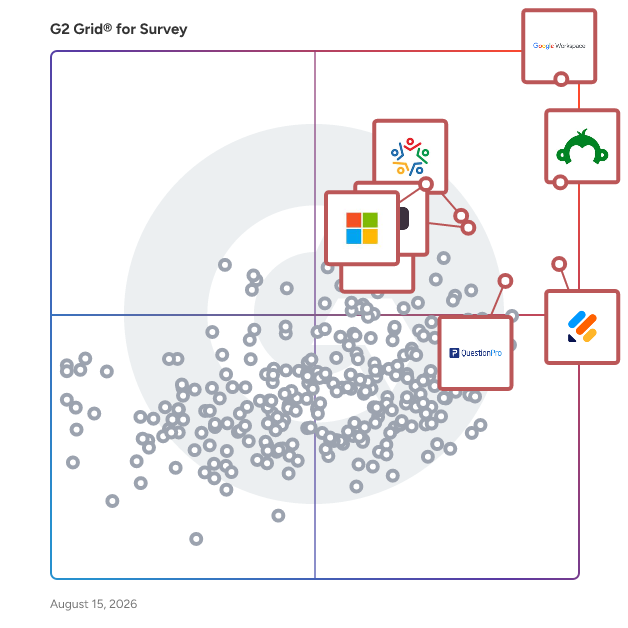
| 1 | [Google Workspace](https://www.g2.com/products/google-workspace/reviews) | 4.6/5.0 (45,558 reviews) | Real-time team survey and document collaboration | "[All-in-One Google Workspace Hub That Boosts Collaboration and Efficiency](https://www.g2.com/survey_responses/google-workspace-review-12894893)" |
| 2 | [SurveyMonkey](https://www.g2.com/products/surveymonkey/reviews) | 4.4/5.0 (23,200 reviews) | Fast survey creation and feedback reporting | "[Build with AI Makes Survey Creation Fast and Effortless](https://www.g2.com/survey_responses/surveymonkey-review-12696624)" |
| 3 | [Jotform](https://www.g2.com/products/jotform/reviews) | 4.7/5.0 (4,920 reviews) | Flexible forms with payments and workflows | "[Helpful for Multiple Registration in One Form](https://www.g2.com/survey_responses/jotform-review-12892930)" |
| 4 | [Microsoft Forms](https://www.g2.com/products/microsoft-forms/reviews) | 4.4/5.0 (458 reviews) | Microsoft-native simple surveys and quizzes | "[Simple and Practical Tool for Managing forms, Follow ups, and Daily Information Collection](https://www.g2.com/survey_responses/microsoft-forms-review-12786461)" |
| 5 | [Zoho Survey](https://www.g2.com/products/zoho-survey/reviews) | 4.4/5.0 (990 reviews) | CRM-connected customer feedback surveys | "[Straightforward Survey Creation with Handy Zoho Integrations](https://www.g2.com/survey_responses/zoho-survey-review-12867660)" |
| 6 | [Typeform](https://www.g2.com/products/typeform/reviews) | 4.5/5.0 (975 reviews) | Interactive lead and feedback forms | "[Flexible, Easy-to-Use, Robust, and Fits the Budget](https://www.g2.com/survey_responses/typeform-review-12873950)" |
| 7 | [Microsoft 365](https://www.g2.com/products/microsoft365/reviews) | 4.6/5.0 (5,510 reviews) | Suite-based survey and file workflows | "[Microsoft 365: An All-in-One Platform for Reliable Collaboration and Productivity](https://www.g2.com/survey_responses/microsoft-365-review-12849292)" |
| 8 | [QuestionPro](https://www.g2.com/products/questionpro/reviews) | 4.5/5.0 (1,129 reviews) | Advanced research surveys with branching | "[Reliable, Easy-to-Navigate Survey Platform with Strong Integrations and Helpful Insights](https://www.g2.com/survey_responses/questionpro-review-12814777)" |
| 9 | [Constant Contact](https://www.g2.com/products/constant-contact/reviews) | 4.1/5.0 (7,207 reviews) | Email campaigns with embedded feedback collection | "[Reliable Email Marketing and Audience Management in One Platform](https://www.g2.com/survey_responses/constant-contact-review-12867593)" |
| 10 | [Qualtrics Strategy &amp; Research](https://www.g2.com/products/qualtrics-strategy-research/reviews) | 4.4/5.0 (2,911 reviews) | Research-grade experience feedback analysis | "[Very useful for Wellness Surveys, Feedback Collection and Research Work](https://www.g2.com/survey_responses/qualtrics-strategy-research-review-12806991)" |

  
## Which Survey Software Is Best for Your Use Case?

- **Leader:** [Google Workspace](https://www.g2.com/products/google-workspace/reviews)
- **Highest Performer:** [Leapsome](https://www.g2.com/products/leapsome/reviews)
- **Easiest to Use:** [Matter](https://www.g2.com/products/matter-app/reviews)
- **Top Trending:** [Tally](https://www.g2.com/products/tally-forms-tally/reviews)
- **Best Free Software:** [SurveyMonkey](https://www.g2.com/products/surveymonkey/reviews)

  
## Which Type of Survey Software Tools Are You Looking For?
  - [Survey Software](https://www.g2.com/categories/survey) *(current)*
  - [Employee Engagement Software](https://www.g2.com/categories/employee-engagement)
  - [Online Form Builder Software](https://www.g2.com/categories/online-form-builder)
  - [User Research Tools](https://www.g2.com/categories/user-research)

  
---

**Sponsored**

### Alchemer Survey

Alchemer Survey is a professional survey platform that helps organizations collect feedback, analyze results, and turn insights into action across customer experience, employee engagement, and market research programs. Designed for teams that need more power and flexibility than basic survey tools — without the complexity of enterprise research platforms — Alchemer Survey scales from a single project to organization-wide feedback programs. What is Alchemer Survey used for? Alchemer Survey is used to run customer satisfaction (CSAT) surveys, Net Promoter Score (NPS) programs, market research studies, employee engagement surveys, product feedback loops, and academic or organizational research. It supports both one-off surveys and ongoing, multi-wave feedback programs across industries including technology, healthcare, education, financial services, and retail. Who is Alchemer Survey for? Alchemer Survey is built for researchers, CX professionals, HR teams, marketers, and product managers who need advanced survey logic and reporting without requiring dedicated IT or data science support. It serves organizations of all sizes — from small teams running targeted studies to enterprises managing global, multi-language feedback programs. Key capabilities: - Advanced survey building with branching logic, piping, randomization, and skip patterns — enabling highly tailored respondent experiences - Pre-built templates for common use cases alongside full custom-build options, so teams can launch fast or go deep - Omnichannel distribution via email, web, SMS, embedded links, QR codes, and social media — maximizing reach and response rates - Real-time reporting and analytics with live dashboards, response filtering, cross-tabulation, and exportable reports for easy stakeholder sharing - Multi-language support for global research programs, with role-based permissions to manage access and data governance at scale - Scalable architecture that grows with organizational needs — from a single survey to enterprise-wide feedback operations How does Alchemer Survey compare to other survey platforms? Alchemer Survey sits between simple tools like SurveyMonkey and Google Forms and enterprise platforms like Qualtrics. It offers research-grade features — advanced logic, robust reporting, and flexible distribution — at a price point and implementation complexity accessible to mid-market teams. Organizations that have outgrown basic tools but don&#39;t need (or want to pay for) a full enterprise suite consistently cite Alchemer Survey as a preferred alternative. Bottom line: Alchemer Survey gives organizations the tools to ask smarter questions, reach the right audiences, and act on what they learn — whether running a quick pulse survey or a comprehensive global research program.


[Visit website](https://www.g2.com/external_clickthroughs/record?secure%5Bad_program%5D=ppc&amp;secure%5Bad_slot%5D=category_product_list&amp;secure%5Bcategory_id%5D=28&amp;secure%5Bdisplayable_resource_id%5D=28&amp;secure%5Bdisplayable_resource_type%5D=Category&amp;secure%5Bmedium%5D=sponsored&amp;secure%5Bplacement_reason%5D=page_category&amp;secure%5Bplacement_resource_ids%5D%5B%5D=28&amp;secure%5Bprioritized%5D=false&amp;secure%5Bproduct_id%5D=1627&amp;secure%5Bresource_id%5D=28&amp;secure%5Bresource_type%5D=Category&amp;secure%5Bsource_type%5D=category_page&amp;secure%5Bsource_url%5D=https%3A%2F%2Fwww.g2.com%2Fcategories%2Fsurvey%3Fpage%3D13&amp;secure%5Btoken%5D=8a936ac912e43b22511f018947348f60ffb44a21288d49d2345b6b24216e702c&amp;secure%5Burl%5D=https%3A%2F%2Fwww.alchemer.com%2Fl%2Falchemer-survey-g2-ppc%2F&amp;secure%5Burl_type%5D=book_demo)

---

  
## Buyer Guide: Key Questions for Choosing Survey Software Software
  ### What does Survey Software do?
  When I explain survey software, I frame it as a system that helps teams collect feedback from question creation through response analysis. These platforms bring survey building, templates, branding, question logic, distribution links, embedded forms, dashboards, and reports into one workflow. Instead of collecting feedback through scattered forms, emails, or manual tracking, teams can create cleaner respondent experiences, gather responses faster, and turn feedback from customers, employees, students, or researchers into usable data.


  ### Who uses Survey Software primarily?
  After I evaluated G2 reviewer roles and job titles, I found that Survey Software serves many teams:

- **Marketing teams** gather customer feedback, campaign input, and audience insights.
- **Product teams** collect user opinions and feature feedback.
- **HR teams** run employee engagement and satisfaction surveys.
- **Educational users** create quizzes, classroom forms, and academic feedback.
- **Researchers and consultants** conduct market, client, and field studies.
- **Administrators** manage templates, permissions, workflows, and integrations.
- **Business owners** use results to guide decisions.


  ### Why do businesses use Survey Software?
  From the G2 reviewer patterns I evaluated, businesses use Survey Software because feedback work becomes difficult when teams rely on manual forms, scattered responses, or slow reporting. Users mention the need to gather opinions quickly, measure satisfaction, support research, and make decisions from structured response data.

Common benefits include:

- Faster survey creation through templates and intuitive builders.
- Easier feedback collection across email, websites, mobile, and shared links.
- Better analysis through dashboards, summaries, and responses.
- Stronger collaboration for teams that create and review surveys.
- More consistent customer, employee, event, and research programs.


  ### What types of Survey Software should I consider?
  From G2 reviewer descriptions, buyers should compare several product types:

- **General survey builders** for quick questionnaires and feedback collection.
- **Form-first platforms** for registrations, intake, payments, and operational data capture.
- **Research-focused tools** for panels, advanced question logic, and analysis.
- **Employee feedback platforms** for engagement, pulse surveys, and internal programs.
- **Event and education tools** for live polling, quizzes, and participation.
- **Field data tools** for mobile, offline, and geospatial collection needs.


  ### What are the core features to look for in Survey Software?
  When I break down G2 reviews for this category, I look closely at the themes users repeatedly mention:

- Flexible question types, branching, and conditional logic that help create more relevant respondent experiences.
- Custom branding, themes, and layout controls that help surveys feel polished and consistent with the organization&#39;s brand.
- Dashboards, response summaries, and reporting tools that help teams understand feedback and share results more easily.
- Integrations with productivity, CRM, marketing, and automation systems that help connect survey data to daily workflows.
- Collaboration, sharing, permissions, and team management that help multiple stakeholders review, edit, and manage surveys together.
- Mobile-friendly forms and dependable respondent access that help people complete surveys from different devices and locations.
- Support resources for setup and survey design issues that help teams launch surveys with fewer delays.


  ### What trends are shaping Survey Software right now?
  From the G2 review patterns I evaluated, several trends stand out:

- **AI-assisted survey building** is speeding up question creation, survey design, and response summarization.
- **Respondent experience** is becoming a stronger priority as teams look for cleaner layouts, easier navigation, and higher completion rates.
- **Advanced logic and personalization** are making surveys more targeted based on respondent answers, segments, or use cases.
- **Workflow integrations** are connecting survey data with CRM, marketing, productivity, and automation systems.
- **Mobile and offline collection** is expanding survey use cases for field teams, events, research, and operational feedback.
- **Real-time reporting** is helping teams interpret responses faster and act on feedback sooner.


  ### How should I choose Survey Software?
  For me, the strongest Survey Software fit depends on audience, survey complexity, reporting needs, and connected workflows. I would prioritize products reviewers praise for ease of use, customization, dependable collection, useful reporting, and responsive support. I would also examine concerns around learning curve, advanced logic, plan limits, mobile depth, and integration quality before making a final choice.


---

  ## What Are the Top-Rated Survey Software Products in 2026?
### 1. [Google Workspace](https://www.g2.com/products/google-workspace/reviews)
  **Average Rating:** 4.6/5.0
  **Total Reviews:** 45,558
  **Why buyers love it?:** When I assessed Google Workspace’s G2 review data, the central signal was its value as a shared work hub where forms, files, email, chat, and meetings stay connected. Reviewers highlight real-time collaboration, familiar tools, easy sharing, and a single place for daily work across Docs, Sheets, Drive, Gmail, Meet, and Forms. The product reads as a practical survey option when feedback collection needs to live beside documents, classroom tasks, team communication, and lightweight analysis. Users also mention friction around shared Drive organization, file conversion, lower-tier feature limits, offline depth, and large Sheets workloads.


### What Do G2 Reviewers Say About Google Workspace?
*AI-generated summary from verified user reviews*

**Pros:**

- Users appreciate the **ease of use** of Google Workspace, making collaboration and communication seamless and intuitive.
- Users love the **seamless collaboration** in Google Workspace, enhancing teamwork with easy communication and intuitive tools.
- Users value the **easy collaboration** features of Google Workspace, enhancing team efficiency and communication in real-time.
- Users value the **seamless integration** of Google Workspace with existing tools, enhancing collaboration and productivity.
- Users appreciate the **seamless integration** of email, documents, and collaboration in Google Workspace, enhancing productivity.

**Cons:**

- Users find the **missing features** in Google Workspace lacking, particularly in version history and CRM capabilities.
- Users experience **limited features** in Google Workspace, wishing for more effective tools and improved capabilities.
- Users find Google Workspace **lacking features** compared to Office 365, especially in CRM and advanced reporting capabilities.
- Users note **limited storage** can complicate file organization and accessibility, especially with numerous documents and collaborators.
- Users experience **internet dependency** issues with Google Workspace, noting limitations in offline functionality and connection-related quality drops.
  #### What Are Recent G2 Reviews of Google Workspace?

**"[Google Workspace Keeps Communication, Collaboration, and Files Seamlessly in One Place](https://www.g2.com/survey_responses/google-workspace-review-12879543)"**

**Rating:** 4.5/5.0 stars
*— Ram K.*

[Read full review](https://www.g2.com/survey_responses/google-workspace-review-12879543)

---

**"[All-in-One Google Workspace Hub That Boosts Collaboration and Efficiency](https://www.g2.com/survey_responses/google-workspace-review-12894893)"**

**Rating:** 5.0/5.0 stars
*— Charan B.*

[Read full review](https://www.g2.com/survey_responses/google-workspace-review-12894893)

---

  #### What Are G2 Users Discussing About Google Workspace?

- [What tips do you have for effectively using Google Meet’s advanced features for large virtual meetings?](https://www.g2.com/discussions/what-tips-do-you-have-for-effectively-using-google-meet-s-advanced-features-for-large-virtual-meetings) - 16 comments, 10 upvotes
- [What is Google Surveys used for?](https://www.g2.com/discussions/what-is-google-surveys-used-for) - 8 comments, 2 upvotes
- [What does G Suite do?](https://www.g2.com/discussions/what-does-g-suite-do) - 8 comments, 5 upvotes
### 2. [SurveyMonkey](https://www.g2.com/products/surveymonkey/reviews)
  **Average Rating:** 4.4/5.0
  **Total Reviews:** 23,200
  **Why buyers love it?:** Across SurveyMonkey’s G2 reviews, I found a clear emphasis on speed and approachability for survey creation. Reviewers highlight templates, easy setup, simple distribution, real-time analytics, visual reports, and AI-assisted summarization that help teams collect feedback with less manual work. I read the product as a strong fit for routine customer, employee, education, and market feedback where teams need structured responses and quick insight. Users also mention price sensitivity, distribution constraints, branding limits, and reporting flexibility as areas that can affect more advanced programs.


### What Do G2 Reviewers Say About SurveyMonkey?
*AI-generated summary from verified user reviews*

**Pros:**

- Users value the **ease of use** of SurveyMonkey, facilitating effortless survey creation and response collection.
- Users love the **ease of creation** with SurveyMonkey, allowing for fast and user-friendly survey development.
- Users find SurveyMonkey to be **intuitive** , making it easy to gather and analyze customer feedback effectively.
- Users love the **simplicity and efficiency** of SurveyMonkey, making survey creation and analysis quick and easy.
- Users appreciate the **ease of use** of SurveyMonkey, making feedback collection and analysis straightforward and efficient.

**Cons:**

- Users find SurveyMonkey **too expensive** , especially for limited features in the free plan and high customization costs.
- Users note the **significant limitations** of SurveyMonkey&#39;s free plan, often feeling pressured to pay for more features.
- Users face **survey issues** such as limited customization, slow mobile editing, and inadequate customer support options.
- Users find that **limited features** in lower-tier plans restrict access to essential tools and customization options.
- Users find the **limited customization** options in SurveyMonkey restrict creative control over formatting and design elements.

#### Key Features
  - Customer Service Channels
  - Survey Builder
  - Branding
  - Reporting &amp; Analytics
  - Conditional Logic
  #### What Are Recent G2 Reviews of SurveyMonkey?

**"[Build with AI Makes Survey Creation Fast and Effortless](https://www.g2.com/survey_responses/surveymonkey-review-12696624)"**

**Rating:** 4.5/5.0 stars
*— Chandra K.*

[Read full review](https://www.g2.com/survey_responses/surveymonkey-review-12696624)

---

**"[Fast Idea-to-Live Surveys with Smart Logic Branching](https://www.g2.com/survey_responses/surveymonkey-review-12831740)"**

**Rating:** 4.5/5.0 stars
*— Felipe C.*

[Read full review](https://www.g2.com/survey_responses/surveymonkey-review-12831740)

---

  #### What Are G2 Users Discussing About SurveyMonkey?

- [What is SurveyMonkey used for?](https://www.g2.com/discussions/what-is-surveymonkey-used-for) - 6 comments
- [What is SurveyMonkey Market Research Solutions used for?](https://www.g2.com/discussions/what-is-surveymonkey-market-research-solutions-used-for) - 3 comments, 2 upvotes
- [What is SurveyMonkey?](https://www.g2.com/discussions/what-is-surveymonkey) - 2 comments, 1 upvote
### 3. [Jotform](https://www.g2.com/products/jotform/reviews)
  **Average Rating:** 4.7/5.0
  **Total Reviews:** 4,920
  **Why buyers love it?:** My read of Jotform’s G2 feedback centered on form creation that extends beyond surveys into data capture, approvals, and payments. Reviewers highlight drag-and-drop setup, templates, field options, AI-assisted form creation, integrations, exports, and the ability to manage customer or internal information in one place. I found the product valuable when teams need surveys, registrations, service requests, subscriptions, and payment collection in the same form-building environment. Users also mention submission limits, free-plan constraints, advanced feature complexity, integration friction, and occasional issues with AI-assisted edits.


### What Do G2 Reviewers Say About Jotform?
*AI-generated summary from verified user reviews*

**Pros:**

- Users love the **ease of use** of Jotform, finding it perfect for creating varied and functional forms effortlessly.
- Users appreciate Jotform for its **ease of use** and effective collection of client information, enhancing business professionalism.
- Users love the **ease of creation** with Jotform, finding it straightforward and efficient for form setup.
- Users praise Jotform for its **user-friendly design** , enabling quick and easy form creation for various needs.
- Users appreciate the **flexibility and creativity** of Jotform, enabling tailored forms and efficient task management.

**Cons:**

- Users find Jotform&#39;s pricing **too expensive** , especially when opting for monthly plans during tight financial periods.
- Users find **missing features** in Jotform, particularly with integration and customization options for forms.
- Users report **form issues** such as navigation difficulties and sizing problems, hindering the overall user experience.
- Users find **limited customization** options in Jotform, making it challenging to integrate personal branding effectively.
- Users find that **form design options are limited** , making it difficult to create visually engaging forms easily.

#### Key Features
  - Integration APIs
  - Candidate Search
  - Candidate Evaluations
  - Survey Customization
  - Goal and Challenge Creation
  #### What Are Recent G2 Reviews of Jotform?

**"[Helpful for Multiple Registration in One Form](https://www.g2.com/survey_responses/jotform-review-12892930)"**

**Rating:** 4.5/5.0 stars
*— Tara L.*

[Read full review](https://www.g2.com/survey_responses/jotform-review-12892930)

---

**"[Streamlined Event Registration &amp; Data Management](https://www.g2.com/survey_responses/jotform-review-12884440)"**

**Rating:** 5.0/5.0 stars
*— Katherine M.*

[Read full review](https://www.g2.com/survey_responses/jotform-review-12884440)

---

  #### What Are G2 Users Discussing About Jotform?

- [What innovative uses of Jotform are seen in data collection and management across various sectors?](https://www.g2.com/discussions/what-innovative-uses-of-jotform-are-seen-in-data-collection-and-management-across-various-sectors) - 1 upvote
- [What is Jotform used for?](https://www.g2.com/discussions/jotform-what-is-jotform-used-for) - 4 comments, 2 upvotes
- [Who uses JotForm?](https://www.g2.com/discussions/who-uses-jotform)
### 4. [Microsoft Forms](https://www.g2.com/products/microsoft-forms/reviews)
  **Average Rating:** 4.4/5.0
  **Total Reviews:** 458
  **Why buyers love it?:** Microsoft Forms showed me a consistent pattern in the review data: simple feedback collection inside an existing Microsoft environment. Reviewers highlight a clean form builder, fast sharing, real-time responses, automatic charts, multilingual support, notifications, and Microsoft suite integration. I read the product as a fit for teams that need quick surveys, quizzes, registrations, and feedback forms without a separate specialized survey stack. Users also mention limited design control, basic branding options, restricted question types, and less depth for complex survey logic.


### What Do G2 Reviewers Say About Microsoft Forms?
*AI-generated summary from verified user reviews*

**Pros:**

- Users love the **ease of use** of Microsoft Forms, making feedback collection and questionnaire creation effortless.
- Users value the **ease of creation** in Microsoft Forms, appreciating its intuitive interface and quick response collection.
- Users find that Microsoft Forms offers **seamless integrations** with Microsoft tools, enhancing collaboration and data management.
- Users love the **intuitive design** of Microsoft Forms, making data collection and survey creation effortless and straightforward.
- Users appreciate the **ease of use and accessibility** of Microsoft Forms, facilitating quick edits and efficient feedback gathering.

**Cons:**

- Users find **limited customization** frustrating, resulting in generic forms and restrictive sharing options that hinder creativity.
- Users find Microsoft Forms has **missing features** , limiting customization options and overall functionality compared to competitors.
- Users are frustrated by the **limited features** of Microsoft Forms, hindering customization and advanced functionality.
- Users express concerns about **poor design** in Microsoft Forms, citing limited customization and confusing updates.
- Users express frustration with the **limited integrations** of Microsoft Forms, especially regarding non-Microsoft applications.

#### Key Features
  - Survey Builder
  - Branching/Skip Logic
  - BI Tools Integration
  - Conditional Logic
  - Embedded Forms
  #### What Are Recent G2 Reviews of Microsoft Forms?

**"[Simple and Practical Tool for Managing forms, Follow ups, and Daily Information Collection](https://www.g2.com/survey_responses/microsoft-forms-review-12786461)"**

**Rating:** 4.5/5.0 stars
*— Ishan S.*

[Read full review](https://www.g2.com/survey_responses/microsoft-forms-review-12786461)

---

**"[Simple and Efficient Tool for Surveys and Academic Forms](https://www.g2.com/survey_responses/microsoft-forms-review-12839124)"**

**Rating:** 5.0/5.0 stars
*— Dr. Shalini P.*

[Read full review](https://www.g2.com/survey_responses/microsoft-forms-review-12839124)

---

  #### What Are G2 Users Discussing About Microsoft Forms?

- [What is Microsoft Forms used for?](https://www.g2.com/discussions/what-is-microsoft-forms-used-for) - 2 comments
- [Is Microsoft form free?](https://www.g2.com/discussions/is-microsoft-form-free) - 2 comments
- [Is Microsoft Forms good?](https://www.g2.com/discussions/is-microsoft-forms-good) - 2 comments
### 5. [Zoho Survey](https://www.g2.com/products/zoho-survey/reviews)
  **Average Rating:** 4.4/5.0
  **Total Reviews:** 990
  **Why buyers love it?:** Zoho Survey’s review data pointed me toward a straightforward tool for building and distributing feedback forms with minimal ramp time. Reviewers highlight drag-and-drop survey creation, question flexibility, logic, theme customization, real-time reports, email or SMS distribution, and connections to Zoho CRM and other tools. I found the product useful for customer feedback programs that need survey data tied back to sales or service context. Users also mention advanced feature limits, paid-plan requirements, support response concerns, and some integration or customization challenges.


### What Do G2 Reviewers Say About Zoho Survey?
*AI-generated summary from verified user reviews*

**Pros:**

- Users value the **intuitive ease of use** of Zoho Survey, facilitating quick and flexible survey building.
- Users love the **easy, intuitive survey creation** in Zoho Survey, enabling quick and professional survey setup.
- Users value the **intuitive design** of Zoho Survey, facilitating quick and effective survey creation with powerful insights.
- Users find the **simplicity and user-friendliness** of Zoho Survey ideal for creating and managing surveys efficiently.
- Users find Zoho Survey **extremely helpful** for collecting data with versatile features and excellent support options.

**Cons:**

- Users find that the **customization options** in Zoho Survey are limited, restricting design flexibility and advanced features.
- Users find the **user interface lacking** , with a need for modernization and improved functionality across the platform.
- Users are frustrated by the **limited features** in Zoho Survey, particularly in the free version and design options.
- Users find **limited data analysis capabilities** in Zoho Survey, needing richer analytics and broader third-party integrations.
- Users find the **outdated design** of Zoho Survey limits aesthetics and modern usability in surveys.

#### Key Features
  - Survey Builder
  - Branching/Skip Logic
  - Reporting &amp; Analytics
  - Adaptive Learning
  #### What Are Recent G2 Reviews of Zoho Survey?

**"[Straightforward Survey Creation with Handy Zoho Integrations](https://www.g2.com/survey_responses/zoho-survey-review-12867660)"**

**Rating:** 4.5/5.0 stars
*— Himanshu J.*

[Read full review](https://www.g2.com/survey_responses/zoho-survey-review-12867660)

---

**"[Reliable, Feature-Rich Surveys with Templates, AI Form Creation, and Zoho Integration](https://www.g2.com/survey_responses/zoho-survey-review-12865329)"**

**Rating:** 4.5/5.0 stars
*— Konjengbam  M.*

[Read full review](https://www.g2.com/survey_responses/zoho-survey-review-12865329)

---

  #### What Are G2 Users Discussing About Zoho Survey?

- [What is Zoho Survey used for?](https://www.g2.com/discussions/what-is-zoho-survey-used-for) - 4 comments, 1 upvote
- [What are the features of survey?](https://www.g2.com/discussions/zoho-survey-what-are-the-features-of-survey)
- [Is Zoho survey legit?](https://www.g2.com/discussions/is-zoho-survey-legit) - 2 comments, 1 upvote
### 6. [Typeform](https://www.g2.com/products/typeform/reviews)
  **Average Rating:** 4.5/5.0
  **Total Reviews:** 975
  **Why buyers love it?:** In Typeform’s G2 feedback, I saw the strongest signal around polished, interactive forms that feel easy for respondents to complete. Reviewers highlight quick survey setup, mobile-first form design, routing logic, localization, custom variables, integrations with marketing and CRM tools, and AI-assisted creation. I read the product as useful for lead qualification, event feedback, customer satisfaction, and quizzes where presentation quality and response flow matter. Users also mention higher-plan feature access, limited pop-up customization, response organization effort, load delays, and cost concerns.


### What Do G2 Reviewers Say About Typeform?
*AI-generated summary from verified user reviews*

**Pros:**

- Users appreciate the **ease of use** in Typeform, allowing for seamless creation of engaging and professional forms.
- Users love Typeform&#39;s **intuitive design** , making surveys feel conversational and engaging while ensuring ease of use.
- Users love the **engaging one-question-at-a-time format** of Typeform, making surveys feel like conversations instead of chores.
- Users value the **seamless integrations** of Typeform, enhancing workflow efficiency with tools like Slack and Google Sheets.
- Users love the **ease of creation** with Typeform, finding it an ideal tool for generating and qualifying leads.

**Cons:**

- Users find Typeform **too expensive** , with many essential features restricted by high paywalls and low submission limits.
- Users find the **limited customization** options require significant time investment to achieve a professional appearance for their forms.
- Users find the **limited features** in Typeform restrict their customization options and can incur additional costs as they scale.
- Users are frustrated by **missing features** , requiring upgrades for essential tools and insights that should be included.
- Users face **integration issues** with Typeform, particularly regarding limited CRM connections and cumbersome response exports.

#### Key Features
  - Features
  - Mobile
  - Forms
  - Question Types
  - Branching/Skip Logic
  #### What Are Recent G2 Reviews of Typeform?

**"[Flexible, Easy-to-Use, Robust, and Fits the Budget](https://www.g2.com/survey_responses/typeform-review-12873950)"**

**Rating:** 4.5/5.0 stars
*— Dustin F.*

[Read full review](https://www.g2.com/survey_responses/typeform-review-12873950)

---

**"[imple and Professional Platform for Forms and Data Collection](https://www.g2.com/survey_responses/typeform-review-12799700)"**

**Rating:** 5.0/5.0 stars
*— Ishan S.*

[Read full review](https://www.g2.com/survey_responses/typeform-review-12799700)

---

  #### What Are G2 Users Discussing About Typeform?

- [What is Typeform used for?](https://www.g2.com/discussions/typeform-what-is-typeform-used-for) - 1 comment
- [Is Typeform secure?](https://www.g2.com/discussions/is-typeform-secure) - 1 comment
- [What is included in Typeform free plan?](https://www.g2.com/discussions/what-is-included-in-typeform-free-plan) - 1 comment
### 7. [Microsoft 365](https://www.g2.com/products/microsoft365/reviews)
  **Average Rating:** 4.6/5.0
  **Total Reviews:** 5,510
  **Why buyers love it?:** When I evaluated Microsoft 365’s review data, the clearest theme was productivity breadth rather than standalone survey depth. Reviewers highlight familiar Office apps, OneDrive file access, real-time sync, Forms, Teams, Outlook, Power BI, and Copilot-supported work across communication and reporting. I saw the survey fit where feedback collection is part of a broader Microsoft-based workflow that also needs documents, email, storage, and analysis. Users also mention subscription cost, layout changes, feature volume, internet dependency, and system heaviness as factors that can slow adoption.


### What Do G2 Reviewers Say About Microsoft 365?
*AI-generated summary from verified user reviews*

**Pros:**

- Users appreciate the **ease of use** of Microsoft 365, enabling seamless collaboration and access across devices.
- Users appreciate the **seamless team collaboration** of Microsoft 365, enhancing productivity and communication through integrated tools.
- Users love the **seamless integration with Microsoft apps** , making content accessible from anywhere and enhancing productivity.
- Users appreciate the **seamless integrations** of Microsoft 365, enhancing accessibility and collaboration across apps.
- Users value the **seamless integration** of Microsoft 365, enhancing collaboration and accessibility across all applications.

**Cons:**

- Users consider Microsoft 365 **expensive** compared to free alternatives, with limited choice for budget-friendly options.
- Users are frustrated by **missing features** in Microsoft 365, with updates disrupting workflows and essential tools locked behind higher plans.
- Users find the **learning curve steep** for Microsoft 365, making it challenging for non-technical individuals to adapt.
- Users find Microsoft 365 **lacking features** due to frequent updates and limitations in lower-priced plans for small teams.
- Users find Microsoft 365 has **limited features** that frustrate them, especially with costly plans and poor updates.
  #### What Are Recent G2 Reviews of Microsoft 365?

**"[Microsoft 365: An All-in-One Platform for Reliable Collaboration and Productivity](https://www.g2.com/survey_responses/microsoft-365-review-12849292)"**

**Rating:** 5.0/5.0 stars
*— Diksha D.*

[Read full review](https://www.g2.com/survey_responses/microsoft-365-review-12849292)

---

**"[All-in-One Office Ecosystem with Reliable Apps and Seamless Collaboration](https://www.g2.com/survey_responses/microsoft-365-review-12834956)"**

**Rating:** 5.0/5.0 stars
*— Megh P.*

[Read full review](https://www.g2.com/survey_responses/microsoft-365-review-12834956)

---

  #### What Are G2 Users Discussing About Microsoft 365?

- [What are the uses of Microsoft software?](https://www.g2.com/discussions/what-are-the-uses-of-microsoft-software) - 2 comments, 1 upvote
- [What kind of software is Microsoft Office?](https://www.g2.com/discussions/what-kind-of-software-is-microsoft-office) - 1 comment, 1 upvote
- [What programs are in Microsoft Office suite?](https://www.g2.com/discussions/what-programs-are-in-microsoft-office-suite) - 1 comment
### 8. [QuestionPro](https://www.g2.com/products/questionpro/reviews)
  **Average Rating:** 4.5/5.0
  **Total Reviews:** 1,129
  **Why buyers love it?:** QuestionPro’s G2 reviews signaled to me a platform aimed at more structured research than basic form collection. Reviewers highlight advanced survey logic, branching, panel management, file uploads, GDPR-aware data collection, analytics, reporting, security controls, and support for complex academic, healthcare, and market research needs. I read the product as a fit when teams need targeted studies with many question types, compliance considerations, and centralized insight workflows. Users also mention a busy interface, rigid chart output, niche logic setup complexity, pricing fit, and the need for guidance on advanced configurations.


### What Do G2 Reviewers Say About QuestionPro?
*AI-generated summary from verified user reviews*

**Pros:**

- Users highlight the **ease of use** of QuestionPro, making survey creation and participation simple and accessible.
- Users commend **QuestionPro&#39;s comprehensive capabilities** , robust analytics, and exceptional customer service, making it an excellent choice.
- Users highly value the **intuitive design** of QuestionPro, making it accessible and easy to navigate for everyone.
- Users value the **exceptional customer support** from QuestionPro, noting their responsiveness and helpfulness throughout the experience.
- Users appreciate the **ease of creation** with QuestionPro, allowing fast and efficient survey design and deployment.

**Cons:**

- Users find **survey limitations** problematic, as spam issues and lag hinder the overall effectiveness of QuestionPro.
- Users find the **learning curve steep** , requiring more time to master QuestionPro&#39;s extensive functionality.
- Users find QuestionPro **expensive** , as significant price increases and paywalls limit access to desirable features.
- Users express a desire for more **flexible customization** options in QuestionPro, indicating some limitations in dashboard and survey settings.
- Users find the customization and reporting features of QuestionPro to be **not intuitive** , causing frustration in navigation.

#### Key Features
  - Survey Builder
  - Branching/Skip Logic
  - Reporting &amp; Analytics
  - Adaptive Learning
  #### What Are Recent G2 Reviews of QuestionPro?

**"[It Makes Health Surveys and Feedback Work More Organized](https://www.g2.com/survey_responses/questionpro-review-12819765)"**

**Rating:** 5.0/5.0 stars
*— Ishan S.*

[Read full review](https://www.g2.com/survey_responses/questionpro-review-12819765)

---

**"[Reliable, Easy-to-Navigate Survey Platform with Strong Integrations and Helpful Insights](https://www.g2.com/survey_responses/questionpro-review-12814777)"**

**Rating:** 4.0/5.0 stars
*— Living A.*

[Read full review](https://www.g2.com/survey_responses/questionpro-review-12814777)

---

  #### What Are G2 Users Discussing About QuestionPro?

- [What is QuestionPro used for?](https://www.g2.com/discussions/what-is-questionpro-used-for) - 1 comment
### 9. [Constant Contact](https://www.g2.com/products/constant-contact/reviews)
  **Average Rating:** 4.1/5.0
  **Total Reviews:** 7,207
  **Why buyers love it?:** Constant Contact’s review data framed surveys for me as part of a broader communication and marketing workflow. Reviewers highlight email templates, campaign scheduling, list management, mobile previews, deliverability support, automation, social publishing, analytics, and survey tools that help collect feedback from an existing audience. I saw the product as useful when surveys need to connect with newsletters, clinic updates, promotions, or customer communications rather than stand alone as research instruments. Users also mention editor rigidity, slower UI moments, higher-tier feature access, segmentation limits, and cost concerns.


### What Do G2 Reviewers Say About Constant Contact?
*AI-generated summary from verified user reviews*

**Pros:**

- Users find Constant Contact&#39;s **ease of use** exceptional, enabling effortless content creation and effective customer engagement.
- Users find that Constant Contact offers **easy creation** of content through templates and simple scheduling for stress-free planning.
- Users appreciate the **ease of email management** in Constant Contact, enjoying reliable features and effective segmentation tools.
- Users praise the **simple onboarding** process with Constant Contact, making team integration quick and easy.
- Users praise Constant Contact for its **user-friendly interface** , simplifying community engagement and effective marketing efforts.

**Cons:**

- Users are frustrated by **missing features** like a better search function and slower photo uploads impacting their experience.
- Users find the **limited features** of Constant Contact restrict flexibility and complicate the newsletter design process.
- Users find the **limited customization options** in Constant Contact frustrating, hindering their desired layouts and designs.
- Users express frustration with the **limited templates** in Constant Contact, desiring more creative design options.
- Users find **layout issues** in Constant Contact can hinder desired flexibility and create a cumbersome design experience.

#### Key Features
  - CRM Integration
  - Email and Mobile Preview
  - Social Functionality
  - Rich Media Capabilties
  - Performance and Reliability
  #### What Are Recent G2 Reviews of Constant Contact?

**"[Reliable Email Marketing and Audience Management in One Platform](https://www.g2.com/survey_responses/constant-contact-review-12867593)"**

**Rating:** 4.5/5.0 stars
*— VINAY P.*

[Read full review](https://www.g2.com/survey_responses/constant-contact-review-12867593)

---

**"[Flexible Email Templates and Insightful Reporting in Constant Contact](https://www.g2.com/survey_responses/constant-contact-review-12837182)"**

**Rating:** 4.5/5.0 stars
*— Olga Z.*

[Read full review](https://www.g2.com/survey_responses/constant-contact-review-12837182)

---

  #### What Are G2 Users Discussing About Constant Contact?

- [How are small businesses using Constant Contact to enhance their email marketing campaigns effectively?](https://www.g2.com/discussions/how-are-small-businesses-using-constant-contact-to-enhance-their-email-marketing-campaigns-effectively) - 3 comments
- [What is Constant Contact used for?](https://www.g2.com/discussions/constant-contact-what-is-constant-contact-used-for) - 4 comments, 1 upvote
- [Does Constant Contact have a CRM?](https://www.g2.com/discussions/does-constant-contact-have-a-crm) - 2 comments
### 10. [Qualtrics Strategy &amp; Research](https://www.g2.com/products/qualtrics-strategy-research/reviews)
  **Average Rating:** 4.4/5.0
  **Total Reviews:** 2,911
  **Why buyers love it?:** Qualtrics Strategy &amp; Research stood out to me in the review data for flexible survey design paired with deeper analysis. Reviewers highlight advanced analytics, survey logic, automation, trigger-based workflows, AI sentiment analysis, dashboards, and the ability to collect experience data across customer, product, and research programs. I read the product as a fit for teams that need systematic feedback capture and insight development for strategic decisions. Users also mention dashboard navigation friction, feature complexity, training needs, advanced module cost, and occasional limits in chart refinement.


### What Do G2 Reviewers Say About Qualtrics Strategy &amp; Research?
*AI-generated summary from verified user reviews*

**Pros:**

- Users appreciate the **ease of use** of Qualtrics, finding it simple to create and manage surveys effortlessly.
- Users value the **ease of creating sophisticated surveys** with Qualtrics, enjoying its versatile and scalable features.
- Users appreciate the **robust features** of Qualtrics, enabling sophisticated surveys and seamless data management for various projects.
- Users find the **intuitive interface** of Qualtrics Strategy &amp; Research simplifies survey creation and data analysis effortlessly.
- Users appreciate the **ease of creation** with Qualtrics, enjoying a user-friendly interface for building surveys effortlessly.

**Cons:**

- Users express frustration over **survey collaboration limitations** , making it difficult to manage and share survey access effectively.
- Users note the **international survey capacity limitations** of Qualtrics, seeking more advanced templates and design support.
- Users find the **steep learning curve** of Qualtrics Strategy &amp; Research makes survey design challenging and unintuitive.
- Users find the **limited customization** options frustrating, particularly regarding advanced analytics and survey appearances.
- Users express concerns about **pricing issues** , citing high costs and limited discounts for non-profits.

#### Key Features
  - Survey
  - Survey Builder
  - Branching/Skip Logic
  - Reporting &amp; Analytics
  - Comparison
  #### What Are Recent G2 Reviews of Qualtrics Strategy &amp; Research?

**"[Very useful for Wellness Surveys, Feedback Collection and Research Work](https://www.g2.com/survey_responses/qualtrics-strategy-research-review-12806991)"**

**Rating:** 5.0/5.0 stars
*— Ishan S.*

[Read full review](https://www.g2.com/survey_responses/qualtrics-strategy-research-review-12806991)

---

**"[Intuitive Surveys, Results can be difficult to view](https://www.g2.com/survey_responses/qualtrics-strategy-research-review-12705973)"**

**Rating:** 4.0/5.0 stars
*— Emily H.*

[Read full review](https://www.g2.com/survey_responses/qualtrics-strategy-research-review-12705973)

---

  #### What Are G2 Users Discussing About Qualtrics Strategy &amp; Research?

- [How are organizations utilizing Qualtrics CoreXM to gather and analyze customer experience data?](https://www.g2.com/discussions/how-are-organizations-utilizing-qualtrics-corexm-to-gather-and-analyze-customer-experience-data) - 1 comment
- [What is Qualtrics CoreXM used for?](https://www.g2.com/discussions/what-is-qualtrics-corexm-used-for) - 2 comments, 2 upvotes
- [Is qualtrics better than SurveyMonkey?](https://www.g2.com/discussions/is-qualtrics-better-than-surveymonkey) - 3 comments, 1 upvote
### 11. [Leapsome](https://www.g2.com/products/leapsome/reviews)
  **Average Rating:** 4.8/5.0
  **Total Reviews:** 2,372
  **Why buyers love it?:** Leapsome’s G2 reviews pointed me to survey use inside a broader people-management workflow. Reviewers highlight ease of use, clean dashboards, anonymous internal surveys, peer and self reviews, praise, feedback, task visibility, and simple forms for company communication. I saw the product as useful when survey feedback connects directly to performance cycles, employee engagement, and internal development processes. Users also mention difficulty finding specific tabs, notification issues, limited customization, LMS gaps, and an initial sense of platform complexity for new users.


### What Do G2 Reviewers Say About Leapsome?
*AI-generated summary from verified user reviews*

**Pros:**

- Users love the **ease of use** of Leapsome, enjoying its intuitive design that simplifies feedback and performance management.
- Users appreciate the **helpful features** of Leapsome, enhancing transparency and simplifying feedback and task management.
- Users appreciate the **intuitive interface** of Leapsome, making navigation and performance management seamless and efficient.
- Users find Leapsome **user-friendly and intuitive** , making career growth setup and goal tracking effortless and efficient.
- Users appreciate the **seamless integration of performance reviews and feedback** , enhancing efficiency and engagement across teams.

**Cons:**

- Users find the **missing features** in Leapsome, particularly with integration and navigation, impacting usability and functionality.
- Users find the **learning curve steep** , particularly due to confusing setup and inadequate education on using modules.
- Users experience **navigation difficulty** with Leapsome, finding the interface complicated when accessing various modules.
- Users find the platform **not intuitive** , facing challenges with the learning curve and unclear menu navigation.
- Users note **feedback issues** with lengthy overlays and rigid notifications, affecting usability and clarity in Leapsome.

#### Key Features
  - Performance
  - Reporting &amp; Dashboards
  - Content Delivery and Tracking
  - Confidence Levels
  - Action Item Creation
  #### What Are Recent G2 Reviews of Leapsome?

**"[Intuitive, Highly Customizable Performance Management with Excellent Onboarding](https://www.g2.com/survey_responses/leapsome-review-12879512)"**

**Rating:** 5.0/5.0 stars
*— Jelena K.*

[Read full review](https://www.g2.com/survey_responses/leapsome-review-12879512)

---

**"[Premium People Enablement Platform with Clean UI, Solid Integrations, and Stellar Support](https://www.g2.com/survey_responses/leapsome-review-12876538)"**

**Rating:** 5.0/5.0 stars
*— Gibson C.*

[Read full review](https://www.g2.com/survey_responses/leapsome-review-12876538)

---

  #### What Are G2 Users Discussing About Leapsome?

- [I&#39;m having difficulty setting up performance reviews in Leapsome. Any tips for a new user?](https://www.g2.com/discussions/i-m-having-difficulty-setting-up-performance-reviews-in-leapsome-any-tips-for-a-new-user)
### 12. [G2 Marketing Solutions](https://www.g2.com/products/g2/reviews)
  **Average Rating:** 4.6/5.0
  **Total Reviews:** 5,281
  **Why buyers love it?:** For G2 Marketing Solutions, I saw the review data emphasize ease of participation and the value of software feedback as a decision input. Reviewers highlight an easy interface, simple setup, review and survey workflows, AI assistance, templates, software comparison, and the ability to gather opinions that help buyers evaluate products. I read the product as relevant when teams want to collect, organize, and activate customer voice around software reputation and market presence. Users also mention generic questions, email volume, AI response preferences, interface density, and review verification friction.


### What Do G2 Reviewers Say About G2 Marketing Solutions?
*AI-generated summary from verified user reviews*

**Pros:**

- Users commend the **ease of use** of G2 Marketing Solutions, facilitating quick implementation of marketing initiatives.
- Users value the **intuitive platform** of G2 Marketing Solutions for efficiently gathering feedback and reviews.
- Users value the **excellent customer support** from G2 Marketing Solutions, enhancing their experience with effective suggestions and ease of use.
- Users value the **authenticity** of G2 Marketing Solutions, trusting genuine reviews and insights from real clients.
- Users value G2 for its **trusted user-generated reviews** that guide informed decisions on products and services.

**Cons:**

- Users face challenges with **review inconsistencies** , leading to confusion due to varying quality and depth of user feedback.
- Users find G2 Marketing Solutions to be **expensive** , making it challenging for small businesses to engage effectively.
- Users should be wary of **biased reviews** that may not reflect the current state of G2 Marketing Solutions.
- Users express concern over the **lack of clarity** in review moderation and confirmation processes, impacting user satisfaction.
- Users find the **pricing issues** of G2 Marketing Solutions quite steep, especially for tech startups with limited budgets.

#### Key Features
  - Customer Feedback
  - Revenue Reporting
  - Social Networks Monitoring
  - Contact Data Availability
  - Integrations
  #### What Are Recent G2 Reviews of G2 Marketing Solutions?

**"[G2’s Authentic Reviews and Well-Categorized UI Made RevOps Research Easy](https://www.g2.com/survey_responses/g2-marketing-solutions-review-12852103)"**

**Rating:** 4.5/5.0 stars
*— Yogesh N.*

[Read full review](https://www.g2.com/survey_responses/g2-marketing-solutions-review-12852103)

---

**"[Builds Trust and Visibility with Authentic Reviews and Buyer Intent Data](https://www.g2.com/survey_responses/g2-marketing-solutions-review-12793251)"**

**Rating:** 5.0/5.0 stars
*— Atharva Z.*

[Read full review](https://www.g2.com/survey_responses/g2-marketing-solutions-review-12793251)

---

  #### What Are G2 Users Discussing About G2 Marketing Solutions?

- [In what ways is G2.com influencing purchasing decisions in the software and technology market?](https://www.g2.com/discussions/in-what-ways-is-g2-com-influencing-purchasing-decisions-in-the-software-and-technology-market) - 8 comments, 4 upvotes
- [How is G2.com being used to enhance operational efficiency and user experience in its specific field?](https://www.g2.com/discussions/how-is-g2-com-being-used-to-enhance-operational-efficiency-and-user-experience-in-its-specific-field) - 6 comments, 2 upvotes
- [What is G2.com used for?](https://www.g2.com/discussions/what-is-g2-com-used-for) - 11 comments, 6 upvotes
### 13. [Mentimeter](https://www.g2.com/products/mentimeter/reviews)
  **Average Rating:** 4.7/5.0
  **Total Reviews:** 788
  **Why buyers love it?:** Mentimeter’s review data made its real-time audience use case especially clear to me. Reviewers highlight polls, quizzes, word clouds, anonymous responses, interactive slides, participant access, and strong engagement in classes, workshops, meetings, and events. I read the product as a fit when survey questions need to happen live and support discussion during a presentation or facilitated session. Users also mention free-plan limits, design customization limits, reliance on stable internet, and gaps in more advanced quiz or gamification options.


### What Do G2 Reviewers Say About Mentimeter?
*AI-generated summary from verified user reviews*

**Pros:**

- Users enjoy the **ease of use** of Mentimeter, enabling engaging and interactive presentations effortlessly.
- Users love the **engagement features** of Mentimeter, enhancing participation and interaction in a simple, intuitive way.
- Users value the **interactive engagement** offered by Mentimeter, enhancing participation and making presentations enjoyable and fun.
- Users love that Mentimeter offers a **fun and interactive experience** , enhancing engagement during presentations and classes.
- Users praise the **easy interactions** in Mentimeter presentations, enhancing engagement and making participation seamless.

**Cons:**

- Users find the **limited customization** in Mentimeter restricts their ability to create tailored presentations effectively.
- Users find Mentimeter&#39;s features **too basic and limiting** , especially in the free version and for importing existing presentations.
- Users find that **PowerPoint integration can be glitchy** , affecting the quality and functionality of their presentations.
- Users often face **PowerPoint integration issues** that hinder smooth presentations and limit functionality of imported slides.
- Users find the **limited features** of Mentimeter restrictive for advanced customization and session depth.
  #### What Are Recent G2 Reviews of Mentimeter?

**"[Straightforward, Interactive Presentations with Real-Time Feedback](https://www.g2.com/survey_responses/mentimeter-review-12833920)"**

**Rating:** 4.5/5.0 stars
*— Luciana S.*

[Read full review](https://www.g2.com/survey_responses/mentimeter-review-12833920)

---

**"[very useful for Interactive Presentations, Surveys and Audience Feedback](https://www.g2.com/survey_responses/mentimeter-review-12803919)"**

**Rating:** 5.0/5.0 stars
*— Ishan S.*

[Read full review](https://www.g2.com/survey_responses/mentimeter-review-12803919)

---

  #### What Are G2 Users Discussing About Mentimeter?

- [What do you like most about Mentimeter for audience engagement, and what improvements would you suggest?](https://www.g2.com/discussions/what-do-you-like-most-about-mentimeter-for-audience-engagement-and-what-improvements-would-you-suggest)
- [Is Mentimeter a software?](https://www.g2.com/discussions/is-mentimeter-a-software)
- [Why is Mentimeter good?](https://www.g2.com/discussions/why-is-mentimeter-good) - 1 comment
### 14. [Matter](https://www.g2.com/products/matter-app/reviews)
  **Average Rating:** 4.7/5.0
  **Total Reviews:** 1,182
  **Product Description:** Bring employee recognition, rewards, surveys, and more directly into Slack or Microsoft Teams! 💜 Trusted by 4,700+ companies, including Sephora, Petco, Shell, Bolt, JiffyLube, Siemens, Carrier, True Classic, Microsoft, Sotheby’s, and many more! ✅ Free 14-Day Trial – Full access to all features, no credit card required ✅ 2-Minute Setup – Start building culture instantly ✅ Free Forever Plan – Keep core kudos recognition features at no cost Matter helps you build culture, boost engagement, and create happier teams — all where work happens. What you can do with Matter: 🎉 Recognition: Celebrate wins together with peer-to-peer kudos recognition tied to your company values. Create a recognition habit with Feedback Friday™ — automatic engagement reminders that gamify recognition and encourage participation. 🎁&amp;nbsp;Rewards: 5,500+ reward options across 200+ countries. Turn recognition into rewards people love — gift cards, premium gifts, donations, prepaid cards, monetary options, and more! Create your own rewards store with custom company-branded rewards. Whether it’s an extra day off, an exclusive t-shirt, or a unique perk, offer rewards that match your culture. 📋 Surveys: Collect continuous feedback and insights with pulse surveys, eNPS, custom employee surveys, and automated onboarding surveys, all delivered natively inside Microsoft Teams (and via email). Boost response rates by up to 10x with seamless delivery and built-in rewards. 🏆 Challenges &amp; Incentives: Drive action with customizable challenges and incentives that align with your goals, reinforce company culture, and reward behaviors that move people forward. 🥳 Celebrations &amp; Milestones: Never miss a birthday or work anniversary with automated celebrations and reward delivery — strengthening team connection and culture for every special moment and service milestone. 📊&amp;nbsp;Analytics &amp; Reporting: Access real-time dashboards, exportable data reports, manager-level insights, advanced filtering across groups (e.g., departments) and segments, and fully custom reporting to understand and improve engagement across your organization. ⚙️&amp;nbsp;Integrations: Matter integrates natively with Slack, Microsoft Teams, and 200+ HRIS systems for turn-key integration and data import. API access for all your reporting, accounting, and billing requirements. What companies are saying about Matter: - “Our company’s culture &amp; morale changed overnight! In under 2 months, we’ve had over 2,000 kudos sent and 80%+ engagement across all employees. Matter has motivated people to participate like no other software we have ever used.” — Jeff Hagel, President - “I love how easy it is for employees to recognize each other with kudos. Matter has boosted morale, increased employee engagement, and it’s now a strong presence in our company culture.” — Michael Margolese, Senior Human Resources Manager - “Matter helps our employees feel more valued, rewarded, and recognized. It’s a very fun and easy-to-use platform that has created a positive experience and engagement for our people while also helping to reinforce our core values daily.” — Taylor Rapp, Director of People &amp; Culture


### What Do G2 Reviewers Say About Matter?
*AI-generated summary from verified user reviews*

**Pros:**

- Users love Matter for its **seamless recognition system** that fosters appreciation and engagement among team members.
- Users appreciate the **powerful culture of appreciation** fostered by MatterApp, enhancing team engagement and recognition.
- Users love the **ease of employee recognition** with Matter, enhancing team morale and seamless communication.
- Users enjoy the **accessible peer recognition** features of Matter, fostering a positive and collaborative team culture.
- Users appreciate the **ease of use** of Matter, facilitating seamless feedback and engagement within teams.

**Cons:**

- Users feel the **limited options** in vendor and feature selection restrict personalization and overall enjoyment of Matter.
- Users feel the **limited customization** options for kudos cards restrict creativity and personalization in their experience with Matter.
- Users find the **excessive notifications** from Matter overwhelming and often troublesome to manage effectively.
- Users find the **coin limitations** frustrating, as they lack quantity and options for redemption outside the US.
- Users find the **annoying distractions** from automatic notices can clutter channels and complicate notifications.
  #### What Are Recent G2 Reviews of Matter?

**"[People will work more for praise, than a raise!](https://www.g2.com/survey_responses/matter-review-8332935)"**

**Rating:** 5.0/5.0 stars
*— Amanda G.*

[Read full review](https://www.g2.com/survey_responses/matter-review-8332935)

---

**"[Effortless Recognition &amp; Reward, Perfect for Remote Teams](https://www.g2.com/survey_responses/matter-review-11181672)"**

**Rating:** 4.5/5.0 stars
*— Bennie  V.*

[Read full review](https://www.g2.com/survey_responses/matter-review-11181672)

---

### 15. [Userpilot](https://www.g2.com/products/userpilot/reviews)
  **Average Rating:** 4.6/5.0
  **Total Reviews:** 983
  **Why buyers love it?:** Userpilot’s G2 feedback centered my evaluation on product teams that want to connect user feedback with in-app behavior. Reviewers highlight in-app surveys, onboarding flows, tooltips, checklists, product analytics, dashboards, session insight, segmentation, and direct user communication without heavy engineering dependency. I found the product useful when survey data needs to guide product adoption, feature usage, and customer education inside a software experience. Users also mention dashboard customization limits, report-sharing gaps, temporary recording access, survey export issues, and potential complexity from the breadth of features.


### What Do G2 Reviewers Say About Userpilot?
*AI-generated summary from verified user reviews*

**Pros:**

- Users praise the **intuitive and easy-to-use interface** of Userpilot, enhancing their overall experience and efficiency.
- Users value the **intuitive design** of Userpilot, making it easy to create journeys without coding.
- Users praise the **easy setup** of Userpilot, appreciating its straightforward integration and reliable support resources.
- Users value the **exceptional customer support** from Userpilot, appreciating the dedicated CSM and professional assistance.
- Users appreciate the **helpfulness** of Userpilot, benefiting from clear insights and dedicated support for engagement.

**Cons:**

- Users find the **learning curve steep** , requiring time to fully navigate and utilize all features effectively.
- Users note a **steep learning curve** with Userpilot, requiring time to master its extensive features effectively.
- Users note the **limited customization** options in Userpilot, impacting the flexibility and control of their user experiences.
- Users find **reporting complexity** and a learning curve challenging, along with limited advanced features and integration constraints.
- Users find the **pricing steep** for Userpilot, especially as usage grows, impacting budget for startups.

#### Key Features
  - Survey Implementation
  - User Segmentation
  - Account-Level Analytics
  - Survey Builder
  - Branching/Skip Logic
  #### What Are Recent G2 Reviews of Userpilot?

**"[Ease of Use and Incredible Support](https://www.g2.com/survey_responses/userpilot-review-12607367)"**

**Rating:** 5.0/5.0 stars
*— Karla  C.*

[Read full review](https://www.g2.com/survey_responses/userpilot-review-12607367)

---

**"[Actionable In-Product Feedback Right When It Matters](https://www.g2.com/survey_responses/userpilot-review-12841970)"**

**Rating:** 5.0/5.0 stars
*— Magdalena P.*

[Read full review](https://www.g2.com/survey_responses/userpilot-review-12841970)

---

  #### What Are G2 Users Discussing About Userpilot?

- [What is Userpilot used for?](https://www.g2.com/discussions/what-is-userpilot-used-for) - 1 upvote
### 16. [Delighted](https://www.g2.com/products/delighted/reviews)
  **Average Rating:** 4.7/5.0
  **Total Reviews:** 59
  **Why buyers love it?:** What stood out to me in Delighted’s G2 feedback was how often reviewers connect simple survey creation with fast feedback visibility. Reviewers highlight an intuitive interface, quick survey setup, templates, multiple distribution options, Slack integration, customer categorization, and dashboards that make NPS or CSAT results easier to monitor. I read the product as a strong fit for teams that want short customer feedback surveys with reporting that stakeholders can understand without heavy configuration. Users also mention limits around advanced reporting, integrations, web survey customization, direct response workflows, and occasional downtime.


  #### What Are Recent G2 Reviews of Delighted?

**"[Delighted is amazing.](https://www.g2.com/survey_responses/delighted-review-9782860)"**

**Rating:** 5.0/5.0 stars
*— Anna G.*

[Read full review](https://www.g2.com/survey_responses/delighted-review-9782860)

---

**"[Very VERY intuitive 👏](https://www.g2.com/survey_responses/delighted-review-6697443)"**

**Rating:** 5.0/5.0 stars
*— Verified User in Computer Software*

[Read full review](https://www.g2.com/survey_responses/delighted-review-6697443)

---

  #### What Are G2 Users Discussing About Delighted?

- [Who owns delighted?](https://www.g2.com/discussions/who-owns-delighted) - 1 comment
- [What is NPS delighted?](https://www.g2.com/discussions/what-is-nps-delighted)
- [What does Delighted do?](https://www.g2.com/discussions/what-does-delighted-do)
### 17. [SurveyMars](https://www.g2.com/products/surveymars/reviews)
  **Average Rating:** 4.6/5.0
  **Total Reviews:** 122
  **Product Description:** SurveyMars is a completely free survey and poll maker platform. With unlimited surveys, questions, and responses, you can gather insights quickly and effortlessly. Get started for free and there is no credit card required.


### What Do G2 Reviewers Say About SurveyMars?
*AI-generated summary from verified user reviews*

**Pros:**

- Users find it incredibly easy to create surveys with **varied question types and helpful AI hints** on SurveyMars.
- Users value the **simplicity and speed** of SurveyMars, appreciating its secure interface and appealing design.
- Users love the **simple and fast survey creation** in SurveyMars, allowing quick feedback collection without needing technical skills.
- Users find SurveyMars **incredibly user-friendly** , allowing even non-technical teams to efficiently create and send surveys.
- Users praise the **easy setup** of SurveyMars, enabling immediate survey creation without complicated onboarding processes.

**Cons:**

- Users desire **more advanced customization options** in SurveyMars for enhanced survey design flexibility.
- Users find the **limited data analysis capabilities** of SurveyMars restrictive for comprehensive audience segmentation and reporting.
- Users report **export limitations** and **mobile formatting issues** that hinder efficient survey experiences and data handling.
- Users point out the **missing advanced security and customization features** , limiting suitability for sensitive enterprise surveys.
- Users find the **poor visualization** in SurveyMars limits data analysis and sharing of insights effectively.
  #### What Are Recent G2 Reviews of SurveyMars?

**"[A Simple Way to Gather Insights and Make Better Decisions](https://www.g2.com/survey_responses/surveymars-review-12893977)"**

**Rating:** 5.0/5.0 stars
*— VINAY P.*

[Read full review](https://www.g2.com/survey_responses/surveymars-review-12893977)

---

**"[Fast, Organized Healthcare Surveys with Helpful AI Question Generation](https://www.g2.com/survey_responses/surveymars-review-12782471)"**

**Rating:** 5.0/5.0 stars
*— Ishan S.*

[Read full review](https://www.g2.com/survey_responses/surveymars-review-12782471)

---

### 18. [Tally](https://www.g2.com/products/tally-forms-tally/reviews)
  **Average Rating:** 4.9/5.0
  **Total Reviews:** 128
  **Product Description:** Say Goodbye to Boring Forms Tally is the simplest way to create online forms for free. No coding required — just type your questions like you would in a doc, and you’re ready to go. The best part? You get unlimited forms and submissions for free. 💨 As simple as it gets: Tally is the intuitive form builder you’ve been searching for. Just type and build any type of form in seconds.  🆓 Unlimited submissions for free: Say goodbye to paywalls. With Tally, you can create unlimited forms and collect unlimited submissions at no cost, as long as you follow our fair usage guidelines.  💬 Exceptional customer support: At Tally, our users come first. As an independent company, we build in public with a roadmap shaped by your feedback and provide fast, responsive support.


### What Do G2 Reviewers Say About Tally?
*AI-generated summary from verified user reviews*

**Pros:**

- Users find Tally to be **extremely easy to use** , facilitating quick setup and seamless integration for efficient workflows.
- Users highlight Tally&#39;s **easy setup** , allowing for seamless integration and quick implementation into workflows.
- Users appreciate the **seamless integrations** of Tally, enhancing workflows with popular tools like Zoho CRM and Google Sheets.
- Users value the **simplicity** of Tally, appreciating its fast and easy form creation capabilities for business management.
- Users commend Tally&#39;s **exceptional customer support** , highlighting its effectiveness and the team&#39;s educational approach to resolving issues.

**Cons:**

- Users find the **learning curve steep** , with complexity in calculations making it challenging for novices to use Tally effectively.
- Users note a lack of **missing features** , such as integration options and essential tools that could enhance functionality.
- Users find the **limited customization** options frustrating, particularly regarding design flexibility and layout adjustments.
- Users report **form issues** including clunky currency switches, integration loss when copying, and cluttered conditional logic.
- Users frequently face **layout issues** that hinder mobile usability and complicate content integration in Tally.
  #### What Are Recent G2 Reviews of Tally?

**"[Fast, Minimalist Form Builder with Polished Results, Plus Unlimited Free Forms](https://www.g2.com/survey_responses/tally-review-12703783)"**

**Rating:** 5.0/5.0 stars
*— Jatin B.*

[Read full review](https://www.g2.com/survey_responses/tally-review-12703783)

---

**"[Simple on the Surface, Powerful Under the Hood — and Outstanding Support](https://www.g2.com/survey_responses/tally-review-12721769)"**

**Rating:** 5.0/5.0 stars
*— Yannick P.*

[Read full review](https://www.g2.com/survey_responses/tally-review-12721769)

---

### 19. [ArcGIS Survey123](https://www.g2.com/products/arcgis-survey123/reviews)
  **Average Rating:** 4.3/5.0
  **Total Reviews:** 60
  **Product Description:** ArcGIS Survey123 provides an end to end, location aware, form-centric data gathering solution. With Survey123 you can design powerful smart forms and leverage them throughout your organization to streamline the way you work. Organizations worldwide use Survey123 to support asset and inventory inspection workflows, perform field damage assessments, support citizen science, crowdsourcing efforts and much more. Survey123 is included with ArcGIS, and provides powerful features to help you leverage the power of location to boost your productivity while capturing data and analyzing the results of your surveys.


### What Do G2 Reviewers Say About ArcGIS Survey123?
*AI-generated summary from verified user reviews*

**Pros:**

- Users value the **ease of use** in ArcGIS Survey123, enhancing data collection through intuitive forms and seamless integration.
- Users appreciate the **efficiency** of ArcGIS Survey123, enabling seamless data collection and integration in various field environments.
- Users value the **customization options** in ArcGIS Survey123, enabling tailored forms to enhance data collection and quality.
- Users value the **easy integrations** of ArcGIS Survey123, enhancing data flow with seamless connections to various GIS tools.
- Users praise the **streamlined setup ease** of ArcGIS Survey123, making form creation quick and user-friendly.

**Cons:**

- Users find the **complexity** of designing advanced forms in Survey123 to be cumbersome and time-consuming.
- Users find the **limited customization** options of ArcGIS Survey123 restrictive for creating more complex surveys.
- Users find the **limited features** of Survey123 frustrating when creating complex or dynamic surveys, impacting customization.
- Users report **significant survey issues** including slow load times, bugs, and functional limitations that hinder usability.
- Users face **upload issues** with slow load times and bugs, complicating form design and performance in Survey123.
  #### What Are Recent G2 Reviews of ArcGIS Survey123?

**"[Form-Based Surveys with Powerful Offline Sync for Field Data Collection](https://www.g2.com/survey_responses/arcgis-survey123-review-12638371)"**

**Rating:** 5.0/5.0 stars
*— Dhawood Gani N.*

[Read full review](https://www.g2.com/survey_responses/arcgis-survey123-review-12638371)

---

**"[Reliable Tool for Easy Field Data Collection](https://www.g2.com/survey_responses/arcgis-survey123-review-12541540)"**

**Rating:** 5.0/5.0 stars
*— Emina d.*

[Read full review](https://www.g2.com/survey_responses/arcgis-survey123-review-12541540)

---

  #### What Are G2 Users Discussing About ArcGIS Survey123?

- [What is ArcGIS Survey123 used for?](https://www.g2.com/discussions/what-is-arcgis-survey123-used-for) - 2 comments, 1 upvote
- [What&#39;s new in survey123?](https://www.g2.com/discussions/what-s-new-in-survey123) - 1 comment, 1 upvote
- [How much does survey123 cost?](https://www.g2.com/discussions/how-much-does-survey123-cost) - 2 comments
### 20. [Assembly by Quantum Workplace](https://www.g2.com/products/assembly-by-quantum-workplace/reviews)
  **Average Rating:** 4.8/5.0
  **Total Reviews:** 3,881
  **Product Description:** 🚀 Assembly: Modern Employee Recognition That Drives Retention, Culture, and ROI Assembly is an employee recognition and engagement platform that helps HR teams build high-performing, connected cultures. Designed for hybrid and remote teams, Assembly makes it easy for peers and managers to celebrate everyday wins, milestones, and company values — boosting morale and reducing turnover. 🌟 Peer &amp; Manager Recognition Enable continuous appreciation across your organization. Employees can easily recognize peers, while managers drive impact with structured awards and multi-level approval workflows. 🎉 Automated Celebrations Never miss a birthday, work anniversary, or new hire welcome. Assembly automates milestone celebrations, so no one feels forgotten — even in distributed teams. 🎁 Flexible Rewards Catalog Offer digital gift cards, meaningful experiences, charitable donations, branded swag, and even Amazon rewards. Tailor your catalog to global and local preferences. 🏆 Awards, 📣 Announcements &amp; 🎯 Challenges Celebrate excellence with formal awards, keep teams aligned with timely announcements, and spark engagement with fun, gamified challenges that build energy, participation, and shared purpose. ✍️ AI-Generated Recognition Messages Make giving recognition easier with our AI-powered assistant. Employees get help crafting personalized, authentic, and values-aligned messages that resonate. 🧠 AI-Powered Insights with DoraAI Use DoraAI to uncover recognition trends, engagement gaps, and cultural health across your company. Get instant answers, smart recommendations, and beautiful data visualizations. 📊 Manager Dashboards &amp; Notifications Managers get proactive alerts when team members are recognized or celebrated, plus insights into team engagement, participation, and recognition patterns. 🖼️ Custom Branding Customize logos, colors, email templates, core values, and reward types to align with your brand identity and culture — no generic experience here. 🌍 Multilingual Support Foster global participation with localized experiences for international and distributed teams. 💎 Premium Customer Support Get fast, expert onboarding and dedicated support to ensure your program is successful from day one.


### What Do G2 Reviewers Say About Assembly by Quantum Workplace?
*AI-generated summary from verified user reviews*

**Pros:**

- Users value the **quick recognition and appreciation** features of Assembly, enhancing team bonding and workplace culture.
- Users appreciate the **ease of use** of Assembly, highlighting fast searching and instant email notifications.
- Users love the **fast delivery of gift cards** and the ability to share appreciation with coworkers effectively.
- Users appreciate the **instant and rewarding recognition** process of Assembly, enhancing team morale and individual experiences.
- Users appreciate the **ease of peer recognition** in Assembly, fostering a culture of appreciation and boosting team morale.

**Cons:**

- Users note the **limited options** in emojis, gifs, and trophies, impacting their overall experience with Assembly.
- Users are frustrated with the **reward limitations** , finding the monthly cap on stars and trophies restrictive.
- Users find the **limited points** system restrictive, requiring excessive points for meaningful rewards and sharing options.
- Users find the **user interface less user-friendly** , struggling with navigation despite recent improvements to the system.
- Users find the **interface confusing** , leading to navigation challenges and registration issues via Slack.
  #### What Are Recent G2 Reviews of Assembly by Quantum Workplace?

**"[A Fun Way to Show Appreciation to Your Teammates](https://www.g2.com/survey_responses/assembly-by-quantum-workplace-review-12846090)"**

**Rating:** 5.0/5.0 stars
*— Stephanie H.*

[Read full review](https://www.g2.com/survey_responses/assembly-by-quantum-workplace-review-12846090)

---

**"[Assembly Makes Recognition Effortless and Meaningful](https://www.g2.com/survey_responses/assembly-by-quantum-workplace-review-12813226)"**

**Rating:** 5.0/5.0 stars
*— Dani L.*

[Read full review](https://www.g2.com/survey_responses/assembly-by-quantum-workplace-review-12813226)

---

  #### What Are G2 Users Discussing About Assembly by Quantum Workplace?

- [What is the importance of employee recognition?](https://www.g2.com/discussions/what-is-the-importance-of-employee-recognition)
- [How do you motivate employees with recognition?](https://www.g2.com/discussions/how-do-you-motivate-employees-with-recognition)
- [Which is the purpose of the assembly website and slack integration?](https://www.g2.com/discussions/assembly-which-is-the-purpose-of-the-assembly-website-and-slack-integration)
### 21. [Vevox](https://www.g2.com/products/vevox/reviews)
  **Average Rating:** 4.7/5.0
  **Total Reviews:** 434
  **Product Description:** Vevox is a real-time polling and anonymous Q&amp;A platform for employee engagement. Rated #1 by users across Trustpilot, G2, and Capterra, Vevox makes online and in-person meetings &amp; classes unmissable by providing participants, wherever they are located, the opportunity to have an equal say. Participants can freely interact by using the Vevox App or integrations to answer polls or contribute to Q&amp;A’s through their smartphones or laptops. Giving your staff a voice and hearing their feedback has never been easier, or more inclusive. What makes it so good? Vevox is the most intuitive employee engagement technology there is, with user friendly features that have been fine-tuned in partnership with customers just like you. Vevox users say their hybrid comms meetings have been transformed. Getting started is quick and easy and the platform can run independently as a standalone tool, or seamlessly integrates with your existing meeting tech, including Microsoft Teams, Zoom, PowerPoint and other technologies, offering a one-stop solution to running successful and engaging hybrid meetings. Make your meetings more interactive, democratic – and more fun!


### What Do G2 Reviewers Say About Vevox?
*AI-generated summary from verified user reviews*

**Pros:**

- Users find Vevox to be incredibly **easy to use** , enhancing engagement and fostering inclusive participation in meetings and classrooms.
- Users appreciate the **high interactivity and engagement** that Vevox brings to sessions, fostering inclusivity and participation.
- Users appreciate the **interactive features** of Vevox, enhancing engagement through seamless integration and flexibility.
- Users love Vevox for its **highly interactive engagement** , empowering every participant to contribute comfortably in sessions.
- Users value the **highly interactive polling** capabilities of Vevox, enhancing engagement and inclusivity in sessions.

**Cons:**

- Users dislike the **limited layout control in PowerPoint integration** , as all question slides have the same design.
- Users express frustration with **PowerPoint layout limitations** in Vevox, affecting individual slide customization and question display.
- Users find **missing features** in Vevox, such as team competitions and enhanced Q&amp;A capabilities, limiting engagement.
- Users desire more **granular customization options** for branding and features, finding current limitations restrictive.
- Users highlight **integration issues** between Vevox and PowerPoint, leading to confusion and technical difficulties during use.
  #### What Are Recent G2 Reviews of Vevox?

**"[User-Friendly, Engaging Presentations with Seamless PowerPoint &amp; Zoom Integrations](https://www.g2.com/survey_responses/vevox-review-12843174)"**

**Rating:** 5.0/5.0 stars
*— Liadan S.*

[Read full review](https://www.g2.com/survey_responses/vevox-review-12843174)

---

**"[Vevox Makes Presentations Interactive, Inclusive, and Insight-Driven](https://www.g2.com/survey_responses/vevox-review-12885241)"**

**Rating:** 5.0/5.0 stars
*— Lee H.*

[Read full review](https://www.g2.com/survey_responses/vevox-review-12885241)

---

  #### What Are G2 Users Discussing About Vevox?

- [What is Vevox used for?](https://www.g2.com/discussions/what-is-vevox-used-for) - 1 comment
- [Is Vevox really anonymous?](https://www.g2.com/discussions/is-vevox-really-anonymous) - 1 comment
- [Is Vevox free?](https://www.g2.com/discussions/is-vevox-free) - 1 comment
### 22. [SurveySparrow](https://www.g2.com/products/surveysparrow/reviews)
  **Average Rating:** 4.4/5.0
  **Total Reviews:** 2,020
  **Product Description:** SurveySparrow is an AI-powered Customer Experience platform that goes further — bringing feedback from surveys, reviews, support conversations, calls, and social media into one place, and turning it into insights your team can act on the same day. Instead of managing a feedback program, you build a continuous system that improves customer satisfaction, retention, and growth. Try it free for 14 days. No credit card required. What Running CX on SurveySparrow Actually Looks Like: You want to run a survey — but not the kind that feels like a survey. With Conversational Surveys, it feels like a chat. Customers don&#39;t fill in a form; they have a conversation, and that changes everything. Response rates go up by 40%, and the answers actually mean something. But a good question only gets you so far. So Echo AI steps in mid-conversation, automatically asking the follow-ups your team would have asked anyway. The score comes with the story behind it. Now you&#39;ve got responses — hundreds of them, maybe thousands. CogniVue reads every single one. Sentiment, themes, and trends all surfaced automatically, before anyone on your team opens a dashboard. No spreadsheets. No manual tagging. No waiting. And you didn&#39;t have to spend days building the survey in the first place. The AI Survey Builder suggested the questions, the logic, and the flow based on what you were trying to find out. Auto-Translate made sure it ran in every language your customers speak, across every channel they use — surveys, reviews, social, support, calls. All of it lands in one place through Omnichannel Feedback Collection. Your NPS, CSAT, and CES dashboards now reflect the full picture. Leadership sees what&#39;s happening in real time. And when something needs action, Workflow Automation makes sure it gets it — triggering follow-ups, notifying the right teams, and pushing data directly into Salesforce, HubSpot, Slack, Jira, and 95+ other tools without anyone having to move a thing manually. For teams in the field, there are Offline Surveys. For research that needs a human face, Video Surveys. For regulated industries, HIPAA Compliance. And for companies that want the entire experience to feel theirs unmistakably, Add Your Own Brand keeps your brand front and centre across every survey, every communication, and every customer touchpoint. That&#39;s the full loop. From the first question to the last action handled.


### What Do G2 Reviewers Say About SurveySparrow?
*AI-generated summary from verified user reviews*

**Pros:**

- Users rave about the **ease of use** of SurveySparrow, enjoying a clean interface and quick survey creation.
- Users appreciate the **clean and engaging user interface** of SurveySparrow, making survey creation simple and efficient.
- Users appreciate the **user-friendly interface** of SurveySparrow, making survey creation and feedback collection engaging and efficient.
- Users appreciate the **easy-to-use interface** of SurveySparrow, making survey creation and engagement seamless and enjoyable.
- Users appreciate the **easy-to-use interface and engaging surveys** of SurveySparrow, enhancing patient feedback collection and experience.

**Cons:**

- Users note **poor reporting** with limited customization options and occasional lags, affecting analysis and decision-making.
- Users find **difficult reporting** in SurveySparrow due to limited customization and interface challenges during setup.
- Users note **limited customization** options in lower tiers, leading to challenges in achieving professional survey designs.
- Users find **limited reporting** capabilities and customization restrictions frustrating, especially in lower-tier plans of SurveySparrow.
- Users find **advanced analytics limited** , lacking in depth for complex statistical analysis and custom predictive models.
  #### What Are Recent G2 Reviews of SurveySparrow?

**"[Easy Setup, Clean Interface, and Smooth Survey Creation](https://www.g2.com/survey_responses/surveysparrow-review-12863198)"**

**Rating:** 4.5/5.0 stars
*— Muhammad O.*

[Read full review](https://www.g2.com/survey_responses/surveysparrow-review-12863198)

---

**"[SurveySparrow Makes Interactive, Easy Surveys and Streamlines Customer Feedback](https://www.g2.com/survey_responses/surveysparrow-review-12780059)"**

**Rating:** 5.0/5.0 stars
*— Sidharth B.*

[Read full review](https://www.g2.com/survey_responses/surveysparrow-review-12780059)

---

  #### What Are G2 Users Discussing About SurveySparrow?

- [What novel approaches are market researchers adopting with SurveySparrow to gain deeper insights?](https://www.g2.com/discussions/what-novel-approaches-are-market-researchers-adopting-with-surveysparrow-to-gain-deeper-insights)
- [What is SurveySparrow used for?](https://www.g2.com/discussions/what-is-surveysparrow-used-for) - 2 comments
### 23. [SOCi](https://www.g2.com/products/soci/reviews)
  **Average Rating:** 4.5/5.0
  **Total Reviews:** 3,931
  **Product Description:** SOCi is redefining how multi-location enterprises achieve local and AI search visibility with the world’s first agentic workforce. Built specifically for distributed brands, SOCi’s brand-trained agents are guided by a unified visibility engine that autonomously executes and optimizes local marketing work across AI search, GEO ecosystems, social, and reviews — ensuring every location is visible, discoverable, and growing in today’s geo-driven landscape. Trusted by leading brands like Ford, Ace Hardware, and Liberty Tax, and recognized by Fast Company as one of the World’s Most Innovative Companies, SOCi transforms marketing from software you manage into work that gets done — intelligently, consistently, and at scale. Learn more at www.soci.ai or contact hello@soci.ai MEET SOCi GENIUS AGENTS: Trained on your brand, data, and guidelines, Genius Agents work 24/7 across every location, managing local search, social, and reputation for you. Local search, social, and reputation are all connected. When Genius Agents work together, sharing insights and coordinating plans, they unlock even greater value. Genius Local Search Agent: Drives local SEO and AI search visibility by analyzing signals, optimizing listings, and publishing Google Posts. Genius Social Agent: Publishes and manages social content and engagements, guided by customer signals and market trends. Genius Reputation Agent: Responds to all reviews, analyzes surveys, and uses customer feedback to uncover insights and sentiment trends. ADDITIONAL SOLUTIONS: Pages: Create customizable, search-optimized local landing pages to maximize visibility and drive conversions. Locators: Make it easy for customers to find your nearby locations and products with SEO-friendly locator pages. Boost &amp; Ads: Auto-generate and deploy hyper-localized ad campaigns across all your locations, tailored to local audiences. Forms &amp; Surveys: Automate localized forms and surveys across every location to capture customer insights, generate leads, manage feedback, and collect first-party data.


### What Do G2 Reviewers Say About SOCi?
*AI-generated summary from verified user reviews*

**Pros:**

- Users find SOCi extremely **easy to use** , especially for managing social media and responding to reviews efficiently.
- Users appreciate the **easy and convenient post scheduling** in SOCi, enhancing their content management experience across platforms.
- Users love the **multi-platform posting capability** of SOCi, simplifying social media management across various accounts.
- Users find SOCi **extremely helpful** for managing reviews and social media, with outstanding support and easy setup.
- Users appreciate the **centralized management** of SOCi, finding it simplifies social media handling and saves time.

**Cons:**

- Users express a desire for **limited customization** in SOCi, seeking more options and independence in managing vendors.
- Users find SOCi has **missing features** such as robust reporting and customization, impacting accuracy and workflow efficiency.
- Users find the **complex usage** of SOCi cumbersome and confusing, making it challenging to create effective posts.
- Users find SOCi **not intuitive** , struggling with posting schedules and account linking without proper training.
- Users experience **scheduling issues** with SOCi, often having to edit posts individually and encountering multiple platform limitations.
  #### What Are Recent G2 Reviews of SOCi?

**"[SOCi Centralizes Multi-Location Management and Keeps Brand Consistency](https://www.g2.com/survey_responses/soci-review-11285287)"**

**Rating:** 4.5/5.0 stars
*— Marketing .*

[Read full review](https://www.g2.com/survey_responses/soci-review-11285287)

---

**"[One Size Fits All Tool for Marketing - Must Implement](https://www.g2.com/survey_responses/soci-review-8480255)"**

**Rating:** 4.5/5.0 stars
*— Meghan P.*

[Read full review](https://www.g2.com/survey_responses/soci-review-8480255)

---

### 24. [Okendo](https://www.g2.com/products/okendo/reviews)
  **Average Rating:** 4.6/5.0
  **Total Reviews:** 361
  **Product Description:** Okendo is the customer marketing platform built for Shopify brands to strengthen relationships and maximize lifetime value. Okendo makes it easy to collect feedback, reward engagement, and personalize interactions, helping brands turn shoppers into Superfans. Okendo’s products work together to build trust, increase retention, and capture valuable insights. With unified profiles, AI-powered tools and insights, customizable programs, and deep integrations across the eCommerce stack, Okendo provides brands with the tools to build stronger communities and drive long-term growth. With Okendo, brands can: - Convert better by showcasing content like customer ratings, reviews, photos, and videos that build trust and improve shopper confidence. - Retain more with loyalty and referral programs that reward engagement, encourage repeat purchases, and strengthen brand advocacy. - Adapt faster with quizzes, surveys, and AI automation that capture customer insights and personalize campaigns in real time. Why Brands Choose Okendo - Trusted by 18,000+ fast-growing Shopify brands including SKIMS, Rhode, and Oh Polly. - Proven impact with an average 4X lift in conversion rates and 15X ROI. - 65+ integrations with tools like Shopify, Klaviyo, Attentive, Postscript, and Meta. - Dedicated customer support with responsive, hands-on guidance for SMBs through enterprise. - Reliable, scalable performance built to support growth at every stage.


### What Do G2 Reviewers Say About Okendo?
*AI-generated summary from verified user reviews*

**Pros:**

- Users highlight the **ease of use** of Okendo, praising its seamless integration and intuitive interface for effective management.
- Users commend Okendo&#39;s **exceptional customer support** , highlighting their quick responses and helpful resources throughout the process.
- Users appreciate Okendo&#39;s **seamless Shopify integration** , making it easy to customize and enhance their e-commerce experience.
- Users appreciate Okendo&#39;s **seamless Shopify integration** and powerful automation features, enhancing flexibility and support for their business.
- Users find Okendo’s **easy setup** process straightforward and efficient, simplifying their experience without heavy developer involvement.

**Cons:**

- Users experience **limited customization** options with Okendo, particularly regarding review placement and design flexibility.
- Users find it frustrating that Okendo lacks **essential features** , complicating processes like promotions and multi-store management.
- Users feel the pricing is **expensive** and express a desire for it to be lower for better accessibility.
- Users note the **lack of customization** in Okendo hampers branding and user experience adjustments effectively.
- Users find the **usage difficulty** of Okendo frustrating, as navigation and feature limitations can hinder their experience.
  #### What Are Recent G2 Reviews of Okendo?

**"[Reliable, Intuitive Reviews That Feel Premium and On-Brand](https://www.g2.com/survey_responses/okendo-review-12759695)"**

**Rating:** 4.5/5.0 stars
*— Polly I.*

[Read full review](https://www.g2.com/survey_responses/okendo-review-12759695)

---

**"[Freyja &amp; the Okendo Team Were Incredible to Work With](https://www.g2.com/survey_responses/okendo-review-12801720)"**

**Rating:** 5.0/5.0 stars
*— Saskia C.*

[Read full review](https://www.g2.com/survey_responses/okendo-review-12801720)

---

  #### What Are G2 Users Discussing About Okendo?

- [What is Okendo used for?](https://www.g2.com/discussions/what-is-okendo-used-for) - 1 comment
### 25. [PerformYard Performance Management](https://www.g2.com/products/performyard-performance-management/reviews)
  **Average Rating:** 4.7/5.0
  **Total Reviews:** 1,247
  **Product Description:** PerformYard is a complete, AI-driven employee performance toolkit. With it, you can build your vision of performance management with an easy-to-use system your people will love. Get streamlined, AI-assisted performance reviews, 1:1 meetings, goal management, continuous feedback, and engagement surveys all in one place. With PerformYard your organization can continuously improve, use AI-powered recommendations, and develop a high-performance culture.   
_PerformYard’s AI-powered performance management workflows, engagement tools, and data dashboards help you take the tactical actions necessary to get the best version of your people. The platform creates a natural feedback loop, scientifically validated engagement surveys inform your strategy and the most flexible AI-powered performance management platform on the market evolves as your strategy does. A highly engaged and productive workforce is a journey and PerformYard AI is here to guide you.   
Performance: PerformYard’s AI-driven performance management toolkit makes it easy to streamline the entire process, bringing review cycles, goals, feedback, and performance data analysis into one platform that can surface AI insights for every employee. Engagement: PerformYard Engagement allows you to fine-tune your organization with anonymous engagement surveys, visual data, and AI-powered recommendations to build a strong culture of energized, productive employees. Flexibility: PerformYard helps you build a unique performance feedback loop for your specific company culture with a rich feature set that can accommodate the needs of every kind of organization Simplicity: PerformYard makes life easy for HR, managers, and employees with a centralized platform for performance and feedback. AI-powered summaries and automation capture all your performance data in one platform with detailed AI reporting. Human support: We provide the best support in the industry, always human, on-the-phone, free and unlimited._


### What Do G2 Reviewers Say About PerformYard Performance Management?
*AI-generated summary from verified user reviews*

**Pros:**

- Users appreciate the **ease of use** of PerformYard, finding goal tracking and management efficient and user-friendly.
- Users value the **goal tracking** features of PerformYard, finding it easy to set, manage, and monitor goals.
- Users appreciate the **helpfulness** of PerformYard, benefiting from organized processes and outstanding customer support.
- Users value the **easy navigation** and user-friendly design of PerformYard, facilitating seamless performance management.
- Users value the **goal tracking feature** of PerformYard for its reminders and progress monitoring capabilities.

**Cons:**

- Users experience **goal confusion** due to cumbersome updates and unclear navigation within the PerformYard platform.
- Users find **navigation difficult** within PerformYard, citing issues with linking screens and overall user experience.
- Users note **limited customization options** , particularly in reporting features and formatting, affecting tailored performance management.
- Users experience a **steep learning curve** with PerformYard, facing confusion and difficulty mastering its workflows.
- Users find the **missing employee development features** limit their experience, reducing effectiveness for larger organizations and personal connections.
  #### What Are Recent G2 Reviews of PerformYard Performance Management?

**"[PerformYard Makes Performance Tracking Continuous, Transparent, and Goal-Aligned](https://www.g2.com/survey_responses/performyard-performance-management-review-12786484)"**

**Rating:** 5.0/5.0 stars
*— Samuel M.*

[Read full review](https://www.g2.com/survey_responses/performyard-performance-management-review-12786484)

---

**"[PerformYard Makes Quarterly Review Cycles Fast and Effortless](https://www.g2.com/survey_responses/performyard-performance-management-review-12338699)"**

**Rating:** 5.0/5.0 stars
*— Shar B.*

[Read full review](https://www.g2.com/survey_responses/performyard-performance-management-review-12338699)

---

  #### What Are G2 Users Discussing About PerformYard Performance Management?

- [What is PerformYard Performance Management used for?](https://www.g2.com/discussions/what-is-performyard-performance-management-used-for) - 2 comments, 1 upvote

    ## What Is Survey Software?
  [Collaboration &amp; Productivity Software](https://www.g2.com/categories/collaboration-productivity)
  ## What Software Categories Are Similar to Survey Software?
    - [Employee Engagement Software](https://www.g2.com/categories/employee-engagement)
    - [Online Form Builder Software](https://www.g2.com/categories/online-form-builder)
    - [User Research Tools](https://www.g2.com/categories/user-research)

  
---

## How Do You Choose the Right Survey Software?

### What You Should Know About Survey Software

### What is Survey Software?

Survey software allows users to create various survey types to gather information. These solutions are useful across a wide range of industries and for collecting different sets of information. Businesses can gather customer feedback to inform their product development and marketing strategies. This information can also be used to develop internal employee engagement strategies. Survey software can even be used to poll constituents in a political district. That data is then used to shape campaign strategies. Mobile survey software applications have now expanded the possibilities for use. In short, survey software is a multiuse tool that is limited only by the creativity of its users during deployment.

Key Benefits of Survey Software

- Collect feedback and data efficiently
- Leverage data to develop strategy
- Gain customer insight
- Manage the survey process

### Why Use Survey Software?

Survey software has many different use cases. Businesses may use survey software to shape product development based on customer feedback, and educational institutions use survey software to assess their academic programs and employees. Corporations may use it to solicit feedback from employees, take that feedback, and use it to create an employee engagement strategy. Survey tools can be used during live events and even in the field to collect valuable data.

**Product Development —** Products, be they software products or otherwise, can always improve. Internal product teams are often extremely close to the product they’re developing, so it can be difficult to stay objective and maintain an unbiased perspective when it comes to evaluating potential areas for improvement. Survey software can be used prelaunch to help teams put together a comprehensive, customer-focused product or postlaunch to help product teams tweak the product to improve it.

**Education Program Assessment —** Academic program surveys have long been a part of university-level courses. They give students a voice that can be heard by the administration by producing teacher evaluations. Course evaluations are also given to compile feedback about the actual structure and content of the course itself. The feedback is then used to improve teacher performance and increase the amount of value students are seeing from their courses.

**Employee Feedback —** One of the use cases of survey software is gathering employee feedback. These surveys are often anonymous to solicit the most accurate, unfiltered feedback from employees. Businesses then compile the data gathered from employees during the survey and analyze it. Management and human resources teams then use the insights gained through the analysis of the data to identify employee-highlighted problem areas and put in place active strategies to improve those areas. While survey tools can be used to solicit employee feedback, employee engagement tools contain both survey features and comprehensive tools to address employee concerns and increase engagement levels.

### Who Uses Survey Software?

HR departments, educational institutions (typically universities), product teams, marketers, and researchers all use survey software. Because survey software can be used to structure and distribute surveys in a multitude of ways, the user base is extremely diverse and the use cases varied. Each group uses survey software to gather specific sets of information.

**Marketers —** Marketers use survey software to gauge customer reaction to advertisements and campaigns they produce. They also use these solutions to conduct in-depth market research, laying the groundwork for product development and marketing campaigns by seeing what their target demographic wants and needs.

**Academic Researchers —** Researchers use survey software to collect the data that drives their insights. A lot of academic research, particularly in the social sciences, is conducted using surveys, and survey software is increasingly used to carry out those surveys.

**HR Departments —** Human resources professionals use survey software to carry out employee satisfaction surveys. These surveys typically hit on things like employee happiness, the perceived availability of career advancement opportunities, company culture, and more. Tools, like the net promoter score (NPS), can be tabulated from the answers given to gauge overall employee contentment with their workplace.

**Product Teams —** Product teams can use survey software to solicit customer feedback on their product. They can ask questions about specific features, desired features, and more to improve upon their existing product. This can always be a vital tool but is particularly useful in the initial stages of development.

### Kinds of Survey Software

There are three main types of survey software: telephone, in-person, and web-based. Telephone survey software automates the process of calling people and collecting and recording their answers. Computer-assisted in-person survey software is designed to be used for in-depth answer collection when both parties, interviewer and interviewee are in the same room. There are prompts delivered via the software interface on both sides. Entirely web-based survey software is the most common type and is conducted entirely online.

### Survey Software Features

Survey software often contains, but is not limited to, the following features:

**Survey Builder —** Survey software comes with a feature, often a drag-and-drop tool, that enables users to easily build surveys within the solution. This tool allows users to craft every aspect of the survey, including the form of question, the layout of the survey, and more.

**Survey Template —** Survey solutions typically offer pre-built templates for users to save time when creating surveys. These templates will vary depending on the type of survey being constructed. For example, a survey to gather feedback for academic research will look a lot different from a market research survey put together by a marketing team.

**Multimedia Support —** Certain surveys work better when there is rich media included. Some survey solutions offer the ability to include multimedia like images, videos, and more.

**Analytics —** This feature allows users to gain insights from the data collected within the software. The analytics capabilities within survey software can range from fairly basic to quite complex, with the ability to have different types of weighting, filtering, and multivariable analysis.

**Email Distribution —** Use email to distribute survey questions. This feature may be an integration or just built in to the application itself.

**Mobility —** This feature allows users to distribute surveys via mobile devices, which is an increasingly important feature to have, as people spend more time and conduct more activity on their phones and tablets than ever before.

#### Additional Survey Software Features

**Multilingual Support —** The ability to produce surveys in multiple languages can be vital if conducting international data collection.

**White-Labeling —** This feature allows users to completely brand their surveys with their company or organization logo and feel. The fully branded survey may be helpful in raising brand awareness.

**Answer Scoring —** Survey software can calculate survey scores automatically, which is dependent on the scoring algorithm for each survey. The algorithm sets the weight of different questions to determine the final score.

**Answer Flows —** This feature handles the survey’s reaction to different answers that are given. As users go through the survey, different paths may be taken, depending on their answers to certain questions.

### Trends Related to Survey Software

There are several trends that are currently affecting the survey software market. Some of the major ones include an increase in focus on the customer experience with the product, a paradigm shift to thinking about the customer experience as a whole.

**Customer Experience Ecosystem —** Companies have begun to focus on every single customer touchpoint. Instead of just focusing on surveying for product feedback, companies will use survey tools to gain insights into how customers perceive their support and all of the other interaction points with the company. The multiuse nature of survey software will facilitate the gathering of this data.

**Real User Feedback —** This is an increasingly important aspect of solidifying trust in a customer base. Potential customers want to see real user feedback to verify a product’s qualifications. This feedback is often collected using survey software, which allows customers to air grievances or wholeheartedly endorse products. The important thing here is the transparency that real user reviews allow a company to stamp its product with.

**Multi-Channel Options —** The public is living in different portions of the digital world more and more. The increase in mobile phone usage that accompanied the proliferation of smartphones has driven an increased need for companies to reach customers at different touchpoints. Mobile versions of survey software applications are popping up everywhere, allowing users to gather data from multiple channels. Certain people still prefer phone surveys. Survey software has adapted to cover all available avenues to questioning.

**Artificial Intelligence —** The rise of AI has affected the survey industry, in addition to many others. Applications are now using machine learning to help surveyors engineer new question sets and analyze the data they receive from those they survey. The number of survey solutions that incorporate machine learning and AI in their software should continue to increase going forward.

**Personalized Questions —** Personalized question sets are the new normal. As survey solutions offer increasingly complex survey creation options, including skip logic and varied survey paths dependent on the answers to survey questions, there are more options for surveyors to engineer complicated surveys that will get them valuable data.

**Pulse Surveys —** Pulse surveys are increasing in popularity. These are extremely short surveys, often just a question long, to gauge customer satisfaction. (You may have seen these in retail stores or airports, where the question is often about how your experience was and the possible answers range from a sad face to a smiley face.) Survey software will accomodate more of these pulse surveys going forward.

### Potential Issues with Survey Software

**Subpar Answers —** This is a potential issue that can hamper the data collection process, particularly during anonymous surveys. If someone’s name is not attached to something, they might feel less of an obligation to fill out answers to the extent they otherwise might.

**Survey Question Ambiguity —** This issue is not exclusive to surveys conducted with survey software but is still something to be aware of. If a company wants to use the data gathered by their survey, it should ensure that the open-ended questions are clear and the answers can be standardized. Ambiguities in the questions can lead to bad data, which then defeats the purpose of carrying the survey out in the first place.

**Privacy —** The issue of survey data being exposed is always a concern, so organizations should take extra steps to ensure that the data they collect is being protected.

### Software and Services Related to Survey Software

Survey software often integrates with third-party solutions in [marketing software](https://www.g2.com/categories/marketing) categories.

[**CRM Software**](https://www.g2.com/categories/crm) **—** Survey solutions sometimes integrate with CRM software to provide users with survey data attached to customer profiles.

**Marketing Software —** Survey software also usually interacts with marketing software to provide marketing solutions with access to data that can help shape strategy.

### What are the best software tools for creating professional surveys?

Here are some leading software platforms for creating professional, high-quality surveys with ease:

- [SurveyMonkey](https://www.g2.com/products/surveymonkey/reviews) offers advanced survey templates and logic features that make it easy to design polished, professional-grade surveys.
- [Qualtrics Strategy &amp; Research](https://www.g2.com/products/qualtrics-strategy-research-formerly-corexm/reviews)provides enterprise-level survey capabilities with deep analytics, ideal for high-stakes research and strategic feedback.
- [Typeform](https://www.g2.com/products/typeform/reviews) creates visually engaging, conversational surveys that feel more interactive and user-friendly for respondents.
- [Jotform](https://www.g2.com/products/jotform/reviews) combines powerful form-building with customizable survey layouts to support professional branding and design flexibility.
- [Zoho Survey](https://www.g2.com/products/zoho-survey/reviews) delivers robust survey tools with multilingual support and analytics, perfect for global teams seeking polished insights.

### What are the most user-friendly survey software tools for small teams?

Here are some of the most user-friendly survey tools ideal for [small teams](https://www.g2.com/categories/survey/small-business) looking to gather quick, actionable insights:

- [Google Workspace (Forms)](https://www.g2.com/products/google-workspace/reviews) is easy to set up and share. Google Forms is ideal for small teams looking to create quick surveys with built-in collaboration.
- [Microsoft Forms](https://www.g2.com/products/microsoft-forms/reviews) offers a clean interface and seamless integration with Microsoft 365, making it a natural fit for small teams already using Office tools.
- [SurveySparrow](https://www.g2.com/products/surveysparrow/reviews) delivers conversational, mobile-friendly surveys with a minimal learning curve—perfect for small teams focused on engagement.
- [Jotform](https://www.g2.com/products/jotform/reviews) provides a drag-and-drop builder with flexible templates, enabling small teams to launch polished surveys without technical skills.
- [Typeform](https://www.g2.com/products/typeform/reviews) features a visually appealing, step-by-step format that enhances the user experience and simplifies data collection for lean teams.﻿


