# Best Software Asset Management (SAM) Tools

  *By [Tian Lin](https://research.g2.com/insights/author/tian-lin)*

   Software asset management (SAM) tools are used to document and manage the software licenses used by a business. Traditionally used to track local, on-premises software licenses, many SAM tools have broadened their scope to include tracking SaaS assets as well. Companies use SAM software for various reasons, including cost tracking, contract management and compliance, and license management solutions, making them prime tools for internal asset and user access managers.

SAM tools share similarities with a few solutions that also manage and track technology assets, including [IT asset management software](https://www.g2.com/categories/it-asset-management), which also covers physical assets and [SaaS operations management software](https://www.g2.com/categories/saas-operations-management), which focuses particularly on as-a-service software management.

To qualify for inclusion in the Software Asset Management category, a product must:

- Provide tools to build a software inventory
- Track local, on-premises software solutions; many track as-a-service software solutions, as well
- Document software licenses and deployments to determine license compliance position
- Provide compliance management capabilities for software programs


## Category Overview

**Total Products under this Category:** 60


## Trust & Credibility Stats

**Why You Can Trust G2's Software Rankings:**

- 30 Analysts and Data Experts
- 2,400+ Authentic Reviews
- 60+ Products
- Unbiased Rankings

G2's software rankings are built on verified user reviews, rigorous moderation, and a consistent research methodology maintained by a team of analysts and data experts. Each product is measured using the same transparent criteria, with no paid placement or vendor influence. While reviews reflect real user experiences, which can be subjective, they offer valuable insight into how software performs in the hands of professionals. Together, these inputs power the G2 Score, a standardized way to compare tools within every category.


## Best Software Asset Management (SAM) Tools At A Glance

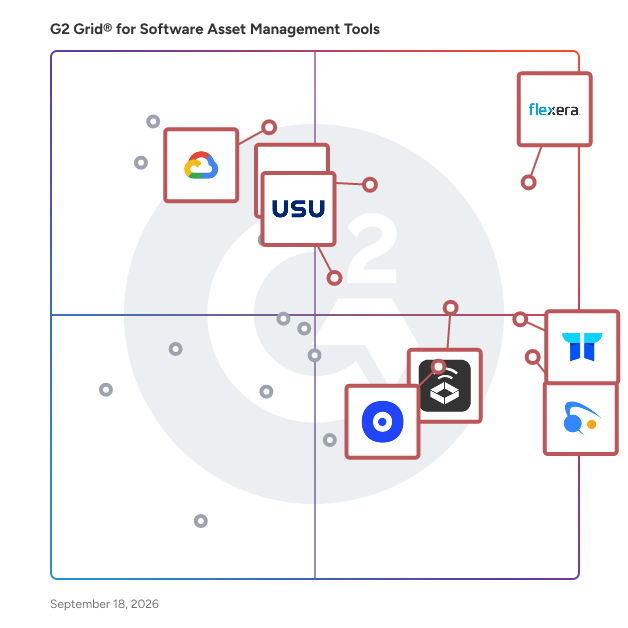
- **Leader:** [Snow Atlas](https://www.g2.com/products/snow-atlas/reviews)
- **Highest Performer:** [CloudEagle](https://www.g2.com/products/cloudeagle/reviews)
- **Easiest to Use:** [Alloy Navigator](https://www.g2.com/products/alloy-navigator/reviews)
- **Top Trending:** [AssetSonar](https://www.g2.com/products/ezo-assetsonar/reviews)
- **Best Free Software:** [Zluri](https://www.g2.com/products/zluri/reviews)


---

**Sponsored**

### Asato

Asato is an IT asset optimization platform designed to assist Chief Information Officers (CIOs) and IT leaders in managing and enhancing their IT asset portfolios. This solution focuses on optimizing the entire IT asset estate through continuous discovery and AI-driven execution, aiming to eliminate waste, capture value, and maximize the return on investment (ROI) of IT expenditures across various domains, including Software as a Service (SaaS), hardware, and cloud infrastructure. The platform serves a diverse audience, particularly organizations looking to streamline their IT operations and improve asset management. Asato is particularly beneficial for enterprises that operate in complex environments with multiple IT systems and assets. By unifying data from disparate sources into a connected knowledge layer, Asato provides actionable insights that facilitate risk and compliance analysis, cost optimization, and proactive decision-making support for IT operations. This holistic approach enables organizations to align their technology strategies with overarching business objectives. One of the standout features of Asato is its ability to deliver unified visibility and management of IT assets across various platforms, including SaaS, hardware, and cloud services. This comprehensive visibility allows organizations to monitor and manage their assets effectively, ensuring that resources are utilized efficiently and that potential issues are identified before they escalate. Additionally, the platform leverages AI to provide powerful insights that drive cost optimization and enhance operational efficiency, making it easier for IT leaders to make informed decisions. Asato also emphasizes risk and compliance monitoring, which is crucial in today&#39;s digital landscape. By continuously assessing digital assets for compliance with regulatory requirements and organizational policies, the platform helps mitigate risks associated with IT asset management. Furthermore, real-time analytics and decision support capabilities empower IT leaders to adapt their strategies dynamically, ensuring that they remain responsive to changing business needs and technological advancements. Overall, Asato stands out in the IT asset optimization category by combining advanced AI technologies with a comprehensive approach to asset management. Its focus on delivering actionable insights, risk mitigation, and operational efficiency positions it as a valuable tool for organizations aiming to enhance their IT asset management practices and drive better business outcomes.


[Visit website](https://www.g2.com/external_clickthroughs/record?secure%5Bad_program%5D=ppc&amp;secure%5Bad_slot%5D=category_product_list&amp;secure%5Bcategory_id%5D=1198&amp;secure%5Bdisplayable_resource_id%5D=1198&amp;secure%5Bdisplayable_resource_type%5D=Category&amp;secure%5Bmedium%5D=sponsored&amp;secure%5Bplacement_reason%5D=page_category&amp;secure%5Bplacement_resource_ids%5D%5B%5D=1198&amp;secure%5Bprioritized%5D=false&amp;secure%5Bproduct_id%5D=1717718&amp;secure%5Bresource_id%5D=1198&amp;secure%5Bresource_type%5D=Category&amp;secure%5Bsource_type%5D=category_page&amp;secure%5Bsource_url%5D=https%3A%2F%2Fwww.g2.com%2Fcategories%2Fsoftware-asset-management-tools%3Fpage%3D3&amp;secure%5Btoken%5D=3452d9bf52a17693a729ba7f6936fb31df81c07123cd92f934f09ab5e2c9b850&amp;secure%5Burl%5D=https%3A%2F%2Fwww.asato.ai&amp;secure%5Burl_type%5D=book_demo&amp;secure%5Bvisitor_segment%5D=180)

---

## Top-Rated Products (Ranked by G2 Score)
### 1. [Snow Atlas](https://www.g2.com/products/snow-atlas/reviews)
  Snow Atlas is a cloud-native Software Asset Management (SAM) and Software as a Service (SaaS) management solution designed to help organizations efficiently manage and optimize their software assets. It provides comprehensive insights into software usage, enabling businesses to uncover shadow IT, prepare for audits, and identify cost-saving opportunities within weeks. Key Features and Functionality: - Audit Defense: Ensures organizations are always prepared for software vendor audits, reducing the risk of unexpected costs and minimizing the time spent on audit-related activities. - Shadow IT Detection: Identifies unauthorized or unmanaged software usage within the organization, allowing for better control and security. - Cost Optimization: Analyzes software usage to pinpoint underutilized licenses and subscriptions, facilitating informed decisions to reduce unnecessary expenditures. - Comprehensive Insights: Offers detailed visibility into software assets across the organization, supporting strategic planning and compliance efforts. Primary Value and Problem Solved: Snow Atlas addresses the challenges organizations face in managing growing software budgets and ensuring compliance with licensing agreements. By providing deep insights into software usage and facilitating proactive audit readiness, it empowers businesses to optimize their software investments, mitigate risks associated with non-compliance, and achieve significant cost savings.


  **Average Rating:** 4.5/5.0
  **Total Reviews:** 23

**User Satisfaction Scores:**

- **Automated end user license provisioning:** 8.0/10 (Category avg: 8.5/10)
- **Customized alerts:** 8.7/10 (Category avg: 8.6/10)
- **Approved app catalogue:** 8.5/10 (Category avg: 8.4/10)
- **Ease of Use:** 8.8/10 (Category avg: 9.1/10)


**Seller Details:**

- **Seller:** [Flexera](https://www.g2.com/sellers/flexera)
- **Year Founded:** 2008
- **HQ Location:** Itasca, IL
- **Twitter:** @flexera (4,738 Twitter followers)
- **LinkedIn® Page:** https://www.linkedin.com/company/574962/ (2,045 employees on LinkedIn®)

**Reviewer Demographics:**
  - **Top Industries:** Information Technology and Services
  - **Company Size:** 57% Enterprise, 35% Mid-Market


#### Pros & Cons

**Pros:**

- Visibility (10 reviews)
- Application Integration (9 reviews)
- Ease of Use (8 reviews)
- Data Management (6 reviews)
- Integrations (6 reviews)

**Cons:**

- Limited Customization (7 reviews)
- Complex Setup (6 reviews)
- Complex Configuration (5 reviews)
- Complexity (5 reviews)
- Difficult Learning (5 reviews)

### 2. [CloudEagle](https://www.g2.com/products/cloudeagle/reviews)
  CloudEagle.ai is an AI-driven SaaS Management, Identity Governance, and Security solution that provides enterprises with a centralized command hub to detect, protect, govern, and optimize their SaaS and AI application ecosystems. Driving continuous orchestration for your Identities, AI, and SaaS stack, CloudEagle.ai unifies data from IT, HR, Finance, and Security to expose shadow AI usage, over-provisioned privileges, dormant identities, and redundant licenses. With 500+ native integrations, organizations achieve complete visibility across both sanctioned and unsanctioned applications. Codeless, Slack-native workflows streamline onboarding, offboarding, access reviews, license harvesting, and contract renewals. Role-driven provisioning enforces least-privilege access on an ongoing basis, while automated license reclamation directly links identity governance to measurable cost savings.


  **Average Rating:** 4.7/5.0
  **Total Reviews:** 100

**User Satisfaction Scores:**

- **Automated end user license provisioning:** 8.6/10 (Category avg: 8.5/10)
- **Customized alerts:** 8.9/10 (Category avg: 8.6/10)
- **Approved app catalogue:** 9.1/10 (Category avg: 8.4/10)
- **Ease of Use:** 9.4/10 (Category avg: 9.1/10)


**Seller Details:**

- **Seller:** [CloudEagle](https://www.g2.com/sellers/cloudeagle)
- **Year Founded:** 2021
- **HQ Location:** Palo Alto, US
- **Twitter:** @cloudeagleai (148 Twitter followers)
- **LinkedIn® Page:** https://www.linkedin.com/company/cloudeagle/ (75 employees on LinkedIn®)

**Reviewer Demographics:**
  - **Who Uses This:** Software Engineer
  - **Top Industries:** Information Technology and Services, Computer Software
  - **Company Size:** 47% Mid-Market, 42% Small-Business


#### Pros & Cons

**Pros:**

- Automation (23 reviews)
- Ease of Use (21 reviews)
- Time-Saving (18 reviews)
- Tracking (16 reviews)
- Features (14 reviews)

**Cons:**

- Difficult Learning (9 reviews)
- Complex Setup (7 reviews)
- Difficult Setup (6 reviews)
- Setup Difficulty (6 reviews)
- Learning Curve (5 reviews)

### 3. [Google Cloud Asset Inventory](https://www.g2.com/products/google-cloud-asset-inventory/reviews)
  Cloud Asset Inventory A metadata inventory service that allows you to view, monitor, and analyze all your Google Cloud and Anthos assets across projects and services.


  **Average Rating:** 4.1/5.0
  **Total Reviews:** 17

**User Satisfaction Scores:**

- **Automated end user license provisioning:** 7.6/10 (Category avg: 8.5/10)
- **Customized alerts:** 8.0/10 (Category avg: 8.6/10)
- **Approved app catalogue:** 7.7/10 (Category avg: 8.4/10)
- **Ease of Use:** 8.6/10 (Category avg: 9.1/10)


**Seller Details:**

- **Seller:** [Google](https://www.g2.com/sellers/google)
- **Year Founded:** 1998
- **HQ Location:** Mountain View, CA
- **Twitter:** @google (31,910,461 Twitter followers)
- **LinkedIn® Page:** https://www.linkedin.com/company/1441/ (336,169 employees on LinkedIn®)
- **Ownership:** NASDAQ:GOOG

**Reviewer Demographics:**
  - **Top Industries:** Computer Software
  - **Company Size:** 44% Mid-Market, 39% Small-Business


### 4. [FlexNet Manager](https://www.g2.com/products/flexnet-manager/reviews)
  Software is one of the major items on any IT expense budget. Industry analysts estimate software license and maintenance fees represent 20 to 35% of total enterprise IT spend. The approach for managing a software asset portfolio is typically inefficient, relying on a local approach instead of a global one, and frequently involves spreadsheets or other ad hoc methods. The lack of efficient software asset management processes exposes enterprises to software audit liabilities and overspending on licenses and maintenance. Flexera FlexNet Manager software and IT asset management solutions manage and optimize enterprise software regardless of location, from the desktop to the data center to the cloud. We&#39;ll give your organization a growth path and roadmap for success. Manage and reduce spend on applications from Adobe, IBM, Microsoft, Oracle, VMware, Symantec and SAP. Flexnet Manager Suite for Clients: Optimize your software licenses across desktops, laptops, and other client devices. FlexNet Manager for Clients automatically applies product use rights acquired through software license agreements from desktop vendors such as Adobe, Microsoft and Symantec. Product use rights can dramatically affect the number of licenses consumed by an organization, and must therefore be considered to minimize costs and ensure license compliance. Flexnet Manager Suite for Data Centers: It&#39;s difficult to know what’s happening across your data centers–until now. No matter what your challenges, FlexNet Manager for Data Centers can help you get control. You get visibility and insight for all your assets with our powerful, easy-to-use, role-based Data Analytics Dashboards. Flexnet Manager Suite for SAP Applications: Managing SAP® licenses can require significant time and effort. It&#39;s difficult to get an accurate handle on license requirements and position. And not knowing what applications are indirectly accessing SAP data can cost you big time. We’ll help you navigate SAP for business success. Flexnet Manager Suite for Engineering Apps: Concurrent licenses can be challenging to manage. But managing them effectively is essential for engineering and design applications. License denials can lead to project delays, lost revenue and decreased customer satisfaction. Lack of visibility can cause still more problems. FlexNet Manager for Engineering Applications delivers a comprehensive solution.


  **Average Rating:** 4.1/5.0
  **Total Reviews:** 62

**User Satisfaction Scores:**

- **Automated end user license provisioning:** 6.9/10 (Category avg: 8.5/10)
- **Customized alerts:** 7.9/10 (Category avg: 8.6/10)
- **Approved app catalogue:** 7.5/10 (Category avg: 8.4/10)
- **Ease of Use:** 7.9/10 (Category avg: 9.1/10)


**Seller Details:**

- **Seller:** [Flexera](https://www.g2.com/sellers/flexera)
- **Year Founded:** 2008
- **HQ Location:** Itasca, IL
- **Twitter:** @flexera (4,738 Twitter followers)
- **LinkedIn® Page:** https://www.linkedin.com/company/574962/ (2,045 employees on LinkedIn®)

**Reviewer Demographics:**
  - **Top Industries:** Information Technology and Services, Telecommunications
  - **Company Size:** 84% Enterprise, 9% Mid-Market


#### Pros & Cons

**Pros:**

- Asset Management (8 reviews)
- Integrations (6 reviews)
- Customer Support (5 reviews)
- Ease of Use (5 reviews)
- Features (5 reviews)

**Cons:**

- Complexity (9 reviews)
- Difficult Setup (7 reviews)
- Learning Curve (6 reviews)
- App Functionality Issues (4 reviews)
- Complex Interface (3 reviews)

### 5. [Alloy Navigator](https://www.g2.com/products/alloy-navigator/reviews)
  Alloy Navigator is an AI-powered IT service and asset management solution that enables organizations of all sizes to manage their IT operations. This solution offers fully integrated help desk, network inventory and knowledge base capabilities, plus ITIL standards such as change and configuration management. Navigator creates relationships automatically between meaningful data while providing a comprehensive view of IT infrastructure components. Alloy Navigator’s service desk manages tickets, assets, incidents, changes, work orders and more within a single interface. Workflow management engine inside Alloy Navigator enables users to design custom IT processes. These can be altered to the specific needs of the business and personnel and might even include AI-driven steps. The solution also offers an online web portal, self-service portal for end users, and mobile apps for technicians and end-users. The Self-Service Portal is equipped with an AI Assistant to resolve routine questions of end-users, freeing IT for bigger challenges. Alloy Navigator gives users the ability to one-click audit their entire network, conduct a physical inventory with a barcode scanner and ensure compliance in software licensing. End users and admins also have access to interactive dashboards, scheduled reporting and real-time views for timely analysis.


  **Average Rating:** 4.8/5.0
  **Total Reviews:** 92

**User Satisfaction Scores:**

- **Automated end user license provisioning:** 9.2/10 (Category avg: 8.5/10)
- **Customized alerts:** 9.4/10 (Category avg: 8.6/10)
- **Approved app catalogue:** 9.0/10 (Category avg: 8.4/10)
- **Ease of Use:** 9.1/10 (Category avg: 9.1/10)


**Seller Details:**

- **Seller:** [Alloy Software](https://www.g2.com/sellers/alloy-software)
- **Year Founded:** 2002
- **HQ Location:** Bloomfield, NJ
- **Twitter:** @AlloySoftware (469 Twitter followers)
- **LinkedIn® Page:** https://www.linkedin.com/company/alloy-software/ (17 employees on LinkedIn®)

**Reviewer Demographics:**
  - **Top Industries:** Information Technology and Services, Marketing and Advertising
  - **Company Size:** 79% Small-Business, 32% Mid-Market


#### Pros & Cons

**Pros:**

- Asset Management (32 reviews)
- Ease of Use (31 reviews)
- Ticketing System (27 reviews)
- Ticket Management (27 reviews)
- Automation (21 reviews)

**Cons:**

- Learning Curve (13 reviews)
- Complex Setup (12 reviews)
- Limited Customization (11 reviews)
- Setup Difficulty (11 reviews)
- Poor Interface Design (8 reviews)

### 6. [USU](https://www.g2.com/products/usu/reviews)
  USU is an IT Management software provider headquartered in Boston, MA, specializing in solutions designed to enhance operational efficiency and financial management for mid-market and enterprise organizations across North America and Europe. The company&#39;s offerings are tailored to meet the specific needs of various stakeholder groups within IT, Finance, Procurement, Customer Service, and Cloud Operations. By providing system-wide visibility and reducing costs, USU empowers organizations to navigate the complexities of hybrid and multi-cloud environments effectively. Our Product Suite: - IT Asset Management - SaaS Management - Multicloud Monitoring - FinOps - Customer Service Knowledge Management IT Asset Management The product suite includes standalone solutions that address critical operational and financial challenges faced by modern IT departments. For instance, USU IT Asset Management (ITAM) offers comprehensive visibility and control over software licensing and cloud entitlements. With features such as deep vendor optimization intelligence and seamless integration with ServiceNow, organizations can typically reduce software overspend by up to 30%, mitigate audit risks, and enhance negotiation outcomes. This solution is particularly beneficial for IT departments seeking to streamline their asset management processes. SaaS Management USU SaaS Management is a purpose-built solution that gives organizations complete visibility and control over their SaaS ecosystem. It helps IT, Finance, and Procurement teams reduce costs, improve governance, and streamline renewals by identifying underused, redundant, or unauthorized applications. Key Capabilities: \&gt;\&gt; Auto-discover all SaaS apps, including shadow IT \&gt;\&gt; Monitor usage to eliminate underused licenses \&gt;\&gt; Centralize renewals and contract data \&gt;\&gt; Control access and enforce policies Proven Results: \&gt;\&gt; Save 15–25% on SaaS spend \&gt;\&gt; Reduce tool sprawl and shadow IT \&gt;\&gt; Improve SaaS governance and renewal outcomes Multicloud Monitoring | Observability USU Multicloud Monitoring further enhances operational capabilities by offering real-time visibility into applications, services, and infrastructure. With AIOps-driven event correlation and automated root cause analysis, IT Operations and Site Reliability Engineering (SRE) teams can resolve incidents more swiftly and prevent outages, thereby minimizing user impact. FinOps USU FinOps brings financial visibility and accountability to your cloud environment. It helps teams optimize usage, control budgets, and drive cost-aware decision-making across AWS, Azure, GCP, and hybrid clouds. Key Capabilities: \&gt;\&gt; Real-time cloud cost tracking \&gt;\&gt; Budgeting, forecasting, and alerts \&gt;\&gt; Identify and eliminate idle resources \&gt;\&gt; Enable showback and chargeback Proven Results: \&gt;\&gt; Cut cloud waste by 20–50% \&gt;\&gt; Improve budget accuracy \&gt;\&gt; Align finance and engineering teams Customer Service Knowledge Management USU also provides Customer Service Knowledge Management (CSKM), which enhances support efficiency through an AI-assisted knowledge platform. This tool ensures that content remains consistent and easily maintainable, resulting in reduced handling times and improved customer satisfaction (CSAT) across contact centers and service desks. Overall, USU&#39;s solutions focus on delivering practical ROI and measurable efficiency gains. By combining advanced software capabilities with expert advisory support, USU enables organizations to reduce costs, improve performance, and operate confidently in complex IT environments. Trusted by Fortune 500 companies and recognized in multiple Gartner Market Guides, USU is committed to fostering partnerships that ensure customers achieve and sustain meaningful results across their entire IT landscape.


  **Average Rating:** 4.5/5.0
  **Total Reviews:** 50

**User Satisfaction Scores:**

- **Automated end user license provisioning:** 8.2/10 (Category avg: 8.5/10)
- **Customized alerts:** 8.4/10 (Category avg: 8.6/10)
- **Approved app catalogue:** 8.8/10 (Category avg: 8.4/10)
- **Ease of Use:** 8.3/10 (Category avg: 9.1/10)


**Seller Details:**

- **Seller:** [USU](https://www.g2.com/sellers/usu)
- **Company Website:** https://www.usu.com
- **Year Founded:** 2000
- **HQ Location:** Boston, MA
- **LinkedIn® Page:** https://www.linkedin.com/company/usu-solutions-en/00137992 (201 employees on LinkedIn®)
- **Ownership:** ETR: OSP2

**Reviewer Demographics:**
  - **Top Industries:** Consumer Services, Computer Software
  - **Company Size:** 55% Enterprise, 29% Small-Business


#### Pros & Cons

**Pros:**

- Ease of Use (5 reviews)
- Product Quality (5 reviews)
- Data Management (4 reviews)
- Integrations (3 reviews)
- Monitoring (3 reviews)

**Cons:**

- Complex Configuration (2 reviews)
- Inadequate Reporting (1 reviews)
- Integration Issues (1 reviews)
- Limited Automation (1 reviews)
- Limited Customization (1 reviews)

### 7. [Zluri](https://www.g2.com/products/zluri/reviews)
  Zluri is a next-gen Identity Governance and Administration (IGA) platform that enables IT and security teams to discover identities and applications, streamline access management, and automate access reviews, all from a single, intuitive interface. Zluri helps organizations automate critical access controls mandated by SOX, HIPAA, SOC 2, and more, ensuring the right people have the right access to the right applications at the right time, with minimal time and manual effort.


  **Average Rating:** 4.6/5.0
  **Total Reviews:** 174

**User Satisfaction Scores:**

- **Automated end user license provisioning:** 9.2/10 (Category avg: 8.5/10)
- **Customized alerts:** 9.3/10 (Category avg: 8.6/10)
- **Approved app catalogue:** 9.2/10 (Category avg: 8.4/10)
- **Ease of Use:** 8.9/10 (Category avg: 9.1/10)


**Seller Details:**

- **Seller:** [Zluri](https://www.g2.com/sellers/zluri)
- **Company Website:** https://www.zluri.com/
- **Year Founded:** 2020
- **HQ Location:** San Franscisco, California
- **Twitter:** @zluri_hq (225 Twitter followers)
- **LinkedIn® Page:** https://www.linkedin.com/company/zluri/ (270 employees on LinkedIn®)

**Reviewer Demographics:**
  - **Who Uses This:** IT Manager
  - **Top Industries:** Information Technology and Services, Computer Software
  - **Company Size:** 66% Mid-Market, 23% Enterprise


#### Pros & Cons

**Pros:**

- Automation (12 reviews)
- Ease of Use (12 reviews)
- Time-saving (11 reviews)
- Customer Support (9 reviews)
- Features (9 reviews)

**Cons:**

- Limited Integrations (8 reviews)
- Integration Issues (7 reviews)
- Limited Features (7 reviews)
- Missing Features (5 reviews)
- Small Business Challenges (5 reviews)

### 8. [ServiceNow Software Asset Management](https://www.g2.com/products/servicenow-software-asset-management/reviews)
  Track and manage software licenses across the enterprise from a unified platform. Reduce costs, stay compliant, and align use to business need. SAM runs on the Now Platform®, a single system of action for the enterprise.


  **Average Rating:** 4.4/5.0
  **Total Reviews:** 46

**User Satisfaction Scores:**

- **Automated end user license provisioning:** 7.8/10 (Category avg: 8.5/10)
- **Customized alerts:** 8.3/10 (Category avg: 8.6/10)
- **Approved app catalogue:** 8.3/10 (Category avg: 8.4/10)
- **Ease of Use:** 8.8/10 (Category avg: 9.1/10)


**Seller Details:**

- **Seller:** [ServiceNow](https://www.g2.com/sellers/servicenow)
- **Year Founded:** 2004
- **HQ Location:** Santa Clara, CA
- **Twitter:** @servicenow (54,215 Twitter followers)
- **LinkedIn® Page:** https://www.linkedin.com/company/29352/ (32,701 employees on LinkedIn®)
- **Ownership:** NYSE:NOW

**Reviewer Demographics:**
  - **Top Industries:** Information Technology and Services, Computer Software
  - **Company Size:** 75% Enterprise, 25% Mid-Market


#### Pros & Cons

**Pros:**

- Ease of Use (4 reviews)
- Interface Usability (2 reviews)
- Tracking Performance (2 reviews)
- User Interface (2 reviews)
- Customer Support (1 reviews)

**Cons:**

- Access Issues (1 reviews)
- Connectivity Issues (1 reviews)
- Difficult Navigation (1 reviews)
- Integration Issues (1 reviews)
- Mobile Compatibility (1 reviews)

### 9. [AssetSonar](https://www.g2.com/products/ezo-assetsonar/reviews)
  EZO AssetSonar is a comprehensive IT asset management platform designed to provide organizations with real-time visibility into their entire digital infrastructure. This solution enables users to effectively track and optimize their hardware, software, and license management processes. By doing so, EZO AssetSonar helps businesses reduce risks, control IT expenditures, and enhance compliance with regulatory requirements. Targeted primarily at IT departments and asset managers, EZO AssetSonar addresses common challenges faced by organizations, such as SaaS sprawl, shadow IT, and the management of redundant software licenses. The platform&#39;s robust features, including software discovery, license tracking, and software normalization, empower businesses to gain a clearer understanding of their software landscape. This clarity allows for informed decision-making regarding software utilization and licensing, ultimately leading to cost savings and improved operational efficiency. One of the standout features of EZO AssetSonar is its risk-based patching capabilities. This functionality enables IT teams to identify vulnerabilities within their systems, prioritize them based on severity, and take swift action to remediate these issues. By focusing on the most critical vulnerabilities, organizations can significantly reduce their exposure to security threats and ensure that their systems remain secure and compliant with industry standards. EZO AssetSonar also offers seamless integrations with leading Mobile Device Management (MDM) and IT Service Management (ITSM) tools, such as Jamf, Zendesk, Intune, Jira, and SCCM. These integrations streamline workflows and facilitate continuous monitoring of the IT ecosystem, allowing IT teams to automate manual tasks and consolidate data from various sources. This not only enhances operational efficiency but also frees up valuable time for IT professionals to concentrate on strategic initiatives that drive business growth. By optimizing the IT asset lifecycle, EZO AssetSonar equips organizations with the tools they need to boost team efficiency and make smarter purchasing decisions. Its powerful capabilities in IT asset management ensure that businesses can maintain complete control over their digital assets while navigating the complexities of modern IT environments.


  **Average Rating:** 4.5/5.0
  **Total Reviews:** 72

**User Satisfaction Scores:**

- **Automated end user license provisioning:** 6.5/10 (Category avg: 8.5/10)
- **Customized alerts:** 7.3/10 (Category avg: 8.6/10)
- **Approved app catalogue:** 6.3/10 (Category avg: 8.4/10)
- **Ease of Use:** 8.8/10 (Category avg: 9.1/10)


**Seller Details:**

- **Seller:** [EZO](https://www.g2.com/sellers/ezo)
- **Company Website:** https://ezo.io/
- **Year Founded:** 2011
- **HQ Location:** Carson City, Nevada
- **Twitter:** @EZOsolutions (810 Twitter followers)
- **LinkedIn® Page:** https://www.linkedin.com/company/ezosolutions/ (268 employees on LinkedIn®)

**Reviewer Demographics:**
  - **Top Industries:** Information Technology and Services, Computer Software
  - **Company Size:** 77% Mid-Market, 10% Small-Business


#### Pros & Cons

**Pros:**

- Asset Management (21 reviews)
- Ease of Use (17 reviews)
- Product Quality (9 reviews)
- Integrations (7 reviews)
- Customer Support (6 reviews)

**Cons:**

- Filtering Issues (5 reviews)
- Limited Customization (5 reviews)
- Complexity (4 reviews)
- Expensive (4 reviews)
- Inadequate Reporting (4 reviews)

### 10. [Microsoft Volume Licensing](https://www.g2.com/products/microsoft-volume-licensing/reviews)
  Volume licensing programs and agreements will evolve as we improve your purchase experience, starting with the Microsoft Customer Agreement.


  **Average Rating:** 4.5/5.0
  **Total Reviews:** 14

**User Satisfaction Scores:**

- **Automated end user license provisioning:** 9.4/10 (Category avg: 8.5/10)
- **Customized alerts:** 8.3/10 (Category avg: 8.6/10)
- **Approved app catalogue:** 9.2/10 (Category avg: 8.4/10)
- **Ease of Use:** 8.5/10 (Category avg: 9.1/10)


**Seller Details:**

- **Seller:** [Microsoft](https://www.g2.com/sellers/microsoft)
- **Year Founded:** 1975
- **HQ Location:** Redmond, Washington
- **Twitter:** @microsoft (13,114,353 Twitter followers)
- **LinkedIn® Page:** https://www.linkedin.com/company/microsoft/ (227,697 employees on LinkedIn®)
- **Ownership:** MSFT

**Reviewer Demographics:**
  - **Company Size:** 40% Small-Business, 20% Mid-Market


### 11. [Torii](https://www.g2.com/products/torii/reviews)
  Torii is security’s SaaS governance copilot, revealing every app and identity—shadow SaaS and AI included—and turning visibility into enforceable control. Security teams eliminate blind spots across their SaaS stack, compress exposure windows, automate access reviews and requests, and close audits on schedule with evidence. With Torii’s always-on agentic AI, you’ll get real-time alerts for new issues, while human-approved fixes ensure no wayward changes.


  **Average Rating:** 4.5/5.0
  **Total Reviews:** 303

**User Satisfaction Scores:**

- **Automated end user license provisioning:** 7.7/10 (Category avg: 8.5/10)
- **Customized alerts:** 7.7/10 (Category avg: 8.6/10)
- **Approved app catalogue:** 8.1/10 (Category avg: 8.4/10)
- **Ease of Use:** 9.2/10 (Category avg: 9.1/10)


**Seller Details:**

- **Seller:** [Torii Labs LTD.](https://www.g2.com/sellers/torii-labs-ltd)
- **Company Website:** https://toriihq.com
- **Year Founded:** 2017
- **HQ Location:** New York
- **Twitter:** @torii_hq (581 Twitter followers)
- **LinkedIn® Page:** https://www.linkedin.com/company/11298659/ (149 employees on LinkedIn®)

**Reviewer Demographics:**
  - **Who Uses This:** IT Manager
  - **Top Industries:** Information Technology and Services, Computer Software
  - **Company Size:** 75% Mid-Market, 19% Enterprise


#### Pros & Cons

**Pros:**

- Ease of Use (31 reviews)
- Application Integration (20 reviews)
- Automation (17 reviews)
- SaaS Management (14 reviews)
- Features (13 reviews)

**Cons:**

- Missing Features (16 reviews)
- Poor Reporting (7 reviews)
- Limited Features (6 reviews)
- Limited Integrations (6 reviews)
- Access Control (5 reviews)

### 12. [Snow Commander](https://www.g2.com/products/snow-commander/reviews)
  Snow Software is changing the way organizations understand and manage their technology consumption. Our technology intelligence platform provides comprehensive visibility and contextual insight across software, SaaS, hardware and cloud. With Snow, IT leaders can effectively optimize resources, enhance performance and enable operational agility in a hybrid world.


  **Average Rating:** 4.2/5.0
  **Total Reviews:** 21

**User Satisfaction Scores:**

- **Automated end user license provisioning:** 9.0/10 (Category avg: 8.5/10)
- **Customized alerts:** 9.3/10 (Category avg: 8.6/10)
- **Approved app catalogue:** 9.7/10 (Category avg: 8.4/10)
- **Ease of Use:** 8.2/10 (Category avg: 9.1/10)


**Seller Details:**

- **Seller:** [Flexera](https://www.g2.com/sellers/flexera)
- **Year Founded:** 2008
- **HQ Location:** Itasca, IL
- **Twitter:** @flexera (4,738 Twitter followers)
- **LinkedIn® Page:** https://www.linkedin.com/company/574962/ (2,045 employees on LinkedIn®)

**Reviewer Demographics:**
  - **Top Industries:** Information Technology and Services
  - **Company Size:** 57% Enterprise, 35% Mid-Market


#### Pros & Cons

**Pros:**

- Automation (3 reviews)
- Compliance Management (3 reviews)
- Control (3 reviews)
- Ease of Use (3 reviews)
- Efficiency (3 reviews)

**Cons:**

- Complexity (3 reviews)
- Learning Curve (3 reviews)
- Time-Consumption (3 reviews)
- Complex Configuration (2 reviews)
- Complex Reporting (2 reviews)

### 13. [AWS License Manager](https://www.g2.com/products/aws-license-manager/reviews)
  AWS License Manager makes it easier to manage licenses in AWS and on-premises servers from software vendors such as Microsoft, SAP, Oracle, and IBM. AWS License Manager lets administrators create customized licensing rules that emulate the terms of their licensing agreements, and then enforces these rules when an instance of EC2 gets launched.


  **Average Rating:** 4.6/5.0
  **Total Reviews:** 14

**User Satisfaction Scores:**

- **Automated end user license provisioning:** 9.0/10 (Category avg: 8.5/10)
- **Customized alerts:** 9.3/10 (Category avg: 8.6/10)
- **Approved app catalogue:** 8.7/10 (Category avg: 8.4/10)
- **Ease of Use:** 8.3/10 (Category avg: 9.1/10)


**Seller Details:**

- **Seller:** [Amazon Web Services (AWS)](https://www.g2.com/sellers/amazon-web-services-aws-3e93cc28-2e9b-4961-b258-c6ce0feec7dd)
- **Year Founded:** 2006
- **HQ Location:** Seattle, WA
- **Twitter:** @awscloud (2,225,864 Twitter followers)
- **LinkedIn® Page:** https://www.linkedin.com/company/amazon-web-services/ (156,424 employees on LinkedIn®)
- **Ownership:** NASDAQ: AMZN

**Reviewer Demographics:**
  - **Company Size:** 41% Small-Business, 41% Enterprise


### 14. [SolarWinds Service Desk](https://www.g2.com/products/solarwinds-service-desk/reviews)
  Enterprise-grade ITSM that&#39;s actually easy to use — resolve issues up to 52% faster with AI, unified asset management, and native ITOps integration built in from day one. SolarWinds Service Desk is a cloud-based IT service management (ITSM) platform that enables IT teams and other business departments to manage service requests, incidents, assets, and workflows in a unified environment. It is designed for IT professionals, service desk teams, and organizations looking to enhance their service management capabilities without the implementation overhead typically associated with enterprise ITSM tools. The platform covers incident management, problem management, change management, asset management, and CMDB in a single product. A configurable, drag-and-drop self-service portal and easy-to-use knowledge base allow end users to resolve common issues independently, while rule-based automations handle ticket routing, prioritization, escalation, and notifications without manual intervention. Customizable dashboards and reporting give teams visibility across incidents, requests, changes, and assets. AI capabilities are embedded directly into agent workflows; including ticket summarization, solution suggestions, intelligent incident/problem linking, response and resolution drafting, runbook generation, and knowledge base recommendations. These capabilities are available out of the box without additional configuration. The AI is scoped to surface relevant, actionable information at the right moment rather than requiring teams to build or maintain separate AI tooling. As part of the SolarWinds portfolio, Service Desk integrates natively with SolarWinds Observability and IT operations tools, allowing infrastructure alerts to automatically generate service desk tickets and giving technicians direct access to node health, recent changes, and other operational context within the incident record. Native integrations also include Microsoft Entra ID for user lifecycle management, Jira for cross-team escalation, Automox for patch management, and an open API for custom connections. Service Desk supports enterprise service management (ESM), enabling organizations to extend ITSM processes beyond IT, to departments such as HR, Facilities, and Legal, without additional products or professional services. For IT teams, the lift is minimal: new department portals are built on the same platform they already manage, using the same workflows, automations, and reporting. This gives IT centralized visibility and control across the organization, reducing the risk of departments adopting unauthorized tools to fill gaps in service coverage. Overall, SolarWinds Service Desk offers a robust set of features designed to enhance service management efficiency, without the headache. By integrating automation, customized workflows, and intelligent recommendations, it stands out as a comprehensive solution that not only addresses the immediate needs of IT teams but also supports broader organizational goals for improved service delivery.


  **Average Rating:** 4.3/5.0
  **Total Reviews:** 765

**User Satisfaction Scores:**

- **Automated end user license provisioning:** 7.8/10 (Category avg: 8.5/10)
- **Customized alerts:** 8.3/10 (Category avg: 8.6/10)
- **Approved app catalogue:** 7.8/10 (Category avg: 8.4/10)
- **Ease of Use:** 9.0/10 (Category avg: 9.1/10)


**Seller Details:**

- **Seller:** [SolarWinds Worldwide LLC](https://www.g2.com/sellers/solarwinds-worldwide-llc)
- **Company Website:** https://www.solarwinds.com
- **Year Founded:** 1999
- **HQ Location:** Austin, TX
- **Twitter:** @solarwinds (19,616 Twitter followers)
- **LinkedIn® Page:** https://www.linkedin.com/company/166039/ (2,818 employees on LinkedIn®)

**Reviewer Demographics:**
  - **Who Uses This:** IT Manager, Systems Administrator
  - **Top Industries:** Information Technology and Services, Hospital &amp; Health Care
  - **Company Size:** 67% Mid-Market, 24% Enterprise


#### Pros & Cons

**Pros:**

- Ticketing System (8 reviews)
- Asset Management (7 reviews)
- Ease of Use (7 reviews)
- Ticket Management (7 reviews)
- User Interface (5 reviews)

**Cons:**

- Missing Features (5 reviews)
- Asset Management (4 reviews)
- Insufficient Information (3 reviews)
- Limited Features (3 reviews)
- App Limitations (2 reviews)

### 15. [Licenseware](https://www.g2.com/products/licenseware/reviews)
  Licenseware connects with any IT data source (drag and drop or API) and applies complex SAM logic and context, allowing for rapid answers regarding your software licensing, compliance and cost optimisation potential. 🏆 ITAM Technology Innovation of the Year - ITAM Review Excellence Awards 2023 YTL Utilities UK 💬 &quot;Licenseware made our Microsoft EA renewal simple, all of the complex manual work was removed entirely.&quot; Accenture 💬 &quot;We&#39;re saving up to 50% of the time required to finish large projects&quot;.


  **Average Rating:** 4.6/5.0
  **Total Reviews:** 24

**User Satisfaction Scores:**

- **Automated end user license provisioning:** 7.8/10 (Category avg: 8.5/10)
- **Customized alerts:** 8.2/10 (Category avg: 8.6/10)
- **Approved app catalogue:** 8.1/10 (Category avg: 8.4/10)
- **Ease of Use:** 8.8/10 (Category avg: 9.1/10)


**Seller Details:**

- **Seller:** [Licenseware](https://www.g2.com/sellers/licenseware)
- **Year Founded:** 2020
- **HQ Location:** Bucharest
- **Twitter:** @licenseware (26 Twitter followers)
- **LinkedIn® Page:** https://www.linkedin.com/company/licenseware/ (13 employees on LinkedIn®)

**Reviewer Demographics:**
  - **Top Industries:** Consulting, Computer Software
  - **Company Size:** 50% Small-Business, 29% Mid-Market


### 16. [SymphonyAI IT Service Management](https://www.g2.com/products/symphonyai-it-service-management/reviews)
  SymphonyAI IT Service Management offers an enterprise-class solution that delivers measurable business outcomes leveraging automation, predictive, and generative AI. Customers have been able to automate 60% of service requests, achieve a 50% faster resolution, and realize a 30% savings on hardware and software costs using our ITSM platform. We are recognized as a Gartner Customers’ Choice, featured as a leader and significant player in many leading analyst reports. Leading global companies like KPMG, Toyota, Trelix, Ameritas, Hershey’s, Smart &amp; Final, are SymphonyAI customers. SymphonyAI ITSM can generate significant cost savings and a faster time to value compared to any leading players in the market.


  **Average Rating:** 4.6/5.0
  **Total Reviews:** 66

**User Satisfaction Scores:**

- **Automated end user license provisioning:** 6.9/10 (Category avg: 8.5/10)
- **Customized alerts:** 7.6/10 (Category avg: 8.6/10)
- **Approved app catalogue:** 6.5/10 (Category avg: 8.4/10)
- **Ease of Use:** 9.1/10 (Category avg: 9.1/10)


**Seller Details:**

- **Seller:** [SymphonyAI](https://www.g2.com/sellers/symphonyai-cf01fc99-7338-420c-9ae6-2c2a4552d056)
- **Year Founded:** 2017
- **HQ Location:** Palo Alto, California
- **Twitter:** @SymphonySummit (470 Twitter followers)
- **LinkedIn® Page:** https://www.linkedin.com/company/symphonyai/ (2,052 employees on LinkedIn®)

**Reviewer Demographics:**
  - **Top Industries:** Information Technology and Services, Automotive
  - **Company Size:** 68% Enterprise, 32% Mid-Market


#### Pros & Cons

**Pros:**

- Automation (2 reviews)
- Automation Efficiency (1 reviews)
- Configuration Ease (1 reviews)
- Customizability (1 reviews)
- Ease of Use (1 reviews)

**Cons:**

- Complex Configuration (1 reviews)
- Complexity (1 reviews)
- Complex Setup (1 reviews)
- Expensive (1 reviews)
- Filtering Issues (1 reviews)

### 17. [Oomnitza](https://www.g2.com/products/oomnitza/reviews)
  Oomnitza is an IT asset management platform that helps companies get complete visibility and control over all their technology—laptops, servers, SaaS apps, cloud infrastructure, and more—without the heavy lift. Most ITAM tools only track hardware or require multiple systems to manage assets. Oomnitza gives you everything you need in one place, so you can stop managing spreadsheets and chasing data across tools. With 1,500+ pre-built connectors, agentless deployment, and no-code automation, Oomnitza makes it easy to track assets, automate key workflows, and stay audit-ready, all without custom scripts or professional services. Why IT teams choose Oomnitza: - Everything in one place: Manage devices, software, and cloud assets from a single dashboard. - No more spreadsheet cleanup: Asset data is pulled automatically from all your systems and kept accurate. - Automation that saves hours: Streamline tasks like onboarding, offboarding, access reviews, and audits—no tickets or manual handoffs. - Works with your tools: Connects to the systems you already use—Jamf, Intune, Okta, SCCM, Zendesk, and more. - Fast deployment: No agents to install. No rebuild required. You’ll see value in weeks—not months. Oomnitza helps IT, security, and finance teams work from the same playbook so you can reduce risk, improve compliance, and save time every day.


  **Average Rating:** 4.6/5.0
  **Total Reviews:** 135

**User Satisfaction Scores:**

- **Automated end user license provisioning:** 7.8/10 (Category avg: 8.5/10)
- **Customized alerts:** 9.4/10 (Category avg: 8.6/10)
- **Approved app catalogue:** 7.8/10 (Category avg: 8.4/10)
- **Ease of Use:** 8.7/10 (Category avg: 9.1/10)


**Seller Details:**

- **Seller:** [Oomnitza](https://www.g2.com/sellers/oomnitza)
- **Company Website:** https://www.oomnitza.com
- **Year Founded:** 2012
- **HQ Location:** San Francisco, CA
- **Twitter:** @Oomnitza (373 Twitter followers)
- **LinkedIn® Page:** https://www.linkedin.com/company/2518359/ (108 employees on LinkedIn®)

**Reviewer Demographics:**
  - **Top Industries:** Information Technology and Services, Computer Software
  - **Company Size:** 51% Enterprise, 38% Mid-Market


#### Pros & Cons

**Pros:**

- Customizability (2 reviews)
- Automation (1 reviews)
- Ease of Use (1 reviews)
- Flexibility (1 reviews)
- Helpful (1 reviews)

**Cons:**

- Complexity (2 reviews)
- Poor Interface Design (2 reviews)
- Complex Configuration (1 reviews)
- Difficult Learning (1 reviews)
- Difficult Navigation (1 reviews)

### 18. [Watchman Monitoring](https://www.g2.com/products/watchman-monitoring/reviews)
  Our proactive alerts and monitoring actively detect 150 cross-platform issues which helps IT professionals avoid downtime, increase recurring revenue, manage the flow of support tickets, and provide peace-of-mind to their customers.


  **Average Rating:** 4.5/5.0
  **Total Reviews:** 12

**User Satisfaction Scores:**

- **Automated end user license provisioning:** 7.3/10 (Category avg: 8.5/10)
- **Customized alerts:** 9.3/10 (Category avg: 8.6/10)
- **Approved app catalogue:** 7.3/10 (Category avg: 8.4/10)
- **Ease of Use:** 8.9/10 (Category avg: 9.1/10)


**Seller Details:**

- **Seller:** [Watchman Monitoring](https://www.g2.com/sellers/watchman-monitoring)
- **Year Founded:** 2010
- **HQ Location:** Baton Rouge, LA
- **Twitter:** @watchmanmonitor (853 Twitter followers)
- **LinkedIn® Page:** https://www.linkedin.com/company/1753450 (5 employees on LinkedIn®)

**Reviewer Demographics:**
  - **Top Industries:** Information Technology and Services
  - **Company Size:** 67% Small-Business, 25% Enterprise


### 19. [IFS assyst](https://www.g2.com/products/ifs-assyst/reviews)
  IFS assyst is an Enterprise Service Management (ESM) and IT Service Management (ITSM) solution provided by IFS. It’s designed to help organizations automate workflows, enhance service and support quality, and boost customer satisfaction across various industries. We deliver frictionless customer and employee experiences, one intelligent workflow at a time. Our modern service management technology lets you automate service delivery and support so your customers get what they need fast, and you can focus on building the future of your organization. IFS assyst is uniquely easy to buy, set up, use, and upgrade. Whether you’re in IT, HR, Facilities, Finance, or any other team that provides services to customers and employees, IFS assyst puts service management technology within your reach. Our process automation takes the boring out of everyday tasks, allowing you to focus on work that matters. Global brands trust IFS assyst to automate complex business processes easily without fuss. Everyday we assyst!


  **Average Rating:** 3.5/5.0
  **Total Reviews:** 14

**User Satisfaction Scores:**

- **Ease of Use:** 6.7/10 (Category avg: 9.1/10)


**Seller Details:**

- **Seller:** [IFS](https://www.g2.com/sellers/ifs)
- **Year Founded:** 1983
- **HQ Location:** Linkoping , Sweden
- **Twitter:** @ifs (18,006 Twitter followers)
- **LinkedIn® Page:** https://www.linkedin.com/company/164301/ (9,278 employees on LinkedIn®)
- **Ownership:** STO: IFS

**Reviewer Demographics:**
  - **Top Industries:** Information Technology and Services
  - **Company Size:** 79% Enterprise, 29% Mid-Market


### 20. [Certero for Enterprise SAM](https://www.g2.com/products/certero-for-enterprise-sam/reviews)
  Built for your key software licensing challenges, digital transformation goals and evolving technology consumption. Certero for Enterprise SAM uses hyperscalable cloud architecture and provisioning to deliver an unrivaled customer experience for enterprises large and small.


  **Average Rating:** 4.3/5.0
  **Total Reviews:** 9

**User Satisfaction Scores:**

- **Automated end user license provisioning:** 8.6/10 (Category avg: 8.5/10)
- **Customized alerts:** 7.6/10 (Category avg: 8.6/10)
- **Approved app catalogue:** 8.1/10 (Category avg: 8.4/10)
- **Ease of Use:** 8.5/10 (Category avg: 9.1/10)


**Seller Details:**

- **Seller:** [Certero for Enterprise ITAM](https://www.g2.com/sellers/certero-for-enterprise-itam)
- **Year Founded:** 2007
- **HQ Location:** Warrington, Cheshire
- **Twitter:** @Certerosoftware (847 Twitter followers)
- **LinkedIn® Page:** https://www.linkedin.com/company/310814 (40 employees on LinkedIn®)

**Reviewer Demographics:**
  - **Company Size:** 50% Enterprise, 30% Mid-Market


### 21. [License Statistics](https://www.g2.com/products/license-statistics/reviews)
  Get support for a number of license servers, including LM-X License Manager, FLEXlm/FlexNet, IBM LUM, Dassault Systemes License Server (DSLS), Sentinel RMS and Reprise License Manager (RLM), as well as your custom license server.


  **Average Rating:** 4.7/5.0
  **Total Reviews:** 9

**User Satisfaction Scores:**

- **Automated end user license provisioning:** 9.4/10 (Category avg: 8.5/10)
- **Customized alerts:** 9.8/10 (Category avg: 8.6/10)
- **Approved app catalogue:** 9.4/10 (Category avg: 8.4/10)
- **Ease of Use:** 9.6/10 (Category avg: 9.1/10)


**Seller Details:**

- **Seller:** [X Formation](https://www.g2.com/sellers/x-formation)
- **Year Founded:** 2004
- **HQ Location:** Tilst
- **Twitter:** @x_formation (44 Twitter followers)
- **LinkedIn® Page:** https://www.linkedin.com/company/x-formation/ (9 employees on LinkedIn®)

**Reviewer Demographics:**
  - **Top Industries:** Pharmaceuticals
  - **Company Size:** 78% Mid-Market, 22% Enterprise


### 22. [ManageEngine Asset Explorer](https://www.g2.com/products/manageengine-asset-explorer/reviews)
  ManageEngine Asset Explorer comprehensive ITAM solution that lets IT teams discover, track, and manage all the IT hardware and software assets in their organization.


  **Average Rating:** 4.2/5.0
  **Total Reviews:** 13

**User Satisfaction Scores:**

- **Automated end user license provisioning:** 7.8/10 (Category avg: 8.5/10)
- **Customized alerts:** 8.9/10 (Category avg: 8.6/10)
- **Approved app catalogue:** 8.3/10 (Category avg: 8.4/10)
- **Ease of Use:** 8.9/10 (Category avg: 9.1/10)


**Seller Details:**

- **Seller:** [Zoho](https://www.g2.com/sellers/zoho-b00ca9d5-bca8-41b5-a8ad-275480841704)
- **Year Founded:** 1996
- **HQ Location:** Austin, TX
- **Twitter:** @Zoho (137,251 Twitter followers)
- **LinkedIn® Page:** https://www.linkedin.com/company/38373/ (30,531 employees on LinkedIn®)
- **Phone:** +1 (888) 900-9646 

**Reviewer Demographics:**
  - **Company Size:** 62% Mid-Market, 38% Enterprise


### 23. [Eracent](https://www.g2.com/products/eracent/reviews)
  Eracent provides comprehensive IT Asset Management (ITAM) and Software Asset Management (SAM) solutions that enable enterprises to govern and manage the full lifecycle of all of their IT assets, software licenses and subscriptions. IT Management Center™ (ITMC) clients gain full visibility into their complete environment, and they benefit from cost optimization, reduced publisher audit risk, streamlined and automated processes, and minimized endpoint and network security threats. ITMC Discovery and IT-Pedia® provide a continuously updated, normalized asset and license baseline. The publisher-specific Continuous License Reconciliation™ (CLR) modules enable license position reporting and proactive management around any licensing model. This includes Oracle GLAS-verified detection and reporting for Oracle Database, Java SE and Fusion Middleware, as well as SAP/SAP Engines, IBM subcapacity licensing, and many more. The Eracent SBOM Manager provides management and analysis to identify and mitigate vulnerabilities, expose potential license risk, and support obsolesence management. Eracent&#39;s CyberSecurity Management Suite (CSMS) helps organizations successfully implement and maintain an effective NIST CSF 2.0-based cybersecurity program. available in on-premise, subscription and hosted options. Eracent&#39;s solutions are available in hosted or on-premise versions.


  **Average Rating:** 4.4/5.0
  **Total Reviews:** 10

**User Satisfaction Scores:**

- **Automated end user license provisioning:** 10.0/10 (Category avg: 8.5/10)
- **Customized alerts:** 8.3/10 (Category avg: 8.6/10)
- **Approved app catalogue:** 10.0/10 (Category avg: 8.4/10)
- **Ease of Use:** 8.9/10 (Category avg: 9.1/10)


**Seller Details:**

- **Seller:** [Eracent](https://www.g2.com/sellers/eracent)
- **Year Founded:** 2000
- **HQ Location:** Riegelsville, Pennsylvania
- **Twitter:** @eracent (142 Twitter followers)
- **LinkedIn® Page:** https://www.linkedin.com/company/15155 (82 employees on LinkedIn®)

**Reviewer Demographics:**
  - **Company Size:** 60% Enterprise, 20% Small-Business


### 24. [License Dashboard](https://www.g2.com/products/license-dashboard/reviews)
  License Dashboard combines unrivalled SAM and licensing expertise with professionally-developed solutions designed to help both large and fast-growing organizations manage their IT expenditure, minimize costs, optimize utilization and streamline the entire asset lifecycle.


  **Average Rating:** 3.5/5.0
  **Total Reviews:** 9

**User Satisfaction Scores:**

- **Automated end user license provisioning:** 9.2/10 (Category avg: 8.5/10)
- **Customized alerts:** 9.2/10 (Category avg: 8.6/10)
- **Approved app catalogue:** 8.1/10 (Category avg: 8.4/10)
- **Ease of Use:** 9.4/10 (Category avg: 9.1/10)


**Seller Details:**

- **Seller:** [License Dashboard](https://www.g2.com/sellers/license-dashboard)
- **Year Founded:** 2008
- **HQ Location:** Pocklington, England, United Kingdom
- **LinkedIn® Page:** http://www.linkedin.com/company/license-dashboard (22 employees on LinkedIn®)

**Reviewer Demographics:**
  - **Company Size:** 33% Enterprise, 33% Mid-Market


#### Pros & Cons

**Pros:**

- Cost Savings (1 reviews)
- Features (1 reviews)
- Integration Capabilities (1 reviews)
- SaaS Management (1 reviews)
- Shadow IT Discovery (1 reviews)

**Cons:**

- Difficult Navigation (1 reviews)
- Integration Issues (1 reviews)
- Lack of Automation (1 reviews)
- Manual Processes (1 reviews)
- Poor Customer Support (1 reviews)

### 25. [OpenText ZENworks Asset Management](https://www.g2.com/products/opentext-zenworks-asset-management/reviews)
  Micro Focus ZENworks Asset Management (formerly Novell) ZENworks Asset Management) integrates inventory, software usage, and license reconciliation to get the most accurate view of software installations and license compliance available. The combination of hardware, software, and purchasing data enables to get a complete view of IT assets. This ensures license compliance and eliminates software overspending.


  **Average Rating:** 4.1/5.0
  **Total Reviews:** 7

**User Satisfaction Scores:**

- **Automated end user license provisioning:** 7.5/10 (Category avg: 8.5/10)
- **Customized alerts:** 8.3/10 (Category avg: 8.6/10)
- **Approved app catalogue:** 6.7/10 (Category avg: 8.4/10)
- **Ease of Use:** 7.5/10 (Category avg: 9.1/10)


**Seller Details:**

- **Seller:** [OpenText](https://www.g2.com/sellers/opentext)
- **Year Founded:** 1991
- **HQ Location:** Waterloo, ON
- **Twitter:** @OpenText (21,586 Twitter followers)
- **LinkedIn® Page:** https://www.linkedin.com/company/2709/ (23,339 employees on LinkedIn®)
- **Ownership:** NASDAQ:OTEX

**Reviewer Demographics:**
  - **Company Size:** 43% Enterprise, 43% Small-Business


#### Pros & Cons

**Pros:**

- Asset Management (2 reviews)
- Product Quality (2 reviews)
- Device Monitoring (1 reviews)
- Integrations (1 reviews)
- Intuitive (1 reviews)

**Cons:**

- Expensive (1 reviews)
- Learning Curve (1 reviews)
- Poor Interface Design (1 reviews)
- Setup Difficulty (1 reviews)
- Slow Performance (1 reviews)


## Parent Category

[IT Management Software](https://www.g2.com/categories/it-management)


## Related Categories

- [SaaS Management Platforms (SMP)](https://www.g2.com/categories/saas-management-platforms-(smp))
- [SaaS Spend Management Software](https://www.g2.com/categories/saas-spend-management)
- [IT Asset Management Software](https://www.g2.com/categories/it-asset-management)


---

## Buyer Guide

### What You Should Know About Software Asset Management (SAM) Tools

### What are Software Asset Management (SAM) Tools?

Software asset management (SAM) tools allow businesses to manage the software licenses used across their company. These tools have traditionally supported on-premises software license management, but many tools also support SaaS assets, as well. Software asset management software helps companies monitor and manage software deployment, software licenses, license compliance, and ultimately license spend for all end users involved in the application. The primary use case of SAM is to keep the business compliant as software vendors don’t want the business using more of their software than they purchased or licensed. Vendors often conduct software compliance audits to ensure companies use the specific application correctly. If they are not compliant, a fee or penalty may incur. An excellent SAM practice prevents vendor audits and penalties.&amp;nbsp;

SAM tools discover on-premises software by scanning databases, system logs, and enterprise resource planning (ERP) applications. This not only shows the software used, but it also prevents unsanctioned software use, known as shadow IT, since it uncovers unreported software. After the discovery, SAM tracks the software compliance with metrics like renewal dates, the maximum number of users and devices, etc. SAM software will go through a normalization process that pulls these metrics out of contracts. Normalization can be partially automated, but due to the complexity of software contracts, manual entry may still be necessary for accuracy. After all key fields are pulled and tracked, SAM tools visualize the metrics and software usage to check for compliance. This visualization informs companies if there are any overuse cases so they can act early to avoid penalties.&amp;nbsp;

Additionally, companies can make the most of their tech stack by ensuring every application is being utilized correctly and not paying for unused licenses. A visualization of usage ensures companies that their money is being spent most efficiently.

**What Does SAM Stand For?**

SAM stands for software asset management. It is a business practice for software compliance and procurement. SAM software does most of the heavy lifting by discovering software, tracking licenses, and visualizing usage data. Some SAM software also tracks SaaS and cloud applications, but they focus more on usage optimization than compliance.

### What are the Common Features of Software Asset Management (SAM) Tools?

The following are some core features within SAM tools that can help users in monitoring software compliance, tracking usage data, and preventing vendor audits:

**Software discovery:** A software management tool maintains a centralized software database. It should automatically discover and document software used on company devices. Manual entry at scale is impractical because it is too time-consuming and inaccurate.

**Usage visualization:** SAM tools should track software usage from the time of procurement to their disposal. By monitoring usage by users, central IT can make important purchasing and license allocation decisions based on who is overusing or underusing the software in real time.

**Alerting:** Once there is an overused case or expiring license, the system should alert the IT manager. Without this functionality, IT managers cannot discontinue or adjust software license agreements on time. Therefore, SAM plays a critical role in the IT service management (ITSM) and Information Technology Infrastructure Library (ITIL) processes.

**Compliance documentation:** A software license agreement can be extremely complex. To document these compliance requirements, SAM tools should document the specific metrics and conditions in its database from the agreements. SAM experts would need to input this information into a centralized SAM database for any SAM tools to work.

### What are the Benefits of Software Asset Management (SAM) Tools?

**Cost saving:** SAM gives companies a usage view of their software estate. This allows companies to cut underused licenses in vendor negotiations, saving them an average of 10-20% on software spending.&amp;nbsp;

**Improves vendor relationship:** Vendors are less likely to perform an audit if they are informed of their client’s license entitlements. Suspicious software licensing changes are the top reason why vendors conduct audits. Constant auditing and frequent penalties waste time and deteriorate client relationships. Companies lower software audit risk by informing vendors on license changes, headcount changes, usage data, etc.

**Prevents shadow IT:** Shadow IT is when employees secretly procure their desired hardware or software. There are security risks associated with unknown software, but there is also the threat of non-compliance. Unapproved software, which is therefore not covered by an organization’s license terms, could trigger a software vendor audit. SAM tools should tackle red tape, long delays, and missed requests from employees so they are less likely to procure unauthorized software.&amp;nbsp;

### Who Uses Software Asset Management (SAM) Tools?

**IT managers:** The primary users of this software are IT managers. They are responsible for setting up the SAM tool and tracking all the software. SAM tools also enable them to negotiate better terms with vendors by identifying their real software requirements.&amp;nbsp;

**Finance teams:** Finance teams can determine how many software licenses they can cut based on usage. This also provides them with a clear understanding of software costs in budget planning.

#### Software Related to Software Asset Management (SAM) Tools

[IT asset management software](https://www.g2.com/categories/it-asset-management): IT asset management (ITAM) software helps users document their IT hardware and software inventory. SAM is a part of the ITAM process since it only manages software inventory.

[SaaS operations management software](https://www.g2.com/categories/saas-operations-management): SaaS operations management, or SaaSOps, is a process of managing, governing, and securing SaaS products within a business. This is similar to SAM but it mostly covers cloud applications. Some vendors today offer comprehensive tools that manage both SAM and SaaSOps practices.&amp;nbsp;

### Challenges with Software Asset Management (SAM) Tools

**Data normalization:** Data normalization is part of the SAM automation process that identifies and formats key data from application codes. Normalization turns unstructured data into readable metrics to show compliance status and usage information. SAM tools automate this process with the correct configuration. The challenge is that it is time-consuming to set up the correct metrics (what is the limit for per device, per user, etc.) with complex software contracts. To correctly identify all the metrics, the legal, finance, and IT teams should work together for an extended period. Companies with new SAM processes should aim for a few critical software licenses to start.

**Data integration:** Not all applications can be integrated with every SAM tool. Some SAM vendors offer specific SAM tools for leading vendors such as Microsoft, while some SAM vendors claim to offer all-in-one solutions for all applications. Companies should review their requirements and ask vendors to demonstrate whether or not their tools can integrate specific applications.

### Which Companies Should Buy Software Asset Management (SAM) Tools?

**Enterprise** : Companies with 500 or more employees should consider buying SAM tools. Manual software license tracking is difficult with this many employees, typically enterprise businesses will hire license management solution companies to facilitate this task. Vendors also actively target enterprises for vendor audits, making them more likely to receive penalties.&amp;nbsp;

### How to Buy Software Asset Management (SAM) Tools

#### Requirements Gathering (RFI/RFP) for Software Asset Management (SAM) Tools

Whether a company is looking for its first SAM software or trying to replace an existing one, g2.com can help find the best tool.

The company’s needs when searching for SAM software often relate to specifically desired data and metrics. For example, the user may be most interested in monitoring their software usage. Buyers should make a ranked list of the SAM features that most directly address the problems they’re trying to solve, then reference G2 reviews to find the right fit.

Prioritizing the desired feature set can help narrow down the potential pool of SAM solutions, allowing teams to then apply further considerations for budget, ease of integration with other systems, security requirements, and more. This holistic approach empowers buyers to move forward with a focused checklist, which can be used in conjunction with G2 scoring to select the best SAM product for the business.

#### Compare Software Asset Management (SAM) Products

**Create a long list**

When searching for SAM software, companies need to identify compatibility with existing ERP, HR, and other business management software. Buyers should make a list of important existing software that needs to be integrated, then filter out the SAM tools that can’t be integrated with existing software.

**Create a short list**

It helps to cross-reference the results of initial vendor evaluations with G2 reviews from other buyers, the combination of which will help to narrow in on a short three to five-product list. From there, buyers can compare pricing and features to determine the best fit. Some vendors don’t charge implementation costs while some do.&amp;nbsp;

**Conduct demos**

As a rule of thumb, companies should make sure to demo all of the products that end up on their short list. During demos, buyers should ask specific questions related to the functionalities they care most about; for example, one might ask to be walked through a typical performance issue from alerting to license reconciliation within the SAM tool.&amp;nbsp;

#### Selection of Software Asset Management (SAM) Tools

**Choose a selection team**

Regardless of a company’s size, it’s important to involve the most relevant personas when beginning the SAM software selection process. Larger companies may include SAM specialists, procurement teams, IT managers, and developers who will be working with the software most closely. Smaller companies with fewer employees might just need IT managers to fill the role.

**Negotiation**

Many vendors offer full software license platforms that go beyond SAM (on-premises) to include SaaS license management and spending platforms. While some companies will not budge on the configurations of their packages, buyers looking to trim costs should try to negotiate down to the specific functions that matter to them to get the best price. For example, a vendor’s pricing page where SAM functionality is only included with a robust all-in-one monitoring package, whereas a sales conversation may prove otherwise.&amp;nbsp;

**Final decision**

After this stage, it is important to perform a trial run if possible with a small selection of IT professionals or developers. This will help to ensure that the SAM software of choice integrates well with an IT administrator’s systems setup or a developer’s day-to-day work. If the SAM tool is well-liked and well-utilized, the buyer can take that as a sign that their selection is the right one. If not, looking back at the other options may be necessary.


