# Best Single Sign-On (SSO) Software - Page 3

## How Many Single Sign-On (SSO) Solutions Products Does G2 Track?

**Total Products under this Category:** 172

### Category Stats (Jul 2026)

- **Average Rating:** 4.4/5 The average rating of products in this category, based on all submitted ratings
- **Top Trending Product:** ID.me (+1.62%) - Among all products in this category, ID.me recorded the largest rating increase compared to last month

_Last updated: July 26, 2026_

## How Does G2 Rank Single Sign-On (SSO) Solutions Products?

**Why You Can Trust G2's Software Rankings:**

- 30 Analysts and Data Experts
- 18,000+ Authentic Reviews
- 172+ Products
- Unbiased Rankings

G2's software rankings are built on verified user reviews, rigorous moderation, and a consistent research methodology maintained by a team of analysts and data experts. Each product is measured using the same transparent criteria, with no paid placement or vendor influence. While reviews reflect real user experiences, which can be subjective, they offer valuable insight into how software performs in the hands of professionals. Together, these inputs power the G2 Score, a standardized way to compare tools within every category.

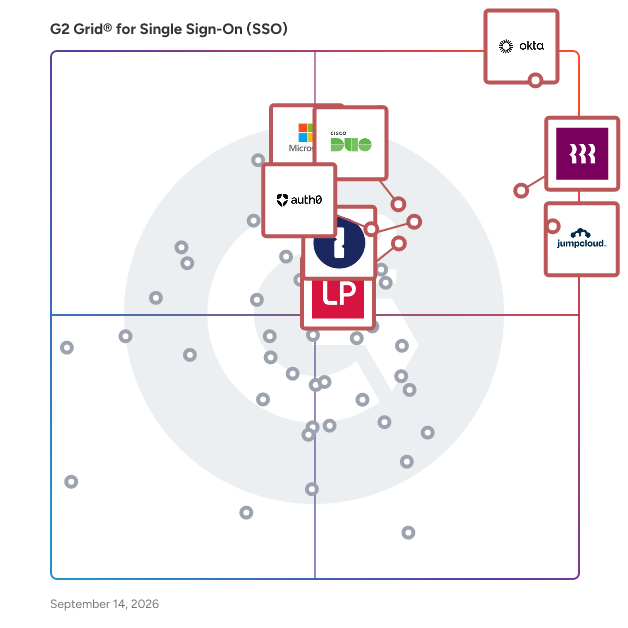
## G2 Grid® for Single Sign-On (SSO) Solutions
 ![G2 Grid® for Single Sign-On (SSO) Solutions plotting products by satisfaction and market presence](https://www.g2.com/categories/single-sign-on-sso/grids.png?focus%5B%5D=633&focus%5B%5D=1640029&focus%5B%5D=36316&focus%5B%5D=3899&focus%5B%5D=5282&focus%5B%5D=4533&focus%5B%5D=1718&focus%5B%5D=22264)

Highlighted products: Okta, Rippling IT, JumpCloud, Microsoft Entra ID, Cisco Duo, 1Password, LastPass, and Auth0.

Underlying data: [Grid® JSON](https://www.g2.com/categories/single-sign-on-sso/grids.json?focus%5B%5D=okta&focus%5B%5D=rippling-it&focus%5B%5D=jumpcloud&focus%5B%5D=microsoft-entra-id&focus%5B%5D=cisco-duo&focus%5B%5D=1password&focus%5B%5D=lastpass&focus%5B%5D=auth0)

**Sponsored**

### CoreView

CoreView is the leading SaaS platform for Microsoft 365 Tenant Resilience. Trusted by enterprises worldwide, CoreView secures the configuration, identity, and access layers of Microsoft 365—hardening tenants against attack, reducing privilege and blast radius, detecting configuration tampering, and restoring security posture after incidents. By protecting Microsoft 365 & Entra at the tenant level, CoreView ensures organisations can prevent compromise, withstand intrusion, and recover with confidence from cyber threats and operational disruption. Use Cases: 1. Tenant Resilience for Microsoft 365 2. Complex Microsoft 365 tenant management 3. Enforce governance and lifecycle management for Microsoft 365

[Visit website](https://www.g2.com/external_clickthroughs/record?secure%5Bad_program%5D=ppc&secure%5Bad_slot%5D=category_product_list&secure%5Bcategory_id%5D=254&secure%5Bchosen_at%5D=2026-07-28T08%3A10%3A26Z&secure%5Bdisplayable_resource_id%5D=255&secure%5Bdisplayable_resource_type%5D=Category&secure%5Bmedium%5D=sponsored&secure%5Bplacement_reason%5D=neighbor_category&secure%5Bplacement_resource_ids%5D%5B%5D=255&secure%5Bprioritized%5D=false&secure%5Bproduct_id%5D=40320&secure%5Bresource_id%5D=254&secure%5Bresource_type%5D=Category&secure%5Bsource_type%5D=category_page&secure%5Bsource_url%5D=https%3A%2F%2Fwww.g2.com%2Fcategories%2Fsingle-sign-on-sso%3Fpage%3D3&secure%5Btoken%5D=d2f18d2ce9c1d5a94a8495a0b316ccc3604d3eda8cdf1915bcb8e4e6b94dbbad&secure%5Burl%5D=https%3A%2F%2Fhubs.ly%2FQ04g6Cs60&secure%5Burl_type%5D=custom_url)

### [CyberArk Workforce Identity](https://www.g2.com/products/cyberark-workforce-identity/reviews)

CyberArk Identity Overview CyberArk Identity is a SaaS-delivered suite of solutions designed to simplify identity and access management in enterprises. CyberArk Identity unifies Workforce Access and Identity Management solutions in a single offering. Workforce Access capabilities include single sign-on, multi-factor authentication, session security, and credential management. Identity Management capabilities include lifecycle management, identity orchestration, and identity governance. With CyberArk Identity, organizations can secure workforce access to applications, endpoints, and infrastructure and protect themselves from the leading cause of data breaches – compromised credentials. CyberArk Identity is part of the CyberArk Identity Security Platform. Built for the dynamic enterprise, CyberArk Identity Security Platform secures access for any identity to any resource or environment from anywhere using any device. The CyberArk Identity Security Platform enables operational efficiencies with a single admin portal, streamlines meeting compliance requirements with unified audit capabilities, and delivers Identity Security Intelligence for continuous identity threat detection and protection. Workforce Access solutions: • CyberArk Single Sign-On (SSO) is an easy-to-manage solution for one-click access to your cloud, mobile, and legacy apps. CyberArk SSO enables a secure and frictionless sign-in experience for both internal and external users that adjusts based on risk. • CyberArk App Gateway is an add-on to our Single Sign-On solution that enables VPN-less access to legacy applications. It allows companies to set up per-application, per-user access to individual legacy applications hosted on-premises. • CyberArk Adaptive Multi-Factor Authentication (MFA) helps strengthen security and prevent attacks involving compromised credentials by requiring users to present multiple forms of evidence to gain access to your applications. Unlike traditional MFA solutions, CyberArk Adaptive MFA uses AI-powered behavioral analytics and contextual information to determine which authentication factors to apply to a particular user in a specific situation. • CyberArk Secure Web Sessions is a cloud-based service that enables organizations to monitor, record, and audit end-user activity within high-risk and high-value web applications. Security and compliance specialists can use Secure Web Sessions to search recorded sessions using free text input and quickly filter events by users, dates, and actions. • CyberArk Workforce Password Management is an enterprise-focused password manager providing a user-friendly solution to store business application credentials in a centralized vault and securely share them with other users in the organization. Identity Management Services: • CyberArk Identity Lifecycle Management provides an easy way to route application access requests, create application accounts, manage entitlements for those accounts, and revoke access when necessary. • CyberArk Identity Flows is an identity orchestration solution that improves security, efficiency, and productivity by automating identity data and events. With Identity Flows, organizations can orchestrate complex identity management processes and synchronize identity data across diverse applications, directory stores, and repositories. • CyberArk Identity Compliance solution continuously discovers access, streamlines access certifications, and provides comprehensive identity analytics. Identity Compliance automates manually intensive, error-prone administrative processes, ensuring all workforce and privileged access rights are properly assigned and continually certified across enterprises.

**Average Rating:** 4.5/5.0

**Total Reviews:** 126

#### How Do G2 Users Rate CyberArk Workforce Identity?

- **Has the product been a good partner in doing business?:** 9.0/10 (Category avg: 8.9/10)
- **Partner Access:** 9.2/10 (Category avg: 8.8/10)
- **Ease of connecting applications:** 9.0/10 (Category avg: 8.6/10)
- **Supports BYOD users:** 8.9/10 (Category avg: 8.7/10)

#### Who Is the Company Behind CyberArk Workforce Identity?

- **Seller:** [Palo Alto Networks](https://www.g2.com/sellers/palo-alto-networks)
- **Year Founded:** 2005
- **HQ Location:** Santa Clara, CA
- **Twitter:** @PaloAltoNtwks (128,951 Twitter followers)
- **LinkedIn® Page:** https://www.linkedin.com/company/30086/ (22,313 employees on LinkedIn®)
- **Ownership:** NYSE: PANW

#### Who Uses This Product?

- **Top Industries:** Information Technology and Services, Financial Services
- **Company Size:** 48% Large, 48% Medium

#### What Do G2 Reviewers Say About CyberArk Workforce Identity?

_AI-generated summary from verified user reviews_

##### Pros

- Users praise CyberArk Workforce Identity for its **ease of use** , featuring an intuitive UI and straightforward setup.
- Users value the **efficient access review process** of CyberArk Workforce Identity, enhancing productivity and streamlining permissions.
- Users appreciate the **intuitive interface** of CyberArk Workforce Identity, making it user-friendly for diverse teams.
- Users value the **responsiveness and friendliness** of CyberArk's customer support, enhancing their overall experience with the product.
- Users value the **effective access review capabilities** of CyberArk Workforce Identity, enhancing security and management in organizations.

##### Cons

- Users find the **missing integrations and limited dashboard capabilities** to hinder full functionality of CyberArk Workforce Identity.
- Users note significant **integration issues** , as many legacy platforms and manual processes hinder smooth functionality.
- Users express frustration over the **lack of automation** , especially in user mapping and integration processes within CyberArk Workforce Identity.
- Users find the **lack of integrations and reporting options** limits CyberArk Workforce Identity's effectiveness for their needs.
- Users are frustrated by **manual processes** in CyberArk Workforce Identity, particularly with user mapping and integration challenges.

#### What Are Recent G2 Reviews of CyberArk Workforce Identity?

**["Fast User-Device Linking, Needs Installation Speed Boost"](https://www.g2.com/survey_responses/cyberark-workforce-identity-review-12700425)**

**Rating:** 4.0/5.0 stars

_— Dominika T._

[Read full review](https://www.g2.com/survey_responses/cyberark-workforce-identity-review-12700425)

**["The way Access Reviews should be!"](https://www.g2.com/survey_responses/cyberark-workforce-identity-review-8369131)**

**Rating:** 5.0/5.0 stars

_— kam n._

[Read full review](https://www.g2.com/survey_responses/cyberark-workforce-identity-review-8369131)

### [PingFederate](https://www.g2.com/products/ping-identity-pingfederate/reviews)

PingFederate is an enterprise federation server that enables secure user authentication and single sign-on (SSO) across various applications and services. It acts as a centralized authentication authority, facilitating seamless access for customers, employees, and partners without the need for multiple sign-ons or passwords. By supporting a wide range of identity protocols, PingFederate ensures interoperability and enhances both security and user experience. Key Features and Functionality: - Single Sign-On (SSO): Provides users with one-click access to multiple applications, reducing password fatigue and improving productivity. - Multi-Protocol Support: Supports industry-standard protocols such as SAML, WS-Federation, WS-Trust, OAuth, and SCIM, ensuring compatibility with various systems and applications. - Multi-Factor Authentication (MFA): Integrates with PingID to offer enhanced security through additional authentication factors. - Automated Provisioning: Streamlines user management by automating the provisioning and de-provisioning of user accounts. - Customizable Integration Kits: Offers SDKs and integration kits for custom applications, enabling tailored authentication solutions. - Extensive Audit and Logging: Provides comprehensive auditing and logging capabilities to meet compliance and service-level requirements. Primary Value and Solutions Provided: PingFederate addresses the challenges of managing secure and efficient access to applications in complex environments. By eliminating the need for multiple passwords and sign-ons, it enhances user experience and productivity. Its support for various identity protocols ensures seamless integration with existing systems, while features like MFA and automated provisioning bolster security and simplify user management. Overall, PingFederate empowers organizations to balance robust security measures with a frictionless user experience.

**Average Rating:** 4.6/5.0

**Total Reviews:** 27

#### How Do G2 Users Rate PingFederate?

- **Has the product been a good partner in doing business?:** 8.7/10 (Category avg: 8.9/10)
- **Partner Access:** 8.7/10 (Category avg: 8.8/10)
- **Ease of connecting applications:** 8.4/10 (Category avg: 8.6/10)
- **Supports BYOD users:** 8.8/10 (Category avg: 8.7/10)

#### Who Is the Company Behind PingFederate?

- **Seller:** [Ping Identity](https://www.g2.com/sellers/ping-identity)
- **Year Founded:** 2002
- **HQ Location:** Denver, CO
- **Twitter:** @pingidentity (42,053 Twitter followers)
- **LinkedIn® Page:** https://www.linkedin.com/company/21870/ (2,378 employees on LinkedIn®)
- **Phone:** 1.303.468.2900

#### Who Uses This Product?

- **Top Industries:** Information Technology and Services
- **Company Size:** 79% Large, 12% Medium

#### What Do G2 Reviewers Say About PingFederate?

_AI-generated summary from verified user reviews_

##### Pros

- Users value the **easy implementation and onboarding** process of PingFederate, along with excellent technical support for IAM issues.
- Users praise the **ease of implementation** of PingFederate, appreciating straightforward onboarding and effective technical support.
- Users highlight the **implementation ease** of PingFederate, appreciating the smooth onboarding and technical support for IAM issues.
- Users find the **easy implementation and onboarding** of PingFederate highly beneficial for IAM-related applications and support.

##### Cons

- Users are disappointed by the **lack of PAM support** in PingFederate, which limits high-level security enhancements.
- Users are concerned about the **lack of PAM support** in PingFederate, which limits its security capabilities.

#### What Are Recent G2 Reviews of PingFederate?

**["Single Sign On for All Needs"](https://www.g2.com/survey_responses/pingfederate-review-5129888)**

**Rating:** 5.0/5.0 stars

_— Verified User in Pharmaceuticals_

[Read full review](https://www.g2.com/survey_responses/pingfederate-review-5129888)

**["Great On Prem IAM solution"](https://www.g2.com/survey_responses/pingfederate-review-4862110)**

**Rating:** 4.0/5.0 stars

_— Umang B._

[Read full review](https://www.g2.com/survey_responses/pingfederate-review-4862110)

### [Symantec SiteMinder](https://www.g2.com/products/symantec-siteminder/reviews)

Symantec SiteMinder is designed to secure the modern enterprise through a unified access management platform that applies the appropriate authentication mechanism to positively identify users; provides single sign-on and identity federation for seamless access to any application; enforces granular security policies to stop unauthorized access to sensitive resources; and monitors and manages the entire user session to prevent session hijacking.

**Average Rating:** 4.3/5.0

**Total Reviews:** 15

#### How Do G2 Users Rate Symantec SiteMinder?

- **Has the product been a good partner in doing business?:** 8.8/10 (Category avg: 8.9/10)
- **Partner Access:** 8.5/10 (Category avg: 8.8/10)
- **Ease of connecting applications:** 8.2/10 (Category avg: 8.6/10)
- **Supports BYOD users:** 7.6/10 (Category avg: 8.7/10)

#### Who Is the Company Behind Symantec SiteMinder?

- **Seller:** [Broadcom](https://www.g2.com/sellers/broadcom-ab3091cd-4724-46a8-ac89-219d6bc8e166)
- **Year Founded:** 1991
- **HQ Location:** San Jose, CA
- **Twitter:** @broadcom (63,909 Twitter followers)
- **LinkedIn® Page:** https://www.linkedin.com/company/broadcom/ (55,094 employees on LinkedIn®)
- **Ownership:** NASDAQ: CA

#### Who Uses This Product?

- **Top Industries:** Information Technology and Services
- **Company Size:** 71% Large, 13% Medium

#### What Are Recent G2 Reviews of Symantec SiteMinder?

**["Secured and seamless authentication-Symantec SiteMinder"](https://www.g2.com/survey_responses/symantec-siteminder-review-5114402)**

**Rating:** 5.0/5.0 stars

_— Priyanka R._

[Read full review](https://www.g2.com/survey_responses/symantec-siteminder-review-5114402)

**["Easy to use Federated SSO"](https://www.g2.com/survey_responses/symantec-siteminder-review-160754)**

**Rating:** 5.0/5.0 stars

_— Verified User in Information Technology and Services_

[Read full review](https://www.g2.com/survey_responses/symantec-siteminder-review-160754)

### [QuickLaunch](https://www.g2.com/products/quicklaunch/reviews)

QuickLaunch is an AI-powered Integration (iPaaS) and Identity (IDaaS & ILM) platform built specifically for higher education. QuickLaunch iPaaS enables institutions to automate workflows and connect systems including Ellucian Banner, Jenzabar, Anthology, Slate, and Great Plains through a no-code visual builder and 500+ pre-built connectors. QuickLaunch IDaaS and ILM suite deliver seamless Single Sign-On (SSO), adaptive Multi-Factor Authentication (MFA), automated provisioning and deprovisioning, and full identity lifecycle management—from applicant to alumni. Trusted daily by over 1.2 million users at more than 200 institutions including Texas A&M University, Louisiana State University, and the University of North Carolina, QuickLaunch offers 99.999%+ historical uptime and is fully compliant with FERPA, HECVAT, and GDPR—helping IT teams focus on education, not infrastructure.

**Average Rating:** 4.6/5.0

**Total Reviews:** 12

#### How Do G2 Users Rate QuickLaunch?

- **Has the product been a good partner in doing business?:** 9.2/10 (Category avg: 8.9/10)
- **Partner Access:** 8.3/10 (Category avg: 8.8/10)
- **Ease of connecting applications:** 8.6/10 (Category avg: 8.6/10)
- **Supports BYOD users:** 8.8/10 (Category avg: 8.7/10)

#### Who Is the Company Behind QuickLaunch?

- **Seller:** [QuickLaunch](https://www.g2.com/sellers/quicklaunch)
- **Year Founded:** 2018
- **HQ Location:** Miami, US
- **Twitter:** @QLSSO (334 Twitter followers)
- **LinkedIn® Page:** https://www.linkedin.com/company/quicklaunch-sso/ (46 employees on LinkedIn®)

#### Who Uses This Product?

- **Company Size:** 50% Medium, 33% Large

#### What Are Recent G2 Reviews of QuickLaunch?

**["Well secured reliable"](https://www.g2.com/survey_responses/quicklaunch-review-9035252)**

**Rating:** 4.0/5.0 stars

_— Verified User in Information Technology and Services_

[Read full review](https://www.g2.com/survey_responses/quicklaunch-review-9035252)

**["Best user experience with single signOn"](https://www.g2.com/survey_responses/quicklaunch-review-9724558)**

**Rating:** 4.5/5.0 stars

_— Nadisha A._

[Read full review](https://www.g2.com/survey_responses/quicklaunch-review-9724558)

### [Stytch](https://www.g2.com/products/stytch/reviews)

Stytch is the most powerful identity platform built for developers. With advanced features like device fingerprinting and account takeover-resistant authentication, Stytch provides the infrastructure to make your company’s identity and access management secure, reliable, and scalable. Stytch offers CIAM solutions for B2C and B2B, including breach-resistant passwords, passwordless auth flows, MFA, SSO with SAML and OIDC, and fraud and risk protection.

**Average Rating:** 4.8/5.0

**Total Reviews:** 37

#### How Do G2 Users Rate Stytch?

- **Has the product been a good partner in doing business?:** 9.7/10 (Category avg: 8.9/10)
- **Partner Access:** 9.2/10 (Category avg: 8.8/10)
- **Ease of connecting applications:** 8.9/10 (Category avg: 8.6/10)
- **Supports BYOD users:** 9.2/10 (Category avg: 8.7/10)

#### Who Is the Company Behind Stytch?

- **Seller:** [Stytch](https://www.g2.com/sellers/stytch)
- **Year Founded:** 2020
- **HQ Location:** San Francisco, CA
- **Twitter:** @stytchauth (3,186 Twitter followers)
- **LinkedIn® Page:** https://www.linkedin.com/company/stytch/about (29 employees on LinkedIn®)

#### Who Uses This Product?

- **Top Industries:** Computer Software
- **Company Size:** 81% Small, 16% Medium

#### What Are Recent G2 Reviews of Stytch?

**["Excellent auth product"](https://www.g2.com/survey_responses/stytch-review-8746600)**

**Rating:** 5.0/5.0 stars

_— Alice D._

[Read full review](https://www.g2.com/survey_responses/stytch-review-8746600)

**["Great product, unbelievably great support"](https://www.g2.com/survey_responses/stytch-review-8745195)**

**Rating:** 5.0/5.0 stars

_— Elisabeth B._

[Read full review](https://www.g2.com/survey_responses/stytch-review-8745195)

### [GateKeeper Proximity Authentication](https://www.g2.com/products/gatekeeper-proximity-authentication/reviews)

Proximity MFA for shared workstations. MFA for Shared Computers is a cutting-edge security solution designed to enhance user authentication and access control in environments where multiple users share computing resources. This innovative approach allows individuals to log in using their physical presence rather than traditional passwords, creating a seamless and secure experience across computers, VPNs, websites, and desktop applications. Patented and designed for rugged environments including law enforcement, healthcare, manufacturing (ICS/OT cybersecurity), and compliance. Targeted primarily at organizations that require stringent security measures, such as healthcare providers, financial institutions, and government agencies, this solution addresses common challenges associated with password management. By eliminating the need for users to remember or type passwords, it significantly reduces the risk of forgotten credentials, password resets, and the chaos that often accompanies password management. The continuous authentication feature ensures that users remain securely logged in as long as they are present, while automatically locking the system when they step away, thus preventing unauthorized access. Key features of MFA for Shared Computers include passwordless proximity login, which utilizes a wireless key to authenticate users effortlessly. This technology allows passwords to auto-fill across various platforms, including electronic health records (EHRs) like Allscripts PM and eClinicalWorks, as well as web applications such as Office365 and banking sites. The solution integrates seamlessly with existing systems such as Active Directory, Okta, and RADIUS, ensuring that organizations can maintain their current infrastructure while enhancing security protocols. The benefits of adopting this solution extend beyond mere convenience. Organizations can automate access control and ensure compliance with various regulatory standards, including CMMC, CJIS, HIPAA, and NIS2. By streamlining user authentication processes, businesses can improve productivity while maintaining a high level of security. The ability to manage passwords efficiently across shared computers not only enhances user experience but also fortifies overall organizational security, making it an essential tool for any entity looking to safeguard sensitive information in a shared computing environment.

**Average Rating:** 4.9/5.0

**Total Reviews:** 43

#### How Do G2 Users Rate GateKeeper Proximity Authentication?

- **Has the product been a good partner in doing business?:** 9.9/10 (Category avg: 8.9/10)

#### Who Is the Company Behind GateKeeper Proximity Authentication?

- **Seller:** [Untethered Labs](https://www.g2.com/sellers/untethered-labs)
- **Company Website:** https://www.gkaccess.com
- **Year Founded:** 2015
- **HQ Location:** Greenbelt, MD
- **Twitter:** @gkaccess (1,989 Twitter followers)
- **LinkedIn® Page:** https://www.linkedin.com/company/5370448/ (19 employees on LinkedIn®)

#### Who Uses This Product?

- **Top Industries:** Hospital & Health Care, Electrical/Electronic Manufacturing
- **Company Size:** 40% Medium, 38% Small

#### What Do G2 Reviewers Say About GateKeeper Proximity Authentication?

_AI-generated summary from verified user reviews_

##### Pros

- Users appreciate the **user-friendly interface** of GateKeeper, enabling effortless management of passwords and seamless logins.
- Users value the **enhanced security** of GateKeeper Proximity Authentication, ensuring secure logins and comprehensive protection for their devices.
- Users find the **implementation ease** of GateKeeper Proximity Authentication straightforward, facilitating quick setup and reliable access.
- Users value the **exceptional customer support** of GateKeeper Proximity Authentication, citing professionalism and prompt assistance.
- Users appreciate the **secure sharing** capabilities of GateKeeper, enhancing login security while simplifying access management.

##### Cons

- Users experience **authentication issues** with proprietary tokens occasionally, raising concerns about security and usability.
- Users experience a **difficult learning curve** , requiring additional training to effectively use GateKeeper Proximity Authentication.
- Users experience **limited compatibility** issues, especially with Android app availability and reliance on Bluetooth technology.
- Users express concerns over **app issues** , highlighting biometric data privacy and potential security fatigue as major drawbacks.
- Users express concerns about **data security** , specifically regarding biometric privacy and potential insider threats to safety.

#### What Are Recent G2 Reviews of GateKeeper Proximity Authentication?

**["Easy-to-Navigate EHR That Speeds Up Patient Rooming"](https://www.g2.com/survey_responses/gatekeeper-proximity-authentication-review-13114388)**

**Rating:** 5.0/5.0 stars

_— Angie P._

[Read full review](https://www.g2.com/survey_responses/gatekeeper-proximity-authentication-review-13114388)

**["Benefits for Gatekeeper Proximity."](https://www.g2.com/survey_responses/gatekeeper-proximity-authentication-review-13131887)**

**Rating:** 4.5/5.0 stars

_— Verified User in Hospital & Health Care_

[Read full review](https://www.g2.com/survey_responses/gatekeeper-proximity-authentication-review-13131887)

### [Thales SafeNet Trusted Access](https://www.g2.com/products/thales-safenet-trusted-access/reviews)

SafeNet Trusted Access from Thales Group is a cloud-based Access Management and Authentication service that enables secure, frictionless access to cloud and enterprise applications. It combines single-sign-on (SSO), multi-factor authentication (MFA), and context-based access policies into a unified platform to ensure the right user has the right level of access at the right time. SafeNet Trusted Access supports a broad range of authentication methods, including adaptive and risk-based authentication, FIDO-based authenticators, push and mobile-based options, allowing organizations to tailor security to different users and use cases. Smart SSO reduces password fatigue while step-up authentication is applied where required. Delivered as a SaaS solution with no infrastructure required, it enables rapid deployment, scalable user management, and seamless integration with cloud and on-premises applications, supporting zero trust security both in the cloud and on-premises.

**Average Rating:** 4.5/5.0

**Total Reviews:** 29

#### How Do G2 Users Rate Thales SafeNet Trusted Access?

- **Has the product been a good partner in doing business?:** 8.3/10 (Category avg: 8.9/10)
- **Partner Access:** 9.0/10 (Category avg: 8.8/10)
- **Ease of connecting applications:** 7.5/10 (Category avg: 8.6/10)
- **Supports BYOD users:** 9.5/10 (Category avg: 8.7/10)

#### Who Is the Company Behind Thales SafeNet Trusted Access?

- **Seller:** [Thales Group](https://www.g2.com/sellers/thales-group)
- **HQ Location:** Austin, Texas
- **Twitter:** @ThalesCloudSec (6,935 Twitter followers)
- **LinkedIn® Page:** https://www.linkedin.com/company/thalessoftwaremonetization/ (46 employees on LinkedIn®)
- **Ownership:** EPA:HO
- **Total Revenue (USD mm):** $15,854

#### Who Uses This Product?

- **Top Industries:** Computer Networking
- **Company Size:** 63% Large, 30% Medium

#### What Do G2 Reviewers Say About Thales SafeNet Trusted Access?

_AI-generated summary from verified user reviews_

##### Pros

- Users value the **convenience of managing SSO and MFA in one place** , reducing complexities across multiple vendors.
- Users appreciate the **streamlined access control** of Thales SafeNet Trusted Access, simplifying management of SSO and MFA.
- Users appreciate the **streamlined management of SSO and MFA policies** , simplifying configurations for key SaaS applications.
- Users value the **cross-platform capabilities** of Thales SafeNet Trusted Access, simplifying management of SSO and MFA across apps.
- Users appreciate the **comprehensive data analysis** capabilities of Thales SafeNet Trusted Access, streamlining management and audits effectively.

##### Cons

- Users note **admin limitations** due to confusing interfaces and unhelpful error messages during integrations, hindering efficient changes.
- Users find the **complex administration** process challenging, often requiring additional time to navigate the UI and integrations.
- Users find the **initial integration complexity** challenging due to quirks and unclear error messages, requiring time to master.
- Users experience **complex setup** challenges with Thales SafeNet Trusted Access, requiring time to navigate its intricate admin UI.
- Users face a **difficult learning process** with Thales SafeNet Trusted Access, requiring time to navigate its complexities effectively.

#### What Are Recent G2 Reviews of Thales SafeNet Trusted Access?

**["One Place for SSO, MFA & Conditional Access—with Audit-Ready Reporting"](https://www.g2.com/survey_responses/thales-safenet-trusted-access-review-12236301)**

**Rating:** 4.0/5.0 stars

_— Verified User in Computer & Network Security_

[Read full review](https://www.g2.com/survey_responses/thales-safenet-trusted-access-review-12236301)

**["The Hybrid Identity Bridge for Modern Enterprise Stacks."](https://www.g2.com/survey_responses/thales-safenet-trusted-access-review-12809137)**

**Rating:** 4.5/5.0 stars

_— Pablo C._

[Read full review](https://www.g2.com/survey_responses/thales-safenet-trusted-access-review-12809137)

### [Frontegg](https://www.g2.com/products/frontegg/reviews)

Frontegg is the only solution that provides robust and scalable user management infrastructure for B2B SaaS, handling the full user journey, from signup to subscription. The platform is multi-tenant at its core, which enables organization-level granularity for any setting or configuration. For a comprehensive user experience, Frontegg offers a self-serve Admin Portal, which provides the user with full visibility and control over their personal and organizational settings. Our platform enables app builders by supporting their efforts all the way from fundamental authentication flows to the most advanced capabilities such as complex organizational structures (multi-tenancy), fine-grained authorization, API-token management, self-service admin portal for end-users, subscription enforcement, single-sign-on (SSO), and much more. Frontegg’s interfaces are embedded as a UI layer within your app and become a customer-facing management interface for your end-users, both on the personal and workspace levels. Frontegg also powers-up your backend through rich SDKs supported in various languages and frameworks.

**Average Rating:** 4.8/5.0

**Total Reviews:** 362

#### How Do G2 Users Rate Frontegg?

- **Has the product been a good partner in doing business?:** 9.6/10 (Category avg: 8.9/10)
- **Partner Access:** 9.2/10 (Category avg: 8.8/10)
- **Ease of connecting applications:** 9.4/10 (Category avg: 8.6/10)
- **Supports BYOD users:** 9.2/10 (Category avg: 8.7/10)

#### Who Is the Company Behind Frontegg?

- **Seller:** [Frontegg LTD](https://www.g2.com/sellers/frontegg-ltd)
- **Company Website:** https://www.frontegg.com
- **Year Founded:** 2019
- **HQ Location:** Mountain View, California, United States
- **Twitter:** @FronteggForSaaS (457 Twitter followers)
- **LinkedIn® Page:** https://www.linkedin.com/company/29365766/ (72 employees on LinkedIn®)

#### Who Uses This Product?

- **Who Uses This:** Software Engineer, CTO
- **Top Industries:** Computer Software, Computer & Network Security
- **Company Size:** 54% Small, 32% Medium

#### What Do G2 Reviewers Say About Frontegg?

_AI-generated summary from verified user reviews_

##### Pros

- Users find Frontegg to be **incredibly easy to use** , streamlining authentication and user management efficiently.
- Users value the **responsive customer support** of Frontegg, which enhances their overall experience and efficiency.
- Users value the **seamless integrations** offered by Frontegg, enhancing efficiency and reducing engineering overhead significantly.
- Users value Frontegg for its **flexible user management** and seamless integration with various login systems and SSO providers.
- Users praise Frontegg for its **easy integrations** , significantly reducing implementation time for authentication and user management.

##### Cons

- Users find the **documentation lacking** , often leading to frustrations and time-consuming support interactions for API guidance.
- Users find the **documentation outdated** , often lacking real-world examples for complex scenarios and causing frustration.
- Users face **integration issues** with Frontegg, particularly in adapting to legacy systems and complex configurations.
- Users express frustration with the **lack of clear documentation** , making API usage and error handling unnecessarily complicated.
- Users find **customization options limited** , particularly for UI components and integration, impacting brand consistency and user experience.

#### What Are Recent G2 Reviews of Frontegg?

**["Works well once you get started"](https://www.g2.com/survey_responses/frontegg-review-12515838)**

**Rating:** 4.5/5.0 stars

_— Nick Z._

[Read full review](https://www.g2.com/survey_responses/frontegg-review-12515838)

**["Streamlines Streamlit Authentication with Stellar Support"](https://www.g2.com/survey_responses/frontegg-review-12818227)**

**Rating:** 4.0/5.0 stars

_— Thomas S._

[Read full review](https://www.g2.com/survey_responses/frontegg-review-12818227)

### [Crowd](https://www.g2.com/products/crowd/reviews)

Single sign-on and user identity that's easy to use

**Average Rating:** 4.0/5.0

**Total Reviews:** 14

#### How Do G2 Users Rate Crowd?

- **Has the product been a good partner in doing business?:** 8.3/10 (Category avg: 8.9/10)
- **Partner Access:** 8.3/10 (Category avg: 8.8/10)
- **Ease of connecting applications:** 9.0/10 (Category avg: 8.6/10)
- **Supports BYOD users:** 7.8/10 (Category avg: 8.7/10)

#### Who Is the Company Behind Crowd?

- **Seller:** [Atlassian](https://www.g2.com/sellers/atlassian)
- **Year Founded:** 2002
- **HQ Location:** Sydney and San Francisco
- **Twitter:** @Atlassian (106,496 Twitter followers)
- **LinkedIn® Page:** https://www.linkedin.com/company/atlassian (21,081 employees on LinkedIn®)
- **Ownership:** NASDAQ:TEAM

#### Who Uses This Product?

- **Top Industries:** Information Technology and Services
- **Company Size:** 50% Medium, 29% Large

#### What Do G2 Reviewers Say About Crowd?

_AI-generated summary from verified user reviews_

##### Cons

- Users find the **UI tough to navigate** , leading to frustration and a challenging user experience.

#### What Are Recent G2 Reviews of Crowd?

**["Crowd review"](https://www.g2.com/survey_responses/crowd-review-5294825)**

**Rating:** 5.0/5.0 stars

_— Verified User in Telecommunications_

[Read full review](https://www.g2.com/survey_responses/crowd-review-5294825)

**["Great source for benchmarking"](https://www.g2.com/survey_responses/crowd-review-10439756)**

**Rating:** 4.5/5.0 stars

_— Pete K._

[Read full review](https://www.g2.com/survey_responses/crowd-review-10439756)

### [PortalGuard](https://www.g2.com/products/portalguard/reviews)

PortalGuard is a single, unified Identity and Access Management (IAM) platform designed to help organizations streamline their security processes while enhancing user experience. This comprehensive solution addresses various business initiatives, including multi-factor authentication, single sign-on, and self-service password reset. By integrating these functionalities, PortalGuard enables organizations to manage user identities and access rights efficiently, ensuring that sensitive information remains secure while providing seamless access to authorized users. Targeted at businesses of all sizes, PortalGuard is particularly beneficial for organizations that prioritize security and user convenience. Its user-friendly interface and robust features make it suitable for industries such as healthcare, finance, education, and government, where data protection and regulatory compliance are critical. The platform caters to a diverse audience, from IT administrators managing user access to end-users seeking a hassle-free login experience. By addressing the specific needs of these groups, PortalGuard fosters a secure environment that enhances productivity and reduces the risk of unauthorized access. One of the standout features of PortalGuard is its support for biometric authentication. By allowing users to log in using unique biological traits such as fingerprints, palm prints, or facial recognition, the platform not only enhances security but also simplifies the authentication process. This approach eliminates the need for complex passwords, thereby reducing the likelihood of password-related security breaches, including phishing attacks. In addition to biometric capabilities, PortalGuard offers multi-factor authentication (MFA) to further strengthen security. By requiring multiple forms of verification—such as a password combined with a biometric scan or a one-time code sent to a mobile device—organizations can significantly mitigate the risk of unauthorized access. The single sign-on feature allows users to access multiple applications with a single set of credentials, streamlining the login process and improving overall user satisfaction. Furthermore, the self-service password reset functionality empowers users to manage their passwords independently, reducing the burden on IT support teams and minimizing downtime. PortalGuard also supports a variety of integrations, including Microsoft Entra ID, PING, and ForgeRock, along with popular authenticators. This flexibility allows organizations to augment their existing security measures, such as those provided by DUO for MFA, by using PortalGuard as their Identity Provider (IdP). By adopting PortalGuard, organizations can achieve a higher level of protection for their sensitive data while simplifying access for their users, ultimately creating a more secure environment and a centralized hub for IAM needs.

**Average Rating:** 4.4/5.0

**Total Reviews:** 58

#### How Do G2 Users Rate PortalGuard?

- **Has the product been a good partner in doing business?:** 9.7/10 (Category avg: 8.9/10)
- **Partner Access:** 8.3/10 (Category avg: 8.8/10)
- **Ease of connecting applications:** 8.5/10 (Category avg: 8.6/10)
- **Supports BYOD users:** 9.0/10 (Category avg: 8.7/10)

#### Who Is the Company Behind PortalGuard?

- **Seller:** [BIO-key](https://www.g2.com/sellers/bio-key)
- **Company Website:** https://www.bio-key.com/
- **Year Founded:** 1993
- **HQ Location:** Wall, NJ
- **Twitter:** @BIOkeyIntl (1,484 Twitter followers)
- **LinkedIn® Page:** https://www.linkedin.com/company/bio-key-international/about (81 employees on LinkedIn®)

#### Who Uses This Product?

- **Top Industries:** Higher Education, Education Management
- **Company Size:** 58% Medium, 39% Large

#### What Do G2 Reviewers Say About PortalGuard?

_AI-generated summary from verified user reviews_

##### Pros

- Users value the **ease of use** of PortalGuard, noting its simplicity and effective user experience enhancements.
- Users praise the **outstanding customer support** of PortalGuard, highlighting seamless updates and effective assistance with configurations.
- Users praise the **easy setup** of PortalGuard, facilitating a seamless and efficient identity management experience.
- Users highlight the **robust security features** of PortalGuard, ensuring reliable and customizable identity management for all access needs.
- Users praise PortalGuard for its **reliability** , as it provides a stable and secure identity management solution.

##### Cons

- Users find **limited customization** options for the login page, making personalization challenging and support inconsistent.
- Users find the **complexity of initial setup** and interface outdated, leading to a frustrating experience with the product.
- Users experience **delay issues** with troubleshooting and updates, impacting timely customization and compliance efforts.
- Users express concern over **limited features** , hoping for faster releases and more customization options in PortalGuard.
- Users find the **initial setup complex** , requiring significant assistance and ongoing monitoring to manage effectively.

#### What Are Recent G2 Reviews of PortalGuard?

**["Great product!"](https://www.g2.com/survey_responses/portalguard-review-4270317)**

**Rating:** 5.0/5.0 stars

_— David A._

[Read full review](https://www.g2.com/survey_responses/portalguard-review-4270317)

**["PortalGuard provides a reliable and secure authentication experience."](https://www.g2.com/survey_responses/portalguard-review-11494889)**

**Rating:** 4.0/5.0 stars

_— Carlos D._

[Read full review](https://www.g2.com/survey_responses/portalguard-review-11494889)

### [PingOne Advanced Identity Cloud](https://www.g2.com/products/pingone-advanced-identity-cloud/reviews)

ForgeRock provides an identity platform to helps global brands, enterprises and government entities build secure, customer-facing relationships across any app, device or thing, user can use online identities to grow revenue, extend reach and launch new business models, and the company.

**Average Rating:** 4.4/5.0

**Total Reviews:** 25

#### How Do G2 Users Rate PingOne Advanced Identity Cloud?

- **Has the product been a good partner in doing business?:** 8.8/10 (Category avg: 8.9/10)
- **Partner Access:** 9.4/10 (Category avg: 8.8/10)
- **Ease of connecting applications:** 8.5/10 (Category avg: 8.6/10)
- **Supports BYOD users:** 9.4/10 (Category avg: 8.7/10)

#### Who Is the Company Behind PingOne Advanced Identity Cloud?

- **Seller:** [Ping Identity](https://www.g2.com/sellers/ping-identity)
- **Year Founded:** 2002
- **HQ Location:** Denver, CO
- **Twitter:** @pingidentity (42,053 Twitter followers)
- **LinkedIn® Page:** https://www.linkedin.com/company/21870/ (2,378 employees on LinkedIn®)
- **Phone:** 1.303.468.2900

#### Who Uses This Product?

- **Top Industries:** Information Technology and Services, Computer & Network Security
- **Company Size:** 61% Large, 23% Medium

#### What Are Recent G2 Reviews of PingOne Advanced Identity Cloud?

**["Really commendable"](https://www.g2.com/survey_responses/pingone-advanced-identity-cloud-review-4449442)**

**Rating:** 5.0/5.0 stars

_— Srijan R._

[Read full review](https://www.g2.com/survey_responses/pingone-advanced-identity-cloud-review-4449442)

**["It was an overall solution for identity and access management"](https://www.g2.com/survey_responses/pingone-advanced-identity-cloud-review-9082669)**

**Rating:** 4.0/5.0 stars

_— Prajyot P._

[Read full review](https://www.g2.com/survey_responses/pingone-advanced-identity-cloud-review-9082669)

### [Imprivata Enterprise Access Management](https://www.g2.com/products/imprivata-enterprise-access-management/reviews)

Simple, secure, No Click Access(tm) for workstations, applications, and critical workflows Imprivata Enterprise Access Management (EAM) enables digital access for clinicians with the tap of a badge, delivers single sign-on to apps, and enhances security and flexibility with multifactor authentication options.

**Average Rating:** 4.6/5.0

**Total Reviews:** 21

#### How Do G2 Users Rate Imprivata Enterprise Access Management?

- **Has the product been a good partner in doing business?:** 8.8/10 (Category avg: 8.9/10)
- **Partner Access:** 9.2/10 (Category avg: 8.8/10)
- **Ease of connecting applications:** 7.8/10 (Category avg: 8.6/10)
- **Supports BYOD users:** 5.0/10 (Category avg: 8.7/10)

#### Who Is the Company Behind Imprivata Enterprise Access Management?

- **Seller:** [Imprivata](https://www.g2.com/sellers/imprivata)
- **Year Founded:** 2004
- **HQ Location:** Waltham, MA
- **Twitter:** @Imprivata (10,048 Twitter followers)
- **LinkedIn® Page:** https://www.linkedin.com/company/18976/ (1,261 employees on LinkedIn®)
- **Phone:** (781) 674-2700

#### Who Uses This Product?

- **Top Industries:** Hospital & Health Care
- **Company Size:** 61% Large, 39% Medium

#### What Do G2 Reviewers Say About Imprivata Enterprise Access Management?

_AI-generated summary from verified user reviews_

##### Pros

- Users appreciate the **easy-to-use biometric authentication** of Imprivata, enjoying its quick setup and multiple authentication methods.
- Users appreciate the **ease of use** and quick setup of Imprivata Enterprise Access Management, simplifying their authentication process.
- Users appreciate the **easy setup** of Imprivata Enterprise Access Management, allowing quick and straightforward authentication.

##### Cons

- Users find the **admin limitations** frustrating, as enrollment and registration processes are not user-friendly or efficient.
- Users face **authentication issues** , finding the registration process cumbersome without options like admin enrollment or QR codes.
- Users find the **complex setup** process cumbersome, lacking easy registration options for devices and methods.
- Users face significant **verification issues** as enrolling and registering devices is cumbersome and not user-friendly.

#### What Are Recent G2 Reviews of Imprivata Enterprise Access Management?

**["Imprivata Confirm ID is a great level of protection"](https://www.g2.com/survey_responses/imprivata-enterprise-access-management-review-7151013)**

**Rating:** 5.0/5.0 stars

_— Verified User in Hospital & Health Care_

[Read full review](https://www.g2.com/survey_responses/imprivata-enterprise-access-management-review-7151013)

**["The application is universal"](https://www.g2.com/survey_responses/imprivata-enterprise-access-management-review-6785647)**

**Rating:** 5.0/5.0 stars

_— Bess L._

[Read full review](https://www.g2.com/survey_responses/imprivata-enterprise-access-management-review-6785647)

### [SecureAuth: Workforce IAM](https://www.g2.com/products/secureauth-workforce-iam/reviews)

More security shouldn’t mean more obstacles. Since 2005, SecureAuth has helped leading companies simplify identity and access management for customers and employees—creating experiences that are as welcoming as they are secure. SecureAuth is redefining authentication for the modern enterprise. Today’s evolving threat landscape demands innovative, adaptive security solutions. As the first-to-market provider of continuous facial authentication, we go beyond the initial authentication to deliver ongoing security throughout the entire session. Our mature AI-driven risk engine delivers dynamic—and often invisible—authentication, making you more effective than ever at eliminating threats while ensuring frictionless, secure access for employees and customers. Welcome to Better Identity.

**Average Rating:** 4.4/5.0

**Total Reviews:** 28

#### How Do G2 Users Rate SecureAuth: Workforce IAM?

- **Has the product been a good partner in doing business?:** 9.1/10 (Category avg: 8.9/10)
- **Partner Access:** 9.2/10 (Category avg: 8.8/10)
- **Ease of connecting applications:** 9.6/10 (Category avg: 8.6/10)
- **Supports BYOD users:** 9.0/10 (Category avg: 8.7/10)

#### Who Is the Company Behind SecureAuth: Workforce IAM?

- **Seller:** [SecureAuth](https://www.g2.com/sellers/secureauth)
- **Year Founded:** 2005
- **HQ Location:** Irvine, CA
- **Twitter:** @SecureAuth (8,564 Twitter followers)
- **LinkedIn® Page:** https://www.linkedin.com/company/863303/ (143 employees on LinkedIn®)
- **Phone:** 949-777-6959

#### Who Uses This Product?

- **Top Industries:** Hospital & Health Care
- **Company Size:** 141% Medium, 66% Small

#### What Are Recent G2 Reviews of SecureAuth: Workforce IAM?

**["NO MORE THEFT, BE SECURE WITH SECUREAUTH IDENTITY PLATFORM."](https://www.g2.com/survey_responses/secureauth-workforce-iam-review-3480356)**

**Rating:** 5.0/5.0 stars

_— beatrice w._

[Read full review](https://www.g2.com/survey_responses/secureauth-workforce-iam-review-3480356)

**["Very good reliable security platform."](https://www.g2.com/survey_responses/secureauth-workforce-iam-review-3931926)**

**Rating:** 4.5/5.0 stars

_— Laura C._

[Read full review](https://www.g2.com/survey_responses/secureauth-workforce-iam-review-3931926)

### [miniOrange Identity & Access Management](https://www.g2.com/products/miniorange-identity-access-management/reviews)

miniOrange IAM trusted platform offers frictionless solutions like - Single Sign-On, Multi-Factor Authentication, User lifeCycle Management, Passwordless Authentication, and much more. miniOrange’s ultimate goal is to balance security for the enterprises and provide seamless access to their Workforce, Customer and partners to the exact dedicated resources so that they can focus on what's important. We trust in building a highly customizable solution which has support for both On-premise and Cloud deployment options like identity-as-a-service (IDaaS), which can be used by both IT and Developer teams. By harnessing the power of the IAM cloud, miniOrange allows people to access applications on any device at any time, while still enforcing strong security policies. It directly integrates with an organization's existing directories and identity systems, helping to implement the service quickly at large scale and low total cost. Safeguarding billions of login transactions each month for 5000+ organizations, miniOrange delivers convenience, privacy, and security so that customers can focus on innovation, work faster, boost revenue and stay secure. For more information, visit https://www.miniorange.com/ or Snapshot- Visit our site : www.miniorange.com Year Founded: 2012 Locations : Pune, India | New York, NY | SAN JOSE, CA Phone No. : USA: +1 978 658 9387 India: +91 97178 45846 Email : info@xecurify.com

**Average Rating:** 4.6/5.0

**Total Reviews:** 41

#### How Do G2 Users Rate miniOrange Identity & Access Management?

- **Has the product been a good partner in doing business?:** 8.9/10 (Category avg: 8.9/10)
- **Partner Access:** 8.8/10 (Category avg: 8.8/10)
- **Ease of connecting applications:** 8.9/10 (Category avg: 8.6/10)
- **Supports BYOD users:** 8.1/10 (Category avg: 8.7/10)

#### Who Is the Company Behind miniOrange Identity & Access Management?

- **Seller:** [miniOrange](https://www.g2.com/sellers/miniorange)
- **Year Founded:** 2012
- **HQ Location:** Pune, India
- **Twitter:** @miniOrange\_it (28 Twitter followers)
- **LinkedIn® Page:** https://www.linkedin.com/company/miniorange/about (566 employees on LinkedIn®)

#### Who Uses This Product?

- **Top Industries:** Computer Software
- **Company Size:** 37% Medium, 34% Small

#### What Do G2 Reviewers Say About miniOrange Identity & Access Management?

_AI-generated summary from verified user reviews_

##### Pros

- Users appreciate the **ease of use** with miniOrange, enjoying quick setup and seamless integration across all applications.
- Users value the **flexibility of multi-factor authentication options** in miniOrange, enhancing security and user experience across platforms.
- Users value the **robust security features** of miniOrange Identity & Access Management, enhancing protection against malware and phishing attacks.
- Users appreciate the **smooth integration of Single Sign-On** , simplifying access across multiple applications without password hassles.
- Users appreciate the **smooth integration** of miniOrange's authentication solution, enhancing security and convenience across multiple applications.

##### Cons

- Users face **integration issues** that necessitate support involvement, which can complicate the user experience.
- Users find miniOrange's **customer support lacking** , particularly in timely assistance and integration with other products.
- Users experience **system delays** that slow down management tasks and hinder efficient support and product integration.
- Users feel that miniOrange should enhance the **Active Directory management** features for a better overall experience.
- Users find the initial **complex configuration** challenging but appreciate the prompt and patient support provided.

#### What Are Recent G2 Reviews of miniOrange Identity & Access Management?

**["miniOrange Enabled Legacy Access Gateway and Unified Federated Identity Across Regions"](https://www.g2.com/survey_responses/miniorange-identity-access-management-review-13088825)**

**Rating:** 5.0/5.0 stars

_— Daniele T._

[Read full review](https://www.g2.com/survey_responses/miniorange-identity-access-management-review-13088825)

**["Seamless Oracle E-Business Suite Integration with Smooth Deployment and Responsive Support"](https://www.g2.com/survey_responses/miniorange-identity-access-management-review-12910538)**

**Rating:** 5.0/5.0 stars

_— Al L._

[Read full review](https://www.g2.com/survey_responses/miniorange-identity-access-management-review-12910538)

- [&lsaquo; Prev‹ Prev](/categories/single-sign-on-sso?order=g2_score&page=2#product-list)
- [1](/categories/single-sign-on-sso?order=g2_score#product-list)
- [2](/categories/single-sign-on-sso?order=g2_score&page=2#product-list)
- 3
- [4](/categories/single-sign-on-sso?order=g2_score&page=4#product-list)
- [5](/categories/single-sign-on-sso?order=g2_score&page=5#product-list)
- [6](/categories/single-sign-on-sso?order=g2_score&page=6#product-list)
- [7](/categories/single-sign-on-sso?order=g2_score&page=7#product-list)
- …
- [11](/categories/single-sign-on-sso?order=g2_score&page=11#product-list)
- [12](/categories/single-sign-on-sso?order=g2_score&page=12#product-list)
- [Next &rsaquo;Next ›](/categories/single-sign-on-sso?order=g2_score&page=4#product-list)

Spotlight Categories

[Affiliate Marketing Software](https://www.g2.com/categories/affiliate-marketing)

[Spend Management Software](https://www.g2.com/categories/spend-management)

[Quality Management Systems (QMS)](https://www.g2.com/categories/quality-management-qms)

[Job Search Sites](https://www.g2.com/categories/job-search-sites)

[Cloud Content Collaboration Software](https://www.g2.com/categories/cloud-content-collaboration)

Similar Categories

- [Multi-Factor Authentication (MFA)](/categories/multi-factor-authentication-mfa)
- [Biometric Authentication](/categories/biometric-authentication)
- [Cloud Directory Services](/categories/cloud-directory-services)
- [Customer Identity and Access Management (CIAM)](/categories/customer-identity-and-access-management-ciam)
- [Decentralized Identity](/categories/decentralized-identity)

- [Identity and Access Management (IAM)](/categories/identity-and-access-management-iam)
- [Passwordless Authentication](/categories/passwordless-authentication)
- [Password Managers](/categories/password-managers)
- [Password Policy Enforcement](/categories/password-policy-enforcement)
- [Privileged Access Management (PAM)](/categories/privileged-access-management-pam)

- [Risk-Based Authentication (RBA)](/categories/risk-based-authentication-rba)
- [Self-Service Password Reset (SSPR) Tools](/categories/self-service-password-reset-sspr-tools)
- [User Provisioning and Governance Tools](/categories/user-provisioning-and-governance-tools)

[Browse Single Sign-On (SSO) Themes](/categories/single-sign-on-sso/themes)

 ![Brandon Summers-Miller](/assets/transparent-ad5be28fbcd25b7b08d2cebe1d957125437fb5407d75ee717965ad22c8808791.gif "Brandon Summers-Miller")
BS

Researched and written by [Brandon Summers-Miller](https://research.g2.com/insights/author/brandon-summers-miller)

Updated March 4, 2025

Single sign-on (SSO) solutions are authentication tools that allows users to sign into multiple applications or databases with a single set of credentials. Federation is the linking of IT systems, organizations, and personal identities with credentials and repositories. The [best SSO solutions](https://learn.g2.com/best-sso-software) serve to simplify identification processes and create an uninhibited feel when working to access applications, portals, and servers. The software is designed to provide users with access to multiple applications or datasets without requiring multiple logins.

The goal of SSO software is not only to improve ease of use while navigating across applications but also to minimize work for IT administrators and developers by centralizing access management. SSO products effectively join the desired applications and route logins through an SSO server. These solutions often include features such as dashboards for simplified navigation, application clouds, directory integration, and mobile applications for remote access.

There is some crossover between SSO software and solution types such as [cloud identity and access management software](https://www.g2.com/categories/cloud-identity-and-access-management), [password management software](https://www.g2.com/categories/password-management), and [user provisioning/governance software](https://www.g2.com/categories/user-provisioning-governance), but single sign-on products focus mainly on secure enterprise access to servers, applications, and databases rather than the management of data or passwords.

To qualify for inclusion in the SSO category, a product must:

- Allow users access to multiple applications or databases through one portal
- Automate authentication to prevent multiple logins
- Centralize authentication servers across applications
- Provide secure access to applications and data
- Integrate login access to business applications

Show More

* * *

## How Do You Choose the Right Single Sign-On (SSO) Solutions?

### What You Should Know About Single Sign-On Solutions

### What are Single Sign-On (SSO) Solutions?

Single sign-on (SSO) solutions are user authentication solution that helps companies secure access to business applications and assets. It does so while also providing end users with a convenient, easy-to-use portal that requires them only to sign in and authenticate once to access multiple corporate applications and resources.&nbsp;

SSO solutions share authentication sessions between a trusted identity provider, which manages digital identities and applications. In practice, commonly, an identity provider requires the user to log in and authenticate; the identity provider then shares this authentication session with other applications by passing digitally signed tokens for the receiving application to verify that it is coming from a trusted provider before granting the user with access to the application. If the user identity token is accepted, the user is automatically granted access to the application.

Companies use SSO software mainly to improve security and enhance the end-user sign-on experience, whether that be internal employees, end customers, or corporate business partners. SSO solutions also centralizes user access management, thus reducing the security management burden on administrators. Using an SSO solution, IT administrators can reduce or eliminate common time-consuming tasks like password resets. SSO products contain features that benefit both end users and administrators. For end users, this includes an easy-to-use user portal, intuitive authentication, and often a mobile application. For administrators, these solutions often include an identity directory or directory integrations, multiple multi-factor authentication (MFA) methods, audit features, and prebuilt application integrations.&nbsp;

**What Does SSO Stand For?**

SSO most commonly stands for single sign-on. The acronym SSO is less frequently used to describe same sign-on, which is different from single sign-on; same sign-on does not rely on trusted tokens, but rather credential sharing. Rarely, the acronym SSO is used to describe single sign-out.

Other common acronyms people may encounter regarding SSO products include:

FIM: federated identity management, of which SSO is a part

IAM: identity and access management

IdP: identity provider

JWT: JSON Web Token, a protocol commonly used in business-to-consumer (B2C) SSO applications

LDAP: lightweight directory access protocol, an open protocol used for directory services authentication

MFA: multi-factor authentication

OIDC: OpenID Connect, an authentication protocol

OAuth: an open standard authentication protocol

SAML: Security Assertion Markup Language, an open standard used for SSO solutions

#### What Types of Single Sign-On (SSO) Solutions Exist?

**Business to employee (B2E)**

Companies use B2E SSO solutions to securely manage their employees’ access to corporate accounts, provide an easy-to-use user experience, and reduce user need for IT administrators services.

**Business to business (B2B)**

Companies use B2B SSO solutions to enable their business partners and corporate customers to best utilize the company’s services, using the partner or corporate customer’s preferred identity providers.

**Business to consumer (B2C) or customer identity and access management (CIAM)**

In B2C or CIAM use cases, customers are able to sign into other accounts and connect them to the business’ app to provide an SSO experience. Most commonly, customers authenticate using social media identity providers like Facebook or Google enabling them access to connected accounts. **&nbsp;**

### What are the Common Features of Single Sign-On (SSO) Solutions?

The following are some core features within SSO solutions that can help users and administrators.

**User portal:** User portals provide an intuitive, easy-to-use end-user interface.

**Mobile app:** Many SSO solutions offer a mobile app for end users to both authenticate and access the SSO solution from their mobile devices.

**MFA methods:** Most SSO providers offer multiple authentication methods to end users, from software or hardware token-based authentication, to mobile push, passwordless authentication, biometric authentication, or one-time passcodes (OTPs).&nbsp;

**Adaptive or contextual access:** Some SSO software offers advanced authentication tools, such as adaptive or contextual access. Using machine learning to understand a user’s contextual use of the SSO product, such as location, IP address, time, and other real-time factors to create a user baseline profile. This profile is then used to determine anomalous access activity to prevent access when risk is deemed too high.

**Directory or integration:** To assist with user provisioning and management, SSO solutions either integrate with standard directories, such as Microsoft Active Directory, LDAP-based directories, or Google Cloud Directory or offer their own cloud directories built into the SSO software.

**Prebuilt integration application catalog:** SSO solutions commonly provide prebuilt integrations to widely used SaaS applications, which are available on an application catalog.

**Role management:** SSO solutions assist administrators with user provisioning and assigning permissions based on user role for access control.

**Audit features** : Audit features provide administrators audit logs to monitor user access.

### What are the Benefits of Single Sign-On (SSO) Solutions?

**Increases security:** The main benefit of using an SSO solution is for securing user access to company applications and other resources through user authentication.

**Reduces password authentication risk:** Since users must only sign in and authenticate once to access multiple applications, SSO solutions reduce the risks associated with poor password management and using only a single factor for authentication.

**Saves users time and frustration:** SSO solutions reduce the number of logins end users such as employees or customers must remember and SSO solutions reduce user frustration when switching between multiple applications once authenticated.

**Saves administrators time and money:** Users can access their accounts in one centralized location, reducing the number of calls to administrators for password resets, saving time and, therefore money on labor costs.

**Seamless experience across assets:** SSO solutions reduce login friction for end users once authenticated and give them access to multiple accounts.&nbsp;

**Centralizes consumer profiles:** SSO software consolidates end-user experiences in one tool to provide a centralized view of end-user or customer data.

### Who Uses Single Sign-On (SSO) Solutions?

**Systems administrators:** Systems administrators are responsible for deploying and managing a company’s SSO solutions.

**Employees:** Employees are end users of SSO solutions in a B2E use case to sign on and authenticate with the user portal to access their corporate accounts.

**Customers:** Customers are end users of SSO solutions in a B2C use case and sign in and authenticate using an identity provider, often a social media account, to access a business’ applications.

**Business contacts:** Companies may use SSO software to enable their business partners and corporate customers to securely authenticate and access the company’s assets, often with multiple identity providers.

#### Software Related to Single Sign-On (SSO) Solutions

Related solutions that can be used together with SSO software include:

[Identity and access management (IAM) software](https://www.g2.com/categories/identity-and-access-management-iam) **:** For employee use cases, IAM software offers broader identity solutions, of which SSO is often a part. IAM software authenticates users, provides access to systems and data based on company policies, tracks user activity, and provides reporting tools to ensure employees comply with company policies and regulations.

[Customer identity and access management (CIAM) software](https://www.g2.com/categories/customer-identity-and-access-management-ciam) **:** For customer use cases, CIAM software provides robust identity functionality. CIAM software enables businesses to centralize and manage customer identities, preferences, and profile information at scale while offering customers self-registration options.

[Password manager software](https://www.g2.com/categories/password-manager) **:** Password managers are secure repositories that store individual user passwords, much like a vault. SSO solutions differs from password managers because SSO software provides authentication before granting a trusted token, not an actual password, for access to an application.&nbsp;

[SaaS operations management software](https://www.g2.com/categories/saas-operations-management) **:** SaaS operations management software tools enable businesses to manage, govern, and secure their SaaS product portfolios; many of these tools integrate with SSO solutions to manage user permissions. **&nbsp;&nbsp;&nbsp;**

[SaaS spend management software](https://www.g2.com/categories/saas-spend-management) **:** This software enables companies to manage SaaS utilization to identify cost savings. Many of these tools integrate with SSO software to manage end-user utilization of SaaS subscriptions.

### Challenges with Single Sign-On (SSO) Solutions

Software solutions can come with their own set of challenges. Issues to consider include:&nbsp;

**Legacy applications** : SSO tools may not integrate with legacy applications; a solution to overcome this may include password vaulting tools within the SSO software to provide the end user with ease of use, despite not technically functioning as SSO regarding authentication.&nbsp;

**High availability:** It is important that the SSO provider has high availability to avoid users being locked out of their systems; with applications managed centrally with an SSO solution, any downtime can prevent end users from accessing their applications and resources. If a company has mission-critical applications that must be available 24/7, many companies will not integrate these tools with SSO providers and instead log in and authenticate separately.

### Which Companies Should Buy Single Sign-On (SSO) Solutions?

All companies can benefit from securing their login process to corporate assets.

**Companies securing employees:** Companies of all sizes that want to secure their employees’ access to corporate applications use SSO solutions.

**Companies securing customers:** Companies that want to enable their customers to provide self service to securely authenticate and login to applications use SSO solutions.

**Companies securing partners:** Companies that want to secure their partners and contractors access to corporate applications use SSO solutions.

### How to Buy Single Sign-On (SSO) Solutions

#### Requirements Gathering (RFI/RFP) for Single Sign-On (SSO) Software

Prior to selecting an SSO software service provider or solution, buyers must consider what factors are important to the company, which may include:

**End-user use case:** Buyers must determine their end users—whether employees, customers, or business partners—to determine what kind of SSO solution works best for these constituencies.

**Cloud vs. on-premises application support:** The buyer should determine what applications and company resources will be connected to the SSO software. For applications that need high availability (24/7), they may not wish to connect those in case of downtime with the SSO provider. Many SSO providers offer prebuilt integrations with the most popular business software. If the business has applications that are custom-built, legacy, or on-premises, those may need integrations built to connect with the SSO. Another workaround would be to use a password vault within an SSO solution for legacy applications that are difficult to connect.

**Federation protocols** : If the organization needs to integrate with multiple identity providers outside of the organization, especially for authenticating business partners, FIM can achieve this. Federation protocols include SAML 1.1, SAML2, WS-Federation, OAuth2, OpenID Connect, WS-Trust, and other protocols.

**Authentication type** : The company should ensure that the authentication types its employees, customers, or partners will use are supported by the SSO solution of choice. This may include software or hardware-token-based authentication for employees and OTPs via email, SMS, or phone for customers, among many other authentication methods. Many SSO solutions now offer contextual or risk-based authentication measures to learn user behaviors, identify patterns, and thus provide risk-based assessments when the authentication process does not meet typical patterns.&nbsp;

**Mobile app** : If end users will access corporate applications from mobile devices, ensure the SSO software provider’s mobile app meets particular business needs.&nbsp;

**Developer support** : Buyers must ensure the SSO provider has the developer support the team requires, including software development kits (SDKs) and application programming interface (API) lifecycle management functions, particularly for B2C SSO use cases.&nbsp;

**Meets security standards** : SSO is a security tool providing users with authenticated access to their company resources. It is important that the SSO service provider meet security standards that are important to the company, which may include ISO 27017, ISO 27018, ISO 27001, SOC 2 Type 2, and others.&nbsp;

#### Compare Single Sign-On Software (SSO) Products

**Create a long list**

Buyers should create a long list of software solutions by researching on g2.com, by reading real-user reviews, seeing how vendors compare on G2 Grid® reports, and saving the software selections to “My List” to reference them in the future. Using g2.com, users can learn about which solutions are most often used in the geographic market and which ones are best for every business segment size—whether that is for small, medium, and enterprise businesses.

**Create a short list**

After creating a long list of vendors, buyers must do further research to narrow down the selections. Using g2.com’s compare feature, they can stack specific software up side by side to learn about how real users of the software rate their functionality. G2 also has quarterly reports showcasing users’ perception of return on investment (in months),&nbsp;the software provider’s average implementation time in months, usability scores, and many other factors.

**Conduct demos**

Up next is time to demo the products. Many vendors enable buyers to contact them directly from g2’s website by clicking the “Get a quote” button on their product profile. Buyers must prepare for each demo by having a standard list of questions and clarifications to ask each vendor.&nbsp;

#### Selection of Single Sign-On (SSO) Solutions&nbsp;

**Choose a selection team**

Single sign-on solutions impact users across the business—from employees, customers, business partners, IT teams, infosec teams, and more. The company’s software selection team should include people representative of these groups. They must start with three to five people to join the selection committee and clearly define project roles.&nbsp;

**Negotiation**

It is important to know how many licenses are needed, as pricing often depends on the number of licenses the buyer purchases and the length of time they purchase it for. Often buyers can get discounts if they purchase large blocks of licenses for a longer duration. They must be sure to negotiate not just on price, but also implementation. Companies may be able to get free or reduced implementation services or ongoing support, as well.

**Final decision**

Before making a final choice, buyers should check if they can get a trial run of the product to test adoption with a small sample size of users. If the tool is well used and well received, the buyer can be confident that the selection was correct.