# Best Single Sign-On (SSO) Software - Page 2

## How Many Single Sign-On (SSO) Solutions Products Does G2 Track?

**Total Products under this Category:** 172

### Category Stats (Jul 2026)

- **Average Rating:** 4.4/5 The average rating of products in this category, based on all submitted ratings
- **Top Trending Product:** ID.me (+1.62%) - Among all products in this category, ID.me recorded the largest rating increase compared to last month

_Last updated: July 26, 2026_

## How Does G2 Rank Single Sign-On (SSO) Solutions Products?

**Why You Can Trust G2's Software Rankings:**

- 30 Analysts and Data Experts
- 18,000+ Authentic Reviews
- 172+ Products
- Unbiased Rankings

G2's software rankings are built on verified user reviews, rigorous moderation, and a consistent research methodology maintained by a team of analysts and data experts. Each product is measured using the same transparent criteria, with no paid placement or vendor influence. While reviews reflect real user experiences, which can be subjective, they offer valuable insight into how software performs in the hands of professionals. Together, these inputs power the G2 Score, a standardized way to compare tools within every category.

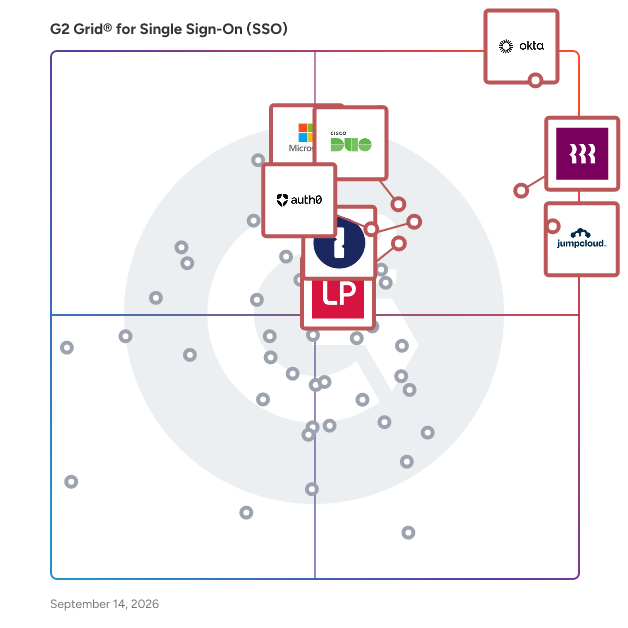
## G2 Grid® for Single Sign-On (SSO) Solutions
 ![G2 Grid® for Single Sign-On (SSO) Solutions plotting products by satisfaction and market presence](https://www.g2.com/categories/single-sign-on-sso/grids.png?focus%5B%5D=633&focus%5B%5D=1640029&focus%5B%5D=36316&focus%5B%5D=3899&focus%5B%5D=5282&focus%5B%5D=4533&focus%5B%5D=1718&focus%5B%5D=22264)

Highlighted products: Okta, Rippling IT, JumpCloud, Microsoft Entra ID, Cisco Duo, 1Password, LastPass, and Auth0.

Underlying data: [Grid® JSON](https://www.g2.com/categories/single-sign-on-sso/grids.json?focus%5B%5D=okta&focus%5B%5D=rippling-it&focus%5B%5D=jumpcloud&focus%5B%5D=microsoft-entra-id&focus%5B%5D=cisco-duo&focus%5B%5D=1password&focus%5B%5D=lastpass&focus%5B%5D=auth0)

**Sponsored**

### CoreView

CoreView is the leading SaaS platform for Microsoft 365 Tenant Resilience. Trusted by enterprises worldwide, CoreView secures the configuration, identity, and access layers of Microsoft 365—hardening tenants against attack, reducing privilege and blast radius, detecting configuration tampering, and restoring security posture after incidents. By protecting Microsoft 365 & Entra at the tenant level, CoreView ensures organisations can prevent compromise, withstand intrusion, and recover with confidence from cyber threats and operational disruption. Use Cases: 1. Tenant Resilience for Microsoft 365 2. Complex Microsoft 365 tenant management 3. Enforce governance and lifecycle management for Microsoft 365

[Visit website](https://www.g2.com/external_clickthroughs/record?secure%5Bad_program%5D=ppc&secure%5Bad_slot%5D=category_product_list&secure%5Bcategory_id%5D=254&secure%5Bchosen_at%5D=2026-07-28T06%3A12%3A12Z&secure%5Bdisplayable_resource_id%5D=255&secure%5Bdisplayable_resource_type%5D=Category&secure%5Bmedium%5D=sponsored&secure%5Bplacement_reason%5D=neighbor_category&secure%5Bplacement_resource_ids%5D%5B%5D=255&secure%5Bprioritized%5D=false&secure%5Bproduct_id%5D=40320&secure%5Bresource_id%5D=254&secure%5Bresource_type%5D=Category&secure%5Bsource_type%5D=category_page&secure%5Bsource_url%5D=https%3A%2F%2Fwww.g2.com%2Fcategories%2Fsingle-sign-on-sso%3Fpage%3D2&secure%5Btoken%5D=1e3b13b0803ad65f1a722b830ae6b732ed19443711d1bfb37b4bafd16ba08b93&secure%5Burl%5D=https%3A%2F%2Fhubs.ly%2FQ04g6Cs60&secure%5Burl_type%5D=custom_url)

### [Citrix Workspace](https://www.g2.com/products/citrix-workspace-2024-10-30/reviews)

Citrix Workspace Essentials provides a comprehensive, zero-trust approach to deliver secure and contextual access to corporate internal web apps, SaaS, and virtual applications. With Citrix Workspace Essentials, IT can consolidate traditional security products such as VPN, single-sign on, multi-factor authentication, and provide usage analytics for Web and SaaS apps. Citrix Workspace Essentials provides end-users with simplified, secure, and VPN-less access to Web apps, SaaS, virtualized apps, and data.

**Average Rating:** 4.4/5.0

**Total Reviews:** 67

#### How Do G2 Users Rate Citrix Workspace?

- **Has the product been a good partner in doing business?:** 9.0/10 (Category avg: 8.9/10)
- **Partner Access:** 8.7/10 (Category avg: 8.8/10)
- **Ease of connecting applications:** 8.6/10 (Category avg: 8.6/10)
- **Supports BYOD users:** 8.8/10 (Category avg: 8.7/10)

#### Who Is the Company Behind Citrix Workspace?

- **Seller:** [Citrix](https://www.g2.com/sellers/citrix)
- **Year Founded:** 1989
- **HQ Location:** Fort Lauderdale, FL
- **Twitter:** @citrix (197,812 Twitter followers)
- **LinkedIn® Page:** https://www.linkedin.com/company/2641/ (4,232 employees on LinkedIn®)
- **Ownership:** NASDAQ:CTXS

#### Who Uses This Product?

- **Top Industries:** Information Technology and Services, Financial Services
- **Company Size:** 61% Large, 33% Medium

#### What Do G2 Reviewers Say About Citrix Workspace?

_AI-generated summary from verified user reviews_

##### Pros

- Users value the **secure access** to applications and desktops provided by Citrix Workspace, enhancing remote work safety.
- Users appreciate the **ease of use** of Citrix Workspace, enjoying its seamless setup and convenient features for collaboration.
- Users value the **secure remote access** provided by Citrix Workspace, enabling efficient work from anywhere without security concerns.
- Users value the **secure access** to applications and desktops, enhancing safety and reliability for remote work.
- Users commend Citrix Workspace for its **strong security features** , ensuring safe collaboration and authorized access to data.

##### Cons

- Users often experience **slow loading** times, leading to frustration and interruptions in their workflow.
- Users often experience **slow performance** with Citrix Workspace, leading to interruptions that hinder productivity.
- Users often face **connection issues** with Citrix Workspace, leading to disconnections and slow performance during sessions.
- Users report experiencing **slow internet** with Citrix Workspace, often facing glitches and the need to switch windows frequently.
- Users face **access issues** with settings and printers not maintaining consistency across different machines daily.

#### What Are Recent G2 Reviews of Citrix Workspace?

**["Secure, Seamless Remote Access with Citrix Workspace"](https://www.g2.com/survey_responses/citrix-workspace-review-12736255)**

**Rating:** 5.0/5.0 stars

_— mani s._

[Read full review](https://www.g2.com/survey_responses/citrix-workspace-review-12736255)

**["User-Friendly Workspace, Occasional Crashes"](https://www.g2.com/survey_responses/citrix-workspace-review-13074692)**

**Rating:** 5.0/5.0 stars

_— Vince Dustien C._

[Read full review](https://www.g2.com/survey_responses/citrix-workspace-review-13074692)

### [Ping Identity](https://www.g2.com/products/ping-identity/reviews)

Ping Identity is a type of identity management solution designed to help organizations implement Zero Trust security frameworks while enhancing user experiences across various platforms. With a focus on intelligent identity solutions, Ping Identity empowers enterprises to securely manage access to cloud, mobile, Software as a Service (SaaS), and on-premises applications, facilitating a seamless integration of identity management into their digital business strategies. The target audience for Ping Identity primarily includes large enterprises and organizations that require robust security measures and streamlined access management for their workforce, customers, and partners. This solution is particularly beneficial for businesses operating in hybrid environments, where applications and data are spread across multiple platforms and locations. By adopting Ping Identity, organizations can ensure that their security protocols are not only effective but also user-friendly, thereby improving overall productivity and satisfaction. Key features of the PingOne Cloud Platform include single sign-on (SSO), multi-factor authentication (MFA), and adaptive authentication, which collectively enhance security while simplifying the user experience. The platform's SSO capability allows users to access multiple applications with a single set of credentials, reducing password fatigue and improving user compliance. MFA adds an extra layer of security by requiring additional verification steps, which is crucial in today’s threat landscape. Adaptive authentication further strengthens security by assessing user behavior and context, enabling organizations to respond dynamically to potential risks. Ping Identity stands out in the identity management category through its commitment to open standards and strategic partnerships with industry leaders such as Microsoft and Amazon. This approach not only enhances interoperability with existing systems but also ensures that organizations can leverage the latest technologies and innovations in identity management. By providing flexible solutions tailored to meet the unique needs of each enterprise, Ping Identity accelerates digital transformation initiatives, enhances customer engagement, and fortifies security measures, making it a valuable asset for any organization looking to navigate the complexities of modern identity management.

**Average Rating:** 4.4/5.0

**Total Reviews:** 118

#### How Do G2 Users Rate Ping Identity?

- **Has the product been a good partner in doing business?:** 8.6/10 (Category avg: 8.9/10)
- **Partner Access:** 8.6/10 (Category avg: 8.8/10)
- **Ease of connecting applications:** 8.5/10 (Category avg: 8.6/10)
- **Supports BYOD users:** 9.0/10 (Category avg: 8.7/10)

#### Who Is the Company Behind Ping Identity?

- **Seller:** [Ping Identity](https://www.g2.com/sellers/ping-identity)
- **Company Website:** https://www.PingIdentity.com
- **Year Founded:** 2002
- **HQ Location:** Denver, CO
- **Twitter:** @pingidentity (42,053 Twitter followers)
- **LinkedIn® Page:** https://www.linkedin.com/company/21870/ (2,378 employees on LinkedIn®)

#### Who Uses This Product?

- **Top Industries:** Information Technology and Services, Computer Software
- **Company Size:** 69% Large, 23% Medium

#### What Do G2 Reviewers Say About Ping Identity?

_AI-generated summary from verified user reviews_

##### Pros

- Users value the **responsive customer management** in Ping Identity, appreciating the ease of configuration and collaboration.
- Users appreciate the **ease of use** of Ping Identity, finding it simple to configure and manage applications.
- Users appreciate the **adaptability** of Ping Identity, enjoying seamless app configuration and management experiences.
- Users value the **easy app configuration and management** capabilities in Ping Identity, enhancing their maintenance experience.
- Users appreciate the **responsive customer support** of Ping Identity, highlighting their willingness to listen and collaborate effectively.

##### Cons

- Users find the **limited features** of Ping Identity restrictive, particularly in terms of customization and ease of setup.
- Users find **authentication issues** with Ping Identity, especially regarding confusion in setup and maintenance of OAuth/OIDC.
- Users find the **complex administration** of Ping Identity challenging, noting confusion in setup and maintenance.
- Users find the **complex setup** of Ping Identity confusing, affecting the ease of using its features.
- Users find the **interface confusing** , making setup and maintenance of Ping Identity challenging and frustrating.

#### What Are Recent G2 Reviews of Ping Identity?

**["Scalable and Reliable Identity Management at Massive Scale"](https://www.g2.com/survey_responses/ping-identity-review-12643118)**

**Rating:** 5.0/5.0 stars

_— Peter B._

[Read full review](https://www.g2.com/survey_responses/ping-identity-review-12643118)

**["Comprehensive, Stable Authentication Suite That’s Easy to Use"](https://www.g2.com/survey_responses/ping-identity-review-12827456)**

**Rating:** 4.5/5.0 stars

_— Naveen Kumar S._

[Read full review](https://www.g2.com/survey_responses/ping-identity-review-12827456)

### [Citrix Gateway](https://www.g2.com/products/citrix-gateway/reviews)

Citrix Gateway is a customer-managed solution that can be deployed on premises or on any public cloud, such as AWS, Azure, or Google Cloud Platform.

**Average Rating:** 4.0/5.0

**Total Reviews:** 68

#### How Do G2 Users Rate Citrix Gateway?

- **Has the product been a good partner in doing business?:** 8.3/10 (Category avg: 8.9/10)
- **Partner Access:** 8.6/10 (Category avg: 8.8/10)
- **Ease of connecting applications:** 8.2/10 (Category avg: 8.6/10)
- **Supports BYOD users:** 6.8/10 (Category avg: 8.7/10)

#### Who Is the Company Behind Citrix Gateway?

- **Seller:** [Citrix](https://www.g2.com/sellers/citrix)
- **Year Founded:** 1989
- **HQ Location:** Fort Lauderdale, FL
- **Twitter:** @citrix (197,812 Twitter followers)
- **LinkedIn® Page:** https://www.linkedin.com/company/2641/ (4,232 employees on LinkedIn®)
- **Ownership:** NASDAQ:CTXS

#### Who Uses This Product?

- **Top Industries:** Information Technology and Services, Hospital & Health Care
- **Company Size:** 55% Large, 38% Medium

#### What Do G2 Reviewers Say About Citrix Gateway?

_AI-generated summary from verified user reviews_

##### Pros

- Users value the **easy access** to work applications from any device, enhancing remote work efficiency and security.
- Users value the **security features** of Citrix Gateway, enabling safe access to work applications from any device.

##### Cons

- Users find the **setup complexities** of Citrix Gateway challenging, necessitating specialized knowledge for configuration.

#### What Are Recent G2 Reviews of Citrix Gateway?

**["Secure, Reliable Remote Access That’s Easy to Use"](https://www.g2.com/survey_responses/citrix-gateway-review-7094409)**

**Rating:** 4.5/5.0 stars

_— Mohamed B._

[Read full review](https://www.g2.com/survey_responses/citrix-gateway-review-7094409)

**["secure and easy access"](https://www.g2.com/survey_responses/citrix-gateway-review-11451752)**

**Rating:** 5.0/5.0 stars

_— Verified User in Banking_

[Read full review](https://www.g2.com/survey_responses/citrix-gateway-review-11451752)

### [Oracle SSO](https://www.g2.com/products/oracle-sso/reviews)

A suite that simplifies enterprise single sign-on deployments for system administrators and extends the benefits of ESSO to remote and mobile users.

**Average Rating:** 3.8/5.0

**Total Reviews:** 14

#### How Do G2 Users Rate Oracle SSO?

- **Has the product been a good partner in doing business?:** 7.7/10 (Category avg: 8.9/10)
- **Partner Access:** 8.9/10 (Category avg: 8.8/10)
- **Ease of connecting applications:** 8.6/10 (Category avg: 8.6/10)
- **Supports BYOD users:** 7.8/10 (Category avg: 8.7/10)

#### Who Is the Company Behind Oracle SSO?

- **Seller:** [Oracle](https://www.g2.com/sellers/oracle)
- **Year Founded:** 1977
- **HQ Location:** Austin, TX
- **Twitter:** @Oracle (827,997 Twitter followers)
- **LinkedIn® Page:** https://www.linkedin.com/company/1028/ (208,078 employees on LinkedIn®)
- **Ownership:** NYSE:ORCL

#### Who Uses This Product?

- **Company Size:** 82% Large, 29% Medium

#### What Are Recent G2 Reviews of Oracle SSO?

**["Oracle Single Sign-On"](https://www.g2.com/survey_responses/oracle-sso-review-5126106)**

**Rating:** 4.0/5.0 stars

_— Hasan O._

[Read full review](https://www.g2.com/survey_responses/oracle-sso-review-5126106)

**["IT Admin"](https://www.g2.com/survey_responses/oracle-sso-review-10031729)**

**Rating:** 5.0/5.0 stars

_— Verified User in Information Services_

[Read full review](https://www.g2.com/survey_responses/oracle-sso-review-10031729)

### [PingID](https://www.g2.com/products/ping-identity-pingid/reviews)

PingID is a cloud-based, adaptive multi-factor authentication (MFA) solution designed to enhance security while maintaining user convenience. It enables organizations to implement robust authentication measures across various applications and services, ensuring that only authorized users gain access. By integrating seamlessly with existing identity systems, PingID supports a range of authentication methods, including mobile apps, biometrics, security keys, and more, catering to diverse user preferences and security requirements. Key Features and Functionality: - Versatile Authentication Methods: Supports multiple authentication options such as mobile push notifications, biometrics (fingerprint and facial recognition), SMS, email, voice calls, and hardware tokens, allowing users to choose their preferred method. - Adaptive Authentication: Evaluates contextual factors like device posture, geolocation, and IP address to adjust authentication requirements dynamically, enhancing security without compromising user experience. - Seamless Integration: Integrates with various platforms, including PingOne, PingFederate, VPNs, Microsoft Azure AD, and Active Directory Federation Services (AD FS), facilitating easy deployment within existing IT infrastructures. - User Self-Service Portal: Empowers users to manage their authentication devices and methods, reducing the burden on IT support and improving overall productivity. - Comprehensive Administrative Insights: Provides dashboards for monitoring MFA usage and associated costs, enabling administrators to make informed decisions regarding security policies and resource allocation. Primary Value and Problem Solved: PingID addresses the critical need for enhanced security in an era where cyber threats are increasingly sophisticated. By implementing adaptive MFA, it ensures that access to sensitive applications and data is granted only to verified users, thereby mitigating the risk of unauthorized access and potential data breaches. Simultaneously, PingID maintains a user-friendly experience by offering flexible authentication methods and minimizing disruptions, striking a balance between stringent security measures and operational efficiency.

**Average Rating:** 4.5/5.0

**Total Reviews:** 35

#### How Do G2 Users Rate PingID?

- **Has the product been a good partner in doing business?:** 8.9/10 (Category avg: 8.9/10)
- **Partner Access:** 9.2/10 (Category avg: 8.8/10)
- **Ease of connecting applications:** 10.0/10 (Category avg: 8.6/10)
- **Supports BYOD users:** 9.2/10 (Category avg: 8.7/10)

#### Who Is the Company Behind PingID?

- **Seller:** [Ping Identity](https://www.g2.com/sellers/ping-identity)
- **Year Founded:** 2002
- **HQ Location:** Denver, CO
- **Twitter:** @pingidentity (42,053 Twitter followers)
- **LinkedIn® Page:** https://www.linkedin.com/company/21870/ (2,378 employees on LinkedIn®)
- **Phone:** 1.303.468.2900

#### Who Uses This Product?

- **Top Industries:** Information Technology and Services
- **Company Size:** 74% Large, 18% Small

#### What Do G2 Reviewers Say About PingID?

_AI-generated summary from verified user reviews_

##### Pros

- Users find the **ease of use** with PingID to be remarkable, enhancing security without complexity in authentication.
- Users value the **reliable and seamless authentication** experience of PingID, enhancing security without sacrificing usability.
- Users appreciate the **seamless multi-factor authentication** of PingID, providing a fast and user-friendly experience.
- Users value the **high security** of PingID, which offers a seamless and user-friendly authentication experience.
- Users appreciate the **intuitive user interface** of PingID, making multi-factor authentication simple and efficient.

##### Cons

- Users find the **complex setup** of PingID challenging, particularly for first-time users and those with intricate infrastructures.
- Users find the **setup difficulties** of PingID challenging, particularly for first-time users and complex infrastructures.
- Users face **API issues** with PingID, particularly with server reset failures upon app uninstallation.
- Users find the **initial setup complex** , leading to a frustrating experience with PingID.
- Users experience **connectivity issues** with PingID, particularly when the app is uninstalled and does not reset server settings.

#### What Are Recent G2 Reviews of PingID?

**["PingID is a fantastic security solution"](https://www.g2.com/survey_responses/pingid-review-11681054)**

**Rating:** 5.0/5.0 stars

_— Cristhian R._

[Read full review](https://www.g2.com/survey_responses/pingid-review-11681054)

**["Easy to Use, Simple Setup, and Straightforward Experience"](https://www.g2.com/survey_responses/pingid-review-12977825)**

**Rating:** 5.0/5.0 stars

_— Rhythm K._

[Read full review](https://www.g2.com/survey_responses/pingid-review-12977825)

### [Akamai Enterprise Application Access](https://www.g2.com/products/akamai-akamai-enterprise-application-access/reviews)

Enterprise Application Access is a unique cloud architecture that closes all inbound firewall ports, while ensuring that only authorized users and devices have access to the internal applications they need, and not the entire network. No one can access applications directly because they are hidden from the Internet and public exposure. Enterprise Application Access integrates data path protection, single sign-on, identity access, application security, and management visibility and control into a single service.

**Average Rating:** 4.4/5.0

**Total Reviews:** 27

#### How Do G2 Users Rate Akamai Enterprise Application Access?

- **Has the product been a good partner in doing business?:** 9.4/10 (Category avg: 8.9/10)
- **Partner Access:** 9.3/10 (Category avg: 8.8/10)
- **Ease of connecting applications:** 9.7/10 (Category avg: 8.6/10)
- **Supports BYOD users:** 9.3/10 (Category avg: 8.7/10)

#### Who Is the Company Behind Akamai Enterprise Application Access?

- **Seller:** [Akamai Technologies](https://www.g2.com/sellers/akamai-technologies)
- **Year Founded:** 1998
- **HQ Location:** Cambridge, MA
- **Twitter:** @Akamai (115,251 Twitter followers)
- **LinkedIn® Page:** https://www.linkedin.com/company/3925/ (10,552 employees on LinkedIn®)
- **Ownership:** NASDAQ:AKAM

#### Who Uses This Product?

- **Top Industries:** Information Technology and Services, Computer & Network Security
- **Company Size:** 37% Large, 33% Small

#### What Do G2 Reviewers Say About Akamai Enterprise Application Access?

_AI-generated summary from verified user reviews_

##### Pros

- Users find the **customer support** for Akamai Enterprise Application Access to be effective and helpful during implementation.
- Users appreciate the **ease of use** of Akamai Enterprise Application Access, enhancing their daily operations with seamless integration.
- Users appreciate the **easy access** provided by Akamai Enterprise Application Access, making daily workflows seamless and efficient.
- Users find Akamai Enterprise Application Access to have **excellent features** , including easy integration and strong customer support.
- Users value the **robust security features** of Akamai, effectively safeguarding against zero-day attacks and DDoS threats.

#### What Are Recent G2 Reviews of Akamai Enterprise Application Access?

**["best ZTNA out there"](https://www.g2.com/survey_responses/akamai-enterprise-application-access-review-10590988)**

**Rating:** 5.0/5.0 stars

_— Yash K._

[Read full review](https://www.g2.com/survey_responses/akamai-enterprise-application-access-review-10590988)

**["Akamai protect organization security"](https://www.g2.com/survey_responses/akamai-enterprise-application-access-review-10406268)**

**Rating:** 5.0/5.0 stars

_— Verified User in Insurance_

[Read full review](https://www.g2.com/survey_responses/akamai-enterprise-application-access-review-10406268)

### [Symantec VIP](https://www.g2.com/products/symantec-symantec-vip/reviews)

Symantec Validation and ID Protection (VIP) is a cloud-based, multi-factor authentication (MFA) service designed to secure access to sensitive data and applications across various devices and locations. By combining traditional username and password credentials with additional authentication factors, such as one-time passwords (OTPs), biometrics, or hardware tokens, VIP enhances security without compromising user productivity. Its scalable infrastructure allows organizations to implement robust authentication measures without the need for dedicated on-premises hardware. Key Features and Functionality: - Cloud-Based Infrastructure: Delivers secure, reliable, and scalable authentication services without requiring on-premises hardware. - Risk-Based Authentication: Utilizes device and behavior profiling to assess login attempts, blocking potentially risky access while maintaining a seamless experience for legitimate users. - Diverse Authentication Methods: Supports a wide range of authentication options, including hardware tokens, software-based OTPs, SMS or voice-based OTPs, biometrics, and push notifications, catering to various user preferences and security requirements. - Passwordless and Push Login Options: Offers user-friendly authentication experiences by eliminating the need for passwords through biometric verification or push notifications. - Self-Service Credential Provisioning: Enables users to register and manage their authentication credentials independently, reducing the administrative burden on IT departments. - Comprehensive Integration Support: Seamlessly integrates with popular VPNs, webmail services, single sign-on (SSO) applications, and user directories, facilitating broad compatibility across enterprise environments. Primary Value and User Benefits: Symantec VIP addresses the critical need for enhanced security in an era where sophisticated cyber threats and data breaches are prevalent. By implementing multi-factor authentication, organizations can significantly reduce the risk of unauthorized access, even if primary credentials are compromised. The service's flexibility in authentication methods ensures that security measures can be tailored to meet diverse user needs and compliance requirements. Additionally, its cloud-based nature offers scalability and reliability, allowing businesses to adapt to evolving security challenges without substantial infrastructure investments. Ultimately, Symantec VIP empowers organizations to protect sensitive information effectively while maintaining operational efficiency and user satisfaction.

**Average Rating:** 4.5/5.0

**Total Reviews:** 43

#### How Do G2 Users Rate Symantec VIP?

- **Has the product been a good partner in doing business?:** 9.4/10 (Category avg: 8.9/10)
- **Partner Access:** 8.7/10 (Category avg: 8.8/10)
- **Ease of connecting applications:** 9.2/10 (Category avg: 8.6/10)
- **Supports BYOD users:** 9.0/10 (Category avg: 8.7/10)

#### Who Is the Company Behind Symantec VIP?

- **Seller:** [Broadcom](https://www.g2.com/sellers/broadcom-ab3091cd-4724-46a8-ac89-219d6bc8e166)
- **Year Founded:** 1991
- **HQ Location:** San Jose, CA
- **Twitter:** @broadcom (63,909 Twitter followers)
- **LinkedIn® Page:** https://www.linkedin.com/company/broadcom/ (55,094 employees on LinkedIn®)
- **Ownership:** NASDAQ: CA

#### Who Uses This Product?

- **Top Industries:** Information Technology and Services, Hospital & Health Care
- **Company Size:** 75% Large, 16% Small

#### What Do G2 Reviewers Say About Symantec VIP?

_AI-generated summary from verified user reviews_

##### Pros

- Users praise the **easy-to-use cloud services** of Symantec VIP, enhancing security while simplifying two-factor authentication.
- Users appreciate the **ease of use** of Symantec VIP, enhancing security without complicating the login process.
- Users value the **strong security** of Symantec VIP, finding it reliable and user-friendly for two-factor authentication.
- Users value the **easy-to-use two-factor authentication** of Symantec VIP, enhancing security without complicating the login process.
- Users praise the **cross-platform functionality** of Symantec VIP, enhancing security with a seamless login experience across apps.

##### Cons

- Users often experience **delays in notifications** while noting the simplistic user interface and limited customization options.
- Users find the **limited customization** options of Symantec VIP restrict their ability to tailor the experience to their needs.
- Users find the **missing features** in Symantec VIP limit customization and analytics, impacting overall usability and experience.
- Users experience **notification delays** with Symantec VIP, along with a simplistic interface and limited customization options.
- Users find the **poor interface design** of Symantec VIP lacks intuitiveness and modernity, impacting user experience.

#### What Are Recent G2 Reviews of Symantec VIP?

**["Easy to use two factor authentication."](https://www.g2.com/survey_responses/symantec-vip-review-11588668)**

**Rating:** 5.0/5.0 stars

_— Gulrez T._

[Read full review](https://www.g2.com/survey_responses/symantec-vip-review-11588668)

**["VIP access"](https://www.g2.com/survey_responses/symantec-vip-review-11220334)**

**Rating:** 5.0/5.0 stars

_— KRITHIKA K._

[Read full review](https://www.g2.com/survey_responses/symantec-vip-review-11220334)

### [ManageEngine ADSelfService Plus](https://www.g2.com/products/manageengine-adselfservice-plus/reviews)

ManageEngine ADSelfService Plus is an identity security solution with MFA, SSO, and SSPR capabilities. ADSelfService Plus is an identity security solution that ensures secure and seamless access to enterprise resources and establishes a Zero Trust environment. With adaptive multi-factor authentication (MFA), single sign-on (SSO), self-service password management, a password policy enhancer, remote work enablement, and workforce self-service, ADSelfService Plus provides your employees with secure, simple access to the resources they need. ADSelfService Plus helps keep identity-based threats out, fast-tracks application onboarding, improves password security, reduces help desk tickets, and empowers remote workforces. The core features of ADSelfService Plus include: Adaptive MFA Enable context-based MFA with 19 different authentication factors for endpoint and application logins. Enterprise SSO Allow users to access all enterprise applications with a single, secure authentication flow. Password management and security Simplify password management with self-service password resets and account unlocks, strong password policies, and password expiry notifications. Enterprise self-service Delegate profile updates and group subscriptions to end users and monitor these self-service actions with approval workflows. Remote work enablement Enhance remote work with cached credential updates, secure logins, and mobile password management. Powerful integrations Establish an efficient and secure IT environment through integration with SIEM, ITSM, and IAM tools. Reporting and auditing Simplify auditing with predefined, actionable reports about authentication failures, logon attempts, and blocked users.

**Average Rating:** 4.5/5.0

**Total Reviews:** 32

#### How Do G2 Users Rate ManageEngine ADSelfService Plus?

- **Has the product been a good partner in doing business?:** 8.9/10 (Category avg: 8.9/10)

#### Who Is the Company Behind ManageEngine ADSelfService Plus?

- **Seller:** [Zoho](https://www.g2.com/sellers/zoho-b00ca9d5-bca8-41b5-a8ad-275480841704)
- **Year Founded:** 1996
- **HQ Location:** Austin, TX
- **Twitter:** @Zoho (137,880 Twitter followers)
- **LinkedIn® Page:** https://www.linkedin.com/company/38373/ (30,766 employees on LinkedIn®)
- **Phone:** +1 (888) 900-9646 

#### Who Uses This Product?

- **Company Size:** 56% Medium, 31% Large

#### What Do G2 Reviewers Say About ManageEngine ADSelfService Plus?

_AI-generated summary from verified user reviews_

##### Pros

- Users value the **efficient customer support** of ManageEngine ADSelfService Plus, enhancing overall service and reducing IT requests.
- Users value the **secure and intuitive credential recovery** of ADSelfService Plus, enhancing productivity and reducing IT support requests.
- Users appreciate the **quick deployment** of ManageEngine ADSelfService Plus, enhancing overall efficiency across the organization.
- Users highlight the **ease of implementation** of ManageEngine ADSelfService Plus, facilitating quick deployment and improved service.
- Users find the **ease of use** of ManageEngine ADSelfService Plus enhances deployment and reduces IT support requests.

##### Cons

- Users face **missing features** due to MSI installers being impacted by Windows updates, requiring potential reinstallation.
- Users face **update issues** with ADSelfService Plus, requiring reinstallation to maintain access after Windows updates.

#### What Are Recent G2 Reviews of ManageEngine ADSelfService Plus?

**["Easy Active Directory Integration and Secure Self-Service Password Resets"](https://www.g2.com/survey_responses/manageengine-adselfservice-plus-review-13002748)**

**Rating:** 4.0/5.0 stars

_— Tyrone O._

[Read full review](https://www.g2.com/survey_responses/manageengine-adselfservice-plus-review-13002748)

**["Secure Self-Service Password Reset Tool That Reduce Helpdesk Workload"](https://www.g2.com/survey_responses/manageengine-adselfservice-plus-review-13018359)**

**Rating:** 5.0/5.0 stars

_— Jasim K._

[Read full review](https://www.g2.com/survey_responses/manageengine-adselfservice-plus-review-13018359)

### [AuthX](https://www.g2.com/products/authx/reviews)

AuthX is a cloud-based IAM platform offering Passwordless Authentication with SSO, MFA, Passkeys, Badge Tap & Go, and Biometrics. It streamlines secure access across Workstations, Web, Network, and Mobile endpoints with advanced authentication workflows. Enabling Zero Trust Security, AuthX unifies credentials, apps, and devices while proactively managing risks.

**Average Rating:** 4.9/5.0

**Total Reviews:** 66

#### How Do G2 Users Rate AuthX?

- **Has the product been a good partner in doing business?:** 10.0/10 (Category avg: 8.9/10)
- **Partner Access:** 9.8/10 (Category avg: 8.8/10)
- **Ease of connecting applications:** 9.7/10 (Category avg: 8.6/10)
- **Supports BYOD users:** 9.9/10 (Category avg: 8.7/10)

#### Who Is the Company Behind AuthX?

- **Seller:** [AuthX](https://www.g2.com/sellers/authx)
- **Year Founded:** 2019
- **HQ Location:** Gaithersburg, Maryland, United States
- **Twitter:** @auth\_x (229 Twitter followers)
- **LinkedIn® Page:** https://www.linkedin.com/company/authx1 (31 employees on LinkedIn®)

#### Who Uses This Product?

- **Top Industries:** Information Technology and Services
- **Company Size:** 88% Medium, 17% Large

#### What Do G2 Reviewers Say About AuthX?

_AI-generated summary from verified user reviews_

##### Pros

- Users value the **ease of use** with AuthX, enjoying efficient and seamless passwordless authentication across their systems.
- Users value the **efficient security features** of AuthX, appreciating its passwordless login and contextual MFA for safe access.
- Users appreciate the **seamless authentication** with AuthX's Single Sign-On, enhancing workflow efficiency and maintaining robust security.
- Users appreciate the **easy access** provided by AuthX, benefiting from seamless passwordless authentication and efficient workflows.
- Users love the **easy integrations** of AuthX, enhancing efficiency and security across various systems and tools.

##### Cons

- Users note a **difficult learning** curve with AuthX, particularly for those new to IAM systems and advanced features.
- Users find the **difficult learning process** for AuthX challenging but appreciate its powerful features once mastered.
- Users find the **high learning curve** of AuthX challenging initially, especially for those new to IAM systems.
- Users find the initial **learning curve steep** , especially for those unfamiliar with IAM systems and complex features.
- Users find the **API difficulty** challenging, especially due to a steep learning curve and limited documentation.

#### What Are Recent G2 Reviews of AuthX?

**["Passwordless Authentication That Fits Naturally Into Everyday Work"](https://www.g2.com/survey_responses/authx-review-11920325)**

**Rating:** 5.0/5.0 stars

_— Chethan M._

[Read full review](https://www.g2.com/survey_responses/authx-review-11920325)

**["Seamless Single Sign-On That Keeps Work Moving"](https://www.g2.com/survey_responses/authx-review-11920358)**

**Rating:** 5.0/5.0 stars

_— Allwin I._

[Read full review](https://www.g2.com/survey_responses/authx-review-11920358)

### [WSO2 Identity Platform](https://www.g2.com/products/wso2-identity-platform/reviews)

What is WSO2 Identity Platform? WSO2 Identity Platform is a unified, API-first suite designed to orchestrate identity for humans, applications, and autonomous AI agents. It provides a modular fabric for modern identity, allowing organizations to deploy the full platform or select specific capabilities to enhance their existing IAM stack. Managed identities within the suite now exceed one billion for more than 250 customers across global industries including financial services, healthcare, and government. Comprehensive capabilities WSO2 Identity Platform serves as a strategic foundation for modern identity by offering: - Developer-first design with extreme extensibility: Use an API-first approach to customize every stage of the user journey. Avoid proprietary black boxes with a platform built for deep technical integration. - Open source freedom without hidden vendor lock-in: Retain full control of your identity data and logic. Benefit from a transparent, community-vetted codebase that ensures long-term agility and security. - Deploy anywhere across hybrid and cloud environments: Run WSO2 Access Manager on-premises, in private clouds, or as a containerized solution. Maintain consistency across your infrastructure with ease. - Scale to millions of users with proven reliability: Effortlessly manage complex B2B and B2C requirements. From progressive profiling to delegated administration, handle massive growth without performance loss. - Future-proof security for humans and AI agents: Secure the next generation of digital interactions. Use AI-powered flows and branding to protect both human users and autonomous AI agents seamlessly. - Meet global standards with built-in compliance: Simplify adherence to GDPR, FAPI, and OIDC. WSO2 Access Manager provides the granular consent and security protocols required for highly regulated industries. Value proposition: How do you position yourself against your competitors? - WSO2 Identity Platform is designed for deep technical integration and absolute deployment freedom. - Total deployment freedom: Maintain control with options for self-managed software for privacy or managed SaaS for speed. - Agentic enterprise strategy: WSO2 is a pioneer in treating AI agents as first-class citizens, providing the identity layer required to secure and govern autonomous AI interactions. - Extreme extensibility: Service extensions and an API-first approach allow developers to modify flow behaviors to meet unique requirements without being locked into a "proprietary black box". - Lower TCO & high ROI: Proven to provide a 332% ROI over three years, with pricing that allows for scaling to over 100 million users without exponential cost increases. - Open source transparency: A community-vetted codebase ensures long-term agility, security, and the elimination of hidden vendor lock-in.

**Average Rating:** 4.5/5.0

**Total Reviews:** 107

#### How Do G2 Users Rate WSO2 Identity Platform?

- **Has the product been a good partner in doing business?:** 8.8/10 (Category avg: 8.9/10)
- **Partner Access:** 8.9/10 (Category avg: 8.8/10)
- **Ease of connecting applications:** 8.4/10 (Category avg: 8.6/10)
- **Supports BYOD users:** 8.5/10 (Category avg: 8.7/10)

#### Who Is the Company Behind WSO2 Identity Platform?

- **Seller:** [WSO2](https://www.g2.com/sellers/wso2)
- **Company Website:** https://wso2.com
- **Year Founded:** 2005
- **HQ Location:** Mountain View, CA
- **Twitter:** @wso2 (12,751 Twitter followers)
- **LinkedIn® Page:** https://www.linkedin.com/company/66028/ (1,254 employees on LinkedIn®)

#### Who Uses This Product?

- **Who Uses This:** Software Engineer
- **Top Industries:** Information Technology and Services, Computer Software
- **Company Size:** 47% Medium, 37% Large

#### What Do G2 Reviewers Say About WSO2 Identity Platform?

_AI-generated summary from verified user reviews_

##### Pros

- Users value the **seamless authentication integration** of WSO2 Identity Platform, enhancing security and simplifying user access management.
- Users value the **robust security features** of WSO2 Identity Platform, enhancing their cyber security effectiveness and management.
- Users appreciate the **user-friendly interface** of WSO2 Identity Platform, simplifying identity management with ease of integration.
- Users appreciate the **ease of setup and integration** with WSO2 Identity Platform, streamlining their implementation process.
- Users praise **Single Sign-On** in WSO2 Identity Platform for its seamless access management and enhanced security features.

##### Cons

- Users report a **difficult learning curve** with WSO2 Identity Platform, especially for beginners and complex customizations.
- Users find WSO2 Identity Platform to have a **complexity barrier** that challenges beginners and requires advanced knowledge.
- Users find the **complex setup** of WSO2 Identity Platform challenging, often requiring significant technical expertise and learning resources.
- Users often struggle with a **steep learning curve** in WSO2 Identity Platform, making initial setup challenging for beginners.
- Users face a **poor documentation** issue, making integration and customization efforts overly complicated and time-consuming.

#### What Are Recent G2 Reviews of WSO2 Identity Platform?

**["Bridging RFC Precision with Real-World Flexibility in WSO2 IS"](https://www.g2.com/survey_responses/wso2-identity-platform-review-11404135)**

**Rating:** 5.0/5.0 stars

_— CEDRIC G._

[Read full review](https://www.g2.com/survey_responses/wso2-identity-platform-review-11404135)

**["Total Control and Unmatched Customization"](https://www.g2.com/survey_responses/wso2-identity-platform-review-12748062)**

**Rating:** 4.5/5.0 stars

_— Octavio d._

[Read full review](https://www.g2.com/survey_responses/wso2-identity-platform-review-12748062)

### [OneLogin](https://www.g2.com/products/onelogin/reviews)

OneLogin simpliﬁes identity management with secure, one-click access, for employees, customers and partners, through all device types, to all enterprise cloud and on-premises applications. OneLogin enables IT identity policy enforcement and instantly disables app access for employees who leave or change roles in real-time by removing them from Active Directory. Take control over application access, quickly on- and off-board team members, and provide end-users with easy access to all their applications on every device. Extend your on-premises security model to the cloud in minutes. Eliminate the pain and expense of extensive identity policy management. OneLogin reduces identity infrastructure costs and complex integration projects for each new app and efficiently extends identity policies to the cloud. OneLogin eliminates the need for lengthy integration and provisioning projects, manual de-provisioning, protracted on- and off-boarding processes, username and password resets, and Shadow IT.

**Average Rating:** 4.4/5.0

**Total Reviews:** 274

#### How Do G2 Users Rate OneLogin?

- **Has the product been a good partner in doing business?:** 8.7/10 (Category avg: 8.9/10)
- **Partner Access:** 8.8/10 (Category avg: 8.8/10)
- **Ease of connecting applications:** 9.1/10 (Category avg: 8.6/10)
- **Supports BYOD users:** 9.0/10 (Category avg: 8.7/10)

#### Who Is the Company Behind OneLogin?

- **Seller:** [One Identity](https://www.g2.com/sellers/one-identity)
- **HQ Location:** Aliso Viejo, CA
- **Twitter:** @OneIdentity (7,871 Twitter followers)
- **LinkedIn® Page:** https://www.linkedin.com/company/one-identity (718 employees on LinkedIn®)

#### Who Uses This Product?

- **Who Uses This:** Account Manager
- **Top Industries:** Computer Software, Education Management
- **Company Size:** 49% Medium, 40% Large

#### What Do G2 Reviewers Say About OneLogin?

_AI-generated summary from verified user reviews_

##### Pros

- Users value the **easy access** OneLogin provides, simplifying login with just one password for all applications.
- Users commend the **robust security features** of OneLogin, enhancing protection with strong authentication and password management.
- Users praise OneLogin for its **seamless single sign-on** functionality, enhancing security and streamlining access across apps.
- Users praise OneLogin for its **effective SSO capabilities** , providing a secure and convenient access solution.
- Users value the **seamless SSO experience** provided by OneLogin, enhancing efficiency and security in accessing applications.

##### Cons

- Users find **limited features** in OneLogin, focusing mainly on SSO and MFA without advanced IAM capabilities.
- Users report **limited functionality** in OneLogin, citing a lack of advanced IAM features and slow support response times.
- Users express concern over **login issues** that occasionally disrupt access to business tools and services.
- Users report a **lack of advanced features** in OneLogin, hindering functionality and overall satisfaction with the platform.
- Users are concerned about **outages** with OneLogin that disrupt their experience and business applications significantly.

#### What Are Recent G2 Reviews of OneLogin?

**["Easy to use SSO platform"](https://www.g2.com/survey_responses/onelogin-review-10012120)**

**Rating:** 5.0/5.0 stars

_— Stijn B._

[Read full review](https://www.g2.com/survey_responses/onelogin-review-10012120)

**["Reliable SSO and Access Management Platform"](https://www.g2.com/survey_responses/onelogin-review-13076565)**

**Rating:** 5.0/5.0 stars

_— Utkarsh K._

[Read full review](https://www.g2.com/survey_responses/onelogin-review-13076565)

- [&lsaquo; Prev‹ Prev](/categories/single-sign-on-sso?order=g2_score&source=search#product-list)
- [1](/categories/single-sign-on-sso?order=g2_score&source=search#product-list)
- 2
- [3](/categories/single-sign-on-sso?order=g2_score&page=3&source=search#product-list)
- [4](/categories/single-sign-on-sso?order=g2_score&page=4&source=search#product-list)
- [5](/categories/single-sign-on-sso?order=g2_score&page=5&source=search#product-list)
- [6](/categories/single-sign-on-sso?order=g2_score&page=6&source=search#product-list)
- …
- [11](/categories/single-sign-on-sso?order=g2_score&page=11&source=search#product-list)
- [12](/categories/single-sign-on-sso?order=g2_score&page=12&source=search#product-list)
- [Next &rsaquo;Next ›](/categories/single-sign-on-sso?order=g2_score&page=3&source=search#product-list)

Spotlight Categories

[Affiliate Marketing Software](https://www.g2.com/categories/affiliate-marketing)

[Spend Management Software](https://www.g2.com/categories/spend-management)

[Quality Management Systems (QMS)](https://www.g2.com/categories/quality-management-qms)

[Job Search Sites](https://www.g2.com/categories/job-search-sites)

[Cloud Content Collaboration Software](https://www.g2.com/categories/cloud-content-collaboration)

Similar Categories

- [Multi-Factor Authentication (MFA)](/categories/multi-factor-authentication-mfa)
- [Biometric Authentication](/categories/biometric-authentication)
- [Cloud Directory Services](/categories/cloud-directory-services)
- [Customer Identity and Access Management (CIAM)](/categories/customer-identity-and-access-management-ciam)
- [Decentralized Identity](/categories/decentralized-identity)

- [Identity and Access Management (IAM)](/categories/identity-and-access-management-iam)
- [Passwordless Authentication](/categories/passwordless-authentication)
- [Password Managers](/categories/password-managers)
- [Password Policy Enforcement](/categories/password-policy-enforcement)
- [Privileged Access Management (PAM)](/categories/privileged-access-management-pam)

- [Risk-Based Authentication (RBA)](/categories/risk-based-authentication-rba)
- [Self-Service Password Reset (SSPR) Tools](/categories/self-service-password-reset-sspr-tools)
- [User Provisioning and Governance Tools](/categories/user-provisioning-and-governance-tools)

[Browse Single Sign-On (SSO) Themes](/categories/single-sign-on-sso/themes)

 ![Brandon Summers-Miller](/assets/transparent-ad5be28fbcd25b7b08d2cebe1d957125437fb5407d75ee717965ad22c8808791.gif "Brandon Summers-Miller")
BS

Researched and written by [Brandon Summers-Miller](https://research.g2.com/insights/author/brandon-summers-miller)

Updated March 4, 2025

Single sign-on (SSO) solutions are authentication tools that allows users to sign into multiple applications or databases with a single set of credentials. Federation is the linking of IT systems, organizations, and personal identities with credentials and repositories. The [best SSO solutions](https://learn.g2.com/best-sso-software) serve to simplify identification processes and create an uninhibited feel when working to access applications, portals, and servers. The software is designed to provide users with access to multiple applications or datasets without requiring multiple logins.

The goal of SSO software is not only to improve ease of use while navigating across applications but also to minimize work for IT administrators and developers by centralizing access management. SSO products effectively join the desired applications and route logins through an SSO server. These solutions often include features such as dashboards for simplified navigation, application clouds, directory integration, and mobile applications for remote access.

There is some crossover between SSO software and solution types such as [cloud identity and access management software](https://www.g2.com/categories/cloud-identity-and-access-management), [password management software](https://www.g2.com/categories/password-management), and [user provisioning/governance software](https://www.g2.com/categories/user-provisioning-governance), but single sign-on products focus mainly on secure enterprise access to servers, applications, and databases rather than the management of data or passwords.

To qualify for inclusion in the SSO category, a product must:

- Allow users access to multiple applications or databases through one portal
- Automate authentication to prevent multiple logins
- Centralize authentication servers across applications
- Provide secure access to applications and data
- Integrate login access to business applications

Show More

* * *

## How Do You Choose the Right Single Sign-On (SSO) Solutions?

### What You Should Know About Single Sign-On Solutions

### What are Single Sign-On (SSO) Solutions?

Single sign-on (SSO) solutions are user authentication solution that helps companies secure access to business applications and assets. It does so while also providing end users with a convenient, easy-to-use portal that requires them only to sign in and authenticate once to access multiple corporate applications and resources.&nbsp;

SSO solutions share authentication sessions between a trusted identity provider, which manages digital identities and applications. In practice, commonly, an identity provider requires the user to log in and authenticate; the identity provider then shares this authentication session with other applications by passing digitally signed tokens for the receiving application to verify that it is coming from a trusted provider before granting the user with access to the application. If the user identity token is accepted, the user is automatically granted access to the application.

Companies use SSO software mainly to improve security and enhance the end-user sign-on experience, whether that be internal employees, end customers, or corporate business partners. SSO solutions also centralizes user access management, thus reducing the security management burden on administrators. Using an SSO solution, IT administrators can reduce or eliminate common time-consuming tasks like password resets. SSO products contain features that benefit both end users and administrators. For end users, this includes an easy-to-use user portal, intuitive authentication, and often a mobile application. For administrators, these solutions often include an identity directory or directory integrations, multiple multi-factor authentication (MFA) methods, audit features, and prebuilt application integrations.&nbsp;

**What Does SSO Stand For?**

SSO most commonly stands for single sign-on. The acronym SSO is less frequently used to describe same sign-on, which is different from single sign-on; same sign-on does not rely on trusted tokens, but rather credential sharing. Rarely, the acronym SSO is used to describe single sign-out.

Other common acronyms people may encounter regarding SSO products include:

FIM: federated identity management, of which SSO is a part

IAM: identity and access management

IdP: identity provider

JWT: JSON Web Token, a protocol commonly used in business-to-consumer (B2C) SSO applications

LDAP: lightweight directory access protocol, an open protocol used for directory services authentication

MFA: multi-factor authentication

OIDC: OpenID Connect, an authentication protocol

OAuth: an open standard authentication protocol

SAML: Security Assertion Markup Language, an open standard used for SSO solutions

#### What Types of Single Sign-On (SSO) Solutions Exist?

**Business to employee (B2E)**

Companies use B2E SSO solutions to securely manage their employees’ access to corporate accounts, provide an easy-to-use user experience, and reduce user need for IT administrators services.

**Business to business (B2B)**

Companies use B2B SSO solutions to enable their business partners and corporate customers to best utilize the company’s services, using the partner or corporate customer’s preferred identity providers.

**Business to consumer (B2C) or customer identity and access management (CIAM)**

In B2C or CIAM use cases, customers are able to sign into other accounts and connect them to the business’ app to provide an SSO experience. Most commonly, customers authenticate using social media identity providers like Facebook or Google enabling them access to connected accounts. **&nbsp;**

### What are the Common Features of Single Sign-On (SSO) Solutions?

The following are some core features within SSO solutions that can help users and administrators.

**User portal:** User portals provide an intuitive, easy-to-use end-user interface.

**Mobile app:** Many SSO solutions offer a mobile app for end users to both authenticate and access the SSO solution from their mobile devices.

**MFA methods:** Most SSO providers offer multiple authentication methods to end users, from software or hardware token-based authentication, to mobile push, passwordless authentication, biometric authentication, or one-time passcodes (OTPs).&nbsp;

**Adaptive or contextual access:** Some SSO software offers advanced authentication tools, such as adaptive or contextual access. Using machine learning to understand a user’s contextual use of the SSO product, such as location, IP address, time, and other real-time factors to create a user baseline profile. This profile is then used to determine anomalous access activity to prevent access when risk is deemed too high.

**Directory or integration:** To assist with user provisioning and management, SSO solutions either integrate with standard directories, such as Microsoft Active Directory, LDAP-based directories, or Google Cloud Directory or offer their own cloud directories built into the SSO software.

**Prebuilt integration application catalog:** SSO solutions commonly provide prebuilt integrations to widely used SaaS applications, which are available on an application catalog.

**Role management:** SSO solutions assist administrators with user provisioning and assigning permissions based on user role for access control.

**Audit features** : Audit features provide administrators audit logs to monitor user access.

### What are the Benefits of Single Sign-On (SSO) Solutions?

**Increases security:** The main benefit of using an SSO solution is for securing user access to company applications and other resources through user authentication.

**Reduces password authentication risk:** Since users must only sign in and authenticate once to access multiple applications, SSO solutions reduce the risks associated with poor password management and using only a single factor for authentication.

**Saves users time and frustration:** SSO solutions reduce the number of logins end users such as employees or customers must remember and SSO solutions reduce user frustration when switching between multiple applications once authenticated.

**Saves administrators time and money:** Users can access their accounts in one centralized location, reducing the number of calls to administrators for password resets, saving time and, therefore money on labor costs.

**Seamless experience across assets:** SSO solutions reduce login friction for end users once authenticated and give them access to multiple accounts.&nbsp;

**Centralizes consumer profiles:** SSO software consolidates end-user experiences in one tool to provide a centralized view of end-user or customer data.

### Who Uses Single Sign-On (SSO) Solutions?

**Systems administrators:** Systems administrators are responsible for deploying and managing a company’s SSO solutions.

**Employees:** Employees are end users of SSO solutions in a B2E use case to sign on and authenticate with the user portal to access their corporate accounts.

**Customers:** Customers are end users of SSO solutions in a B2C use case and sign in and authenticate using an identity provider, often a social media account, to access a business’ applications.

**Business contacts:** Companies may use SSO software to enable their business partners and corporate customers to securely authenticate and access the company’s assets, often with multiple identity providers.

#### Software Related to Single Sign-On (SSO) Solutions

Related solutions that can be used together with SSO software include:

[Identity and access management (IAM) software](https://www.g2.com/categories/identity-and-access-management-iam) **:** For employee use cases, IAM software offers broader identity solutions, of which SSO is often a part. IAM software authenticates users, provides access to systems and data based on company policies, tracks user activity, and provides reporting tools to ensure employees comply with company policies and regulations.

[Customer identity and access management (CIAM) software](https://www.g2.com/categories/customer-identity-and-access-management-ciam) **:** For customer use cases, CIAM software provides robust identity functionality. CIAM software enables businesses to centralize and manage customer identities, preferences, and profile information at scale while offering customers self-registration options.

[Password manager software](https://www.g2.com/categories/password-manager) **:** Password managers are secure repositories that store individual user passwords, much like a vault. SSO solutions differs from password managers because SSO software provides authentication before granting a trusted token, not an actual password, for access to an application.&nbsp;

[SaaS operations management software](https://www.g2.com/categories/saas-operations-management) **:** SaaS operations management software tools enable businesses to manage, govern, and secure their SaaS product portfolios; many of these tools integrate with SSO solutions to manage user permissions. **&nbsp;&nbsp;&nbsp;**

[SaaS spend management software](https://www.g2.com/categories/saas-spend-management) **:** This software enables companies to manage SaaS utilization to identify cost savings. Many of these tools integrate with SSO software to manage end-user utilization of SaaS subscriptions.

### Challenges with Single Sign-On (SSO) Solutions

Software solutions can come with their own set of challenges. Issues to consider include:&nbsp;

**Legacy applications** : SSO tools may not integrate with legacy applications; a solution to overcome this may include password vaulting tools within the SSO software to provide the end user with ease of use, despite not technically functioning as SSO regarding authentication.&nbsp;

**High availability:** It is important that the SSO provider has high availability to avoid users being locked out of their systems; with applications managed centrally with an SSO solution, any downtime can prevent end users from accessing their applications and resources. If a company has mission-critical applications that must be available 24/7, many companies will not integrate these tools with SSO providers and instead log in and authenticate separately.

### Which Companies Should Buy Single Sign-On (SSO) Solutions?

All companies can benefit from securing their login process to corporate assets.

**Companies securing employees:** Companies of all sizes that want to secure their employees’ access to corporate applications use SSO solutions.

**Companies securing customers:** Companies that want to enable their customers to provide self service to securely authenticate and login to applications use SSO solutions.

**Companies securing partners:** Companies that want to secure their partners and contractors access to corporate applications use SSO solutions.

### How to Buy Single Sign-On (SSO) Solutions

#### Requirements Gathering (RFI/RFP) for Single Sign-On (SSO) Software

Prior to selecting an SSO software service provider or solution, buyers must consider what factors are important to the company, which may include:

**End-user use case:** Buyers must determine their end users—whether employees, customers, or business partners—to determine what kind of SSO solution works best for these constituencies.

**Cloud vs. on-premises application support:** The buyer should determine what applications and company resources will be connected to the SSO software. For applications that need high availability (24/7), they may not wish to connect those in case of downtime with the SSO provider. Many SSO providers offer prebuilt integrations with the most popular business software. If the business has applications that are custom-built, legacy, or on-premises, those may need integrations built to connect with the SSO. Another workaround would be to use a password vault within an SSO solution for legacy applications that are difficult to connect.

**Federation protocols** : If the organization needs to integrate with multiple identity providers outside of the organization, especially for authenticating business partners, FIM can achieve this. Federation protocols include SAML 1.1, SAML2, WS-Federation, OAuth2, OpenID Connect, WS-Trust, and other protocols.

**Authentication type** : The company should ensure that the authentication types its employees, customers, or partners will use are supported by the SSO solution of choice. This may include software or hardware-token-based authentication for employees and OTPs via email, SMS, or phone for customers, among many other authentication methods. Many SSO solutions now offer contextual or risk-based authentication measures to learn user behaviors, identify patterns, and thus provide risk-based assessments when the authentication process does not meet typical patterns.&nbsp;

**Mobile app** : If end users will access corporate applications from mobile devices, ensure the SSO software provider’s mobile app meets particular business needs.&nbsp;

**Developer support** : Buyers must ensure the SSO provider has the developer support the team requires, including software development kits (SDKs) and application programming interface (API) lifecycle management functions, particularly for B2C SSO use cases.&nbsp;

**Meets security standards** : SSO is a security tool providing users with authenticated access to their company resources. It is important that the SSO service provider meet security standards that are important to the company, which may include ISO 27017, ISO 27018, ISO 27001, SOC 2 Type 2, and others.&nbsp;

#### Compare Single Sign-On Software (SSO) Products

**Create a long list**

Buyers should create a long list of software solutions by researching on g2.com, by reading real-user reviews, seeing how vendors compare on G2 Grid® reports, and saving the software selections to “My List” to reference them in the future. Using g2.com, users can learn about which solutions are most often used in the geographic market and which ones are best for every business segment size—whether that is for small, medium, and enterprise businesses.

**Create a short list**

After creating a long list of vendors, buyers must do further research to narrow down the selections. Using g2.com’s compare feature, they can stack specific software up side by side to learn about how real users of the software rate their functionality. G2 also has quarterly reports showcasing users’ perception of return on investment (in months),&nbsp;the software provider’s average implementation time in months, usability scores, and many other factors.

**Conduct demos**

Up next is time to demo the products. Many vendors enable buyers to contact them directly from g2’s website by clicking the “Get a quote” button on their product profile. Buyers must prepare for each demo by having a standard list of questions and clarifications to ask each vendor.&nbsp;

#### Selection of Single Sign-On (SSO) Solutions&nbsp;

**Choose a selection team**

Single sign-on solutions impact users across the business—from employees, customers, business partners, IT teams, infosec teams, and more. The company’s software selection team should include people representative of these groups. They must start with three to five people to join the selection committee and clearly define project roles.&nbsp;

**Negotiation**

It is important to know how many licenses are needed, as pricing often depends on the number of licenses the buyer purchases and the length of time they purchase it for. Often buyers can get discounts if they purchase large blocks of licenses for a longer duration. They must be sure to negotiate not just on price, but also implementation. Companies may be able to get free or reduced implementation services or ongoing support, as well.

**Final decision**

Before making a final choice, buyers should check if they can get a trial run of the product to test adoption with a small sample size of users. If the tool is well used and well received, the buyer can be confident that the selection was correct.