Top Free Server Backup Software - Page 2

How Many Server Backup Software Products Does G2 Track?

Total Products under this Category: 187

Category Stats (Oct 2026)

  • Average Rating: 4.33/5 The average rating of products in this category, based on all submitted ratings
  • Top Trending Product: BMC AMI Ops (+0.48%) - Among all products in this category, BMC AMI Ops recorded the largest rating increase compared to last month

Last updated: October 15, 2026

How Does G2 Rank Server Backup Software Products?

Why You Can Trust G2's Software Rankings:

  • 30 Analysts and Data Experts
  • 19,100+ Authentic Reviews
  • 187+ Products
  • Unbiased Rankings

G2's software rankings are built on verified user reviews, rigorous moderation, and a consistent research methodology maintained by a team of analysts and data experts. Each product is measured using the same transparent criteria, with no paid placement or vendor influence. While reviews reflect real user experiences, which can be subjective, they offer valuable insight into how software performs in the hands of professionals. Together, these inputs power the G2 Score, a standardized way to compare tools within every category.

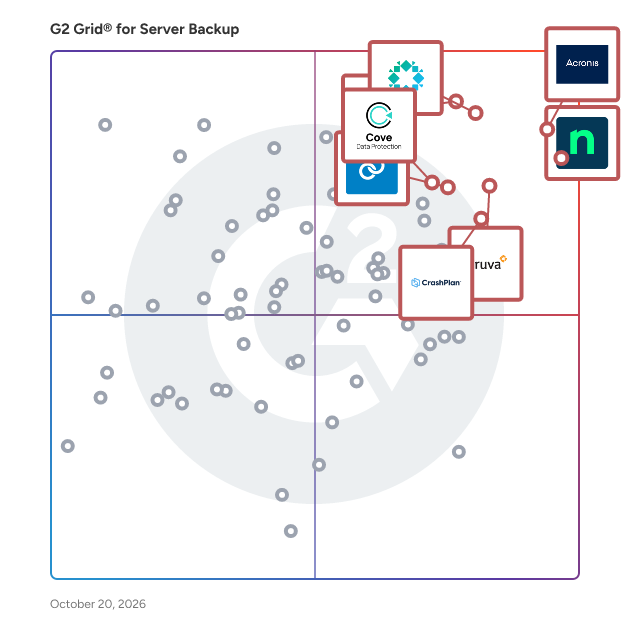
G2 Grid® for Server Backup Software

G2 Grid® for Server Backup Software plotting products by satisfaction and market presence

Highlighted products: Acronis Cyber Protect Cloud, NinjaOne, Rubrik, Veeam Data Platform, Druva Data Security Cloud, CrashPlan Platform, Datto SIRIS, and Cove Data Protection.

Underlying data: [Grid® JSON](https://www.g2.com/categories/server-backup/grids.json?focus%5B%5D=acronis-cyber-protect-cloud&focus%5B%5D=ninjaone&focus%5B%5D=rubrik&focus%5B%5D=veeam-data-platform&focus%5B%5D=druva-data-security-cloud&focus%5B%5D=crashplan-platform&focus%5B%5D=kaseya-datto-siris&focus%5B%5D=cove-data-protection)

Macrium Backup & Restore

Macrium Backup & Restore is a suite of image-based backup and disaster recovery software for Windows systems. It enables IT teams in manufacturing and operational technology (OT) environments to protect data, restore systems rapidly, and reduce downtime after hardware failure, user error, or cyber threats. The suite includes four distinct products: Macrium Reflect (Standalone) for Workstation & Server Backup, Macrium SiteBackup, Macrium Reflect LTSC, and Macrium Technician’s License. Each product serves a specific purpose in supporting resilient IT and OT infrastructure: Macrium provides comprehensive backup and disk imaging for individual endpoints such as critical manufacturing systems and production lines. It supports full, differential, and incremental backups, allowing organizations to create reliable recovery points and restore systems quickly. Macrium SiteBackup offers centralized management of backups across multiple endpoints and servers. With Macrium Site Manager, IT teams can automate backup schedules, monitor backup status, and access detailed reporting — all from a single interface. SiteBackup supports physical and virtual machines and is suited to small IT teams or large enterprise environments. Macrium Reflect LTSC (Long-Term Service Channel) is a perpetual license version of Reflect with built-in maintenance. Designed for organizations that require long-term stability and minimal software change, Reflect LTSC is well-suited to regulated industries, industrial control systems, and manufacturing environments where consistent platform behavior over time is essential. Macrium Technician’s License is a portable backup and recovery toolkit for IT professionals. It enables technicians to run Macrium Reflect directly from a USB or external drive, supporting ad hoc backup, restore, or system troubleshooting across multiple machines — without installing software on each device. Key features across the product suite: - Image-based backup for Windows workstations, servers, and virtual machines - Bare metal restore with support for dissimilar hardware - Centralized management and reporting - Support for incremental and differential backup strategies - Built-in encryption and protection against ransomware threats - One-time and subscription licensing models to suit different IT needs Macrium Backup & Restore is used by IT teams across healthcare, education, manufacturing, and corporate IT to ensure business continuity, maintain operational uptime, and reduce the impact of system outages. Speak to one of our experts here: https://www.macrium.com/contact

Average Rating: 4.7/5.0

Total Reviews: 93

How Do G2 Users Rate Macrium Backup & Restore?

  • Has the product been a good partner in doing business?: 9.1/10 (Category avg: 8.7/10)
  • Security Standards: 8.7/10 (Category avg: 8.7/10)
  • Disaster Recovery: 9.1/10 (Category avg: 8.6/10)
  • Activity Monitoring: 7.8/10 (Category avg: 8.6/10)

Who Is the Company Behind Macrium Backup & Restore?

Who Uses This Product?

  • Who Uses This: IT Manager
  • Top Industries: Information Technology and Services, Manufacturing
  • Company Size: 54% Small, 33% Medium

What Do G2 Reviewers Say About Macrium Backup & Restore?

AI-generated summary from verified user reviews

Pros
  • Users appreciate the ease of use of Macrium Backup & Restore, finding it intuitive and simple for daily backups.
  • Users praise the flawless reliability of Macrium Backup & Restore, valuing its ease of use and effective automation.
  • Users find the easy setup of Macrium Backup & Restore fast and straightforward, enhancing their backup experience.
  • Users value the effective data restoration capabilities of Macrium Backup & Restore, ensuring peace of mind with reliable backups.
  • Users find Macrium Backup & Restore to be extremely reliable, offering flawless performance and effortless automated backups every time.
Cons
  • Users face backup issues such as lack of cloud options and inconvenient restore processes, complicating data recovery.
  • Users find that some features need improvement for broader usability, as advanced management feels too specific and complex.
  • Users face challenges with restore processes, including timeouts and issues with BitLocker security during restores.
  • Users find insufficient information on adding drivers and using Rescue Media, which complicates the experience with legacy machines.
  • Users find the lack of features in Macrium Backup & Restore limits advanced management and usability with legacy machines.

What Are Recent G2 Reviews of Macrium Backup & Restore?

What Are G2 Users Discussing About Macrium Backup & Restore?

Axcient x360Recover

Axcient x360Recover is the most reliable, flexible and cost-effective business continuity and disaster recovery (BCDR) solution for MSPs and the SMBs they serve. With x360Recover you can comprehensively protect data from cyberthreats like ransomware or risks like accidental deletion with a solution that is simple to deploy and manage. Delivered as a flexible direct-to-cloud or appliance-based deployment, x360Recover can cover nearly all modern backup and recovery use cases—including appliance, server, and cloud-to-cloud—with a solution built on Axcient's proprietary Chain-Free backup technology and including features like AirGap, AutoVerify, Virtual Office, and PSA/RMM integration. By eliminating the pains and inefficiencies of chain management, Axcient dramatically simplifies management and can include worry-free data storage and retention by default. Innovative features mean backup integrity is automatically verified, and one or more systems can be virtualized almost instantly. x360Recover delivers an RPO of 15 minutes and an RTO of less than 1 hour.

Average Rating: 4.6/5.0

Total Reviews: 129

How Do G2 Users Rate Axcient x360Recover?

  • Has the product been a good partner in doing business?: 9.0/10 (Category avg: 8.7/10)
  • Security Standards: 9.0/10 (Category avg: 8.7/10)
  • Disaster Recovery: 9.4/10 (Category avg: 8.6/10)
  • Activity Monitoring: 8.7/10 (Category avg: 8.6/10)

Who Is the Company Behind Axcient x360Recover?

  • Seller: ConnectWise
  • Company Website:
  • Year Founded: 1982
  • HQ Location: Tampa, FL
  • Twitter: @ConnectWise
    14,926 Twitter followers
  • LinkedIn® Page: www.linkedin.com
    3,401 employees on LinkedIn®

Who Uses This Product?

  • Who Uses This: Owner, CEO
  • Top Industries: Information Technology and Services, Computer & Network Security
  • Company Size: 77% Small, 25% Medium

What Do G2 Reviewers Say About Axcient x360Recover?

AI-generated summary from verified user reviews

Pros
  • Users value the quick and knowledgeable support from Axcient x360Recover, enhancing their backup experience.
  • Users value the effective data recovery of Axcient x360Recover, despite finding it somewhat challenging at times.
  • Users appreciate the effective recovery process of Axcient x360Recover, highlighting its thoroughness despite some complexity.
  • Users find the setup ease of Axcient x360Recover impressive, allowing quick backups of PCs and servers.
Cons
  • Users find the inefficient recovery process challenging, making it harder to complete necessary recoveries.
  • Users find that the restore issues make recoveries more challenging and complicated than anticipated.

What Are Recent G2 Reviews of Axcient x360Recover?

What Are G2 Users Discussing About Axcient x360Recover?

Acronis Cyber Protect

Acronis Cyber Protect delivers robust protection against cyberthreats, unparalleled backup and recovery capabilities and simplified management and visibility through a single pane of glass, for the entire environment. Key features of Acronis Cyber Protect include: · Cyberthreat protection: Using artificial intelligence (AI) and machine learning (ML), proactively secures data, applications and systems, from advanced cyberattacks, including ransomware and other forms of malware. · Rapid Recovery: Reduced dependency on central IT support empowers users to initiate one-click recovery of distributed endpoints, including bare-metal recovery of physical workloads. · Reduced TCO: Broad, multigenerational OS support, enables vendor consolidation while ensuring comprehensive protection. · Simplified management: Centralized management includes local autonomy and seamless integration with existing third-party tools to provide a unified view of backup and recovery operations along with broad, multigenerational OS support. · Data sovereignty: With the use of Acronis’ extensive network of global data centers, users can ensure compliance and master regional data sovereignty laws, offering peace of mind and regulatory compliance. Acronis is majority-owned by EQT.

Average Rating: 4.3/5.0

Total Reviews: 657

How Do G2 Users Rate Acronis Cyber Protect?

  • Has the product been a good partner in doing business?: 8.4/10 (Category avg: 8.7/10)
  • Security Standards: 9.1/10 (Category avg: 8.7/10)
  • Disaster Recovery: 9.0/10 (Category avg: 8.6/10)
  • Activity Monitoring: 9.0/10 (Category avg: 8.6/10)

Who Is the Company Behind Acronis Cyber Protect?

  • Seller: Acronis
  • Year Founded: 2003
  • HQ Location: Schaffhausen
  • Twitter: @acronis
    94,498 Twitter followers
  • LinkedIn® Page: www.linkedin.com
    1,923 employees on LinkedIn®
  • Ownership: Acronis is majority-owned by EQT

Who Uses This Product?

  • Who Uses This: Support Analyst, Software Developer
  • Top Industries: Information Technology and Services, Computer Software
  • Company Size: 45% Small, 40% Medium

What Do G2 Reviewers Say About Acronis Cyber Protect?

AI-generated summary from verified user reviews

Pros
  • Users value Acronis Cyber Protect for its integrated backup and cybersecurity, streamlining management and enhancing data safety.
  • Users appreciate the ease of use of Acronis Cyber Protect, thanks to its intuitive interface and streamlined features.
  • Users appreciate the all-in-one solution of Acronis Cyber Protect, combining backup and cybersecurity for efficient management.
  • Users appreciate the data recovery capabilities of Acronis Cyber Protect, allowing quick restoration and seamless management.
  • Users appreciate the all-in-one security solution of Acronis Cyber Protect, simplifying data protection and recovery management.
Cons
  • Users find Acronis Cyber Protect to be expensive, especially challenging for smaller businesses on a budget.
  • Users find the complexity of setup and configuration of Acronis Cyber Protect can be overwhelming, especially for non-IT users.
  • Users find Acronis Cyber Protect to have a difficult learning curve, which complicates initial setup and usage.
  • Users express frustration with poor customer support from Acronis, leading to delays and unresolved issues during setup.
  • Users experience slow performance with Acronis Cyber Protect, particularly during client setup and on older machines.

What Are Recent G2 Reviews of Acronis Cyber Protect?

What Are G2 Users Discussing About Acronis Cyber Protect?

AI can help you find the answers. G2 helps you trust them.

Connect G2 to Claude or ChatGPT for answers grounded in G2's trusted reviews, comparisons, and pricing from real user insights.

How it works

365 Total Backup (formerly Altaro Office 365 Backup for MSPs)

365 Total Backup (formerly Altaro Office 365 Backup for MSPs) is a monthly subscription program enabling Managed Service Providers, IT resellers and IT consultants to provide backup and recovery services for Microsoft/Office 365 mailboxes, Teams, files stored within OneDrive and SharePoint, and Windows-based endpoints. MSPs can easily take backups and manage them through a convenient, multi-tenant, cloud-based console. M365 backups are automatically saved to a secure data center. No contracts or upfront costs apply: MSPs simply pay per user, per month. One monthly fee includes backup, unlimited M365 backups storage, management console and 24/7 support. MSPs can set their own price and earn recurring revenue. (See also: 11 Critical Reasons Why You Need Backup for Office 365 at https://www.altaro.com/office-365-backup/why-backup.php)

Average Rating: 4.8/5.0

Total Reviews: 58

How Do G2 Users Rate 365 Total Backup (formerly Altaro Office 365 Backup for MSPs)?

  • Has the product been a good partner in doing business?: 9.6/10 (Category avg: 8.7/10)
  • Security Standards: 10.0/10 (Category avg: 8.7/10)
  • Disaster Recovery: 10.0/10 (Category avg: 8.6/10)
  • Activity Monitoring: 10.0/10 (Category avg: 8.6/10)

Who Is the Company Behind 365 Total Backup (formerly Altaro Office 365 Backup for MSPs)?

  • Seller: Hornetsecurity
  • Company Website:
  • Year Founded: 2007
  • HQ Location: Hannover, DE
  • Twitter: @Hornetsecurity
    1,115 Twitter followers
  • LinkedIn® Page: www.linkedin.com
    562 employees on LinkedIn®

Who Uses This Product?

  • Top Industries: Information Technology and Services, Computer & Network Security
  • Company Size: 76% Small, 22% Medium

What Are Recent G2 Reviews of 365 Total Backup (formerly Altaro Office 365 Backup for MSPs)?

CyberSentriq

CyberSentriq is an integrated cybersecurity and data protection platform, leveraging solutions from two best-of breed vendors in the MSP space. Partnering with over 3,000 MSPs and protecting over 150,000 SMBs globally, CyberSentriq provides an unmatched combination of proactive AI-driven email and web security, advanced data protection, and operational resilience. The CyberSentriq platform offers: - Data backup & recovery for Microsoft M365 & Entra ID, Azure, Google workspace and more - AI-driven threat intelligence and detection - Advanced email security at both the Mail Exchange (MX) and Integrated Cloud Email Security (ICES) layers. - Security awareness services - Phishing simulation - Email archiving and encryption

Average Rating: 4.6/5.0

Total Reviews: 385

How Do G2 Users Rate CyberSentriq?

  • Has the product been a good partner in doing business?: 9.4/10 (Category avg: 8.7/10)
  • Security Standards: 9.1/10 (Category avg: 8.7/10)
  • Disaster Recovery: 9.1/10 (Category avg: 8.6/10)
  • Activity Monitoring: 8.9/10 (Category avg: 8.6/10)

Who Is the Company Behind CyberSentriq?

  • Seller: CyberSentriq
  • Company Website:
  • Year Founded: 2025
  • HQ Location: Galway ,Galway
  • Twitter: @Redstor
    1,949 Twitter followers
  • LinkedIn® Page: www.linkedin.com
    206 employees on LinkedIn®

Who Uses This Product?

  • Who Uses This: IT Manager, Director
  • Top Industries: Information Technology and Services, Computer & Network Security
  • Company Size: 47% Medium, 41% Small

What Do G2 Reviewers Say About CyberSentriq?

AI-generated summary from verified user reviews

Pros
  • Users appreciate the ease of use of CyberSentriq, benefiting from its user-friendly interface and efficient cloud solutions.
  • Users commend the exceptional restore capability of CyberSentriq, allowing versatile recovery across multiple platforms effortlessly.
  • Users love the ease of tracking and reviewing backups with Redstore, enhancing data management efficiency and reliability.
  • Users value the exceptional backup and restore features of CyberSentriq, ensuring efficient data recovery across platforms.
  • Users appreciate the reliable daily backups of CyberSentriq, ensuring quick access and minimal downtime during recovery.
Cons
  • Users face backup issues due to vague reporting and no scheduled backups on user endpoints, complicating restoration efforts.
  • Users express the need for improved reporting features in CyberSentriq for better troubleshooting and transparency.
  • Users find the reporting inadequate for troubleshooting, lacking detail needed for effective error resolution and analysis.
  • Users struggle with backup failures, finding error resolution tedious and reporting on Office 365 insufficient for troubleshooting.
  • Users find the reporting issues in CyberSentriq unsatisfactory, lacking detail and options for effective auditing.

What Are Recent G2 Reviews of CyberSentriq?

What Are G2 Users Discussing About CyberSentriq?

Barracuda Backup

Barracuda Backup offers businesses a flexible, reliable, and cost-effective solution to backup and restore data. Barracuda Backup can be deployed as a physical or virtual appliance on-premises, which acts as a backup target for data from a variety of different sources such as servers, virtual machines, databases, and applications.

Average Rating: 4.3/5.0

Total Reviews: 55

How Do G2 Users Rate Barracuda Backup?

  • Has the product been a good partner in doing business?: 9.1/10 (Category avg: 8.7/10)
  • Security Standards: 9.2/10 (Category avg: 8.7/10)
  • Disaster Recovery: 9.0/10 (Category avg: 8.6/10)
  • Activity Monitoring: 8.7/10 (Category avg: 8.6/10)

Who Is the Company Behind Barracuda Backup?

  • Seller: Barracuda
  • Year Founded: 2002
  • HQ Location: Campbell, CA
  • Twitter: @Barracuda
    15,239 Twitter followers
  • LinkedIn® Page: www.linkedin.com
    2,327 employees on LinkedIn®
  • Ownership: Private

Who Uses This Product?

  • Top Industries: Information Technology and Services
  • Company Size: 55% Medium, 29% Small

What Do G2 Reviewers Say About Barracuda Backup?

AI-generated summary from verified user reviews

Pros
  • Users value the minimal fuss of backup frequency, making Barracuda Backup a reliable solution for their needs.
  • Users value the user-friendly interface and fast data recovery of Barracuda Backup, emphasizing its ease of use.
  • Users praise the wide Linux OS compatibility of Barracuda Backup, enhancing flexibility for diverse environments.
  • Users value the wide Linux OS compatibility of Barracuda Backup, enhancing their flexibility in data management.
  • Users value the minimal fuss of backups that Barracuda Backup provides once configured effectively.
Cons
  • Users report a slow performance in the Barracuda Backup's web administration interface, affecting management efficiency.
  • Users report that backup processes can be slow, especially when dealing with large amounts of data.
  • Users find the cost of Barracuda Backup to be higher than alternative backup solutions, particularly for small businesses.
  • Users struggle with the lack of backup options, finding retention policies confusing and wishing for more flexibility.
  • Users find the lack of backup options challenging, wishing for more flexibility in retention policies and database backups.

What Are Recent G2 Reviews of Barracuda Backup?

What Are G2 Users Discussing About Barracuda Backup?

C2 Backup

C2 Backup is Synology’s cloud-based backup service, designed to keep every piece of your personal data safe and offer you an easy-to-handle backup solution. ‧ All-in-one backup solution for both Mac and Windows devices Back up your Windows PCs, MAC devices, and Microsoft OneDrive data to the cloud and never lose a file again. ‧ Manage backups with ease and flexibility C2 Backup keeps all your data safe by protecting your device entirely, from software to tools you use every day, files, folders, and even external drives when you plug them into your PC. Users are also able to configure backup schedule and retention policies based on individual requirements and restore preferences. ‧ Multiple recovery methods available C2 Backup offers flexible recovery options when restoring your main PC or new devices. You can restore exactly what you need, from entire bare-metal recovery to individual files and folders. ‧ Your data is protected with our military-grade data protection C2 Backup can securely and efficiently back up Windows devices and Microsoft 365 data from a signle console. The solution is equipped with private key protection, client-side AES 256-bit encryption, and high data resiliency (servers with 99.999999999% data durability) to keep your data fully protected.

Average Rating: 4.6/5.0

Total Reviews: 29

How Do G2 Users Rate C2 Backup?

  • Has the product been a good partner in doing business?: 9.4/10 (Category avg: 8.7/10)
  • Security Standards: 10.0/10 (Category avg: 8.7/10)
  • Disaster Recovery: 10.0/10 (Category avg: 8.6/10)
  • Activity Monitoring: 10.0/10 (Category avg: 8.6/10)

Who Is the Company Behind C2 Backup?

  • Seller: Synology C2
  • Year Founded: 2000
  • HQ Location: New Taipei City , TW
  • Twitter: @Synology
    67,298 Twitter followers
  • LinkedIn® Page: www.linkedin.com
    993 employees on LinkedIn®

Who Uses This Product?

  • Company Size: 66% Small, 17% Medium

What Are Recent G2 Reviews of C2 Backup?

What Are G2 Users Discussing About C2 Backup?

Commvault Cloud

Commvault (NASDAQ: CVLT) is the gold standard in cyber resilience, leading the charge to protect the world against ransomware and other cyber threats by helping companies reduce risk, minimize downtime, and control costs. The new Commvault Cloud, powered by Metallic AI, represents decades of innovation, industry leadership, customer trust, and a deep ecosystem of partnerships. It’s the only cyber resilience platform built for the hybrid world, offering the best data security for all workloads, anywhere combined with the rapid, enterprise-scale recovery. Commvault helps over 25,000 customers worldwide fight ransomware and achieve total resilience in face of tomorrow’s threats. Learn more about Commvault by visiting www.commvault.com

Average Rating: 4.4/5.0

Total Reviews: 187

How Do G2 Users Rate Commvault Cloud?

  • Has the product been a good partner in doing business?: 8.6/10 (Category avg: 8.7/10)
  • Security Standards: 9.2/10 (Category avg: 8.7/10)
  • Disaster Recovery: 8.9/10 (Category avg: 8.6/10)
  • Activity Monitoring: 8.9/10 (Category avg: 8.6/10)

Who Is the Company Behind Commvault Cloud?

  • Seller: Commvault
  • Company Website:
  • Year Founded: 1996
  • HQ Location: Eatontown, New Jersey, United States
  • Twitter: @Commvault
    64,666 Twitter followers
  • LinkedIn® Page: www.linkedin.com
    3,551 employees on LinkedIn®

Who Uses This Product?

  • Who Uses This: System Administrator
  • Top Industries: Information Technology and Services, Computer Software
  • Company Size: 47% Large, 38% Medium

What Do G2 Reviewers Say About Commvault Cloud?

AI-generated summary from verified user reviews

Pros
  • Users value the robust security and backup capabilities of Commvault Cloud for seamless data protection.
  • Users value the ease of use of Commvault Cloud, appreciating its affordable maintenance and support for various connectors.
  • Users value the ease of managing backups and disaster recovery through Commvault Cloud's unified interface.
  • Users value the reliability of Commvault Cloud, enjoying seamless backups and peace of mind in data management.
  • Users value the automation features of Commvault Cloud, simplifying management of backups and disaster recovery effortlessly.
Cons
  • Users find the complex setup of Commvault Cloud challenging, especially without prior experience or dedicated resources.
  • Users find the complex interface of Commvault Cloud to be overwhelming, increasing the learning curve for new users.
  • Users find the complexity of Commvault Cloud can lead to a steep learning curve and challenging administration tasks.
  • Users note a difficult learning curve with Commvault Cloud, especially for inexperienced teams navigating its complex features.
  • Users feel the product is expensive and the confusing cost structure adds to their frustration with Commvault Cloud.

What Are Recent G2 Reviews of Commvault Cloud?

What Are G2 Users Discussing About Commvault Cloud?

Comet Backup

Fast, secure backup software for businesses and IT providers. Start running backups and restores in less than 15 minutes! Comet is a flexible, all-in-one backup platform available in 15 languages. You choose your backup destination, storage location, configuration and setup. Backup to your own storage/location, SFTP, FTP or cloud storage provider (Wasabi, Amazon AWS, Google Cloud Storage, Microsoft Azure, Backblaze B2, or other S3-compatible cloud providers). • Disk Image/Baremetal, Files and Folder, Office 365, SQL, VMware backup, Hyper-V backup and more! • Backup to your own storage or cloud. • Deliver data protection for disaster recovery and business continuity.

Average Rating: 4.3/5.0

Total Reviews: 114

G2 Deal: Get $100 Credit on your first 90 Days with Comet Back up

Sign up for 30 Day free trial (No Credit Card Required) and receive $100 credit if you choose to purchase after the trial expires.

Price: $100.00

View this exclusive G2 deal

How Do G2 Users Rate Comet Backup?

  • Has the product been a good partner in doing business?: 8.6/10 (Category avg: 8.7/10)
  • Security Standards: 9.2/10 (Category avg: 8.7/10)
  • Disaster Recovery: 8.7/10 (Category avg: 8.6/10)
  • Activity Monitoring: 9.2/10 (Category avg: 8.6/10)

Who Is the Company Behind Comet Backup?

  • Seller: Comet Backup
  • Company Website:
  • Year Founded: 2015
  • HQ Location: Christchurch
  • Twitter: @CometBackup
    621 Twitter followers
  • LinkedIn® Page: www.linkedin.com
    19 employees on LinkedIn®

Who Uses This Product?

  • Who Uses This: Owner, CEO
  • Top Industries: Information Technology and Services, Computer & Network Security
  • Company Size: 78% Small, 18% Medium

What Do G2 Reviewers Say About Comet Backup?

AI-generated summary from verified user reviews

Pros
  • Users commend Comet Backup for its secure and reliable backup solutions, ensuring essential data is safeguarded effortlessly.
  • Users value the secure storage of Comet Backup, preventing loss of essential and confidential data effectively.
  • Users commend the ease of use of Comet Backup, praising its seamless integration with various storage providers.
  • Users appreciate the secure and reliable storage system of Comet Backup, ensuring their data is well protected.
  • Users value the flexible storage capacity of Comet Backup, which meets diverse backup needs across multiple devices.
Cons
  • Users find the complex interface of Comet Backup challenging, needing clearer instructions and improved design for better usability.
  • Users find Comet Backup to be expensive, especially for small businesses, driving some to consider alternatives.
  • Users suggest that UX improvement is necessary for better aesthetics and clearer feature instructions in Comet Backup.
  • Users are dissatisfied with pricing issues, including pre-pay requirements and high costs for small businesses.
  • Users find the retention policies confusing, which may hinder their understanding of Comet Backup's features.

What Are Recent G2 Reviews of Comet Backup?

What Are G2 Users Discussing About Comet Backup?

OpenText Server Backup

OpenText™ Server Backup is a cloud-based backup and disaster recovery solution designed to protect physical and virtual servers from ransomware, hardware failures, accidental deletion, and other data loss events. It securely backs up server data to the cloud with encryption in transit and at rest, while enabling fast recovery of files, folders, volumes, or entire servers when needed. Built for IT teams, SMBs, and managed service providers, OpenText Server Backup simplifies backup management through a centralized cloud console with automated policies, monitoring, reporting, and recovery workflows. Incremental backups reduce bandwidth and storage usage by only backing up new or changed data after the initial backup. Key benefits include: * Rapid recovery from ransomware, outages, and disasters * Secure cloud backup with encrypted storage and transmission * Automated backups with customizable retention policies * Centralized management across multiple servers and sites * Bare-metal recovery for full server restoration * Flexible recovery options for files, volumes, or complete systems * AWS cloud storage integration for scalability and resilience * Lightweight agents with minimal performance impact OpenText Server Backup helps organizations improve cyber resilience, minimize downtime, and ensure business continuity without the complexity of traditional backup infrastructure.

Average Rating: 4.5/5.0

Total Reviews: 81

How Do G2 Users Rate OpenText Server Backup?

  • Has the product been a good partner in doing business?: 9.0/10 (Category avg: 8.7/10)
  • Security Standards: 9.2/10 (Category avg: 8.7/10)
  • Disaster Recovery: 8.6/10 (Category avg: 8.6/10)
  • Activity Monitoring: 8.5/10 (Category avg: 8.6/10)

Who Is the Company Behind OpenText Server Backup?

  • Seller: OpenText
  • Year Founded: 1991
  • HQ Location: Waterloo, ON
  • Twitter: @OpenText
    21,565 Twitter followers
  • LinkedIn® Page: www.linkedin.com
    22,835 employees on LinkedIn®
  • Ownership: NASDAQ:OTEX

Who Uses This Product?

  • Top Industries: Information Technology and Services, Computer & Network Security
  • Company Size: 47% Medium, 34% Small

What Are Recent G2 Reviews of OpenText Server Backup?

Unitrends Backup and Recovery

Unitrends Data Center Backup and Recovery offers a Unified BCDR solution enabling our users to address the challenges of today with a complete, agile solution designed to backup, secure and recover all workloads. The platform encompasses protection for traditional data center infrastructure as well as cloud-based IaaS workloads, SaaS applications and the data being generated on endpoint devices such as laptops and PCs. Purposeful integrations with security tools provide end-to-end protection against cybercrime and human error, while automation and artificial intelligence is injected into the platform to simplify complex systems and provide a unified experience with visibility across a complete backup infrastructure.

Average Rating: 4.2/5.0

Total Reviews: 445

How Do G2 Users Rate Unitrends Backup and Recovery?

  • Has the product been a good partner in doing business?: 8.5/10 (Category avg: 8.7/10)
  • Security Standards: 8.5/10 (Category avg: 8.7/10)
  • Disaster Recovery: 8.6/10 (Category avg: 8.6/10)
  • Activity Monitoring: 8.4/10 (Category avg: 8.6/10)

Who Is the Company Behind Unitrends Backup and Recovery?

  • Seller: Kaseya
  • Company Website:
  • Year Founded: 2000
  • HQ Location: Miami, FL
  • Twitter: @KaseyaCorp
    17,411 Twitter followers
  • LinkedIn® Page: www.linkedin.com
    5,483 employees on LinkedIn®

Who Uses This Product?

  • Who Uses This: IT Manager, Network Administrator
  • Top Industries: Information Technology and Services, Hospital & Health Care
  • Company Size: 61% Medium, 28% Small

What Do G2 Reviewers Say About Unitrends Backup and Recovery?

AI-generated summary from verified user reviews

Pros
  • Users find Unitrends Backup and Recovery to be easy to use, with intuitive interfaces and smooth recovery processes.
  • Users highlight the reliability of Unitrends Backup and Recovery, praising its flawless backups and solid performance.
  • Users praise the flawless backup functionality of Unitrends Backup, appreciating its comprehensive VM support and management features.
  • Users appreciate the frequent and reliable backups of Unitrends, ensuring data protection and ease of management.
  • Users commend the exceptional customer support of Unitrends Backup and Recovery for its quick and knowledgeable assistance.
Cons
  • Users experience significant issues with poor customer support, leading to frustrating troubleshooting and unresolved problems.
  • Users find the poor interface design frustrating, making navigation difficult and complicating daily tasks.
  • Users struggle with backup issues, finding setup unintuitive and lacking sufficient troubleshooting guidance for persistent errors.
  • Users find the missing features of Unitrends Backup and Recovery frustrating, hindering effective management and resolution of issues.
  • Users find the UI needs improvement, citing navigation issues and a lack of customization and user permissions.

What Are Recent G2 Reviews of Unitrends Backup and Recovery?

What Are G2 Users Discussing About Unitrends Backup and Recovery?

GoodSync

GoodSync is a powerful and flexible file synchronization and backup solution developed by Siber Systems. Designed to serve individual users, small businesses, and large enterprises alike, GoodSync ensures data consistency, integrity, and availability across devices, servers, and storage platforms. With support for one-way (data backup) and two-way (data synchronization) operations, automation, and a broad range of storage protocols, from local folders to cloud services, GoodSync adapts to virtually any data workflow. Its advanced feature set includes ransomware protection, real-time change detection and transfer, automated conflict resolution, versioning, encryption, and flexible management, whether configured per endpoint or centrally managed via a unified console for mobile, workstation, and server environments. Whether deployed on a personal workstation or as part of a distributed enterprise infrastructure, GoodSync provides a scalable and secure framework for automating file backup and synchronization across diverse environments.

Average Rating: 4.6/5.0

Total Reviews: 74

How Do G2 Users Rate GoodSync?

  • Has the product been a good partner in doing business?: 9.0/10 (Category avg: 8.7/10)
  • Security Standards: 6.7/10 (Category avg: 8.7/10)
  • Disaster Recovery: 8.3/10 (Category avg: 8.6/10)
  • Activity Monitoring: 8.0/10 (Category avg: 8.6/10)

Who Is the Company Behind GoodSync?

  • Seller: Siber Systems
  • Company Website:
  • Year Founded: 2000
  • HQ Location: Fairfax, US
  • Twitter: @roboform
    19,840 Twitter followers
  • LinkedIn® Page: www.linkedin.com
    16 employees on LinkedIn®

Who Uses This Product?

  • Top Industries: Computer Software, Computer Networking
  • Company Size: 54% Small, 34% Medium

What Do G2 Reviewers Say About GoodSync?

AI-generated summary from verified user reviews

Pros
  • Users find GoodSync exceptionally easy to use, simplifying file synchronization and updates across multiple devices.
  • Users find the easy-to-use backup solution of GoodSync invaluable for seamless and flexible file management.
  • Users appreciate the easy setup of GoodSync, finding it straightforward and helpful for automatic file syncing.
  • Users value the automation capabilities of GoodSync, enabling effortless syncing and reliable file management in their daily tasks.
  • Users value the reliability of GoodSync, ensuring seamless backups and confidence in data safety without manual intervention.
Cons
  • Users find the confusing interface of GoodSync overwhelming, especially for newcomers navigating its complex features.
  • Users face syncing issues with GoodSync, citing limitations on multiple user access and complicated setup processes.
  • Users find the setup process complex, with a steep learning curve and challenges in understanding job configurations.
  • Users note data limitations with GoodSync, finding restrictions on syncing sources and targets frustrating.
  • Users find the learning difficulty with GoodSync challenging, especially for newcomers navigating its complex interface and features.

What Are Recent G2 Reviews of GoodSync?

What Are G2 Users Discussing About GoodSync?

SnapShooter

SnapShooter is a server backup platform, for native snapshot-based backups from the industries biggest providers, as well as on the server, database, file and application backups.

Average Rating: 5.0/5.0

Total Reviews: 10

How Do G2 Users Rate SnapShooter?

  • Has the product been a good partner in doing business?: 10.0/10 (Category avg: 8.7/10)
  • Security Standards: 10.0/10 (Category avg: 8.7/10)
  • Disaster Recovery: 10.0/10 (Category avg: 8.6/10)
  • Activity Monitoring: 10.0/10 (Category avg: 8.6/10)

Who Is the Company Behind SnapShooter?

Who Uses This Product?

  • Top Industries: Computer Software
  • Company Size: 91% Small

What Are Recent G2 Reviews of SnapShooter?

What Are G2 Users Discussing About SnapShooter?

Arcserve UDP

Arcserve Unified Data Protection (UDP) is an all-in-one data resilience solution designed to protect data across physical, virtual, and cloud environments. With comprehensive backup, granular restore, and disaster recovery capabilities, Arcserve UDP also provides AI-enabled ransomware protection. The platform offers image-based backups, agentless protection for virtual environments, support for applications like Microsoft Exchange and SQL Server, and capabilities for data reduction, automated testing, instant recovery, bare-metal recovery, instant restores, and failover capabilities. Arcserve UDP supports multiple hypervisors, as well as on-premises and cloud storage providers, including Arcserve Cloud Storage, AWS, Microsoft Azure, Google Cloud, and Wasabi.

Average Rating: 4.2/5.0

Total Reviews: 103

How Do G2 Users Rate Arcserve UDP?

  • Has the product been a good partner in doing business?: 8.4/10 (Category avg: 8.7/10)
  • Security Standards: 8.6/10 (Category avg: 8.7/10)
  • Disaster Recovery: 8.8/10 (Category avg: 8.6/10)
  • Activity Monitoring: 8.2/10 (Category avg: 8.6/10)

Who Is the Company Behind Arcserve UDP?

  • Seller: Arcserve
  • Year Founded: 1983
  • HQ Location: Eden Prairie, MN
  • Twitter: @Arcserve
    12,988 Twitter followers
  • LinkedIn® Page: www.linkedin.com
    649 employees on LinkedIn®

Who Uses This Product?

  • Who Uses This: IT Manager, System Administrator
  • Top Industries: Information Technology and Services, Computer & Network Security
  • Company Size: 56% Medium, 31% Small

What Do G2 Reviewers Say About Arcserve UDP?

AI-generated summary from verified user reviews

Pros
  • Users value the ease of use of Arcserve UDP, appreciating its simple configuration and friendly interface.
  • Users value the reliable backup solutions of Arcserve UDP, highlighting its ease of use and ransomware protection.
  • Users find Arcserve UDP to be reliable, offering easy-to-use solutions with effective ransomware protection and backup features.
  • Users value the ease of use of Arcserve UDP, appreciating its simple configuration and friendly interface.
  • Users value the simple configuration of Arcserve UDP, enjoying its user-friendly interface and ease of use.
Cons
  • Users experience poor customer support with inconsistent responses and delays in addressing product updates and functionalities.
  • Users face slow restoration times and dependency on IT, limiting effective backup and recovery options.
  • Users express concerns about backup failures due to the need for on-site IT and datastore issues.
  • Users face significant backup issues with Arcserve UDP, requiring on-site IT support and risking data loss during datastore problems.
  • Users face data deletion issues with Arcserve UDP, risking loss of backup data during datastore problems.

What Are Recent G2 Reviews of Arcserve UDP?

What Are G2 Users Discussing About Arcserve UDP?

Arctera Backup Exec

Backup Exec is a simple, secure, unified and comprehensive data protection software solution. It is designed to help organizations protect their data by providing a range of features for backup, disaster recovery, and archiving. Key features of Backup Exec include: Data Backup: Backup Exec offers flexible backup options for various environments, including virtual machines, physical servers, cloud storage, and databases. It can back up data from both on-premises and cloud-based systems. Disaster Recovery: The software includes tools for disaster recovery, ensuring that businesses can quickly restore their critical systems and data in the event of a system failure, data corruption, or cyberattack. Cross-Platform Support: It supports a wide range of operating systems, including Windows, Linux, and VMware, as well as cloud platforms like Amazon Web Services (AWS) and Microsoft Azure. Centralized Management: Backup Exec provides a centralized interface to manage backups, monitor system status, and configure backup policies, making it easier for IT administrators to oversee the entire backup environment. File and Application Protection: It includes specialized agents for backing up applications like Microsoft Exchange, SQL Server, and SharePoint, as well as file-level backup. Cloud Integration: Backup Exec integrates with cloud storage, allowing organizations to back up data directly to the cloud for offsite storage and disaster recovery. Encryption and Security: The software offers encryption both during the backup process and for data storage, ensuring that sensitive data is secure and compliant with regulations. Automated Backups: Backup Exec can automate backup tasks based on customizable schedules, reducing manual intervention and ensuring that backups occur regularly. In summary, Backup Exec is a powerful solution for businesses looking to protect and recover their critical data, with a range of features that address the needs of both small and large organizations.

Average Rating: 4.2/5.0

Total Reviews: 264

How Do G2 Users Rate Arctera Backup Exec?

  • Has the product been a good partner in doing business?: 8.3/10 (Category avg: 8.7/10)
  • Security Standards: 8.7/10 (Category avg: 8.7/10)
  • Disaster Recovery: 8.7/10 (Category avg: 8.6/10)
  • Activity Monitoring: 8.6/10 (Category avg: 8.6/10)

Who Is the Company Behind Arctera Backup Exec?

  • Seller: Arctera
  • Year Founded: 2024
  • HQ Location: Pleasanton, California, United States
  • LinkedIn® Page: www.linkedin.com
    586 employees on LinkedIn®

Who Uses This Product?

  • Who Uses This: IT Manager, IT Administrator
  • Top Industries: Information Technology and Services, Computer Software
  • Company Size: 59% Medium, 22% Small

What Do G2 Reviewers Say About Arctera Backup Exec?

AI-generated summary from verified user reviews

Pros
  • Users value the flexible backup frequency of Arctera Backup Exec, enabling quick recovery based on available disk space.
  • Users value the efficient virtual machine backup of Arctera Backup Exec, enabling quick recovery with minimal effort.
  • Users value the efficient recovery process of Arctera Backup Exec, enabling quick restoration of vital systems effortlessly.
  • Users value the efficient disaster recovery capabilities of Arctera Backup Exec, enabling quick restoration of critical systems.
  • Users value the ease of use of Arctera Backup Exec, finding it simplifies their backup management tasks.
Cons
  • Users find the complex setup of job scheduling in Arctera Backup Exec to be challenging and cumbersome.
  • Users find the learning curve steep when scheduling jobs, indicating a need for a more user-friendly interface.
  • Users find the scheduling limitations challenging, particularly when managing multiple jobs efficiently.
  • Users experience slow performance with Arctera Backup Exec, noting delays in refreshing and occasional lags.
  • Users experience time delays with Arctera Backup Exec, as it takes time to refresh and occasionally lags.

What Are Recent G2 Reviews of Arctera Backup Exec?

What Are G2 Users Discussing About Arctera Backup Exec?

Tian Lin
TL
Researched and written by Tian Lin
Updated October 3, 2024