Best Online Proofing Software with Creative Collaboration Capabilities

How Many Online Proofing Software Products Does G2 Track?

Total Products under this Category: 107

Category Stats (Nov 2026)

  • Average Rating: 4.6/5 (↑0.01 vs Oct 2026) The average rating of products in this category, based on all submitted ratings
  • Top Trending Product: WebCenter Go (+3.53%) - Among all products in this category, WebCenter Go recorded the largest rating increase compared to last month

Last updated: November 12, 2026

How Does G2 Rank Online Proofing Software Products?

Why You Can Trust G2's Software Rankings:

  • 30 Analysts and Data Experts
  • 27,000+ Authentic Reviews
  • 107+ Products
  • Unbiased Rankings

G2's software rankings are built on verified user reviews, rigorous moderation, and a consistent research methodology maintained by a team of analysts and data experts. Each product is measured using the same transparent criteria, with no paid placement or vendor influence. While reviews reflect real user experiences, which can be subjective, they offer valuable insight into how software performs in the hands of professionals. Together, these inputs power the G2 Score, a standardized way to compare tools within every category.

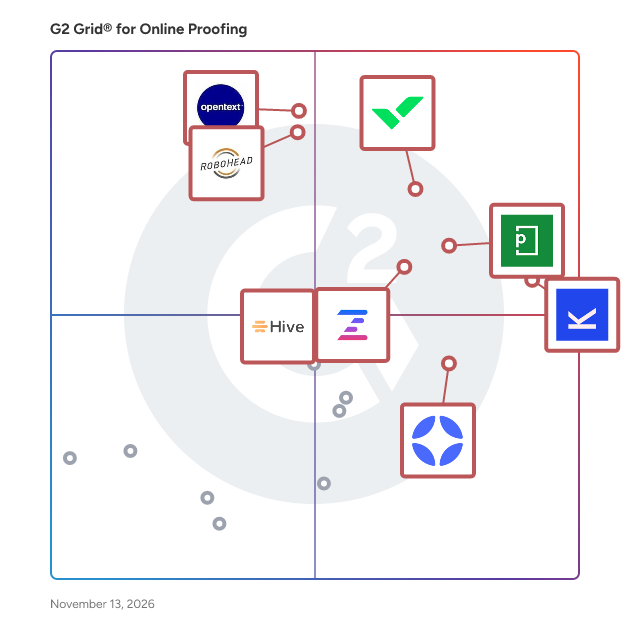
G2 Grid® for Online Proofing Software

G2 Grid® for Online Proofing Software plotting products by satisfaction and market presence

Highlighted products: Kontentino, Wrike, PageProof, OpenText Hightail, RoboHead, Ziflow, StreamWork, and Hive.

Underlying data: [Grid® JSON](https://www.g2.com/categories/online-proofing/grids.json?focus%5B%5D=kontentino&focus%5B%5D=wrike&focus%5B%5D=pageproof&focus%5B%5D=opentext-opentext-hightail&focus%5B%5D=robohead&focus%5B%5D=ziflow&focus%5B%5D=streamwork-streamwork&focus%5B%5D=hive-hive-hive)

PageProof

PageProof is an online proofing and creative approval platform with AI-powered insights and commenting that helps marketing and creative teams review, collaborate on, and approve content efficiently and securely. It brings every file type, reviewer, workflow step, and approval decision into one structured environment – transforming fragmented feedback into a clear, organized path to sign-off. The result is a review process that feels calmer, more predictable, and purpose-built for producing quality creative work at scale. Designed for organizations that create and distribute content regularly, PageProof supports global marketing departments, in-house creative teams, agencies, higher-education institutions, and enterprise brands. Teams use PageProof to replace long email threads and printouts, consolidate feedback, manage stakeholder approvals, and maintain compliance and brand accuracy across all creative output. PageProof provides a governed approval process that ensures the right people review the right content at the right time. Automated workflows, templates, and intelligent tools reduce manual steps and give teams a clear, auditable path from first draft to final approval. Key capabilities include: • End-to-end online proofing for static artwork, video, audio, HTML, presentations, documents, emails, and more. • Automated workflows and templates that structure review stages and eliminate repetitive setup work. • PageProof Intelligence® features such as Smart Compare, Smart Check, and Smart Tags that add clarity and insight to every review. • Additional PageProof Intelligence features for proofing include PI Insights providing AI powered insights into your work, PI Commenting adding comments onto your work directly. • PageProof Agentic Proofing allows teams to create PI Agents to check work according to their own defined guidelines for brand, language, style, tone, design - you decide! • Smart proofing tools – including rulers, gridlines, automated link scanner, barcode and QR code scanner, spell check, ColorSep®, color check, and metadata analysis – that surface issues early and reduce revision cycles. • Deep integrations with design, communication, project management, and content systems including Adobe Creative Cloud, Adobe Express, Figma, Canva, Microsoft Office, Slack, Asana, monday.com, Trello, Airtable, ClickUp, MediaValet, and others. • Enterprise-grade security with patented encryption of proofs, full audit trails, granular access controls, data residency options for sovereignty requirements, and ISO 27001:2022 certification. Teams choose PageProof to bring structure to creative operations, reduce approval bottlenecks, and deliver work with confidence. Every proof includes an automatic audit history, clear to-dos, version control, and structured decision-making – giving reviewers clarity and creatives the direction they need to move forward. Additional benefits include: • Support for unlimited reviewers inside and outside the organization. • Consistent workflows that strengthen brand governance and reduce errors. • Streamlined collaboration that minimizes meetings, email chains, and scattered feedback. • FinalFile delivery, a flexible delivery layer that automatically routes approved files into downstream systems such as MediaValet and project management tools. For more than a decade, PageProof has helped organizations bring order, clarity, and speed to the creative review process – empowering teams to produce their best work without compromising on accuracy, security, or workflow integrity.

Average Rating: 4.8/5.0

Total Reviews: 391

How Do G2 Users Rate PageProof?

  • Has the product been a good partner in doing business?: 9.6/10 (Category avg: 9.4/10)
  • Quality of Support: 9.6/10 (Category avg: 9.1/10)
  • Ease of Admin: 9.1/10 (Category avg: 9.0/10)
  • Ease of Use: 9.1/10 (Category avg: 9.0/10)

Who Is the Company Behind PageProof?

  • Seller: PageProof
  • Company Website:
  • Year Founded: 2014
  • HQ Location: Birkenhead, Auckland
  • LinkedIn® Page: www.linkedin.com
    37 employees on LinkedIn®

Who Uses This Product?

  • Who Uses This: Graphic Designer, Marketing Manager
  • Top Industries: Marketing and Advertising, Graphic Design
  • Company Size: 52% Small, 38% Medium

What Do G2 Reviewers Say About PageProof?

AI-generated summary from verified user reviews

Pros
  • Users find PageProof to be easy to use, facilitating intuitive project reviews and seamless collaboration among stakeholders.
  • Users value the collaborative commenting features of PageProof, enhancing visibility and streamlining the review process effortlessly.
  • Users highlight the intuitive proofreading tools of PageProof, enhancing collaboration and feedback efficiency for all projects.
  • Users value the great team collaboration in PageProof, facilitating seamless feedback and faster review cycles.
  • Users value the efficiency of PageProof, enjoying streamlined workflows and seamless feedback integration with other tools.
Cons
  • Users desire missing features like expanded tools, improved notifications, and better bulk editing for enhanced productivity.
  • Users find upload issues frustrating, struggling with document flow, limited folder structures, and markup limitations.
  • Users find the document handling cumbersome, requiring repetitive steps and causing delays in the review process.
  • Users often face software instability with PageProof, experiencing crashes and saving issues that disrupt their workflow.
  • Users find the approval process cumbersome, needing to repeatedly send documents for new updates from approvers.

What Are Recent G2 Reviews of PageProof?

What Are G2 Users Discussing About PageProof?

OpenText Hightail

OpenText Hightail is the essential creative collaboration application for marketing teams and their creative partners developing compelling visual creative content and looking to speed their time to market. With one place for teams to share, review feedback and approve multimedia files, Hightail streamlines the process and helps teams keep marketing campaigns on schedule. Mobile access and visual previews also make it easy for executive level creative review. Learn more at www.hightail.com.

Average Rating: 4.2/5.0

Total Reviews: 677

How Do G2 Users Rate OpenText Hightail?

  • Has the product been a good partner in doing business?: 8.7/10 (Category avg: 9.4/10)
  • Quality of Support: 8.2/10 (Category avg: 9.1/10)
  • Ease of Admin: 8.5/10 (Category avg: 9.0/10)
  • Ease of Use: 8.8/10 (Category avg: 9.0/10)

Who Is the Company Behind OpenText Hightail?

  • Seller: OpenText
  • Year Founded: 1991
  • HQ Location: Waterloo, ON
  • LinkedIn® Page: www.linkedin.com
    22,835 employees on LinkedIn®
  • Ownership: NASDAQ:OTEX
  • Phone: +1-519-888-7111

Who Uses This Product?

  • Who Uses This: Owner, Project Manager
  • Top Industries: Marketing and Advertising, Entertainment
  • Company Size: 51% Small, 31% Medium

What Are Recent G2 Reviews of OpenText Hightail?

What Are G2 Users Discussing About OpenText Hightail?

Ziflow

Ziflow is an online proofing solution that helps marketing, creative and agency teams review, mark up and approve content before it is published. It belongs to the online proofing and creative review and approval software categories and serves in-house creative teams, creative and marketing operations leaders, brand managers, and advertising, design and production agencies. Common use cases include digital advertising, packaging, print, video production, website design and localization QA. Ziflow replaces feedback spread across email, shared drives, spreadsheets and chat with a single workspace. Reviewers comment directly on the asset, and each decision is recorded against the version it applies to. Organizations using Ziflow include AWS, Toyota, McCann Worldgroup, DoorDash, Williams Sonoma, Vista and Viasat.. Key features of Ziflow include: • Automated workflow routing: Route proofs based on project type, team structure, or deadlines. • Version control: Maintain a clear audit trail with side-by-side version comparisons and comment histories. • Role-based permissions: Manage access and visibility across internal teams and external collaborators. • Deadline tracking and reminders: Set due dates for each review stage and automatically notify reviewers to keep projects moving on schedule. • Real-time commenting and markup tools: Provide visual feedback on any file type. • Integrations with popular tools: Connect Ziflow to platforms like Adobe Creative Cloud, monday.com, Slack, and more. • ReviewAI: AI-assisted review that checks assets against a team’s own checklist criteria, such as a required legal disclaimer, and explains each pass or fail result for a reviewer to confirm. Ziflow is particularly useful for teams managing a high volume of creative assets or working across multiple stakeholders. It helps reduce review cycle times, limit errors, and keep content projects on track—especially when scaling production across channels and teams.

Average Rating: 4.5/5.0

Total Reviews: 932

How Do G2 Users Rate Ziflow?

  • Has the product been a good partner in doing business?: 9.2/10 (Category avg: 9.4/10)
  • Quality of Support: 9.1/10 (Category avg: 9.1/10)
  • Ease of Admin: 8.8/10 (Category avg: 9.0/10)
  • Ease of Use: 8.9/10 (Category avg: 9.0/10)

Who Is the Company Behind Ziflow?

  • Seller: Ziflow
  • Company Website:
  • Year Founded: 2016
  • HQ Location: London
  • LinkedIn® Page: www.linkedin.com
    103 employees on LinkedIn®
  • Ownership: Private

Who Uses This Product?

  • Who Uses This: Graphic Designer, Project Manager
  • Top Industries: Marketing and Advertising, Design
  • Company Size: 48% Small, 43% Medium

What Do G2 Reviewers Say About Ziflow?

AI-generated summary from verified user reviews

Pros
  • Users find the ease of use in Ziflow invaluable for seamless collaboration and clear communication.
  • Users value the centralized review platform of Ziflow, enhancing collaboration and precision in asset management.
  • Users value the seamless commenting features of Ziflow, enhancing collaboration and feedback across various asset formats.
  • Users commend Ziflow for its exceptional efficiency, enhancing collaboration and streamlining processes across teams effortlessly.
  • Users value the version control features in Ziflow for effective feedback tracking and asset management.
Cons
  • Users note the limited options in Ziflow's filing system, impacting organization and file management abilities.
  • Users report commenting issues in Ziflow, including confusion over UX and difficulties in tracking feedback efficiently.
  • Users experience limited access due to admin restrictions, frequent logouts, and difficulties with file downloads and compatibility.
  • Users experience limited usability due to confusing UX and difficult comment management in Ziflow.
  • Users find Ziflow's interface not intuitive, facing challenges in navigating features and managing comments effectively.

What Are Recent G2 Reviews of Ziflow?

What Are G2 Users Discussing About Ziflow?

AI can help you find the answers. G2 helps you trust them.

Connect G2 to Claude or ChatGPT for answers grounded in G2's trusted reviews, comparisons, and pricing from real user insights.

How it works

ReviewStudio

ReviewStudio is a type of online proofing solution designed to help users streamline feedback and approval processes for their creative projects. This platform addresses the common challenges associated with fragmented feedback systems, allowing teams to gather and manage all creative input in a single, organized environment. By centralizing feedback, ReviewStudio enhances collaboration and accelerates project timelines. The target audience for ReviewStudio includes marketing teams, advertising agencies, and large enterprises that require efficient collaboration on creative content. These users often face difficulties when juggling multiple emails, tools, and meetings to gather feedback. ReviewStudio simplifies this process by providing a dedicated space where all stakeholders can engage with the content directly. This is particularly beneficial for teams working on complex projects that involve numerous revisions and require input from various sources. Key features of ReviewStudio include the ability to markup and comment directly on images, videos, PDFs, and web pages from any device. This functionality allows users to provide precise feedback, ensuring that comments are contextual and easily understood. Additionally, the platform enables users to convert feedback into actionable task assignments, facilitating a smoother workflow. With version comparison capabilities, teams can track changes and verify that revisions have been implemented correctly, reducing the likelihood of miscommunication and errors. ReviewStudio stands out in its category by offering a user-friendly interface that fosters collaboration among team members and clients alike. The platform is particularly advantageous for global advertising agencies that need to manage external client feedback efficiently. By integrating ReviewStudio into their existing workflows, organizations can enhance productivity and ensure that creative projects are completed on time and to the satisfaction of all parties involved. Overall, ReviewStudio provides a comprehensive solution for managing creative feedback, making it an essential tool for teams aiming to optimize their creative processes.

Average Rating: 4.7/5.0

Total Reviews: 156

How Do G2 Users Rate ReviewStudio?

  • Has the product been a good partner in doing business?: 9.3/10 (Category avg: 9.4/10)
  • Quality of Support: 9.2/10 (Category avg: 9.1/10)
  • Ease of Admin: 8.9/10 (Category avg: 9.0/10)
  • Ease of Use: 8.9/10 (Category avg: 9.0/10)

Who Is the Company Behind ReviewStudio?

  • Seller: StoryTEQ
  • Year Founded: 2017
  • HQ Location: Amsterdam
  • LinkedIn® Page: www.linkedin.com
    197 employees on LinkedIn®

Who Uses This Product?

  • Who Uses This: President, Owner
  • Top Industries: Marketing and Advertising, Architecture & Planning
  • Company Size: 69% Small, 22% Medium

What Do G2 Reviewers Say About ReviewStudio?

AI-generated summary from verified user reviews

Pros
  • Users love the ease of use in ReviewStudio, with intuitive features that streamline feedback and improve collaboration.
  • Users value the commenting features of ReviewStudio, enhancing clarity and collaboration with direct, in-context feedback.
  • Users value the effective version control in ReviewStudio, streamlining feedback and enhancing collaboration among team members.
  • Users appreciate the superior workflow and collaboration tools of ReviewStudio, greatly enhancing project approval processes.
  • Users find that ReviewStudio offers time-saving efficiencies by centralizing feedback and streamlining the review process.
Cons
  • Users find the interface unintuitive, requiring complex navigation and adjustments that hinder straightforward usage.
  • Users experience upload issues, finding the process cumbersome and requesting more efficient features to streamline their workflow.
  • Users face issues with commenting functionality, including decision button confusion and lack of options for text size and image attachments.
  • Users feel the absence of a text feature for caption creation limits functionality and flexibility in their workflow.
  • Users find poor notifications frustrating, requiring manual adjustments and missing automatic alerts for an efficient workflow.

What Are Recent G2 Reviews of ReviewStudio?

What Are G2 Users Discussing About ReviewStudio?

KROCK.io

Krock.io is video review and media collaboration software built for creative teams working on video, animation, design, and marketing projects. It simplifies the entire feedback loop—from initial concepts to final delivery—by bringing all communication, versioning, and approvals into one place. With Krock, teams can create customizable workflows, assign roles (team member, collaborator, reviewer), and streamline feedback with time-coded comments on video, design files, and documents. The platform supports a variety of file types and integrates with tools like Adobe Premiere Pro and Final Cut Pro via dedicated plugins. Krock.io is perfect for animation studios, video production companies, marketing agencies, and in-house creative teams who want to save time, reduce miscommunication, and deliver projects faster with a professional client-facing experience.

Average Rating: 4.5/5.0

Total Reviews: 42

How Do G2 Users Rate KROCK.io?

  • Has the product been a good partner in doing business?: 8.8/10 (Category avg: 9.4/10)
  • Quality of Support: 8.9/10 (Category avg: 9.1/10)
  • Ease of Admin: 8.8/10 (Category avg: 9.0/10)
  • Ease of Use: 9.0/10 (Category avg: 9.0/10)

Who Is the Company Behind KROCK.io?

  • Seller: Krock
  • Year Founded: 2020
  • HQ Location: Tallinn, EE
  • LinkedIn® Page: www.linkedin.com
    4 employees on LinkedIn®

Who Uses This Product?

  • Top Industries: Marketing and Advertising
  • Company Size: 83% Small, 12% Medium

What Do G2 Reviewers Say About KROCK.io?

AI-generated summary from verified user reviews

Pros
  • Users appreciate the communication ease of KROCK.io, enabling smooth feedback sharing and collaboration in creative projects.
  • Users appreciate the easy sharing capabilities of KROCK.io, enhancing collaboration and streamlining project management effortlessly.
  • Users value the time-saving organization of KROCK.io, streamlining project management and enhancing team collaboration.
  • Users appreciate the ease of commenting, facilitating quick feedback on shared visuals and enhancing team alignment.
  • Users appreciate the ease of use of KROCK.io, making project management intuitive and efficient for collaboration.
Cons
  • Users note the slow performance of KROCK.io, particularly with larger files and mobile view limitations, impacting usability.
  • Users find the limited customization for notifications somewhat overwhelming, suggesting a need for greater flexibility.
  • Users find the limited features of KROCK.io inadequate for complex workflows, affecting overall functionality and usability.
  • Users find that upload speeds and mobile view limitations hinder effective data visualization on KROCK.io's app.
  • Users face mobile compatibility issues as large files take time to upload and charts are hard to read.

What Are Recent G2 Reviews of KROCK.io?

IntelligenceBank

IntelligenceBank is the AI-powered digital asset management, marketing compliance and marketing workflow platform that helps marketing teams create and manage more approved content, faster.

Average Rating: 4.5/5.0

Total Reviews: 325

How Do G2 Users Rate IntelligenceBank?

  • Has the product been a good partner in doing business?: 9.4/10 (Category avg: 9.4/10)
  • Quality of Support: 9.4/10 (Category avg: 9.1/10)
  • Ease of Admin: 8.8/10 (Category avg: 9.0/10)
  • Ease of Use: 8.7/10 (Category avg: 9.0/10)

Who Is the Company Behind IntelligenceBank?

  • Seller: IntelligenceBank
  • Company Website:
  • Year Founded: 2009
  • HQ Location: Melbourne, VIC
  • LinkedIn® Page: www.linkedin.com
    82 employees on LinkedIn®

Who Uses This Product?

  • Who Uses This: Marketing Coordinator
  • Top Industries: Marketing and Advertising, Construction
  • Company Size: 44% Medium, 31% Small

What Do G2 Reviewers Say About IntelligenceBank?

AI-generated summary from verified user reviews

Pros
  • Users appreciate the user-friendly platform of IntelligenceBank, making uploads, downloads, and organization effortless for everyone.
  • Users appreciate the customizability of IntelligenceBank, enabling tailored workflows and efficient asset management for their specific needs.
  • Users praise the easy organization of IntelligenceBank, streamlining asset management with a user-friendly and intuitive platform.
  • Users appreciate the user-friendly platform of IntelligenceBank, which simplifies asset organization and enhances overall efficiency.
  • Users appreciate the customizable platform of IntelligenceBank, enhancing workflow management and brand alignment effectively.
Cons
  • Users find IntelligenceBank not intuitive, with clunky navigation and cumbersome search functions hindering efficiency.
  • Users feel the missing features in IntelligenceBank hinder usability and limit overall functionality and efficiency.
  • Users complain about poor usability in IntelligenceBank, noting clunky navigation and an unintuitive interface hinder efficiency.
  • Users face filtering issues with IntelligenceBank, struggling with clunky navigation and ineffective search functionalities.
  • Users find folder management cumbersome, with a convoluted system making navigation and search frustratingly inefficient.

What Are Recent G2 Reviews of IntelligenceBank?

What Are G2 Users Discussing About IntelligenceBank?

Approval Studio

Approval Studio is built for creative teams who are tired of chasing approvals over email. You upload a file, share a link, and your client annotates directly in their browser. No account, no download, no back and forth asking if they got the file. Every comment is pinned to the exact spot on the artwork, every version is stored, and every approval is timestamped. For packaging and print work specifically, you get tools that generic proofing software skips: a barcode scanner, color separation, and four comparison modes that catch the differences your eyes miss after the tenth revision. Project management, task assignments, audit trails, and integrations with Adobe Creative Cloud, Slack, Shopify, and Zapier are all included. For teams building custom modern workflows, there's a full API and native MCP support.

Average Rating: 4.8/5.0

Total Reviews: 44

How Do G2 Users Rate Approval Studio?

  • Has the product been a good partner in doing business?: 9.4/10 (Category avg: 9.4/10)
  • Quality of Support: 9.8/10 (Category avg: 9.1/10)
  • Ease of Admin: 8.9/10 (Category avg: 9.0/10)
  • Ease of Use: 9.4/10 (Category avg: 9.0/10)

Who Is the Company Behind Approval Studio?

Who Uses This Product?

  • Top Industries: Marketing and Advertising, Information Technology and Services
  • Company Size: 73% Small, 25% Medium

What Do G2 Reviewers Say About Approval Studio?

AI-generated summary from verified user reviews

Pros
  • Users value the automation capabilities of Approval Studio, significantly enhancing workflow efficiency and reducing manual efforts.
  • Users appreciate the communication ease of Approval Studio, minimizing back-and-forth and enhancing collaboration effectively.
  • Users appreciate the ease of use in Approval Studio, which simplifies the approval process and enhances workflow efficiency.
  • Users appreciate the easy integrations of Approval Studio, enhancing efficiency and streamlining their agency workflows effectively.
  • Users commend the efficiency of Approval Studio, as it streamlines reviews and reduces communication delays effectively.
Cons
  • Users feel that Approval Studio lacks specific views for tracking approval statuses, making it difficult to identify bottlenecks.
  • Users notice integration issues with Approval Studio, seeking more options to enhance workflow efficiency and tracking.

What Are Recent G2 Reviews of Approval Studio?

What Are G2 Users Discussing About Approval Studio?

ArtworkFlow

Artwork Flow is an AI-powered label management and compliance platform for NPD, regulatory, and packaging teams. It helps fast-growing brands such as Vita Coco, HomeChef, and Trinchero Family Estates accelerate their time to market through cutting-edge label compliance, proofing, and workflow features.

Average Rating: 4.8/5.0

Total Reviews: 44

How Do G2 Users Rate ArtworkFlow?

  • Has the product been a good partner in doing business?: 9.1/10 (Category avg: 9.4/10)
  • Quality of Support: 9.8/10 (Category avg: 9.1/10)
  • Ease of Admin: 8.6/10 (Category avg: 9.0/10)
  • Ease of Use: 9.6/10 (Category avg: 9.0/10)

Who Is the Company Behind ArtworkFlow?

Who Uses This Product?

  • Top Industries: Computer Software, Marketing and Advertising
  • Company Size: 53% Small, 31% Medium

What Do G2 Reviewers Say About ArtworkFlow?

AI-generated summary from verified user reviews

Pros
  • Users find ArtworkFlow's ease of use in managing workflows and projects to be highly beneficial and efficient.
  • Users appreciate the efficient asset management in ArtworkFlow, enhancing project timelines and resource planning effectively.
  • Users appreciate the user-friendly workflow and version history features of ArtworkFlow, enhancing collaboration and project management.
  • Users value the effective branding management of ArtworkFlow, enhancing asset organization and operational efficiency significantly.
  • Users value the centralization of assets in ArtworkFlow, enhancing project management and streamlining marketing operations.
Cons
  • Users find feature limitations in ArtworkFlow, notably missing tools for ideation and project resumption options.
  • Users experience slow performance with ArtworkFlow, finding it time-consuming to analyze reports for projects.
  • Users experience slow loading times, expressing a desire for improvements in speed and functionality during use.
  • Users find the inadequate reporting capabilities of ArtworkFlow limit their ability to track efficiency effectively.
  • Users report integration issues, noting difficulty in connecting APIs and triggering workflows from DAM systems.

What Are Recent G2 Reviews of ArtworkFlow?

GoProof

The GoProof proofing software and collaboration ecosystem makes the creative journey enjoyable for everyone. It's a happy place! Creatives use the Adobe CC extension or file uploader to share their work for approval through the secure GoProof website portal, allowing as many collaborators as they want to view, comment, request version changes and sign the work off. It removes the messy task of constantly exporting PDFs, MP4s or images and creating a ton of disconnected email trails every time feedback is required. Collaborators have more than 10 markup tools including @mentioning to express their feelings and can be assigned different roles in the review. Gatekeepers request changes to be made before finally hitting the sign off button when they're happy. As well as tracking all projects, version history and design assets, GoProof includes workflow options for Adobe InCopy users to submit copy directly into Adobe InDesign documents and for managers to approve work with designers before forwarding it on as a new review to their clients. Key GoProof features include: - Plugin proofing extension for Ps, Id, Ai, Ic and Pr Creative Cloud products - Send content for review and receive change requests back through Adobe CC - No file-sharing, messy email trails or PDF exports - One shared web app platform for document, video and copy proofing - Unlimited, role-based collaborators who don't require CC licenses - Multiple workflow options - Export file uploader for proofing PDFs, PNGs, JPGs, GIFs, TIFFs, BMPs and MP4s - Full version history management ”GoProof has made good use of the Creative Cloud platform by building a panel that gives their customers access to GoProof directly within Adobe tools like Photoshop CC, Illustrator CC, and InDesign CC, which streamlines the review and approval process for creative teams.” Platform Partnerships Manager, Creative Cloud, Adobe.

Average Rating: 4.3/5.0

Total Reviews: 15

How Do G2 Users Rate GoProof?

  • Has the product been a good partner in doing business?: 9.4/10 (Category avg: 9.4/10)
  • Quality of Support: 8.0/10 (Category avg: 9.1/10)
  • Ease of Admin: 7.8/10 (Category avg: 9.0/10)
  • Ease of Use: 8.9/10 (Category avg: 9.0/10)

Who Is the Company Behind GoProof?

Who Uses This Product?

  • Company Size: 60% Medium, 40% Small

What Are Recent G2 Reviews of GoProof?

What Are G2 Users Discussing About GoProof?

edoro

edoro (formerly QuickReviewer) is a content orchestration and online proofing solution that helps creative, editorial, marketing, and regulatory teams review assets, automate routing workflows, and manage production timelines across the entire project lifecycle. The platform unifies project organization, visual ideation, AI-driven preflight checks, and cross-departmental feedback into a single operational command center. *Multi-Format Visual Proofing: Enables frame-accurate markup, interactive playback, and side-by-side version comparisons across 150+ file types—including high-resolution video, multi-page PDFs, live web URLs, HTML5 banners, audio tracks, and static graphics—backed by private internal commenting layers. *Agentic Workflow Automation: Constructs multi-stage parallel review paths guided by automated triggers, customizable stage-closure logic, and worst-outcome overrides that automatically halt pipelines and return rejected assets for rework. *Structured Metadata & Asset Governance:** Standardizes file ingestion using customizable metadata schemas (Job Jackets) with mandatory field validations, such as ISBN, DOI, or client billing codes, ensuring long-term database integrity. *Visual Timelines & Task Management: Features interactive Gantt charts, Kanban task boards, and dynamic cross-project dependency mapping to help project managers identify bottlenecks and track execution paths in real time. Designed for industries with complex review requirements—such as publishing, life sciences, consumer packaged goods, financial services, and creative agencies—edoro eliminates manual file transfers and administrative review lag. The platform maintains immutable, legal-grade audit logs and integrates natively with enterprise ecosystems.

Average Rating: 4.8/5.0

Total Reviews: 36

How Do G2 Users Rate edoro?

  • Has the product been a good partner in doing business?: 9.9/10 (Category avg: 9.4/10)
  • Quality of Support: 8.8/10 (Category avg: 9.1/10)
  • Ease of Admin: 9.9/10 (Category avg: 9.0/10)
  • Ease of Use: 9.0/10 (Category avg: 9.0/10)

Who Is the Company Behind edoro?

Who Uses This Product?

  • Top Industries: Information Technology and Services, Computer Software
  • Company Size: 63% Small, 26% Medium

What Do G2 Reviewers Say About edoro?

AI-generated summary from verified user reviews

Pros
  • Users appreciate the seamless communication in QuickReviewer, enhancing collaboration among clients and design teams alike.
  • Users appreciate the ease of use of Quick Reviewer, enhancing collaboration and streamlining the proofing process effectively.
  • Users value the effective team collaboration features of edoro, enhancing communication and streamlining the design review process.
  • Users value the efficiency of edoro's color-coded comments and version control for seamless tracking of changes.
  • Users find QuickReviewer's user-friendliness enhances collaboration, making PDF reviews efficient and straightforward.
Cons
  • Users find limited storage space for documents challenging, especially freelancers needing more capacity for their work.
  • Users face integration issues as there's currently no direct support for JIRA or Trello, despite upcoming improvements.

What Are Recent G2 Reviews of edoro?

What Are G2 Users Discussing About edoro?

WebCenter Go

WebCenter Go is a cloud-based artwork and packaging management solution designed to help brands, CPG companies, and agencies bring products to market faster with complete accuracy and control. Purpose-built for teams managing high volumes of packaging artwork, WebCenter Go centralizes every step of the artwork lifecycle—from briefing and versioning to reviews, approvals, and compliance—into a single, easy-to-use platform. At its core, WebCenter Go enables teams to streamline the creation, management, and distribution of packaging artwork. Instead of juggling email threads, scattered files, or manual checklists, users can manage all assets and workflows in one place. The platform offers structured project setup, customizable approval flows, automated task assignments, and real-time status visibility, making it easier for cross-functional teams to collaborate without delays or miscommunication. One of WebCenter Go’s key strengths is its built-in viewer and annotation tool, which allows stakeholders to review artwork with precision, compare versions side-by-side, and mark changes directly on the file. This helps teams reduce rounds of revisions, prevent errors, and ensure packaging meets brand guidelines and regulatory requirements before printing. WebCenter Go also strengthens compliance by standardizing processes and reducing the risk of outdated or incorrect assets reaching production. With clear audit trails, controlled access, and version management, companies can maintain full traceability across all artwork changes. Because WebCenter Go is hosted in the cloud, deployment is fast, onboarding is simple, and teams can scale usage across departments and regions without IT complexity. The interface is designed for non-technical users, enabling widespread adoption across marketing, packaging, regulatory, procurement, and design teams. Ultimately, WebCenter Go helps organizations accelerate artwork approvals, avoid costly errors, and shorten time-to-market—making it an ideal solution for growing brands and enterprises looking to modernize their packaging development process.

Average Rating: 4.4/5.0

Total Reviews: 8

How Do G2 Users Rate WebCenter Go?

  • Has the product been a good partner in doing business?: 8.0/10 (Category avg: 9.4/10)
  • Quality of Support: 8.9/10 (Category avg: 9.1/10)
  • Ease of Admin: 9.0/10 (Category avg: 9.0/10)
  • Ease of Use: 8.1/10 (Category avg: 9.0/10)

Who Is the Company Behind WebCenter Go?

Who Uses This Product?

  • Company Size: 50% Medium, 38% Small

What Are Recent G2 Reviews of WebCenter Go?

Re4m

Re4m is a cloud-based creative platform that allows brand teams, designers and local marketers to plan, produce and publish inspirational, performant content and creative campaigns at scale. Built by a team of experienced marketing practitioners, Re4m streamlines disconnected and cumbersome creative production processes from an initial idea through to publishing and promoting content. At the heart of Re4m is a visual collaboration engine that empowers businesses, teams and individuals to give real-time interactive feedback on all types of content (digital videos, pdfs, images, live websites, design files etc). Once content is correct, compliant and approved, Re4m provides closed loop processes to enable content to be published to 3rd party solutions.

Average Rating: 5.0/5.0

Total Reviews: 1

How Do G2 Users Rate Re4m?

  • Has the product been a good partner in doing business?: 10.0/10 (Category avg: 9.4/10)
  • Quality of Support: 10.0/10 (Category avg: 9.1/10)
  • Ease of Admin: 10.0/10 (Category avg: 9.0/10)
  • Ease of Use: 10.0/10 (Category avg: 9.0/10)

Who Is the Company Behind Re4m?

Who Uses This Product?

  • Company Size: 100% Small

What Are Recent G2 Reviews of Re4m?

WebProof

WebProof is an Online Workflow Management Software. We provide a great Proofing Tool that helps you manage your entire workflow and receive team and clients feedback. Page Flip, Adobe InDesign Server Setup, Adobe InDesign Plugin, Adobe Illustrator Plugin, Catalog Maker. You can find an Online, and iOS version.

Average Rating: 5.0/5.0

Total Reviews: 1

How Do G2 Users Rate WebProof?

  • Quality of Support: 8.3/10 (Category avg: 9.1/10)
  • Ease of Use: 10.0/10 (Category avg: 9.0/10)

Who Is the Company Behind WebProof?

Who Uses This Product?

  • Company Size: 100% Medium

What Are Recent G2 Reviews of WebProof?

What Are G2 Users Discussing About WebProof?

WebCenter Pack

WebCenter Pack’s intuitive tools and seamless prepress integration boost productivity, reduce costs, and shorten lead times. Dashboards and reports provide valuable insights, while the affordable subscription model makes it accessible with minimal investment.

Who Is the Company Behind WebCenter Pack?