Best Cleaning Services Software

Last updated: November 14, 2026

How Many Cleaning Services Software Products Does G2 Track?

Total Products under this Category: 238

Category Stats (Nov 2026)

  • Average Rating: 4.41/5 (↑0.04 vs Oct 2026) The average rating of products in this category, based on all submitted ratings
  • Top Trending Product: PocketSuite (+16.67%) - Among all products in this category, PocketSuite recorded the largest rating increase compared to last month

Last updated: November 24, 2026

How Does G2 Rank Cleaning Services Software Products?

Why You Can Trust G2's Software Rankings:

  • 30 Analysts and Data Experts
  • 5,600+ Authentic Reviews
  • 238+ Products
  • Unbiased Rankings

G2's software rankings are built on verified user reviews, rigorous moderation, and a consistent research methodology maintained by a team of analysts and data experts. Each product is measured using the same transparent criteria, with no paid placement or vendor influence. While reviews reflect real user experiences, which can be subjective, they offer valuable insight into how software performs in the hands of professionals. Together, these inputs power the G2 Score, a standardized way to compare tools within every category.

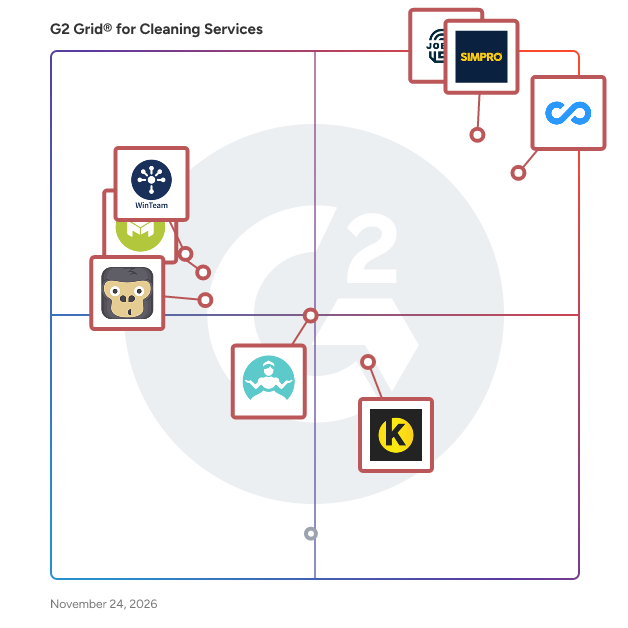
G2 Grid® for Cleaning Services Software

G2 Grid® for Cleaning Services Software plotting products by satisfaction and market presence

Highlighted products: Jobber, Simpro, Connecteam, Kickserv, ZenMaid Software, mHelpDesk, WinTeam by WorkWave, and GorillaDesk.

Underlying data: [Grid® JSON](https://www.g2.com/categories/cleaning-services/grids.json?focus%5B%5D=jobber&focus%5B%5D=simpro&focus%5B%5D=connecteam&focus%5B%5D=kickserv&focus%5B%5D=zenmaid-software&focus%5B%5D=mhelpdesk&focus%5B%5D=winteam-by-workwave&focus%5B%5D=gorilladesk)

Jobber

Start Your Free Trial of Jobber - No Credit Card Required Run a more efficient, predictable service business with one system built for growing, multi-crew teams. Keep Work Moving as You Get Busier Jobber connects quoting, scheduling, invoicing, and payments in one place so work moves forward without constant follow-ups or manual coordination. Build efficient days without spending hours managing the calendar, and adjust quickly when plans change. Plus, connect with tools like QuickBooks Online to keep your operations running smoothly. Keep Your Team Aligned in the Field and Office Give your crews clear schedules, job details, and updates they can access anywhere. While they stay focused on the work, your office has real-time visibility into every job without chasing calls, texts, or status updates. Drive Predictable, Profitable Performance Track jobs, revenue, and payments in one place so you always know how your business is performing. Automations keep quotes, invoices, and follow-ups moving, helping you maintain steady cash flow without adding more admin work. Client Testimonial “I spend maybe an hour per week on invoicing and paperwork now. Online payments and invoicing make me look professional.” - Stacey Flanagan, SEF The Lawn Surgeon Discover the Jobber Difference Join 200,000+ service professionals across 50+ industries including landscaping, HVAC, and residential cleaning who run their business with Jobber.

Average Rating: 4.6/5.0

Total Reviews: 547

How Do G2 Users Rate Jobber?

  • Ease of Admin: 9.1/10 (Category avg: 8.8/10)
  • Has the product been a good partner in doing business?: 9.2/10 (Category avg: 9.0/10)
  • Quality of Support: 9.1/10 (Category avg: 8.8/10)
  • Ease of Use: 9.0/10 (Category avg: 8.6/10)

Who Is the Company Behind Jobber?

  • Seller: Jobber
  • Company Website:
  • Year Founded: 2011
  • HQ Location: Edmonton, Canada
  • LinkedIn® Page: www.linkedin.com
    1,462 employees on LinkedIn®

Who Uses This Product?

  • Who Uses This: Owner, Office Manager
  • Top Industries: Construction, Consumer Services
  • Company Size: 86% Small, 6% Medium

What Do G2 Reviewers Say About Jobber?

AI-generated summary from verified user reviews

Pros
  • Users find the interface intuitive and easy to navigate, helping them learn the platform and move through daily tasks smoothly.
  • Users like having business tools together in one platform, which helps them organize and manage their workflows.
  • Users appreciate the time savings and streamlined operations, which reduce administrative work and make running their businesses easier.
  • Users find setup easy and appreciate helpful onboarding guidance that gets them started quickly.
  • Users value the easy, flexible scheduling tools that help them organize calendars, adjust jobs, and keep crews on track.
Cons
  • Users find costs high, with add-on features and plan options often requiring extra payments.
  • Users find the mobile app limited compared with desktop, lacking features and sometimes unreliable or difficult to use.
  • Users say limited customization restricts how well settings, emails, workflows, and client-facing features can fit their businesses.
  • Users find scheduling cumbersome and hard to navigate, with limited online booking and crew, availability, and job-order controls.
  • Users find quote options inflexible, with pricing and online presentation limitations and unreliable saving or sending.

What Are Recent G2 Reviews of Jobber?

What Are G2 Users Discussing About Jobber?

Connecteam

Connecteam is a mobile-first workforce management app featuring a robust set of tools designed to help organizations with deskless teams improve communication, retain staff, and drive operational efficiency. Connecteam allows managers to put their business processes on autopilot and focus on business growth while also freeing up employees to be more productive, professional, and satisfied. At the heart of Connecteam lies a powerful suite of tools for scheduling, time tracking, task management, communication, HR processes, and training—all built for the realities of frontline teams. Whether you need to create complex shift schedules, automate payroll-ready timesheets, distribute company announcements, or onboard new hires at scale, Connecteam brings everything under one intuitive app. Save time and increase productivity with AI assisted scheduling, mobile-first custom checklists, forms, and reports; Track work hours with GPS time clock; Simplify employee communication, enhance professional skills with mobile courses (AI powered course content creator), manage daily tasks and so much more, all in one app. Connecteam AI helps you work faster and smarter than humanly possible, while keeping it simple: -AI Agent : Just ask your AI sidekick in chat. From stock info to safety steps, manuals, or care procedures, employees get instant spot-on answers, pulled straight from your in-app resources. No delays, no guesswork. -Auto scheduling : Your team schedule’s fully covered in seconds. AI puzzles availability, roles, fairness, and requirements with expert precision. The result? Reliable schedules, happier employees, and no admin hassle. -AI course creation: Turn any training topic into a full course. Just describe the subject and AI instantly builds a pro-level course, ready to go. Your team, trained the way you need, to the standard you expect. -File to Form: Digitize forms in a snap - upload a file or take a photo of any paper form. AI turns it into a fillable version your team can complete wherever they are. Easy for them, efficient for you. -AI updates and feed: Level up every update - write clear team updates that land. AI enhances your message and auto-translates it into each employee’s preferred language. Everyone stays aligned, nothing gets misinterpreted. -Speech to text: Fill forms, hands-free - simply speak into forms. AI captures, summarizes, and sorts your team’s input on the spot, without them having to look down or slow down. No distractions, no delays—just clear, accurate reporting. Additionally, ensure a secure and easy login for system admins with Active Directory Single Sign-On (SSO).

Average Rating: 4.6/5.0

Total Reviews: 3,492

How Do G2 Users Rate Connecteam?

  • Ease of Admin: 9.0/10 (Category avg: 8.8/10)
  • Has the product been a good partner in doing business?: 9.3/10 (Category avg: 9.0/10)
  • Quality of Support: 9.1/10 (Category avg: 8.8/10)
  • Ease of Use: 9.0/10 (Category avg: 8.6/10)

Who Is the Company Behind Connecteam?

Who Uses This Product?

  • Who Uses This: Owner, Manager
  • Top Industries: Construction, Retail
  • Company Size: 83% Small, 14% Medium

What Do G2 Reviewers Say About Connecteam?

AI-generated summary from verified user reviews

Pros
  • Users love the ease of use of Connecteam, which streamlines tasks and communication seamlessly in one app.
  • Users love the all-in-one utility of Connecteam, which streamlines scheduling, communication, and training in one app.
  • Users enjoy the efficient scheduling capabilities of Connecteam, streamlining management and communication for deskless teams.
  • Users love the seamless team collaboration with Connecteam, enhancing communication and streamlining operations efficiently.
  • Users find Connecteam user-friendly, praising its intuitive interface and seamless communication for deskless teams.
Cons
  • Users express frustration with the missing features in Connecteam, particularly regarding attendance reporting and geo-locking inconsistencies.
  • Users often face limited features without higher payment, which may hinder small business usability and flexibility.
  • Users find scheduling issues frustrating, especially with limited visibility on meeting changes and shift requests.
  • Users feel there is a need for better audit trails and notifications management in Connecteam to enhance usability.
  • Users find Connecteam's interface not user-friendly, leading to confusion and setup fatigue for less tech-savvy employees.

What Are Recent G2 Reviews of Connecteam?

What Are G2 Users Discussing About Connecteam?

Simpro

Simpro is field service management software for trade and service contractors. It handles job management from the first call through quoting, scheduling, the work order, the invoice and the payment, so the office, the field and finance work from the same records. More than 250,000 users worldwide run their work in Simpro. Simpro Lightning, Simpro's AI-First Operating Platform, brings AI field service management into the field service software contractors already run. Cooper, the AI at its center, powers JustAsk and a digital workforce of role-based AI agents for training, job preparation, documentation and customer summaries. • JustAsk answers business questions in plain language. Ask for margins by technician or overdue invoices and get the answer without building a report. • FieldReady supports technician training, JobReady prepares each job before dispatch, JobScribe structures on-site documentation, and JobBrief writes customer summaries for technicians to review. • JustDo is the AI office assistant. Tell it what needs doing, or hand it an email, PDF, photo or spreadsheet, and it drafts the job, customer or quote in Simpro for your team to approve. It brings field service automation to the data entry that fills an office team's day. • Pulse is the AI receptionist, a digital worker on the Simpro Lightning digital workforce. It answers inbound calls 24/7, recognizes callers from their Simpro record, qualifies the job and places a provisional hold on the schedule for your team to confirm. Safety-critical calls such as gas leaks or flooding go straight to your on-call technician. • Two-Way Messaging and GPS Time Tracking handle customer communication and time capture. Delight, the AI customer marketing agent, is a digital worker for customer follow-up. It reads each customer's Simpro job history and assets and writes them personal messages about maintenance reminders, quotes that went quiet and seasonal campaigns. You can preview each message 24 hours before it goes out. Simtrac 360 adds GPS fleet tracking hardware that is built into Simpro. The AX300 tracker plugs into a vehicle's OBD port, and a hardwired AK300 is available for covert installs. Simpro sites act as geofences, so each site visit becomes labor hours on the matching job. Odometer readings and engine hours update the vehicle's asset record. The core platform covers the full job lifecycle: • Win and plan work: Customer and site history, estimates and quotes live in one field service CRM. When a quote is accepted, the office schedules and dispatches the right technician from the same system. • Complete work in the field: Technicians get mobile work orders, digital forms, job notes and asset records. Preventive maintenance contracts run on the same records, so work order management and maintenance management stay in one place. • Protect margin and cash flow: Job costing, inventory, invoicing, payment options and dashboards show what each job made, from quote to cash. Simpro is built for trade contractors running residential and commercial service calls, maintenance, installations and projects: • HVAC: Emergency no-heat and no-cool calls, seasonal maintenance contracts and full system replacements share one schedule. Estimates use live supplier pricing for equipment and refrigerant, and job costing tracks estimated against actual cost as the work happens. • Plumbing: Burst pipe call-outs, backflow and gas maintenance agreements and hot water system replacements all compete for the same plumbers. The office schedules them from a drag-and-drop dispatch board, and fittings costs stay tied to supplier price files. • Electrical: Reactive callouts, scheduled maintenance and multi-stage projects run on one platform. Estimates cover labor, materials and large cable runs, and job costing shows where each project stands before the final invoice. • Pool service: Recurring cleaning and maintenance visits can be bulk-scheduled by route, zone and preferred technician, and field staff clock in and out from the Simpro Mobile app. Fire protection and security contractors run on the same platform. It works for small teams and grows with the business.

Average Rating: 4.1/5.0

Total Reviews: 533

How Do G2 Users Rate Simpro?

  • Ease of Admin: 7.6/10 (Category avg: 8.8/10)
  • Has the product been a good partner in doing business?: 7.9/10 (Category avg: 9.0/10)
  • Quality of Support: 7.6/10 (Category avg: 8.8/10)
  • Ease of Use: 7.7/10 (Category avg: 8.6/10)

Who Is the Company Behind Simpro?

  • Seller: Simpro
  • Company Website:
  • Year Founded: 2002
  • HQ Location: Miami, FL
  • LinkedIn® Page: www.linkedin.com
    719 employees on LinkedIn®

Who Uses This Product?

  • Who Uses This: Director, Office Manager
  • Top Industries: Construction, Electrical/Electronic Manufacturing
  • Company Size: 78% Small, 22% Medium

What Do G2 Reviewers Say About Simpro?

AI-generated summary from verified user reviews

Pros
  • Users find Simpro to be incredibly easy to use, thanks to its user-friendly interface and customizable options.
  • Users value the streamlined data collection capabilities of Simpro, enhancing workflow and asset management efficiency.
  • Users value the user-friendly interface and wide range of features in Simpro, enhancing productivity and customization.
  • Users find the responsive customer support of Simpro quick and effective, enhancing overall satisfaction and usability.
  • Users value the efficiency of Simpro, streamlining everything from quotes to invoicing seamlessly in one system.
Cons
  • Users find the complexity of setup in Simpro overwhelming, making it challenging to utilize its features effectively.
  • Users find the complex setup of Simpro challenging, resulting in a steep learning curve and slower workflows.
  • Users find the difficult learning curve challenging due to complexity and extensive setup requirements in Simpro.
  • Users face difficult onboarding and complexity with Simpro, making the transition and training challenging for staff.
  • Users find the learning curve challenging due to the complexity and extensive setup required for effective use.

What Are Recent G2 Reviews of Simpro?

What Are G2 Users Discussing About Simpro?

AI can help you find the answers. G2 helps you trust them.

Connect G2 to Claude or ChatGPT for answers grounded in G2's trusted reviews, comparisons, and pricing from real user insights.

How it works

Kickserv

Kickserv provides an approachable and affordable way for service companies to manage leads, schedule and manage jobs, estimates, invoices and payments from anywhere. Trusted by professionals since 2006, our user interface is easy to use and easy to learn. Mobile applications for iOS and Android and integration with QuickBooks are included with all plans. World class support so you don’t have to go it alone. This is service made simple.

Average Rating: 4.5/5.0

Total Reviews: 182

How Do G2 Users Rate Kickserv?

  • Ease of Admin: 9.1/10 (Category avg: 8.8/10)
  • Has the product been a good partner in doing business?: 9.1/10 (Category avg: 9.0/10)
  • Quality of Support: 9.2/10 (Category avg: 8.8/10)
  • Ease of Use: 8.9/10 (Category avg: 8.6/10)

Who Is the Company Behind Kickserv?

  • Seller: EverCommerce
  • Company Website:
  • Year Founded: 2016
  • HQ Location: Denver, Colorado
  • LinkedIn® Page: www.linkedin.com
    1,613 employees on LinkedIn®
  • Ownership: NASDAQ: EVCM

Who Uses This Product?

  • Who Uses This: Owner, President
  • Top Industries: Construction, Consumer Services
  • Company Size: 84% Small, 15% Medium

What Do G2 Reviewers Say About Kickserv?

AI-generated summary from verified user reviews

Pros
  • Users appreciate the ease of use of Kickserv, enhancing their experience in managing time and work orders.
  • Users value the ease of scheduling with Kickserv, which improves efficiency and customer service support is exceptional.
  • Users praise the exceptional customer support of Kickserv, appreciating quick help and effective solutions for their needs.
  • Users love the ease of scheduling with Kickserv, enhancing their service management and customer interactions.
  • Users value the effective client management features of Kickserv for enhancing service operations and customer satisfaction.
Cons
  • Users find the mobile app hard to work with, noting restrictions and difficulties that impact usability.
  • Users face scheduling issues with Kickserv, struggling to navigate the calendar when it becomes cluttered.
  • Users find the calendar navigation cumbersome as it lacks an option to directly return to previous weeks.
  • Users note the limited functionality of Kickserv, particularly regarding mobile app capabilities and employee interaction.
  • Users are frustrated by the higher subscription rate required to enable external payment features in Kickserv.

What Are Recent G2 Reviews of Kickserv?

What Are G2 Users Discussing About Kickserv?

ZenMaid Software

ZenMaid is the all-in-one maid service management software, designed to automate, simplify, and grow your maid service. Loved by over 3,000 maid service owners, we’re known for being the easiest-to-use software on the market. Get set up in less than 5 minutes and see why we’ve swept so many service owners off their feet. Give us a try for 14 days, on us!

Average Rating: 4.8/5.0

Total Reviews: 16

How Do G2 Users Rate ZenMaid Software?

  • Ease of Admin: 9.4/10 (Category avg: 8.8/10)
  • Has the product been a good partner in doing business?: 9.8/10 (Category avg: 9.0/10)
  • Quality of Support: 9.4/10 (Category avg: 8.8/10)
  • Ease of Use: 9.1/10 (Category avg: 8.6/10)

Who Is the Company Behind ZenMaid Software?

  • Seller: ZenMaid
  • Year Founded: 2013
  • HQ Location: Palo Alto, US
  • LinkedIn® Page: www.linkedin.com
    22 employees on LinkedIn®

Who Uses This Product?

  • Who Uses This: Owner
  • Top Industries: Consumer Services
  • Company Size: 100% Small

What Do G2 Reviewers Say About ZenMaid Software?

AI-generated summary from verified user reviews

Cons
  • Users often experience slow performance and glitches with ZenMaid Software, impacting their overall satisfaction.
  • Users often experience slow performance and glitches with ZenMaid Software, impacting their overall productivity.

What Are Recent G2 Reviews of ZenMaid Software?

What Are G2 Users Discussing About ZenMaid Software?

WinTeam by WorkWave

For the past 35 years, TEAM Software by WorkWave has been the leading provider of business software solutions that help commercial cleaning and security companies achieve scalable growth. Originally, we started off as a cleaning and security business, and when we couldn’t find a software solution to meet our back-office, financial and operational needs, we built one – WinTeam. That means WinTeam was created by a company like yours, for a company like yours, with your specific needs and industry challenges in mind. WinTeam is our flagship, award-winning ERP solution capable of housing financial, operational and workforce management tools all in one place. Companies seeking business management software that maximizes efficiency, automates operations and drives profitability choose WinTeam, the ideal solution for organizations ready to integrate human resources, payroll, financials and analytics into one holistic system. Protect tight profit margins with ERP accounting software, make it easy to create budgets and better manage cash flow by taking advantage of growth-enabling features that can offer a complete picture of profitability.

Average Rating: 4.1/5.0

Total Reviews: 26

How Do G2 Users Rate WinTeam by WorkWave?

  • Ease of Admin: 8.3/10 (Category avg: 8.8/10)
  • Has the product been a good partner in doing business?: 8.3/10 (Category avg: 9.0/10)
  • Quality of Support: 7.9/10 (Category avg: 8.8/10)
  • Ease of Use: 7.8/10 (Category avg: 8.6/10)

Who Is the Company Behind WinTeam by WorkWave?

  • Seller: WorkWave
  • Year Founded: 1984
  • HQ Location: Holmdel, NJ
  • LinkedIn® Page: www.linkedin.com
    474 employees on LinkedIn®

Who Uses This Product?

  • Top Industries: Security and Investigations
  • Company Size: 54% Large, 31% Medium

What Are Recent G2 Reviews of WinTeam by WorkWave?

What Are G2 Users Discussing About WinTeam by WorkWave?

mHelpDesk

Win more jobs with mhelpDesk. Get organized and grow your business with mHelpDesk. 10,000+ businesses have already made the switch.

Average Rating: 4.0/5.0

Total Reviews: 131

How Do G2 Users Rate mHelpDesk?

  • Ease of Admin: 8.0/10 (Category avg: 8.8/10)
  • Has the product been a good partner in doing business?: 7.6/10 (Category avg: 9.0/10)
  • Quality of Support: 8.2/10 (Category avg: 8.8/10)
  • Ease of Use: 8.2/10 (Category avg: 8.6/10)

Who Is the Company Behind mHelpDesk?

Who Uses This Product?

  • Top Industries: Hospital & Health Care, Education Management
  • Company Size: 44% Small, 34% Medium

What Do G2 Reviewers Say About mHelpDesk?

AI-generated summary from verified user reviews

Pros
  • Users find mHelpDesk to be very easy to use, which significantly enhances their overall experience.
  • Users find mHelpDesk to be very easy to use, enhancing their overall satisfaction with the product.
Cons
  • Users experience feature limitations with mHelpDesk, including inadequate integration and poor support affecting usability.
  • Users report integration issues with mHelpDesk, leading to dissatisfaction and challenges in utilizing its full potential.
  • Users are frustrated by the lack of features and poor integration with other tools in mHelpDesk.
  • Users experience poor customer support with mHelpDesk, leading to frustrating challenges in resolving issues.
  • Users express frustration with poor support, which significantly impacts their experience with mHelpDesk.

What Are Recent G2 Reviews of mHelpDesk?

What Are G2 Users Discussing About mHelpDesk?

GorillaDesk

GorillaDesk has helped thousands of business owners just like you grow their business, organize their operations, empower their technicians, and wow their customers with one powerful, easy-to-use tool. Best of all, it doesn’t matter what industry you work in—pest control, lawn care, pool cleaning, or something in between—we have everything you need to build the business you’re dreaming of: an all-in-one software solution and world-class Customer Success team.

Average Rating: 4.8/5.0

Total Reviews: 43

How Do G2 Users Rate GorillaDesk?

  • Ease of Admin: 9.7/10 (Category avg: 8.8/10)
  • Has the product been a good partner in doing business?: 9.5/10 (Category avg: 9.0/10)
  • Quality of Support: 9.6/10 (Category avg: 8.8/10)
  • Ease of Use: 9.6/10 (Category avg: 8.6/10)

Who Is the Company Behind GorillaDesk?

Who Uses This Product?

  • Top Industries: Consumer Services, Environmental Services
  • Company Size: 100% Small

What Do G2 Reviewers Say About GorillaDesk?

AI-generated summary from verified user reviews

Pros
  • Users value the efficient bulk appointment management of GorillaDesk, making it easy to handle recurring jobs effortlessly.
  • Users appreciate the bulk booking management of GorillaDesk, finding it handy for recurring jobs and appointment rescheduling.
  • Users praise the outstanding customer service of GorillaDesk for their quick responses and product knowledge.
  • Users praise the outstanding customer support, highlighting quick responses and deep product knowledge.
  • Users love the extensive customization options in GorillaDesk, enhancing both their experience and their customers'.
Cons
  • Users find the complex setup of GorillaDesk overwhelming initially, but believe it's worth the effort in the end.
  • Users experience delays and system outages with GorillaDesk, causing frustration and lost productivity during critical moments.
  • Users find the learning curve steep, feeling overwhelmed initially, but acknowledge it's ultimately rewarding.
  • Users experience poor communication from management, especially when issues arise, leading to frustration and dissatisfaction.
  • Users experience poor customer support with GorillaDesk, often feeling frustrated during critical service issues and downtime.

What Are Recent G2 Reviews of GorillaDesk?

What Are G2 Users Discussing About GorillaDesk?

Launch27

Launch27 is a sleek, powerful online booking system that allows potential customers to buy your maid services directly from your website. The entire booking engine can be customized to match your existing housekeeping website and can be integrated in mere seconds, giving customers a seamless buying experience from start to finish. Launch27 also has its own built-in calendar to show you upcoming jobs and appointment times, while the on-board analytics let’s you fine tune your cleaning services with numerous add-ons for awesome conversion rates. -Installs on any web page in seconds -Customize colors, fonts, layouts, pricing & more -Set custom pricing for different geographic areas -Automatically syncs w/ your calendar availability -Collect payments for you securely online -Allows for single or recurring bookings -Powerful analytics to track your progress online Why do other cleaning companies love Launch27? In a nutshell, it eliminates the need for giving quotes in-person or over the phone. It’s also an easier, user-friendly process for your clients so your conversion rates will continue to increase while freeing up your day. That means more time can be spent doing what you do best- actually cleaning homes/businesses and growing your business while earning a great living. You’ll also be pleased to know that Launch27 listens closely to our amazing users and we are continually making updates based on your feedback. We 100% stand by our customers and our team takes pride in being a true partner for your business- we are always here to help!

Average Rating: 4.6/5.0

Total Reviews: 64

How Do G2 Users Rate Launch27?

  • Ease of Admin: 8.9/10 (Category avg: 8.8/10)
  • Has the product been a good partner in doing business?: 9.6/10 (Category avg: 9.0/10)
  • Quality of Support: 8.9/10 (Category avg: 8.8/10)
  • Ease of Use: 9.0/10 (Category avg: 8.6/10)

Who Is the Company Behind Launch27?

  • Seller: Launch27
  • Year Founded: 2013
  • HQ Location: Houston, TX
  • LinkedIn® Page: www.linkedin.com
    4 employees on LinkedIn®

Who Uses This Product?

  • Who Uses This: Business Owner, Owner
  • Top Industries: Consumer Services, Facilities Services
  • Company Size: 97% Small, 3% Medium

What Are Recent G2 Reviews of Launch27?

What Are G2 Users Discussing About Launch27?

BookingKoala

BookingKoala is a cloud-based booking solution that allows users to manage appointments, track sales growth and manage marketing channels. Features include role-based dashboards, integrated coupons, email and SMS reminders, client referrals and multi-location support. Apps for iOS and Android are also available. BookingKoala provides a customer-facing dashboard that allows clients to manage and view their appointments, refer friends and buy gift cards. Clients can also access a rating tool that lets them provide feedback on service providers. The service provider dashboard displays upcoming appointments, client payments and unassigned bookings. The admin dashboard lets users manage system settings, edit staff information and change access permissions. A built-in reporting system provides data on revenue, payroll and coupon types. Users can set up several types of bookings, such as on-time or recurring appointments. Other features include system logs, cart abandonment reports and in-app notifications. Pricing is per month. Support is offered via email.

Average Rating: 4.8/5.0

Total Reviews: 36

How Do G2 Users Rate BookingKoala?

  • Ease of Admin: 9.4/10 (Category avg: 8.8/10)
  • Has the product been a good partner in doing business?: 9.2/10 (Category avg: 9.0/10)
  • Quality of Support: 9.4/10 (Category avg: 8.8/10)
  • Ease of Use: 9.7/10 (Category avg: 8.6/10)

Who Is the Company Behind BookingKoala?

Who Uses This Product?

  • Who Uses This: Business Owner, Independent Business Owner
  • Top Industries: Consumer Services, Hospitality
  • Company Size: 92% Small, 6% Medium

What Do G2 Reviewers Say About BookingKoala?

AI-generated summary from verified user reviews

Pros
  • Users praise the ease of use of BookingKoala, enjoying its simple online booking and clean interface.
  • Users value the ease of scheduling with BookingKoala, benefiting from its user-friendly interface and automation features.
  • Users value the simplicity of BookingKoala, enjoying its easy-to-use booking form and streamlined workflows.
  • Users appreciate the user-friendly interface of BookingKoala, making scheduling and payments simple and efficient.
  • Users highlight the workflow efficiency of BookingKoala, appreciating its simplicity in managing scheduling and payments.
Cons
  • Users face significant connectivity issues with BookingKoala, resulting in disrupted operations and unresponsive support.
  • Users find BookingKoala expensive without adequate support and features, leading to frustration and operational struggles.
  • Users express frustration over severe feature limitations, including outdated integrations and lack of reliable support impacting operations.
  • Users highlight the poor job management and support from BookingKoala, which disrupts operations and impacts revenue significantly.
  • Users are frustrated with the limited automation in BookingKoala, leading to unresolved issues and diminished support responsiveness.

What Are Recent G2 Reviews of BookingKoala?

What Are G2 Users Discussing About BookingKoala?

ServiceDeck

ServiceDeck is a powerful field service management (FSM) software designed to revolutionize your field service operations. Ideal for service providers like plumbers, electricians, cleaners, landscapers, and many others, ServiceDeck streamlines operations, automates processes, and enhances customer connections with its cutting-edge dispatching software and field worker management tools. Explore the incredible features ServiceDeck provides: 🔗 Connect - Marketplace: An AI-Powered marketplace tailored to your business, offering instant access to new markets, clients, and projects. Benefit from a data-driven Business Directory with public reviews and ratings, and a database of Service Providers for efficient outsourcing. - Customer Portal: Offer customers a personalized portal to view and manage their requests, quotes, invoices, and job statuses. - Mobile App: Empower your team with a mobile app for live location tracking, work history access, project status updates, and time-off requests. 🎛️ Manage - Smart Scheduling: Leverage our advanced scheduling software to visualize your company's daily workload and assign jobs based on team availability. - Document Management: Maintain organization with all job-specific documents in one place, enabling your team to attach project images on-the-go. - Integrated Invoicing: Effortlessly convert jobs into customizable invoices with a single click, providing customers the convenience of online payments through various methods. 🤖 Automate - Custom Integrations: Optimize your operations by integrating ServiceDeck with existing platforms like Stripe, QuickBooks, and WordPress. - Automated Proposals: Deliver a personalized and automated proposal process by integrating your public website with ServiceDeck for seamless quotation requests. - Detailed Reporting: Monitor your team's workload and efficiency with in-app time logs, and track your revenue and expenses to make informed business decisions. 🌟 Top Features: - Worker Availability: Schedule intelligently based on employee availability, time off, and daily breaks. - GPS Tracking: Keep track of your team's location with in-app live tracking and interactive maps. - Document Management: Easily attach project images on-the-go and store all job-specific documents in one place. - Scheduling and Dispatching: Streamline job assignments and resource allocation with efficient scheduling and dispatching tools in our field service management software. Transform your service business with ServiceDeck and focus on delivering outstanding services to your customers. Experience the difference ServiceDeck can make for your business. Don't wait – try ServiceDeck now and elevate your field service operations to new heights with our comprehensive FSM software!

Average Rating: 4.5/5.0

Total Reviews: 33

How Do G2 Users Rate ServiceDeck?

  • Ease of Admin: 7.0/10 (Category avg: 8.8/10)
  • Has the product been a good partner in doing business?: 7.3/10 (Category avg: 9.0/10)
  • Quality of Support: 8.9/10 (Category avg: 8.8/10)
  • Ease of Use: 8.9/10 (Category avg: 8.6/10)

Who Is the Company Behind ServiceDeck?

Who Uses This Product?

  • Company Size: 57% Small, 26% Medium

What Do G2 Reviewers Say About ServiceDeck?

AI-generated summary from verified user reviews

Pros
  • Users appreciate the variety of features offered by ServiceDeck, enhancing efficiency and streamlining business operations.
  • Users praise the responsive customer support of ServiceDeck, enhancing their onboarding and overall experience significantly.
  • Users appreciate the ease of use of ServiceDeck, finding it intuitive and user-friendly for all technical levels.
  • Users appreciate the quick response time of ServiceDeck's support team, enhancing their overall experience with the platform.
  • Users appreciate the simplicity and effectiveness of the ServiceDeck mobile app, enabling smooth operations across platforms.
Cons
  • Users highlight the need for improvements in loading times and data integration features to enhance performance.
  • Users find the slow performance of ServiceDeck frustrating, particularly during loading times which can hinder productivity.
  • Users report bug issues with ServiceDeck that disrupt workflows, highlighting the need for better stability during updates.
  • Users find the complex setup of ServiceDeck time-consuming, especially for larger teams with intricate needs.
  • Users find the limited integrations of ServiceDeck hinder importing more data effectively.

What Are Recent G2 Reviews of ServiceDeck?

Swept

Swept is Janitorial Software that Saves Janitorial Businesses Time and Money Swept makes simple and smart janitorial software designed specifically for the janitorial and commercial cleaning industry. Swept’s mission is to help cleaning companies retain their cleaners and clients by streamlining communication between managers and employees. Swept lets you proactively address issues on site before they become problems. We help Managers communicate with their staff about issues on site, as well as provide cleaning instructions, track supply requests, and complete inspections. Swept helps eliminate the most common mistakes that cause customer frustration by improving communication and visibility across the team. All users get continuous access to their schedules via mobile app, with all shift changes and updates in real time. Late alerts notify managers if a cleaner has not signed in on time, and automatically sends them a reminder to their mobile device. Cleaners can sign in via mobile app. Time tracking features ensure users that clients receive the service they paid for, with recorded time for each cleaner imported automatically for review or payroll. Swept helps users identify issues immediately by allowing cleaners to report them to managers in real time. Translate cleaning instructions to enable managers to support cleaners without being onsite. Custom channels help teams stay connected, and Managers organized. Supply tracking features keep supply closets stocked and work moving on time. Swept’s messaging features allow clients to communicate with managers via SMS, or using their own account within the mobile app. Once logged in, clients can access the message board to stay up to date on job status, changes, issues, and more. Managers are able to create custom inspection plans with unlimited inspection points, as well as measure performance by rating the quality of each inspection point. All recorded notes can be sent to clients via mobile before the team exits the building. At Swept, we believe that cleaners add value beyond cleaning and that the most common mistakes that degrade customer satisfaction can easily be avoided with better communication. Get started for $30/month today

Average Rating: 4.3/5.0

Total Reviews: 9

How Do G2 Users Rate Swept?

  • Ease of Admin: 8.9/10 (Category avg: 8.8/10)
  • Has the product been a good partner in doing business?: 7.8/10 (Category avg: 9.0/10)
  • Quality of Support: 8.3/10 (Category avg: 8.8/10)
  • Ease of Use: 9.6/10 (Category avg: 8.6/10)

Who Is the Company Behind Swept?

  • Seller: Swept
  • Year Founded: 2014
  • HQ Location: Halifax, Nova Scotia
  • LinkedIn® Page: ca.linkedin.com
    24 employees on LinkedIn®

Who Uses This Product?

  • Company Size: 67% Small, 33% Medium

What Do G2 Reviewers Say About Swept?

AI-generated summary from verified user reviews

Pros
  • Users commend the helpful and professional customer support of Swept, enhancing their overall experience and satisfaction.
  • Users appreciate the real-time communication features of Swept, enhancing efficiency and connectivity for remote teams.
  • Users value the all-in-one features of Swept, including real-time communication and easy management of cleaning tasks.
  • Users appreciate the easy scheduling features of Swept, making shift management seamless and efficient.
  • Users value the customization features of Swept, enhancing communication and management efficiency for teams.
Cons
  • Users often face clocking issues with Swept, causing disruptions and frustration during shift changes.
  • Users find the pricing too high for small businesses, making it less accessible for some potential customers.
  • Users report notification issues with delayed alerts, affecting their overall experience with Swept.
  • Users report poor navigation due to occasional glitches and limited availability in certain areas, hindering usability.
  • Users experience scheduling issues with Swept, as downtime prevents workers from clocking in for shifts effectively.

What Are Recent G2 Reviews of Swept?

JanBid

JanBid is an estimating software solution that provides you with the cleaning details for each account including the desired cleaning frequency, providing tools and functions to help you manage your business.

Average Rating: 4.3/5.0

Total Reviews: 7

How Do G2 Users Rate JanBid?

  • Ease of Admin: 10.0/10 (Category avg: 8.8/10)
  • Has the product been a good partner in doing business?: 10.0/10 (Category avg: 9.0/10)
  • Quality of Support: 8.9/10 (Category avg: 8.8/10)
  • Ease of Use: 9.2/10 (Category avg: 8.6/10)

Who Is the Company Behind JanBid?

Who Uses This Product?

  • Company Size: 86% Small, 14% Medium

What Do G2 Reviewers Say About JanBid?

AI-generated summary from verified user reviews

Pros
  • Users appreciate the ease of use of JanBid, making it simple to track rates and perform price analysis.
  • Users find the easy setup of JanBid to be a significant advantage, enhancing their bidding experience effortlessly.

What Are Recent G2 Reviews of JanBid?

OrangeQC

OrangeQC is refreshingly simple inspection software. We make quality control easy with inspection forms that your team can fill out right from their phones. Then, we automatically collect, organize, and analyze that data to give you powerful insights into your team’s performance. Our ticket and work order system organizes how janitorial and maintenance teams deal with problems and requests. All communication is in one place, so everyone’s on the same page. Things get done quickly and efficiently. Our clients love how we simplify the entire process, including automatically generating reports and analytics they can share with their own clients—or use to win new bids. Every step of the way, we keep things simple and intuitive. We believe the best software is the one that actually gets used.

Average Rating: 4.7/5.0

Total Reviews: 7

How Do G2 Users Rate OrangeQC?

  • Ease of Admin: 9.4/10 (Category avg: 8.8/10)
  • Has the product been a good partner in doing business?: 10.0/10 (Category avg: 9.0/10)
  • Quality of Support: 9.3/10 (Category avg: 8.8/10)
  • Ease of Use: 9.2/10 (Category avg: 8.6/10)

Who Is the Company Behind OrangeQC?

  • Seller: OrangeQC
  • Year Founded: 2009
  • HQ Location: Chicago, US
  • LinkedIn® Page: www.linkedin.com
    4 employees on LinkedIn®

Who Uses This Product?

  • Company Size: 57% Small, 43% Medium

What Do G2 Reviewers Say About OrangeQC?

AI-generated summary from verified user reviews

Pros
  • Users appreciate the strong customer support of OrangeQC, enabling quick resolutions and enhancing their overall experience.
  • Users value the flexibility of OrangeQC in accommodating various departmental needs and daily routines.
  • Users appreciate the versatile auditing features of OrangeQC, empowering them with mobile checklists and instant report generation.
  • Users appreciate the instant reporting capabilities of OrangeQC, enhancing efficiency and tailored inspections on-the-go.
  • Users appreciate the user-friendly interface of OrangeQC, making it easy to navigate and utilize effectively.
Cons
  • Users find OrangeQC expensive, especially smaller businesses or startups, feeling it lacks advanced features and integrations.
  • Users feel that the limited features of OrangeQC restrict its utility for diverse business needs.
  • Users feel the integration issues with other software hinder their overall experience with OrangeQC.
  • Users find OrangeQC's limited mobile functionality restrictive, lacking advanced features and integrations for a better experience.
  • Users find the limited customization in reporting frustrating, wishing for more advanced options to enhance their experience.

What Are Recent G2 Reviews of OrangeQC?

What Are G2 Users Discussing About OrangeQC?

ResponsiBid

It’s like hiring the most responsible office assistant you can imagine for a fraction of what an office assistant costs. And it does the job the way you want it to. Every time. ResponsiBid allows you to quickly build proposals in any service field, particularly carpet cleaning, window cleaning, pressure washing, window tinting, and solar panel cleaning... but the custom items area will allow you to build a proposal for anything you can imagine. ResponsiBid then automates the follow-up and aggregates the data so that you know where you are getting the best leads and customers. Some of our features include: - Proposal total customization - Price floors for certain geographic and/or building sizes - Automatic trip charge inclusion - "Call screen" inputting of callers allows you to either give anonymous bids, quickly find existing customers, or start a bid to be finished later - Pricing adjustment in any conceivable way - Commercial or residential bids - Full reporting on all quotes over time periods - Automated follow-up or follow-up reminders to admin users to make phone call follow-ups - Website integration for leads to get instant quotes-- or to begin a quote - Block competitors from getting quotes on the website - CRM integration allows your quotes to generate prospect profiles in your customer management software - A bidding hub that puts all prospects into an actionable sequence

Average Rating: 4.2/5.0

Total Reviews: 11

How Do G2 Users Rate ResponsiBid?

  • Ease of Admin: 7.8/10 (Category avg: 8.8/10)
  • Has the product been a good partner in doing business?: 9.4/10 (Category avg: 9.0/10)
  • Quality of Support: 9.5/10 (Category avg: 8.8/10)
  • Ease of Use: 8.0/10 (Category avg: 8.6/10)

Who Is the Company Behind ResponsiBid?

Who Uses This Product?

  • Company Size: 82% Small, 9% Medium

What Do G2 Reviewers Say About ResponsiBid?

AI-generated summary from verified user reviews

Pros
  • Users value the effective client communication through automated emails and text messages with ResponsiBid.
  • Users love how ResponsiBid ensures effective communication with customers through automated emails and text messages.
Cons
  • Users report calendar job inaccuracies in ResponsiBid, leading to confusion and scheduling issues.
  • Users experience data management issues with jobs not being prioritized accurately on the calendar.

What Are Recent G2 Reviews of ResponsiBid?

What Are G2 Users Discussing About ResponsiBid?

Reviews of Cleaning Services products
Neya Kumaresan
NK
Researched and written by Neya Kumaresan