Best E-Signature Software - Page 7

How Many E-Signature Software Products Does G2 Track?

Total Products under this Category: 431

Category Stats (Aug 2026)

  • Average Rating: 4.59/5 (↑0.01 vs Jul 2026) The average rating of products in this category, based on all submitted ratings
  • Top Trending Product: Kinective SignPlus (+8.33%) - Among all products in this category, Kinective SignPlus recorded the largest rating increase compared to last month

Last updated: August 04, 2026

How Does G2 Rank E-Signature Software Products?

Why You Can Trust G2's Software Rankings:

  • 30 Analysts and Data Experts
  • 56,200+ Authentic Reviews
  • 431+ Products
  • Unbiased Rankings

G2's software rankings are built on verified user reviews, rigorous moderation, and a consistent research methodology maintained by a team of analysts and data experts. Each product is measured using the same transparent criteria, with no paid placement or vendor influence. While reviews reflect real user experiences, which can be subjective, they offer valuable insight into how software performs in the hands of professionals. Together, these inputs power the G2 Score, a standardized way to compare tools within every category.

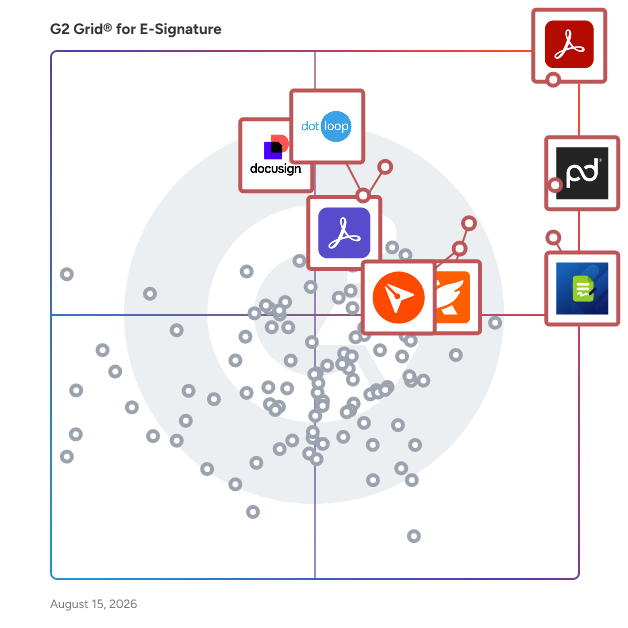
G2 Grid® for E-Signature Software

G2 Grid® for E-Signature Software plotting products by satisfaction and market presence

Highlighted products: Adobe Acrobat, PandaDoc, Jotform Sign, Foxit PDF Editor, Docusign, Adobe Acrobat Sign, BoldSign, and dotloop.

Underlying data: [Grid® JSON](https://www.g2.com/categories/e-signature/grids.json?focus%5B%5D=adobe-acrobat&focus%5B%5D=pandadoc&focus%5B%5D=jotform-sign&focus%5B%5D=foxit-pdf-editor&focus%5B%5D=docusign&focus%5B%5D=adobe-acrobat-sign&focus%5B%5D=boldsign&focus%5B%5D=dotloop)

Sponsored

Guardz

Guardz is a unified cybersecurity platform specifically designed for Managed Service Providers (MSPs). This innovative solution consolidates essential security controls, identity threat detection and response (ITDR), endpoint protection (EDR), email security, user awareness training and phishing simulations, and Managed Detection and Response (MDR) into a single AI-native framework. The platform aims to enhance operational efficiency by streamlining security processes and providing a comprehensive approach to cybersecurity. Targeting MSPs, Guardz addresses the unique challenges these providers face in managing multiple security tools that often operate in silos. By adopting an identity-centric approach, Guardz connects various security vectors, effectively reducing the gaps that can leave organizations vulnerable. This layered and holistic view enables MSPs to respond to user risks in real time, ensuring that security measures are not only reactive but also proactive in safeguarding client environments. Key features of Guardz include its 24/7 AI and human-led Managed Detection and Response (MDR) services. The platform employs agentic AI to triage threats at machine speed, allowing for rapid identification and prioritization of potential security incidents. This automated triage process is complemented by expert analysts who validate findings, mitigate risks, and guide response actions. As a result, MSPs can offer scalable protection to their clients without the need to expand their workforce, making it a cost-effective solution for growing cybersecurity demands. Guardz stands out in the cybersecurity landscape by providing a unified platform that integrates various security functions into one cohesive system. This integration not only simplifies the management of security tools but also enhances the overall effectiveness of security measures. By leveraging AI-driven insights and human expertise, Guardz empowers MSPs to deliver robust cybersecurity solutions that adapt to the evolving threat landscape, ensuring their clients remain protected against emerging risks.

Visit website

Signable

Signable is the UK’s most trusted, user-friendly eSignature platform designed to help businesses move faster with secure, compliant document management. With simple workflows, unlimited users, and flexible pricing, Signable offers everything growing and established teams need - without the high costs or hidden complexity of alternative tools. Whether embedding Signable into your platform via our API or automating workflows through smart integrations, our solution fits around your business. Backed by responsive, UK-based support, we make electronic signing seamless, reliable, and human. That’s why thousands of businesses trust Signable to keep their documents moving, and their business growing.

Average Rating: 4.8/5.0

Total Reviews: 17

How Do G2 Users Rate Signable?

  • Has the product been a good partner in doing business?: 8.9/10 (Category avg: 9.2/10)
  • Performance and Reliability: 10.0/10 (Category avg: 9.0/10)
  • Enterprise Scalability: 9.6/10 (Category avg: 8.9/10)
  • Signature Document Creation: 9.2/10 (Category avg: 9.1/10)

Who Is the Company Behind Signable?

  • Seller: Signable
  • Year Founded: 2011
  • HQ Location: Bristol, England
  • Twitter: @signablehq
    1,887 Twitter followers
  • LinkedIn® Page: www.linkedin.com
    66 employees on LinkedIn®

Who Uses This Product?

  • Company Size: 71% Small, 24% Medium

What Are Recent G2 Reviews of Signable?

What Are G2 Users Discussing About Signable?

Signority

Signority is a leading eSignature and document workflow platform that enables businesses and government organizations to streamline digital transactions securely. As a proud member of the FileCloud family, Signority helps ensure International and Canadian regulatory compliance like GDPR, HIPAA, and PIPEDA and assists in complying with security and industry standards including SOC 2 and ISO. Our technology guarantees data sovereignty and protection, nonrepudiation, and legal traceability. Signority offers automated document signing tailored to customer processes, reducing human errors and helping customers navigate the complexities of digital transformation across various cloud environments.

Average Rating: 4.7/5.0

Total Reviews: 46

How Do G2 Users Rate Signority?

  • Has the product been a good partner in doing business?: 9.1/10 (Category avg: 9.2/10)
  • Performance and Reliability: 9.4/10 (Category avg: 9.0/10)
  • Enterprise Scalability: 9.3/10 (Category avg: 8.9/10)
  • Signature Document Creation: 8.9/10 (Category avg: 9.1/10)

Who Is the Company Behind Signority?

  • Seller: Signority
  • Year Founded: 2010
  • HQ Location: Ottawa, Canada
  • Twitter: @Signority
    1,490 Twitter followers
  • LinkedIn® Page: www.linkedin.com
    7 employees on LinkedIn®

Who Uses This Product?

  • Top Industries: Insurance, Marketing and Advertising
  • Company Size: 72% Small, 15% Medium

What Are Recent G2 Reviews of Signority?

What Are G2 Users Discussing About Signority?

Nitro Sign

Nitro Sign is a secure electronic signature solution that makes signing documents simple, fast, and affordable. With tiered Standard, Plus, and Enterprise plans, Nitro Sign scales from individuals and small teams to large organizations, so you only pay for the functionality you need. Nitro Sign is simple to purchase, easy to implement, and straightforward to use, backed by a full range of service and support resources. It's part of why millions of users around the world trust Nitro for both PDF editing and eSignature.

Average Rating: 4.5/5.0

Total Reviews: 10

How Do G2 Users Rate Nitro Sign?

  • Has the product been a good partner in doing business?: 8.3/10 (Category avg: 9.2/10)
  • Performance and Reliability: 8.3/10 (Category avg: 9.0/10)
  • Enterprise Scalability: 9.2/10 (Category avg: 8.9/10)
  • Signature Document Creation: 10.0/10 (Category avg: 9.1/10)

Who Is the Company Behind Nitro Sign?

  • Seller: Nitro, Inc
  • Company Website:
  • Year Founded: 2005
  • HQ Location: San Francisco, CA
  • LinkedIn® Page: www.linkedin.com
    371 employees on LinkedIn®

Who Uses This Product?

  • Company Size: 45% Small, 45% Medium

What Do G2 Reviewers Say About Nitro Sign?

AI-generated summary from verified user reviews

Pros
  • Users appreciate the easy document creation in Nitro Sign, making it simple to send for signatures.
  • Users appreciate the easy sharing of Nitro Sign, finding document creation and signature requests straightforward and efficient.
  • Users emphasize the user-friendly interface of Nitro Sign, making document creation and sending for signatures easy.
Cons
  • Users find the learning curve steep, as adding fields can be cumbersome and confusing for signers.

What Are Recent G2 Reviews of Nitro Sign?

What Are G2 Users Discussing About Nitro Sign?

Clientary

Clientary is a full-suite app for your team to manage projects, hours, proposals, leads, invoices, payments, staff, and clients. Stop wrestling with one-off doc files, templates, and disconnected apps. Clientary helps you streamline client lifecycles from proposals and estimates, to time tracking, invoices and payments so you and your team have everything you need in one place. Clientary also includes a branded client portal to help you look professional to clients and prospects.

Average Rating: 4.7/5.0

Total Reviews: 45

How Do G2 Users Rate Clientary?

  • Has the product been a good partner in doing business?: 9.8/10 (Category avg: 9.2/10)
  • Performance and Reliability: 9.4/10 (Category avg: 9.0/10)
  • Enterprise Scalability: 9.6/10 (Category avg: 8.9/10)
  • Signature Document Creation: 9.7/10 (Category avg: 9.1/10)

Who Is the Company Behind Clientary?

  • Seller: Unbrew
  • Year Founded: 2008
  • HQ Location: San Jose, CA
  • Twitter: @clientary
    631 Twitter followers
  • LinkedIn® Page: www.linkedin.com

Who Uses This Product?

  • Top Industries: Information Technology and Services
  • Company Size: 63% Small, 20% Large

What Are Recent G2 Reviews of Clientary?

ValidSign

Our e-signature has been implemented within a variety of processes by more than 3000 organizations worldwide. ValidSign is an Enterprise-solution, which means, you can use ValidSign in all the different departments of your organization for the signing of various documents. ValidSign operates in over 30 different markets and holds an expertise in all of them. For instance, at this exact moment a board member from an American University is signing an establishment decision with ValidSign. At the same time the accountant in the Netherlands is signing a tax return. We are here to serve every organization that wants to accelerate business, simplify signing and improve customer service!

Average Rating: 4.4/5.0

Total Reviews: 268

How Do G2 Users Rate ValidSign?

  • Has the product been a good partner in doing business?: 8.8/10 (Category avg: 9.2/10)
  • Performance and Reliability: 8.4/10 (Category avg: 9.0/10)
  • Enterprise Scalability: 8.6/10 (Category avg: 8.9/10)
  • Signature Document Creation: 8.3/10 (Category avg: 9.1/10)

Who Is the Company Behind ValidSign?

  • Seller: ValidSign
  • Year Founded: 2014
  • HQ Location: Eefde, Gelderland
  • Twitter: @ValidSign
    78 Twitter followers
  • LinkedIn® Page: www.linkedin.com
    26 employees on LinkedIn®

Who Uses This Product?

  • Who Uses This: Accountant
  • Top Industries: Accounting, Real Estate
  • Company Size: 49% Medium, 32% Small

What Do G2 Reviewers Say About ValidSign?

AI-generated summary from verified user reviews

Pros
  • Users value the easy signing process of ValidSign, effectively facilitating online document approvals.
  • Users appreciate how ValidSign effectively serves its purpose of signing documents online, streamlining their workflow.

What Are Recent G2 Reviews of ValidSign?

What Are G2 Users Discussing About ValidSign?

Progress ShareFile

Progress® ShareFile® AI-powered document collaboration platform is designed to help businesses run client work from start to finish—securely, efficiently and with less friction. Built for organizations that handle sensitive information—such as accounting, legal and financial services—ShareFile software goes beyond traditional file transfer tools to support a more connected, end-to-end client experience. From document collection and collaboration to approvals, e-signatures and secure storage, ShareFile unifies key stages of client work in a single, secure platform. With ShareFile, teams can securely share files, manage document workflows and collaborate with clients through branded client portals—while helping maintain visibility into documents, requests and client interactions. Instead of juggling disconnected tools, businesses can streamline processes, reduce manual work and create more consistent, professional client experiences. ShareFile combines secure file transfer, client portals, document workflow automation and e-signature capabilities into one solution, helping teams move work faster, while helping organizations manage sensitive data. Key capabilities include: • Secure file sharing and large file transfer with encrypted email and attachments • Client portals for structured, branded collaboration and document exchange • Document workflow automation for intake, approvals, onboarding and repeatable processes • Built-in e-signature, forms and approvals to help complete work without switching tools • AI-powered document automation, including intake, summarization and instant Q&A • Granular permissions, audit trails and governance controls to help improve visibility and support compliance efforts • Advanced security features, including encryption in transit and at rest, plus tools that support secure client interactions By unifying people, processes and data into a single platform, ShareFile helps reduce tool sprawl and enables teams to scale client work without increasing complexity. Benefits can include improved efficiency, more consistent client experiences and stronger operational outcomes. ShareFile is a modern alternative to legacy FTP systems and basic file-sharing tools—purpose-built to help organizations run client work end-to-end, improve client experiences and operate with greater confidence.

Average Rating: 4.2/5.0

Total Reviews: 1,477

How Do G2 Users Rate Progress ShareFile?

  • Has the product been a good partner in doing business?: 8.5/10 (Category avg: 9.2/10)
  • Performance and Reliability: 9.0/10 (Category avg: 9.0/10)
  • Enterprise Scalability: 8.8/10 (Category avg: 8.9/10)
  • Signature Document Creation: 8.8/10 (Category avg: 9.1/10)

Who Is the Company Behind Progress ShareFile?

  • Seller: Progress Software
  • Company Website:
  • Year Founded: 1981
  • HQ Location: Burlington, MA.
  • Twitter: @ProgressSW
    48,773 Twitter followers
  • LinkedIn® Page: www.linkedin.com
    4,205 employees on LinkedIn®

Who Uses This Product?

  • Who Uses This: Owner, Office Manager
  • Top Industries: Accounting, Information Technology and Services
  • Company Size: 37% Small, 32% Medium

What Do G2 Reviewers Say About Progress ShareFile?

AI-generated summary from verified user reviews

Pros
  • Users appreciate the ease of use of Progress ShareFile, praising its intuitive interface and smooth collaboration features.
  • Users value the robust security features of Progress ShareFile, ensuring secure collaboration and document management across teams.
  • Users appreciate the easy document sharing of Progress ShareFile, facilitating seamless collaboration across teams and devices.
  • Users praise the easy collaboration and sharing capabilities of Progress ShareFile across devices and locations.
  • Users appreciate the secure sharing of Progress ShareFile, enabling smooth collaboration with internal and external teams.
Cons
  • Users find the file tracking system cumbersome, making it harder to manage shared files and their histories.
  • Users find the interface issues of Progress ShareFile challenging, especially for newcomers navigating its complex features.
  • Users experience slow performance with Progress ShareFile, particularly when uploading large files or handling multiple tasks simultaneously.
  • Users find the pricing expensive, particularly challenging for small teams or startups needing basic file-sharing features.
  • Users find the interface usability lacking, citing complexity and clutter that can overwhelm new users.

What Are Recent G2 Reviews of Progress ShareFile?

What Are G2 Users Discussing About Progress ShareFile?

Docupilot

Docupilot is a cloud-based document automation platform designed to help businesses streamline the creation of documents. This innovative solution enables users to design custom templates and automatically generate a variety of documents—such as contracts, invoices, reports, and letters—by merging these templates with data sourced from multiple origins. By leveraging technology, Docupilot simplifies the document generation process, making it accessible and efficient for organizations of all sizes. Targeted primarily at businesses and professionals who frequently handle documentation, Docupilot caters to a wide range of industries, including legal, finance, real estate, and marketing. The platform is particularly beneficial for teams that require consistent and accurate document creation, as it minimizes the manual effort involved in generating standard documents. Users can easily create templates that reflect their unique branding and requirements, ensuring that every document produced is not only functional but also visually aligned with the organization's identity. One of the standout features of Docupilot is its template design capability. Users can create and customize document templates using an intuitive editor, or they can upload existing formats from Word, PowerPoint, Excel, and fillable PDF forms. This flexibility allows businesses to maintain their preferred document styles while integrating automation into their workflows. Additionally, the data integration feature enables users to merge templates with information from various sources, such as spreadsheets, databases, and CRM systems, ensuring that documents are populated with accurate and up-to-date information. Docupilot also offers automated workflows, allowing users to set up triggers that generate and distribute documents based on specific events or schedules. This functionality is particularly useful for organizations that need to send out regular reports or invoices, as it reduces the time spent on repetitive tasks. Furthermore, the platform supports integrations with popular applications like Zapier, Salesforce, and Google Sheets, enhancing workflow efficiency and enabling seamless data transfer between systems. Collaboration is another key aspect of Docupilot, as it allows team members to share templates and work together on document creation. This feature fosters a collaborative environment, ensuring that input from various stakeholders can be incorporated into the final documents. By automating repetitive document creation tasks, Docupilot not only helps reduce errors but also saves time and improves overall productivity within an organization, making it a valuable tool for any business looking to optimize its document management processes.

Average Rating: 4.6/5.0

Total Reviews: 73

How Do G2 Users Rate Docupilot?

  • Has the product been a good partner in doing business?: 9.7/10 (Category avg: 9.2/10)
  • Performance and Reliability: 9.2/10 (Category avg: 9.0/10)
  • Enterprise Scalability: 10.0/10 (Category avg: 8.9/10)
  • Signature Document Creation: 10.0/10 (Category avg: 9.1/10)

Who Is the Company Behind Docupilot?

  • Seller: Docupilot, Inc.
  • Company Website:
  • Year Founded: 2018
  • HQ Location: Newark, Delaware
  • Twitter: @docupilot
    34 Twitter followers
  • LinkedIn® Page: www.linkedin.com

Who Uses This Product?

  • Top Industries: Marketing and Advertising
  • Company Size: 55% Small, 24% Medium

What Do G2 Reviewers Say About Docupilot?

AI-generated summary from verified user reviews

Pros
  • Users find Docupilot's ease of use enables quick customization and efficient document creation, enhancing their workflow significantly.
  • Users value the automation capabilities of Docupilot, enhancing efficiency and collaboration in document creation.
  • Users praise the efficient customer support of Docupilot for quickly resolving issues and enhancing user experience.
  • Users value the intuitive interface and extensive features of Docupilot, making document automation seamless and efficient.
  • Users appreciate the time-saving automation of Docupilot, enhancing collaboration and speeding up document creation.
Cons
  • Users find Docupilot to be too expensive for its limited task efficiency and rigid pricing structure.
  • Users face formatting issues with templates, making it challenging to achieve desired outputs despite responsive support.
  • Users find the learning curve challenging, but appreciate the automation speed and seek more tutorials for improvement.
  • Users find the steep learning curve challenging initially, though quick automation benefits may outweigh this difficulty.
  • Users find some features of Docupilot to be complicated to use, suggesting room for improvement in documentation.

What Are Recent G2 Reviews of Docupilot?

SmartSign

eOriginal SmartSign® Services provide a comprehensive, highly secure electronic signature solution that serves as the launching point for fully digital transaction management. Through an extensive collection of programming interfaces, SmartSign seamlessly integrates with existing document or content management systems to create more streamlined and efficient business processes. eOriginal SmartSign can be delivered as a web-based application, mobile application or embedded application, and offers customers and partners a variety of integration options, ranging from minimal (“zero”) integration to a complete OEM embedded solution, depending on business requirements and transaction volume.

Average Rating: 4.2/5.0

Total Reviews: 10

How Do G2 Users Rate SmartSign?

  • Performance and Reliability: 8.3/10 (Category avg: 9.0/10)
  • Enterprise Scalability: 6.9/10 (Category avg: 8.9/10)
  • Signature Document Creation: 8.6/10 (Category avg: 9.1/10)

Who Is the Company Behind SmartSign?

  • Seller: eOriginal
  • Year Founded: 1996
  • HQ Location: Baltimore, US
  • Twitter: @eOriginal
    969 Twitter followers
  • LinkedIn® Page: www.linkedin.com
    28 employees on LinkedIn®

Who Uses This Product?

  • Company Size: 70% Small, 20% Large

What Are Recent G2 Reviews of SmartSign?

What Are G2 Users Discussing About SmartSign?

SAP Signature Management by DocuSign

Streamline recruiting and onboarding processes with eSignature

Average Rating: 4.4/5.0

Total Reviews: 15

How Do G2 Users Rate SAP Signature Management by DocuSign?

  • Has the product been a good partner in doing business?: 8.3/10 (Category avg: 9.2/10)
  • Performance and Reliability: 10.0/10 (Category avg: 9.0/10)
  • Enterprise Scalability: 9.4/10 (Category avg: 8.9/10)
  • Signature Document Creation: 8.9/10 (Category avg: 9.1/10)

Who Is the Company Behind SAP Signature Management by DocuSign?

  • Seller: SAP
  • Year Founded: 1972
  • HQ Location: Walldorf
  • Twitter: @SAP
    297,052 Twitter followers
  • LinkedIn® Page: www.linkedin.com
    141,955 employees on LinkedIn®
  • Ownership: NYSE:SAP

Who Uses This Product?

  • Company Size: 50% Medium, 38% Large

What Do G2 Reviewers Say About SAP Signature Management by DocuSign?

AI-generated summary from verified user reviews

Pros
  • Users value the ease of use of SAP Signature Management, praising its hassle-free and straightforward e-signing process.
  • Users praise the ease of electronic signing with SAP Signature Management, enjoying its safety and simplicity.
  • Users appreciate the easy integration of SAP Signature Management with various platforms, enhancing overall workflow efficiency.
  • Users appreciate the security of SAP Signature Management by DocuSign, feeling safe while signing documents electronically.
  • Users value the simplicity of the software, highlighting it as the easiest e-signing method available.
Cons
  • Users find the cost of implementation for SAP Signature Management by DocuSign to be very high and prohibitive.
  • Users find the learning curve challenging for those less tech-savvy, though easier for knowledgeable individuals.
  • Users report slow performance with SAP Signature Management, occasionally experiencing hanging issues that disrupt workflow.

What Are Recent G2 Reviews of SAP Signature Management by DocuSign?

What Are G2 Users Discussing About SAP Signature Management by DocuSign?

iSign

iSign Solutions Inc. is a Silicon Valley software company that was originally founded in 1981 as the Communication Intelligence Corporation. iSign is changing the way enterprises transact business. With the world’s most secure and flexible e-signature solutions, iSign works across a wide range of industries supporting the transition towards a truly paperless business workflow. iSign has deployments with over 400 channel partners and enterprises worldwide, representing hundreds of millions of electronic signatures captured each year. iSign technology eliminates the need for billions of paper sheets and is a key driver in enterprise cost and human resource efficiencies. Our solutions encompass a wide array of functionality and services, including electronic signatures, biometric authentication and simple-to-complex workflow management. These solutions are available across virtually all enterprise, desktop and mobile environments as a seamlessly integrated platform for both ad-hoc (semi-automated) and fully automated transactions. Our platform can be deployed both on-premise and as a cloud-based service, with the ability to easily transition between deployment models. For more information, please contacts us or visit our website by using the links on the right of this page.

Average Rating: 4.4/5.0

Total Reviews: 11

How Do G2 Users Rate iSign?

  • Has the product been a good partner in doing business?: 9.4/10 (Category avg: 9.2/10)
  • Performance and Reliability: 9.2/10 (Category avg: 9.0/10)
  • Enterprise Scalability: 8.1/10 (Category avg: 8.9/10)
  • Signature Document Creation: 7.9/10 (Category avg: 9.1/10)

Who Is the Company Behind iSign?

  • Seller: CIC
  • Year Founded: 1981
  • HQ Location: San Jose, CA
  • Twitter: @cic
    64,207 Twitter followers
  • LinkedIn® Page: www.linkedin.com
    325 employees on LinkedIn®
  • Ownership: OTCQB:ISGN

Who Uses This Product?

  • Company Size: 42% Medium, 33% Small

What Are Recent G2 Reviews of iSign?

What Are G2 Users Discussing About iSign?

BunnyDoc

BunnyDoc is a digital signature app that helps you sign and store documents online, generate agreements, and negotiate contracts with legally-binding eSignatures efficiently.

Average Rating: 4.8/5.0

Total Reviews: 14

How Do G2 Users Rate BunnyDoc?

  • Has the product been a good partner in doing business?: 9.4/10 (Category avg: 9.2/10)
  • Performance and Reliability: 8.9/10 (Category avg: 9.0/10)
  • Enterprise Scalability: 9.0/10 (Category avg: 8.9/10)
  • Signature Document Creation: 9.7/10 (Category avg: 9.1/10)

Who Is the Company Behind BunnyDoc?

Who Uses This Product?

  • Company Size: 93% Small

What Do G2 Reviewers Say About BunnyDoc?

AI-generated summary from verified user reviews

Pros
  • Users appreciate the easy sharing feature of BunnyDoc, enabling swift contract management and tracking.
  • Users value the easy signing feature of BunnyDoc, streamlining contract management with speed and efficiency.
  • Users appreciate the efficient tracking features of BunnyDoc, simplifying contract management and collaboration.
Cons
  • Users experience slow email and contract sharing with BunnyDoc, finding the process frustratingly delayed compared to competitors.
  • Users experience slow performance with BunnyDoc's email and contract sharing, causing delays in sending important documents.

What Are Recent G2 Reviews of BunnyDoc?

FormSwift

FormSwift is an online platform that enables users to create, edit, sign, and manage a wide array of documents directly from their web browser. Catering to individuals, small businesses, and professionals, FormSwift offers a comprehensive library of over 1,100 customizable templates, including legal forms, business documents, and personal agreements. Its intuitive interface simplifies the document creation process, eliminating the need for complex software installations. Key Features and Functionality: - Extensive Template Library: Access to a vast collection of templates covering various categories such as legal, business, personal, real estate, and tax documents. - Online PDF Editor: Edit PDFs, Word documents, and images directly within the platform without requiring additional software. - Electronic Signatures: Digitally sign documents and request signatures from others, streamlining the approval process. - Document Sharing: Easily share documents via email, allowing recipients to view, edit, or sign as needed. - Mobile Accessibility: Convert paper documents to digital format using mobile devices, facilitating on-the-go document management. Primary Value and User Solutions: FormSwift addresses the challenges associated with traditional document handling by providing a seamless, cloud-based solution for document creation and management. Users can efficiently generate and customize documents, reducing the time and effort typically required. The platform's electronic signature capability eliminates the need for physical paperwork, expediting the signing process. Additionally, FormSwift's online accessibility ensures that documents can be created, edited, and shared from anywhere, enhancing productivity and collaboration for individuals and businesses alike.

Average Rating: 4.0/5.0

Total Reviews: 29

How Do G2 Users Rate FormSwift?

  • Has the product been a good partner in doing business?: 7.7/10 (Category avg: 9.2/10)
  • Performance and Reliability: 9.3/10 (Category avg: 9.0/10)
  • Enterprise Scalability: 9.7/10 (Category avg: 8.9/10)
  • Signature Document Creation: 9.1/10 (Category avg: 9.1/10)

Who Is the Company Behind FormSwift?

Who Uses This Product?

  • Top Industries: Marketing and Advertising
  • Company Size: 97% Small, 13% Medium

What Do G2 Reviewers Say About FormSwift?

AI-generated summary from verified user reviews

Pros
  • Users appreciate the easy-to-use interface of FormSwift, simplifying the creation and editing of forms effortlessly.
  • Users love the ease of creation with FormSwift, appreciating its intuitive interface for making forms quickly.
  • Users appreciate the intuitive interface of FormSwift, simplifying the process of creating and editing forms.
  • Users love the intuitive editing features of FormSwift, making form creation a breeze and user-friendly.
  • Users value the easy signing feature of FormSwift, allowing quick signature requests and seamless document signing.
Cons
  • Users are frustrated by the expensive auto-renewals and unexpected charges following free trials, leading to dissatisfaction.
  • Users are frustrated with inadequate notifications, leading to unexpected charges and slow, unhelpful customer support responses.
  • Users report insufficient training, leading to confusion about charges and difficulty reaching support for assistance.
  • Users experience licensing issues with hidden charges and slow support, leading to frustration and lack of assistance.
  • Users report payment issues with hidden charges and slow support responses, complicating their experience with FormSwift.

What Are Recent G2 Reviews of FormSwift?

What Are G2 Users Discussing About FormSwift?

Yousign

Yousign is the easy-to-use, legally binding eSignature, and contract automation solution that is helping more than 13 000 SMBs power their agreements. Our platform streamlines your approval workflows, secures your agreements, and enables you to offer a top-notch experience to your customers, partners, and teams. We deliver a seamless and personalized signing experience with compliance at its core. As a trusted third party, certification authority, and eIDAS-certified solution, we always ensure the legal validity of your signatures. Yousign enables your business to: Be productive - Approve, send, and sign all documents in just a few clicks from anywhere - Automate tracking and speed up signatures - Easily integrate with your existing solutions Be secure - Strengthen data security and traceability - Provide centralized legally binding signatures Be collaborative - Ensure immediate adoption and better collaboration - Streamline and standardize processes Be unique - Offer a high-quality signing experience to both users and end-users - Enhance the brand image and ensure consistency

Average Rating: 4.3/5.0

Total Reviews: 91

How Do G2 Users Rate Yousign?

  • Has the product been a good partner in doing business?: 9.3/10 (Category avg: 9.2/10)
  • Performance and Reliability: 9.4/10 (Category avg: 9.0/10)
  • Enterprise Scalability: 8.6/10 (Category avg: 8.9/10)
  • Signature Document Creation: 8.3/10 (Category avg: 9.1/10)

Who Is the Company Behind Yousign?

  • Seller: Yousign
  • Year Founded: 2013
  • HQ Location: Caen, Normandie
  • Twitter: @YousignEU
    3,289 Twitter followers
  • LinkedIn® Page: www.linkedin.com
    247 employees on LinkedIn®

Who Uses This Product?

  • Who Uses This: CEO
  • Top Industries: Real Estate, Financial Services
  • Company Size: 78% Small, 19% Medium

What Do G2 Reviewers Say About Yousign?

AI-generated summary from verified user reviews

Cons
  • Users report poor customer support that fails to resolve issues, leading to frustration and unresolved disputes.
  • Users report unexpected fees in Yousign, facing misleading pricing and unauthorized charges without proper support resolutions.
  • Users find Yousign's pricing to be misleading and expensive, leading to frustration and poor support experiences.
  • Users find Yousign's expensive subscriptions misleading and frustrating, with additional costs and inadequate customer support.
  • Users report significant problems with payment issues, including unauthorized charges and unresponsive customer support.

What Are Recent G2 Reviews of Yousign?

What Are G2 Users Discussing About Yousign?

DocuFirst

DocuFirst is the easy way to manage your business forms and documents in one simple secure online platform. DocuFirst is much more than just an e-sign solution! We allow businesses to collect and store data needed to fill forms, along with providing robust document management capabilities.

Average Rating: 4.5/5.0

Total Reviews: 14

How Do G2 Users Rate DocuFirst?

  • Performance and Reliability: 10.0/10 (Category avg: 9.0/10)
  • Enterprise Scalability: 9.4/10 (Category avg: 8.9/10)
  • Signature Document Creation: 8.9/10 (Category avg: 9.1/10)

Who Is the Company Behind DocuFirst?

  • Seller: DocuFirst
  • Year Founded: 2016
  • HQ Location: Houston, Texas
  • Twitter: @DocuFirst
    33 Twitter followers
  • LinkedIn® Page: www.linkedin.com
    1 employees on LinkedIn®

Who Uses This Product?

  • Company Size: 43% Small, 29% Medium

What Are Recent G2 Reviews of DocuFirst?

What Are G2 Users Discussing About DocuFirst?

Formstack for Salesforce

What if your end user only had to fill out the same information once? If Salesforce is at the center of how your organization operates, you can build more efficient, streamlined processes with Formstack for Salesforce, a modular platform for data collection, automated document generation, digital signature and workflows where you can use prefill alongside your data to power end user experiences Formstack for Salesforce is a set of dynamic, customizable modules that allow Salesforce customers to digitize processes at scale, in and around their Salesforce org.

Average Rating: 4.1/5.0

Total Reviews: 33

How Do G2 Users Rate Formstack for Salesforce?

  • Has the product been a good partner in doing business?: 8.0/10 (Category avg: 9.2/10)
  • Performance and Reliability: 8.8/10 (Category avg: 9.0/10)
  • Enterprise Scalability: 8.5/10 (Category avg: 8.9/10)
  • Signature Document Creation: 8.9/10 (Category avg: 9.1/10)

Who Is the Company Behind Formstack for Salesforce?

  • Seller: Formstack, LLC
  • Company Website:
  • Year Founded: 2006
  • HQ Location: Fishers, IN
  • Twitter: @Formstack
    6,392 Twitter followers
  • LinkedIn® Page: www.linkedin.com
    219 employees on LinkedIn®

Who Uses This Product?

  • Top Industries: Non-Profit Organization Management, Information Technology and Services
  • Company Size: 46% Medium, 30% Small

What Do G2 Reviewers Say About Formstack for Salesforce?

AI-generated summary from verified user reviews

Pros
  • Users appreciate the time-saving integration of Formstack with Salesforce, streamlining data collection effortlessly.
  • Users find the ease of use of Formstack for Salesforce essential for efficient data collection and management.
  • Users praise the easy integration with Salesforce, simplifying field mapping and enhancing data collection efficiency.
  • Users appreciate the seamless Salesforce integration of Formstack, enhancing data flow and form-building efficiency.
  • Users commend the responsive customer support of Formstack for Salesforce, enhancing their overall user experience.
Cons
  • Users find the learning curve challenging, especially for advanced configurations, lacking sufficient documentation and support.
  • Users find the form issues hinder usability, with a steep learning curve and outdated design complicating the experience.
  • Users find the interface usability challenging, as it is often complex and lacks user-friendly features.
  • Users find the pricing to be prohibitive, especially for smaller teams needing advanced features and support.
  • Users find limited customization options frustrating, requiring reliance on developers for form design flexibility.

What Are Recent G2 Reviews of Formstack for Salesforce?

Julie Jung
JJ
Researched and written by Julie Jung
Updated April 9, 2026