Best Document Creation Software for Medium-Sized Businesses - Page 3

How Many Document Creation Software Products Does G2 Track?

Total Products under this Category: 334

Category Stats (Sep 2026)

  • Average Rating: 4.37/5 The average rating of products in this category, based on all submitted ratings
  • Top Trending Product: DocNexus (+2.22%) - Among all products in this category, DocNexus recorded the largest rating increase compared to last month

Last updated: September 26, 2026

How Does G2 Rank Document Creation Software Products?

Why You Can Trust G2's Software Rankings:

  • 30 Analysts and Data Experts
  • 156,900+ Authentic Reviews
  • 334+ Products
  • Unbiased Rankings

G2's software rankings are built on verified user reviews, rigorous moderation, and a consistent research methodology maintained by a team of analysts and data experts. Each product is measured using the same transparent criteria, with no paid placement or vendor influence. While reviews reflect real user experiences, which can be subjective, they offer valuable insight into how software performs in the hands of professionals. Together, these inputs power the G2 Score, a standardized way to compare tools within every category.

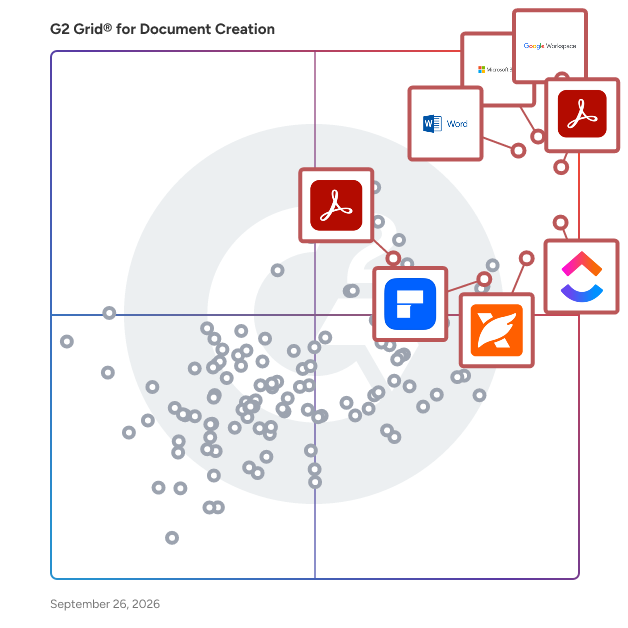
G2 Grid® for Document Creation Software

G2 Grid® for Document Creation Software plotting products by satisfaction and market presence

Highlighted products: Google Workspace, Microsoft 365, Adobe Acrobat, Microsoft Word, ClickUp, Wondershare PDFelement, Adobe PDF Pack, and Foxit PDF Editor.

Underlying data: [Grid® JSON](https://www.g2.com/categories/document-creation/grids.json?focus%5B%5D=google-workspace&focus%5B%5D=microsoft365&focus%5B%5D=adobe-acrobat&focus%5B%5D=microsoft-word&focus%5B%5D=clickup&focus%5B%5D=wondershare-wondershare-pdfelement&focus%5B%5D=adobe-pdf-pack&focus%5B%5D=foxit-pdf-editor&segment=mid-market)

Smallpdf

Smallpdf is the Zurich-based company behind one of the world’s most popular and trusted PDF editing software suites. Founded in 2013, Smallpdf offers secure and easy-to-use PDF software that over 1 billion users have used to compress, translate, sign, edit, merge, and convert PDF documents online, on their computers, or mobile devices. Smallpdf is built for individual professionals and teams of all sizes. Smallpdf Pro gives individual users unlimited access to all 40+ tools, AI-powered features, OCR, strong compression, and mobile app access. Smallpdf Pro for Teams adds member access management, special discounted pricing, centralized billing, and priority support. No onboarding or IT setup is required, and the platform works on web, Windows desktop, and mobile (iOS and Android). It also integrates natively with Google Drive, Microsoft OneDrive, and Dropbox. Security is a core part of Smallpdf: it is ISO/IEC 27001-certified and GDPR-, CCPA-, and nFADP-compliant. It uses 256-bit TLS encryption, and files are automatically deleted from servers after processing for added peace of mind.

Average Rating: 4.5/5.0

Total Reviews: 299

How Do G2 Users Rate Smallpdf?

  • Has the product been a good partner in doing business?: 9.2/10 (Category avg: 9.0/10)
  • Quality of Support: 8.7/10 (Category avg: 8.6/10)
  • Ease of Use: 9.4/10 (Category avg: 8.9/10)
  • Ease of Admin: 9.5/10 (Category avg: 8.9/10)

Who Is the Company Behind Smallpdf?

  • Seller: Smallpdf
  • Year Founded: 2013
  • HQ Location: Zurich
  • Twitter: @smallpdf
    8,080 Twitter followers
  • LinkedIn® Page: www.linkedin.com
    75 employees on LinkedIn®

Who Uses This Product?

  • Who Uses This: Administrative Assistant, Consultant
  • Top Industries: Information Technology and Services, Computer Software
  • Company Size: 48% Small, 38% Medium

What Do G2 Reviewers Say About Smallpdf?

AI-generated summary from verified user reviews

Pros
  • Users appreciate the ease of use of Smallpdf, praising its smooth interface and comprehensive functionality across devices.
  • Users love the easy conversion process of Smallpdf, enabling fast and efficient PDF format transformations.
  • Users praise Smallpdf for its easy PDF processing, streamlining tasks like merging, compressing, and converting files effortlessly.
  • Users find easy editing in Smallpdf makes their PDF tasks faster and more efficient, enhancing overall productivity.
  • Users love the ease of use and comprehensive functionalities of Smallpdf for all their PDF needs.
Cons
  • Users note limited features in Smallpdf compared to competitors, impacting flexibility and overall functionality.
  • Users report unexpected additional costs from Smallpdf, even after canceling subscriptions, causing frustration and distrust.
  • Users find conversion issues with Smallpdf, noting functionality limits, cost concerns, and quality loss in images.
  • Users find difficult navigation on Smallpdf, especially when accessing various image formats and customizable options.
  • Users find editing issues significant, particularly with functionality limits and quality loss during compression and merging.

What Are Recent G2 Reviews of Smallpdf?

What Are G2 Users Discussing About Smallpdf?

ConvertAPI

Blazing Fast Document Conversion API for Developers & Enterprises ConvertAPI helps you automate document workflows with a powerful REST API that converts Word, Excel, PowerPoint, HTML, PDF, and over 500+ file formats in seconds. Whether you’re building a product, processing thousands of files per day, or need secure, scalable document handling, ConvertAPI delivers with low latency, enterprise-grade uptime (99.95% SLA), and full compliance (ISO 27001, GDPR, HIPAA). Features Below is an overview of the key functionalities: Document Conversion - Office to PDF: Convert Word (DOC, DOCX), Excel (XLS, XLSX), and PowerPoint (PPT, PPTX) documents to PDF or PDF/A formats. - PDF to Office: Transform PDFs into editable Word, Excel, and PowerPoint documents. HTML/Web to PDF: Convert HTML files or web pages to PDF using a headless Chrome browser. - Image to PDF: Convert various image formats (e.g., JPG, PNG, BMP) to PDF. - PDF to Image: Convert PDFs to image formats such as JPG, PNG, TIFF, SVG, and WebP. - eBook Conversion: Convert DJVU and other eBook formats to PDF or images. - Email Conversion: Convert EML and MSG email files to PDF or image formats. Document Processing & Transformation - Merge PDF: Combine multiple PDF documents into one PDF. - Split PDF: Split PDF into several parts, by page ranges, patterns, bookmarks and etc. - Rotate: Rotate pages in PDF. - Delete Pages: Remove unwanted pages from PDF. - Watermarking: Add text or image watermarks to PDF and images. - Flatten PDFs: Flatten PDF layers to prevent further editing. - Repair Documents: Recover corrupted or damaged PDF and DOCX files. - Rasterize PDFs: Convert vector PDFs into raster images. Security & Optimization - Password Protection: Encrypt PDF and Office documents with passwords and AES-256 encryption. - Remove Protection: Unlock password-protected PDFs. - Redact PDF: Automatically detect and redact sensitive information in PDF files using AI. - Compress PDF: Reduce PDF sizes by up to 90% without compromising quality. - PDF/A Conversion: Convert PDFs to PDF/A format for long-term archiving. - Metadata Management: Edit or remove metadata from PDF documents. - Data Extraction & OCR - Text Extraction: Extract text content from PDFs, with optional OCR for scanned documents. - Table Extraction: Extract tabular data from PDFs into CSV or Excel formats. - Image Extraction: Extract images from PDFs into various image formats. - Form Data Extraction: Extract form field data from PDFs into FDF format. - Email Attachments: Extract attachments from EML and MSG email files. Advanced Tools - Document Generation: Create DOCX or PDF documents dynamically using templates and JSON data. - Format Comparison: Compare DOCX documents to identify differences in content and formatting. - ZIP Archiving: Create ZIP archives from multiple files, with optional password protection. - For a complete list of supported conversions and tools, visit https://www.convertapi.com/api. Get started in minutes with simple integration, transparent pricing, and world-class support.

Average Rating: 4.5/5.0

Total Reviews: 44

How Do G2 Users Rate ConvertAPI?

  • Has the product been a good partner in doing business?: 8.8/10 (Category avg: 9.0/10)
  • Quality of Support: 8.8/10 (Category avg: 8.6/10)
  • Ease of Use: 9.5/10 (Category avg: 8.9/10)
  • Ease of Admin: 9.2/10 (Category avg: 8.9/10)

Who Is the Company Behind ConvertAPI?

  • Seller: ConvertAPI
  • Year Founded: 2011
  • HQ Location: N/A
  • Twitter: @convertapi
    6 Twitter followers
  • LinkedIn® Page: www.linkedin.com
    6 employees on LinkedIn®

Who Uses This Product?

  • Top Industries: Computer Software, Information Technology and Services
  • Company Size: 71% Small, 24% Medium

What Do G2 Reviewers Say About ConvertAPI?

AI-generated summary from verified user reviews

Pros
  • Users find ConvertAPI to be very straightforward, making implementation and usage quick and efficient for various needs.
  • Users value the API integration of ConvertAPI, enhancing flexibility and enabling seamless workflow automation.
  • Users value the easy integrations of ConvertAPI, enabling seamless functionality across various platforms and languages.
  • Users value the comprehensive converters of ConvertAPI, appreciating its ease of use and excellent support features.
  • Users value the easy integrations with ConvertAPI, appreciating its wide variety of converters and excellent documentation.
Cons
  • Users find ConvertAPI expensive, especially for small businesses needing cost-effective options for occasional conversions.
  • Users desire more affordable pricing options to better accommodate small businesses and infrequent converters.
  • Users regret the missing features like account hold options and lack of support for certain file formats.
  • Users are frustrated with the data restrictions as ConvertAPI doesn't support xlsm file extensions, limiting usability.
  • Users find the limited features of ConvertAPI frustrating, especially the lack of an account hold option.

What Are Recent G2 Reviews of ConvertAPI?

What Are G2 Users Discussing About ConvertAPI?

Inkscape

Inkscape is a free and open-source vector graphics editor available for GNU/Linux, Windows, and macOS. It is widely used for creating both artistic and technical illustrations, including cartoons, clip art, logos, typography, diagrams, and flowcharts. By utilizing vector graphics, Inkscape ensures sharp printouts and renderings at any resolution, unlike raster graphics that are limited by pixel count. The software employs the standardized Scalable Vector Graphics (SVG) file format as its primary format, which is supported by many other applications, including web browsers. Key Features and Functionality: - Object Creation: Inkscape offers a variety of tools for drawing and shaping objects, such as the Pencil tool for freehand drawing, the Pen tool for creating Bézier curves and straight lines, and the Calligraphy tool for producing filled paths that mimic calligraphic strokes. It also includes shape tools for rectangles, ellipses, stars, polygons, and spirals. - Object Manipulation: Users can perform transformations like moving, scaling, rotating, and skewing objects both interactively and by specifying exact numeric values. Inkscape supports grouping objects, layering, and aligning and distributing objects for precise design control. - Text Support: The software provides a comprehensive text tool that allows for multi-line text, full on-canvas editing, and the ability to flow text along a path or into a shape. Users can adjust font, spacing, kerning, and more. - File Format Compatibility: Inkscape can import and export various file formats, including SVG, AI, EPS, PDF, PS, and PNG, facilitating interoperability with other graphic design tools. - Extensibility: Designed to be extensible, Inkscape allows users to customize its functionality with add-ons, enhancing its capabilities to meet specific needs. Primary Value and User Solutions: Inkscape provides a powerful, free alternative to proprietary vector graphics editors, enabling users to create high-quality illustrations without financial barriers. Its support for the SVG standard ensures compatibility and ease of sharing across different platforms and applications. The software's comprehensive feature set, combined with its user-friendly interface and multi-lingual support, makes it accessible to a broad audience, from beginners to professional designers. By offering tools for precise object creation and manipulation, robust text support, and compatibility with various file formats, Inkscape addresses the diverse needs of users seeking a versatile and cost-effective solution for vector graphic design.

Average Rating: 4.4/5.0

Total Reviews: 409

How Do G2 Users Rate Inkscape?

  • Has the product been a good partner in doing business?: 8.6/10 (Category avg: 9.0/10)
  • Quality of Support: 7.7/10 (Category avg: 8.6/10)
  • Ease of Use: 7.8/10 (Category avg: 8.9/10)
  • Ease of Admin: 8.3/10 (Category avg: 8.9/10)

Who Is the Company Behind Inkscape?

  • Seller: Inkscape
  • HQ Location: Chino Hills, CA
  • Twitter: @inkscape
    40,486 Twitter followers
  • LinkedIn® Page: www.linkedin.com
    1 employees on LinkedIn®

Who Uses This Product?

  • Who Uses This: Graphic Designer, Designer
  • Top Industries: Graphic Design, Design
  • Company Size: 75% Small, 15% Medium

What Do G2 Reviewers Say About Inkscape?

AI-generated summary from verified user reviews

Pros
  • Users enjoy the user-friendly interface of Inkscape, making it accessible and easy to master for beginners.
  • Users love that Inkscape is totally free yet offers features comparable to expensive software like Adobe Illustrator.
  • Users love Inkscape for its comprehensive and free features, enabling easy vector graphics creation without quality loss.
  • Users appreciate the intuitive UI and flexibility of Inkscape, making it ideal for beginners and vector graphics enthusiasts.
  • Users love Inkscape for its powerful vector design capabilities, offering free, professional-quality tools for all skill levels.
Cons
  • Users note the missing features in Inkscape, like Gradient Mesh and Free Transform, hindering their illustration experience.
  • Users note significant tool limitations in Inkscape, missing essential features like Gradient Mesh and advanced transformation options.
  • Users experience performance issues with Inkscape, including slow processing times and frequent crashes during complex tasks.
  • Users report slow performance with Inkscape, especially with large files, causing frustration during design tasks.
  • Users express frustration with Inkscape's limited features, particularly missing tools compared to more advanced software like Adobe Illustrator.

What Are Recent G2 Reviews of Inkscape?

What Are G2 Users Discussing About Inkscape?

MadCap Flare

Empowering teams to create, manage, and deliver exceptional content at scale MadCap Flare is the go-to solution for technical content teams that need to streamline workflows and deliver consistent, high-quality content across every channel. Trusted by documentation, training, and knowledge management professionals worldwide, Flare combines the precision of XML-based authoring with the flexibility of multi-channel publishing—all from a single, centralized platform. Why leading teams rely on Flare: Scalable, topic-based authoring: XML-based structure ensures precision and scalability for complex documentation projects. Single-source publishing: Manage all outputs from one project to eliminate redundancy and simplify updates. Multi-channel delivery: Publish effortlessly to self-service portals, online Help, documentation hubs, and training guides. Advanced content reuse: Reuse variables, snippets, and conditions to save time and maintain accuracy. Real-time collaboration with Flare Online: Co-author, review, and manage content simultaneously in the cloud—no check-in delays or version conflicts. Integrated translation management: Accelerate localization and expand your global reach. Flexible publishing formats: Deliver content in HTML5, PDF, Word, SCORM, and more to meet diverse audience needs. Proven ROI: Cut production costs, speed release cycles, and boost customer satisfaction. What sets Flare apart: Unlike traditional content management tools, Flare is purpose-built for technical content teams—offering unmatched flexibility, control, and scalability. With Flare Online, teams gain cloud-based collaboration and instant publishing capabilities for faster, more connected workflows. Together, they form a unified platform for creating, managing, and delivering knowledge at scale—ensuring efficiency, brand consistency, and an exceptional user experience. That’s why thousands of organizations trust Flare to power their global content strategy.gy."

Average Rating: 4.4/5.0

Total Reviews: 484

How Do G2 Users Rate MadCap Flare?

  • Has the product been a good partner in doing business?: 8.9/10 (Category avg: 9.0/10)
  • Quality of Support: 8.6/10 (Category avg: 8.6/10)
  • Ease of Use: 7.4/10 (Category avg: 8.9/10)
  • Ease of Admin: 8.0/10 (Category avg: 8.9/10)

Who Is the Company Behind MadCap Flare?

  • Seller: MadCap Software
  • Company Website:
  • Year Founded: 2005
  • HQ Location: Denver, CO
  • Twitter: @MadCapSoftware
    1,678 Twitter followers
  • LinkedIn® Page: www.linkedin.com
    124 employees on LinkedIn®

Who Uses This Product?

  • Who Uses This: Technical Writer, Senior Technical Writer
  • Top Industries: Computer Software, Information Technology and Services
  • Company Size: 52% Medium, 29% Large

What Do G2 Reviewers Say About MadCap Flare?

AI-generated summary from verified user reviews

Pros
  • Users appreciate the user-friendly content management of MadCap Flare, enhancing efficiency in documentation and review processes.
  • Users praise MadCap Flare for its exceptional efficiency, allowing for streamlined authoring and documentation tasks with ease.
  • Users value the user-friendly interface of MadCap Flare, enhancing efficiency in both authoring and technical documentation tasks.
  • Users commend the excellent customer support from MadCap Flare, particularly praising their responsive and knowledgeable tech team.
  • Users value the customization options in MadCap Flare, allowing for diverse project applications and ongoing discovery.
Cons
  • Users find the steep learning curve of MadCap Flare challenging, requiring consistent use to retain knowledge and skills.
  • Users find the complexity of MadCap Flare challenging, especially when not using it regularly between jobs.
  • Users find the cost of entry and travel for conferences too high, limiting access for many documentation professionals.
  • Users find learning difficulty with MadCap Flare due to its complexity, making it challenging to remember processes over time.
  • Users report experiencing performance issues with MadCap Flare, particularly slowdowns during large project builds.

What Are Recent G2 Reviews of MadCap Flare?

What Are G2 Users Discussing About MadCap Flare?

Soda PDF Anywhere

Soda PDF Anywhere is the first fully functional PDF solution available both as a desktop and a web-based app. Users have the freedom to access features on any device with a web browser, including desktops, laptops, smartphones, and tablets. Switching between both applications is done seamlessly, which is a breakthrough in the software industry. Soda PDF Anywhere also comes equipped with innovative features specifically designed to increase productivity, including PDF conversion, editing, reviewing & security tools, sending documents for e-signature, Bates numbering, cloud storage integration (Dropbox, Box, Onedrive, Google Drive, Sharepoint), and much more.

Average Rating: 4.4/5.0

Total Reviews: 70

How Do G2 Users Rate Soda PDF Anywhere?

  • Has the product been a good partner in doing business?: 6.5/10 (Category avg: 9.0/10)
  • Quality of Support: 8.0/10 (Category avg: 8.6/10)
  • Ease of Use: 8.7/10 (Category avg: 8.9/10)
  • Ease of Admin: 7.7/10 (Category avg: 8.9/10)

Who Is the Company Behind Soda PDF Anywhere?

Who Uses This Product?

  • Who Uses This: Software Engineer
  • Top Industries: Information Technology and Services, Computer Software
  • Company Size: 49% Medium, 41% Small

What Do G2 Reviewers Say About Soda PDF Anywhere?

AI-generated summary from verified user reviews

Pros
  • Users appreciate the ease of use of Soda PDF Anywhere, enjoying its seamless navigation and reliable functionalities.
  • Users love the seamless functionality of Soda PDF Anywhere for effective collaboration and document management.
  • Users value the seamless team collaboration features of Soda PDF Anywhere, enhancing efficiency and communication during projects.
  • Users appreciate the easy editing capabilities of Soda PDF Anywhere, enhancing their document management experience effortlessly.
  • Users emphasize the reliability of Soda PDF Anywhere for quick document generation and secure collaboration.
Cons
  • Users report issues with crashes during large PDF editing, which disrupts their otherwise seamless workflows.
  • Users find the performance issues on the mobile app version less satisfactory compared to the desktop version.

What Are Recent G2 Reviews of Soda PDF Anywhere?

What Are G2 Users Discussing About Soda PDF Anywhere?

Adobe InCopy

InCopy lets copywriters and editors style text, track changes, and make simple layout modifications to a document while designers work on the same document simultaneously in Adobe InDesign — all without overwriting each other’s contributions.

Average Rating: 4.2/5.0

Total Reviews: 66

How Do G2 Users Rate Adobe InCopy?

  • Has the product been a good partner in doing business?: 8.3/10 (Category avg: 9.0/10)
  • Quality of Support: 8.5/10 (Category avg: 8.6/10)
  • Ease of Use: 8.1/10 (Category avg: 8.9/10)
  • Ease of Admin: 8.0/10 (Category avg: 8.9/10)

Who Is the Company Behind Adobe InCopy?

  • Seller: Adobe
  • Year Founded: 1982
  • HQ Location: San Jose, CA
  • Twitter: @Adobe
    956,842 Twitter followers
  • LinkedIn® Page: www.linkedin.com
    42,975 employees on LinkedIn®
  • Ownership: NASDAQ:ADBE

Who Uses This Product?

  • Top Industries: Publishing, Marketing and Advertising
  • Company Size: 55% Small, 39% Medium

What Do G2 Reviewers Say About Adobe InCopy?

AI-generated summary from verified user reviews

Pros
  • Users find Adobe InCopy easy to use, enjoying its intuitive interface designed for seamless publishing collaboration.
  • Users find Adobe InCopy intuitive, making the publishing process straightforward and familiar, akin to using Github.
  • Users find the team collaboration in Adobe InCopy straightforward, enhancing their publishing workflow effectively.
Cons
  • Users find a heavy dependency on the internet challenging when using Adobe InCopy alongside InDesign.

What Are Recent G2 Reviews of Adobe InCopy?

What Are G2 Users Discussing About Adobe InCopy?

S-Docs

S-Docs is a document operations platform designed to help users streamline their document creation and signing processes. This solution caters to a wide range of organizations, from small businesses to large global enterprises, enabling them to efficiently manage critical documents through intuitive automation and secure e-signature capabilities. By focusing on both ease of use and robust functionality, S-Docs empowers businesses to enhance their operational efficiency and transform their workflows. The platform is particularly valuable for organizations that handle a high volume of documents, such as contracts, invoices, and compliance forms. Its target audience includes industries like finance, healthcare, legal, and manufacturing, where accurate and timely document management is essential. S-Docs addresses the specific needs of these sectors by providing a comprehensive solution that not only simplifies document workflows but also ensures compliance with industry regulations. Key features of S-Docs include its user-friendly document automation tools, which allow users to create customized templates and generate documents quickly. The e-signature functionality further enhances the platform by enabling users to obtain signatures securely and efficiently, reducing the time spent on manual processes. Additionally, S-Docs integrates seamlessly with existing systems, ensuring that organizations can leverage their current technology investments while enhancing their document operations. The benefits of using S-Docs extend beyond mere efficiency. By automating document processes, organizations can reduce human error, improve accuracy, and accelerate turnaround times. The platform also supports collaboration among team members, allowing multiple users to work on documents simultaneously, which fosters a more agile working environment. Furthermore, S-Docs' commitment to security ensures that sensitive information is protected throughout the document lifecycle, giving users peace of mind. Overall, S-Docs stands out in the document operations category by offering a comprehensive solution that not only simplifies document workflows but also drives significant process transformation. Its focus on automation, security, and integration makes it a valuable tool for organizations looking to enhance their document management capabilities and achieve greater operational efficiency.

Average Rating: 4.7/5.0

Total Reviews: 122

How Do G2 Users Rate S-Docs?

  • Has the product been a good partner in doing business?: 9.4/10 (Category avg: 9.0/10)
  • Quality of Support: 9.2/10 (Category avg: 8.6/10)
  • Ease of Use: 8.9/10 (Category avg: 8.9/10)
  • Ease of Admin: 9.0/10 (Category avg: 8.9/10)

Who Is the Company Behind S-Docs?

  • Seller: S-Docs
  • Year Founded: 2010
  • HQ Location: New York, NY
  • LinkedIn® Page: www.linkedin.com
    54 employees on LinkedIn®

Who Uses This Product?

  • Who Uses This: Salesforce Administrator
  • Top Industries: Non-Profit Organization Management, Information Technology and Services
  • Company Size: 46% Small, 40% Medium

What Do G2 Reviewers Say About S-Docs?

AI-generated summary from verified user reviews

Pros
  • Users appreciate the ease of use of S-Docs, making document generation and e-signature fast and simple.
  • Users commend the excellent customer support of S-Docs, finding their assistance invaluable during technical issues.
  • Users appreciate the seamless integration of S-Docs with Salesforce, enhancing document generation and e-signature efficiency.
  • Users praise the seamless Salesforce integration of S-Docs, enhancing security and simplifying document generation processes.
  • Users value the ease of template creation with S-Docs, enhancing daily operations seamlessly within Salesforce.
Cons
  • Users find the learning curve steep, especially with complex templates and a non-intuitive interface, hindering effective use.
  • Users find the S-Docs interface not intuitive, noting a steep learning curve and complexity for less technical users.
  • Users express concerns about automation difficulty, noting that complex templates require time and troubleshooting expertise.
  • Users find S-Docs too expensive, especially after recent pricing changes and tiered minimum user requirements.
  • Users face formatting issues with S-Docs, including limitations in customization and troublesome DOCX output.

What Are Recent G2 Reviews of S-Docs?

XaitPorter

XaitPorter is a cloud based document co-authoring and automation solution. XaitPorter has a built on workflow, is built on a database to making reuse of information easier and automatically takes care of formatting, layout and numbering. Xait with XaitPorter has 50,000+ users globally. Xait has majority of the larger oil service and engineering companies globally, and 50+ oil companies as clients. In addition, Xait have clients in the CRO industry, ITC, Engineering, construction, and more. XaitPorter is used for a wide variety of documents such as tenders, contracts, license applications, field development plans, well reports, annual reports and more. XaitPorter is built for complex documents with high value and high impact, and make it easy to manage teams collaborating on business critical documents. XaitPorter automatically takes care of formatting, layout and numbering. In addition, as XaitPorter is built on a database, XaitPorter ensure that our clients can more efficiently manage, maintain and leverage their content.

Average Rating: 4.6/5.0

Total Reviews: 51

How Do G2 Users Rate XaitPorter?

  • Has the product been a good partner in doing business?: 9.1/10 (Category avg: 9.0/10)
  • Quality of Support: 9.3/10 (Category avg: 8.6/10)
  • Ease of Use: 8.9/10 (Category avg: 8.9/10)
  • Ease of Admin: 8.4/10 (Category avg: 8.9/10)

Who Is the Company Behind XaitPorter?

  • Seller: Xait
  • Year Founded: 2000
  • HQ Location: Sandnes, Norway
  • Twitter: @xaitgroup
    701 Twitter followers
  • LinkedIn® Page: www.linkedin.com
    94 employees on LinkedIn®

Who Uses This Product?

  • Top Industries: Oil & Energy, Computer Software
  • Company Size: 57% Medium, 31% Large

What Are Recent G2 Reviews of XaitPorter?

What Are G2 Users Discussing About XaitPorter?

MobiOffice

MobiOffice (formerly OfficeSuite) is a 3-in-1 office suite alternative that allows you to easily create and edit text documents, spreadsheets, and presentations at work and at home. Available on Windows, Android, iOS, and macOS, MobiOffice includes MobiDocs, MobiSheets, and MobiSlides. MobiOffice is compatible with all major file formats, including Microsoft Office (DOCX, ODT, PPTX), Google formats (Docs, Sheets, Slides), Apple iWork, OpenOffice, LibreOffice, WPS Office, Polaris Office, and more. Take a closer look at MobiOffice’s core components: • MobiDocs simplifies the way you create and edit documents. You can use customizable templates, apply basic formatting like fonts and styles, and easily integrate images and tables. Additionally, you can access advanced functions like spell check and an AI-powered paraphraser. MobiDocs is an easy-to-use, feature-rich tool for both simple and complex tasks. • MobiSheets offers simple, user-friendly tools to build spreadsheets, manage and analyze data effortlessly, visualize trends, and create reports. At the same time, advanced features like Pivot Tables handle more complex data tasks for business needs, making it suitable for both beginners and advanced users. • MobiSlides allows you to create polished, professional presentations with a wide selection of templates and easy design tools. You can also leverage more advanced features like animations, multimedia integration, and custom transitions to bring your ideas to life. Optimized for all major platforms, MobiOffice’s components - MobiDocs, MobiSheets, and MobiSlides - are available as a complete suite or standalone apps оn Windows, delivering tailored and affordable solutions that suit individual needs. MobiOffice integrates with MobiDrive, for up to 20GB of free cloud storage and value plans up to 2TB, making file access and syncing easier than ever.

Average Rating: 4.5/5.0

Total Reviews: 37

How Do G2 Users Rate MobiOffice?

  • Has the product been a good partner in doing business?: 10.0/10 (Category avg: 9.0/10)
  • Quality of Support: 9.0/10 (Category avg: 8.6/10)
  • Ease of Use: 9.1/10 (Category avg: 8.9/10)
  • Ease of Admin: 10.0/10 (Category avg: 8.9/10)

Who Is the Company Behind MobiOffice?

  • Seller: MobiSystems
  • Year Founded: 2001
  • HQ Location: Sofia, Sofia
  • Twitter: @MobiSystems
    3,525 Twitter followers
  • LinkedIn® Page: www.linkedin.com
    137 employees on LinkedIn®

Who Uses This Product?

  • Company Size: 37% Medium, 37% Small

What Do G2 Reviewers Say About MobiOffice?

AI-generated summary from verified user reviews

Pros
  • Users value the seamless communication integration in MobiOffice, enhancing document management and collaboration effortlessly.
  • Users appreciate the well-organized data management in MobiOffice, enabling easy updates and access to document history.
  • Users value the efficient document editing in MobiOffice, thanks to its clean interface and adaptable templates.
  • Users value the well-organized interface and adaptable templates of MobiOffice, enhancing productivity and document management.
  • Users appreciate the easy editing capabilities of MobiOffice, enjoying seamless integration of dynamic data and document history.

What Are Recent G2 Reviews of MobiOffice?

PDFescape

PDFescape is a totally free and open source online PDF reader and editor, as well as a PDF form filler with features for PDF form design. PDFescape offers users a new way to open and edit PDF files online. It allows for a much better PDF software experience by using the original document file format, allowing users to be not be constrained by typical software requirements. Due to the fact that this PDF editor can be accessed online, PDFescape only requires a modern internet browser and an active internet connection. Below are some of the features offered by this PDF editor.

Online PDF Reader

  • Natively open PDF documents in your preferred web browser
  • Manipulate PDF pages with zooming and rotation features for an optimal viewing experience
  • Copy PDF text to your clipboard by selecting your desired content
  • Easily search PDF text for specific keywords and terms with ease
  • Gives you the ability to save, download, and print all PDF documents
  • Provides users with thumbnail, bookmark, and link support features and functionality

Online PDF Editor

  • Gives you the option to add text, shapes, whiteout, and other annotations to PDF files
  • Crop, rotate, shift, move, delete and insert PDF files to create more custom files
  • Easily create links to multiple PDF files or other types of web content
  • Edit PDF information tags to help with identification
  • Encrypt PDF content with password protection features
  • Add additional images to PDF forms and documents
  • Sign PDF documents using scanned and imported signatures

PDF Form Filler

  • Fill out PDF forms using pre-existing form fields or by using a text tool
  • PDF field calculation and formatting features are supported
  • PDF text, checkbox, radio, list, and drop down fields are available and supported
  • Basic PDF field design and styling properties supported
  • Allows users to quickly jump from field to field using tabs

PDF Form Designer

  • Create and add new PDF form fields to any existing PDF file
  • Style PDF form fields with text, color, size features
  • Modify existing PDF form fields to suit custom documents
  • Fully supports checkbox, radio, dropdown, listbox, text, submit button and reset button fields in all PDF files
  • Submit buttons are able to be created to be compatible with PDFescape Ultimate's publishing feature
PDFescape also offers many more features as a PDF editor, including RAD options, PDF merging, and some of the functionality listed below.

PDFescape Additional Features:

  • PDF Annotator
  • Premium Desktop Features
  • Ultimate Desktop Features
  • Webmaster Tools
  • Additional Publishing Features
  • Volume Licensing
  • And many more!

Average Rating: 4.2/5.0

Total Reviews: 67

How Do G2 Users Rate PDFescape?

  • Has the product been a good partner in doing business?: 8.3/10 (Category avg: 9.0/10)
  • Quality of Support: 8.1/10 (Category avg: 8.6/10)
  • Ease of Use: 8.7/10 (Category avg: 8.9/10)
  • Ease of Admin: 8.3/10 (Category avg: 8.9/10)

Who Is the Company Behind PDFescape?

  • Seller: Red Software
  • Year Founded: 2015
  • HQ Location: Monza, MB
  • Twitter: @pdfescape
    396 Twitter followers
  • LinkedIn® Page: www.linkedin.com
    26 employees on LinkedIn®

Who Uses This Product?

  • Top Industries: Information Technology and Services, Computer Software
  • Company Size: 39% Medium, 36% Large

What Do G2 Reviewers Say About PDFescape?

AI-generated summary from verified user reviews

Pros
  • Users love the easy editing capabilities of PDFescape, making document management and updates seamless and efficient.
  • Users find PDFescape's PDF editing capabilities invaluable for maintaining and customizing their professional documents effortlessly.
  • Users value the versatile document editing capabilities of PDFescape, enhancing project management and maintaining up-to-date visuals.
  • Users value the easy form filling features of PDFescape, enhancing document customization and overall usability.
  • Users value the content management capabilities of PDFescape, enabling seamless updates and customization of documents.
Cons
  • Users experience conversion issues with PDFescape, particularly in importing files and scaling PDFs to Excel.
  • Users often face data deletion issues that complicate the importing and exporting of PDFs and other files.
  • Users report import issues with PDFescape, noting slow file imports and occasional scaling problems with PDFs to Excel.
  • Users experience PDF importing delays and occasional scaling issues when converting PDFs to Excel.
  • Users find the slow loading times frustrating, especially with larger documents, impacting their workflow efficiency.

What Are Recent G2 Reviews of PDFescape?

What Are G2 Users Discussing About PDFescape?

Formstack Documents

Formstack Documents is the only document generation solution you need to save time, put a stop to manual entry, and streamline your paperwork process. With Formstack Documents, you can upload, merge, and deliver smart documents in a snap. Start from scratch or upload your own fillable PDF or Word document. Our app allows you to easily customize your document and merge it with data. Once you've created your document, it's time to figure out where you'll be sending it. From emails to Google Drive to a third-party integration via Webhooks, Formstack Documents gives you the control to send your merged files wherever you want. Formstack Documents integrates with over 150 different products, ensuring you'll easily be able to upload, merge, and deliver your documents, no matter what products you're using.

Average Rating: 4.5/5.0

Total Reviews: 148

How Do G2 Users Rate Formstack Documents?

  • Has the product been a good partner in doing business?: 9.0/10 (Category avg: 9.0/10)
  • Quality of Support: 8.7/10 (Category avg: 8.6/10)
  • Ease of Use: 8.2/10 (Category avg: 8.9/10)
  • Ease of Admin: 8.6/10 (Category avg: 8.9/10)

Who Is the Company Behind Formstack Documents?

  • Seller: Formstack, LLC
  • Company Website:
  • Year Founded: 2006
  • HQ Location: Fishers, IN
  • Twitter: @Formstack
    6,392 Twitter followers
  • LinkedIn® Page: www.linkedin.com
    219 employees on LinkedIn®

Who Uses This Product?

  • Who Uses This: Owner
  • Top Industries: Computer Software, Non-Profit Organization Management
  • Company Size: 59% Small, 33% Medium

What Do G2 Reviewers Say About Formstack Documents?

AI-generated summary from verified user reviews

Pros
  • Users value the seamless integration of Formstack Documents, enhancing workflows and saving time across various platforms.
  • Users find automation features in Formstack Documents incredibly time-saving, enhancing overall workflow efficiency and ease of use.
  • Users find Formstack Documents to be very user-friendly, significantly streamlining their document generation process with ease.
  • Users value the easy integrations of Formstack Documents, which streamline workflows and enhance productivity across various platforms.
  • Users love how Formstack Documents provides time-saving automation for document generation, enhancing efficiency and reducing errors.
Cons
  • Users find the learning curve steep for complex document merges, though the new builder simplifies the process.
  • Users find bug issues with Formstack Documents occasionally disrupt their experience, though most are easily resolved.
  • Users find the user interface clunky, leading to a less intuitive experience despite its robust capabilities.
  • Users find the poor documentation inadequate for advanced scenarios, hindering their overall experience with Formstack Documents.
  • Users find the setup difficulty of Formstack Documents challenging initially, but it becomes user-friendly after configuration.

What Are Recent G2 Reviews of Formstack Documents?

What Are G2 Users Discussing About Formstack Documents?

Drawboard PDF

Millions of engineers, architects, lawyers, students and educators are already using Drawboard PDF every day for fast and collaborative PDF markup. Our remarkable markup tools are helping streamline workflows and reduce the world’s reliance on paper. Drawboard PDF is available as a Windows 10+11 app, an iOS app and as web app. - Feels like real ink - Store+Share markups with your team - Text review tools - Bookmarks, markup history and keyword search - Favorites toolbar - Draw objects and shapes - Signatures library - Page manipulation PRO - Document Builder - Calibrated Measurements - Digital Protractor - Grids and Lines - Engineering Line Styles - Callouts

Average Rating: 4.3/5.0

Total Reviews: 39

How Do G2 Users Rate Drawboard PDF?

  • Quality of Support: 8.6/10 (Category avg: 8.6/10)
  • Ease of Use: 8.9/10 (Category avg: 8.9/10)

Who Is the Company Behind Drawboard PDF?

  • Seller: Drawboard
  • Year Founded: 2011
  • HQ Location: Melbourne, VIC
  • Twitter: @drawboard
    869 Twitter followers
  • LinkedIn® Page: www.linkedin.com
    37 employees on LinkedIn®

Who Uses This Product?

  • Top Industries: Higher Education
  • Company Size: 50% Small, 40% Medium

What Do G2 Reviewers Say About Drawboard PDF?

AI-generated summary from verified user reviews

Pros
  • Users appreciate the full-featured capabilities of Drawboard PDF, enhancing their PDF editing and workflow efficiency significantly.
  • Users commend the responsive customer support of Drawboard PDF, appreciating quick resolutions to their issues.
  • Users enjoy the daily usefulness of Drawboard PDF for document markup and note-taking, enhancing productivity.
  • Users praise the ease of use of Drawboard PDF, finding it intuitive and effective for detailed PDF markup.
  • Users find the easy implementation of Drawboard PDF allows seamless annotation and editing of PDF documents.
Cons
  • Users find the missing hot keys and PDF cropping features limiting their overall experience with Drawboard PDF.
  • Users find the lack of hotkeys and cropping features in Drawboard PDF limits efficiency and usability.
  • Users experience occasional slow performance with large documents, but updates have improved speed and stability.

What Are Recent G2 Reviews of Drawboard PDF?

What Are G2 Users Discussing About Drawboard PDF?

LibreOffice Writer

Writer has all the features you need from a modern, full-featured word processing and desktop publishing tool. It's simple enough for a quick memo, but powerful enough to create complete books with contents, diagrams, indexes, and more. You're free to concentrate on your message, while Writer makes it look great.

Average Rating: 4.1/5.0

Total Reviews: 87

How Do G2 Users Rate LibreOffice Writer?

  • Has the product been a good partner in doing business?: 7.5/10 (Category avg: 9.0/10)
  • Quality of Support: 7.6/10 (Category avg: 8.6/10)
  • Ease of Use: 8.4/10 (Category avg: 8.9/10)
  • Ease of Admin: 8.3/10 (Category avg: 8.9/10)

Who Is the Company Behind LibreOffice Writer?

  • Seller: LibreOffice
  • Year Founded: 2010
  • HQ Location: Berlin, DE
  • Twitter: @libreoffice
    79,608 Twitter followers
  • LinkedIn® Page: www.linkedin.com
    36 employees on LinkedIn®

Who Uses This Product?

  • Top Industries: Information Technology and Services, Computer Software
  • Company Size: 60% Small, 25% Medium

What Do G2 Reviewers Say About LibreOffice Writer?

AI-generated summary from verified user reviews

Pros
  • Users appreciate the regular updates and feature enhancements of LibreOffice Writer, boosting performance and versatility on multiple platforms.
  • Users value the regular support and updates for LibreOffice Writer, enhancing functionality and user experience.
  • Users value the customization options in LibreOffice Writer, enhancing their writing experience with tailored features.
  • Users find LibreOffice Writer easy to use and appreciate the supportive open-source community for guidance and contributions.
  • Users value the seamless integrations in LibreOffice Writer, facilitating diverse document formats across different operating systems.
Cons
  • Users find the missing features in LibreOffice Writer limiting, hindering productivity and collaborative efforts.

What Are Recent G2 Reviews of LibreOffice Writer?

What Are G2 Users Discussing About LibreOffice Writer?

CleverPDF

CleverPDF offers more than 30 PDF tools online for free. Users can convert PDF to Office, iWork, images, Ebooks or create PDF from those formats. Besides PDF conversion, there are dozens of PDF utility tools such as compress, combine, split, encrypt, add watermark or page numbers to PDF and more. It can help you with your daily PDF tasks. The web-based app is completely free, perpetual license for Offline versions (Mac and Windows) are also available.

Average Rating: 4.4/5.0

Total Reviews: 27

How Do G2 Users Rate CleverPDF?

  • Has the product been a good partner in doing business?: 10.0/10 (Category avg: 9.0/10)
  • Quality of Support: 8.2/10 (Category avg: 8.6/10)
  • Ease of Use: 9.4/10 (Category avg: 8.9/10)
  • Ease of Admin: 8.3/10 (Category avg: 8.9/10)

Who Is the Company Behind CleverPDF?

  • Seller: CleverPDF
  • Year Founded: 2017
  • HQ Location: Hong Kong, Hong Kong
  • Twitter: @cleverpdf
    282 Twitter followers
  • LinkedIn® Page: www.linkedin.com
    1 employees on LinkedIn®

Who Uses This Product?

  • Company Size: 44% Small, 41% Medium

What Do G2 Reviewers Say About CleverPDF?

AI-generated summary from verified user reviews

Pros
  • Users find CleverPDF to be easy to use, especially for extracting images and managing reports effortlessly.
  • Users value the easy extraction of high-quality images and consistent auto-page numbering in CleverPDF for reports.

What Are Recent G2 Reviews of CleverPDF?

What Are G2 Users Discussing About CleverPDF?

Templafy

Templafy is the leading AI-powered document generation platform, enabling enterprise organizations to create accurate, compliant, and on-brand documents with maximum efficiency and control. Accessible directly within M365, Google Workspace, Salesforce, Claude or any AI agent Templafy simplifies document workflows through AI and automation, to reduce risk and and boost productivity. Founded in 2014, Templafy is a global organization with offices across Europe and the US. Trusted by industry leaders like KPMG and BDO, Templafy saves teams over 30% of the time they typically spend on repetitive work like proposals, engagement letters, and audit reports, so they can focus on revenue-driving tasks instead. Join more than 4 million users worldwide who rely on Templafy to accelerate business content creation with AI.

Average Rating: 4.4/5.0

Total Reviews: 58

How Do G2 Users Rate Templafy?

  • Has the product been a good partner in doing business?: 9.3/10 (Category avg: 9.0/10)
  • Quality of Support: 8.4/10 (Category avg: 8.6/10)
  • Ease of Use: 8.9/10 (Category avg: 8.9/10)
  • Ease of Admin: 8.6/10 (Category avg: 8.9/10)

Who Is the Company Behind Templafy?

  • Seller: Templafy
  • Company Website:
  • HQ Location: New York, USA
  • Twitter: @Templafy
    1,082 Twitter followers
  • LinkedIn® Page: www.linkedin.com
    196 employees on LinkedIn®

Who Uses This Product?

  • Top Industries: Accounting, Consulting
  • Company Size: 46% Large, 41% Medium

What Do G2 Reviewers Say About Templafy?

AI-generated summary from verified user reviews

Pros
  • Users find Templafy to be easy to use, streamlining document creation and ensuring brand consistency effortlessly.
  • Users appreciate the seamless integration and automated features of Templafy, enhancing efficiency and brand consistency.
  • Users appreciate the ease of use and integration of Templafy's templates, enhancing efficiency and brand consistency.
  • Users value the time-saving features of Templafy, enabling faster document creation and enhanced productivity.
  • Users appreciate the seamless branding integration in Templafy, ensuring consistency and efficiency across documents and proposals.
Cons
  • Users find the complex usability of Templafy frustrating due to integration issues and challenges with template creation.
  • Users find Templafy quite expensive, especially since many features can be replicated in Word.
  • Users find missing features in Templafy, including limited templates and frustrating file size constraints.
  • Users face technical issues with Templafy, dealing with bugs and integration challenges that hinder their experience.
  • Users find Templafy has adifficult learning curve, especially for newcomers, making full utilization challenging.

What Are Recent G2 Reviews of Templafy?

What Are G2 Users Discussing About Templafy?

Neeraja Prakash
NP
Researched and written by Neeraja Prakash
Updated