Best Enterprise Digital Adoption Platforms - Page 2

How Many Digital Adoption Platforms Products Does G2 Track?

Total Products under this Category: 123

Category Stats (Oct 2026)

  • Average Rating: 4.62/5 The average rating of products in this category, based on all submitted ratings
  • Top Trending Product: uPerform (+0.21%) - Among all products in this category, uPerform recorded the largest rating increase compared to last month

Last updated: October 20, 2026

How Does G2 Rank Digital Adoption Platforms Products?

Why You Can Trust G2's Software Rankings:

  • 30 Analysts and Data Experts
  • 19,900+ Authentic Reviews
  • 123+ Products
  • Unbiased Rankings

G2's software rankings are built on verified user reviews, rigorous moderation, and a consistent research methodology maintained by a team of analysts and data experts. Each product is measured using the same transparent criteria, with no paid placement or vendor influence. While reviews reflect real user experiences, which can be subjective, they offer valuable insight into how software performs in the hands of professionals. Together, these inputs power the G2 Score, a standardized way to compare tools within every category.

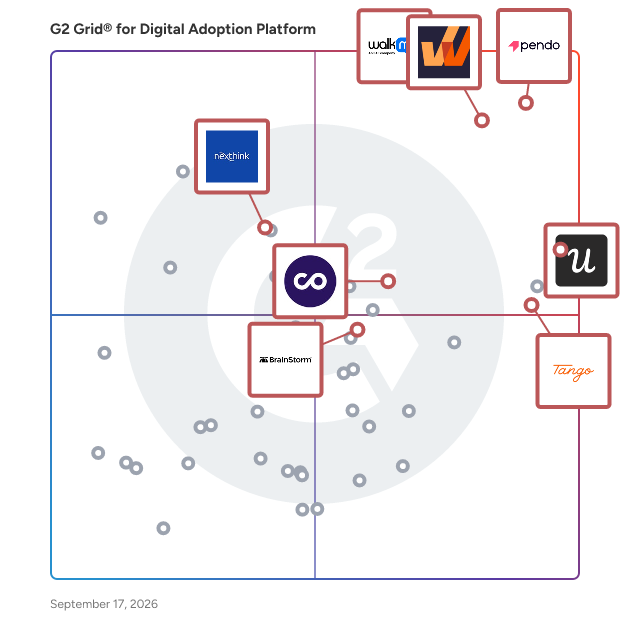
G2 Grid® for Digital Adoption Platforms

G2 Grid® for Digital Adoption Platforms plotting products by satisfaction and market presence

Highlighted products: WalkMe, Whatfix, Pendo, Nexthink, Userpilot, Tango, BrainStorm, and ChurnZero.

Underlying data: [Grid® JSON](https://www.g2.com/categories/digital-adoption-platform/grids.json?focus%5B%5D=walkme&focus%5B%5D=whatfix&focus%5B%5D=pendo-io-pendo&focus%5B%5D=nexthink&focus%5B%5D=userpilot&focus%5B%5D=tango-tango&focus%5B%5D=brainstorm-inc-brainstorm&focus%5B%5D=churnzero&segment=enterprise)

Product Fruits

No-code product adoption platform for user onboarding, feature adoption and in-app support. Product Fruits is a digital adoption platform that helps product and customer success teams guide users to value, drive feature adoption and deliver in-app support. Without writing code. Build product tours, checklists, hints, tooltips and announcements to onboard new users and roll out new features. Layer in an in-app help center, embedded knowledge base and NPS surveys to scale support and catch friction before it becomes a ticket. Two things set Product Fruits apart: 1. Product Fruits Flows guide every user to the next right step. Instead of showing everyone the same generic tour, Flows adapt to where each user is — their role, their progress, their behavior — so the right guidance appears at the right moment. Users never get stuck, and they never see steps they've already mastered. 2. Product Fruits AI is the speed layer. It drafts Flows, copy and adaptive logic in minutes, with no design or engineering sprints. Teams ship and iterate on their own. Elvin AI, the in-app help agent, answers users' questions from your own help docs. #Who it's for Built for product teams who own activation and adoption, and CS teams who own retention and support. Common industries include financial services, education, healthcare, e-commerce and SaaS. #What you can do with Product Fruits - Shorten time to value with personalized user onboarding journeys - Increase feature adoption by guiding users to new capabilities - Reduce churn by addressing struggles before users disengage - Scale user onboarding across thousands of users without manual effort - Lower support tickets with contextual answers where users need them #How it works Setup takes two steps. First, install the Product Fruits Chrome extension to build tours and guidance flows visually. Then add a JavaScript snippet to your application to publish experiences live. Most teams complete setup in under an hour. #What's included - Flows & guidance: Adaptive product tours, checklists, tooltips and beacons that route each user to their next right step - AI personalization: Product Fruits AI drafts flow structure and copy that adapts to each user - In-app communication: AI-generated announcements, banners, pop-ups and newsfeeds that keep users informed about updates and features - Feedback & insights: Contextual and NPS surveys based on user behavior, capturing sentiment and surfacing friction - Knowledge & support: Centralized help center and Elvin AI answering questions from your approved sources, #Why teams choose Product Fruits AI powers every feature and Product Fruits Flows make sure that power lands at the right moment. From building tours to answering support questions, Product Fruits personalizes each step of the journey. The result: faster adoption, higher satisfaction and fewer support escalations.

Average Rating: 4.6/5.0

Total Reviews: 254

How Do G2 Users Rate Product Fruits?

  • User Segmentation: 8.5/10 (Category avg: 8.8/10)
  • Ease of Use: 8.8/10 (Category avg: 9.0/10)
  • Text Bubble Walkthroughs: 9.0/10 (Category avg: 9.1/10)
  • Audio-visual Walkthroughs: 8.6/10 (Category avg: 8.9/10)

Who Is the Company Behind Product Fruits?

  • Seller: Product Fruits
  • Company Website:
  • Year Founded: 2019
  • HQ Location: Prague, CZ
  • Twitter: @productfruits
    21 Twitter followers
  • LinkedIn® Page: www.linkedin.com
    27 employees on LinkedIn®

Who Uses This Product?

  • Who Uses This: Product Manager, CTO
  • Top Industries: Computer Software, Information Technology and Services
  • Company Size: 64% Small, 25% Medium

What Do G2 Reviewers Say About Product Fruits?

AI-generated summary from verified user reviews

Pros
  • Users praise the excellent customer support, highlighting responsiveness and clarity as key benefits during onboarding.
  • Users praise the ease of use of Product Fruits, facilitating intuitive onboarding and guiding without technical hassles.
  • Users love the easy setup of Product Fruits, enabling seamless onboarding without additional assistance.
  • Users love the intuitive design of Product Fruits, simplifying onboarding and enhancing the overall user experience.
  • Users appreciate the intuitive and user-friendly interface of Product Fruits, making tooltips and onboarding easy to create.
Cons
  • Users note that customization options are limited, making it challenging for deeper adjustments and advanced design features.
  • Users note a learning curve due to many features and settings that require time to fully master.
  • Users find difficult customization a challenge due to limited flexibility and requirements for additional coding effort.
  • Users find the analytics reporting inadequate, hindering their ability to measure improvements and user engagement effectively.
  • Users find the product expensive due to fluctuating MAU pricing, risking potential overcharges from inaccurate setup.

What Are Recent G2 Reviews of Product Fruits?

UserGuiding

UserGuiding is a no-code product adoption platform for teams who need users to reach value on their own, without a support ticket or a training call. You build in-app guidance inside your own product using a visual editor and a Chrome extension, with no engineering ticket. Interactive guides and walkthroughs, onboarding checklists, tooltips, hotspots, banners and announcement modals, each targeted to segments you define from user attributes and events. One platform for the whole adoption loop. Onboard users, see where they stall, ask them why, collect what they want built next, show them what you committed to, then announce it in-app when it ships. Self-serve help: a standalone multilingual Knowledge Base, a Resource Center widget inside your product, and an AI Assistant that answers your users' questions conversationally from your own content. Deflect tickets without adding headcount. Feedback and evidence: in-app surveys and NPS targeted to the right users at the right moment, analytics on every guide, checklist and survey, and Session Replay to see exactly where users stall. Custom Alerts flag a material that stops performing, instead of you finding out at the monthly review. Feature requests and public roadmap: your users submit ideas inside your product and vote on each other's. Everything lands in an inbox you approve before anything goes public. What you pick moves onto a public roadmap in status columns you name yourself, and when it ships it becomes an update post on the same page the request started on. AI-native access: UserGuiding ships an MCP server, so you can query your own adoption data straight from Claude, Cursor or any MCP client rather than exporting spreadsheets. The 1:1 onboarding program: twelve weeks, one hour a week, someone from our team on a call with yours, building in your account instead of handing you a plan. Each session takes one piece of your user journey and gets something live. UserGuiding is the only product adoption platform that includes a weekly 1:1 onboarding program at no additional fee. Everywhere else, hands-on implementation is a paid services engagement or reserved for enterprise contracts. You can see what UserGuiding costs without booking a call. Plans start at $174 per month billed annually. Enterprise adds SAML SSO, activity logs, migration support, and SOC 2, GDPR and HIPAA compliance. More than 1,000 companies use UserGuiding, which holds 4.7 stars across 772 G2 reviews, most often praised for how quickly it goes live.

Average Rating: 4.7/5.0

Total Reviews: 779

How Do G2 Users Rate UserGuiding?

  • User Segmentation: 8.7/10 (Category avg: 8.8/10)
  • Ease of Use: 9.1/10 (Category avg: 9.0/10)
  • Text Bubble Walkthroughs: 9.1/10 (Category avg: 9.1/10)
  • Audio-visual Walkthroughs: 8.6/10 (Category avg: 8.9/10)

Who Is the Company Behind UserGuiding?

  • Seller: UserGuiding
  • Company Website:
  • Year Founded: 2017
  • HQ Location: Istanbul, TR
  • Twitter: @UserGuiding
    1,755 Twitter followers
  • LinkedIn® Page: www.linkedin.com
    24 employees on LinkedIn®

Who Uses This Product?

  • Who Uses This: Product Manager, Product Designer
  • Top Industries: Computer Software, Information Technology and Services
  • Company Size: 55% Small, 36% Medium

What Do G2 Reviewers Say About UserGuiding?

AI-generated summary from verified user reviews

Pros
  • Users appreciate the ease of use of UserGuiding, finding it simple and intuitive for onboarding and setup.
  • Users value the responsive and helpful customer support of UserGuiding, enhancing their overall experience and satisfaction.
  • Users find the easy setup of UserGuiding highly beneficial for onboarding and managing customer updates efficiently.
  • Users find the intuitive interface of UserGuiding essential for quickly understanding and utilizing new features independently.
  • Users appreciate the helpful onboarding features of UserGuiding, enhancing customer experience and driving business success.
Cons
  • Users find the limited customization options challenging, requiring additional code changes for desired features.
  • Users find missing features in UserGuiding, such as limited customization options and lack of comprehensive analytics.
  • Users note the limitations of mobile app support in UserGuiding, impacting their overall experience and insights.
  • Users find the learning curve challenging due to tricky custom setup and language barriers for non-English speakers.
  • Users experience editing difficulties with UserGuiding, facing lag and challenges when navigating the Rich Text Editor and changes.

What Are Recent G2 Reviews of UserGuiding?

What Are G2 Users Discussing About UserGuiding?

Userlane

Userlane is the software adoption platform for healthcare, financial services, manufacturing, and pharma. Organizations are making their largest technology investments yet, spanning digital transformation, new core systems, and AI. Across software, AI, training, and support budgets, one factor decides the return: whether people use the technology well. Userlane delivers the data to decide: where to cut, where to invest, and how to realize that value. It captures the signals of how work actually happens: who is working, in which application, on which task. It interprets those signals to show which applications earn their budget, where spend can be reduced, and where friction points to an AI opportunity. It detects shifts in user behavior (task success, compliance, signs that someone is lost within a workflow) and responds by surfacing insights to the teams responsible and offering assistance within the application. And it quantifies the impact on business results. Large and mid-market organizations run Userlane across their entire estate, from clinical systems to ERP, CRM, and AI tools, independent of any vendor.

Average Rating: 4.7/5.0

Total Reviews: 80

How Do G2 Users Rate Userlane?

  • User Segmentation: 9.2/10 (Category avg: 8.8/10)
  • Ease of Use: 8.9/10 (Category avg: 9.0/10)
  • Text Bubble Walkthroughs: 9.2/10 (Category avg: 9.1/10)
  • Audio-visual Walkthroughs: 9.0/10 (Category avg: 8.9/10)

Who Is the Company Behind Userlane?

  • Seller: Userlane
  • Year Founded: 2016
  • HQ Location: Munich, Bavaria
  • Twitter: @UserlaneHQ
    7,327 Twitter followers
  • LinkedIn® Page: www.linkedin.com
    69 employees on LinkedIn®

Who Uses This Product?

  • Top Industries: Computer Software, Automotive
  • Company Size: 40% Large, 38% Medium

What Do G2 Reviewers Say About Userlane?

AI-generated summary from verified user reviews

Pros
  • Users appreciate the ease of creating guides and tool tips, enhancing their onboarding experience and user understanding.
  • Users appreciate the easy creation of guides and tools, enhancing their ability to onboard and engage effectively.
  • Users love the easy setup of Userlane, enabling quick creation of guides and seamless onboarding experiences.
  • Users appreciate the ease of creating guides and tooltips, enhancing the clarity of user interactions on the platform.
  • Users appreciate the intuitive guidebuilding features of Userlane, making onboarding and support seamless and effective.
Cons
  • Users experience bugs in the interface for managers, which hinders usability and independence from customer support.
  • Users find that missing simple functions lead to complicated workarounds and buggy manager interfaces, limiting independence from CS.
  • Users find the missing features frustrating, often requiring complicated workarounds for basic functionality.
  • Users find the missing functionality in Userlane frustrating, often requiring complex workarounds for basic tasks.
  • Users experience software bugs in the manager interface, hindering independence and usability of the tool.

What Are Recent G2 Reviews of Userlane?

AI can help you find the answers. G2 helps you trust them.

Connect G2 to Claude or ChatGPT for answers grounded in G2's trusted reviews, comparisons, and pricing from real user insights.

How it works

Amplitude Guides and Surveys

Part of the Amplitude AI Analytics Platform, Amplitude Guides and Surveys uses actual user behavior to power smarter in-app engagement. Deliver help, collect feedback, and understand the issues your users are having, without making them rage quit. Guides and Surveys makes it easy for product teams, growth teams, marketing teams, or any team to engage with users: • Launch on-brand guides and messaging that direct your users to important features in your app, triggered by their behavior • Survey users when they’re most likely to give you qualitative feedback that’s actually quality • Provide better help with resource centers and an AI Assistant that understand your product docs as well as the user’s in-product behavior • Set guardrails to make sure users aren’t overwhelmed with back-to-back popups • Measure engagement to understand how users interact with your guides and surveys, as well as your product And with Guides and Surveys integrated in the rest of the Amplitude platform, engagement connects seamlessly with your analytics and experimentation. See the metrics and session replays behind every interaction, base engagement on your behavioral cohorts, and customize via A/B testing. Plus, you can consolidate your tech stack. Amplitude Guides and Surveys helps users feel like they’re interacting with bespoke assistance, not spammy popups. Use it to drive better engagement and fuel faster growth.

Average Rating: 4.7/5.0

Total Reviews: 202

How Do G2 Users Rate Amplitude Guides and Surveys?

  • User Segmentation: 8.7/10 (Category avg: 8.8/10)
  • Ease of Use: 9.0/10 (Category avg: 9.0/10)
  • Text Bubble Walkthroughs: 9.1/10 (Category avg: 9.1/10)
  • Audio-visual Walkthroughs: 8.9/10 (Category avg: 8.9/10)

Who Is the Company Behind Amplitude Guides and Surveys?

  • Seller: Amplitude
  • Company Website:
  • Year Founded: 2012
  • HQ Location: San Francisco, CA
  • Twitter: @Amplitude_HQ
    22,465 Twitter followers
  • LinkedIn® Page: www.linkedin.com
    1,635 employees on LinkedIn®

Who Uses This Product?

  • Who Uses This: Product Manager, CTO
  • Top Industries: Computer Software, Information Technology and Services
  • Company Size: 55% Small, 36% Medium

What Do G2 Reviewers Say About Amplitude Guides and Surveys?

AI-generated summary from verified user reviews

Pros
  • Users find Amplitude Guides and Surveys easy to use, facilitating seamless feedback collection and enhancing user onboarding.
  • Users value the ease of building and deploying surveys for enhancing onboarding and collecting real-time feedback.
  • Users value the real-time feedback capabilities of Amplitude Guides & Surveys, enhancing onboarding and user experience significantly.
  • Users value the real-time feedback functionality of Amplitude Guides and Surveys, significantly enhancing user navigation and satisfaction.
  • Users find the easy setup of Amplitude Guides & Surveys straightforward, enhancing their ability to connect with users effectively.
Cons
  • Users find the limited customization in Amplitude Guides and Surveys restricts flexibility and complicates user experience.
  • Users feel that the difficult customization options limit their ability to align designs with their specific needs.
  • Users find the customization limitations in Amplitude Guides and Surveys hinder advanced logic and user segmentation.
  • Users express frustration over missing features, particularly regarding advanced targeting, multi-language support, and basic insights.
  • Users find Amplitude Guides and Surveys restrictive in features, especially when advanced options are locked behind a paywall.

What Are Recent G2 Reviews of Amplitude Guides and Surveys?

Fin

Fin is an AI Agent that helps CX teams deliver instant, accurate, & personalized experiences on any channel, in over 45 languages, 24/7. It is the highest-performing customer agent on the market, resolving 76% of queries on average across 12K+ customers, including highly complex, multi-step cases like refunds, account changes, or subscription issues. Fin connects into business systems, pulls customer data, and takes action in those systems – automatically resolving queries without needing a human. If Fin can’t answer the question or it has explicit guidance not to, it hands off to a human in whatever help desk they’re working in. It runs on all the channels you engage with customers on: voice, email, chat, WhatsApp, SMS, social, Slack, Discord, and more. It delivers the same personalized, context-rich experience regardless of where the conversation is happening. Works across the entire customer journey. Fin is a single Agent that understands the entire customer context and history, can build a relationship with customers over time, and can transition from one use case to another – from service to sales to ecommerce – without the customer even realizing the change. The Fin family of agent roles include: - Fin for Service resolves customers queries and automates support processes end-to-end. - Fin for Sales answers product discovery questions, qualifies inbound leads, and books appointments for your sales team or guides those leads to a self-service flow. - Fin for Ecommerce answers questions as customers shop, recommends exactly the right product, and guides them through checkout. What makes Fin different: - Industry-leading performance: Fin resolves 76% of cases on average across 12,000+ customers, with many customers seeing resolution rates of over 90%. This is because Fin is powered by Apex, our proprietary models that are purpose-built for CX. Fin Apex 1.0 outperforms generic frontier models, with a 2.8% higher resolution rate and 65% fewer hallucinations on average when compared to frontier models. - Easy-to-launch and optimize: Fin is fast to set up and easy for anyone on your team to configure without the need for technical resources. Teams go live in days, see value quickly, and are able to continuously and easily improve Fin themselves. - One platform across AI & human agents: Fin is natively integrated with Intercom, but also integrates seamlessly with almost any helpdesk. This means you can manage your human team and Fin in one place, without ever having to migrate off your system of record or change your workflows. - An agent for customer operations: Operator is an internal agent that helps CX leaders spot problems, find opportunities to improve, and act on them. You can optimize Fin agentically and without the manual lift. - Full trust and control: Fin is the only AI Agent that gives you complete control over how it performs. You can configure tone, behavior, and knowledge without any technical resources. And it has a full observability and testing suite, so you can deploy changes with confidence and trust what is going live to customers. - One agent for the whole lifecycle: Fin is a single Customer Agent, working across the entire customer lifecycle to help sell, onboard, and deliver excellent service. All on the same shared context, history, and guidance. - The most experienced partner: Fin combines 15+ years experience in CX with a 60+ person cutting-edge AI team. We partner with customers for the long-term and have developed the Blueprint for success based on our own experience using Fin.

Average Rating: 4.5/5.0

Total Reviews: 3,764

How Do G2 Users Rate Fin?

  • User Segmentation: 9.1/10 (Category avg: 8.8/10)
  • Ease of Use: 8.9/10 (Category avg: 9.0/10)
  • Text Bubble Walkthroughs: 9.0/10 (Category avg: 9.1/10)
  • Audio-visual Walkthroughs: 8.9/10 (Category avg: 8.9/10)

Who Is the Company Behind Fin?

  • Seller: Fin
  • Company Website:
  • Year Founded: 2011
  • HQ Location: San Francisco, CA
  • Twitter: @fin_ai
    45,225 Twitter followers
  • LinkedIn® Page: www.linkedin.com
    1,238 employees on LinkedIn®

Who Uses This Product?

  • Who Uses This: Customer Success Manager, CEO
  • Top Industries: Computer Software, Information Technology and Services
  • Company Size: 56% Small, 37% Medium

What Do G2 Reviewers Say About Fin?

AI-generated summary from verified user reviews

Pros
  • Users appreciate the powerful query resolution capabilities of Fin, highlighting its quick access to helpful resources.
  • Users find Fin to be incredibly easy to use and appreciate its quick and efficient responses.
  • Users appreciate Fin's speed and reliability in resolving queries, enjoying its intuitive UI and seamless integration.
  • Users enjoy the efficiency of Fin, benefiting from seamless navigation and effective AI handling of customer queries.
  • Users appreciate the automation features of Fin, enhancing efficiency and client management without overwhelming support teams.
Cons
  • Users find the missing features in Fin, particularly for procedure visibility and conversation simulation, frustrating and limiting.
  • Users find AI limitations in Fin, struggling with unique formats and providing unhelpful responses at times.
  • Users express frustration with limited features in Fin, citing a need for better integration and simulation options.
  • Users find the learning curve challenging, struggling with setup and the need for constant monitoring and attention.
  • Users express concerns over Fin's high pricing, with many features requiring additional payment, leading to unexpected bills.

What Are Recent G2 Reviews of Fin?

What Are G2 Users Discussing About Fin?

VisualSP

VisualSP is a fully customizable digital adoption platform that provides in context learning as an overlay on top of your enterprise web applications like Microsoft 365, Dynamics 365, Salesforce, ServiceNow, Workday, SuccessFactors, NetSuite, Nintex, HubSpot and other custom web applications. VisualSP supports corporate employees at the moment of their need and when they are in the flow of their work by providing in-app contextual guidance and training. It delivers hundreds of regularly updated, and completely customizable, guided walkthroughs, tips, videos, and articles in their own web environment. Employees are empowered with readily available contextual training and guidance which in turn speeds up onboarding, and improves efficiency from within the digital workplace. Empowering employees with contextual microlearning increases user adoption of web applications while decreasing frustration and support tickets as a result. Learning by doing is at the core of how VisualSP provides the support to your employees for better utilization of enterprise web applications. VisualSP is available across the following countries: USA, Canada, Germany, France, UK, Bermuda, Switzerland, Netherlands, Belgium, Australia, and more.

Average Rating: 4.9/5.0

Total Reviews: 34

How Do G2 Users Rate VisualSP?

  • User Segmentation: 9.1/10 (Category avg: 8.8/10)
  • Ease of Use: 9.2/10 (Category avg: 9.0/10)
  • Text Bubble Walkthroughs: 9.8/10 (Category avg: 9.1/10)
  • Audio-visual Walkthroughs: 9.3/10 (Category avg: 8.9/10)

Who Is the Company Behind VisualSP?

  • Seller: VisualSP
  • Year Founded: 2005
  • HQ Location: Plainfield, IL
  • Twitter: @sharepointvideo
    2,195 Twitter followers
  • LinkedIn® Page: www.linkedin.com
    10 employees on LinkedIn®

Who Uses This Product?

  • Top Industries: Information Technology and Services
  • Company Size: 38% Large, 35% Small

What Do G2 Reviewers Say About VisualSP?

AI-generated summary from verified user reviews

Pros
  • Users value the ease of use of VisualSP, enjoying intuitive guidance that enhances productivity and streamlines onboarding.
  • Users find efficiency in VisualSP's streamlined onboarding and in-app guidance, enhancing productivity and reducing support needs.
  • Users value the responsive and helpful customer support from VisualSP, enhancing productivity and digital adoption effectively.
  • Users value the step-by-step guidance from VisualSP, which streamlines onboarding and enhances productivity effectively.
  • Users value the seamless integrations of VisualSP with Microsoft tools, enhancing productivity and support efficiency.
Cons
  • Users face compatibility issues with VisualSP, as it is limited to web applications and excludes desktop use.
  • Users note a lack of integration with client applications, which slightly diminishes the overall experience but remains manageable.
  • Users note a lack of integration with client applications, yet find browser functionality valuable despite this drawback.
  • Users find the mobile app limitations of VisualSP frustrating, as it restricts usage to web applications only.
  • Users find the poor user experience in VisualSP due to complex navigation and excessive window management frustrating.

What Are Recent G2 Reviews of VisualSP?

What Are G2 Users Discussing About VisualSP?

Lemon Learning

Lemon Learning is a Digital Adoption Platform (DAP) that empowers millions users worldwide in their use of digital tools. Lemon Learning is like GPS navigation for any web-based software, whether market-leading solutions or unique tools developed in-house. Interactive, in-app walkthroughs guide users step by step through any business process or functionality. From small businesses to major global enterprises, Lemon Learning helps teams across the globe to boost adoption of digital tools. The international organizations and stock market leaders we work with include KPMG, Martin Bower, Chanel, Randstad, Aéroports de Paris, among many others.

Average Rating: 4.8/5.0

Total Reviews: 44

How Do G2 Users Rate Lemon Learning?

  • User Segmentation: 9.6/10 (Category avg: 8.8/10)
  • Ease of Use: 9.6/10 (Category avg: 9.0/10)
  • Text Bubble Walkthroughs: 9.2/10 (Category avg: 9.1/10)
  • Audio-visual Walkthroughs: 9.9/10 (Category avg: 8.9/10)

Who Is the Company Behind Lemon Learning?

  • Seller: Lemonlearning
  • Company Website:
  • Year Founded: 2014
  • HQ Location: Paris, France
  • LinkedIn® Page: www.linkedin.com
    54 employees on LinkedIn®

Who Uses This Product?

  • Top Industries: Manufacturing
  • Company Size: 44% Medium, 38% Large

What Are Recent G2 Reviews of Lemon Learning?

What Are G2 Users Discussing About Lemon Learning?

Totango

Totango is a Customer Growth platform for driving customer value and revenue at scale, combining scalable customer management, predictive revenue intelligence, and a strategic, value-based post-sales methodology to transform how companies prove customer ROI, drive retention, and earn expansion. The Customer Growth Platform includes Totango Customer Success and Unison Customer Intelligence. Each of these solutions plays a distinct role in the Customer-Led Growth through value realization methodology. Totango Customer Success focuses on tracking customer health and engagement, enabling teams to proactively address potential issues and foster long-term relationships. Unison Customer Intelligence aggregates data from multiple sources, offering insights that help organizations understand customer behavior and preferences. Totango's target audience and target buyers include mid-sized to large enterprises across various industries that prioritize customer retention, renewals, and expansion and that generally rely on subscription-based models, where maintaining customer loyalty is critical to their revenue growth. Key features of Totango include customizable dashboards, real-time analytics, and automated workflows. These tools enable users to visualize customer data effectively, monitor key performance indicators, and automate routine tasks, thereby enhancing efficiency. The platform also supports collaboration among teams, allowing for seamless communication and alignment on customer goals. By providing actionable insights, Totango empowers organizations to refine their revenue strategies and make informed decisions that drive growth. Overall, Totango stands out as a leader in the Customer Success category by offering a holistic approach to managing customer relationships. Its integration of various tools and functionalities allows enterprises to gain a deeper understanding of their customers, ultimately leading to improved satisfaction and loyalty. By investing in Totango, organizations can position themselves for long-term success in an increasingly competitive landscape.

Average Rating: 4.3/5.0

Total Reviews: 1,140

How Do G2 Users Rate Totango?

  • User Segmentation: 7.9/10 (Category avg: 8.8/10)
  • Ease of Use: 8.2/10 (Category avg: 9.0/10)
  • Text Bubble Walkthroughs: 6.6/10 (Category avg: 9.1/10)
  • Audio-visual Walkthroughs: 7.5/10 (Category avg: 8.9/10)

Who Is the Company Behind Totango?

  • Seller: Totango
  • Company Website:
  • Year Founded: 2010
  • HQ Location: New York, NY
  • LinkedIn® Page: www.linkedin.com
    116 employees on LinkedIn®

Who Uses This Product?

  • Who Uses This: Customer Success Manager, CSM
  • Top Industries: Computer Software, Information Technology and Services
  • Company Size: 57% Medium, 22% Small

What Do G2 Reviewers Say About Totango?

AI-generated summary from verified user reviews

Pros
  • Users find Totango to be easy to use, simplifying setup and enhancing account tracking and daily workflows.
  • Users value the excellent customer support from Totango, enhancing their effectiveness and simplifying account management.
  • Users appreciate the robust functionality of Totango, enabling seamless campaign management and valuable insights.
  • Users appreciate the customization options in Totango, enhancing account management and improving customer adoption strategies.
  • Users value the efficiency of Totango, streamlining workflows and enhancing productivity across the customer journey.
Cons
  • Users find the learning curve steep, as the overload of data makes it challenging to identify key information quickly.
  • Users face integration issues with Totango, particularly with Salesforce, hindering a seamless experience across platforms.
  • Users find missing features in Totango, such as limited analysis tools and poor campaign templates, frustrating.
  • Users find the limited customization options in Totango hinder their ability to tailor the product effectively.
  • Users face a steep learning curve with Totango, finding it overwhelming and lacking sufficient educational resources.

What Are Recent G2 Reviews of Totango?

What Are G2 Users Discussing About Totango?

uPerform

uPerform® is a healthcare-focused digital adoption and learning platform designed to assist health systems in managing the continuous evolution of technology while enhancing clinician adoption and training efficiency. This innovative solution is specifically tailored for the healthcare sector, addressing the unique challenges faced by clinicians and administrative teams as they navigate complex electronic health record (EHR) systems and other critical healthcare applications. The primary audience for uPerform includes Education, IT, and Clinical Informatics teams within healthcare organizations. These teams benefit from a unified platform that enables them to create, manage, and deliver training, performance support, and change communications effectively and at scale. By consolidating these functions, uPerform alleviates the reliance on disparate tools and manual processes, streamlining the onboarding process, system upgrades, and ongoing optimization efforts. This integrated approach ensures that healthcare professionals receive consistent and relevant training that aligns with their daily workflows. One of the standout features of uPerform is its ability to deliver role-based learning directly within the EHR and other essential systems. Clinicians receive tailored guidance at the moment of need, allowing them to access support without disrupting their workflow. This capability not only reduces frustration but also enhances clinician confidence, enabling them to focus on patient care rather than navigating intricate systems. By embedding learning directly into daily tasks, uPerform fosters a more efficient and effective training environment. Additionally, uPerform supports the entire learning lifecycle, allowing authors and subject matter experts to quickly capture workflows, create step-by-step guidance, and publish updates as systems evolve. This ensures that training content remains accurate and relevant, reflecting real clinical processes and adapting to changes in technology. The platform's ability to provide timely updates contributes to a more agile training approach, which is essential in the fast-paced healthcare environment. By simplifying training operations and embedding support within daily workflows, uPerform helps health systems accelerate time to proficiency for clinicians, reduce the burden on help desks, and improve overall user experience. The platform's capacity to scale training efficiently across the enterprise positions it as a valuable asset for healthcare organizations striving for excellence in clinician education and technology adoption.

Average Rating: 4.3/5.0

Total Reviews: 38

How Do G2 Users Rate uPerform?

  • Ease of Use: 8.2/10 (Category avg: 9.0/10)
  • Audio-visual Walkthroughs: 10.0/10 (Category avg: 8.9/10)

Who Is the Company Behind uPerform?

  • Seller: uPerform
  • Company Website:
  • HQ Location: Elkridge, MD
  • Twitter: @uPerformApp
    752 Twitter followers
  • LinkedIn® Page: www.linkedin.com
    96 employees on LinkedIn®

Who Uses This Product?

  • Top Industries: Hospital & Health Care
  • Company Size: 73% Large, 17% Medium

What Are Recent G2 Reviews of uPerform?

What Are G2 Users Discussing About uPerform?

ClickLearn

ClickLearn is the market leading solution for creating easy user instructions, e-learning and process videos for business software. ClickLearn will automate writing your business-critical walk-throughs, saving you 80% of the time you now spend creating them manually in Dynamics 365 F&O/CE/BC, Salesforce, Oracle, IFS, Acumatica, SAP and most of your other business systems. The ClickLearn solution produces your walk-throughs in eight different formats from a single source, including written documentation, hands-on-labs, videos with automated effects and voice over. On top of that ClickLearn has a User Experience Panel that guides the users within the live system. Simply record your work process in your business systems. With one click, ClickLearn produces your walk-throughs in all formats and in more than 45 languages and 135 dialects. It creates a complete e-learning portal with full tracking and scoring and upgrades your work instructions as you upgrade your business system with no manual effort on your part. Learn more and get a free trial or sign up for an informative webinar at: https://clicklearn.com/

Average Rating: 4.5/5.0

Total Reviews: 40

How Do G2 Users Rate ClickLearn?

  • User Segmentation: 9.0/10 (Category avg: 8.8/10)
  • Ease of Use: 8.2/10 (Category avg: 9.0/10)
  • Text Bubble Walkthroughs: 9.3/10 (Category avg: 9.1/10)
  • Audio-visual Walkthroughs: 9.5/10 (Category avg: 8.9/10)

Who Is the Company Behind ClickLearn?

  • Seller: ClickLearn
  • Year Founded: 2009
  • HQ Location: Copenhagen K, DK
  • Twitter: @ClickLearn
    505 Twitter followers
  • LinkedIn® Page: www.linkedin.com
    90 employees on LinkedIn®

Who Uses This Product?

  • Company Size: 45% Large, 40% Medium

What Do G2 Reviewers Say About ClickLearn?

AI-generated summary from verified user reviews

Pros
  • Users appreciate the ease of use of ClickLearn, enjoying seamless documentation and user-friendly training guides.
  • Users praise the efficiency of ClickLearn, enabling quick training and documentation while freeing up IT resources.
  • Users praise the easy creation of user guides in ClickLearn, enhancing efficiency and consistency across documentation.
  • Users commend the responsive customer support of ClickLearn, greatly aiding in project completion and problem resolution.
  • Users value the comprehensive documentation tools of ClickLearn, enabling easy creation and access to user guides.
Cons
  • Users experience audio issues with ClickLearn, including voice cut-offs and lost recordings, requiring repeated efforts.
  • Users face frequent bug issues that lead to lost recordings and unnecessary repetition of work.
  • Users find compatibility issues with ClickLearn frustrating, especially with older versions and limited editing capabilities.
  • Users find ClickLearn's usability complex, particularly for non-recording tasks, which hampers their overall experience.
  • Users find the difficult learning experience with ClickLearn challenging, especially for advanced training requirements.

What Are Recent G2 Reviews of ClickLearn?

What Are G2 Users Discussing About ClickLearn?

Neeraja Prakash
NP
Researched and written by Neeraja Prakash
Updated