Top Free Construction CRM Software

How Many Construction CRM Software Products Does G2 Track?

Total Products under this Category: 130

Category Stats (Oct 2026)

  • Average Rating: 4.36/5 (↑0.01 vs Sep 2026) The average rating of products in this category, based on all submitted ratings
  • Top Trending Product: Jonas Enterprise Service & Construction Software (+1.27%) - Among all products in this category, Jonas Enterprise Service & Construction Software recorded the largest rating increase compared to last month

Last updated: October 06, 2026

How Does G2 Rank Construction CRM Software Products?

Why You Can Trust G2's Software Rankings:

  • 30 Analysts and Data Experts
  • 6,200+ Authentic Reviews
  • 130+ Products
  • Unbiased Rankings

G2's software rankings are built on verified user reviews, rigorous moderation, and a consistent research methodology maintained by a team of analysts and data experts. Each product is measured using the same transparent criteria, with no paid placement or vendor influence. While reviews reflect real user experiences, which can be subjective, they offer valuable insight into how software performs in the hands of professionals. Together, these inputs power the G2 Score, a standardized way to compare tools within every category.

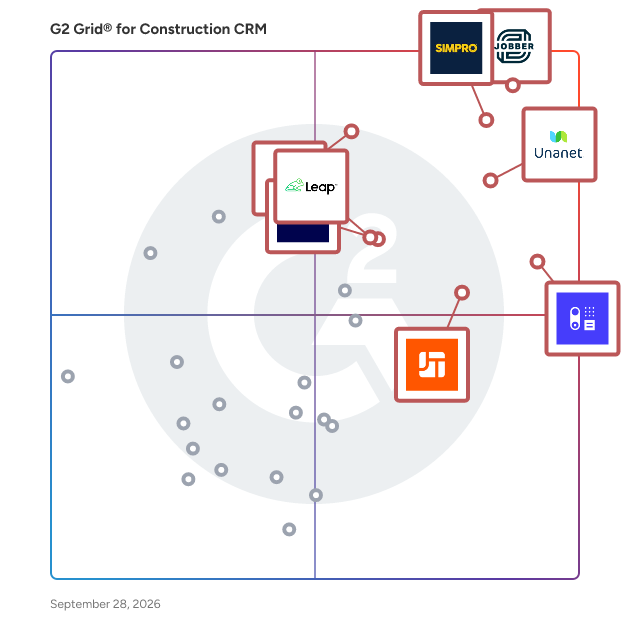
G2 Grid® for Construction CRM Software

G2 Grid® for Construction CRM Software plotting products by satisfaction and market presence

Highlighted products: Jobber, Simpro, Unanet CRM, Capsule CRM, Housecall Pro, JobTread, FieldPulse, and Leap.

Underlying data: [Grid® JSON](https://www.g2.com/categories/construction-crm/grids.json?focus%5B%5D=jobber&focus%5B%5D=simpro&focus%5B%5D=unanet-crm&focus%5B%5D=capsule-crm&focus%5B%5D=housecall-pro&focus%5B%5D=jobtread&focus%5B%5D=fieldpulse-fieldpulse&focus%5B%5D=leap-llc-leap)

Jobber

Start Your Free Trial of Jobber - No Credit Card Required Run a more efficient, predictable service business with one system built for growing, multi-crew teams. Keep Work Moving as You Get Busier Jobber connects quoting, scheduling, invoicing, and payments in one place so work moves forward without constant follow-ups or manual coordination. Build efficient days without spending hours managing the calendar, and adjust quickly when plans change. Plus, connect with tools like QuickBooks Online to keep your operations running smoothly. Keep Your Team Aligned in the Field and Office Give your crews clear schedules, job details, and updates they can access anywhere. While they stay focused on the work, your office has real-time visibility into every job without chasing calls, texts, or status updates. Drive Predictable, Profitable Performance Track jobs, revenue, and payments in one place so you always know how your business is performing. Automations keep quotes, invoices, and follow-ups moving, helping you maintain steady cash flow without adding more admin work. Client Testimonial “I spend maybe an hour per week on invoicing and paperwork now. Online payments and invoicing make me look professional.” - Stacey Flanagan, SEF The Lawn Surgeon Discover the Jobber Difference Join 200,000+ service professionals across 50+ industries including landscaping, HVAC, and residential cleaning who run their business with Jobber.

Average Rating: 4.6/5.0

Total Reviews: 520

How Do G2 Users Rate Jobber?

  • Has the product been a good partner in doing business?: 9.3/10 (Category avg: 9.2/10)
  • Ease of Admin: 9.1/10 (Category avg: 8.7/10)
  • Ease of Use: 9.0/10 (Category avg: 8.7/10)
  • Quality of Support: 9.1/10 (Category avg: 8.7/10)

Who Is the Company Behind Jobber?

  • Seller: Jobber
  • Company Website:
  • Year Founded: 2011
  • HQ Location: Edmonton, Canada
  • Twitter: @GetJobber
    7,288 Twitter followers
  • LinkedIn® Page: www.linkedin.com
    1,462 employees on LinkedIn®

Who Uses This Product?

  • Who Uses This: Owner, Office Manager
  • Top Industries: Construction, Consumer Services
  • Company Size: 85% Small, 6% Medium

What Do G2 Reviewers Say About Jobber?

AI-generated summary from verified user reviews

Pros
  • Users find Jobber's ease of use invaluable, enhancing workflow both in-office and on-field, simplifying invoicing and scheduling.
  • Users value the easy-to-use scheduling features of Jobber, enhancing efficiency and customer management in their businesses.
  • Users love the easy-to-use invoicing system in Jobber, streamlining billing and ensuring a professional appearance.
  • Users value the flexibility and comprehensive features of Jobber, enhancing efficiency across all departments.
  • Users love the convenient scheduling management that keeps everything organized in one accessible location.
Cons
  • Users find Jobber's limited functionality frustrating, particularly lacking marketing features and options for larger operations.
  • Users believe that improvements are needed in maintenance agreements and invoicing processes for better workflow management.
  • Users find Jobber's limited features frustrating, particularly for time tracking and usability with larger operations.
  • Users experience feature limitations in Jobber, particularly with clock-in/out and lack of user-friendly cost analysis.
  • Users express frustration with limited customization, especially regarding settings and credit card processing options in Jobber.

What Are Recent G2 Reviews of Jobber?

What Are G2 Users Discussing About Jobber?

Capsule CRM

Capsule CRM is a customer relationship management (CRM) software solution that helps small and medium-sized businesses win more business, keep more clients, and deliver consistently great work. It gives sales, marketing, and service teams one organized place to see every contact, conversation, and deal - so nothing falls through the cracks, and no one's digging through scattered spreadsheets or half-updated tools just to find out where things stand. Trusted by more than 10,000 businesses worldwide, Capsule is built for teams that want the structure of a bigger CRM system without the complexity or setup headaches that usually come with one. It brings sales tracking, contact management, and project tracking together in one place, so your team can spend less time managing software and more time managing relationships. Capsule connects to the tools businesses already use - like email, accounting software, and marketing platforms - and now offers an AI integration, available via Model Context Protocol (MCP), that lets supported AI tools answer questions about your CRM data in plain language. No dashboards to build, no filters to configure - just ask. Here's what makes it work for growing teams: Contact and company management: every interaction, note, email, and document lives in one place, so you walk into every call or meeting already knowing where things stand. Visual sales pipelines: see exactly where every deal is and what needs your attention next, with the flexibility to build different pipelines for different sales processes. Built-in task and calendar management: follow-ups and meetings are linked directly to the right contact or deal, so nothing gets missed and no one has to keep it all in their head. Project and case tracking: keep delivery and after-sale work moving with simple boards, milestones, and stages, so sales and delivery teams are always working from the same page. Easy integrations: connect Capsule to the tools you already rely on, with even more possible through its API and growing AI/MCP capabilities. Reporting tools turn your pipeline and activity data into a clear, honest picture of how sales are really going, so decisions get made on real numbers instead of gut feel. And as your team grows, you can control who sees and edits what - so Capsule scales with you instead of becoming something you have to manage around. At its core, Capsule is built for businesses that want a CRM that feels quick to set up and easy to keep organized from day one, without giving up the depth needed to handle more complex sales or client work as the business grows.

Average Rating: 4.7/5.0

Total Reviews: 518

G2 Deal: 20% off the monthly price per user of any paid Capsule plan for 12 months

Capsule CRM is a growth-oriented CRM tool that empowers salespeople, marketers, and business owners to win more business, retain more clients, and deliver exceptional work. G2 customers can get 20% off the monthly price per user of any paid Capsule plan for the first 12 months.

Price: ~~$21-$75 per user per month.~~ → $16.80-$60 per user per month.

View this exclusive G2 deal

How Do G2 Users Rate Capsule CRM?

  • Has the product been a good partner in doing business?: 9.5/10 (Category avg: 9.2/10)
  • Ease of Admin: 9.4/10 (Category avg: 8.7/10)
  • Ease of Use: 9.4/10 (Category avg: 8.7/10)
  • Quality of Support: 9.4/10 (Category avg: 8.7/10)

Who Is the Company Behind Capsule CRM?

  • Seller: Capsule
  • Company Website:
  • Year Founded: 2007
  • HQ Location: Manchester, GB
  • Twitter: @CapsuleCRM
    5,249 Twitter followers
  • LinkedIn® Page: www.linkedin.com
    55 employees on LinkedIn®

Who Uses This Product?

  • Who Uses This: Director, Owner
  • Top Industries: Consulting, Marketing and Advertising
  • Company Size: 92% Small, 7% Medium

What Do G2 Reviewers Say About Capsule CRM?

AI-generated summary from verified user reviews

Pros
  • Users find Capsule CRM incredibly easy to use, making it perfect for beginners and efficient for small businesses.
  • Users consistently praise the exceptional customer support of Capsule CRM, highlighting quick responses and effective solutions.
  • Users appreciate Capsule CRM for its user-friendly design, making sales management simple and efficient for small businesses.
  • Users value the simplicity of Capsule CRM, appreciating its easy setup and user-friendly design for effective management.
  • Users appreciate the intuitive task management in Capsule CRM, enhancing productivity and clarity in daily priorities.
Cons
  • Users desire additional missing features, such as more templates and improved options for managing customer information.
  • Users note the limited customization options in Capsule CRM, which may hinder personalized usage for some needs.
  • Users face integration issues with Capsule CRM, limiting collaboration and reliance on third-party tools for functionality.
  • Users find the steep learning curve of Capsule CRM challenging, wishing for better resources to master the features.
  • Users feel Capsule CRM has limited features, particularly in the mobile app, hindering effective usage and integration.

What Are Recent G2 Reviews of Capsule CRM?

What Are G2 Users Discussing About Capsule CRM?

Housecall Pro

Housecall Pro is a comprehensive business solution designed specifically for home service professionals, providing a suite of innovative tools and features within an easy-to-use platform. Trusted by over 200k+ Pros, Housecall Pro aims to streamline operations for professionals in various home service industries, including plumbing, electrical work, landscaping, and cleaning services. This platform is accessible via both web and mobile applications, allowing users to manage their businesses efficiently from anywhere. The target audience for Housecall Pro includes small to medium-sized businesses in the home services sector that are looking to enhance their operational efficiency and increase revenue. The platform caters to a variety of use cases, such as automating marketing efforts to attract new customers, facilitating online booking, and managing job schedules. By integrating these functionalities, Housecall Pro empowers service professionals to focus more on their core work while effectively managing the business side of operations. Key features of Housecall Pro include automated marketing campaigns that help users reach potential clients, visually appealing proposal creation, and consumer financing options that enable businesses to secure larger jobs. The platform also supports online payment processing, allowing customers to pay via multiple methods, including credit cards, bank transfers, and mobile wallets. This flexibility not only enhances customer satisfaction but also accelerates cash flow for service providers. In addition to revenue growth and payment solutions, Housecall Pro offers robust job management capabilities. Users can automate routine tasks such as scheduling, dispatching, and invoicing, while also tracking leads and job progress through a comprehensive workflow management board. Real-time alerts enhance communication among team members and clients, ensuring everyone stays informed throughout the service process. Furthermore, the platform integrates seamlessly with third-party tools like QuickBooks, enabling users to sync data effortlessly and manage payroll and employee benefits. Housecall Pro also provides valuable insights through detailed analytics and reporting on key business metrics, allowing professionals to make informed decisions and scale their operations effectively. On average, users report a more than 35% increase in monthly revenue after their first year with Housecall Pro. Subscribers gain access to an online community where they can connect with other home service professionals, sharing insights and best practices. This collaborative environment fosters growth and learning, making Housecall Pro not just a tool, but a partner in business success.

Average Rating: 4.3/5.0

Total Reviews: 202

How Do G2 Users Rate Housecall Pro?

  • Has the product been a good partner in doing business?: 8.8/10 (Category avg: 9.2/10)
  • Ease of Admin: 9.0/10 (Category avg: 8.7/10)
  • Ease of Use: 8.9/10 (Category avg: 8.7/10)
  • Quality of Support: 8.7/10 (Category avg: 8.7/10)

Who Is the Company Behind Housecall Pro?

  • Seller: Housecall Pro
  • Company Website:
  • Year Founded: 2013
  • HQ Location: San Diego, CA
  • LinkedIn® Page: www.linkedin.com
    1,550 employees on LinkedIn®

Who Uses This Product?

  • Who Uses This: Owner, owner
  • Top Industries: Construction, Consumer Services
  • Company Size: 90% Small, 4% Medium

What Do G2 Reviewers Say About Housecall Pro?

AI-generated summary from verified user reviews

Pros
  • Users appreciate the ease of use of Housecall Pro, highlighting its simple setup and user-friendly features.
  • Users appreciate the easy setup of Housecall Pro, highlighting its user-friendly nature and seamless integration.
  • Users find Housecall Pro to be highly user-friendly, simplifying business operations and enhancing customer interactions.
  • Users appreciate the user-friendly interface of Housecall Pro, finding it easy to set up and learn.
  • Users value the responsive customer support of Housecall Pro, enhancing their overall experience and business efficiency.
Cons
  • Users find missing features in Housecall Pro, such as insufficient customization and lack of specialized tools for industries.
  • Users find Housecall Pro to be a little expensive, especially when adding more contractors increases overall costs significantly.
  • Users express the need for improvement in functionality, reporting consistency, and less aggressive upselling of services.
  • Users express frustration over limited features in Housecall Pro, desiring better customization and specialized tools for scheduling.
  • Users feel that feature limitations hinder Housecall Pro's effectiveness, lacking customization and specialized options for diverse needs.

What Are Recent G2 Reviews of Housecall Pro?

What Are G2 Users Discussing About Housecall Pro?

AI can help you find the answers. G2 helps you trust them.

Connect G2 to Claude or ChatGPT for answers grounded in G2's trusted reviews, comparisons, and pricing from real user insights.

How it works

Leap

What is Leap? Leap is the complete roofing and home improvement contractor software built for roofers and multi-trade contractors, including siding, window and door, remodeling, with built-in support for both retail and insurance-driven jobs. Leap connects your entire business workflow, from first lead to final payment, in one place, so you can win more jobs, run a tighter operation, and deliver a homeowner experience that earns referrals. What is Leap CRM? Leap CRM is a roofing and home improvement CRM built for contractors who managing leads, scheduling, production, crews and subcontractors, and materials ordering in one system. It's built for home improvement contractors who are scaling beyond what spreadsheets and disconnected tools can handle. Key capabilities include: - Fully customizable workflows by division or trade - Real-time job costing and profit/loss tracking by project - Custom report builder across leads, revenue, margins, and team performance - Direct materials ordering from ABC Supply, SRS Distribution, and QXO with live pricing pulled into estimates - Built-in insurance claim tools for contractors who work restoration and adjuster-driven jobs - Two-way texting and automated homeowner communication, so nothing gets lost between crew and office - Homeowner portal and subcontractor portal included - Integrated payments via Leap Pay, no monthly fees, same-day payouts - GreenSky financing available at point of sale - 15+ integrations included at no extra cost: QuickBooks, CompanyCam, Eagleview, HOVER, GAF QuickMeasure, Angi Leads, Zapier, Google Calendar, and more Leap CRM starts at $79/month. What is SalesPro? SalesPro is Leap's in-home sales app for sales reps who build proposals, present pricing, and close deals at the kitchen table, fully offline. SalesPro features include: - Patented dynamic contract system that adjusts in real time as options change - Full offline capability, no Wi-Fi or cell signal required - Configurable required fields and If/Then logic guardrails to prevent errors - Built-in eSignature and payment capture - Multi-trade support: roofing, siding, windows, doors, baths, remodeling, and more - Financing through a 10-lender Universal Credit Application -35+ integrations included at no extra cost: Eagleview, DocuSign, HOVER, GAF QuickMeasure, JobNimbus, Salesforce, CompanyCam, FeneVision, and more Why Contractors Choose Leap Leap has been named to the Inc. 5000 list of fastest-growing companies five consecutive years (2021–2025). With a 4.3-star rating across 500+ reviews on G2 and Capterra, contractors across North America rely on Leap to run their businesses more efficiently and close more jobs.

Average Rating: 4.4/5.0

Total Reviews: 168

How Do G2 Users Rate Leap?

  • Has the product been a good partner in doing business?: 9.0/10 (Category avg: 9.2/10)
  • Ease of Admin: 8.5/10 (Category avg: 8.7/10)
  • Ease of Use: 8.7/10 (Category avg: 8.7/10)
  • Quality of Support: 8.6/10 (Category avg: 8.7/10)

Who Is the Company Behind Leap?

  • Seller: Leap
  • Company Website:
  • Year Founded: 2016
  • HQ Location: Columbia, Maryland
  • LinkedIn® Page: www.linkedin.com
    145 employees on LinkedIn®

Who Uses This Product?

  • Top Industries: Construction, Consumer Goods
  • Company Size: 58% Small, 42% Medium

What Do G2 Reviewers Say About Leap?

AI-generated summary from verified user reviews

Cons
  • Users find Leap's service clunky and outdated, hindering effective data tracking and offering poor value for the price.
  • Users find Leap's data management clunky, hindering proper tracking and feeling overpriced compared to better alternatives.
  • Users find Leap very expensive compared to better alternatives, making its value proposition questionable.
  • Users find the inadequate tracking of Leap frustrating, impacting their ability to manage data effectively.
  • Users find the inefficient tracking of Leap frustrating, complicating data management and hindering overall productivity.

What Are Recent G2 Reviews of Leap?

Buildr

Buildr is the AI preconstruction workspace for general contractors. It enables leading builders to run estimating, pursuit tracking, business development, bid leveling, bidding, workforce planning, financial forecasting, and more—within a single connected workflow. Built for the modern GC, Buildr is construction’s first collaborative, AI-powered environment where teams move faster, make smarter decisions, and dramatically increase precon output. Leverage Buildr to expand your precon capacity, win smarter, and reduce risk with unprecedented efficiency.

Average Rating: 4.8/5.0

Total Reviews: 74

How Do G2 Users Rate Buildr?

  • Has the product been a good partner in doing business?: 9.9/10 (Category avg: 9.2/10)
  • Ease of Admin: 9.3/10 (Category avg: 8.7/10)
  • Ease of Use: 9.4/10 (Category avg: 8.7/10)
  • Quality of Support: 9.7/10 (Category avg: 8.7/10)

Who Is the Company Behind Buildr?

  • Seller: Buildr
  • Year Founded: 2018
  • HQ Location: Irvine, California
  • Twitter: @buildr
    158 Twitter followers
  • LinkedIn® Page: www.linkedin.com
    36 employees on LinkedIn®

Who Uses This Product?

  • Who Uses This: Project Manager, Project Engineer
  • Top Industries: Construction
  • Company Size: 47% Small, 41% Medium

What Do G2 Reviewers Say About Buildr?

AI-generated summary from verified user reviews

Pros
  • Users value the ease of use of Buildr, appreciating its intuitive dashboard and streamlined project organization.
  • Users value the centralized platform of Buildr, enhancing collaboration and streamlining processes across all divisions.
  • Users value the easy project management of BUILDR, enjoying organized contacts, task reminders, and streamlined processes for team alignment.
  • Users find setup easy with Buildr, appreciating the straightforward process and helpful tutorial for quick onboarding.
  • Users value the comprehensive tracking features of Buildr, effectively managing jobs and fostering team alignment.
Cons
  • Users find missing features in Buildr, limiting their ability to track projects and access flexible reporting options.
  • Users note the need for improvement in tracking and reporting features, making organization and usability challenging.
  • Users find the complexity of Buildr overwhelming, making organization and data input challenging without proper usage.
  • Users find difficult navigation issues that hinder finding information quickly and disrupt workflow efficiency.
  • Users find the lack of customization in Buildr limits functionality and organization, especially for complex projects.

What Are Recent G2 Reviews of Buildr?

What Are G2 Users Discussing About Buildr?

Contractor+

Contractor+ is an operating system for build and service contractors that connects jobs, crews, customers, and business communication. It gives owners, office staff, and field teams a shared place to manage work from the first inquiry through the final payment. Keep customer details, property records, documents, tasks, and conversation history together in the CRM. Build professional estimates with Estimatic AI, local cost data, Good/Better/Best options, and optional add-ons. Move approved work into scheduling and job management, coordinate crews, track time and mileage, manage contracts, and monitor job costs and profitability. Two-way email and text, business phone tools, and team and client chats help keep conversations connected to the work. Send invoices, collect payments through Contractor+ Pay, and give customers a branded client portal. QuickBooks Online, Zapier, and developer API options connect Contractor+ with other business systems. Contractor+ is available on the web, iPhone, iPad, and Android. PRO TEAM is built for growing teams, starting at $98/month with two users included. MAX is $597/month with unlimited team members, included Voice and AI usage, Contractor+ Local, and priority support and onboarding. Monthly prices are in USD; feature access, usage, and fees depend on the plan. Annual billing is available.

Average Rating: 4.6/5.0

Total Reviews: 150

How Do G2 Users Rate Contractor+?

  • Has the product been a good partner in doing business?: 9.3/10 (Category avg: 9.2/10)
  • Ease of Admin: 8.8/10 (Category avg: 8.7/10)
  • Ease of Use: 9.0/10 (Category avg: 8.7/10)
  • Quality of Support: 9.1/10 (Category avg: 8.7/10)

Who Is the Company Behind Contractor+?

  • Seller: Contractor Plus, Inc.
  • Year Founded: 2020
  • HQ Location: Orlando, US
  • Twitter: @cplusapp
    1,840 Twitter followers
  • LinkedIn® Page: linkedin.com
    790 employees on LinkedIn®

Who Uses This Product?

  • Who Uses This: Owner
  • Top Industries: Construction
  • Company Size: 91% Small

What Do G2 Reviewers Say About Contractor+?

AI-generated summary from verified user reviews

Pros
  • Users appreciate the ease of use of Contractor+, praising its seamless integration and intuitive setup process.
  • Users love the easy project tracking and customizable features of Contractor+, enhancing their business efficiency and communication.
  • Users find the easy setup of Contractor+ highly beneficial, streamlining project management from day one.
  • Users love the easy estimating process in Contractor+, streamlining bids, management, and offering great customer support.
  • Users appreciate the hassle-free setup of Contractor+, making invoicing and project management a breeze.
Cons
  • Users find that improvement is needed for data integration and pricing, impacting the overall experience with Contractor+.
  • Users feel the cost issues of Contractor+ are high, particularly regarding upgrades and feature access.
  • Users find the pricing of Contractor+ to be high and hope for improvements in affordability.
  • Users find the learning curve steep for beginners due to the complexity of Contractor+'s many features.
  • Users find the feature limitations of Contractor+ frustrating, especially the lack of Zapier integration and change order processing.

What Are Recent G2 Reviews of Contractor+?

Knowify

**NEW** - Knowify now connects directly to AI platforms like Claude and ChatGPT. No generic AI advice. No reports to build. No analyst to hire. Just the insights you need to grow with confidence. ✅ “What jobs need my attention this week?” ✅ “What’s my WIP this month?” ✅ “Who’s making me the most money on commercial work?” Every job. Every number. Everything that drives profitability. Any question you’ve every had about your business. Now all you have to do is ask. ------------------------------------------------- Knowify is job management software built for trade contractors. Founded in New York City, with team members across the U.S. and Canada, Knowify supports growing subcontractors with teams ranging from 2 to 200. The platform is trusted by contractors across trades like electrical, plumbing, HVAC, drywall, and remodeling. Knowify brings estimating, job costing, scheduling, time tracking, and invoicing together in one platform. It supports construction-specific workflows including AIA billing, change orders, certified payroll, and prevailing wage tracking. Mobile tools keep field teams connected to the office, and everything stays in sync with QuickBooks Online, QuickBooks Payroll, QuickBooks time, QuickBooks Payments, and Intuit Enterprise Suite through a best-in-class two-way integration. Knowify helps contractors stay organized, on schedule, and profitable. With real-time visibility into costs and progress, contractors can manage every job more efficiently and make confident financial decisions. Knowify replaces spreadsheets and disconnected tools with one system built to support growing construction businesses. Most importantly - our fully U.S.-based support team is full of real people ready to talk and help you solve the challenges in your business. We're proud partners of the trades - and proud of our commitment to top quality software and service.

Average Rating: 4.5/5.0

Total Reviews: 102

How Do G2 Users Rate Knowify?

  • Has the product been a good partner in doing business?: 9.1/10 (Category avg: 9.2/10)
  • Ease of Admin: 8.7/10 (Category avg: 8.7/10)
  • Ease of Use: 8.8/10 (Category avg: 8.7/10)
  • Quality of Support: 9.4/10 (Category avg: 8.7/10)

Who Is the Company Behind Knowify?

  • Seller: Knowify
  • Company Website:
  • Year Founded: 2012
  • HQ Location: New York, NY
  • Twitter: @knowify
    970 Twitter followers
  • LinkedIn® Page: www.linkedin.com
    53 employees on LinkedIn®

Who Uses This Product?

  • Who Uses This: Owner
  • Top Industries: Construction
  • Company Size: 85% Small, 12% Medium

What Do G2 Reviewers Say About Knowify?

AI-generated summary from verified user reviews

Pros
  • Users enjoy the user-friendly interface of Knowify, making navigation intuitive and enhancing overall experience.
  • Users appreciate the exceptional customer support of Knowify, highlighting responsive service and personalized training sessions.
  • Users value the effective data management in Knowify, streamlining processes and enhancing project organization effortlessly.
  • Users value the enhanced efficiency of Knowify, benefiting from streamlined processes and excellent customer support.
  • Users love the user-friendly interface and exceptional customer service of Knowify, enhancing their overall experience significantly.
Cons
  • Users feel there is a desperate need for improved reporting and better commission calculations to enhance functionality.
  • Users find the missing features in Knowify limiting, impacting management of large projects and client interactions.
  • Users experience access limitations with Knowify, leading to increased workload and functionality issues for employees.
  • Users report invoicing issues with mismatched tax rates and cumbersome proposal revision processes, impacting efficiency.
  • Users find limited customization in Knowify, struggling with features like reporting and invoicing templates.

What Are Recent G2 Reviews of Knowify?

What Are G2 Users Discussing About Knowify?

ConWize

ConWize is a cutting-edge cloud-based software utilized today by general contractors, developers, subcontractors, and management companies. Our customers' biggest challenge in bid management and estimating is entirely solved by a sophisticated yet user-friendly tool, resulting in substantial savings of up to 50% of the time working on a tender while enhancing the accuracy of cost estimations. The solution also provides the ability to plan and manage contractual engagements, along with a complete and digital procurement process at the execution phase. Our users experience a remarkable ROI in less than 3 months! ConWize integrates with Autodesk Construction Cloud. The integration allows users to extract the bill of quantities from the 3D model and calculate quantities automatically, simplifying the entire process. ConWize also integrates with Procore and is available in Procore's marketplace.

Average Rating: 4.9/5.0

Total Reviews: 104

How Do G2 Users Rate ConWize?

  • Has the product been a good partner in doing business?: 10.0/10 (Category avg: 9.2/10)
  • Ease of Admin: 9.6/10 (Category avg: 8.7/10)
  • Ease of Use: 9.8/10 (Category avg: 8.7/10)
  • Quality of Support: 10.0/10 (Category avg: 8.7/10)

Who Is the Company Behind ConWize?

  • Seller: anyService Ltd.
  • Year Founded: 2017
  • HQ Location: Center, IL
  • Twitter: @conwize_io
    50 Twitter followers
  • LinkedIn® Page: www.linkedin.com
    10 employees on LinkedIn®

Who Uses This Product?

  • Who Uses This: Bid Manager, Estimator
  • Top Industries: Construction, Civil Engineering
  • Company Size: 58% Medium, 32% Small

What Do G2 Reviewers Say About ConWize?

AI-generated summary from verified user reviews

Pros
  • Users value the ease of use of ConWize, appreciating its intuitive interface and time-saving features.
  • Users value the centralization of data in ConWize, enhancing efficiency and collaboration across projects.
  • Users find the centralized data management of ConWize essential, enhancing project estimation and analysis efficiency.
  • Users value the ease of estimating with ConWize, benefiting from centralized data and comprehensive analysis tools.
  • Users appreciate the ease of use and effective features of ConWize, enhancing productivity and accuracy in workflow.
Cons
  • Users find inefficient processes hinder their experience, with time-consuming data transfers and onboarding efforts impacting productivity.
  • Users face a steep learning curve with ConWize, requiring time to adapt and recognize its full potential.
  • Users find upload issues time-consuming, especially when transferring proposals and data from different formats into the system.
  • Users face a steep learning curve with ConWize, struggling to adapt from traditional methods to the new platform.
  • Users find data importing issues frustrating, as consolidating contacts and transferring data from Excel is time-consuming.

What Are Recent G2 Reviews of ConWize?

Quickbase

Quickbase is an AI-driven platform designed to help businesses streamline their operations by adapting to their unique workflows and processes. Unlike traditional off-the-shelf software, which often requires users to conform to predefined structures, Quickbase empowers organizations to create customized solutions that align with their specific needs. This flexibility is crucial for companies seeking to eliminate inefficiencies and reduce the burden of 'Gray Work' - what we call the time-consuming tasks and manual processes that arise from using rigid software systems. The target audience for Quickbase includes businesses of all sizes across various industries that are looking to enhance their operational efficiency. Whether it's a 50 person small business or a large enterprise, organizations can benefit from a platform that allows them to connect disparate data sources, automate repetitive tasks, and scale their competitive advantages. Quickbase is particularly valuable for teams that rely on collaboration and data-driven decision-making, as it fosters an environment where information flows seamlessly and processes are optimized. Key features of Quickbase include its intuitive interface, which allows users to build custom applications without extensive coding knowledge. This user-friendly design enables teams to quickly adapt the platform to their specific workflows, ensuring that they can address unique challenges without the need for extensive IT support. Additionally, Quickbase offers powerful automation capabilities, allowing users to set up triggers and workflows that reduce manual effort and streamline operations. The platform also supports integration with various data sources, enabling businesses to consolidate their information and gain valuable insights. One of the standout benefits of Quickbase is its ability to scale with your business. As organizations grow and evolve, their processes often become more complex. Quickbase's adaptable nature ensures that users can modify their applications and workflows as needed, without the constraints typically associated with traditional software. This flexibility not only saves time but also fosters innovation, as teams can experiment with new processes and tools that enhance their productivity. By prioritizing user-centric design and adaptability, Quickbase stands out in the crowded landscape of business software solutions. It provides organizations with the tools they need to optimize their operations, reduce inefficiencies, and ultimately drive growth. With Quickbase, businesses can focus on what truly matters—leveraging their unique processes to gain a competitive edge in their respective markets.

Average Rating: 4.5/5.0

Total Reviews: 1,553

How Do G2 Users Rate Quickbase?

  • Has the product been a good partner in doing business?: 8.8/10 (Category avg: 9.2/10)
  • Ease of Admin: 8.6/10 (Category avg: 8.7/10)
  • Ease of Use: 8.6/10 (Category avg: 8.7/10)
  • Quality of Support: 8.6/10 (Category avg: 8.7/10)

Who Is the Company Behind Quickbase?

  • Seller: Quickbase
  • Company Website:
  • Year Founded: 2012
  • HQ Location: Boston, MA
  • Twitter: @quickbase
    5,146 Twitter followers
  • LinkedIn® Page: www.linkedin.com
    806 employees on LinkedIn®

Who Uses This Product?

  • Who Uses This: Project Manager, Project Coordinator
  • Top Industries: Information Technology and Services, Construction
  • Company Size: 42% Medium, 31% Small

What Do G2 Reviewers Say About Quickbase?

AI-generated summary from verified user reviews

Pros
  • Users love the ease of use of Quickbase, finding it user-friendly and adaptable for various business needs.
  • Users value the customization options in Quickbase, enhancing adaptability and efficiency in managing their databases.
  • Users love the customizability of Quickbase, enabling tailored applications to fit specific business needs effectively.
  • Users appreciate the flexibility of Quickbase, enabling high customization and adaptation to diverse business needs.
  • Users love the customization options in Quickbase, tailoring databases to fit unique business needs effectively.
Cons
  • Users struggle with the learning curve due to enforced changes and lack of tailored training options.
  • Users feel the missing features in Quickbase limit its effectiveness for tasks like document management and reporting.
  • Users find Quickbase's limited features hinder effective integration, mobile usability, and overall flexibility in development.
  • Users find Quickbase to be not intuitive, with a confusing interface that affects overall usability and experience.
  • Users note limited customization options that can hinder flexibility, especially for those seeking advanced functionality and control.

What Are Recent G2 Reviews of Quickbase?

What Are G2 Users Discussing About Quickbase?

ServiceDeck

ServiceDeck is a powerful field service management (FSM) software designed to revolutionize your field service operations. Ideal for service providers like plumbers, electricians, cleaners, landscapers, and many others, ServiceDeck streamlines operations, automates processes, and enhances customer connections with its cutting-edge dispatching software and field worker management tools. Explore the incredible features ServiceDeck provides: 🔗 Connect - Marketplace: An AI-Powered marketplace tailored to your business, offering instant access to new markets, clients, and projects. Benefit from a data-driven Business Directory with public reviews and ratings, and a database of Service Providers for efficient outsourcing. - Customer Portal: Offer customers a personalized portal to view and manage their requests, quotes, invoices, and job statuses. - Mobile App: Empower your team with a mobile app for live location tracking, work history access, project status updates, and time-off requests. 🎛️ Manage - Smart Scheduling: Leverage our advanced scheduling software to visualize your company's daily workload and assign jobs based on team availability. - Document Management: Maintain organization with all job-specific documents in one place, enabling your team to attach project images on-the-go. - Integrated Invoicing: Effortlessly convert jobs into customizable invoices with a single click, providing customers the convenience of online payments through various methods. 🤖 Automate - Custom Integrations: Optimize your operations by integrating ServiceDeck with existing platforms like Stripe, QuickBooks, and WordPress. - Automated Proposals: Deliver a personalized and automated proposal process by integrating your public website with ServiceDeck for seamless quotation requests. - Detailed Reporting: Monitor your team's workload and efficiency with in-app time logs, and track your revenue and expenses to make informed business decisions. 🌟 Top Features: - Worker Availability: Schedule intelligently based on employee availability, time off, and daily breaks. - GPS Tracking: Keep track of your team's location with in-app live tracking and interactive maps. - Document Management: Easily attach project images on-the-go and store all job-specific documents in one place. - Scheduling and Dispatching: Streamline job assignments and resource allocation with efficient scheduling and dispatching tools in our field service management software. Transform your service business with ServiceDeck and focus on delivering outstanding services to your customers. Experience the difference ServiceDeck can make for your business. Don't wait – try ServiceDeck now and elevate your field service operations to new heights with our comprehensive FSM software!

Average Rating: 4.5/5.0

Total Reviews: 33

How Do G2 Users Rate ServiceDeck?

  • Has the product been a good partner in doing business?: 7.3/10 (Category avg: 9.2/10)
  • Ease of Admin: 7.0/10 (Category avg: 8.7/10)
  • Ease of Use: 8.9/10 (Category avg: 8.7/10)
  • Quality of Support: 8.9/10 (Category avg: 8.7/10)

Who Is the Company Behind ServiceDeck?

  • Seller: ServiceDeck
  • Year Founded: 2022
  • HQ Location: Mississauga , CA
  • Twitter: @Servicedeck_io
    42 Twitter followers
  • LinkedIn® Page: www.linkedin.com
    6 employees on LinkedIn®

Who Uses This Product?

  • Company Size: 57% Small, 26% Medium

What Do G2 Reviewers Say About ServiceDeck?

AI-generated summary from verified user reviews

Pros
  • Users value the intuitive interface and comprehensive features of ServiceDeck, ensuring efficient task management and streamlined operations.
  • Users commend the responsive customer support of ServiceDeck, appreciating their prompt and helpful assistance during onboarding.
  • Users love the ease of use of ServiceDeck, finding it intuitive and simple for all technical levels.
  • Users appreciate the responsive customer support of ServiceDeck, ensuring prompt issue resolution and a smooth experience.
  • Users appreciate the simplicity and cross-platform functionality of ServiceDeck, enhancing their business operations efficiently.
Cons
  • Users note that improvement is needed in loading times and feature integrations, affecting overall efficiency.
  • Users experience slow performance at times, with longer loading for certain features causing frustration during urgent tasks.
  • Users often face bug issues in ServiceDeck, which can disrupt workflows and affect overall functionality.
  • Users find the complex setup for ServiceDeck time-consuming, especially for larger teams with intricate requirements.
  • Users note that data importing issues stem from limited integrations, highlighting a need for improvement.

What Are Recent G2 Reviews of ServiceDeck?

D-Tools

D-Tools System Integrator is a complete estimation, system design and project management software solution.

Average Rating: 4.3/5.0

Total Reviews: 7

How Do G2 Users Rate D-Tools?

  • Has the product been a good partner in doing business?: 10.0/10 (Category avg: 9.2/10)
  • Ease of Admin: 6.7/10 (Category avg: 8.7/10)
  • Ease of Use: 8.1/10 (Category avg: 8.7/10)
  • Quality of Support: 6.7/10 (Category avg: 8.7/10)

Who Is the Company Behind D-Tools?

  • Seller: D Tools
  • Year Founded: 2024
  • HQ Location: N/A
  • Twitter: @DTools
    4,314 Twitter followers
  • LinkedIn® Page: www.linkedin.com
    1 employees on LinkedIn®

Who Uses This Product?

  • Company Size: 57% Small, 43% Medium

What Are Recent G2 Reviews of D-Tools?

What Are G2 Users Discussing About D-Tools?

INGENIOUS.BUILD

INGENIOUS.BUILD is a cloud-based construction management software solution that connects pre-construction to closeout, centralizing workflows, financial management, and team communication in one unified platform. It is designed for Owners, Developers, Owner’s Reps, and General Contractors, while enabling Specialty Trades and Architects & Engineers to collaborate seamlessly within the workspace. The software supports users in planning, executing, and overseeing capital construction projects across portfolios of varying size and complexity. The platform provides a centralized system for managing capital projects and real estate developments, giving stakeholders shared visibility into budgets, contracts, schedules, and documentation across the project lifecycle. It replaces fragmented systems and manual tracking processes by consolidating operational and financial data into a single cloud-based environment. This allows project teams to coordinate activities, standardize reporting, and maintain consistent documentation from early planning through project closeout. Core capabilities include: - Capital planning, budgeting, bidding, and procurement - Contract administration, change order management, and invoicing - RFIs, submittals, document control, and vendor coordination - Mobile field tools for daily reports, punch lists, and progress tracking - Real-time dashboards for cost tracking, schedule monitoring, and portfolio oversight INGENIOUS.BUILD enables stakeholders to maintain accountability, monitor performance, and use real-time and historical data to improve forecasting and decision-making. #BuildingTheFuture #BeINGENIOUS

Average Rating: 4.4/5.0

Total Reviews: 15

How Do G2 Users Rate INGENIOUS.BUILD?

  • Has the product been a good partner in doing business?: 9.2/10 (Category avg: 9.2/10)
  • Ease of Admin: 9.6/10 (Category avg: 8.7/10)
  • Ease of Use: 8.9/10 (Category avg: 8.7/10)
  • Quality of Support: 9.1/10 (Category avg: 8.7/10)

Who Is the Company Behind INGENIOUS.BUILD?

Who Uses This Product?

  • Top Industries: Construction
  • Company Size: 27% Small, 20% Large

What Do G2 Reviewers Say About INGENIOUS.BUILD?

AI-generated summary from verified user reviews

Pros
  • Users find Ingenious.Build to have a highly intuitive interface and a smooth onboarding experience that enhances usability.
  • Users appreciate the budget management capabilities of Ingenious.Build for effective financial oversight and accurate reporting.
  • Users value the intuitive interface and responsive customer support of INGENIOUS.BUILD, enhancing project management efficiency.
  • Users value the setup ease of INGENIOUS.BUILD, enjoying a smooth onboarding process and intuitive navigation.
  • Users praise the responsive customer support at Ingenious.Build, highlighting effective communication and assistance throughout the process.
Cons
  • Users find missing features in Ingenious.Build, particularly in the custom reporting module and forms section.
  • Users find the learning curve steep, as the rigid structure and evolving software can overwhelm new users.
  • Users find limited features in INGENIOUS.BUILD, particularly in reporting and procurement, affecting usability and effectiveness.
  • Users find the limited functionality restricts personalized analysis and reporting, affecting overall user satisfaction with Ingenious.Build.
  • Users face budgeting issues with INGENIOUS.BUILD, citing complex exports and difficulties in user management.

What Are Recent G2 Reviews of INGENIOUS.BUILD?

Ketterly

Ketterly is an all-in-one CRM and operations platform built specifically for roofing and exterior contractors — it runs the whole job lifecycle from a door knock to a paid invoice, on one system, with no per-user fees. Field → lead: door-knocking maps with territory/knock tracking, hail overlays, the Combine gamification layer, canvasser workflows on iOS/Android via Capacitor. Lead → quote: satellite auto-measure (included, no per-report fees), templated line items, Good/Better/Best tiered proposals, public presentation pages, e-signature. Quote → job: crew scheduling and calendar (with one-way sync out to Google/Outlook), material and work orders, QXO supplier catalog, subcontractor acceptance flows. Job → money: invoicing with deposits/partial payments, Stripe payment links, Connect payouts for subs, a full commissions engine across sales_rep / manager / team_lead roles, WIP and P&L reporting. Around all of it: QuickBooks Online sync, customer portal, Retell voice agent, PostcardMania direct mail, and the SEO content engine — several of those sold as paid add-ons.

Average Rating: 5.0/5.0

Total Reviews: 1

How Do G2 Users Rate Ketterly?

  • Has the product been a good partner in doing business?: 10.0/10 (Category avg: 9.2/10)
  • Ease of Admin: 10.0/10 (Category avg: 8.7/10)
  • Ease of Use: 10.0/10 (Category avg: 8.7/10)
  • Quality of Support: 8.3/10 (Category avg: 8.7/10)

Who Is the Company Behind Ketterly?

Who Uses This Product?

  • Company Size: 100% Small

What Are Recent G2 Reviews of Ketterly?

Builtie

Builtie is a construction sales intelligence platform for trade contractors who sell to builders, general contractors and developers. It reads building permit records across North America, keeps the projects that are at the stage when your trade is still being awarded, and attaches the builder and a verified decision maker: the owner at a small builder, or the project manager or estimator at a commercial GC. Each contact is matched on declared employer and corroborated before it is stored. In one workspace you get the project feed for your trade and area, decision-maker emails and phones, an AI call script per project, a construction CRM organized around projects, an Action Plan of who to contact next, and on the Growth plan, LinkedIn and email outreach sequences. Builtie also publishes free city construction reports and a free daily Market Recap email for New York, Miami-Dade, Nashville and Toronto. Coverage: permit-level depth in New York, Miami-Dade, Austin, Nashville, Chicago and Seattle in the US, and Toronto, Vancouver and Calgary in Canada, with the deepest data in the Greater Toronto Area. Ask for live sample projects in your own city.

Who Is the Company Behind Builtie?

Neya Kumaresan
NK
Researched and written by Neya Kumaresan
Updated October 3, 2024