Best Cloud Content Collaboration Software - Page 8

How Many Cloud Content Collaboration Software Products Does G2 Track?

Total Products under this Category: 263

Category Stats (Sep 2026)

  • Average Rating: 4.36/5 (↑0.01 vs Aug 2026) The average rating of products in this category, based on all submitted ratings
  • Top Trending Product: Assai Document Management (+26.07%) - Among all products in this category, Assai Document Management recorded the largest rating increase compared to last month

Last updated: September 01, 2026

How Does G2 Rank Cloud Content Collaboration Software Products?

Why You Can Trust G2's Software Rankings:

  • 30 Analysts and Data Experts
  • 118,600+ Authentic Reviews
  • 263+ Products
  • Unbiased Rankings

G2's software rankings are built on verified user reviews, rigorous moderation, and a consistent research methodology maintained by a team of analysts and data experts. Each product is measured using the same transparent criteria, with no paid placement or vendor influence. While reviews reflect real user experiences, which can be subjective, they offer valuable insight into how software performs in the hands of professionals. Together, these inputs power the G2 Score, a standardized way to compare tools within every category.

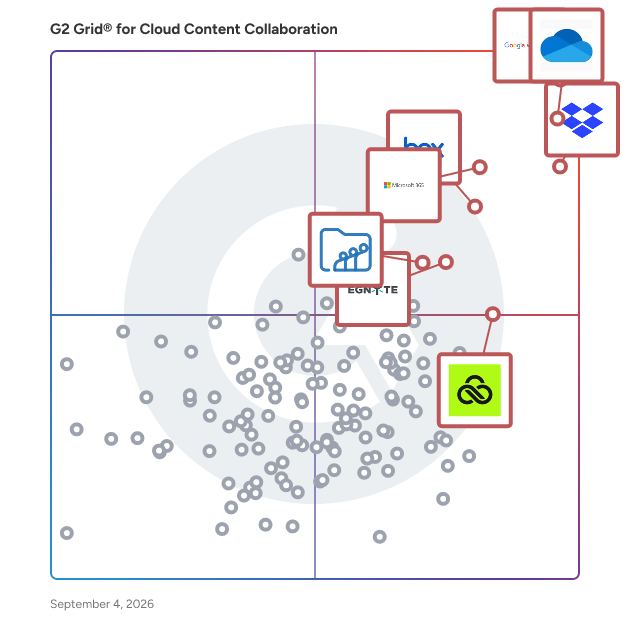
G2 Grid® for Cloud Content Collaboration Software

G2 Grid® for Cloud Content Collaboration Software plotting products by satisfaction and market presence

Highlighted products: Google Workspace, Microsoft OneDrive for Business, Dropbox, Microsoft 365, Box, Egnyte, LucidLink, and Zoho WorkDrive.

Underlying data: [Grid® JSON](https://www.g2.com/categories/cloud-content-collaboration/grids.json?focus%5B%5D=google-workspace&focus%5B%5D=microsoft-onedrive-for-business&focus%5B%5D=dropbox&focus%5B%5D=microsoft365&focus%5B%5D=box&focus%5B%5D=egnyte&focus%5B%5D=lucidlink&focus%5B%5D=zoho-workdrive)

Onehub

Onehub is the secure file storage and sharing service built for businesses of any size. Bank-level encryption of your data as well as our granular, role-based permission structure means you can control who has access to your content and share critical business files with confidence. Onehub offers a suite of robust business tools such as virtual data rooms, client portals, Google Docs integration, automatic watermarking, branded workspaces, and custom agreements to enhance and expand your file sharing. Customize your Onehub Workspace to give content sharing a more professional, polished look and create your own Client Portal. Onehub’s virtual data rooms give your most important deals the security and privacy you require.

Average Rating: 4.2/5.0

Total Reviews: 45

How Do G2 Users Rate Onehub?

  • Has the product been a good partner in doing business?: 8.2/10 (Category avg: 8.8/10)
  • Performance and Reliability: 9.2/10 (Category avg: 8.7/10)
  • File following: 8.5/10 (Category avg: 8.8/10)
  • Device Syncing: 6.9/10 (Category avg: 8.8/10)

Who Is the Company Behind Onehub?

  • Seller: Onehub
  • Year Founded: 2007
  • HQ Location: Seattle, WA
  • Twitter: @onehub
    530 Twitter followers
  • LinkedIn® Page: www.linkedin.com
    17 employees on LinkedIn®

Who Uses This Product?

  • Top Industries: Financial Services
  • Company Size: 56% Small, 29% Large

What Are Recent G2 Reviews of Onehub?

What Are G2 Users Discussing About Onehub?

dMACQ DMS+

DMS+ (https://dmacq.com/dms+) is the next-gen AI-powered Document Management System that transforms how businesses digitize, secure and manage critical documents. Built for Enterprises across Finance, Human Resource, Legal, Healthcare, Manufacturing and Government Sectors, DMS+ doesn’t just store files but supercharges it's productivity with Intelligent Automation, Enterprise-Grade security and Seamless Compliance with GDPR, DPDP Act, RBI regulations and more. Why DMS+? 🔍 AI-Powered Search & OCR – Find any document in seconds with smart search & lightning-fast text recognition. 📂 Smart Metadata Management – Tag, categorize and organize documents effortlessly for faster retrieval and better data governance. 🤖 Automated Workflows – Ditch manual processes with AI-driven approvals, routing and compliance tracking. ☁️ Flexible Hosting – Secure cloud or on-premise? You choose—full control, zero compromises. 📑 Version Control & Audit Trails – Track every edit, restore previous versions and stay audit-ready 24/7. 🔄 ERP/CRM Integrations – Works flawlessly with SAP, Salesforce, Microsoft Dynamics and more. 🔒 Bank-Grade Security – Role-based access, encryption, digital signatures and MFA keep your data locked down. Ready to leave clunky document management behind? Discover DMS+ today! (https://dmacq.com/dms+)

Average Rating: 4.3/5.0

Total Reviews: 30

How Do G2 Users Rate dMACQ DMS+?

  • Has the product been a good partner in doing business?: 9.5/10 (Category avg: 8.8/10)
  • Performance and Reliability: 8.1/10 (Category avg: 8.7/10)
  • File following: 8.5/10 (Category avg: 8.8/10)
  • Device Syncing: 7.9/10 (Category avg: 8.8/10)

Who Is the Company Behind dMACQ DMS+?

  • Seller: dMACQ
  • Year Founded: 2011
  • HQ Location: Mumbai, Maharashtra, IN
  • Twitter: @SrikantKrishnan
    4 Twitter followers
  • LinkedIn® Page: www.linkedin.com
    82 employees on LinkedIn®

Who Uses This Product?

  • Company Size: 52% Medium, 26% Large

What Do G2 Reviewers Say About dMACQ DMS+?

AI-generated summary from verified user reviews

Pros
  • Users value the ease of use of dMACQ DMS+, enhancing organization and efficiency in their tasks.
  • Users value the robust document management capabilities of dMACQ DMS+, enhancing productivity and simplifying data organization.
  • Users value the robust audit trails and seamless workflows of dMACQ DMS+, enhancing efficiency and security.
  • Users love the powerful search functionality, enabling rapid document discovery with just a few keywords.
  • Users appreciate the efficiency of dMACQ DMS+, streamlining workflows and enhancing productivity with reliable tools.
Cons
  • Users note the lack of features in dMACQ DMS+, desiring improvements in usability and advanced functionalities.
  • Users find the navigation complex, often relying on support to manage features and access rights effectively.
  • Users find the learning curve challenging, especially for advanced features, impacting initial usability and configuration.
  • Users find the complex workflows cumbersome, needing extra clicks, and often requiring support for basic tasks.
  • Users highlight cost issues with dMACQ DMS+, suggesting it needs better features and UI/UX to justify expenses.

What Are Recent G2 Reviews of dMACQ DMS+?

What Are G2 Users Discussing About dMACQ DMS+?

DRACOON

DRACOON is a German enterprise cloud platform designed for highly secure file sharing and collaboration. It offers end-to-end encryption, ensuring that only authorized users can access data, thereby meeting stringent data protection standards such as GDPR. With over 400,000 users across various industries, DRACOON provides a centralized solution for storing, managing, and sharing files securely. Key Features and Functionality: - End-to-End Encryption: Client-side encryption ensures that data remains confidential, with decryption keys retained solely by the data owner. - Granular User and Rights Management: Administrators can assign precise access rights at the folder and file levels, ensuring that users have appropriate permissions. - Secure Data Rooms: Create encrypted spaces for collaborative work, allowing internal and external users to share and edit files securely. - Multi-Platform Access: Access files via web browsers, desktop applications for Windows and macOS, and mobile apps for iOS and Android. - Integration with Existing Systems: Seamlessly integrates with Microsoft Outlook for encrypted email communication and Microsoft Teams for secure file sharing. - Compliance and Certifications: Holds certifications such as ISO 27001 and BSI C5, demonstrating adherence to high security and compliance standards. Primary Value and Solutions Provided: DRACOON addresses the critical need for secure and compliant file sharing within organizations. By implementing robust encryption and comprehensive access controls, it ensures that sensitive data is protected against unauthorized access and breaches. The platform's integration capabilities allow businesses to enhance their existing workflows without compromising security. Additionally, DRACOON's compliance with international standards simplifies regulatory adherence, making it an ideal solution for industries with stringent data protection requirements.

Average Rating: 4.3/5.0

Total Reviews: 32

How Do G2 Users Rate DRACOON?

  • Has the product been a good partner in doing business?: 9.4/10 (Category avg: 8.8/10)
  • Performance and Reliability: 8.9/10 (Category avg: 8.7/10)
  • File following: 9.0/10 (Category avg: 8.8/10)
  • Device Syncing: 9.0/10 (Category avg: 8.8/10)

Who Is the Company Behind DRACOON?

  • Seller: DRACOON
  • Year Founded: 2012
  • HQ Location: Regensburg, Bavaria
  • Twitter: @dracoongmbh
    256 Twitter followers
  • LinkedIn® Page: www.linkedin.com
    57 employees on LinkedIn®

Who Uses This Product?

  • Top Industries: Information Technology and Services
  • Company Size: 39% Small, 33% Medium

What Do G2 Reviewers Say About DRACOON?

AI-generated summary from verified user reviews

Pros
  • Users value DRACOON's high-level security, enhanced by certifications and client-side encryption, ensuring effective data protection.
  • Users value the seamless integration of DRACOON with existing tools, enhancing collaboration and efficiency in data management.
  • Users value DRACOON's high reliability in security and compliance, ensuring safe file sharing and collaboration.
  • Users value the ease of use of DRACOON, which simplifies secure sharing without compromising security or compliance.
  • Users appreciate the secure sharing capabilities of DRACOON, providing confidence and simplicity when handling sensitive data.
Cons
  • Users find limited customization options frustrating, as they desire more flexibility in tailoring the dashboard and workflows.
  • Users experience slow loading times, particularly with large file sync, impacting overall efficiency and mobile app responsiveness.
  • Users experience slow uploads with DRACOON, which can hinder effective file sharing and collaboration efforts.
  • Users experience syncing issues with large files and folders, affecting performance and user satisfaction.
  • Users note that training is required for DRACOON, with a steep learning curve complicating initial setup and configuration.

What Are Recent G2 Reviews of DRACOON?

What Are G2 Users Discussing About DRACOON?

HDUK

Secure Document Exchange

Average Rating: 4.1/5.0

Total Reviews: 14

How Do G2 Users Rate HDUK?

  • Has the product been a good partner in doing business?: 9.6/10 (Category avg: 8.8/10)
  • Performance and Reliability: 9.5/10 (Category avg: 8.7/10)
  • File following: 9.2/10 (Category avg: 8.8/10)
  • Device Syncing: 9.3/10 (Category avg: 8.8/10)

Who Is the Company Behind HDUK?

Who Uses This Product?

  • Top Industries: Information Technology and Services
  • Company Size: 43% Small, 29% Medium

What Are Recent G2 Reviews of HDUK?

What Are G2 Users Discussing About HDUK?

TransferChain

TransferChain provides the safest cloud storage, file transfer, and file request capabilities for businesses - through zero-knowledge encryption, file splitting, distributed cloud architectures, and blockchain authorization. Neither TransferChain nor any unauthorized third parties, be it potential bad actors or data centers, can access the user’s private and confidential information. TransferChain is the most secure and private way to store your sensitive documents and share them externally.

Average Rating: 4.7/5.0

Total Reviews: 29

How Do G2 Users Rate TransferChain?

  • Has the product been a good partner in doing business?: 10.0/10 (Category avg: 8.8/10)
  • Performance and Reliability: 9.0/10 (Category avg: 8.7/10)
  • File following: 9.0/10 (Category avg: 8.8/10)
  • Device Syncing: 7.6/10 (Category avg: 8.8/10)

Who Is the Company Behind TransferChain?

  • Seller: TransferChain AG
  • Year Founded: 2020
  • HQ Location: Baar, Switzerland
  • Twitter: @TransferChain_
    860 Twitter followers
  • LinkedIn® Page: www.linkedin.com
    19 employees on LinkedIn®

Who Uses This Product?

  • Company Size: 86% Small, 3% Large

What Do G2 Reviewers Say About TransferChain?

AI-generated summary from verified user reviews

Pros
  • Users value the exceptional security features of TransferChain, appreciating the peace of mind for sensitive file transfers.
  • Users appreciate the ease of use of TransferChain, enjoying its intuitive interface and seamless navigation for all.
  • Users appreciate the security focus of TransferChain, feeling secure with its zero-knowledge encryption for sensitive data.
  • Users love the secure storage of TransferChain, appreciating its zero-knowledge encryption and end-to-end protection for sensitive files.
  • Users commend the reliability of TransferChain, praising its fast loading and secure handling of sensitive data.
Cons
  • Users find the file size limitations of TransferChain frustrating, causing slow uploads and impacting overall efficiency.
  • Users find mobile app issues challenging, especially with integration on phones and older browsers, but hope for improvements.
  • Users find the security complexities of TransferChain overwhelming, making login and cloud creation confusing and frustrating.
  • Users find the insufficient information regarding file size limits frustrating for transferring larger files effectively.
  • Users experience a small learning curve with TransferChain initially, but it becomes more user-friendly over time.

What Are Recent G2 Reviews of TransferChain?

QSA.net

QSA.net provides the user with an integrated management system software solution that enables real time management of documents and information. Main functionalities are: document manager software, cloud storage and real-time networking. The main objective of our Software is to ensure efficient communication, monitor organizational processes, and manage commitments and deadlines in Q-HS-E Systems.

Average Rating: 4.1/5.0

Total Reviews: 21

How Do G2 Users Rate QSA.net?

  • Has the product been a good partner in doing business?: 8.6/10 (Category avg: 8.8/10)
  • Performance and Reliability: 10.0/10 (Category avg: 8.7/10)
  • File following: 9.0/10 (Category avg: 8.8/10)
  • Device Syncing: 8.7/10 (Category avg: 8.8/10)

Who Is the Company Behind QSA.net?

  • Seller: Consind E.A. Srl
  • Year Founded: 1998
  • HQ Location: Saronno, IT
  • Twitter: @QSANET
    67 Twitter followers
  • LinkedIn® Page: www.linkedin.com
    8 employees on LinkedIn®

Who Uses This Product?

  • Company Size: 33% Medium, 33% Small

What Do G2 Reviewers Say About QSA.net?

AI-generated summary from verified user reviews

Pros
  • Users value the deep regulatory expertise and supportive approach of QSA.net, simplifying compliance and enhancing security.
  • Users find QSA.net's ease of use beneficial, with clear guidance simplifying complex processes effectively.
  • Users commend the easy setup of QSA.net, simplifying the process of achieving compliance and security.
  • Users value the unmatched security and compliance expertise of QSA.net, making regulatory processes seamless and efficient.
  • Users find QSA.net's easy setup to be a significant advantage, enhancing the compliance experience effortlessly.
Cons
  • Users find the website overly complicated, making initial use of QSA.net challenging despite eventual familiarity.
  • Users find the difficult learning curve of QSA.net challenging, though familiarity improves usability over time.
  • Users find the inefficiency in adjusting PCI scope frustrating, as it delays revenue-generating initiatives for fast-growing businesses.
  • Users express frustration with time delays in PCI scope adjustments, which hinder revenue-generating initiatives for fast-growing businesses.

What Are Recent G2 Reviews of QSA.net?

What Are G2 Users Discussing About QSA.net?

fileplan

fileplan is simple document management in the cloud that enables consistent, planned filing with document control and collaboration. The vendor (Radix Software) says fileplan helps teams apply simple, common sense principles to organize and control their documents since the software is quick to implement and simple to use. fileplan document management software is focused on delivering a practical user experience that helps organizations take control of their files quickly by providing a filing structured that can be consistently applied by all staff without changing the way they work with documents. With fileplan, the vendor's goal is to bridge the gap between the ease of use and convenience of cloud-based file synchronization and sharing and the advanced control offered by traditional document management systems. fileplan features: - planned filing for documents and email in one place - access documents wherever you are working - retain control over access and versions - simple to use

Average Rating: 4.4/5.0

Total Reviews: 48

How Do G2 Users Rate fileplan?

  • Has the product been a good partner in doing business?: 9.2/10 (Category avg: 8.8/10)
  • Performance and Reliability: 8.6/10 (Category avg: 8.7/10)
  • File following: 8.9/10 (Category avg: 8.8/10)
  • Device Syncing: 8.2/10 (Category avg: 8.8/10)

Who Is the Company Behind fileplan?

  • Seller: Radix Software
  • Year Founded: 2005
  • HQ Location: Brisbane, Australia
  • Twitter: @RadixSoftware
    14 Twitter followers
  • LinkedIn® Page: www.linkedin.com
    2 employees on LinkedIn®

Who Uses This Product?

  • Top Industries: Education Management
  • Company Size: 46% Medium, 44% Small

What Do G2 Reviewers Say About fileplan?

AI-generated summary from verified user reviews

Pros
  • Users appreciate the ease of use of Fileplan, highlighting its straightforward setup and intuitive interface for effective document management.
  • Users value the easy organization and compliance features of Fileplan, enhancing their document management experience significantly.
  • Users value the reliable organization and security of FilePlan, enhancing document management and workflow efficiency.
  • Users value the security features of Fileplan, ensuring compliance and safe management of documents and records.
  • Users love the amazing storage capacity of Fileplan, making document management easy and efficient.
Cons
  • Users find searching inefficient, with slow results and cumbersome bulk file actions impacting usability and experience.
  • Users find that slow loading times, especially with large files, hinder the overall performance of FilePlan.
  • Users find the mobile experience less intuitive than desktop, highlighting slow search results and cumbersome bulk actions.
  • Users find offline capabilities limited, hindering mobile work and scenarios requiring disconnection from the cloud.
  • Users find search difficulties with FilePlan, as results can take longer than expected and navigation is cumbersome.

What Are Recent G2 Reviews of fileplan?

What Are G2 Users Discussing About fileplan?

Fasoo Wrapsody eCo

Wrapsody eCo is an all-in-one secure collaboration platform designed to enhance productivity and security for external collaboration. It facilitates seamless content sharing and synchronization with features including real-time updates, version control, advanced encryption, and access controls. Wrapsody eCo provides a wide range of collaboration tools, from enterprise messaging and video conferencing to comprehensive monitoring and auditing features to track document usage and user activities. Additionally, its robust security framework with advanced file encryption and access controls ensures that sensitive data remains protected at all times (at rest, in transit, and even in use). Key Features of Wrapsody eCo: - Secure Document Sharing - Share documents internally and externally while maintaining security, regardless of whether the files are viewed in a browser, downloaded, or edited locally. The protection is applied to the data itself and travels with the file across various endpoints, clouds, and repositories. - Workgroup Access - Invite external users to workgroups that restrict access at the file level, eliminating the need to manage encryption and access based on location. Access can be revoked at any time, and restrictions on editing, printing, and screen capture can be implemented as needed. - Content Virtualization - Virtualize content and allow users to have access to the latest version of a file regardless of location or time. Invite external users to workgroups that restrict access at the file level, eliminating the need to manage encryption and access based on location. Access can be revoked at any time, and restrictions on editing, printing, and screen capture can be implemented as needed. - Audit Trail - Attach security tags to files and enhance traceability for regulatory compliance (e.g., GDPR, CCPA, NYDFS, and etc.). This approach offers deeper insights than restricted portals or location-based security methods. All file derivatives, including copies with different names and formats, inherit the security and traceability of the original file.

Average Rating: 4.0/5.0

Total Reviews: 22

How Do G2 Users Rate Fasoo Wrapsody eCo?

  • Has the product been a good partner in doing business?: 8.3/10 (Category avg: 8.8/10)
  • Performance and Reliability: 8.9/10 (Category avg: 8.7/10)
  • File following: 8.8/10 (Category avg: 8.8/10)
  • Device Syncing: 8.8/10 (Category avg: 8.8/10)

Who Is the Company Behind Fasoo Wrapsody eCo?

  • Seller: Fasoo AI
  • Year Founded: 2000
  • HQ Location: Darien, US
  • Twitter: @Fasoocom
    235 Twitter followers
  • LinkedIn® Page: www.linkedin.com
    130 employees on LinkedIn®
  • Ownership: 150900 (KOSDAQ)

Who Uses This Product?

  • Company Size: 41% Small, 36% Medium

What Do G2 Reviewers Say About Fasoo Wrapsody eCo?

AI-generated summary from verified user reviews

Pros
  • Users value the data-centric security of Fasoo Wrapsody eCo, ensuring secure collaboration without disrupting workflows.
  • Users appreciate the ease of use in Fasoo Wrapsody eCo, praising its seamless setup and user-friendly features.
  • Users value the seamless collaboration offered by Fasoo Wrapsody eCo, balancing security with usability for sensitive data sharing.
  • Users commend the easy setup of Fasoo Wrapsody eCo, making it IT-friendly and seamless for their teams.
  • Users value the seamless integration of Fasoo Wrapsody eCo for secure collaboration across regulated industries without compromising usability.
Cons
  • Users find the inconvenient security controls and mobile app issues hinder the setup and everyday use of Fasoo Wrapsody eCo.
  • Users express frustration with complex permission issues and limited editing options, hindering efficient workflow and collaboration.
  • Users face clunky email/attachment workflows due to the inability to embed secure shares directly into Outlook or Gmail.
  • Users find the premium pricing of Fasoo Wrapsody eCo to be unsuitable for small-scale needs.
  • Users find the lack of native support for large file formats limits editing efficiency and disrupts secure workflows.

What Are Recent G2 Reviews of Fasoo Wrapsody eCo?

What Are G2 Users Discussing About Fasoo Wrapsody eCo?

OpenText Documentum Content Management

OpenText™ Documentum™ content management is a distributed, cloud-native enterprise content platform that offers a compliant, secure single-source-of-truth for all users. Built on a modular foundation, Documentum software integrates into enterprise business applications to enable access from any UI. Documentum products scale to meet the high-volume content demands of highly-regulated organizations.

Average Rating: 3.7/5.0

Total Reviews: 57

How Do G2 Users Rate OpenText Documentum Content Management?

  • Has the product been a good partner in doing business?: 6.8/10 (Category avg: 8.8/10)
  • Performance and Reliability: 9.6/10 (Category avg: 8.7/10)
  • File following: 8.9/10 (Category avg: 8.8/10)
  • Device Syncing: 7.8/10 (Category avg: 8.8/10)

Who Is the Company Behind OpenText Documentum Content Management?

  • Seller: OpenText
  • Year Founded: 1991
  • HQ Location: Waterloo, ON
  • Twitter: @OpenText
    21,565 Twitter followers
  • LinkedIn® Page: www.linkedin.com
    23,048 employees on LinkedIn®
  • Ownership: NASDAQ:OTEX

Who Uses This Product?

  • Top Industries: Information Technology and Services, Financial Services
  • Company Size: 60% Large, 23% Medium

What Do G2 Reviewers Say About OpenText Documentum Content Management?

AI-generated summary from verified user reviews

Pros
  • Users value the granular security and compliance features of OpenText Documentum, enhancing control over sensitive documents.
  • Users praise the user-friendly interface of OpenText Documentum, making their experience smooth and intuitive.
  • Users commend the robustness and scalability of Documentum, effectively managing massive volumes of documents with ease.
  • Users value the user-friendly experience of OpenText Documentum Content Management, making it easy to navigate and utilize.
  • Users value the easy collaboration features of Documentum, which enhance teamwork and streamline document review processes.
Cons
  • Users find the cost of Documentum to be prohibitively high, adding financial strain and complexity to its usage.
  • Users face a steep learning curve with Documentum, necessitating significant training for effective use.
  • Users find the complexity of OpenText Documentum challenging due to its steep learning curve and complicated operations.
  • Users find the complex workflows of OpenText Documentum challenging, making the system hard to navigate and operate.
  • Users find the price too expensive and the complexity adds to the overall frustration with the product.

What Are Recent G2 Reviews of OpenText Documentum Content Management?

What Are G2 Users Discussing About OpenText Documentum Content Management?

Nomadesk

Nomadesk is a business file sharing & synchronization that allows users and professional customers to edit, share, synchronize and secure files from anywhere _ online and offline! Provides encrypted, user backups in virtual vaults to protect information. Nomadesk integrates with Office 365 so users can view and edit anywhere.

Average Rating: 4.2/5.0

Total Reviews: 28

How Do G2 Users Rate Nomadesk?

  • Has the product been a good partner in doing business?: 7.5/10 (Category avg: 8.8/10)
  • Performance and Reliability: 8.0/10 (Category avg: 8.7/10)
  • File following: 8.3/10 (Category avg: 8.8/10)
  • Device Syncing: 8.5/10 (Category avg: 8.8/10)

Who Is the Company Behind Nomadesk?

  • Seller: Nomadesk
  • Year Founded: 2004
  • HQ Location: Sint-Denijs-Westrem, BE
  • LinkedIn® Page: www.linkedin.com
    9 employees on LinkedIn®

Who Uses This Product?

  • Company Size: 39% Small, 39% Medium

What Do G2 Reviewers Say About Nomadesk?

AI-generated summary from verified user reviews

Pros
  • Users value the secure storage of Nomadesk, ensuring files are protected from loss, theft, and unauthorized access.
  • Users find the easy setup of Nomadesk to be straightforward, making it simple to start using the service.
  • Users appreciate the robust security of Nomadesk, highlighting 256-bit encryption and remote wipe for data protection.
  • Users value the top-tier security of Nomadesk, citing its robust protection against data theft and loss.
Cons
  • Users experience syncing issues with lag, particularly when handling large files, impacting overall efficiency.
  • Users experience laggy syncing and saving with Nomadesk, particularly when handling large file sizes, affecting performance.
  • Users report that slow loading affects performance, particularly when syncing large files, causing frustration.
  • Users experience slow performance with Nomadesk, particularly during syncing and saving large files, impacting overall efficiency.

What Are Recent G2 Reviews of Nomadesk?

What Are G2 Users Discussing About Nomadesk?

Paper Tiger

Paper Tiger is a comprehensive document management system designed to streamline the organization and retrieval of both physical and digital files. By integrating with Google Drive through its Digital Tiger feature, it enables users to efficiently manage paper documents, scanned PDFs, and various digital files from a single platform. Since its inception in 1995, Paper Tiger has assisted over 20,000 organizations in transforming cluttered workspaces into efficient, organized environments. Key Features and Functionality: - Document Indexing: Assigns unique identifiers to physical files, facilitating quick and easy retrieval. - Search Functionality: Offers robust search capabilities, allowing users to locate documents using keywords, categories, and other metadata. - Digital Integration: Through Digital Tiger, integrates seamlessly with Google Drive, enabling management of digital files alongside physical ones. - File Tagging: Allows for the categorization and tagging of documents, enhancing organization and searchability. - Cloud Storage Integration: Supports cloud storage solutions, ensuring secure and accessible document storage. - User Permissions: Provides customizable user access controls to maintain document security and integrity. - Version Control: Maintains a history of document revisions, allowing users to track changes and revert to previous versions if necessary. - Audit Trails: Generates logs of document access and modifications, ensuring accountability and compliance. - Automated Backup: Ensures data safety through regular, automated backups of all documents. - Customizable Metadata: Enables the addition of specific metadata to documents, improving organization and retrieval. - Document Sharing: Facilitates secure sharing of documents within and outside the organization. - Mobile Access: Offers mobile applications, allowing users to manage documents on-the-go. - Optical Character Recognition (OCR): Converts scanned documents into searchable text, enhancing digital file management. - Workflow Automation: Automates routine document management tasks, increasing efficiency and reducing manual workload. Primary Value and User Solutions: Paper Tiger addresses the common challenges of document mismanagement and time-consuming searches by providing a unified system for organizing and retrieving both physical and digital files. Its integration with Google Drive through Digital Tiger allows users to manage all documents from a single interface, reducing clutter and improving productivity. The system's robust search functionality and indexing capabilities eliminate the frustration of lost or misplaced documents, enabling users to focus on their core tasks without the distraction of disorganization. By offering features like version control, audit trails, and automated backups, Paper Tiger ensures document security and compliance, making it an invaluable tool for businesses aiming to optimize their document management processes.

Average Rating: 4.2/5.0

Total Reviews: 18

How Do G2 Users Rate Paper Tiger?

  • Has the product been a good partner in doing business?: 10.0/10 (Category avg: 8.8/10)
  • Performance and Reliability: 7.9/10 (Category avg: 8.7/10)
  • File following: 8.1/10 (Category avg: 8.8/10)
  • Device Syncing: 9.0/10 (Category avg: 8.8/10)

Who Is the Company Behind Paper Tiger?

  • Seller: Thepapertiger
  • Year Founded: 1978
  • HQ Location: Santa Fe, NM
  • Twitter: @thepapertiger
    3 Twitter followers
  • LinkedIn® Page: www.linkedin.com
    11 employees on LinkedIn®

Who Uses This Product?

  • Top Industries: Information Technology and Services
  • Company Size: 63% Large, 58% Small

What Do G2 Reviewers Say About Paper Tiger?

AI-generated summary from verified user reviews

Pros
  • Users value the responsive customer support of Paper Tiger, appreciating quick assistance through live chat and integration help.
  • Users find the ease of use of Paper Tiger delightful, with quick setup and intuitive filing processes.
  • Users value the simplicity and inviting process of Paper Tiger, appreciating its customer-focused approach and commitment to improvement.
  • Users appreciate the simplicity of the system in Paper Tiger, enjoying its inviting and customer-centered approach.
Cons
  • Users find the product expensive, especially when needing advanced features that require higher-cost plans.
  • Users experience slow performance during bulk uploads, making setup feel more tedious than expected.
  • Users experience time delays during bulk uploads, causing frustration and slowing down the initial setup process.
  • Users report upload issues with lag during bulk imports, affecting the initial setup speed of Paper Tiger.

What Are Recent G2 Reviews of Paper Tiger?

What Are G2 Users Discussing About Paper Tiger?

NetDocuments

NetDocuments is a cloud-native document management system built for legal professionals who need secure, intelligent, and connected ways to manage their work. Trusted by law firms, corporate legal departments, and public-sector organizations, NetDocuments goes beyond document storage to serve as the central platform where legal work happens. It brings together content, workflows, collaboration, and AI in a single governed environment—helping teams work more efficiently while maintaining strict security, compliance, and auditability. With built-in AI capabilities like intelligent search, automated profiling, and workflow automation, NetDocuments helps legal teams surface insight faster, reduce administrative effort, and apply their expertise where it matters most. Deep integrations with Microsoft 365 and other legal technologies ensure professionals can work seamlessly in the tools they already use — without sacrificing control or governance. NetDocuments is designed to scale with organizations of any size, providing a secure foundation for intelligent legal work today and in the future.

Average Rating: 3.9/5.0

Total Reviews: 33

How Do G2 Users Rate NetDocuments?

  • Has the product been a good partner in doing business?: 8.1/10 (Category avg: 8.8/10)
  • Performance and Reliability: 1.7/10 (Category avg: 8.7/10)
  • File following: 6.7/10 (Category avg: 8.8/10)
  • Device Syncing: 6.7/10 (Category avg: 8.8/10)

Who Is the Company Behind NetDocuments?

  • Seller: NetDocuments
  • Company Website:
  • Year Founded: 1998
  • HQ Location: Lehi, UT
  • Twitter: @netdocuments
    6,598 Twitter followers
  • LinkedIn® Page: www.linkedin.com
    578 employees on LinkedIn®

Who Uses This Product?

  • Who Uses This: Paralegal
  • Top Industries: Law Practice, Legal Services
  • Company Size: 46% Small, 43% Medium

What Do G2 Reviewers Say About NetDocuments?

AI-generated summary from verified user reviews

Pros
  • Users value the efficient document management features of NetDocuments, such as effective search and easy downloads.
  • Users find the ease of creation in NetDocuments enhances workflow with simple saving and downloading of documents.
  • Users find NetDocuments easy to use, especially appreciating the effective search and document handling features.
  • Users find the easy upload process in NetDocuments convenient, enhancing their document management experience.
  • Users find NetDocuments intuitive and easy to navigate, enhancing their overall experience with effective features.
Cons
  • Users report multiple billing issues with NetDocuments, including unexpected costs and inadequate support for setup and storage.
  • Users express concerns over cost increases due to inadequate sub-folder setups and unexpected storage fees.
  • Users find the document management setup cumbersome and feel it lacks adequate support and customization options.
  • Users struggle with email integration, finding setup cumbersome and lacking essential features compared to previous systems.
  • Users express concerns about the expensive nature of NetDocuments, especially regarding storage and setup costs.

What Are Recent G2 Reviews of NetDocuments?

What Are G2 Users Discussing About NetDocuments?

Aeroplicity

Aeroplicity is simplifying the Aerospace and Defense industry with a frictionless experience. Aeroplicity is an AI-native, blockchain-backed, cloud-based operating system; focusing on aerospace operations and cybersecurity compliance for the Defense Industrial Base.

Average Rating: 4.0/5.0

Total Reviews: 23

How Do G2 Users Rate Aeroplicity?

  • Has the product been a good partner in doing business?: 8.3/10 (Category avg: 8.8/10)
  • Performance and Reliability: 8.9/10 (Category avg: 8.7/10)
  • File following: 8.7/10 (Category avg: 8.8/10)
  • Device Syncing: 8.7/10 (Category avg: 8.8/10)

Who Is the Company Behind Aeroplicity?

  • Seller: Aeroplicity
  • Year Founded: 2023
  • HQ Location: N/A
  • Twitter: @aeroplicity
    10 Twitter followers
  • LinkedIn® Page: www.linkedin.com
    8 employees on LinkedIn®

Who Uses This Product?

  • Top Industries: Information Technology and Services
  • Company Size: 61% Medium, 35% Small

What Do G2 Reviewers Say About Aeroplicity?

AI-generated summary from verified user reviews

Pros
  • Users highlight the exceptional reliability of Aeroplicity, enhancing efficiency and transforming aviation operations seamlessly.
  • Users praise the easy collaboration features of Aeroplicity, enhancing teamwork and management efficiency across multiple accounts.
  • Users praise the intuitive UI of Aeroplicity, enabling quick mastery and streamlined management of aviation operations.
  • Users appreciate the convenient access provided by Aeroplicity's document digitization feature, enhancing overall work efficiency.
  • Users find Aeroplicity's convenience unbeatable, thanks to its efficient document digitization and multi-account management features.
Cons
  • Users express frustration with internet dependence, noting connectivity issues in remote areas that hinder performance and efficiency.
  • Users experience offline limitations with Aeroplicity, causing delays and errors due to spotty connectivity in remote areas.
  • Users find permission issues in Aeroplicity complex, particularly with managing accounts and maintaining clear boundaries.
  • Users struggle with syncing issues due to inconsistent cellular connectivity, leading to delays and potential data errors.
  • Users experience frustrating time delays due to inconsistent connectivity and slow setup in remote APAC/EU areas.

What Are Recent G2 Reviews of Aeroplicity?

Docuvity

Docuvity Enterprise is a comprehensive document management software designed to streamline organizational workflows and enhance document accessibility. It offers an on-premise installation with an annual subscription model, providing cost-effective solutions for businesses seeking efficient document handling. The platform ensures global accessibility to documents, enabling users to retrieve complete search results with a single click. By optimizing processes and enhancing transparency through workflow management, Docuvity Enterprise facilitates efficient document monitoring and management within a secure central repository. Key Features and Functionality: - Document Search & Advanced Search: Allows searches by keyword, metadata, indexed value, date range, document type, comments, and supports saved public and private searches. - Document Library & Folder Management: Enables creation and management of documents with version control, metadata viewing and management, access control with role-based permissions, document commenting, tagging, drag-and-drop functionality, and uploading capabilities. - Document Workflow Management: Supports generic, review-approve, multi-level, and bulk workflows to streamline document processes. - Subscription & Notification: Provides alerts for document expiry and renewal, as well as notifications for document uploads, edits, and deletions. - Reports: Generates user audit reports, workflow reports, query and metadata reports for comprehensive oversight. - Additional Features: Includes document import and export, attachment and association capabilities, user and group management, pooled and group tasks, digital signatures, annotations, and a user dashboard for enhanced usability. Primary Value and Solutions Provided: Docuvity Enterprise addresses the challenges of document management by offering a collaborative system that enhances individual productivity and accountability. It enables quick creation, modification, and assignment of tasks with version control, ensuring efficient execution of projects. The platform maintains vital knowledge for future projects, tracks individual turnaround times, and monitors the quality of business-critical documents, thereby streamlining operations and fostering a more productive work environment.

Average Rating: 4.2/5.0

Total Reviews: 27

How Do G2 Users Rate Docuvity?

  • Has the product been a good partner in doing business?: 7.2/10 (Category avg: 8.8/10)
  • Performance and Reliability: 7.9/10 (Category avg: 8.7/10)
  • File following: 8.5/10 (Category avg: 8.8/10)
  • Device Syncing: 8.2/10 (Category avg: 8.8/10)

Who Is the Company Behind Docuvity?

Who Uses This Product?

  • Company Size: 44% Small, 37% Medium

What Do G2 Reviewers Say About Docuvity?

AI-generated summary from verified user reviews

Pros
  • Users praise the convenient interface of Docuvity, making document management effortless and secure.
  • Users love the effective document organization in Docuvity, transforming their management processes for group portfolios.
  • Users benefit from Docuvity's efficient file sharing tools, enhancing productivity through streamlined document management.
  • Users highlight the great security of Docuvity, enhancing their confidence in managing documents effectively.
  • Users praise the user-friendly interface of Docuvity, finding document management simple and effective.
Cons
  • Users find the document access and management experience less fluid than the desktop version, affecting mobile productivity.
  • Users experience a learning curve for integration with Docuvity, making the transition challenging for some.
  • Users find internet dependence problematic, hindering productivity during unstable connections compared to a desktop experience.
  • Users note a learning curve required for effective use of Docuvity after switching from their current systems.

What Are Recent G2 Reviews of Docuvity?

What Are G2 Users Discussing About Docuvity?

DocSavy

DocSavy helps you use your documents to manage your business better.

Average Rating: 4.1/5.0

Total Reviews: 13

How Do G2 Users Rate DocSavy?

  • Has the product been a good partner in doing business?: 9.2/10 (Category avg: 8.8/10)
  • File following: 8.9/10 (Category avg: 8.8/10)
  • Device Syncing: 8.3/10 (Category avg: 8.8/10)

Who Is the Company Behind DocSavy?

Who Uses This Product?

  • Company Size: 38% Large, 23% Small

What Do G2 Reviewers Say About DocSavy?

AI-generated summary from verified user reviews

Pros
  • Users find DocSavy very easy to use, benefiting from its intuitive interface and smooth integration for document management.
  • Users value the streamlined document management capabilities of DocSavy, appreciating its ease of access and organization.
  • Users value the easy access to their documents with DocSavy, enhancing overall document management efficiency.
  • Users commend the easy setup of DocSavy, making onboarding and document management a breeze.
  • Users appreciate the user-friendly folder management of DocSavy, making document organization effortless and efficient.
Cons
  • Users note a learning curve with DocSavy, indicating that comprehensive training is necessary for effective use.
  • Users find that DocSavy can be inconvenient for simple workflows due to its complexity and clunky interface.
  • Users experience poor customer support with delays in response times, impacting their overall satisfaction with DocSavy.
  • Users express pricing concerns with DocSavy, particularly regarding high costs for add-ons and premium support.
  • Users feel the slow loading times of DocSavy hinder their productivity and overall experience with the product.

What Are Recent G2 Reviews of DocSavy?

What Are G2 Users Discussing About DocSavy?

Neeraja Prakash
NP
Researched and written by Neeraja Prakash
Updated July 20, 2025