Best Cloud Content Collaboration Software - Page 6

How Many Cloud Content Collaboration Software Products Does G2 Track?

Total Products under this Category: 263

Category Stats (Sep 2026)

  • Average Rating: 4.36/5 (↑0.01 vs Aug 2026) The average rating of products in this category, based on all submitted ratings
  • Top Trending Product: Assai Document Management (+26.07%) - Among all products in this category, Assai Document Management recorded the largest rating increase compared to last month

Last updated: September 01, 2026

How Does G2 Rank Cloud Content Collaboration Software Products?

Why You Can Trust G2's Software Rankings:

  • 30 Analysts and Data Experts
  • 118,600+ Authentic Reviews
  • 263+ Products
  • Unbiased Rankings

G2's software rankings are built on verified user reviews, rigorous moderation, and a consistent research methodology maintained by a team of analysts and data experts. Each product is measured using the same transparent criteria, with no paid placement or vendor influence. While reviews reflect real user experiences, which can be subjective, they offer valuable insight into how software performs in the hands of professionals. Together, these inputs power the G2 Score, a standardized way to compare tools within every category.

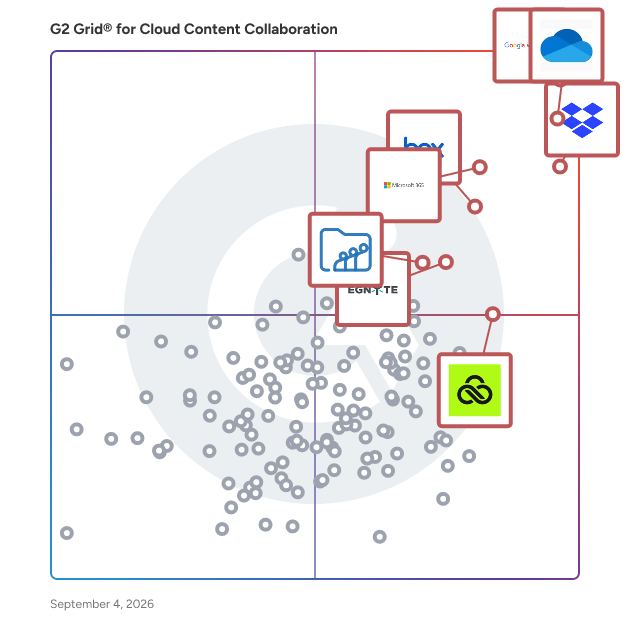
G2 Grid® for Cloud Content Collaboration Software

G2 Grid® for Cloud Content Collaboration Software plotting products by satisfaction and market presence

Highlighted products: Google Workspace, Microsoft OneDrive for Business, Dropbox, Microsoft 365, Box, Egnyte, LucidLink, and Zoho WorkDrive.

Underlying data: [Grid® JSON](https://www.g2.com/categories/cloud-content-collaboration/grids.json?focus%5B%5D=google-workspace&focus%5B%5D=microsoft-onedrive-for-business&focus%5B%5D=dropbox&focus%5B%5D=microsoft365&focus%5B%5D=box&focus%5B%5D=egnyte&focus%5B%5D=lucidlink&focus%5B%5D=zoho-workdrive)

GoFileRoom

Why choose GoFileRoom It’s time to banish paper files and storage fees. Thomson Reuters GoFileRoom is cloud-based electronic document storage software designed for tax and accounting professionals. GoFileRoom offers an arsenal of features to give your firm 24/7 access to document storage in the cloud. Your staff can quickly associate client documents to workflows while uploading files to the web-based DMS. Streamline your processes and create a truly paperless office. Plus, integrate GoFileRoom with other products to save even more time and money. Learn more at https://tax.thomsonreuters.com/us/en/cs-professional-suite/gofileroom

Average Rating: 4.1/5.0

Total Reviews: 37

How Do G2 Users Rate GoFileRoom?

  • Has the product been a good partner in doing business?: 7.0/10 (Category avg: 8.8/10)
  • Performance and Reliability: 9.7/10 (Category avg: 8.7/10)
  • File following: 9.2/10 (Category avg: 8.8/10)
  • Device Syncing: 8.5/10 (Category avg: 8.8/10)

Who Is the Company Behind GoFileRoom?

  • Seller: Thomson Reuters
  • Year Founded: 2008
  • HQ Location: Toronto, CA
  • Twitter: @thomsonreuters
    150,224 Twitter followers
  • LinkedIn® Page: www.linkedin.com
    36,619 employees on LinkedIn®
  • Ownership: NYSE:TRI

Who Uses This Product?

  • Top Industries: Accounting
  • Company Size: 38% Medium, 38% Small

What Do G2 Reviewers Say About GoFileRoom?

AI-generated summary from verified user reviews

Pros
  • Users appreciate the centralized cloud-based document management of GoFileRoom, which streamlines secure collaboration and file access.
  • Users find GoFileRoom to be very easy to use, enhancing organization and simplifying document management and access.
  • Users appreciate the easy access to files via GoFileRoom's centralized cloud-based system, enhancing organization and collaboration.
  • Users appreciate the centralized cloud-based system of GoFileRoom for secure and organized document management and sharing.
  • Users appreciate the centralized cloud-based system of GoFileRoom, enhancing secure document management and collaboration.
Cons
  • Users find limited customization options in GoFileRoom hinder their experience and desire more flexibility in file organization.
  • Users find GoFileRoom's interface outdated, wishing for a more modern design and improved performance.
  • Users find data management issues in GoFileRoom, suggesting smoother organization and enhanced search and sharing features.
  • Users find the inefficient search functionality limits usability and complicates file organization within GoFileRoom.
  • Users find GoFileRoom lacking features that make it appear outdated and less competitive in the market.

What Are Recent G2 Reviews of GoFileRoom?

What Are G2 Users Discussing About GoFileRoom?

OpenText Filr

Feels like Dropbox. Acts like Fort Knox.

Average Rating: 4.0/5.0

Total Reviews: 12

How Do G2 Users Rate OpenText Filr?

  • Has the product been a good partner in doing business?: 10.0/10 (Category avg: 8.8/10)
  • Performance and Reliability: 10.0/10 (Category avg: 8.7/10)
  • File following: 8.3/10 (Category avg: 8.8/10)
  • Device Syncing: 8.7/10 (Category avg: 8.8/10)

Who Is the Company Behind OpenText Filr?

  • Seller: OpenText
  • Year Founded: 1991
  • HQ Location: Waterloo, ON
  • Twitter: @OpenText
    21,565 Twitter followers
  • LinkedIn® Page: www.linkedin.com
    23,048 employees on LinkedIn®
  • Ownership: NASDAQ:OTEX

Who Uses This Product?

  • Company Size: 50% Medium, 42% Large

What Are Recent G2 Reviews of OpenText Filr?

What Are G2 Users Discussing About OpenText Filr?

Discuss Greenbox

Greenbox is a remarkably unique document management system with an advanced integrated business process management system. It is a Document Management System that helps in storing, tracking, retrieving and managing documents while having centralized access. Anyone and everyone with permission can access a file irrespective of where they are. The system takes care of complete safety and confidentiality of the documents and is designed to simplify the otherwise complicated operations. Greenbox allows the user access to a variety of features like unlimited folders and subfolders, universal content search, Solr OCR/text search inside an image, document versioning and restoration, granular access control and advanced document control feature. Document approval workflow, smart handling of metadata and an attractive price bracket are some of its most notable features.

Average Rating: 4.7/5.0

Total Reviews: 16

How Do G2 Users Rate Discuss Greenbox?

  • Has the product been a good partner in doing business?: 8.3/10 (Category avg: 8.8/10)
  • Performance and Reliability: 8.6/10 (Category avg: 8.7/10)
  • File following: 9.5/10 (Category avg: 8.8/10)
  • Device Syncing: 9.8/10 (Category avg: 8.8/10)

Who Is the Company Behind Discuss Greenbox?

Who Uses This Product?

  • Company Size: 63% Medium, 31% Small

What Do G2 Reviewers Say About Discuss Greenbox?

AI-generated summary from verified user reviews

Pros
  • Users value the reliability of Greenbox in efficiently managing sensitive employee records and enhancing HR workflows.
  • Users value the secure handling of sensitive employee records that enhances efficiency and collaboration in HR workflows.
  • Users appreciate the effective team collaboration tools in Discuss Greenbox, enhancing efficiency and security in HR workflows.
Cons
  • Users report frustration with poor customer support, highlighting difficulties in receiving timely responses for complex issues.

What Are Recent G2 Reviews of Discuss Greenbox?

What Are G2 Users Discussing About Discuss Greenbox?

Resilio Sync

Resilio Sync is a peer-to-peer file synchronization tool that enables users to transfer and synchronize files directly between devices without relying on cloud services. This approach ensures enhanced privacy, as data remains stored on user devices and is not uploaded to external servers. Resilio Sync is compatible with multiple platforms, including Windows, macOS, Linux, Android, iOS, and FreeBSD, making it a versatile solution for personal and professional use. Key Features and Functionality: - Direct Device-to-Device Synchronization: Utilizes peer-to-peer technology to facilitate direct file transfers between devices, eliminating the need for intermediary cloud storage. - Cross-Platform Compatibility: Supports a wide range of operating systems, including Windows, macOS, Linux, Android, iOS, and FreeBSD, ensuring seamless synchronization across different devices. - Unlimited File Size Handling: Allows synchronization of files of any size, making it suitable for transferring large media files, scientific datasets, or engineering assets. - Enhanced Privacy and Security: Data is stored locally on user devices, reducing exposure to potential breaches associated with cloud storage. - Selective Sync and Bandwidth Control: Offers features like selective synchronization of specific files or folders and the ability to control bandwidth usage, providing users with greater flexibility and control over their data transfers. Primary Value and User Solutions: Resilio Sync addresses the limitations of traditional cloud-based synchronization services by offering a decentralized, secure, and efficient method for file transfer and synchronization. By eliminating reliance on third-party servers, it provides users with complete control over their data, ensuring privacy and reducing the risk of data breaches. Its cross-platform support and ability to handle files of any size make it an ideal solution for individuals and organizations that require reliable and fast file synchronization without the constraints of cloud storage.

Average Rating: 4.3/5.0

Total Reviews: 34

How Do G2 Users Rate Resilio Sync?

  • Has the product been a good partner in doing business?: 10.0/10 (Category avg: 8.8/10)
  • Performance and Reliability: 8.3/10 (Category avg: 8.7/10)
  • File following: 6.7/10 (Category avg: 8.8/10)
  • Device Syncing: 9.0/10 (Category avg: 8.8/10)

Who Is the Company Behind Resilio Sync?

  • Seller: Resilio
  • Year Founded: 2016
  • HQ Location: Pleasanton, US
  • LinkedIn® Page: www.linkedin.com
    73 employees on LinkedIn®

Who Uses This Product?

  • Company Size: 47% Small, 32% Medium

What Do G2 Reviewers Say About Resilio Sync?

AI-generated summary from verified user reviews

Pros
  • Users value the effortless handling of large files with Resilio Sync, ensuring fast transfers and ultimate control.
  • Users find Resilio Sync to be super easy to use, enabling rapid setup and file sharing, even for non-techies.
  • Users value the reliability of Resilio Sync, enjoying uninterrupted file sharing and efficient performance across devices.
  • Users appreciate the security of Resilio Sync, ensuring private data syncing and protection without third-party reliance.
  • Users appreciate the cross-platform support of Resilio Sync, enhancing their productivity across various devices and operating systems.
Cons
  • Users struggle with syncing issues that cause frequent disruptions and reduce the reliability of Resilio Sync.
  • Users are frustrated by the limited functionality of Resilio Sync, particularly in its free version and sharing options.
  • Users often struggle with permission issues during setup, finding it complicated and confusing for non-technical users.
  • Users find initial setup training required for Resilio Sync, making it challenging for non-technical individuals.
  • Users note that premium features can be quite expensive, especially for multiple devices requiring Pro access.

What Are Recent G2 Reviews of Resilio Sync?

What Are G2 Users Discussing About Resilio Sync?

PaperTrail

Papertrail is an enterprise-grade document management and automation platform designed to digitize, process, and integrate documents into core business systems. Built for organizations handling high document volumes, Papertrail combines secure cloud storage, advanced OCR, workflow automation, and API-first integrations in a single platform. Documents can be captured from scanners, email, uploads, or APIs, automatically classified, indexed, and converted into structured data. Papertrail supports intelligent document processing for invoices, contracts, HR records, operational files, and customer documentation. Using OCR and rules-based automation, data is extracted, validated, enriched, and routed through configurable workflows such as approvals, exception handling, and downstream processing. The platform integrates directly with ERP, accounting, HR, and custom systems—including SAP S/4HANA—allowing extracted data and documents to flow seamlessly into existing business applications. REST APIs and webhook support enable tight integration with internal platforms and third-party software. Key platform capabilities include: • OCR-based data extraction and document classification • Centralized cloud document repository with full-text search • Workflow automation for routing, approvals, and validation • Version control and complete audit trails • Role-based access control and user permissions • Secure document sharing and collaboration • API-driven integrations and automated ingestion • Support for multi-branch and multi-entity deployments Security is built into every layer of the platform. Papertrail provides encrypted storage, granular access controls, activity logging, and traceability across the document lifecycle, helping organizations meet internal governance and compliance requirements. Papertrail is used across retail, automotive, healthcare, HR, and professional services to streamline invoice processing, employee onboarding, client file management, and legacy archive digitization. By eliminating manual data capture and disconnected systems, Papertrail reduces operational costs, improves accuracy, and accelerates document-driven workflows. Designed for scalability and flexibility, Papertrail supports both SMBs and large enterprises looking to modernize document operations and build a paperless, automation-first environment.

Average Rating: 4.4/5.0

Total Reviews: 48

How Do G2 Users Rate PaperTrail?

  • Has the product been a good partner in doing business?: 8.9/10 (Category avg: 8.8/10)
  • Performance and Reliability: 8.5/10 (Category avg: 8.7/10)
  • File following: 8.1/10 (Category avg: 8.8/10)
  • Device Syncing: 8.4/10 (Category avg: 8.8/10)

Who Is the Company Behind PaperTrail?

  • Seller: Egis Software
  • Year Founded: 1993
  • HQ Location: Highlands North, ZA
  • Twitter: @EGISsoft
    19 Twitter followers
  • LinkedIn® Page: www.linkedin.com
    47 employees on LinkedIn®

Who Uses This Product?

  • Top Industries: Information Technology and Services, Computer Software
  • Company Size: 44% Medium, 40% Small

What Do G2 Reviewers Say About PaperTrail?

AI-generated summary from verified user reviews

Pros
  • Users appreciate the ease of use of PaperTrail, enabling quick setup and effortless management of log data.
  • Users appreciate the effortless document management features of PaperTrail, streamlining tracking and maintaining clear status updates.
  • Users find the easy setup of PaperTrail enables quick integration without requiring technical expertise or complex configurations.
  • Users appreciate the easy setup of PaperTrail, enabling immediate use without needing complex configurations or DevOps skills.
  • Users appreciate the effective document management of PaperTrail, simplifying tracking and ensuring everything is organized and accessible.
Cons
  • Users express frustration with the limited customization in PaperTrail, impacting their ability to effectively analyze log data.
  • Users experience slow performance with PaperTrail, especially when overused, which can hinder its overall effectiveness.
  • Users find the product expensive, especially impacting small businesses and raising concerns about trust and performance.
  • Users express frustration over the missing features in PaperTrail, particularly custom dashboards and aggregate analysis tools.
  • Users find the absence of an offline mode in PaperTrail inconvenient, especially when internet access is restricted.

What Are Recent G2 Reviews of PaperTrail?

What Are G2 Users Discussing About PaperTrail?

Documize

Community is the enterprise-ready wiki and knowledge-base software. Simple, elegant, usable by both technical and non-technical people alike.

Average Rating: 4.3/5.0

Total Reviews: 58

How Do G2 Users Rate Documize?

  • Has the product been a good partner in doing business?: 8.3/10 (Category avg: 8.8/10)
  • Performance and Reliability: 8.8/10 (Category avg: 8.7/10)
  • File following: 8.9/10 (Category avg: 8.8/10)
  • Device Syncing: 8.6/10 (Category avg: 8.8/10)

Who Is the Company Behind Documize?

  • Seller: Documize
  • HQ Location: London, England
  • Twitter: @documize
    4 Twitter followers
  • LinkedIn® Page: www.linkedin.com
    1 employees on LinkedIn®

Who Uses This Product?

  • Top Industries: Information Technology and Services
  • Company Size: 44% Medium, 33% Small

What Do G2 Reviewers Say About Documize?

AI-generated summary from verified user reviews

Pros
  • Users appreciate the simple and clean interface of Documize, enhancing organization and collaboration for effective team coordination.
  • Users value the easy collaboration in Documize, appreciating its organized system and efficient document sharing features.
  • Users value the simple and clean interface of Documize, enhancing organization and collaboration without confusion.
  • Users value the effective team collaboration offered by Documize, enhancing coordination and knowledge sharing seamlessly.
  • Users value the data management capabilities of Documize, empowering efficient organization and informed decision-making.
Cons
  • Users find the pricing expensive, with the Essential plan costing $900 annually, which feels excessive.
  • Users find integration difficulty with Documize due to its limited features compared to more established platforms.
  • Users criticize Documize for its limited features and lack of integrations compared to more established platforms.
  • Users find the limited customization options of Documize restrict their ability to tailor the tool efficiently.
  • Users find the limited functionality of Documize frustrating, particularly with outdated UI and confusing permissions.

What Are Recent G2 Reviews of Documize?

What Are G2 Users Discussing About Documize?

JUMBOmail

JUMBOmail is the professional file transfer platform designed for people who value their work, their brand, and their time. We go beyond just sending large files by transforming the entire delivery process into a secure, impressive, and stress-free experience. Built for creative professionals, agencies, and businesses, JUMBOmail empowers you to: Make a Great Impression: Deliver your work on a beautiful, custom-branded page that reflects your professionalism, not our logo. Receive Files, Not Hassle: Embed a custom JUMBOform on your own website, creating a simple and professional portal for clients or colleagues to send large files directly to you. Get Paid, Not Ignored: With JUMBO Pay, the awkward chase is over. Secure your work so clients pay upon delivery, allowing you to focus on your next project, not the last one. Share with Total Peace of Mind: Our commitment to security is the bedrock of our platform, proven by our SOC 2 Type II, ISO 27001, and ISO 27017 certifications. Your most important files are in safe hands. Always Know What's Happening: With clear analytics, you can stop wondering. See exactly when your files are viewed and downloaded for complete clarity. We started JUMBOmail in 2010 because we saw talented people getting bogged down by clunky tools. We knew there had to be a better way. Our whole approach is built on empathy—understanding that behind every file is a deadline, a client, or a critical public service. Our mission is to handle the complex logistics of digital delivery so you can stay focused on yours. Whether that’s creating exceptional work, growing a thriving business, or serving your community, we’re here to make sure your great work arrives perfectly, every time.

Average Rating: 4.6/5.0

Total Reviews: 22

How Do G2 Users Rate JUMBOmail?

  • Has the product been a good partner in doing business?: 8.9/10 (Category avg: 8.8/10)
  • Performance and Reliability: 10.0/10 (Category avg: 8.7/10)
  • File following: 8.3/10 (Category avg: 8.8/10)
  • Device Syncing: 8.7/10 (Category avg: 8.8/10)

Who Is the Company Behind JUMBOmail?

Who Uses This Product?

  • Company Size: 57% Small, 17% Medium

What Do G2 Reviewers Say About JUMBOmail?

AI-generated summary from verified user reviews

Pros
  • Users appreciate the convenience of transferring large files with JUMBOmail, enhancing productivity for their operations.
  • Users value JUMBOmail's efficient data transfer, streamlining workflow and enhancing project management for large file needs.
  • Users appreciate the ease of use of JUMBOmail, enhancing efficiency and simplifying large file transfers for daily operations.
  • Users appreciate JUMBOmail's easy large file transfers, which streamline operations and enhance project management efficiency.
  • Users value JUMBOmail's efficient file management, enhancing daily operations with its intuitive interface and streamlined processes.
Cons
  • Users find the mandatory sign-in requirement for sending files with JUMBOmail to be an inconvenience.
  • Users are frustrated by the login issues in JUMBOmail, finding the sign-in requirement inconvenient for sending files.

What Are Recent G2 Reviews of JUMBOmail?

What Are G2 Users Discussing About JUMBOmail?

Scan123

Scan123 allows you to spend less time dealing with paperwork and more time doing what your business does best. Scan123 is a document management solution that helps you digitize your paper files, secure your documents in the cloud, quickly find what you're looking for, and instantly share with those that need access. No more misplaced files. Now you can easily stay in compliance and end the struggle to find important documents.

Average Rating: 4.5/5.0

Total Reviews: 31

How Do G2 Users Rate Scan123?

  • Has the product been a good partner in doing business?: 9.2/10 (Category avg: 8.8/10)
  • Performance and Reliability: 8.7/10 (Category avg: 8.7/10)
  • File following: 8.9/10 (Category avg: 8.8/10)
  • Device Syncing: 8.6/10 (Category avg: 8.8/10)

Who Is the Company Behind Scan123?

  • Seller: Scan123
  • Year Founded: 1996
  • HQ Location: Portland, US
  • Twitter: @Scan123
    65 Twitter followers
  • LinkedIn® Page: www.linkedin.com
    39 employees on LinkedIn®

Who Uses This Product?

  • Company Size: 53% Small, 25% Large

What Do G2 Reviewers Say About Scan123?

AI-generated summary from verified user reviews

Pros
  • Users praise the excellent customer support of Scan123, enhancing their overall experience with the application.
  • Users appreciate the reliability of Scan123, which consistently delivers efficient document scanning and great customer service.
  • Users love the secure storage capabilities of Scan123, keeping their documents safely and easily accessible.
  • Users value the secure document storage offered by Scan123, ensuring their files are kept safe and accessible.
  • Users love the speed efficiency of Scan123, significantly simplifying and accelerating their document scanning process.
Cons
  • Users find Scan123 to be expensive, but believe the quality justifies the higher price.

What Are Recent G2 Reviews of Scan123?

What Are G2 Users Discussing About Scan123?

edoclink

The edoclink is an integrated document management, enabling the dematerialisation of processes and administrative decision

Average Rating: 4.4/5.0

Total Reviews: 14

How Do G2 Users Rate edoclink?

  • Has the product been a good partner in doing business?: 8.3/10 (Category avg: 8.8/10)
  • Performance and Reliability: 7.5/10 (Category avg: 8.7/10)
  • File following: 9.0/10 (Category avg: 8.8/10)
  • Device Syncing: 8.8/10 (Category avg: 8.8/10)

Who Is the Company Behind edoclink?

  • Seller: Link Consulting
  • Year Founded: 1998
  • HQ Location: Lisboa, PT
  • Twitter: @LinkConsulting
    172 Twitter followers
  • LinkedIn® Page: www.linkedin.com
    766 employees on LinkedIn®

Who Uses This Product?

  • Company Size: 86% Medium, 29% Small

What Do G2 Reviewers Say About edoclink?

AI-generated summary from verified user reviews

Pros
  • Users highlight the ease of use of edoclink, making file management and sharing effortless and efficient.
  • Users highlight the collaboration focus of edoclink, making teamwork seamless through efficient online document management.
  • Users value edoclink for its fast and supportive customer service, enhancing their responsiveness and overall experience.
  • Users value the efficient data management capabilities of edoclink, enhancing document organization and secure sharing.
  • Users love the easy access of edoclink, making document management and sharing seamless from anywhere.
Cons
  • Users find the offline document access cumbersome and time-consuming, hindering their workflow and convenience.
  • Users find the offline access limitations of edoclink cumbersome, hindering quick retrieval of important documents.
  • Users find the cost issues of edoclink to be a significant drawback due to its high pricing and maintenance fees.
  • Users find the delays in offline access of edoclink cumbersome, impacting workflow efficiency significantly.
  • Users find the expensive pricing and high maintenance costs of edoclink to be a significant drawback.

What Are Recent G2 Reviews of edoclink?

What Are G2 Users Discussing About edoclink?

Frame.io

One platform for all your creative work. Frame.io is the all-in-one platform that helps creative teams collaborate, review, and deliver projects faster. Whether you’re working in video, design, or marketing, Frame.io centralizes your creative process—from upload to approval—in one secure, easy-to-use workspace built specifically for creatives. Upload nearly any creative file lightning-fast to a cloud workspace purpose-built for visual assets. Panel-based workspaces and nested folder trees make organizing, finding, and sharing assets intuitive and effortless. With flexible metadata, you can tag, sort, and group files by assignee, due date, status, and more—so your team can work the way it wants. Frame.io eliminates silos with secure, centralized communication that follows the work. You can share assets on the fly, collaborate in context, and find anything instantly across projects. Powerful features like speaker-labeled transcripts, searchable captions, and Collections make managing even the most complex creative pipelines simple. Best-in-Class Review & Approval Get precise, actionable feedback on videos, images, and documents with tools designed for every stakeholder—creatives, clients, and executives alike. Comment directly on a frame or image, timestamp notes, and keep conversations tied to specific assets so nothing gets lost in translation. Customized Workflow Management Assign tasks, track milestones, and build workflows tailored to your team’s unique process. Metadata-powered tracking helps you visualize progress from concept through delivery, ensuring every step is aligned, transparent, and on schedule. Beautiful Sharing & Presentations Showcase your work in crystal-clear high resolution with custom-branded share links and presentations. Add your logo, background, colors, and headers so everything stays on brand. Control permissions with a click—decide who can view, comment, or download, and easily toggle settings as needs evolve. Enterprise-Grade Security Protect your intellectual property with advanced security features like watermarking, single sign-on (SSO), and two-factor authentication (2FA). You decide who sees what, how they interact with assets, and when access expires—so your creative work stays safe at every stage. Whatever you create, Frame.io helps you deliver it faster. That’s why teams across industries choose Frame.io to accelerate their creative workflows, unify collaboration, and elevate the way they produce and present their work.

Average Rating: 4.5/5.0

Total Reviews: 197

How Do G2 Users Rate Frame.io?

  • Has the product been a good partner in doing business?: 8.3/10 (Category avg: 8.8/10)
  • Performance and Reliability: 10.0/10 (Category avg: 8.7/10)
  • File following: 10.0/10 (Category avg: 8.8/10)
  • Device Syncing: 9.2/10 (Category avg: 8.8/10)

Who Is the Company Behind Frame.io?

  • Seller: Adobe
  • Company Website:
  • Year Founded: 1982
  • HQ Location: San Jose, CA
  • Twitter: @Adobe
    956,842 Twitter followers
  • LinkedIn® Page: www.linkedin.com
    42,087 employees on LinkedIn®

Who Uses This Product?

  • Who Uses This: Video Editor
  • Top Industries: Marketing and Advertising, Media Production
  • Company Size: 55% Small, 20% Medium

What Do G2 Reviewers Say About Frame.io?

AI-generated summary from verified user reviews

Pros
  • Users find Frame.io's ease of use enhances collaboration and streamlines the review process, saving time significantly.
  • Users value the easy sharing features of Frame.io, facilitating effective collaboration and streamlined feedback for video projects.
  • Users appreciate the collaboration and review features of Frame.io, enhancing team communication and saving time on revisions.
  • Users praise Frame.io's easy setup, enjoying a smooth and hassle-free experience for video collaboration and project reviews.
  • Users find Frame.io exceptionally intuitive, enhancing collaboration and simplifying feedback collection on video projects.
Cons
  • Users experience slow performance during bulk uploads and video preview loading, especially with weak internet connections.
  • Users feel the subscription cost is high for small creators, affecting accessibility despite the product's value.
  • Users face storage limitations with Frame.io, particularly when handling multiple high-quality videos, impacting their workflow efficiency.
  • Users find the limited options for downloading and customizing features on Frame.io frustrating and less efficient.
  • Users find the UI design issues of Frame.io complicate simple video tasks and create confusion with non-video assets.

What Are Recent G2 Reviews of Frame.io?

What Are G2 Users Discussing About Frame.io?

Wondershare Document Cloud

Wondershare Document Cloud is a comprehensive cloud-based platform designed to streamline document management, collaboration, and electronic signing processes. Integrated seamlessly with Wondershare's PDFelement, it offers users a unified solution for handling PDFs and other documents across various devices and operating systems. Key Features and Functionality: - Cloud Storage: Provides secure storage with up to 100GB capacity, enabling users to access and manage documents from any device, anytime, anywhere. - Electronic Signatures: Facilitates the creation and collection of legally binding electronic signatures without the need for account registration or software downloads. - Collaborative Annotations and Comments: Allows multiple users to highlight, underline, strikethrough text, and post comments on shared documents, enhancing team collaboration and communication. - File Sharing: Enables sharing of files via links and personalized email notifications, with customizable editing and commenting permissions to maintain control over document access. - Integration with PDFelement: Offers seamless interaction with PDFelement, allowing users to edit, convert, and manage PDFs efficiently across desktop, mobile, and web platforms. Primary Value and User Solutions: Wondershare Document Cloud addresses the challenges of modern document workflows by providing a centralized, secure, and accessible platform for document storage, collaboration, and signing. It eliminates the need for multiple tools by integrating essential functionalities into one solution, thereby enhancing productivity and efficiency for individuals and teams. The platform's cross-device compatibility ensures that users can manage their documents seamlessly, regardless of their operating system or device, making it an ideal choice for professionals seeking a reliable and versatile document management solution.

Average Rating: 4.3/5.0

Total Reviews: 25

How Do G2 Users Rate Wondershare Document Cloud?

  • Has the product been a good partner in doing business?: 9.4/10 (Category avg: 8.8/10)
  • Performance and Reliability: 9.3/10 (Category avg: 8.7/10)
  • File following: 8.8/10 (Category avg: 8.8/10)
  • Device Syncing: 9.1/10 (Category avg: 8.8/10)

Who Is the Company Behind Wondershare Document Cloud?

  • Seller: Wondershare
  • Year Founded: 2003
  • HQ Location: Shenzen, CN
  • Twitter: @Wondershare
    14,154 Twitter followers
  • LinkedIn® Page: www.linkedin.com
    644 employees on LinkedIn®
  • Ownership: SHE: 300624

Who Uses This Product?

  • Top Industries: Information Technology and Services
  • Company Size: 64% Small, 32% Medium

What Do G2 Reviewers Say About Wondershare Document Cloud?

AI-generated summary from verified user reviews

Pros
  • Users value the ease of use of Wondershare Document Cloud, enabling quick onboarding and seamless document management.
  • Users value the impressive cloud storage capacity of Wondershare Document Cloud, making file management hassle-free and efficient.
  • Users value the easy file sharing feature of Wondershare Document Cloud, enhancing collaboration and productivity seamlessly.
  • Users value the large cloud storage of Wondershare Document Cloud, effortlessly handling massive files without any size limitations.
  • Users value the reliability of Wondershare Document Cloud, finding it efficient for managing documents with ease and security.
Cons
  • Users find integration with other cloud services difficult, requiring manual migrations that complicate their workflow.
  • Users find the product lacking features, particularly in advanced automation and template management for efficiency.
  • Users report experiencing PDF corruption issues when attempting to open documents, leading to frustration and data loss.
  • Users experience slower file upload speeds with larger documents, which can hinder their workflow efficiency.
  • Users find it annoying that Wondershare Document Cloud persistently prompts for purchases despite having a lifetime license.

What Are Recent G2 Reviews of Wondershare Document Cloud?

What Are G2 Users Discussing About Wondershare Document Cloud?

LogicalDOC

LogicalDOC is a document management system built for small and mid-sized businesses that are tired of hunting through shared drives, email threads, and filing cabinets just to find a single document. With thousands of organizations across 60 countries relying on it every day, LogicalDOC has become the go-to document management system for teams that want things simple, fast, and secure. The problem most businesses face is not that they lack documents. It is that they cannot find them when it matters most. Studies show employees lose up to 30% of their working day just searching for files. LogicalDOC solves this with full-text document search that indexes everything automatically, including scanned paper files through built-in OCR technology. You type, you find. That is it. What makes LogicalDOC stand out as a document management system is how much it handles natively without needing a team of IT specialists to set it up or run it. Document version control keeps a clean history of every change so nothing gets lost or overwritten. Role-based access permissions mean the right people see the right files and nobody else. Document workflow automation removes the back-and-forth of manual approvals so your team can actually focus on work. And a full audit trail keeps your business compliant and accountable at all times. LogicalDOC connects directly with the tools your team already uses including Microsoft Office, Outlook, Google Drive, DocuSign, Dropbox, Amazon S3 and Microsoft Azure. There is no need to change how your team works. LogicalDOC fits around your existing setup, not the other way around. The latest version of LogicalDOC also brings AI into your document management system through a built-in assistant called MENTOR. It uses Natural Language Processing to understand what your team is looking for, classify documents automatically, and trigger workflows without anyone needing to write a line of code. You can even build custom AI assistants for specific departments like legal, HR, compliance or sales. When it comes to deployment, LogicalDOC gives you the choice. You can run it as a cloud-hosted document management system or install it on-premise on Windows, Linux or macOS. Either way you get the same full feature set, the same security, and the same performance. For businesses that handle sensitive information, LogicalDOC includes encryption, compliance-ready document archiving, records retention scheduling, electronic signatures, and support for over 20 languages across global teams. LogicalDOC is not the flashiest name in the document management system market. It is just the one that works, the one that real teams in real businesses use every day to stay organized, move faster, and stop losing time to avoidable document chaos.

Average Rating: 4.3/5.0

Total Reviews: 27

How Do G2 Users Rate LogicalDOC?

  • Has the product been a good partner in doing business?: 8.3/10 (Category avg: 8.8/10)
  • Performance and Reliability: 8.3/10 (Category avg: 8.7/10)
  • File following: 8.0/10 (Category avg: 8.8/10)
  • Device Syncing: 8.3/10 (Category avg: 8.8/10)

Who Is the Company Behind LogicalDOC?

  • Seller: LogicalDOC
  • Year Founded: 2006
  • HQ Location: Fair Lawn, US
  • Twitter: @logicaldoc
    2,630 Twitter followers
  • LinkedIn® Page: www.linkedin.com
    8 employees on LinkedIn®

Who Uses This Product?

  • Top Industries: Computer Software
  • Company Size: 45% Small, 28% Large

What Do G2 Reviewers Say About LogicalDOC?

AI-generated summary from verified user reviews

Pros
  • Users appreciate the balanced data management of LogicalDOC, combining enterprise features with user-friendly usability for effective collaboration.
  • Users appreciate the ease of use of LogicalDOC, which simplifies document management for both tech-savvy and non-technical users.
  • Users value the easy collaboration in LogicalDOC, enhancing coordination and efficiency in document management processes.
  • Users enjoy the flexibility of cloud and on-premises work with LogicalDOC, enhancing collaboration and document management.
  • Users appreciate the easy access to documents from multiple devices, enhancing efficiency and flexibility in their workflow.
Cons
  • Users find LogicalDOC's collaboration features lacking, as real-time co-editing is limited to basic text files only.
  • Users find LogicalDOC's limited collaboration functionality challenging, requiring external tools for effective teamwork on diverse file types.
  • Users find the poor customer support of LogicalDOC frustrating, citing slow response times and limited accessibility.
  • Users experience slow uploads with LogicalDOC, leading to inefficiencies in document management and collaboration.
  • Users experience time delays in support responses, making it difficult to resolve issues promptly with LogicalDOC.

What Are Recent G2 Reviews of LogicalDOC?

What Are G2 Users Discussing About LogicalDOC?

PowerFolder

PowerFolder offers file sync, share and backup solutions for businesses.

Average Rating: 4.8/5.0

Total Reviews: 40

How Do G2 Users Rate PowerFolder?

  • Has the product been a good partner in doing business?: 10.0/10 (Category avg: 8.8/10)
  • Performance and Reliability: 10.0/10 (Category avg: 8.7/10)
  • File following: 9.6/10 (Category avg: 8.8/10)
  • Device Syncing: 9.5/10 (Category avg: 8.8/10)

Who Is the Company Behind PowerFolder?

  • Seller: PowerFolder
  • Year Founded: 2009
  • HQ Location: Düsseldorf, DE
  • Twitter: @PowerFolder
    745 Twitter followers
  • LinkedIn® Page: www.linkedin.com
    6 employees on LinkedIn®

Who Uses This Product?

  • Who Uses This: Account Manager
  • Top Industries: Accounting
  • Company Size: 83% Medium, 15% Small

What Do G2 Reviewers Say About PowerFolder?

AI-generated summary from verified user reviews

Pros
  • Users value the secure and efficient file sharing in PowerFolder, enabling smooth collaboration with employees and third parties.
  • Users value the efficient folder management in PowerFolder, enabling seamless document sharing and real-time updates.
  • Users value the secure sharing capabilities of PowerFolder for efficiently collaborating on updated files with others.
  • Users value the secure file sharing of PowerFolder, appreciating its efficiency and consistent updates for collaborative work.
Cons
  • Users experience slow file transfer and ineffective synchronization, making online work and mobile access inconvenient.
  • Users find file size limitations inconvenient, as transfers can be slow and synchronization less effective, especially online.
  • Users find the slow file transfer and synchronization issues of PowerFolder very inconvenient when needing quick access online.
  • Users experience permission issues that hinder effective file access and synchronization, especially on mobile devices.

What Are Recent G2 Reviews of PowerFolder?

What Are G2 Users Discussing About PowerFolder?

Ideagen Collaboration Portal

Ideagen Collaboration Portal (formerly Ideagen Huddle) is a cloud-based platform that provides a safe and unique workspace environment for your team, partners and external stakeholders. Companies in highly regulated industries can review work, securely share sensitive information and collaborate efficiently which allows you to maintain complete control of the document - meeting your project goals on time and to budget, every time. With Ideagen Collaboration Portal, you get an easier way to collaborate and co-edit documents, control file versions, collaborate with clients, and organize team tasks. Built-in approval workflow means you'll never miss a deadline again, and our free mobile app keeps you connected even when you're on the road. Benefits include: • Government grade security – confidently protect your sensitive data and reduce the risk of loss or theft • Custom branded Client portals – Make all your documents and associated communications accessible in one central location • Regulated collaboration – Keep control of versions, co-edit, make comments and revisions, all in real-time. • Controlled external collaboration – Make external collaboration frictionless for all stakeholders Because Ideagen Collaboration Portal is cloud-based, it sits above your existing IT infrastructure so you can be sure everyone authorized can have access. Being cloud-based also keeps everyone synchronized to the latest files, so there’s never any risk of out-of-date documents being shared.

Average Rating: 4.2/5.0

Total Reviews: 139

How Do G2 Users Rate Ideagen Collaboration Portal?

  • Has the product been a good partner in doing business?: 8.4/10 (Category avg: 8.8/10)
  • Performance and Reliability: 8.4/10 (Category avg: 8.7/10)
  • File following: 8.7/10 (Category avg: 8.8/10)
  • Device Syncing: 8.0/10 (Category avg: 8.8/10)

Who Is the Company Behind Ideagen Collaboration Portal?

  • Seller: Ideagen
  • Year Founded: 2000
  • HQ Location: Ruddington, Nottingham
  • Twitter: @Ideagen_
    2,172 Twitter followers
  • LinkedIn® Page: www.linkedin.com
    1,386 employees on LinkedIn®

Who Uses This Product?

  • Top Industries: Non-Profit Organization Management, Government Administration
  • Company Size: 42% Small, 32% Large

What Do G2 Reviewers Say About Ideagen Collaboration Portal?

AI-generated summary from verified user reviews

Pros
  • Users find the ease of use of Ideagen Collaboration Portal enhances their experience and ensures swift implementation.
  • Users commend the exceptional customer support of Ideagen Collaboration Portal, ensuring responsiveness and satisfaction with services.
  • Users value the easy collaboration features of Ideagen Collaboration Portal, enhancing teamwork and project management efficiency.
  • Users find the easy setup of the Ideagen Collaboration Portal simplifies collaboration across diverse stakeholders and projects.
  • Users appreciate the solid security features of Ideagen Collaboration Portal, ensuring the safety of sensitive information.
Cons
  • Users are frustrated by hidden costs and difficult cancellation policies, leading to dissatisfaction with Ideagen Collaboration Portal.
  • Users find the difficult learning curve challenging, especially for those unfamiliar with computers and the interface.
  • Users report issues with inconsistent editing and performance in the Ideagen Collaboration Portal, affecting overall usability.
  • Users find the Ideagen Collaboration Portal expensive due to high charges for basic features and unreliable customer support.
  • Users experience inconvenience from frequent logins and limited mobile app functionality, hindering overall usability.

What Are Recent G2 Reviews of Ideagen Collaboration Portal?

What Are G2 Users Discussing About Ideagen Collaboration Portal?

Bitrix24

Bitrix24 is an all-in-one business workspace that combines CRM, collaboration, and management tools in a single, easy-to-use platform – free for unlimited users. Whether you're a small team or a growing business, Bitrix24 helps you to: — Track leads and manage customer relationships with a built-in CRM — Stay on top of projects and tasks with Kanban boards, timelines, and time tracking — Communicate easily via team messenger, video calls, and shared calendars — Create and edit documents, manage files, and collect e-signatures — Run marketing campaigns and manage customer interactions through email, calls, and WhatsApp Bitrix24’s AI-powered assistant CoPilot helps automate routine tasks, write emails, analyze data, and suggest next steps, saving time and boosting productivity. What makes Bitrix24 a great solution for businesses: — Free forever for unlimited users, with access to core features and 5 GB storage — No per-user fees – upgrade only when you need more storage or advanced tools — Accessible anywhere via web, desktop, and mobile apps — Scalable – grow your business without switching platforms or juggling tools Over 15 million companies trust Bitrix24 to simplify operations, cut costs, and get more done – all in one place.

Average Rating: 4.1/5.0

Total Reviews: 576

How Do G2 Users Rate Bitrix24?

  • Has the product been a good partner in doing business?: 7.8/10 (Category avg: 8.8/10)
  • Performance and Reliability: 8.8/10 (Category avg: 8.7/10)
  • File following: 8.7/10 (Category avg: 8.8/10)
  • Device Syncing: 8.6/10 (Category avg: 8.8/10)

Who Is the Company Behind Bitrix24?

  • Seller: Bitrix24
  • Company Website:
  • Year Founded: 1998
  • HQ Location: Alexandria, Virginia
  • LinkedIn® Page: www.linkedin.com
    267 employees on LinkedIn®

Who Uses This Product?

  • Who Uses This: Marketing Manager, Project Manager
  • Top Industries: Information Technology and Services, Marketing and Advertising
  • Company Size: 55% Small, 35% Medium

What Do G2 Reviewers Say About Bitrix24?

AI-generated summary from verified user reviews

Pros
  • Users find Bitrix24 to be easy to use, effectively streamlining business processes and enhancing customer experience.
  • Users appreciate the team collaboration tools in Bitrix24, enhancing communication and streamlining business processes effortlessly.
  • Users value the effective communication capabilities of Bitrix24, enhancing collaboration with teams and customers seamlessly.
  • Users appreciate the flexibility and versatility of Bitrix24, enjoying its comprehensive features for business management.
  • Users find Bitrix24 intuitive, making collaboration and customer management seamless and enhancing overall productivity.
Cons
  • Users find the learning curve steep, requiring time and training to fully utilize Bitrix24's extensive features.
  • Users report performance issues with Bitrix24, experiencing lag and slowdowns, especially during complex workflows.
  • Users express concern over lacking features, with notable omissions affecting value as compared to initial promises.
  • Users find Bitrix24 to be not user-friendly, often struggling to locate tools and navigate the system efficiently.
  • Users experience slow performance with Bitrix24, especially during complex workflows, impacting overall productivity.

What Are Recent G2 Reviews of Bitrix24?

What Are G2 Users Discussing About Bitrix24?

Neeraja Prakash
NP
Researched and written by Neeraja Prakash
Updated July 20, 2025