Best Calendar Software - Page 5

How Many Calendar Software Products Does G2 Track?

Total Products under this Category: 174

Category Stats (Nov 2026)

  • Average Rating: 4.47/5 (↑0.01 vs Oct 2026) The average rating of products in this category, based on all submitted ratings
  • Top Trending Product: Modern Events Calendar (+5.35%) - Among all products in this category, Modern Events Calendar recorded the largest rating increase compared to last month

Last updated: November 01, 2026

How Does G2 Rank Calendar Software Products?

Why You Can Trust G2's Software Rankings:

  • 30 Analysts and Data Experts
  • 156,500+ Authentic Reviews
  • 174+ Products
  • Unbiased Rankings

G2's software rankings are built on verified user reviews, rigorous moderation, and a consistent research methodology maintained by a team of analysts and data experts. Each product is measured using the same transparent criteria, with no paid placement or vendor influence. While reviews reflect real user experiences, which can be subjective, they offer valuable insight into how software performs in the hands of professionals. Together, these inputs power the G2 Score, a standardized way to compare tools within every category.

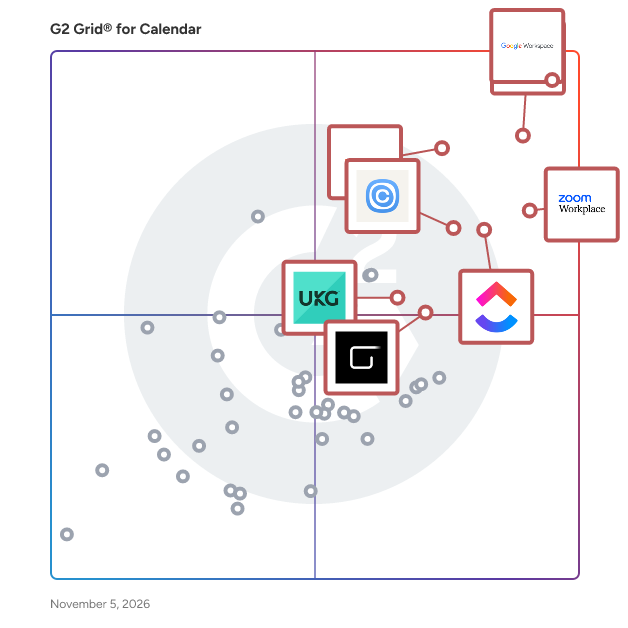
G2 Grid® for Calendar Software

G2 Grid® for Calendar Software plotting products by satisfaction and market presence

Highlighted products: Google Workspace, Microsoft Outlook, Zoom Workplace, Microsoft 365, UKG Ready, ClickUp, Calendly, and GlossGenius.

Underlying data: [Grid® JSON](https://www.g2.com/categories/calendar-software/grids.json?focus%5B%5D=google-workspace&focus%5B%5D=microsoft-outlook&focus%5B%5D=zoom-workplace&focus%5B%5D=microsoft365&focus%5B%5D=ukg-ready&focus%5B%5D=clickup&focus%5B%5D=calendly&focus%5B%5D=glossgenius)

Cron

It’s about time. Cron is the next-generation calendar for professionals and teams.

Average Rating: 4.4/5.0

Total Reviews: 5

How Do G2 Users Rate Cron?

  • Sync Multiple Calendars: 9.3/10 (Category avg: 8.7/10)
  • Software Integrations: 8.0/10 (Category avg: 8.2/10)
  • Customized Calendar Notifications: 9.3/10 (Category avg: 8.7/10)

Who Is the Company Behind Cron?

  • Seller: Cron
  • Year Founded: 2019
  • HQ Location: San Francisco, US
  • LinkedIn® Page: www.linkedin.com
    12 employees on LinkedIn®

Who Uses This Product?

  • Company Size: 60% Small, 20% Large

What Do G2 Reviewers Say About Cron?

AI-generated summary from verified user reviews

Pros
  • Users appreciate the automation capabilities of Cron, enabling background jobs even when logged out or system is off.
Cons
  • Users find the lack of failure notifications frustrating, making it hard to track job statuses effectively.

What Are Recent G2 Reviews of Cron?

FullCalendar

A JavaScript event calendar. Customizable and open source.

Average Rating: 4.8/5.0

Total Reviews: 5

How Do G2 Users Rate FullCalendar?

  • Has the product been a good partner in doing business?: 8.3/10 (Category avg: 9.1/10)
  • Sync Multiple Calendars: 5.0/10 (Category avg: 8.7/10)
  • Software Integrations: 6.7/10 (Category avg: 8.2/10)
  • Customized Calendar Notifications: 6.7/10 (Category avg: 8.7/10)

Who Is the Company Behind FullCalendar?

Who Uses This Product?

  • Company Size: 80% Small, 20% Large

What Are Recent G2 Reviews of FullCalendar?

What Are G2 Users Discussing About FullCalendar?

Spark for Teams

Spark for Teams is a collaborative email platform builds on the foundation of the Spark email app, which is widely recognized for its smart features that help users manage their email more efficiently. The primary goal of Spark for Teams is to enhance team productivity and streamline communication by offering several key features: 1. **Shared Inboxes**: Teams can collaborate on emails from shared addresses like support@ or info@, ensuring that all team members can access and respond to messages. 2. **Shared Emails**: Stop forwarding or screenshooting your emails to post them into Slack or Microsoft Teams — with Shared Emails you could paste a link and your team will have access to all the email conversations without noisy "adding to cc" emails. 3. **Email Delegation**: Assign emails to team members directly within the app, allowing for clear responsibility and follow-up on tasks. 4. **Team Comments**: Team members can discuss emails internally without forwarding or copying emails back and forth, making internal communication more efficient. 5. **Shared Drafts +AI**: Collaborate on email drafts in real-time, allowing multiple team members to contribute to the creation of important messages. 6. **Templates +AI**: Create and share email templates within the team to ensure consistent communication and save time on repetitive responses. 7. **+AI Meeting Notes** can transcribe and summarize your meeting to capture every point. Fully focus during every discussion and never miss a detail. No bots joining your call, works with any meeting tool. Access all your meeting notes anytime in Spark Mail App. 8. **Centralized Email Management**: Manage multiple email accounts from a single interface, which is particularly useful for teams handling multiple projects or client accounts. 9. **Smart Inbox +AI**: Prioritize important emails and filter out distractions with intelligent sorting and categorization of incoming messages. 10. **Integrations**: Connect Spark with other productivity tools like Trello, Asana, and more to streamline workflows and ensure that email communications integrate smoothly with other team activities. Spark for Teams aims to reduce the chaos often associated with team email management by providing a suite of tools that enhance collaboration, improve communication efficiency, and streamline workflows.

Average Rating: 4.4/5.0

Total Reviews: 22

How Do G2 Users Rate Spark for Teams?

  • Has the product been a good partner in doing business?: 9.6/10 (Category avg: 9.1/10)

Who Is the Company Behind Spark for Teams?

  • Seller: Spark Mail
  • Year Founded: 2007
  • HQ Location: Odessa, Ukraine
  • Twitter: @Readdle
    25,721 Twitter followers
  • LinkedIn® Page: www.linkedin.com
    338 employees on LinkedIn®

Who Uses This Product?

  • Top Industries: Marketing and Advertising
  • Company Size: 86% Small, 9% Medium

What Do G2 Reviewers Say About Spark for Teams?

AI-generated summary from verified user reviews

Pros
  • Users highlight the effective email management features of Spark, enhancing team collaboration and productivity significantly.
  • Users value the seamless collaboration features in Spark for Teams, enhancing productivity and email management significantly.
  • Users praise the ease of use of Spark for Teams, enhancing collaboration and productivity effortlessly.
  • Users value the efficient collaboration features in Spark for Teams, enhancing email management and teamwork seamlessly.
  • Users value the streamlined communication features of Spark for Teams, enhancing collaboration and efficiency significantly.
Cons
  • Users report bug issues with syncing delays and crashes, impacting usability and complicating user experience.
  • Users express frustration over missing features in Spark for Teams, impacting usability and experience across devices.
  • Users experience frequent software bugs with syncing delays and crashes, complicating their productivity and usability.
  • Users face challenges with infrequent updates, leading to unexpected changes that complicate management and team efficiency.
  • Users find the interface design lacking on Mac, preferring the native feel of previous versions for smoother performance.

What Are Recent G2 Reviews of Spark for Teams?

AI can help you find the answers. G2 helps you trust them.

Connect G2 to Claude or ChatGPT for answers grounded in G2's trusted reviews, comparisons, and pricing from real user insights.

How it works

Team Calendars for Confluence

Team Calendars for Confluence is an integrated scheduling tool designed to help teams coordinate and communicate effectively within Confluence. It enables users to create, share, and manage calendars that link personal and team events directly to Confluence pages and individual work calendars. This integration ensures that all team members stay informed about project timelines, availability, and key milestones, fostering better collaboration and planning. Key Features and Functionality: - Calendar Sharing and Integration: Team Calendars supports CalDAV integration, allowing synchronization with popular calendar clients such as Microsoft Outlook, Google Calendar, and Apple Calendar. This feature ensures seamless collaboration across different platforms. - Customizable Views: Users can choose from four distinct calendar views—list, week, month, and timeline—to visualize schedules in a way that best suits their needs. - Event Planning and Management: The tool allows for the creation of recurring events and the ability to toggle event types on and off, facilitating organized and efficient planning. - Embedding Calendars: Calendars can be embedded directly into Confluence pages, linking events to specific spaces and pages, thereby enhancing the context and accessibility of scheduling information. - Jira Integration: Team Calendars integrates with Jira, enabling teams to add sprints, releases, or any custom date fields to a calendar, providing comprehensive insight into development work. Primary Value and User Benefits: Team Calendars for Confluence addresses the challenge of disjointed scheduling and communication within teams. By centralizing calendars and linking them to Confluence content, it ensures that all team members have a unified view of project timelines, individual availability, and key events. This centralization reduces miscommunication, enhances transparency, and streamlines project planning and execution. The integration with Jira further bridges the gap between project management and scheduling, offering a holistic view of development progress and deadlines. Overall, Team Calendars enhances team productivity by providing a single source of truth for scheduling and availability within the Confluence environment.

Average Rating: 4.1/5.0

Total Reviews: 5

How Do G2 Users Rate Team Calendars for Confluence?

  • Has the product been a good partner in doing business?: 7.5/10 (Category avg: 9.1/10)
  • Sync Multiple Calendars: 7.3/10 (Category avg: 8.7/10)
  • Software Integrations: 8.0/10 (Category avg: 8.2/10)
  • Customized Calendar Notifications: 7.7/10 (Category avg: 8.7/10)

Who Is the Company Behind Team Calendars for Confluence?

  • Seller: Atlassian
  • Year Founded: 2002
  • HQ Location: Sydney and San Francisco
  • Twitter: @Atlassian
    106,496 Twitter followers
  • LinkedIn® Page: www.linkedin.com
    16,946 employees on LinkedIn®
  • Ownership: NASDAQ:TEAM

Who Uses This Product?

  • Company Size: 60% Large, 40% Medium

What Do G2 Reviewers Say About Team Calendars for Confluence?

AI-generated summary from verified user reviews

Pros
  • Users appreciate the intuitive experience of Team Calendars for Confluence, making it easy to navigate and use.
  • Users value the multiple calendar types, enhancing scheduling and collaboration while integrating seamlessly with Jira.
  • Users appreciate the multiple calendar type integrations that significantly enhance scheduling and team collaboration efficiency.
  • Users value the intuitive experience of Team Calendars for Confluence, which simplifies navigation and enhances usability.
  • Users appreciate the multiple calendar types for effective scheduling and improved team collaboration integrated with Jira.
Cons
  • Users struggle with the lack of read receipt functionality, making it unclear if team members have seen appointments.
  • Users find the integration issues with other calendars like Outlook frustrating, limiting overall functionality and accessibility.
  • Users find the limited storage and integration options frustrating, hindering seamless calendar management and mobile access.

What Are Recent G2 Reviews of Team Calendars for Confluence?

Weezly

Weezly is an all-in-one sales platform that helps teams find leads, reach prospects across LinkedIn and email, create personalized AI videos, book meetings, manage replies, and follow up with an AI sales assistant. Weezly Features: + LinkedIn Prospecting & Outreach Reach prospects and manage your LinkedIn outreach from one place. Build structured sequences with connection requests, messages, follow-ups, profile actions, and other touchpoints. Weezly helps sales teams, recruiters, and agencies stay organized and engage prospects more efficiently. + AI Personalized Video Outreach Record one real video and use AI to personalize it for each prospect, including personalized greetings with their name. Weezly can also send playable personalized videos directly inside DMs, helping your outreach stand out without relying only on external video links or recording a new video for every lead. + B2B Lead Database Find prospects directly inside Weezly using filters such as job title, industry, location, company information, and more. Add relevant leads directly to your outreach campaigns without relying entirely on external databases. + Meeting Scheduling Make it easy for prospects to book a meeting with you without the back-and-forth of finding a suitable time. Keep scheduling connected to your outreach workflow so interested prospects can move smoothly from conversation to booked meeting. + AI Sales Assistant Turn sales conversations into actionable follow-ups. The AI Sales Assistant can join meetings, record and summarize conversations, draft follow-up emails, score calls against sales playbooks, and provide coaching based on real call evidence. It works with Zoom, Google Meet, Microsoft Teams, calendar-based meetings, and in-person conversations. Why Weezly? Instead of paying for and managing separate tools, Weezly brings the entire sales workflow into one platform. Fewer tools, less switching between platforms, and one place to manage the journey from finding a prospect to closing the conversation.

Average Rating: 5.0/5.0

Total Reviews: 21

How Do G2 Users Rate Weezly?

  • Has the product been a good partner in doing business?: 10.0/10 (Category avg: 9.1/10)
  • Sync Multiple Calendars: 9.6/10 (Category avg: 8.7/10)
  • Software Integrations: 10.0/10 (Category avg: 8.2/10)
  • Customized Calendar Notifications: 9.6/10 (Category avg: 8.7/10)

Who Is the Company Behind Weezly?

  • Seller: Easynote
  • Year Founded: 2016
  • HQ Location: Malmö, SE
  • Twitter: @easynote
  • LinkedIn® Page: www.linkedin.com
    6 employees on LinkedIn®

Who Uses This Product?

  • Top Industries: Consulting
  • Company Size: 81% Small, 14% Medium

What Do G2 Reviewers Say About Weezly?

AI-generated summary from verified user reviews

Pros
  • Users appreciate the seamless AI integration of Weezly, enhancing their LinkedIn inbox management effortlessly.
  • Users value the automatic scheduling feature of Weezly, enhancing productivity and streamlining LinkedIn interactions effortlessly.
  • Users love the automation features of Weezly, making LinkedIn inbox management and follow-ups effortless and efficient.
  • Users love the efficient booking management in Weezly, simplifying meetings and enhancing conversation organization.
  • Users find call management in Weezly efficient, simplifying meeting bookings and enhancing overall communication organization.
Cons
  • Users feel limited by customization options as some CRM features are still unavailable, affecting overall flexibility.
  • Users notice limited features due to Weezly being new, impacting the overall functionality and experience slightly.
  • Users note the missing features in Weezly, as some CRM functions are not yet live.
  • Users note the poor interface design of Weezly, which could benefit from a smoother experience despite its utility.
  • Users note poor organization in Weezly, with some CRM features still unavailable and a less smooth design.

What Are Recent G2 Reviews of Weezly?

CalendarWiz

Customizable calendar with must-have features to share activities, events and schedules. Improve communications with desktop and mobile access, website calendar plugins, invites & reminders, room booking and more.

Average Rating: 3.6/5.0

Total Reviews: 4

Who Is the Company Behind CalendarWiz?

  • Seller: CalendarWiz
  • Year Founded: 2004
  • HQ Location: North Hampton, US
  • Twitter: @CalendarWiz
    39 Twitter followers
  • LinkedIn® Page: www.linkedin.com
    2 employees on LinkedIn®

Who Uses This Product?

  • Company Size: 100% Small

What Are Recent G2 Reviews of CalendarWiz?

Fastmail

Fastmail is a privacy-focused email hosting and productivity solution that helps businesses manage professional email communication, calendars, and contacts through a unified, ad-free platform. Founded in 1999 and independently operated from Melbourne, Australia, Fastmail provides organizations with custom domain email hosting, team collaboration tools, and administrative controls without relying on advertising revenue or scanning user data for commercial purposes. Fastmail is designed for small to mid-size businesses, professional teams, agencies, and organizations that require reliable email infrastructure paired with strong privacy practices. It supports companies that want to operate branded email addresses on their own domains. The platform also serves compliance-conscious organizations and some regulated industries through its email retention and archiving capabilities on the highest-tier plan. Fastmail's dedicated business plans offer per-user pricing with the flexibility to mix and match tiers across a team, allowing administrators to assign different storage and feature levels based on individual roles, all while reducing costs. Users can access their accounts through a polished web interface, native desktop applications for macOS, Windows, and Linux, and mobile apps for iOS and Android. The platform supports standard protocols including IMAP, SMTP, CalDAV, CardDAV, and WebDAV, ensuring compatibility with third-party clients such as Outlook and Apple Mail. Fastmail also co-authored and implements JMAP (JSON Meta Application Protocol), an open IETF standard that unifies email, contacts, and calendar synchronization under a single modern protocol. For AI-assisted workflows, Fastmail offers a Model Context Protocol (MCP) server, enabling integration with compatible AI tools and agents. Key features and capabilities include: ● Custom domain hosting and branded email addresses: Businesses can connect multiple custom domains, create individual mailboxes for team members, set up shared email addresses (e.g., support@yourbusiness.com), and configure DNS through a guided setup wizard. ● Team collaboration tools: Shared calendars, a company-wide contact address book, and shared mail folders allow teams to coordinate schedules, maintain centralized contact records, and collaboratively manage inbound communications, each from their own accounts. ● Administrative controls and user management: Account administrators can add or remove users, assign plan tiers, monitor storage usage, manage domains and aliases, and oversee account security settings from a centralized dashboard with consolidated billing. ● Privacy and security architecture: Fastmail does not display ads or scan email content for advertising purposes, and anonymizes remote image fetching to prevent tracking-pixel-based surveillance. All accounts include two-factor authentication, app-specific passwords, and session management. Data is hosted across geographically distributed data centers in the United States and the Netherlands, and the company operates under Australian law. ● Migration and interoperability: Built-in migration tools support importing email, contacts, and calendars. Open protocol support and a public JMAP API enable integration with existing workflows, automation tools, and custom applications.

Average Rating: 4.2/5.0

Total Reviews: 17

How Do G2 Users Rate Fastmail?

  • Has the product been a good partner in doing business?: 8.8/10 (Category avg: 9.1/10)

Who Is the Company Behind Fastmail?

  • Seller: FastMail
  • Year Founded: 1999
  • HQ Location: Melbourne, AU
  • LinkedIn® Page: www.linkedin.com
    311 employees on LinkedIn®

Who Uses This Product?

  • Top Industries: Information Technology and Services
  • Company Size: 76% Small, 29% Medium

What Are Recent G2 Reviews of Fastmail?

What Are G2 Users Discussing About Fastmail?

beams

Experience beams: the next-gen productivity and automation platform for meaningful insights and seamless workflows. See your daily meeting overview on top of your screen. Join calls with a single click or shortcut and always be on time. Check your calendar health and track your progress. Learn how you spend your time and what you can do to improve your work habits. Sync your Slack status with your calendar(s) for deep work. Get into flow by launching a pomodoro focus timer, auto-blocking notifications and auto-syncing your Slack status. Coming soon: Level up your product team's work experience. Understand your teams' work patterns across all your tools, improve productivity and automate workflows.

Average Rating: 5.0/5.0

Total Reviews: 3

How Do G2 Users Rate beams?

  • Has the product been a good partner in doing business?: 10.0/10 (Category avg: 9.1/10)
  • Sync Multiple Calendars: 10.0/10 (Category avg: 8.7/10)
  • Software Integrations: 10.0/10 (Category avg: 8.2/10)
  • Customized Calendar Notifications: 10.0/10 (Category avg: 8.7/10)

Who Is the Company Behind beams?

Who Uses This Product?

  • Company Size: 100% Small

What Are Recent G2 Reviews of beams?

Calendars.Cloud

Take your marketing calendar to the next level with Calendars Cloud where we provide customers with a powerful tool to create a beautifully customizable calendar from any standard or custom objects in Salesforce.

Average Rating: 4.5/5.0

Total Reviews: 3

How Do G2 Users Rate Calendars.Cloud?

  • Sync Multiple Calendars: 8.3/10 (Category avg: 8.7/10)
  • Software Integrations: 8.3/10 (Category avg: 8.2/10)
  • Customized Calendar Notifications: 8.3/10 (Category avg: 8.7/10)

Who Is the Company Behind Calendars.Cloud?

Who Uses This Product?

  • Company Size: 67% Large, 33% Small

What Are Recent G2 Reviews of Calendars.Cloud?

What Are G2 Users Discussing About Calendars.Cloud?

Calendarscope

Calendarscope is a full-featured calendar software for planning, managing, and scheduling appointments, meetings, birthdays, vacations, special events. It allows you to view all your events in a daily, weekly, monthly, or yearly overview. You can get a quick look at the events of a single day in any calendar view.

Average Rating: 4.5/5.0

Total Reviews: 3

How Do G2 Users Rate Calendarscope?

  • Sync Multiple Calendars: 10.0/10 (Category avg: 8.7/10)
  • Software Integrations: 10.0/10 (Category avg: 8.2/10)
  • Customized Calendar Notifications: 10.0/10 (Category avg: 8.7/10)

Who Is the Company Behind Calendarscope?

Who Uses This Product?

  • Company Size: 67% Medium, 33% Small

What Do G2 Reviewers Say About Calendarscope?

AI-generated summary from verified user reviews

Pros
  • Users find Calendarscope to be a helpful tool for both personal and professional reminders and scheduling.
  • Users find Calendarscope's scheduling capabilities invaluable for personal reminders and professional task management.

What Are Recent G2 Reviews of Calendarscope?

What Are G2 Users Discussing About Calendarscope?

DASCalendar

DASCalendar is a productivity platform that empowers people and teams to achieve more by redefining how they manage their time.

Average Rating: 4.8/5.0

Total Reviews: 2

How Do G2 Users Rate DASCalendar?

  • Sync Multiple Calendars: 10.0/10 (Category avg: 8.7/10)
  • Software Integrations: 5.0/10 (Category avg: 8.2/10)
  • Customized Calendar Notifications: 8.3/10 (Category avg: 8.7/10)

Who Is the Company Behind DASCalendar?

Who Uses This Product?

  • Company Size: 100% Small

What Are Recent G2 Reviews of DASCalendar?

DayViewer

DayViewer is an online planner system comprising of multiple productivity tools and systems all inside one easy to use application. Businesses & professionals use for appointments, information management, notes, scheduling jobs and tasks. Plan daily to help manage you time and business and become more effective every day. DayViewer Team Rooms help management and collaboration in a team and is an excellent workforce management solution. Think of Team Rooms as a diary that everyone in the team can access and view what's happening and to stay synchronized.

Average Rating: 4.0/5.0

Total Reviews: 2

Who Is the Company Behind DayViewer?

  • Seller: Dayviewer
  • Year Founded: 2010
  • HQ Location: London, GB
  • Twitter: @dayviewer
    1,303 Twitter followers
  • LinkedIn® Page: www.linkedin.com
    2 employees on LinkedIn®

Who Uses This Product?

  • Company Size: 50% Medium, 50% Small

What Are Recent G2 Reviews of DayViewer?

What Are G2 Users Discussing About DayViewer?

Google Calendar for Confluence

Google Calendar for Confluence empowers teams to embed, sync, and customize multiple calendars directly within Confluence pages. Developed by codefortynine, this app lets users securely integrate Google Calendars into Confluence Cloud using a simple macro. Teams can share calendars without making them public, consolidate project timelines, meetings, and events in one view, and avoid scheduling conflicts. Customization options include calendar size, color coding, timezone settings, and view modes (week, month, agenda), making it easy to tailor the calendar display to fit any Confluence page. Ideal for managing release schedules, resource availability, and company-wide events - all within a familiar workspace

Average Rating: 4.8/5.0

Total Reviews: 2

How Do G2 Users Rate Google Calendar for Confluence?

  • Has the product been a good partner in doing business?: 10.0/10 (Category avg: 9.1/10)
  • Sync Multiple Calendars: 10.0/10 (Category avg: 8.7/10)
  • Software Integrations: 10.0/10 (Category avg: 8.2/10)

Who Is the Company Behind Google Calendar for Confluence?

Who Uses This Product?

  • Company Size: 50% Large, 50% Medium

What Do G2 Reviewers Say About Google Calendar for Confluence?

AI-generated summary from verified user reviews

Pros
  • Users value the efficiency of Google Calendar for Confluence, streamlining team coordination with real-time updates and easy integration.
  • Users appreciate the seamless integration of Google Calendar for Confluence, enhancing visibility and coordination within teams.
  • Users appreciate the ease of use of Google Calendar for Confluence, enhancing team coordination through simple integration.
  • Users love the easy implementation of Google Calendar for Confluence, facilitating seamless integration with no technical expertise needed.
  • Users love the seamless integration of Google Calendar for Confluence, enhancing visibility and team coordination effortlessly.
Cons
  • Users notice the limited customization options in Google Calendar for Confluence, restricting their ability to tailor calendar views effectively.
  • Users find integration issues frustrating, particularly with permission syncing and limited customization options for calendar views.
  • Users find the missing features in Google Calendar for Confluence, like limited customization and advanced analytics, frustrating.
  • Users experience slow performance when syncing events, impacting efficiency for teams juggling multiple projects.

What Are Recent G2 Reviews of Google Calendar for Confluence?

GroupOffice

GroupOffice is an open-source groupware and CRM platform for enterprises and the public sector. It’s created and maintained by the Dutch company Intermesh. You can self-host the software or run it on Intermesh’s secure cloud infrastructure, where your data remains fully private. Collaborate with integrated file sharing, video conferencing, E-mail, calendar and contact management, project and time tracking, quoting and invoicing, support ticketing, and the Collabora Online office suite. By combining all these tools in a single platform, GroupOffice eliminates the need for multiple separate systems and streamlines your workflow. GroupOffice is easily extensible with custom modules, allowing you to tailor the platform to your specific needs.

Average Rating: 4.2/5.0

Total Reviews: 10

How Do G2 Users Rate GroupOffice?

  • Has the product been a good partner in doing business?: 10.0/10 (Category avg: 9.1/10)

Who Is the Company Behind GroupOffice?

  • Seller: Group Office
  • Year Founded: 2003
  • HQ Location: ’s-Hertogenbosch, North Brabant
  • Twitter: @GroupOffice
    307 Twitter followers
  • LinkedIn® Page: www.linkedin.com
    5 employees on LinkedIn®

Who Uses This Product?

  • Company Size: 45% Medium, 36% Large

What Are Recent G2 Reviews of GroupOffice?

What Are G2 Users Discussing About GroupOffice?

Levenza AI Calendar

AI-powered scheduling for the enterprise. Levenza AI Calendar empowers executive assistants and other busy professionals to schedule meetings and coordinate availability 10x faster. Levenza serves the world's largest consulting and professional services firms, financial services firms, and Fortune 500 enterprises. Customers include Oliver Wyman, Baird, and Hg Capital.

Average Rating: 5.0/5.0

Total Reviews: 2

How Do G2 Users Rate Levenza AI Calendar?

  • Has the product been a good partner in doing business?: 10.0/10 (Category avg: 9.1/10)

Who Is the Company Behind Levenza AI Calendar?

Who Uses This Product?

  • Company Size: 100% Medium

What Are Recent G2 Reviews of Levenza AI Calendar?

Neeraja Prakash
NP
Researched and written by Neeraja Prakash
Updated March 6, 2025