Best Business Instant Messaging Software - Page 6

How Many Business Instant Messaging Software Products Does G2 Track?

Total Products under this Category: 145

Category Stats (Sep 2026)

  • Average Rating: 4.45/5 The average rating of products in this category, based on all submitted ratings
  • Top Trending Product: Lark (+0.4%) - Among all products in this category, Lark recorded the largest rating increase compared to last month

Last updated: September 01, 2026

How Does G2 Rank Business Instant Messaging Software Products?

Why You Can Trust G2's Software Rankings:

  • 30 Analysts and Data Experts
  • 217,000+ Authentic Reviews
  • 145+ Products
  • Unbiased Rankings

G2's software rankings are built on verified user reviews, rigorous moderation, and a consistent research methodology maintained by a team of analysts and data experts. Each product is measured using the same transparent criteria, with no paid placement or vendor influence. While reviews reflect real user experiences, which can be subjective, they offer valuable insight into how software performs in the hands of professionals. Together, these inputs power the G2 Score, a standardized way to compare tools within every category.

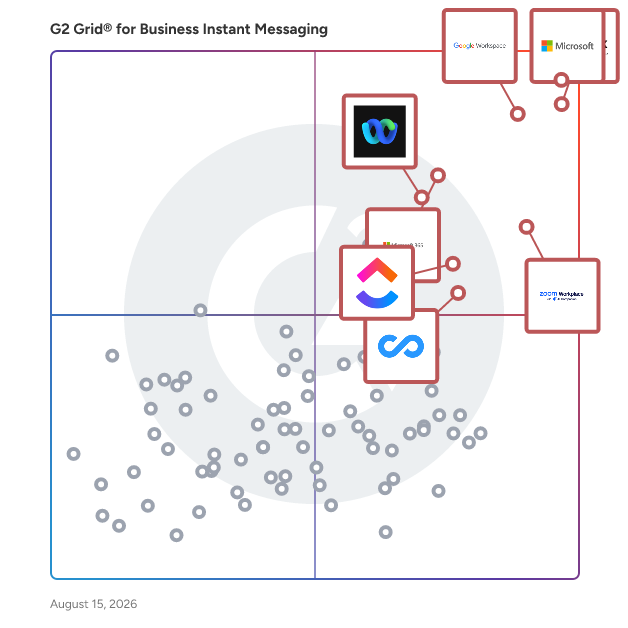
G2 Grid® for Business Instant Messaging Software

G2 Grid® for Business Instant Messaging Software plotting products by satisfaction and market presence

Highlighted products: Microsoft Teams, Slack, Google Workspace, Zoom Workplace, Microsoft 365, Webex Suite, ClickUp, and Connecteam.

Underlying data: [Grid® JSON](https://www.g2.com/categories/business-instant-messaging/grids.json?focus%5B%5D=microsoft-teams&focus%5B%5D=slack&focus%5B%5D=google-workspace&focus%5B%5D=zoom-workplace&focus%5B%5D=microsoft365&focus%5B%5D=cisco-webex-suite&focus%5B%5D=clickup&focus%5B%5D=connecteam)

Appinall

Appinall is a comprehensive communication and management platform designed to streamline operations for businesses, organizations, and communities. It offers a suite of tools that facilitate efficient communication, event management, and member engagement, all within a single, user-friendly interface. Key Features and Functionality: - Group Communication: Enables seamless messaging and collaboration among team members, enhancing productivity and coordination. - Event Management: Simplifies the planning, scheduling, and tracking of events, ensuring all participants are informed and engaged. - Member Management: Provides tools to manage member information, roles, and permissions, fostering organized and secure interactions. - Task Management: Allows assignment and tracking of tasks, ensuring accountability and timely completion of projects. - Payment Processing: Integrates payment solutions for collecting fees, donations, or sales, streamlining financial transactions. - Customizable Notifications: Offers tailored alerts and reminders to keep members informed about important updates and deadlines. Primary Value and Solutions Provided: Appinall addresses the challenges of fragmented communication and disjointed management tools by offering an all-in-one platform that centralizes essential functions. It enhances operational efficiency, improves member engagement, and simplifies administrative tasks, making it an invaluable solution for organizations seeking to optimize their internal processes and community interactions.

Average Rating: 4.4/5.0

Total Reviews: 22

How Do G2 Users Rate Appinall?

  • Has the product been a good partner in doing business?: 9.4/10 (Category avg: 8.8/10)
  • Web Application: 8.1/10 (Category avg: 9.0/10)
  • Third-Party Integrations: 8.4/10 (Category avg: 8.4/10)
  • File Sharing: 9.3/10 (Category avg: 8.9/10)

Who Is the Company Behind Appinall?

  • Seller: Appinall
  • Year Founded: 2015
  • HQ Location: Braintree, Massachusetts
  • Twitter: @Appinall
    225 Twitter followers
  • LinkedIn® Page: www.linkedin.com
    4 employees on LinkedIn®

Who Uses This Product?

  • Company Size: 39% Medium, 39% Small

What Do G2 Reviewers Say About Appinall?

AI-generated summary from verified user reviews

Pros
  • Users appreciate the ease of use of Appinall, enjoying seamless teamwork and quick setup across devices.
  • Users appreciate the simplicity and clarity of Appinall, making teamwork and project tracking effortless and efficient.
  • Users enjoy the easy file sharing feature of Appinall, enhancing teamwork and communication across platforms.
  • Users value the ease of teamwork in Appinall, appreciating the integration of chat, tasks, and file sharing.
  • Users appreciate the quick setup of Appinall, making team collaboration seamless and efficient on both mobile and web.
Cons
  • Users experience integration issues with external tools and slow app loading during high activity, affecting usability.
  • Users feel that the limited customization of advanced features hinders their ability to adapt workflows effectively.
  • Users experience performance issues with slow loading times in groups with many members or messages.
  • Users experience slow loading times with Appinall, especially when in large groups or during high message volumes.

What Are Recent G2 Reviews of Appinall?

What Are G2 Users Discussing About Appinall?

VIPole

VIPOLE is an encrypted communication platform designed for teams of all sizes. VIPole delivers secure messaging, calls, video, sharing and a whole host of collaboration tools for business, such as notes, an organizer, a daily planner and a password vault. Everything within the system is fully e2e encrypted in transit and at rest.

Average Rating: 4.5/5.0

Total Reviews: 15

How Do G2 Users Rate VIPole?

  • Has the product been a good partner in doing business?: 9.2/10 (Category avg: 8.8/10)
  • Web Application: 9.2/10 (Category avg: 9.0/10)
  • Third-Party Integrations: 8.2/10 (Category avg: 8.4/10)
  • File Sharing: 9.1/10 (Category avg: 8.9/10)

Who Is the Company Behind VIPole?

  • Seller: VIPole International LP
  • Year Founded: 2012
  • HQ Location: South Shields,United Kingdom
  • Twitter: @VIPoleapp
    577 Twitter followers
  • LinkedIn® Page: www.linkedin.com
    17 employees on LinkedIn®

Who Uses This Product?

  • Company Size: 53% Medium, 40% Small

What Do G2 Reviewers Say About VIPole?

AI-generated summary from verified user reviews

Cons
  • Users find the mobile app lacking features compared to the more robust desktop/web version.

What Are Recent G2 Reviews of VIPole?

What Are G2 Users Discussing About VIPole?

Sigmify

Sigmify is a cloud-based platform designed to enhance organizational collaboration and streamline business processes. It integrates customer relationship management (CRM), knowledge management, and issue tracking into a unified interface, enabling teams to work more efficiently and effectively. By consolidating information that is often scattered across various applications, emails, and documents, Sigmify provides a centralized hub for accessing and managing critical business data. This approach reduces the time spent gathering information, allowing users to focus on their core tasks. As a Software as a Service (SaaS) solution, Sigmify eliminates the need for hardware or software installations, offering a cost-effective, pay-as-you-use model that requires only an internet connection and a web browser. Key Features and Functionality: - Collaboration Tools: Facilitates real-time messaging, file sharing, and project management, ensuring seamless communication among team members. - CRM Integration: Provides tools for managing customer relationships, tracking interactions, and maintaining a comprehensive customer database. - Knowledge Management: Offers an easy-to-maintain organizational knowledge repository, centralizing information for quick access and reference. - Issue Tracking: Enables efficient management of day-to-day issues through an intuitive online portal, improving response times and resolution rates. - No-Code/Low-Code App Builder (MyApps): Allows users to create custom business process applications using a drag-and-drop interface, without the need for programming knowledge. - Integration Capabilities: Seamlessly integrates with existing applications, unifying data and enhancing workflow automation. - Mobile Accessibility: Provides mobile applications compatible with smartphones and tablets, ensuring access to critical information on the go. Primary Value and Solutions Provided: Sigmify addresses the common challenge of fragmented information within organizations by offering a centralized platform that unifies data from various sources. This consolidation enhances collaboration, improves decision-making, and increases overall productivity. By eliminating the need for multiple disparate systems, Sigmify reduces automation costs and simplifies IT infrastructure. Its no-code/low-code app builder empowers users to develop tailored solutions that meet specific business requirements, fostering innovation and agility. Additionally, as a cloud-based service, Sigmify ensures scalability, flexibility, and accessibility, enabling organizations to adapt to changing needs without significant investment in hardware or software.

Average Rating: 4.1/5.0

Total Reviews: 16

How Do G2 Users Rate Sigmify?

  • Has the product been a good partner in doing business?: 7.1/10 (Category avg: 8.8/10)
  • Web Application: 7.6/10 (Category avg: 9.0/10)
  • Third-Party Integrations: 6.9/10 (Category avg: 8.4/10)
  • File Sharing: 8.1/10 (Category avg: 8.9/10)

Who Is the Company Behind Sigmify?

  • Seller: Sigmify
  • HQ Location: Bala-Cynwyd, US
  • Twitter: @Sigmify
    41 Twitter followers
  • LinkedIn® Page: www.linkedin.com
    1 employees on LinkedIn®

Who Uses This Product?

  • Top Industries: Information Technology and Services
  • Company Size: 41% Medium, 35% Small

What Do G2 Reviewers Say About Sigmify?

AI-generated summary from verified user reviews

Pros
  • Users appreciate the improved communication of Sigmify, enhancing collaboration and workflow efficiency across teams and tasks.
  • Users find Sigmify to be easy to use, with a clean interface that streamlines workflows and enhances team collaboration.
  • Users appreciate the seamless integration and extensibility of Sigmify, centralizing tools and streamlining workflows effectively.
  • Users value the enhanced team collaboration offered by Sigmify, improving communication and streamlining workflows effortlessly.
  • Users value the automation capabilities of Sigmify, enhancing collaboration and streamlining workflows across multiple platforms.
Cons
  • Users find the learning curve steep, especially for custom app building and onboarding for non-technical users.
  • Users find custom app building complex for non-technical users, highlighting a steep learning curve with Sigmify.
  • Users find that connectivity issues hinder accessibility, making smart lighting less viable for small businesses and low-income households.
  • Users find Sigmify expensive, making smart lighting less accessible for small businesses and low-income households.
  • Users note the integration issues with Sigmify, highlighting limited compatibility with existing systems and apps.

What Are Recent G2 Reviews of Sigmify?

What Are G2 Users Discussing About Sigmify?

SayHey Messenger

SayHey Messenger® is a business instant messaging application designed to enhance team collaboration through secure, private, and regulatory-compliant communication. Tailored for industries with stringent compliance requirements, such as banking, finance, insurance, and human resources, SayHey Messenger® offers a customizable platform that integrates seamlessly into existing workflows. Key Features and Functionality: - Data Sovereignty: Provides organizations with full ownership and control over their messaging data, ensuring compliance with data protection regulations. - Regulatory Compliance: Meets industry standards for secure communication, making it suitable for regulated sectors. - Integration Capabilities: Can be deployed as a standalone SaaS mobile app or integrated into existing enterprise software systems. - Admin Portal: Offers tools for moderation, auditing, and keyword monitoring to maintain communication standards. - Collaboration Tools: Features such as SayHey Spaces enable company-wide broadcasts and team collaborations. - User Engagement: An intuitive interface designed to encourage user adoption and engagement. - External Messaging: Allows sending SMS messages to external users while maintaining data retention and compliance. - Custom Branding: Enables customization with company logos, colors, and other branding elements for a cohesive user experience. Primary Value and User Solutions: SayHey Messenger® addresses the critical need for secure and compliant internal and external communication within organizations. By offering full data ownership and control, it mitigates risks associated with data breaches and regulatory non-compliance. The platform's integration capabilities ensure a smooth adoption process, enhancing productivity without disrupting existing workflows. Additionally, its external messaging feature allows businesses to communicate with clients via SMS while adhering to compliance standards, thereby improving client engagement and satisfaction.

Average Rating: 4.3/5.0

Total Reviews: 16

How Do G2 Users Rate SayHey Messenger?

  • Has the product been a good partner in doing business?: 6.7/10 (Category avg: 8.8/10)
  • Web Application: 8.8/10 (Category avg: 9.0/10)
  • Third-Party Integrations: 7.9/10 (Category avg: 8.4/10)
  • File Sharing: 8.8/10 (Category avg: 8.9/10)

Who Is the Company Behind SayHey Messenger?

Who Uses This Product?

  • Company Size: 56% Small, 38% Medium

What Do G2 Reviewers Say About SayHey Messenger?

AI-generated summary from verified user reviews

Pros
  • Users value the instant chat feature of SayHey Messenger, enhancing communication with clients and teams effectively.
  • Users appreciate the ease of use of SayHey Messenger, making communication with employees quick and efficient.
  • Users appreciate the integrated and personalized communication experience with SayHey Messenger, enhancing workplace connectivity.
  • Users love the high-quality video and audio calls of SayHey Messenger, enhancing their communication experience significantly.
  • Users love the customization options that enhance their brand experience and improve communication effectiveness with SayHey Messenger.
Cons
  • Users find the learning curve steep due to a difficult UI and an overload of features, affecting usability.
  • Users identify missing features in SayHey Messenger, noting limitations in search and file-sharing capabilities.
  • Users face file sharing issues with SayHey Messenger, finding it difficult to navigate shared documents and conversations.
  • Users find the limited customization options in SayHey Messenger restrict their overall messaging experience.
  • Users find limited features in SayHey Messenger, with a focus on video chatting and minimal customization options.

What Are Recent G2 Reviews of SayHey Messenger?

Rock

Rock allows anyone to start collaborating on a new project within seconds with messaging, tasks, and everything related to project management in one space. Whether you work in a startup, marketing, software engineering, consulting, design, education or anything else, Rock can easily get people across teams together to work on new projects. Collaborate and message with freelancers, agencies, and other partners. All from the same place. Maximize your productivity while streamlining team communication and collaboration with: - Full-fledged messaging app with unlimited messages. - Tasks, project boards, to-do lists, filters, deadlines and more! - Kanban boards, sprints, recurring tasks, and more all in the Tasks mini-app. - Note-taking functionality to document important information with your team. - Seamless integrations with Google Drive, Zoom, GitHub, Zapier and more! The fastest way to start working on any project with anyone. Try Rock and collaborate and discuss with anyone.

Average Rating: 4.1/5.0

Total Reviews: 14

How Do G2 Users Rate Rock?

  • Has the product been a good partner in doing business?: 9.2/10 (Category avg: 8.8/10)
  • Web Application: 8.3/10 (Category avg: 9.0/10)
  • Third-Party Integrations: 7.1/10 (Category avg: 8.4/10)
  • File Sharing: 8.7/10 (Category avg: 8.9/10)

Who Is the Company Behind Rock?

  • Seller: Rock
  • Year Founded: 2019
  • HQ Location: San Francisco, US
  • Twitter: @LetsRockHQ
    514 Twitter followers
  • LinkedIn® Page: www.linkedin.com
    31 employees on LinkedIn®

Who Uses This Product?

  • Company Size: 64% Small, 21% Medium

What Do G2 Reviewers Say About Rock?

AI-generated summary from verified user reviews

Pros
  • Users appreciate the ease of use of Rock, enjoying its simple interface and smooth integration into workflows.
  • Users appreciate the clean and distraction-free interface of Rock, enhancing organization and teamwork efficiency.
  • Users appreciate the effective automation features that streamline tasks and organization for teams in one platform.
  • Users appreciate the convenience of Rock for its all-in-one interface and easy organization of tasks and notes.
  • Users appreciate the customization options in Rock, allowing for organized and tailored communication within teams.
Cons
  • Users find the limited features of Rock restricts functionality, with basic reporting and few third-party integrations.
  • Users face integration issues due to limited third-party options and basic reporting and analytics features.
  • Users find missing features in Rock, particularly with third-party integrations and basic reporting capabilities.
  • Users report performance issues with occasional slowdowns, impacting their overall experience and flexibility with the product.

What Are Recent G2 Reviews of Rock?

What Are G2 Users Discussing About Rock?

Maqpie

Maqpie is a real-time messaging solution that brings a chat between users to any SaaS without development at all.

Average Rating: 4.4/5.0

Total Reviews: 23

How Do G2 Users Rate Maqpie?

  • Has the product been a good partner in doing business?: 9.4/10 (Category avg: 8.8/10)
  • Web Application: 8.9/10 (Category avg: 9.0/10)
  • Third-Party Integrations: 8.9/10 (Category avg: 8.4/10)
  • File Sharing: 8.9/10 (Category avg: 8.9/10)

Who Is the Company Behind Maqpie?

  • Seller: Maqpie
  • Year Founded: 2016
  • HQ Location: N/A
  • Twitter: @maqpie
    15 Twitter followers
  • LinkedIn® Page: www.linkedin.com
    1 employees on LinkedIn®

Who Uses This Product?

  • Company Size: 70% Medium, 26% Large

What Do G2 Reviewers Say About Maqpie?

AI-generated summary from verified user reviews

Pros
  • Users appreciate the ease of use of Maqpie, enjoying streamlined communication and simplified management in one platform.
  • Users value the unified team communication of Maqpie, streamlining messaging and file sharing effortlessly.
  • Users find the setup ease of Maqpie incredibly user-friendly, streamlining their communication and workflow effortlessly.
  • Users appreciate the unified team communication in Maqpie, simplifying messaging and file sharing for improved collaboration.
  • Users appreciate the easy integrations of Maqpie, enhancing communication and simplifying workflow with various software tools.
Cons
  • Users find the limited features of Maqpie restrict their customization options and overall functionality.
  • Users find the limited customization options frustrating, wishing for more control over layouts and feature settings.
  • Users find that some features are limited, lacking necessary customization and flexibility for optimal use.

What Are Recent G2 Reviews of Maqpie?

What Are G2 Users Discussing About Maqpie?

SPACE Channel

SPACE Channel is a fast team communication tool with minimal but required features so that teams enjoy working with no confusion. The simple UX makes it easy to use for teams. Create channels for purposeful and organized communications. In-app meetings promote quick decision-making and real-time collaboration. Search and find the desired information effortlessly and in no time. Channel boosts the productivity of the team by accelerating and streamlining the strategy and execution.

Average Rating: 4.1/5.0

Total Reviews: 13

How Do G2 Users Rate SPACE Channel?

  • Has the product been a good partner in doing business?: 5.0/10 (Category avg: 8.8/10)
  • Web Application: 7.5/10 (Category avg: 9.0/10)
  • Third-Party Integrations: 5.8/10 (Category avg: 8.4/10)
  • File Sharing: 7.9/10 (Category avg: 8.9/10)

Who Is the Company Behind SPACE Channel?

Who Uses This Product?

  • Company Size: 77% Small, 15% Medium

What Do G2 Reviewers Say About SPACE Channel?

AI-generated summary from verified user reviews

Pros
  • Users value the real-time communication capabilities of SPACE Channel, enhancing collaboration and peer interaction effectively.
  • Users appreciate the ease of use of SPACE Channel, finding its content clear, engaging, and enjoyable to follow.
  • Users appreciate the intuitive explanations of SPACE Channel, finding complex topics engaging and easy to understand.
  • Users appreciate the well-organized content of SPACE Channel, making complex space topics easy and enjoyable to understand.
  • Users appreciate the clear and engaging explanations of complex space topics, enhanced by high-quality visuals and organization.
Cons
  • Users experience integration issues with SPACE Channel, affecting compatibility with partner tools and usability on lower-end devices.
  • Users report performance issues with SPACE Channel, noting high resource usage and limited integration with partner tools.
  • Users experience software glitches, including UI issues and frequent hanging, detracting from the overall experience.

What Are Recent G2 Reviews of SPACE Channel?

What Are G2 Users Discussing About SPACE Channel?

Thirdlane Connect

Thirdlane Connect is a white-label team collaboration tool with voice, omnichannel messaging, and video for MSPs, service providers, and telecom resellers on Thirdlane’s multi-tenant UCaaS platform. Deliver branded calling, chat, and meetings across web, desktop, and mobile with APIs and CRM integrations. Main features: - VoIP calling, call recording, transfer, and hold - Team chat for 1:1 and groups - Video meetings with screen sharing - Presence and status sync - File sharing and inline media - Click-to-call and CRM screen pops - Branded apps for web, Windows, macOS, Linux, iOS, and Android See how Thirdlane helps MSPs, UCaaS providers, resellers, and enterprises deliver white-label multi-tenant communications. Request a live demo today: https://www.thirdlane.com

Average Rating: 4.3/5.0

Total Reviews: 22

How Do G2 Users Rate Thirdlane Connect?

  • Has the product been a good partner in doing business?: 8.3/10 (Category avg: 8.8/10)

Who Is the Company Behind Thirdlane Connect?

  • Seller: Thirdlane
  • Year Founded: 2003
  • HQ Location: Fairfax, US
  • Twitter: @thirdlanepbx
    47 Twitter followers
  • LinkedIn® Page: www.linkedin.com
    4 employees on LinkedIn®
  • Ownership: Third Lane Technologies, LLC

Who Uses This Product?

  • Company Size: 43% Small, 29% Medium

What Do G2 Reviewers Say About Thirdlane Connect?

AI-generated summary from verified user reviews

Pros
  • Users love the ease of use of Thirdlane Connect, making communication seamless for everyone in the team.
  • Users value the easy communication of Thirdlane Connect, enjoying seamless calls, chats, and meetings in one platform.
  • Users value the consolidated communication tools in Thirdlane Connect, enhancing collaboration with seamless integration and ease of use.
  • Users find the easy setup of Thirdlane Connect allows for quick integration and smooth communication from the start.
  • Users value the intuitive interface of Thirdlane Connect, enhancing workflows and making communication seamless across all devices.
Cons
  • Users face a steep learning curve with Thirdlane Connect, making initial setup and navigation challenging for non-technical users.
  • Users often struggle with the difficult setup of Thirdlane Connect, as it demands technical expertise for configuration.
  • Users find the steep learning curve challenging, particularly for non-technical users during initial setup and navigation.
  • Users struggle with the steep learning curve and dated interface of Thirdlane Connect, complicating initial setup and navigation.
  • Users struggle with the difficult interface of Thirdlane Connect, finding setup and navigation overwhelming and challenging.

What Are Recent G2 Reviews of Thirdlane Connect?

What Are G2 Users Discussing About Thirdlane Connect?

Aritic Swarm

Real-time Communication App for Team Collaboration, Communication and Engagement

Average Rating: 4.4/5.0

Total Reviews: 9

How Do G2 Users Rate Aritic Swarm?

  • Web Application: 8.3/10 (Category avg: 9.0/10)
  • Third-Party Integrations: 7.0/10 (Category avg: 8.4/10)
  • File Sharing: 8.9/10 (Category avg: 8.9/10)

Who Is the Company Behind Aritic Swarm?

  • Seller: Aritic
  • Year Founded: 2015
  • HQ Location: Bangalore, IN
  • Twitter: @ariticdotcom
    857 Twitter followers
  • LinkedIn® Page: www.linkedin.com
    43 employees on LinkedIn®

Who Uses This Product?

  • Company Size: 67% Medium, 33% Small

What Do G2 Reviewers Say About Aritic Swarm?

AI-generated summary from verified user reviews

Pros
  • Users value the high video quality in Aritic Swarm, enhancing their messaging and collaboration experiences significantly.
  • Users value the secure file sharing and collaboration capabilities of Aritic Swarm, enhancing remote teamwork efficiency.
  • Users praise the user-friendly interface of Aritic Swarm, appreciating its simplicity and ease of use.
  • Users value the instant and collaborative communication features of Aritic Swarm, enhancing teamwork across remote platforms.
  • Users praise the secure screen sharing capabilities of Aritic Swarm, enhancing remote collaboration and communication significantly.
Cons
  • Users face integration issues with Aritic Swarm, limiting compatibility with other applications and websites.
  • Users face complexity challenges with Aritic Swarm, especially new users struggling with the overwhelming feature set.
  • Users are concerned about the lack of transparent pricing and limited integration options with Aritic Swarm.
  • Users experience file sharing issues with Aritic Swarm, leading to reliance on external cloud storage for management.
  • Users express concern over the limited customization options in Aritic Swarm, affecting their personalization experience.

What Are Recent G2 Reviews of Aritic Swarm?

What Are G2 Users Discussing About Aritic Swarm?

Team Engine

To win the war on talent, you need a lightning-fast hiring process and a fail-proof system for consistent communication with candidates and employees alike. Team Engine helps you attract more applicants, hire them quicker and—crucially—keep them engaged throughout their tenure. Team Engine accelerates the hiring process by automating the manual (but time-sensitive) steps needed to keep candidates moving forward—even when your team is off the clock! Reach candidates and employees where they prefer to engage (in their texts) with our automated messaging platform that keeps everyone in the loop. By automating best practices for hiring and retention, you’ll ensure the best experience for your applicants and employees. Team Engine will help you: Find and hire great people — Automate the redundant tasks in your hiring process so you can add value where it matters most. Motivate and retain quality employees — Get new hires off to a good start with structured one-on-ones and the opportunity to give feedback on the experience. Execute and continuously improve — Build connectedness across your company to get work done, create efficient processes, and nurture a culture of growth and development. A glimpse at how we help: • texting with deskless employees & job applicants • automated messaging for time-sensitive communications (e.g. interview reminders and open enrollment deadlines) • built-in recruitment advertising on Craigslist, Facebook & Instagram • translated communications for Spanish-speakers • a centralized hub for organizing all recruiting activity and applicant details • diversification of candidate sourcing for greater reach

Average Rating: 4.7/5.0

Total Reviews: 56

How Do G2 Users Rate Team Engine?

  • Has the product been a good partner in doing business?: 9.7/10 (Category avg: 8.8/10)
  • Web Application: 7.8/10 (Category avg: 9.0/10)
  • Third-Party Integrations: 7.5/10 (Category avg: 8.4/10)
  • File Sharing: 7.5/10 (Category avg: 8.9/10)

Who Is the Company Behind Team Engine?

  • Seller: Team Engine
  • HQ Location: Boulder, Colorado
  • Twitter: @TeamEngine_IO
    138 Twitter followers
  • LinkedIn® Page: www.linkedin.com
    16 employees on LinkedIn®

Who Uses This Product?

  • Top Industries: Construction, Consumer Services
  • Company Size: 70% Medium, 30% Small

What Do G2 Reviewers Say About Team Engine?

AI-generated summary from verified user reviews

Pros
  • Users appreciate the responsive customer service of Team Engine, valuing quick answers and effective action on suggestions.
  • Users value the excellent communication features of Team Engine, appreciating quick responses and effective automatisms.
  • Users value the ease of use of Team Engine, enabling seamless communication and efficient scheduling throughout recruitment.
  • Users appreciate the automation and communication features of Team Engine, streamlining applicant interactions and job postings.
  • Users value the effective communication automations in Team Engine, streamlining applicant interactions and internal announcements.
Cons
  • Users are frustrated by the messaging issues that hinder communication and delay important updates from Team Engine.
  • Users are dissatisfied with the limited flexibility in the hiring process, preferring more options and scheduling capabilities.
  • Users find the limited customization options frustrating, wishing for enhanced scheduling and hiring process functionalities.
  • Users feel the missing bulk automation features hinder effective communication and management throughout the hiring process.
  • Users desire more robust scheduling capabilities, wishing for auto-updates and better options for hiring processes.

What Are Recent G2 Reviews of Team Engine?

What Are G2 Users Discussing About Team Engine?

JoiTeam

JoiTeam unifies all your collaboration in one platform. From messaging to office automation and workflow tools, it enables teams to work smarter and faster — through on-premise deployment with enhanced security management.

Average Rating: 4.4/5.0

Total Reviews: 8

How Do G2 Users Rate JoiTeam?

  • Has the product been a good partner in doing business?: 9.2/10 (Category avg: 8.8/10)
  • Web Application: 8.8/10 (Category avg: 9.0/10)
  • Third-Party Integrations: 9.0/10 (Category avg: 8.4/10)
  • File Sharing: 9.2/10 (Category avg: 8.9/10)

Who Is the Company Behind JoiTeam?

Who Uses This Product?

  • Company Size: 50% Small, 38% Medium

What Do G2 Reviewers Say About JoiTeam?

AI-generated summary from verified user reviews

Pros
  • Users value the effective communication offered by JoiTeam, enhancing collaboration and keeping teams aligned effortlessly.
  • Users find JoiTeam's ease of use enhances project management, facilitating seamless collaboration and communication among team members.
  • Users love the easy file sharing in JoiTeam, enhancing team coordination and simplifying collaboration efforts.
  • Users love that JoiTeam provides easy collaboration, simplifying project management and enhancing team coordination effectively.
  • Users appreciate the integrated task management of JoiTeam, enabling seamless collaboration and focus without switching apps.
Cons
  • Users find the interface not intuitive, making navigation and file sharing more cumbersome than necessary.
  • Users find the file sharing issues in JoiTeam frustrating, especially with larger file uploads and locating shared items.
  • Users find the learning curve steep due to a crowded interface and challenges with file sharing.
  • Users note the limited customization options for dashboards, along with slow loading times and mobile access issues.
  • Users note that the free version has limited features and customer support is also lacking.

What Are Recent G2 Reviews of JoiTeam?

Relesys

Relesys is a Software-as-a-Service (SaaS) company founded with the sole purpose of creating a more engaged and united workforce. The communication and performance platform enables companies to strengthen their internal communication and performance by providing employees access via an intuitive user-friendly app, with all the information they need to succeed with their jobs, thus improving the overall performance.

Average Rating: 4.6/5.0

Total Reviews: 13

How Do G2 Users Rate Relesys?

  • Has the product been a good partner in doing business?: 9.4/10 (Category avg: 8.8/10)
  • Web Application: 10.0/10 (Category avg: 9.0/10)
  • Third-Party Integrations: 10.0/10 (Category avg: 8.4/10)
  • File Sharing: 10.0/10 (Category avg: 8.9/10)

Who Is the Company Behind Relesys?

  • Seller: Relesys
  • Year Founded: 2014
  • HQ Location: Nordhavn, DK
  • Twitter: @TheRelesysApp
    36 Twitter followers
  • LinkedIn® Page: www.linkedin.com
    118 employees on LinkedIn®
  • Ownership: RELE (CPH)

Who Uses This Product?

  • Top Industries: Retail
  • Company Size: 62% Medium, 31% Large

What Are Recent G2 Reviews of Relesys?

What Are G2 Users Discussing About Relesys?

Bizeus

Bizeus is an all-in-one conversational CRM platform built for businesses that want to scale customer communication across WhatsApp, Messenger, and Instagram. Designed to streamline and centralize conversations, Bizeus empowers teams to manage multi-agent chats from a unified inbox, automate repetitive tasks, and provide fast, personalized support at scale. Whether you're a startup, a growing company, or an agency managing multiple clients, Bizeus helps you increase productivity, close more sales, and deliver exceptional customer experiences - all from one simple, powerful interface. At the heart of Bizeus is its WhatsApp CRM integration, allowing you to connect one or multiple numbers per company without going through the tedious approval process of WhatsApp Business API. Your agents can send and receive messages, respond to chats in real time, assign conversations to teammates, and track interactions with complete visibility - no tech team required. Bizeus includes features like: Omnichannel inbox: manage conversations from WhatsApp, Messenger, and Instagram in one place. Multi-agent support: allow multiple users to handle messages from the same number. Smart automation: use tags, quick replies, and workflows to reduce response times. Conversation tracking: keep a record of every chat, lead, and customer interaction. Team performance insights: monitor productivity, response time, and engagement metrics. Built for modern sales and support teams, Bizeus helps reduce response time, increase team collaboration, and scale your customer service efforts. It’s especially useful for eCommerce, education, digital services, and local businesses that rely heavily on conversational channels to convert and retain clients. Getting started with Bizeus is quick — no technical setup, no coding, and no API approval. Just scan, connect, and start engaging. Whether you're launching campaigns, handling support inquiries, or managing daily conversations, Bizeus gives you the tools to do it better, faster, and smarter.

Average Rating: 4.2/5.0

Total Reviews: 6

How Do G2 Users Rate Bizeus?

  • Has the product been a good partner in doing business?: 7.5/10 (Category avg: 8.8/10)
  • Web Application: 7.9/10 (Category avg: 9.0/10)
  • Third-Party Integrations: 5.6/10 (Category avg: 8.4/10)
  • File Sharing: 7.2/10 (Category avg: 8.9/10)

Who Is the Company Behind Bizeus?

Who Uses This Product?

  • Company Size: 67% Medium, 33% Small

What Do G2 Reviewers Say About Bizeus?

AI-generated summary from verified user reviews

Pros
  • Users love Bizeus for its seamless integration of messaging apps, enhancing efficiency and ease of communication.
  • Users highlight the ease of use with Bizeus, enjoying seamless integration and organized communication from multiple platforms.
  • Users appreciate the ease of use and integration of Bizeus, simplifying customer communication with a unified inbox.
  • Users value the automations in Bizeus, enhancing efficiency and streamlining customer interactions for better management.
  • Users value Bizeus for its effective communication capabilities, transforming interactions into relatable and manageable experiences.
Cons
  • Users face integration issues with Bizeus, limiting flexibility and connectivity with third-party applications and services.
  • Users find the difficult navigation in some modules frustrating, hindering their overall experience with Bizeus.
  • Users experience file sharing issues with Bizeus, finding it less efficient for complex tasks on mobile devices.
  • Users find the initial setup challenging, but appreciate the flexibility with third-party integrations after overcoming it.
  • Users find the job listings lack uniqueness, often leading to cliches that diminish their effectiveness.

What Are Recent G2 Reviews of Bizeus?

Heed

Heed is an employee communication and alerting platform that enables organizations to deliver targeted messages directly to employees across desktop, mobile, and shared display devices. Heed belongs to the Employee Communication Software category and is used by medium to large enterprises that need to reach employees quickly and reliably, whether to share business updates, compliance notifications, or time-sensitive operational alerts. The platform is designed for industries where information visibility and accountability are essential, including financial services, government, healthcare, and technology. Heed helps communication, HR, and IT teams manage and distribute content through multiple channels while tracking delivery and engagement metrics in real time. Its cross-device architecture ensures messages appear prominently, not lost in crowded inboxes or internal chat threads. Key Features and Capabilities: * Desktop Alerts & Mobile Notifications: Deliver instant, attention grabbing updates across devices. * Digital Signage & Corporate Screensavers: Display branded content and announcements on shared screens and employee desktops. * Desktop Ticker: Keep key information visible throughout the day with a persistent scrolling news bar. * Targeting & Scheduling: Send messages to specific employee groups or locations, on demand or at scheduled times. * Analytics & Reporting: Measure message delivery, open rates, and engagement trends for transparency and optimization. Common Use Cases: - Communicating urgent IT, security, or operational incidents. - Sharing compliance and policy updates that require acknowledgment. - Promoting engagement initiatives, surveys, or internal campaigns. - Distributing leadership messages or cultural updates to dispersed teams. Heed integrates with existing enterprise tools such as ServiceNow, Microsoft Teams, and SharePoint, enabling organizations to automate and extend communication workflows. The platform supports both cloud and on-premise deployments, making it suitable for regulated or security-sensitive environments. By consolidating multiple communication channels into a single, manageable system, Heed provides a structured, measurable way for businesses to ensure the right message reaches the right people at the right time.

Average Rating: 4.9/5.0

Total Reviews: 10

How Do G2 Users Rate Heed?

  • Has the product been a good partner in doing business?: 10.0/10 (Category avg: 8.8/10)
  • Web Application: 10.0/10 (Category avg: 9.0/10)
  • Third-Party Integrations: 8.3/10 (Category avg: 8.4/10)
  • File Sharing: 9.2/10 (Category avg: 8.9/10)

Who Is the Company Behind Heed?

  • Seller: Heed
  • Year Founded: 2017
  • HQ Location: London, GB
  • LinkedIn® Page: www.linkedin.com
    21 employees on LinkedIn®
  • Ownership: privately owned

Who Uses This Product?

  • Company Size: 50% Small, 30% Medium

What Do G2 Reviewers Say About Heed?

AI-generated summary from verified user reviews

Pros
  • Users appreciate Heed's centralized platform for health, safety, and compliance, enhancing visibility and proactive responses.
  • Users value the real-time alerts and targeted notifications from Heed, enhancing team responsiveness and communication efficiency.
  • Users value the real-time alerts of Heed, enhancing team responsiveness and ensuring critical updates are promptly seen.
  • Users value the effective team collaboration provided by Heed, enhancing communication and engagement across remote teams.
  • Users appreciate the real-time alerts from Heed, enhancing responsiveness and alignment during critical situations.
Cons
  • Users find the costing to be expensive and require customization based on their specific industrial needs.
  • Users note that integration issues can complicate the setup process, impacting overall functionality and customization.
  • Users note a lack of integrations, which can hinder the seamless connection with existing tools and workflows.
  • Users frequently experience lagging performance with Heed, which detracts from their overall satisfaction with the product.
  • Users feel that Heed's limited customization options hinder their ability to tailor alerts and integrations for specific workflows.

What Are Recent G2 Reviews of Heed?

Tetra Teams

Tetra is that one place where your team converges to accomplish things but also to address unaccomplished things in the most collaborative way. Certain things get neglected and thus gets delayed, but with Tetra, you are in full control of all things. It is not only a workplace collaboration suite but also a project management suite of getting things done. Thus it combines the power of collaboration towards completion. When it comes to team collaboration and getting things done, you can consult several people or read several books, but still you may have no idea or clue as to how to proceed or you can smartly keep things online in “one place”. Features 1. Real time messaging 2. Whiteboard 3. Assessment Tools 4. Smart Search 5. No data stored in devices 6. Task Management 7. Polls & Surveys 8. Integration with applications 9. End to End encryption 10. Auto Thread creation 11. Notifications

Average Rating: 4.7/5.0

Total Reviews: 6

How Do G2 Users Rate Tetra Teams?

  • Has the product been a good partner in doing business?: 8.9/10 (Category avg: 8.8/10)
  • Web Application: 9.0/10 (Category avg: 9.0/10)
  • Third-Party Integrations: 8.7/10 (Category avg: 8.4/10)
  • File Sharing: 8.7/10 (Category avg: 8.9/10)

Who Is the Company Behind Tetra Teams?

Who Uses This Product?

  • Company Size: 67% Small, 17% Large

What Do G2 Reviewers Say About Tetra Teams?

AI-generated summary from verified user reviews

Pros
  • Users appreciate the ease of use of Tetra Teams, benefiting from seamless collaboration and organized discussions.
  • Users value the efficient file sharing of Tetra Teams, enhancing collaboration and reducing time spent on administrative tasks.
  • Users value the organization features of Tetra Teams, enhancing collaboration and productivity through streamlined communication and documentation.
  • Users value Tetra Teams for its efficient task management, fostering seamless collaboration and organization among team members.
  • Users appreciate the smooth team collaboration in Tetra Teams, benefiting from integrated tasks, meetings, and knowledge sharing.
Cons
  • Users find the learning curve challenging, especially for those transitioning from other platforms or inexperienced teams.
  • Users find the difficult navigation of Tetra Teams frustrating, often requiring extra clicks to access features.
  • Users experience integration issues with Tetra Teams, making it difficult to connect with essential third-party tools effectively.
  • Users face limited customization options with Tetra Teams, making it hard to adapt to specific workflows and tools.

What Are Recent G2 Reviews of Tetra Teams?

Neeraja Prakash
NP
Researched and written by Neeraja Prakash
Updated October 23, 2024