# Best Billing Software for Small Business - Page 3

*By [Nathan Calabrese](https://research.g2.com/insights/author/nathan-calabrese)*


Products classified in the overall Billing category are similar in many regards and help companies of all sizes solve their business problems. However, small business features, pricing, setup, and installation differ from businesses of other sizes, which is why we match buyers to the right Small Business Billing to fit their needs. Compare product ratings based on reviews from enterprise users or connect with one of G2&#39;s buying advisors to find the right solutions within the Small Business Billing category.

In addition to qualifying for inclusion in the Billing Software category, to qualify for inclusion in the Small Business Billing Software category, a product must have at least 10 reviews left by a reviewer from a small business.


## Top Billing Software at a Glance
| # | Product | Rating | Best For | What Users Say |
|---|---------|--------|----------|----------------|
| 1 | [NetSuite](https://www.g2.com/products/oracle-netsuite/reviews) | 4.1/5.0 (4,718 reviews) | End-to-end billing with customizable revenue recognition | "[Real-Time Visibility Across Finance, Inventory, Purchasing, and Sales](https://www.g2.com/survey_responses/netsuite-review-12905951)" |
| 2 | [Xero](https://www.g2.com/products/xero/reviews) | 4.4/5.0 (1,673 reviews) | Cloud-native invoicing with automated bank reconciliation | "[Beginner-Friendly Accounting with Fast Support, Helpful AI, and Smooth Hubdoc Uploads](https://www.g2.com/survey_responses/xero-review-13094370)" |
| 3 | [PayPal Invoicing](https://www.g2.com/products/paypal-invoicing/reviews) | 4.3/5.0 (204 reviews) | PayPal-native invoicing with integrated payment collection | "[PayPal Invoicing Makes Billing Fast, Secure, and Effortlessly Organized](https://www.g2.com/survey_responses/paypal-invoicing-review-13057548)" |
| 4 | [BILL AP/AR](https://www.g2.com/products/bill-ap-ar/reviews) | 4.4/5.0 (1,783 reviews) | QuickBooks-integrated AP/AR approval workflows | "[Bill.com-Tool for seamless accounts payable process](https://www.g2.com/survey_responses/bill-ap-ar-review-8948375)" |
| 5 | [Square Point of Sale](https://www.g2.com/products/square-point-of-sale/reviews) | 4.6/5.0 (1,182 reviews) | Mobile invoicing with integrated payment collection | "[Square Point of Sale: Simple, Flexible, and Easy for Staff to Learn](https://www.g2.com/survey_responses/square-point-of-sale-review-12726472)" |
| 6 | [Zoho Invoice](https://www.g2.com/products/zoho-invoice/reviews) | 4.7/5.0 (360 reviews) | Zero-cost invoicing with automated payment reminders | "[Zoho Invoice Makes Invoicing Fast, Organized, and Professional](https://www.g2.com/survey_responses/zoho-invoice-review-13033429)" |
| 7 | [FreshBooks](https://www.g2.com/products/freshbooks/reviews) | 4.5/5.0 (959 reviews) | Service-business invoicing with automated recurring billing | "[A great balance between invoicing, project tracking, and profitability](https://www.g2.com/survey_responses/freshbooks-review-13058067)" |
| 8 | [Stampli](https://www.g2.com/products/stampli/reviews) | 4.6/5.0 (1,952 reviews) | AI-coded invoice approval with ERP sync | "[All-in-One Invoice View Makes Approvals Fast and Efficient](https://www.g2.com/survey_responses/stampli-review-13061256)" |
| 9 | [Chargebee](https://www.g2.com/products/chargebee/reviews) | 4.4/5.0 (963 reviews) | — | "[Affordable, Reliable, but Needs UI Enhancements](https://www.g2.com/survey_responses/chargebee-review-13030719)" |
| 10 | [Zoho Books](https://www.g2.com/products/zoho-books/reviews) | 4.4/5.0 (320 reviews) | End-to-end invoicing with Zoho-native automation | "[All-in-One Finance Management with a Clean, Intuitive Dashboard](https://www.g2.com/survey_responses/zoho-books-review-12738952)" |


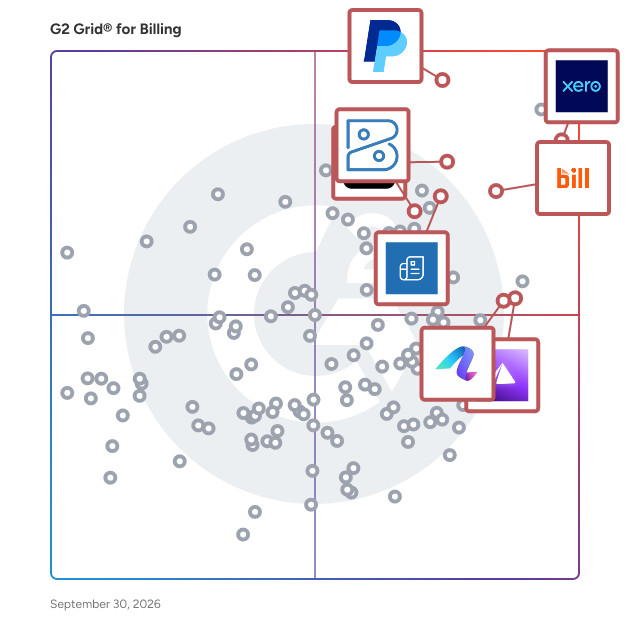
## G2 Grid® for Billing Software
![G2 Grid® for Billing Software plotting products by satisfaction and market presence](https://www.g2.com/categories/billing/grids.png?focus%5B%5D=1142&focus%5B%5D=96727&focus%5B%5D=1656&focus%5B%5D=5855&focus%5B%5D=6006&focus%5B%5D=1191&focus%5B%5D=147434&focus%5B%5D=164780)
Highlighted products: Xero, PayPal Invoicing, Square Point of Sale, Zoho Invoice, BILL AP/AR, FreshBooks, Refrens Accounting, and Anchor.
Underlying data: [Grid® JSON](https://www.g2.com/categories/billing/grids.json?focus%5B%5D=xero&amp;focus%5B%5D=paypal-invoicing&amp;focus%5B%5D=square-point-of-sale&amp;focus%5B%5D=zoho-invoice&amp;focus%5B%5D=bill-ap-ar&amp;focus%5B%5D=freshbooks&amp;focus%5B%5D=refrens-accounting&amp;focus%5B%5D=anchor-anchor&amp;segment=small-business)


## How Many Billing Software Products Does G2 Track?
**Total Products under this Category:** 764

### Category Stats (Jul 2026)
- **Average Rating**: 4.41/5 The average rating of products in this category, based on all submitted ratings
- **Top Trending Product**: Mango Practice Management (+5.19%) - Among all products in this category, Mango Practice Management recorded the largest rating increase compared to last month
*Last updated: July 18, 2026*


## How Does G2 Rank Billing Software Products?

**Why You Can Trust G2's Software Rankings:**

- 30 Analysts and Data Experts
- 32,800+ Authentic Reviews
- 764+ Products
- Unbiased Rankings

G2's software rankings are built on verified user reviews, rigorous moderation, and a consistent research methodology maintained by a team of analysts and data experts. Each product is measured using the same transparent criteria, with no paid placement or vendor influence. While reviews reflect real user experiences, which can be subjective, they offer valuable insight into how software performs in the hands of professionals. Together, these inputs power the G2 Score, a standardized way to compare tools within every category.


---

**Sponsored**

### Greenhouse

Greenhouse is more than an ATS – they’re a true hiring partner that gives companies of all sizes everything they’ll ever need to get measurably better at hiring. With Greenhouse, organizations can cut recruiting costs and ensure every hire is the right hire. Their industry-leading, AI-powered software supports every stage of the hiring process, from sourcing to onboarding, empowering companies to hire top talent quickly, consistently and fairly – today and as their business grows. With a structured hiring approach at its core, Greenhouse makes it easy to define the role, requirements and attributes of a successful candidate before a job is posted, enabling internal alignment and more confident, data-driven decisions. Greenhouse Real Talent™ enhances this process by helping teams identify and prioritize real, qualified candidates while detecting fraud, spam and impersonation attempts. They’ve helped over 7,500 companies across diverse industry verticals and scaling goals turn talent into a strategic advantage, so they can be ready to hire for what’s next. Some of the most successful companies, like Hubspot, Block, NFL, Lyft, Trivago and HelloFresh, use Greenhouse for data and guidance on the behaviors and capabilities they need to improve their overall hiring performance. They have also received numerous awards showcasing their commitment to product innovation and great hiring, including: G2 Top 50 Best HR Products (2025), G2 Best Enterprise Products (2025), Fortune Best Workplaces (2019–2024) and Inc. 5000 (2018–2024). © 2024, Greenhouse Software, Inc. All rights reserved. &quot;Hire for what&#39;s next,&quot; “The/Your all-together hiring platform,” &quot;Talent Makers&quot; and the G Logo are trademarks of Greenhouse Software, Inc.


[Visit website](https://www.g2.com/external_clickthroughs/record?secure%5Bad_program%5D=ppc&amp;secure%5Bad_slot%5D=category_product_list&amp;secure%5Bcategory_id%5D=90&amp;secure%5Bchosen_at%5D=2026-07-19T19%3A31%3A04Z&amp;secure%5Bdisplayable_resource_id%5D=789&amp;secure%5Bdisplayable_resource_type%5D=Category&amp;secure%5Bmedium%5D=sponsored&amp;secure%5Bplacement_reason%5D=retargeted_product&amp;secure%5Bplacement_resource_ids%5D%5B%5D=3900&amp;secure%5Bprioritized%5D=false&amp;secure%5Bproduct_id%5D=3900&amp;secure%5Bresource_id%5D=90&amp;secure%5Bresource_type%5D=Category&amp;secure%5Bsource_type%5D=category_page&amp;secure%5Bsource_url%5D=https%3A%2F%2Fwww.g2.com%2Fcategories%2Fbilling%2Fsmall-business%3Fpage%3D4&amp;secure%5Btoken%5D=e3884a892866217f5f3fbf3cec54147b3b7bec2ac6eb97ef8e7de6401aceb823&amp;secure%5Burl%5D=https%3A%2F%2Fwww.greenhouse.com%2Fdemo%3Futm_medium%3Ddirectories%26utm_source%3Dg2clicks%26utm_campaign%3DGRO-1125-directoryppc%26utm_targeting%3Dnamer-all-ec-prospect%26utm_content%3D&amp;secure%5Burl_type%5D=book_demo)

---

## What Are the Top-Rated Billing Software Products in 2026?
### 1. [BQE CORE](https://www.g2.com/products/core-bqe-software-inc/reviews)
Designed for and built by Architects , Engineers, Consulting Firms, and Professional Service Practices, BQE CORE is an all-in-one professional services work management platform that enables firms to control every aspect of their operations - project management, project accounting, time &amp; expense, time tracking, billing &amp; invoicing, project-based ERP, professional services automation, and so much more. BQE CORE makes it easier and more profitable to run professional services firms. It organizes information, automates repetitive tasks, and allows your firm to spend more time providing service to your clients instead of managing internal processes. It is built by Architects, Engineers, and CPA&#39;s to meet the specific needs of professional services firms. It helps firms bolster their cash flow by expediting their billing process while improving their project management and their ability to analyze performance. BQE CORE utilizes state-of-the-art technologies delivering actionable business intelligence and award winning artificial intelligence including natural language processing and speech recognition. BQE CORE supports a wide range of industries, including architect firms, engineering, legal services and many more. You can access BQE CORE from any browser or mobile device and experience full functionality. The native mobile app includes iPhone and Android devices. CORE also has over 200 report and invoice templates. Invoices for every contract type conceivable.


**Average Rating:** 4.3/5.0
**Total Reviews:** 437
**How Do G2 Users Rate BQE CORE?**

- **Has the product been a good partner in doing business?:** 8.4/10 (Category avg: 8.9/10)
- **Accounting:** 8.4/10 (Category avg: 8.7/10)
- **Payments:** 8.5/10 (Category avg: 8.6/10)
- **Management:** 8.6/10 (Category avg: 8.7/10)

**Who Is the Company Behind BQE CORE?**

- **Seller:** [BQE Software, Inc.](https://www.g2.com/sellers/bqe-software-inc)
- **Company Website:** https://www.bqe.com
- **Year Founded:** 1995
- **HQ Location:** Torrance, CA
- **Twitter:** @bqesoftware (3,923 Twitter followers)
- **LinkedIn® Page:** https://www.linkedin.com/company/151644/ (410 employees on LinkedIn®)

**Who Uses This Product?**
- **Who Uses This:** Office Manager, Architect
- **Top Industries:** Architecture &amp; Planning, Civil Engineering
- **Company Size:** 79% Small-Business, 19% Mid-Market


#### What Are BQE CORE's Pros and Cons?

**Pros:**

- Ease of Use (9 reviews)
- User Interface (5 reviews)
- Invoice Management (4 reviews)
- Invoicing (4 reviews)
- Time Tracking (4 reviews)

**Cons:**

- Slow Loading (4 reviews)
- Slow Performance (4 reviews)
- Learning Difficulty (3 reviews)
- Complex Usability (2 reviews)
- Learning Curve (2 reviews)


### What Do G2 Reviewers Say About BQE CORE?
*AI-generated summary from verified user reviews*

**Pros:**

- Users find **BQE CORE&#39;s ease of use** to be exceptional, facilitating various business functions seamlessly.
- Users appreciate the **intuitive user interface** of BQE CORE, enhancing project management and time tracking efficiency.
- Users praise BQE CORE&#39;s **efficient invoice management** , enjoying its simplicity and responsive customer support for seamless transactions.
- Users praise the **easy invoicing process** in BQE CORE, highlighting its efficiency and helpful customer support.
- Users find **time tracking effortless** with BQE CORE, enhancing project management and invoicing capabilities significantly.

**Cons:**

- Users note that the **slow loading** of BQE CORE can hinder the overall experience, despite its reliability.
- Users experience **slow performance** with BQE CORE, noting lag and refresh needs, despite its reliability.
- Users find the **learning difficulty** frustrating due to complicated navigation and cumbersome record management.
- Users find the **navigation complex** and scheduling training challenging, impacting their overall experience with BQE CORE.
- Users find the **learning curve steep** , making initial navigation and training a challenge for new users.

#### What Are Recent G2 Reviews of BQE CORE?

**"[Good Software](https://www.g2.com/survey_responses/bqe-core-review-11659639)"**

**Rating:** 5.0/5.0 stars
*— Camilo R.*

[Read full review](https://www.g2.com/survey_responses/bqe-core-review-11659639)

---

**"[BQE has all of the pieces we were missing!](https://www.g2.com/survey_responses/bqe-core-review-7306061)"**

**Rating:** 4.0/5.0 stars
*— Verified User in Civil Engineering*

[Read full review](https://www.g2.com/survey_responses/bqe-core-review-7306061)

---


#### What Are G2 Users Discussing About BQE CORE?

- [What are the components in a core ERP system?](https://www.g2.com/discussions/what-are-the-components-in-a-core-erp-system)
- [What are the 3 most common core ERP components?](https://www.g2.com/discussions/what-are-the-3-most-common-core-erp-components)
- [What are two features of a ERP?](https://www.g2.com/discussions/what-are-two-features-of-a-erp)
- [What are the main features of ERP?](https://www.g2.com/discussions/bqe-core-what-are-the-main-features-of-erp)

### 2. [FastSpring](https://www.g2.com/products/fastspring/reviews)
FastSpring is the leading merchant of record for global SaaS &amp; software companies and gaming studios – powering over a billion dollars in worldwide transactions every year. We&#39;ll manage your checkout, VAT, sales tax, compliance, and more, freeing you to focus on what you do best – building great products and games! For two decades, FastSpring has been a payment provider you can use to sell games or in-game items on your website, web shop, or embedded directly into your game with fully customizable and branded checkouts just for you. Founded in 2005, FastSpring is a privately owned company headquartered in Santa Barbara with offices in Austin, Amsterdam, Singapore, Canada, and the UK. Need to review a charge from one of our sellers?https://fastspring.com/consumer-support For questions about billing or refunds, visit: https://fastspring.com/consumer-support/topics/billing-and-refunds We value your feedback and want to make things right. FastSpring is an authorized reseller of digital products for thousands of global companies. &quot;FS\*,&quot; &quot;PP\*FS,&quot; or &quot;FSPRG&quot; on your financial statement may indicate a charge from a company that uses FastSpring to process online transactions.


**Average Rating:** 4.5/5.0
**Total Reviews:** 178
**How Do G2 Users Rate FastSpring?**

- **Has the product been a good partner in doing business?:** 9.3/10 (Category avg: 8.9/10)
- **Accounting:** 10.0/10 (Category avg: 8.7/10)
- **Payments:** 10.0/10 (Category avg: 8.6/10)
- **Management:** 10.0/10 (Category avg: 8.7/10)

**Who Is the Company Behind FastSpring?**

- **Seller:** [FastSpring](https://www.g2.com/sellers/fastspring)
- **Company Website:** https://fastspring.com/
- **Year Founded:** 2005
- **HQ Location:** Santa Barbara, CA
- **Twitter:** @FastSpring (3,308 Twitter followers)
- **LinkedIn® Page:** https://www.linkedin.com/company/497464/ (184 employees on LinkedIn®)

**Who Uses This Product?**
- **Who Uses This:** Owner, CEO
- **Top Industries:** Computer Software, Information Technology and Services
- **Company Size:** 86% Small-Business, 10% Mid-Market


#### What Are FastSpring's Pros and Cons?

**Pros:**

- Ease of Use (2 reviews)
- Easy Payments (2 reviews)
- Payment Management (2 reviews)
- Payment Processing (2 reviews)
- Reliability (2 reviews)

**Cons:**

- Billing Issues (1 reviews)
- Complex Customization (1 reviews)
- Complex Features (1 reviews)
- Complex Interface (1 reviews)
- Complexity (1 reviews)


### What Do G2 Reviewers Say About FastSpring?
*AI-generated summary from verified user reviews*

**Pros:**

- Users enjoy the **ease of use** of FastSpring, streamlining e-commerce processes while focusing on business growth.
- Users value the **easy payment processing** of FastSpring, enjoying its flexible options and secure transaction management.
- Users value the **efficient payment management** of FastSpring, streamlining global transactions and subscription billing effortlessly.
- Users value FastSpring for its **secure and flexible payment processing** , simplifying international transactions and enhancing business efficiency.
- Users value the **reliable payment processing** of FastSpring, appreciating its security and efficiency in managing subscriptions.

**Cons:**

- Users experience **billing issues** as payments are sometimes declined, causing frustration during transactions.
- Users find the **complex customization** options challenging, especially for beginners needing more intuitive onboarding and design flexibility.
- Users find the **complex features** of FastSpring challenging, especially for new users attempting to navigate the system.
- Users find the **complex and outdated interface** challenging, making onboarding and customization difficult for beginners.
- Users find the **user interface complex and outdated** , making it challenging for new users to navigate efficiently.

#### What Are Recent G2 Reviews of FastSpring?

**"[The Go-To Platform for Global Digital Commerce](https://www.g2.com/survey_responses/fastspring-review-12408191)"**

**Rating:** 4.5/5.0 stars
*— Jason M.*

[Read full review](https://www.g2.com/survey_responses/fastspring-review-12408191)

---

**"[Very good](https://www.g2.com/survey_responses/fastspring-review-8082113)"**

**Rating:** 4.0/5.0 stars
*— Verified User in Health, Wellness and Fitness*

[Read full review](https://www.g2.com/survey_responses/fastspring-review-8082113)

---


#### What Are G2 Users Discussing About FastSpring?

- [What is FastSpring used for?](https://www.g2.com/discussions/what-is-fastspring-used-for)
- [What does FastSpring do?](https://www.g2.com/discussions/what-does-fastspring-do)
- [What is Fsprg NL?](https://www.g2.com/discussions/what-is-fsprg-nl)
- [How much does FastSpring cost?](https://www.g2.com/discussions/how-much-does-fastspring-cost) - 1 comment
- [What is FastSpring software?](https://www.g2.com/discussions/what-is-fastspring-software)

### 3. [Clientary](https://www.g2.com/products/clientary/reviews)
Clientary is a full-suite app for your team to manage projects, hours, proposals, leads, invoices, payments, staff, and clients. Stop wrestling with one-off doc files, templates, and disconnected apps. Clientary helps you streamline client lifecycles from proposals and estimates, to time tracking, invoices and payments so you and your team have everything you need in one place. Clientary also includes a branded client portal to help you look professional to clients and prospects.


**Average Rating:** 4.7/5.0
**Total Reviews:** 45
**How Do G2 Users Rate Clientary?**

- **Has the product been a good partner in doing business?:** 9.8/10 (Category avg: 8.9/10)
- **Accounting:** 9.2/10 (Category avg: 8.7/10)
- **Payments:** 9.6/10 (Category avg: 8.6/10)
- **Management:** 9.6/10 (Category avg: 8.7/10)

**Who Is the Company Behind Clientary?**

- **Seller:** [Unbrew](https://www.g2.com/sellers/unbrew)
- **Year Founded:** 2008
- **HQ Location:** San Jose, CA
- **Twitter:** @clientary (631 Twitter followers)
- **LinkedIn® Page:** https://www.linkedin.com/company/clientary/

**Who Uses This Product?**
- **Top Industries:** Information Technology and Services
- **Company Size:** 63% Small-Business, 20% Enterprise


#### What Are Recent G2 Reviews of Clientary?

**"[Perfectly Merged into our Brand&#39;s Aesthetics &amp; Needs](https://www.g2.com/survey_responses/clientary-review-9407822)"**

**Rating:** 4.5/5.0 stars
*— Jay S.*

[Read full review](https://www.g2.com/survey_responses/clientary-review-9407822)

---

**"[Easy to Use, Responsive Support, and Constant Improvements](https://www.g2.com/survey_responses/clientary-review-12615050)"**

**Rating:** 4.5/5.0 stars
*— Ethan H.*

[Read full review](https://www.g2.com/survey_responses/clientary-review-12615050)

---


### 4. [Workday Financial Management](https://www.g2.com/products/workday-financial-management/reviews)
Workday Financial Management is a native cloud and AI-powered solution that gives Accounting teams a single, trusted foundation to drive greater productivity, deliver superior insights grounded in rich business context, and adapt quickly to changing business needs. Embedded AI and purpose-built finance agents reshape how finance work gets done - streamlining record-to-report, payables, and opportunity-to-cash cycles, surfacing anomalies and insights at the speed of conversation, and strengthening internal controls across global operations. Built on an in-memory architecture and object data model, it unifies transaction processing, multidimensional reporting, consolidation, planning, and compliance in a consistent experience across web and mobile. Key capabilities span Accounting and Finance, Accounting Center, Audit and Internal Controls, Reporting and Analytics, Global Financial Reporting and Consolidation, Financial Planning, Projects, Expenses, Procurement, Inventory, Grants Management, and Project Billing.


**Average Rating:** 4.2/5.0
**Total Reviews:** 274
**How Do G2 Users Rate Workday Financial Management?**

- **Has the product been a good partner in doing business?:** 8.2/10 (Category avg: 8.9/10)
- **Accounting:** 8.8/10 (Category avg: 8.7/10)
- **Payments:** 8.9/10 (Category avg: 8.6/10)
- **Management:** 8.7/10 (Category avg: 8.7/10)

**Who Is the Company Behind Workday Financial Management?**

- **Seller:** [Workday](https://www.g2.com/sellers/workday)
- **Company Website:** https://www.workday.com
- **Year Founded:** 2005
- **HQ Location:** Pleasanton, CA
- **Twitter:** @Workday (52,273 Twitter followers)
- **LinkedIn® Page:** https://www.linkedin.com/company/17719/ (24,145 employees on LinkedIn®)

**Who Uses This Product?**
- **Who Uses This:** Accountant
- **Top Industries:** Financial Services, Accounting
- **Company Size:** 46% Enterprise, 33% Mid-Market


#### What Are Workday Financial Management's Pros and Cons?

**Pros:**

- Ease of Use (28 reviews)
- Integrations (9 reviews)
- Learning (7 reviews)
- Navigation Ease (7 reviews)
- User Interface (7 reviews)

**Cons:**

- Not User-Friendly (9 reviews)
- Learning Curve (8 reviews)
- Complexity Issues (6 reviews)
- Not Intuitive (6 reviews)
- Complex Processes (5 reviews)


### What Do G2 Reviewers Say About Workday Financial Management?
*AI-generated summary from verified user reviews*

**Pros:**

- Users find the **intuitive interface** of Workday Financial Management makes navigation and financial analysis effortless.
- Users appreciate the **seamless integrations** with other applications, enhancing data accessibility and analysis for financial tasks.
- Users value Workday&#39;s **ease of learning** and accessible training features, enhancing their skill development and performance.
- Users find the **navigation ease** of Workday Financial Management intuitive, making access to financial data seamless and reliable.
- Users appreciate the **intuitive interface** of Workday Financial Management, making navigation and data access seamless and efficient.

**Cons:**

- Users find Workday Financial Management to be **not user-friendly** , requiring training and extra steps for navigation and reporting.
- Users note a **steep learning curve** , making initial navigation challenging for new users of Workday Financial Management.
- Users find the **complexity issues** of Workday Financial Management can lead to confusion and a steep learning curve.
- Users find Workday Financial Management **not intuitive** , struggling with confusing navigation and a clunky search functionality.
- Users find the **complex processes** in Workday Financial Management challenging, especially during implementation and urgent tasks.

#### What Are Recent G2 Reviews of Workday Financial Management?

**"[Intuitive Interface with Seamless Workday Integration and Strong Reporting](https://www.g2.com/survey_responses/workday-financial-management-review-12264145)"**

**Rating:** 4.5/5.0 stars
*— Dustin J.*

[Read full review](https://www.g2.com/survey_responses/workday-financial-management-review-12264145)

---

**"[Consolidates Finance and HR Effortlessly](https://www.g2.com/survey_responses/workday-financial-management-review-12725602)"**

**Rating:** 4.5/5.0 stars
*— Avneet P.*

[Read full review](https://www.g2.com/survey_responses/workday-financial-management-review-12725602)

---


#### What Are G2 Users Discussing About Workday Financial Management?

- [What is Workday Financial Management used for?](https://www.g2.com/discussions/what-is-workday-financial-management-used-for)
- [What is finance management system?](https://www.g2.com/discussions/what-is-finance-management-system)
- [What products does workday offer?](https://www.g2.com/discussions/what-products-does-workday-offer)
- [What is Workday software used for?](https://www.g2.com/discussions/workday-financial-management-what-is-workday-software-used-for)
- [What is workday financial system?](https://www.g2.com/discussions/what-is-workday-financial-system)

### 5. [PaySimple](https://www.g2.com/products/paysimple/reviews)
Businesses come to PaySimple with a simple, but important need – a better way to accept payments. Developed for the unique needs of service-based businesses, PaySimple delivers flexible payment and billing solutions that are preferred by over 20,000 businesses each day. Unlike our competitors, PaySimple is committed to personalized service. Our customers receive unmatched, personal support with our dedicated customer success and care teams. With a robust API, PaySimple is a trusted technology partner for payment integrations; natively handling cashflow within SaaS products and mobile applications. Learn more or inquire about PaySimple at 800.466.0992 Specialties: Online Payments, Mobile Payments, POS, Recurring Billing, Customer Management, Online Payment Forms, E-Invoicing, Cashflow Reporting, eCheck processing, Dedicated Merchant Accounts, Payment Integration


**Average Rating:** 4.3/5.0
**Total Reviews:** 79
**How Do G2 Users Rate PaySimple?**

- **Has the product been a good partner in doing business?:** 9.0/10 (Category avg: 8.9/10)

**Who Is the Company Behind PaySimple?**

- **Seller:** [PaySimple](https://www.g2.com/sellers/paysimple)
- **Year Founded:** 2006
- **HQ Location:** Denver, CO
- **Twitter:** @PaySimple (2,209 Twitter followers)
- **LinkedIn® Page:** https://www.linkedin.com/company/76295/ (53 employees on LinkedIn®)
- **Phone:** 800-466-0992

**Who Uses This Product?**
- **Top Industries:** Financial Services, Health, Wellness and Fitness
- **Company Size:** 81% Small-Business, 18% Mid-Market


#### What Are Recent G2 Reviews of PaySimple?

**"[Best Payments Platform that Accepts and Processes a Variety of Payments!](https://www.g2.com/survey_responses/paysimple-review-7040574)"**

**Rating:** 5.0/5.0 stars
*— Mansi J.*

[Read full review](https://www.g2.com/survey_responses/paysimple-review-7040574)

---

**"[Paysimple is a Best Online Accounting Software!](https://www.g2.com/survey_responses/paysimple-review-6831277)"**

**Rating:** 5.0/5.0 stars
*— kumari s.*

[Read full review](https://www.g2.com/survey_responses/paysimple-review-6831277)

---


#### What Are G2 Users Discussing About PaySimple?

- [What is PaySimple used for?](https://www.g2.com/discussions/what-is-paysimple-used-for)

### 6. [Billtrust](https://www.g2.com/products/billtrust/reviews)
Billtrust is a specialized B2B order-to-cash software solution designed to help finance leaders streamline their invoicing and payment processes. By transitioning from traditional paper invoicing and check acceptance to efficient electronic billing and payments, Billtrust enables organizations to enhance their cash flow management, reduce operational costs, and improve customer satisfaction. With a focus on leveraging AI-powered technology, Billtrust serves as a comprehensive platform that addresses the unique challenges businesses face in managing their accounts receivable. Targeting finance professionals across various industries, Billtrust is particularly beneficial for organizations that handle large volumes of invoices and payments. Its user-friendly interface and robust features cater to companies seeking to modernize their financial operations while maintaining a strong focus on customer experience. By automating the order-to-cash cycle, Billtrust enables finance teams to allocate their resources more effectively, allowing them to focus on strategic initiatives rather than mundane administrative tasks. With more than $1 trillion invoice dollars processed, Billtrust delivers business value through deep industry expertise and a culture relentlessly focused on delivering meaningful customer outcomes. The platform offers a suite of tools designed to facilitate electronic invoicing and payments. This not only accelerates cash flow but also minimizes the costs associated with paper-based invoicing methods. Additionally, Billtrust&#39;s AI-driven insights enable finance leaders to make informed decisions, optimize their collections strategies, and improve overall financial performance. The platform is designed to integrate seamlessly with existing financial systems, ensuring that businesses can adopt its solutions without significant disruption. By focusing on the specific needs of finance leaders, Billtrust offers a tailored approach that enhances operational efficiency and fosters stronger customer relationships through improved payment experiences. Overall, Billtrust is a powerful tool for finance leaders looking to modernize their order-to-cash processes. Its combination of advanced technology, industry expertise, and customer-centric design makes it an essential solution for organizations seeking to enhance their financial operations and drive sustainable growth.


**Average Rating:** 4.4/5.0
**Total Reviews:** 508
**How Do G2 Users Rate Billtrust?**

- **Has the product been a good partner in doing business?:** 8.9/10 (Category avg: 8.9/10)
- **Accounting:** 8.8/10 (Category avg: 8.7/10)
- **Payments:** 9.2/10 (Category avg: 8.6/10)
- **Management:** 8.9/10 (Category avg: 8.7/10)

**Who Is the Company Behind Billtrust?**

- **Seller:** [Billtrust](https://www.g2.com/sellers/billtrust)
- **Company Website:** https://www.billtrust.com/
- **Year Founded:** 2001
- **HQ Location:** Hamilton, NJ
- **Twitter:** @Billtrust (1,888 Twitter followers)
- **LinkedIn® Page:** https://www.linkedin.com/company/billtrust/ (805 employees on LinkedIn®)

**Who Uses This Product?**
- **Who Uses This:** Credit Manager, Accounts Receivable
- **Top Industries:** Accounting, Construction
- **Company Size:** 44% Enterprise, 39% Mid-Market


#### What Are Billtrust's Pros and Cons?

**Pros:**

- Ease of Use (164 reviews)
- Invoicing (93 reviews)
- Payment Processing (50 reviews)
- Customer Satisfaction (47 reviews)
- Efficiency (41 reviews)

**Cons:**

- Invoicing Issues (38 reviews)
- Payment Issues (35 reviews)
- Missing Features (31 reviews)
- Poor Customer Support (25 reviews)
- Login Issues (24 reviews)


### What Do G2 Reviewers Say About Billtrust?
*AI-generated summary from verified user reviews*

**Pros:**

- Users enjoy the **ease of use** of Billtrust, finding it simple for managing payments and invoices.
- Users appreciate the **visibility into invoice status** provided by Billtrust, simplifying payment tracking and management.
- Users value the **smoother payment processing** with online access to invoices and real-time payment tracking.
- Users appreciate the **customer satisfaction** with Billtrust, enjoying easy online payments and seamless invoicing capabilities.
- Users value the **efficiency** of Billtrust, enjoying streamlined workflows and effortless management of tasks and payments.

**Cons:**

- Users face frequent **invoicing issues** that hinder payment processes and customer communication, causing frustration and delays.
- Users face **payment issues** with Billtrust, such as delayed invoices and problems with payment application to invoices.
- Users find **missing features** in Billtrust, leading to frustrations with invoice management and limited customization options.
- Users face challenges with **poor customer support** , struggling to receive timely assistance and communicate effectively.
- Users face **login issues** with delayed statements and password resets, complicating their overall experience with Billtrust.

#### What Are Recent G2 Reviews of Billtrust?

**"[Handles Deduction &amp; Payment Automation Efficiently](https://www.g2.com/survey_responses/billtrust-review-9315346)"**

**Rating:** 4.5/5.0 stars
*— Verified User in Accounting*

[Read full review](https://www.g2.com/survey_responses/billtrust-review-9315346)

---

**"[Great program with just one issue....](https://www.g2.com/survey_responses/billtrust-review-10033290)"**

**Rating:** 5.0/5.0 stars
*— Jennifer W.*

[Read full review](https://www.g2.com/survey_responses/billtrust-review-10033290)

---


#### What Are G2 Users Discussing About Billtrust?

- [How long has billtrust been in business?](https://www.g2.com/discussions/how-long-has-billtrust-been-in-business) - 1 comment, 1 upvote
- [Is Billtrust legit?](https://www.g2.com/discussions/is-billtrust-legit) - 3 comments, 1 upvote
- [What kind of company is billtrust?](https://www.g2.com/discussions/what-kind-of-company-is-billtrust)
- [What does Billtrust do?](https://www.g2.com/discussions/what-does-billtrust-do) - 1 comment, 1 upvote

### 7. [Aspire](https://www.g2.com/products/aspire-aspire/reviews)
Aspire is the all-in-one finance platform for modern businesses globally, helping over 50,000 companies save time and money with international payments, expense management, payable management, and receivable management solutions - accessible via a single, user-friendly account Headquartered in Singapore, Aspire has over 600+ employees across nine countries and is backed by global top tier VCs, including Sequoia, Lightspeed, Y-Combinator, Tencent and Paypal. In 2023, Aspire closed an oversubscribed US$100M Series C round and announced that it has achieved profitability.


**Average Rating:** 4.5/5.0
**Total Reviews:** 35
**How Do G2 Users Rate Aspire?**

- **Has the product been a good partner in doing business?:** 9.3/10 (Category avg: 8.9/10)
- **Accounting:** 9.7/10 (Category avg: 8.7/10)
- **Payments:** 9.8/10 (Category avg: 8.6/10)
- **Management:** 9.0/10 (Category avg: 8.7/10)

**Who Is the Company Behind Aspire?**

- **Seller:** [Aspire](https://www.g2.com/sellers/aspire)
- **Year Founded:** 2018
- **HQ Location:** Singapore, SG
- **LinkedIn® Page:** https://www.linkedin.com/company/aspire-sea/ (1,123 employees on LinkedIn®)

**Who Uses This Product?**
- **Top Industries:** Marketing and Advertising
- **Company Size:** 63% Small-Business, 29% Mid-Market


#### What Are Aspire's Pros and Cons?

**Pros:**

- Customer Support (1 reviews)
- Data Entry (1 reviews)
- Ease of Use (1 reviews)
- Easy Setup (1 reviews)
- Intuitive (1 reviews)


### What Do G2 Reviewers Say About Aspire?
*AI-generated summary from verified user reviews*

**Pros:**

- Users appreciate the **quick and reliable customer support** of Aspire, enhancing their overall experience and ease of use.
- Users praise the **ease of use** and intuitive interface of Aspire, along with reliable customer support.
- Users appreciate the **ease of use** of Aspire, noting its intuitive interface and reliable customer support.
- Users enjoy the **easy setup** of Aspire, appreciating its intuitive interface and responsive customer support.
- Users find Aspire&#39;s setup simple and appreciate the **intuitive interface** along with responsive customer support.


#### What Are Recent G2 Reviews of Aspire?

**"[Easy budgeting and spend tracking for business](https://www.g2.com/survey_responses/aspire-review-9698003)"**

**Rating:** 5.0/5.0 stars
*— Vincent H.*

[Read full review](https://www.g2.com/survey_responses/aspire-review-9698003)

---

**"[Productive expense management automation](https://www.g2.com/survey_responses/aspire-review-9203714)"**

**Rating:** 5.0/5.0 stars
*— Benny C.*

[Read full review](https://www.g2.com/survey_responses/aspire-review-9203714)

---


### 8. [OneBill](https://www.g2.com/products/onebill-2021-09-08/reviews)
OneBill is an end-to-end billing &amp; monetization platform for global scale. Businesses across regions trust OneBill to power their entire billing &amp; monetization lifecycle, from subscriptions to sophisticated usage-based pricing models, product catalogs to bundles and offers, order fulfillment to user provisioning, quote-to-cash to AR management, accounting and taxes to revenue recognition, multi-org/ multi-tenancy to multi-currency pricing, self-signup to channel partner/ reseller enablement, customer portals to partner/ agent portals - all within a single unified platform.


**Average Rating:** 4.6/5.0
**Total Reviews:** 47
**How Do G2 Users Rate OneBill?**

- **Has the product been a good partner in doing business?:** 9.4/10 (Category avg: 8.9/10)
- **Accounting:** 8.7/10 (Category avg: 8.7/10)
- **Payments:** 8.5/10 (Category avg: 8.6/10)
- **Management:** 8.8/10 (Category avg: 8.7/10)

**Who Is the Company Behind OneBill?**

- **Seller:** [OneBill Software](https://www.g2.com/sellers/onebill-software)
- **Year Founded:** 2009
- **HQ Location:** Santa Clara, California
- **Twitter:** @onebillsoftware (1,172 Twitter followers)
- **LinkedIn® Page:** https://www.linkedin.com/company/onebill-inc (159 employees on LinkedIn®)

**Who Uses This Product?**
- **Top Industries:** Telecommunications, Information Technology and Services
- **Company Size:** 88% Small-Business, 10% Mid-Market


#### What Are OneBill's Pros and Cons?

**Pros:**

- Ease of Use (13 reviews)
- Customer Support (9 reviews)
- Invoicing (7 reviews)
- Billing Efficiency (6 reviews)
- Features (6 reviews)

**Cons:**

- Poor Customer Support (6 reviews)
- Complex Setup (3 reviews)
- Difficulty (2 reviews)
- Error Handling (2 reviews)
- Intuitiveness (2 reviews)


### What Do G2 Reviewers Say About OneBill?
*AI-generated summary from verified user reviews*

**Pros:**

- Users find OneBill to be very **user-friendly** , allowing easy activation of billing and invoice generation without extensive training.
- Users praise the **exceptional customer support** from OneBill, emphasizing responsiveness and efficient communication throughout the process.
- Users value the **easy and efficient invoicing** process of OneBill, significantly reducing their workload.
- Users value the **billing efficiency** of OneBill, streamlining invoice generation and comprehensive telecom billing management.
- Users value the **user-friendly interface** and **comprehensive reporting** features of OneBill, simplifying their experience.

**Cons:**

- Users face **slow customer support** , with delays due to time zone differences impacting issue resolution efficiency.
- Users find the **complex setup** of OneBill challenging, requiring significant investment in time and patience for implementation.
- Users find the **navigation difficult** , describing the interface as confusing and not intuitive for product cancellation.
- Users find **error handling complex** , making it challenging to resolve issues without careful data submission.
- Users find the **navigation confusing** , noting that cancellation of products lacks intuitive design and clarity.

#### What Are Recent G2 Reviews of OneBill?

**"[Reliable System](https://www.g2.com/survey_responses/onebill-review-8195338)"**

**Rating:** 4.0/5.0 stars
*— Verified User in Telecommunications*

[Read full review](https://www.g2.com/survey_responses/onebill-review-8195338)

---

**"[OneBill - Simple - Fast - Efficient](https://www.g2.com/survey_responses/onebill-review-9771811)"**

**Rating:** 5.0/5.0 stars
*— Brenda T.*

[Read full review](https://www.g2.com/survey_responses/onebill-review-9771811)

---


#### What Are G2 Users Discussing About OneBill?

- [What is OneBill used for?](https://www.g2.com/discussions/what-is-onebill-used-for)

### 9. [Invoiced](https://www.g2.com/products/invoiced/reviews)
Invoiced is a powerful and user-friendly accounts receivable platform designed to help businesses streamline billing, enhance cash flow, and elevate customer satisfaction. This software solution caters to organizations looking to optimize their financial operations by automating their A/R. Targeted primarily at medium to enterprise-sized businesses, Invoiced offers tools that simplify complex financial processes. The platform is particularly beneficial for companies that manage a high volume of transactions or have recurring billing needs. Invoiced allows businesses to maintain a professional appearance while reducing the time spent on manual invoicing tasks by providing features such as customizable invoice templates and automated billing. This efficiency saves time and minimizes the risk of human error, which can lead to payment delays. One of Invoiced&#39;s standout features is its integrated payment processing capabilities. This allows users to accept payments directly through invoices, streamlining the payment collection process. Additionally, the platform includes robust payment tracking and account reconciliation tools, which help businesses monitor their cash flow in real-time. By offering subscription management, Invoiced also caters to companies with recurring revenue models, enabling them to manage customer subscriptions effortlessly. Invoiced has gained the trust of thousands of customers globally, processing billions in receivables. Its reputation as a leader in accounts receivable automation is further solidified by recognition from industry platforms such as G2, where it is acknowledged as a category leader in various financial management areas. The platform&#39;s ability to enhance cash flow management and improve credit and collections processes makes it a valuable asset for businesses aiming to elevate their financial operations. Overall, Invoiced stands out in its category by providing a comprehensive solution that simplifies invoicing and enhances overall financial management. Its user-friendly interface and powerful automation features position it as an essential tool for businesses looking to improve efficiency and customer satisfaction in their billing processes.


**Average Rating:** 4.5/5.0
**Total Reviews:** 398
**How Do G2 Users Rate Invoiced?**

- **Has the product been a good partner in doing business?:** 9.2/10 (Category avg: 8.9/10)
- **Accounting:** 8.7/10 (Category avg: 8.7/10)
- **Payments:** 8.9/10 (Category avg: 8.6/10)
- **Management:** 9.0/10 (Category avg: 8.7/10)

**Who Is the Company Behind Invoiced?**

- **Seller:** [Invoiced](https://www.g2.com/sellers/invoiced)
- **Company Website:** https://invoiced.com
- **Year Founded:** 2013
- **HQ Location:** Austin, Texas
- **LinkedIn® Page:** https://www.linkedin.com/company/No-Linkedin-Presence-Added-Intentionally-By-DataOps (1 employees on LinkedIn®)

**Who Uses This Product?**
- **Who Uses This:** Owner, CEO
- **Top Industries:** Computer Software, Marketing and Advertising
- **Company Size:** 77% Small-Business, 21% Mid-Market


#### What Are Invoiced's Pros and Cons?

**Pros:**

- Ease of Use (15 reviews)
- Invoicing Management (11 reviews)
- Features (10 reviews)
- User Interface (9 reviews)
- Payment Processing (8 reviews)

**Cons:**

- Payment Issues (11 reviews)
- Access Limitations (5 reviews)
- Poor Customer Support (5 reviews)
- Expensive (4 reviews)
- Missing Features (4 reviews)


### What Do G2 Reviewers Say About Invoiced?
*AI-generated summary from verified user reviews*

**Pros:**

- Users appreciate the **ease of use** of Invoiced, making accounting tasks and invoicing efficient and efficient.
- Users appreciate the **easy invoicing management** of Invoiced, enhancing their efficiency in handling accounting tasks effortlessly.
- Users appreciate the **ease of use** of Invoiced, simplifying accounting tasks with efficient features and integrations.
- Users appreciate the **intuitive user interface** of Invoiced, which simplifies invoicing and enhances customer engagement significantly.
- Users appreciate the **convenient payment processing** capabilities of Invoiced, enhancing efficiency in managing transactions and records.

**Cons:**

- Users experience **payment issues** with delayed customer transactions, leading to frustration and dissatisfaction in the process.
- Users express frustration over **access limitations** with Invoiced, particularly regarding integration and invoice caps that increase costs.
- Users face **poor customer support** , experiencing slow responses and unresolved issues, causing frustration and dissatisfaction.
- Users find Invoiced **too expensive** , especially after surpassing the 50-invoice limit, which affects overall satisfaction.
- Users express frustration over the **missing features** , such as an aging report download and timesheet tracking.

#### What Are Recent G2 Reviews of Invoiced?

**"[Highly Customizable and Efficient Invoicing Portal](https://www.g2.com/survey_responses/invoiced-review-9001029)"**

**Rating:** 5.0/5.0 stars
*— Robert R.*

[Read full review](https://www.g2.com/survey_responses/invoiced-review-9001029)

---

**"[Great platform that is very user friendly](https://www.g2.com/survey_responses/invoiced-review-8264929)"**

**Rating:** 4.5/5.0 stars
*— Stephanie A.*

[Read full review](https://www.g2.com/survey_responses/invoiced-review-8264929)

---


#### What Are G2 Users Discussing About Invoiced?

- [What is Invoiced used for?](https://www.g2.com/discussions/what-is-invoiced-used-for) - 1 comment
- [What invoiced means?](https://www.g2.com/discussions/what-invoiced-means)
- [What is an invoicing software?](https://www.g2.com/discussions/what-is-an-invoicing-software)
- [What are the features of an invoice?](https://www.g2.com/discussions/invoiced-what-are-the-features-of-an-invoice)

### 10. [Monograph](https://www.g2.com/products/monograph/reviews)
Monograph is a Firm Management Platform Built Exclusively for Architecture &amp; Engineering Firms. It connects Projects, People, and Finances into a single, real-time system so firm leaders can Plan Work Confidently, Forecast What’s Next, and Protect Profitability before problems surface. Unlike generic professional services software, Monograph is designed around how A/E firms actually operate. Balance Project Delivery, Staffing Capacity, and Financial Performance at the same time with a beautiful UX. Run the Firm. Not Just the Projects. With Monograph, firms can: - Manage Project Budgets &amp; Schedules - Forecast Staffing Capacity and Future Revenue - Track Time, Expenses, and Utilization - Handle Billing, Invoicing, and Payments - Monitor Margins, Cash Flow, and Financial Health in Real Time Join 16,000+ Firms Managing everything in one place, so decisions are based on live data, not outdated spreadsheets or disconnected systems.


**Average Rating:** 4.5/5.0
**Total Reviews:** 27
**How Do G2 Users Rate Monograph?**

- **Has the product been a good partner in doing business?:** 8.0/10 (Category avg: 8.9/10)
- **Accounting:** 3.3/10 (Category avg: 8.7/10)
- **Management:** 10.0/10 (Category avg: 8.7/10)

**Who Is the Company Behind Monograph?**

- **Seller:** [Monograph](https://www.g2.com/sellers/monograph)
- **Company Website:** https://monograph.com/
- **Year Founded:** 2019
- **HQ Location:** San Francisco , US
- **LinkedIn® Page:** https://www.linkedin.com/company/monograph (114 employees on LinkedIn®)

**Who Uses This Product?**
- **Top Industries:** Architecture &amp; Planning
- **Company Size:** 74% Small-Business, 7% Enterprise


#### What Are Monograph's Pros and Cons?

**Pros:**

- Ease of Use (7 reviews)
- Time Tracking (6 reviews)
- Easy Setup (5 reviews)
- Project Tracking (5 reviews)
- Time-saving (5 reviews)

**Cons:**

- Missing Features (5 reviews)
- Report Customization (5 reviews)
- Date Issues (4 reviews)
- Limited Features (4 reviews)
- Reporting Issues (4 reviews)


### What Do G2 Reviewers Say About Monograph?
*AI-generated summary from verified user reviews*

**Pros:**

- Users appreciate the **ease of use** of Monograph, finding it simplifies project management and financial data access.
- Users value the **efficient time tracking** capabilities of Monograph, enhancing project coordination and budget management.
- Users find the **easy setup** of Monograph beneficial, streamlining their project management and time tracking processes.
- Users value the **visual project tracking** in Monograph, enhancing clarity on team capacity and project budgets.
- Users appreciate the **time-saving benefits** of Monograph, simplifying project costs and invoicing for greater efficiency.

**Cons:**

- Users express a need for **missing features** in Monograph, particularly regarding data visualization and document export options.
- Users express frustration with **limited report customization** in Monograph, hindering effective tracking and project management.
- Users report **date issues** in Monograph, with problems like inactive projects appearing in timesheets and data split anomalies.
- Users note the **limited features** in Monograph, especially pertaining to analytics, reporting, and project tracking capabilities.
- Users face challenges with **reporting issues** , struggling to find reports and needing more customizable options for data extraction.

#### What Are Recent G2 Reviews of Monograph?

**"[Easy-to-Navigate Interface with Practical Features and Strong QuickBooks Online Integration](https://www.g2.com/survey_responses/monograph-review-12669943)"**

**Rating:** 5.0/5.0 stars
*— Jason P.*

[Read full review](https://www.g2.com/survey_responses/monograph-review-12669943)

---

**"[Easy Project Setup, Responsive Support, and Customizable Look](https://www.g2.com/survey_responses/monograph-review-12442634)"**

**Rating:** 4.5/5.0 stars
*— Christopher  N.*

[Read full review](https://www.g2.com/survey_responses/monograph-review-12442634)

---


#### What Are G2 Users Discussing About Monograph?

- [What is Monograph used for?](https://www.g2.com/discussions/what-is-monograph-used-for)

### 11. [Maxio](https://www.g2.com/products/maxio/reviews)
At Maxio, we help B2B SaaS companies unlock their next stage of growth. Our financial operations platform is designed to meet the unique financial challenges of B2B SaaS, including billing, subscription management, revenue &amp; expense recognition, and SaaS metrics &amp; analytics. We believe that in order for SaaS companies to unlock their next stage of growth, their financial operations tech stack must strike the right balance between flexibility, which allows them to pivot quickly in an ever-changing market, and complexity, which supports them as they scale their business, operations, and monetization strategies. No matter how complex your requirements are, Maxio will automate the full spectrum of your subscription lifecycle—from billing and invoicing to ARR management to revenue recognition–all in a single, unified system that allows you to generate custom reports that your investors will love. Maxio is taking finance farther so businesses can go faster.


**Average Rating:** 4.3/5.0
**Total Reviews:** 816
**How Do G2 Users Rate Maxio?**

- **Has the product been a good partner in doing business?:** 8.7/10 (Category avg: 8.9/10)
- **Accounting:** 8.1/10 (Category avg: 8.7/10)
- **Payments:** 8.1/10 (Category avg: 8.6/10)
- **Management:** 8.2/10 (Category avg: 8.7/10)

**Who Is the Company Behind Maxio?**

- **Seller:** [Maxio](https://www.g2.com/sellers/maxio)
- **Company Website:** https://www.maxio.com/
- **Year Founded:** 2009
- **HQ Location:** Peachtree Corners, Georgia
- **Twitter:** @WeAreMaxio (4,867 Twitter followers)
- **LinkedIn® Page:** https://www.linkedin.com/company/wearemaxio/ (258 employees on LinkedIn®)

**Who Uses This Product?**
- **Who Uses This:** Controller, CFO
- **Top Industries:** Computer Software, Information Technology and Services
- **Company Size:** 53% Small-Business, 44% Mid-Market


#### What Are Maxio's Pros and Cons?

**Pros:**

- Ease of Use (130 reviews)
- Billing Management (88 reviews)
- Integrations (66 reviews)
- Customer Support (62 reviews)
- Invoicing (62 reviews)

**Cons:**

- Poor Reporting (44 reviews)
- Missing Features (31 reviews)
- Integration Issues (30 reviews)
- Invoicing Issues (30 reviews)
- Limitations (30 reviews)


### What Do G2 Reviewers Say About Maxio?
*AI-generated summary from verified user reviews*

**Pros:**

- Users appreciate the **ease of use** of Maxio, simplifying invoice processing and enhancing revenue tracking significantly.
- Users value the **efficient billing management** of Maxio, streamlining invoicing and integrating payments from multiple platforms.
- Users value the **seamless integrations** of Maxio, enhancing billing, reporting, and overall revenue management efficiency.
- Users praise the **excellent customer support** of Maxio, highlighting quick responses and helpful assistance.
- Users value the **easy navigation and automation** of Maxio&#39;s invoicing, making transactions seamless and efficient.

**Cons:**

- Users struggle with **poor reporting** , requiring manual exports and facing limitations in customization and flexibility.
- Users find the **missing features** in Maxio frustrating, particularly bulk invoicing and email collection capabilities.
- Users face **integration issues** between Maxio and other tools, affecting functionality and requiring improvements in support and documentation.
- Users experience **invoicing issues** due to clunky integrations and complex syncing processes between platforms like SFDC and QuickBooks.
- Users face **sync delays and support inconsistencies** with Maxio, along with limited testing options and invoicing issues.

#### What Are Recent G2 Reviews of Maxio?

**"[Effortless Invoicing, Needs User Guidance](https://www.g2.com/survey_responses/maxio-review-12416867)"**

**Rating:** 5.0/5.0 stars
*— Yessie Z.*

[Read full review](https://www.g2.com/survey_responses/maxio-review-12416867)

---

**"[Maxio is a fantastic solution for high-growth SaaS Companies](https://www.g2.com/survey_responses/maxio-review-11207176)"**

**Rating:** 4.0/5.0 stars
*— Verified User in Facilities Services*

[Read full review](https://www.g2.com/survey_responses/maxio-review-11207176)

---


#### What Are G2 Users Discussing About Maxio?

- [Can stripe handle subscriptions?](https://www.g2.com/discussions/can-stripe-handle-subscriptions) - 1 comment
- [What is Zoho subscription?](https://www.g2.com/discussions/what-is-zoho-subscription) - 1 comment
- [How much does Chargify cost?](https://www.g2.com/discussions/how-much-does-chargify-cost)
- [What does Chargify?](https://www.g2.com/discussions/what-does-chargify)

### 12. [SherpaDesk](https://www.g2.com/products/sherpadesk/reviews)
SherpaDesk focuses on what matters most to professional services - Time. SherpaDesk is a cloud-hosted professional service automation (PSA) solution that integrates core business processes into one solution. Organizations are able to track customer service issues, capture billable &amp; nonbillable time and monitor all of their project&#39;s profitability. SherpaDesk&#39;s mobile application is the perfect solution for any organizations who have techs in the field and need log their time and expenses.


**Average Rating:** 4.4/5.0
**Total Reviews:** 40
**How Do G2 Users Rate SherpaDesk?**

- **Has the product been a good partner in doing business?:** 9.2/10 (Category avg: 8.9/10)
- **Accounting:** 8.9/10 (Category avg: 8.7/10)
- **Payments:** 5.8/10 (Category avg: 8.6/10)
- **Management:** 9.2/10 (Category avg: 8.7/10)

**Who Is the Company Behind SherpaDesk?**

- **Seller:** [SherpaDesk](https://www.g2.com/sellers/sherpadesk-8fbb92f8-4592-460f-94e9-6031d093092e)
- **Year Founded:** 2012
- **HQ Location:** San Francisco, CA
- **Twitter:** @SherpaDesk (1,436 Twitter followers)
- **LinkedIn® Page:** https://www.linkedin.com/company/2877291/ (4 employees on LinkedIn®)

**Who Uses This Product?**
- **Top Industries:** Information Technology and Services, Education Management
- **Company Size:** 63% Small-Business, 33% Mid-Market


#### What Are SherpaDesk's Pros and Cons?

**Pros:**

- All-in-one Solutions (1 reviews)
- Customer Support (1 reviews)
- Flexibility (1 reviews)
- Helpful (1 reviews)
- QuickBooks Integration (1 reviews)


### What Do G2 Reviewers Say About SherpaDesk?
*AI-generated summary from verified user reviews*

**Pros:**

- Users value the **all-in-one solutions** of SherpaDesk, appreciating its seamless integration and flexibility for support contracts.
- Users commend the **rapid response times** of SherpaDesk&#39;s customer support, enhancing their overall experience and satisfaction.
- Users value the **flexibility** of SherpaDesk, supporting various contract types and enhancing overall operational efficiency.
- Users appreciate the **helpfulness** of SherpaDesk, finding it simplifies workflows and enhances support responsiveness.
- Users love the **QuickBooks integration** , which simplifies contract and hourly work management seamlessly in SherpaDesk.


#### What Are Recent G2 Reviews of SherpaDesk?

**"[PSA that works and works VERY well!](https://www.g2.com/survey_responses/sherpadesk-review-11526938)"**

**Rating:** 5.0/5.0 stars
*— John B.*

[Read full review](https://www.g2.com/survey_responses/sherpadesk-review-11526938)

---

**"[Intuitive and full of features](https://www.g2.com/survey_responses/sherpadesk-review-10890067)"**

**Rating:** 4.0/5.0 stars
*— David R.*

[Read full review](https://www.g2.com/survey_responses/sherpadesk-review-10890067)

---


#### What Are G2 Users Discussing About SherpaDesk?

- [What is SherpaDesk used for?](https://www.g2.com/discussions/what-is-sherpadesk-used-for)

### 13. [Bonsai](https://www.g2.com/products/bonsai/reviews)
Bonsai is a one-stop platform for agencies, consultancies and professional service providers. It is designed to provide businesses with a complete and real-time overview of their business. Simplify your business operations and consolidate your projects, clients and team into one integrated, easy-to-use platform. From contracts, proposals and project management to client billing, revenue tracking and resource management. Project Management: Assign projects &amp; tasks to your team, prioritize your week and see exactly how your projects progress. Set project budgets &amp; avoid unexpected costs. Gantt chart, Kanban view, integrated timer for easy billing, and collaboration with external partners for an efficient work. Team Time Tracking: Get an instant report of your team&#39;s tracked hours with accurate timesheets &amp; see who&#39;s over capacity at a glance. Monitor your business&#39;s utilization &amp; get clarity on your team&#39;s efficiency &amp; profitability. Plan your resources in advance to keep your projects on track and on budget. CRM: Manage your clients and their projects in one place. Create unique client profiles with all your notes, contacts, rates and tags. Invite your clients to your branded Client Portal where they can access projects, documents and links you’ve shared with them.


**Average Rating:** 4.3/5.0
**Total Reviews:** 100
**How Do G2 Users Rate Bonsai?**

- **Has the product been a good partner in doing business?:** 9.1/10 (Category avg: 8.9/10)
- **Accounting:** 7.5/10 (Category avg: 8.7/10)
- **Payments:** 7.7/10 (Category avg: 8.6/10)
- **Management:** 7.9/10 (Category avg: 8.7/10)

**Who Is the Company Behind Bonsai?**

- **Seller:** [Bonsai (YC W16)](https://www.g2.com/sellers/bonsai-yc-w16)
- **Year Founded:** 2015
- **HQ Location:** San Francisco, California
- **Twitter:** @bonsaiinc (3,038 Twitter followers)
- **LinkedIn® Page:** https://www.linkedin.com/company/6591614/ (41 employees on LinkedIn®)

**Who Uses This Product?**
- **Who Uses This:** Owner
- **Top Industries:** Marketing and Advertising, Design
- **Company Size:** 94% Small-Business, 1% Mid-Market


#### What Are Bonsai's Pros and Cons?

**Pros:**

- Ease of Use (21 reviews)
- Invoicing (17 reviews)
- Invoice Management (13 reviews)
- Time-saving (13 reviews)
- Time Tracking (13 reviews)

**Cons:**

- Missing Features (18 reviews)
- Expensive (8 reviews)
- Integration Issues (8 reviews)
- Limited Customization (8 reviews)
- Limited Features (8 reviews)


### What Do G2 Reviewers Say About Bonsai?
*AI-generated summary from verified user reviews*

**Pros:**

- Users love the **ease of use** of Bonsai, enjoying streamlined management of proposals, invoices, and payments all in one place.
- Users value the **all-in-one invoicing management** of Bonsai, streamlining proposals, payments, and business operations efficiently.
- Users appreciate the **all-in-one invoice management** of Bonsai, simplifying proposals, payments, and overall business processes.
- Users value the **time-saving features** of Bonsai, enabling efficient management of proposals, invoices, and tracking in one place.
- Users value the **time tracking** feature of Bonsai, enhancing project management and streamlining their business operations.

**Cons:**

- Users note the **missing features** , such as contact export options and a mobile app, affecting overall satisfaction.
- Users find Bonsai **expensive compared to alternatives** , often paying for features they don&#39;t use and lacking customization options.
- Users face **integration issues** with Bonsai, particularly affecting scheduling and timezone management for global teams.
- Users find **limited customization** in Bonsai&#39;s packages, making it challenging to tailor the service to specific needs.
- Users find Bonsai&#39;s **limited features** restrictive, often missing vital tools while paying for unnecessary options.

#### What Are Recent G2 Reviews of Bonsai?

**"[Great Accounts/CRM/collab solution for micro and small businesses](https://www.g2.com/survey_responses/bonsai-review-9713271)"**

**Rating:** 5.0/5.0 stars
*— Anita Q.*

[Read full review](https://www.g2.com/survey_responses/bonsai-review-9713271)

---

**"[A love hate relationship I love to hate](https://www.g2.com/survey_responses/bonsai-review-10245202)"**

**Rating:** 5.0/5.0 stars
*— Braden E.*

[Read full review](https://www.g2.com/survey_responses/bonsai-review-10245202)

---


#### What Are G2 Users Discussing About Bonsai?

- [What is Bonsai for freelancers?](https://www.g2.com/discussions/what-is-bonsai-for-freelancers)
- [Is Bonsai a CRM?](https://www.g2.com/discussions/is-bonsai-a-crm) - 1 comment
- [How does Bonsai app work?](https://www.g2.com/discussions/how-does-bonsai-app-work) - 1 comment
- [What is Bonsai software?](https://www.g2.com/discussions/what-is-bonsai-software) - 2 comments

### 14. [Tridens Monetization](https://www.g2.com/products/tridens-monetization/reviews)
Monetize Anything-as-a-Service (XaaS) with the quote-order-cash Tridens Monetization. Tridens Monetization provides converged, real-time charging as part of an end-to-end revenue management solution for supporting the key business processes of generation, capture, collection, and analysis of revenue. Combining the industry’s most comprehensive functional footprint with superior cloud-native architecture, Tridens Monetization is future-ready; it supports any service, industry, and partner-enabled business model for communications, energy &amp; utility, finance, the Internet of Things, media &amp; entertainment, software, travel, transportation, logistics, and many more companies.


**Average Rating:** 4.9/5.0
**Total Reviews:** 25
**How Do G2 Users Rate Tridens Monetization?**

- **Has the product been a good partner in doing business?:** 9.7/10 (Category avg: 8.9/10)
- **Accounting:** 9.3/10 (Category avg: 8.7/10)
- **Payments:** 9.4/10 (Category avg: 8.6/10)
- **Management:** 9.6/10 (Category avg: 8.7/10)

**Who Is the Company Behind Tridens Monetization?**

- **Seller:** [Tridens](https://www.g2.com/sellers/tridens)
- **Year Founded:** 2007
- **HQ Location:** Maribor, Slovenia
- **Twitter:** @tridens
- **LinkedIn® Page:** https://www.linkedin.com/company/tridens/ (28 employees on LinkedIn®)

**Who Uses This Product?**
- **Top Industries:** Telecommunications
- **Company Size:** 48% Small-Business, 28% Mid-Market


#### What Are Recent G2 Reviews of Tridens Monetization?

**"[Cloud Computing and SaaS Billing](https://www.g2.com/survey_responses/tridens-monetization-review-8106499)"**

**Rating:** 5.0/5.0 stars
*— Tomislav A.*

[Read full review](https://www.g2.com/survey_responses/tridens-monetization-review-8106499)

---

**"[A flexible utility billing platform with a strong development and support team](https://www.g2.com/survey_responses/tridens-monetization-review-6758751)"**

**Rating:** 4.5/5.0 stars
*— Verified User in Utilities*

[Read full review](https://www.g2.com/survey_responses/tridens-monetization-review-6758751)

---


#### What Are G2 Users Discussing About Tridens Monetization?

- [What is Tridens Monetization used for?](https://www.g2.com/discussions/what-is-tridens-monetization-used-for)

### 15. [Bloom](https://www.g2.com/products/bloom-io-bloom/reviews)
Bloom is a business workspace for independent business owners, freelancers, and service professionals. It connects all client touch-points in a professional experience, including digital forms, quotes, contracts, invoices, digital payments, communication, scheduling, and even the client portal.


**Average Rating:** 4.5/5.0
**Total Reviews:** 82
**How Do G2 Users Rate Bloom?**

- **Has the product been a good partner in doing business?:** 8.5/10 (Category avg: 8.9/10)
- **Accounting:** 8.5/10 (Category avg: 8.7/10)
- **Payments:** 9.2/10 (Category avg: 8.6/10)
- **Management:** 8.7/10 (Category avg: 8.7/10)

**Who Is the Company Behind Bloom?**

- **Seller:** [Bloom.io](https://www.g2.com/sellers/bloom-io)
- **Year Founded:** 2015
- **HQ Location:** Vancouver, WA
- **Twitter:** @bloomcrm (9,470 Twitter followers)
- **LinkedIn® Page:** https://www.linkedin.com/company/bloomcrm/ (11 employees on LinkedIn®)

**Who Uses This Product?**
- **Top Industries:** Photography, Marketing and Advertising
- **Company Size:** 100% Small-Business


#### What Are Bloom's Pros and Cons?

**Pros:**

- Design Appreciation (1 reviews)
- Intuitive (1 reviews)
- Intuitive Interface (1 reviews)
- User-Friendly (1 reviews)
- User-Friendly Interface (1 reviews)

**Cons:**

- Limited Features (1 reviews)
- Missing Features (1 reviews)


### What Do G2 Reviewers Say About Bloom?
*AI-generated summary from verified user reviews*

**Pros:**

- Users value the **stunning UI** of Bloom, finding it ideal for centralizing communications for small teams and solopreneurs.
- Users love the **intuitive UI** of Bloom, which effectively centralizes client communications for small teams.
- Users love the **intuitive interface** of Bloom, enhancing productivity for solopreneurs and small creative teams.
- Users love the **user-friendly interface** of Bloom, which simplifies client communication for solopreneurs and small teams.
- Users love the **stunning user interface** of Bloom, making client communication centralization easy for solopreneurs and teams.

**Cons:**

- Users find the **limited features** of Bloom lacking, as it only offers project tracking without task management capabilities.
- Users find the **lack of a task management system** limits Bloom’s project management capabilities, focusing more on tracking.

#### What Are Recent G2 Reviews of Bloom?

**"[The Absolute Best CRM](https://www.g2.com/survey_responses/bloom-review-8244740)"**

**Rating:** 5.0/5.0 stars
*— Rachel M.*

[Read full review](https://www.g2.com/survey_responses/bloom-review-8244740)

---

**"[Sleek and comprehensive system for any design-driven profession](https://www.g2.com/survey_responses/bloom-review-8277277)"**

**Rating:** 5.0/5.0 stars
*— Alexis N.*

[Read full review](https://www.g2.com/survey_responses/bloom-review-8277277)

---


### 16. [InvoiceBerry](https://www.g2.com/products/invoiceberry/reviews)
Send professional invoices and quotes, easily track expenses and create various financial reports in the cloud. Try InvoiceBerry free today!


**Average Rating:** 4.6/5.0
**Total Reviews:** 14
**How Do G2 Users Rate InvoiceBerry?**

- **Has the product been a good partner in doing business?:** 10.0/10 (Category avg: 8.9/10)
- **Accounting:** 8.9/10 (Category avg: 8.7/10)
- **Payments:** 8.9/10 (Category avg: 8.6/10)
- **Management:** 7.7/10 (Category avg: 8.7/10)

**Who Is the Company Behind InvoiceBerry?**

- **Seller:** [InvoiceBerry](https://www.g2.com/sellers/invoiceberry)
- **Year Founded:** 2010
- **HQ Location:** London, Greater London
- **Twitter:** @invoiceberry (1,995 Twitter followers)
- **LinkedIn® Page:** https://www.linkedin.com/company/2591359 (5 employees on LinkedIn®)

**Who Uses This Product?**
- **Company Size:** 79% Small-Business, 14% Enterprise


#### What Are Recent G2 Reviews of InvoiceBerry?

**"[The best and only invoicing Platform I need!!](https://www.g2.com/survey_responses/invoiceberry-review-9035738)"**

**Rating:** 5.0/5.0 stars
*— Alwin J.*

[Read full review](https://www.g2.com/survey_responses/invoiceberry-review-9035738)

---

**"[Easy invoice maker, fast to create](https://www.g2.com/survey_responses/invoiceberry-review-9042577)"**

**Rating:** 5.0/5.0 stars
*— Vishwa R.*

[Read full review](https://www.g2.com/survey_responses/invoiceberry-review-9042577)

---


### 17. [Invoice2go from BILL](https://www.g2.com/products/invoice2go-from-bill/reviews)
Invoice2go, a BILL mobile invoicing solution. BILL (NYSE: BILL) is a leader in financial automation software for small and midsize businesses. We are dedicated to automating the future of finance so businesses can thrive.


**Average Rating:** 4.3/5.0
**Total Reviews:** 89
**How Do G2 Users Rate Invoice2go from BILL?**

- **Has the product been a good partner in doing business?:** 8.8/10 (Category avg: 8.9/10)
- **Payments:** 10.0/10 (Category avg: 8.6/10)
- **Management:** 6.7/10 (Category avg: 8.7/10)

**Who Is the Company Behind Invoice2go from BILL?**

- **Seller:** [BILL (previously Bill.com)](https://www.g2.com/sellers/bill-previously-bill-com)
- **Year Founded:** 2006
- **HQ Location:** San Jose, CA
- **Twitter:** @billcom (17,263 Twitter followers)
- **LinkedIn® Page:** https://www.linkedin.com/company/bill/ (3,407 employees on LinkedIn®)
- **Ownership:** NYSE: BILL

**Who Uses This Product?**
- **Who Uses This:** Owner, Business Owner
- **Top Industries:** Construction
- **Company Size:** 97% Small-Business, 3% Mid-Market


#### What Are Recent G2 Reviews of Invoice2go from BILL?

**"[Very easy to use](https://www.g2.com/survey_responses/invoice2go-from-bill-review-6484542)"**

**Rating:** 4.5/5.0 stars
*— Sarah M.*

[Read full review](https://www.g2.com/survey_responses/invoice2go-from-bill-review-6484542)

---

**"[I like it very much. Very intuitive. Easy to use](https://www.g2.com/survey_responses/invoice2go-from-bill-review-5173270)"**

**Rating:** 5.0/5.0 stars
*— Yossi s.*

[Read full review](https://www.g2.com/survey_responses/invoice2go-from-bill-review-5173270)

---


#### What Are G2 Users Discussing About Invoice2go from BILL?

- [What is your experience regarding pricing and costs for Invoice2go from BILL, and how does it compare to other invoicing tools?](https://www.g2.com/discussions/what-is-your-experience-regarding-pricing-and-costs-for-invoice2go-from-bill-and-how-does-it-compare-to-other-invoicing-tools)

### 18. [TrulySmall Invoices](https://www.g2.com/products/trulysmall-invoices/reviews)
TrulySmall Invoices is the fastest and simplest way for small business owners, freelancers, designers, contractors, and consultants to invoice clients. Create and send professional invoices for free from anywhere in the world—right from your phone. Easily manage your billing, invoicing, and finances on-the-go with our mobile app, and never miss an opportunity to get paid fast! Include as much or as little detail by entering anything from payment information, due dates, logos, discounts, shipping details, sales tax, and more. Send your invoice as PDF by email quickly and seamlessly from within the app.


**Average Rating:** 4.6/5.0
**Total Reviews:** 40
**How Do G2 Users Rate TrulySmall Invoices?**

- **Has the product been a good partner in doing business?:** 8.1/10 (Category avg: 8.9/10)
- **Accounting:** 8.1/10 (Category avg: 8.7/10)
- **Payments:** 8.6/10 (Category avg: 8.6/10)
- **Management:** 8.6/10 (Category avg: 8.7/10)

**Who Is the Company Behind TrulySmall Invoices?**

- **Seller:** [Kashoo](https://www.g2.com/sellers/kashoo)
- **Year Founded:** 2009
- **HQ Location:** Vancouver, BC
- **Twitter:** @KashooOnline (2,170 Twitter followers)
- **LinkedIn® Page:** https://www.linkedin.com/company/827645/ (10 employees on LinkedIn®)

**Who Uses This Product?**
- **Top Industries:** Marketing and Advertising, Information Technology and Services
- **Company Size:** 95% Small-Business, 3% Mid-Market


#### What Are Recent G2 Reviews of TrulySmall Invoices?

**"[TrulySmall is Great!](https://www.g2.com/survey_responses/trulysmall-invoices-review-9351280)"**

**Rating:** 4.0/5.0 stars
*— Megan W.*

[Read full review](https://www.g2.com/survey_responses/trulysmall-invoices-review-9351280)

---

**"[Easy for a first-time invoicer!](https://www.g2.com/survey_responses/trulysmall-invoices-review-8519306)"**

**Rating:** 4.5/5.0 stars
*— Megan W.*

[Read full review](https://www.g2.com/survey_responses/trulysmall-invoices-review-8519306)

---


#### What Are G2 Users Discussing About TrulySmall Invoices?

- [What does Trulysmall Invoices do?](https://www.g2.com/discussions/what-does-trulysmall-invoices-do)
- [What is an invoice tracking software?](https://www.g2.com/discussions/trulysmall-invoices-what-is-an-invoice-tracking-software)
- [What is invoice generator software?](https://www.g2.com/discussions/what-is-invoice-generator-software)

### 19. [Certinia Financial Management Cloud](https://www.g2.com/products/certinia-financial-management-cloud/reviews)
Certinia FM Cloud: The Engine for Financial Certainty Streamline, simplify, and automate your financial management on the Salesforce platform. Our services-centric FM Cloud software provides a unified information infrastructure, automated billing processes, and connected financial intelligence to move your organization from reactive accounting to a predictive financial engine. Accounting &amp; Finance Automate your financial operations and tackle routine tasks in a few clicks. Generate real-time financial analysis and impeccable compliance reports. Subscription &amp; Usage Billing Whether you deal in time and materials, subscription-based contracts, or fixed-fee services, any billing model can be accommodated. Centralize and manage limitless revenue models tailored to your customers’ needs, not system constraints, while reducing Time-to-Revenue. Revenue Management Automate revenue and cost schedules for a faster period-end close. Eliminate error-prone spreadsheets with automated workflows that ensure compliance with ASC 606 and IFRS 15. Simplify complex recognition processes, streamline audits, and increase operational efficiency. Financial Planning &amp; Analysis Accelerate planning cycles with core financials and analytics on a single platform. Build dynamic, accurate plans and stress-test scenarios to better anticipate spend and generate budgets with audit trails of all the changes being made. Perform FP&amp;A to inform agile, strategic decision-making. Procurement Manage and analyze the procurement of goods and services across your organization. Enforce spend policies, source suppliers, and identify savings while controlling maverick spend through automated workflows and 2- or 3-way invoice matching. Order &amp; Inventory Management Simplify the fulfillment of goods and services with a true opportunity-to-cash solution. Get flexible pricing, views into upsell opportunities, and margin at a line level, ensuring your financial truth is defined by your project outcomes. FM Cloud Analytics &amp; Reporting Increase revenue with business insights generated by data-centric architecture. Find intelligence on project profitability to increase margins and improve overall business predictability through automated, service-centric analytics. FM Cloud Communities Reduce DSO and streamline customer service. Connect customers and partners with experts, information, and each other. Collaborate, share data, e-invoice, and enable instant digital payments.


**Average Rating:** 4.0/5.0
**Total Reviews:** 418
**How Do G2 Users Rate Certinia Financial Management Cloud?**

- **Has the product been a good partner in doing business?:** 8.0/10 (Category avg: 8.9/10)
- **Accounting:** 8.3/10 (Category avg: 8.7/10)
- **Payments:** 7.9/10 (Category avg: 8.6/10)
- **Management:** 8.1/10 (Category avg: 8.7/10)

**Who Is the Company Behind Certinia Financial Management Cloud?**

- **Seller:** [Certinia](https://www.g2.com/sellers/certinia)
- **Company Website:** https://certinia.com/
- **Year Founded:** 2009
- **HQ Location:** Austin, TX
- **Twitter:** @CertiniaInc (12,206 Twitter followers)
- **LinkedIn® Page:** https://www.linkedin.com/company/certinia/ (981 employees on LinkedIn®)

**Who Uses This Product?**
- **Who Uses This:** Accountant, Controller
- **Top Industries:** Information Technology and Services, Computer Software
- **Company Size:** 65% Mid-Market, 23% Small-Business


#### What Are Certinia Financial Management Cloud's Pros and Cons?

**Pros:**

- Integrations (3 reviews)
- Accounting Management (2 reviews)
- Cloud-Based (2 reviews)
- Customer Service (2 reviews)
- Customer Support (2 reviews)

**Cons:**

- Learning Curve (4 reviews)
- Complexity (2 reviews)
- Learning Difficulty (2 reviews)
- Access Restrictions (1 reviews)
- Account Setup Difficulty (1 reviews)


### What Do G2 Reviewers Say About Certinia Financial Management Cloud?
*AI-generated summary from verified user reviews*

**Pros:**

- Users value the **seamless integration** with Salesforce, enhancing financial data management and operational efficiency.
- Users value the **centralized accounting and financial reporting** capabilities of Certinia Financial Management Cloud for efficiency.
- Users value the **cloud-based integration** of Certinia Financial Management Cloud for streamlined financial operations and analytics.
- Users appreciate the **excellent customer support** of Certinia Financial Management Cloud, enhancing their overall positive experience.
- Users commend the **excellent customer support** of Certinia Financial Management Cloud, enhancing their overall experience with the product.

**Cons:**

- Users find the **steep learning curve** of Certinia Financial Management Cloud challenging, particularly during setup and navigation.
- Users find the **complexity of setup and navigation** challenging, particularly for those unfamiliar with Salesforce.
- Users find the **learning difficulty** of Certinia Financial Management Cloud to be challenging, especially for newcomers.
- Users express concerns about the **dependency on the Salesforce ecosystem** , which may limit flexibility and accessibility.
- Users find the **account setup difficult** , leading to a complex experience that hinders efficiency for new users.

#### What Are Recent G2 Reviews of Certinia Financial Management Cloud?

**"[Seamless Sales to Billing Integration](https://www.g2.com/survey_responses/certinia-financial-management-cloud-review-12701761)"**

**Rating:** 4.5/5.0 stars
*— Alex C.*

[Read full review](https://www.g2.com/survey_responses/certinia-financial-management-cloud-review-12701761)

---

**"[Easy to Use, Unifies Finance, Billing, and Customer Data in One Place](https://www.g2.com/survey_responses/certinia-financial-management-cloud-review-12536451)"**

**Rating:** 5.0/5.0 stars
*— Jessica M.*

[Read full review](https://www.g2.com/survey_responses/certinia-financial-management-cloud-review-12536451)

---


#### What Are G2 Users Discussing About Certinia Financial Management Cloud?

- [What is FinancialForce Financial Management ERP used for?](https://www.g2.com/discussions/what-is-financialforce-financial-management-erp-used-for) - 1 comment
- [How much does financial force cost?](https://www.g2.com/discussions/how-much-does-financial-force-cost)
- [What is financial accounting software?](https://www.g2.com/discussions/what-is-financial-accounting-software) - 1 comment
- [What is enterprise financial management?](https://www.g2.com/discussions/what-is-enterprise-financial-management) - 1 comment
- [What is the financial management system?](https://www.g2.com/discussions/what-is-the-financial-management-system) - 1 comment

### 20. [Wise-Pay](https://www.g2.com/products/wise-pay/reviews)
Wise-Pay is a comprehensive payment automation solution designed to streamline financial operations for businesses, particularly those utilizing Professional Services Automation (PSA) tools. By integrating seamlessly with accounting platforms like Xero and QuickBooks Online, Wise-Pay facilitates efficient invoice synchronization, payment processing, and reconciliation, thereby enhancing cash flow management and reducing manual administrative tasks. Key Features and Functionality: - Invoice Synchronization: Automatically sync invoices from PSA systems to accounting platforms, ensuring accurate and up-to-date financial records. - Tax and Rounding Management: Handle taxes and rounding adjustments to maintain precise invoice validation. - Integration Capabilities: Offer both automatic and on-demand integration sync options to suit various business needs. - Invoice Management: Send and manage invoices directly from PSA systems, streamlining the billing process. - Custom Notifications and Reminders: Configure event notifications for payment statuses, overdue invoices, collection notices, and credit card expiry reminders to keep stakeholders informed. - Support Availability: Access 24/5 support and a detailed knowledge base tailored for both payers and merchants. - Regional Support: Operate in multiple regions, including the United States (CC/ACH), Canada (CC/ACH), Australia (CC/DDR), and New Zealand (CC/DDR). Primary Value and User Solutions: Wise-Pay addresses the common challenges businesses face in managing accounts receivable and payment processing. By automating these processes, it minimizes manual errors, reduces administrative workload, and accelerates the invoice-to-cash cycle. This leads to improved cash flow, enhanced operational efficiency, and the ability to scale business operations confidently. Additionally, Wise-Pay&#39;s integration with leading accounting and PSA platforms ensures a cohesive and reliable financial management ecosystem.


**Average Rating:** 4.4/5.0
**Total Reviews:** 16
**How Do G2 Users Rate Wise-Pay?**

- **Has the product been a good partner in doing business?:** 10.0/10 (Category avg: 8.9/10)
- **Accounting:** 7.9/10 (Category avg: 8.7/10)
- **Payments:** 8.8/10 (Category avg: 8.6/10)
- **Management:** 8.3/10 (Category avg: 8.7/10)

**Who Is the Company Behind Wise-Pay?**

- **Seller:** [Wise Sync](https://www.g2.com/sellers/wise-sync)
- **Year Founded:** 2013
- **HQ Location:** Melbourne, Australia
- **LinkedIn® Page:** http://www.linkedin.com/company/wise-sync (8 employees on LinkedIn®)

**Who Uses This Product?**
- **Company Size:** 75% Small-Business, 13% Mid-Market


#### What Are Wise-Pay's Pros and Cons?

**Pros:**

- Ease of Use (3 reviews)
- Intuitive (2 reviews)
- Automation (1 reviews)
- Customer Support (1 reviews)
- Easy Access (1 reviews)

**Cons:**

- Expensive (2 reviews)
- Connectivity Issues (1 reviews)
- Missing Features (1 reviews)
- Payment Issues (1 reviews)
- Poor Customer Support (1 reviews)


### What Do G2 Reviewers Say About Wise-Pay?
*AI-generated summary from verified user reviews*

**Pros:**

- Users find Wise-Pay&#39;s **ease of use** remarkable, highlighting its intuitive interface and seamless setup for frequent transactions.
- Users appreciate the **intuitive interface** of Wise-Pay, enabling seamless navigation and effortless transactions for all ages.
- Users love the **automation** of Wise-Pay, enjoying faster transfers and an easy-to-use application.
- Users appreciate the **responsive customer support** of Wise-Pay, enhancing their transaction experience through various communication channels.
- Users enjoy the **easy access** of Wise-Pay via app or web, appreciating its convenience and robust security.

**Cons:**

- Users find the **fees for small transactions expensive** , leading to concerns about the overall cost of using Wise-Pay.
- Users experience **connectivity issues** that lead to lag in customer support responses, affecting their satisfaction.
- Users note the **missing banking features** in Wise-Pay, limiting its functionality for more complex financial needs.
- Users find Wise-Pay has **payment issues** , citing bugs and its inadequacy as a payment portal.
- Users experience **poor customer support** with delayed responses, often due to connectivity issues affecting their experience.

#### What Are Recent G2 Reviews of Wise-Pay?

**"[Secure, Convenient Platform with Impressive Conversion Rates](https://www.g2.com/survey_responses/wise-pay-review-12147715)"**

**Rating:** 5.0/5.0 stars
*— Raffy C.*

[Read full review](https://www.g2.com/survey_responses/wise-pay-review-12147715)

---

**"[Low Transfer Fees That Save Me Money](https://www.g2.com/survey_responses/wise-pay-review-12315558)"**

**Rating:** 5.0/5.0 stars
*— Kevin M.*

[Read full review](https://www.g2.com/survey_responses/wise-pay-review-12315558)

---


### 21. [WORKetc](https://www.g2.com/products/worketc/reviews)
WORKetc was created as a tool to help every team across your business communicate and collaborate more efficiently. From sales leads, project management, billing, CRM and more, WORKetc can adjust to the needs of your entire team and ensure that everyone stays informed about the most important elements of their job. Start your 14-day free trial today and witness first hand how our experienced team can help your business streamline and optimize your workflows with WORKetc.


**Average Rating:** 4.6/5.0
**Total Reviews:** 51
**How Do G2 Users Rate WORKetc?**

- **Has the product been a good partner in doing business?:** 9.3/10 (Category avg: 8.9/10)

**Who Is the Company Behind WORKetc?**

- **Seller:** [WORKetc](https://www.g2.com/sellers/worketc-fc49807b-71d1-4e3a-b8de-c00f478ff336)
- **Year Founded:** 2016
- **HQ Location:** San Francisco, CA
- **Twitter:** @WORKetc (20,071 Twitter followers)
- **LinkedIn® Page:** https://www.linkedin.com/company/work-etc-/ (7 employees on LinkedIn®)
- **Phone:** 800-322-7860

**Who Uses This Product?**
- **Top Industries:** Information Technology and Services, Computer Software
- **Company Size:** 79% Small-Business, 8% Mid-Market


#### What Are Recent G2 Reviews of WORKetc?

**"[Helps us with our eblasts and keeping track of details about customers](https://www.g2.com/survey_responses/worketc-review-1401016)"**

**Rating:** 5.0/5.0 stars
*— Verified User in Human Resources*

[Read full review](https://www.g2.com/survey_responses/worketc-review-1401016)

---

**"[Excellent all in one CRM and more ](https://www.g2.com/survey_responses/worketc-review-634478)"**

**Rating:** 5.0/5.0 stars
*— Randy B.*

[Read full review](https://www.g2.com/survey_responses/worketc-review-634478)

---


#### What Are G2 Users Discussing About WORKetc?

- [What is WORKetc used for?](https://www.g2.com/discussions/what-is-worketc-used-for)

### 22. [invoice ninja](https://www.g2.com/products/invoice-ninja/reviews)
Invoice Ninja was built to serve freelancers and business owners with a complete suite of invoicing &amp; payment tools to advance your business. Instead of using Word documents, nondescript PayPal forms, or overpriced software, with Invoice Ninja you can send beautiful branded invoices with minimum of effort and maximum professionalism.


**Average Rating:** 4.3/5.0
**Total Reviews:** 22
**How Do G2 Users Rate invoice ninja?**

- **Has the product been a good partner in doing business?:** 7.7/10 (Category avg: 8.9/10)
- **Accounting:** 1.7/10 (Category avg: 8.7/10)
- **Payments:** 8.3/10 (Category avg: 8.6/10)
- **Management:** 8.3/10 (Category avg: 8.7/10)

**Who Is the Company Behind invoice ninja?**

- **Seller:** [Invoice Ninja](https://www.g2.com/sellers/invoice-ninja)
- **Year Founded:** 2014
- **HQ Location:** Fort Myers, FL
- **Twitter:** @invoiceninja (2,034 Twitter followers)
- **LinkedIn® Page:** https://www.linkedin.com/company/5107983/ (6 employees on LinkedIn®)

**Who Uses This Product?**
- **Company Size:** 95% Small-Business, 5% Mid-Market


#### What Are Recent G2 Reviews of invoice ninja?

**"[A simple and easy-to-use program for invoicing and receiving payments that is super customizable.](https://www.g2.com/survey_responses/invoice-ninja-review-7480057)"**

**Rating:** 5.0/5.0 stars
*— Ana T.*

[Read full review](https://www.g2.com/survey_responses/invoice-ninja-review-7480057)

---

**"[Trying very hard, but... can we wait?](https://www.g2.com/survey_responses/invoice-ninja-review-5230869)"**

**Rating:** 4.0/5.0 stars
*— Elba María M.*

[Read full review](https://www.g2.com/survey_responses/invoice-ninja-review-5230869)

---


#### What Are G2 Users Discussing About invoice ninja?

- [What is invoice processing software?](https://www.g2.com/discussions/what-is-invoice-processing-software)
- [What is the best app for invoicing?](https://www.g2.com/discussions/what-is-the-best-app-for-invoicing)
- [How does invoice Ninja work?](https://www.g2.com/discussions/how-does-invoice-ninja-work)
- [What are the features of invoice?](https://www.g2.com/discussions/what-are-the-features-of-invoice)

### 23. [Accelo](https://www.g2.com/products/accelo/reviews)
Most PSA platforms tell you what happened. Accelo tells you what&#39;s coming. Professional services firms running on disconnected tools are making critical decisions on data that&#39;s always a few weeks behind: a project tool here, a resourcing spreadsheet there, an invoicing system that talks to neither. Scope drifts unnoticed. Margins erode before anyone sees them. Resourcing decisions get made on gut feel. And 42% of professional services firms are losing revenue they&#39;ve already earned as a result. Accelo is an AI-powered PSA platform that connects project delivery, resourcing, and financials in one place and tells you what&#39;s coming before it becomes a problem. Not another tool to add to the stack. The platform that replaces the gaps between them. Where traditional PSA software records and reports, Accelo forecasts and flags. AI surfaces scope drift and margin risk in real time, while there&#39;s still a conversation to have, not a write-off to explain. Intelligent resourcing matches people to work based on skills, workload, and past performance, not just who has an opening in a spreadsheet. Capacity gaps show up against your live pipeline before they affect delivery, not after a hiring decision goes wrong. Accelo&#39;s AI is embedded across the platform, not bolted on as a separate module or a marketing claim. Predictive risk flagging monitors projects, resourcing, and financials simultaneously, surfacing early warning signals before they escalate. AI-predicted project completion dates update in real time as delivery data changes. Automated time capture logs billable hours as work happens, closing the gap between hours worked and revenue collected. Intelligent resource matching evaluates skills, workload, and past project performance (not just calendar availability) to recommend the right person for every engagement. For teams already using AI tools in their workflow, Accelo connects natively to ChatGPT, Claude, Gemini, and Microsoft Copilot via MCP, enabling natural language queries against live project, resource, and financial data without leaving the tools your team already uses. Every project your team completes makes the platform&#39;s recommendations sharper. Accelo serves agencies, consulting firms, IT services companies, and other professional services businesses with 20 to +500 employees managing a mix of project and retainer work, where leadership is making decisions based on incomplete or delayed data and the cost of finding out too late is already showing up in the margins.


**Average Rating:** 4.3/5.0
**Total Reviews:** 661
**How Do G2 Users Rate Accelo?**

- **Has the product been a good partner in doing business?:** 8.8/10 (Category avg: 8.9/10)
- **Accounting:** 6.9/10 (Category avg: 8.7/10)
- **Payments:** 6.3/10 (Category avg: 8.6/10)
- **Management:** 6.7/10 (Category avg: 8.7/10)

**Who Is the Company Behind Accelo?**

- **Seller:** [Accelo](https://www.g2.com/sellers/accelo)
- **Company Website:** https://www.accelo.com/
- **Year Founded:** 2011
- **HQ Location:** Denver, Colorado
- **Twitter:** @accelo (2,980 Twitter followers)
- **LinkedIn® Page:** https://www.linkedin.com/company/6652457/ (73 employees on LinkedIn®)

**Who Uses This Product?**
- **Who Uses This:** Project Manager, CEO
- **Top Industries:** Marketing and Advertising, Information Technology and Services
- **Company Size:** 72% Small-Business, 25% Mid-Market


#### What Are Accelo's Pros and Cons?

**Pros:**

- Ease of Use (34 reviews)
- Project Management (29 reviews)
- Efficiency (26 reviews)
- Client Management (24 reviews)
- Task Management (24 reviews)

**Cons:**

- Missing Features (20 reviews)
- Learning Curve (19 reviews)
- Limited Features (16 reviews)
- Complexity (12 reviews)
- Limited Customization (12 reviews)


### What Do G2 Reviewers Say About Accelo?
*AI-generated summary from verified user reviews*

**Pros:**

- Users value the **ease of use** of Accelo, enjoying seamless access and efficient project management across departments.
- Users value the **comprehensive project oversight** of Accelo, enhancing coordination, efficiency, and profitability across tasks.
- Users value the **seamless integration** of Accelo, enhancing efficiency across multiple business functions for scalable growth.
- Users appreciate the **integrated client management** features of Accelo, enhancing efficiency and supporting business growth.
- Users value the **effective task management** provided by Accelo, enhancing project tracking and minimizing manual overhead.

**Cons:**

- Users express frustration over **missing features** in Accelo, impacting usability and complicating task management.
- Users struggle with the **steep learning curve** of Accelo, requiring extensive configuration and causing frustration for small businesses.
- Users criticize Accelo for its **limited features** , which hinder efficiency and contribute to poor overall performance.
- Users find Accelo&#39;s **complexity** overwhelming, noting its steep learning curve and confusing multitude of options.
- Users find the **limited customization** in Accelo frustrating, hindering ability to tailor workflows to their unique needs.

#### What Are Recent G2 Reviews of Accelo?

**"[Streamlined Project Management, But Setup Can Be Overwhelming for Small Businesses](https://www.g2.com/survey_responses/accelo-review-11856029)"**

**Rating:** 4.5/5.0 stars
*— Ifeoma E.*

[Read full review](https://www.g2.com/survey_responses/accelo-review-11856029)

---

**"[Total control of projects and billing in an integrated and agile platform](https://www.g2.com/survey_responses/accelo-review-12720113)"**

**Rating:** 4.0/5.0 stars
*— Antonio H.*

[Read full review](https://www.g2.com/survey_responses/accelo-review-12720113)

---


#### What Are G2 Users Discussing About Accelo?

- [What is Accelo used for?](https://www.g2.com/discussions/what-is-accelo-used-for) - 1 comment

### 24. [Zuora](https://www.g2.com/products/zuora-zuora/reviews)
Zuora Billing is enabling companies to monetize new innovations fast, while scaling and automating billing processes. Companies leveraging Zuora Billing are able to unlock new growth strategies with 50+ out of the box pricing models, configurable discounting, and billing triggers. Pricing is sychronized with Zuora CPQ to support direct sales, APIs to support consumer channels, and the abiltiy to enable self serve and partner portals to nurture customers across any sales channel. Last, Zuora Billing allows companies to automate their billing operations at scale by automating prorations, orchestrating provisioning, general ledger interation, connecters to tax engines, and support for 40+ payment gateways.


**Average Rating:** 3.9/5.0
**Total Reviews:** 293
**How Do G2 Users Rate Zuora?**

- **Has the product been a good partner in doing business?:** 7.9/10 (Category avg: 8.9/10)
- **Accounting:** 8.5/10 (Category avg: 8.7/10)
- **Payments:** 8.2/10 (Category avg: 8.6/10)
- **Management:** 8.8/10 (Category avg: 8.7/10)

**Who Is the Company Behind Zuora?**

- **Seller:** [Zuora](https://www.g2.com/sellers/zuora)
- **Year Founded:** 2007
- **HQ Location:** Redwood City, California
- **Twitter:** @Zuora (18,994 Twitter followers)
- **LinkedIn® Page:** https://www.linkedin.com/company/229978/ (1,641 employees on LinkedIn®)
- **Ownership:** NYSE: ZUO

**Who Uses This Product?**
- **Top Industries:** Computer Software, Information Technology and Services
- **Company Size:** 52% Mid-Market, 39% Enterprise


#### What Are Zuora's Pros and Cons?

**Pros:**

- Ease of Use (15 reviews)
- Billing Management (10 reviews)
- Subscription Management (7 reviews)
- Automation (6 reviews)
- Efficiency (6 reviews)

**Cons:**

- Difficult Learning (7 reviews)
- Learning Difficulty (6 reviews)
- Learning Curve (5 reviews)
- Complex Features (4 reviews)
- Complexity (4 reviews)


### What Do G2 Reviewers Say About Zuora?
*AI-generated summary from verified user reviews*

**Pros:**

- Users appreciate the **user-friendly interface** of Zuora, enhancing their experience with easy navigation and customization.
- Users appreciate the **flexibility and automation** of Zuora, enabling efficient subscription billing and easy customization.
- Users value the **flexibility in subscription management** with Zuora, noting its ease in adapting to customer needs.
- Users value the **automation capabilities** of Zuora, enhancing efficiency and simplifying subscription billing and revenue recognition.
- Users value the **efficiency** of Zuora, which automates billing and simplifies subscription management, saving time and reducing stress.

**Cons:**

- Users find Zuora has a **difficult learning curve** , making initial adaptation and complex integrations challenging for newcomers.
- Users find Zuora&#39;s **steep learning curve** challenging, particularly for those unfamiliar with complex SaaS systems.
- Users find the **steep learning curve** of Zuora challenging, especially for those unfamiliar with complex SaaS systems.
- Users find Zuora&#39;s **complex features** overwhelming, leading to challenges in setup and a steep learning curve.
- Users report that Zuora&#39;s interface can feel **complex and overwhelming** , particularly during initial setup and learning phases.

#### What Are Recent G2 Reviews of Zuora?

**"[Easy Product Setup, Billing, and Reporting](https://www.g2.com/survey_responses/zuora-review-12726274)"**

**Rating:** 5.0/5.0 stars
*— shanmuka k.*

[Read full review](https://www.g2.com/survey_responses/zuora-review-12726274)

---

**"[Zuora made our billing life so much easier](https://www.g2.com/survey_responses/zuora-review-11610398)"**

**Rating:** 4.5/5.0 stars
*— Kevin H.*

[Read full review](https://www.g2.com/survey_responses/zuora-review-11610398)

---


#### What Are G2 Users Discussing About Zuora?

- [What is Zuora Revenue (formerly RevPro) used for?](https://www.g2.com/discussions/what-is-zuora-revenue-formerly-revpro-used-for)
- [Who are zuora customers?](https://www.g2.com/discussions/who-are-zuora-customers)
- [What is zuora software?](https://www.g2.com/discussions/what-is-zuora-software)

### 25. [Fiverr Workspace](https://www.g2.com/products/fiverr-workspace/reviews)
AND.CO from Fiverr is a business management software designed to help freelancers, solopreneurs, entrepreneurs, studios and so on, save time on running their business. With its entire suite of features, AND.CO from Fiverr solves many of the problems that plague the modern freelancer. It’s your one-stop-app for proposals, contracts, projects, time tracking, invoicing, scheduled invoicing, payments, recurring payments, task management, income &amp; expense tracking and reporting. Phew—that sounds like a lot of features. Did we mention they’re all in one place? But what else makes us better than using 8 apps to run your business? Our software intelligently integrates each aspect of business management so you can eliminate inefficiencies across your business. That means proposals and contracts once approved automatically creates your projects. Set up scheduled invoicing for automated invoicing &amp; recurring billing so you are notified when it&#39;s time to invoice. It means time tracking that speaks to your projects and invoices, Automated overdue invoice reminders that talk to your task list. It means payments that know to automatically file your income and online payment processing fees as an expense so all your books are in order. Every feature talks to the next so that you can do things faster and focus on the work you love. AND.CO helps with the rest! Yeah, that’s what it means. With less time spent managing the business, you get more time to operate in your genius zone!


**Average Rating:** 3.9/5.0
**Total Reviews:** 19
**How Do G2 Users Rate Fiverr Workspace?**

- **Has the product been a good partner in doing business?:** 5.4/10 (Category avg: 8.9/10)

**Who Is the Company Behind Fiverr Workspace?**

- **Seller:** [Fiverr](https://www.g2.com/sellers/fiverr)
- **Year Founded:** 2010
- **HQ Location:** Tel-Aviv
- **Twitter:** @fiverr (458,568 Twitter followers)
- **LinkedIn® Page:** https://www.linkedin.com/company/861427/ (213,999 employees on LinkedIn®)

**Who Uses This Product?**
- **Top Industries:** Marketing and Advertising
- **Company Size:** 90% Small-Business, 5% Mid-Market


#### What Are Fiverr Workspace's Pros and Cons?

**Pros:**

- All-in-one Solutions (1 reviews)
- Comprehensive Features (1 reviews)
- Contract Management (1 reviews)
- Document Management (1 reviews)
- Ease of Use (1 reviews)

**Cons:**

- Delays (1 reviews)
- Email Issues (1 reviews)
- Lack of Communication Features (1 reviews)
- Limited Features (1 reviews)
- Missing Features (1 reviews)


### What Do G2 Reviewers Say About Fiverr Workspace?
*AI-generated summary from verified user reviews*

**Pros:**

- Users love the **all-in-one solutions** of Fiverr Workspace for streamlined proposals, contracts, invoicing, and financial tracking.
- Users value the **comprehensive features** of Fiverr Workspace, seamlessly integrating proposals, contracts, invoicing, and more.
- Users value the **all-in-one solution** of Fiverr Workspace, combining contracts, invoicing, and timekeeping seamlessly.
- Users value the **all-in-one document management** capabilities of Fiverr Workspace, enhancing efficiency and organization.
- Users appreciate the **all-in-one functionality** of Fiverr Workspace, which simplifies management of proposals and invoicing.

**Cons:**

- Users have noted significant **delays in support response** and unresolved issues, impacting their overall satisfaction with Fiverr Workspace.
- Users express frustration with **email support issues** that delay resolution and hinder timely assistance with problems.
- Users are frustrated by the **lack of communication features** in Fiverr Workspace, impacting support and response times.
- Users note a **lack of new features** in Fiverr Workspace, indicating stagnation since the acquisition of And.co.
- Users lament the **lack of new features** in Fiverr Workspace, highlighting a decline in product quality since the acquisition.

#### What Are Recent G2 Reviews of Fiverr Workspace?

**"[I use this for everything!](https://www.g2.com/survey_responses/fiverr-workspace-review-4055353)"**

**Rating:** 5.0/5.0 stars
*— Kayla S.*

[Read full review](https://www.g2.com/survey_responses/fiverr-workspace-review-4055353)

---

**"[AND.CO is an all-in-one essential for business owners!](https://www.g2.com/survey_responses/fiverr-workspace-review-4844365)"**

**Rating:** 4.5/5.0 stars
*— Verified User in Design*

[Read full review](https://www.g2.com/survey_responses/fiverr-workspace-review-4844365)

---


#### What Are G2 Users Discussing About Fiverr Workspace?

- [What is Fiverr Workspace used for?](https://www.g2.com/discussions/what-is-fiverr-workspace-used-for)


## What Is Billing Software?

[Accounting &amp; Finance Software](https://www.g2.com/categories/accounting-finance)

## What Software Categories Are Similar to Billing Software?

- [Invoice Management Software](https://www.g2.com/categories/invoice-management)
- [Accounts Receivable Software](https://www.g2.com/categories/accounts-receivable)
- [Subscription Billing Software](https://www.g2.com/categories/subscription-billing)


---

## How Do You Choose the Right Billing Software?

### What You Should Know About Billing Software

### What is Billing Software?

Billing and invoicing software provides a range of functionality that is critical to collecting revenue, the end goal for all successful businesses. These billing solutions may vary in breadth of capabilities or target different professions and business sizes, but each offers the ability to streamline and automate the invoice and billing workflow. Collecting payments from customers can be a struggle, so improving the billing process and increasing the ease of collection to help ensure timely payments is always beneficial.

Billing software allows users to build an invoice that will eventually be sent to a customer to collect payment. Often, billing solutions offer pre-built invoice templates for users who are looking for basic, straightforward invoice layouts. They may also offer an invoice creator for companies interested in building out custom invoices, which can be branded and personalized to fit a company’s criteria. Once the invoice is built, users may choose to print and mail the invoice; however, online invoicing is more widely used in today’s business world.

Users can set invoice reminders that alert the customer that a payment due date is approaching, making sure that they are aware of what they owe and helping get ahead of the collection process. Customers can reply to payment requests on the spot, either through a payment gateway or directly through the invoice, with a variety of different payment methods. This includes credit card or other forms of electronic payments, which can be set up to recur monthly or on a subscription basis.

For project- and service-based companies, time tracking functionality is offered to record hours worked and to bill for those hours accordingly. Hourly rates can be adjusted based on the project or employee; expenses associated with said project and employee can be documented as well. Once that information is recorded, invoices can be sent and payments collected.

Billing fits into the overall accounting software ecosystem, and is just one aspect of financial management. These solutions generally integrate with other accounting, ERP, or CRM tools for greater insights and transparency into business processes. As a business grows its customer base, billing software provides one central location for all invoice and collection needs, allowing businesses to stay organized and on top of their finances and overall revenue management.

### Why Use Billing Software?

The reasons for using billing software appear simple at first; in actuality, billing solutions provide a breadth of advantages for accounting departments and businesses. The business problems that billing and invoice software solve range from basic organization of invoices, to automated collection, simpler record keeping and tracking, and even improved customer relations.

**Improved Organization –** When a business has multiple customers, it can be challenging to keep track of all invoices. That’s where billing and invoice software comes in to play. Billing solutions provide one central location for all invoices, so accountants are never scrambling to find documentation surrounding paid or unpaid bills. This billing hub ensures that businesses can better keep track of all customers and where they stand with their payments. This helps businesses improve customer relationships through the ability to routinely follow up and request payments when they are due. It also helps accounts receivable departments track all incoming finances for better overall accounting. If a business is not using a payment management system, such as a billing and invoicing software, then accounting departments will be spending hours just attempting to organize invoices, let alone make sense of them.

**Billing Automation –** Before billing automation, businesses would usually have to create invoices in a basic document creation software (such as Microsoft Word), print the invoice, and mail it to a customer. That customer would usually have to write a check and mail it back to the business. However, billing and invoice software allows users to automate this process from start to finish. Users can create invoices online and send them to customers instantly via email or a client portal. This online invoicing allows customers to then pay instantly through the application, and the business receives its money instantly. This automation saves businesses time and effort, and allows for increased tracking capabilities. The biggest business problem being solved with billing automation is attempting to eliminate late or missed payments by customers. By doing so, businesses can collect money on time and help improve revenue growth month over month, quarter over quarter, and year over year for increased valuation.

**Easier Record Keeping and Tracking –** By integrating billing and invoice software with accounting software, users can easily keep track of end-to-end accounting records. Billing software specifically tracks all expenses and records from invoice creation to the payment by the customer. This provides more transparency for businesses and allows for accurate accounting through the end of the billing cycle. These solutions also provide insights into the financial standing of customers, which is a huge benefit when customers are set up for subscription billing.

**Improved Customer Relations –** Sending prompt alerts for customers with outstanding balances is not only a good way to ensure timely payments; it is also a way to reach out and build customer relationships. One might believe that these notifications are agitating, but in reality, customers want to pay on time, so being proactive in this scenario is helpful. Additionally, client portals offer a way for accountants on both sides of the invoice to quickly converse as well as a way for companies to provide quick customer service. By staying on top of billing inquiries, businesses can maintain positive relationships with customers and receive timely payments.

### Who Uses Billing Software?

Billing and invoicing software is used by a number of different employees within an organization. The main role that utilizes billing solutions are accountants. An accountant is a broad title, but often in-house accountants are in charge of accounts payable and accounts receivable, meaning they are required to collect payments from customers. Those specifically tasked with collection may be considered billing coordinators or collection specialists. Some larger enterprises may employ billing analysts to help forecast and budget based on billing and revenue history.

For professional services, a project manager may be in charge of invoicing customers. This is done based on specific projects, how much time was spent on a project, and the hourly cost for the customer. The project manager may be tasked with working with the customer and ensuring timely payments come in, regardless of the progress of the project.

In the health care world, medical billers and coders are in charge of collected outstanding payments. This is a much more complex and regulated form of billing collection due to insurance claims and the complications included with that side of the business. For smaller, private practices, the doctor or the office administrator may be in charge of filing insurance claims and collecting payments. Other practices may outsource to medical billing services.

Small-business owners may be the ones in charge of collecting payments if the company is not large enough to have its own accounting team. Often, these users will have a small-business accounting tool that offers online invoicing and invoice templates. These solutions are built for those that do not have the expertise of accountants or collection specialists.

### Kinds of Billing Software

**Medical billing software –** [Medical billing software](https://www.g2.com/categories/medical-billing) is used by hospitals, physicians’ offices, home health care facilities, and other medical institutions to create, distribute, and manage bills and invoices for the services they provide to patients.

Due to the unique industry requirements of the medical industry, and to encourage compliance with medical privacy regulations, such as the Health Insurance Portability and Accountability Act (HIPAA), it is recommended that medical institutions utilize [medical billing software solution](https://www.g2.com/categories/medical-billing) rather than more general billing and invoicing software that can be used across any industry. These tools offer specific functionality that is especially helpful to medical billers and coders, who need to code patient charts following treatment and initiate insurance claims.

Medical billing tools are often set up to easily integrate with other tools that are fundamental to running a hospital or medical practice, such as [EHR tools](https://www.g2.com/categories/ehr) and [medical practice management software](https://www.g2.com/categories/medical-practice-management). Medical practice management tools also often include native billing and invoicing features, eliminating the need for a standalone medical billing tool. The decision of whether to use a standalone medical billing product or a medical practice management tool depends largely on the number of physicians, patients, and procedures conducted within the practice, with mid- to large-scale offices or practices being at the level of maturity to consider a more all-encompassing tool.

**Legal billing software –** [Legal billing software](https://www.g2.com/categories/legal-billing) is a critical and foundational tool for any law firm. This software enables attorneys to calculate billable hours and generate invoices to ensure payment is being requested for services provided. Legal billing software can be used by lawyers working independently, entire law firms, or by legal departments within a larger organization.

Law firms typically bill hourly, and as such time tracking features are important to look out for in this type of billing and invoicing software. These tools provide legal-focused billing features such as retainer-fee and split-fee functionality as well as the ability to create user standards based on the job role of the person whose time is being billed. Additionally, they provide native activity coding features that align directly with the American Bar Association’s uniform task-based activity codes. Automating the uniformity of billing information helps to more easily serve clients and companies who want to track legal cost benchmarks or more closely track legal expenses. What would have been a largely manual administrative task in the past, or with more general billing tools, becomes streamlined and automated with legal billing software.

The type of legal billing software that is right for you or your business will largely depend on the type of legal operation you run. Solo practitioners, small firms, and large firms will all have varying needs when it comes to the features of legal billing and invoicing software. Legal billing features are often included in [legal practice management software](https://www.g2.com/categories/legal-practice-management), which provide tools to manage the daily operations of a law firm (including functionality for case management and client management, among other features) in addition to legal billing.

**Billing software for small businesses –** In a small business, time is one of the most valuable resources, and accounting teams could always use more of it. Small businesses often rely on a single accountant, or small team, to manage billing and invoicing, accounts payable and receivable, and balancing the company’s general ledger, among myriad other tasks to keep finances in order. [Invoicing software for small business](https://www.g2.com/categories/billing?segment=small-business)can help ease some of the strain when it comes to streamlining billing and collection processes.

To keep a small business afloat, efficient, closely monitored billing practices are a must. These tools frequently offer features for time tracking, invoice due dates and reminders, tax calculators, and more. These automations, templatized tasks, and reminders help a busy accountant who is potentially stretched thin. Invoicing software for small businesses is typically a point solution (a tool that only provides billing features), but there are also [small-business accounting tools](https://www.g2.com/categories/small-business-accounting) which introduce automations into a small business’ end-to-end financial management process, including the billing and collections process.

There are a number of free invoicing software products, or products which offer a free trial, that can be beneficial to a smaller company that is just starting out and either doesn’t know the extent of tools needed or is looking to limit expenses. These offerings are typically stripped-down versions with a heavy focus on simplicity and ease of use.

**Inventory-based billing software –** Companies that sell physical goods may want to consider purchasing an inventory-based billing software tool. As mentioned above, many billing software products are geared toward billing hours or for services. However, companies that maintain an inventory and sell goods may want to consider an inventory-based billing tool with features specific to their use case.

### Billing Software Features

Billing and invoicing software features have many benefits; however, most tie back to the simple solution that these products help minimize late or missed payments, as well as optimize and automate the overall collection process. The following are all reasons why businesses should adopt billing software:

**Invoice creation –** Billing software offers users easy and simple invoice creation, whereas prior to billing software, users were required to build out each invoice manually. Instead of this labor-intensive process, invoice templates in billing software enable fast and streamlined invoice creation. By providing pre-built invoice templates, users can quickly create an invoice to be sent off to a customer.

If one wishes to customize an invoice, they can include a variety of personalized information, such as a logo, business address, company branded colors, and any other necessary information required in the form. Additional invoice information may include receipts to prove expenses and tax rates, among other fields. Each of these customizations helps make sure a business receives all the formal information required to bill a customer.

**Online invoicing –** Prior to billing software, businesses had to not only manually create their invoices, but also send them through the mail. This would take a considerable amount of time and make collections for end of month, end of quarter, and end of year time consuming. If a business prefers to print out invoices and mail them, many products offer the ability to print; with the use of billing software, companies can instantly send over an invoice to a customer via online invoicing. This allows simultaneous invoicing to customers all over the world. Businesses can rapidly collect, because customers can submit payment directly through the invoice, no matter their location. This is particularly convenient for global businesses because billing software can record finance records in all currencies and convert to an overall total. The streamlining of the billing process is a major benefit for businesses and a key reason why companies choose billing software.

**Automated reminders –** If a lawyer or a project manager has one client, it might not be a burden to call said client and inquire about paying bills every month; for businesses with hundreds or thousands of clients, it can be a major hassle. Billing software allows users to set up automated alerts that send reminders to customers before their payments are overdue. By setting up these automated alerts for all customers, the accounting team at a company never has to worry about remembering who they have or have not bugged to pay their bills. Additionally, no one has to take the time out of their day to call up and pester a customer for money. These automated reminders help ensure that a business misses less payments from its customers.

**Estimates –** Similar to building invoices, many billing solutions allow users to build estimates through the use of pre-built templates and many customization options. The benefit of creating estimates inside billing software is that if the customer accepts the estimate, the user can turn the estimate into an invoice quickly and seamlessly, without having to recreate all the information on the invoice. By recording estimate history, businesses can track rates of acceptance and re-evaluate pricing and discounting tactics to optimize landing new business.

**Recurring billing –** For long-term customers, businesses can use billing software to set up recurring payments that automatically charge customers in an agreed-upon cadence. If customers have submitted a credit card as preferred payment, it will automatically be run by the business at each correct date. This makes it easier for both the business and customer, since they can worry less about making and receiving the payment and rely on the software to do the work for them. For businesses that use a subscription-based revenue model, these solutions are often considered subscription management software; however, there is some overlap between the two.

**Billable time tracking –** Instead of requiring users to record their billable hours in a spreadsheet or complementary solution, billing software often offers time tracking capabilities. This enables employees to record the exact hours that they work on specific projects and then bill at the rate appropriate to that service. This allows high-level insight into the project as a whole and how much it is costing the client. This functionality is used in PSA software, but offers additional project and resource management capabilities.

**Flexible billing options –** The subscription management features within billing software enhance these solutions by easily offering different pricing package for certain customers and unique billing structures. These flexible pricing options make life easier on sales teams and accountants by providing reasoning, one-off value details, and the level of discount they are providing to customers as a whole.

For professional services or project-based companies, these flexible billing options are very important. Administrators can set billing rates for specific employees or projects instead of having one standard rate across all business units. Additionally, businesses can opt to bill at certain milestones within the project, even if it is not complete. This is particularly convenient when expensing materials for the client. This flexible functionality is prevalent in PSA software.

**Payment tracking and reporting –** When a business has alerted a customer of a required payment and they still do not follow through with their contractual agreements, billing software makes it easy to understand who is lapsing. Instead of digging through spreadsheets or books to know who has and has not paid during that payment period, billing software offers payment reports to get a quick view into customers at fault. Also, these payment reports can provide insights into who has possibly overpaid their invoice and has earned a credit, or which customers require a refund.

**Revenue reporting –** Billing software can help businesses record and track revenue. Often, these solutions integrate with a CRM or accounting tool that helps track end-to-end financial details. By knowing which accounts have paid their bills and the overall financial standing of the company, businesses can build budgets, forecast, and give clear pictures into their revenue status. Billing data can feed into corporate performance management (CPM) tools to help conduct such projections.

**Client portals –** Some billing solutions offer a client portal or a forum for accountants from both parties to communicate with each other to solve problems. Different departments are also provided a centralized location to view and understand billing details. Companies can make payment information and options clear to customers through the methods indicated by the billing software product. In addition to basic communication, a client portal provides a location for customers to see their entire transaction history and any outstanding payments. If a customer needs a copy of a particular invoice or receipt, instead of submitting a request for that document, they can simply download it from their portal. This saves time for both the business and customer. This transparency is also particularly beneficial for project managers who are billing a client for specific tasks or milestones, as well as tracking expenses. The client can have exact insight into the progress of the project and what they are being charged for.

**Mobile billing –** Many billing solutions offer a mobile application so that users can send and receive invoices on the go. This is particularly helpful for service businesses, so that when a project or job is completed the employee can send an invoice immediately upon completion. By sending it from a mobile phone, the employee does not need to record the information after the fact; instead, they send the invoice and receive it on the spot. This is an invaluable time-saver for small businesses.

### Billing Software Trends

The billing software industry has not taken many progressive steps in terms of innovation in recent years; however, some basic trends in the entire software world are relative to billing and invoicing software, including cloud-based and mobile applications, as well as integrations.

In the future, billing solutions may include blockchain technology. Blockchain ledgers would help improve the speed of transactions from business to business. In addition, it would help security concerns by keeping the terms of a contract encrypted, as well as the amount of the transaction private. Blockchain may help billing users optimize ledger recordings by automating the step between billing and general ledger. The payment would be automatically put into a blockchain ledger and the information recorded. This would help improve financial close and make the life of accountants much easier at the end of months, quarters, and years.

### Potential Issues with Billing Software

Any time a company is making transactions, there also runs a risk of error. For billing and invoicing software, these errors may come in a variety of different ways.

**Failed Transactions –** One error may be a failed transaction, where the customer provides a payment but it does not go through. This may happen when the customer is light on cash or something much less concerning occurs, such as an expired credit card. Regardless, this can cause difficulties for accounting teams because they are not receiving the correct amount of funds on time.

**Discounts and Promotions –** Many billing solutions provide flexible payment options, but if these are not communicated properly, customers may pay an incorrect amount. If a sales representative has given an incorrect discount, then this may cause errors. Fortunately, billing solutions usually display how much credit a customer has in the event of overpaying.

**Automatic Billing Issues –** This is more likely to be a concern with subscription management software, but it is relevant to billing solutions as well. If a customer is signed up for automatic billing each month, but for some reason has insufficient funds in their account, then the automatic transaction would be rejected. This again becomes problematic when trying to collect funds by a certain date. Additionally, if a customer is unaware that they are enrolled in recurring billing and is subsequently charged, then they may be unhappy.

### Software and Services Related to Billing Software

There are a number of related software categories that integrate and work in tandem with billing and invoice software. [Accounting software](https://www.g2.com/categories/accounting) is the most obvious of all billing integrations. By connecting billing and accounting software, companies can improve tracking and recording practices and further automate tedious accounting tasks. Smaller companies may choose to utilize [small-business accounting software](https://www.g2.com/categories/small-business-accounting) that offers all necessary accounting functionality for smaller shops, including invoice creation and online invoicing. Additionally, [ERP systems](https://www.g2.com/categories/erp-systems) may provide billing modules within the accounting solutions offered.

[CRM](https://www.g2.com/categories/crm) systems can connect to billing solutions to provide insight into exact accounts and their billing history, as well as denote any outstanding payments they may have. This is convenient because it provides transparency across business units, aligning sales and accounting teams. Sales may also utilize [CPQ software](https://www.g2.com/categories/cpq), which can be impacted by billing in the sense that the quotes provided from a CPQ solution can be turned into an invoice. Again, this helps optimize processes for sales and accounting.

For professional service companies, connecting [time tracking](https://www.g2.com/categories/time-tracking) and billing is critical because they frequently bill hourly. Providing insights into the amount of time an employee put into a specific project and how much they earned for the company based on that time tracking is a crucial business process. Often, time and billing capabilities are combined in [professional services automation (PSA) software](https://www.g2.com/categories/professional-services-automation), which can send invoices directly from the tool.

Subscription management software offers recurring billing functionality for businesses that use a subscription model for revenue. These payments will be processed automatically. This is particularly convenient for e-commerce businesses that rely on yearly or monthly subscriptions.