  # Best Web Content Management Software for Small Business

  *By [Gauri Pawsey](https://research.g2.com/insights/author/gauri-pawsey)*

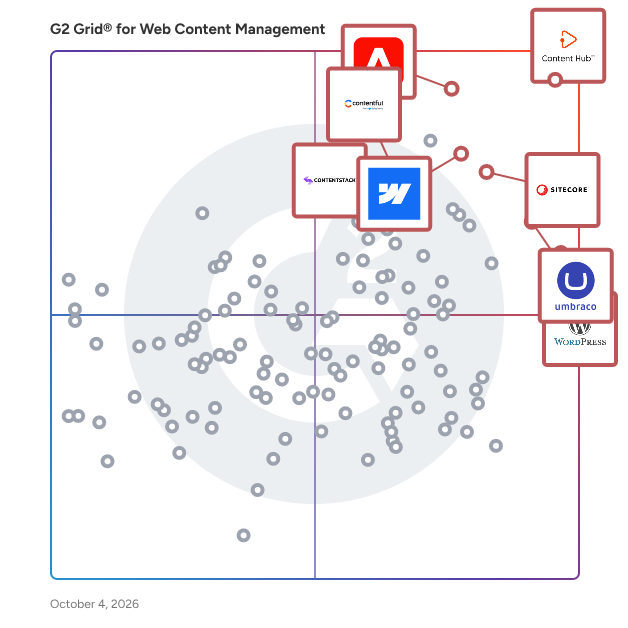
   Products classified in the overall Web Content Management category are similar in many regards and help companies of all sizes solve their business problems. However, small business features, pricing, setup, and installation differ from businesses of other sizes, which is why we match buyers to the right Small Business Web Content Management to fit their needs. Compare product ratings based on reviews from enterprise users or connect with one of G2&#39;s buying advisors to find the right solutions within the Small Business Web Content Management category.

In addition to qualifying for inclusion in the Web Content Management Software category, to qualify for inclusion in the Small Business Web Content Management Software category, a product must have at least 10 reviews left by a reviewer from a small business.


## How Many Web Content Management Software Products Does G2 Track?
**Total Products under this Category:** 389

### Category Stats (May 2026)
- **Average Rating**: 4.28/5 (↓0.01 vs Apr 2026)
- **New Reviews This Quarter**: 427
- **Buyer Segments**: Small-Business 45% │ Mid-Market 31% │ Enterprise 23%
- **Top Trending Product**: Superblog (+0.067)
*Last updated: May 18, 2026*

  
## How Does G2 Rank Web Content Management Software Products?

**Why You Can Trust G2's Software Rankings:**

- 30 Analysts and Data Experts
- 31,000+ Authentic Reviews
- 389+ Products
- Unbiased Rankings

G2's software rankings are built on verified user reviews, rigorous moderation, and a consistent research methodology maintained by a team of analysts and data experts. Each product is measured using the same transparent criteria, with no paid placement or vendor influence. While reviews reflect real user experiences, which can be subjective, they offer valuable insight into how software performs in the hands of professionals. Together, these inputs power the G2 Score, a standardized way to compare tools within every category.

  
## Which Web Content Management Software Is Best for Your Use Case?

- **Best for Small Businesses:** [HubSpot Content Hub](https://www.g2.com/products/hubspot-content-hub/reviews)
- **Best for Mid-Market:** [HubSpot Content Hub](https://www.g2.com/products/hubspot-content-hub/reviews)
- **Best for Enterprise:** [Adobe Experience Manager](https://www.g2.com/products/adobe-experience-manager/reviews)
- **Highest User Satisfaction:** [WordPress.org](https://www.g2.com/products/wordpress-org/reviews)
- **Best Free Software:** [HubSpot Content Hub](https://www.g2.com/products/hubspot-content-hub/reviews)

  
---

**Sponsored**

### Adobe Experience Manager

Built on an AI-powered foundation, Adobe Experience Manager is a comprehensive suite of composable content services that empowers your team to create and deliver the right across websites, mobile apps, and other touchpoints -- all at scale. Adobe Experience Manager includes content and asset management, digital forms and guides, and a learning management system. Essential products within Adobe Experience Manager include: • Experience Manager Sites: Empowers brands to design and deliver personalized digital experiences at scale — fast, seamless, and built to adapt to whatever comes next. • Experience Manager Assets: A customizable Digital Assets Management system that lets you easily discover, govern, and activate millions of assets so you can deliver and scale personalized experiences. Adobe’s native AI in AEM Assets is uniquely trained on your brand’s data, voice, and creative DNA—learning from your metadata, content patterns, and regional nuances across brands and geographies. • Experience Manager Forms: End-to-end digital enrollment solution to create, manage, publish and update digital forms and customer communications integrated with back-end processes and systems of record • Learning Manager: A learning management system (LMS) that makes it easy to integrate trainings into your brands’ websites and apps. • Experience Manager Guides: A component content management system for managing and scaling documentation, knowledge, and support content.


[Visit website](https://www.g2.com/external_clickthroughs/record?secure%5Bad_program%5D=ppc&amp;secure%5Bad_slot%5D=category_product_list&amp;secure%5Bcategory_id%5D=51&amp;secure%5Bdisplayable_resource_id%5D=51&amp;secure%5Bdisplayable_resource_type%5D=Category&amp;secure%5Bmedium%5D=sponsored&amp;secure%5Bplacement_reason%5D=page_category&amp;secure%5Bplacement_resource_ids%5D%5B%5D=51&amp;secure%5Bprioritized%5D=false&amp;secure%5Bproduct_id%5D=1288&amp;secure%5Bresource_id%5D=51&amp;secure%5Bresource_type%5D=Category&amp;secure%5Bsource_type%5D=category_page&amp;secure%5Bsource_url%5D=https%3A%2F%2Fwww.g2.com%2Fcategories%2Fweb-content-management%2Fmid-market&amp;secure%5Btoken%5D=83537b3223a05d47ec750a343469379898a685f38a26da209c2f72ed948c02ea&amp;secure%5Burl%5D=https%3A%2F%2Fbusiness.adobe.com%2Fproducts%2Fexperience-manager%2Fsites.html%3Fsdid%3DF89JZBK1%26mv%3Daffiliate&amp;secure%5Burl_type%5D=custom_url)

---

  ## What Are the Top-Rated Web Content Management Software Products in 2026?
### 1. [HubSpot Content Hub](https://www.g2.com/products/hubspot-content-hub/reviews)
  Content Hub provides tools to create, manage, and personalize content across the entire customer journey, addressing the modern challenge of producing high-volume, multi-channel, personalized content at scale. Core Value Proposition: Content Hub addresses three critical content challenges: creating sufficient content volume to support multi-channel strategies, managing content assets and permissions across distributed teams, and personalizing content at scale. The role of content has evolved beyond just a lead generation tool– marketers need to create more content than ever before, distribute it across more channels at more points in the customer journey, and make it highly personal to the buyer. Key Capabilities: Content Creation Tools: Content Hub provides website page builders, blog editors, landing page creators, and asset management systems within a unified platform, enabling content production without switching between multiple tools. Multi-Channel Distribution: The platform enables content publishing across websites, blogs, landing pages, and email from a single content library with consistent brand management and asset reuse. Personalization at Scale: Content Hub includes dynamic content functionality that adapts page elements, messaging, and calls-to-action based on visitor attributes, behavior, and customer journey stage. This enables personalization without creating separate page versions for each audience segment. Content Management: The platform provides tools that help marketing teams coordinate content production, maintain quality standards, and measure effectiveness. Content Hub vs. Alternatives: Unlike standalone content management systems lacking marketing context, Content Hub operates on the HubSpot CRM platform, enabling content personalization based on customer data. This connection between content and customer data enables relevant experiences traditional CMS platforms cannot deliver. Content Hub eliminates the need to purchase and integrate separate tools for website management, landing pages, blog hosting, and asset storage by providing these capabilities within the HubSpot ecosystem. Who Should Use Content Hub: Content Hub serves marketing teams producing content across multiple channels and journey stages, content managers coordinating distributed content production, and organizations requiring content personalization based on customer behavior. The platform scales content operations from small marketing teams to enterprise content organizations. Outcome: With Content Hub, marketers get everything they need to create and manage personalized content experiences across the customer journey at scale, shifting from reactive content production to strategic content programs.


  **Average Rating:** 4.5/5.0
  **Total Reviews:** 1,887
**How Do G2 Users Rate HubSpot Content Hub?**

- **Has the product been a good partner in doing business?:** 8.9/10 (Category avg: 8.7/10)
- **Content Authoring:** 8.8/10 (Category avg: 8.6/10)
- **Flexible Navigation Structures:** 8.2/10 (Category avg: 8.3/10)
- **API / Integrations:** 8.3/10 (Category avg: 8.3/10)

**Who Is the Company Behind HubSpot Content Hub?**

- **Seller:** [HubSpot](https://www.g2.com/sellers/hubspot)
- **Company Website:** https://www.HubSpot.com
- **Year Founded:** 2006
- **HQ Location:** Cambridge, MA
- **Twitter:** @HubSpot (785,652 Twitter followers)
- **LinkedIn® Page:** https://www.linkedin.com/company/68529/ (11,979 employees on LinkedIn®)

**Who Uses This Product?**
  - **Who Uses This:** Marketing Manager, Digital Marketing Manager
  - **Top Industries:** Marketing and Advertising, Computer Software
  - **Company Size:** 53% Small-Business, 40% Mid-Market


#### What Are HubSpot Content Hub's Pros and Cons?

**Pros:**

- Ease of Use (240 reviews)
- Content Management (122 reviews)
- Features (101 reviews)
- Easy Creation (89 reviews)
- Intuitive (81 reviews)

**Cons:**

- Limited Customization (56 reviews)
- Learning Curve (51 reviews)
- Lack of Customization (37 reviews)
- Expensive (35 reviews)
- Confusing Interface (29 reviews)

### 2. [Wix Studio](https://www.g2.com/products/wix-studio/reviews)
  Wix Studio is the website building platform for professional designers, developers, and marketers. With high-end design capabilities, streamlined workflows, and robust business tools, it empowers freelancers and agencies to build, manage, and scale exceptional websites with maximum efficiency. Wix Studio addresses the requirements of professional web creators by offering an all-in-one solution that combines advanced design technology with workflow, business and client management tools. Users can efficiently collaborate, design high-performing websites and grow their client base—whether they are part of an agency, small studio, or working independently. Key features include: - Advanced design capabilities: Access a fully responsive drag-and-drop editor with extensive design precision and flexibility. With custom breakpoints, layout grids and no-code animations and effects you can create visually distinctive, custom websites. - Hyper-efficient workflow: Wix Studio is built to streamline workflows, minimize repetition, and maximize creative output. From the start, you can instantly convert design files into fully functional websites with the Figma to Studio plugin, or quickly map site structures using the AI-powered Visual Sitemap and Wireframe Generator. A library of pre-designed components and over 375 responsive templates makes building faster, while site styles and themes ensure brand consistency across projects. And with built-in AI tools to automate repetitive tasks and optimize design, you can stay focused on creativity, not busywork. - Deep functionality: Wix Studio offers a robust no-code CMS, enabling dynamic content creation, custom collections and precise styling. Creators can also add custom CSS, backend logic, and work in a VS Code-based IDE or integrate with GitHub for seamless development and deployment. - Client management: Centralize communication, approvals and feedback within the platform, simplifying client management. The Client Kit enables seamless handovers by allowing you to add custom tutorials, guides and resources directly to client dashboards for easy onboarding and ongoing support. With tools like Content Mode, clients can independently update site content without affecting design. - Management workflows: Manage your team and clients from one unified dashboard. With built-in solutions for Stores, Events, Bookings, and more, creators can easily handle diverse client operations—no plugins or external tools needed. Wix Studio brings everything together, combining collaborative tools, ready-made sections, and wireframes to streamline both building and management. Plus, built-in automations take care of marketing, customer engagement, and internal notifications, so you can focus on what matters most. - Growth opportunity: Wix Studio helps agencies and freelancers turn creative expertise into scalable growth. Through the Partner Program, you’ll unlock tiered benefits that evolve with your agency while opening new income streams. Sell custom templates in the global Marketplace, earn revenue share from premium sites and marketing solutions, and monetize your apps and widgets by reaching over 258 million users in the Wix App Market. Wix Studio is a versatile solution for professional web creators seeking to efficiently produce exceptional websites and manage their workflow and business growth in a unified platform.


  **Average Rating:** 4.6/5.0
  **Total Reviews:** 76
**How Do G2 Users Rate Wix Studio?**

- **Has the product been a good partner in doing business?:** 9.5/10 (Category avg: 8.7/10)
- **Content Authoring:** 9.4/10 (Category avg: 8.6/10)
- **Flexible Navigation Structures:** 8.8/10 (Category avg: 8.3/10)
- **API / Integrations:** 8.7/10 (Category avg: 8.3/10)

**Who Is the Company Behind Wix Studio?**

- **Seller:** [Wix](https://www.g2.com/sellers/wix)
- **Company Website:** https://www.wix.com/
- **Year Founded:** 2006
- **HQ Location:** Tel Aviv
- **Twitter:** @Wix (390,063 Twitter followers)
- **LinkedIn® Page:** https://www.linkedin.com/company/97250/ (7,648 employees on LinkedIn®)

**Who Uses This Product?**
  - **Top Industries:** Design, Marketing and Advertising
  - **Company Size:** 76% Small-Business, 10% Mid-Market


#### What Are Wix Studio's Pros and Cons?

**Pros:**

- Ease of Use (39 reviews)
- Design (20 reviews)
- Features (19 reviews)
- Simple (17 reviews)
- Customer Support (16 reviews)

**Cons:**

- Limited Features (13 reviews)
- Missing Features (12 reviews)
- Limited Customization (11 reviews)
- Learning Curve (8 reviews)
- Limited Options (8 reviews)

### 3. [Webflow](https://www.g2.com/products/webflow/reviews)
  Webflow is the agentic web marketing platform for high-performing teams. Marketers, designers, and developers collaborate in Webflow to build distinctive web experiences that grow their brand, rank in AI search, and drive real revenue, all without the complexity of a Frankenstack or the cost of constant replatforming. Built-in AI accelerates creation, optimization, and automation, while audit trails and permissions ensure teams stay in control. Over 300,000 companies and 2,000+ Certified Partners trust Webflow to power enterprise-grade web experiences worldwide.


  **Average Rating:** 4.4/5.0
  **Total Reviews:** 976
**How Do G2 Users Rate Webflow?**

- **Has the product been a good partner in doing business?:** 8.9/10 (Category avg: 8.7/10)
- **Content Authoring:** 8.6/10 (Category avg: 8.6/10)
- **Flexible Navigation Structures:** 8.5/10 (Category avg: 8.3/10)
- **API / Integrations:** 7.7/10 (Category avg: 8.3/10)

**Who Is the Company Behind Webflow?**

- **Seller:** [Webflow](https://www.g2.com/sellers/webflow)
- **Company Website:** https://webflow.com
- **Year Founded:** 2012
- **HQ Location:** San Francisco, California
- **Twitter:** @webflowapp (1 Twitter followers)
- **LinkedIn® Page:** https://www.linkedin.com/company/3502352/ (1,729 employees on LinkedIn®)

**Who Uses This Product?**
  - **Who Uses This:** Founder, Graphic Designer
  - **Top Industries:** Design, Marketing and Advertising
  - **Company Size:** 69% Small-Business, 22% Mid-Market


#### What Are Webflow's Pros and Cons?

**Pros:**

- Ease of Use (278 reviews)
- Design Flexibility (180 reviews)
- Features (170 reviews)
- Intuitive (166 reviews)
- Flexibility (152 reviews)

**Cons:**

- Learning Curve (109 reviews)
- Limited Features (105 reviews)
- Missing Features (97 reviews)
- Expensive (82 reviews)
- Steep Learning Curve (80 reviews)

### 4. [WordPress.org](https://www.g2.com/products/wordpress-org/reviews)
  WordPress.org is the official platform offering the free, open-source WordPress software, enabling users to create and manage websites on their own web servers. This self-hosted solution provides complete control over website customization, functionality, and data management, making it ideal for individuals and businesses seeking flexibility and scalability. Key Features and Functionality: - Full Customization: Users can install custom themes and plugins to tailor their websites to specific needs and aesthetics. - Open-Source Software: WordPress.org operates under the General Public License (GPL), allowing users to modify and distribute the software freely. - Community Support: Access to extensive documentation, forums, and a global community of developers and users for assistance and collaboration. - SEO-Friendly: Built-in features and plugins to optimize websites for search engines, enhancing online visibility. - E-commerce Capabilities: Integration with plugins like WooCommerce to create and manage online stores efficiently. Primary Value and Solutions Provided: WordPress.org empowers users with complete ownership and control over their websites, eliminating restrictions imposed by third-party hosting services. This autonomy allows for extensive customization, scalability, and the ability to implement advanced features tailored to specific requirements. By leveraging the vast ecosystem of themes and plugins, users can create diverse websites ranging from personal blogs to complex e-commerce platforms. Additionally, the open-source nature fosters continuous improvement and innovation, ensuring that users benefit from the latest web technologies and security updates.


  **Average Rating:** 4.4/5.0
  **Total Reviews:** 9,362
**How Do G2 Users Rate WordPress.org?**

- **Has the product been a good partner in doing business?:** 8.5/10 (Category avg: 8.7/10)
- **Content Authoring:** 8.9/10 (Category avg: 8.6/10)
- **Flexible Navigation Structures:** 8.3/10 (Category avg: 8.3/10)
- **API / Integrations:** 8.4/10 (Category avg: 8.3/10)

**Who Is the Company Behind WordPress.org?**

- **Seller:** [WordPress Foundation](https://www.g2.com/sellers/wordpress-foundation)
- **Year Founded:** 2009
- **HQ Location:** San Francisco, CA
- **Twitter:** @WordPress (611,986 Twitter followers)
- **LinkedIn® Page:** https://www.linkedin.com/company/wordpress-foundation/about (1 employees on LinkedIn®)

**Who Uses This Product?**
  - **Who Uses This:** Owner, Founder
  - **Top Industries:** Marketing and Advertising, Information Technology and Services
  - **Company Size:** 73% Small-Business, 19% Mid-Market


#### What Are WordPress.org's Pros and Cons?

**Pros:**

- Ease of Use (135 reviews)
- Customization (100 reviews)
- Plugins (94 reviews)
- Customizability (80 reviews)
- Flexibility (63 reviews)

**Cons:**

- Plugin Issues (67 reviews)
- Learning Curve (52 reviews)
- Security Issues (51 reviews)
- Inadequate Updates (36 reviews)
- Security Vulnerabilities (26 reviews)

### 5. [Duda](https://www.g2.com/products/duda/reviews)
  Duda is the leading website development platform empowering digital marketing agencies and SaaS companies to build and manage their customers&#39; digital presence. Duda’s award-winning low-code no-code platform enables agencies and SaaS companies to reach higher productivity and unprecedented growth with an extensive range of capabilities spanning ecommerce, client management, SEO, automation, and white labeling.


  **Average Rating:** 4.7/5.0
  **Total Reviews:** 763
**How Do G2 Users Rate Duda?**

- **Has the product been a good partner in doing business?:** 9.3/10 (Category avg: 8.7/10)
- **Content Authoring:** 8.9/10 (Category avg: 8.6/10)
- **Flexible Navigation Structures:** 8.5/10 (Category avg: 8.3/10)
- **API / Integrations:** 8.2/10 (Category avg: 8.3/10)

**Who Is the Company Behind Duda?**

- **Seller:** [Duda](https://www.g2.com/sellers/duda)
- **Company Website:** https://www.duda.co/
- **Year Founded:** 2009
- **HQ Location:** Palo Alto, CA
- **Twitter:** @DudaPlatform (14,008 Twitter followers)
- **LinkedIn® Page:** https://www.linkedin.com/company/duda/ (422 employees on LinkedIn®)

**Who Uses This Product?**
  - **Who Uses This:** Owner, CEO
  - **Top Industries:** Marketing and Advertising, Design
  - **Company Size:** 86% Small-Business, 11% Mid-Market


#### What Are Duda's Pros and Cons?

**Pros:**

- Ease of Use (155 reviews)
- Customer Support (98 reviews)
- Easy Creation (81 reviews)
- Features (69 reviews)
- Intuitive (56 reviews)

**Cons:**

- Limited Customization (47 reviews)
- Limited Features (45 reviews)
- Missing Features (34 reviews)
- Lack of Customization (28 reviews)
- Learning Curve (24 reviews)

### 6. [Umbraco](https://www.g2.com/products/umbraco/reviews)
  Umbraco is a leading open-source .NET Core CMS with over 700,000 active installs worldwide and a vibrant community of over 220,000 members. Since its inception on February 16, 2005, Umbraco has remained an open-source project backed by a dedicated commercial company. At Umbraco, we pride ourselves on staying at the forefront of technology. Our alignment with Microsoft’s .NET release schedule ensures that Umbraco is always up-to-date with the latest .NET version. Umbraco CMS offers unparalleled flexibility, giving you full control over your website and its features. Beyond the core CMS, we provide two unique products to cater to your specific needs: Umbraco Cloud: The ideal environment for your Umbraco projects, featuring Azure Cloud hosting, automated upgrades, and streamlined workflows to maximize your productivity and project potential. Umbraco Heartcore: Our headless CMS option, equipped with fully managed APIs, GraphQL support, CDN capabilities, and more, providing a robust solution for omnichannel content delivery. Why choose Umbraco? Developers appreciate Umbraco for its flexibility and scalability. It integrates seamlessly with your code, allowing you to create a website that looks, feels, and operates exactly as you envision. With open-source code and APIs, Umbraco is easily extendable and adaptable to meet diverse requirements. For content editors and marketers, Umbraco delivers an exceptional editing experience. Our CMS includes intuitive features and workflows designed to enhance content creation and management. If you have specific needs, Umbraco’s backend can be customized by developers to fit perfectly. Our mission is to provide a platform that empowers you to manage your projects your way. By keeping our system open and adaptable, we ensure that Umbraco remains relevant and efficient for a wide range of project requirements.


  **Average Rating:** 4.5/5.0
  **Total Reviews:** 932
**How Do G2 Users Rate Umbraco?**

- **Has the product been a good partner in doing business?:** 8.8/10 (Category avg: 8.7/10)
- **Content Authoring:** 8.8/10 (Category avg: 8.6/10)
- **Flexible Navigation Structures:** 8.5/10 (Category avg: 8.3/10)
- **API / Integrations:** 8.2/10 (Category avg: 8.3/10)

**Who Is the Company Behind Umbraco?**

- **Seller:** [Umbraco](https://www.g2.com/sellers/umbraco)
- **Company Website:** https://umbraco.com
- **Year Founded:** 2005
- **HQ Location:** Odense
- **Twitter:** @umbraco (3,520 Twitter followers)
- **LinkedIn® Page:** https://www.linkedin.com/company/804354/ (185 employees on LinkedIn®)

**Who Uses This Product?**
  - **Who Uses This:** Software Engineer, Developer
  - **Top Industries:** Computer Software, Information Technology and Services
  - **Company Size:** 51% Small-Business, 35% Mid-Market


#### What Are Umbraco's Pros and Cons?

**Pros:**

- Ease of Use (109 reviews)
- Content Management (66 reviews)
- Intuitive (55 reviews)
- Features (51 reviews)
- Customizability (44 reviews)

**Cons:**

- Learning Curve (26 reviews)
- Limited Features (23 reviews)
- Poor Usability Design (22 reviews)
- Difficult Usability (19 reviews)
- Editor Limitations (19 reviews)

### 7. [Sanity](https://www.g2.com/products/sanity/reviews)
  The Content Operating System—a fully customizable all-code backend for content-driven websites and apps. Power all your content operations from a single platform with a feature-rich content workspace, interactive visual editing, serverless functions, AI agent, and the database optimized for content. Learn more: https://www.sanity.io/ Try it out: https://www.sanity.io/get-started Join the community: https://snty.link/community Get work-ready: https://www.sanity.io/learn Questions? hello@sanity.io


  **Average Rating:** 4.7/5.0
  **Total Reviews:** 902
**How Do G2 Users Rate Sanity?**

- **Has the product been a good partner in doing business?:** 9.2/10 (Category avg: 8.7/10)
- **Content Authoring:** 9.1/10 (Category avg: 8.6/10)
- **Flexible Navigation Structures:** 8.8/10 (Category avg: 8.3/10)
- **API / Integrations:** 8.9/10 (Category avg: 8.3/10)

**Who Is the Company Behind Sanity?**

- **Seller:** [Sanity.io](https://www.g2.com/sellers/sanity-io)
- **Company Website:** https://www.sanity.io
- **Year Founded:** 2018
- **HQ Location:** San Francisco, California
- **Twitter:** @sanity_io (15,008 Twitter followers)
- **LinkedIn® Page:** https://www.linkedin.com/company/18400536/ (277 employees on LinkedIn®)

**Who Uses This Product?**
  - **Who Uses This:** Software Engineer, Web Developer
  - **Top Industries:** Computer Software, Information Technology and Services
  - **Company Size:** 73% Small-Business, 18% Mid-Market


#### What Are Sanity's Pros and Cons?

**Pros:**

- Customizability (93 reviews)
- Features (85 reviews)
- Flexibility (84 reviews)
- Ease of Use (81 reviews)
- Customization (76 reviews)

**Cons:**

- Learning Curve (66 reviews)
- Learning Difficulty (32 reviews)
- Poor Documentation (26 reviews)
- Lack of Tutorials (21 reviews)
- Missing Features (20 reviews)

### 8. [Pantheon](https://www.g2.com/products/pantheon/reviews)
  Pantheon is the website operations (WebOps) platform top developers, marketers, and IT use to build, launch and run their Drupal, WordPress and NextJS websites. Pantheon includes all of the tools professional developers need to build mission-critical sites—like staging environments, version control, backups and workflow. Powering 700,000+ sites with over 17 billion page views, Pantheon’s container-based infrastructure allows you to launch websites faster, without worrying about traffic spikes, security, or performance. It’s free in development. You can scale in software on the same infrastructure from day one, and never touch a server again. Create your free account now!


  **Average Rating:** 4.4/5.0
  **Total Reviews:** 586
**How Do G2 Users Rate Pantheon?**

- **Has the product been a good partner in doing business?:** 8.8/10 (Category avg: 8.7/10)
- **Content Authoring:** 9.1/10 (Category avg: 8.6/10)
- **Flexible Navigation Structures:** 8.9/10 (Category avg: 8.3/10)
- **API / Integrations:** 8.9/10 (Category avg: 8.3/10)

**Who Is the Company Behind Pantheon?**

- **Seller:** [Pantheon](https://www.g2.com/sellers/pantheon)
- **Company Website:** https://pantheon.io
- **Year Founded:** 2010
- **HQ Location:** San Francisco, CA
- **Twitter:** @getpantheon (22,547 Twitter followers)
- **LinkedIn® Page:** https://www.linkedin.com/company/2198587/ (406 employees on LinkedIn®)

**Who Uses This Product?**
  - **Who Uses This:** Web Developer, Senior Web Developer
  - **Top Industries:** Marketing and Advertising, Information Technology and Services
  - **Company Size:** 65% Small-Business, 26% Mid-Market


#### What Are Pantheon's Pros and Cons?

**Pros:**

- Customer Support (14 reviews)
- Ease of Use (12 reviews)
- Helpful (11 reviews)
- Reliability (9 reviews)
- Easy Setup (6 reviews)

**Cons:**

- Expensive (7 reviews)
- High Pricing (4 reviews)
- Learning Curve (4 reviews)
- Bug Issues (3 reviews)
- Dashboard Issues (3 reviews)

### 9. [Elementor](https://www.g2.com/products/elementor/reviews)
  THE #1 NO CODE DRAG &amp; DROP WORDPRESS WEBSITE BUILDER POWERING 22M+ WEBSITES WORLDWIDE, NOW WITH AI. Elementor, the leading WordPress website creation platform, empowers you to build professional, pixel-perfect websites seamlessly with its no-code, drag-and-drop Atomic Editor. Supporting the full website lifecycle, Elementor enables you to confidently build, optimize, and manage your website with extended capabilities such as AI-powered creation, image optimization, transactional email delivery, accessibility tools, performance boosters, and more. Now in version 4 – the Atomic Editor! Introducing a new generation of performance-first atomic building blocks that allow you to control every atomic part with no limits or locked layouts. Define your global design systems and reusable components once, and they apply everywhere instantly – turning hours or even days of work into single clicks. Unlock all features with Elementor One. Need fast and secure cloud hosting for your Elementor site? Try out Elementor Host Powered by Google Cloud &amp; Cloudflare. 4.9/5 TrustPilot score. 🌟 Create Professional Stunning Websites Intuitive Drag &amp; Drop Builder: Build any website with our no-code, drag-and-drop Editor. Achieve design precision with full control over layout and style. Pixel-Perfect Design Tools: Upload SVGs, apply masks, gradients, box shadows, headline effects, shape dividers, and use built-in CSS controls for advanced customization. Template Library: Apply complete website kits for instant setups, or choose from a vast library of single pages, blocks, and pop-up templates. Advanced Widgets: Access over 40 FREE widgets, including heading, image, text editor, video, button, gallery, carousels, and more. AI Capabilities: Revolutionize your design and content creation process with native AI integration. Instantly create sections, text, code, and images. 🗝️ Key features: Design System: Use Variables and Classes for consistent colors, typography, and design elements, ensuring a cohesive, professional look that updates everywhere globally. Responsive Design: Optimize your design for every device with custom breakpoints, ensuring a seamless desktop, tablet, and mobile experience. Mask Shapes: Turning any element, like an image or video, into whatever shape you desire to create standout designs. CSS Transform: Use CSS Transform to rotate, scale, and skew elements, adding dynamic styling to your site. Entrance Animations: Add entrance animations to elements to create engaging and interactive user experiences. Revision History: Elementor’s Revision History feature enables users to track and revert to previous versions of their designs, providing peace of mind and flexibility during the creative process. Developer-Friendly: Equipped with extensive documentation, API, developer tools, and custom code areas, Elementor offers a conducive environment for developers to extend its capabilities and create custom solutions. Floating Buttons: Enhance user interaction with customizable, floating action buttons that stay in view as users scroll. Components [Pro]: Reuse the same building blocks across pages and sites, and update them everywhere they appear. Including controlled content editing, allowing collaborators and clients to update only exposed content properties without breaking layout or styling. Theme Builder [Pro]: Design every part of your site—headers, footers, posts, and archives—for complete control over appearance. Popup Builder [Pro]: Create eye-catching popups with Elementor’s Popup Builder, equipped with advanced targeting and triggering options to optimize user engagement and conversions. Forms [Pro]: Design and integrate custom forms, utilizing advanced features and integrations to capture and manage submissions effectively. WooCommerce Builder [Pro]: Integrate Elementor with WooCommerce to design custom product pages, shop layouts, archives, carts, checkout pages, my account, and more, enhancing your store’s visual appeal and functionality. Dynamic Content [Pro]: Leverage dynamic content capabilities to create personalized and interactive web experiences by connecting your designs to various data sources. Notes [Pro]: Enhance team collaboration by using Elementor’s Notes feature to leave feedback and comments directly on the design interface. Custom Code [Pro]: Insert custom code to extend the functionality of your site, offering flexibility for advanced customizations. Custom CSS [Pro]: Apply Custom CSS to fine-tune the styling of elements, ensuring precise control over the design aspects. Motion Effects [Pro]: Add advanced motion effects to elements for a more dynamic and engaging user experience. Custom Fonts &amp; Icons [Pro]: Upload and use custom fonts and icons to match your brand’s identity. 😍 Elementor FREE widgets Unlock the potential of Elementor with our comprehensive suite of free widgets and tools, designed to empower your website creation process and elevate your design capabilities: Heading. Add eye-catching headlines. Image. Control the size, opacity and more. Text Editor. Just like the WordPress text editor. Video. Add YouTube, Vimeo, VideoPress, Dailymotion or self-hosted videos. Button. Create interactive buttons. Link in Bio. Build link in bio components to promote your business / services. Image Box. A box with image, headline and text. Testimonials. Customer testimonials. Icon. Place one or more of 600+ icons available. Icon Box. An icon, headline, and text with one widget. Social Icons. Link to your social pages with the Facebook/X (formerly Twitter) icons. Image Gallery. Display your images in a grid. Image Carousel. Create rotating carousels or sliders for chosen images. Icon List. Use any icon to create a bullet list. Counter. Show numbers in an escalating manner. Progress Bar. Include an escalating progress bar. Nested Tabs. Display content in vertical or horizontal tabs. Nested Accordion. Display any type of content in collapsible sections. Rating. Display how many stars (or another icon) other visitors gave. Alert. Include a colored alert box to draw visitor’s attention. HTML. Insert code into the page. Shortcode. Insert shortcodes from any plugin into the page. Menu Anchor. Link any menu to this anchor. Read More. Set the Read More cut-off for the excerpt in archive pages. Sidebar. Add sidebars onto the page. Google Maps. Embed maps into the page. SoundCloud. Add SoundCloud audio bits. Divider. Separate content with a designed divider. Spacer. Add space between elements. Text Path. Attach your text to a path. And counting… 🚀 Enhance Your Website Website performance impacts your visitor’s experience and search result ranking. Elementor, in partnership with Google Chrome, continuously enhances performance without compromising design. Key features include: - Reduced DOM Output: Streamlined HTML structure for faster rendering. Improved Media File Loading: Optimized loading of images, videos, and other media assets. - Reduced CSS and JS Files: Minimized stylesheets and scripts individually loaded only on demand for quicker loading times. - Lazy Loading: Deferred loading of non-critical resources to improve initial page load speed. - Faster Font Loading: Efficient delivery of web fonts to enhance text rendering speed. - Optimized Front-End Asset Loading: Efficient loading of assets like JavaScript and CSS to minimize render-blocking. - Element Caching: Cache frequently accessed design elements to reduce server response time and enhance overall performance. 🔥 Elementor Editor Pro Features Create unparalleled websites while saving time, money and resources with Elementor Editor Pro’s full website builder. Get access to 100+ professional widgets, features, and tools. Editor Pro Design Widgets: - Posts: Display your blog posts with customizable layouts and styles. - Share Buttons: Allow visitors to easily share your content on various social media platforms. - Portfolio: Showcase your work or projects with stunning portfolio layouts. - Slides: Create dynamic slideshows with custom animations and transitions. - Form: Design and customize advanced forms for user interaction and data collection. - Login: Add a login form or user registration module to your website. - Nav Menu: Customize and style your website’s navigation menu for better user experience. - Animated Headline: Create attention-grabbing headlines with animated effects. - Price Table: Display pricing plans or packages in a structured and visually appealing format. - Price List: Showcase a list of prices or services with customizable styling options. - Gallery: Create beautiful image galleries with various layout options and lightbox support. - Flip Box: Add interactive flip animations to highlight content or features. - Call to Action: Encourage user interaction and conversions with compelling call-to-action sections. - Media Carousel: Showcase a carousel of media files such as images or videos. - Testimonial Carousel: Display client testimonials in a carousel format for social proof. - Nested Carousel: Create nested carousels for more complex content organization. - Loop Carousel: Display content in a looped carousel for continuous viewing. - Table Of Content: Generate a table of contents for longer articles or guides to improve navigation. - Countdown: Add countdown timers to create urgency for promotions or events. - Facebook Page: Embed your Facebook page feed or content onto your website. - Blockquote: Highlight quotes or testimonials with stylish formatting options. - Template: Save and reuse design templates for consistent branding and layout. - Reviews: Showcase customer reviews and ratings to build trust and credibility. - Facebook Button: Add buttons to promote interactions with your Facebook page or content. - Facebook Embed: Embed Facebook posts or content onto your website. - Facebook Comments: Enable Facebook comments on your website’s pages or posts. - PayPal Button: Integrate PayPal buttons for easy online payments. - Stripe Button: Integrate Stripe payment buttons to facilitate secure online transactions. - Lottie Widget: Add Lottie animations to enhance visual appeal and engagement. - Code Highlight: Display code snippets with syntax highlighting for better readability. - Video Playlist: Create and customize playlists for video content on your website. - Mega Menu: Customize advanced menus for better navigation and displaying complex content. - Off Canvas: Create off-canvas areas that slide in to show extra info or menus without cluttering the main layout. Editor Pro Theme Widgets: Build and customize all the key parts of your website including headers, footers, 404 page, global archives, and more… - Post Title: Customize the title of individual blog posts or pages. - Post Excerpt: Display a brief summary or teaser of your blog posts. - Post Content: Customize the main content area of your blog posts or pages. - Featured Image: Set and customize featured images for blog posts or pages. - Author Box: Display author information and bios on blog posts. - Post Comments: Customize the appearance and functionality of comments sections on your website. - Post Navigation: Add navigation links to adjacent posts for easy browsing. - Post Info: Display additional information about blog posts, such as author and date. - Site Logo: Upload and customize your website’s logo for branding purposes. - Site Title: Customize the title of your website. - Page Title: Customize the title of individual pages. - Search Bar: Add a search bar to allow users to search your website’s content. - Breadcrumbs: Display hierarchical navigation paths for better user navigation. - Sitemap: Generate a sitemap for better search engine indexing and user navigation. - Loop Grid: Design and customize grid layouts for blog post archives or product listings. Editor Pro WooCommerce Widgets: Design and customize a complete online shopping experience across your entire website. - Product: Display individual products with customizable layouts and styles. - Breadcrumbs: Display hierarchical navigation paths for better user navigation within your store. - Product Title: Customize the title of individual products. - Product Images: Set and customize images for product listings. - Product Price: Display the price of individual products. - Add To Cart: Add customizable add to cart buttons for easy purchasing. - Product Rating: Display ratings and reviews for products. - Product Stock: Display stock availability for products. - Product Meta: Display additional information about products, such as SKU and categories. - Product Content: Customize the main content area of product descriptions. - Short Description: Display brief summaries or teasers of products. - Product Data Tabs: Organize product information into tabbed sections for better organization. - Additional Information: Display additional details about products, such as dimensions and weight. - Product Related: Showcase related products to encourage additional purchases. - Upsells: Promote upsell products to increase average order value. - Products: Display a grid or list of products with customizable settings. - Custom Add To Cart: Customize the add to cart button for specific products. - WooCommerce Pages: Design and customize WooCommerce-specific pages, such as the cart and checkout pages. - Product Categories: Display product categories for easy navigation within your store. - Menu Cart: Display a cart icon in your navigation menu for easy access to the shopping cart. - Cart: Customize the appearance and functionality of the shopping cart page. - Checkout: Customize the appearance and functionality of the checkout page. - My Account: Customize the appearance and functionality of the customer account area. - Purchase Summary: Display a summary of purchases during the checkout process. - WooCommerce Notices: Customize the appearance and functionality of WooCommerce notices, such as order confirmation messages. Build professional websites with Elementor Editor Pro! 🔒 SECURITY AND COMPLIANCE Elementor places a paramount focus on security, evident through our acquisition of industry certifications such as ISO/IEC 27001, ISO/IEC 27017, ISO/IEC 27018, ISO/IEC 27701, and SOC 2 Type II. These certifications underscore our commitment to implementing robust security measures, and highlight our dedication to adhering to recognized industry standards. We encourage ethical security research through our Bug Bounty program. We collaborate with leading bug bounty services to provide opportunities for researchers to report vulnerabilities in our services. Our bounty programs include a triage team available 24/7/365. For more information: Trust Center. ♿ Accessibility Best Practices Elementor offers accessibility tools and enhancements to help you provide a better experience for all users. Including HTML 5 semantic, full keyboard navigation menu, ongoing improvement of features, widget, and more. 🌐 Translated to 63+ languages, includes RTL support Elementor supports multiple languages, typographies, and RTL, with editor translations in over 63 languages. It’s also compatible with WPML, Polylang, TranslatePress, Weglot, and more. To contribute, add a new language via translate.wordpress.org. See our guide on how to translate and localize the plugin.


  **Average Rating:** 4.4/5.0
  **Total Reviews:** 404
**How Do G2 Users Rate Elementor?**

- **Has the product been a good partner in doing business?:** 8.3/10 (Category avg: 8.7/10)
- **Content Authoring:** 9.4/10 (Category avg: 8.6/10)
- **Flexible Navigation Structures:** 9.4/10 (Category avg: 8.3/10)
- **API / Integrations:** 9.4/10 (Category avg: 8.3/10)

**Who Is the Company Behind Elementor?**

- **Seller:** [Elementor](https://www.g2.com/sellers/elementor)
- **Company Website:** https://elementor.com/
- **Year Founded:** 2016
- **HQ Location:** Ramat Gan, Tel Aviv District, Israel
- **Twitter:** @elemntor (29,096 Twitter followers)
- **LinkedIn® Page:** https://www.linkedin.com/company/10682833/ (508 employees on LinkedIn®)

**Who Uses This Product?**
  - **Who Uses This:** Owner, Web Developer
  - **Top Industries:** Marketing and Advertising, Information Technology and Services
  - **Company Size:** 86% Small-Business, 13% Mid-Market


#### What Are Elementor's Pros and Cons?

**Pros:**

- Ease of Use (105 reviews)
- Intuitive (51 reviews)
- Drag-and-Drop Functionality (42 reviews)
- Customizability (35 reviews)
- Customization (35 reviews)

**Cons:**

- Plugin Issues (27 reviews)
- Slow Loading (27 reviews)
- Expensive (24 reviews)
- Limited Features (21 reviews)
- Poor Customer Support (20 reviews)

### 10. [Hygraph](https://www.g2.com/products/hygraph/reviews)
  Whatever you imagine – whether it’s a global news platform, an ecommerce experience, a learning app, a content hub, or something entirely unique – you can build it with Hygraph. Hygraph is the leading headless CMS for enterprises building content-rich websites, apps, and digital products. It gives teams the tools to create, manage, and deliver structured content anywhere – across web, mobile, or any other platform. With a powerful GraphQL API, flexible content modeling, and fine-grained permissions, both developers and content teams can move faster and work better together. Hygraph is built to handle complex content needs while staying easy to use, so your team can focus on delivering great digital experiences.


  **Average Rating:** 4.4/5.0
  **Total Reviews:** 711
**How Do G2 Users Rate Hygraph?**

- **Has the product been a good partner in doing business?:** 9.0/10 (Category avg: 8.7/10)
- **Content Authoring:** 8.7/10 (Category avg: 8.6/10)
- **Flexible Navigation Structures:** 8.2/10 (Category avg: 8.3/10)
- **API / Integrations:** 8.6/10 (Category avg: 8.3/10)

**Who Is the Company Behind Hygraph?**

- **Seller:** [Hygraph](https://www.g2.com/sellers/hygraph)
- **Company Website:** https://hygraph.com/
- **Year Founded:** 2017
- **HQ Location:** Berlin
- **Twitter:** @hygraph (5,107 Twitter followers)
- **LinkedIn® Page:** https://www.linkedin.com/company/18152461/ (66 employees on LinkedIn®)

**Who Uses This Product?**
  - **Who Uses This:** Software Engineer, Web Developer
  - **Top Industries:** Computer Software, Information Technology and Services
  - **Company Size:** 65% Small-Business, 28% Mid-Market


#### What Are Hygraph's Pros and Cons?

**Pros:**

- Ease of Use (133 reviews)
- Content Management (91 reviews)
- API Integration (82 reviews)
- Integrations (73 reviews)
- Flexibility (72 reviews)

**Cons:**

- Learning Curve (86 reviews)
- Learning Difficulty (42 reviews)
- Expensive (37 reviews)
- Difficult Usability (36 reviews)
- Pricing Issues (32 reviews)

### 11. [Yext](https://www.g2.com/products/yext/reviews)
  Yext (NYSE: YEXT) is the leading local brand visibility platform built for a world where discovery and engagement happen everywhere — across AI and traditional search, social, websites, and direct communications. Backed by billions of trusted data points benchmarked against the competition, Yext provides unmatched visibility into brand performance at both the global and hyper-local level. From insight to impact, you get actionable recommendations and a suite of integrated tools to execute at scale. The result: clarity, control, and confidence that customers discover you everywhere it matters. To learn more about Yext, visit yext.com.


  **Average Rating:** 4.4/5.0
  **Total Reviews:** 1,084
**How Do G2 Users Rate Yext?**

- **Has the product been a good partner in doing business?:** 8.7/10 (Category avg: 8.7/10)
- **Content Authoring:** 8.0/10 (Category avg: 8.6/10)
- **Flexible Navigation Structures:** 7.9/10 (Category avg: 8.3/10)
- **API / Integrations:** 8.0/10 (Category avg: 8.3/10)

**Who Is the Company Behind Yext?**

- **Seller:** [Yext](https://www.g2.com/sellers/yext)
- **Company Website:** https://www.yext.com
- **Year Founded:** 2006
- **HQ Location:** New York
- **Twitter:** @yext (21,824 Twitter followers)
- **LinkedIn® Page:** https://www.linkedin.com/company/515401/ (2,335 employees on LinkedIn®)

**Who Uses This Product?**
  - **Who Uses This:** Marketing Manager, Digital Marketing Manager
  - **Top Industries:** Financial Services, Hospital &amp; Health Care
  - **Company Size:** 38% Enterprise, 30% Mid-Market


#### What Are Yext's Pros and Cons?

**Pros:**

- Ease of Use (360 reviews)
- Helpful (199 reviews)
- Centralized Management (189 reviews)
- Customer Support (182 reviews)
- Features (165 reviews)

**Cons:**

- Complex Usability (99 reviews)
- Learning Curve (83 reviews)
- Difficult Learning (80 reviews)
- Difficult Navigation (68 reviews)
- Limited Features (67 reviews)

### 12. [Adobe Experience Manager](https://www.g2.com/products/adobe-experience-manager/reviews)
  Built on an AI-powered foundation, Adobe Experience Manager is a comprehensive suite of composable content services that empowers your team to create and deliver the right across websites, mobile apps, and other touchpoints -- all at scale. Adobe Experience Manager includes content and asset management, digital forms and guides, and a learning management system. Essential products within Adobe Experience Manager include: • Experience Manager Sites: Empowers brands to design and deliver personalized digital experiences at scale — fast, seamless, and built to adapt to whatever comes next. • Experience Manager Assets: A customizable Digital Assets Management system that lets you easily discover, govern, and activate millions of assets so you can deliver and scale personalized experiences. Adobe’s native AI in AEM Assets is uniquely trained on your brand’s data, voice, and creative DNA—learning from your metadata, content patterns, and regional nuances across brands and geographies. • Experience Manager Forms: End-to-end digital enrollment solution to create, manage, publish and update digital forms and customer communications integrated with back-end processes and systems of record • Learning Manager: A learning management system (LMS) that makes it easy to integrate trainings into your brands’ websites and apps. • Experience Manager Guides: A component content management system for managing and scaling documentation, knowledge, and support content.


  **Average Rating:** 4.2/5.0
  **Total Reviews:** 649
**How Do G2 Users Rate Adobe Experience Manager?**

- **Has the product been a good partner in doing business?:** 8.3/10 (Category avg: 8.7/10)
- **Content Authoring:** 8.3/10 (Category avg: 8.6/10)
- **Flexible Navigation Structures:** 7.9/10 (Category avg: 8.3/10)
- **API / Integrations:** 7.9/10 (Category avg: 8.3/10)

**Who Is the Company Behind Adobe Experience Manager?**

- **Seller:** [Adobe](https://www.g2.com/sellers/adobe)
- **Company Website:** https://adobe.com
- **Year Founded:** 1982
- **HQ Location:** San Jose, CA
- **Twitter:** @Adobe (959,034 Twitter followers)
- **LinkedIn® Page:** https://www.linkedin.com/company/1480/ (41,539 employees on LinkedIn®)

**Who Uses This Product?**
  - **Who Uses This:** Software Engineer, Consultant
  - **Top Industries:** Information Technology and Services, Marketing and Advertising
  - **Company Size:** 47% Enterprise, 26% Small-Business


#### What Are Adobe Experience Manager's Pros and Cons?

**Pros:**

- Ease of Use (160 reviews)
- Content Management (141 reviews)
- Features (122 reviews)
- Customization (97 reviews)
- Integrations (85 reviews)

**Cons:**

- Learning Curve (119 reviews)
- Complex Usability (113 reviews)
- Difficult Learning (111 reviews)
- Expensive (81 reviews)
- Steep Learning Curve (77 reviews)

### 13. [Progress Sitefinity](https://www.g2.com/products/progress-sitefinity/reviews)
  Progress Sitefinity is a cloud-first content management system (CMS) and digital experience platform (DXP) used to build, manage and personalize websites, portals and other digital properties. It is adopted by mid-market and enterprise organisations that operate multi-site, multilingual or regulated digital estates and need to balance marketing autonomy with IT governance and developer flexibility. Primary use cases include corporate websites, member and customer portals, authenticated experiences, integration-heavy workflows and consolidation of fragmented CMS deployments. Sitefinity supports marketing, development and IT teams through a shared platform model with role-appropriate tools and permissions. Key capabilities include: - Multisite, multilingual and multi-brand management with governance controls and workflows - Native customer data platform (Sitefinity Insight) for segmentation, analytics and personalization - 1,000+ prebuilt connectors and open APIs, Sitefinity Cloud platform integrates with your MarTech stack, CRM and enterprise systems in hours—not weeks - Extensibility using .NET and ASP.NET Core for custom development and composable architectures Sitefinity also incorporates generative and retrieval-augmented capabilities through Progress® Agentic RAG, enabling dynamic assembly of experiences from approved content to reduce manual production work while maintaining accuracy, compliance and brand standards. Additional operational benefits and deployment considerations: - Standardization and consolidation of CMS estates across business units or regions - Support for marketing, development and IT workflows without requiring a headless-only approach - Structured content for regulated or high-volume publishing environments - Deployment on-premises or as a managed cloud service on Microsoft Azure, reducing maintenance and providing security, scaling and compliance


  **Average Rating:** 4.0/5.0
  **Total Reviews:** 488
**How Do G2 Users Rate Progress Sitefinity?**

- **Has the product been a good partner in doing business?:** 8.0/10 (Category avg: 8.7/10)
- **Content Authoring:** 8.5/10 (Category avg: 8.6/10)
- **Flexible Navigation Structures:** 7.5/10 (Category avg: 8.3/10)
- **API / Integrations:** 7.4/10 (Category avg: 8.3/10)

**Who Is the Company Behind Progress Sitefinity?**

- **Seller:** [Progress Software](https://www.g2.com/sellers/progress-software)
- **Company Website:** https://www.progress.com/
- **Year Founded:** 1981
- **HQ Location:** Burlington, MA.
- **Twitter:** @ProgressSW (48,838 Twitter followers)
- **LinkedIn® Page:** https://www.linkedin.com/company/progress-software/ (4,207 employees on LinkedIn®)

**Who Uses This Product?**
  - **Who Uses This:** Web Developer, Marketing Manager
  - **Top Industries:** Information Technology and Services, Non-Profit Organization Management
  - **Company Size:** 47% Mid-Market, 29% Small-Business


#### What Are Progress Sitefinity's Pros and Cons?

**Pros:**

- Content Management (10 reviews)
- Ease of Use (10 reviews)
- Customizability (7 reviews)
- Features (5 reviews)
- Customer Support (4 reviews)

**Cons:**

- Expensive (5 reviews)
- Pricing Issues (5 reviews)
- Limited Features (4 reviews)
- Content Management (3 reviews)
- Data Migration (3 reviews)

### 14. [Storyblok](https://www.g2.com/products/storyblok/reviews)
  Storyblok is a headless CMS that enables marketers and developers to create with joy and succeed in the AI-driven content era. It empowers you to deliver structured and consistent content everywhere: websites, apps, AI search, and beyond. Legendary brands like Virgin Media O2, Oatly, and TomTom use Storyblok to make a bigger, faster market impact. It’s Joyful Headless™, and it changes everything.


  **Average Rating:** 4.5/5.0
  **Total Reviews:** 563
**How Do G2 Users Rate Storyblok?**

- **Has the product been a good partner in doing business?:** 8.9/10 (Category avg: 8.7/10)
- **Content Authoring:** 9.2/10 (Category avg: 8.6/10)
- **Flexible Navigation Structures:** 8.5/10 (Category avg: 8.3/10)
- **API / Integrations:** 8.5/10 (Category avg: 8.3/10)

**Who Is the Company Behind Storyblok?**

- **Seller:** [Storyblok](https://www.g2.com/sellers/storyblok)
- **Company Website:** https://www.storyblok.com
- **Year Founded:** 2017
- **HQ Location:** Linz, Oberösterreich
- **Twitter:** @storyblok (9,263 Twitter followers)
- **LinkedIn® Page:** https://www.linkedin.com/company/17989065/ (292 employees on LinkedIn®)

**Who Uses This Product?**
  - **Who Uses This:** Software Engineer, Frontend Developer
  - **Top Industries:** Computer Software, Information Technology and Services
  - **Company Size:** 56% Small-Business, 30% Mid-Market


#### What Are Storyblok's Pros and Cons?

**Pros:**

- Ease of Use (111 reviews)
- Intuitive (71 reviews)
- Content Management (69 reviews)
- Features (60 reviews)
- Easy Setup (48 reviews)

**Cons:**

- Learning Curve (37 reviews)
- Expensive (22 reviews)
- Missing Features (19 reviews)
- Lack of Features (18 reviews)
- Pricing Issues (18 reviews)

### 15. [Padlet](https://www.g2.com/products/padlet/reviews)
  Dostoevsky said that beauty will save the world. Padlet offers beautiful boards and canvases for visual thinkers and learners. Use boards to collect, organize, and present anything. Use sandboxes for whiteboarding, lessons, and activities. Over 40 million people every month actively use Padlet around the world. Here are some of the ways they use it: -Collaborate on files with clients -Store instructional videos -Share marketing assets -Manage real-estate listings on a map -Create interactive lessons -Design collaborative worksheets -Make slideshows -Build meeting agendas -Solicit feedback -Brainstorm ideas -And more Dostoevsky would have loved Padlet.


  **Average Rating:** 4.9/5.0
  **Total Reviews:** 336
**How Do G2 Users Rate Padlet?**

- **Has the product been a good partner in doing business?:** 9.6/10 (Category avg: 8.7/10)
- **Content Authoring:** 9.1/10 (Category avg: 8.6/10)
- **Flexible Navigation Structures:** 9.0/10 (Category avg: 8.3/10)
- **API / Integrations:** 8.1/10 (Category avg: 8.3/10)

**Who Is the Company Behind Padlet?**

- **Seller:** [Padlet](https://www.g2.com/sellers/padlet)
- **Year Founded:** 2012
- **HQ Location:** San Francisco, US
- **Twitter:** @padlet (73,414 Twitter followers)
- **LinkedIn® Page:** https://www.linkedin.com/company/padlet/ (78 employees on LinkedIn®)

**Who Uses This Product?**
  - **Who Uses This:** Teacher
  - **Top Industries:** Education Management, Primary/Secondary Education
  - **Company Size:** 49% Small-Business, 43% Mid-Market


#### What Are Padlet's Pros and Cons?

**Pros:**

- Ease of Use (24 reviews)
- Features (11 reviews)
- Simple (10 reviews)
- Intuitive (9 reviews)
- Helpful (8 reviews)

**Cons:**

- Access Limitations (8 reviews)
- Missing Features (5 reviews)
- Lack of Features (4 reviews)
- Limited Features (4 reviews)
- Expensive (3 reviews)

### 16. [Contentstack](https://www.g2.com/products/contentstack/reviews)
  Contentstack is redefining how modern digital experiences are built and managed. As the pioneer of the Agentic Experience Platform (AXP), Contentstack brings together structured content and brand governance (Content Cloud), real-time customer data, omnichannel personalization (Data Cloud) and autonomous AI orchestration (Agent OS) into one unified system. While many organizations adopted headless CMS or standalone AI tools expecting transformation, they often found themselves managing disconnected systems and manual workflows. Contentstack helps enterprises move beyond that complexity by connecting content, data and AI in a way that makes digital experiences faster to launch, easier to manage and more adaptive in real time. Leading brands including Steve Madden, LG Electronics, Subaru of America, Dolce &amp; Gabbana, 1-800-Flowers, Decathlon, and Caesars Entertainment rely on Contentstack to reduce operational friction and deliver personalized, scalable digital experiences with confidence. The company is known for its customer-first culture and commitment to the communities it serves through the Contentstack Cares program. Learn more at https://www.contentstack.com.


  **Average Rating:** 4.4/5.0
  **Total Reviews:** 300
**How Do G2 Users Rate Contentstack?**

- **Has the product been a good partner in doing business?:** 9.3/10 (Category avg: 8.7/10)
- **Content Authoring:** 8.8/10 (Category avg: 8.6/10)
- **Flexible Navigation Structures:** 8.2/10 (Category avg: 8.3/10)
- **API / Integrations:** 8.3/10 (Category avg: 8.3/10)

**Who Is the Company Behind Contentstack?**

- **Seller:** [Contentstack](https://www.g2.com/sellers/contentstack-0aa0d25e-6949-4e56-897b-9403491128f0)
- **Company Website:** https://www.contentstack.com
- **Year Founded:** 2018
- **HQ Location:** Austin, TX
- **Twitter:** @Contentstack (2,394 Twitter followers)
- **LinkedIn® Page:** https://www.linkedin.com/company/18395537/ (680 employees on LinkedIn®)

**Who Uses This Product?**
  - **Who Uses This:** Software Engineer, Product Manager
  - **Top Industries:** Retail, Computer Software
  - **Company Size:** 43% Mid-Market, 37% Enterprise


#### What Are Contentstack's Pros and Cons?

**Pros:**

- Ease of Use (59 reviews)
- Content Management (48 reviews)
- Intuitive (39 reviews)
- Flexibility (31 reviews)
- Features (28 reviews)

**Cons:**

- Content Management (29 reviews)
- Limited Features (17 reviews)
- Missing Features (16 reviews)
- Limited Customization (15 reviews)
- Learning Curve (14 reviews)

### 17. [Directus](https://www.g2.com/products/directus/reviews)
  Directus is a CMS that sits beside any new or existing SQL database, instantly providing a powerful toolkit of features for managing, visualizing, and connecting data. Engineers get a self-documenting REST and GraphQL API, event hooks for logic, granular access control, data workflows, and much more, all out of the box. Our modern and fully-customizable TypeScript codebase is completely open-source and built to be extended, so there is no feature ceiling to outgrow. To fully democratize this data access, all the power of our robust developer tooling is also available via an intuitive no-code application, enabling self-service for even the most non-technical of business users. The Directus front-end includes flexible database content management, drag-and-drop dashboards and charts, digital asset management, and end-to-end internationalization (supporting 50+ languages) for global teams. Most importantly, all of this happens without any database migration or vendor lock-in. Directus introspects the database schema at runtime, delivering a dynamic API and App based on your project’s existing architecture, with database abstraction allowing migration fluidity and feature parity across all major SQL vendors. You maintain total control over your database and the ability to write pure SQL queries, allowing Directus to be incrementally adopted based on business requirements. Leveraging the flexibility and potential of the database itself, common use cases include everything from headless CMS, business intelligence, IoT data, back-office tools, and building no-code internal apps. With nearly two decades of real-world product development, 38+ million docker downloads, and an enormous developer community across startups and Fortune 100 companies alike, Directus is a proven data solution at any scale.


  **Average Rating:** 4.9/5.0
  **Total Reviews:** 51
**How Do G2 Users Rate Directus?**

- **Has the product been a good partner in doing business?:** 9.5/10 (Category avg: 8.7/10)
- **Content Authoring:** 8.8/10 (Category avg: 8.6/10)
- **Flexible Navigation Structures:** 9.2/10 (Category avg: 8.3/10)
- **API / Integrations:** 9.0/10 (Category avg: 8.3/10)

**Who Is the Company Behind Directus?**

- **Seller:** [Directus](https://www.g2.com/sellers/directus)
- **Year Founded:** 2011
- **HQ Location:** Brooklyn, NY
- **Twitter:** @directus (52,497 Twitter followers)
- **LinkedIn® Page:** https://www.linkedin.com/company/ranger-studio-llc (2 employees on LinkedIn®)

**Who Uses This Product?**
  - **Who Uses This:** CEO
  - **Top Industries:** Computer Software, Program Development
  - **Company Size:** 51% Small-Business, 31% Mid-Market


#### What Are Directus's Pros and Cons?

**Pros:**

- Flexibility (7 reviews)
- API Integration (6 reviews)
- Integrations (6 reviews)
- Customer Support (5 reviews)
- Platform Flexibility (5 reviews)

**Cons:**

- Developer Challenges (3 reviews)
- Learning Difficulty (2 reviews)
- UI Problems (2 reviews)
- API Issues (1 reviews)
- Compatibility Issues (1 reviews)

### 18. [CloudCannon](https://www.g2.com/products/cloudcannon/reviews)
  The visual CMS that gives content teams full autonomy on your developer-approved tech stack. With CloudCannon, your marketing team can build pages visually with your on-brand custom components, share and review changes on a fully functioning preview site and publish changes with a push of a button. CloudCannon gives your team an exceptional website editing interface with a robust a flexible developer experience. Support for static site generators – Jekyll, Hugo, 11ty, Next.js, Nuxt.js, Gatsby, SvelteKit, and Astro.


  **Average Rating:** 4.8/5.0
  **Total Reviews:** 45
**How Do G2 Users Rate CloudCannon?**

- **Has the product been a good partner in doing business?:** 9.7/10 (Category avg: 8.7/10)
- **Content Authoring:** 9.0/10 (Category avg: 8.6/10)
- **Flexible Navigation Structures:** 9.4/10 (Category avg: 8.3/10)
- **API / Integrations:** 9.3/10 (Category avg: 8.3/10)

**Who Is the Company Behind CloudCannon?**

- **Seller:** [CloudCannon](https://www.g2.com/sellers/cloudcannon)
- **Year Founded:** 2013
- **HQ Location:** Dunedin, Otago
- **Twitter:** @CloudCannon (1,417 Twitter followers)
- **LinkedIn® Page:** https://www.linkedin.com/company/cloud-cannon/ (23 employees on LinkedIn®)

**Who Uses This Product?**
  - **Top Industries:** Computer Software, Information Technology and Services
  - **Company Size:** 80% Small-Business, 11% Enterprise


### 19. [Ontraport](https://www.g2.com/products/ontraport/reviews)
  Ontraport integrates your marketing, sales and support operations in one unified platform so you can scale, effortlessly. If you’re like most organizations, you have a collection of tech tools that you’ve strung together over time: website builder, email platform, payment processor, and much more. And as you’ve grown, you’ve realized this tech stack hurts more than it helps. Successful enterprises do it differently: They know that having one central database, tightly integrated with their core business functions, is the only way to deliver high-quality customer experiences at scale. Enterprise level platforms are popular for exactly this reason. But they’re complex and expensive — out of reach for most. Ontraport gives you access to this professional-grade power. It’s designed to be managed by anyone, and it’s priced for teams with budgets to stick to. For more information, visit www.ontraport.com.


  **Average Rating:** 4.5/5.0
  **Total Reviews:** 215
**How Do G2 Users Rate Ontraport?**

- **Has the product been a good partner in doing business?:** 9.0/10 (Category avg: 8.7/10)

**Who Is the Company Behind Ontraport?**

- **Seller:** [Ontraport](https://www.g2.com/sellers/ontraport)
- **Year Founded:** 2008
- **HQ Location:** Santa Barbara, CA
- **Twitter:** @Ontraport (12,074 Twitter followers)
- **LinkedIn® Page:** https://www.linkedin.com/company/2597064/ (100 employees on LinkedIn®)
- **Phone:** +1 (855) 668-7276

**Who Uses This Product?**
  - **Who Uses This:** CEO, Owner
  - **Top Industries:** Professional Training &amp; Coaching, Marketing and Advertising
  - **Company Size:** 92% Small-Business, 5% Mid-Market


#### What Are Ontraport's Pros and Cons?

**Pros:**

- Customer Support (10 reviews)
- Helpful (8 reviews)
- Customer Management (5 reviews)
- Ease of Use (5 reviews)
- Automation Focus (4 reviews)

**Cons:**

- Learning Curve (6 reviews)
- Not Intuitive (4 reviews)
- Poor Customer Support (3 reviews)
- Billing Issues (2 reviews)
- Contact Management (2 reviews)

### 20. [Brightspot](https://www.g2.com/products/brightspot/reviews)
  Brightspot is the leading content management solution for delivering brilliant digital experiences through a fast, flexible and secure platform. Founded in 2008 and headquartered in Reston, Virginia, Brightspot has spent more than 15 years helping organizations transform how they manage and deliver content. Today, the platform powers mission-critical digital experiences for some of the world’s most recognized brands, including AP News, NPR, Walmart and FedEx. Built to support the needs of both non-technical users and developers alike, Brightspot removes the friction that slows content teams down. With support for headless, hybrid and decoupled architectures, the platform gives you the flexibility to scale your digital operations without the limitations of legacy systems or rigid infrastructure. From multisite and multilingual publishing to role-based workflows, modular content models and seamless integrations, Brightspot enables you to manage even the most complex content ecosystems — all from one centralized hub. Brightspot’s AI-powered features and automation tools accelerate your publishing process, freeing teams to focus on what matters most: creating high-impact content. Intuitive authoring tools, pre-built templates, customizable workflows and built-in SEO and translation tools make it easier than ever to create. Beyond the product, Brightspot is known for its unmatched customer partnership. From onboarding to innovation, Brightspot works closely with your team to ensure your CMS evolves with your business. Whether you&#39;re growing your audience, adding new brands, expanding to global markets or integrating with the latest technologies, Brightspot is with you every step of the way. That’s why 97% of customers return year after year. With Brightspot, content becomes a competitive advantage — not a roadblock. Launch faster. Scale smarter. And lead fearlessly with a CMS that adapts to your business, not the other way around.


  **Average Rating:** 4.4/5.0
  **Total Reviews:** 78
**How Do G2 Users Rate Brightspot?**

- **Has the product been a good partner in doing business?:** 8.9/10 (Category avg: 8.7/10)
- **Content Authoring:** 8.3/10 (Category avg: 8.6/10)
- **Flexible Navigation Structures:** 8.1/10 (Category avg: 8.3/10)
- **API / Integrations:** 7.6/10 (Category avg: 8.3/10)

**Who Is the Company Behind Brightspot?**

- **Seller:** [Brightspot](https://www.g2.com/sellers/brightspot)
- **Company Website:** https://www.brightspot.com
- **Year Founded:** 2008
- **HQ Location:** Reston, US
- **Twitter:** @TeamBrightspot (504 Twitter followers)
- **LinkedIn® Page:** https://www.linkedin.com/company/brightspot/ (204 employees on LinkedIn®)

**Who Uses This Product?**
  - **Top Industries:** Online Media, Information Technology and Services
  - **Company Size:** 53% Mid-Market, 35% Small-Business


#### What Are Brightspot's Pros and Cons?

**Pros:**

- Ease of Use (18 reviews)
- Content Management (14 reviews)
- Customization (10 reviews)
- Customizability (9 reviews)
- Flexibility (8 reviews)

**Cons:**

- Missing Features (6 reviews)
- Feature Limitations (5 reviews)
- Learning Curve (5 reviews)
- Limited Customization (5 reviews)
- Limited Functionality (5 reviews)

### 21. [Kontent.ai](https://www.g2.com/products/kontent-ai/reviews)
  Kontent.ai is the world’s first Agentic CMS and the only platform that helps organizations intelligently operate content at scale. By embedding AI agents into content workflows, Kontent.ai empowers organizations to automate operations, enforce governance, and accelerate time to market, without adding headcount. Kontent.ai features two core AI capabilities. The AI Agent is activated through natural language prompts and can execute complex tasks such as launching large-scale campaigns, restructuring content in bulk, or supporting content migrations, reducing the need for developer involvement.  Expert Agents operate as always-on, fully customizable digital teammates. Once created by using a natural language prompt, they trigger automatically, eliminating manual steps and ensuring consistency across processes. They can support business specific use cases, from enforcing brand and compliance standards to content audits and localization. You can integrate them with your existing tech stack to extend automation beyond the CMS and coordinate actions across systems. Multiple agents can also be combined to work together, eliminating workflow steps in complex tasks and reducing operational complexity.  Kontent.ai Agentic CMS helps you: - Expand to new markets faster - Improve team productivity - Reduce compliance risk - Improve content performance With a demonstrated ROI of 320%, Kontent.ai customers, including WebMD Ignite, Elanco, Zurich Insurance, PPG, and Oxford University, see measurable improvements in content velocity, operational efficiency, and risk reduction. Kontent.ai is a Microsoft partner recognized by Gartner and Forrester. Learn more at kontent.ai. 


  **Average Rating:** 4.3/5.0
  **Total Reviews:** 173
**How Do G2 Users Rate Kontent.ai?**

- **Has the product been a good partner in doing business?:** 9.0/10 (Category avg: 8.7/10)
- **Content Authoring:** 9.0/10 (Category avg: 8.6/10)
- **Flexible Navigation Structures:** 8.4/10 (Category avg: 8.3/10)
- **API / Integrations:** 8.9/10 (Category avg: 8.3/10)

**Who Is the Company Behind Kontent.ai?**

- **Seller:** [Kontent.ai](https://www.g2.com/sellers/kontent-ai-002cd013-3ff3-42c4-af22-40e7fe42fb3c)
- **Year Founded:** 2015
- **HQ Location:** Brno
- **Twitter:** @Kontent_ai (3,900 Twitter followers)
- **LinkedIn® Page:** https://www.linkedin.com/company/kontentai/ (131 employees on LinkedIn®)

**Who Uses This Product?**
  - **Who Uses This:** Developer
  - **Top Industries:** Computer Software, Information Technology and Services
  - **Company Size:** 42% Mid-Market, 38% Small-Business


#### What Are Kontent.ai's Pros and Cons?

**Pros:**

- Ease of Use (10 reviews)
- Content Management (9 reviews)
- Customer Support (8 reviews)
- Easy Integrations (7 reviews)
- Intuitive (7 reviews)

**Cons:**

- Learning Curve (4 reviews)
- Limited Features (4 reviews)
- Missing Features (4 reviews)
- CMS Limitations (3 reviews)
- Steep Learning Curve (3 reviews)

### 22. [Kentico](https://www.g2.com/products/kentico/reviews)
  One platform, endless possibilities. Kentico is a content management system and commerce platform, with built-in digital marketing and AI capabilities that help deliver personalized customer experiences through websites, microsites, emails, and other digital channels. It consolidates marketing tools to improve efficiency, drive stronger customer engagement, and reach business goals faster. Reduce the complexity of your marketing technologies and take control of your content across your websites, microsites, emails, and other digital channels.


  **Average Rating:** 4.4/5.0
  **Total Reviews:** 329
**How Do G2 Users Rate Kentico?**

- **Has the product been a good partner in doing business?:** 8.5/10 (Category avg: 8.7/10)
- **Content Authoring:** 8.7/10 (Category avg: 8.6/10)
- **Flexible Navigation Structures:** 8.3/10 (Category avg: 8.3/10)
- **API / Integrations:** 8.5/10 (Category avg: 8.3/10)

**Who Is the Company Behind Kentico?**

- **Seller:** [Kentico](https://www.g2.com/sellers/kentico-0d41184f-32ba-4fc4-bd87-729931e5b980)
- **Company Website:** https://www.kentico.com/
- **Year Founded:** 2004
- **HQ Location:** Brno
- **Twitter:** @Kentico (12,422 Twitter followers)
- **LinkedIn® Page:** https://www.linkedin.com/company/373060/ (211 employees on LinkedIn®)

**Who Uses This Product?**
  - **Who Uses This:** Software Engineer, Software Developer
  - **Top Industries:** Information Technology and Services, Marketing and Advertising
  - **Company Size:** 41% Mid-Market, 33% Small-Business


#### What Are Kentico's Pros and Cons?

**Pros:**

- Content Management (21 reviews)
- Ease of Use (21 reviews)
- Features (12 reviews)
- Customer Support (9 reviews)
- Personalization (9 reviews)

**Cons:**

- Expensive (8 reviews)
- Limited Features (5 reviews)
- Learning Curve (4 reviews)
- Limited Customization (4 reviews)
- Complex Customization (3 reviews)

### 23. [Bloomreach](https://www.g2.com/products/bloomreach-bloomreach/reviews)
  Bloomreach is the agentic platform for personalization. Powering autonomous search, conversational shopping, and autonomous marketing, Bloomreach personalizes the entire customer experience. From retail to financial services, hospitality to gaming, businesses create experiences that drive higher growth and lasting loyalty. Bloomreach drives personalization for 1,400+ brands around the world, including American Eagle, Sonepar, and Pandora. The target audience for Bloomreach encompasses commerce businesses of all sizes that are looking to optimize customer interactions and drive sales growth. Its suite of products is particularly beneficial for marketers, content creators, and ecommerce managers who aim to improve customer engagement and conversion rates. Bloomreach is well-suited for brands operating across multiple channels, as it provides a cohesive strategy to connect with customers effectively. Use cases include personalized marketing campaigns, enhanced product discovery, streamlined content management, and AI-driven customer service, making it a versatile tool for various business needs. Key features of Bloomreach include its Engagement platform, which offers robust marketing automation capabilities that enable businesses to deliver personalized messages and offers based on customer behavior. The Discovery solution enhances the search experience on ecommerce sites, ensuring that customers can easily find products that match their interests. Additionally, the Content product functions as a headless content management system (CMS), allowing for flexible content delivery across various platforms. The Clarity tool, an AI-powered conversational shopping assistant, further enriches the customer experience by facilitating real-time interactions and support. The integration of Loomi, Bloomreach&#39;s AI for ecommerce, significantly amplifies the platform&#39;s capabilities by enabling rapid data processing and analysis. This results in new pathways for customers to engage with products, ultimately leading to increased profitability and accelerated business growth. Bloomreach is designed to simplify complex tasks, offering advanced customer journeys, social ad retargeting, omnichannel support, and AI-powered optimization. This comprehensive feature set provides a holistic view of the customer, optimizing experiences across all channels. The platform is also cost-effective and faster to deploy compared to competitors, reducing reliance on third-party solutions and lowering the total cost of ownership. With high ratings in customer reviews, Bloomreach is recognized for the quality of its user guides, support, and overall reliability, making it a valuable asset for businesses seeking to enhance their ecommerce strategies.


  **Average Rating:** 4.6/5.0
  **Total Reviews:** 758
**How Do G2 Users Rate Bloomreach?**

- **Has the product been a good partner in doing business?:** 9.1/10 (Category avg: 8.7/10)
- **Content Authoring:** 8.2/10 (Category avg: 8.6/10)
- **Flexible Navigation Structures:** 8.0/10 (Category avg: 8.3/10)
- **API / Integrations:** 8.4/10 (Category avg: 8.3/10)

**Who Is the Company Behind Bloomreach?**

- **Seller:** [Bloomreach](https://www.g2.com/sellers/bloomreach)
- **Company Website:** https://www.bloomreach.com
- **Year Founded:** 2009
- **HQ Location:** Mountain View, CA
- **Twitter:** @bloomreach_tm (10,409 Twitter followers)
- **LinkedIn® Page:** https://www.linkedin.com/company/bloomreach/ (1,124 employees on LinkedIn®)

**Who Uses This Product?**
  - **Who Uses This:** CRM Manager, Marketing Manager
  - **Top Industries:** Retail, Marketing and Advertising
  - **Company Size:** 49% Mid-Market, 28% Small-Business


#### What Are Bloomreach's Pros and Cons?

**Pros:**

- Ease of Use (116 reviews)
- Features (106 reviews)
- Helpful (94 reviews)
- Customer Support (90 reviews)
- Customer Engagement (79 reviews)

**Cons:**

- Learning Curve (91 reviews)
- Learning Difficulty (61 reviews)
- Missing Features (59 reviews)
- Limited Features (54 reviews)
- Difficult Learning (51 reviews)

### 24. [Ghost](https://www.g2.com/products/ghost/reviews)
  Ghost is an open-source publishing platform designed for professional bloggers, journalists, and content creators seeking a streamlined and efficient way to publish and monetize their work. Built on Node.js, Ghost offers a modern, minimalist interface that emphasizes speed and simplicity, enabling users to focus on content creation without unnecessary distractions. Its architecture supports both traditional and headless CMS configurations, providing flexibility for various publishing needs. Key Features and Functionality: - Intuitive Editor: Ghost provides a distraction-free writing environment with a real-time preview, allowing users to compose content seamlessly. - Built-in SEO Tools: The platform includes native SEO features such as meta tag settings, automatic sitemaps, and support for structured data, eliminating the need for additional plugins. - Membership and Subscription Management: Ghost enables creators to monetize their content through integrated membership and subscription features, supporting both free and paid tiers. - Customizable Themes: Users can choose from a variety of professional themes or develop their own, ensuring their publication aligns with their brand identity. - High Performance: Leveraging Node.js, Ghost delivers fast load times and efficient performance, enhancing the user experience. - Extensive Integrations: The platform supports numerous integrations, allowing users to connect with various tools and services to extend functionality. Primary Value and Solutions: Ghost addresses the challenges faced by modern content creators by offering a platform that combines ease of use with powerful features. It simplifies the publishing process, allowing users to focus on creating high-quality content while providing the tools necessary to build and engage an audience. With its built-in monetization options, Ghost empowers creators to generate sustainable revenue streams without relying on third-party services. Additionally, its open-source nature ensures transparency and continuous improvement driven by a dedicated community.


  **Average Rating:** 4.1/5.0
  **Total Reviews:** 39
**How Do G2 Users Rate Ghost?**

- **Has the product been a good partner in doing business?:** 8.2/10 (Category avg: 8.7/10)
- **Content Authoring:** 8.9/10 (Category avg: 8.6/10)
- **Flexible Navigation Structures:** 8.4/10 (Category avg: 8.3/10)
- **API / Integrations:** 8.6/10 (Category avg: 8.3/10)

**Who Is the Company Behind Ghost?**

- **Seller:** [Ghost Foundation](https://www.g2.com/sellers/ghost-foundation)
- **Year Founded:** 2013
- **HQ Location:** New York, US
- **Twitter:** @TryGhost (1,959 Twitter followers)
- **LinkedIn® Page:** https://www.linkedin.com/company/3158597/ (112 employees on LinkedIn®)

**Who Uses This Product?**
  - **Top Industries:** Computer Software, Information Technology and Services
  - **Company Size:** 77% Small-Business, 13% Mid-Market


#### What Are Ghost's Pros and Cons?

**Pros:**

- Community Support (1 reviews)
- Customer Support (1 reviews)
- Ease of Use (1 reviews)
- Easy Integrations (1 reviews)
- Easy Setup (1 reviews)


### 25. [Payload CMS](https://www.g2.com/products/payload-cms/reviews)
  Payload is a free and open-source Headless CMS built with React and TypeScript. It&#39;s the happy medium between application framework and CMS, boosting your development process, while staying out of your way as your apps get more complex.


  **Average Rating:** 4.9/5.0
  **Total Reviews:** 59
**How Do G2 Users Rate Payload CMS?**

- **Has the product been a good partner in doing business?:** 9.4/10 (Category avg: 8.7/10)
- **Content Authoring:** 10.0/10 (Category avg: 8.6/10)
- **Flexible Navigation Structures:** 9.8/10 (Category avg: 8.3/10)
- **API / Integrations:** 10.0/10 (Category avg: 8.3/10)

**Who Is the Company Behind Payload CMS?**

- **Seller:** [Payload](https://www.g2.com/sellers/payload)
- **Year Founded:** 2022
- **HQ Location:** Grand Rapids, US
- **Twitter:** @payloadcms (12,663 Twitter followers)
- **LinkedIn® Page:** https://www.linkedin.com/company/payload-cms/ (10 employees on LinkedIn®)

**Who Uses This Product?**
  - **Top Industries:** Computer Software, Information Technology and Services
  - **Company Size:** 85% Small-Business, 14% Mid-Market


#### What Are Payload CMS's Pros and Cons?

**Pros:**

- Community Support (3 reviews)
- Ease of Use (3 reviews)
- Easy Integration (3 reviews)
- Integrations (3 reviews)
- Documentation (2 reviews)

**Cons:**

- Lack of Customization (1 reviews)
- Limited Community Support (1 reviews)
- Slow Loading (1 reviews)
- Slow Performance (1 reviews)
- Update Issues (1 reviews)


    ## What Is Web Content Management Software?
  [Content Management Systems](https://www.g2.com/categories/content-management)
  ## What Software Categories Are Similar to Web Content Management Software?
    - [E-Commerce Platforms](https://www.g2.com/categories/e-commerce-platforms)
    - [Digital Asset Management Software](https://www.g2.com/categories/digital-asset-management)
    - [Website Builder Software](https://www.g2.com/categories/website-builder)
    - [Landing Page Builders](https://www.g2.com/categories/landing-page-builders)
    - [Headless CMS Software](https://www.g2.com/categories/headless-cms)
    - [Digital Experience Platforms (DXP)](https://www.g2.com/categories/digital-experience-platforms-dxp)
    - [WebOps Platforms](https://www.g2.com/categories/webops-platforms)

  
---

## How Do You Choose the Right Web Content Management Software?

### What You Should Know About Web Content Management Software

### What is Web Content Management Software?

Web content management tools exist to organize, store, distribute, and protect content that users intend to publish on the web. Types of content include, but are not limited to, text documents, photos, videos, web graphics and animations, and more.

The platforms provide users a repository that can assist in brand development and content curation for diverse organizations. Whether it’s a blog, an online store, personal portfolio, or website for a political campaign, WCM tools can help prepare and organize content for exposure.

In many cases, WCM tools offer an assortment of templated web pages, from which site administrators can browse and choose. This assists organizations that wish to have a respectable web presence but lack the ability to create code in a professional capacity. Some WCM solutions offer drag-and-drop features that make websites more customizable, while others have more limitations. Some even make room for HTML-savvy employees to input their knowledge to customize websites that match their unique vision.

Web content management tools provide both a back end and a front end to operations. The back end is where administrators log in to edit pages, update content, and access communications that may have been submitted through comment boxes or other forms. This is where settings and features can be adjusted, depending on an organization’s subscription level. The front end of a WCM tool is the website itself. It’s the homepage that users land on, the contact page where visitors get in touch with the organization, or the team page where users learn who is behind the magic.

Many web content management tools are geared toward users with a marketing mind. The goal of most any website or organization is to grow a large, loyal usership or customer base. WCM tools can help with these efforts by providing tools for A/B testing, lead generation, and automation of content release.

A key difference between web content management tools and other CMS platforms (business content management, enterprise content management) is that WCM tools can both prepare and publish content. Business and enterprise content management tools assist with content creation, distribution, and storage, but provide no option to publish. Their usage is more limited to internal efforts. An organization might use an ECM tool to store company reports and HR paperwork, but utilize a WCM tool to update its public blog.

### Why Use Web Content Management Software?

Web content management tools are unique in their ability to create front-facing websites for an organization to attract current or potential clientele. Some need no code with their templates and drag-and-drop features, or they can allow for the input of HTML. The features that define the difference between WCM tools and website builders are the back-end, admin-facing capabilities. WCM tools can be helpful for marketing teams, lead generation for sales, data storage, and file organization by putting all of these functionalities in one place.

Web content management systems can be used to solve a variety of problems frequently encountered by digital marketers. In their reviews, users reported establishing a blog presence, increasing web traffic, and designing and administering digital content without coding knowledge as three of the most significant business problems solved with web content management solutions.

WCM tools can be used to increase impact within a company’s marketing efforts. Web content management software can allow for the creation of landing pages and analyze visitor traffic and data for specific marketing campaigns. Administrators can automate content publication and integrate the WCM tool with existing emails to simplify email marketing campaigns.

Blogs have become an increasingly popular way to share content. Free from the confines of a main web page, blogs allow for a greater level of creativity and provide a new platform to connect with a target audience.

Web content management tools greatly assist in the creation of a quality blog––this is mainly due to ease of content customization and the scalability features these solutions provide. Working alongside CMS tools, web content management software allows users to easily edit and manipulate digital aspects of a blog, giving multiple admins complete control over content and overall appearance. With autonomous blog power, fresh content with strategic SEO practices helps establish a credible platform, leading to higher-quality material and more page visits.

Increasing web traffic is a top priority for many businesses. Web content management systems, coupled with CMS tools and specialized plugins, offer features that help boost SEO and create a stronger community around content using social media.

Social media plugins help weave all forms of content together. Websites or blogs managed by a web content management system can be automatically generated into RSS feeds that not only allow for greater content cohesion, but can increase the number of subscribers and readers to a site.

A common limiting factor for website and blog designers is lack of HTML or basic coding knowledge. Web content management systems help mitigate this problem with WYSIWYG editors and other tools specifically designed for non-coders.

WCM tools with drag-and-drop functionality enable better ease of use and allow for greater customization with fewer pain points. Automated templates provided by WCM software provide users with a central hub for all types of content, allowing for consistency and brand establishment across all channels.

### Who Uses Web Content Management Software?

Web content management (WCM) systems allow users with limited knowledge of web programming languages to create, edit, and publish digital content such as text, embedded audio and video files, and interactive graphics for websites.

Web content management software can be useful for any individual or company looking to create a website or blog painlessly. The goal of any web content management tool is to ensure users can easily create and publish content, even users without design or coding experience. Part of what makes web content management solutions so popular is their incredible ease of use.

These systems are typically utilized by creative teams, digital marketers, and web developers, making the process of uploading and writing content simple. However, companies with content creators in multiple departments will often have access to a WCM to guarantee an efficient workflow.

### Web Content Management Software Features

Web content management products can vary widely, but all of them have approximately the same base features at their core. These are features you can expect in most, if not all, web content management systems.

**Content Authoring –** Drafting and publishing content is intuitive and non-technical.

**Rich Text Editor –** Formatting content is straightforward and painless.

**Versioning –** Keep track of incrementally changing versions of the same content.

[**Plugins/Widgets/Apps**](https://www.g2.com/categories/web-content-management/f/plug-ins-widgets-apps) **–** Available gadgets and modules suit the needs of your site and are easily incorporated onto the page.

[**Approval Process**](https://www.g2.com/categories/web-content-management/f/approval-process) **–** Can easily institute an approval routing process between authors and editors.

[**Content Scheduling**](https://www.g2.com/categories/web-content-management/f/content-scheduling) **–** Easily schedule content to be published at a certain time and in a certain order.

**Asset Management –** System allows the storage and management of rich media files.

**Internal Search –** Able to search your content based on keyword, metadata, tags, etc.

**Content Repository –** Content—both published and yet-to-be published—can be intuitively managed, edited, tagged, approved, and stored.

#### Additional Web Content Management Software Features

Plenty of web content management products have started offering additional features aside from the typical functionality expected. There is plenty of variation within WCM products, and these are examples of a few of the features we have seen offered by some.

[**Prebuilt Templates**](https://www.g2.com/categories/web-content-management/f/breadth-of-pre-built-templates) **–** The software provides a wide breadth of free or purchasable site templates that are attractive and suited to your web pages&#39; needs.

[**Mobile Templates**](https://www.g2.com/categories/web-content-management/f/mobile) **–** Effective mobile templates are available and easily customizable.

[**Branding/Themes**](https://www.g2.com/categories/web-content-management/f/branding-themes) **–** Consistent design elements across sites (including personalized brand components) unites web pages into a coherent online presence.

[**Customization**](https://www.g2.com/categories/web-content-management/f/customization) **–** The visual appearance of web pages can be easily customized to fit your site’s needs.

[**User Community**](https://www.g2.com/categories/web-content-management/f/user-community) **–** The system has a large and interactive community of users.

[**SEO**](https://www.g2.com/categories/web-content-management/f/seo) **–** Pagination, page headers and titles, meta tags, and URL structure all contribute to site SEO.

**Flexible Navigation Structures –** Users are able to build out different and multiple taxonomies to store and index content.

**User Access and Permissions –** The ability to grant access to select data, features, objects, etc., is based on the users, user role, groups, etc.

[**Internationalization**](https://www.g2.com/categories/web-content-management/f/internationalization) **–** Enables users to view and interact with the same content in multiple languages.

**Dashboard and Reports –** Access pre-built and custom reports and dashboards.

**Application Programming Interface (API)/Integrations –** This specifies how the application communicates with other software. APIs typically enable integration of data, logic, objects, etc., with other software applications.

[**Enterprise Scalability**](https://www.g2.com/categories/web-content-management/f/enterprise-scalability) **–** Provides features to allow scaling for large organizations or an expansive web presence.

### Potential Issues with Web Content Management Software

The resources required to effectively maintain a digital brand aren’t cheap. Open-source implementations have the added cost of developer resources, which can be fulfilled in house or through contracted services. Even proprietary vendors with customer support often still require substantial resources to configure and troubleshoot the system. This cost persists for sites that need continual customization or recur when a firm decides to upgrade software versions.

### Software and Services Related to Web Content Management Software

[**Digital asset management software**](https://www.g2.com/categories/digital-asset-management) typically integrates with web content management systems so marketers ensure a smooth lifecycle for assets from creation to publication.

[**Website builder software**](https://www.g2.com/categories/website-builder) provides the same website templating, design, and publishing features as a web content management system. However, web content management systems tend to be better for web pages expecting lots of updates or uploaded content.

[**Digital experience platforms (DXP)**](https://www.g2.com/categories/digital-experience-platforms-dxp) have been adopted by companies looking for more functionality than typically provided by a traditional web content management system. DXPs combine the functionality of a web content management system, a digital asset management system, a website builder, and an analytics tool.


