Best Autodesk Construction Cloud Integration Partners - Page 2

Last updated: June 16, 2025

How Many Autodesk Construction Cloud Integration Partners Products Does G2 Track?

Total Products under this Category: 80

Category Stats (Nov 2026)

  • Average Rating: 4.42/5 The average rating of products in this category, based on all submitted ratings
  • Top Trending Product: CMiC Platform (+9.04%) - Among all products in this category, CMiC Platform recorded the largest rating increase compared to last month

Last updated: November 25, 2026

How Does G2 Rank Autodesk Construction Cloud Integration Partners Products?

Why You Can Trust G2's Software Rankings:

  • 30 Analysts and Data Experts
  • 11,500+ Authentic Reviews
  • 80+ Products
  • Unbiased Rankings

G2's software rankings are built on verified user reviews, rigorous moderation, and a consistent research methodology maintained by a team of analysts and data experts. Each product is measured using the same transparent criteria, with no paid placement or vendor influence. While reviews reflect real user experiences, which can be subjective, they offer valuable insight into how software performs in the hands of professionals. Together, these inputs power the G2 Score, a standardized way to compare tools within every category.

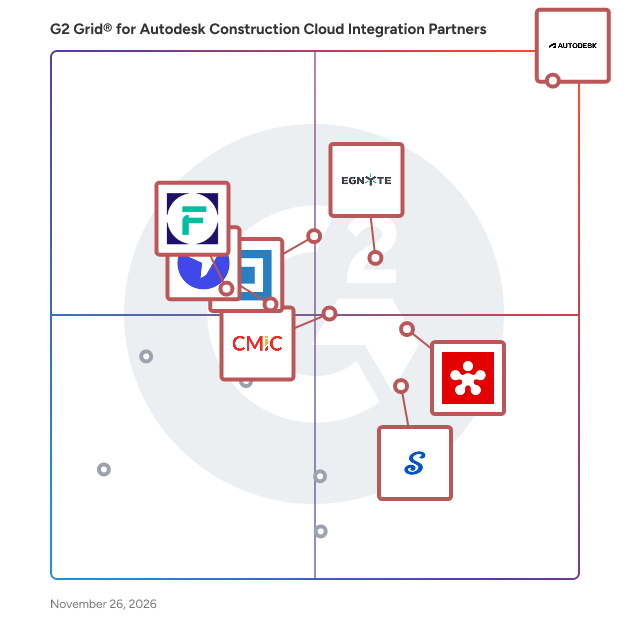
G2 Grid® for Autodesk Construction Cloud Integration Partners

G2 Grid® for Autodesk Construction Cloud Integration Partners plotting products by satisfaction and market presence

Highlighted products: Autodesk Forma (formerly Autodesk Construction Cloud), Egnyte, Bluebeam, Revizto, SignNow, CMiC Platform, DroneDeploy, and Graitec File Sync.

Underlying data: [Grid® JSON](https://www.g2.com/categories/autodesk-construction-cloud-integration-partners/grids.json?focus%5B%5D=autodesk-forma-formerly-autodesk-construction-cloud&focus%5B%5D=egnyte&focus%5B%5D=bluebeam&focus%5B%5D=revizto&focus%5B%5D=signnow&focus%5B%5D=cmic-platform&focus%5B%5D=dronedeploy&focus%5B%5D=graitec-file-sync)

OpenSpace

OpenSpace is a Visual Intelligence Platform designed for the construction industry, leveraging advanced computer vision and AI technologies to provide comprehensive, real-time visual documentation of jobsites. By capturing 360° imagery, OpenSpace enables builders to monitor progress, enhance coordination between field and office teams, and make informed decisions swiftly. This platform transforms traditional construction workflows by integrating reality data into daily operations, thereby reducing risks and increasing efficiency. Key Features and Functionality: - OpenSpace Capture: Utilizes 360° cameras to document construction sites comprehensively, creating a detailed visual record that is automatically mapped to floor plans. - OpenSpace Field: An AI-powered system that allows teams to capture, track, and manage site data using smartphones, with images automatically aligned to floor plans and BIM models. - OpenSpace Progress Tracking: Provides automated tracking of construction progress, offering insights into work completed and identifying potential schedule risks. - OpenSpace Air: Integrates drone imagery into the platform, enabling the creation of high-resolution orthomosaics, point clouds, and 3D meshes for comprehensive site analysis. - OpenSpace BIM+: Offers 3D tools that facilitate coordination between field teams and Virtual Design and Construction (VDC) teams, allowing for seamless comparison of as-built conditions to design intent. Primary Value and Solutions Provided: OpenSpace addresses the construction industry's need for accurate, up-to-date site documentation and efficient project management. By providing a visual record of the jobsite, it enhances transparency, reduces miscommunication, and minimizes costly rework. The platform's AI-driven analytics offer actionable insights, enabling teams to identify issues promptly and make data-driven decisions. Additionally, OpenSpace's integration capabilities with tools like Procore and Autodesk Construction Cloud streamline workflows, fostering better collaboration among stakeholders. Overall, OpenSpace empowers construction professionals to deliver projects on time and within budget by transforming reality data into strategic assets.

Average Rating: 4.4/5.0

Total Reviews: 18

How Do G2 Users Rate OpenSpace?

  • Has the product been a good partner in doing business?: 9.4/10 (Category avg: 8.9/10)
  • Ease of Use: 8.1/10 (Category avg: 8.8/10)
  • Quality of Support: 9.0/10 (Category avg: 8.7/10)
  • Ease of Setup: 9.2/10 (Category avg: 8.4/10)

Who Is the Company Behind OpenSpace?

  • Seller: OpenSpace
  • Year Founded: 2017
  • HQ Location: SAN FRANCISCO, CA
  • LinkedIn® Page: www.linkedin.com
    424 employees on LinkedIn®

Who Uses This Product?

  • Top Industries: Construction
  • Company Size: 50% Medium, 33% Small

What Do G2 Reviewers Say About OpenSpace?

AI-generated summary from verified user reviews

Pros
  • Users find OpenSpace's ease of use invaluable, streamlining project documentation and coordination effortlessly.
  • Users value the fast and accurate 360° photo capture of OpenSpace, enhancing job site documentation and project tracking.
  • Users value the real-time updates from OpenSpace, enabling effective monitoring and coordination of project phases remotely.
  • Users value the real-time updates from OpenSpace, enabling effective project tracking and remote coordination.
  • Users value the real-time site visibility of OpenSpace, enhancing project monitoring and coordination from any location.
Cons
  • Users report inaccurate information in 360 photos not aligning with floor plans, causing confusion in tracking sitework.
  • Users find the complexity of setup and training challenging, creating confusion for field teams initially.
  • Users find the complex setup of OpenSpace challenging, requiring additional training to effectively navigate its features.
  • Users face confusion with OpenSpace's functionality, requiring additional training for field teams to use it effectively.
  • Users find the difficult setup of OpenSpace requires training, which can create confusion for field teams.

What Are Recent G2 Reviews of OpenSpace?

What Are G2 Users Discussing About OpenSpace?

Stratus

STRATUS is the premiere Virtual Design and Construction Productivity software solution for MEP Contractors.

Average Rating: 4.0/5.0

Total Reviews: 5

How Do G2 Users Rate Stratus?

  • Has the product been a good partner in doing business?: 8.3/10 (Category avg: 8.9/10)
  • Ease of Use: 8.3/10 (Category avg: 8.8/10)
  • Quality of Support: 10.0/10 (Category avg: 8.7/10)
  • Ease of Setup: 6.1/10 (Category avg: 8.4/10)

Who Is the Company Behind Stratus?

  • Seller: GTP
  • Year Founded: 2010
  • HQ Location: Larkspur, Colorado, United States
  • LinkedIn® Page: www.linkedin.com
    111 employees on LinkedIn®

Who Uses This Product?

  • Company Size: 67% Medium, 33% Small

What Are Recent G2 Reviews of Stratus?

Cintoo

Cintoo specializes in innovative cloud-based solutions for the management, visualization, and analysis of reality capture data. The Cintoo platform enables AEC and Industry 4.0 organizations to upload 3D scan data from terrestrial scanners, mobiles and drones and use it to drive efficiencies and enhance decision-making. Sync scans and models by integrating with BIM coordination platforms, like Autodesk Construction Cloud, or connect to Digital Twin, document management or IoT platforms with asset tagging. Cintoo helps customers lead with 3D scan data synergy—turning reality capture into a strategic advantage. For more information, visit www.cintoo.com or follow us on LinkedIn at www.linkedin.com/company/cintoo.

Average Rating: 4.1/5.0

Total Reviews: 5

How Do G2 Users Rate Cintoo?

  • Has the product been a good partner in doing business?: 10.0/10 (Category avg: 8.9/10)
  • Ease of Use: 8.8/10 (Category avg: 8.8/10)
  • Quality of Support: 9.6/10 (Category avg: 8.7/10)
  • Ease of Setup: 8.9/10 (Category avg: 8.4/10)

Who Is the Company Behind Cintoo?

  • Seller: Cintoo
  • Year Founded: 2013
  • HQ Location: Miami, US
  • LinkedIn® Page: www.linkedin.com
    90 employees on LinkedIn®

Who Uses This Product?

  • Company Size: 40% Large, 40% Small

What Are Recent G2 Reviews of Cintoo?

What Are G2 Users Discussing About Cintoo?

AI can help you find the answers. G2 helps you trust them.

Connect G2 to Claude or ChatGPT for answers grounded in G2's trusted reviews, comparisons, and pricing from real user insights.

How it works

Cloudsfer

The ultimate solution for fast, secure and smooth content migration, backup & sync between Cloud & On Premise storage providers such as Google Drive, Dropbox, Box, SharePoint, OneDrive, Azure, Amazon S3, File System, Egnyte and many more. Cloudsfer is simple to use, robust solution addressing all data migration needs of consumers, SMB and enterprises. Try for free now: www.cloudsfer.com

Average Rating: 4.1/5.0

Total Reviews: 15

How Do G2 Users Rate Cloudsfer?

  • Has the product been a good partner in doing business?: 5.0/10 (Category avg: 8.9/10)
  • Ease of Use: 8.8/10 (Category avg: 8.8/10)
  • Quality of Support: 6.7/10 (Category avg: 8.7/10)
  • Ease of Setup: 8.3/10 (Category avg: 8.4/10)

Who Is the Company Behind Cloudsfer?

  • Seller: Tzunami
  • Year Founded: 1999
  • HQ Location: New York, NY
  • LinkedIn® Page: www.linkedin.com
    32 employees on LinkedIn®

Who Uses This Product?

  • Company Size: 53% Small, 33% Medium

What Are Recent G2 Reviews of Cloudsfer?

What Are G2 Users Discussing About Cloudsfer?

ProjectReady

ProjectReady delivers comprehensive information management solutions for the AECO, solving cross-platform and cross-stakeholder collaboration by connecting key industry tools and their associated data – Autodesk, Procore, Microsoft 365, Egnyte, Box and Bluebeam – to efficiently and securely exchange project information, ensure a single source of truth, and automate processes and tasks. ProjectReady's Two Core Products Include: ProjectReady WorkBridge (https://project-ready.com/workbridge/) - Sync, Transfer or Migrate Submittals, RFI’s, Documents, Issues, Photos, Sheets and Forms across the Autodesk Construction Cloud (ACC) and Procore or multiple tenants of the same platform (ACC to ACC or Procore to Procore). - Seamlessly transfer documents to SharePoint. - Full Audit Trail ProjectReady Central (https://project-ready.com/projectready-central/) - Automate the setup and connection of ACC, Microsoft 365, Procore and Egnyte for projects with consistent project information, while centralizing security and governance management of Autodesk, Microsoft 365 & Egnyte. - Sync Documents Across Procore, ACC, SharePoint and/or Egnyte - Setup Microsoft 365 SharePoint Cloud Backup for Procore Featured Solutions: ACC and Procore Migration (https://project-ready.com/autodesk-and-procore-migration-with-projectready/) - ProjectReady simplifies ACC and Procore migration. Zero manual data handling and sync for active projects Microsoft 365 Cloud Backup for ACC and Procore (https://project-ready.com/autodesk-and-procore-cloud-backup-with-sharepoint/) - Seamless setup of ACC and/or Procore Cloud Backup to Microsoft 365 SharePoint

Average Rating: 4.6/5.0

Total Reviews: 4

How Do G2 Users Rate ProjectReady?

  • Has the product been a good partner in doing business?: 10.0/10 (Category avg: 8.9/10)
  • Ease of Use: 8.9/10 (Category avg: 8.8/10)
  • Quality of Support: 8.3/10 (Category avg: 8.7/10)
  • Ease of Setup: 10.0/10 (Category avg: 8.4/10)

Who Is the Company Behind ProjectReady?

  • Seller: ProjectReady
  • Year Founded: 2018
  • HQ Location: White Plains, US
  • LinkedIn® Page: www.linkedin.com
    7 employees on LinkedIn®
  • Phone: 914.893.4228

Who Uses This Product?

  • Company Size: 75% Small, 25% Large

What Are Recent G2 Reviews of ProjectReady?

What Are G2 Users Discussing About ProjectReady?

STACK Takeoff & Estimate

From project evaluation to completion, contractors use STACK’s cloud-based software to help run their business and maximize their profits. Save time with STACK's powerful, time-saving AI features. Accelerated by AI. Driven by You. STACK Takeoff & Estimate allow you to bid more projects in less time with comprehensive takeoff and construction cost estimating software. With best-in-class cloud-based tools, you can see 10X faster bids and up to 35% more opportunities to win. STACK provides enterprise-grade security & reliability that construction teams are looking for. Protect project data, ensure uptime, and keep your teams working without disruption. For more information on how STACK software is helping teams gain visibility, insight, and alignment throughout the bid process and in the field, visit stackct.com.

Average Rating: 4.5/5.0

Total Reviews: 95

How Do G2 Users Rate STACK Takeoff & Estimate?

  • Has the product been a good partner in doing business?: 9.5/10 (Category avg: 8.9/10)
  • Ease of Use: 9.0/10 (Category avg: 8.8/10)
  • Quality of Support: 9.3/10 (Category avg: 8.7/10)
  • Ease of Setup: 9.0/10 (Category avg: 8.4/10)

Who Is the Company Behind STACK Takeoff & Estimate?

Who Uses This Product?

  • Who Uses This: Estimator
  • Top Industries: Construction
  • Company Size: 79% Small, 9% Medium

What Do G2 Reviewers Say About STACK Takeoff & Estimate?

AI-generated summary from verified user reviews

Pros
  • Users find STACK Takeoff & Estimate to be extremely easy to use, enhancing their overall efficiency and productivity.
  • Users love the customizability and ease of use in STACK Takeoff & Estimate, enhancing their project efficiency significantly.
  • Users praise the intuitive interface of STACK Takeoff & Estimate, making navigation and usage effortless and efficient.
  • Users commend the easy setup of STACK Takeoff & Estimate, facilitating a smooth transition for various projects.
  • Users appreciate the efficiency improvement of STACK Takeoff & Estimate, enjoying quick measures and easy estimates.
Cons
  • Users express a need for missing features like improved export options and additional takeoff types for better functionality.
  • Users feel that improvement is needed in measurement speed and custom formatting options for estimates.
  • Users face access limitations with STACK Takeoff & Estimate, making it challenging to manage takeoffs on multiple devices.
  • Users find mobile limitations a challenge, struggling to access information and perform tasks effectively on-site.
  • Users find the costly pricing of STACK Takeoff & Estimate to be a concern, especially with multiple users.

What Are Recent G2 Reviews of STACK Takeoff & Estimate?

What Are G2 Users Discussing About STACK Takeoff & Estimate?

Assignar

Assignar is an all-in-one construction operations platform designed to help self-performing general contractors and subcontractors coordinate and deploy fieldworkers, staff, and machinery to jobsites using mobile technologies and real-time cloud data. Being cloud based, our platform connects the field to the office, offering more visibility, optimized construction processes, and helps managers make data-driven decisions so that projects stay on time and on budget. Built by industry professionals for the industry, Assignar replaces paper, spreadsheets, and single-point solutions to allow real-time tracking and control of field operations. With multiple integrations available, Assignar helps connect your data from end-to-end.

Average Rating: 4.4/5.0

Total Reviews: 52

How Do G2 Users Rate Assignar?

  • Has the product been a good partner in doing business?: 9.0/10 (Category avg: 8.9/10)
  • Ease of Use: 8.6/10 (Category avg: 8.8/10)
  • Quality of Support: 9.4/10 (Category avg: 8.7/10)
  • Ease of Setup: 8.5/10 (Category avg: 8.4/10)

Who Is the Company Behind Assignar?

  • Seller: Assignar
  • Company Website:
  • Year Founded: 2014
  • HQ Location: Denver, CO
  • LinkedIn® Page: www.linkedin.com
    61 employees on LinkedIn®

Who Uses This Product?

  • Top Industries: Construction
  • Company Size: 56% Small, 44% Medium

What Do G2 Reviewers Say About Assignar?

AI-generated summary from verified user reviews

Pros
  • Users praise the ease of use, noting its user-friendly interface for both field and office staff.
  • Users value the responsive customer support of Assignar, enhancing their experience and facilitating effective integration.
  • Users value the centralization of data in Assignar, enhancing decision-making and improving project organization and workflows.
  • Users highlight the easy implementation of Assignar, facilitating smooth integration and enhanced operational efficiency.
  • Users find Assignar's easy sharing features invaluable for seamless data connection and improved decision-making across teams.
Cons
  • Users find missing features problematic as older systems hinder productivity and lack updates in Assignar's new versions.
  • Users find the interface design outdated, making it less user-friendly despite improvements from the development team.
  • Users find Assignar to be expensive, impacting their willingness to switch from older, more familiar systems.
  • Users feel that the limited features of Assignar hinder their overall experience and usability of the software.
  • Users find Assignar has poor usability, though improvements have been made over time for better user experience.

What Are Recent G2 Reviews of Assignar?

What Are G2 Users Discussing About Assignar?

Autodownloader

Selectively download backup copies of your BIM 360 documents onto your local drives

Average Rating: 4.5/5.0

Total Reviews: 3

How Do G2 Users Rate Autodownloader?

  • Ease of Use: 8.3/10 (Category avg: 8.8/10)
  • Quality of Support: 7.5/10 (Category avg: 8.7/10)

Who Is the Company Behind Autodownloader?

Who Uses This Product?

  • Company Size: 75% Small, 25% Large

What Are Recent G2 Reviews of Autodownloader?

BCF Export

Seamlessly export Autodesk® BIM 360® Issues into a BCF file

Average Rating: 4.2/5.0

Total Reviews: 3

How Do G2 Users Rate BCF Export?

  • Ease of Use: 7.8/10 (Category avg: 8.8/10)
  • Quality of Support: 6.1/10 (Category avg: 8.7/10)

Who Is the Company Behind BCF Export?

  • Seller: Autodesk
  • Year Founded: 1982
  • HQ Location: San Francisco
  • LinkedIn® Page: www.linkedin.com
    15,757 employees on LinkedIn®
  • Ownership: NASDAQ:ADSK
  • Total Revenue (USD mm): $3,790

Who Uses This Product?

  • Company Size: 100% Medium

What Are Recent G2 Reviews of BCF Export?

What Are G2 Users Discussing About BCF Export?

Clearstory

Clearstory is the only purpose-built technology for managing Change Orders between construction stakeholders in real time, delivering unmatched transparency and speed. With all projects, trades, and Change Orders in one place, our cloud-based Change Order Request Log provides the visibility needed to reduce risk and foster trust. Designed for contractors of all types, Clearstory is easy to adopt, streamlines communication, and modernizes the T&M Tag and Change Order approach to simplify processes and save time and money.

Average Rating: 4.8/5.0

Total Reviews: 99

How Do G2 Users Rate Clearstory?

  • Has the product been a good partner in doing business?: 9.8/10 (Category avg: 8.9/10)
  • Ease of Use: 9.1/10 (Category avg: 8.8/10)
  • Quality of Support: 9.6/10 (Category avg: 8.7/10)
  • Ease of Setup: 9.1/10 (Category avg: 8.4/10)

Who Is the Company Behind Clearstory?

  • Seller: Clearstory
  • Year Founded: 2018
  • HQ Location: San Francisco , US
  • LinkedIn® Page: www.linkedin.com
    101 employees on LinkedIn®

Who Uses This Product?

  • Who Uses This: Project Manager, Project Engineer
  • Top Industries: Construction
  • Company Size: 43% Medium, 33% Small

What Do G2 Reviewers Say About Clearstory?

AI-generated summary from verified user reviews

Pros
  • Users commend the intuitive ease of use in Clearstory, benefiting from helpful tutorials and excellent customer support.
  • Users value the efficient tracking of contractual discussions and changes, ensuring transparency and clarity in approvals.
  • Users value the efficiency improvement from Clearstory, praising its intuitive design and quick support response times.
  • Users appreciate the tracking efficiency of Clearstory, benefiting from streamlined change order management in one central place.
  • Users value the excellent organization of Clearstory, enabling efficient management of multiple projects and change orders.
Cons
  • Users express concerns over missing features, particularly needing more reporting capabilities and easier customization options.
  • Users find difficult navigation in Clearstory, especially with T&M modules and searching change events, complicating usability.
  • Users find difficult customization frustrating, as it complicates report updates and limits efficient project management.
  • Users find a difficult learning curve with Clearstory, particularly in using the T&M module effectively.
  • Users find the difficult setup of Clearstory particularly challenging, especially when configuring features initially.

What Are Recent G2 Reviews of Clearstory?

RedTeam

Choosing a Construction Management software is a crucial decision, so when you make a purchase it’s important to consider the software along with the support and resources, you’ll receive to use it effectively. RedTeam Flex not only offers top-of-the-line software, but we also provide extensive training and support to ensure you get the maximum benefit from our platform. When you choose RedTeam Flex, you’ll have the support you need to confidently manage your construction projects from start to finish. RedTeam Flex resources are available to help you, and your entire team via chat and support tickets, with the option for paid training sessions with dedicated training specialists.

Average Rating: 4.1/5.0

Total Reviews: 103

How Do G2 Users Rate RedTeam?

  • Has the product been a good partner in doing business?: 8.5/10 (Category avg: 8.9/10)
  • Ease of Use: 8.0/10 (Category avg: 8.8/10)
  • Quality of Support: 8.5/10 (Category avg: 8.7/10)
  • Ease of Setup: 7.3/10 (Category avg: 8.4/10)

Who Is the Company Behind RedTeam?

  • Seller: RedTeam Software
  • Company Website:
  • Year Founded: 2006
  • HQ Location: Orlando, FL
  • LinkedIn® Page: www.linkedin.com
    99 employees on LinkedIn®

Who Uses This Product?

  • Top Industries: Construction
  • Company Size: 81% Small, 18% Medium

What Are Recent G2 Reviews of RedTeam?

What Are G2 Users Discussing About RedTeam?

VisualLive

Cloud-based software quickly converts your files, keeping all geometries, textures, and materials,

Average Rating: 3.8/5.0

Total Reviews: 3

How Do G2 Users Rate VisualLive?

  • Ease of Use: 9.2/10 (Category avg: 8.8/10)
  • Ease of Setup: 6.7/10 (Category avg: 8.4/10)

Who Is the Company Behind VisualLive?

Who Uses This Product?

  • Company Size: 100% Large

What Are Recent G2 Reviews of VisualLive?

What Are G2 Users Discussing About VisualLive?

4D Reconstruct

Reconstruct is the leader in remote quality control, progress monitoring, and facilities assessment. Our cutting-edge reality mapping technology empowers you to manage projects remotely, mitigate risk, save time and money, and make better decisions—all while slashing travel to the job site. Reconstruct is the only solution that allows you to truly visualize your project by combining reality capture, design, and construction schedule. And best of all, virtually anyone on the job site can conduct reality capture using equipment as simple as a smartphone or 360 camera.

Average Rating: 4.7/5.0

Total Reviews: 5

How Do G2 Users Rate 4D Reconstruct?

  • Has the product been a good partner in doing business?: 10.0/10 (Category avg: 8.9/10)
  • Ease of Use: 9.0/10 (Category avg: 8.8/10)
  • Quality of Support: 9.0/10 (Category avg: 8.7/10)
  • Ease of Setup: 10.0/10 (Category avg: 8.4/10)

Who Is the Company Behind 4D Reconstruct?

Who Uses This Product?

  • Top Industries: Construction
  • Company Size: 60% Small, 60% Medium

What Are Recent G2 Reviews of 4D Reconstruct?

What Are G2 Users Discussing About 4D Reconstruct?

Control Center 8

EarthCam’s software-as-a-service (SaaS) platform, Control Center 8.5, features valuable tools within a smart security dashboard. Project teams can easily analyze data, review recordings and share the high-quality content across their organization.

Average Rating: 5.0/5.0

Total Reviews: 2

Who Is the Company Behind Control Center 8?

  • Seller: EarthCam
  • Year Founded: 1996
  • HQ Location: Upper Saddle River, NJ
  • LinkedIn® Page: www.linkedin.com
    219 employees on LinkedIn®

Who Uses This Product?

  • Company Size: 100% Small

What Are Recent G2 Reviews of Control Center 8?

What Are G2 Users Discussing About Control Center 8?

DAQRI Computer Vision

DAQRI customers improve workplace efficiency, safety, and their bottom line. DAQRI develops, markets and sells its platform products from head offices in Los Angeles, California, and Dublin, Ireland.

Average Rating: 4.5/5.0

Total Reviews: 2

How Do G2 Users Rate DAQRI Computer Vision?

  • Has the product been a good partner in doing business?: 6.7/10 (Category avg: 8.9/10)
  • Ease of Use: 8.3/10 (Category avg: 8.8/10)
  • Quality of Support: 7.5/10 (Category avg: 8.7/10)
  • Ease of Setup: 10.0/10 (Category avg: 8.4/10)

Who Is the Company Behind DAQRI Computer Vision?

  • Seller: Daqri
  • Year Founded: 2010
  • HQ Location: Los Angeles, US
  • LinkedIn® Page: www.linkedin.com
    16 employees on LinkedIn®

Who Uses This Product?

  • Company Size: 50% Medium, 50% Small

What Do G2 Reviewers Say About DAQRI Computer Vision?

AI-generated summary from verified user reviews

Pros
  • Users experience enhanced work productivity with DAQRI Computer Vision, facilitating remote diagnosing and local repairs effectively.
  • Users value the real-time updates feature of DAQRI Computer Vision, significantly boosting productivity during repairs and diagnostics.
  • Users find DAQRI Computer Vision's web viewing capabilities invaluable for enhancing productivity and facilitating remote diagnostics.
Cons
  • Users face integration issues with DAQRI Computer Vision, as it lacks compatibility with mainstream enterprise hardware platforms.
  • Users find that DAQRI's limited access to proprietary smart glasses restricts compatibility and overall utility in enterprises.

What Are Recent G2 Reviews of DAQRI Computer Vision?

What Are G2 Users Discussing About DAQRI Computer Vision?

Neeraja Prakash
NP
Researched and written by Neeraja Prakash