# Best Accounting Practice Management Software for Small Business - Page 2

## How Many Accounting Practice Management Software Products Does G2 Track?

**Total Products under this Category:** 138

### Category Stats (Aug 2026)

- **Average Rating:** 4.43/5 (↑0.02 vs Jul 2026) The average rating of products in this category, based on all submitted ratings
- **Top Trending Product:** Mango Practice Management (+3.86%) - Among all products in this category, Mango Practice Management recorded the largest rating increase compared to last month

_Last updated: August 01, 2026_

## How Does G2 Rank Accounting Practice Management Software Products?

**Why You Can Trust G2's Software Rankings:**

- 30 Analysts and Data Experts
- 4,700+ Authentic Reviews
- 138+ Products
- Unbiased Rankings

G2's software rankings are built on verified user reviews, rigorous moderation, and a consistent research methodology maintained by a team of analysts and data experts. Each product is measured using the same transparent criteria, with no paid placement or vendor influence. While reviews reflect real user experiences, which can be subjective, they offer valuable insight into how software performs in the hands of professionals. Together, these inputs power the G2 Score, a standardized way to compare tools within every category.

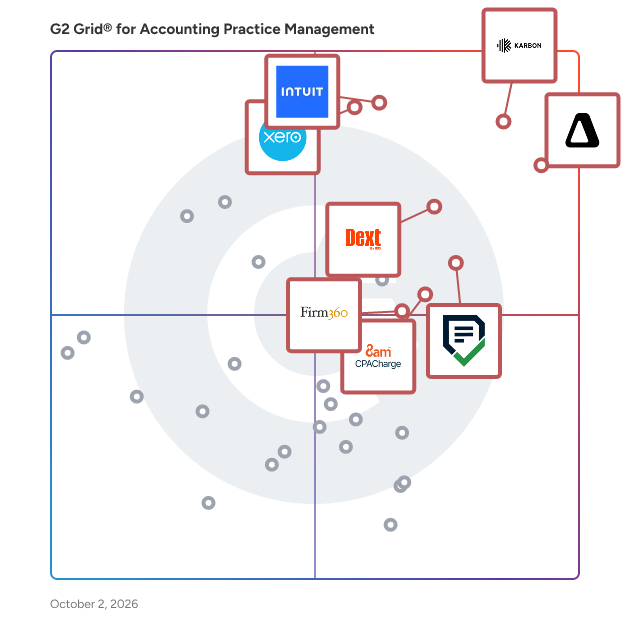
## G2 Grid® for Accounting Practice Management Software
 ![G2 Grid® for Accounting Practice Management Software plotting products by satisfaction and market presence](https://www.g2.com/categories/accounting-practice-management/grids.png?focus%5B%5D=36425&focus%5B%5D=18207&focus%5B%5D=87918&focus%5B%5D=103265&focus%5B%5D=87849&focus%5B%5D=113232&focus%5B%5D=118725&focus%5B%5D=46118)

Highlighted products: Karbon, Canopy, QuickBooks Online Accountant, Financial Cents, Xero Practice Manager, 8am CPACharge, Firm360, and Dext.

Underlying data: [Grid® JSON](https://www.g2.com/categories/accounting-practice-management/grids.json?focus%5B%5D=karbon-2025-03-03&focus%5B%5D=canopy-2026-05-12&focus%5B%5D=quickbooks-online-accountant&focus%5B%5D=financial-cents&focus%5B%5D=xero-practice-manager&focus%5B%5D=8am-cpacharge&focus%5B%5D=firm360&focus%5B%5D=dext&segment=small-business)

**Sponsored**

### Vertice

Vertice is the intelligent procurement platform built for the modern enterprise. By uniting agentic workflows, AI-powered insights, and expert buying talent, we enable finance and procurement teams in 30+ countries to operate with greater precision, speed, and impact. Customers including ARM, Blackberry, Factorial, Le Figaro and Santander use Vertice's platform to review, analyze and negotiate purchases with greater confidence. Vertice processes over $75bn in spend, with a proven track record of delivering 20%+ savings and accelerating procurement cycles by 2x. Headquartered in London and recognised in 2025 by the Financial Times as the UK’s fastest growing scale-up, Vertice also operates in New York, Sydney, Brno, Linz and Johannesburg. Learn more at www.vertice.one.

[Visit website](https://www.g2.com/external_clickthroughs/record?secure%5Bad_program%5D=ppc&secure%5Bad_slot%5D=category_product_list_llm&secure%5Bcategory_id%5D=1592&secure%5Bchosen_at%5D=2026-08-03T12%3A41%3A25Z&secure%5Bdisplayable_resource_id%5D=1387&secure%5Bdisplayable_resource_type%5D=Category&secure%5Bmedium%5D=sponsored&secure%5Bplacement_reason%5D=retargeted_product&secure%5Bplacement_resource_ids%5D%5B%5D=1188126&secure%5Bprioritized%5D=false&secure%5Bproduct_id%5D=1188126&secure%5Bresource_id%5D=1592&secure%5Bresource_type%5D=Category&secure%5Bsource_type%5D=category_page&secure%5Bsource_url%5D=https%3A%2F%2Fwww.g2.com%2Fcategories%2Faccounting-practice-management%2Fsmall-business%3Fpage%3D2&secure%5Btoken%5D=83ec35ebbfb044e70210bf34757ed2c253b203472bd9e0095bce2ca7ce6c6c55&secure%5Burl%5D=https%3A%2F%2Fwww.vertice.one%2Fsaas-purchasing-platform%3Futm_campaign%3D464408788-Growth_2026Jul_Paid%2520Search_Global_G2_ads%26utm_source%3Dppc&secure%5Burl_type%5D=custom_url)

### [Countable](https://www.g2.com/products/countable-countable/reviews)

Countable is a comprehensive community engagement platform designed to foster meaningful interactions between organizations and their stakeholders. It offers a suite of tools that enable companies, nonprofits, and government entities to build and manage online communities, facilitating discussions, content sharing, and collaborative decision-making. By providing a centralized hub for engagement, Countable helps organizations strengthen relationships, gather valuable insights, and drive collective action. Key Features and Functionality: - Customizable Community Hubs: Create branded online spaces tailored to specific audiences, allowing for personalized user experiences. - Interactive Content Modules: Share articles, videos, and other media to inform and engage community members effectively. - Discussion Forums: Facilitate open dialogues and debates on pertinent topics, encouraging active participation and diverse viewpoints. - Actionable Campaigns: Launch initiatives that prompt users to take specific actions, such as signing petitions or participating in surveys. - Analytics Dashboard: Monitor engagement metrics and user behavior to assess the effectiveness of community strategies. - Integration Capabilities: Seamlessly connect with existing CRM systems, social media platforms, and other tools to streamline operations. Primary Value and Solutions Provided: Countable addresses the challenge organizations face in building and maintaining active, engaged communities. By offering a centralized platform with interactive features, it enables organizations to: - Enhance Stakeholder Engagement: Foster deeper connections with audiences through meaningful interactions and content sharing. - Drive Collective Action: Mobilize community members around causes, campaigns, or initiatives, leading to tangible outcomes. - Gather Actionable Insights: Utilize analytics to understand community dynamics, preferences, and feedback, informing strategic decisions. - Strengthen Brand Loyalty: Build trust and loyalty by providing a transparent and participatory environment for stakeholders. In summary, Countable empowers organizations to create vibrant online communities that drive engagement, collaboration, and positive change.

**Average Rating:** 4.7/5.0

**Total Reviews:** 16

#### How Do G2 Users Rate Countable?

- **Has the product been a good partner in doing business?:** 10.0/10 (Category avg: 9.1/10)
- **Reporting:** 4.7/10 (Category avg: 7.9/10)
- **New Client:** 7.1/10 (Category avg: 8.5/10)
- **Job Status:** 7.5/10 (Category avg: 8.7/10)

#### Who Is the Company Behind Countable?

- **Seller:** [Countable](https://www.g2.com/sellers/countable)
- **Year Founded:** 2014
- **HQ Location:** San Francisco, US
- **LinkedIn® Page:** [www.linkedin.com](https://www.g2.com/external_clickthroughs/record?secure%5Bsource_type%5D=product_profile&secure%5Btoken%5D=0de5f6fec1150d1fb0954235bedcb575438cf05e359c4d8b339d58deace7ba92&secure%5Burl%5D=https%3A%2F%2Fwww.linkedin.com%2Fcompany%2F5057551%2F&secure%5Burl_type%5D=linkedin_company_website)  
24 employees on LinkedIn®

#### Who Uses This Product?

- **Top Industries:** Accounting
- **Company Size:** 100% Small

#### What Do G2 Reviewers Say About Countable?

_AI-generated summary from verified user reviews_

##### Pros

- Users appreciate the **ease of use** of Countable, enjoying its seamless navigation and quick integrations.
- Users commend Countable's **excellent customer support** , highlighting prompt responses and clear explanations for swift problem resolution.
- Users value the **seamless integrations** of Countable with accounting software, enhancing convenience and efficiency in task management.
- Users love the **automation features** of Countable, significantly speeding up year-end processes and client management.
- Users value the **customizable features** of Countable, enhancing efficiency and compliance for their accounting needs.

##### Cons

- Users find **poor usability** in Countable, noting clunky interfaces and workflows that complicate the overall experience.
- Users notice **slow performance** at times, impacting their experience while navigating the platform's features.
- Users find **formatting issues** in Countable's features, making navigation and tracking challenging during the workflow.
- Users find the **learning curve steep** , especially with work papers and checklist formatting in Countable.
- Users are eager for updates but frustrated by the **limited features** currently available in Countable.

#### What Are Recent G2 Reviews of Countable?

**["Easy cloud based software to simple integrations"](https://www.g2.com/survey_responses/countable-review-12767071)**

**Rating:** 4.5/5.0 stars

_— Danielle S._

[Read full review](https://www.g2.com/survey_responses/countable-review-12767071)

**["A solid cloud-based tool for compilations — fast and improving"](https://www.g2.com/survey_responses/countable-review-12350879)**

**Rating:** 4.5/5.0 stars

_— Sebastien P._

[Read full review](https://www.g2.com/survey_responses/countable-review-12350879)

### [Mango Practice Management](https://www.g2.com/products/mango-practice-management/reviews)

Founded by a practice CPA for over 35 years, Mango Practice Management is truly built by accountants for accountants. We provide project management, document management, time and billing, secure file-sharing, integrated payments, and client engagement solutions that bring real organization to your firm. Streamline workflows, eliminate non-billable work, collaborate with your clients, and get paid fast for all the work you do. Like we always say, Mango has everything you need, all in one place. Start your 10-day free trial at www.mangopractice.com to take back control of your practice today!

**Average Rating:** 3.8/5.0

**Total Reviews:** 35

#### How Do G2 Users Rate Mango Practice Management?

- **Has the product been a good partner in doing business?:** 7.6/10 (Category avg: 9.1/10)
- **Reporting:** 8.1/10 (Category avg: 7.9/10)
- **New Client:** 7.9/10 (Category avg: 8.5/10)
- **Job Status:** 8.2/10 (Category avg: 8.7/10)

#### Who Is the Company Behind Mango Practice Management?

- **Seller:** [ProfitSolv](https://www.g2.com/sellers/profitsolv)
- **Company Website:** www.profitsolv.com
- **Year Founded:** 2020
- **HQ Location:** Knoxville, US
- **Twitter:** @ProfitSolv  
18 Twitter followers
- **LinkedIn® Page:** [www.linkedin.com](https://www.g2.com/external_clickthroughs/record?secure%5Bsource_type%5D=product_profile&secure%5Btoken%5D=110825cd09c105929d616c5ff8cd1ef39b4798f2adc87f4917c69e318444e10c&secure%5Burl%5D=https%3A%2F%2Fwww.linkedin.com%2Fcompany%2Fprofitsolv%2F&secure%5Burl_type%5D=linkedin_company_website)  
179 employees on LinkedIn®

#### Who Uses This Product?

- **Top Industries:** Accounting
- **Company Size:** 86% Small, 14% Medium

#### What Do G2 Reviewers Say About Mango Practice Management?

_AI-generated summary from verified user reviews_

##### Pros

- Users find Mango Practice Management to be an **easy and user-friendly tool** , facilitating smooth transitions and efficient workflows.
- Users praise the **user-friendly billing system** of Mango Practice Management, enhancing client engagement and invoice creation.
- Users appreciate the **user-friendly invoicing system** in Mango, facilitating seamless billing and customization for diverse engagements.
- Users value the **client management capabilities** of Mango, enhancing invoicing and organization for their practices.
- Users praise the **amazing abundance of features** in Mango Practice Management, simplifying various tasks for accounting firms.

##### Cons

- Users find the **limited options** in billing and reporting features frustrating, highlighting a need for more flexibility.
- Users are disappointed by the **missing features** in Mango Practice Management, particularly the lack of billing flexibility.
- Users find the lack of **billing flexibility** frustrating, specifically with combining clients and recurring payment options.
- Users face **slow processing** with Mango, experiencing latency, recurring issues, and delayed bug fixes that hinder usability.
- Users face **frequent software bugs** with Mango, causing frustration due to ongoing glitches and recurring issues.

#### What Are Recent G2 Reviews of Mango Practice Management?

**["Flexible for Tracking Client Communications and Projects with Clear Dashboard Visuals for Open Items"](https://www.g2.com/survey_responses/mango-practice-management-review-13093535)**

**Rating:** 5.0/5.0 stars

_— Richard P._

[Read full review](https://www.g2.com/survey_responses/mango-practice-management-review-13093535)

**["Mango Practice Management Keeps Everything Organized and Easy to Navigate"](https://www.g2.com/survey_responses/mango-practice-management-review-13068103)**

**Rating:** 5.0/5.0 stars

_— Liz F._

[Read full review](https://www.g2.com/survey_responses/mango-practice-management-review-13068103)

#### What Are G2 Users Discussing About Mango Practice Management?

- [What is Mango Practice Management used for?](https://www.g2.com/discussions/what-is-mango-practice-management-used-for)

### [Caseware](https://www.g2.com/products/caseware/reviews)

Caseware is the AI platform for modern audit and assurance engagements. Purpose-built for audit and financial reporting, Caseware embeds governed, engagement-aware intelligence directly into the workflows firms already trust—helping teams plan, execute, review and report with greater speed, confidence and control. With AI agents, methodology-driven automation and an open platform architecture, Caseware helps firms streamline complex work, protect quality and extend intelligence across the full engagement lifecycle. Trusted by firms around the world, Caseware brings together 35+ years of domain expertise with frontier AI built for what comes next.

**Average Rating:** 4.0/5.0

**Total Reviews:** 68

#### How Do G2 Users Rate Caseware?

- **Has the product been a good partner in doing business?:** 7.6/10 (Category avg: 9.1/10)
- **Reporting:** 3.3/10 (Category avg: 7.9/10)
- **Job Status:** 10.0/10 (Category avg: 8.7/10)

#### Who Is the Company Behind Caseware?

- **Seller:** [Caseware International](https://www.g2.com/sellers/caseware-international)
- **Company Website:** www.caseware.com
- **Year Founded:** 1988
- **HQ Location:** Toronto, ON
- **Twitter:** @CaseWare  
5,821 Twitter followers
- **LinkedIn® Page:** [www.linkedin.com](https://www.g2.com/external_clickthroughs/record?secure%5Bsource_type%5D=product_profile&secure%5Btoken%5D=989ec55c8f13cfc6b3c593a7593f7d19f4c68ed17468c58ca8ed23843cb8e56a&secure%5Burl%5D=https%3A%2F%2Fwww.linkedin.com%2Fcompany%2F80551%2F&secure%5Burl_type%5D=linkedin_company_website)  
634 employees on LinkedIn®

#### Who Uses This Product?

- **Top Industries:** Accounting
- **Company Size:** 39% Small, 33% Medium

#### What Do G2 Reviewers Say About Caseware?

_AI-generated summary from verified user reviews_

##### Pros

- Users value the **ease of use** in Caseware, enhancing audit efficiency with straightforward templates and seamless data integration.
- Users value the **efficiency** of Caseware, benefiting from streamlined processes and rapid handling of large data volumes.
- Users value the **automation capabilities** of Caseware, enhancing efficiency and accuracy in the auditing process.
- Users highlight the **ease of use of templates** , making audits simple and enhancing overall efficiency and quality.
- Users value the **audit efficiency** of Caseware, benefiting from tailored insights and seamless data integration for financial audits.

##### Cons

- Users face a **steep learning curve** with Caseware, requiring extensive training and time to become proficient.
- Users experience **slow performance** during data synchronization, particularly with large files, impacting usability at times.
- Users find the **time-consuming setup** and learning process of Caseware to be quite challenging and inefficient.
- Users find the **setup process time-consuming** and often struggle with simultaneous edits causing confusion and extra work.
- Users find the **difficult learning curve** of Caseware challenging, making setup and collaboration cumbersome and time-consuming.

#### What Are Recent G2 Reviews of Caseware?

**["Standards-Aligned Auditing in the Cloud, with Promising Verity AI Integration"](https://www.g2.com/survey_responses/caseware-review-12860942)**

**Rating:** 4.5/5.0 stars

_— Ryan M._

[Read full review](https://www.g2.com/survey_responses/caseware-review-12860942)

**["Essential for Audit Firms with Forward-Thinking Innovation"](https://www.g2.com/survey_responses/caseware-review-12861854)**

**Rating:** 4.5/5.0 stars

_— Drew C._

[Read full review](https://www.g2.com/survey_responses/caseware-review-12861854)

#### What Are G2 Users Discussing About Caseware?

- [What is Working Papers used for?](https://www.g2.com/discussions/what-is-working-papers-used-for)
- [What is CaseWare Cloud used for?](https://www.g2.com/discussions/what-is-caseware-cloud-used-for)

### [Cone](https://www.g2.com/products/cone-accounting-practice-management/reviews)

Cone is all-in-one accounting practice management and proposal software - built for modern accounting and bookkeeping firms. From proposals and engagement letters to billing, payments, workflow automation, and client communication - Cone delivers a unified experience that replaces multiple tools. Cone’s platform includes: - Customizable Proposals & Engagement Letters (standalone or integrated) - Billing & Payments (with automated invoicing, reminders, and recurring billing) - Multiple Pricing Packages - Time Tracking - Document Management - Email Management - Workflow Automation - Client Portal - Integrations with Xero, QBO, GoCardless, Stripe, Google Drive, SharePoint, and more Trusted by thousands of accountants and bookkeepers globally - across the UK, US, Australia, and beyond - Cone helps firms start small or scale confidently, without switching between tools or breaking the bank. P.S.: Cone’s proposal and engagement letter software is also available as a standalone product - perfect for firms looking to streamline onboarding and get paid faster.

**Average Rating:** 4.9/5.0

**Total Reviews:** 34

#### How Do G2 Users Rate Cone?

- **Has the product been a good partner in doing business?:** 9.6/10 (Category avg: 9.1/10)
- **Reporting:** 8.3/10 (Category avg: 7.9/10)
- **New Client:** 10.0/10 (Category avg: 8.5/10)
- **Job Status:** 10.0/10 (Category avg: 8.7/10)

#### Who Is the Company Behind Cone?

- **Seller:** [Cone](https://www.g2.com/sellers/cone)
- **Year Founded:** 2022
- **HQ Location:** United States
- **LinkedIn® Page:** [www.linkedin.com](https://www.g2.com/external_clickthroughs/record?secure%5Bsource_type%5D=product_profile&secure%5Btoken%5D=00e28e34b2f87b035470554d90009efa87788ecbbde004886a4a62741f03806e&secure%5Burl%5D=https%3A%2F%2Fwww.linkedin.com%2Fcompany%2Fgetcone&secure%5Burl_type%5D=linkedin_company_website)  
8 employees on LinkedIn®

#### Who Uses This Product?

- **Top Industries:** Accounting
- **Company Size:** 97% Small, 3% Medium

#### What Do G2 Reviewers Say About Cone?

_AI-generated summary from verified user reviews_

##### Pros

- Users find Cone's **ease of use** remarkable, facilitating seamless workflows and enhancing team collaboration efficiently.
- Users commend Cone for its **excellent customer support** , enhancing their overall experience and satisfaction with the product.
- Users love how Cone provides **time-saving efficiency** by consolidating essential tools into one platform.
- Users value the **efficiency** of Cone, noting significant time and cost savings through its all-in-one capabilities.
- Users commend Cone for its **affordability and all-in-one functionality** , significantly reducing costs and time for businesses.

##### Cons

- Users notice a **learning curve** with Cone, but support makes the setup process smoother over time.
- Users face significant **deletion problems** without an autosave feature, resulting in lost work upon page reload.
- Users find the **difficult setup** of Cone requires time, though support from the team is appreciated.
- Users face **initial usage difficulty** due to limited help articles and guidance before signing up for the platform.
- Users face **limited customization** options for branding and content, hindering proposal personalization for clients.

#### What Are Recent G2 Reviews of Cone?

**["Cone: Great Product and Truly Responsive Customer Service"](https://www.g2.com/survey_responses/cone-review-12402475)**

**Rating:** 5.0/5.0 stars

_— Christen C._

[Read full review](https://www.g2.com/survey_responses/cone-review-12402475)

**["All-in-One Practice Management That Saves Time and Money"](https://www.g2.com/survey_responses/cone-review-12334776)**

**Rating:** 5.0/5.0 stars

_— Ben C._

[Read full review](https://www.g2.com/survey_responses/cone-review-12334776)

### [Uncat](https://www.g2.com/products/uncat/reviews)

Fix Uncategorized Transactions & Automate Your Accounting with Uncat. No more spreadsheets! Streamline your accounting for just $9/client/month with Uncat, the all-in-one client platform used by over 20,000 professionals. Effortlessly categorize transactions, process receipts, and manage client requests all in one place. Uncat syncs with QuickBooks Online, Xero, and QuickBooks Desktop. Uncat is highly rated by accountants and bookkeepers, and, most importantly, by their clients. Check out an introduction or a full demo of Uncat on YouTube. Introducing Uncat: https://www.youtube.com/watch?v=jVb3P0q3Ziw Full demo of Uncat: https://www.uncat.com/tutorial-jason

**Average Rating:** 4.7/5.0

**Total Reviews:** 42

#### How Do G2 Users Rate Uncat?

- **Has the product been a good partner in doing business?:** 10.0/10 (Category avg: 9.1/10)
- **Reporting:** 6.7/10 (Category avg: 7.9/10)
- **New Client:** 9.2/10 (Category avg: 8.5/10)
- **Job Status:** 10.0/10 (Category avg: 8.7/10)

#### Who Is the Company Behind Uncat?

- **Seller:** [Uncat](https://www.g2.com/sellers/uncat)
- **Year Founded:** 2019
- **HQ Location:** Knoxville, TN
- **Twitter:** @uncatexpense  
559 Twitter followers
- **LinkedIn® Page:** [www.linkedin.com](https://www.g2.com/external_clickthroughs/record?secure%5Bsource_type%5D=product_profile&secure%5Btoken%5D=c591cf6bf3ada2efa4cfb1b8e38a2ac3291965eb15dbc1557815c35868510ce4&secure%5Burl%5D=https%3A%2F%2Fwww.linkedin.com%2Fcompany%2Funcat&secure%5Burl_type%5D=linkedin_company_website)  
3 employees on LinkedIn®

#### Who Uses This Product?

- **Top Industries:** Accounting
- **Company Size:** 93% Small, 7% Medium

#### What Do G2 Reviewers Say About Uncat?

_AI-generated summary from verified user reviews_

##### Pros

- Users love the **ease of use** of Uncat, making transaction management simple and efficient during month-end close.
- Users value the **effective communication** features of Uncat, simplifying client interactions directly within the app.
- Users value the **easy management of uncategorized transactions** and direct client communication within Uncat.
- Users find **time-saving benefits** in Uncat, simplifying uncategorized transaction categorization for efficient month-end closes.

##### Cons

- Users note the **limited customization options** for categorization rules, restricting their ability to tailor functionality.
- Users feel the interface is outdated and want **more filtering options** in reports to enhance usability.
- Users find the **poor reporting** of Uncat limiting, wishing for more filtering options and a modern interface.

#### What Are Recent G2 Reviews of Uncat?

**["Smooth Accounting Integration and Faster Receipt Management"](https://www.g2.com/survey_responses/uncat-review-12849070)**

**Rating:** 4.0/5.0 stars

_— Verified User in Accounting_

[Read full review](https://www.g2.com/survey_responses/uncat-review-12849070)

**["Simple and effective for cleaning up bookkeeping"](https://www.g2.com/survey_responses/uncat-review-11873502)**

**Rating:** 4.0/5.0 stars

_— Sagar K._

[Read full review](https://www.g2.com/survey_responses/uncat-review-11873502)

### [Jetpack Workflow](https://www.g2.com/products/jetpack-workflow/reviews)

Jetpack Workflow is a workflow management tool that helps firms standardize, track and automate their processes allowing them to complete more work and prevent tasks from falling through the cracks. Serving over 16K customers globally, we help firm owners meet deadlines, track team progress, and grow their practice without worry. Jetpack Workflow also offers native integration with QBO and the G-Suite, as well as our integration with Zapier, we keep you connected to all the important areas of your business and clients. Our template library has over 70 ready-to-use templates that will get you organized, fast. With world-class support available via chat, phone, or email, our workflow specialists ensure you get the most out of our software so you can focus on growing your business.

**Average Rating:** 4.2/5.0

**Total Reviews:** 13

#### How Do G2 Users Rate Jetpack Workflow?

- **Has the product been a good partner in doing business?:** 10.0/10 (Category avg: 9.1/10)
- **Reporting:** 1.7/10 (Category avg: 7.9/10)
- **New Client:** 6.7/10 (Category avg: 8.5/10)
- **Job Status:** 10.0/10 (Category avg: 8.7/10)

#### Who Is the Company Behind Jetpack Workflow?

- **Seller:** [Jetpack Workflow](https://www.g2.com/sellers/jetpack-workflow)
- **Year Founded:** 2015
- **HQ Location:** Pittsburgh, US
- **Twitter:** @JetpackWorkflow  
1,382 Twitter followers
- **LinkedIn® Page:** [www.linkedin.com](https://www.g2.com/external_clickthroughs/record?secure%5Bsource_type%5D=product_profile&secure%5Btoken%5D=410def80792a518d7064e4da9176369f83499f00be1c87b59f422c5e28eb4b2c&secure%5Burl%5D=https%3A%2F%2Fwww.linkedin.com%2Fcompany%2Fjetpackworkflow%2F&secure%5Burl_type%5D=linkedin_company_website)  
7 employees on LinkedIn®

#### Who Uses This Product?

- **Top Industries:** Accounting
- **Company Size:** 77% Small, 15% Medium

#### What Do G2 Reviewers Say About Jetpack Workflow?

_AI-generated summary from verified user reviews_

##### Pros

- Users value the **ease of use** of Jetpack Workflow, appreciating its straightforward setup and immediate accessibility.
- Users find the **setup ease** of Jetpack Workflow beneficial, allowing for a quick and straightforward start.
- Users appreciate the **clean and straightforward UI** of Jetpack Workflow, enhancing their accounting practice experience.
- Users appreciate the **workflow customization** in Jetpack Workflow, enhancing efficiency tailored to accounting practices.

##### Cons

- Users note the **lack of email integration** as a major disadvantage, limiting connectivity options and document storage.

#### What Are Recent G2 Reviews of Jetpack Workflow?

**["Wonderful workflow solution for Accounting Practices"](https://www.g2.com/survey_responses/jetpack-workflow-review-10975641)**

**Rating:** 5.0/5.0 stars

_— James H._

[Read full review](https://www.g2.com/survey_responses/jetpack-workflow-review-10975641)

**["Effortless Organization with Jetpack Workflow"](https://www.g2.com/survey_responses/jetpack-workflow-review-12344649)**

**Rating:** 5.0/5.0 stars

_— Daniel L._

[Read full review](https://www.g2.com/survey_responses/jetpack-workflow-review-12344649)

#### What Are G2 Users Discussing About Jetpack Workflow?

- [What is Jetpack Workflow used for?](https://www.g2.com/discussions/what-is-jetpack-workflow-used-for)

### [SuiteFiles](https://www.g2.com/products/suitefiles-suitefiles/reviews)

SuiteFiles is an intelligent workspace solution specifically designed for professional service firms, aimed at streamlining the way teams manage their documents and client interactions. This comprehensive platform integrates essential functions such as document creation, review, approval, client collaboration, and digital signing into a single, cohesive system. By eliminating the need to juggle multiple folders, emails, and manual follow-ups, SuiteFiles provides a structured environment that enhances productivity and ensures efficient completion of work. The target audience for SuiteFiles encompasses a diverse range of professional service firms, including law offices, accounting firms, and consultancy agencies. These organizations often handle extensive documentation and require effective communication with clients. SuiteFiles addresses these challenges by creating a centralized workspace where all relevant documents, conversations, and approvals are easily accessible. This organization reduces the likelihood of important information being overlooked or lost, ultimately fostering better collaboration among team members and clients. Key features of SuiteFiles include seamless integration with widely-used tools such as Microsoft 365, Xero, Karbon, WorkflowMax, HubSpot, and QuickBooks Online. This compatibility allows firms to enhance their existing tech stack rather than complicate it with additional software. By connecting these tools, SuiteFiles helps create a more efficient workflow, enabling users to manage their tasks and client interactions without the hassle of switching between different applications. The platform’s ability to consolidate various functions into one interface simplifies the user experience and promotes a more streamlined approach to document management. The benefits of using SuiteFiles extend beyond mere organization; it empowers professional service firms to focus on their core competencies by minimizing busy work. With everything living in context, teams can spend less time chasing down documents or coordinating approvals and more time on delivering quality service to their clients. The platform promotes clarity and control, ensuring that all team members are aligned and that client confidence is maintained throughout the process. SuiteFiles is designed for firms that prioritize efficiency and client satisfaction. By providing an intelligent workspace that consolidates essential functions and integrates with existing tools, it enables professional service firms to work smarter, not harder, ultimately leading to more finished work and enhanced client relationships. This solution not only supports the operational needs of these firms but also contributes to a more collaborative and productive work environment.

**Average Rating:** 4.5/5.0

**Total Reviews:** 59

#### How Do G2 Users Rate SuiteFiles?

- **Has the product been a good partner in doing business?:** 9.1/10 (Category avg: 9.1/10)
- **Reporting:** 5.3/10 (Category avg: 7.9/10)
- **New Client:** 8.0/10 (Category avg: 8.5/10)
- **Job Status:** 5.6/10 (Category avg: 8.7/10)

#### Who Is the Company Behind SuiteFiles?

- **Seller:** [SuiteFiles](https://www.g2.com/sellers/suitefiles)
- **Company Website:** www.suitefiles.com
- **Year Founded:** 2012
- **HQ Location:** Wellington, NZ
- **Twitter:** @SuiteFiles  
681 Twitter followers
- **LinkedIn® Page:** [www.linkedin.com](https://www.g2.com/external_clickthroughs/record?secure%5Bsource_type%5D=product_profile&secure%5Btoken%5D=dd31c3d2313bfc2314d40cb27f61285a59969b6f46fcbbd83ebf2c3cab783e20&secure%5Burl%5D=https%3A%2F%2Fwww.linkedin.com%2Fcompany%2Fsuitefiles%2F&secure%5Burl_type%5D=linkedin_company_website)  
25 employees on LinkedIn®

#### Who Uses This Product?

- **Top Industries:** Accounting
- **Company Size:** 93% Small, 7% Medium

#### What Do G2 Reviewers Say About SuiteFiles?

_AI-generated summary from verified user reviews_

##### Pros

- Users value the **centralization of documents** in SuiteFiles, enhancing collaboration and efficiency for their teams.
- Users appreciate the **quick and reliable customer support** of SuiteFiles, which enhances their overall experience significantly.
- Users value the **easy editing** features of SuiteFiles, enhancing collaboration and document management efficiency.
- Users highlight the **efficiency** of SuiteFiles, enabling seamless collaboration and document management in one place.
- Users value the **organization features** of SuiteFiles, facilitating collaboration and providing easy access to essential documents.

##### Cons

- Users find the **accessibility issues** of SuiteFiles can be cumbersome, impacting document retrieval efficiency.
- Users face **difficult learning** curves with SuiteFiles, impacting their ability to adapt and utilize its features effectively.
- Users find the **difficult navigation** in SuiteFiles cumbersome, affecting their efficiency in accessing documents.
- Users find the **document access process a bit chunky** , which can hinder efficiency and workflow.
- Users find the **document access cumbersome** at times, which can hinder their workflow efficiency.

#### What Are Recent G2 Reviews of SuiteFiles?

**["System that's easy to use and improves efficiencies!"](https://www.g2.com/survey_responses/suitefiles-review-10282837)**

**Rating:** 5.0/5.0 stars

_— Sue T._

[Read full review](https://www.g2.com/survey_responses/suitefiles-review-10282837)

**["Easy to onboard, friendly assistance from staff, a great solution to our needs"](https://www.g2.com/survey_responses/suitefiles-review-10795153)**

**Rating:** 4.0/5.0 stars

_— Valerie O._

[Read full review](https://www.g2.com/survey_responses/suitefiles-review-10795153)

### [Bright](https://www.g2.com/products/bright/reviews)

Bright provides a suite of industry-leading software solutions for accountants and bookkeepers across the UK and Ireland. Bright's multi-award-winning, user-friendly and innovative products let users support clients while profitably running their practices, with the backing of exceptional support.

**Average Rating:** 4.6/5.0

**Total Reviews:** 28

#### How Do G2 Users Rate Bright?

- **Has the product been a good partner in doing business?:** 8.3/10 (Category avg: 9.1/10)
- **Reporting:** 8.9/10 (Category avg: 7.9/10)
- **New Client:** 8.1/10 (Category avg: 8.5/10)
- **Job Status:** 8.3/10 (Category avg: 8.7/10)

#### Who Is the Company Behind Bright?

- **Seller:** [Bright Software Group](https://www.g2.com/sellers/bright-software-group)
- **Year Founded:** 1992
- **HQ Location:** Duleek, County Meath
- **Twitter:** @GreatPayroll  
1,886 Twitter followers
- **LinkedIn® Page:** [www.linkedin.com](https://www.g2.com/external_clickthroughs/record?secure%5Bsource_type%5D=product_profile&secure%5Btoken%5D=a6fe44a05f5bad83b452d1f789cbf477aba2b0cf57d0f0d02756def4cf2d6540&secure%5Burl%5D=https%3A%2F%2Fwww.linkedin.com%2Fcompany%2F2812633&secure%5Burl_type%5D=linkedin_company_website)  
25 employees on LinkedIn®

#### Who Uses This Product?

- **Who Uses This:** Director
- **Top Industries:** Accounting
- **Company Size:** 68% Small, 29% Medium

#### What Do G2 Reviewers Say About Bright?

_AI-generated summary from verified user reviews_

##### Pros

- Users appreciate the **ease of use** for importing and managing spreadsheets, enhancing workflow efficiency.
- Users appreciate the **automation capabilities** of Bright, enhancing efficiency and centralizing account management seamlessly.
- Users value the **easy management** of spreadsheets on Bright, appreciating its user-friendly and customizable accounting features.
- Users value the **automatic reminders** and task generation in Bright, enhancing efficiency in payroll management.
- Users value the **comprehensive features** of Bright, finding that they significantly simplify their daily tasks.

##### Cons

- Users often face **login problems** , including finicky sign-in processes and frequent password changes.
- Users find the **slow loading** times frustrating, suggesting significant improvements are necessary for a better experience.

#### What Are Recent G2 Reviews of Bright?

**["User-Friendly Payroll Software with Easily Accessible Support"](https://www.g2.com/survey_responses/bright-review-12947950)**

**Rating:** 5.0/5.0 stars

_— Christine D._

[Read full review](https://www.g2.com/survey_responses/bright-review-12947950)

**["Comprehensive Accounting, Tax & Payroll Suite for Accountants"](https://www.g2.com/survey_responses/bright-review-12970179)**

**Rating:** 4.5/5.0 stars

_— Peter S._

[Read full review](https://www.g2.com/survey_responses/bright-review-12970179)

### [OfficeTools by CARET](https://www.g2.com/products/officetools-by-caret/reviews)

OfficeTools provides everything you need to run your tax and accounting practice from a single solution. With OfficeTools Workspace, you can track projects from start to completion, organize client data, manage staff and tax workflow, and automate billing from one central dashboard—all while integrating with the applications you use most. OfficeTools Workspace helps your firm streamline day-to-day operations and work as a unified team.

**Average Rating:** 3.6/5.0

**Total Reviews:** 82

#### How Do G2 Users Rate OfficeTools by CARET?

- **Has the product been a good partner in doing business?:** 6.2/10 (Category avg: 9.1/10)
- **Reporting:** 5.8/10 (Category avg: 7.9/10)
- **New Client:** 5.8/10 (Category avg: 8.5/10)
- **Job Status:** 5.0/10 (Category avg: 8.7/10)

#### Who Is the Company Behind OfficeTools by CARET?

- **Seller:** [CARET](https://www.g2.com/sellers/caret-891b58ed-205f-4e4e-a01f-a392a0b14764)
- **Year Founded:** 1983
- **HQ Location:** San Diego, CA
- **LinkedIn® Page:** [www.linkedin.com](https://www.g2.com/external_clickthroughs/record?secure%5Bsource_type%5D=product_profile&secure%5Btoken%5D=bfc1146c355fabb6444f1d88e2f52ef0d7cd8f28a83a36003c9e11168f4aca20&secure%5Burl%5D=https%3A%2F%2Fwww.linkedin.com%2Fcompany%2Fget-caret%2F&secure%5Burl_type%5D=linkedin_company_website)  
362 employees on LinkedIn®

#### Who Uses This Product?

- **Who Uses This:** Owner
- **Top Industries:** Accounting, Financial Services
- **Company Size:** 97% Small, 2% Large

#### What Are Recent G2 Reviews of OfficeTools by CARET?

**["Office Automation"](https://www.g2.com/survey_responses/officetools-by-caret-review-8329678)**

**Rating:** 5.0/5.0 stars

_— Usman H._

[Read full review](https://www.g2.com/survey_responses/officetools-by-caret-review-8329678)

**["Office Tools is a Game Changer - Updated June 29th 2022"](https://www.g2.com/survey_responses/officetools-by-caret-review-4181066)**

**Rating:** 4.0/5.0 stars

_— Alessandro C._

[Read full review](https://www.g2.com/survey_responses/officetools-by-caret-review-4181066)

#### What Are G2 Users Discussing About OfficeTools by CARET?

- [What do you like most about OfficeTools for practice management, and what could be improved?](https://www.g2.com/discussions/what-do-you-like-most-about-officetools-for-practice-management-and-what-could-be-improved)
- [What is OfficeTools used for?](https://www.g2.com/discussions/what-is-officetools-used-for)

### [Pixie](https://www.g2.com/products/usepixie/reviews)

Pixie is a cloud-based practice management software for accounting and bookkeeping firms. Our platform helps you centralise clients, deadlines, workflow, email, and document management. Firm owners that use Pixie spend less time doing manual admin, streamline their workflows, become less client-facing and easily get their team on the same page.

**Average Rating:** 4.7/5.0

**Total Reviews:** 12

#### How Do G2 Users Rate Pixie?

- **Has the product been a good partner in doing business?:** 9.3/10 (Category avg: 9.1/10)
- **Reporting:** 7.1/10 (Category avg: 7.9/10)
- **New Client:** 9.3/10 (Category avg: 8.5/10)
- **Job Status:** 10.0/10 (Category avg: 8.7/10)

#### Who Is the Company Behind Pixie?

- **Seller:** [Pixie](https://www.g2.com/sellers/pixie)
- **Year Founded:** 2019
- **HQ Location:** London, UK
- **Twitter:** @usepixie  
806 Twitter followers
- **LinkedIn® Page:** [www.linkedin.com](https://www.g2.com/external_clickthroughs/record?secure%5Bsource_type%5D=product_profile&secure%5Btoken%5D=c1e6eb42192d725a4b945e8158685973c736f23f758ae4cd88f0d5926bb50ebd&secure%5Burl%5D=https%3A%2F%2Fwww.linkedin.com%2Fcompany%2F28177092&secure%5Burl_type%5D=linkedin_company_website)  
4 employees on LinkedIn®

#### Who Uses This Product?

- **Top Industries:** Accounting
- **Company Size:** 83% Small, 8% Large

#### What Do G2 Reviewers Say About Pixie?

_AI-generated summary from verified user reviews_

##### Pros

- Users find that **automation features** in Pixie significantly reduce mental load and streamline project management effectively.
- Users value the **centralized organization** of Pixie, enhancing project management and reducing mental workload significantly.
- Users love the **customization options** in Pixie, enhancing workflow efficiency and professional communication.
- Users find the **ease of use** of Pixie enhances project organization and task management, streamlining workflows efficiently.
- Users value the **efficiency** of Pixie, praising its project organization and task management for reducing mental load.

##### Cons

- Users express frustration over **poor customer support** , highlighting slow issue resolution and a lack of real-time assistance.
- Users experience **frequent update issues** with Pixie, resulting in downtime and inefficient workflows that hinder productivity.

#### What Are Recent G2 Reviews of Pixie?

**["Great Workflow Tool with Frustrating Support Challenges"](https://www.g2.com/survey_responses/pixie-review-11575622)**

**Rating:** 4.0/5.0 stars

_— Amy C._

[Read full review](https://www.g2.com/survey_responses/pixie-review-11575622)

**["Can’t fault Pixie! 🤙"](https://www.g2.com/survey_responses/pixie-review-7787813)**

**Rating:** 5.0/5.0 stars

_— Emilio V._

[Read full review](https://www.g2.com/survey_responses/pixie-review-7787813)

- [&lsaquo; Prev‹ Prev](/categories/accounting-practice-management/small-business?order=g2_score&selected_view=grid#product-list)
- [1](/categories/accounting-practice-management/small-business?order=g2_score&selected_view=grid#product-list)
- 2
- Next &rsaquo;Next ›

Spotlight Categories

[E-commerce Fraud Protection Software](https://www.g2.com/categories/e-commerce-fraud-protection)

[Purchasing Software](https://www.g2.com/categories/purchasing-software)

[Product Analytics Software](https://www.g2.com/categories/product-analytics)

[AI Sales Assistant Software](https://www.g2.com/categories/ai-sales-assistant)

[Event Registration and Ticketing Software](https://www.g2.com/categories/event-registration-ticketing)

Similar Categories

- [Order Management](/categories/order-management)
- [Accounting](/categories/accounting)
- [Accounts Receivable](/categories/accounts-receivable)
- [AP Automation](/categories/ap-automation)
- [Billing](/categories/billing)

- [Budgeting and Forecasting](/categories/budgeting-and-forecasting)
- [Business Plan](/categories/business-plan)
- [Cash Flow Management](/categories/cash-flow-management)
- [Credit and Collections](/categories/credit-and-collections)
- [Cross-border payments software](/categories/cross-border-payments-software)

- [Deduction Management](/categories/deduction-management)
- [Enterprise Payment](/categories/enterprise-payment)
- [Equity Management](/categories/equity-management)
- [Financial Analysis](/categories/financial-analysis)
- [Financial Audit](/categories/financial-audit)

[Browse Accounting Practice Management Themes](/categories/accounting-practice-management/themes)

 ![Nathan Calabrese](/assets/transparent-ad5be28fbcd25b7b08d2cebe1d957125437fb5407d75ee717965ad22c8808791.gif "Nathan Calabrese")
NC

Researched and written by [Nathan Calabrese](https://research.g2.com/insights/author/nathan-calabrese)

Updated 

Products classified in the overall Accounting Practice Management category are similar in many regards and help companies of all sizes solve their business problems. However, small business features, pricing, setup, and installation differ from businesses of other sizes, which is why we match buyers to the right Small Business Accounting Practice Management to fit their needs. Compare product ratings based on reviews from enterprise users or connect with one of G2's buying advisors to find the right solutions within the Small Business Accounting Practice Management category.

In addition to qualifying for inclusion in the Accounting Practice Management Software category, to qualify for inclusion in the Small Business Accounting Practice Management Software category, a product must have at least 10 reviews left by a reviewer from a small business.

Show More

* * *

## How Do You Choose the Right Accounting Practice Management Software?

### What You Should Know Accounting Practices Management Software

### What is Accounting Practice Management Software?

Accounting practice management (APM) software manages the front- and back-office operations for companies providing accounting services. This type of software is used to organize a company's services offering and track delivery using workflows and task management.

APM solutions help accounting professionals increase productivity and improve customer relationships. These software products can be implemented and used across the entire company but are most beneficial for independent accountants.

### What are the Common Features of Accounting Practice Management Software?

The following are some core features within accounting practice management (APM) software that can help users to better communicate with customers, automate tasks, and track projects.

**Customer relationship management:** This software helps standardize the onboarding process by using templates to bring more clients quicker. It also manages workflows and shares notes, emails, tasks, and activities related to each client or job. APM software can also provide customers with detailed reports about efficiency and other critical metrics.

**Task automation:** APM software can help automate time-consuming, low-value tasks such as collecting client data and storing files. This software can also automatically update due dates, assignees, and statuses as milestones are achieved.

**Communication portals:** Portals allow accountants to message clients, share documents, and share contact info through one dashboard. This feature allows for easier collaboration, a more streamlined workflow, and the ability to easily reference notes, documents, and other client information.

**Project tracking:** This software can create, assign, and track projects from beginning to end. It can also keep team members notified about tasks, updates, and due dates through real-time emails and instant messaging.

### What are the Benefits of Accounting Practice Management Software?

There are many benefits of APM software that can help improve the overall efficiency of accounting firms, as mentioned below:

**Efficiency:** APM software can minimize or even eliminate various tasks, such as manual billing, and removes a lot of paperwork, helping to speed up operations.

**Workload analysis:** APM software can highlight upcoming, current, and late tasks and deadlines to provide an overview of what has been completed and what needs to be. It can also break down jobs into more manageable tasks.

**Better communication:** Team members can easily share information through one centralized system, allowing for better accountability throughout all operations by tracking who worked on what, when, and what changes were made.

### Who Uses Accounting Practice Management Software

The following personnel work most closely with APM software:

**Accountants:** Accountants use APM software to increase productivity and improve customer relationships through collaboration, project management, and workflow automation.

**Office Managers:** Office managers use APM software to track and process time to create and send invoices, run reports, and collect payments from clients.&nbsp;

#### Software Related to Accounting Practice Management Software

Related solutions that can be used together with accounting practice management (APM) software include:

[Accounting software](https://www.g2.com/categories/accounting) **:** Accounting software helps businesses streamline and automate finance management processes, ensuring accurate records and increasing operational efficiency across recurring processes such as invoicing and reconciliation.

[Project management software](https://www.g2.com/categories/project-management) **:** Project management software assists employees, administrators, and teams with managing team goals and long-term projects, as well as coordinating individual tasks. It accomplishes this through a range of tools to manage workloads, monitor productivity, and allocate resources.

### Which Companies Should Buy Accounting Practice Management Software?

**Companies providing accounting services:** Any company that provides accounting services to its customers can use this software. They need it to manage the front- and back-office operations, organize their company's service offerings, and track delivery using workflows and task management.

### How to Buy Accounting Practice Management Software

#### Requirements Gathering (RFI/RFP) for Accounting Practice Management Software

When selecting APM software, it is essential to first look at how the business operates and then familiarize oneself with the different types of software available. There are various options for APM software products, including those designed for the business needs of small and medium-sized companies. Some things to consider while buying accounting practice management software include its ability to track the status of projects, automated tasks, and easily communicate with customers.

#### Compare Accounting Practice Management Software Products

**Create a long list**

Depending on the industry, the buyer will want to create a long list of software products designed to help businesses in their particular industry. For example, there are platforms specifically built for enterprise-sized accounting firms, while other platforms have flexibility with the number of users and allow additional seats as a company grows.

**Create a short list**

After reviewing and researching the software on the long list, the buyer can whittle it down based on their budget. APM software is available for all budgets, and some general applications may be downloaded free or bought off the shelf at a lower price.

However, buyers must remember that the more specialized a software is, the more expensive it gets. This is the case because the user base for specialized software is relatively small. The company should be prepared to pay a premium if it wants something specific to its industry or customized for its business.

**Conduct demos**

As a rule of thumb, companies should demo all products on their short list. During demos, buyers should ask specific questions about the functionalities they care about most. For example, one might ask to be walked through any features for task management, customer portals, project management, or customer billing.

#### Selection of Accounting Practice Management Software

**Choose a selection team**

The managers from departments such as finance and accounting who will be using this software must be involved in the selection process. Every business is different, and frequent users are in the best position to offer an educated opinion about the best choice for the business's particular needs. Users may even be able to help the company install and set up the software of choice.

After choosing a software, buyers must remember that they don’t have to be stuck with this selection forever; most platforms allow for add-ons or modifications. However, the company shouldn’t make this decision lightly because no matter what software is chosen, it will involve a considerable commitment of time and money. To see a return on investment (ROI), buyers cannot change their minds in a few months and switch software again.

**Negotiation**

Negotiating a software contract is vital to minimize risk, whether in terms of performance protection, security protection, or simply ensuring that both parties agree on what to expect from the other. If the business has the cash flow, it could ask for a discount in return for an annual upfront payment, and many software providers are happy to make that deal. A software provider may offer unlimited usage if the buyer pays up front instead of a monthly or quarterly package price.&nbsp;

Buyers should also determine if they need help implementing or integrating the software with other systems. Usually, a software provider's first offer will include some implementation services in a given timeframe. Buyers can ask for these services to be removed if they can manage it themselves or if a third party can do it for cheaper. Buyers also need to decide for how long they will need this software. If the company uses the software for years, the buyer can negotiate longer terms which sometimes results in a more favorable pricing.

**Final decision**

The final decision should be based on all the information gathered previously. Businesses should try to prioritize needs and select the solution that meets most, if not all, of their requirements. Companies must remember that there isn't a perfect software, but there is one that is best for their business.&nbsp;

If possible, buyers should try to conduct a pilot program with a smaller sample size of users to gauge how well the software is received, integrated, and implemented. If the platform receives high marks, then they can buy with more confidence. If the tool is inefficient or not performing as expected, it might be time to test another software.