AI-Generated Results
Finding matches…
Acorn is a comprehensive image editor for macOS, designed to cater to both novice and professional users seeking a powerful yet user-friendly tool for their graphic editing needs. With its latest version, Acorn 8, the application introduces a suite of advanced features that streamline the editing process and enhance creative possibilities.
Key Features and Functionality:
- AI-Powered Subject Selection: Utilizes machine learning to accurately identify and isolate subjects within images, simplifying complex selection tasks.
- Live Text Tool: Detects and allows direct interaction with text in images, enabling users to highlight and copy text seamlessly.
- Data-Driven Graphics: Automates the creation of personalized designs by importing CSV files to populate text boxes and images, ideal for bulk graphics and dynamic layouts.
- On-Canvas Ruler: Provides precise measurement and alignment tools directly on the canvas, supporting units like pixels, inches, or centimeters.
- JPEG-XL Support: Offers full import and export capabilities for the JPEG-XL format, ensuring high-quality images with reduced file sizes.
- Look-Up Tables (LUTs): Enhances photos and videos with pre-designed LUTs for professional color grading and visual styling.
- Super Resolution ML Image Resizing: Employs machine learning to upscale images while preserving sharp details and clarity.
- Über Export: Facilitates exporting images in various formats with real-time previews and customizable presets for consistent output.
- Apple Shortcuts Support: Integrates with Apple's Shortcuts to automate tasks like applying filters, cropping, and resizing.
- Unified Windows Interface: Features a single, cohesive window with a matching toolbar, reducing clutter and enhancing user experience.
- Layered Screenshots: Captures screenshots with each window as a separate layer, now with AppleScript support and timed captures.
- Animated GIF and PNG Export: Exports images as animated GIFs or PNGs, with options to edit frames and adjust playback speed.
- Perspective Fix & Crop Tool: Corrects perspective distortions with an intuitive grid overlay.
- Super Accurate Color Picker: Allows precise color adjustments in RGB or HSV modes without switching interfaces.
Primary Value and User Solutions:
Acorn addresses the need for a robust, non-subscription-based image editor that combines advanced features with ease of use. It empowers users to perform complex editing tasks efficiently, from AI-driven selections to automated design processes, all within a streamlined interface. By integrating modern technologies like machine learning and supporting the latest image formats, Acorn ensures that users have access to cutting-edge tools for their creative projects.
Not seeing what you're looking for?
Dive deeper into "ScreenDuo" on G2 AI

Cloudup is a file-sharing service that enables users to instantly share a wide array of content, including videos, photos, music, links, and documents. By simply dragging and dropping files, users can create streams and generate shareable links accessible to anyone, regardless of whether they have a Cloudup account. This seamless sharing experience is designed to be both intuitive and visually appealing for both the sender and the recipient.
Key Features and Functionality:
- Instant Sharing: Quickly share various types of content by creating streams and generating shareable links.
- Cross-Platform Compatibility: Access and share content across web applications and native desktop apps for Mac (OSX 6 and higher) and Windows (XP, Vista, 7, 8, and 8).
- Enhanced Desktop Features: Desktop applications offer additional functionalities such as screenshot auto-detection and directory uploading.
- Generous Storage: Users receive 1,000 items for free, each up to 200MB, totaling up to 200GB of free storage space.
Primary Value and User Solutions:
Cloudup addresses the need for efficient and effortless file sharing by providing a platform that simplifies the process of distributing various types of content. Its user-friendly interface and cross-platform support ensure that users can share and access their files anytime, anywhere, without encountering compatibility issues. The generous free storage allocation allows users to manage and share substantial amounts of data without incurring additional costs. Overall, Cloudup enhances productivity and collaboration by streamlining the file-sharing process.

TestFirst is a modern, cloud-based test management system that is laser-focused on productivity.
Run tests fast with the Test Execution Module. Add and annotate screenshots easily with the Annotation Module. Maintain test cases quickly with the Test Case Fragments. Create bug reports in seconds. Manage test projects. Create test plans. Track releases. Generate reports. Release better products.
Start now to manage your testing teams efficiently.

TestFlight is Apple's official platform for beta testing apps, games, and App Clips across all Apple platforms. It enables developers to distribute pre-release versions to internal team members or external testers, facilitating comprehensive testing and feedback collection before public release.
Key Features and Functionality:
- Seamless Tester Management: Invite up to 100 internal testers and 10,000 external testers without the need to track UDIDs or provision profiles.
- Flexible Distribution: Share beta builds via email invitations or public links, allowing for targeted or broad tester engagement.
- Comprehensive Feedback Collection: Testers can provide feedback directly through the TestFlight app, including annotated screenshots and crash reports, aiding in efficient issue identification and resolution.
- Multiple Build Testing: Upload and test up to 100 builds simultaneously, enabling parallel testing of different versions or features.
- Detailed Tester Metrics: Monitor tester engagement and manage participation effectively through insightful metrics.
Primary Value and Problem Solved:
TestFlight streamlines the beta testing process by offering a centralized platform for distributing pre-release apps and gathering valuable user feedback. This ensures that developers can identify and address issues before the official launch, leading to higher-quality applications and enhanced user satisfaction. By simplifying tester management and feedback collection, TestFlight reduces the complexity and time associated with traditional beta testing methods.

Jam is a free browser extension for 1 click bug reporting. Just record your screen, take a screenshot, or replay a bug that just happened. Every Jam includes deep bug diagnostics you can share with engineers in one link.
- Automatically includes console and network logs, reproduction steps, and metadata in every bug report.
- Ability to capture bugs after they happened (up to 2 minutes) with technical session details.
- AI code analysis for streamlined debugging, based on your existing bug reports.
- Integrates with most popular issue trackers and collaboration tools like Jira, Linear, Asana, Sentry, Slack, etc.
- Faster and organized QA flows with team workspaces.
- Enterprise grade security and privacy, compliant with SOC 2 Type II

Meet Icecream Screen Recorder, a tool that enables you to capture any area of your screen either as a screenshot or a video file. The intuitive and easy-to-use software offers a complete suite of tools and options for professional screen capture with audio. With our screen recording software you can record webinars, games and Skype videos in HD, and much more in a quick and hassle-free way.
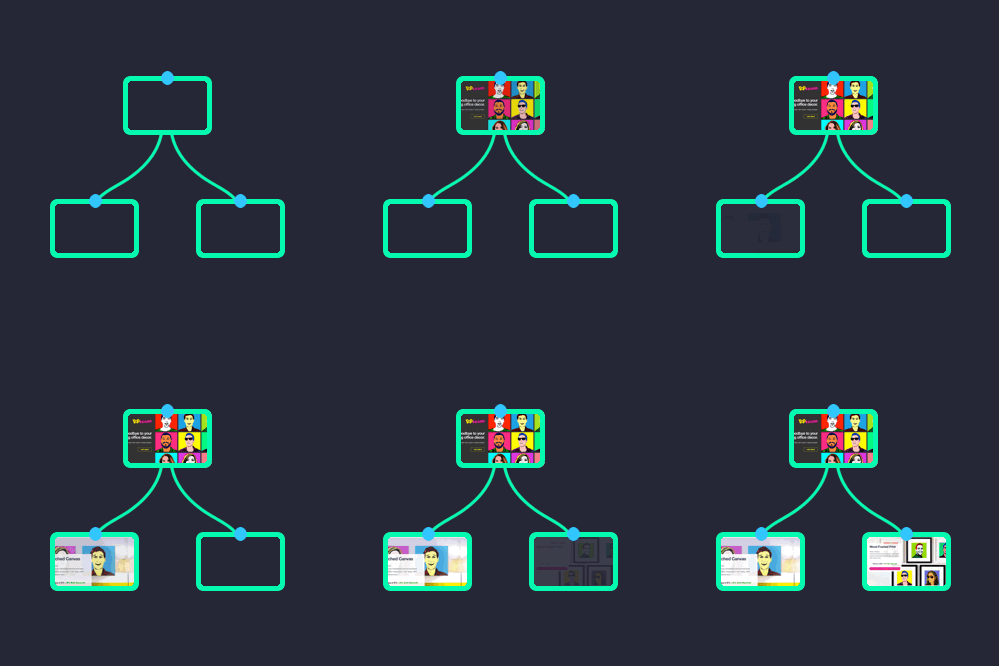
Automatically generate beautiful visual sitemaps + high-resolution screenshots of any site or web-app, making it fast and easy to perform in-depth site audits for UI, UX, SEO, and marketing research. Simply enter a URL and get a thumbnail-based visual architecture of the entire site.

Tether is a feedback and bug reporting tool for teams, allowing team members to share screen recordings, screenshots + markup so that no bug goes unsolved. Additionally, Tether grabs technical details automatically such as browser type, OS, page name and more.

Name of Product or Service
bjhnm
Vendor Name
hbjmn
Is this a software or service provider?
Software
Provider
Description
URL for Product or Service
I work for this company and would like to serve as admin of the listing.
Yes
No
Upload a Logo
upload arrow
Drag Above or Select File
Add Logo
Or upload a logo from the web
Upload Screenshots
upload arrow
Drag Above or Select File
Title
Description
Add More
Who do you consider to be your top competitors?
This is used to help us determine the proper category for your product
Want to get reviews right away?
Provide up to 3 email addresses for users of the product/service you're adding, and we'll reach out to them to ask for their review.

NoteGPT uses ChatGPT AI for summarizing YouTube videos, screenshot capturing and note-taking on YouTube videos.

XCrawl is an AI-powered web scraping API and intelligent scraper tool that transforms any website into structured data via dedicated Scrape, Crawl, and SERP APIs built for AI agents and automation workflows, delivering LLM-ready JSON and clean Markdown output alongside auto-rotating global residential proxies and support for headless screenshots.

Splashtop Autonomous Endpoint Management (AEM) is a comprehensive solution designed to enhance IT operations by automating endpoint management tasks, thereby improving security and operational efficiency. It provides IT teams and Managed Service Providers (MSPs) with the tools to remotely configure devices, enforce security policies, and streamline operations across distributed environments.
Key Features and Functionality:
- Device Configuration: Remotely set up Wi-Fi, firewall, proxy, screen-lock, and password policies to ensure devices adhere to organizational standards.
- Application Deployment: Install and manage software across multiple devices from a centralized console, facilitating efficient software distribution.
- Policy Automation: Automatically apply predefined configurations to new devices based on group assignments, reducing manual setup efforts.
- Vulnerability Scanning: Detect and prioritize security risks by identifying Common Vulnerabilities and Exposures (CVEs) and Known Exploited Vulnerabilities (KEVs).
- Automated Patching: Keep operating systems and third-party applications up to date with automated patch management, minimizing exposure to security threats.
- Ring-Based Policy Management: Implement staged, risk-based rollouts of policies and updates to manage deployments effectively.
- Customizable Dashboards: Monitor system health and performance in real-time through centralized dashboards, enabling proactive management.
- Configurable Alerts and Smart Actions: Set up alerts and automated responses to swiftly detect and resolve issues, ensuring continuous system uptime.
- One-to-Many Actions: Execute tasks such as scripting, mass deployments, remote commands, and system updates across multiple endpoints simultaneously.
Primary Value and User Benefits:
Splashtop AEM addresses the challenges faced by IT teams in managing and securing a growing number of endpoints in distributed work environments. By automating routine tasks like device configuration, software deployment, and patch management, it reduces the risk of misconfigurations and unpatched vulnerabilities, thereby strengthening the organization's security posture. The solution's real-time visibility and control enable IT administrators to act swiftly, maintain compliance, and operate at scale without increasing complexity or costs. This empowers organizations to keep their systems secure and efficient, allowing IT resources to focus on strategic initiatives.

Adwallet fully automates direct and programmatic ad screenshots for Publishers and Agencies.

PhotoScape X is a comprehensive photo editing software designed to cater to both beginners and professionals. It offers a user-friendly interface combined with a robust set of tools, enabling users to enhance, edit, and manage their photos efficiently. With support for various file formats, including RAW images, PhotoScape X provides a versatile platform for all your photo editing needs.
Key Features and Functionality:
- Photo Editor: Offers tools for rotating, straightening, resizing, cropping, and adjusting colors. Users can apply filters, effects, overlays, and textures to enhance images. Additional features include auto-level, auto-contrast, backlight correction, bloom, HDR, dehaze, vignetting, sharpen, blur, white balance, curves, levels, color balance, hue/saturation, sepia, grayscale, black & white, negative, 3D effect, text object, text warp, image object, magnifier object, paint brush, paint bucket, effect brushes, mosaic brush, spot healing brush, mixer brush, red-eye correction, liquify, and clone stamp.
- Batch Editor: Allows simultaneous editing of multiple photos, streamlining the workflow for tasks like resizing, renaming, and format conversion.
- Collage Maker and Combine Tool: Enables users to merge multiple photos into a single collage frame or attach them vertically or horizontally to create one final photo.
- GIF Creator: Facilitates the creation of animated GIFs from image sequences.
- Cut Out Tool: Provides options to remove backgrounds using the Magic Eraser, Lasso tool, or Brush tool.
- Screen Capture and Color Picker: Allows capturing screenshots and selecting colors from the screen for precise editing.
- RAW Converter: Supports the conversion and editing of RAW image files, ensuring high-quality outputs.
- Macro Recording: Enables recording multiple actions and playing them back all at once, enhancing efficiency.
Primary Value and User Solutions:
PhotoScape X addresses the need for an all-in-one photo editing solution that is both powerful and accessible. Its extensive feature set allows users to perform a wide range of editing tasks without the need for multiple software applications. The intuitive interface ensures that even users with minimal editing experience can achieve professional-quality results. By offering tools for batch processing, collage creation, GIF animation, and RAW image support, PhotoScape X streamlines the photo editing process, saving time and effort for photographers, designers, and hobbyists alike.

Screenshot Reports is an AI-powered reporting platform designed for agencies, consultants, and businesses that want to save time and impress clients. Instead of dealing with multiple integrations, broken data connectors, or hours of manual report building, Screenshot Reports makes reporting effortless — all you need are simple screenshots.

ScreenshotRun is a screenshot API built for developers. Capture full-page, element-level, or viewport screenshots of any URL with a simple API call. Supports custom viewport sizes, device emulation, PDF generation, delayed rendering for JavaScript-heavy pages, and bulk capture. Integrate website screenshots into your app, dashboard, or workflow in minutes. Reliable, fast, and designed to handle high-volume requests without breaking a sweat.

Ruttl is a feedback tool for live websites. Just like Invision which is a feedback tool for static websites, Ruttl allows you to review live links or staging links.
Current Problem: Currently In order to review developed websites, people take screenshots and encircles the issues, and share a word doc with the developer or they just sit with the developers and ask them to make the changes.But this process is very tedious and time taking, On an average, a single page takes around 3-4 hours to review and still, the final output is just close to perfection.
That’s why we created ruttl. Ruttl allows you to leave comments on live website and make real time edits so you can give precise, contextual feedback to your team.

Zebrunner ecosystem consists of the following products:
Zebrunner Testing platform is a single tool for test execution & real-time analysis that collects all test results in one place and generates transparent reports for management. Visualize test results with interactive video sessions, published logs, screenshots, test history line, smart AI labels as well as track the pass rate, infrastructure usage, and team performance with reporting dashboards and widgets at a glance.
Zebrunner Selenium Grid is a cloud-based Selenium hub with by-hour pricing that allows to execute thousands of web tests across multiple browsers at high speed, ensuring bug-free products before the launch.
Zebrunner Device Farm is a cross-platform solution for mobile app testing with real devices (phones, tablets, and TVs). Enables to run automated and manual test scenarios on Android & iOS 24/7, execute tests in parallel as well as develop and debug remotely.

TinyTake is a free screen capture & video recording software for Microsoft Windows & Mac. With TinyTake, you can capture images and videos of your computer screen, add comments and share them with others in minutes. TinyTake is ideally suited for anyone who is doing online customer support, customer documentation, educational videos or just want's to take the hassle out of capturing screenshots. TinyTake makes the whole process of capturing or recording super easy & fast.

The stand-alone API analyzes pages in a self-contained, "headless" browser after scripting has been applied - full DOM analysis of a rendered web page! It supports all features of the WAVE API Specification, plus the ability to capture full-page screenshots, define customized viewport sizes (handy for checking mobile responsive breakpoints), support pass-through authentication, etc.