Best Video Editing Software

How Many Video Editing Software Products Does G2 Track?

Total Products under this Category: 295

Category Stats (Aug 2026)

  • Average Rating: 4.48/5 (↑0.01 vs Jul 2026) The average rating of products in this category, based on all submitted ratings
  • Top Trending Product: Runway (+5.57%) - Among all products in this category, Runway recorded the largest rating increase compared to last month

Last updated: August 04, 2026

How Does G2 Rank Video Editing Software Products?

Why You Can Trust G2's Software Rankings:

  • 30 Analysts and Data Experts
  • 66,500+ Authentic Reviews
  • 295+ Products
  • Unbiased Rankings

G2's software rankings are built on verified user reviews, rigorous moderation, and a consistent research methodology maintained by a team of analysts and data experts. Each product is measured using the same transparent criteria, with no paid placement or vendor influence. While reviews reflect real user experiences, which can be subjective, they offer valuable insight into how software performs in the hands of professionals. Together, these inputs power the G2 Score, a standardized way to compare tools within every category.

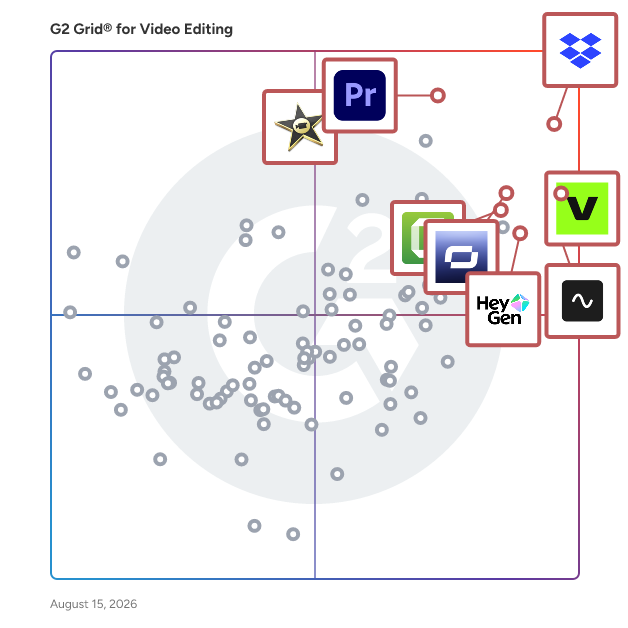
G2 Grid® for Video Editing Software

G2 Grid® for Video Editing Software plotting products by satisfaction and market presence

Highlighted products: Dropbox, VEED, Adobe Premiere Pro, Riverside, Synthesia, Camtasia, iMovie, and HeyGen.

Underlying data: [Grid® JSON](https://www.g2.com/categories/video-editing/grids.json?focus%5B%5D=dropbox&focus%5B%5D=veed&focus%5B%5D=adobe-premiere-pro&focus%5B%5D=riverside&focus%5B%5D=synthesia&focus%5B%5D=camtasia&focus%5B%5D=imovie&focus%5B%5D=heygen)

Sponsored

UserEvidence

UserEvidence is a customer voice platform that automates social proof for GTM teams, generating verified case studies, testimonials, and stats in minutes. Using surveys and third-party reviews, UserEvidence continually captures feedback throughout the customer journey and creates a customer story library that proves the value of your product. Game-changing B2B companies like Pendo, Workato, Gong, Jasper.ai, and Ramp rely on UserEvidence to create authentic customer stories at scale.

Visit website

Dropbox

Keep creative projects moving from first draft to final sign-off. Dropbox brings your team’s files, feedback, and approvals together in one secure cloud storage platform. Back up your work, send large files in seconds, and keep everyone in sync—so nothing slows you down. Find it fast, from anywhere Dropbox makes it easy to find and share files across desktop, mobile, and web—whether your team is in the office, remote, or on the go. Organize your work, align your team Every version stays current and simple to manage. Synced team folders keep content up to date, and previews for 175+ file types keep your team in the loop. Share anything, instantly Send large assets—up to 2 TB uploads and 1 TB video previews—with just a link. Security you can trust Protect your files with industry-leading encryption, granular permissions, compliance-ready controls, and built-in recovery features. Dropbox integrates with Google Workspace, Microsoft 365, Adobe Creative Cloud, Slack, Salesforce, Canva, Autodesk, Zoom, Claud, and more. Trusted by more than 700 million users and 575,000 teams worldwide.

Average Rating: 4.4/5.0

Total Reviews: 30,868

How Do G2 Users Rate Dropbox?

  • Has the product been a good partner in doing business?: 8.9/10 (Category avg: 9.0/10)
  • Quality of Support: 8.6/10 (Category avg: 8.7/10)
  • Ease of Admin: 8.9/10 (Category avg: 9.0/10)
  • Titles and Captions: 7.5/10 (Category avg: 8.4/10)

Who Is the Company Behind Dropbox?

  • Seller: Dropbox
  • Company Website:
  • Year Founded: 2007
  • HQ Location: San Francisco, California
  • Twitter: @Dropbox
    3,279,477 Twitter followers
  • LinkedIn® Page: www.linkedin.com
    4,149 employees on LinkedIn®

Who Uses This Product?

  • Who Uses This: Owner, Project Manager
  • Top Industries: Information Technology and Services, Marketing and Advertising
  • Company Size: 63% Small, 23% Medium

What Do G2 Reviewers Say About Dropbox?

AI-generated summary from verified user reviews

Pros
  • Users appreciate the ease of use of Dropbox, enjoying seamless file management and sharing across devices.
  • Users appreciate the easy file sharing feature of Dropbox, finding it secure and convenient for collaboration.
  • Users appreciate the versatile cloud storage of Dropbox, ideal for seamless file sharing and efficient collaboration.
  • Users value the easy access of Dropbox across multiple devices, enhancing organization and file sharing effortlessly.
  • Users love the team collaboration features of Dropbox, making it easy to share and organize files effortlessly.
Cons
  • Users find the pricing to be quite expensive, particularly for minimal storage upgrades compared to competitors.
  • Users find the expensive cost of Dropbox storage upgrades a significant drawback, longing for more flexible pricing options.
  • Users find the storage limitations of Dropbox restrictive, often leading to the need for costly upgrades quickly.
  • Users express frustration with limited storage on Dropbox's free plan, which quickly runs out compared to competitors.
  • Users complain about the limited free storage and constant upgrade prompts that hinder their experience with Dropbox.

What Are Recent G2 Reviews of Dropbox?

What Are G2 Users Discussing About Dropbox?

VEED

VEED è una piattaforma di creazione e modifica video alimentata dall'IA che aiuta creatori, marketer, team e imprese a generare e modificare contenuti video su larga scala. La piattaforma combina la generazione avanzata di video con strumenti di editing semplici ma potenti, permettendo agli utenti di produrre video professionali senza competenze tecniche o attrezzature costose. Dall'Idea al Video in un Flusso di Lavoro Unificato VEED unisce la generazione e l'editing video in un'unica piattaforma, così gli utenti possono creare contenuti originali attraverso la generazione di video con l'IA, per poi perfezionarli con funzionalità di editing professionali, tutto in un unico spazio di lavoro. Gli utenti non devono più destreggiarsi tra strumenti, lottare con le competenze di editing o affrontare colli di bottiglia nella produzione. Questo approccio integrato aiuta i team a scalare la produzione di contenuti, localizzare i video nei vari mercati e mantenere la coerenza del marchio nelle campagne. La piattaforma è progettata per i creatori di contenuti che producono video per i social media e l'educazione, i team di marketing che sviluppano risorse per le campagne, i piccoli imprenditori che creano contenuti promozionali e le imprese che gestiscono contenuti video su larga scala. L'interfaccia basata su browser di VEED non richiede download o installazioni, rendendo la creazione di video professionali accessibile da qualsiasi dispositivo con connessione internet. I team possono collaborare su progetti in tempo reale, condividere feedback e gestire più progetti video contemporaneamente. Generazione Video con l'IA Le capacità di generazione video di VEED sono alimentate dall'IA leader del settore di OpenAI, Google ed ElevenLabs e integrate con le ultime versioni, tra cui Sora e Veo. La piattaforma presenta anche Fabric 1.0, il modello di video IA proprietario di VEED che offre una sincronizzazione labiale naturale tra avatar generati e audio, creando contenuti video più realistici e coinvolgenti. Gli utenti possono: • Trasformare script di testo in video completi con avatar IA e scene dinamiche • Generare voiceover professionali in più lingue e voci utilizzando la tecnologia di sintesi vocale neurale • Creare video parlanti con precisione di sincronizzazione labiale utilizzando Fabric 1.0 • Creare visuali personalizzate, animazioni e grafiche in movimento da prompt di testo • Produrre più varianti di video ottimizzate per diverse piattaforme e target di pubblico Il flusso di lavoro di generazione video consente agli utenti di iniziare da zero con solo un prompt di testo, eliminando la necessità di attrezzature di ripresa, studi o competenze professionali davanti alla telecamera. I video possono essere personalizzati con colori del marchio, loghi e preferenze di stile per mantenere la coerenza visiva nei contenuti. Strumenti di Editing Alimentati dall'IA La piattaforma consente ai creatori di automatizzare compiti di editing complessi che tradizionalmente richiedono competenze professionali e conoscenze software. Le principali capacità di editing includono: • Generare e tradurre sottotitoli automatici in oltre 125 lingue, con stile completamente personalizzabile • Tradurre audio parlato in più lingue utilizzando il doppiaggio IA. • Rimozione intuitiva dello sfondo per video e immagini, senza bisogno di schermo verde • Rilevare e rimuovere parole di riempimento per dialoghi più puliti e professionali • Tagliare automaticamente le scene, migliorare il ritmo e rimuovere spazi morti con Magic Cut • Pulire l'audio e ridurre il rumore di fondo con un clic Queste funzionalità di editing funzionano insieme agli strumenti di editing video tradizionali come l'editing della timeline, le transizioni, le sovrapposizioni di testo e la correzione del colore, offrendo agli utenti sia l'automazione alimentata dall'IA che il controllo creativo manuale.

Average Rating: 4.6/5.0

Total Reviews: 2,161

How Do G2 Users Rate VEED?

  • Ritiene che the product sia stato un valido partner commerciale?: 9.0/10 (Category avg: 9.0/10)
  • Qualità del supporto: 8.4/10 (Category avg: 8.7/10)
  • Facilità di amministrazione: 9.2/10 (Category avg: 9.0/10)
  • Titoli e didascalie: 9.0/10 (Category avg: 8.4/10)

Who Is the Company Behind VEED?

  • Venditore: VEED
  • Sito web dell'azienda:
  • Anno di Fondazione: 2018
  • Sede centrale: London, GB
  • Twitter: @veedstudio
    22,690 follower su Twitter
  • Pagina LinkedIn®: www.linkedin.com
    176 dipendenti su LinkedIn®

Who Uses This Product?

  • Who Uses This: Founder, Owner
  • Top Industries: Marketing e pubblicità, Software per computer
  • Company Size: 81% Small, 9% Medium

What Do G2 Reviewers Say About VEED?

AI-generated summary from verified user reviews

Pros
  • Gli utenti apprezzano la facilità d'uso di VEED, che semplifica l'editing e migliora l'efficienza della produzione di contenuti.
  • Gli utenti amano le opzioni di personalizzazione intuitive e gli strumenti di intelligenza artificiale per creare contenuti e video in modo efficiente.
  • Gli utenti amano la semplicità e facilità d'uso dell'editing di VEED, rendendo la creazione di video rapida ed efficiente.
  • Gli utenti amano l'interfaccia intuitiva di VEED, rendendo il montaggio video rapido e piacevole per tutti.
  • Gli utenti amano la facile creazione di video con VEED, apprezzando la sua interfaccia intuitiva e le funzionalità di editing senza soluzione di continuità.
Cons
  • Gli utenti sperimentano prestazioni lente con VEED, portando a problemi di riproduzione frustranti e a una funzionalità complessiva ridotta.
  • Gli utenti notano le funzionalità limitate di VEED, desiderando più transizioni per migliorare la qualità del video.
  • Gli utenti trovano il prezzo costoso, in particolare per l'accesso a funzionalità avanzate e funzioni di intelligenza artificiale.
  • Gli utenti notano le limitazioni dell'IA nella precisione video e nella funzionalità di sintesi vocale, indicando margini di miglioramento.
  • Gli utenti trovano le opzioni limitate per la personalizzazione e la grafica frustranti, influenzando la loro creatività ed efficienza nell'editing.

What Are Recent G2 Reviews of VEED?

What Are G2 Users Discussing About VEED?

Adobe Premiere Pro

Adobe Premiere Pro is a professional video editing software developed by Adobe Systems, designed for creating high-quality videos across various industries. It offers a comprehensive suite of tools for editing, color correction, audio enhancement, and visual effects, making it a preferred choice for filmmakers, broadcasters, and content creators. Key Features and Functionality: - Advanced Editing Tools: Provides industry-standard video editing capabilities, including three-point editing, timeline-based editing, and support for multiple video and audio tracks. - AI-Powered Enhancements: Utilizes artificial intelligence to streamline workflows, such as Object Mask for quick masking and tracking, Text-Based Editing for efficient transcript-based editing, and Media Intelligence for rapid clip searching. - Color Correction and Grading: Offers powerful color correction tools, including color wheels, curve controls, and built-in video scopes, enabling precise color adjustments and grading. - Audio Editing and Mixing: Features professional audio tools to reduce noise, enhance dialogue, and add advanced effects, along with AI capabilities like Enhance Speech for improving audio quality. - Effects and Transitions: Includes a vast library of cinematic effects, transitions, and customizable templates to create unique visual styles. - Title and Caption Creation: Allows for the design of polished titles, captions, and graphics with customizable templates, and supports automatic translation of captions in multiple languages. - Cross-Platform Compatibility: Available on both Windows and macOS platforms, ensuring flexibility and accessibility for users. Primary Value and User Solutions: Adobe Premiere Pro addresses the needs of professional video editors by providing a robust and versatile platform that integrates seamlessly with other Adobe Creative Cloud applications. Its AI-driven features significantly reduce editing time, allowing users to focus on creative aspects rather than technical complexities. The software's comprehensive toolset enables the production of high-quality videos suitable for various platforms, from social media to cinematic releases. By offering advanced editing capabilities, color correction, audio enhancement, and visual effects in a single package, Premiere Pro empowers users to bring their creative visions to life efficiently and effectively.

Average Rating: 4.5/5.0

Total Reviews: 1,642

How Do G2 Users Rate Adobe Premiere Pro?

  • Has the product been a good partner in doing business?: 8.7/10 (Category avg: 9.0/10)
  • Quality of Support: 8.1/10 (Category avg: 8.7/10)
  • Ease of Admin: 8.5/10 (Category avg: 9.0/10)
  • Titles and Captions: 9.0/10 (Category avg: 8.4/10)

Who Is the Company Behind Adobe Premiere Pro?

  • Seller: Adobe
  • Year Founded: 1982
  • HQ Location: San Jose, CA
  • Twitter: @Adobe
    956,842 Twitter followers
  • LinkedIn® Page: www.linkedin.com
    42,087 employees on LinkedIn®
  • Ownership: NASDAQ:ADBE

Who Uses This Product?

  • Who Uses This: Graphic Designer, Owner
  • Top Industries: Media Production, Marketing and Advertising
  • Company Size: 64% Small, 22% Medium

What Do G2 Reviewers Say About Adobe Premiere Pro?

AI-generated summary from verified user reviews

Pros
  • Users love the ease of use and powerful features of Adobe Premiere Pro, making video editing feel effortless.
  • Users praise Adobe Premiere Pro for its high quality tools and versatility in both video editing and motion design.
  • Users find Adobe Premiere Pro to be user-friendly, enabling quick learning and efficient video editing for beginners.
  • Users praise Adobe Premiere Pro for its exceptional control and flexibility in creating detailed educational video content.
  • Users highly recommend Adobe Premiere Pro for its powerful features and seamless Adobe integration, enabling efficient and creative video editing.
Cons
  • Users find the steep learning curve of Adobe Premiere Pro challenging, especially for mid-range systems and beginners.
  • Users experience slow rendering in Adobe Premiere Pro, often needing to rely on additional software for better performance.
  • Users find the expensive cost of Adobe Premiere Pro to be a significant drawback compared to free alternatives.
  • Users find Adobe Premiere Pro to have a time-consuming learning curve and occasional performance issues, impacting efficiency.
  • Users face frequent update issues that lead to crashes and slow performance, particularly with large projects.

What Are Recent G2 Reviews of Adobe Premiere Pro?

What Are G2 Users Discussing About Adobe Premiere Pro?

Riverside

Riverside (anciennement Riverside.fm) est la plateforme tout-en-un pour enregistrer, diffuser en direct, éditer, réutiliser et publier des vidéos et des podcasts de qualité studio. Les créateurs et les entreprises l'utilisent pour produire du contenu de qualité broadcast sans le labyrinthe de production de multiples outils, de studios coûteux ou d'expertise technique. Enregistrez des vidéos jusqu'à 4K et de l'audio non compressé localement sur l'appareil de chaque participant, de sorte que la qualité reste intacte même avec une mauvaise connexion Internet. Éditez en modifiant la transcription. Transformez de longs enregistrements en clips, sous-titres, notes d'émission et traductions avec l'IA. Les webinaires peuvent accueillir jusqu'à 10 000 participants. Approuvé par des podcasteurs indépendants comme Tim Ferriss, Mel Robbins et Guy Raz, et par des marques telles que Spotify, Marvel, HubSpot, Microsoft et Intuit. Quels sont les principaux avantages de Riverside ? - Tout-en-un : Enregistrez, diffusez en direct, éditez, réutilisez, hébergez et publiez depuis une seule plateforme. Résultats de qualité studio, sans studio nécessaire : Vidéo jusqu'à 4K et audio non compressé, enregistrés localement pour que la qualité ne dépende pas de la connexion Internet. - IA qui fait le gros du travail : Éditez en discutant ou en modifiant le texte, découpez automatiquement, améliorez l'audio, traduisez et générez des notes d'émission en quelques secondes. - Rapidité sans compromettre la qualité : Réduisez des heures de post-production en minutes. - Portée maximale de chaque enregistrement : Réutilisation intégrée en clips, sous-titres, transcriptions, traductions et formats sociaux. - Aucune courbe d'apprentissage : Assez facile pour les débutants, assez profond pour les pros. Les invités rejoignent via un lien de navigateur. Quelles sont les principales fonctionnalités de Riverside ? - Enregistrez un son et une vidéo d'une clarté cristalline indépendamment de la connexion Internet - Éditez le contenu avec des outils intuitifs et économes en temps utilisant l'IA - Réutilisez automatiquement le contenu pour plusieurs canaux - Diffusez en direct sur toutes les plateformes sociales (YouTube, Facebook, Instagram, Twitch, et plus) - Transcrivez des fichiers audio et vidéo en plus de 100 langues avec une précision de 99% - Hébergez et distribuez votre podcast vers les principaux répertoires comme Spotify, Apple et YouTube. À quoi Riverside est-il le mieux utilisé ? Pour les créateurs : - Enregistrement, édition, hébergement et publication de podcasts - Interviews vidéo à distance avec des invités partout dans le monde - Vidéos YouTube et contenu long format - Émissions en direct et podcasts en direct - Enregistrements en solo, capture d'écran et tutoriels Pour les entreprises et les équipes : - Vidéo marketing : témoignages, études de cas, contenu social, podcasts de marque - Webinaires et événements virtuels jusqu'à 10 000 participants - Communications internes : assemblées générales, mises à jour exécutives, réunions générales - Apprentissage et développement : formation, intégration, connaissances internes - Ventes : démonstrations, appels de prospection, histoires de clients - Produit : démonstrations, appels utilisateurs enregistrés, présentations - Producteurs et agences : production à distance multi-invités avec contrôle total du producteur Qu'offre Riverside pour les entreprises ? Contrôle total de la production : - Mode Producteur : Gérez la session sans apparaître dans l'enregistrement. Contrôlez les micros, caméras, mises en page et téléprompteurs des invités. - Branding du studio : Verrouillez les polices, couleurs, logos et superpositions pour que le contenu reste conforme à la marque à grande échelle. Collaboration en équipe : - Espaces de travail, rôles et permissions : Organisez les équipes, attribuez des accès, partagez des fichiers à l'intérieur/à l'extérieur de l'entreprise. - Commentaires dans l'éditeur : Feedback sans fils Slack ou enregistrements d'écran. - API Riverside Échelle et vitesse : - Enregistrement, stockage et exportations illimités. - Édition simultanée en équipe. Sécurité et support de niveau entreprise : - Chiffrement de bout en bout. SSO disponible. - Support en direct 24/7 - Responsable du succès client dédié. - Producteur à la demande

Average Rating: 4.8/5.0

Total Reviews: 1,740

How Do G2 Users Rate Riverside?

  • the product a-t-il été un bon partenaire commercial?: 9.5/10 (Category avg: 9.0/10)
  • Qualité du support: 9.4/10 (Category avg: 8.7/10)
  • Facilité d’administration: 9.5/10 (Category avg: 9.0/10)
  • Titres et légendes: 9.1/10 (Category avg: 8.4/10)

Who Is the Company Behind Riverside?

  • Vendeur: Riverside
  • Site Web de l'entreprise:
  • Année de fondation: 2020
  • Emplacement du siège social: Palo Alto, California
  • Twitter: @RiversidedotFM
    10,509 abonnés Twitter
  • Page LinkedIn®: www.linkedin.com
    450 employés sur LinkedIn®

Who Uses This Product?

  • Who Uses This: Fondateur, Propriétaire
  • Top Industries: Divertissement, Production médiatique
  • Company Size: 89% Small, 10% Medium

What Do G2 Reviewers Say About Riverside?

AI-generated summary from verified user reviews

Pros
  • Les utilisateurs adorent la facilité d'utilisation de Riverside, leur permettant de se concentrer sur le contenu sans distractions techniques.
  • Les utilisateurs apprécient la qualité audio et vidéo exceptionnelle de Riverside, rendant le podcasting plus fluide et plus professionnel.
  • Les utilisateurs apprécient la haute qualité de Riverside, leur permettant de créer du contenu vidéo professionnel et soigné sans effort.
  • Les utilisateurs louent Riverside pour son expérience d'enregistrement simplifiée et professionnelle, bénéficiant de fonctionnalités intuitives et d'un excellent support.
  • Les utilisateurs admirent la qualité vidéo excellente sur Riverside, leur permettant de créer du contenu d'apparence professionnelle sans effort.
Cons
  • Les utilisateurs rencontrent des problèmes d'enregistrement tels que des problèmes de qualité audio et des erreurs de transcription, ce qui affecte la satisfaction globale avec Riverside.
  • Les utilisateurs trouvent que Riverside manque de fonctionnalités essentielles comme la capacité d'écran vert et les outils collaboratifs, ce qui impacte l'utilisabilité.
  • Les utilisateurs souhaitent voir les lacunes des fonctionnalités à Riverside résolues, notamment pour l'intégration de l'écran vert et de Zapier.
  • Les utilisateurs rencontrent des problèmes audio, y compris des pistes manquantes et des bruits de fond indésirables, affectant la qualité globale lors des enregistrements.
  • Les utilisateurs rencontrent des problèmes d'édition avec des outils déconnectés et une intensité des ressources, affectant la performance globale et l'utilisabilité.

What Are Recent G2 Reviews of Riverside?

What Are G2 Users Discussing About Riverside?

Synthesia

Synthesia is the world's leading AI video platform for business, trusted by over 90% of the Fortune 100. As AI continues to shape the way we live and work, Synthesia develops products to enhance visual communication and enterprise skill development, helping people work better and stay at the center of successful organizations. Create videos from any input: Type or paste a script, generate one from a prompt, or turn a PowerPoint deck, PDF, Word doc, link, or ready-made template into a polished, publish-ready video in minutes. Present with AI Avatars: Prompt fully customizable avatars into any outfit, setting, and action, choose from a realistic stock avatar library, or create a personal avatar from a single photo that looks and sounds like you. Communicate globally: Deliver consistent, localized content to every market in 160+ languages with built-in AI translation and dubbing, plus a Translation Glossary that locks key terminology so your message stays accurate everywhere. Practice with Roleplay Sessions: People step into a real conversation with an Interactive Avatar that talks, asks questions, and pushes back - then get coached and scored in real time, with their skill uplift measured over time, all in one platform. Engage through interactivity: Add quizzes, clickable moments, and branching paths that turn passive viewing into active learning. Measure real impact: Synthesia’s built-in analytics let you see how your videos perform, who’s watching, where they drop off, and how they engage. Use data-driven insights to refine content and maximize ROI on every communication. Built for enterprise trust: Synthesia is trusted by the world’s leading organizations for its enterprise-grade security and compliance standards, including SOC 2 Type II, GDPR, ISO 42001, and ISO 27001. From HR and L&D to Marketing and Sales, Synthesia enables every team to create on-brand, on-message videos at scale, turning communication into a competitive advantage.

Average Rating: 4.6/5.0

Total Reviews: 2,769

How Do G2 Users Rate Synthesia?

  • Has the product been a good partner in doing business?: 8.9/10 (Category avg: 9.0/10)
  • Quality of Support: 8.9/10 (Category avg: 8.7/10)
  • Ease of Admin: 9.1/10 (Category avg: 9.0/10)
  • Titles and Captions: 8.6/10 (Category avg: 8.4/10)

Who Is the Company Behind Synthesia?

  • Seller: Synthesia
  • Company Website:
  • Year Founded: 2017
  • HQ Location: London
  • Twitter: @synthesiaIO
    28,606 Twitter followers
  • LinkedIn® Page: www.linkedin.com
    772 employees on LinkedIn®

Who Uses This Product?

  • Who Uses This: CEO, Owner
  • Top Industries: Computer Software, Information Technology and Services
  • Company Size: 66% Small, 18% Medium

What Do G2 Reviewers Say About Synthesia?

AI-generated summary from verified user reviews

Pros
  • Users praise the ease of use of Synthesia, enjoying quick video creation with many customization options.
  • Users appreciate the high-quality video generation from Synthesia, enhancing training effectiveness and user engagement.
  • Users love the convenience and ease of use of Synthesia for creating engaging and effective videos.
  • Users love the high-quality realistic avatars in Synthesia, enhancing their video projects with professionalism and ease.
  • Users value the robust features of Synthesia, enabling easy creation of high-quality content for various platforms.
Cons
  • Users note that the avatars appear somewhat unnatural, despite recent improvements, affecting overall user experience.
  • Users express concerns over limited avatars, noting inconsistencies in appearance, gestures, and voice pronunciation with video generation.
  • Users find the avatar quality lacking realism, with issues in gestures, pronunciation, and overall naturalness.
  • Users note the unnatural appearance of AI avatars, despite improvements, limiting the overall user experience.
  • Users find the limited customization of AI avatars' expressions and gestures restricts their creative potential.

What Are Recent G2 Reviews of Synthesia?

What Are G2 Users Discussing About Synthesia?

Camtasia

The Camtasia Product Suite is a powerful, AI-powered ecosystem for video creation and screen recording. Built to deliver professional results fast, Camtasia makes it easy to produce high-quality content—even if you’ve never edited a video before. Our advanced AI features—including Camtasia Rev, script generation, text-to-speech, and automatic translations—streamline your entire workflow. Plus, with our new Zoom integration, you can instantly turn meeting recordings into reusable training content. Pull Zoom cloud recordings directly into your timeline, edit screen and camera feeds as independent layers, and apply dynamic layouts so your camera never blocks critical onscreen content. Whether you choose our Free, Essentials, Plus, or Pro plan, the Camtasia Editor is easy enough for beginners yet versatile enough to be your video solution for life. Explore our plans today and accelerate your production journey.

Average Rating: 4.6/5.0

Total Reviews: 1,753

How Do G2 Users Rate Camtasia?

  • Has the product been a good partner in doing business?: 9.0/10 (Category avg: 9.0/10)
  • Quality of Support: 8.7/10 (Category avg: 8.7/10)
  • Ease of Admin: 9.1/10 (Category avg: 9.0/10)
  • Titles and Captions: 8.8/10 (Category avg: 8.4/10)

Who Is the Company Behind Camtasia?

  • Seller: TechSmith
  • Company Website:
  • Year Founded: 1987
  • HQ Location: Okemos, MI
  • Twitter: @TechSmith
    29,513 Twitter followers
  • LinkedIn® Page: www.linkedin.com
    356 employees on LinkedIn®

Who Uses This Product?

  • Who Uses This: Founder, Instructional Designer
  • Top Industries: Computer Software, Information Technology and Services
  • Company Size: 53% Small, 27% Medium

What Do G2 Reviewers Say About Camtasia?

AI-generated summary from verified user reviews

Pros
  • Users value the ease of use in Camtasia, enabling quick screen recording and editing without advanced skills.
  • Users appreciate the easy and efficient video editing of Camtasia, enabling quick creation of professional-quality tutorials.
  • Users love Camtasia for its easy editing, enabling quick creation of professional-quality demo and tutorial videos.
  • Users appreciate the easy screen recording and fast editing workflow of Camtasia, allowing for professional-quality content creation effortlessly.
  • Users appreciate the easy creation process in Camtasia, enabling quick production of professional-quality videos without advanced skills.
Cons
  • Users find Camtasia to be too expensive, especially compared to similar products like Snagit.
  • Users find the steep learning curve of Camtasia challenging, making it harder to navigate advanced features efficiently.
  • Users experience slow rendering times, especially with larger projects, impacting their editing efficiency and satisfaction.
  • Users note feature limitations in Camtasia, particularly in background removal and interactivity options, impacting overall effectiveness.
  • Users note the limited features in Camtasia, wishing for more advanced tools and improved functionality.

What Are Recent G2 Reviews of Camtasia?

What Are G2 Users Discussing About Camtasia?

iMovie

iMovie is a user-friendly video editing application developed by Apple, designed to help users create professional-quality movies and trailers with ease. Available on Mac, iPhone, and iPad, iMovie offers a streamlined interface and intuitive tools that make video editing accessible to everyone, from beginners to seasoned editors. Key Features and Functionality: - Magic Movie: Automatically creates polished videos from selected clips and photos, complete with titles, transitions, and music, allowing users to produce custom videos with minimal effort. - Storyboards: Provides 20 pre-made templates for popular video types, such as cooking tutorials and product reviews, guiding users through the storytelling process with shot lists and step-by-step instructions. - Cinematic Mode: Enables editing of videos captured in Cinematic mode on iPhone, allowing users to adjust depth-of-field effects and focus points for a more professional look. - High-Fidelity Filters and Effects: Offers 13 creative video filters and various effects like slow motion, fast forward, picture-in-picture, and split-screen to enhance visual storytelling. - Soundtracks and Audio Editing: Includes over 100 smart soundtracks that adjust to the length of the movie, along with options to add sound effects, voiceovers, and music from the user's library. - Green-Screen Effects: Allows users to place subjects over different backgrounds using green-screen effects, with masking controls and strength adjustments for a natural appearance. - Seamless Integration Across Devices: Projects can be started on an iPhone or iPad and finished on a Mac, with support for 4K video editing and the ability to export in various resolutions. Primary Value and User Solutions: iMovie empowers users to transform their video clips into compelling narratives without requiring advanced editing skills. By offering a suite of powerful yet accessible tools, iMovie simplifies the video creation process, enabling users to produce high-quality content for personal projects, social media, educational purposes, and more. Its integration across Apple devices ensures a flexible and cohesive editing experience, allowing users to work on their projects anytime, anywhere.

Average Rating: 4.3/5.0

Total Reviews: 565

How Do G2 Users Rate iMovie?

  • Has the product been a good partner in doing business?: 9.0/10 (Category avg: 9.0/10)
  • Quality of Support: 8.3/10 (Category avg: 8.7/10)
  • Ease of Admin: 9.1/10 (Category avg: 9.0/10)
  • Titles and Captions: 8.2/10 (Category avg: 8.4/10)

Who Is the Company Behind iMovie?

  • Seller: Apple
  • Year Founded: 1976
  • HQ Location: Cupertino, CA
  • Twitter: @Apple
    9,935,357 Twitter followers
  • LinkedIn® Page: www.linkedin.com
    187,339 employees on LinkedIn®
  • Ownership: NASDAQ:AAPL

Who Uses This Product?

  • Who Uses This: Teacher, Owner
  • Top Industries: Marketing and Advertising, Higher Education
  • Company Size: 73% Small, 20% Medium

What Do G2 Reviewers Say About iMovie?

AI-generated summary from verified user reviews

Pros
  • Users love the intuitive simplicity of iMovie, making video editing accessible for beginners and novices alike.
  • Users love the intuitive and accessible interface of iMovie, making video editing simple and efficient for everyone.
  • Users love iMovie for its intuitive video creation features, which make editing easy for beginners and novices.
  • Users appreciate the ease of learning with iMovie, enabling quick and intuitive video editing for beginners.
  • Users appreciate the easy creation of videos with iMovie, finding it intuitive and perfect for beginners.
Cons
  • Users find iMovie's limited advanced features frustrating, particularly for more comprehensive editing needs and project sizes.
  • Users find the limited advanced features of iMovie restrictive for more complex editing needs and collaboration.
  • Users find that iMovie's limited editing capabilities may restrict advanced users seeking enhanced features for their projects.
  • Users find that slow rendering impacts their experience, particularly with larger projects and exports in iMovie.
  • Users find the audio issues in iMovie restrict their editing potential, especially for more advanced projects.

What Are Recent G2 Reviews of iMovie?

What Are G2 Users Discussing About iMovie?

Adobe Express

Quickly and easily make standout content from thousands of beautiful templates with the all-new Adobe Express. Simply choose a template, add images and text, and quickly resize your creations to fit your favorite social media site. Available on web and mobile. Make stunning content. Start from thousands of templates for social media graphics, stories, and thumbnails, as well as posters, flyers, business cards, logos, and more. Get free Adobe Stock images. Access the Adobe Stock royalty-free photo collection* with millions of on-trend and seasonal images. Give your photos pro effects. Get the look you want with easy-to-apply effects, filters, textures, and overlays. Remove backgrounds instantly. Effortlessly cut out backgrounds without having to outline your subject — and start with a fresh canvas. Add design elements. Discover just what you need from tons of images, icons, backgrounds, and design assets. Resize content in a snap. Instantly resize and reflow content to fit any size for Instagram, Facebook, YouTube, banners, flyers, and more. Your content will adjust instantly using intuitive Adobe tools. Make it move. Create attention-grabbing content with features to animate text and photos. Apply your brand. Upload your brand logo, fonts, and colors and apply them to any design with one tap. Make videos made for social. Easily trim, crop, resize, and convert videos. Play with text. Choose from over 18,000 licensed fonts from the Adobe Fonts library. Start from text templates that feature curved type, grids, and beautiful font pairs. Remix it. Customize predesigned graphics and text to make them your own. Work better together. Share templates, assets, and brand identity across your team so content consistently reflects your look. Save favorite templates to your library for a faster start. *Adobe Express membership required. The Adobe Stock photo collection does not include Premium or editorial content. Limited Adobe Stock functionality available in web page and video features within the desktop app.​

Average Rating: 4.5/5.0

Total Reviews: 836

How Do G2 Users Rate Adobe Express?

  • Has the product been a good partner in doing business?: 9.1/10 (Category avg: 9.0/10)
  • Quality of Support: 8.7/10 (Category avg: 8.7/10)
  • Ease of Admin: 9.4/10 (Category avg: 9.0/10)
  • Titles and Captions: 9.0/10 (Category avg: 8.4/10)

Who Is the Company Behind Adobe Express?

  • Seller: Adobe
  • Company Website:
  • Year Founded: 1982
  • HQ Location: San Jose, CA
  • Twitter: @Adobe
    956,842 Twitter followers
  • LinkedIn® Page: www.linkedin.com
    42,087 employees on LinkedIn®

Who Uses This Product?

  • Who Uses This: Graphic Designer, Marketing Manager
  • Top Industries: Marketing and Advertising, Design
  • Company Size: 56% Small, 27% Medium

What Do G2 Reviewers Say About Adobe Express?

AI-generated summary from verified user reviews

Pros
  • Users appreciate the ease of use in Adobe Express, especially for non-designers with ready-to-go templates.
  • Users love the variety of ready-made templates in Adobe Express, making design quick and user-friendly for everyone.
  • Users value the speed and ease of Adobe Express, enabling quick creation of professional content on the go.
  • Users love the easy creation process in Adobe Express, streamlining the development of professional-quality content effortlessly.
  • Users value the intuitive design of Adobe Express, enabling fast and effortless content creation across devices.
Cons
  • Users find the limited features of Adobe Express restrictive compared to other graphic design platforms like Canva.
  • Users find feature limitations in Adobe Express, noting it lacks functions compared to other platforms like Canva.
  • Users find Adobe Express has limited customization options, which can restrict more advanced design projects and flexibility.
  • Users find Adobe Express has limited options, lacking advanced design features and tools for more complex projects.
  • Users experience slow performance with Adobe Express, particularly when handling heavier designs or multiple projects.

What Are Recent G2 Reviews of Adobe Express?

What Are G2 Users Discussing About Adobe Express?

HeyGen

HeyGen è la principale piattaforma di generazione video AI progettata per assistere gli utenti nella creazione di video visivamente coinvolgenti senza sforzo. Questa soluzione innovativa si rivolge a una vasta gamma di utenti, dai piccoli imprenditori alle grandi aziende, consentendo loro di produrre video di alta qualità senza la necessità di competenze tecniche estese o risorse di produzione costose. Semplificando il processo di creazione video, HeyGen consente agli utenti di comunicare efficacemente i loro messaggi e migliorare la presenza del loro marchio, senza i tradizionali colli di bottiglia. La piattaforma è particolarmente vantaggiosa per i marketer, i professionisti della formazione e sviluppo, i solopreneur e i creatori di contenuti che cercano di coinvolgere il loro pubblico attraverso una narrazione visiva dinamica. HeyGen semplifica il processo di creazione video in diversi modi chiave. Gli utenti possono generare video professionali e raffinati da un solo prompt, rendendolo adatto a varie applicazioni come campagne di marketing, presentazioni di vendita e comunicazioni interne. Inoltre, la piattaforma consente agli utenti di trasformare contenuti scritti, come blog e articoli, in video vivaci, riducendo significativamente il tempo dedicato alla creazione di contenuti. Questa funzione consente agli utenti di condividere i loro messaggi in modo più efficiente, massimizzando la loro portata. Un'altra caratteristica distintiva di HeyGen è la sua capacità di trasformare script in video realistici con avatar AI realistici e doppiaggi autentici. Questa capacità non solo cattura l'attenzione del pubblico, ma migliora anche l'esperienza complessiva di visione. Inoltre, HeyGen abbatte le barriere linguistiche offrendo opzioni di localizzazione in oltre 175 lingue e dialetti, permettendo agli utenti di connettersi con il pubblico globale in modo significativo. Con un'interfaccia user-friendly e un set di funzionalità robusto, HeyGen si distingue come una soluzione completa per la creazione di video. Ha già guadagnato la fiducia di oltre 90.000 aziende, tra cui marchi rinomati come OpenAI, HubSpot e Ogilvy. Sfruttando le capacità di HeyGen, gli utenti possono produrre una vasta gamma di video, dalle promozioni di marketing ai contenuti educativi, assicurando che le loro storie siano raccontate in modo coinvolgente e memorabile. La tua storia conta. Rendila indimenticabile con HeyGen.

Average Rating: 4.8/5.0

Total Reviews: 1,937

How Do G2 Users Rate HeyGen?

  • Ritiene che the product sia stato un valido partner commerciale?: 9.2/10 (Category avg: 9.0/10)
  • Qualità del supporto: 9.0/10 (Category avg: 8.7/10)
  • Facilità di amministrazione: 9.1/10 (Category avg: 9.0/10)
  • Titoli e didascalie: 8.7/10 (Category avg: 8.4/10)

Who Is the Company Behind HeyGen?

  • Venditore: HeyGen
  • Sito web dell'azienda:
  • Anno di Fondazione: 2020
  • Sede centrale: Los Angeles, California
  • Pagina LinkedIn®: www.linkedin.com
    382 dipendenti su LinkedIn®

Who Uses This Product?

  • Who Uses This: CEO, Owner
  • Top Industries: Marketing e pubblicità, Consulenza
  • Company Size: 87% Small, 8% Medium

What Do G2 Reviewers Say About HeyGen?

AI-generated summary from verified user reviews

Pros
  • Gli utenti trovano HeyGen facile da usare, anche per le persone non esperte di tecnologia, producendo risultati professionali rapidamente.
  • Gli utenti lodano HeyGen per la sua qualità eccezionale nella creazione di video, offrendo avatar accurati e risultati professionali senza sforzo.
  • Gli utenti elogiano gli avatar realistici di HeyGen, migliorando la creazione di video con sincronizzazione naturale e funzionalità di voice-over.
  • Gli utenti amano HeyGen per la sua creazione di video avanzata e facile da usare, che consente una produzione senza sforzo di contenuti professionali.
  • Gli utenti evidenziano l'alta qualità di HeyGen, notando i suoi risultati professionali e gli strumenti avanzati per la creazione di video.
Cons
  • Gli utenti trovano il prezzo elevato di HeyGen preoccupante, soprattutto in relazione ai crediti e ai costi delle API.
  • Gli utenti ritengono che HeyGen sia costoso, soprattutto per quanto riguarda i crediti limitati disponibili per la generazione di contenuti.
  • Gli utenti trovano che le limitazioni degli avatar di HeyGen possano compromettere la connessione personale e la profondità emotiva nei contenuti video.
  • Gli utenti sono preoccupati per il costo elevato di HeyGen, ritenendo che potrebbe non essere accessibile per le piccole imprese.
  • Gli utenti trovano che le limitazioni dell'IA di HeyGen ostacolino la sfumatura emotiva e la connessione personale, influenzando l'esperienza utente e la fiducia.

What Are Recent G2 Reviews of HeyGen?

Movavi Video Editor

Movavi Video Editor for Mac is a user-friendly yet powerful video editing software designed to help users create professional-quality videos with ease. Whether you're a beginner or an experienced editor, this tool offers a comprehensive suite of features to bring your creative ideas to life. With its intuitive interface and advanced functionalities, Movavi Video Editor simplifies the video editing process, making it accessible to all. Key Features and Functionality: - Revamped Timeline: The new, clearer, and more streamlined timeline allows for faster project completion, whether you're working on short social media clips or longer family movies. - Frame-Precise Cuts: The Blade tool enables precise cuts, allowing you to create sharp and engaging montages effortlessly. - Pro-Quality Color Correction: Enhance your videos with advanced color correction tools that are simple to use, helping you achieve the perfect look for your footage. - AI Motion Tracking: Easily attach photos, videos, emojis, or memes to moving objects in your footage with AI-powered motion tracking. - Overlay Effects with Blending Modes: Choose from 13 blending modes for each overlay effect to achieve the perfect visual style for your video. - Extensive Effects Library: Access a vast collection of professionally designed effects, including filters, transitions, titles, and stickers, to enhance your videos. - Automatic Subtitles: Utilize AI to quickly generate subtitles from your speech, supporting multiple languages and customizable text options. - Silence Removal: Automatically detect and remove unwanted pauses in your footage, saving time and improving the flow of your videos. - Mouse-Over Effects Preview: Easily preview effects like titles, transitions, and filters by hovering your mouse over them, streamlining the editing process. - Fast Effect Copying: Quickly apply effects, color adjustments, and audio settings from one clip to another, ensuring consistency across your project. Primary Value and Solutions: Movavi Video Editor for Mac addresses the needs of users seeking an efficient and accessible video editing solution. By combining a user-friendly interface with advanced features, it enables users to produce high-quality videos without a steep learning curve. The software's AI-powered tools, such as automatic subtitles and motion tracking, automate time-consuming tasks, allowing users to focus on creativity. Additionally, the extensive library of effects and the streamlined editing process make it an ideal choice for content creators aiming to produce engaging videos for social media, personal projects, or professional use.

Average Rating: 4.6/5.0

Total Reviews: 415

How Do G2 Users Rate Movavi Video Editor?

  • Has the product been a good partner in doing business?: 9.1/10 (Category avg: 9.0/10)
  • Quality of Support: 9.1/10 (Category avg: 8.7/10)
  • Ease of Admin: 9.2/10 (Category avg: 9.0/10)
  • Titles and Captions: 9.1/10 (Category avg: 8.4/10)

Who Is the Company Behind Movavi Video Editor?

  • Seller: Movavi
  • Year Founded: 2004
  • HQ Location: Limassol, Limassol
  • Twitter: @Movavi
    4,241 Twitter followers
  • LinkedIn® Page: www.linkedin.com
    251 employees on LinkedIn®

Who Uses This Product?

  • Who Uses This: Student, student
  • Top Industries: Entertainment, Animation
  • Company Size: 82% Small, 6% Medium

What Do G2 Reviewers Say About Movavi Video Editor?

AI-generated summary from verified user reviews

Pros
  • Users praise the ease of use of Movavi Video Editor, highlighting its intuitive interface and streamlined workflow.
  • Users love the intuitive interface of Movavi Video Editor, making video editing easy and enjoyable for beginners.
  • Users praise the user-friendly interface of Movavi Video Editor, making video editing enjoyable for all skill levels.
  • Users love the user-friendly interface of Movavi Video Editor, making video editing accessible for everyone.
  • Users find Movavi Video Editor highly recommendable due to its ease of use and intuitive interface.
Cons
  • Users express frustration over the watermark in the trial version, limiting their experience and causing disappointment.
  • Users highlight limitations in editing features with Moavi Video Editor, affecting creativity and complex project handling.
  • Users are frustrated by the watermark issues in the trial version, impacting their editing experience and output quality.
  • Users feel the cost is high for beginners or casual users who want to try the software before committing.
  • Users experience slow rendering times with large files in Movavi Video Editor, affecting their editing workflow.

What Are Recent G2 Reviews of Movavi Video Editor?

What Are G2 Users Discussing About Movavi Video Editor?

Final Cut Pro X

Final Cut Pro X is a professional video editing software developed by Apple, designed to provide filmmakers, video editors, and content creators with a comprehensive suite of tools for crafting high-quality videos. Built on a modern 64-bit architecture, it leverages the full power of Mac hardware to deliver exceptional performance, even when working with demanding formats like 4K video. Key Features and Functionality: - Magnetic Timeline: A flexible, trackless canvas that allows users to add and arrange clips effortlessly, with other clips automatically adjusting to maintain synchronization. - Clip Connections and Compound Clips: Link primary story clips to other elements such as titles and sound effects to keep them in perfect sync, and combine related elements into a single, editable Compound Clip. - Content Auto-Analysis and Smart Collections: Automatically scans and tags media upon import, organizing clips based on shot type, media type, and the number of people in the shot, facilitating efficient media management. - Advanced Chroma Keying: Provides sophisticated controls for color sampling, edge adjustment, and light wrap, enabling precise keying without the need for external applications. - Multicam Editing: Synchronizes up to 64 angles of video and photos using audio waveforms, time and date, or timecode, allowing seamless editing of multicamera projects. - 3D Titles and Motion Graphics: Offers customizable 3D titles with various styles, materials, and lighting options, along with integration with Motion for creating professional motion graphics. - Audio Editing and Color Correction: Includes powerful tools for refining audio and performing color grading to achieve the desired aesthetic. - Integration with Touch Bar: On compatible MacBook Pro models, the Touch Bar provides context-sensitive controls for editing tools, audio levels, and timeline navigation. Primary Value and User Solutions: Final Cut Pro X streamlines the video editing process by combining a user-friendly interface with advanced features, enabling users to focus on storytelling without being hindered by technical complexities. Its efficient media organization, real-time performance, and comprehensive toolset address the needs of both novice and professional editors, facilitating the creation of polished, professional-quality videos.

Average Rating: 4.4/5.0

Total Reviews: 371

How Do G2 Users Rate Final Cut Pro X?

  • Has the product been a good partner in doing business?: 8.8/10 (Category avg: 9.0/10)
  • Quality of Support: 8.2/10 (Category avg: 8.7/10)
  • Ease of Admin: 8.6/10 (Category avg: 9.0/10)
  • Titles and Captions: 8.7/10 (Category avg: 8.4/10)

Who Is the Company Behind Final Cut Pro X?

  • Seller: Apple
  • Year Founded: 1976
  • HQ Location: Cupertino, CA
  • Twitter: @Apple
    9,935,357 Twitter followers
  • LinkedIn® Page: www.linkedin.com
    187,339 employees on LinkedIn®
  • Ownership: NASDAQ:AAPL

Who Uses This Product?

  • Who Uses This: Owner, Director
  • Top Industries: Media Production, Entertainment
  • Company Size: 74% Small, 16% Medium

What Do G2 Reviewers Say About Final Cut Pro X?

AI-generated summary from verified user reviews

Pros
  • Users love the affordable one-time purchase of Final Cut Pro X, emphasizing its value for video editing.
  • Users love the high quality of Final Cut Pro X, appreciating its impressive performance and excellent rendering capabilities.
  • Users love the speed and efficiency of Final Cut Pro X, enhancing their video editing workflows significantly.
  • Users praise the ease of use of Final Cut Pro X, highlighting its intuitive interface and seamless editing workflow.
  • Users highly recommend Final Cut Pro X for its ease of use and efficiency, especially for beginners in video editing.
Cons
  • Users find feature limitations in Final Cut Pro X, especially in color grading and cross-platform support, frustrating.
  • Users note a steeper learning curve with Final Cut Pro X, requiring time and effort to master its features.
  • Users often face audio issues with Final Cut Pro X, impacting their editing experience and productivity.
  • Users find the software somewhat time-consuming due to advanced features, plugins, and project organization challenges.
  • Users often face editing issues with color correction and grading, leading to time-consuming refinements in Final Cut Pro X.

What Are Recent G2 Reviews of Final Cut Pro X?

What Are G2 Users Discussing About Final Cut Pro X?

Wondershare Filmora

Wondershare Filmora is a comprehensive video editing software solution designed to help users create, edit, and produce high-quality videos with ease. This versatile platform caters to a wide range of users, from novices looking to make their first video to seasoned professionals seeking advanced editing capabilities. With its intuitive interface and robust feature set, Filmora empowers users to bring their creative visions to life. The target audience for Wondershare Filmora includes content creators, educators, marketers, and anyone interested in video production. Beginners will appreciate the user-friendly interface that simplifies the editing process, while more experienced users can take advantage of advanced tools that allow for intricate editing and customization. Filmora is particularly useful for social media influencers who need to produce engaging content quickly, as well as businesses looking to create promotional videos or training materials. One of the standout features of Wondershare Filmora is its AI-powered tools, which streamline the editing process and enhance productivity. These tools can automatically analyze video content, suggest edits, and even assist in color correction, making it easier for users to achieve professional-looking results without extensive technical knowledge. Additionally, Filmora offers advanced editing capabilities, such as multi-track editing, keyframing, and a wide array of visual effects, transitions, and filters, allowing users to add a unique touch to their projects. The user-friendly interface of Wondershare Filmora is designed to facilitate a seamless editing experience. With a drag-and-drop functionality, users can easily import media files, arrange clips on the timeline, and apply effects with minimal effort. The software also includes a library of royalty-free music and sound effects, enabling users to enhance their videos with high-quality audio without the need for additional resources. This combination of accessibility and powerful features makes Filmora a valuable tool for anyone looking to produce engaging video content efficiently. Overall, Wondershare Filmora stands out in the video editing software category by offering a balanced blend of simplicity and sophistication. Its AI-driven features, advanced editing capabilities, and user-friendly design provide a comprehensive solution for video creators at all skill levels. Whether you are crafting a personal project or a professional presentation, Filmora equips you with the tools necessary to elevate your video editing experience.

Average Rating: 4.4/5.0

Total Reviews: 599

How Do G2 Users Rate Wondershare Filmora?

  • Has the product been a good partner in doing business?: 8.3/10 (Category avg: 9.0/10)
  • Quality of Support: 8.3/10 (Category avg: 8.7/10)
  • Ease of Admin: 8.9/10 (Category avg: 9.0/10)
  • Titles and Captions: 8.6/10 (Category avg: 8.4/10)

Who Is the Company Behind Wondershare Filmora?

  • Seller: Wondershare
  • Year Founded: 2003
  • HQ Location: Shenzen, CN
  • Twitter: @Wondershare
    14,154 Twitter followers
  • LinkedIn® Page: www.linkedin.com
    644 employees on LinkedIn®
  • Ownership: SHE: 300624

Who Uses This Product?

  • Who Uses This: CEO, Graphic Designer
  • Top Industries: Marketing and Advertising, Computer Software
  • Company Size: 80% Small, 16% Medium

What Do G2 Reviewers Say About Wondershare Filmora?

AI-generated summary from verified user reviews

Pros
  • Users find Wondershare Filmora's ease of use remarkable, making video editing accessible and enjoyable for everyone.
  • Users praise the user-friendly interface of Wondershare Filmora, making video editing accessible for beginners and professionals alike.
  • Users love the intuitive and beginner-friendly interface of Wondershare Filmora, making video editing accessible for everyone.
  • Users love the user-friendly interface of Wondershare Filmora, making video editing accessible and enjoyable for everyone.
  • Users praise Wondershare Filmora for its great value for money and user-friendly interface that enhances editing efficiency.
Cons
  • Users are disappointed with the expensive cost of features and templates now behind a paywall, limiting accessibility.
  • Users dislike the limited free options available, with many features locked behind a paywall even after purchase.
  • Users experience slow rendering with long projects and 4K videos, leading to lag during editing sessions.
  • Users find feature limitations in Wondershare Filmora, particularly concerning credit usage and subscription requirements for new features.
  • Users are frustrated by limited free templates and unclear pricing, making it difficult to access desired features.

What Are Recent G2 Reviews of Wondershare Filmora?

What Are G2 Users Discussing About Wondershare Filmora?

Vizard

Vizard è un generatore di video AI progettato per trasformare un singolo video in oltre dieci clip brevi coinvolgenti, adatte a piattaforme come TikTok, YouTube Shorts, Instagram Reels e altre. Questa soluzione innovativa automatizza il processo di editing spesso noioso, permettendo agli utenti di concentrarsi sui loro sforzi creativi mantenendo un programma di pubblicazione costante. Con una base di utenti che supera i 10 milioni, Vizard offre un punto di ingresso accessibile per i creatori emergenti che cercano di migliorare la loro presenza digitale. Rivolto principalmente a creatori di contenuti, marketer e gestori di social media, Vizard si rivolge a coloro che hanno bisogno di produrre contenuti video di alta qualità in modo efficiente. La piattaforma è particolarmente vantaggiosa per individui e aziende che mirano ad aumentare la loro visibilità su più canali social media senza l'onere di un editing estensivo. Semplificando il processo di creazione video, Vizard consente agli utenti di interagire con il loro pubblico in modo più efficace e frequente. Le caratteristiche principali di Vizard sono progettate per migliorare l'esperienza di editing video. La funzione AI Clipping consente agli utenti di identificare rapidamente i momenti salienti nei loro filmati con un solo clic, garantendo che i momenti più accattivanti siano messi in evidenza. Inoltre, lo strumento AI Dynamic Captioning genera didascalie dinamiche in 32 lingue, rendendo i video accessibili a un pubblico globale. Le capacità di AI Speaker Detection e Auto-Reframe tracciano e centrano intelligentemente i soggetti importanti, migliorando l'esperienza visiva complessiva. Inoltre, Vizard incorpora emoji e B-roll generati dall'AI per arricchire visivamente i video, rendendoli più attraenti e coinvolgenti. La funzione AI Social Captions genera didascalie ottimizzate per vari algoritmi dei social media, aumentando la probabilità che i contenuti vengano scoperti. Gli utenti possono anche beneficiare del Content Calendar integrato, che consente la connessione di fino a 20 account su più piattaforme, facilitando la pianificazione e la programmazione dei contenuti direttamente all'interno di Vizard. Oltre a queste caratteristiche, Vizard offre un AI Studio che fornisce accesso a modelli avanzati di generazione di immagini e video, permettendo agli utenti di creare risorse video uniche. Lo strumento AdMaker semplifica il processo di produzione di annunci in stile contenuto generato dagli utenti (UGC) senza la necessità di modelli o riprese dal vivo, migliorando ulteriormente la versatilità della piattaforma. Nel complesso, Vizard si distingue nel panorama affollato delle soluzioni di editing video combinando tecnologia AI avanzata con funzionalità user-friendly, rendendolo uno strumento inestimabile per i creatori di contenuti moderni.

Average Rating: 4.7/5.0

Total Reviews: 396

How Do G2 Users Rate Vizard?

  • Ritiene che the product sia stato un valido partner commerciale?: 9.1/10 (Category avg: 9.0/10)
  • Qualità del supporto: 9.1/10 (Category avg: 8.7/10)
  • Facilità di amministrazione: 9.1/10 (Category avg: 9.0/10)
  • Titoli e didascalie: 9.1/10 (Category avg: 8.4/10)

Who Is the Company Behind Vizard?

  • Venditore: Vizard. Corp
  • Sito web dell'azienda:
  • Anno di Fondazione: 2023
  • Sede centrale: Palo Alto, US
  • Twitter: @vizard_ai
    369 follower su Twitter
  • Pagina LinkedIn®: www.linkedin.com
    30 dipendenti su LinkedIn®

Who Uses This Product?

  • Who Uses This: Owner, Founder
  • Top Industries: Marketing e pubblicità, Intrattenimento
  • Company Size: 93% Small, 4% Medium

What Do G2 Reviewers Say About Vizard?

AI-generated summary from verified user reviews

Pros
  • Gli utenti apprezzano la facilità d'uso di Vizard, che consente una creazione di video rapida e professionale con poco sforzo.
  • Gli utenti amano le funzionalità che fanno risparmiare tempo di Vizard, riducendo drasticamente il tempo di montaggio e produzione video.
  • Gli utenti amano Vizard per le sue funzionalità di creazione video che fanno risparmiare tempo, migliorando l'efficienza e massimizzando il potenziale di contenuti virali.
  • Gli utenti elogiano la velocità e l'efficienza di Vizard, riducendo significativamente il tempo trascorso sui compiti di montaggio video.
  • Gli utenti elogiano Vizard per la sua alta qualità, trasformando efficacemente la creazione di contenuti e migliorando il potenziale virale.
Cons
  • Gli utenti trovano il costo di Vizard elevato, soprattutto per i piccoli creatori di contenuti che necessitano di opzioni economiche.
  • Gli utenti notano limitazioni del piano come filigrane e un limite di caricamento di 1 GB, che possono ostacolare i creatori principianti.
  • Gli utenti trovano che le limitazioni dell'IA richiedano aggiustamenti manuali per il contesto e la precisione nelle modifiche, influenzando l'efficienza.
  • Gli utenti sono frustrati dalle limitazioni della versione gratuita, poiché manca di funzionalità e opzioni di esportazione.
  • Gli utenti notano che il rendering lento può prolungare i tempi di modifica, specialmente per i video lunghi, ma è gestibile nel complesso.

What Are Recent G2 Reviews of Vizard?

AKOOL

AKOOL is a complete AI Video Generation Suite, transforming how professional video content is created. Our multimodal platform combines cutting-edge generation tools with enterprise-grade production infrastructure to deliver studio-quality results at scale. We believe exceptional video content should be effortless to produce. That's why we've reimagined traditional workflows with intuitive AI tools that empower teams—from marketing, sales to HR, e-commerce and more—to create professional videos in minutes, not weeks. Create with Unmatched Ease 🎥 AI-Generated Avatars & Voices – Bring stories to life with diverse presenters or custom avatars in 175+ languages ✂️ Smart Editing Tools – Automatically generate scenes, transitions and polished edits in seconds 🚀 Hyper-Personalization – Dynamically tailor videos with names, offers and localized messaging More than just a tool, AKOOL is your partner in visual storytelling. Whether launching your first campaign or scaling global content, we give you the power to create without limits—faster, smarter and with greater impact. Join 40,000+ businesses transforming their video strategy with AKOOL.

Average Rating: 4.8/5.0

Total Reviews: 594

How Do G2 Users Rate AKOOL?

  • Has the product been a good partner in doing business?: 9.5/10 (Category avg: 9.0/10)
  • Quality of Support: 9.3/10 (Category avg: 8.7/10)
  • Ease of Admin: 9.5/10 (Category avg: 9.0/10)
  • Titles and Captions: 9.2/10 (Category avg: 8.4/10)

Who Is the Company Behind AKOOL?

  • Seller: Akool Inc.
  • Company Website:
  • HQ Location: 471 Emerson St Palo Alto, CA 94301
  • Twitter: @AkoolInc
    53,664 Twitter followers
  • LinkedIn® Page: www.linkedin.com
    113 employees on LinkedIn®

Who Uses This Product?

  • Who Uses This: Marketing Manager, Manager
  • Top Industries: Marketing and Advertising, Information Technology and Services
  • Company Size: 82% Small, 16% Medium

What Do G2 Reviewers Say About AKOOL?

AI-generated summary from verified user reviews

Pros
  • Users praise the ease of use of AKOOL, allowing even beginners to create engaging AI-videos effortlessly.
  • Users praise the high quality AI features of Akool, enabling efficient and impressive video content creation.
  • Users value the efficient video creation with AKOOL's AI features, enhancing communication and trust in health topics.
  • Users love the fantastic AI features of Akool for quick and personalized video editing and seamless content creation.
  • Users love the efficient AI features of Akool, enabling fast personalized video editing and seamless management.
Cons
  • Users experience slow performance during exports, with inconsistent speeds affecting their ability to quickly generate high-quality images.
  • Users find the pricing to be high, suggesting improvements for the cost and value of features offered.
  • Users report slow rendering times, especially when importing large data or generating 4K content during peak hours.
  • Users find the AI limitations concerning, noting the need for updates and improved accuracy in performance.
  • Users feel the expensive cost of AKOOL doesn't justify the limited features and templates available.

What Are Recent G2 Reviews of AKOOL?

Wistia

Wistia est une plateforme complète de marketing vidéo qui aide les équipes à créer, héberger, commercialiser et mesurer leurs vidéos et webinaires, le tout en un seul endroit. Avec Wistia, vous pouvez facilement créer des vidéos professionnelles, héberger des webinaires, collecter et envoyer des prospects à votre plateforme d'automatisation du marketing, et plus encore. À mesure que vous améliorez votre stratégie de marketing vidéo, Wistia vous soutient avec des ressources éducatives et un support de classe mondiale.

Average Rating: 4.6/5.0

Total Reviews: 1,132

How Do G2 Users Rate Wistia?

  • the product a-t-il été un bon partenaire commercial?: 9.2/10 (Category avg: 9.0/10)
  • Qualité du support: 9.1/10 (Category avg: 8.7/10)
  • Facilité d’administration: 9.3/10 (Category avg: 9.0/10)
  • Titres et légendes: 8.8/10 (Category avg: 8.4/10)

Who Is the Company Behind Wistia?

  • Vendeur: Wistia
  • Site Web de l'entreprise:
  • Année de fondation: 2006
  • Emplacement du siège social: Cambridge, MA
  • Twitter: @wistia
    28,640 abonnés Twitter
  • Page LinkedIn®: www.linkedin.com
    205 employés sur LinkedIn®

Who Uses This Product?

  • Who Uses This: Responsable Marketing, Responsable Marketing Digital
  • Top Industries: Logiciels informatiques, Marketing et publicité
  • Company Size: 48% Medium, 35% Small

What Do G2 Reviewers Say About Wistia?

AI-generated summary from verified user reviews

Pros
  • Les utilisateurs trouvent que Wistia est exceptionnellement facile à utiliser, s'intégrant parfaitement dans leur pile technologique média et leurs flux de travail.
  • Les utilisateurs apprécient Wistia pour sa gestion centralisée des vidéos, son partage facile et ses fonctionnalités d'édition robustes pour le branding.
  • Les utilisateurs adorent la qualité vidéo exceptionnelle de Wistia, qui améliore leur contenu de marque et l'engagement des spectateurs.
  • Les utilisateurs adorent Wistia pour sa gestion centralisée des vidéos, simplifiant le partage, l'édition et l'analyse de tout le contenu vidéo.
  • Les utilisateurs apprécient les intégrations transparentes de Wistia, améliorant leur flux de travail avec la compatibilité des sites web et des campagnes par e-mail.
Cons
  • Les utilisateurs souhaitent plus d'options de personnalisation pour l'expérience de webinaire en direct et les fonctionnalités d'analyse dans Wistia.
  • Les utilisateurs souhaitent plus d'options de personnalisation et de gestion de la taille des fichiers dans Wistia, recherchant une polyvalence accrue pour les projets vidéo.
  • Les utilisateurs trouvent Wistia cher, ce qui pose un obstacle et conduit à la suppression des vidéos archivées.
  • Les utilisateurs trouvent Wistia cher, en particulier lorsqu'ils dépassent les limites de stockage, ce qui affecte le rapport coût-efficacité global.
  • Les utilisateurs sont frustrés par les limitations des fonctionnalités telles que les problèmes de synchronisation du téléprompteur et les fonctionnalités manquantes dans les webinaires.

What Are Recent G2 Reviews of Wistia?

What Are G2 Users Discussing About Wistia?

Neeraja Prakash
NP
Researched and written by Neeraja Prakash
Updated April 9, 2026

Learn More About Video Editing Software

What is video editing software?

Video editing software handles post-production editing of content after video production has been completed. Filmmakers rely on these solutions to edit their video footage in a nonlinear format, meaning they can arrange clips in whichever format they need for their final product. Video editing tools support raw footage, and most solutions can work with a variety of file types as long as they are in a digital format. Users then convert the format of the video if required. 

When a video has been completely uploaded to the platform, editors begin the post-production process by dragging audio and video files onto the editing tool’s timeline. Video editing programs then help trim excess footage. Most solutions give users the option to edit video and audio files in one bundle or separately. They let creators insert transitions between clips so videos seamlessly transition from scene to scene. Users can make copies of video files, which allows them to alter footage without losing the original. Potential modifications available are trimming video clips, editing audio, adding video effects and graphics, color grading, and editing multi-camera shots. Editing software allows users to export video as well. 

Users can usually upload a product created with editing software to any major video hosting platform like YouTube, TikTok, or Instagram. Some video editing tools are optimized for specific operating systems, such as MacOS, Linux, and Windows for computers or Android and iOS for mobile phones.

  • Best free professional video editor for Windows and Mac: Adobe Premiere Pro
  • Best free video editor for Windows and Mac: DaVinci Resolve
  • Best video editing software for beginners: Wondershare Filmora
  • Other options for Apple users: Final Cut Pro and iMovie
  • Best mid-range video editing software for Windows: Luxea Pro

What are the common features of video editing software?

While some video editors provide basic editing assistance, other products maintain an arsenal of features for making the perfect video for user needs. 

The features highlighted below can be found in video editing solutions. However, buyers should be advised that not all of these features are guaranteed in each product. Before purchasing a solution, buyers must contact a vendor to ensure the solution has the required features.

  • Video clip editing: These solutions should allow users to trim footage and arrange clips with drag-and-drop functionality. Users can make cuts to those clips and add transitions so the video flows from one clip to the next. The software can make copies of clips so as not to distort the original; all versions of the clips are stored within the platform.
  • Audio editing tools: Background noise can drown out audio during production. Video editors include audio editing tools to manipulate the audio level so it’s perfectly clear to the audience. These solutions should come with the option to either edit video and audio files together as a bundle or as two separate items. Video editing software also includes a library of sound effects.
  • Video templates: Templates are customizable frameworks that creators can use as a foundation for their projects. Users who aren't video editing pros benefit from the time- and cost-saving convenience they offer.
  • Presets: Presets are similar to templates in that they both allow users to skip some of the manual video editing steps. A set of pre-made visual adjustments that users can apply to their videos. Presets give videos a high-quality finish.
  • Color correction: Light doesn’t always cooperate during video productions. Creators use software to adjust lighting and colors within a frame until they’re right. These tools should allow users to maintain the color across a string of clips. Color grading features let users alter elements such as shading and highlights with these platforms.
  • Closed captioning: Some solutions give you the ability to add captions to the video. Users can edit captions in a variety of formats and styles from the platform and save them as a part of the video or as a completely different file.
  • Overlays: Overlaying means that creators can place videos, pictures, or words on top of the main video and play them simultaneously. Overlays create more interesting and complex videos.

What types of video editing software exist?

All video editing software products have the same endgame, which is to help users create the perfect video that looks and sounds exactly how they want it. That’s why there aren’t many subcategories. Different solutions might have different sets of features, but they all aim to get users the same result. The tools may, however, differ slightly in each product’s individual focus.

Open-source video editing software

 An open-source software solution means that any user can modify the code of that particular solution. If the changes one user makes happen to be popular with the community, they can elect to adopt those changes officially into the solution. Many users consider open-source video editing software to be more stable and secure than alternatives. They’re often free of charge, making them ideal options for small businesses or users who are just beginning to learn.

Closed-source video editing software

Closed-source video editing software, also known as proprietary video editing software, is the opposite of an open-source solution. Simply put, that means users cannot make changes to its code. These solutions often include improved software functionality, advanced features, and increased user-friendliness and support. While open-source software is constantly being updated, those updates typically cannot keep up with the quality of closed-source video editors. And while closed-source video editing programs are not guaranteed to be free of charge, some are low-cost or offer a free trial.

Neither one of these types of video editors is superior to the other. It depends on what you need from a particular solution. For example, if you want a professional video on a tight budget, an open-source solution may be the way to go. If customer support and user-friendliness are more important, then closed-source video editing software is your best option.

What are the benefits of video editing software?

It can be tempting to send clips off to a professional videographer to put together a final product. However, it can easily be done in-house with a good video editing solution too. And, there are various benefits to using editing software. The following are some of the benefits a business will reap from using video editors.

  • Cost savings: Hiring a company to edit a video can be quite costly. Plus, bringing on professional services in order to get a high-quality video isn’t the only way. Some video editors on the market are even available for free. Plenty of these solutions offer tutorials as well, so you can edit on your own.
  • Convenience: Along with being more cost-efficient, editing software allows users to work on their videos at their own convenience. Users can edit videos in the comfort of their own homes or at the office or anywhere in between because many of these solutions are cloud-based.
  • Quick publishing: Editing videos in-house gives your business greater control. The team can decide what needs to be cut, edited, or added and how many rounds of edits the video needs to go through. There is no need to rely on an outside company’s timeline.
  • Collaboration: Cloud-based or online video editing apps also offer a level of boosted collaboration to the editing process. They let editors send files back and forth with all members of the team. That ensures everyone who needs to have eyes on the project will do so before the final product goes live.
  • Organization: Video editing is messy. Editing software takes a cluttered collection of video clips and keeps it organized.

Who uses video editing software?

Video editors are popular across many different fields. The following are a few examples of common use cases.

  • Marketing professionals: Marketing teams are always looking for new ways to expand their audience. A brief and well-edited video is a great way to do just that. Marketing teams commonly put this practice to use on their social media channels. Users can create advertisements with video software and share them on different channels to increase brand recognition. As video editing platforms have become more affordable and user-friendly, more and more teams have adopted videos as part of their marketing strategy. Because of this, a basic understanding of video editing software is quickly becoming a requirement for marketing professionals.
  • Content teams: Content teams often work together with marketing teams to make sure content stays on target. Video is an easily digestible type of content that can help elevate a company’s brand. This type of content is a great way to establish a company’s voice while informing and maybe entertaining the target demographic. It’s a little more eye-catching than the typical written word, and editing software makes sure the company’s video content stands out from the crowd. Videos are also a great way to break up a longer blog post or article.
  • Video production companies: A video production company is obviously constantly working with videos day in and day out. Editing software ensures they can deliver the best product possible to their clients. Production companies collaborate with a variety of clientele who require different kinds of content. The videos can range from something simple, like a wedding montage to a major motion picture. 

Video editing software pricing

Users can expect to pay between $50-$200 for video editing software. Some sellers offer their products at a monthly or yearly cost, while others have a one-off fee. There are free products or those that offer free versions. However, you’ll experience tradeoffs in functionality and quality with the free options. Videos created on some free versions may have a watermark, for example. Some sellers use tiered pricing, with different features and functions offered at different pricing levels.

Challenges with video editing software

Editing software is absolutely vital to any company that creates videos, but that doesn’t mean the software is without its issues. 

  • Customer support: If users select free video editing software, the odds are that they will not have access to any type of customer support. Sure, many of these solutions offer forums where users can share tips and advice with one another, but it doesn’t compare to having the support of the software vendors themselves. And while paid solutions offer customer support, they can end up being pricey.
  • Learning curve: Mastering advanced video editing techniques takes time and patience. Many video editing tools feature intricate and non-intuitive interfaces with a multitude of options. It’s overwhelming for almost every beginner to figure out how to navigate and understand the tool. 
  • Exporting and rendering time: Creating high-quality videos is a time-consuming and challenging process, especially when working with large video files or intricate edits. Users may experience delays or lose edits while completing video projects.

How to choose the best video editing software

1. Requirements gathering (RFI/RFP) for video editing software

Professional video editing software isn’t as expensive as some other enterprise-level tools, and there are plenty of free video editors on the market, but it is still important to make sure the product of choice meets user needs. Several video editing software products are on the market, and while having options is good, the variety often makes it difficult to differentiate between sellers. 

Video editing vendors are usually playing a game of catch up with each other to make certain they are keeping up with the trends and offering the most attractive features. While many components are the same, buyers need to look out for key differences when considering a purchase. Consider the following areas:

  • User interface: Video editing software features are similar, but user interfaces differ, so it’s important to understand who will be using the software and their level of expertise. Intuitive and simple interfaces are better suited for beginners. On the other hand, experienced editors may prefer products with complex interfaces so they can produce more sophisticated work.
  • Input formats: While most video editing programs offer compatibility with a wide range of video file formats, it’s important to check since there are so many kinds of recording devices available today. Users must be sure to know which video formats they will be using and then confirm the software can handle that type of input file.
  • File outputs and distribution: Along with the number of video recording devices, there is also a vast amount of playback devices, especially with the growing popularity of video hosting services. Get a good idea of all the possible video file formats you want to produce and a plan for where you will publish them. 
  • Operating systems: Sometimes, the software is specifically made to run on certain operating systems, i.e., video editing software for Windows and video editing software for Mac.
  • Software upgrades: Many products offer tiered pricing. If you’re not sure if you need a full-blown video editing product, it may be a good idea to start with the most basic offering. However, be sure to check which functionality the higher tiers offer and compare it with your video editing needs. It’s simpler to upgrade to the pro version of a product than to transition to a completely new product.

2. Compare video editing software products

  • Create a long list: There are an extensive number of options when it comes to video editors, but most product websites have a “Features” page that provides a high-level picture of what the software comprises. G2.com is a good place to start.
  • Create a short list: Next, research further into the long list of solutions to create a short list. A lot of research (articles and videos) online explains and reviews different products from different perspectives. Find research that caters to your industry. G2’s “Compare” feature gives you side-by-side comparisons of specific features, so you learn how real users rate them.
  • Conduct demos: Demos are a great way to watch potential solutions in action. During the demo, you’ll be able to ask questions to determine which product is right for your organization. Demos aren’t common with video editor providers because this type of software isn’t as expensive or integrated as deeply with a company’s existing software ecosystem as other software is. However, video editing software providers usually offer a free trial, which allows buyers to test out solutions before purchasing. 

3. Selection of video editing software

  • Choose a selection team: Team members from content creation, marketing, or design are usually the ones using video editing software. The workers who are going to be using the software directly should select the product.
  • Negotiation: Negotiations typically don’t occur for video editing software purchases. The prices are set.
  • Final decision: The final decision depends on the teams or, more often, individuals who use the video editor the most.