Best Classroom Management Software

How Many Classroom Management Software Products Does G2 Track?

Total Products under this Category: 137

Category Stats (Aug 2026)

  • Average Rating: 4.39/5 The average rating of products in this category, based on all submitted ratings
  • Top Trending Product: iClicker (+5.0%) - Among all products in this category, iClicker recorded the largest rating increase compared to last month

Last updated: August 05, 2026

How Does G2 Rank Classroom Management Software Products?

Why You Can Trust G2's Software Rankings:

  • 30 Analysts and Data Experts
  • 3,700+ Authentic Reviews
  • 137+ Products
  • Unbiased Rankings

G2's software rankings are built on verified user reviews, rigorous moderation, and a consistent research methodology maintained by a team of analysts and data experts. Each product is measured using the same transparent criteria, with no paid placement or vendor influence. While reviews reflect real user experiences, which can be subjective, they offer valuable insight into how software performs in the hands of professionals. Together, these inputs power the G2 Score, a standardized way to compare tools within every category.

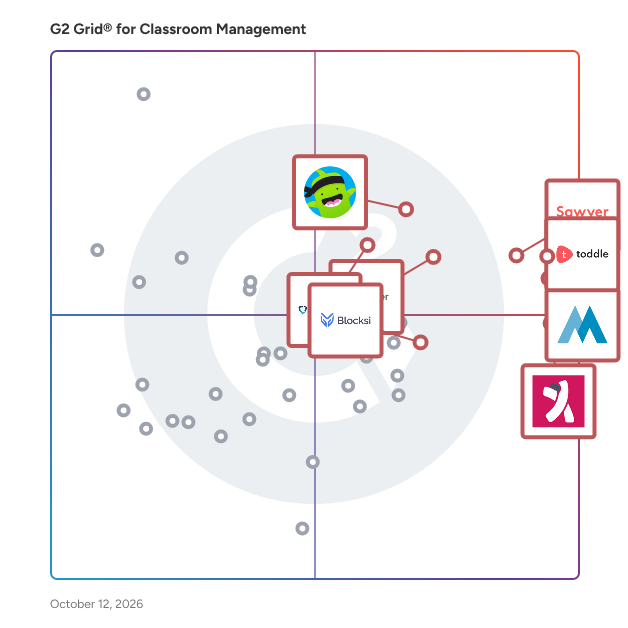
G2 Grid® for Classroom Management Software

G2 Grid® for Classroom Management Software plotting products by satisfaction and market presence

Highlighted products: Toddle, Sawyer, KINDERPEDIA, ClassDojo, iClicker, GoGuardian Teacher, Edsby, and Illumine.

Underlying data: [Grid® JSON](https://www.g2.com/categories/classroom-management/grids.json?focus%5B%5D=toddle&focus%5B%5D=sawyer&focus%5B%5D=kinderpedia&focus%5B%5D=classdojo&focus%5B%5D=iclicker&focus%5B%5D=goguardian-teacher&focus%5B%5D=edsby&focus%5B%5D=illumine-labs-pvt-ltd-illumine)

Sponsored

Adobe Experience Manager

Adobe Experience Manager (AEM) is an agentic content system built for the agentic era, when brands must be discovered, cited, and trusted across human visitors and AI agents simultaneously. Unlike headless-only content management systems that solve for content availability (storing content and delivering it via API), AEM is architected for brand visibility: ensuring content performs once it reaches every surface, from web and mobile to LLMs and emerging agentic channels. What Adobe Experience Manager Is Experience Manager combines structured content management, digital asset management, agentic workflows, enterprise governance, and edge delivery in a single, natively integrated platform. Most enterprises already use AEM as a headless system of record powering mobile apps, multi-site experiences, and connected channels, while also gaining the presentation, delivery, and optimization layers that headless-only systems require customers to build or buy separately. Agentic CMS: The Foundation for AI Discovery AEM is designed as an agentic content management system. Structured, governed, fast content is what AI systems surface, cite, and trust. AEM's agent capabilities — including the Brand Experience Agent, Brand Governance Agent, and Content Advisor Agent — bring intelligence and automation across the content lifecycle: accelerating creation and migration, enforcing brand and compliance governance, and continuously optimizing experiences for both human and agentic traffic. Key Capabilities Experience Manager Sites: A modern decoupled architecture for creating and delivering personalized web and app experiences at scale, serving both headless (Content Fragments via GraphQL/REST) and full experience delivery needs. Experience Manager Assets: A digital asset management system to govern and activate assets, with native AI trained on a brand's data, voice, and creative DNA across regions and geographies. Experience Manager Forms: End-to-end digital enrollment integrated with back-end systems of record. AEM Sites Optimizer: Continuous optimization of performance, SEO, and discoverability (requires AEM Sites). LLM Optimizer: Purpose-built visibility into agentic traffic using real CDN signals, with brand-aware recommendations to improve how content is surfaced and cited by AI systems. Edge Delivery Services: Sub-second content delivery with personalization applied at the edge, built for agentic workflows where content is assembled and served in milliseconds. Experience Manager Guides and Learning Manager: Scalable component content management for documentation, knowledge, and support content, and an integrated learning management system. Differentiators Content + decisioning in one event loop: AEM integrates with Adobe Journey Optimizer and Real-Time CDP, making content decisions on unified customer profiles that draw on behavioral, transactional, and engagement signals, not on CRM records alone. Generative creation in the workflow: Adobe Firefly and generative content capabilities are embedded inside AEM's authoring environment as native capabilities, not adjacent integrations. Enterprise governance at scale: Multi-site, multi-brand, multi-language support with role-based access control, workflow approvals, and audit trails built in. Proven Results Brands using Adobe's optimization capabilities have seen measurable gains in AI-era visibility, including significant increases in LLM citation rates and AI-referral traffic, alongside improvements in page performance and organic visibility.

Visit website

Toddle

Over 2,500 schools across 100+ countries trust Toddle to work faster, teach better, and personalise learning like never before. Toddle is the world’s leading AI-powered LMS, built by educators, for educators. Everything we do comes back to the 4 things that matter most to schools: All-in-one space: Everything from curriculum planning, portfolios, and assessment to reporting, family communication, and pastoral care connects seamlessly on Toddle. Schools typically replace a patchwork of 3-5 platforms with Toddle. Some replace as many as 7. Powerful AI suite built in: Every workflow on Toddle is powered by advanced AI, opening up possibilities that simply didn’t exist before. Think endless creative ideas for every unit and lesson. Authentic assessments built in minutes. Meaningful feedback for every learner, delivered 80% faster. And so much more. Deep integrations: Toddle works seamlessly with 100+ platforms including PowerSchool, Veracross, Blackbaud, Compass, Clever, Wonde, TASS, and Synergetic. Support that feels like partnership: Every school is paired with a Toddle Buddy, a former educator who guides you at every step - from migration and onboarding to long-term success.Toddle is a cloud-based, AI-powered learning management system (LMS) built exclusively for K–12 schools, supporting international schools, IB World Schools, independent schools, charter schools, and faith-based institutions. Designed by educators, Toddle brings the entire teaching and learning cycle into one platform, including collaborative curriculum planning, learning experience design, student portfolios, assessments, gradebooks, attendance, family communication, progress reports, AI tutors, behaviour management, and accreditation workflows. It helps reduce administrative workload while improving teaching and learning outcomes. Trusted by over 2,500 schools across 100+ countries, Toddle is one of the leading LMS platforms for K–12 education worldwide.

Average Rating: 4.7/5.0

Total Reviews: 63

How Do G2 Users Rate Toddle?

  • Ease of Use: 9.1/10 (Category avg: 8.6/10)
  • Student Assignment Distribution: 9.8/10 (Category avg: 8.1/10)
  • Student Assignment Collection: 9.8/10 (Category avg: 8.0/10)
  • Progress Reporting: 10.0/10 (Category avg: 8.3/10)

Who Is the Company Behind Toddle?

  • Seller: Toddle
  • Year Founded: 2019
  • HQ Location: Phoenix, US
  • Twitter: @toddle_edu
  • LinkedIn® Page: www.linkedin.com
    656 employees on LinkedIn®

Who Uses This Product?

  • Who Uses This: Teacher
  • Top Industries: Education Management, Primary/Secondary Education
  • Company Size: 58% Medium, 41% Small

What Do G2 Reviewers Say About Toddle?

AI-generated summary from verified user reviews

Pros
  • Users value the effective communication tools in Toddle for seamless interaction with parents and students.
  • Users value the versatile functionality of Toddle for lesson planning, tracking students, and parent communication.
  • Users value the parent engagement features of Toddle, enhancing communication and collaboration with families effectively.
  • Users value Toddle for its effective reporting tools that streamline lesson planning and student communication.
  • Users value the student monitoring capabilities of Toddle, enhancing lesson planning and parent communication effectively.
Cons
  • Users express concerns about the inadequate security measures of Toddle, questioning the protection for student assessments.
  • Users express concerns about the security of the assessment software, affecting their trust and experience with Toddle.

What Are Recent G2 Reviews of Toddle?

Sawyer

Sawyer is an all-in-one platform built for children’s activity providers.We simplify scheduling, registration, payments, and parent communication so educators can focus on teaching instead of admin tasks. From camps and after school programs to drop-in classes and private lessons, Sawyer adapts to fit any schedule. With customizable registration forms, secure payment processing, and built-in communication tools, Sawyer makes it easy to manage programs and engage families. Educators also gain access to training resources, community support, and flexible pricing with no long-term contracts. Sawyer helps programs run smoothly, grow with ease, and deliver delightful experiences for families.

Average Rating: 4.5/5.0

Total Reviews: 72

How Do G2 Users Rate Sawyer?

  • Ease of Use: 8.5/10 (Category avg: 8.6/10)
  • Student Assignment Distribution: 8.3/10 (Category avg: 8.1/10)
  • Student Assignment Collection: 8.3/10 (Category avg: 8.0/10)
  • Progress Reporting: 8.3/10 (Category avg: 8.3/10)

Who Is the Company Behind Sawyer?

  • Seller: Sawyer
  • Company Website:
  • Year Founded: 2015
  • HQ Location: New York, US
  • Twitter: @sawyer
    484 Twitter followers
  • LinkedIn® Page: www.linkedin.com
    80 employees on LinkedIn®

Who Uses This Product?

  • Top Industries: Education Management, Arts and Crafts
  • Company Size: 88% Small, 8% Medium

What Do G2 Reviewers Say About Sawyer?

AI-generated summary from verified user reviews

Pros
  • Users find Sawyer to be exceptionally easy to use, simplifying registrations and streamlining communication effectively.
  • Users value the responsive customer support of Sawyer, noting quick and effective assistance for any inquiries.
  • Users find Sawyer to be incredibly intuitive, enhancing both administrative management and customer interactions seamlessly.
  • Users find Sawyer's user-friendly interface invaluable for managing analytics, classes, and customer support effectively.
  • Users value the easy integrations of Sawyer, which streamline operations and enhance overall efficiency in managing student information.
Cons
  • Users find Sawyer's limited reporting features hinder effective data access, complicating management and decision-making.
  • Users struggle with complex usability of Sawyer’s features, leading to confusion and repetitive tasks during setup.
  • Users express frustration over the limited customization options in Sawyer, hindering their ability to tailor reports and features.
  • Users find the difficult setup of Sawyer frustrating, facing challenges with initial configuration and feature integration.
  • Users experience integration issues with existing systems, leading to manual data handling and complications in workflows.

What Are Recent G2 Reviews of Sawyer?

What Are G2 Users Discussing About Sawyer?

KINDERPEDIA

Kinderpedia is the complete digital platform designed for schools and kindergartens, helping them manage daily activities, communicate with families, and keep everything connected in one place. Built for K–12 education and early years settings, Kinderpedia supports schools in handling both academic and administrative work more easily, from attendance and lesson planning to communication and billing. Today, it is used by more than 2,000 schools in over 40 countries, supporting a growing community of educators, parents, and school leaders on four continents. The platform serves a diverse target audience, including teachers, school administrators, and parents. For educators, Kinderpedia simplifies the management of classes, lesson planning, and tracking student progress. Teachers can easily follow each child's development and share timely updates with parents, in a collaborative environment that enhances student learning. School leaders benefit from a comprehensive overview of institutional activities, allowing for better decision-making and resource allocation. Parents, on the other hand, gain insights into their child’s daily experiences, reinforcing the partnership between home and school. The platform also includes AI-powered tools that support teachers with insights into student progress and helpful content suggestions. These tools reduce repetitive work and help educators focus more on teaching, while making it easier to adapt learning to each child’s needs. On the operational side, Kinderpedia includes features for invoicing, payments, and financial tracking, giving schools better visibility and control over their finances. By bringing together educational, communication, and financial workflows, the platform helps schools run more smoothly without adding complexity. Ultimately, Kinderpedia is centred around the concept of connection, linking people, information, and processes to create a transparent, engaging, and well-organised learning environment. By facilitating collaboration among educators, parents, and students, Kinderpedia not only enhances the overall effectiveness of school management but also contributes to the educational experience and its outcomes.

Average Rating: 4.7/5.0

Total Reviews: 130

How Do G2 Users Rate KINDERPEDIA?

  • Ease of Use: 9.4/10 (Category avg: 8.6/10)
  • Student Assignment Distribution: 9.8/10 (Category avg: 8.1/10)
  • Student Assignment Collection: 9.9/10 (Category avg: 8.0/10)
  • Progress Reporting: 9.7/10 (Category avg: 8.3/10)

Who Is the Company Behind KINDERPEDIA?

  • Seller: KINDERPEDIA
  • Company Website:
  • Year Founded: 2018
  • HQ Location: Bucharest, RO
  • Twitter: @Kinderpedia_app
    24 Twitter followers
  • LinkedIn® Page: www.linkedin.com
    39 employees on LinkedIn®

Who Uses This Product?

  • Who Uses This: Teacher
  • Top Industries: Education Management, Primary/Secondary Education
  • Company Size: 68% Small, 26% Medium

What Do G2 Reviewers Say About KINDERPEDIA?

AI-generated summary from verified user reviews

Pros
  • Users appreciate the centralized information in Kinderpedia, enhancing efficiency and streamlining school management tasks.
  • Users appreciate the effective communication features of KINDERPEDIA, enhancing classroom management and parent engagement.
  • Users love the ease of use of KINDERPEDIA, making it accessible and adaptable for everyone in the school environment.
  • Users appreciate the effective parent communication feature of KINDERPEDIA, enhancing engagement and connection with families.
  • Users find KINDERPEDIA to be extremely user-friendly, making it easy for teachers and parents to connect and communicate.
Cons
  • Users report technical issues with KINDERPEDIA, including notification failures and problems with message drafting and translations.
  • Users note limited features in KINDERPEDIA, including message formatting and group chat options, impacting usability.
  • Users find the access limitations frustrating, as certain tools are restricted to browsers and hinder overall functionality.
  • Users express frustration over customization issues that limit personal timeline options and hinder overall functionality.
  • Users are disappointed with the limited customization options, restricting the ability to personalize and enhance their experience.

What Are Recent G2 Reviews of KINDERPEDIA?

ClassDojo

ClassDojo is a educational technology platform designed to enhance communication and collaboration among K-8 teachers, students, and families. By providing a suite of tools that facilitate real-time messaging, photo and video sharing, and positive behavior reinforcement, ClassDojo fosters a connected and supportive classroom environment. Trusted by educators worldwide, it is utilized in 95% of pre-kindergarten through eighth-grade schools across the United States and in over 180 countries globally. Key Features and Functionality: - Real-Time Communication: Enables seamless, two-way messaging between teachers and families, with instant translation available in over 130 languages, ensuring inclusivity and effective communication. - Classroom Stories: Allows teachers to share photos, videos, and announcements, providing families with a window into their child's daily learning experiences. - Positive Behavior Reinforcement: Offers tools for recognizing and rewarding positive student behaviors, promoting a constructive classroom culture. - Student Portfolios: Empowers students to showcase their work through digital portfolios, fostering student engagement and enabling parents to track academic progress. - Event Reminders: Keeps families informed about upcoming events and important dates, enhancing participation and community involvement. Primary Value and Solutions Provided: ClassDojo addresses the critical need for effective communication and engagement in the educational ecosystem. By bridging the gap between classrooms and homes, it ensures that families are actively involved in their children's education. The platform's emphasis on positive reinforcement and real-time updates cultivates a supportive learning environment, leading to improved student behavior and academic outcomes. Additionally, its user-friendly interface and commitment to privacy and security make it a trusted choice for educators and families alike.

Average Rating: 4.5/5.0

Total Reviews: 354

How Do G2 Users Rate ClassDojo?

  • Ease of Use: 9.3/10 (Category avg: 8.6/10)
  • Student Assignment Distribution: 8.2/10 (Category avg: 8.1/10)
  • Student Assignment Collection: 8.0/10 (Category avg: 8.0/10)
  • Progress Reporting: 9.1/10 (Category avg: 8.3/10)

Who Is the Company Behind ClassDojo?

  • Seller: ClassDojo
  • Year Founded: 2011
  • HQ Location: San Francisco, CA
  • Twitter: @ClassDojo
    85,934 Twitter followers
  • LinkedIn® Page: www.linkedin.com
    503 employees on LinkedIn®

Who Uses This Product?

  • Who Uses This: Teacher, Teacher
  • Top Industries: Education Management, Primary/Secondary Education
  • Company Size: 43% Medium, 38% Small

What Do G2 Reviewers Say About ClassDojo?

AI-generated summary from verified user reviews

Pros
  • Users appreciate the effective communication features of ClassDojo, keeping parents informed and engaged in their child's education.
  • Users appreciate the strong parent engagement provided by ClassDojo, enabling effective communication and updates on student behavior.
  • Users find ClassDojo very easy to use, making it simple to implement with students and parents.
  • Users value the real-time updates from ClassDojo, enhancing communication and involvement in their child's daily progress.
  • Users find customer support very helpful, especially during the onboarding process, enhancing their overall experience with ClassDojo.
Cons
  • Users find the difficult setup of ClassDojo challenging initially but improve with regular usage.
  • Users find the costly read receipts feature limiting, as it hinders effective communication with teachers and parents.
  • Users find integration issues challenging at first, but gain proficiency with continued use of ClassDojo.
  • Users feel that customer service for technical issues needs improvement to enhance their overall experience with ClassDojo.

What Are Recent G2 Reviews of ClassDojo?

What Are G2 Users Discussing About ClassDojo?

iClicker

iClicker is an intuitive and flexible student engagement tool that drives student engagement and understanding. iClicker can be used to take attendance, facilitate active learning, and complete in-class quizzes using either mobile devices or iClicker remotes. Developed by educators from the University of Illinois, it is currently used at more than 1,200 institutions, and has been used by over 5,000 instructors and 10 million students.

Average Rating: 4.2/5.0

Total Reviews: 25

How Do G2 Users Rate iClicker?

  • Ease of Use: 8.6/10 (Category avg: 8.6/10)
  • Student Assignment Distribution: 3.3/10 (Category avg: 8.1/10)
  • Student Assignment Collection: 3.3/10 (Category avg: 8.0/10)
  • Progress Reporting: 8.3/10 (Category avg: 8.3/10)

Who Is the Company Behind iClicker?

Who Uses This Product?

  • Top Industries: Higher Education
  • Company Size: 43% Medium, 32% Large

What Are Recent G2 Reviews of iClicker?

GoGuardian Teacher

Engage students, manage your classroom, gather insights, and adapt instruction to create more powerful learning moments for every student, every day. GoGuardian Teacher allows teachers to walk the room, engage with students, while still receiving the info they need to keep students focused and on-task.

Average Rating: 4.7/5.0

Total Reviews: 100

How Do G2 Users Rate GoGuardian Teacher?

  • Ease of Use: 9.0/10 (Category avg: 8.6/10)
  • Student Assignment Distribution: 8.6/10 (Category avg: 8.1/10)
  • Student Assignment Collection: 7.6/10 (Category avg: 8.0/10)
  • Progress Reporting: 8.5/10 (Category avg: 8.3/10)

Who Is the Company Behind GoGuardian Teacher?

  • Seller: GoGuardian
  • Year Founded: 2014
  • HQ Location: El Segundo, California
  • Twitter: @goguardian
    8,707 Twitter followers
  • LinkedIn® Page: www.linkedin.com
    541 employees on LinkedIn®

Who Uses This Product?

  • Who Uses This: Teacher
  • Top Industries: Education Management, Primary/Secondary Education
  • Company Size: 57% Medium, 26% Small

What Do G2 Reviewers Say About GoGuardian Teacher?

AI-generated summary from verified user reviews

Pros
  • Users appreciate the ease of use of GoGuardian Teacher, benefiting from automation and detailed student activity reports.
  • Users appreciate the detailed reporting of GoGuardian Teacher, which effectively tracks students' computer activities.
Cons
  • Users indicate that access restrictions can be circumvented by students, highlighting a need for improved monitoring solutions.

What Are Recent G2 Reviews of GoGuardian Teacher?

What Are G2 Users Discussing About GoGuardian Teacher?

Edsby

The Edsby® digital learning platform for K-12 is built specifically for school districts, regional governments and independent schools. They love Edsby for its modern, pedagogically sound K-12 assessment & reporting, family engagement, personalized learning and analytics. Edsby transforms every organization that adopts it. Teachers and administrators live in it all day. Students and parents make extensive use of it for all aspects of school life, all within a single, familiar, social-style user experience. It integrates closely with existing systems and extends the breadth of what a learning organization can achieve. Edsby addresses several critical challenges faced by K-12 institutions. It modernizes assessment and reporting processes, allowing educators to track student progress effectively and provide timely feedback. The platform also improves family engagement by facilitating communication between schools and families, ensuring parents are informed and involved in their children's education. Additionally, Edsby streamlines communication channels, enhances student engagement through interactive features, and builds capacity for educators by providing tools that support professional development. Other challenges solved by Edsby include data-driven insights into student performance and engagement via robust analytics capabilities. This allows educators to make informed decisions based on real-time data, ultimately improving educational outcomes. The platform also helps improve privacy and security, ensuring that sensitive information is protected while maintaining compliance with relevant regulations. With its extensive integration capabilities, Edsby is built to work alongside existing systems, extending the functionality of K-12 organizations and enabling them to achieve more. Edsby is deployed by organizations around the world. It has been licensed for national use by the New Zealand Ministry of Education and the country of Georgia. With over 80 industry awards and distinctions, it stands out for its comprehensive set of features tailored specifically for K-12 learning environments. With Edsby, educational institutions can enhance their operational efficiency, foster stronger relationships among stakeholders, and ultimately create a more effective learning environment for students.

Average Rating: 4.4/5.0

Total Reviews: 117

How Do G2 Users Rate Edsby?

  • Ease of Use: 8.6/10 (Category avg: 8.6/10)
  • Student Assignment Distribution: 8.7/10 (Category avg: 8.1/10)
  • Student Assignment Collection: 8.6/10 (Category avg: 8.0/10)
  • Progress Reporting: 9.0/10 (Category avg: 8.3/10)

Who Is the Company Behind Edsby?

  • Seller: Edsby
  • Company Website:
  • Year Founded: 2010
  • HQ Location: Andover, Massachusetts
  • Twitter: @edsby
    4,060 Twitter followers
  • LinkedIn® Page: www.linkedin.com
    41 employees on LinkedIn®

Who Uses This Product?

  • Who Uses This: Teacher
  • Top Industries: Primary/Secondary Education, Education Management
  • Company Size: 54% Medium, 34% Small

What Do G2 Reviewers Say About Edsby?

AI-generated summary from verified user reviews

Pros
  • Users appreciate the ease of use of Edsby, benefiting from its all-in-one platform for seamless learning and communication.
  • Users appreciate the ease of communication with Edsby, facilitating seamless interaction between teachers, students, and parents.
  • Users value the communication efficiency of Edsby, appreciating the all-in-one platform for seamless interaction.
  • Users appreciate the ease of communication and centralized information in Edsby, enhancing collaboration and community among students.
  • Users appreciate the ease of parent communication with Edsby, enhancing engagement and keeping families informed.
Cons
  • Users find the limited features of Edsby frustrating, as many lack depth and user-friendly design.
  • Users face frequent technical issues with Edsby, leading to difficulties in accessing assignments and experiencing bugs.
  • Users find the setup process and functionality of Edsby difficult, impacting their overall experience and efficiency.
  • Users find limited functionality in Edsby, particularly with assignment copying and class planner disconnection.
  • Users experience frequent software bugs in Edsby, causing inconvenience and delays in updates for resolution.

What Are Recent G2 Reviews of Edsby?

What Are G2 Users Discussing About Edsby?

Illumine

illumine - The #1 Childcare Management App Ranked as the leading childcare management solution, illumine is designed to help preschools, daycares, kindergartens, and nurseries streamline operations and enhance parent engagement. From digital attendance and automated billing to AI-powered lesson planning and real-time parent communication, illumine simplifies every aspect of childcare management—so you can focus on what matters most: nurturing children. Key Features: Simplify Enrollment and Boost Admissions - Capture inquiries from all channels, including your website & social media - Seamlessly schedule tours and personalize follow-ups in just a few clicks - Keep track of inquiries and build a steady flow of potential enrollments for consistent growth Parent Communication - Share daily reports, activity updates & meal schedules - Send real-time photos, videos & announcements - Contactless check-in/out & bus trackingKey Features: Billing & Payments - Automate invoices and payment reminders - Accept digital payments for a seamless experience - Generate financial reports effortlessly Attendance Management - Track child & staff attendance with ease - Generate detailed attendance reports - Monitor late sign-ins and early check-outs Lesson Planning & Assignments - Generate lesson plans in seconds with AI - Custom templates across multiple curriculums including Montessori, EYFS & Reggio - Create child portfolios and assessments tailored to each child’s learning needs Scale Your Multi-Center Operations - Switch between centers on a single dashboard - Standardize processes while being flexible to each center’s needs - Use AI insights to track and improve enrollment and performance across locations Get in Touch info@myillumine.com

Average Rating: 4.5/5.0

Total Reviews: 89

How Do G2 Users Rate Illumine?

  • Ease of Use: 8.7/10 (Category avg: 8.6/10)
  • Student Assignment Distribution: 8.5/10 (Category avg: 8.1/10)
  • Student Assignment Collection: 8.3/10 (Category avg: 8.0/10)
  • Progress Reporting: 8.2/10 (Category avg: 8.3/10)

Who Is the Company Behind Illumine?

Who Uses This Product?

  • Who Uses This: Director, Manager
  • Top Industries: Education Management, Primary/Secondary Education
  • Company Size: 69% Small, 21% Medium

What Do G2 Reviewers Say About Illumine?

AI-generated summary from verified user reviews

Pros
  • Users appreciate the seamless parent-teacher communication of Illumine, enhancing their ability to connect effectively.
  • Users appreciate the ease of use of Illumine, simplifying operations and enhancing organization and control.
  • Users appreciate the simple and modern interface of Illumine, enjoying its unique features and accessibility on mobile and web.
  • Users praise the effective parent engagement of Illumine, enabling seamless communication and management for all involved.
  • Users commend Illumine for its exceptional customer support, highlighting the team's responsiveness and dedication to user needs.
Cons
  • Users criticize Illumine for its limited features, finding report and billing processes cumbersome and lacking visual accessibility.
  • Users find the limited customization options frustrating, particularly for reports and billing features.
  • Users experience technical issues such as loading delays and glitches that disrupt functionality and usability.
  • Users find the access restrictions confusing, making it challenging for families to navigate the platform effectively.
  • Users find the complex usability of Illumine challenging, particularly regarding dashboard navigation and report uploads.

What Are Recent G2 Reviews of Illumine?

What Are G2 Users Discussing About Illumine?

Blocksi

Blocksi, a US-based EdTech provider with global reach, provides trusted AI-powered, cloud-based solutions for K-12 schools, focusing on classroom management, district-wide internet filtering, and 24/7/365 student safety. With over a decade of experience and SOC 2 Type II certification (CIPA/FERPA compliant), Blocksi supports schools in keeping students safe and focused through user-friendly dashboards for in-school and remote learning. Built for teachers, IT administrators, school leaders, and parents, Blocksi offers multi-layered web filtering for school-issued and BYOD devices, real-time screen monitoring, AI-driven safety alerts with human review, an anti-theft tool, detailed analytics, and additional tools to support learning.

Average Rating: 4.3/5.0

Total Reviews: 38

How Do G2 Users Rate Blocksi?

  • Ease of Use: 8.4/10 (Category avg: 8.6/10)
  • Student Assignment Distribution: 6.7/10 (Category avg: 8.1/10)
  • Student Assignment Collection: 6.0/10 (Category avg: 8.0/10)
  • Progress Reporting: 6.6/10 (Category avg: 8.3/10)

Who Is the Company Behind Blocksi?

  • Seller: Blocksi
  • Year Founded: 2015
  • HQ Location: Palo Alto, California
  • Twitter: @Blocksi1
    1,315 Twitter followers
  • LinkedIn® Page: www.linkedin.com
    43 employees on LinkedIn®

Who Uses This Product?

  • Top Industries: Primary/Secondary Education, Education Management
  • Company Size: 55% Medium, 32% Small

What Do G2 Reviewers Say About Blocksi?

AI-generated summary from verified user reviews

Pros
  • Users appreciate the ease of use of Blocksi, making monitoring and control intuitive for teachers and parents alike.
  • Users love the extensive monitoring features of Blocksi, ensuring safety and intuitive management in classrooms.
  • Users value the comprehensive monitoring capabilities of Blocksi, providing peace of mind and proactive oversight.
  • Users praise Blocksi for its excellent communication and responsive customer service, greatly aiding both teachers and tech admin.
  • Users commend Blocksi's responsive customer support, which effectively aids both teachers and tech admins with great expertise.
Cons
  • Users find the complex usability of Blocksi challenging, especially with data input and rule management.
  • Users report poor reporting features, requiring more detailed analytics for effective monitoring and management.
  • Users report facing technical issues with Blocksi, including bugs and ineffective policy inheritance that hinder usability.
  • Users find that the chrome dependency limits Blocksi's effectiveness in a Windows environment.
  • Users face a difficult learning curve when using Blocksi for the first time, despite helpful technical support.

What Are Recent G2 Reviews of Blocksi?

Lumio

Lumio is a web-based instructional platform that offers more ways to effortlessly make learning fun and engaging on student devices. Teachers can start from scratch, or import existing content like PDFs, Google Slides, PowerPoints, and Canva designs and transform them into dynamic, engaging learning experiences on any device. Within Lumio, they can mix and match file types and add interactive elements like games, collaborative whiteboards, handouts, and assessments, all from a single place. Teachers can even share content with colleagues through shared libraries and co-edit lessons in real-time to leverage one another’s classroom experiences. Tools like instructional audio, activity dashboards, and the ability to offer real-time feedback make Lumio a one-stop tool for teachers. It allows them to personalize learning, enable student creation, and gain insight into learning while providing engaging, active lessons. Lumio inspires and supports curriculum with EdTech partners teachers already know and trust, like Desmos, PhET, Epic!, Tynker, and more. All while integrating with common LMS platforms Canvas and Schoology. Not only does Lumio offer more ways to engage students, it’s also specifically designed to improve outcomes – it’s not just fun, it works! Lumio is developed and updated based on an extensive logic model, ensuring that product improvements lead to desired learning outcomes. With the Research-Based Design Certification from Digital Promise, educators and administrators can feel confident in the benefits of using Lumio. With three available plan options (Free, Standard, and Spark), there’s a Lumio plan, and price, that’s right for everyone. Note: Lumio was formerly known as SMART Learning Suite Online (SLSO)

Average Rating: 4.8/5.0

Total Reviews: 165

How Do G2 Users Rate Lumio?

  • Ease of Use: 9.5/10 (Category avg: 8.6/10)
  • Student Assignment Distribution: 9.2/10 (Category avg: 8.1/10)
  • Student Assignment Collection: 8.7/10 (Category avg: 8.0/10)
  • Progress Reporting: 8.3/10 (Category avg: 8.3/10)

Who Is the Company Behind Lumio?

Who Uses This Product?

  • Who Uses This: Teacher, Instructional Technology Specialist
  • Top Industries: Primary/Secondary Education, Education Management
  • Company Size: 45% Medium, 28% Large

What Do G2 Reviewers Say About Lumio?

AI-generated summary from verified user reviews

Pros
  • Users appreciate the easy-to-create interactive content of Lumio, fostering high student engagement and participation.
  • Users love the customization options in Lumio, enabling engaging and interactive content tailored for diverse student needs.
  • Users appreciate the ease of use of Lumio, enabling effortless creation of engaging and interactive lessons.
  • Users love Lumio for its easy-to-create engaging content that enhances student interaction and learning experiences.
  • Users love the ease of creating interactive lessons with Lumio, enhancing student engagement and accommodating diverse learning needs.
Cons
  • Users find Lumio expensive due to additional costs for tiered components, burdening teachers financially amid budget constraints.
  • Users find the extra costs of Lumio frustrating, impacting accessibility and flexibility in educational settings.
  • Users express frustration over integration issues with Canvas grade passback, impacting daily school operations.
  • Users are frustrated by the lack of Canvas grade passback integration, affecting usability in schools reliant on it.
  • Users find the subscription costs frustrating, especially when additional fees limit access due to budget constraints.

What Are Recent G2 Reviews of Lumio?

What Are G2 Users Discussing About Lumio?

iTunes U

iTunes U is a classroom management app.

Average Rating: 4.3/5.0

Total Reviews: 33

How Do G2 Users Rate iTunes U?

  • Ease of Use: 8.4/10 (Category avg: 8.6/10)
  • Student Assignment Distribution: 8.1/10 (Category avg: 8.1/10)
  • Student Assignment Collection: 7.9/10 (Category avg: 8.0/10)
  • Progress Reporting: 7.9/10 (Category avg: 8.3/10)

Who Is the Company Behind iTunes U?

  • Seller: Apple
  • Year Founded: 1976
  • HQ Location: Cupertino, CA
  • Twitter: @Apple
    9,935,357 Twitter followers
  • LinkedIn® Page: www.linkedin.com
    187,339 employees on LinkedIn®
  • Ownership: NASDAQ:AAPL

Who Uses This Product?

  • Top Industries: Higher Education, Education Management
  • Company Size: 50% Small, 32% Medium

What Do G2 Reviewers Say About iTunes U?

AI-generated summary from verified user reviews

Pros
  • Users value the free access to high-quality educational content from top universities, allowing flexible self-paced learning.
  • Users enjoy the intuitive interface of iTunes U, making it easy to organize and access educational content.
  • Users value the free access to high-quality educational content from top universities, enhancing their learning experience significantly.
  • Users value the well-designed mobile interface of iTunes U, making access to educational content convenient and organized.
Cons
  • Users report outdated documentation that hinders usability and leaves many questions unanswered in iTunes U.
  • Users express frustration with the clunky and non-intuitive interface of iTunes U, impacting their overall experience.
  • Users experience slow performance on iTunes U, leading to frustration and a less efficient learning experience.
  • Users face technical issues including glitches and slow performance, leading to a frustrating experience with iTunes U.

What Are Recent G2 Reviews of iTunes U?

What Are G2 Users Discussing About iTunes U?

HiTeach

HiTeach is an all-in-one AI-powered teaching platform designed to transform traditional classrooms into dynamic and interactive learning environments. This innovative solution empowers educators by providing them with seamless tools for lesson creation, collaboration, and insightful analytics, ultimately enhancing student engagement and simplifying the teaching process. The platform caters to a diverse audience, including teachers, administrators, and educational institutions looking to modernize their teaching methods. HiTeach is particularly beneficial for educators who aim to foster an interactive classroom atmosphere, where students are encouraged to participate actively in their learning journey. With its versatile features, HiTeach adapts to various educational settings, making it suitable for primary, secondary, and even higher education institutions. One of the standout features of HiTeach is its interactive and collaborative learning tools. These tools facilitate real-time participation among students, allowing them to engage in discussions, group projects, and other collaborative activities. This not only enhances the learning experience but also helps develop essential teamwork skills. Additionally, the platform includes AI-powered teaching assistance, which streamlines lesson preparation and assessment processes. Educators can leverage intelligent insights to tailor their teaching strategies, ensuring that they meet the diverse needs of their students. Another significant aspect of HiTeach is its comprehensive analytics capabilities. The platform provides educators with clear and actionable data to track student progress and classroom dynamics effectively. By analyzing this data, teachers can identify trends, monitor individual student performance, and make informed decisions to enhance the overall learning experience. This data-driven approach not only supports educators in their teaching efforts but also fosters a culture of continuous improvement within the classroom. With over 30,000 schools worldwide trusting HiTeach, the platform stands out as a reliable solution for educational institutions seeking to enhance their teaching methodologies. By integrating advanced technology with user-friendly features, HiTeach offers a unique value proposition that addresses the evolving needs of modern education. The combination of interactive tools, AI assistance, and robust analytics positions HiTeach as a comprehensive resource for educators aiming to create engaging and effective learning environments.

Average Rating: 4.8/5.0

Total Reviews: 25

How Do G2 Users Rate HiTeach?

  • Ease of Use: 9.2/10 (Category avg: 8.6/10)
  • Student Assignment Distribution: 9.5/10 (Category avg: 8.1/10)
  • Student Assignment Collection: 8.7/10 (Category avg: 8.0/10)
  • Progress Reporting: 8.5/10 (Category avg: 8.3/10)

Who Is the Company Behind HiTeach?

Who Uses This Product?

  • Who Uses This: teacher
  • Top Industries: Education Management, Primary/Secondary Education
  • Company Size: 58% Small, 38% Medium

What Do G2 Reviewers Say About HiTeach?

AI-generated summary from verified user reviews

Pros
  • Users appreciate the interactive engagement of HiTeach, enhancing collaboration and student interest during lessons.
  • Users appreciate the interactivity of HiTeach, enhancing engagement and making learning enjoyable for both teachers and students.
  • Users appreciate the integrated teaching experience of HiTeach, enhancing engagement and streamlining lesson management effortlessly.
  • Users laud HiTeach for its engaging interactive features that foster active student participation and collaborative learning.
  • Users appreciate the interactive learning experience HiTeach offers, enhancing engagement and making lessons more enjoyable for students.
Cons
  • Users note a difficult learning curve with HiTeach, finding the multitude of tools overwhelming initially.
  • Users report a difficult learning curve with HiTeach, finding advanced features overwhelming and challenging to navigate.
  • Users find the complex usability of HiTeach challenging, especially for new users and on slower devices.
  • Users face a difficult learning curve with HiTeach, making it challenging for newcomers to navigate its features.
  • Users note the limited access of the free version, which restricts usage for larger classes needing a professional license.

What Are Recent G2 Reviews of HiTeach?

WeVideo

WeVideo is a powerful, full-cycle video learning platform built for schools, universities, and businesses. Founded in 2011 on the principle that everyone should have the power to create and communicate through video, we have evolved into a globally recognized solution that helps organizations save time while significantly increasing learner engagement. Transform Passive Content into Active Learning WeVideo empowers educators and trainers to turn standard video viewing into a dynamic, multi-dimensional experience. Users can go beyond simple multimedia creation by embedding diverse assessments, such as multiple choice questions, free response items, and moderated discussions, directly into video content. With features like branched learning scenarios and real-time polls, the platform allows for the creation of flexible, differentiated learning pathways that meet today's learners where they are. A Complete Suite for the Video Lifecycle The platform provides a robust set of cloud-based tools that facilitate every stage of the learning and creation process: Create and Edit: Access intuitive editing tools, a screen recorder, green screen capabilities, and a library of over 2 million royalty-free media assets. Engage and Collaborate: Enable real-time collaboration on projects and utilize shared libraries for team-based content creation. Analyze: Leverage real-time analytics to measure learner engagement, track completion performance, and inform pedagogical or training strategies. Enterprise-Grade Integration and Proven Results Built for professional and academic workflows, WeVideo features a robust LTI 1.3 standard integration. This ensures seamless compatibility with major Learning Management Systems (LMS) such as Canvas and Blackboard, supporting single sign-on (SSO), streamlined assignment creation, and secure grade passback. These tools allow institutions to scale online programs with academic integrity at their core, resulting in measurable impacts, including a validated 208% ROI as documented in a Forrester Total Economic Impact™ study.

Average Rating: 4.6/5.0

Total Reviews: 92

How Do G2 Users Rate WeVideo?

  • Ease of Use: 9.1/10 (Category avg: 8.6/10)
  • Student Assignment Distribution: 8.6/10 (Category avg: 8.1/10)
  • Student Assignment Collection: 9.2/10 (Category avg: 8.0/10)
  • Progress Reporting: 8.9/10 (Category avg: 8.3/10)

Who Is the Company Behind WeVideo?

  • Seller: WeVideo
  • Year Founded: 2011
  • HQ Location: Lake Forest, US
  • Twitter: @WeVideo
    14,686 Twitter followers
  • LinkedIn® Page: www.linkedin.com
    108 employees on LinkedIn®

Who Uses This Product?

  • Who Uses This: Teacher
  • Top Industries: Primary/Secondary Education, Education Management
  • Company Size: 39% Medium, 32% Small

What Do G2 Reviewers Say About WeVideo?

AI-generated summary from verified user reviews

Pros
  • Users value the creativity options in WeVideo, allowing for innovative and engaging video editing and production.
  • Users appreciate the intuitive user interface of WeVideo, which makes video editing accessible and enjoyable for everyone.
  • Users appreciate the seamless integration of WeVideo with educational platforms, enhancing student engagement and learning experiences.
  • Users commend the intuitive design and seamless integration of WeVideo, enhancing engagement and creativity in their courses.
  • Users appreciate the outstanding customer support of WeVideo, enhancing their overall satisfaction and experience with the tool.
Cons
  • Users find the limited access in the free version frustrating, missing out on many valuable features and resources.
  • Users find the tiered system for output limiting, as it restricts video quality to 720p at their school board.
  • Users struggle with software bugs that hinder crucial features, impacting functionality and user experience for students.

What Are Recent G2 Reviews of WeVideo?

What Are G2 Users Discussing About WeVideo?

Lightspeed Filter

Lightspeed Filter is the best-in-class solution that protects students from harmful material to ensure their online safety. To help districts maintain safety and CIPA-compliance, our solution is powered by the most comprehensive database of K-12 online content in the industry from 20 years of web indexing. Whether it's protecting take-home devices or customizing blocklists for grade level, we've got you covered with SSL decryption on all devices, on your network and off, all in the cloud. Fast and accurate roster syncing: Simultaneously sync any combination of student information systems (SIS) and directory services to one centralized place with Lightspeed SmartSync™ technology. Flexible policy management: Quickly locate and manage group policies, reports, and more with quick search functionality, sophisticated hierarchical breadcrumb navigation, and granular group filtering with Lightspeed SmartPolicy™ technology. Easy SSL Decryption: Provide multi-OS SSL decryption without the need to configure proxies, PACs, or trust certificates. Lightspeed SmartAgents™ put the power of a filter inside each device. Granular YouTube Controls: SmartPlay™ takes control of YouTube. Allow educational videos and block inappropriate content, thumbnails and time-wasters—in just a click.

Average Rating: 4.5/5.0

Total Reviews: 63

How Do G2 Users Rate Lightspeed Filter?

  • Ease of Use: 8.9/10 (Category avg: 8.6/10)
  • Progress Reporting: 9.0/10 (Category avg: 8.3/10)

Who Is the Company Behind Lightspeed Filter?

  • Seller: Lightspeed Systems
  • Year Founded: 1999
  • HQ Location: Austin, TX
  • Twitter: @lightspeedsys
    4,595 Twitter followers
  • LinkedIn® Page: www.linkedin.com
    253 employees on LinkedIn®

Who Uses This Product?

  • Top Industries: Primary/Secondary Education, Education Management
  • Company Size: 67% Medium, 20% Large

What Do G2 Reviewers Say About Lightspeed Filter?

AI-generated summary from verified user reviews

Pros
  • Users commend Lightspeed Filter for its excellent communication and dedication to customer support, enhancing the educational experience.
  • Users value the comprehensive solutions offered by Lightspeed Filter, enhancing student safety and optimizing tech efficiently.
  • Users praise the comprehensive content filtering of Lightspeed Filter, ensuring student safety and seamless tech integration.
  • Users commend the responsive customer support of Lightspeed Filter, enhancing the overall experience and ensuring safety for students.
  • Users appreciate the easy setup of Lightspeed Filter, which simplifies the implementation process and enhances school safety.
Cons
  • Users find that support hours are sometimes restrictive, making early morning assistance challenging to access.
  • Users experience insufficient support due to limited support hours, restricting early morning assistance when needed.

What Are Recent G2 Reviews of Lightspeed Filter?

What Are G2 Users Discussing About Lightspeed Filter?

iGradePlus

An affordable School Management System for schools and districts and a free Online Gradebook for individual teachers. Easy-to-use, convenient, reliable, and secure. Offering a wide array of features for individual teachers, schools and districts. Features include student, class, and grade management, attendance and behavior tracking, custom report generation, and extensive student and parent communication features. Individual web portal accounts for students and parents are included with all subscriptions.

Average Rating: 4.9/5.0

Total Reviews: 46

How Do G2 Users Rate iGradePlus?

  • Ease of Use: 9.5/10 (Category avg: 8.6/10)
  • Student Assignment Distribution: 5.0/10 (Category avg: 8.1/10)
  • Student Assignment Collection: 5.0/10 (Category avg: 8.0/10)
  • Progress Reporting: 10.0/10 (Category avg: 8.3/10)

Who Is the Company Behind iGradePlus?

  • Seller: iGradePlus
  • Year Founded: 2011
  • HQ Location: Ellicott City, Maryland, United States
  • Twitter: @igradeplus
    2,178 Twitter followers
  • LinkedIn® Page: www.linkedin.com
    4 employees on LinkedIn®

Who Uses This Product?

  • Top Industries: Education Management, Primary/Secondary Education
  • Company Size: 78% Small, 15% Medium

What Do G2 Reviewers Say About iGradePlus?

AI-generated summary from verified user reviews

Pros
  • Users love the ease of use of iGradePlus, finding it straightforward and efficient for grade tracking and reporting.
  • Users appreciate the seamless accessibility of iGradePlus, making it easy to organize and communicate student information.
  • Users appreciate the centralization of information in iGradePlus, which simplifies reporting and communication with students and parents.
  • Users appreciate the centralized information of iGradePlus, making it easy to manage student data and generate reports.
  • Users appreciate the effective communication tools of iGradePlus, facilitating easy interaction with students and parents.

What Are Recent G2 Reviews of iGradePlus?

What Are G2 Users Discussing About iGradePlus?

Emma Stein
ES
Researched and written by Emma Stein
Updated October 3, 2024

Learn More About Classroom Management Software

What is Classroom Management Software?

These solutions provide device-monitoring features designed to limit in-classroom distractions. Classroom management software also allows teachers to block access to inappropriate websites and content. The purpose of these solutions is to allow teachers to implement technology in the classroom while limiting student distraction. Students stay on task, and teachers are able to do their jobs more effectively.

Why Use Classroom Management Software?

Classroom management software is beneficial for a few different reasons. The primary reason to use these solutions is to promote proper technology usage in the classroom, while limiting the natural distractions that result from unsupervised tech implementation and use. The impact of these solutions, however, is not singular. Classroom management solutions improve teacher oversight, empower student-driven learning, increase classroom engagement, track progress, and improve both teacher-student and student-student communication.

Oversight – With classroom management solutions, teachers can monitor student activity from a single device. Instead of the classic walk-around to ensure that students aren’t flouting in-classroom technology usage rules, teachers have direct access to exactly what their students are looking at. This way, teachers can be sure that students are not abusing their technological privileges.

Empower autonomy and self-directed learning – By providing students with internet-connected devices, which enhance the in-classroom learning experience, teachers are empowering them to take on more responsibility for their education. Students armed with internet-connected devices in the classroom have increased access to information and ideas. The classroom management software installed on said devices enhances the impact that this increased information access has on the students, as it limits the potential for distraction and gives students an outlet through which to test their newfound knowledge.

Increase engagement – Classroom management software provides educators with tools to boost engagement levels among students. Teachers can solicit student responses via their devices, making the entire classroom a more collaborative and responsive environment. Teachers can share their screens with students via these solutions as well, giving them another technological hook with which to snare students’ attention.

Track progress– Classroom management software often contains progress reporting features for teachers to administer in-class assessments and monitor the results of those assessments. The assessments generally take the form of interactive quizzes to be distributed among the students and answered via the students’ devices.

Improve communication – Classroom management solutions typically contain communication tools that facilitate student-teacher communication. The built-in communication tools ensure that there are always sufficient channels through which collaboration can take place. The teacher-student communication channels may also be private, so teachers can send individual messages and distribute advice as needed.

Who Uses Classroom Management Software?

Teachers – The primary users of classroom management software, teachers utilize these solutions to drive engagement, monitor users, track progress, and communicate with parents. Teachers make use of the full functionality of the software, shaping the breadth of usage within their classrooms.

Students – While students do not have administrative access to classroom management software and don’t interact with it in the same way a teacher does, they are still users. Students utilize the software to answer questions in class, complete assessments given by their teachers, access teacher-created or -distributed content, collaborate with their classmates, and ask the teacher questions directly via the application.

Administrators – School administrators may not directly interact with the software interface, but they have the ability to pull the data from classroom management solutions. They can use that data to shape school policy, create data-driven classroom initiatives, and generally inform their decision-making process when it comes to managing their school.

Classroom Management Software Features

Classroom management software often includes, but is not limited to, the following features.

Remote computer monitoring – Classroom management software always contains remote computer monitoring features, which allow teachers to monitor student computer/device activity from a single workstation.

Website and application blocking – This feature prevents students from accessing sites and content deemed inappropriate or distracting. The point of this is to ensure students stay on task.

Teacher and student screen sharing – Teachers can use this feature, which broadcasts both student and teacher screens to a selected group of students, to share their own content and advice or to promote collaboration between students.

Interactive assessments – Teachers can create and distribute interactive quizzes and other assessment types to student devices.

Immediate response – This feature allows students to provide immediate responses to teacher-posed questions asked in the classroom. Instead of forcing a single student to answer the teacher’s question, the responsibility shifts to the entire class to provide an answer.

Progress reporting – Teachers can use the responses generated during in-class assessments to more accurately track student progress. Instead of a single test determining the comprehension level of individual students, the teacher can aggregate more data and track each student more closely through the duration of each class.

Instant messaging – Teachers can message students individually or as a group, depending on the intention. Students can ask and answer questions via the instant messaging capabilities of the application.

Assignment distribution – Some classroom management software contains distribution tools so teachers can give students assignments directly through the application. This eliminates paper waste generated by handing out physical assignments and allows for greater tracking capability.