Best Enterprise Video Editing Software

How Many Video Editing Software Products Does G2 Track?

Total Products under this Category: 293

Category Stats (Aug 2026)

  • Average Rating: 4.48/5 (↑0.01 vs Jul 2026) The average rating of products in this category, based on all submitted ratings
  • Top Trending Product: Runway (+5.57%) - Among all products in this category, Runway recorded the largest rating increase compared to last month

Last updated: August 04, 2026

How Does G2 Rank Video Editing Software Products?

Why You Can Trust G2's Software Rankings:

  • 30 Analysts and Data Experts
  • 66,500+ Authentic Reviews
  • 293+ Products
  • Unbiased Rankings

G2's software rankings are built on verified user reviews, rigorous moderation, and a consistent research methodology maintained by a team of analysts and data experts. Each product is measured using the same transparent criteria, with no paid placement or vendor influence. While reviews reflect real user experiences, which can be subjective, they offer valuable insight into how software performs in the hands of professionals. Together, these inputs power the G2 Score, a standardized way to compare tools within every category.

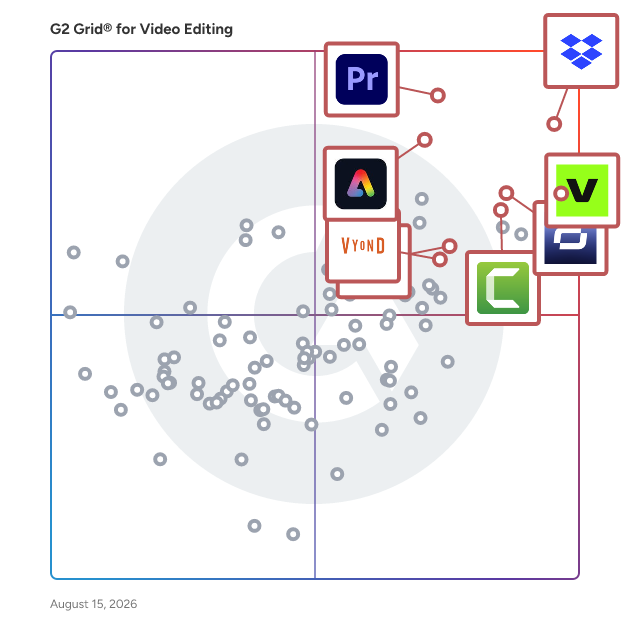
G2 Grid® for Video Editing Software

G2 Grid® for Video Editing Software plotting products by satisfaction and market presence

Highlighted products: Camtasia, Synthesia, Dropbox, Vyond, Adobe Express, Adobe Premiere Pro, Wistia, and VEED.

Underlying data: [Grid® JSON](https://www.g2.com/categories/video-editing/grids.json?focus%5B%5D=camtasia&focus%5B%5D=synthesia&focus%5B%5D=dropbox&focus%5B%5D=vyond&focus%5B%5D=adobe-express&focus%5B%5D=adobe-premiere-pro&focus%5B%5D=wistia&focus%5B%5D=veed&segment=enterprise)

Sponsored

Vyond

Vyond is an all-in-one AI video platform designed to empower organizations in creating secure, compliant, and engaging business content at scale. With a history spanning over 15 years, Vyond has established itself as a trusted solution for more than 20,000 companies, including 65% of the Fortune 500. Vyond is particularly suited for enterprises looking to enhance their internal communications, training programs, sales enablement, and marketing efforts through high-quality video content. Vyond serves a diverse range of use cases. It is particularly beneficial for companies aiming to streamline onboarding processes, improve training completion rates, and enhance compliance training. By integrating seamlessly with existing tools such as Slack, Learning Management Systems (LMS), and Customer Relationship Management (CRM) systems, Vyond allows employees to create brand-safe content without the need to switch between multiple applications. This integration not only fosters a more efficient workflow but also ensures that video content aligns with organizational branding and compliance standards. Key features of Vyond include AI avatars, AI-assisted scripting, instant translation, and text-to-speech capabilities, which collectively enhance the video creation process. Users can develop custom characters and utilize various animation styles, including animated, photorealistic, mixed-media, and live-action formats, all within a single platform. This versatility allows organizations to cater to different audience preferences and learning styles, making their content more engaging and effective. Additionally, Vyond’s SCORM-compliant LMS integration ensures that training materials can be easily tracked and measured, providing valuable insights into employee engagement and learning outcomes. Vyond stands out in the market by simplifying the technology stack for enterprises while expanding their creative capabilities. The platform’s focus on measurable outcomes—such as faster onboarding, higher training completion, and improved sales enablement—enables organizations to track return on investment (ROI) within their existing systems of record. This emphasis on data-driven results allows businesses to make informed decisions about their video content strategies and optimize their communication efforts. With a commitment to ongoing innovation and customer trust, Vyond is dedicated to evolving its platform to meet the needs of modern enterprises. By bringing next-generation AI capabilities into a compliant and governed environment, Vyond enables organizations to create content more efficiently, communicate more effectively, and reduce their reliance on fragmented solutions. This positions Vyond as a comprehensive tool for any organization looking to leverage video as a key component of their business strategy.

Visit website

Camtasia

The Camtasia Product Suite is a powerful, AI-powered ecosystem for video creation and screen recording. Built to deliver professional results fast, Camtasia makes it easy to produce high-quality content—even if you’ve never edited a video before. Our advanced AI features—including Camtasia Rev, script generation, text-to-speech, and automatic translations—streamline your entire workflow. Plus, with our new Zoom integration, you can instantly turn meeting recordings into reusable training content. Pull Zoom cloud recordings directly into your timeline, edit screen and camera feeds as independent layers, and apply dynamic layouts so your camera never blocks critical onscreen content. Whether you choose our Free, Essentials, Plus, or Pro plan, the Camtasia Editor is easy enough for beginners yet versatile enough to be your video solution for life. Explore our plans today and accelerate your production journey.

Average Rating: 4.6/5.0

Total Reviews: 1,753

How Do G2 Users Rate Camtasia?

  • Has the product been a good partner in doing business?: 9.0/10 (Category avg: 9.0/10)
  • Quality of Support: 8.7/10 (Category avg: 8.7/10)
  • Ease of Admin: 9.1/10 (Category avg: 9.0/10)
  • Titles and Captions: 8.8/10 (Category avg: 8.4/10)

Who Is the Company Behind Camtasia?

  • Seller: TechSmith
  • Company Website:
  • Year Founded: 1987
  • HQ Location: Okemos, MI
  • Twitter: @TechSmith
    29,513 Twitter followers
  • LinkedIn® Page: www.linkedin.com
    356 employees on LinkedIn®

Who Uses This Product?

  • Who Uses This: Instructional Designer, Founder
  • Top Industries: Computer Software, Information Technology and Services
  • Company Size: 53% Small, 27% Medium

What Do G2 Reviewers Say About Camtasia?

AI-generated summary from verified user reviews

Pros
  • Users value the ease of use in Camtasia, enabling quick screen recording and editing without advanced skills.
  • Users appreciate the easy and efficient video editing of Camtasia, enabling quick creation of professional-quality tutorials.
  • Users love Camtasia for its easy editing, enabling quick creation of professional-quality demo and tutorial videos.
  • Users appreciate the easy screen recording and fast editing workflow of Camtasia, allowing for professional-quality content creation effortlessly.
  • Users appreciate the easy creation process in Camtasia, enabling quick production of professional-quality videos without advanced skills.
Cons
  • Users find Camtasia to be too expensive, especially compared to similar products like Snagit.
  • Users find the steep learning curve of Camtasia challenging, making it harder to navigate advanced features efficiently.
  • Users experience slow rendering times, especially with larger projects, impacting their editing efficiency and satisfaction.
  • Users note feature limitations in Camtasia, particularly in background removal and interactivity options, impacting overall effectiveness.
  • Users note the limited features in Camtasia, wishing for more advanced tools and improved functionality.

What Are Recent G2 Reviews of Camtasia?

What Are G2 Users Discussing About Camtasia?

Synthesia

Synthesia is the world's leading AI video platform for business, trusted by over 90% of the Fortune 100. As AI continues to shape the way we live and work, Synthesia develops products to enhance visual communication and enterprise skill development, helping people work better and stay at the center of successful organizations. Create videos from any input: Type or paste a script, generate one from a prompt, or turn a PowerPoint deck, PDF, Word doc, link, or ready-made template into a polished, publish-ready video in minutes. Present with AI Avatars: Prompt fully customizable avatars into any outfit, setting, and action, choose from a realistic stock avatar library, or create a personal avatar from a single photo that looks and sounds like you. Communicate globally: Deliver consistent, localized content to every market in 160+ languages with built-in AI translation and dubbing, plus a Translation Glossary that locks key terminology so your message stays accurate everywhere. Practice with Roleplay Sessions: People step into a real conversation with an Interactive Avatar that talks, asks questions, and pushes back - then get coached and scored in real time, with their skill uplift measured over time, all in one platform. Engage through interactivity: Add quizzes, clickable moments, and branching paths that turn passive viewing into active learning. Measure real impact: Synthesia’s built-in analytics let you see how your videos perform, who’s watching, where they drop off, and how they engage. Use data-driven insights to refine content and maximize ROI on every communication. Built for enterprise trust: Synthesia is trusted by the world’s leading organizations for its enterprise-grade security and compliance standards, including SOC 2 Type II, GDPR, ISO 42001, and ISO 27001. From HR and L&D to Marketing and Sales, Synthesia enables every team to create on-brand, on-message videos at scale, turning communication into a competitive advantage.

Average Rating: 4.6/5.0

Total Reviews: 2,769

How Do G2 Users Rate Synthesia?

  • Has the product been a good partner in doing business?: 8.9/10 (Category avg: 9.0/10)
  • Quality of Support: 8.9/10 (Category avg: 8.7/10)
  • Ease of Admin: 9.1/10 (Category avg: 9.0/10)
  • Titles and Captions: 8.6/10 (Category avg: 8.4/10)

Who Is the Company Behind Synthesia?

  • Seller: Synthesia
  • Company Website:
  • Year Founded: 2017
  • HQ Location: London
  • Twitter: @synthesiaIO
    28,606 Twitter followers
  • LinkedIn® Page: www.linkedin.com
    772 employees on LinkedIn®

Who Uses This Product?

  • Who Uses This: CEO, Owner
  • Top Industries: Computer Software, Information Technology and Services
  • Company Size: 66% Small, 18% Medium

What Do G2 Reviewers Say About Synthesia?

AI-generated summary from verified user reviews

Pros
  • Users praise the ease of use of Synthesia, enjoying quick video creation with many customization options.
  • Users appreciate the high-quality video generation from Synthesia, enhancing training effectiveness and user engagement.
  • Users love the convenience and ease of use of Synthesia for creating engaging and effective videos.
  • Users love the high-quality realistic avatars in Synthesia, enhancing their video projects with professionalism and ease.
  • Users value the robust features of Synthesia, enabling easy creation of high-quality content for various platforms.
Cons
  • Users note that the avatars appear somewhat unnatural, despite recent improvements, affecting overall user experience.
  • Users express concerns over limited avatars, noting inconsistencies in appearance, gestures, and voice pronunciation with video generation.
  • Users find the avatar quality lacking realism, with issues in gestures, pronunciation, and overall naturalness.
  • Users note the unnatural appearance of AI avatars, despite improvements, limiting the overall user experience.
  • Users find the limited customization of AI avatars' expressions and gestures restricts their creative potential.

What Are Recent G2 Reviews of Synthesia?

What Are G2 Users Discussing About Synthesia?

Dropbox

Keep creative projects moving from first draft to final sign-off. Dropbox brings your team’s files, feedback, and approvals together in one secure cloud storage platform. Back up your work, send large files in seconds, and keep everyone in sync—so nothing slows you down. Find it fast, from anywhere Dropbox makes it easy to find and share files across desktop, mobile, and web—whether your team is in the office, remote, or on the go. Organize your work, align your team Every version stays current and simple to manage. Synced team folders keep content up to date, and previews for 175+ file types keep your team in the loop. Share anything, instantly Send large assets—up to 2 TB uploads and 1 TB video previews—with just a link. Security you can trust Protect your files with industry-leading encryption, granular permissions, compliance-ready controls, and built-in recovery features. Dropbox integrates with Google Workspace, Microsoft 365, Adobe Creative Cloud, Slack, Salesforce, Canva, Autodesk, Zoom, Claud, and more. Trusted by more than 700 million users and 575,000 teams worldwide.

Average Rating: 4.4/5.0

Total Reviews: 30,867

How Do G2 Users Rate Dropbox?

  • Has the product been a good partner in doing business?: 8.9/10 (Category avg: 9.0/10)
  • Quality of Support: 8.6/10 (Category avg: 8.7/10)
  • Ease of Admin: 8.9/10 (Category avg: 9.0/10)
  • Titles and Captions: 7.5/10 (Category avg: 8.4/10)

Who Is the Company Behind Dropbox?

  • Seller: Dropbox
  • Company Website:
  • Year Founded: 2007
  • HQ Location: San Francisco, California
  • Twitter: @Dropbox
    3,279,477 Twitter followers
  • LinkedIn® Page: www.linkedin.com
    4,149 employees on LinkedIn®

Who Uses This Product?

  • Who Uses This: Owner, Project Manager
  • Top Industries: Information Technology and Services, Marketing and Advertising
  • Company Size: 63% Small, 23% Medium

What Do G2 Reviewers Say About Dropbox?

AI-generated summary from verified user reviews

Pros
  • Users appreciate the ease of use of Dropbox, enjoying seamless file management and sharing across devices.
  • Users appreciate the easy file sharing feature of Dropbox, finding it secure and convenient for collaboration.
  • Users appreciate the versatile cloud storage of Dropbox, ideal for seamless file sharing and efficient collaboration.
  • Users value the easy access of Dropbox across multiple devices, enhancing organization and file sharing effortlessly.
  • Users love the team collaboration features of Dropbox, making it easy to share and organize files effortlessly.
Cons
  • Users find the pricing to be quite expensive, particularly for minimal storage upgrades compared to competitors.
  • Users find the expensive cost of Dropbox storage upgrades a significant drawback, longing for more flexible pricing options.
  • Users find the storage limitations of Dropbox restrictive, often leading to the need for costly upgrades quickly.
  • Users express frustration with limited storage on Dropbox's free plan, which quickly runs out compared to competitors.
  • Users complain about the limited free storage and constant upgrade prompts that hinder their experience with Dropbox.

What Are Recent G2 Reviews of Dropbox?

What Are G2 Users Discussing About Dropbox?

Vyond

Vyond is an all-in-one AI video platform designed to empower organizations in creating secure, compliant, and engaging business content at scale. With a history spanning over 15 years, Vyond has established itself as a trusted solution for more than 20,000 companies, including 65% of the Fortune 500. Vyond is particularly suited for enterprises looking to enhance their internal communications, training programs, sales enablement, and marketing efforts through high-quality video content. Vyond serves a diverse range of use cases. It is particularly beneficial for companies aiming to streamline onboarding processes, improve training completion rates, and enhance compliance training. By integrating seamlessly with existing tools such as Slack, Learning Management Systems (LMS), and Customer Relationship Management (CRM) systems, Vyond allows employees to create brand-safe content without the need to switch between multiple applications. This integration not only fosters a more efficient workflow but also ensures that video content aligns with organizational branding and compliance standards. Key features of Vyond include AI avatars, AI-assisted scripting, instant translation, and text-to-speech capabilities, which collectively enhance the video creation process. Users can develop custom characters and utilize various animation styles, including animated, photorealistic, mixed-media, and live-action formats, all within a single platform. This versatility allows organizations to cater to different audience preferences and learning styles, making their content more engaging and effective. Additionally, Vyond’s SCORM-compliant LMS integration ensures that training materials can be easily tracked and measured, providing valuable insights into employee engagement and learning outcomes. Vyond stands out in the market by simplifying the technology stack for enterprises while expanding their creative capabilities. The platform’s focus on measurable outcomes—such as faster onboarding, higher training completion, and improved sales enablement—enables organizations to track return on investment (ROI) within their existing systems of record. This emphasis on data-driven results allows businesses to make informed decisions about their video content strategies and optimize their communication efforts. With a commitment to ongoing innovation and customer trust, Vyond is dedicated to evolving its platform to meet the needs of modern enterprises. By bringing next-generation AI capabilities into a compliant and governed environment, Vyond enables organizations to create content more efficiently, communicate more effectively, and reduce their reliance on fragmented solutions. This positions Vyond as a comprehensive tool for any organization looking to leverage video as a key component of their business strategy.

Average Rating: 4.7/5.0

Total Reviews: 544

How Do G2 Users Rate Vyond?

  • Has the product been a good partner in doing business?: 9.3/10 (Category avg: 9.0/10)
  • Quality of Support: 9.3/10 (Category avg: 8.7/10)
  • Ease of Admin: 9.4/10 (Category avg: 9.0/10)
  • Titles and Captions: 8.9/10 (Category avg: 8.4/10)

Who Is the Company Behind Vyond?

  • Seller: Vyond
  • Company Website:
  • Year Founded: 2007
  • HQ Location: San Mateo, California
  • Twitter: @VyondVideo
    136 Twitter followers
  • LinkedIn® Page: www.linkedin.com
    274 employees on LinkedIn®

Who Uses This Product?

  • Who Uses This: Instructional Designer, Senior Instructional Designer
  • Top Industries: E-Learning, Hospital & Health Care
  • Company Size: 52% Large, 26% Small

What Do G2 Reviewers Say About Vyond?

AI-generated summary from verified user reviews

Pros
  • Users love the ease of use in Vyond, enabling quick video creation with helpful templates and support.
  • Users love the ease of quick video creation with Vyond, enabling them to develop content efficiently.
  • Users appreciate Vyond's versatile templates and support, facilitating the creation of engaging visual stories effortlessly.
  • Users love the easy creation process with Vyond, allowing quick video production and extensive template options.
  • Users love the versatility of Vyond, making video creation enjoyable and suitable for various applications.
Cons
  • Users express frustration over limited customization options in Vyond, wishing for more character movements and clothing choices.
  • Users note the limited features and lack of variety in scenes, hindering creativity and project flexibility.
  • Users find the limited options in character customization and media assets frustrating and in need of improvement.
  • Users note a steep learning curve with Vyond, requiring time to master its limited video editing features.
  • Users note a limited selection of clothing and accessories in Vyond, making it difficult to find specific items.

What Are Recent G2 Reviews of Vyond?

What Are G2 Users Discussing About Vyond?

Adobe Express

Quickly and easily make standout content from thousands of beautiful templates with the all-new Adobe Express. Simply choose a template, add images and text, and quickly resize your creations to fit your favorite social media site. Available on web and mobile. Make stunning content. Start from thousands of templates for social media graphics, stories, and thumbnails, as well as posters, flyers, business cards, logos, and more. Get free Adobe Stock images. Access the Adobe Stock royalty-free photo collection* with millions of on-trend and seasonal images. Give your photos pro effects. Get the look you want with easy-to-apply effects, filters, textures, and overlays. Remove backgrounds instantly. Effortlessly cut out backgrounds without having to outline your subject — and start with a fresh canvas. Add design elements. Discover just what you need from tons of images, icons, backgrounds, and design assets. Resize content in a snap. Instantly resize and reflow content to fit any size for Instagram, Facebook, YouTube, banners, flyers, and more. Your content will adjust instantly using intuitive Adobe tools. Make it move. Create attention-grabbing content with features to animate text and photos. Apply your brand. Upload your brand logo, fonts, and colors and apply them to any design with one tap. Make videos made for social. Easily trim, crop, resize, and convert videos. Play with text. Choose from over 18,000 licensed fonts from the Adobe Fonts library. Start from text templates that feature curved type, grids, and beautiful font pairs. Remix it. Customize predesigned graphics and text to make them your own. Work better together. Share templates, assets, and brand identity across your team so content consistently reflects your look. Save favorite templates to your library for a faster start. *Adobe Express membership required. The Adobe Stock photo collection does not include Premium or editorial content. Limited Adobe Stock functionality available in web page and video features within the desktop app.​

Average Rating: 4.5/5.0

Total Reviews: 836

How Do G2 Users Rate Adobe Express?

  • Has the product been a good partner in doing business?: 9.1/10 (Category avg: 9.0/10)
  • Quality of Support: 8.7/10 (Category avg: 8.7/10)
  • Ease of Admin: 9.4/10 (Category avg: 9.0/10)
  • Titles and Captions: 9.0/10 (Category avg: 8.4/10)

Who Is the Company Behind Adobe Express?

  • Seller: Adobe
  • Company Website:
  • Year Founded: 1982
  • HQ Location: San Jose, CA
  • Twitter: @Adobe
    956,842 Twitter followers
  • LinkedIn® Page: www.linkedin.com
    42,087 employees on LinkedIn®

Who Uses This Product?

  • Who Uses This: Graphic Designer, Marketing Manager
  • Top Industries: Marketing and Advertising, Design
  • Company Size: 56% Small, 27% Medium

What Do G2 Reviewers Say About Adobe Express?

AI-generated summary from verified user reviews

Pros
  • Users appreciate the ease of use in Adobe Express, especially for non-designers with ready-to-go templates.
  • Users love the variety of ready-made templates in Adobe Express, making design quick and user-friendly for everyone.
  • Users value the speed and ease of Adobe Express, enabling quick creation of professional content on the go.
  • Users love the easy creation process in Adobe Express, streamlining the development of professional-quality content effortlessly.
  • Users value the intuitive design of Adobe Express, enabling fast and effortless content creation across devices.
Cons
  • Users find the limited features of Adobe Express restrictive compared to other graphic design platforms like Canva.
  • Users find feature limitations in Adobe Express, noting it lacks functions compared to other platforms like Canva.
  • Users find Adobe Express has limited customization options, which can restrict more advanced design projects and flexibility.
  • Users find Adobe Express has limited options, lacking advanced design features and tools for more complex projects.
  • Users experience slow performance with Adobe Express, particularly when handling heavier designs or multiple projects.

What Are Recent G2 Reviews of Adobe Express?

What Are G2 Users Discussing About Adobe Express?

Adobe Premiere Pro

Adobe Premiere Pro is a professional video editing software developed by Adobe Systems, designed for creating high-quality videos across various industries. It offers a comprehensive suite of tools for editing, color correction, audio enhancement, and visual effects, making it a preferred choice for filmmakers, broadcasters, and content creators. Key Features and Functionality: - Advanced Editing Tools: Provides industry-standard video editing capabilities, including three-point editing, timeline-based editing, and support for multiple video and audio tracks. - AI-Powered Enhancements: Utilizes artificial intelligence to streamline workflows, such as Object Mask for quick masking and tracking, Text-Based Editing for efficient transcript-based editing, and Media Intelligence for rapid clip searching. - Color Correction and Grading: Offers powerful color correction tools, including color wheels, curve controls, and built-in video scopes, enabling precise color adjustments and grading. - Audio Editing and Mixing: Features professional audio tools to reduce noise, enhance dialogue, and add advanced effects, along with AI capabilities like Enhance Speech for improving audio quality. - Effects and Transitions: Includes a vast library of cinematic effects, transitions, and customizable templates to create unique visual styles. - Title and Caption Creation: Allows for the design of polished titles, captions, and graphics with customizable templates, and supports automatic translation of captions in multiple languages. - Cross-Platform Compatibility: Available on both Windows and macOS platforms, ensuring flexibility and accessibility for users. Primary Value and User Solutions: Adobe Premiere Pro addresses the needs of professional video editors by providing a robust and versatile platform that integrates seamlessly with other Adobe Creative Cloud applications. Its AI-driven features significantly reduce editing time, allowing users to focus on creative aspects rather than technical complexities. The software's comprehensive toolset enables the production of high-quality videos suitable for various platforms, from social media to cinematic releases. By offering advanced editing capabilities, color correction, audio enhancement, and visual effects in a single package, Premiere Pro empowers users to bring their creative visions to life efficiently and effectively.

Average Rating: 4.5/5.0

Total Reviews: 1,642

How Do G2 Users Rate Adobe Premiere Pro?

  • Has the product been a good partner in doing business?: 8.7/10 (Category avg: 9.0/10)
  • Quality of Support: 8.1/10 (Category avg: 8.7/10)
  • Ease of Admin: 8.5/10 (Category avg: 9.0/10)
  • Titles and Captions: 9.0/10 (Category avg: 8.4/10)

Who Is the Company Behind Adobe Premiere Pro?

  • Seller: Adobe
  • Year Founded: 1982
  • HQ Location: San Jose, CA
  • Twitter: @Adobe
    956,842 Twitter followers
  • LinkedIn® Page: www.linkedin.com
    42,087 employees on LinkedIn®
  • Ownership: NASDAQ:ADBE

Who Uses This Product?

  • Who Uses This: Graphic Designer, Owner
  • Top Industries: Media Production, Marketing and Advertising
  • Company Size: 64% Small, 22% Medium

What Do G2 Reviewers Say About Adobe Premiere Pro?

AI-generated summary from verified user reviews

Pros
  • Users love the ease of use and powerful features of Adobe Premiere Pro, making video editing feel effortless.
  • Users praise Adobe Premiere Pro for its high quality tools and versatility in both video editing and motion design.
  • Users find Adobe Premiere Pro to be user-friendly, enabling quick learning and efficient video editing for beginners.
  • Users praise Adobe Premiere Pro for its exceptional control and flexibility in creating detailed educational video content.
  • Users highly recommend Adobe Premiere Pro for its powerful features and seamless Adobe integration, enabling efficient and creative video editing.
Cons
  • Users find the steep learning curve of Adobe Premiere Pro challenging, especially for mid-range systems and beginners.
  • Users experience slow rendering in Adobe Premiere Pro, often needing to rely on additional software for better performance.
  • Users find the expensive cost of Adobe Premiere Pro to be a significant drawback compared to free alternatives.
  • Users find Adobe Premiere Pro to have a time-consuming learning curve and occasional performance issues, impacting efficiency.
  • Users face frequent update issues that lead to crashes and slow performance, particularly with large projects.

What Are Recent G2 Reviews of Adobe Premiere Pro?

What Are G2 Users Discussing About Adobe Premiere Pro?

VEED

VEED is an AI-powered video creation and editing platform that helps creators, marketers, teams and enterprises generate and edit video content at scale. The platform combines advanced AI video generation with simple but powerful editing tools, allowing users to produce professional videos without technical expertise or expensive equipment. From Idea to Video in One Unified Workflow VEED brings video generation and editing together in a single platform so users can create original content through AI video generation, then refine it with professional editing features—all in one workspace. Users no longer need to juggle tools, struggle with editing skills, or deal with production bottlenecks. This integrated approach helps teams scale content production, localize videos across markets, and maintain brand consistency across campaigns. The platform is designed for content creators producing social media and educational videos, marketing teams developing campaign assets, small business owners creating promotional content, and enterprises managing video content at scale. VEED's browser-based interface requires no downloads or installations, making professional video creation accessible from any device with an internet connection. Teams can collaborate on projects in real-time, share feedback, and manage multiple video projects simultaneously. AI Video Generation VEED's video generation capabilities are powered by industry-leading AI from OpenAI, Google, and ElevenLabs and integrated with the latest releases, including Sora and Veo. The platform also features Fabric 1.0, VEED's proprietary AI video model that delivers natural lip-sync synchronization between generated avatars and audio, creating more realistic and engaging video content. Users can: • Transform text scripts into complete videos with AI avatars and dynamic scenes • Generate professional voiceovers in multiple languages and voices using neural text-to-speech technology • Create talking videos with precise lip-sync accuracy using Fabric 1.0 • Create custom visuals, animations, and motion graphics from text prompts • Produce multiple video variations optimized for different platforms and target audiences The video generation workflow allows users to start from scratch with just a text prompt, eliminating the need for filming equipment, studios, or professional on-camera skills. Videos can be customized with brand colors, logos, and style preferences to maintain visual consistency across content. AI-Powered Editing Tools The platform lets creators automate complex editing tasks traditionally requiring professional skills and software expertise. Key editing capabilities include: • Generate and translate automatic subtitles in over 125 languages, with fully customizable styling • Translate spoken audio into multiple languages using AI dubbing. • Intuitive background removal for videos and images—no green screen needed • Detect and remove filler words for cleaner, more professional dialogue • Automatically trim scenes, improve pacing, and remove dead space with Magic Cut • Clean audio and reduce background noise in one click These editing features work alongside traditional video editing tools like timeline editing, transitions, text overlays, and color correction, giving users both AI-powered automation and manual creative control.

Average Rating: 4.6/5.0

Total Reviews: 2,159

How Do G2 Users Rate VEED?

  • Has the product been a good partner in doing business?: 9.0/10 (Category avg: 9.0/10)
  • Quality of Support: 8.4/10 (Category avg: 8.7/10)
  • Ease of Admin: 9.2/10 (Category avg: 9.0/10)
  • Titles and Captions: 9.0/10 (Category avg: 8.4/10)

Who Is the Company Behind VEED?

  • Seller: VEED
  • Company Website:
  • Year Founded: 2018
  • HQ Location: London, GB
  • Twitter: @veedstudio
    22,690 Twitter followers
  • LinkedIn® Page: www.linkedin.com
    176 employees on LinkedIn®

Who Uses This Product?

  • Who Uses This: Founder, Owner
  • Top Industries: Marketing and Advertising, Computer Software
  • Company Size: 81% Small, 9% Medium

What Do G2 Reviewers Say About VEED?

AI-generated summary from verified user reviews

Pros
  • Users appreciate the ease of use of VEED, which simplifies editing and enhances content production efficiency.
  • Users love the user-friendly customization options and AI tools for efficiently creating content and videos.
  • Users love the simple and user-friendly editing of VEED, making video creation quick and efficient.
  • Users love the user-friendly interface of VEED, making video editing quick and enjoyable for all.
  • Users love the easy creation of videos with VEED, appreciating its intuitive interface and seamless editing features.
Cons
  • Users experience slow performance with VEED, leading to frustrating playback issues and decreased overall functionality.
  • Users note the limited features of VEED, wishing for more transitions to enhance video quality.
  • Users find the pricing to be expensive, particularly for access to advanced features and AI functions.
  • Users note the AI limitations in video accuracy and text-to-speech functionality, indicating room for improvement.
  • Users find the limited options for customization and graphics frustrating, impacting their editing creativity and efficiency.

What Are Recent G2 Reviews of VEED?

What Are G2 Users Discussing About VEED?

Wistia

Wistia is a complete video marketing platform that helps teams create, host, market, and measure their videos and webinars—all in one place. With Wistia, you can easily create professional videos, host webinars, collect and send leads to your marketing automation platform, and more. As you level up your video marketing strategy, Wistia has your back with educational resources and world-class support.

Average Rating: 4.6/5.0

Total Reviews: 1,132

How Do G2 Users Rate Wistia?

  • Has the product been a good partner in doing business?: 9.2/10 (Category avg: 9.0/10)
  • Quality of Support: 9.1/10 (Category avg: 8.7/10)
  • Ease of Admin: 9.3/10 (Category avg: 9.0/10)
  • Titles and Captions: 8.8/10 (Category avg: 8.4/10)

Who Is the Company Behind Wistia?

  • Seller: Wistia
  • Company Website:
  • Year Founded: 2006
  • HQ Location: Cambridge, MA
  • Twitter: @wistia
    28,640 Twitter followers
  • LinkedIn® Page: www.linkedin.com
    205 employees on LinkedIn®

Who Uses This Product?

  • Who Uses This: Marketing Manager, Digital Marketing Manager
  • Top Industries: Computer Software, Marketing and Advertising
  • Company Size: 48% Medium, 35% Small

What Do G2 Reviewers Say About Wistia?

AI-generated summary from verified user reviews

Pros
  • Users find Wistia to be exceptionally easy to use, seamlessly integrating into their media tech stack and workflows.
  • Users value Wistia for its centralized video management, easy sharing, and robust editing features for branding.
  • Users love the high-quality video output from Wistia, enhancing their branded content and viewer engagement.
  • Users love Wistia for its centralized video management, simplifying sharing, editing, and analytics for all video content.
  • Users appreciate the seamless integrations of Wistia, enhancing their workflow with website and email campaign compatibility.
Cons
  • Users desire more customization options for the live webinar experience and analytics features in Wistia.
  • Users desire more customization options and file size management in Wistia, seeking enhanced versatility for video projects.
  • Users find Wistia to be expensive, which poses a barrier and leads to the removal of archived videos.
  • Users find Wistia expensive, particularly when exceeding storage limits, impacting overall cost-effectiveness.
  • Users are frustrated by feature limitations like the teleprompter's timing issues and missing functionalities in webinars.

What Are Recent G2 Reviews of Wistia?

What Are G2 Users Discussing About Wistia?

PlayPlay

PlayPlay is the video platform built for business. Everything at PlayPlay is designed, developed and supported to give teams the power to create impactful, branded videos in no time, without requiring any editing skills. What you will get with PlayPlay: - Effortless Video Creation: An intuitive platform designed to help anyone find ideas and turn them into videos that drive results in no time. - AI That Gets You: Purposeful AI designed to support every step of your creation workflow — never a gimmick. - Autonomy for Teams, Alignment for the Brand: give teams creative freedom while keeping every video on-brand. - Premium Guidance, Human Support – Strategic expertise and real people to help you make the most of every video. Trusted by over 3,000 companies for product launches, executive announcements, employee updates, and more.

Average Rating: 4.7/5.0

Total Reviews: 312

How Do G2 Users Rate PlayPlay?

  • Has the product been a good partner in doing business?: 9.2/10 (Category avg: 9.0/10)
  • Quality of Support: 9.5/10 (Category avg: 8.7/10)
  • Ease of Admin: 9.3/10 (Category avg: 9.0/10)
  • Titles and Captions: 8.9/10 (Category avg: 8.4/10)

Who Is the Company Behind PlayPlay?

  • Seller: PlayPlay
  • Company Website:
  • Year Founded: 2017
  • HQ Location: Paris, FR
  • Twitter: @PlayPlayVideo
    1,042 Twitter followers
  • LinkedIn® Page: www.linkedin.com
    203 employees on LinkedIn®

Who Uses This Product?

  • Who Uses This: Chargée de communication, Community Manager
  • Top Industries: Information Technology and Services, Marketing and Advertising
  • Company Size: 48% Large, 33% Medium

What Do G2 Reviewers Say About PlayPlay?

AI-generated summary from verified user reviews

Pros
  • Users love the ease of use of PlayPlay, enabling quick creation of professional videos without prior experience.
  • Users value the ease of use in PlayPlay, enabling anyone to create videos quickly and effortlessly.
  • Users appreciate the high quality of PlayPlay videos, enabling efficient creation of professional content effortlessly.
  • Users appreciate the user-friendly interface and ongoing evolution of PlayPlay, enhancing video creation with valuable features.
  • Users love the easy creation process of PlayPlay, allowing everyone to make videos effortlessly and quickly.
Cons
  • Users feel that PlayPlay's limited customization options hinder more complex video projects, despite its user-friendly design.
  • Users feel that PlayPlay has limited features, lacking customization options and flexibility for video creations.
  • Users highlight editing difficulties, suggesting more advanced features and intuitive sound editing for better usability.
  • Users note that PlayPlay has feature limitations, lacking flexibility and customization options for screens and assets.
  • Users note that the subtitle issues hinder usability, as accents aren't accurately captured and customization is limited.

What Are Recent G2 Reviews of PlayPlay?

iMovie

iMovie is a user-friendly video editing application developed by Apple, designed to help users create professional-quality movies and trailers with ease. Available on Mac, iPhone, and iPad, iMovie offers a streamlined interface and intuitive tools that make video editing accessible to everyone, from beginners to seasoned editors. Key Features and Functionality: - Magic Movie: Automatically creates polished videos from selected clips and photos, complete with titles, transitions, and music, allowing users to produce custom videos with minimal effort. - Storyboards: Provides 20 pre-made templates for popular video types, such as cooking tutorials and product reviews, guiding users through the storytelling process with shot lists and step-by-step instructions. - Cinematic Mode: Enables editing of videos captured in Cinematic mode on iPhone, allowing users to adjust depth-of-field effects and focus points for a more professional look. - High-Fidelity Filters and Effects: Offers 13 creative video filters and various effects like slow motion, fast forward, picture-in-picture, and split-screen to enhance visual storytelling. - Soundtracks and Audio Editing: Includes over 100 smart soundtracks that adjust to the length of the movie, along with options to add sound effects, voiceovers, and music from the user's library. - Green-Screen Effects: Allows users to place subjects over different backgrounds using green-screen effects, with masking controls and strength adjustments for a natural appearance. - Seamless Integration Across Devices: Projects can be started on an iPhone or iPad and finished on a Mac, with support for 4K video editing and the ability to export in various resolutions. Primary Value and User Solutions: iMovie empowers users to transform their video clips into compelling narratives without requiring advanced editing skills. By offering a suite of powerful yet accessible tools, iMovie simplifies the video creation process, enabling users to produce high-quality content for personal projects, social media, educational purposes, and more. Its integration across Apple devices ensures a flexible and cohesive editing experience, allowing users to work on their projects anytime, anywhere.

Average Rating: 4.3/5.0

Total Reviews: 565

How Do G2 Users Rate iMovie?

  • Has the product been a good partner in doing business?: 9.0/10 (Category avg: 9.0/10)
  • Quality of Support: 8.3/10 (Category avg: 8.7/10)
  • Ease of Admin: 9.1/10 (Category avg: 9.0/10)
  • Titles and Captions: 8.2/10 (Category avg: 8.4/10)

Who Is the Company Behind iMovie?

  • Seller: Apple
  • Year Founded: 1976
  • HQ Location: Cupertino, CA
  • Twitter: @Apple
    9,935,357 Twitter followers
  • LinkedIn® Page: www.linkedin.com
    187,339 employees on LinkedIn®
  • Ownership: NASDAQ:AAPL

Who Uses This Product?

  • Who Uses This: Teacher, Owner
  • Top Industries: Marketing and Advertising, Higher Education
  • Company Size: 73% Small, 20% Medium

What Do G2 Reviewers Say About iMovie?

AI-generated summary from verified user reviews

Pros
  • Users love the intuitive simplicity of iMovie, making video editing accessible for beginners and novices alike.
  • Users love the intuitive and accessible interface of iMovie, making video editing simple and efficient for everyone.
  • Users love iMovie for its intuitive video creation features, which make editing easy for beginners and novices.
  • Users appreciate the ease of learning with iMovie, enabling quick and intuitive video editing for beginners.
  • Users appreciate the easy creation of videos with iMovie, finding it intuitive and perfect for beginners.
Cons
  • Users find iMovie's limited advanced features frustrating, particularly for more comprehensive editing needs and project sizes.
  • Users find the limited advanced features of iMovie restrictive for more complex editing needs and collaboration.
  • Users find that iMovie's limited editing capabilities may restrict advanced users seeking enhanced features for their projects.
  • Users find that slow rendering impacts their experience, particularly with larger projects and exports in iMovie.
  • Users find the audio issues in iMovie restrict their editing potential, especially for more advanced projects.

What Are Recent G2 Reviews of iMovie?

What Are G2 Users Discussing About iMovie?

Riverside

Riverside (formerly Riverside.fm) is the all-in-one platform for recording, live streaming, editing, repurposing, and publishing studio-quality videos and podcasts. Creators and businesses use it to produce broadcast-quality content without the production maze of multiple tools, expensive studios, or technical expertise. Record up to 4K video and uncompressed audio locally on every participant’s device, so quality holds up even on bad internet. Edit by editing the transcript. Turn long recordings into clips, captions, show notes, and translations with AI. Webinars scale to 10,000 attendees. Trusted by independent podcasters like Tim Ferriss, Mel Robbins, and Guy Raz, and by brands including Spotify, Marvel, HubSpot, Microsoft, and Intuit. What are Riverside's core benefits? - All-in-one: Record, live stream, edit, repurpose, host, and publish from one platform. Studio-quality results, no studio needed: Up to 4K video and uncompressed audio, recorded locally so quality doesn’t depend on the internet connection. - AI that does the heavy lifting: Edit by chatting or by editing text, clip automatically, enhance audio, translate, and generate show notes in seconds. - Speed without compromising quality: Cut hours of post-production into minutes. - Maximum reach from every recording: Built-in repurposing into clips, captions, transcripts, translations, and social formats. - No learning curve: Easy enough for first-timers, deep enough for pros. Guests join from a browser link. What are Riverside's main features? - Record crystal-clear audio and video regardless of internet connection - Edit content with intuitive, time-saving tools leveraging AI - Repurpose content automatically for multiple channels - Live stream to any social platforms (YouTube, Facebook, Instagram, Twitch, and more) - Transcribe audio and video files in 100+ languages with 99% accuracy - Host and distribute your podcast to major directories like Spotify, Apple, and YouTube. What is Riverside best used for? For creators: - Podcast recording, editing, hosting, and publishing - Remote video interviews with guests anywhere in the world - YouTube videos and long-form content - Live shows and live podcasts - Solo recordings, screen capture, and tutorials For businesses and teams: - Marketing video: testimonials, case studies, social content, brand podcasts - Webinars and virtual events up to 10,000 attendees - Internal communications: town halls, executive updates, all-hands - Learning and development: training, onboarding, internal knowledge - Sales: demos, prospect calls, customer stories - Product: demos, recorded user calls, walkthroughs - Producers and agencies: multi-guest remote production with full producer control What does Riverside offer for businesses? Full production control: - Producer Mode: Run the session without appearing in the recording. Control guests’ mics, cameras, layouts, and teleprompters. - Studio branding: Lock fonts, colors, logos, and overlays so content stays on-brand at scale. Team collaboration: - Workspaces, roles, and permissions: Organize teams, assign access, share files inside/outside the company. - In-editor comments: Feedback without Slack threads or screen recordings. - Riverside API Scale and speed: - Unlimited recording, storage, and exports. - Simultaneous team editing. Enterprise-grade security and support: - End-to-end encryption. SSO available. - 24/7 live support - Dedicated Customer Success Manager. - Producer on demand

Average Rating: 4.8/5.0

Total Reviews: 1,740

How Do G2 Users Rate Riverside?

  • Has the product been a good partner in doing business?: 9.5/10 (Category avg: 9.0/10)
  • Quality of Support: 9.4/10 (Category avg: 8.7/10)
  • Ease of Admin: 9.5/10 (Category avg: 9.0/10)
  • Titles and Captions: 9.1/10 (Category avg: 8.4/10)

Who Is the Company Behind Riverside?

  • Seller: Riverside
  • Company Website:
  • Year Founded: 2020
  • HQ Location: Palo Alto, California
  • Twitter: @RiversidedotFM
    10,509 Twitter followers
  • LinkedIn® Page: www.linkedin.com
    450 employees on LinkedIn®

Who Uses This Product?

  • Who Uses This: Founder, Owner
  • Top Industries: Entertainment, Media Production
  • Company Size: 89% Small, 10% Medium

What Do G2 Reviewers Say About Riverside?

AI-generated summary from verified user reviews

Pros
  • Users love the ease of use of Riverside, allowing them to focus on content without technical distractions.
  • Users appreciate the exceptional audio and video quality of Riverside, making podcasting smoother and more professional.
  • Users appreciate the high quality of Riverside, enabling them to create professional and polished video content effortlessly.
  • Users praise Riverside for its streamlined and professional recording experience, benefiting from intuitive features and excellent support.
  • Users admire the excellent video quality on Riverside, enabling them to create professional-looking content effortlessly.
Cons
  • Users experience recording issues like audio quality problems and transcription errors, impacting overall satisfaction with Riverside.
  • Users find Riverside lacking in essential features like green screen capability and collaborative tools, impacting usability.
  • Users desire to see feature deficiencies in Riverside addressed, specifically for green screen and Zapier integration.
  • Users experience audio issues, including missing tracks and unwanted background noise, affecting overall quality during recordings.
  • Users experience editing issues with disconnected tools and resource intensity, affecting overall performance and usability.

What Are Recent G2 Reviews of Riverside?

What Are G2 Users Discussing About Riverside?

Panopto

Panopto is the leading provider of video knowledge management, enabling universities and enterprises to create, manage, and scale knowledge with confidence. Panopto is trusted by 1,600+ organizations to turn expertise into searchable, accessible video at scale. With AI-powered creation, centralized governance, and secure delivery, Panopto improves engagement and comprehension, accelerates onboarding, and extends institutional knowledge. The Panopto platform serves a wide range of use cases—from lecture capture and flipped classrooms in academic institutions to employee training, onboarding, and knowledge management in corporate environments. Deep integrations with learning management systems (LMS) and enterprise tools ensure a seamless experience across every workflow. Powerful features, including automated video indexing, full-text search, and detailed analytics, help organizations unlock the full value of their video libraries. Panopto's AI video studio, Elai, extends the platform's capabilities with an all-in-one solution for AI-generated video content. Trusted by over 2,000 clients, Elai enables organizations to produce professional, interactive videos narrated by digital human presenters—in minutes, and without a camera, studio, or green screen. Its intuitive editor supports instant video creation from text, PowerPoint, and PDF files; translation into 75+ languages; and interactive elements including buttons, quizzing, and branching scenarios—making scalable content creation accessible to everyone. Panopto's customer base spans higher education, global enterprises, and government agencies, reflecting a shared commitment to accessibility, engagement, and the lasting impact of well-managed knowledge.

Average Rating: 4.3/5.0

Total Reviews: 157

How Do G2 Users Rate Panopto?

  • Has the product been a good partner in doing business?: 9.1/10 (Category avg: 9.0/10)
  • Quality of Support: 8.8/10 (Category avg: 8.7/10)
  • Ease of Admin: 8.4/10 (Category avg: 9.0/10)
  • Titles and Captions: 9.0/10 (Category avg: 8.4/10)

Who Is the Company Behind Panopto?

  • Seller: Panopto
  • Company Website:
  • Year Founded: 2007
  • HQ Location: 600 River Avenue Suite 100 Pittsburgh, PA 15212
  • Twitter: @Panopto
    2,831 Twitter followers
  • LinkedIn® Page: www.linkedin.com
    194 employees on LinkedIn®

Who Uses This Product?

  • Top Industries: Higher Education, Education Management
  • Company Size: 51% Large, 35% Medium

What Do G2 Reviewers Say About Panopto?

AI-generated summary from verified user reviews

Pros
  • Users value the ease of use of Panopto, making it simple to train others and manage video content.
  • Users appreciate the versatile content creation options of Panopto, enhancing video production through various integration methods.
  • Users value the helpfulness of Panopto, highlighting quick support and intuitive features for various skill levels.
  • Users praise the friendly and responsive customer support of Panopto for efficiently resolving issues and providing assistance.
  • Users appreciate the easy recording and organization of videos in Panopto, enhancing accessibility and saving time.
Cons
  • Users find the feature deficiencies of Panopto frustrating, citing slow performance and limited editing capabilities.
  • Users find the difficulty in navigation and SSO setup frustrating, hindering a smooth experience and usability.
  • Users face interface issues in Panopto, from SSO challenges to slow navigation and limited management capabilities.
  • Users often find Panopto to be slow and clunky, leading to frustration during video uploads and editing.
  • Users experience slow rendering with Panopto, causing frustration during uploads and video processing.

What Are Recent G2 Reviews of Panopto?

What Are G2 Users Discussing About Panopto?

Final Cut Pro X

Final Cut Pro X is a professional video editing software developed by Apple, designed to provide filmmakers, video editors, and content creators with a comprehensive suite of tools for crafting high-quality videos. Built on a modern 64-bit architecture, it leverages the full power of Mac hardware to deliver exceptional performance, even when working with demanding formats like 4K video. Key Features and Functionality: - Magnetic Timeline: A flexible, trackless canvas that allows users to add and arrange clips effortlessly, with other clips automatically adjusting to maintain synchronization. - Clip Connections and Compound Clips: Link primary story clips to other elements such as titles and sound effects to keep them in perfect sync, and combine related elements into a single, editable Compound Clip. - Content Auto-Analysis and Smart Collections: Automatically scans and tags media upon import, organizing clips based on shot type, media type, and the number of people in the shot, facilitating efficient media management. - Advanced Chroma Keying: Provides sophisticated controls for color sampling, edge adjustment, and light wrap, enabling precise keying without the need for external applications. - Multicam Editing: Synchronizes up to 64 angles of video and photos using audio waveforms, time and date, or timecode, allowing seamless editing of multicamera projects. - 3D Titles and Motion Graphics: Offers customizable 3D titles with various styles, materials, and lighting options, along with integration with Motion for creating professional motion graphics. - Audio Editing and Color Correction: Includes powerful tools for refining audio and performing color grading to achieve the desired aesthetic. - Integration with Touch Bar: On compatible MacBook Pro models, the Touch Bar provides context-sensitive controls for editing tools, audio levels, and timeline navigation. Primary Value and User Solutions: Final Cut Pro X streamlines the video editing process by combining a user-friendly interface with advanced features, enabling users to focus on storytelling without being hindered by technical complexities. Its efficient media organization, real-time performance, and comprehensive toolset address the needs of both novice and professional editors, facilitating the creation of polished, professional-quality videos.

Average Rating: 4.4/5.0

Total Reviews: 371

How Do G2 Users Rate Final Cut Pro X?

  • Has the product been a good partner in doing business?: 8.8/10 (Category avg: 9.0/10)
  • Quality of Support: 8.2/10 (Category avg: 8.7/10)
  • Ease of Admin: 8.6/10 (Category avg: 9.0/10)
  • Titles and Captions: 8.7/10 (Category avg: 8.4/10)

Who Is the Company Behind Final Cut Pro X?

  • Seller: Apple
  • Year Founded: 1976
  • HQ Location: Cupertino, CA
  • Twitter: @Apple
    9,935,357 Twitter followers
  • LinkedIn® Page: www.linkedin.com
    187,339 employees on LinkedIn®
  • Ownership: NASDAQ:AAPL

Who Uses This Product?

  • Who Uses This: Director, Owner
  • Top Industries: Media Production, Entertainment
  • Company Size: 74% Small, 16% Medium

What Do G2 Reviewers Say About Final Cut Pro X?

AI-generated summary from verified user reviews

Pros
  • Users love the affordable one-time purchase of Final Cut Pro X, emphasizing its value for video editing.
  • Users love the high quality of Final Cut Pro X, appreciating its impressive performance and excellent rendering capabilities.
  • Users love the speed and efficiency of Final Cut Pro X, enhancing their video editing workflows significantly.
  • Users praise the ease of use of Final Cut Pro X, highlighting its intuitive interface and seamless editing workflow.
  • Users highly recommend Final Cut Pro X for its ease of use and efficiency, especially for beginners in video editing.
Cons
  • Users find feature limitations in Final Cut Pro X, especially in color grading and cross-platform support, frustrating.
  • Users note a steeper learning curve with Final Cut Pro X, requiring time and effort to master its features.
  • Users often face audio issues with Final Cut Pro X, impacting their editing experience and productivity.
  • Users find the software somewhat time-consuming due to advanced features, plugins, and project organization challenges.
  • Users often face editing issues with color correction and grading, leading to time-consuming refinements in Final Cut Pro X.

What Are Recent G2 Reviews of Final Cut Pro X?

What Are G2 Users Discussing About Final Cut Pro X?

Animaker

Animaker is an AI-powered animation software that helps creators and teams bring ideas to life through animated videos - for training, communication, and marketing. Trusted by 35 million users and 80% of Fortune 500 companies, Animaker turns simple prompts, scripts, or data into professional animated content in minutes, no animation or design skills required. At its core, Animaker is built around animation, and its toolkit comes loaded with advanced AI tools that simplify every stage of video creation. ● AI Whiteboard Video - Create engaging animated videos in a hand-drawn whiteboard style from prompts. ● AI Clip Generator - Generate professional-looking clips from prompts or uploaded media. ● AI Video Generator - Produce full-length, studio-quality Gen AI videos from simple prompts. ● AI Infographic Maker - Convert data and reports into visually stunning animated infographic videos. ● AI Video Trainers - Build personalized, on-demand training videos at scale. ● AI Video Quiz - Make training videos engaging and interactive by adding quizzes within the content. ● AI Video Editor - Edit, enhance, and polish videos automatically with our AI Assistant Max. ● Subtitle Generator - Add accurate, multilingual subtitles in seconds with one click! ● AI Translate - Auto-translate animaker-made videos into 100+ languages to connect with the audience worldwide ● AI Voice Generator - Create realistic, human-like voiceovers from 180+ voices across 2000+ languages and accents. Our other powerful features include - ● Avatar Maker - Build unique, customizable animated characters that represent your brand and audience. ● Animaker Deck - Create animated presentations with characters for engagement and retention! ● 1000+ ready-to-use templates - Quickly make videos for any purpose from training and onboarding to marketing and internal communication. Since 2015, Animaker has powered over 50 million animated videos, helping L&D teams, educators, and enterprises revolutionize how they train, communicate, and grow through the power of AI-driven video creation. Need to work with regular videos instead? Animaker's AI tools generate, edit, and enhance them too.

Average Rating: 4.7/5.0

Total Reviews: 1,058

How Do G2 Users Rate Animaker?

  • Has the product been a good partner in doing business?: 8.9/10 (Category avg: 9.0/10)
  • Quality of Support: 9.0/10 (Category avg: 8.7/10)
  • Ease of Admin: 8.9/10 (Category avg: 9.0/10)
  • Titles and Captions: 9.1/10 (Category avg: 8.4/10)

Who Is the Company Behind Animaker?

  • Seller: Animaker, Inc
  • Company Website:
  • Year Founded: 2015
  • HQ Location: San Francisco, California
  • Twitter: @animakerhq
    4,054 Twitter followers
  • LinkedIn® Page: www.linkedin.com
    199 employees on LinkedIn®

Who Uses This Product?

  • Who Uses This: Student, Teacher
  • Top Industries: Animation, Higher Education
  • Company Size: 78% Small, 13% Medium

What Do G2 Reviewers Say About Animaker?

AI-generated summary from verified user reviews

Pros
  • Users find Animaker's ease of use invaluable, allowing creative content creation without prior experience or technical skills.
  • Users praise Animaker for its ease of use in video creation, making it perfect for beginners and educators.
  • Users appreciate the user-friendly interface of Animaker, making video creation easy and enjoyable for everyone.
  • Users love the excellent animation features of Animaker, enabling creative video production with audio and layers.
  • Users love the variety of character styles in Animaker, enhancing engagement and creativity in their video projects.
Cons
  • Users find the free plan's limitations hinder usability, especially for nonprofits and occasional users needing extended features.
  • Users find Animaker to be expensive, especially for students and those on a budget, limiting access to features.
  • Users find the lack of free access to premium features restrictive, impacting their animation quality and experience.
  • Users are frustrated with the plan limitations in Animaker, facing restrictions and high costs for basic features.
  • Users report slow rendering issues that hinder video quality and increase editing time significantly.

What Are Recent G2 Reviews of Animaker?

What Are G2 Users Discussing About Animaker?

Descript

In Descript you can make any video you want, any way you want. All you need is an idea; it helps if you know how to type. With the world’s first only AI co-editor, Underlord, you can make a video just by describing your vision. It will create, edit, and design your video—all under your direction. It’s got the taste and judgment you want in a creative partner and the expertise you need from a video editor. And it’s tireless—so you can stay focused on getting the result you’re after while it does all the dirty work. And when you want to get dirty, you don’t need special knowledge or skills. If you can edit text, you can edit video with Descript. It’s loaded with automated design tools, plus the friendliest timeline editor you’ve ever seen, a built-in recorder, and hosted publishing that makes collaboration as easy as sending a link. Create product demos, training videos, screen recordings, video messages, podcasts, or social clips. Join the 7 million+ creators and businesses using Descript, and create something impressive—something you can be proud of.

Average Rating: 4.6/5.0

Total Reviews: 904

How Do G2 Users Rate Descript?

  • Has the product been a good partner in doing business?: 8.6/10 (Category avg: 9.0/10)
  • Quality of Support: 8.4/10 (Category avg: 8.7/10)
  • Ease of Admin: 8.5/10 (Category avg: 9.0/10)
  • Titles and Captions: 8.8/10 (Category avg: 8.4/10)

Who Is the Company Behind Descript?

  • Seller: Descript
  • Company Website:
  • Year Founded: 2017
  • HQ Location: San Francisco, CA
  • LinkedIn® Page: www.linkedin.com
    184 employees on LinkedIn®

Who Uses This Product?

  • Who Uses This: Founder, Owner
  • Top Industries: Marketing and Advertising, Media Production
  • Company Size: 87% Small, 8% Medium

What Do G2 Reviewers Say About Descript?

AI-generated summary from verified user reviews

Pros
  • Users love the easy editing features in Descript, significantly speeding up video production and enhancing usability.
  • Users find the ease of use in Descript remarkable, enhancing podcast creation and editing efficiency significantly.
  • Users love the AI integration in Descript, making video editing incredibly easy and efficient.
  • Users love Descript's A.I.-powered ease of video editing, making content production and collaboration simple and efficient.
  • Users love the script editing feature of Descript, making video and audio edits simple and efficient.
Cons
  • Users face a challenging learning curve with Descript, complicating the importing and production process significantly.
  • Users experience learning difficulties with Descript's interface, finding tools confusing and frustrating to use effectively.
  • Users face complexity challenges with Descript's frequent updates and navigation, disrupting their workflow and accessibility.
  • Users complain about slow performance with Descript, often facing issues like freezing and lag during use.
  • Users face editing issues with hard cuts, inaccurate transcriptions, and challenges in adding audio seamlessly.

What Are Recent G2 Reviews of Descript?

What Are G2 Users Discussing About Descript?